PowerPoint print settings allow users to control how presentation slides are printed, such as print all slides, print some selected slides, print slides with frames or not, print many slides into one page, print order, print color and so on. This article will show you how to set print options when print PowerPoint documents in C#.
Firstly, view Microsoft PowerPoint's page print settings:
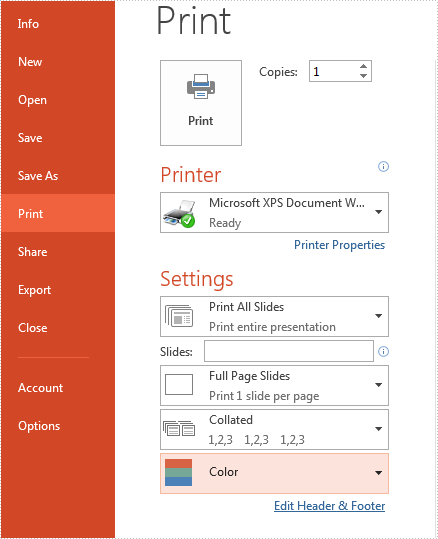
Code Snippets of set print settings of PowerPoint document by using PrinterSettings object to print the presentation slides:
static void Main(string[] args)
{
    //load the sample document from file
    Presentation ppt = new Presentation();
    ppt.LoadFromFile("Sample.pptx");


    //use PrinterSettings object to print presentation slides
    PrinterSettings ps = new PrinterSettings();
    ps.PrintRange = PrintRange.AllPages;
    ps.PrintToFile = true;
    ps.PrintFileName = ("Print.xps");

    //print the slide with frame
    ppt.SlideFrameForPrint = true;

    //print the slide with Grayscale
    ppt.GrayLevelForPrint = true;

    //Print 4 slides horizontal
    ppt.SlideCountPerPageForPrint = PageSlideCount.Four;
    ppt.OrderForPrint = Order.Horizontal;


    ////only select some slides to print
    //ppt.SelectSlidesForPrint("1", "3");


    //print the document
    ppt.Print(ps);

}
Code Snippets of set print document name by using PrintDocument object to print presentation slides:
static void Main(string[] args)
{
    //load the sample document from file
    Presentation ppt = new Presentation();
    ppt.LoadFromFile("Sample.pptx");

    //use PrintDocument object to print presentation slides
    PresentationPrintDocument document = new PresentationPrintDocument(ppt);

    //print document to virtual printer
    document.PrinterSettings.PrinterName = "Microsoft XPS Document Writer";

    //print the slide with frame
    ppt.SlideFrameForPrint = true;

    //print 4 slides horizontal
    ppt.SlideCountPerPageForPrint = PageSlideCount.Four;
    ppt.OrderForPrint = Order.Horizontal;

    //print the slide with Grayscale
    ppt.GrayLevelForPrint = true;

    //set the print document name
    document.DocumentName = "Print Task";

    document.PrinterSettings.PrintToFile = true;
    document.PrinterSettings.PrintFileName = ("Print.xps");

    ppt.Print(document);

}