C++: Change Page Margins in Word
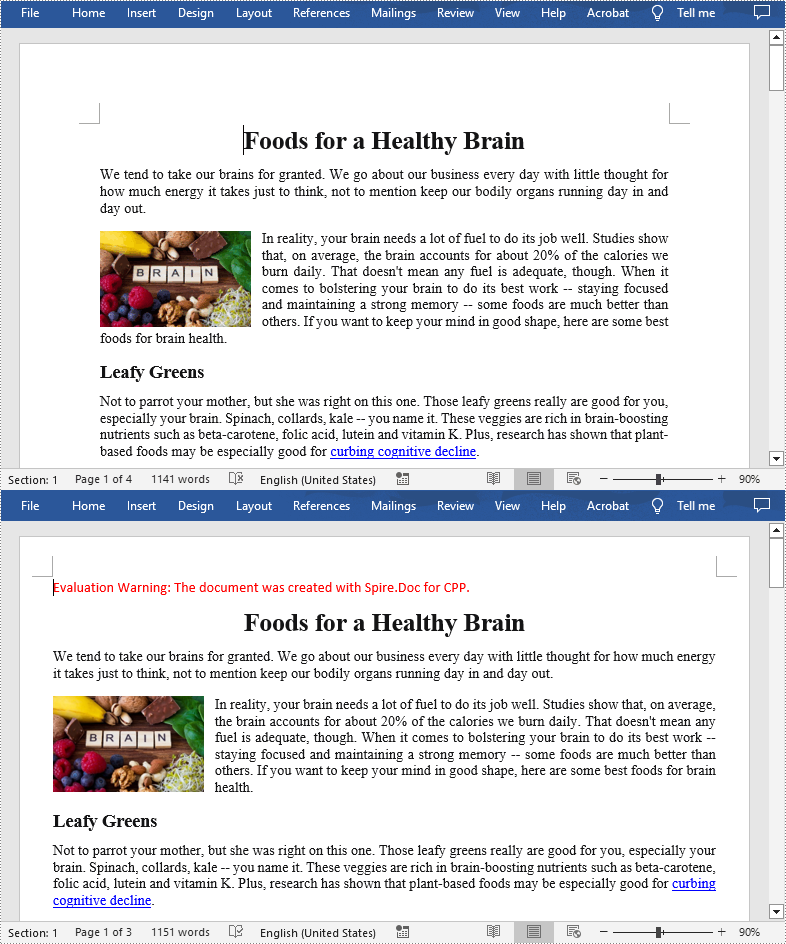
Page margins are the blank spaces at the top, bottom, left, and right edges of a document page. In Word, it may sometimes be quite necessary to adjust the margins to meet the layout requirements of specific documents, such as academic papers, business reports, or creative projects. This article will demonstrate how to programmatically change the page margins of an existing Word document using Spire.Doc for C++.
Install Spire.Doc for C++
There are two ways to integrate Spire.Doc for C++ into your application. One way is to install it through NuGet, and the other way is to download the package from our website and copy the libraries into your program. Installation via NuGet is simpler and more recommended. You can find more details by visiting the following link.
Integrate Spire.Doc for C++ in a C++ Application
Set Page Margins in Word in C++
The MarginsF class provided by Spire.Doc for C++ represents the page margins in Word. To set or change the margins of a Word document, you can use the methods of MarginsF class. The following are the detailed steps.
- Create a Document object.
- Load a Word document using Document->LoadFromFile() method.
- Get a specified section using Document->GetSections()->GetItemInSectionCollection() method.
- Get the page margins of the section using Section->GetPageSetup()->GetMargins() method.
- Set the top, bottom, left and right margins for the pages in the section using MarginsF->SetTop(), MarginsF->SetBottom(), MarginsF->SetLeft(), MarginsF->SetRight() methods.
- Save the result document using Document.SaveToFile() method.
- C++
#include "Spire.Doc.o.h"

using namespace std;
using namespace Spire::Doc;

int main() {
	//Specify the input and output file paths
	wstring inputFile = L"Data\\Foods.docx";
	wstring outputFile = L"SetMargins.docx";

	//Create a Document instance
	intrusive_ptr<Document> document = new Document();

	//Load a Word document
	document->LoadFromFile(inputFile.c_str());

	//Get the first section
	intrusive_ptr<Section> section = document->GetSections()->GetItemInSectionCollection(0);

	//Set top, bottom, left and right page margins for the section
	section->GetPageSetup()->GetMargins()->SetTop(38.0f);
	section->GetPageSetup()->GetMargins()->SetBottom(38.0f);
	section->GetPageSetup()->GetMargins()->SetLeft(29.5f);
	section->GetPageSetup()->GetMargins()->SetRight(29.5f);

	//Save the result document
	document->SaveToFile(outputFile.c_str(), FileFormat::Docx2016);
	document->Close();
}
Apply for a Temporary License
If you'd like to remove the evaluation message from the generated documents, or to get rid of the function limitations, please request a 30-day trial license for yourself.
C++: Insert or Remove Page Breaks in Word
In MS Word, a Page Break is an important feature of page layout that helps you start a new page wherever you want. After inserting page breaks, all formatting of the previous page applies to the new page, which makes the whole document neat and well organized. In this article, you will learn how to programmatically add or remove page breaks in a Word document using Spire.Doc for C++.
- Insert a Page Break after a Specific Paragraph in Word in C++
- Insert a Page Break after a Specific Text in Word in C++
- Remove Page Breaks in a Word Document in C++
Install Spire.Doc for C++
There are two ways to integrate Spire.Doc for C++ into your application. One way is to install it through NuGet, and the other way is to download the package from our website and copy the libraries into your program. Installation via NuGet is simpler and more recommended. You can find more details by visiting the following link.
Integrate Spire.Doc for C++ in a C++ Application
Insert a Page Break after a Specific Paragraph in Word in C++
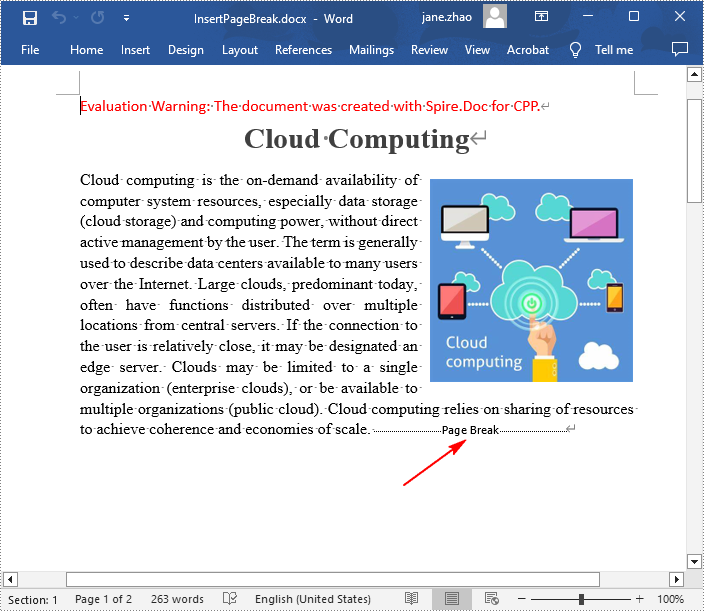
Spire.Doc for C++ offers the Paragraph->AppendBreak(BreakType::PageBreak) method to insert a page break after a paragraph. Once inserted, a symbol indicating the page break will be shown. The following are the detailed steps.
- Create a Document instance.
- Load a Word document using Document->LoadFromFile() method.
- Get a specified section using Document->GetSections()->GetItem(sectionIndex) method.
- Get a specified paragraph using Section->GetParagraphs()->GetItem(paragraphIndex) method.
- Add a page break to end of the paragraph using Paragraph->AppendBreak(BreakType::PageBreak) method.
- Save the result document using Document->SaveToFile() method.
- C++
#include "Spire.Doc.o.h"

using namespace Spire::Doc;

int main() {
 //Specify input file path and name
 std::wstring input_path = L"Data\\";
 std::wstring inputFile = input_path + L"Input.docx";

 //Specify output file path and name
 std::wstring output_path = L"Output\\";
 std::wstring outputFile = output_path + L"InsertPageBreak.docx";

 //Create a Document instance
 intrusive_ptr<Document> document = new Document();

 //Load a Word document from disk
 document->LoadFromFile(inputFile.c_str());

 //Get the first section
 intrusive_ptr<Section> section = document->GetSections()->GetItemInSectionCollection(0);

 //Get the 2nd paragraph in the section
 intrusive_ptr <Paragraph> paragraph = section->GetParagraphs()->GetItemInParagraphCollection(1);

 //Insert a page break after the paragraph
 paragraph->AppendBreak(BreakType::PageBreak);

 //Save the result document
 document->SaveToFile(outputFile.c_str(), FileFormat::Docx2013);
 document->Close();
}
Insert a Page Break after a Specific Text in Word in C++
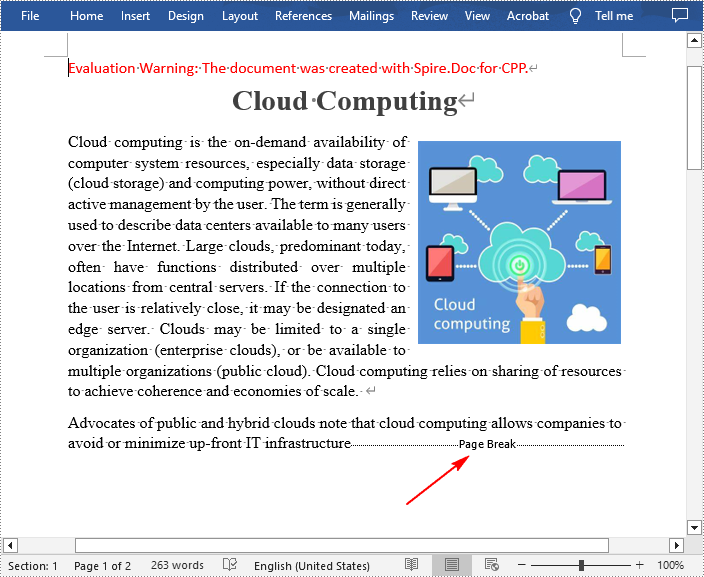
In addition to inserting a page break after a paragraph, Spire.Doc for C++ also allows you to find a specified text and then insert the page break after the specified text. The following are the detailed steps.
- Create a Document instance.
- Load a Word document using Document->LoadFromFile() method.
- Find a specified text using Document->FindString() method.
- Get the text range of the specified text using TextSelection->GetAsOneRange() method.
- Get the paragraph where the text range is located using TextRange->GetOwnerParagraph() method.
- Get the position index of the text range in the paragraph using Paragraph->GetChildObjects()->IndexOf() method.
- Initialize an instance of Break class to create a page break.
- Insert the page break after the specified text using Paragraph->GetChildObjects()->Insert() method.
- Save the result document using Document->SaveToFile() method.
- C++
#include "Spire.Doc.o.h"

using namespace Spire::Doc;

int main() {
 //Specify input file path and name
 std::wstring input_path = L"Data\\";
 std::wstring inputFile = input_path + L"Input.docx";

 //Specify output file path and name
 std::wstring output_path = L"Output\\";
 std::wstring outputFile = output_path + L"InsertPageBreakAfterText.docx";

 //Create a Document instance
 intrusive_ptr<Document> document = new Document();

 //Load a Word document from disk
 document->LoadFromFile(inputFile.c_str());

 //Find a specified text
 intrusive_ptr<TextSelection> selection = document->FindString(L"infrastructure", true, true);

 //Get the text range of the specified text
 intrusive_ptr<TextRange> range = selection->GetAsOneRange();

 //Get the paragraph where the text range is located
 intrusive_ptr<Paragraph> paragraph = range->GetOwnerParagraph();

 //Get the position index of the text range in the paragraph
 int index = paragraph->GetChildObjects()->IndexOf(range);

 //Create a page break
 intrusive_ptr<Break> pageBreak = new Break(document, BreakType::PageBreak);

 //Insert a page break after the specified text
 paragraph->GetChildObjects()->Insert(index + 1, pageBreak);

 //Save to result document
 document->SaveToFile(outputFile.c_str(), FileFormat::Docx2013);
 document->Close();
}
Remove Page Breaks in a Word Document in C++
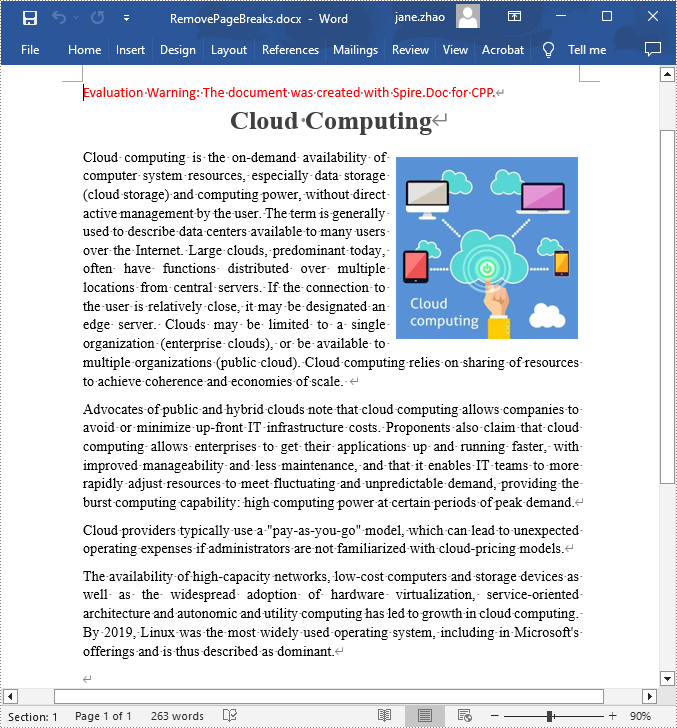
Some mistakenly added page breaks can mess up the structure of your entire document, so it's quite necessary to remove them. The following are the steps to remove page breaks in a Word document.
- Create a Document instance.
- Load a Word document using Document->LoadFromFile() method.
- Traverse through each paragraph in the first section, and then traverse through each child object of a paragraph.
- Determine whether the child object type is a page break. If yes, remove the page break from the paragraph using Paragraph->GetChildObjects()->Remove() method.
- Save the result document using Document->SaveToFile() method.
- C++
#include "Spire.Doc.o.h"

using namespace Spire::Doc;

int main() {
 //Specify input file path and name
 std::wstring input_path = L"Data\\";
 std::wstring inputFile = input_path + L"InsertPageBreak.docx";

 //Specify output file path and name
 std::wstring output_path = L"Output\\";
 std::wstring outputFile = output_path + L"RemovePageBreaks.docx";

 //Create a Document instance
 intrusive_ptr<Document> document = new Document();

 //Load a Word document from disk
 document->LoadFromFile(inputFile.c_str());

 //Traverse through each paragraph in the first section of the document
 for (int j = 0; j < document->GetSections()->GetItemInSectionCollection(0)->GetParagraphs()->GetCount(); j++)
 {
  intrusive_ptr<Paragraph> p = document->GetSections()->GetItemInSectionCollection(0)->GetParagraphs()->GetItemInParagraphCollection(j);

  //Traverse through each child object of a paragraph
  for (int i = 0; i < p->GetChildObjects()->GetCount(); i++)
  {
   intrusive_ptr <DocumentObject> obj = p->GetChildObjects()->GetItem(i);

   //Determine whether the child object type is a page break
   if (Object::CheckType<Break>(obj) && (Object::Dynamic_cast<Break>(obj))->GetBreakType() == BreakType::PageBreak)
   {
    //Remove the page break from the paragraph
    p->GetChildObjects()->Remove(obj);
   }
  }
 }

 //Save the result document
 document->SaveToFile(outputFile.c_str(), FileFormat::Docx2013);
 document->Close();
}
Apply for a Temporary License
If you'd like to remove the evaluation message from the generated documents, or to get rid of the function limitations, please request a 30-day trial license for yourself.