Convert PDF to OFD in C++ | Batch Process & Page Extraction

The Open Fixed-layout Document (OFD) format is a national standard in China, widely used for electronic invoicing and official documentation. For developers working in C++, converting PDF to OFD efficiently is a common requirement. This tutorial demonstrates how to use the Spire.PDF for C++ library to handle three common scenarios: direct file conversion, extracting specific page ranges, and batch processing entire directories. By following these examples, you can integrate robust conversion logic into your applications with minimal overhead.
Converting a Single PDF to OFD
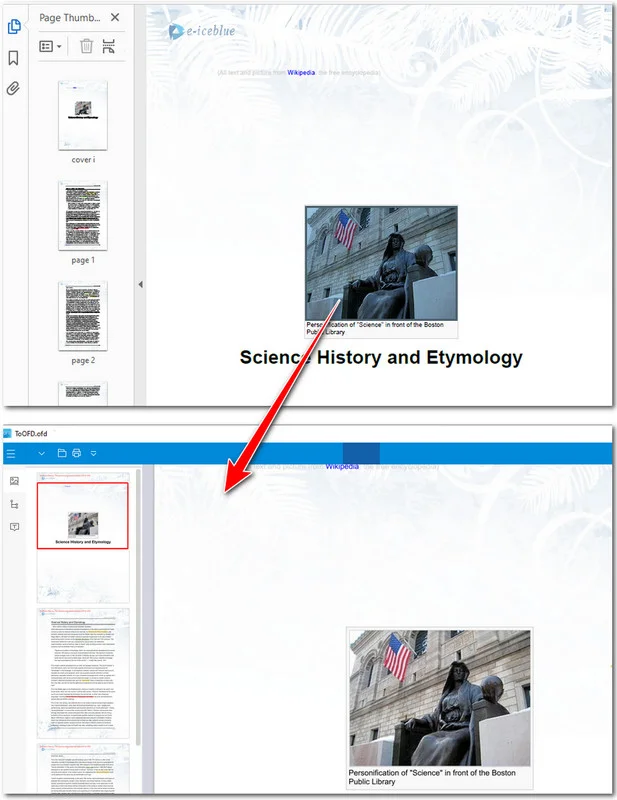
When converting PDF files to OFD, the most common task is a direct PDF-to-OFD conversion. This process involves only three main steps: initializing the document engine, loading the source PDF file from a disk, and exporting the PDF to OFD.
Key Steps:
- Create a PdfDocument instance.
- Load a PDF file using PdfDocument->LoadFromFile() method.
- Save the PDF as an OFD document using PdfDocument->SaveToFile(filename, FileFormat::OFD) method.
Here's the sample code showing how to directly convert a PDF file to an OFD document:
#include "Spire.Pdf.o.h"

using namespace Spire::Pdf;

int main()
{
    //  Create a PdfDocument instance
    PdfDocument* pdf = new PdfDocument();

    // Load a PDF
    pdf->LoadFromFile(L"/input/Booklet.pdf");

    // Save  the PDF as an OFD document
    pdf->SaveToFile(L"/output/ToOFD.ofd", FileFormat::OFD);

    pdf->Close();
    delete pdf;

    return 0;
}
The preview of the original PDF and the converted OFD document:
Beyond OFD, you can also streamline your office workflows by converting PDF to Excel for data analysis or converting PDF to Word for document editing.
Converting a Specific Page Range to OFD
In many cases, you may only need to convert a portion of a PDF document, such as extracting specific chapters from a report or invoice pages for archiving. To fulfill this requirement, you can precisely define a page range for conversion—or alternatively, split the PDF into multiple files first and then perform the conversion. In this chapter, we will focus on the former option, which is ideal for optimizing file sizes and ensuring the output OFD contains only the data relevant to your business workflow.
Key Steps:
- Initialize two PdfDocument instances.
- Load the source PDF and determine the total page count.
- Iterate through the desired range (e.g., indices 1 to 2 for the 2nd and 3rd pages).
- Add a blank page to the new document and draw the source page content onto it using CreateTemplate()->Draw().
- Save the newly constructed document to the OFD format with PdfDocument->SaveToFile(filename, FileFormat::OFD) method.
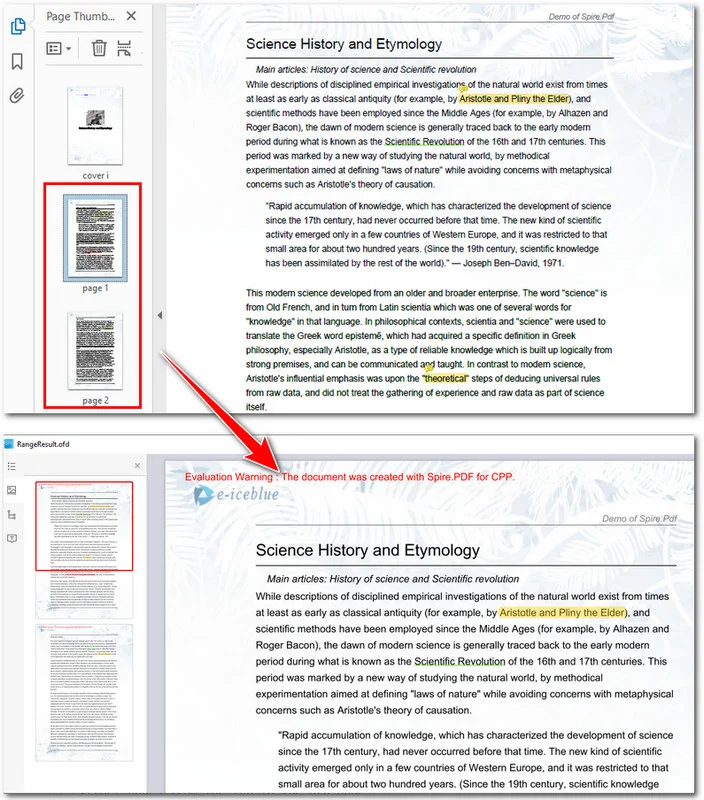
The following example shows how to convert the 2nd and the 3rd pages of a PDF to an OFD file:
#include "Spire.Pdf.o.h"
#include <iostream>

using namespace Spire::Pdf;

int main()
{
    // 1. Use intrusive_ptr to create a PdfDocument instance and load a PDF file
    intrusive_ptr<PdfDocument> oldPdf = new PdfDocument();
    oldPdf->LoadFromFile(L"/input/Booklet.pdf");

    // Create a new PdfDocument object
    intrusive_ptr<PdfDocument> newPdf = new PdfDocument();

    // Get the page count of the source file
    int pageCount = oldPdf->GetPages()->GetCount();
    std::cout << "Total pages: " << pageCount << std::endl;

    // Extract pages from the 2nd to the 3rd page
    if (pageCount >= 3)
    {
        for (int i = 1; i <= 2; i++)
        {
            // Create a new page with the same size in the destination document
            intrusive_ptr<PdfMargins> margins = new PdfMargins(0);
            intrusive_ptr<PdfPageBase> newPage = newPdf->GetPages()->Add(oldPdf->GetPages()->GetItem(i)->GetSize(), margins);

            // Create a template from the source page and draw it onto the new page
            oldPdf->GetPages()->GetItem(i)->CreateTemplate()->Draw(newPage, new PointF(0, 0));
        }

        // Save the result as an OFD document
        newPdf->SaveToFile(L"/output/RangeResult.ofd", FileFormat::OFD);
        std::cout << "OFD saved successfully via Drawing Template logic." << std::endl;
    }

    // Close the documents
    newPdf->Close();
    oldPdf->Close();

    return 0;
}
Here's the preview of the PDF file and the OFD document:
Batch Converting Multiple PDF Files
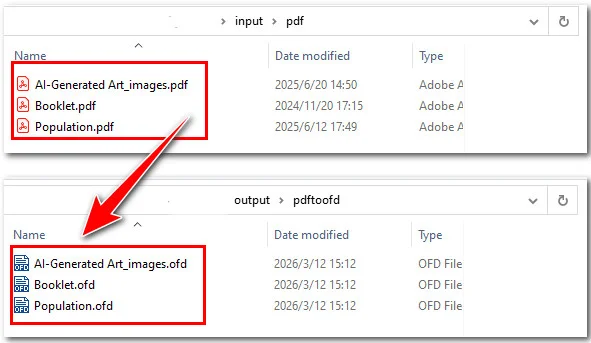
For large-scale industrial applications or document management systems, processing PDF files individually is often inefficient. Automating the conversion of entire directories is a vital requirement for high-volume workflows, such as migrating legacy archives or synchronizing cloud storage folders. By leveraging the Spire.PDF library, you can implement a robust solution that automatically detects and converts every PDF within a target directory, ensuring consistent output while saving significant manual labor.
Key Steps:
- Define the input and output directory paths.
- Initialize a single PdfDocument instance.
- Loop through the input folder to access each PDF file.
- Convert the current PDF document to OFD using PdfDocument->SaveToFile(filename, FileFormat::OFD) method.
#include "Spire.Pdf.o.h"
#include <iostream>
#include <filesystem>
#include <string>

namespace fs = std::filesystem;
using namespace Spire::Pdf;

int main()
{
    // Define input and output directories
    std::string inputDir = "E:/input/pdf/";
    std::string outputDir = "/output/pdftoofd/";

    // Create a PdfDocument instance
    intrusive_ptr<PdfDocument> pdf = new PdfDocument();

    // Iterate through the input directory
    for (const auto& entry : fs::directory_iterator(inputDir))
    {
        // Process only .pdf files
        if (entry.path().extension() == ".pdf")
        {
            // Get the current file path
            std::wstring inputPath = entry.path().wstring();

            // Construct the output file path (change extension to .ofd)
            std::wstring outputFileName = entry.path().stem().wstring() + L".ofd";
            std::wstring outputPath = fs::path(outputDir).wstring() + outputFileName;

            // Load the PDF file
            pdf->LoadFromFile(inputPath.c_str());

            // Save as OFD format
            pdf->SaveToFile(outputPath.c_str(), FileFormat::OFD);

            std::wcout << L"Converted: " << outputFileName << std::endl;
        }
    }

    // Close the document and release resources
    pdf->Close();

    std::cout << "Batch conversion completed." << std::endl;
    return 0;
}
Once you have mastered batch conversion, you can further optimize your document pipeline by learning how to merge multiple PDF files into a single PDF in C++ before or after processing.
FAQs about Converting PDF to OFD
Q: Does the OFD format support all elements from the original PDF?
A: Yes, the conversion process via Spire.PDF preserves text, vector graphics, and images. By using the CreateTemplate() and Draw() methods for page extraction, the library ensures that the layout and visual integrity of the original PDF are accurately mapped to the OFD fixed-layout standard.
Q: How does the conversion handle high-resolution images within a PDF?
A: The conversion engine maintains the DPI and compression settings of the original PDF images. If you are performing batch conversions, the output OFD files will remain optimized for high-quality rendering without excessive file size increases.
Q: Is it possible to convert PDF forms or interactive elements to OFD?
A: OFD is primarily a fixed-layout format meant for standardized viewing and printing. During conversion, interactive form fields are typically flattened into the visual layer of the OFD, ensuring the data remains visible even if the interactivity is no longer required in the final document.
Conclusion
In conclusion, Spire.PDF for C++ offers a flexible and powerful API for handling OFD conversions. Whether you are performing a simple file format swap or executing page conversions, the library ensures high fidelity and document integrity. By automating these tasks with batch processing and modern C++ features, developers can significantly reduce manual effort and streamline document workflows.
If you are looking to enhance your document processing capabilities, we encourage you to explore the full potential of Spire.PDF. Should you encounter any challenges or have specific technical questions during your implementation, please feel free to contact us for professional technical assistance!
How to Convert Images to OFD in C++ (PNG, JPG, BMP)
Converting images to OFD (Open Fixed-layout Document) format in C++ is a common requirement in enterprise document management systems, especially in China where OFD is widely adopted for official document archiving and distribution. Developers often need to digitize scanned documents, create electronic archives, or generate standardized document formats from image files.
Implementing image to OFD conversion from scratch can be complex, particularly when handling different image formats, page sizing, and OFD specification compliance.
With Spire.PDF for C++ from e-iceblue, developers can easily create OFD documents from images such as PNG, JPG, BMP, TIFF, and EMF using a straightforward API that handles the underlying complexity. This article demonstrates how to perform image to OFD conversion in C++, including practical examples for single and batch processing workflows.
Quick Navigation
- Understanding Image to OFD Conversion
- Prerequisites
- Convert an Image to OFD in C++
- Convert Multiple Images to a Multi-Page OFD in C++
- Fit Images into a Fixed Page Size
- Batch Convert Images to OFD
- Common Pitfalls
- FAQ
1. Understanding Image to OFD Conversion
OFD is an XML-based document format designed for preserving fixed-layout documents, similar to PDF but optimized for Chinese character sets and government document standards. Converting images to OFD involves creating a document structure that embeds the image content while maintaining OFD compliance.
Common use cases for image to OFD conversion include:
- Digitizing scanned invoices and receipts for archiving
- Creating standardized document repositories
- Generating electronic document workflows
- Converting legacy image-based documents to modern formats
The conversion process typically involves creating a PDF document, drawing the image onto pages, and then exporting to OFD format using the appropriate file format specification.
2. Prerequisites
Before converting images to OFD in C++, you need to install Spire.PDF for C++ and configure it in your development environment.
Install via NuGet (Recommended)
The easiest way to add Spire.PDF to a C++ project is through NuGet, which automatically downloads the package and configures the required dependencies.
- Open your project in Visual Studio.
- In Solution Explorer, right-click References.
- Select Manage NuGet Packages.
- Search for Spire.PDF.Cpp.
- Click Install.
After installation, you can include the library in your project:
#include "Spire.Pdf.o.h"
Manual Installation
Alternatively, you can download Spire.PDF for C++ and integrate it manually by configuring the include and lib directories.
For detailed instructions, refer to How to Integrate Spire.PDF for C++ in a C++ Application.
3. Convert an Image to OFD in C++
The following example demonstrates how to convert a single image file to OFD format. This implementation creates a PDF document, loads an image, draws it on a page with proper sizing, and saves the result as an OFD file.
#include "Spire.Pdf.o.h"

using namespace Spire::Pdf;

int main()
{
    // Create a new PDF document
    PdfDocument* ofd = new PdfDocument();

    // Load the image file
    auto image = PdfImage::FromFile(L"Sample.jpg");

    // Calculate page dimensions based on image size
    float pageWidth = image->GetWidth();
    float pageHeight = image->GetHeight();

    // Add a page with custom dimensions matching the image
    auto page = ofd->GetPages()->Add(new SizeF(pageWidth, pageHeight));

    // Draw the image on the page
    page->GetCanvas()->DrawImage(image, 0, 0, pageWidth, pageHeight);

    // Save the document as OFD format
    ofd->SaveToFile(L"ImageToOfd.ofd", FileFormat::OFD);

    // Clean up resources
    delete ofd;

    return 0;
}
The following screenshot shows the generated OFD document created from the source image.
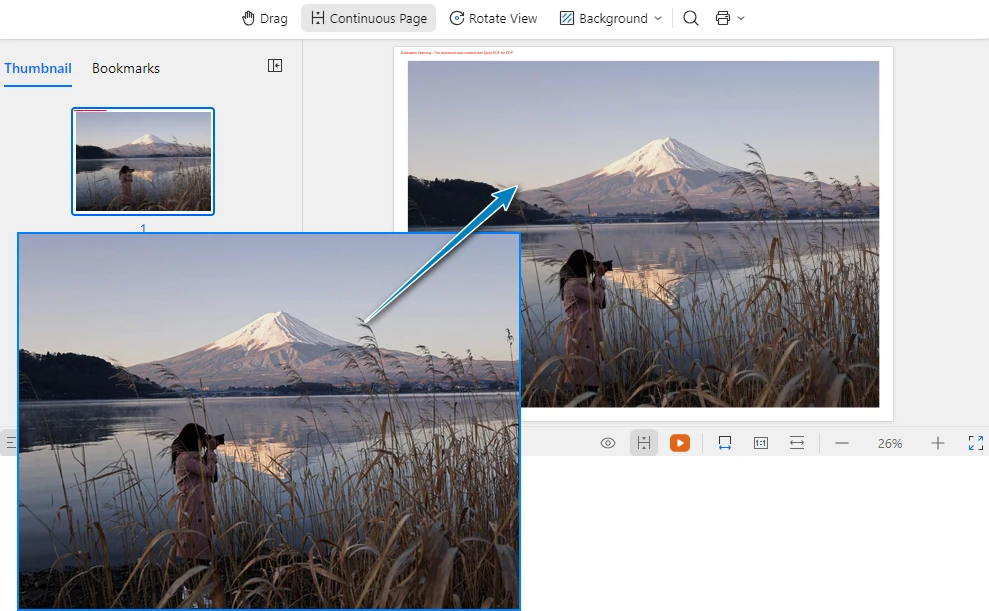
Key Classes and Methods
- PdfDocument – Represents the document container used to create pages and export the final OFD file.
- PdfImage::FromFile() – Loads an image from the specified file path and creates an image object that can be rendered onto a page.
- PdfDocument::GetPages()->Add() – Adds a new page to the document. In this example, the page size is dynamically set based on the image dimensions.
- PdfCanvas::DrawImage() – Draws the image onto the page canvas at the specified position and size.
- SaveToFile() – Saves the document to disk and exports it to OFD format using FileFormat::OFD.
This approach ensures that the image is properly scaled and positioned within the OFD document, maintaining the original image quality and proportions.
Remove Page Margins (Optional)
By default, document pages may include margins, which can introduce unwanted white space around the image. If you want the image to fully occupy the page without any padding, you can set the page margins to zero.
ofd->GetPageSettings()->SetMargins(0.0);
You can also specify custom margins if needed:
ofd->GetPageSettings()->SetMargins(10.0);
Adjusting page margins is useful when generating document layouts that require full-page image rendering.
4. Convert Multiple Images to a Multi-Page OFD in C++
When working with document archives, you often need to combine multiple images into a single OFD file. The following example shows how to create a multi-page OFD document where each page contains a different image.
#include "Spire.Pdf.o.h"
#include <vector>

using namespace Spire::Pdf;

int main()
{
    // Create a new PDF document
    PdfDocument* ofd = new PdfDocument();

    // Define the list of image files to convert
    std::vector<std::wstring> imageFiles = {
        L"Sample1.png",
        L"Sample2.bmp",
        L"Sample3.jpg"
    };

    // Process each image file
    for (size_t i = 0; i < imageFiles.size(); i++)
    {
        // Load the current image
        auto image = PdfImage::FromFile(imageFiles[i].c_str());

        // Get image dimensions
        float pageWidth = image->GetWidth();
        float pageHeight = image->GetHeight();

        // Add a new page for each image
        auto page = ofd->GetPages()->Add(new SizeF(pageWidth, pageHeight));

        // Draw the image on the page
        page->GetCanvas()->DrawImage(image, 0, 0, pageWidth, pageHeight);
    }

    // Save as OFD document
    ofd->SaveToFile(L"multi_page_document.ofd", FileFormat::OFD);

    // Clean up document resource
    delete ofd;

    return 0;
}
The following screenshot shows the generated multi-page OFD document, where each image is placed on a separate page.
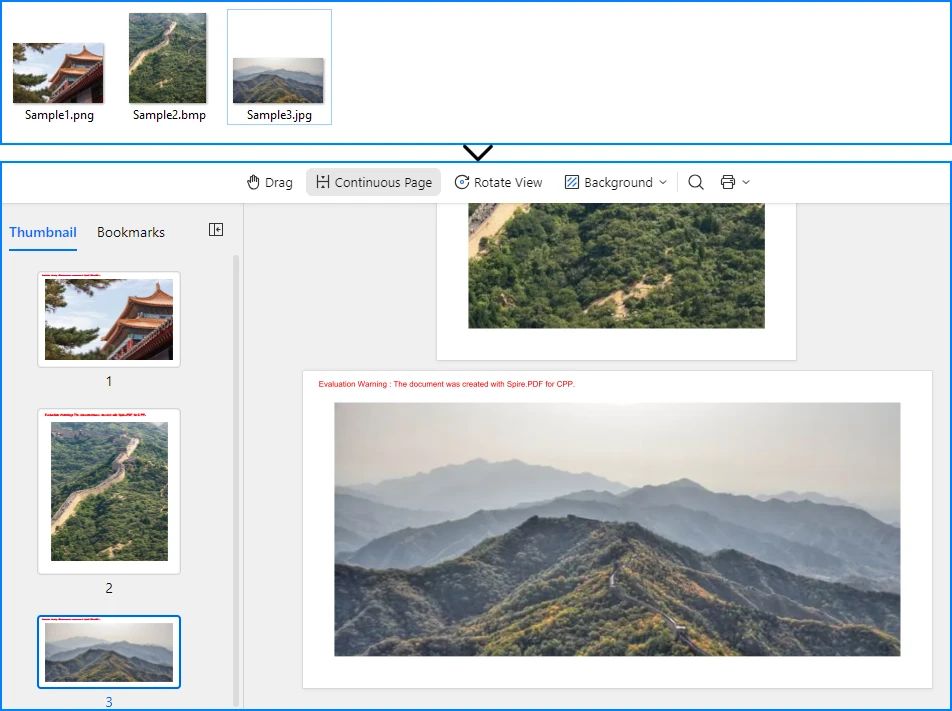
This implementation iterates through a collection of image files, creating a new page for each image and drawing the content with proper sizing. The resulting OFD document preserves the order and layout of all source images in a single file.
If you need to further modify images in a document, such as inserting, replacing, or removing images in existing files, refer to the tutorial on How to Insert, Replace, or Remove Images in a OFD/PDF Using C++
5. Fit Images into a Fixed Page Size
In many real-world document workflows, pages are required to follow a standardized page size instead of matching the original image dimensions. For example, scanned forms, contracts, or reports may need to fit into a fixed layout such as A4 or Letter.
To achieve this, you can create pages with a predefined size and then scale each image proportionally so that it fits within the page boundaries without distortion.
The following example demonstrates how to scale an image to fit within a fixed page size while preserving its aspect ratio.
#define NOMINMAX
#include "Spire.Pdf.o.h"
#include <algorithm>

using namespace Spire::Pdf;

int main()
{
    // Create a new PDF document
    PdfDocument* ofd = new PdfDocument();

    // Add a page with a fixed size (for example, A4)
    PdfPageBase* page = ofd->GetPages()->Add(PdfPageSize::A4);

    // Load the image
    auto image = PdfImage::FromFile(L"Sample.jpg");

    // Get page dimensions
    float pageWidth = page->GetCanvas()->GetClientSize().GetWidth();
    float pageHeight = page->GetCanvas()->GetClientSize().GetHeight();

    // Get image dimensions
    float imgWidth = image->GetWidth();
    float imgHeight = image->GetHeight();

    // Calculate proportional scaling
    float scale = std::min(pageWidth / imgWidth, pageHeight / imgHeight);

    float scaledWidth = imgWidth * scale;
    float scaledHeight = imgHeight * scale;

    // Draw the scaled image on the page
    page->GetCanvas()->DrawImage(image, 0, 0, scaledWidth, scaledHeight);

    // Save as OFD
    ofd->SaveToFile(L"FixedPageSize.ofd", FileFormat::OFD);

    delete ofd;

    return 0;
}
The following screenshot shows how the image is scaled to fit within a fixed page size (A4) while preserving its aspect ratio.
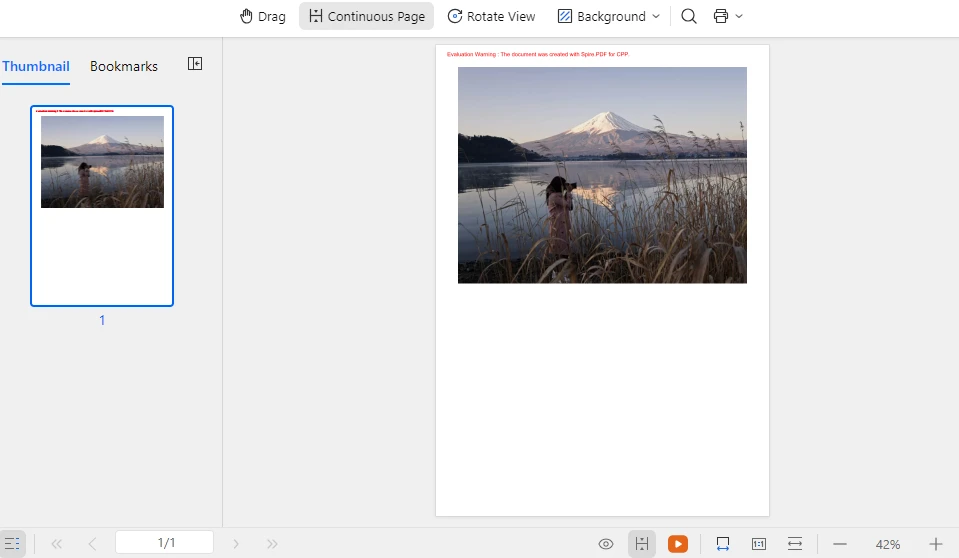
This approach ensures that images of different sizes can be consistently placed within a standardized document layout while maintaining their original proportions and preventing image distortion. The same technique can also be applied when generating multi-page OFD documents from multiple images.
In addition to scaling images to fit a fixed layout, developers may also need to manipulate document pages when generating or modifying documents. Typical operations include creating new pages, deleting pages, resizing page dimensions, or rearranging page order. For more details, refer to: How to Create and Delete Pages in an OFD/PDF document Using C++
6. Batch Convert Images to OFD
For automated document processing workflows, you may need to convert multiple images to separate OFD files. The following example demonstrates batch processing with progress tracking and error handling.
#include "Spire.Pdf.o.h"
#include <vector>
#include <iostream>

using namespace Spire::Pdf;

void ConvertImageToOFD(const std::wstring& inputPath, const std::wstring& outputPath)
{
    // Create a new PDF document
    PdfDocument* ofd = new PdfDocument();

    try
    {
        // Load the image file
        auto image = PdfImage::FromFile(inputPath.c_str());

        // Calculate page dimensions
        float pageWidth = image->GetWidth();
        float pageHeight = image->GetHeight();

        // Add page with image dimensions
        auto page = ofd->GetPages()->Add(new SizeF(pageWidth, pageHeight));

        // Draw image on page
        page->GetCanvas()->DrawImage(image, 0, 0, pageWidth, pageHeight);

        // Save as OFD
        ofd->SaveToFile(outputPath.c_str(), FileFormat::OFD);

        std::wcout << L"Converted: " << inputPath << L" -> " << outputPath << std::endl;

    }
    catch (const std::exception& ex)
    {
        std::wcout << L"Error converting " << inputPath << L": " << ex.what() << std::endl;
    }

    // Clean up document
    delete ofd;
}

int main()
{
    // Define batch conversion tasks
    std::vector<std::pair<std::wstring, std::wstring>> conversionTasks = {
        {L"invoice_0.png", L"invoice_0.ofd"},
        {L"invoice_1.png", L"invoice_1.ofd"},
        {L"invoice_2.png", L"invoice_2.ofd"},
        {L"invoice_3.png", L"invoice_3.ofd"},
        {L"invoice_4.png", L"invoice_4.ofd"}
    };

    // Process all conversion tasks
    for (const auto& task : conversionTasks)
    {
        ConvertImageToOFD(task.first, task.second);
    }

    std::wcout << L"Batch conversion completed." << std::endl;

    return 0;
}
This batch processing approach provides:
- Modular conversion function for reusability
- Error handling for individual file failures
- Progress output for monitoring
- Clean resource management
The implementation processes each image independently, ensuring that a single failure does not interrupt the entire batch operation.
7. Common Pitfalls
Image File Path Issues
Ensure that image file paths are correct and accessible. Use absolute paths or verify the working directory when loading images:
// Use absolute paths for reliability
auto image = PdfImage::FromFile(L"C:\\Documents\\scanned_invoice.png");
Memory Management
Properly clean up PdfDocument and PdfImage objects to prevent memory leaks. Always delete dynamically allocated objects after use:
delete ofd;
Unsupported Image Formats
Spire.PDF supports common image formats including PNG, JPEG, BMP, EMF, and TIFF. Ensure your input files are in supported formats. For unsupported formats, convert them to a supported format first using image processing libraries.
Page Size Considerations
When creating pages based on image dimensions, be aware that extremely large images may result in OFD documents that are difficult to view or print. Consider implementing size limits or scaling for large images:
#define NOMINMAX
#include <algorithm>

// Apply maximum page size constraint
const float MAX_WIDTH = 1000.0f;
const float MAX_HEIGHT = 1400.0f;

float pageWidth  = std::min(static_cast<float>(image->GetWidth()),  MAX_WIDTH);
float pageHeight = std::min(static_cast<float>(image->GetHeight()), MAX_HEIGHT);
File Encoding
When working with file paths containing Chinese characters or special symbols, ensure proper wide string handling (std::wstring) to avoid encoding issues in file operations.
C++ Language Standard
If you encounter compilation issues in some environments, try setting the project to use the C++14 language standard.
For example, in Visual Studio:
- Open Project Properties
- Navigate to C/C++ → Language
- Set C++ Language Standard to ISO C++14 Standard (/std:c++14)
Conclusion
In this article, we demonstrated how to convert images to OFD format in C++ using Spire.PDF. By leveraging the Spire API, developers can implement reliable image to OFD conversion with minimal code, handling single images, multi-page documents, and batch processing workflows. This technique is especially useful for digitizing scanned documents, creating electronic archives, and building automated document processing pipelines.
Spire.PDF for C++ provides comprehensive document processing capabilities beyond OFD conversion, including PDF creation, manipulation, and various export formats. The library simplifies complex document operations while maintaining compliance with industry standards.
If you want to evaluate the full capabilities of Spire.PDF for C++, you can apply for a 30-day free license.
8. FAQ
Do I need any third-party software to convert images to OFD?
No. Spire.PDF performs image to OFD conversion independently and does not require Adobe Acrobat or any other external PDF software.
What image formats are supported for OFD conversion?
Spire.PDF supports common image formats including PNG, JPEG, BMP, EMF, and TIFF. The library handles image loading and rendering automatically during the conversion process.
Is Spire.PDF suitable for high-volume batch processing?
Yes. Spire.PDF is optimized for server environments and can handle batch processing of multiple images efficiently. The library provides proper resource management for continuous operations.
Can I add text or watermarks to images before converting to OFD?
Yes. Spire.PDF allows you to draw additional elements on the page canvas before saving to OFD. For example, you can add text watermarks or image watermarks to the document.
For detailed tutorials, see:
- How to Add Text Watermarks to PDF/OFD Documents in C++
- How to Add Image Watermarks to PDF/OFD Documents in C++
Does the OFD output preserve image quality?
Yes. The OFD conversion maintains the original image quality and resolution. The page dimensions are calculated based on the image size, ensuring no loss of quality during the conversion process.
C++: Convert PDF to SVG
SVG (Scalable Vector Graphics) is a vector graphics format that can be scaled up or down without losing quality, which is especially useful when images need to be placed on large billboards/stadium screens, or when small logos and icons need to be saved. By the same token, if you want to make PDF pages infinitely scalable, you can convert them to SVG format. This article will demonstrate how to convert PDF to SVG in C++ using Spire.PDF for C++.
Install Spire.PDF for C++
There are two ways to integrate Spire.PDF for C++ into your application. One way is to install it through NuGet, and the other way is to download the package from our website and copy the libraries into your program. Installation via NuGet is simpler and more recommended. You can find more details by visiting the following link.
Integrate Spire.PDF for C++ in a C++ Application
Convert a PDF File to SVG in C++
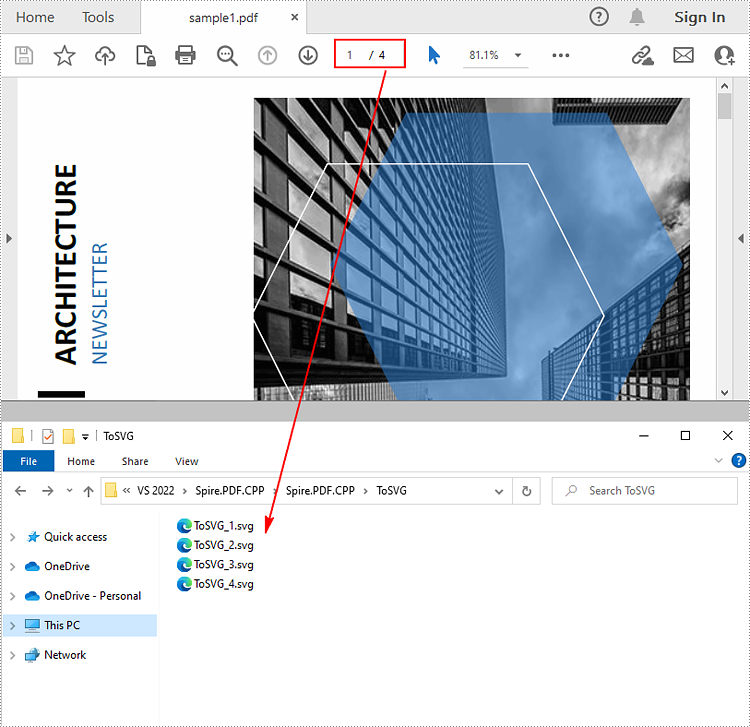
Spire.PDF for C++ offers the PdfDocument->SaveToFile() method to convert each page in a PDF file to a single SVG file. The following are the detailed steps.
- Create a PdfDocument instance.
- Load a sample PDF file using PdfDocument->LoadFromFile() method.
- Convert the PDF file to SVG using PdfDocument->SaveToFile(LPCWSTR_S filename, FileFormat::SVG) method.
- C++
#include "Spire.Pdf.o.h";

using namespace Spire::Pdf;
using namespace std;

int main()
{
	//Specify the input and output files
	wstring inputFile = L"Data\\sample1.pdf";
	wstring outputFile = L"ToSVG\\ToSVG.svg";

	//Create a PdfDcoument instance
	intrusive_ptr<PdfDocument> pdf = new PdfDocument();

	//Load a sample PDF document
	pdf->LoadFromFile(inputFile.c_str());

	//Convert the PDF document to SVG
	pdf->SaveToFile(outputFile.c_str(),FileFormat::SVG);
	pdf->Close();
}
Convert Specified PDF Pages to SVG in C++
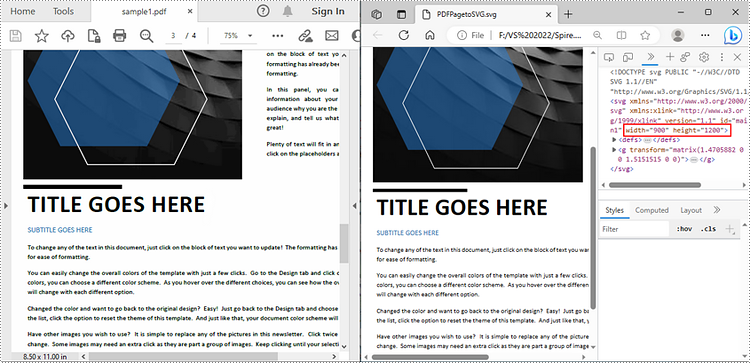
Spire.PDF for C++ also allows you to convert specified pages in a PDF file to SVG files. During conversion, if you want to specify the width and height of the output SVG file, you can use the PdfDocument->GetConvertOptions()->SetPdfToSvgOptions() method. The following are the detailed steps to convert a selected PDF page to SVG with custom width and height.
- Create a PdfDocument instance.
- Load a sample PDF file using PdfDocument->LoadFromFile() method.
- Specify the width and height of the output SVG file using PdfDocument->GetConvertOptions()->SetPdfToSvgOptions(float wPixel, float hPixel) method.
- Convert selected PDF pages to SVG using PdfDocument->SaveToFile(LPCWSTR_S filename, int startIndex, int endIndex, FileFormat::SVG) method.
- C++
#include "Spire.Pdf.o.h";

using namespace Spire::Pdf;
using namespace std;

int main()
{
	//Specify the input and output files
	wstring inputFile = L"Data\\sample1.pdf";
	wstring outputFile = L"PDFPagetoSVG.svg";

	//Create a PdfDcoument instance
	intrusive_ptr<PdfDocument> pdf = new PdfDocument();

	//Load a sample PDF document
	pdf->LoadFromFile(inputFile.c_str());

	//Specify the width and height of the output SVG file
	pdf->GetConvertOptions()->SetPdfToSvgOptions(900, 1200);

	//Convert the specified PDF page to SVG
	pdf->SaveToFile(outputFile.c_str(), 2, 2, FileFormat::SVG);
	pdf->Close();
}
Apply for a Temporary License
If you'd like to remove the evaluation message from the generated documents, or to get rid of the function limitations, please request a 30-day trial license for yourself.
C++: Convert PDF to Excel
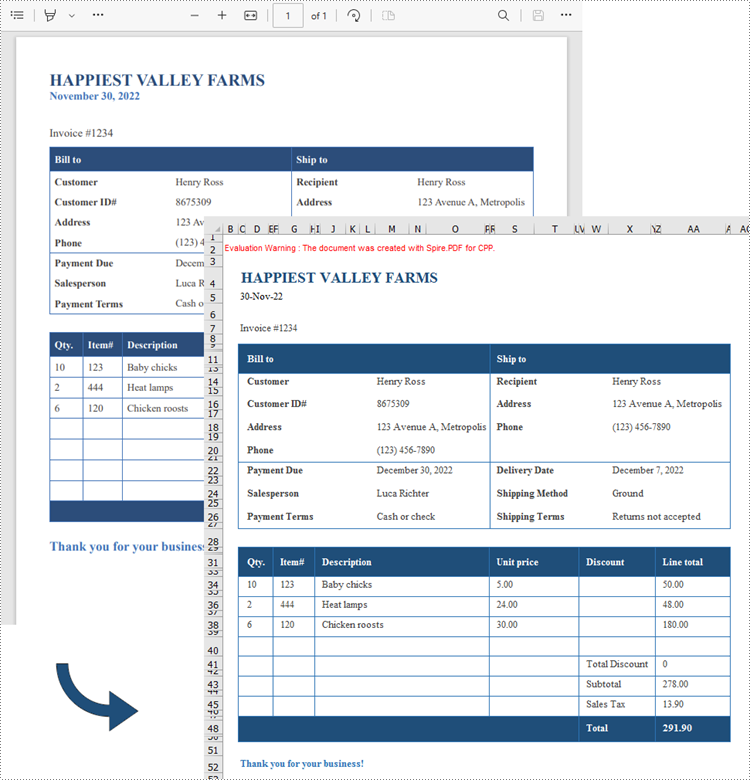
PDF files are great for delivering documents in a standard format that looks exactly the same no matter what device or software you use to view them, but they are difficult to edit. If you have a spreadsheet in PDF format, usually the easiest way to work with the data is to convert the PDF to Excel and edit it there. In this article, you will learn how to convert PDF to Excel in C++ using Spire.PDF for C++.
Install Spire.PDF for C++
There are two ways to integrate Spire.PDF for C++ into your application. One way is to install it through NuGet, and the other way is to download the package from our website and copy the libraries into your program. Installation via NuGet is simpler and more recommended. You can find more details by visiting the following link.
Integrate Spire.PDF for C++ in a C++ Application
Convert PDF to Excel in C++
Spire.PDF for C++ offers the PdfDocument->SaveToFile() method to convert PDF documents to other file formats including XLSX. Before converting, you can set the conversion options by using PdfDocument->GetConvertOptions->SetPdfToXlsxOptions() method. This method takes the XlsxLineLayoutOptions object as a parameter, and the constructor of the XlsxLineLayoutOptions class has the following five parameters, enabling you to control how PDF will be converted to Excel.
- bool convertToMultipleSheet: Indicates whether each page of the PDF will be converted to a worksheet in Excel.
- bool rotatedText: Indicates whether to show rotated text.
- bool splitCell: Indicates whether a PDF table cell containing text spanning several lines will be split into multiple rows in Excel.
- bool wrapText: Indicates whether to wrap text in an Excel cell.
- bool overlapText: Indicates whether to display overlapping text.
- C++
#include "Spire.Pdf.o.h";

using namespace Spire::Pdf;

int main() {

    //Create a PdfDcoument object
    PdfDocument* doc = new PdfDocument();

    //Load a PDF document
    doc->LoadFromFile(L"C:\\Users\\Administrator\\Desktop\\Business sales invoice.pdf");

    //Create a XlsxLineLayoutOptions object
    XlsxLineLayoutOptions* options = new XlsxLineLayoutOptions(true, true, false, true, false);

    //Set PDF to XLSX convert options
    doc->GetConvertOptions()->SetPdfToXlsxOptions(options);

    //Save the PDF document to Excel
    doc->SaveToFile(L"output/PdfToExcel.xlsx", FileFormat::XLSX);
	doc->Close();
	delete doc;
}
Apply for a Temporary License
If you'd like to remove the evaluation message from the generated documents, or to get rid of the function limitations, please request a 30-day trial license for yourself.
C++: Convert PDF to PDF/A or PDF/X
PDF/A and PDF/X are two subsets of PDF file formats that were created to standardize the use of PDF in different areas. The former, PDF/A format, is primarily used for the long-term preservation or archiving of electronic documents, while the latter, PDF/X format, is specifically designed for the reliable and accurate pre-print exchange of graphic data. This article will demonstrate how to programmatically convert PDF to PDF/A or PDF/X format using Spire.PDF for C++.
Install Spire.PDF for C++
There are two ways to integrate Spire.PDF for C++ into your application. One way is to install it through NuGet, and the other way is to download the package from our website and copy the libraries into your program. Installation via NuGet is simpler and more recommended. You can find more details by visiting the following link.
Integrate Spire.PDF for C++ in a C++ Application
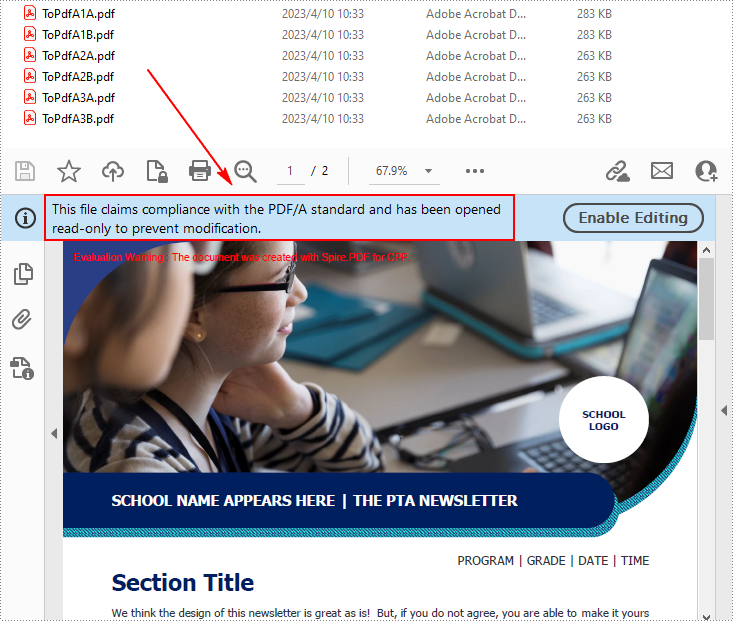
Convert PDF to PDF/A-1A, 2A, 3A, 1B, 2B and 3B in C++
With the passage of time, PDF/A has been continuously enhanced and further standards such as PDF/A-1, PDF/A-2 and PDF/A-3 have been developed. In addition, each standard defines several different levels of conformance. The following are the steps to convert PDF to PDF/A-1A, 2A, 3A, 1B, 2B and 3B compliant files.
- Create a PdfStandardsConverter instance, and pass in a sample PDF file as a parameter.
- Convert the sample file to PdfA1A conformance level using PdfStandardsConverter->ToPdfA1A() method.
- Convert the sample file to PdfA1B conformance level using PdfStandardsConverter->ToPdfA1B() method.
- Convert the sample file to PdfA2A conformance level using PdfStandardsConverter->ToPdfA2A() method.
- Convert the sample file to PdfA2B conformance level using PdfStandardsConverter->ToPdfA2B() method.
- Convert the sample file to PdfA3A conformance level using PdfStandardsConverter->ToPdfA3A() method.
- Convert the sample file to PdfA3B conformance level using PdfStandardsConverter->ToPdfA3B() method.
- C++
#include "Spire.Pdf.o.h";

using namespace Spire::Pdf;
using namespace std;
int main() {

	//Specify the input file
	wstring inputFile = L"Data\\Test.pdf";

	//Create a PdfStandardsConverter instance
	PdfStandardsConverter* converter = new PdfStandardsConverter(inputFile.c_str());

	//Convert to PdfA1A
	converter->ToPdfA1A(L"Output/ToPdfA1A.pdf");

	//Convert to PdfA1B
	converter->ToPdfA1B(L"Output/ToPdfA1B.pdf");

	//Convert to PdfA2A
	converter->ToPdfA2A(L"Output/ToPdfA2A.pdf");

	//Convert to PdfA2B
	converter->ToPdfA2B(L"Output/ToPdfA2B.pdf");

	//Convert to PdfA3A
	converter->ToPdfA3A(L"Output/ToPdfA3A.pdf");

	//Convert to PdfA3B
	converter->ToPdfA3B(L"Output/ToPdfA3B.pdf");

	delete converter;
}
Convert PDF to PDF/X-1a:2001 Standard in C++
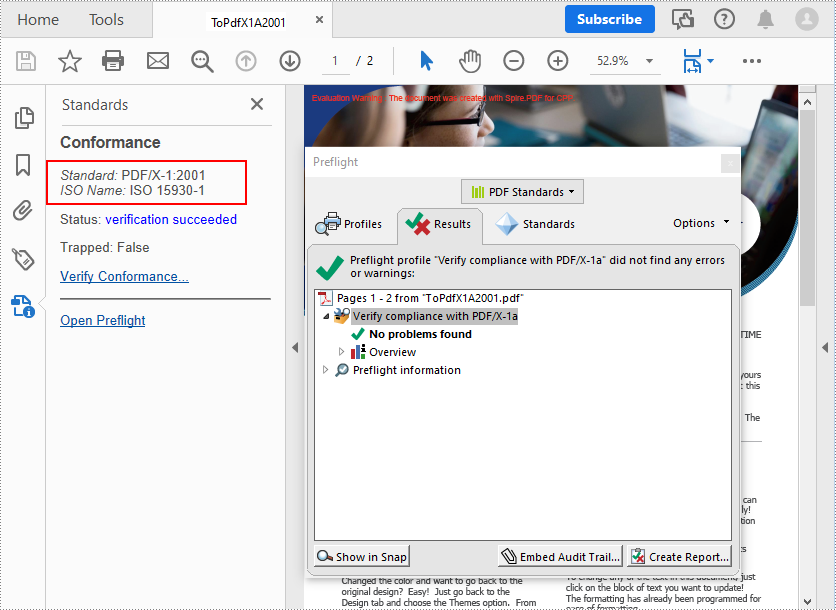
PDF/X-1a:2001 is a standard published in 2001 and has been widely adopted by the printing and publishing industries. It restricts certain features of the PDF format to ensure that the file is suitable for high quality printing. The following are the steps to convert PDF to a PDF/X-1a:2001 standard-compliant file.
- Create a PdfStandardsConverter instance, and pass in a sample PDF file as a parameter.
- Convert the sample file to PDF/X-1a:2001 standards compliant file using PdfStandardsConverter->ToPdfX1A2001() method.
- C++
#include "Spire.Pdf.o.h";

using namespace Spire::Pdf;
using namespace std;
int main() {

	//Specify the input file
	wstring inputFile = L"Data\\Test.pdf";

	//Create a PdfStandardsConverter instance
	PdfStandardsConverter* converter = new PdfStandardsConverter(inputFile.c_str());

	//Convert to PDF/X-1a:2001
	converter->ToPdfX1A2001(L"Output/ToPdfX1A2001.pdf");
	converter->Dispose();
	delete converter;
}
Apply for a Temporary License
If you'd like to remove the evaluation message from the generated documents, or to get rid of the function limitations, please request a 30-day trial license for yourself.
C++: Convert PDF to Word
PDF documents are great for presenting documents on different devices while keeping documents' appearance unchanged. It can also facilitate the sharing and transmission of documents. But editing PDF documents is usually quite troublesome. Therefore, many users will choose to convert PDF documents into easy-to-edit Word documents to facilitate the modification of document content.
- The fixed layout conversion mode has a faster conversion speed and is conducive to the maximum preservation of the original appearance of PDF files. However, since each line of PDF text will be presented in a separate frame in the generated Word documents, the editability of the generated documents will be limited.
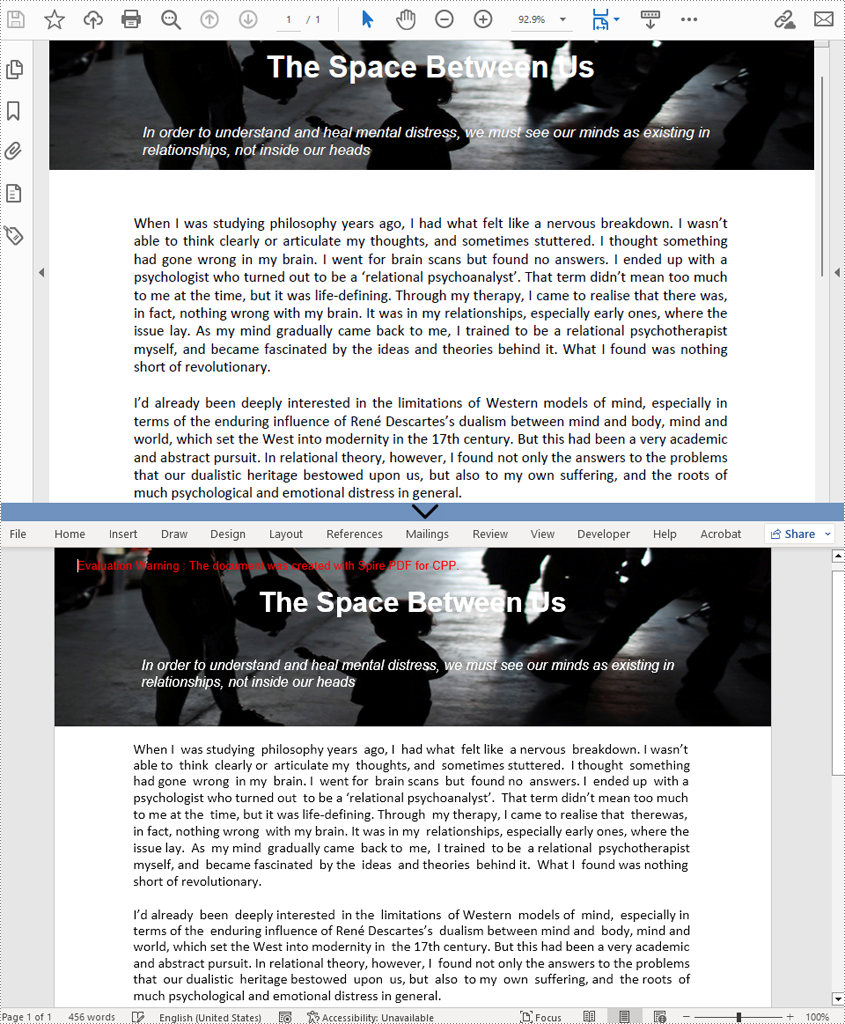
- The flowable structure conversion mode is a full recognition mode. The converted content is not rendered in frames and the resulting document structure is flowable, meaning that the resulting Word document is easy to re-edit but may look different from the original PDF file.
This article is going to demonstrate how to use Spire.PDF for C++ to convert PDFs to Word documents in fixed layout mode or flowable structure mode.
Install Spire.PDF for C++
There are two ways to integrate Spire.PDF for C++ into your application. One way is to install it through NuGet, and the other way is to download the package from our website and copy the libraries into your program. Installation via NuGet is simpler and more recommended. You can find more details by visiting the following link.
Integrate Spire.PDF for C++ in a C++ Application
Convert PDFs to Doc/Docx Files in Fixed Layout
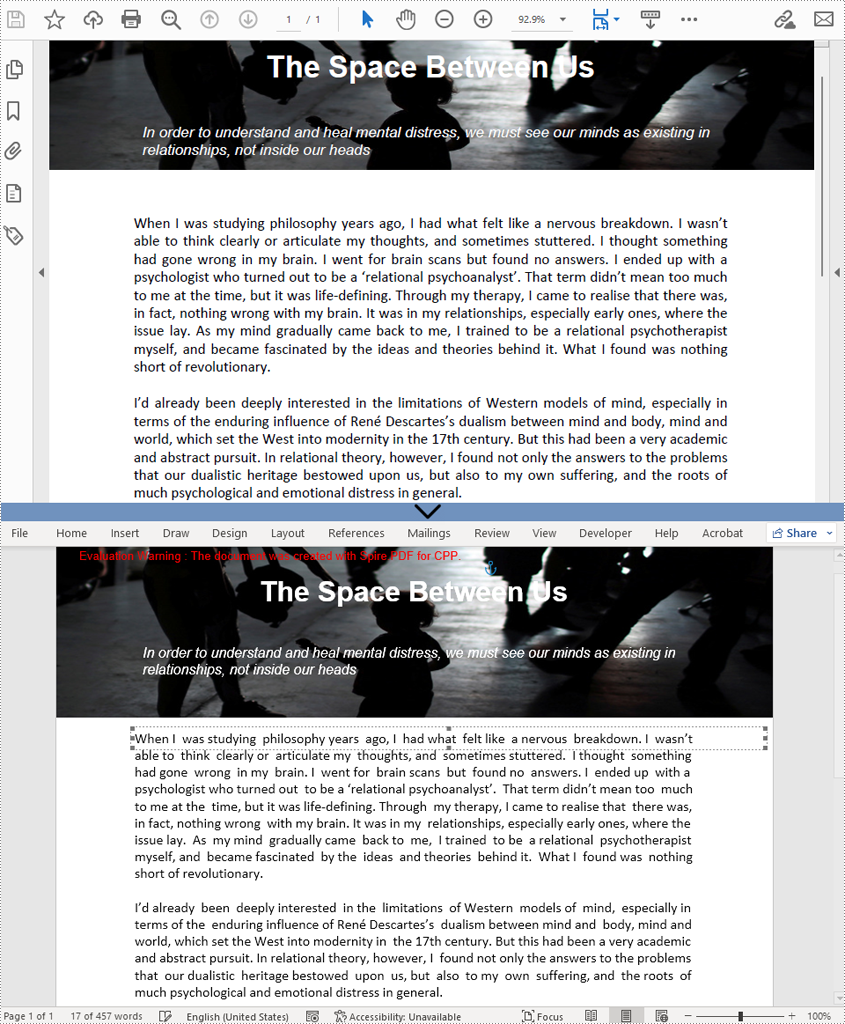
By default, when PdfDocument->SaveToFile() method is used to convert a PDF file to a Word document without setting the conversion options, the content arrangement of the output Word document will be in fixed layout. The detailed steps for converting a PDF file to a Word document in fixed layout mode are as follows.
- Create an object of PdfDocument.
- Load a PDF file using PdfDocument->LoadFromFile() method.
- Save the PDF file as a Doc and a Docx file using PdfDocument->SaveToFile() method.
- C++
#include "Spire.Pdf.o.h"

using namespace Spire::Pdf;

int main()
{
    //Create an Object of PdfDocument
    PdfDocument* pdf = new PdfDocument();

    //Load a PDF file
    pdf->LoadFromFile(L"C:/The Space Between Us.pdf");

    //Save the document as a Doc file
    pdf->SaveToFile(L"Output/PDFToWord.doc", FileFormat::DOC);

    //Save the document as a Docx file
    pdf->SaveToFile(L"Output/PDFToWord.docx", FileFormat::DOCX);
    pdf->Close();
    delete pdf;
}
Convert PDFs to Doc/Docx Files in Flowable Structure
Spire.PDF for C++ provides the PdfDocument->GetConvertOptions()->SetPdfToDocOptions(true, true) method to change the conversion mode to flowable structure mode. The detailed steps for converting a PDF file To a Word document in flowable structure mode are as follows.
- Create an object of PdfDocument.
- Load a PDF file using PdfDocument->LoadFromFile() method.
- Change the conversion mode to flowable structure mode using PdfDocument->GetConvertOptions()->SetPdfToDocOptions(true, true) method.
- Save the PDF file as a Doc and a Docx file using PdfDocument->SaveToFile() method.
- C++
#include "Spire.Pdf.o.h"

using namespace Spire::Pdf;

int main()
{
    //Create an Object of PdfDocument
    PdfDocument* pdf = new PdfDocument();

    //Load a PDF file
    pdf->LoadFromFile(L"C:/The Space Between Us.pdf");

    //Change the conversion mode to flowable structure mode
    pdf->GetConvertOptions()->SetPdfToDocOptions(true, true);

    //Save the document as a Doc file
    pdf->SaveToFile(L"Output/PDFToWord.doc", FileFormat::DOC);

    //Save the document as a Docx file
    pdf->SaveToFile(L"Output/PDFToWord.docx", FileFormat::DOCX);
    pdf->Close();
    delete pdf;
}
Apply for a Temporary License
If you'd like to remove the evaluation message from the generated documents, or to get rid of the function limitations, please request a 30-day trial license for yourself.
C++: Convert PDF to Images
The PDF file format is ideal for most occasions. But still, you may encounter situations where you need to convert PDF to images. Once you convert a certain PDF page into an image, you can post it on social media, upload or transfer it in devices that can only display images, or embed it in your Word document or PowerPoint presentation. In this article, you will learn how to programmatically convert PDF to images in C++ using Spire.PDF for C++.
Install Spire.PDF for C++
There are two ways to integrate Spire.PDF for C++ into your application. One way is to install it through NuGet, and the other way is to download the package from our website and copy the libraries into your program. Installation via NuGet is simpler and more recommended. You can find more details by visiting the following link.
Integrate Spire.PDF for C++ in a C++ Application
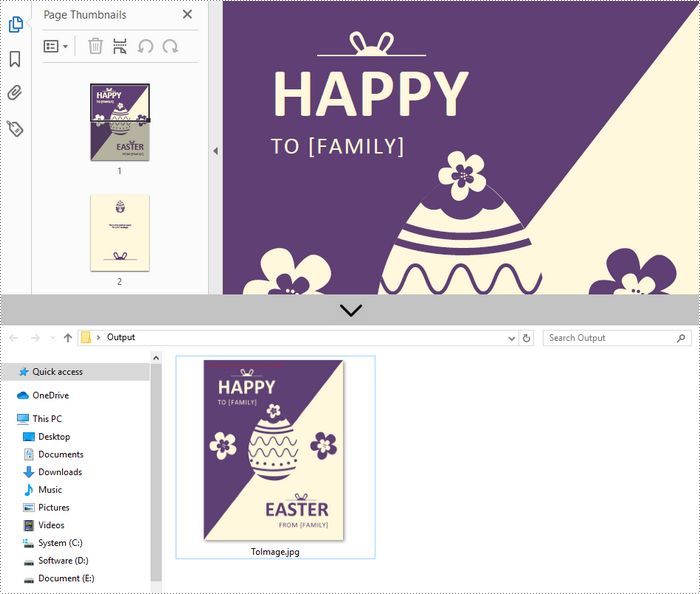
Convert a Specific Page to an Image in C++
Spire.PDF for C++ offers the PdfDocument->SaveAsImage(int pageIndex) method to convert a particular page into image stream. The stream can be then saved as an image file with the desired extension like PNG, JPG, and BMP. The following are the detailed steps.
- Create a PdfDocument instance.
- Load a PDF file using PdfDocument->LoadFromFile() method.
- Convert a specific page into image stream using PdfDocument->SaveAsImage() method.
- Save the image steam as a JPG file using Stream->Save() method.
- C++
#include "Spire.Pdf.o.h";

using namespace Spire::Pdf;
using namespace std;

int main() {

	//Specify input and output file paths
	wstring inputFile = L"C:\\Users\\Administrator\\Desktop\\sample.pdf";
	wstring outputFile = L"C:\\Users\\Administrator\\Desktop\\Output\\ToImage";

	//Create a PdfDocument object
	PdfDocument* doc = new PdfDocument();

	//Load a PDF file
	doc->LoadFromFile(inputFile.c_str());

	//Convert a specific page as image
	boost::intrusive_ptr<Stream> image = doc->SaveAsImage(0, PdfImageType::Bitmap);

	//Write image to a .jpg file
	wstring fileName = outputFile + L".jpg";
	image->Save(fileName.c_str());

	doc->Close();
	delete doc;
}
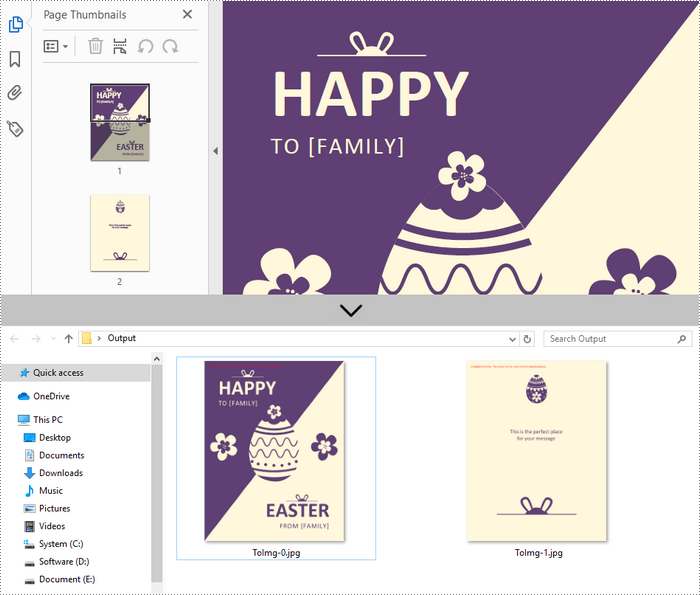
Convert an Entire PDF to Multiple Images in C++
In order to save the whole PDF as separate individual images, you just need to put the conversion part inside a loop statement. The follows are the detailed steps.
- Create a PdfDocument instance.
- Load a PDF file using PdfDocument->LoadFromFile() method.
- Loop through the pages in the document and convert each of them into image stream using PdfDocument->SaveAsImage(int pageIndex) method.
- Save the image steam as JPG files using Stream->Save() method.
- C++
#include "Spire.Pdf.o.h";

using namespace Spire::Pdf;
using namespace std;

int main() {

	//Specify input and output file paths
	wstring inputFile = L"C:\\Users\\Administrator\\Desktop\\sample.pdf";
	wstring outputFile = L"C:\\Users\\Administrator\\Desktop\\Output\\ToImg-";

	//Create a PdfDocument object
	PdfDocument* doc = new PdfDocument();

	//Load a PDF file
	doc->LoadFromFile(inputFile.c_str());

	//Iterate through the pages in the document
	for (int i = 0; i < doc->GetPages()->GetCount(); i++) {

		//Save a specific page as image
		boost::intrusive_ptr<Stream> image = doc->SaveAsImage(i);

		//Write image to a .jpg file
		wstring fileName = outputFile + to_wstring(i) + L".jpg";
		image->Save(fileName.c_str());
	}
	doc->Close();
	delete doc;
}
Apply for a Temporary License
If you'd like to remove the evaluation message from the generated documents, or to get rid of the function limitations, please request a 30-day trial license for yourself.