C++: Change the Margins of a PDF Document
Margins are the empty and unused spaces between the document's content and edges. The margins generally don't contain any text or image, and their primary purpose is to prevent text from colliding with document boundaries. Depending on your needs, you can change the margins to become wider or narrower. In this article, you will learn how to increase or decrease the page margins of a PDF document in C++ using Spire.PDF for C++.
Install Spire.PDF for C++
There are two ways to integrate Spire.PDF for C++ into your application. One way is to install it through NuGet, and the other way is to download the package from our website and copy the libraries into your program. Installation via NuGet is simpler and more recommended. You can find more details by visiting the following link.
Integrate Spire.PDF for C++ in a C++ Application
Increase the Margins of a PDF Document in C++
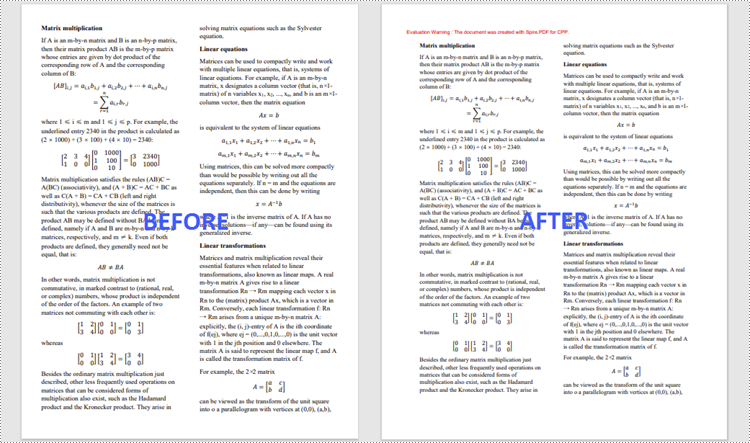
The way to enlarge the margins of a PDF document is to create a new PDF that has a larger page size, and then draw the source page on the large page at the appropriate location. The following are the steps to increase the margins of a PDF document using Spire.PDF for C++.
- Load the original PDF document while initialing the PdfDocument object.
- Create another PdfDocument object, which is used to create a new PDF document that has a larger page size.
- Set the increasing values of the margins.
- Calculate the page size of the new PDF document.
- Loop through the pages in the original document, and create a template based on a specific page using PdfPageBase->CreateTemplate() method.
- Add a page to the new PDF document using PdfDocument->GetPages()->Add() method.
- Draw the template on the page at the coordinate (0, 0) using PdfTemplate->Draw() method.
- Save the new PDF document to file using PdfDocument->SaveToFile() method.
- C++
//Load the original PDF document
 PdfDocument* originalPdf = new PdfDocument(L"C:\\Users\\Administrator\\Desktop\\sample.pdf");

 //Get the first page
 boost::intrusive_ptr<PdfPageBase> firstPage = originalPdf->GetPages()->GetItem(0);

 //Create a new PdfDocument object
 PdfDocument* newPdf = new PdfDocument();

 //Set increasing value of the margins
 boost::intrusive_ptr<PdfMargins> margins = newPdf->GetPageSettings()->GetMargins();
 margins->SetTop(40);
 margins->SetBottom(40);
 margins->SetLeft(40);
 margins->SetRight(40);

 //Calculate the new page size
 SizeF* sizeF = new SizeF(firstPage->GetSize()->GetWidth() + margins->GetLeft() + margins->GetRight(), firstPage->GetSize()->GetHeight() + margins->GetTop() + margins->GetBottom());

 //Loop through the pages in the original document
 for (size_t i = 0; i < originalPdf->GetPages()->GetCount(); i++)
 {
     //Create a template based on a spcific page
     boost::intrusive_ptr<PdfTemplate> pdfTemplate = originalPdf->GetPages()->GetItem(i)->CreateTemplate();

     //Add a page to the new PDF
     boost::intrusive_ptr<PdfPageBase> page = newPdf->GetPages()->Add(sizeF);

     //Draw template on the page
     pdfTemplate->Draw(page, 0.0f, 0.0f);
 }
Decrease the Margins of a PDF Document in C++
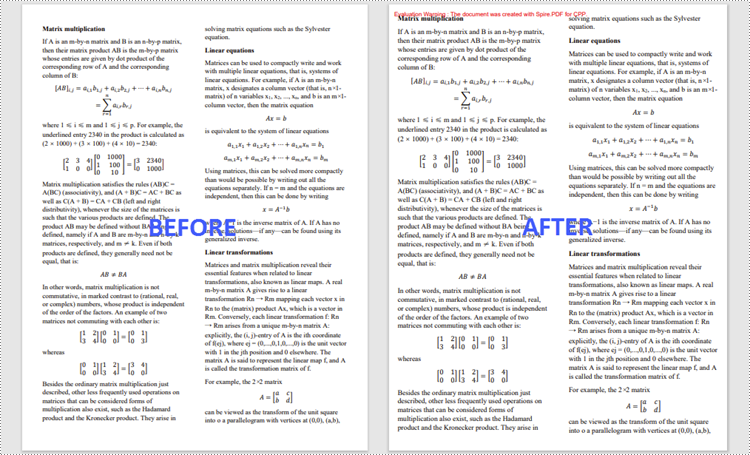
The way to decrease the margins of a PDF is to create a new PDF that has a smaller page size, and then draw the source page on the small page at a specified coordinate. The following are the steps to decrease the margins of a PDF document using Spire.PDF for C++.
- Load the original PDF document while initialing the PdfDocument object.
- Create another PdfDocument object, which is used to create a new PDF document that has a smaller page size.
- Set the decreasing values of the margins.
- Calculate the page size of the new PDF document.
- Loop through the pages in the original document, and create a template based on a specific page using PdfPageBase->CreateTemplate() method.
- Add a page to the new PDF document using PdfDocument->GetPages()->Add() method.
- Draw the template on the page at a specified coordinate using PdfTemplate->Draw() method.
- Save the new PDF document to file using PdfDocument->SaveToFile() method.
- C++
#include "Spire.Pdf.o.h";

using namespace Spire::Pdf;

int main() {

    //Load the original PDF document
    PdfDocument* originalPdf = new PdfDocument(L"C:\\Users\\Administrator\\Desktop\\sample.pdf");

    //Get the first page
    PdfPageBase* firstPage = originalPdf->GetPages()->GetItem(0);

    //Create a new PdfDocument object
    PdfDocument* newPdf = new PdfDocument();

    //Set decreasing value
    double left = -20;
    double right = -20;
    double top = -20;
    double bottom = -20;

    //Calculate the new page size
    SizeF* sizeF = new SizeF(firstPage->GetSize()->GetWidth() + left + right, firstPage->GetSize()->GetHeight() + top + bottom);

    //Loop through the pages in the original document
    for (size_t i = 0; i < originalPdf->GetPages()->GetCount(); i++)
    {
        //Create a template based on a specific page
        PdfTemplate* pdfTemplate = originalPdf->GetPages()->GetItem(i)->CreateTemplate();

        //Add a page to the new PDF
        PdfPageBase* page = newPdf->GetPages()->Add(sizeF, new PdfMargins(0));

        //Draw template on the page
        pdfTemplate->Draw(page, left, top);
    }

    //Save the new document
    newPdf->SaveToFile(L"Output/DecreaseMargins.pdf", FileFormat::PDF);
    newPdf->Close();
    delete originalPdf;
    delete newPdf;
}
Apply for a Temporary License
If you'd like to remove the evaluation message from the generated documents, or to get rid of the function limitations, please request a 30-day trial license for yourself.
C++: Add or Delete Pages in PDF
When you are handling a PDF document with lots of pages, you will most likely need to add new pages to include more information or remove some redundant pages. In this article, you will learn how to programmatically add or delete pages in a PDF document using Spire.PDF for C++.
- Add a Blank Page at the End of a PDF Document in C++
- Insert a Blank Page After a Specific Page in PDF in C++
- Delete an Existing Page in a PDF Document in C++
Install Spire.PDF for C++
There are two ways to integrate Spire.PDF for C++ into your application. One way is to install it through NuGet, and the other way is to download the package from our website and copy the libraries into your program. Installation via NuGet is simpler and more recommended. You can find more details by visiting the following link.
Integrate Spire.PDF for C++ in a C++ Application
Add a Blank Page at the End of a PDF Document in C++
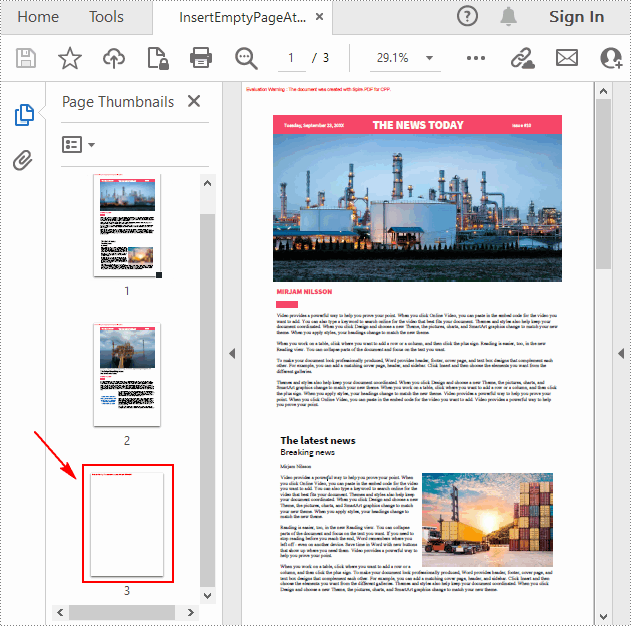
Spire.PDF for C++ allows you to add an empty page with specific size and margins at the end of the document using PdfDocument->GetPages()->Add(SizeF* size, PdfMargins* margins) method. The following are the detailed steps.
- Create a PdfDocument object.
- Load a sample PDF document using PdfDocument->LoadFromFile() method.
- Create an empty page with the specified size and margins and then append it to the end of the document using PdfDocument->GetPages()->Add(SizeF* size, PdfMargins* margins) method.
- Save the result document using PdfDocument->SaveToFile () method.
- C++
#include "Spire.Pdf.o.h"

using namespace Spire::Pdf;
using namespace std;

int main() {
	//Specify input and output file paths
	wstring inputFile = L"Data\\input.pdf";
	wstring outputFile = L"Output\\InsertEmptyPageAtEnd.pdf";

	//Create a PdfDocument object
	PdfDocument* pdf = new PdfDocument();

	//Load a PDF document
	pdf->LoadFromFile(inputFile.c_str());

	//Add an empty page at the end of the document
	PdfMargins tempVar(0, 0);
	pdf->GetPages()->Add(new SizeF(PdfPageSize::A4()), &tempVar);

	//Save the result document
	pdf->SaveToFile(outputFile.c_str());
	pdf->Close();

	delete pdf;
}
Insert a Blank Page After a Specific Page in PDF in C++
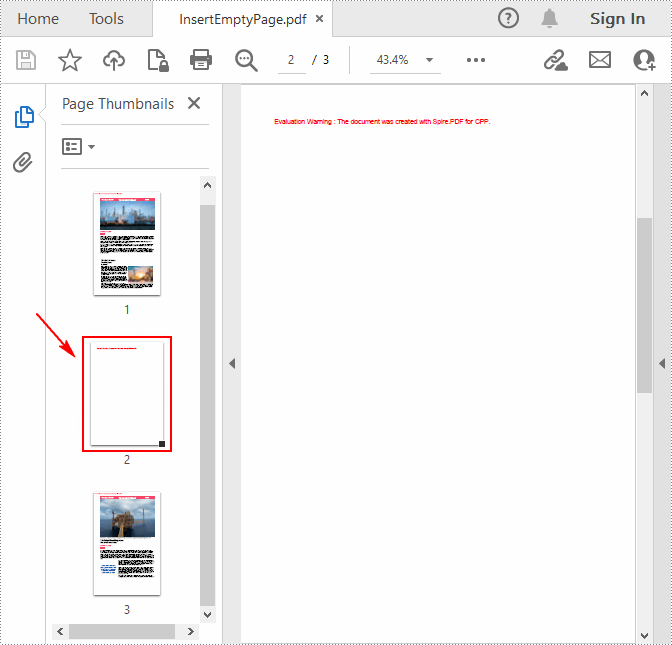
If you want to insert an empty page into a specific position of a PDF document, you can use the PdfDocument->GetPages()->Insert(int index) method. The following are the detailed steps.
- Create a PdfDocument object.
- Load a sample PDF document using PdfDocument->LoadFromFile() method.
- Create a blank page and insert it after a specified PDF page using PdfDocument->GetPages()->Insert(int index) method.
- Save the result document using PdfDocument->SaveToFile () method.
- C++
#include "Spire.Pdf.o.h"

using namespace Spire::Pdf;
using namespace std;

int main() {
	//Specify input and output file paths
	wstring inputFile = L"Data\\input.pdf";
	wstring outputFile = L"Output\\InsertEmptyPage.pdf";

	//Create a PdfDocument object
	PdfDocument* pdf = new PdfDocument();

	//Load a PDF document
	pdf->LoadFromFile(inputFile.c_str());

	//Insert a blank page as the second page
	pdf->GetPages()->Insert(1);

	//Save the result document
	pdf->SaveToFile(outputFile.c_str());
	pdf->Close();

	delete pdf;
}
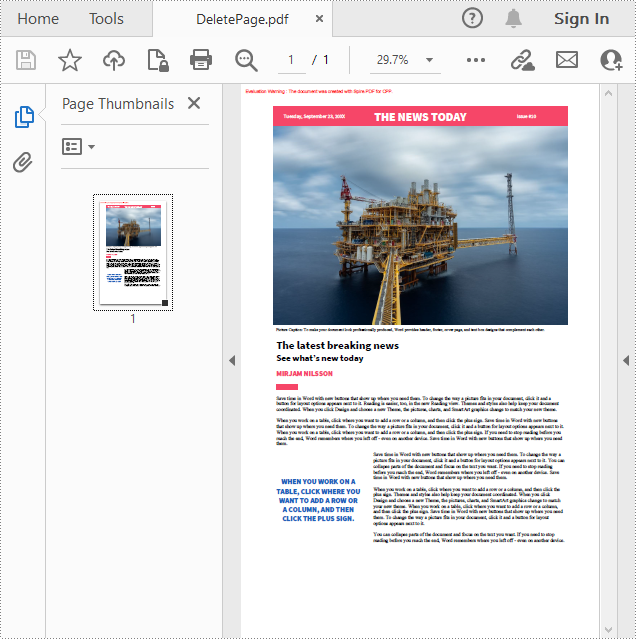
Delete an Existing Page in a PDF Document in C++
For PDF pages containing useless information, you can also remove them using Spire.PDF for C++. The following are the steps to delete a specific page in PDF.
- Create a PdfDocument object.
- Load a sample PDF document using PdfDocument->LoadFromFile() method.
- Remove a specified page from the document using PdfDocument->GetPages()->RemoveAt(int index) method.
- Save the result document using PdfDocument->SaveToFile () method.
- C++
#include "Spire.Pdf.o.h"

using namespace Spire::Pdf;
using namespace std;

int main() {
	//Specify input and output file paths
	wstring inputFile = L"Data\\input.pdf";
	wstring outputFile = L"Output\\DeletePage.pdf";

	//Create a PdfDocument object
	PdfDocument* pdf = new PdfDocument();

	//Load a PDF document
	pdf->LoadFromFile(inputFile.c_str());

	//Delete the first page in the document
	pdf->GetPages()->RemoveAt(0);

	//Save the result document
	pdf->SaveToFile(outputFile.c_str());
	pdf->Close();

	delete pdf;
}
Apply for a Temporary License
If you'd like to remove the evaluation message from the generated documents, or to get rid of the function limitations, please request a 30-day trial license for yourself.