C++: Add Image Watermarks to PDF Documents
Watermarks are faded text or images that appear behind the existing content of a document. You can use them to indicate a document's state (confidential, draft, etc.), or add a subtle company logo. A watermark helps prove the origin of a document and discourage unauthorized copies or distribution. In this article, you will learn how to add image watermarks to PDF in C++ using Spire.PDF for C++.
Install Spire.PDF for C++
There are two ways to integrate Spire.PDF for C++ into your application. One way is to install it through NuGet, and the other way is to download the package from our website and copy the libraries into your program. Installation via NuGet is simpler and more recommended. You can find more details by visiting the following link.
Integrate Spire.PDF for C++ in a C++ Application
Add a Single Image Watermark to PDF in C++
The PdfPageBase->GetCanvas()->DrawImage() method provided by Spire.PDF for C++ allows developers to draw images at any position of a PDF page. The image can be faded by adjusting the transparency of the canvas to prevent it from overwriting the text. The detailed steps to add a single image watermark to PDF are as follows.
- Create a PdfDocument object.
- Load a sample PDF document using PdfDocument->LoadFromFile() method.
- Get a specific page from the document using PdfDocument->GetPages()->GetItem() method.
- Set the transparency of the page using PdfPageBase->GetCanvas()->SetTransparency() method.
- Draw an image at the center of the page using PdfPageBase->GetCanvas()->DrawImage() method.
- Save the document to a different PDF file using PdfDocument->SaveToFile() method.
- C++
#include "Spire.Pdf.o.h";

using namespace std;
using namespace Spire::Pdf;

int main()
{
	//Specify input file and output file paths
	wstring inputFilePath = L"C:\\Users\\Administrator\\Desktop\\sample.pdf";
	wstring outputFilePath = L"C:\\Users\\Administrator\\Desktop\\ImageWatermark.pdf";

	//Create a PdfDocument object
	PdfDocument* doc = new PdfDocument();

	//Load a PDF file
	doc->LoadFromFile(inputFilePath.c_str());

	//Load an image
	boost::intrusive_ptr image = PdfImage::FromFile(L"C:\\Users\\Administrator\\Desktop\\logo.png");

	//Get image height and width
	int imgHeight = image->GetHeight();
	int imgWidth = image->GetWidth();

	//Traverse through the pages in the document
	for (size_t i = 0; i < doc->GetPages()->GetCount(); i++)
	{
		//Get a specific page
		boost::intrusive_ptr page = doc->GetPages()->GetItem(i);

		//Set the page transparency
		page->GetCanvas()->SetTransparency(0.5);

		//Get the page width and height
		float pageWidth = page->GetActualSize()->GetWidth();
		float pageHeight = page->GetActualSize()->GetHeight();

		//Draw image at the center of the page
		RectangleF* rect = new RectangleF((float)(pageWidth - imgWidth) / 2, (float)(pageHeight - imgHeight) / 2, imgWidth, imgHeight);
		page->GetCanvas()->DrawImage(image, rect);
	}

	//Save the document
	doc->SaveToFile(outputFilePath.c_str());
	doc->Close();
	delete doc;
}

Add a Tiled Image Watermark to PDF in C++
A tiled watermark effect can be achieved by using the PdfTilingBrush class. The tiling brush produces a tiled pattern that is repeated to fill a graphics area. The following are the steps to add a tiled image watermark to a PDF document.
- Create a custom method InsertTiledImagetWatermark(PdfPageBase* page, PdfImage* image, int rowNum, int columnNum) to add a tiled watermark to a PDF page. The parameter rowNum and columnNum specify the row number and column number of the tiled watermark.
- Create a PdfDocument object.
- Load a sample PDF document using PdfDocument->LoadFromFile() method.
- Traverse through all pages in the document, and invoke the custom method InsertTiledImageWatermark() to apply watermark to each page.
- Save the document to another file using PdfDocument->SaveToFile() method.
- C++
#include "Spire.Pdf.o.h";

using namespace std;
using namespace Spire::Pdf;

static void InsertTiledImagetWatermark(PdfPageBase* page, PdfImage* image, int rowNum, int columnNum)
{
	//Get page height and width
	float height = page->GetActualSize()->GetHeight();
	float width = page->GetActualSize()->GetWidth();

	//Get image heigh and width
	float imgHeight = image->GetHeight();
	float imgWidth = image->GetWidth();

	//Create a tiling brush
	PdfTilingBrush* brush = new PdfTilingBrush(new SizeF(width / columnNum, height / rowNum));

	//Set transparency
	brush->GetGraphics()->SetTransparency(0.5f);

	//Translate coordinate system to a certain position
	brush->GetGraphics()->TranslateTransform((brush->GetSize()->GetWidth() - imgWidth) / 2, (brush->GetSize()->GetHeight() - imgHeight) / 2);

	//Draw image on the brush at the specified coordinates
	brush->GetGraphics()->DrawImage(image, 0.0, 0.0);

	//Draw rectangle that covers the whole page with the brush
	page->GetCanvas()->DrawRectangle(brush, 0, 0, width, height);
}

int main()
{
	//Specify input file and output file paths
	wstring inputFilePath = L"C:\\Users\\Administrator\\Desktop\\sample.pdf";
	wstring outputFilePath = L"C:\\Users\\Administrator\\Desktop\\TiledImageWatermark.pdf";

	//Create a PdfDocument object
	PdfDocument* doc = new PdfDocument();

	//Load a PDF file
	doc->LoadFromFile(inputFilePath.c_str());

	//Load an image
	PdfImage* image = PdfImage::FromFile(L"C:\\Users\\Administrator\\Desktop\\small-logo.png");

	//Traverse through the pages in the document
	for (size_t i = 0; i < doc->GetPages()->GetCount(); i++)
	{
		//Get a specific page
		PdfPageBase* page = doc->GetPages()->GetItem(i);

		//Add tiled image watermark to the page
		InsertTiledImagetWatermark(page, image, 4, 4);
	}

	//Save the document
	doc->SaveToFile(outputFilePath.c_str());
	doc->Close();
	delete doc;
}

Apply for a Temporary License
If you'd like to remove the evaluation message from the generated documents, or to get rid of the function limitations, please request a 30-day trial license for yourself.
C++: Add Text Watermarks to PDF Documents
As increasingly diverse types of documents are created in PDF, you may find yourself with a need to protect confidential information. Although many other PDF security options are available to keep confidential information secure, the most common approach is to add a custom watermark to the PDF document. In this article, you will learn how to add a single-line or multi-line text watermark to PDF in C++ using Spire.PDF for C++.
Install Spire.PDF for C++
There are two ways to integrate Spire.PDF for C++ into your application. One way is to install it through NuGet, and the other way is to download the package from our website and copy the libraries into your program. Installation via NuGet is simpler and more recommended. You can find more details by visiting the following link.
Integrate Spire.PDF for C++ in a C++ Application
Add a Single-Line Text Watermark to PDF in C++
Spire.PDF for C++ does not provide an interface or a class responsible for inserting watermarks into PDF files. You could, however, draw text like "confidential", "do not copy", or "draft" on each page to mimic the watermark effect. The following are the steps to add a single-line text watermark to a PDF document.
- Create a PdfDocument object.
- Load a sample PDF document using PdfDocument->LoadFromFile() method.
- Get a specific page from the document using PdfDocument->GetPages()->GetItem() method.
- Translate the coordinate system to the specified coordinate using PdfPageBase->GetCanvas()->TraslateTransform() method.
- Rotate the coordinate system 45 degrees counterclockwise using PdfPageBase->GetCanvas()->RotateTransform() method. This step and the step above make sure that the watermark will appear in the middle of the page with an angle of 45 degrees.
- Draw a text watermark on the page using PdfPageBase->GetCanvas()->DrawString() method.
- Save the document to a different PDF file using PdfDocument->SaveToFile() method.
- C++
"#include ""Spire.Pdf.o.h"";

using namespace std;
using namespace Spire::Pdf;
using namespace Spire::Common;

int main()
{
	//Specify input file and output file paths
	wstring inputFilePath = L""C:\\Users\\Administrator\\Desktop\\sample.pdf"";
	wstring outputFilePath = L""Output\\SingleLineTextWatermark.pdf"";

	//Create a PdfDocument object
	PdfDocument* doc = new PdfDocument();

	//Load a PDF file
	doc->LoadFromFile(inputFilePath.c_str());

	//Create a true type font
	PdfTrueTypeFont* font = new PdfTrueTypeFont(L""Arial"", 50.0f, PdfFontStyle::Bold, true);

	//Create a brush
	PdfBrush* brush = PdfBrushes::GetDarkGray();

	//Specify watermark text
	wstring text = L""CONFIDENTIAL"";

	//Measure the text size
	SizeF textSize = font->MeasureString(text.c_str());

	//Calculate two offsets, which are used to calculate the translation amount of coordinate system
	float offset1 = (float)(textSize.GetWidth() * sqrt(2) / 4);
	float offset2 = (float)(textSize.GetHeight() * sqrt(2) / 4);

	//Traverse through the pages in the document
	for (size_t i = 0; i < doc->GetPages()->GetCount(); i++)
	{
		//Get a specific page
		PdfPageBase* page = doc->GetPages()->GetItem(i);

		//Set the page transparency
		page->GetCanvas()->SetTransparency(0.8);

		//Translate the coordinate system to a specified coordinate
		page->GetCanvas()->TranslateTransform(page->GetCanvas()->GetSize()->GetWidth() / 2 - offset1 - offset2, page->GetCanvas()->GetSize()->GetHeight() / 2 + offset1 - offset2);

		//Rotate the coordinate system 45 degrees counterclockwise
		page->GetCanvas()->RotateTransform(-45);

		//Draw watermark text on the page
		page->GetCanvas()->DrawString(text.c_str(), font, brush, 0, 0, new PdfStringFormat(PdfTextAlignment::Left));
	}

	//Save the document
	doc->SaveToFile(outputFilePath.c_str());
	doc->Close();
	delete doc;
}"

Add a Tiled Text Watermark to PDF in C++
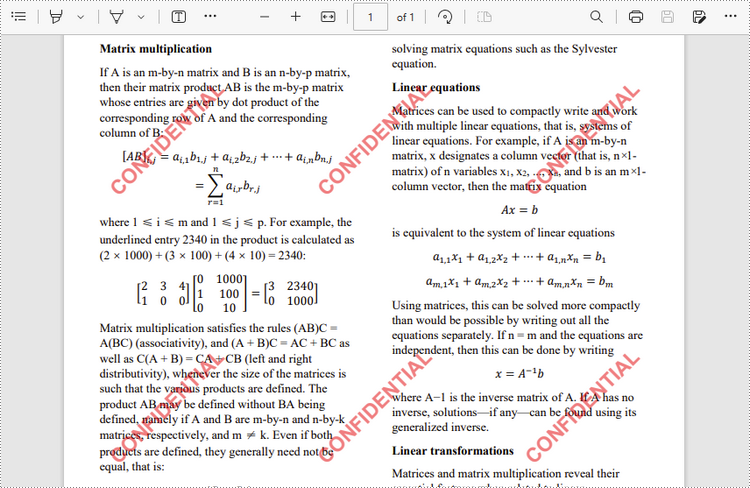
To achieve the tiled watermark effect, you can make use of the PdfTilingBrush class. The tiling brush produces a tiled pattern that is repeated to fill a graphics area. The following are the steps to add a tiled text watermark to a PDF document.
- Create a custom method InsertTiledTextWatermark(PdfPageBase* page, wstring watermarkText, PdfTrueTypeFont* font, int rowNum, int columnNum) to add a tiled watermark to a PDF page. The parameter rowNum and columnNum specify the row number and column number of the tiled watermark.
- Create a PdfDocument object.
- Load a sample PDF document using PdfDocument->LoadFromFile() method.
- Traverse through all pages in the document, and call the custom method InsertTiledTextWatermark() to apply watermark to each page.
- Save the document to another file using PdfDocument->SaveToFile() method.
- C++
#include "Spire.Pdf.o.h";

using namespace std;
using namespace Spire::Pdf;

static void InsertTiledTextWatermark(PdfPageBase* page, wstring watermarkText, PdfTrueTypeFont* font, int rowNum, int columnNum)
{
	//Measure text size
	SizeF textSize = font->MeasureString(watermarkText.c_str());

	//Calculate two offsets, which are used to calculate the translation amount of coordinate system
	float offset1 = (float)(textSize.GetWidth() * sqrt(2) / 4);
	float offset2 = (float)(textSize.GetHeight() * sqrt(2) / 4);

	//Get page height and width
	float height = page->GetActualSize()->GetHeight();
	float width = page->GetActualSize()->GetWidth();

	//Create a tiling brush
	PdfTilingBrush* brush = new PdfTilingBrush(new SizeF(width / columnNum, height / rowNum));
	brush->GetGraphics()->SetTransparency(0.5f);
	brush->GetGraphics()->TranslateTransform(brush->GetSize()->GetWidth() / 2 - offset1 - offset2, brush->GetSize()->GetHeight() / 2 + offset1 - offset2);
	brush->GetGraphics()->RotateTransform(-45);

	//Draw watermark text on the brush
	brush->GetGraphics()->DrawString(watermarkText.c_str(), font, PdfBrushes::GetRed(), 0, 0, new PdfStringFormat(PdfTextAlignment::Left));

	//Draw a rectangle (that covers the whole page) using the tiling brush
	page->GetCanvas()->DrawRectangle(brush, new RectangleF(new PointF(0, 0), page->GetActualSize()));
}

int main()
{
	//Specify input file and output file paths
	wstring inputFilePath = L"C:\\Users\\Administrator\\Desktop\\sample.pdf";
	wstring outputFilePath = L"Output\\MultiLineTextWatermark.pdf";

	//Create a PdfDocument object
	PdfDocument* doc = new PdfDocument();

	//Load a PDF file
	doc->LoadFromFile(inputFilePath.c_str());

	//Specify watermark text
	wstring text = L"CONFIDENTIAL";

	//Creat a true type font
	PdfTrueTypeFont* font = new PdfTrueTypeFont(L"Arial", 20.0f, PdfFontStyle::Bold, true);

	//Traverse through the pages in the document
	for (size_t i = 0; i < doc->GetPages()->GetCount(); i++)
	{
		//Call the custom method to insert multi-line text watermark
                boost::intrusive_ptr page = doc->GetPages()->GetItem(i);
                InsertTiledTextWatermark(page.get(), text.c_str(), font, 3, 3);"
	}

	//Save the document
	doc->SaveToFile(outputFilePath.c_str());
	doc->Close();
	delete doc;
}
Apply for a Temporary License
If you'd like to remove the evaluation message from the generated documents, or to get rid of the function limitations, please request a 30-day trial license for yourself.