Insert OLE Object in Excel in Java applications
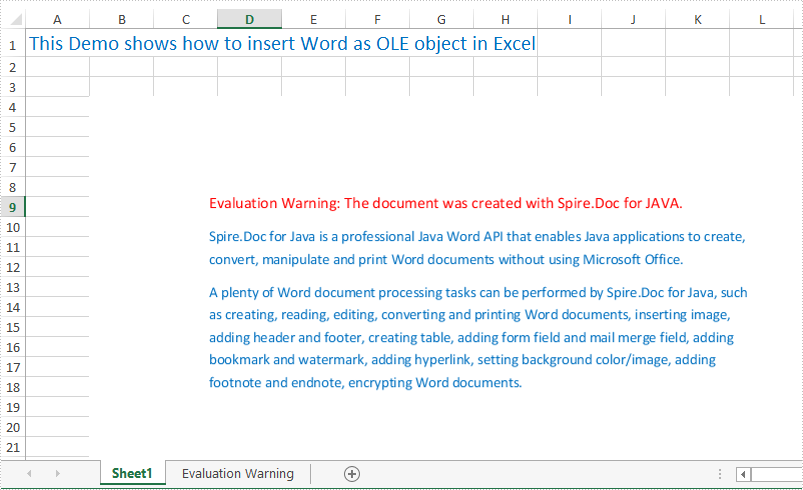
Spire.XLS for Java supports to insert Word, Excel, PowerPoint slide and PDF as linked object or embedded object into Excel Worksheet. This article will show you how to insert a Word document as an embedded object into Excel by using Spire.XLS for Java in Java applications.
import com.spire.xls.*;
import com.spire.xls.core.IOleObject;
import com.spire.doc.*;
import com.spire.doc.documents.ImageType;
import java.awt.image.BufferedImage;

public class insertOLEObjects {
    public static void main(String[] args) {
        String docFile = "Sample.docx";
        String outputFile = "output/insertOLEObjects_result.xlsx";

        //Load the Excel document
        Workbook workbook = new Workbook();
        workbook.loadFromFile("Sample.xlsx");
        //Get the first worksheet
        Worksheet worksheet = workbook.getWorksheets().get(0);

        //Generate image
        BufferedImage image = GenerateImage(docFile);
        //insert OLE object
        IOleObject oleObject = worksheet.getOleObjects().add(docFile, image, OleLinkType.Embed);
        oleObject.setLocation(worksheet.getCellRange("B4"));
        oleObject.setObjectType(OleObjectType.ExcelWorksheet);
        //Save the file
        workbook.saveToFile(outputFile, ExcelVersion.Version2010);
    }

    private static BufferedImage GenerateImage(String fileName) {

        //Load the sample word document
        Document document = new Document();
        document.loadFromFile(fileName);

        //Save the first page of word as an image
        BufferedImage image = document.saveToImages(0, ImageType.Bitmap);
        return image;
    }
}
Output:
Extract OLE Objects from an Excel Document in Java
This article demonstrates how to extract OLE objects from an Excel document using Spire.XLS for Java.
import com.spire.xls.*;
import com.spire.xls.core.IOleObject;

import java.io.*;

public class ExtractOLEObjects {
    public static void main(String[] args){
        //Create a Workbook instance
        Workbook workbook = new Workbook();

        //Load the Excel document
        workbook.loadFromFile("OLEObjectsExample.xlsx");

        //Get the first worksheet
        Worksheet sheet = workbook.getWorksheets().get(0);

        //Extract ole objects
        if (sheet.hasOleObjects()) {
            for (int i = 0; i < sheet.getOleObjects().size(); i++) {
                IOleObject object = sheet.getOleObjects().get(i);
                OleObjectType type = sheet.getOleObjects().get(i).getObjectType();
                switch (type) {
                    //Word document
                    case WordDocument:
                        byteArrayToFile(object.getOleData(), "output/extractOLE.docx");
                        break;
                    //PowerPoint document
                    case PowerPointSlide:
                        byteArrayToFile(object.getOleData(), "output/extractOLE.pptx");
                        break;
                    //PDF document
                    case AdobeAcrobatDocument:
                        byteArrayToFile(object.getOleData(), "output/extractOLE.pdf");
                        break;
                    //Excel document
                    case ExcelWorksheet:
                        byteArrayToFile(object.getOleData(), "output/extractOLE.xlsx");
                        break;
                }
            }
        }
    }
    public static void byteArrayToFile(byte[] datas, String destPath) {
        File dest = new File(destPath);
        try (InputStream is = new ByteArrayInputStream(datas);
             OutputStream os = new BufferedOutputStream(new FileOutputStream(dest, false));) {
            byte[] flush = new byte[1024];
            int len = -1;
            while ((len = is.read(flush)) != -1) {
                os.write(flush, 0, len);
            }
            os.flush();
        } catch (IOException e) {
            e.printStackTrace();
        }
    }
}
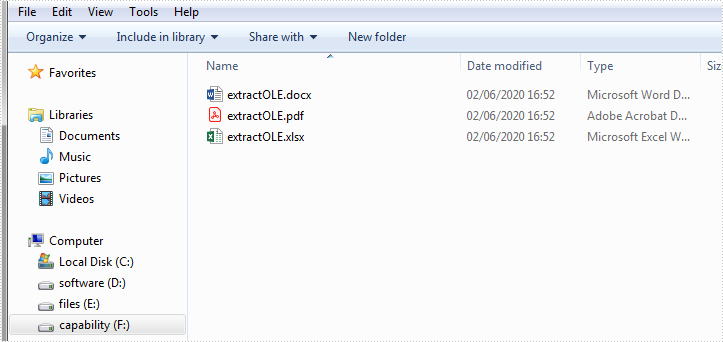
The following screenshot shows the extracted OLE documents:
Add and Remove Form Controls in Excel in Java
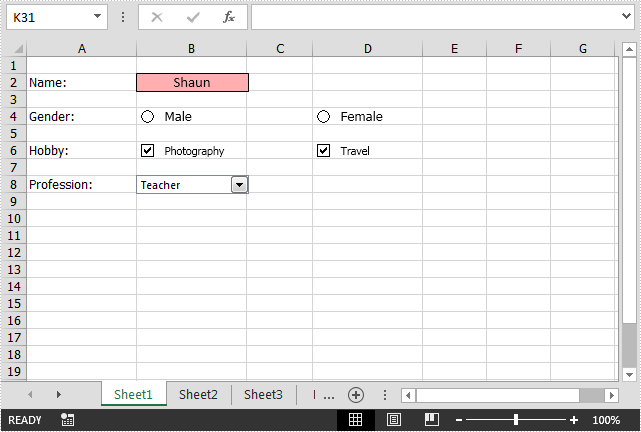
Spire.XLS for Java enables developers to add and manipulate multiple types of form controls, e.g. text box, option button, check box and combo box in Excel files in Java applications.
The following examples will show you how to add and remove text box, option button, check box and combo box form controls in an Excel file using Spire.XLS for Java.
Add Form Controls
import com.spire.xls.*;
import com.spire.xls.core.*;
import java.awt.*;

public class AddFormControls {
    public static void main(String[] args){
        //Create a Workbook instance
        Workbook workbook = new Workbook();
        //Get the first worksheet
        Worksheet sheet = workbook.getWorksheets().get(0);

        sheet.getCellRange("A2").setText("Name: ");
        //Add a text box
        ITextBoxShape textbox = sheet.getTextBoxes().addTextBox(2, 2, 18, 65);
        textbox.setText("Shaun");
        textbox.getFill().setForeColor(Color.PINK);
        textbox.setHAlignment(CommentHAlignType.Center);
        textbox.setVAlignment(CommentVAlignType.Center);

        sheet.getCellRange("A4").setText("Gender: ");
        //Add an option button
        IRadioButton radiobutton1 = sheet.getRadioButtons().add(4, 2, 18, 65);
        radiobutton1.setText("Male");
        //Add an option button
        IRadioButton radiobutton2 = sheet.getRadioButtons().add(4, 4, 18, 65);
        radiobutton2.setText("Female");

        sheet.getCellRange("A6").setText("Hobby: ");
        //Add a check box
        ICheckBox checkbox1 = sheet.getCheckBoxes().addCheckBox(6, 2, 18, 100);
        checkbox1.setCheckState(CheckState.Checked);
        checkbox1.setText("Photography");
        //Add a check box
        ICheckBox checkbox2 = sheet.getCheckBoxes().addCheckBox(6, 4, 18, 65);
        checkbox2.setCheckState(CheckState.Checked);
        checkbox2.setText("Travel");

        sheet.getCellRange("A8").setText("Profession: ");
        sheet.getCellRange("A20").setText("Student");
        sheet.getCellRange("A21").setText("Teacher");
        sheet.getCellRange("A22").setText("Doctor");
        //Add a combo box
        IComboBoxShape combobox = sheet.getComboBoxes().addComboBox(8, 2, 18, 65);
        combobox.setListFillRange(sheet.getCellRange("A20:A22"));
        combobox.setSelectedIndex(1);

        for (int column = 1; column < 5; column ++)
        {
            sheet.setColumnWidth(column, 15f);
        }

        //Save the file
        workbook.saveToFile("AddControls.xlsx", ExcelVersion.Version2013);
    }
}
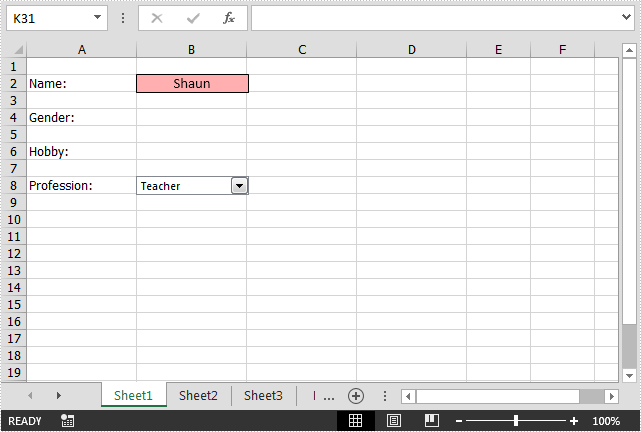
Remove Form Controls
import com.spire.xls.*;

public class RemoveFormControls {
    public static void main(String[] args){
        //Load an Excel file
        Workbook workbook = new Workbook();
        workbook.loadFromFile("AddControls.xlsx");
        //Get the first worksheet
        Worksheet sheet = workbook.getWorksheets().get(0);

        //Remove option buttons from the worksheet
        for(int j = 0; j < sheet.getRadioButtons().getCount(); j ++){
            sheet.getRadioButtons().get(j).remove();
        }

        //Remove check boxes from the worksheet
        for(int i = 0; i < sheet.getCheckBoxes().getCount(); i ++){
            sheet.getCheckBoxes().get(i).remove();
        }

        //Save the file
        workbook.saveToFile("RemoveControls.xlsx", ExcelVersion.Version2013);
    }
}