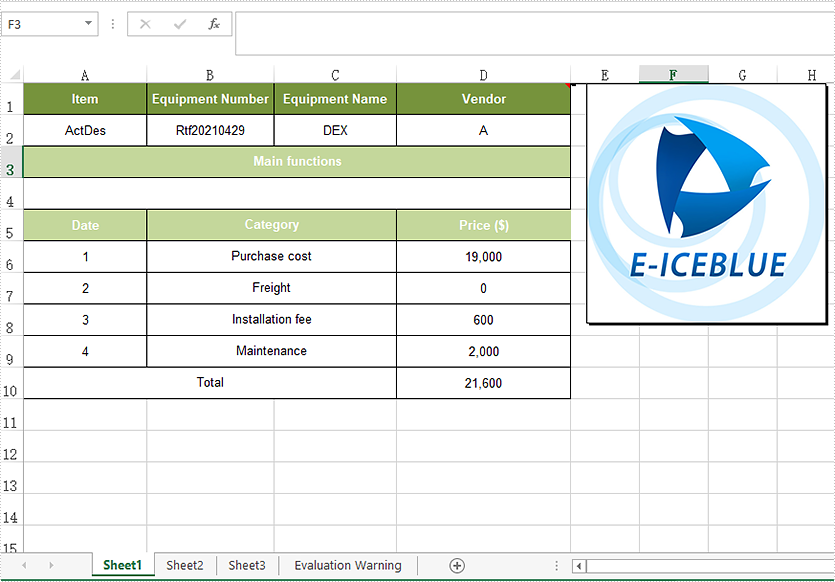
We have demonstrated how to add and read text comments in Excel in Java applications. This article will show you how to insert image comment to Excel with Spire.XLS for Java.
import com.spire.xls.*;
import javax.imageio.ImageIO;
import java.awt.image.BufferedImage;
import java.io.*;

public class Test {
    public static void main(String[] args)throws IOException {
        //Load the sample Excel file
        Workbook workbook = new Workbook();
        workbook.loadFromFile("Sample.xlsx");
        //Get the first worksheet
        Worksheet sheet = workbook.getWorksheets().get(0);

        //set the font
        ExcelFont font = workbook.createFont();
        font.setFontName("Arial");
        font.setSize(11);
        font.setKnownColor(ExcelColors.Orange);

        CellRange range = sheet.getCellRange("D1");
        //Add the commet
        ExcelComment comment = range.addComment();
        //Load the image
        BufferedImage bufferedImage = ImageIO.read(new File("Logo.jpg"));
        //Use the image to fill the comment
        comment.getFill().customPicture(bufferedImage, "Logo.jpg");

        //Set the height and width for the comment
        comment.setHeight(bufferedImage.getHeight());
        comment.setWidth(bufferedImage.getWidth());
        //Show the comment
        comment.setVisible(true);

        //Save the document to file
        workbook.saveToFile("output/setimageComment.xlsx", ExcelVersion.Version2013);

    }
}
Output: