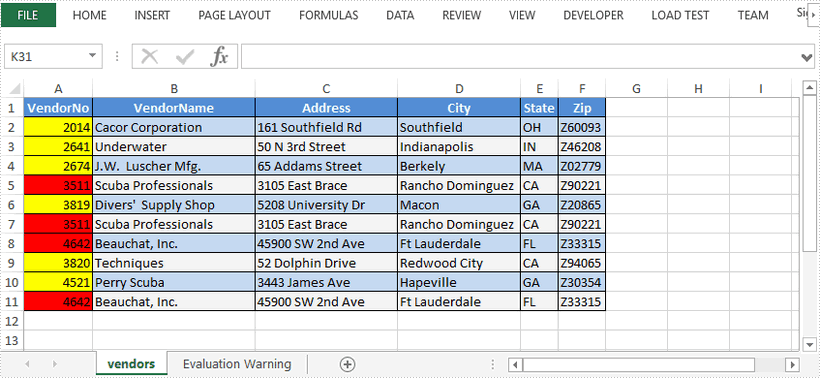
This article demonstrates how to highlight the duplicate and unique values in a selected range through conditional formatting using Spire.XLS for Java.
import com.spire.xls.*;
import com.spire.xls.core.IConditionalFormat;
import com.spire.xls.core.spreadsheet.collections.XlsConditionalFormats;

import java.awt.*;

public class HighlightDuplicates  {
    public static void main(String[] args) {
        //Create a Workbook instance
        Workbook workbook = new Workbook();

        //Load a sample Excel file
        workbook.loadFromFile("C:\\Users\\Administrator\\Desktop\\sample.xlsx");

        //Get the first worksheet
        Worksheet sheet = workbook.getWorksheets().get(0);

        //Add a conditional formatting and specify ranges
        XlsConditionalFormats conditional = sheet.getConditionalFormats().add();
        conditional.addRange(sheet.getCellRange("A2:A11"));

        //Use conditional formatting to highlight duplicate values with red
        IConditionalFormat format1 = conditional.addCondition();
        format1.setFormatType(ConditionalFormatType.DuplicateValues);
        format1.setBackColor(Color.red);

        //Use conditional formatting to highlight unique values with yellow
        IConditionalFormat format2 = conditional.addCondition();
        format2.setFormatType(ConditionalFormatType.UniqueValues);
        format2.setBackColor(Color.yellow);

        //Save the document
        workbook.saveToFile("HighlightDuplicates.xlsx", ExcelVersion.Version2016);
    }
}