Spire.Presentation is a powerful and standalone .NET component which designed for developers to operate the PowerPoint documents in C# and VB.NET. Spire.Presentation enable developers to insert a new table, remove rows or columns in an existing table, and remove the whole table from the presentation slides. This article we will show you how to add a row to an existing table in presentation slide by using C# code.
Step 1: Create Presentation instance and load file.
Presentation ppt = new Presentation();
ppt.LoadFromFile("table.pptx");
Step 2: Get the table within the PowerPoint document.
ITable table = ppt.Slides[0].Shapes[4] as ITable;
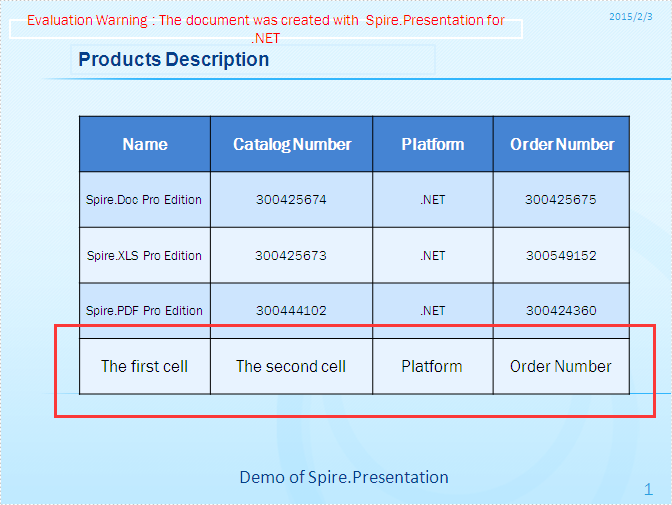
Step 3: Add a new row into the PowerPoint table and set the data for the cells in the new row.
//Get the first row
TableRow row = table.TableRows[0];
//Clone the row and add it to the end of table
table.TableRows.Append(row);
int rowCount = table.TableRows.Count;
//Get the last row
TableRow lastRow = table.TableRows[rowCount - 1];
//Set new data of the first cell of last row
lastRow[0].TextFrame.Text = " The first cell";
//Set new data of the second cell of last row
lastRow[1].TextFrame.Text = " The second cell";
Step 4: Save the document and preview it.
ppt.SaveToFile("result.pptx", FileFormat.Pptx2010);
System.Diagnostics.Process.Start("result.pptx");
Effective screenshot:
Full codes:
using Spire.Presentation;

namespace AddRow
{

    class Program
    {
        static void Main(string[] args)
        {
            Presentation ppt = new Presentation();
            ppt.LoadFromFile("table.pptx");

            ITable table = ppt.Slides[0].Shapes[4] as ITable;
            TableRow row = table.TableRows[0];
            table.TableRows.Append(row);
            int rowCount = table.TableRows.Count;
            TableRow lastRow = table.TableRows[rowCount - 1];
            lastRow[0].TextFrame.Text = "The first cell";
            lastRow[1].TextFrame.Text = "The second cell";

            ppt.SaveToFile("result.pptx", FileFormat.Pptx2010);
            System.Diagnostics.Process.Start("result.pptx");

        }
    }
}