
Converting Word documents to OFD (Open Fixed-layout Document) is a common requirement in many C++ applications, especially for projects serving the Chinese market, where OFD is a national standard for fixed-layout electronic documents in China (GB/T 33190). Whether you're building backend services, report generators, or document processing systems, implementing reliable C++ conversion Word to OFD functionality helps ensure documents can be shared, archived, or submitted to government systems while preserving their original formatting. However, implementing this feature isn't always easy. Traditional solutions often depend on Microsoft Office automation, which can introduce deployment issues and isn't ideal for server-side environments.
In this article, we'll demonstrate how to use Spire.Doc for C++ to convert Word to OFD programmatically. We'll cover basic document conversion as well as more advanced scenarios such as exporting specific pages to OFD format.
- Why Convert Word to OFD?
- Why Choose Spire.Doc for C++
- Setting Up Spire.Doc for C++
- Basic Word to OFD Conversion in C++
- Advanced Word to OFD Conversion Settings
- Frequently Asked Questions
Why Convert Word to OFD?
Although Word documents are convenient for editing, OFD is often preferred for official document archiving and distribution in China. Converting Word to OFD offers several advantages:
- National standard compliance: OFD is China's national standard for fixed-layout electronic documents, making it essential for government submissions and official archives.
- Consistent layout: OFD preserves the original formatting, ensuring the document looks the same across devices and operating systems.
- Document standardization: OFD files are designed to ensure consistent rendering across different platforms and viewers.
- Long-term archiving: OFD is well-suited for archiving and official record-keeping, making it ideal for legal and financial records.
- Improved document integrity: OFD files support digital signatures and document integrity protection, making them more resistant to tampering.
- Automation support: Applications can convert Word to OFD programmatically in document workflows.
Why Choose Spire.Doc for C++
There are a few ways to approach converting Word to OFD in C++ - COM automation, shelling out to external tools, or parsing the .docx format manually. Each comes with trade-offs: platform lock-in, environment dependencies, or significant implementation overhead.
Spire.Doc for C++ sidesteps most of these issues:
- No Office installation required - the library handles conversion internally, which makes it viable for server-side deployment
- Cross-platform - works on both Windows and Linux, which matters if your service runs in a containerized or Linux-based environment
- Faithful formatting - tables, images, headers, footers, and font styles are preserved reliably in the output OFD
- Straightforward API - the core conversion logic is concise, without needing to understand the full document object model upfront
- Support several Word document formats - including DOC, DOCX, DOCM, DOTX / DOTM.
It's not a perfect tool for every edge case, but for most production conversion needs, it covers the ground well.
Setting Up Spire.Doc for C++
Before starting the conversion, make sure your development environment and project are properly configured.
Install via NuGet Package Manager
- Open your project in Visual Studio.
- Go to Tools -> NuGet Package Manager -> Manage NuGet Packages for Solution...
- Search for "Spire.Doc.Cpp".
- Click "Install".
Manual Installation
- Download the latest version of Spire.Doc for C++ from the official website.
- Unzip the package.
- Configure your Visual Studio project to include the Include directory path and link the lib directory. Ensure the DLL files are placed in the same directory as your executable or in a system path.
For detailed installation instructions, see: Integrate Spire.Doc for C++ in a C++ Application
Basic C++ Project Setup
Once installed, make sure the following are in place before writing any code:
Include the header:
#include "Spire.Doc.o.h"
Add the required using namespace:
using namespace Spire::Doc;
Basic Word to OFD Conversion in C++
Once the project is ready, converting a Word document to OFD only requires a few lines of code.
Here is a complete C++ example:
#include "Spire.Doc.o.h"
#include <iostream>

using namespace Spire::Doc;

int main()
{
    Document* document = new Document();

    try {
        document->LoadFromFile(L"C:\\Users\\Tommy\\Desktop\\BusinessReport.docx");

        document->SaveToFile(L"C:\\Users\\Tommy\\Desktop\\BusinessReport.ofd", FileFormat::OFD);

        document->Close();

        std::cout << "success!" << std::endl;

    }
    catch (const std::exception& ex) {
        std::cerr << "error: " << ex.what() << std::endl;
        delete document;
        return -1;
    }

    delete document;
    return 0;
}
Key Code Explanations:
- Create a Document object.
- LoadFromFile() loads the Word document.
- SaveToFile() converts and saves the document as an OFD file using FileFormat::OFD.
Word to OFD conversion result:

Advanced Word to OFD Conversion Settings
Beyond basic Word-to-OFD conversion, Spire.Doc for C++ also provides options for more specific needs. For example, you can export specific pages to OFD or customize the conversion process by adjusting image compression and embedding fonts.
Convert Specific Pages to OFD
In some workflows, you may only need to convert specific pages of a Word document to OFD format. The following example demonstrates how to extract specific pages and save them as a separate OFD file.
Code example:
#include "Spire.Doc.o.h"
#include <iostream>

using namespace Spire::Doc;

int main()
{
    intrusive_ptr<Document> document = new Document();

    try {
        document->LoadFromFile(L"C:\\Users\\Tommy\\Desktop\\Agreement.docx");

        // Extract pages 1-3 (page index starts from 0)
        intrusive_ptr<Document> newDoc = document->ExtractPages(0, 3);

        newDoc->SaveToFile(L"C:\\Users\\Tommy\\Desktop\\Agreement_Partial.ofd", FileFormat::OFD);

        document->Close();
        newDoc->Close();

        std::cout << "Partial OFD Success!" << std::endl;

    }
    catch (const std::exception& ex) {
        std::cerr << "error: " << ex.what() << std::endl;
        return -1;
    }

    return 0;
}
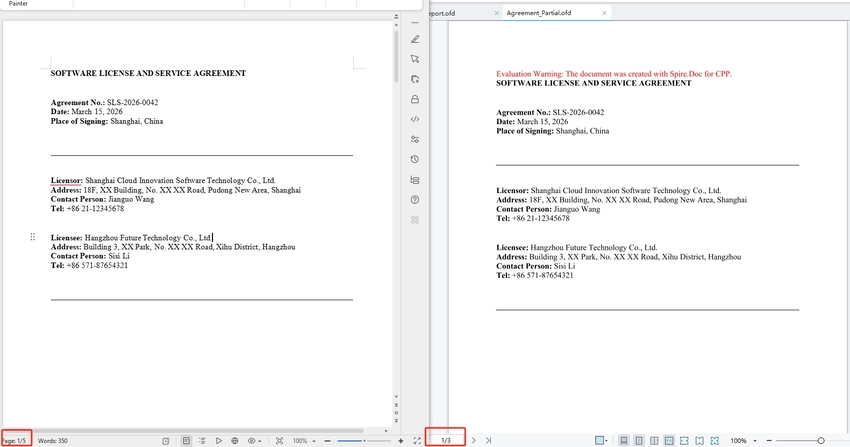
Code Explanation:
- intrusive_ptr is a smart pointer that automatically manages the memory of the Document object, ensuring it is properly destroyed when no longer needed, which helps prevent memory leaks and simplifies code.
- ExtractPages(0, 3) — Extracts pages 1-3 (0-based index) into a new Document.
- Saving the new document with FileFormat::OFD generates an OFD file containing only the selected pages.
Customize OFD Conversion Settings
In some situations, you may want to adjust conversion settings-for example, to reduce the size of the generated OFD or ensure fonts display correctly across different systems. Spire.Doc for C++ provides options for customizing the export process.
The code below shows how to enable image compression and font embedding during conversion.
#include "Spire.Doc.o.h"
#include <iostream>

using namespace Spire::Doc;

int main()
{
    intrusive_ptr<Document> document = new Document();

        try {
            document->LoadFromFile(L"C:\\Users\\Tommy\\Desktop\\MarketingProposal.docx");

            document->SetJPEGQuality(75);

            intrusive_ptr<ToPdfParameterList> parameters = new ToPdfParameterList();
            parameters->SetIsEmbeddedAllFonts(true);

            document->SaveToFile(L"C:\\Users\\Tommy\\Desktop\\MarketingProposal.ofd", FileFormat::OFD);
            document->Close();

            std::cout << "success" << std::endl;
        }
        catch (const std::exception& ex) {
            std::cerr << "error: " << ex.what() << std::endl;
            return -1;
        }
        return 0;
}

- SetJPEGQuality(75) sets the compression quality of JPEG images in the document to 75%. (value range 0-100).
- SetIsEmbeddedAllFonts(true) embeds all fonts used in the document, ensuring the OFD displays correctly even if the viewer's system does not have those fonts installed.
Frequently Asked Questions
Q1. Do I need Microsoft Word installed to perform the conversion?
A: No. Spire.Doc for C++ works independently of Microsoft Office and does not require Word to be installed on the system.
Q2. How can I convert only specific pages of a Word document to OFD?
A: As mentioned previously, you can extract the required pages from the document using intrusive_ptr<Document> newDoc = document->ExtractPages();, and then save the extracted content as an OFD file. Alternatively, you can copy the desired sections into a new document and then perform the conversion.
Q3. Why do some fonts appear different in the converted OFD?
A: This usually happens when the required fonts are not installed on the system. You can enable this by calling SetIsEmbeddedAllFonts(true) before saving the document.
Q4. How can I reduce the size of the generated OFD?
A: You can enable image compression or lower the JPEG quality (SetJPEGQuality(75))during the conversion process to reduce the file size.
Q5. What is the difference between OFD and PDF?
A: OFD (Open Fixed-layout Document) is China's national standard for electronic documents, while PDF is an international standard. OFD is widely adopted in China for e-government and official document workflows. Both formats preserve document layout and formatting.
Conclusion
Implementing a C++ conversion of Word documents to OFD is essential for applications that require reliable document sharing, archiving, or compliance with Chinese national standards. With Spire.Doc for C++, developers can perform Word-to-OFD conversion programmatically without relying on Microsoft Office automation. As demonstrated in this guide, the library supports not only full document conversion but also advanced scenarios such as exporting specific pages and customizing conversion settings, making it a practical solution for C++ document processing tasks.
