Page Content:
- Differences between PowerPoint and OFD Format
- How to Convert PowerPoint to OFD with Spire.Presentation for C++
- Batch Convert PowerPoint Files into OFD Format with C++
- Convert a Single Slide of PowerPoint to OFD with C++
- FAQs
PowerPoint presentations are widely used for business reports and technical documentation. In some industries, especially in government and enterprise systems, documents are often required to be distributed in OFD instead of standard Office formats. Because PowerPoint files can include complex layouts and interactive elements, they are not always suitable for standardized document distribution.
In this tutorial, you will learn how to convert PowerPoint to OFD in C++ using Spire.Presentation for C++. The guide walks through simple code examples for converting an entire .ppt/.pptx file, exporting a single slide, and performing batch PPT to OFD conversion for multiple files.
Differences between PowerPoint and OFD Format
Before implementing the conversion, it helps to first understand the key differences between PowerPoint and OFD formats. Each format is designed for a different purpose and usage scenario, which is why some organizations require documents to be converted before distribution. Knowing these differences can make it clearer why converting PowerPoint to OFD is often necessary in enterprise or government document workflows.
1. File Structure and Purpose
PowerPoint files (PPT/PPTX) are designed for interactive presentations and support animations, transitions, embedded media, and editable slide elements.
OFD, in contrast, is a fixed layout document format like PDF, designed to preserve the exact visual layout of a document across different systems. Because of this, OFD is commonly used for official document distribution and long-term digital archiving.
OFD, in contrast, is a fixed layout document format like PDF, designed to preserve the exact visual layout of a document across different systems. Because of this, OFD is commonly used for official document distribution and long-term digital archiving, similar to scenarios where organizations convert PowerPoint to PDF to ensure consistent document formatting.
2. Compatibility and Standardization
PowerPoint belongs to the Microsoft Office ecosystem and typically requires compatible presentation software to view or edit.
OFD is an open national standard created for electronic document exchange, allowing organizations to share and store documents with consistent formatting regardless of the software environment.
3. Security and Compliance
In many enterprise and government workflows, documents must follow standardized formats to meet regulatory requirements. OFD supports features such as digital signatures, fixed layout rendering, and secure document exchange, making it suitable for compliant document distribution.
How to Convert PowerPoint to OFD with Spire.Presentation for C++
Understanding the differences between PowerPoint and OFD is the first step in ensuring documents are properly formatted for distribution. OFD’s fixed layout and standardized features make it ideal for official and long-term archival use.
To handle the conversion in C++, Spire.Presentation for C++ provides a simple and reliable solution. It lets developers load, edit, and export PowerPoint files to OFD while preserving the original layout and content. It also supports other tasks such as editing slides, extracting images, and converting PowerPoint files to images and other formats.
Read on to learn how to use Spire.Presentation for C++ to convert PowerPoint to OFD format.
Install Spire.Presentation for C++:
Before using the sample code in Visual Studio, make sure to add the library to your C++ project. You can either download it from the official download link and add it to your project manually, or install it automatically via NuGet.
For a more detailed tutorial on how to integrate Spire.Presentation for C++, see: How to Integrate Spire.Presentation for C++ in a C++ Application.
PowerPoint to OFD Conversion Workflow:
- Specify the input and output file paths.
- Create a Presentation object.
- Load the PowerPoint file using Presentation.LoadFromFile(String).
- Save the presentation as an OFD file using Presentation.SaveToFile(String, FileFormat).
- Dispose of the Presentation object to release resources.
Sample Code:
#include "Spire.Presentation.o.h";

using namespace Spire::Presentation;
using namespace std;

int main()
{
    // Specify the input and output file paths
    std::wstring inputFile = L"powerpoint-sample.pptx";
    std::wstring outputFile = L"output\\PowerPointToOFD.ofd";

    // Create a Presentation object
    intrusive_ptr<Presentation> presentation = new Presentation();

    // Load a PowerPoint document from disk
    presentation->LoadFromFile(inputFile.c_str());

    // Save the document to OFD format
    presentation->SaveToFile(outputFile.c_str(), FileFormat::OFD);

    presentation->Dispose();

}
Conversion Result:
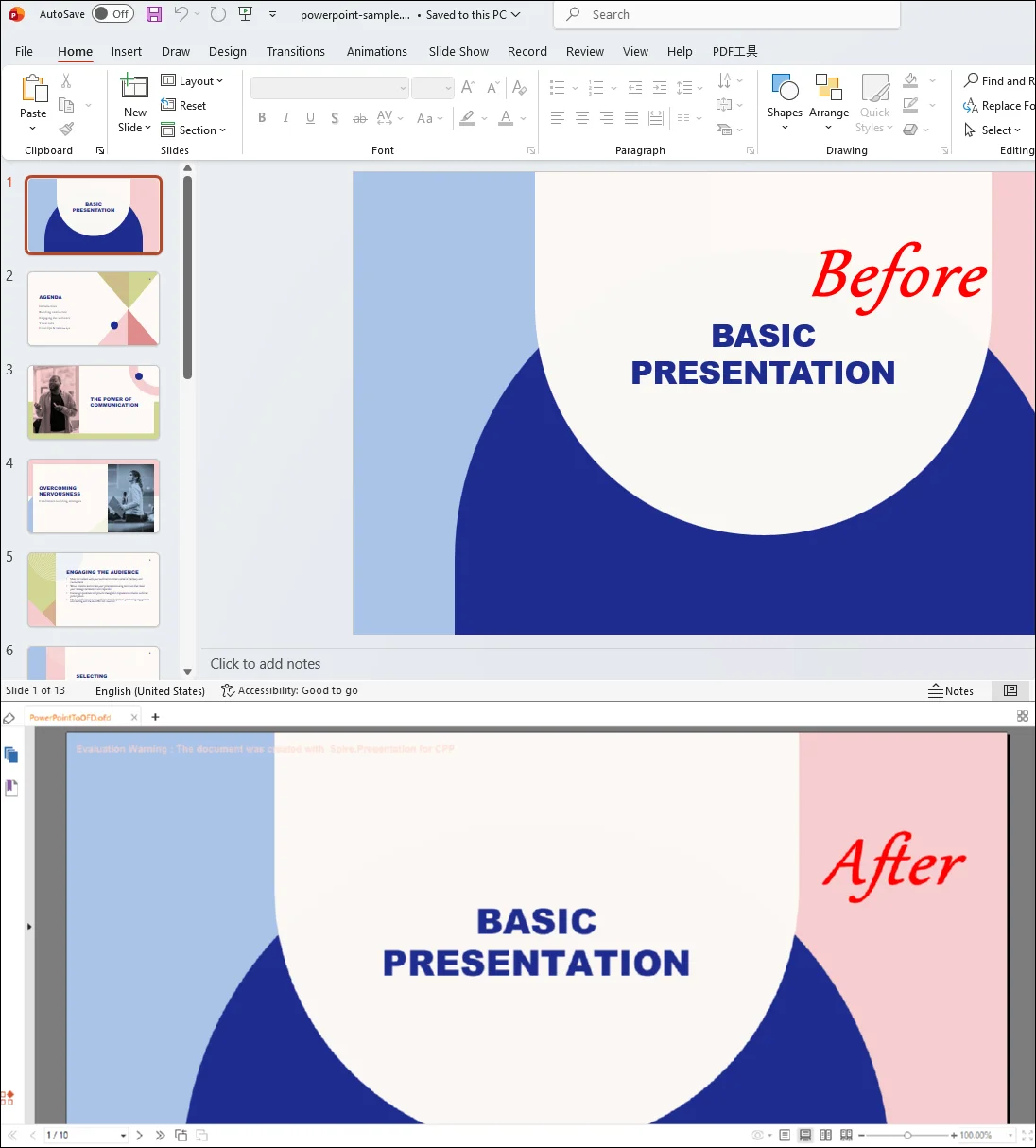
Note: If you want to remove the evaluation warning message of the converted OFD file or gain full access to all features of Spire.Presentation for C++, please contact us to request a 30-day trial license.
Batch Convert PowerPoint Files into OFD Format with C++
In real-world development scenarios, developers often need to process multiple PowerPoint files at once rather than converting them individually. For example, a document management system may need to convert a folder of PPT files into OFD format for standardized archiving or distribution.
Using Spire.Presentation for C++, you can easily iterate through a directory, load each PowerPoint file, and export it to OFD format automatically. This approach greatly improves efficiency when handling large numbers of presentations.
Batch PowerPoint to OFD Conversion Workflow
- Specify the input folder containing PowerPoint files and the output folder for the converted OFD files.
- Iterate through all files in the input directory.
- Load each PowerPoint file using the Presentation object.
- Generate a corresponding OFD output file path.
- Save the presentation as an OFD file.
- Dispose of the Presentation object to release resources.
Sample Code:
#include "Spire.Presentation.o.h"
#include <filesystem>

using namespace Spire::Presentation;
using namespace std;
namespace fs = std::filesystem;

int main()
{
    // Specify folder paths
    wstring inputFolder = L"InputPPT";
    wstring outputFolder = L"batchoutputOFD";

    for (auto& file : fs::directory_iterator(inputFolder))
    {
        if (file.path().extension() == L".pptx")
        {
            intrusive_ptr<Presentation> presentation = new Presentation();

            // Load PowerPoint file
            presentation->LoadFromFile(file.path().wstring().c_str());

            // Generate output OFD file path
            wstring outputFile = outputFolder + L"\\" + file.path().stem().wstring() + L".ofd";

            // Convert to OFD
            presentation->SaveToFile(outputFile.c_str(), FileFormat::OFD);

            presentation->Dispose();
        }
    }

    return 0;
}
Convert a Single Slide of PowerPoint to OFD with C++
In some scenarios, developers may only need to export selected slides instead of converting the entire presentation. For example, a reporting system may generate an OFD document from only a few important slides in a PowerPoint file.
Using Spire.Presentation, you can create a new presentation, copy the required slides from the original PowerPoint file, and then export them to OFD format.
Single Slide to OFD Conversion Workflow
- Load the source PowerPoint file.
- Create a new Presentation object.
- Copy the required slides from the original presentation to the new presentation.
- Save the new presentation as an OFD file.
- Dispose of the Presentation objects to release resources.
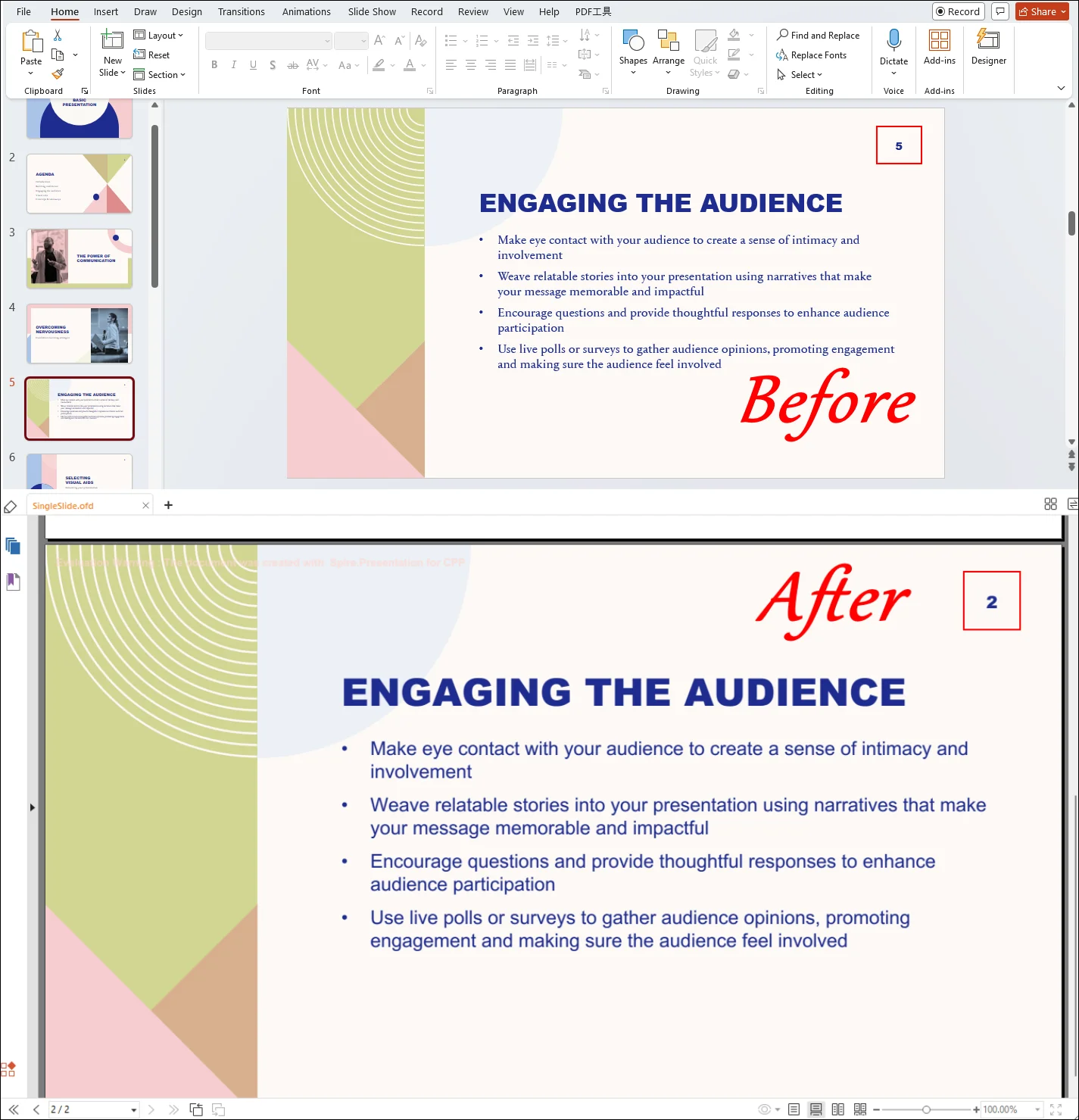
Note: In Spire.Presentation, slide indexing starts from 0, so index 4 refers to the fifth slide in the presentation.
Sample Code:
#include "Spire.Presentation.o.h"

using namespace Spire::Presentation;
using namespace std;

int main()
{
    // Specify input and output paths
    wstring inputFile = L"Input.pptx";
    wstring outputFile = L"SingleSlide.ofd";

    // Load the source presentation
    intrusive_ptr<Presentation> presentation = new Presentation();
    presentation->LoadFromFile(inputFile.c_str());

    // Create a new presentation
    intrusive_ptr<Presentation> newPresentation = new Presentation();

    // Get the specific slide (for example: slide 5)
    intrusive_ptr<ISlide> slide = presentation->GetSlides()->GetItem(4);

    // Add the slide to the new presentation
    newPresentation->GetSlides()->Append(slide);

    // Save the slide as OFD
    newPresentation->SaveToFile(outputFile.c_str(), FileFormat::OFD);

    // Release resources
    presentation->Dispose();
    newPresentation->Dispose();

    return 0;
}
RESULT:
FAQs
1. Can I export PowerPoint files directly to OFD format with Microsoft PowerPoint?
No. Microsoft PowerPoint does not provide built-in support for exporting presentations to OFD format. Developers usually rely on document processing libraries or third-party tools to perform this conversion programmatically.
2. Why convert PowerPoint to OFD instead of PDF?
While PDF is widely used, some government and industry platforms specifically require OFD because it is a national standard document format designed for secure and long-term document storage.
3. Does Spire.Presentation require Microsoft Office?
No. Spire.Presentation for C++ is a standalone library that does not require Microsoft PowerPoint to be installed.
4. Can I convert multiple PowerPoint files to OFD at once?
Yes. By looping through multiple files in a directory and applying the same conversion method, you can easily build a batch conversion tool in C++ with Spire.Presentation.
Wrap-Up
In this tutorial, we showed how to perform PowerPoint to OFD conversion in C++ using Spire.Presentation for C++. With just a few lines of code, developers can load PPT or PPTX files and export them to OFD while preserving the original layout.
We also covered scenarios such as converting an entire presentation, exporting a single slide, and performing batch PPT to OFD conversion, making it easier to integrate this feature into automated workflows or enterprise systems. Download Spire.Presentation for C++ to try these examples and start converting PowerPoint files to OFD in your C++ applications.
