In the world of document management, the OFD (Open Fixed-layout Document) format is gaining significant traction, particularly in East Asian markets, as a domestic alternative to PDF. Whether you are developing financial reporting software or an enterprise document management system, the need to convert Excel to OFD in C++ environments is becoming increasingly common.
This guide provides a comprehensive tutorial on how to convert Excel spreadsheets (XLS/XLSX) to OFD format using Spire.XLS for C++, a robust library designed to handle Excel operations without requiring Microsoft Office to be installed.
- Why Convert Excel to OFD?
- Setting Up Spire.XLS for C++
- Basic Excel to OFD Conversion in C++
- Advanced Excel to OFD Conversion Settings
- Frequently Asked Questions (FAQs)
- Get a Free License
Why Convert Excel to OFD?
Before diving into the code, it is essential to understand the benefits of OFD conversion:
- Immutable Format: OFD preserves the layout, fonts, and images of your Excel sheets, ensuring they look the same on any device.
- Standard Compliance: As a national standard in China (GB/T 33190-2016), OFD is often required for government and archival submissions.
- Compact Size: OFD files are typically smaller than Excel files with rich images/formatting while maintaining high quality.
Setting Up Spire.XLS for C++
The first step is to integrate the library into your project. The easiest method is to use the official NuGet package or manually include the files.
Option A: Install via NuGet Package Manager
- Open your project in Visual Studio.
- Go to Tools -> NuGet Package Manager -> Manage NuGet Packages for Solution...
- Search for "Spire.XLS.Cpp".
- Click "Install".
Option B: Manual Installation
- Download the latest version of Spire.XLS for C++ from the official website.
- Unzip the package.
- Configure your Visual Studio project to include the Include directory path and link the lib directory. Ensure the DLL files are placed in the same directory as your executable or in a system path.
For detailed installation instructions, see: Integrate Spire.XLS for C++ in a C++ Application
Basic Excel to OFD Conversion in C++
Once the Excel library is set up, you can write the code to load an Excel document (.xls or .xlsx) and save it as an OFD.
Here is a complete C++ example:
#include "Spire.Xls.o.h"

using namespace Spire::Xls;
using namespace std;

int main() {

	wstring inputFile = L"Budget.xlsx";
	wstring outputFile = L"ExcelToOFD.ofd";

	// Create a new Workbook object
	intrusive_ptr<Workbook> workbook = new Workbook();

	// Load the workbook from the specified input file
	workbook->LoadFromFile(inputFile.c_str());

	// Save the workbook to the OFD format
	workbook->SaveToFile(outputFile.c_str(), FileFormat::OFD);

	// Dispose of the workbook object.
	workbook->Dispose();
}
Key Code Explanations:
- Create Workbook: The Workbook class represents the entire Excel file and handles loading/saving operations.
- Load Excel File: The LoadFromFile method reads your source Excel document.
- Save as OFD: The SaveToFile method with the FileFormat::OFD enum converts the spreadsheet data into the fixed-layout OFD format.
Excel to OFD conversion result:
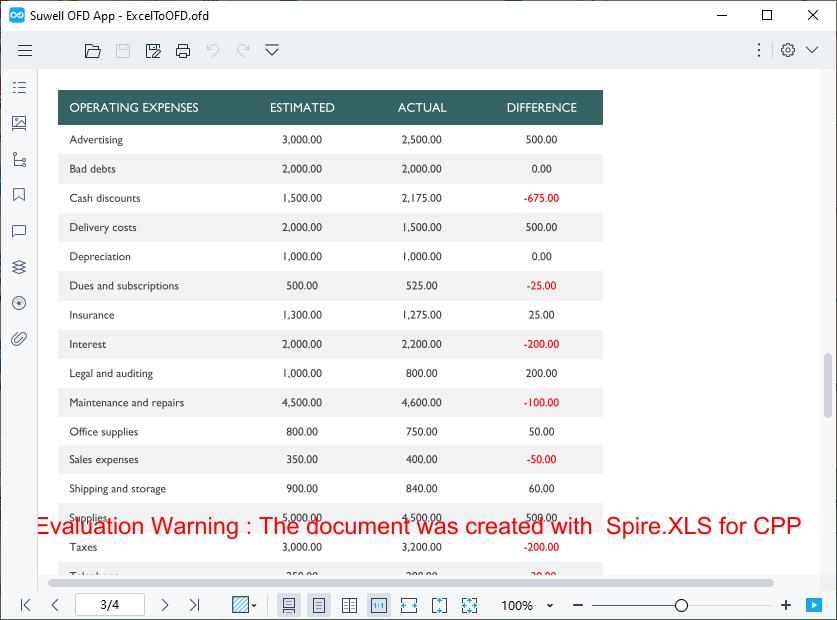
The code converts each sheet in the Excel file to a separate page in the OFD document. If you need to convert only a specific worksheet, you can copy the worksheet to a new workbook first and then use the above code for conversion.
Advanced Excel to OFD Conversion Settings
To gain finer control over how your spreadsheets appear in the final OFD document, Spire.XLS for CPP provides several options to tailor the OFD output. Below are two practical advanced configurations:
Fit Excel Sheet to One Page in OFD Output
By default, when an Excel worksheet is larger than a standard page, it may be split across multiple OFD pages. This can break the visual flow of your data. Spire.XLS for C++ provides the ConverterSetting class to customize Excel conversion, and by setting its SetSheetFitToPage method to true, you can fit each worksheet to a single OFD page.
Core implementation code:
intrusive_ptr<Workbook> workbook = new Workbook();
workbook->LoadFromFile(L"Sample.xlsx");

// Enable fit to one page
workbook->GetConverterSetting()->SetSheetFitToPage(true);

workbook->SaveToFile(L"FittedSheet.ofd", FileFormat::OFD);
workbook->Dispose();
What the code does:
- If the worksheet’s content exceeds the page dimensions, the library scales it down proportionally to fit on a single page.
- This ensures that a wide table or chart is not split awkwardly across pages.
Adjust Page Setup Before Conversion
For more precise control, you can modify the PageSetup properties of individual worksheets. This allows you to set the paper orientation, margins, paper size, and more—just as you would in Excel's Page Layout view.
Core implementation code:
intrusive_ptr<Workbook> workbook = new Workbook();
workbook->LoadFromFile(L"Sample.xlsx");

// Access the first worksheet
intrusive_ptr<Worksheet> sheet = dynamic_pointer_cast<Worksheet>(workbook->GetWorksheets()->Get(0));

// Get the PageSetup object of this worksheet
intrusive_ptr<PageSetup> pageSetup = dynamic_pointer_cast<PageSetup>(sheet->GetPageSetup());

// Set orientation to Landscape
pageSetup->SetOrientation(PageOrientationType::Landscape);

//Set the paper size to A4 paper
pageSetup->SetPaperSize(PaperSizeType::PaperA4);

// Set custom margins (in inches)
pageSetup->SetBottomMargin(2);
pageSetup->SetLeftMargin(1);
pageSetup->SetRightMargin(1);
pageSetup->SetTopMargin(2);

workbook->SaveToFile(L"CustomPageSetup.ofd", FileFormat::OFD);
What the code does:
- Orientation: Changes the page orientation to landscape (ideal for wide tables).
- Margins: Sets custom margins around the content.
- Paper Size: Sets the page size to A4 (options include PaperA4, PaperLetter, PaperLegal, etc.).
- Per‑sheet control: You can apply different settings to each worksheet before conversion.
Pro Tip: If your workflow requires broader compatibility, Spire.XLS for C++ also supports direct Excel to PDF conversion, giving you the flexibility to output to either format depending on your regional or archival requirements.
Frequently Asked Questions (FAQs)
Q1. Do I need Microsoft Excel installed on my server to use Spire.XLS for C++?
A: No. Spire.XLS for C++ is a completely independent library. It does not require Microsoft Office or Excel to be installed on the machine where the application is deployed. This makes it ideal for server-side deployments.
Q2. Does the conversion support all Excel elements (Charts, Pivot Tables, Shapes)?
A: Yes. The library is designed to preserve high-fidelity. Elements such as charts, shapes, images, formulas (as calculated values), and pivot tables are rendered accurately in the output OFD file, maintaining the visual appearance of the original spreadsheet.
Q3. Can I skip a worksheet and converts the rest to OFD?
A: Yes. You can hide unwanted worksheets before conversion (Spire.XLS for C++ skips hidden sheets):
//Hide the the first worksheet
workbook->GetWorksheets()->Get(0)->SetVisibility(WorksheetVisibility::Hidden);
Alternatively, copy the desired sheet to a new workbook as mentioned earlier.
Q4: Does Spire.XLS for CPP support batch converting multiple Excel files to OFD?
A: Yes. You can loop through all Excel files in a specified folder and convert them to OFD in batches.
Conclusion
Converting Excel to OFD in C++ is both straightforward and scalable with Spire.XLS for C++. Whether you need to convert a single spreadsheet or automate batch processing, the library delivers high‑performance results with minimal code. By using advanced settings like fit‑to‑page and custom page setup, you can ensure your OFD documents meet exacting presentation standards.
For more features such as Excel encryption, data writing, or formula calculation, explore the official documentation.
Get a Free License
To fully experience the capabilities of Spire.XLS for C++ without any watermarks or limitations, you can request a 30-day trial license here.
