- Demo
- C# source
- VB.Net source
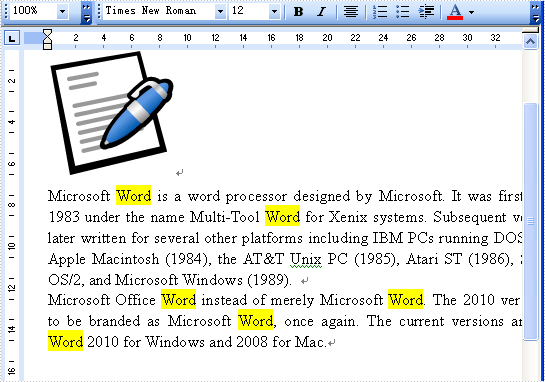
The sample demonstrates how to find and highlight specified text in Word document.
private void button1_Click(object sender, EventArgs e)
{
    //Create word document
    Document document = new Document();
    document.LoadFromFile(@"..\..\..\..\..\..\Data\FindAndReplace.doc");

    //Find text
    TextSelection[] textSelections = document.FindAllString(this.textBox1.Text, true, true);

    //Set hightlight
    foreach(TextSelection selection in textSelections)
    {
        selection.GetAsOneRange().CharacterFormat.HighlightColor = Color.Yellow;
    }

    //Save doc file.
    document.SaveToFile("Sample.doc", FileFormat.Doc);

    //Launching the MS Word file.
    WordDocViewer("Sample.doc");
}

private void WordDocViewer(string fileName)
{
    try
    {
        System.Diagnostics.Process.Start(fileName);
    }
    catch { }
}
Private Sub button1_Click(ByVal sender As Object, ByVal e As EventArgs) Handles button1.Click
	'Create word document
	Dim document_Renamed As New Document()
	document_Renamed.LoadFromFile("..\..\..\..\..\..\Data\FindAndReplace.doc")

	'Find text
	Dim textSelections() As TextSelection = document_Renamed.FindAllString(Me.textBox1.Text, True, True)

	'Set hightlight
	For Each selection As TextSelection In textSelections
		selection.GetAsOneRange().CharacterFormat.HighlightColor = Color.Yellow
	Next selection

	'Save doc file.
	document_Renamed.SaveToFile("Sample.doc", FileFormat.Doc)

	'Launching the MS Word file.
	WordDocViewer("Sample.doc")
End Sub

Private Sub WordDocViewer(ByVal fileName As String)
	Try
		Process.Start(fileName)
	Catch
	End Try
End Sub
