- Demo
- C# source
- VB.Net source
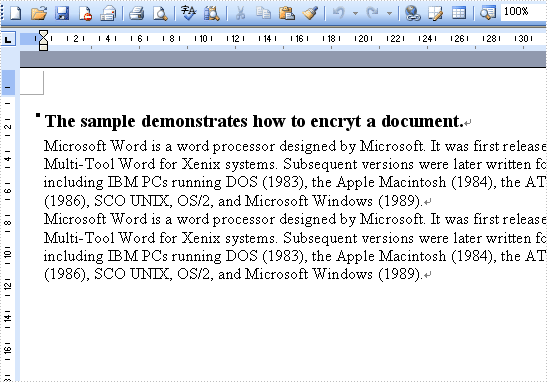
The sample demonstrates how to encrypt a document.
private void button1_Click(object sender, EventArgs e)
{
    //Create word document
    Document document = new Document();

    //Create a new paragraph
    Paragraph paragraph = document.AddSection().AddParagraph();

    //Append Text
    paragraph.AppendText("The sample demonstrates how to encryt a document.");
    paragraph.ApplyStyle(BuiltinStyle.Heading4);

    paragraph = document.Sections[0].AddParagraph();
    paragraph.AppendText("Microsoft Word is a word processor designed by Microsoft. It was first released in 1983 under the name Multi-Tool Word for Xenix systems. Subsequent versions were later written for several other platforms including IBM PCs running DOS (1983), the Apple Macintosh (1984), the AT&T Unix PC (1985), Atari ST (1986), SCO UNIX, OS/2, and Microsoft Windows (1989).");

    paragraph = document.Sections[0].AddParagraph();
    paragraph.AppendText("Microsoft Word is a word processor designed by Microsoft. It was first released in 1983 under the name Multi-Tool Word for Xenix systems. Subsequent versions were later written for several other platforms including IBM PCs running DOS (1983), the Apple Macintosh (1984), the AT&T Unix PC (1985), Atari ST (1986), SCO UNIX, OS/2, and Microsoft Windows (1989).");


    document.Encrypt(this.textBox1.Text);

    //Save doc file.
    document.SaveToFile("Sample.doc",FileFormat.Doc);

    //Launching the MS Word file.
    WordDocViewer("Sample.doc");


}

private void WordDocViewer(string fileName)
{
    try
    {
        System.Diagnostics.Process.Start(fileName);
    }
    catch { }
}
Private Sub button1_Click(ByVal sender As Object, ByVal e As EventArgs) Handles button1.Click
	'Create word document
	Dim document_Renamed As New Document()

	'Create a new paragraph
	Dim paragraph_Renamed As Paragraph = document_Renamed.AddSection().AddParagraph()

	'Append Text
	paragraph_Renamed.AppendText("The sample demonstrates how to encryt a document.")
	paragraph_Renamed.ApplyStyle(BuiltinStyle.Heading4)

	document_Renamed.Encrypt(Me.textBox1.Text)

	'Save doc file.
	document_Renamed.SaveToFile("Sample.doc",FileFormat.Doc)

	'Launching the MS Word file.
	WordDocViewer("Sample.doc")


End Sub

Private Sub WordDocViewer(ByVal fileName As String)
	Try
		Process.Start(fileName)
	Catch
	End Try
End Sub
