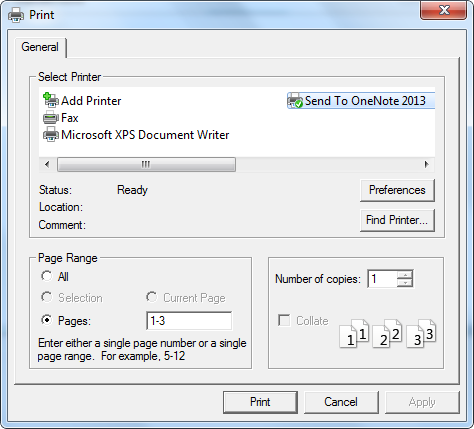
Spire.XLS supports to silently print an Excel file as well as print document with a print dialog, which is provided by System.Windows.Controls namespace in WPF, allowing users to select a specified printer and also the print pages. This article demonstrates how to print Excel file from a WPF application by invoking the print dialog in C# and VB.NET.
Necessary Namespaces:
using System.Windows;
using System.Windows.Controls;
using System.Drawing.Printing;
using Spire.Xls;
Code Snippet:
Step 1: Initialize an instance of Workbook and load a sample Excel file that you want to print.
Workbook workbook = new Workbook();
workbook.LoadFromFile("sample.xlsx");
Step 2: Create a new object of PrintDialog and set its properties such as PageRangeSelection and UserPageRangeEnabled.
PrintDialog dialog = new PrintDialog();
dialog.UserPageRangeEnabled = true;
PageRange rang = new PageRange(1, 3);
dialog.PageRange = rang;
PageRangeSelection seletion = PageRangeSelection.UserPages;
dialog.PageRangeSelection =seletion;
Step 3: Get the print document and invoke the print dialog to print.
PrintDocument pd = workbook.PrintDocument;
if (dialog.ShowDialog() == true)
{
    pd.Print();
}
Output:
Full Code:
[C#]
using Spire.Xls;
using System.Drawing;
using System.Drawing.Printing;
using System.Windows;
using System.Windows.Controls;

namespace WpfApplication1
{
    public partial class MainWindow : Window
    {
        public MainWindow()
        {
            InitializeComponent();
        }
        private void button1_Click(object sender, RoutedEventArgs e)
        {
            Workbook workbook = new Workbook();
            workbook.LoadFromFile("sample.xlsx");
            PrintDialog dialog = new PrintDialog();
            dialog.UserPageRangeEnabled = true;
            PageRange rang = new PageRange(1, 3);
            dialog.PageRange = rang;
            PageRangeSelection seletion = PageRangeSelection.UserPages;
            dialog.PageRangeSelection = seletion;
            PrintDocument pd = workbook.PrintDocument;
            if (dialog.ShowDialog() == true)
            {
                pd.Print();
            }
        }
    }
}
[VB.NET]
Imports Spire.Xls
Imports System.Drawing
Imports System.Drawing.Printing
Imports System.Windows
Imports System.Windows.Controls

Namespace WpfApplication1
	Public Partial Class MainWindow
		Inherits Window
		Public Sub New()
			InitializeComponent()
		End Sub
		Private Sub button1_Click(sender As Object, e As RoutedEventArgs)
			Dim workbook As New Workbook()
			workbook.LoadFromFile("sample.xlsx")
			Dim dialog As New PrintDialog()
			dialog.UserPageRangeEnabled = True
			Dim rang As New PageRange(1, 3)
			dialog.PageRange = rang
			Dim seletion As PageRangeSelection = PageRangeSelection.UserPages
			dialog.PageRangeSelection = seletion
			Dim pd As PrintDocument = workbook.PrintDocument
			If dialog.ShowDialog() = True Then
				pd.Print()
			End If
		End Sub
	End Class
End Namespace
