La conversión de contenido HTML a PDF ofrece muchas ventajas, incluida la capacidad de leerlo sin conexión, así como la conservación del contenido y el formato con alta fidelidad. Spire.PDF proporciona dos métodos para convertir HTML a PDF, uno es usar el complemento web QT, el otro es no usar el complemento. Le recomendamos que utilice el complemento QT para realizar la conversión.
Las siguientes secciones muestran cómo representar una página web HTML (URL) o una cadena HTML en un documento PDF usando Spire.PDF for .NET con o sin el complemento QT.
- Convierta una URL a PDF con el complemento QT
- Convierta una cadena HTML a PDF con el complemento QT
- Convertir una URL a PDF sin complemento
- Convierta una cadena HTML a PDF sin complemento
Instalar Spire.PDF for .NET
Para empezar, debe agregar los archivos DLL incluidos en el paquete Spire.PDF for .NET como referencias en su proyecto .NET. Los archivos DLL se pueden descargar desde este enlace o instalar a través de NuGet.
PM> Install-Package Spire.PDF
Descargar complemento
Si elige el método de complemento, descargue el complemento que se ajuste a su sistema operativo desde el siguiente enlace.
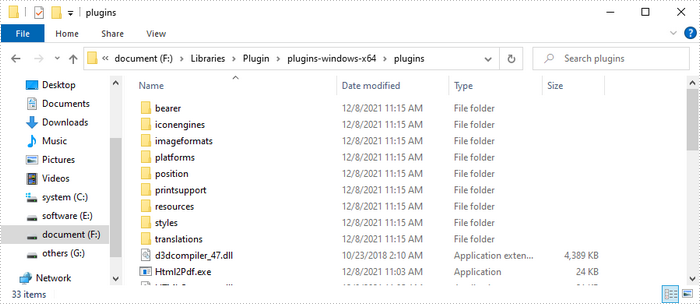
Descomprima el paquete en algún lugar de su disco para obtener la carpeta "complementos". En este ejemplo, guardamos el complemento en la ruta "F:\Libraries\Plugin\plugins-windows-x64\plugins".
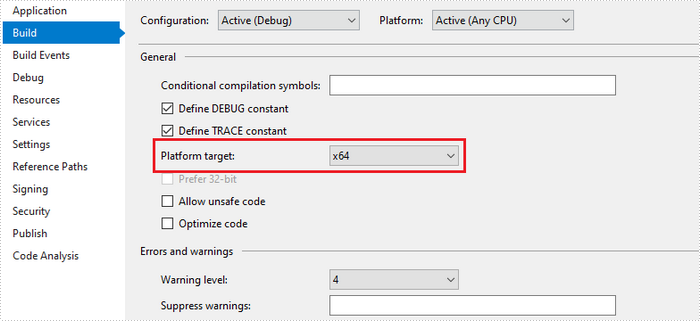
Además, le recomendamos que establezca el "Objetivo de la plataforma" de su proyecto en x64 o x86 según corresponda.
Convierta una URL a PDF con el complemento QT
Los siguientes son los pasos para convertir una URL a PDF usando Spire.PDF con el complemento QT.
- Especifique la ruta URL para convertir.
- Especifique la ruta del archivo PDF generado.
- Especifique la ruta del complemento y asígnela como el valor de la propiedad HtmlConverter.PluginPath.
- Llame al método HtmlConverter.Convert(string url, string fileName, bool enableJavaScript, int timeout, SizeF pageSize, PdfMargins margins) para convertir una URL en un documento PDF.
- C#
- VB.NET
using Spire.Pdf.Graphics;
    using Spire.Pdf.HtmlConverter.Qt;
    using System.Drawing;

    namespace ConvertUrlToPdf
    {
        class Program
        {
            static void Main(string[] args)
            {
                //Specify the URL path
                string url = "https://www.wikipedia.org/";

                //Specify the output file path
                string fileName = "UrlToPdf.pdf";

                //Specify the plugin path
                 string pluginPath = "F:\\Libraries\\Plugin\\plugins-windows-x64\\plugins";

                //Set the plugin path
                 HtmlConverter.PluginPath = pluginPath;

                //Convert URL to PDF
                HtmlConverter.Convert(url, fileName, true, 100000, new Size(1080, 1000), new PdfMargins(0));
            }
        }
    }
Convierta una cadena HTML a PDF con el complemento QT
Los siguientes son los pasos para convertir una cadena HTML a PDF usando Spire.PDF con el complemento QT.
- Obtenga la cadena HTML de un archivo .html.
- Especifique la ruta del archivo PDF generado.
- Especifique la ruta del complemento y asígnela como el valor de la propiedad HtmlConverter.PluginPath.
- Llame al método HtmlConverter.Convert(string htmlString, string fileName, bool enableJavaScript, int timeout, SizeF pageSize, PdfMargins margins, Spire.Pdf.HtmlConverter.LoadHtmlType htmlType) para convertir una cadena HTML en un documento PDF.
Nota: Solo el estilo CSS en línea y el estilo CSS interno se pueden representar correctamente en PDF. Si tiene una hoja de estilo CSS externa, conviértala a un estilo CSS en línea o interno.
- C#
- VB.NET
using System.IO;
    using Spire.Pdf.HtmlConverter.Qt;
    using System.Drawing;
    using Spire.Pdf.Graphics;

    namespace ConvertHtmlStringToPdfWithPlugin
    {
        class Program
        {
            static void Main(string[] args)
            {
                //Get the HTML string from a .html file
                string htmlString = File.ReadAllText(@"C:\Users\Administrator\Desktop\Document\Html\Sample.html");

                //Specify the output file path
                string fileName = "HtmlStringToPdf.pdf";

                //Specify the plugin path
                string pluginPath = "F:\\Libraries\\Plugin\\plugins-windows-x64\\plugins";

                //Set plugin path
                HtmlConverter.PluginPath = pluginPath;

                //Convert HTML string to PDF
                HtmlConverter.Convert(htmlString, fileName, true, 100000, new Size(1080, 1000), new PdfMargins(0), Spire.Pdf.HtmlConverter.LoadHtmlType.SourceCode);
            }
        }
    }
Convertir una URL a PDF sin complemento
Los siguientes son los pasos para convertir una URL a PDF usando Spire.PDF sin complemento.
- Cree un objeto PdfDocument.
- Cree un objeto PdfPageSettings y establezca el tamaño de página y los márgenes a través de él.
- Cree un objeto PdfHtmlLayoutFormat y establezca su propiedad IsWaiting en true.
- Especifique la ruta URL para convertir.
- Cargue HTML desde la ruta URL usando el método PdfDocument.LoadFromHTML().
- Guarde el documento en un archivo PDF utilizando el método PdfDocument.SaveToFile().
- C#
- VB.NET
using System;
    using Spire.Pdf;
    using System.Threading;
    using Spire.Pdf.HtmlConverter;
    using System.Drawing;

    namespace ConverUrlToPdfWithoutPlugin
    {
        class Program
        {
            static void Main(string[] args)
            {
                //Create a PdfDocument object
                PdfDocument doc = new PdfDocument();

                //Create a PdfPageSettings object
                PdfPageSettings setting = new PdfPageSettings();

                //Save page size and margins through the object
                setting.Size = new SizeF(1000, 1000);
                setting.Margins = new Spire.Pdf.Graphics.PdfMargins(20);

                //Create a PdfHtmlLayoutFormat object
                PdfHtmlLayoutFormat htmlLayoutFormat = new PdfHtmlLayoutFormat();

                //Set IsWaiting property to true
                htmlLayoutFormat.IsWaiting = true;

                //Specific the URL path to convert
                String url = "https://www.wikipedia.org/";

                //Load HTML from a URL path using LoadFromHTML method
                Thread thread = new Thread(() =>
                { doc.LoadFromHTML(url, true, true, false, setting, htmlLayoutFormat); });
                thread.SetApartmentState(ApartmentState.STA);
                thread.Start();
                thread.Join();

                //Save the document to a PDF file
                doc.SaveToFile("UrlToPdf.pdf");
                doc.Close();
            }
        }
    }
Convierta una cadena HTML a PDF sin complemento
Los siguientes son los pasos para convertir una cadena HTML a PDF usando Spire.PDF sin complemento.
- Cree un objeto PdfDocument.
- Cree un objeto PdfPageSettings y establezca el tamaño de página y los márgenes a través de él.
- Cree un objeto PdfHtmlLayoutFormat y establezca su propiedad IsWaiting en true.
- Lea la cadena HTML de un archivo .html.
- Cargue HTML desde la cadena HTML utilizando el método PdfDocument.LoadFromHTML().
- Guarde el documento en un archivo PDF utilizando el método PdfDocument.SaveToFile().
- C#
- VB.NET
using Spire.Pdf;
    using Spire.Pdf.HtmlConverter;
    using System.IO;
    using System.Threading;
    using System.Drawing;

    namespace ConvertHtmlStringToPdfWithoutPlugin
    {
        class Program
        {
            static void Main(string[] args)
            {
                //Create a PdfDocument object
                PdfDocument doc = new PdfDocument();

                //Create a PdfPageSettings object
                PdfPageSettings setting = new PdfPageSettings();

                //Save page size and margins through the object
                setting.Size = new SizeF(1000, 1000);
                setting.Margins = new Spire.Pdf.Graphics.PdfMargins(20);

                //Create a PdfHtmlLayoutFormat object
                PdfHtmlLayoutFormat htmlLayoutFormat = new PdfHtmlLayoutFormat();

                //Set IsWaiting property to true
                htmlLayoutFormat.IsWaiting = true;

                //Read html string from a .html file
                string htmlString = File.ReadAllText(@"C:\Users\Administrator\Desktop\Document\Html\Sample.html");

                //Load HTML from html string using LoadFromHTML method
                Thread thread = new Thread(() =>
                { doc.LoadFromHTML(htmlString, true, setting, htmlLayoutFormat); });
                thread.SetApartmentState(ApartmentState.STA);
                thread.Start();
                thread.Join();

                //Save to a PDF file
                doc.SaveToFile("HtmlStringToPdf.pdf");
            }
        }
    }
Solicitar una Licencia Temporal
Si desea eliminar el mensaje de evaluación de los documentos generados o deshacerse de las limitaciones de la función, por favor solicitar una licencia de prueba de 30 días para ti.