Un lien hypertexte dans un document Word permet aux lecteurs de passer de son emplacement à un autre endroit du document, ou à un autre fichier ou site Web, ou à un nouveau message électronique. Les hyperliens permettent aux lecteurs de naviguer rapidement et facilement vers des informations connexes. Cet article montre comment ajoutez des hyperliens vers du texte ou des images en C# et VB.NET à l'aide de Spire.Doc for .NET.
- Insérer des hyperliens lors de l'ajout de paragraphes à Word
- Ajouter des hyperliens au texte existant dans Word
Installer Spire.Doc for .NET
Pour commencer, vous devez ajouter les fichiers DLL inclus dans le package Spire.Doc for.NET comme références dans votre projet .NET. Les fichiers DLL peuvent être téléchargés à partir de ce lien ou installés via NuGet.
PM> Install-Package Spire.Doc
Insérer des hyperliens lors de l'ajout de paragraphes à Word
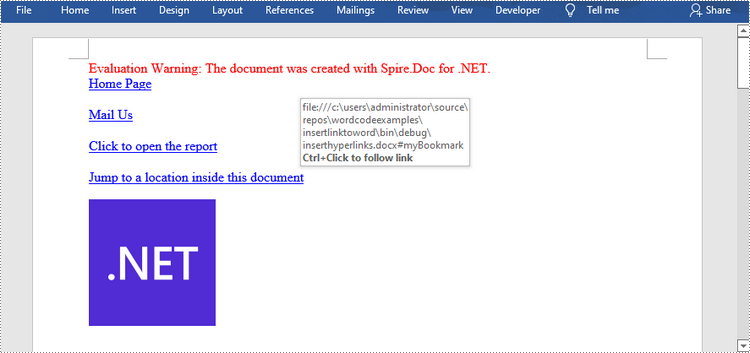
Spire.Doc propose la méthode Paragraph.AppendHyperlink() pour ajouter un lien Web, un lien de courrier électronique, un lien de fichier ou un lien de signet à un morceau de texte ou une image à l'intérieur d'un paragraphe. Voici les étapes détaillées.
- Créez un objet Document.
- Ajoutez-y une section et un paragraphe.
- Insérez un lien hypertexte basé sur du texte à l’aide de la méthode Paragraph.AppendHyerplink (string link, string text, HyperlinkType type).
- Ajoutez une image au paragraphe à l’aide de la méthode Paragraph.AppendPicture().
- Insérez un lien hypertexte basé sur l'image à l'aide de la méthode Paragraph.AppendHyerplink (string link, Spire.Doc.Fields.DocPicture, type HyperlinkType).
- Enregistrez le document à l'aide de la méthode Document.SaveToFile().
- C#
- VB.NET
using Spire.Doc;
    using Spire.Doc.Documents;
    using System.Drawing;

    namespace InsertHyperlinks
    {
        class Program
        {
            static void Main(string[] args)
            {
                //Create a Word document
                Document doc = new Document();

                //Add a section
                Section section = doc.AddSection();

                //Add a paragraph
                Paragraph paragraph = section.AddParagraph();
                paragraph.AppendHyperlink("https://www-iceblue.com/", "Home Page", HyperlinkType.WebLink);

                //Append line breaks
                paragraph.AppendBreak(BreakType.LineBreak);
                paragraph.AppendBreak(BreakType.LineBreak);

                //Add an email link
                paragraph.AppendHyperlink("mailto:support@e-iceblue.com", "Mail Us", HyperlinkType.EMailLink);

                //Append line breaks
                paragraph.AppendBreak(BreakType.LineBreak);
                paragraph.AppendBreak(BreakType.LineBreak);

                //Add a file link
                string filePath = @"C:\Users\Administrator\Desktop\report.xlsx";
                paragraph.AppendHyperlink(filePath, "Click to open the report", HyperlinkType.FileLink);

                //Append line breaks
                paragraph.AppendBreak(BreakType.LineBreak);
                paragraph.AppendBreak(BreakType.LineBreak);

                //Add another section and create a bookmark
                Section section2 = doc.AddSection();
                Paragraph bookmarkParagrapg = section2.AddParagraph();
                bookmarkParagrapg.AppendText("Here is a bookmark");
                BookmarkStart start = bookmarkParagrapg.AppendBookmarkStart("myBookmark");
                bookmarkParagrapg.Items.Insert(0, start);
                bookmarkParagrapg.AppendBookmarkEnd("myBookmark");

                //Link to the bookmark
                paragraph.AppendHyperlink("myBookmark", "Jump to a location inside this document", HyperlinkType.Bookmark);

                //Append line breaks
                paragraph.AppendBreak(BreakType.LineBreak);
                paragraph.AppendBreak(BreakType.LineBreak);

                //Add an image link
                Image image = Image.FromFile(@"C:\Users\Administrator\Desktop\logo.png");
                Spire.Doc.Fields.DocPicture picture = paragraph.AppendPicture(image);
                paragraph.AppendHyperlink("https://docs.microsoft.com/en-us/dotnet/", picture, HyperlinkType.WebLink);

                //Save to file
                doc.SaveToFile("InsertHyperlinks.docx", FileFormat.Docx2013);
            }
        }
    }
Ajouter des hyperliens au texte existant dans Word
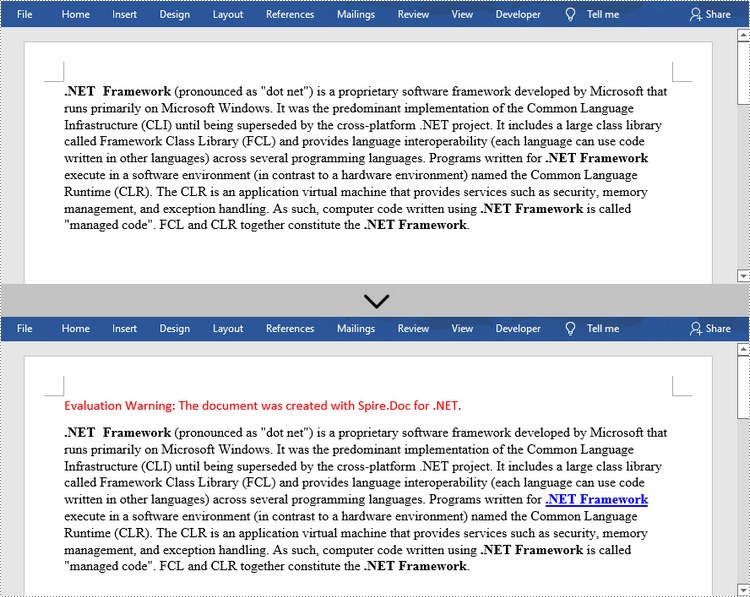
L'ajout d'hyperliens vers du texte existant dans un document est un peu plus compliqué. Vous devrez d’abord trouver la chaîne cible, puis la remplacer dans le paragraphe par un champ de lien hypertexte. Voici les étapes.
- Créez un objet Document.
- Chargez un fichier Word à l'aide de la méthode Document.LoadFromFile().
- Recherchez toutes les occurrences de la chaîne cible dans le document à l'aide de la méthode Document.FindAllString() et obtenez celle spécifique par son index dans la collection.
- Obtenez le propre paragraphe de la chaîne et sa position dans celui-ci.
- Supprimez la chaîne du paragraphe.
- Créez un champ de lien hypertexte et insérez-le à l'emplacement où se trouve la chaîne.
- Enregistrez le document dans un autre fichier à l'aide de la méthode Document.SaveToFle().
- C#
- VB.NET
using Spire.Doc;
    using Spire.Doc.Documents;
    using Spire.Doc.Fields;
    using Spire.Doc.Interface;

    namespace AddHyperlinksToExistingText
    {
        class Program
        {
            static void Main(string[] args)
            {
                //Create a Document object
                Document document = new Document();

                //Load a Word file
                document.LoadFromFile(@"C:\Users\Administrator\Desktop\sample.docx");

                //Find all the occurrences of the string ".NET Framework" in the document
                TextSelection[] selections = document.FindAllString(".NET Framework", true, true);

                //Get the second occurrence
                TextRange range = selections[1].GetAsOneRange();

                //Get its owner paragraph
                Paragraph parapgraph = range.OwnerParagraph;

                //Get its position in the paragraph
                int index = parapgraph.Items.IndexOf(range);

                //Remove it from the paragraph
                parapgraph.Items.Remove(range);

                //Create a hyperlink field
                Spire.Doc.Fields.Field field = new Spire.Doc.Fields.Field(document);
                field.Type = Spire.Doc.FieldType.FieldHyperlink;
                Hyperlink hyperlink = new Hyperlink(field);
                hyperlink.Type = HyperlinkType.WebLink;
                hyperlink.Uri = "https://en.wikipedia.org/wiki/.NET_Framework";
                parapgraph.Items.Insert(index, field);

                //Insert a field mark "start" to the paragraph
                IParagraphBase start = document.CreateParagraphItem(ParagraphItemType.FieldMark);
                (start as FieldMark).Type = FieldMarkType.FieldSeparator;
                parapgraph.Items.Insert(index + 1, start);

                //Insert a text range between two field marks
                ITextRange textRange = new Spire.Doc.Fields.TextRange(document);
                textRange.Text = ".NET Framework";
                textRange.CharacterFormat.Font = range.CharacterFormat.Font;
                textRange.CharacterFormat.TextColor = System.Drawing.Color.Blue;
                textRange.CharacterFormat.UnderlineStyle = UnderlineStyle.Single;
                parapgraph.Items.Insert(index + 2, textRange);

                //Insert a field mark "end" to the paragraph
                IParagraphBase end = document.CreateParagraphItem(ParagraphItemType.FieldMark);
                (end as FieldMark).Type = FieldMarkType.FieldEnd;
                parapgraph.Items.Insert(index + 3, end);

                //Save to file
                document.SaveToFile("AddHyperlink.docx", Spire.Doc.FileFormat.Docx);
            }
        }
    }
Demander une licence temporaire
Si vous souhaitez supprimer le message d'évaluation des documents générés ou vous débarrasser des limitations fonctionnelles, veuillez demander une licence d'essai de 30 jours pour toi.