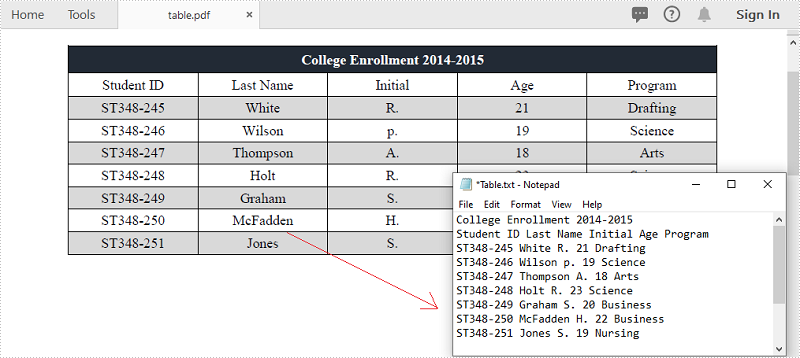
PDF는 데이터 공유 및 쓰기에 가장 널리 사용되는 문서 형식 중 하나입니다. PDF 문서, 특히 테이블의 데이터에서 데이터를 추출해야 하는 상황이 발생할 수 있습니다. 예를 들어, PDF 송장 테이블에 유용한 정보가 저장되어 있으며 추가 분석이나 계산을 위해 데이터를 추출하려고 합니다. 이 문서에서는 다음 방법을 보여줍니다 PDF 테이블에서 데이터 추출Spire.PDF for .NET를 사용하여 TXT 파일로 저장합니다.
Spire.PDF for .NET 설치
먼저 Spire.PDF for .NET 패키지에 포함된 DLL 파일을 .NET 프로젝트의 참조로 추가해야 합니다. DLL 파일은 이 링크 에서 다운로드하거나 NuGet을 통해 설치할 수 있습니다.
- Package Manager
PM> Install-Package Spire.PDF
PDF 테이블에서 데이터 추출
다음은 PDF 문서에서 테이블을 추출하는 주요 단계입니다.
- PdfDocument 클래스의 인스턴스를 만듭니다.
- PdfDocument.LoadFromFile() 메서드를 사용하여 샘플 PDF 문서를 로드합니다.
- PdfTableExtractor.ExtractTable(int pageIndex) 메서드를 사용하여 특정 페이지에서 테이블을 추출합니다.
- PdfTable.GetText(int rowIndex, int columnIndex) 메서드를 사용하여 특정 테이블 셀의 텍스트를 가져옵니다.
- 추출된 데이터를 .txt 파일에 저장합니다.
- C#
- VB.NET
using System.IO;
    using System.Text;
    using Spire.Pdf;
    using Spire.Pdf.Utilities;

    namespace ExtractPdfTable
    {
        class Program
        {
            static void Main(string[] args)
            {
                //Create a PdfDocument object
                PdfDocument doc = new PdfDocument();

                //Load the sample PDF file
                doc.LoadFromFile(@"C:\Users\Administrator\Desktop\table.pdf");

                //Create a StringBuilder object
                StringBuilder builder = new StringBuilder();

                //Initialize an instance of PdfTableExtractor class
                PdfTableExtractor extractor = new PdfTableExtractor(doc);

                //Declare a PdfTable array
                PdfTable[] tableList = null;

                //Loop through the pages
                for (int pageIndex = 0; pageIndex < doc.Pages.Count; pageIndex++)
                {
                    //Extract tables from a specific page
                    tableList = extractor.ExtractTable(pageIndex);

                    //Determine if the table list is null
                    if (tableList != null && tableList.Length > 0)
                    {
                        //Loop through the table in the list
                        foreach (PdfTable table in tableList)
                        {
                            //Get row number and column number of a certain table
                            int row = table.GetRowCount();
                            int column = table.GetColumnCount();

                            //Loop though the row and colunm
                            for (int i = 0; i < row; i++)
                            {
                                for (int j = 0; j < column; j++)
                                {
                                    //Get text from the specific cell
                                    string text = table.GetText(i, j);

                                    //Add text to the string builder
                                    builder.Append(text + " ");
                                }
                                builder.Append("\r\n");
                            }
                        }
                    }
                }

                //Write to a .txt file
                File.WriteAllText("Table.txt", builder.ToString());
            }
        }
    }
Imports System.IO
    Imports System.Text
    Imports Spire.Pdf
    Imports Spire.Pdf.Utilities

    Namespace ExtractPdfTable
        Class Program
            Shared  Sub Main(ByVal args() As String)
                'Create a PdfDocument object
                Dim doc As PdfDocument =  New PdfDocument()

                'Load the sample PDF file
                doc.LoadFromFile("C:\Users\Administrator\Desktop\table.pdf")

                'Create a StringBuilder object
                Dim builder As StringBuilder =  New StringBuilder()

                'Initialize an instance of PdfTableExtractor class
                Dim extractor As PdfTableExtractor =  New PdfTableExtractor(doc)

                'Declare a PdfTable array
                Dim tableList() As PdfTable =  Nothing

                'Loop through the pages
                Dim pageIndex As Integer
                For  pageIndex = 0 To  doc.Pages.Count- 1  Step  pageIndex + 1
                    'Extract tables from a specific page
                    tableList = extractor.ExtractTable(pageIndex)

                    'Determine if the table list is null
                    If tableList <> Nothing And tableList.Length > 0 Then
                        'Loop through the table in the list
                        Dim table As PdfTable
                        For Each table In tableList
                            'Get row number and column number of a certain table
                            Dim row As Integer =  table.GetRowCount()
                            Dim column As Integer =  table.GetColumnCount()

                            'Loop though the row and colunm
                            Dim i As Integer
                            For  i = 0 To  row- 1  Step  i + 1
                                Dim j As Integer
                                For  j = 0 To  column- 1  Step  j + 1
                                    'Get text from the specific cell
                                    Dim text As String =  table.GetText(i,j)

                                    'Add text to the string builder
                                    builder.Append(text + " ")
                                Next
                                builder.Append("\r\n")
                            Next
                        Next
                    End If
                Next

                'Write to a .txt file
                File.WriteAllText("Table.txt", builder.ToString())
            End Sub
        End Class
    End Namespace
임시 면허 신청
생성된 문서에서 평가 메시지를 제거하거나 기능 제한을 제거하려면 다음을 수행하십시오 30일 평가판 라이선스 요청 자신을 위해.