OFD (Open Fixed-layout Document) is a national standard fixed-layout document format widely used in e-invoices, e-certificates, administrative approvals, and other government and financial scenarios. OFD describes document structure based on XML, offering advantages such as independent control and information security. Meanwhile, PDF remains indispensable as an internationally recognized document format for cross-platform distribution. Real-world business often requires flexible switching between the two formats: receiving OFD-format e-invoices and converting them to PDF for printing and distribution, or converting existing PDF contracts to OFD to meet government platform upload requirements.
Spire.PDF for JavaScript performs bidirectional conversion between PDF and OFD entirely in the browser via WebAssembly, managing input and output files through a virtual file system (VFS) with no backend server required.
This article covers two core features:
For installation and project setup, refer to Integrating Spire.PDF for JavaScript in a React Project. The examples below assume Spire.PDF is installed and the WebAssembly module is initialized.
Convert PDF to OFD
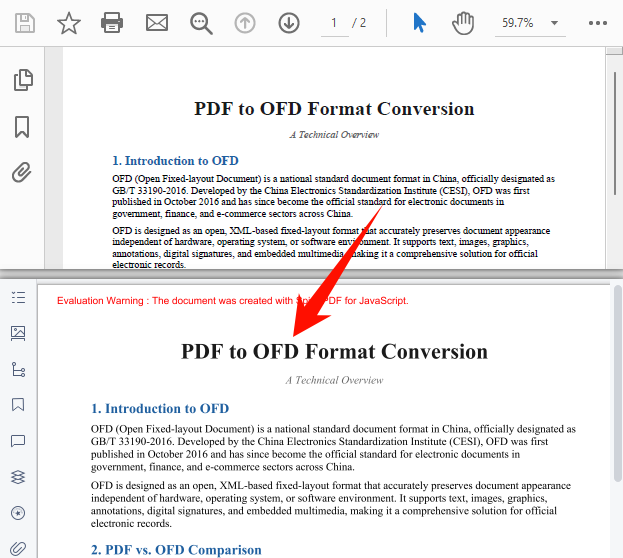
The core of PDF-to-OFD conversion is to re-encode the page content, fonts, and graphics elements from a PDF document into an XML description structure compliant with the OFD standard. Spire.PDF for JavaScript accomplishes this in one step through the PdfDocument object's SaveToFile method with the FileFormat.OFD enum value, eliminating the need to handle underlying format differences manually.
function App() {
  const convertToOFD = async () => {
    // Get the Spire.PDF WASM module
    const pdfModule = window.wasmModule?.spirepdf;

    // Check if the WASM module is ready
    if (!pdfModule) {
      alert('Spire.PDF is not ready yet');
      return;
    }

    // Load fonts and PDF file into VFS
    await window.spire.FetchFileToVFS('ARIAL.TTF', '/Library/Fonts/', `${process.env.PUBLIC_URL}/font/`);
    const inputFileName = 'TemplateIntroduction-en.pdf';
    await window.spire.FetchFileToVFS(inputFileName, "", `${process.env.PUBLIC_URL}/data/`);

    // Create PdfDocument object and load the PDF document
    let doc = new pdfModule.PdfDocument();
    doc.LoadFromFile(inputFileName);

    // Define the output file name for OFD format
    const outputFileName = 'OutputOFD.ofd';

    // Save as OFD format
    doc.SaveToFile({ fileName: outputFileName, fileFormat: pdfModule.FileFormat.OFD });
    doc.Close();

    // Read the converted file from VFS and trigger download
    const fileArray = window.dotnetRuntime.Module.FS.readFile(outputFileName);
    const blob = new Blob([fileArray], { type: 'application/ofd' });
    const url = URL.createObjectURL(blob);
    const a = document.createElement('a');
    a.href = url;
    a.download = outputFileName;
    a.click();
    URL.revokeObjectURL(url);
  };

  return (
    <div style={{ textAlign: 'center', height: '300px' }}>
      <h1>Convert PDF To OFD</h1>
      <button onClick={convertToOFD}>
        Generate
      </button>
    </div>
  );
}

export default App;
OFD output generated after conversion via SaveToFile with FileFormat.OFD
Convert OFD to PDF
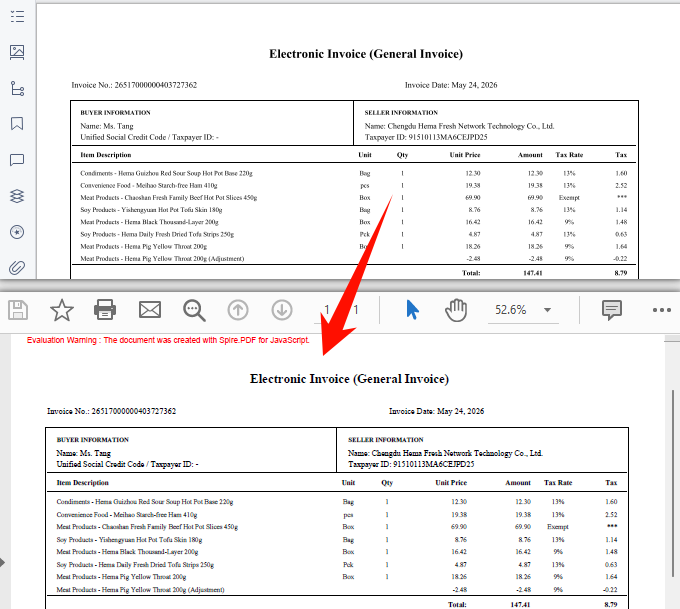
OFD-to-PDF conversion is a common requirement in government electronic document distribution scenarios. Spire.PDF for JavaScript provides the OfdConverter component, which is specifically designed to parse OFD fixed-layout documents and export them as standard PDF files while preserving the original document's layout and visual appearance.
function App() {
  const convertOFDToPDF = async () => {
    // Get the Spire.PDF WASM module
    const pdfModule = window.wasmModule?.spirepdf;

    // Check if the WASM module is ready
    if (!pdfModule) {
      alert('Spire.PDF is not ready yet');
      return;
    }

    // Load fonts and OFD file into VFS
    await window.spire.FetchFileToVFS('Arial.TTF', '/Library/Fonts/', `${process.env.PUBLIC_URL}/font/`);
    const inputFileName = 'Invoice_EN.ofd';
    await window.spire.FetchFileToVFS(inputFileName, "", `${process.env.PUBLIC_URL}/data/`);

    // Create OfdConverter object and pass the OFD file path
    let converter = new pdfModule.OfdConverter(inputFileName);

    // Define the output file name for PDF format
    const outputFileName = 'OutputPDF.pdf';

    // Convert to PDF format
    converter.ToPdf(outputFileName);
    converter.Dispose();

    // Read the converted file from VFS and trigger download
    const fileArray = window.dotnetRuntime.Module.FS.readFile(outputFileName);
    const blob = new Blob([fileArray], { type: 'application/pdf' });
    const url = URL.createObjectURL(blob);
    const a = document.createElement('a');
    a.href = url;
    a.download = outputFileName;
    a.click();
    URL.revokeObjectURL(url);
  };

  return (
    <div style={{ textAlign: 'center', height: '300px' }}>
      <h1>Convert OFD To PDF</h1>
      <button onClick={convertOFDToPDF}>
        Generate
      </button>
    </div>
  );
}

export default App;
Standard PDF output generated after conversion via OfdConverter
FAQ
Can encrypted PDFs be converted to OFD?
Password-protected encrypted PDFs cannot be saved as OFD directly via SaveToFile — the document must be decrypted first.
Solution: Provide the password when loading the PDF via the second parameter of LoadFromFile, then save as OFD:
// Load a password-protected PDF document
let doc = new pdfModule.PdfDocument();
doc.LoadFromFile(inputFileName, "password");

// Save as OFD format
doc.SaveToFile({ fileName: outputFileName, fileFormat: pdfModule.FileFormat.OFD });
doc.Close();
Garbled text in the converted OFD document
OFD relies on font embedding to ensure consistent cross-platform rendering. If the input PDF uses non-embedded fonts and the corresponding font files are not loaded in the VFS, text may appear garbled after conversion.
Solution: Make sure the required TrueType font files (e.g., ARIALUNI.TTF) are loaded into the /Library/Fonts/ directory in VFS before calling the conversion. ARIALUNI.TTF covers common CJK characters and is the recommended font for ensuring conversion quality.
Get a Free License
Spire.PDF for JavaScript offers a 30-day full-featured free trial license with no functional limitations. Apply here to evaluate before purchasing.
