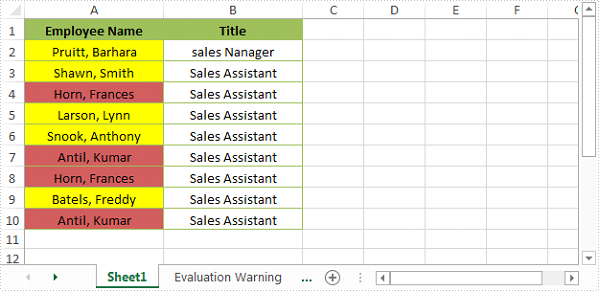
Using Excel conditional formatting, we can quickly find and highlight the duplicate and unique values in a selected cell range. In this article, we’re going to show you how to programmatically highlight duplicate and unique values with different colors using Spire.XLS and conditional formatting.
Detail steps:
Step 1: Initialize an object of Workbook class and Load the Excel file.
Workbook workbook = new Workbook();
workbook.LoadFromFile("Input.xlsx");
Step 2: Get the first worksheet.
Worksheet sheet = workbook.Worksheets[0];
Step 3: Use conditional formatting to highlight duplicate values in range "A2:A10" with IndianRed color.
XlsConditionalFormats xcfs1 = sheet.ConditionalFormats.Add();
xcfs1.AddRange(sheet.Range["A2:A10"]);

IConditionalFormat format1 = xcfs1.AddCondition();
format1.FormatType = ConditionalFormatType.DuplicateValues;
format1.BackColor = Color.IndianRed;
Step 4: Use conditional formatting to highlight unique values in range "A2:A10" with Yellow color.
IConditionalFormat format2 = xcfs1.AddCondition();
format2.FormatType = ConditionalFormatType.UniqueValues;
format2.BackColor = Color.Yellow;"
Step 5: Save the file.
workbook.SaveToFile("HighlightDuplicates.xlsx", ExcelVersion.Version2013);
Screenshot:
Full code:
using Spire.Xls;
using Spire.Xls.Core;
using Spire.Xls.Core.Spreadsheet.Collections;
using System.Drawing;

namespace HighlightDuplicateandUniqueValues
{
    class Program
    {
        static void Main(string[] args)
        {
            //Load the Excel file
            Workbook workbook = new Workbook();
            workbook.LoadFromFile("Input.xlsx");

            //Get the first worksheet
            Worksheet sheet = workbook.Worksheets[0];

            //Use conditional formatting to highlight duplicate values in range "A2:A10" with IndianRed color
            XlsConditionalFormats xcfs1 = sheet.ConditionalFormats.Add();
            xcfs1.AddRange(sheet.Range["A2:A10"]);

            IConditionalFormat format1 = xcfs1.AddCondition();
            format1.FormatType = ConditionalFormatType.DuplicateValues;
            format1.BackColor = Color.IndianRed;

            //Use conditional formatting to highlight unique values in range "A2:A10" with Yellow color
            IConditionalFormat format2 = xcfs1.AddCondition();
            format2.FormatType = ConditionalFormatType.UniqueValues;
            format2.BackColor = Color.Yellow;

            //Save the file
            workbook.SaveToFile("HighlightDuplicates.xlsx", ExcelVersion.Version2013);

        }
    }
}
