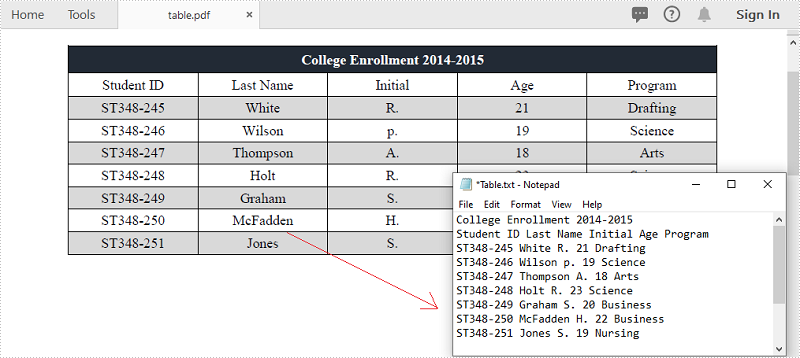
Il PDF è uno dei formati di documento più popolari per la condivisione e la scrittura di dati. Potresti incontrare la situazione in cui è necessario estrarre dati da documenti PDF, in particolare i dati nelle tabelle. Ad esempio, ci sono informazioni utili memorizzate nelle tabelle delle tue fatture PDF e desideri estrarre i dati per ulteriori analisi o calcoli. Questo articolo illustra come estrarre i dati dalle tabelle PDF e salvarlo in un file TXT utilizzando Spire.PDF for .NET.
Installa Spire.PDF for .NET
Per cominciare, è necessario aggiungere i file DLL inclusi nel pacchetto Spire.PDF for.NET come riferimenti nel progetto .NET. I file DLL possono essere scaricati da questo link o installato tramite NuGet.
- Package Manager
PM> Install-Package Spire.PDF
Estrai dati da tabelle PDF
Di seguito sono riportati i passaggi principali per estrarre le tabelle da un documento PDF.
- Crea un'istanza della classe PdfDocument.
- Caricare il documento PDF di esempio utilizzando il metodo PdfDocument.LoadFromFile().
- Estrai le tabelle da una pagina specifica utilizzando il metodo PdfTableExtractor.ExtractTable(int pageIndex).
- Ottieni il testo di una determinata cella della tabella utilizzando il metodo PdfTable.GetText(int rowIndex, int columnIndex).
- Salva i dati estratti in un file .txt.
- C#
- VB.NET
using System.IO;
    using System.Text;
    using Spire.Pdf;
    using Spire.Pdf.Utilities;

    namespace ExtractPdfTable
    {
        class Program
        {
            static void Main(string[] args)
            {
                //Create a PdfDocument object
                PdfDocument doc = new PdfDocument();

                //Load the sample PDF file
                doc.LoadFromFile(@"C:\Users\Administrator\Desktop\table.pdf");

                //Create a StringBuilder object
                StringBuilder builder = new StringBuilder();

                //Initialize an instance of PdfTableExtractor class
                PdfTableExtractor extractor = new PdfTableExtractor(doc);

                //Declare a PdfTable array
                PdfTable[] tableList = null;

                //Loop through the pages
                for (int pageIndex = 0; pageIndex < doc.Pages.Count; pageIndex++)
                {
                    //Extract tables from a specific page
                    tableList = extractor.ExtractTable(pageIndex);

                    //Determine if the table list is null
                    if (tableList != null && tableList.Length > 0)
                    {
                        //Loop through the table in the list
                        foreach (PdfTable table in tableList)
                        {
                            //Get row number and column number of a certain table
                            int row = table.GetRowCount();
                            int column = table.GetColumnCount();

                            //Loop though the row and colunm
                            for (int i = 0; i < row; i++)
                            {
                                for (int j = 0; j < column; j++)
                                {
                                    //Get text from the specific cell
                                    string text = table.GetText(i, j);

                                    //Add text to the string builder
                                    builder.Append(text + " ");
                                }
                                builder.Append("\r\n");
                            }
                        }
                    }
                }

                //Write to a .txt file
                File.WriteAllText("Table.txt", builder.ToString());
            }
        }
    }
Imports System.IO
    Imports System.Text
    Imports Spire.Pdf
    Imports Spire.Pdf.Utilities

    Namespace ExtractPdfTable
        Class Program
            Shared  Sub Main(ByVal args() As String)
                'Create a PdfDocument object
                Dim doc As PdfDocument =  New PdfDocument()

                'Load the sample PDF file
                doc.LoadFromFile("C:\Users\Administrator\Desktop\table.pdf")

                'Create a StringBuilder object
                Dim builder As StringBuilder =  New StringBuilder()

                'Initialize an instance of PdfTableExtractor class
                Dim extractor As PdfTableExtractor =  New PdfTableExtractor(doc)

                'Declare a PdfTable array
                Dim tableList() As PdfTable =  Nothing

                'Loop through the pages
                Dim pageIndex As Integer
                For  pageIndex = 0 To  doc.Pages.Count- 1  Step  pageIndex + 1
                    'Extract tables from a specific page
                    tableList = extractor.ExtractTable(pageIndex)

                    'Determine if the table list is null
                    If tableList <> Nothing And tableList.Length > 0 Then
                        'Loop through the table in the list
                        Dim table As PdfTable
                        For Each table In tableList
                            'Get row number and column number of a certain table
                            Dim row As Integer =  table.GetRowCount()
                            Dim column As Integer =  table.GetColumnCount()

                            'Loop though the row and colunm
                            Dim i As Integer
                            For  i = 0 To  row- 1  Step  i + 1
                                Dim j As Integer
                                For  j = 0 To  column- 1  Step  j + 1
                                    'Get text from the specific cell
                                    Dim text As String =  table.GetText(i,j)

                                    'Add text to the string builder
                                    builder.Append(text + " ")
                                Next
                                builder.Append("\r\n")
                            Next
                        Next
                    End If
                Next

                'Write to a .txt file
                File.WriteAllText("Table.txt", builder.ToString())
            End Sub
        End Class
    End Namespace
Richiedi una licenza temporanea
Se desideri rimuovere il messaggio di valutazione dai documenti generati o eliminare le limitazioni delle funzioni, per favore richiedere una licenza di prova di 30 giorni per te.