React 애플리케이션 내에서 PDF를 HTML로 변환하면 사용자는 정적 문서를 동적이고 액세스 가능한 웹 콘텐츠로 변환할 수 있습니다. 이 접근 방식은 여러 기기에서 반응성을 향상시키고, 콘텐츠 업데이트를 간소화하며, 웹 페이지에 직접 통합되므로 외부 PDF 뷰어가 필요 없습니다. 상태 기반 UI 업데이트와 같은 웹 네이티브 기능을 활용하면서 원래 레이아웃을 유지합니다. PDF의 구조와 최신 웹 인터페이스의 유연성을 병합하여 이 방법은 디자인 무결성을 손상시키지 않으면서도 적응 가능하고 사용자 친화적인 콘텐츠를 만듭니다.
이 문서에서는 React 애플리케이션에서 JavaScript를 사용하여 PDF 파일을 HTML로 변환하기 위해 Spire.PDF for JavaScript 를 사용 하는 방법을 살펴보겠습니다 .
- JavaScript를 사용하여 PDF를 HTML로 변환하는 단계
- PDF 문서를 단일 HTML 파일로 변환
- 이미지를 포함하지 않고 PDF를 HTML로 변환
- PDF를 분리된 HTML 파일로 변환
- 변환된 HTML 파일의 파일 크기 최적화
React 앱에서 JavaScript용 Spire.PDF 설치 및 구성
React 애플리케이션에서 PDF를 HTML로 변환하려면 다음 단계를 따르세요.
1. npm 을 통해 설치 :
프로젝트의 루트 디렉토리에서 다음 명령을 실행하세요.
npm install spire.pdf
2. 필요한 파일을 추가합니다.
Spire.Pdf.Base.js 및 Spire.Pdf.Base.wasm 파일을 프로젝트의 공용 폴더로 복사합니다. 이렇게 하면 WebAssembly 모듈이 올바르게 초기화됩니다.
3. 글꼴 파일 포함:
정확하고 일관된 텍스트 렌더링을 보장하려면 필요한 글꼴 파일을 지정된 폴더(예: /public/fonts)에 넣으세요.
자세한 내용은 다음 문서를 참조하세요: React 프로젝트에서 JavaScript용 Spire.PDF를 통합하는 방법
JavaScript를 사용하여 PDF를 HTML로 변환하는 단계
JavaScript용 Spire.PDF에는 PDF 문서를 처리하기 위한 WebAssembly 모듈이 포함되어 있습니다. PDF를 가상 파일 시스템(VFS)으로 가져오면 개발자는 PDF를 PdfDocument 객체에 로드하고 HTML과 같은 다양한 형식으로 변환할 수 있습니다. 주요 단계는 다음과 같습니다.
- Spire.Pdf.Base.js 파일을 로드하여 WebAssembly 모듈을 초기화합니다.
- wasmModule.FetchFileToVFS() 메서드를 사용하여 PDF 파일을 VFS로 가져옵니다 .
- wasmModule.FetchFileToVFS() 메서드를 사용하여 PDF 문서에 사용된 글꼴 파일을 VFS의 "/Library/Fonts/" 폴더로 가져옵니다 .
- wasmModule.PdfDocument.Create() 메서드를 사용하여 PdfDocument 클래스 의 인스턴스를 생성합니다 .
- (선택 사항) PdfDocument.ConvertOptions.SetPdfToHtmlOptions() 메서드 를 사용하여 변환 옵션을 구성합니다 .
- PdfDocument.SaveToFile() 메서드를 사용하여 PDF 문서를 HTML 형식으로 변환하고 VFS에 저장합니다 .
- HTML 파일을 읽고 다운로드하거나 필요에 따라 사용하세요.
PdfDocument.ConvertOptions.SetPdfToHtmlOptions() 메서드를 사용하여 변환 옵션을 구성할 때 다음 매개변수를 설정할 수 있습니다.
| 매개변수 | 설명 |
| useEmbeddedSvg: bool | 결과 HTML 파일에 SVG를 포함합니다. |
| useEmbeddedImg: bool | 결과 HTML 파일에 SVG로 이미지를 포함합니다(useEmbeddedSvg가 true여야 함). |
| maxPageOneFile: int | 하나의 HTML 파일에 포함되는 최대 PDF 페이지 수를 지정합니다(useEmbeddedSvg가 true인 경우 적용). |
| useHighQualityEmbeddedSvg: bool | HTML 파일에 고품질 SVG를 임베드합니다. 이는 이미지 품질과 파일 크기에 모두 영향을 미칩니다(useEmbeddedSvg가 true일 때 효과적). |
PDF 문서를 단일 HTML 파일로 변환
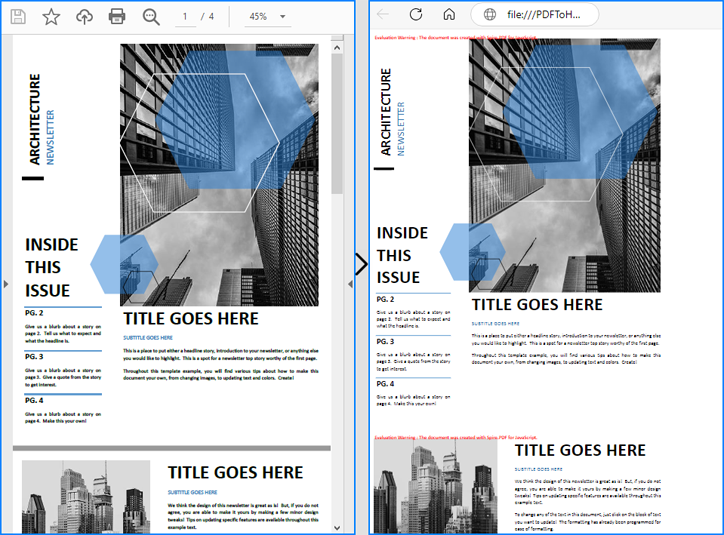
SVG와 이미지를 임베드하고 파일당 최대 페이지를 PDF의 총 페이지 수 또는 0으로 설정하면 개발자는 전체 PDF 문서를 단일 HTML 파일로 변환할 수 있습니다. 또는 개발자는 옵션을 구성하지 않고 PDF를 변환할 수 있으며, 그 결과 모든 요소가 고품질 SVG로 HTML 파일에 임베드됩니다.
다음은 JavaScript용 Spire.PDF를 사용하여 PDF 문서를 단일 HTML 파일로 변환하는 방법을 보여주는 코드 예입니다.
- JavaScript
import React, { useState, useEffect } from 'react';
import JSZip from 'jszip';

function App() {

  // State to store the loaded WASM module
  const [wasmModule, setWasmModule] = useState(null);

  // useEffect hook to load the WASM module when the component mounts
  useEffect(() => {
    const loadWasm = async () => {
      try {
        // Access the Module and spirepdf from the global window object
        const { Module, spirepdf } = window;

        // Set the wasmModule state when the runtime is initialized
        Module.onRuntimeInitialized = () => {
          setWasmModule(spirepdf);
        };
      } catch (err) {
        // Log any errors that occur during module loading
        console.error('Failed to load the WASM module:', err);
      }
    };

    // Create a script element to load the WASM JavaScript file
    const script = document.createElement('script');
    script.src = `${process.env.PUBLIC_URL}/Spire.Pdf.Base.js`;
    script.onload = loadWasm;

    // Append the script to the document body
    document.body.appendChild(script);

    // Cleanup function to remove the script when the component unmounts
    return () => {
      document.body.removeChild(script);
    };
  }, []);

  // Function to convert PDF to HTML
  const ConvertPDFToHTML = async () => {
    if (wasmModule) {
      // Specify the input and output file names
      const inputFileName = 'Sample.pdf';
      const outputFileName = 'PDFToHTML.html';

      // Fetch the input file and add it to the VFS
      await wasmModule.FetchFileToVFS(inputFileName, '', `${process.env.PUBLIC_URL}/`);

      // Fetch the font file used in the PDF to the VFS
      await wasmModule.FetchFileToVFS('Calibri.ttf', '/Library/Fonts/', `${process.env.PUBLIC_URL}/`);
      await wasmModule.FetchFileToVFS('CalibriBold.ttf', '/Library/Fonts/', `${process.env.PUBLIC_URL}/`);

      // Create an instance of the PdfDocument class
      const pdf = wasmModule.PdfDocument.Create();

      // Load the PDF document from the VFS
      pdf.LoadFromFile(inputFileName);

      // Convert the PDF document to an HTML file
      pdf.SaveToFile({ fileName: outputFileName, fileFormat: wasmModule.FileFormat.HTML});

      // Set the conversion options (optional)
      pdf.ConvertOptions.SetPdfToHtmlOptions({ useEmbeddedSvg: true, useEmbeddedImg: true, maxPageOneFile: pdf.Pages.Count, useHighQualityEmbeddedSvg: true})

      // Read the HTML file from the VFS
      const htmlArray = wasmModule.FS.readFile(outputFileName)

      // Create a Blob from the HTML file and download it
      const blob = new Blob([htmlArray], { type: 'text/html' });
      const url = URL.createObjectURL(blob);
      const link = document.createElement('a');
      link.href = url;
      link.download = outputFileName;
      link.click();
    }
  };

  return (
      <div style={{ textAlign: 'center', height: '300px' }}>
        <h1>Convert PDF to HTML Using JavaScript in React</h1>
        <button onClick={ConvertPDFToHTML} disabled={!wasmModule}>
          Convert and Download
        </button>
      </div>
  );
}

export default App;
이미지를 포함하지 않고 PDF를 HTML로 변환
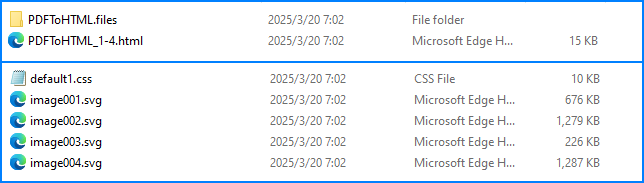
개별 편집을 더 쉽게 하기 위해 HTML 본문을 이미지에서 분리하기 위해 개발자는 이미지와 SVG를 임베드하지 않고 PDF를 HTML로 변환할 수 있습니다. 이를 위해서는 useEmbeddedSvg 및 useEmbeddedImg 매개변수를 false로 설정해야 합니다.
다음은 이 변환과 그 결과를 보여주는 코드 예입니다.
- JavaScript
import React, { useState, useEffect } from 'react';
import JSZip from 'jszip';

function App() {

  // State to store the loaded WASM module
  const [wasmModule, setWasmModule] = useState(null);

  // useEffect hook to load the WASM module when the component mounts
  useEffect(() => {
    const loadWasm = async () => {
      try {
        // Access the Module and spirepdf from the global window object
        const { Module, spirepdf } = window;

        // Set the wasmModule state when the runtime is initialized
        Module.onRuntimeInitialized = () => {
          setWasmModule(spirepdf);
        };
      } catch (err) {
        // Log any errors that occur during module loading
        console.error('Failed to load the WASM module:', err);
      }
    };

    // Create a script element to load the WASM JavaScript file
    const script = document.createElement('script');
    script.src = `${process.env.PUBLIC_URL}/Spire.Pdf.Base.js`;
    script.onload = loadWasm;

    // Append the script to the document body
    document.body.appendChild(script);

    // Cleanup function to remove the script when the component unmounts
    return () => {
      document.body.removeChild(script);
    };
  }, []);

  // Function to convert PDF to HTML
  const ConvertPDFToHTML = async () => {
    if (wasmModule) {
      // Specify the input and output file names
      const inputFileName = 'Sample.pdf';
      const outputFileName = '/output/PDFToHTML.html';

      // Fetch the input file and add it to the VFS
      await wasmModule.FetchFileToVFS(inputFileName, '', `${process.env.PUBLIC_URL}/`);

      // Fetch the font file used in the PDF to the VFS
      await wasmModule.FetchFileToVFS('Calibri.ttf', '/Library/Fonts/', `${process.env.PUBLIC_URL}/`);
      await wasmModule.FetchFileToVFS('CalibriBold.ttf', '/Library/Fonts/', `${process.env.PUBLIC_URL}/`);

      // Create an instance of the PdfDocument class
      const pdf = wasmModule.PdfDocument.Create();

      // Load the PDF document from the VFS
      pdf.LoadFromFile(inputFileName);

      // Set the conversion options to disable SVG and image embedding
      pdf.ConvertOptions.SetPdfToHtmlOptions({ useEmbeddedSvg: false, useEmbeddedImg: false})

      // Convert the PDF document to an HTML file
      pdf.SaveToFile({ fileName: outputFileName, fileFormat: wasmModule.FileFormat.HTML});

      // Create a new JSZip object
      const zip = new JSZip();

      // Recursive function to add a directory and its contents to the ZIP
      const addFilesToZip = (folderPath, zipFolder) => {
        const items = wasmModule.FS.readdir(folderPath);
        items.filter(item => item !== "." && item !== "..").forEach((item) => {
          const itemPath = `${folderPath}/${item}`;

          try {
            // Attempt to read file data
            const fileData = wasmModule.FS.readFile(itemPath);
            zipFolder.file(item, fileData);
          } catch (error) {
            if (error.code === 'EISDIR') {
              // If it's a directory, create a new folder in the ZIP and recurse into it
              const zipSubFolder = zipFolder.folder(item);
              addFilesToZip(itemPath, zipSubFolder);
            } else {
              // Handle other errors
              console.error(`Error processing ${itemPath}:`, error);
            }
          }
        });
      };
      // Add all files in the output folder to the ZIP
      addFilesToZip('/output', zip);

      // Generate and download the ZIP file
      zip.generateAsync({ type: 'blob' }).then((content) => {
        const url = URL.createObjectURL(content);
        const a = document.createElement('a');
        a.href = url;
        a.download = `PDFToHTML.zip`;
        document.body.appendChild(a);
        a.click();
        document.body.removeChild(a);
        URL.revokeObjectURL(url);
      });
    }
  };

  return (
      <div style={{ textAlign: 'center', height: '300px' }}>
        <h1>Convert PDF to HTML Without Embedding Images Using JavaScript in React</h1>
        <button onClick={ConvertPDFToHTML} disabled={!wasmModule}>
          Convert and Download
        </button>
      </div>
  );
}

export default App;
PDF를 분리된 HTML 파일로 변환
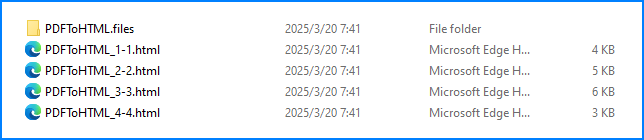
모든 PDF 페이지를 단일 HTML 파일로 변환하는 대신 개발자는 maxPageOneFile 매개변수를 설정하여 각각 제한된 수의 페이지를 포함하는 여러 HTML 파일을 생성할 수 있습니다. 이를 작동시키려면 useEmbeddedSvg 및 useEmbeddedImg를 true로 설정해야 합니다.
다음은 이러한 변환과 그 효과를 보여주는 코드 예제입니다.
- JavaScript
import React, { useState, useEffect } from 'react';
import JSZip from 'jszip';

function App() {

  // State to store the loaded WASM module
  const [wasmModule, setWasmModule] = useState(null);

  // useEffect hook to load the WASM module when the component mounts
  useEffect(() => {
    const loadWasm = async () => {
      try {
        // Access the Module and spirepdf from the global window object
        const { Module, spirepdf } = window;

        // Set the wasmModule state when the runtime is initialized
        Module.onRuntimeInitialized = () => {
          setWasmModule(spirepdf);
        };
      } catch (err) {
        // Log any errors that occur during module loading
        console.error('Failed to load the WASM module:', err);
      }
    };

    // Create a script element to load the WASM JavaScript file
    const script = document.createElement('script');
    script.src = `${process.env.PUBLIC_URL}/Spire.Pdf.Base.js`;
    script.onload = loadWasm;

    // Append the script to the document body
    document.body.appendChild(script);

    // Cleanup function to remove the script when the component unmounts
    return () => {
      document.body.removeChild(script);
    };
  }, []);

  // Function to convert PDF to HTML
  const ConvertPDFToHTML = async () => {
    if (wasmModule) {
      // Specify the input and output file names
      const inputFileName = 'Sample.pdf';
      const outputFileName = '/output/PDFToHTML.html';

      // Fetch the input file and add it to the VFS
      await wasmModule.FetchFileToVFS(inputFileName, '', `${process.env.PUBLIC_URL}/`);

      // Fetch the font file used in the PDF to the VFS
      await wasmModule.FetchFileToVFS('Calibri.ttf', '/Library/Fonts/', `${process.env.PUBLIC_URL}/`);
      await wasmModule.FetchFileToVFS('CalibriBold.ttf', '/Library/Fonts/', `${process.env.PUBLIC_URL}/`);

      // Create an instance of the PdfDocument class
      const pdf = wasmModule.PdfDocument.Create();

      // Load the PDF document from the VFS
      pdf.LoadFromFile(inputFileName);

      // Set the conversion options to disable SVG and image embedding
      pdf.ConvertOptions.SetPdfToHtmlOptions({ useEmbeddedSvg: false, useEmbeddedImg: false, maxPageOneFile: 1 })

      // Convert the PDF document to an HTML file
      pdf.SaveToFile({ fileName: outputFileName, fileFormat: wasmModule.FileFormat.HTML});

      // Create a new JSZip object
      const zip = new JSZip();

      // Recursive function to add a directory and its contents to the ZIP
      const addFilesToZip = (folderPath, zipFolder) => {
        const items = wasmModule.FS.readdir(folderPath);
        items.filter(item => item !== "." && item !== "..").forEach((item) => {
          const itemPath = `${folderPath}/${item}`;

          try {
            // Attempt to read file data
            const fileData = wasmModule.FS.readFile(itemPath);
            zipFolder.file(item, fileData);
          } catch (error) {
            if (error.code === 'EISDIR') {
              // If it's a directory, create a new folder in the ZIP and recurse into it
              const zipSubFolder = zipFolder.folder(item);
              addFilesToZip(itemPath, zipSubFolder);
            } else {
              // Handle other errors
              console.error(`Error processing ${itemPath}:`, error);
            }
          }
        });
      };
      // Add all files in the output folder to the ZIP
      addFilesToZip('/output', zip);

      // Generate and download the ZIP file
      zip.generateAsync({ type: 'blob' }).then((content) => {
        const url = URL.createObjectURL(content);
        const a = document.createElement('a');
        a.href = url;
        a.download = `PDFToHTML.zip`;
        document.body.appendChild(a);
        a.click();
        document.body.removeChild(a);
        URL.revokeObjectURL(url);
      });
    }
  };

  return (
      <div style={{ textAlign: 'center', height: '300px' }}>
        <h1>Convert PDF to HTML Without Embedding Images Using JavaScript in React
          Convert and Download
변환된 HTML 파일의 파일 크기 최적화
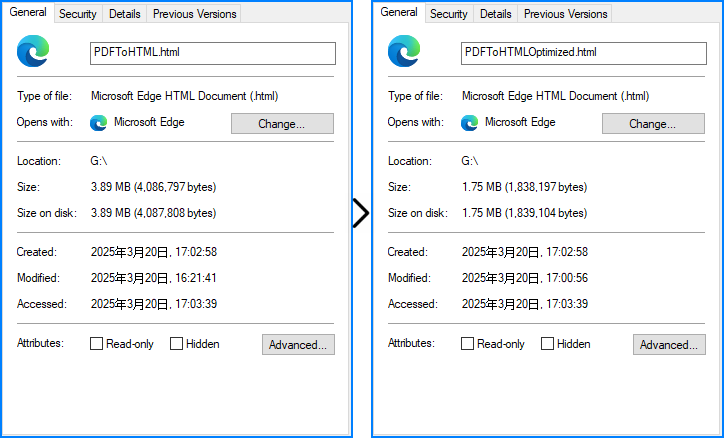
변환된 HTML 파일에 SVG를 임베드할 때 개발자는 useHighQualityEmbeddedSvg 매개변수를 사용하여 임베드된 SVG의 품질을 낮춰 파일 크기를 최적화할 수 있습니다 . 이 매개변수는 임베드된 SVG에만 영향을 미칩니다.
다음은 이러한 최적화와 그 효과를 보여주는 코드 예입니다.
- JavaScript
import React, { useState, useEffect } from 'react';

function App() {

  // State to store the loaded WASM module
  const [wasmModule, setWasmModule] = useState(null);

  // useEffect hook to load the WASM module when the component mounts
  useEffect(() => {
    const loadWasm = async () => {
      try {
        // Access the Module and spirepdf from the global window object
        const { Module, spirepdf } = window;

        // Set the wasmModule state when the runtime is initialized
        Module.onRuntimeInitialized = () => {
          setWasmModule(spirepdf);
        };
      } catch (err) {
        // Log any errors that occur during module loading
        console.error('Failed to load the WASM module:', err);
      }
    };

    // Create a script element to load the WASM JavaScript file
    const script = document.createElement('script');
    script.src = `${process.env.PUBLIC_URL}/Spire.Pdf.Base.js`;
    script.onload = loadWasm;

    // Append the script to the document body
    document.body.appendChild(script);

    // Cleanup function to remove the script when the component unmounts
    return () => {
      document.body.removeChild(script);
    };
  }, []);

  // Function to convert PDF to HTML
  const ConvertPDFToHTML = async () => {
    if (wasmModule) {
      // Specify the input and output file names
      const inputFileName = 'Sample.pdf';
      const outputFileName = 'PDFToHTML.html';

      // Fetch the input file and add it to the VFS
      await wasmModule.FetchFileToVFS(inputFileName, '', `${process.env.PUBLIC_URL}/`);

      // Fetch the font file used in the PDF to the VFS
      await wasmModule.FetchFileToVFS('Calibri.ttf', '/Library/Fonts/', `${process.env.PUBLIC_URL}/`);
      await wasmModule.FetchFileToVFS('CalibriBold.ttf', '/Library/Fonts/', `${process.env.PUBLIC_URL}/`);

      // Create an instance of the PdfDocument class
      const pdf = wasmModule.PdfDocument.Create();

      // Load the PDF document from the VFS
      pdf.LoadFromFile(inputFileName);

      // Set the conversion options to convert with lower quality embedded SVG
      pdf.ConvertOptions.SetPdfToHtmlOptions({ useEmbeddedSvg: true, useEmbeddedImg: true, maxPageOneFile: 0, useHighQualityEmbeddedSvg: false })

      // Convert the PDF document to an HTML file
      pdf.SaveToFile({ fileName: outputFileName, fileFormat: wasmModule.FileFormat.HTML});

      // Read the HTML file from the VFS
      const htmlArray = wasmModule.FS.readFile(outputFileName)

      // Create a Blob from the HTML file and download it
      const blob = new Blob([htmlArray], { type: 'text/html' });
      const url = URL.createObjectURL(blob);
      const link = document.createElement('a');
      link.href = url;
      link.download = outputFileName;
      link.click();
    }
  };

  return (
      <div style={{ textAlign: 'center', height: '300px' }}>
        <h1>Convert PDF to HTML Optimize File Size Using JavaScript in React</h1>
        <button onClick={ConvertPDFToHTML} disabled={!wasmModule}>
          Convert and Download
        </button>
      </div>
  );
}

export default App;
무료 라이센스 요청
JavaScript용 Spire.PDF는 기업 및 개인 사용자 모두에게 무료 체험판 라이선스를 제공합니다. 사용 제한이나 워터마크 없이 PDF 문서를 HTML로 변환하는 임시 라이선스를 신청할 수 있습니다.
변환하는 동안 문제가 발생하면 Spire.PDF 포럼 에서 기술 지원을 받을 수 있습니다 .
결론
Spire.PDF for JavaScript를 사용하여 React 앱에서 PDF를 HTML로 변환하면 정적 문서가 동적이고 액세스 가능한 웹 콘텐츠로 변환됩니다. 간단한 npm 설치, JavaScript, WASM 및 글꼴 파일의 적절한 설정, 단일 파일 출력, 분리된 페이지 및 비포함 이미지를 포함한 여러 변환 옵션을 사용하면 레이아웃 충실도를 유지하면서도 상태 기반 UI 업데이트와 같은 최신 웹 기능을 잠금 해제할 수 있습니다.
고급 사용자 정의에 대해서는 설명서를 확인하세요 .