PDF/A is an ISO-standardized long-term archival format that embeds fonts, color profiles, and metadata into a unified compliance level, ensuring documents remain faithfully reproducible for decades regardless of the PDF reader used. In contrast, standard PDF offers greater flexibility for everyday editing and content extraction. Real-world business often requires switching between these two formats: converting contracts to PDF/A for regulatory compliance during archiving, and restoring them to standard PDF for text extraction during audit review.
Spire.PDF for JavaScript performs bidirectional PDF/PDF/A conversion entirely in the browser via WebAssembly, managing input and output files through a virtual file system (VFS) with no backend server required.
This article covers two core features:
For installation and project setup, refer to Integrating Spire.PDF for JavaScript in a React Project. The examples below assume Spire.PDF is installed and the WebAssembly module is initialized.
Convert PDF to PDF/A
The core of PDF/A archival conversion is to consolidate fonts, color profiles, and metadata in a standard PDF into ISO-compliant levels. Spire.PDF handles this in one step through the PdfStandardsConverter component, supporting multiple compliance levels including PDF/A-1a, PDF/A-1b, PDF/A-2a, PDF/A-2b, PDF/A-3a, and PDF/A-3b.
The conversion standards supported by PdfStandardsConverter and their use cases are as follows:
| Method | Standard | Description |
|---|---|---|
ToPdfA1B |
PDF/A-1b | Based on PDF 1.4, guarantees visual appearance reproducibility only — the most commonly used archival level |
ToPdfA1A |
PDF/A-1a | Requires document tags and structure information on top of 1b, supports accessible reading |
ToPdfA2A |
PDF/A-2a | Based on PDF 1.7, requires tags and structure info, supports layers and transparency |
ToPdfA2B |
PDF/A-2b | PDF/A-2 basic conformance level, allows transparency, layers, and embedded OLE objects |
ToPdfA3A |
PDF/A-3a | Allows embedding XML, Excel, and other arbitrary format files as attachments on top of 2a |
ToPdfA3B |
PDF/A-3b | PDF/A-3 basic conformance level, supports embedding arbitrary format attachments |
ToPdfX1A2001 |
PDF/X-1a:2001 | Print exchange standard, suitable for publishing and printing workflows |
The following example demonstrates converting a PDF to PDF/A-2B using ToPdfA2B:
function App() {
  const convertToPDFA = async () => {
    // Get the Spire.PDF WASM module
    const pdfModule = window.wasmModule?.spirepdf;

    // Check if the WASM module is ready
    if (!pdfModule) {
      alert('Spire.PDF is not ready yet');
      return;
    }

    // Load fonts and PDF file into VFS
    await window.spire.FetchFileToVFS('arial.ttf', '/Library/Fonts/', `${process.env.PUBLIC_URL}/font/`);
    const inputFileName = 'MovieCatalog.pdf';
    await window.spire.FetchFileToVFS(inputFileName, "", `${process.env.PUBLIC_URL}/data/`);

    // Create PdfStandardsConverter
    let converter = new pdfModule.PdfStandardsConverter({ filePath: inputFileName });

    // Convert to PDF/A-2B format
    const outputFileName = 'ToPDFA_result.pdf';
    converter.ToPdfA2B({ filePath: outputFileName });

    // // Convert to PDF/A-1a
    // converter.ToPdfA1A({ filePath: outputFileName });

    // // Convert to PDF/A-2a
    // converter.ToPdfA2A({ filePath: outputFileName });

    // // Convert to PDF/A-2b
    // converter.ToPdfA2B({ filePath: outputFileName });

    // // Convert to PDF/A-3a
    // converter.ToPdfA3A({ filePath: outputFileName });

    // // Convert to PDF/A-3b
    // converter.ToPdfA3B({ filePath: outputFileName });

    // // Convert to PDF/X-1a:2001
    // converter.ToPdfX1A2001({ filePath: outputFileName });

    // Read the converted file from VFS and trigger download
    const fileArray = window.dotnetRuntime.Module.FS.readFile(outputFileName);
    const blob = new Blob([fileArray], { type: 'application/pdf' });
    const url = URL.createObjectURL(blob);
    const a = document.createElement('a');
    a.href = url;
    a.download = outputFileName;
    a.click();
    URL.revokeObjectURL(url);

    // Release resources
    converter.Dispose();
  };

  return (
    <div style={{ textAlign: 'center', height: '300px' }}>
      <h1>Convert PDF To PDF/A</h1>
      <button onClick={convertToPDFA}>
        Generate
      </button>
    </div>
  );
}

export default App;
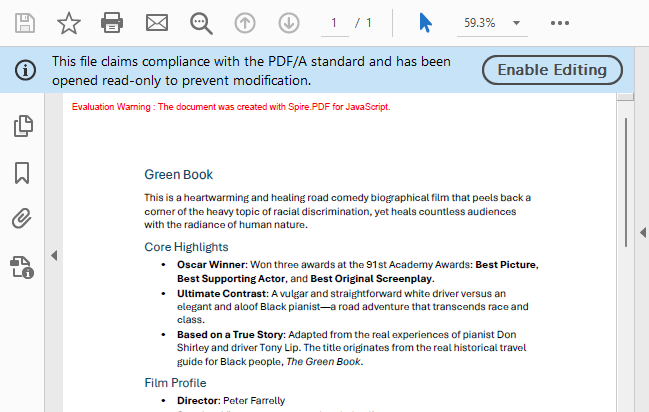
PDF/A output generated after conversion via PdfStandardsConverter
Convert PDF/A to PDF
PDF/A is the standard format for long-term archiving, but in everyday editing and content extraction scenarios, you may need to restore PDF/A back to standard PDF. Spire.PDF for JavaScript achieves this reverse conversion by loading the PDF/A document and copying content page by page into a new document, ensuring the output standard PDF is free of PDF/A compliance constraints.
function App() {
  const convertToNormalPDF = async () => {
    // Get the Spire.PDF WASM module
    const pdfModule = window.wasmModule?.spirepdf;

    // Check if the WASM module is ready
    if (!pdfModule) {
      alert('Spire.PDF is not ready yet');
      return;
    }

    // Load fonts and PDF file into VFS
    await window.spire.FetchFileToVFS('arial.ttf', '/Library/Fonts/', `${process.env.PUBLIC_URL}/font/`);
    const inputFileName = 'PDFA_Sample.pdf';
    await window.spire.FetchFileToVFS(inputFileName, "", `${process.env.PUBLIC_URL}/data/`);

    // Create PdfDocument object
    let doc = new pdfModule.PdfDocument();
    doc.LoadFromFile(inputFileName);

    // Create a new PDF document to draw content onto
    let newDoc = new pdfModule.PdfNewDocument();
    newDoc.CompressionLevel = pdfModule.PdfCompressionLevel.None;

    // Iterate through each page in the original document
    for (let i = 0; i < doc.Pages.Count; i++) {
      let page = doc.Pages.get_Item(i);
      // Get the current page size
      let size = page.Size;

      // Add a new page with the same size and no margins
      let newPage = newDoc.Pages.Add({ size: size, margins: new pdfModule.PdfMargins() });

      // Draw the original page content onto the new page
      let template = page.CreateTemplate();
      let layoutWidget = new pdfModule.PdfLayoutWidget(template.H);
      layoutWidget.Draw({ page: newPage, x: 0, y: 0 });
      // page.CreateTemplate().Draw({page: newPage, x: 0, y: 0});
    }

    // Define the output file name
    const outputFileName = "PDFAToPdf_result.pdf";

    // Save the document to the specified path
    newDoc.Save(outputFileName);

    // Read the generated file from VFS and trigger download
    const fileArray = window.dotnetRuntime.Module.FS.readFile(outputFileName);
    const blob = new Blob([fileArray], { type: 'application/pdf' });
    const url = URL.createObjectURL(blob);
    const a = document.createElement('a');
    a.href = url;
    a.download = outputFileName;
    a.click();
    URL.revokeObjectURL(url);

    // Release resources
    newDoc.Dispose();
    doc.Dispose();
  };

  return (
    <div style={{ textAlign: 'center', height: '300px' }}>
      <h1>Convert PDF/A To Normal PDF</h1>
      <button onClick={convertToNormalPDF}>
        Generate
      </button>
    </div>
  );
}

export default App;
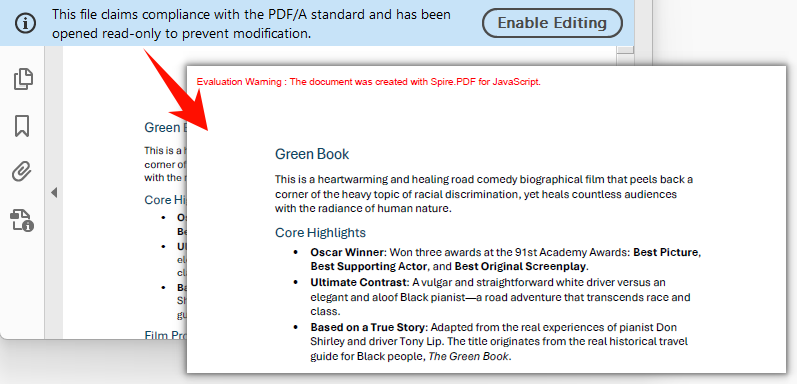
Standard PDF output generated by creating a new document and copying pages
FAQ
Converted PDF/A file size is much larger than the original
PDF/A requires all fonts used in the document to be fully embedded to ensure correct rendering on any device. If the original document uses non-embedded system fonts, the font data will be written completely into the output file during conversion, resulting in a larger file size. This is an inherent requirement of PDF/A compliance. To minimize file size, consider using font subsetting (embedding only the characters actually used) or compressing image content before generating the source PDF.
Can encrypted PDFs be converted to PDF/A?
Encrypted PDFs that require a password to open cannot be processed directly by PdfStandardsConverter. The password must be provided when loading the document.
The PdfStandardsConverter constructor supports a password parameter for converting password-protected PDFs to PDF/A:
// Create PdfStandardsConverter with password
let converter = new pdfModule.PdfStandardsConverter({ filePath: inputFileName, password: "123456" });
converter.ToPdfA2A({ filePath: outputFileName });
converter.Dispose();
"File not found" or "Invalid PDF format" error when loading PDF/A
PDF/A documents must first be converted via PdfStandardsConverter, or properly loaded into the virtual file system (VFS) via FetchFileToVFS. Common mistakes include passing the wrong file name or path, or executing subsequent operations before the file has finished loading. Verify that the file has been loaded into VFS via FetchFileToVFS and that the file name (including extension) matches exactly. Use await to ensure the file is ready before proceeding.
Get a Free License
Spire.PDF for JavaScript offers a 30-day full-featured free trial license with no functional limitations. Apply here to evaluate before purchasing.