Lignes à bandes sur Excel en toute simplicité : alternez rapidement les couleurs des lignes
Table des matières
Installer avec Pypi
pip install Spire.XLS
Liens connexes
Lorsque vous travaillez avec de grandes feuilles de calcul Excel, les lignes de données peuvent facilement se mélanger, ce qui rend difficile le suivi précis des informations. L'alternance des couleurs de lignes dans Excel — souvent appelée lignes en bandes — constitue un moyen simple et efficace d'améliorer la lisibilité, de renforcer la structure visuelle et de réduire les erreurs dans les rapports financiers, les listes d'inventaire ou les grands résumés de données.
Excel offre plusieurs moyens rapides et flexibles d'appliquer des couleurs de lignes alternées. Vous pouvez utiliser la Mise en forme conditionnelle pour un contrôle précis, les Styles de tableau pour des résultats instantanés, ou automatiser le processus sur plusieurs fichiers en utilisant Python avec Spire.XLS for Python. Chaque approche a ses propres avantages en fonction de la fréquence à laquelle vous travaillez avec des données Excel.
L'alternance des couleurs de lignes ne facilite pas seulement la lecture de vos données, mais aide également à maintenir une apparence propre et professionnelle sur différentes feuilles de calcul. Dans ce guide, vous apprendrez comment alterner les couleurs de lignes dans Excel étape par étape, en couvrant à la fois les méthodes intégrées et l'automatisation avec Python pour les utilisateurs avancés.
Aperçu des méthodes
Vous pouvez explorer chaque méthode ci-dessous :
- Alterner les couleurs des lignes dans Excel par mise en forme conditionnelle
- Appliquer des styles de tableau intégrés pour colorer une ligne sur deux
- Automatiser l'alternance des couleurs de lignes Excel avec Python
- Comparaison des méthodes
Pourquoi et comment alterner les couleurs des lignes dans Excel
L'alternance des couleurs de lignes améliore la lisibilité, la comparaison des données et la présentation professionnelle. Cette technique aide vos yeux à suivre chaque ligne à travers les colonnes, réduisant ainsi le risque d'erreurs de lecture. De nombreux utilisateurs ont recours à la coloration manuelle — en sélectionnant une ligne sur deux et en appliquant une couleur de fond — mais cette approche est inefficace. Lorsque vous insérez ou supprimez des lignes, les couleurs ne s'alignent plus correctement.
Cependant, cette méthode manuelle devient rapidement impraticable, surtout lorsque des lignes sont insérées ou supprimées. Heureusement, Excel propose des approches plus intelligentes et dynamiques qui maintiennent automatiquement la cohérence des couleurs. Explorons comment alterner les couleurs des lignes dans Excel en utilisant les outils intégrés avant de passer à la méthode automatisée avec Python.
Méthode 1 – Utiliser la mise en forme conditionnelle pour alterner les couleurs des lignes
La mise en forme conditionnelle est l'une des fonctionnalités les plus flexibles d'Excel. Elle vous permet d'appliquer des styles dynamiques basés sur des règles logiques — ce qui la rend parfaite pour alterner automatiquement les couleurs des lignes sans avoir à ajuster manuellement le format à chaque fois.
Étape 1 : Sélectionnez la plage de données
Surlignez la plage de cellules que vous souhaitez formater, comme A1:D20. La règle ne s'appliquera qu'à cette sélection.
Étape 2 : Créez une règle de mise en forme conditionnelle
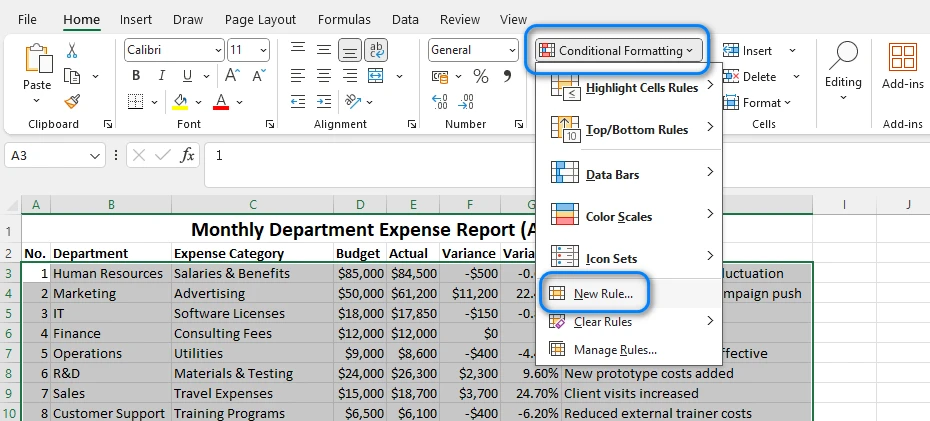
Allez dans Accueil → Mise en forme conditionnelle → Nouvelle règle
Étape 3 : Entrez la formule
Choisissez Utiliser une formule pour déterminer pour quelles cellules le format sera appliqué. Dans la zone de formule, tapez :
=MOD(LIGNE();2)=0
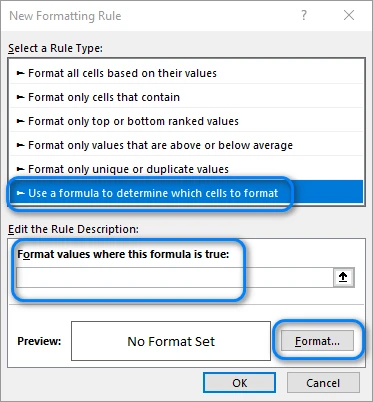
Cette formule vérifie si un numéro de ligne est pair. Vous pouvez changer le « 0 » en « 1 » si vous voulez que le motif de couleur commence à la première ligne au lieu de la deuxième.
Étape 4 : Choisissez une couleur de remplissage
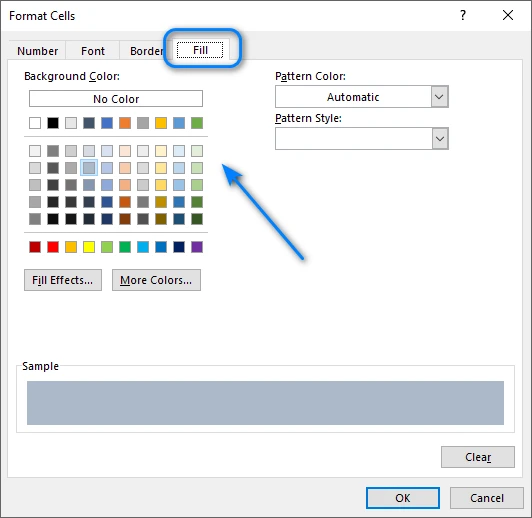
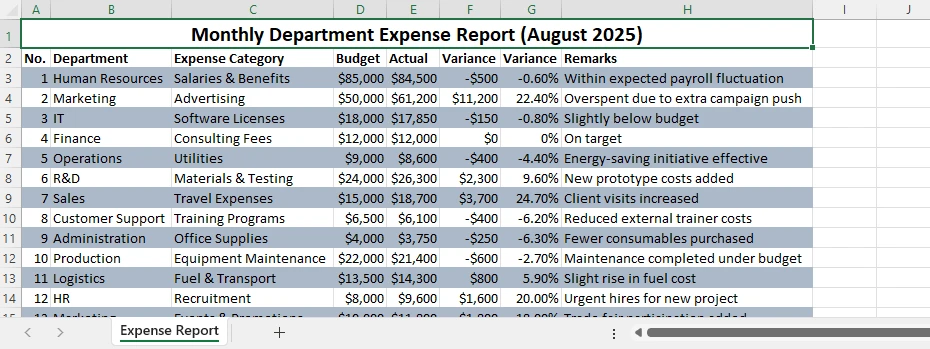
Cliquez sur Format → Remplissage, sélectionnez votre couleur de fond préférée (une teinte claire est recommandée), et confirmez. Une fois appliquée, Excel colore automatiquement chaque ligne paire. Si vous insérez de nouvelles lignes, le motif se mettra à jour dynamiquement.
Voici un exemple du résultat :
Conseils et variantes
- Utilisez =MOD(LIGNE();3)=0 pour colorer une ligne sur trois à la place.
- Combinez avec la mise en forme du texte ou des bordures pour un style plus avancé.
- Pour supprimer la règle, allez dans Mise en forme conditionnelle → Gérer les règles → Supprimer.
La mise en forme conditionnelle offre une grande flexibilité et fonctionne parfaitement lorsque vous avez besoin d'un contrôle total sur les lignes à colorer.
Article connexe : Appliquer la mise en forme conditionnelle dans Excel en utilisant Python
Méthode 2 – Appliquer des styles de tableau pour des couleurs de lignes alternées intégrées
Si vous voulez une option rapide et intégrée qui ne nécessite aucune formule, la fonctionnalité Mettre sous forme de tableau d'Excel peut appliquer instantanément des couleurs de lignes alternées. C'est idéal pour les utilisateurs qui apprécient la vitesse et préfèrent une configuration minimale.
Étape 1 : Mettre la plage sous forme de tableau
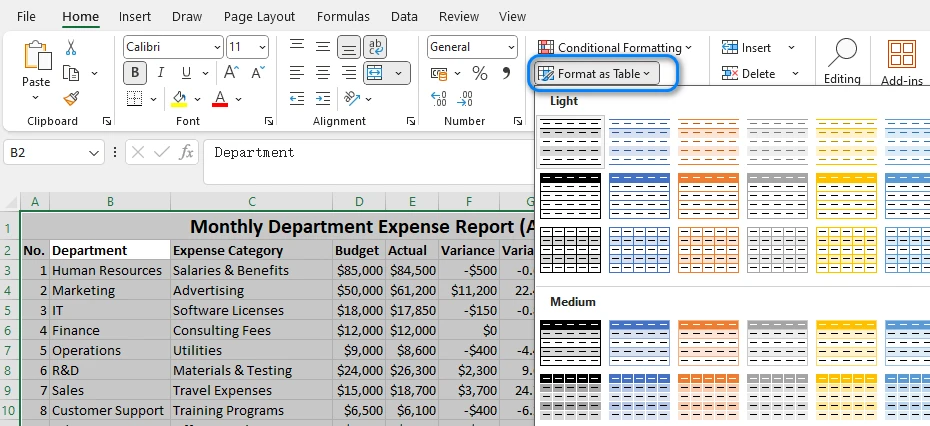
Sélectionnez vos données, puis cliquez sur Accueil → Mettre sous forme de tableau et choisissez n'importe quel style prédéfini. Excel applique instantanément des lignes en bandes et crée une structure de tableau avec des options de tri et de filtrage.
Étape 2 : Ajustez les paramètres du tableau
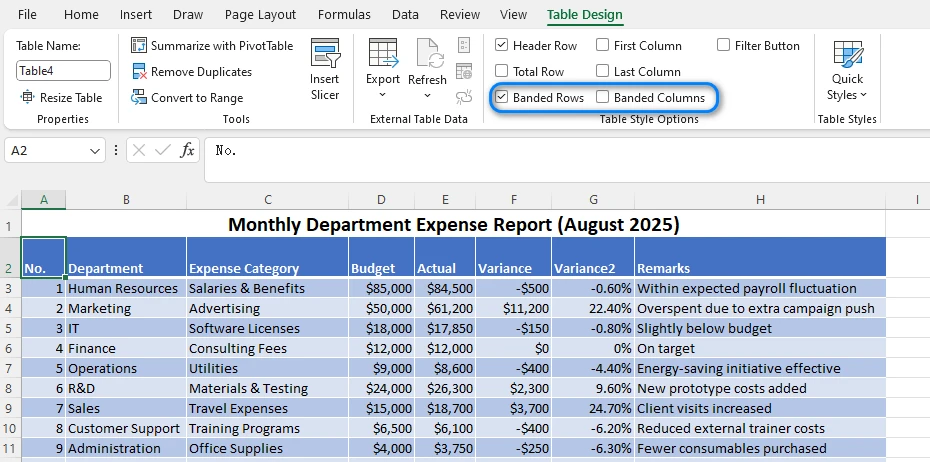
Sous l'onglet Création de tableau, vous pouvez activer ou désactiver les Lignes à bandes ou les Colonnes à bandes. Vous pouvez également personnaliser le jeu de couleurs en choisissant un style de tableau différent.
Étape 3 : Personnalisez l'apparence du tableau
Vous pouvez renommer le tableau, changer les couleurs de l'en-tête ou ajouter une Ligne des totaux. Lorsque de nouvelles lignes sont ajoutées, le motif de couleurs alternées s'étend automatiquement.
Avantages et limitations
- Apparence rapide et professionnelle
- Se met à jour automatiquement avec les nouvelles données
Mais :
- Moins flexible que la mise en forme conditionnelle
- Personnalisation limitée des intervalles de couleur
Pour la plupart des utilisateurs d'Excel, les Styles de tableau sont le moyen le plus rapide de colorer une ligne sur deux sans formules. C'est le moyen le plus rapide d'appliquer une couleur de ligne alternée dans Excel pour une mise en forme rapide des données.
Vous pourriez aussi aimer : Créer ou supprimer des tableaux dans Excel avec Python
Méthode 3 – Automatiser l'alternance des couleurs de lignes dans Excel avec Python
Bien que les options intégrées d'Excel fonctionnent bien pour des fichiers uniques, elles deviennent chronophages lorsqu'elles sont appliquées de manière répétée. Si vous manipulez fréquemment plusieurs feuilles de calcul ou avez besoin d'un style cohérent sur plusieurs rapports, l'automatisation avec Python offre une alternative évolutive.
En utilisant Spire.XLS for Python, vous pouvez facilement contrôler les styles de mise en forme, automatiser la coloration des lignes et même appliquer une logique conditionnelle — ce qui permet de gagner un temps considérable lors du traitement de tâches volumineuses ou répétitives.
Étape 1 : Installer et importer Spire.XLS
Installez le paquet en utilisant pip :
pip install spire.xls
Puis importez-le :
from spire.xls import Workbook, Color, ExcelVersion
Étape 2 : Charger et accéder à la feuille de calcul
workbook = Workbook()
workbook.LoadFromFile("input.xlsx")
sheet = workbook.Worksheets[0]
Ceci charge votre fichier Excel et accède à la première feuille de calcul.
Étape 3 : Appliquer automatiquement les couleurs de lignes alternées
for i in range(1, sheet.LastRow):
    if i % 2 == 0:
        style = sheet.Rows.get_Item(i).Style
        style.Color = Color.get_LightGray()
Explication :
- La boucle vérifie si un numéro de ligne est pair (
i % 2 == 0). - Si c'est vrai, un nouveau style est appliqué avec un fond gris clair.
- Vous pouvez personnaliser la couleur en utilisant n'importe quelle couleur RVB ou de thème prise en charge.
- Pour chaque troisième ou quatrième ligne, ajustez la valeur du modulo (par ex.,
i % 3 == 0).
Cette méthode peut être adaptée pour différents motifs ou plusieurs feuilles de calcul dans le même classeur.
Étape 4 : Enregistrer le fichier
workbook.SaveToFile("output.xlsx", ExcelVersion.Version2016)
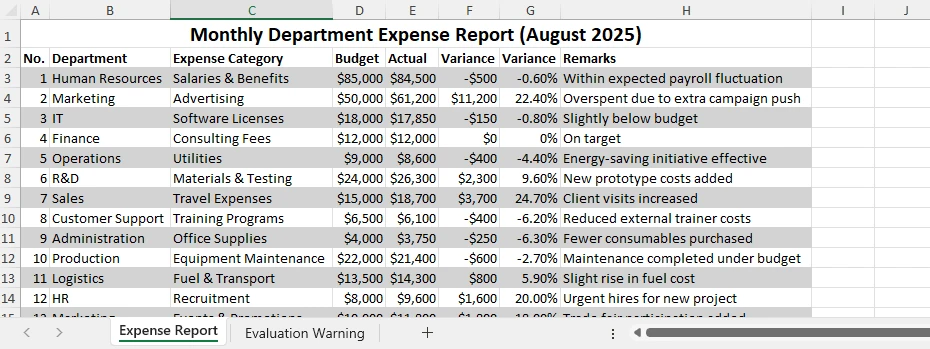
Le nouveau fichier conservera toutes les modifications de mise en forme, et vous pourrez l'ouvrir directement dans Excel. Voici un exemple du fichier de sortie :
Avantages de la méthode Python
- Automatise les tâches de mise en forme répétitives
- Fonctionne sur plusieurs feuilles ou fichiers
- Réduit les erreurs manuelles
- S'intègre de manière transparente avec d'autres flux de traitement de données
Pour les tâches volumineuses ou répétitives, l'automatisation avec Spire.XLS for Python est un moyen pratique de rationaliser votre flux de travail et de maintenir une mise en forme cohérente sur plusieurs fichiers. Si vous souhaitez acquérir davantage de compétences en automatisation d'Excel avec Python, consultez les tutoriels de Spire.XLS for Python.
Comparaison des méthodes
| Méthode | Automatisation | Personnalisation | Mises à jour dynamiques | Idéal pour |
|---|---|---|---|---|
| Coloration manuelle | ❌ | Élevée | ❌ | Modifications rapides et uniques |
| Mise en forme conditionnelle | ✅ | Élevée | ✅ | Mise en forme flexible |
| Style de tableau | ✅ | Moyenne | ✅ | Conception rapide de tableau |
| Automatisation Python | ✅ | Élevée | ✅ | Tâches par lots ou à grande échelle |
Chaque approche a ses avantages, mais l'automatisation offre la meilleure efficacité pour la mise en forme Excel avancée ou répétée.
Questions fréquemment posées sur l'alternance des couleurs de lignes dans Excel
Q1 : Comment puis-je alterner automatiquement les couleurs des lignes dans Excel ?
Vous pouvez utiliser la mise en forme conditionnelle avec la formule =MOD(LIGNE();2)=0 ou appliquer un style de tableau pour formater instantanément vos données.
Q2 : Puis-je alterner les couleurs des lignes sans utiliser de tableau ?
Oui. La mise en forme conditionnelle fonctionne sur n'importe quelle plage et se met à jour automatiquement lorsque vous ajoutez ou supprimez des lignes.
Q3 : Comment colorer une ligne sur deux dans Excel en utilisant Python ?
Vous pouvez automatiser le processus en utilisant Spire.XLS for Python, en parcourant les lignes et en appliquant un style à celles qui sont paires.
Q4 : Puis-je changer le motif de couleur pour toutes les 3 lignes au lieu de 2 ?
Oui. Modifiez la formule en =MOD(LIGNE();3)=0 ou changez la condition dans votre code Python (if i % 3 == 0:).
Conclusion
L'alternance des couleurs de lignes dans Excel est l'un des moyens les plus simples mais aussi les plus efficaces pour rendre vos données plus faciles à lire et à comprendre. Vous pouvez alterner les couleurs des lignes dans Excel facilement en utilisant la mise en forme conditionnelle, les styles de tableau ou l'automatisation avec Python.
Pour ceux qui travaillent avec de grands ensembles de données ou qui ont besoin d'automatisation, Spire.XLS for Python facilite l'application de couleurs alternées et d'autres tâches de mise en forme par programmation. Vous pouvez également utiliser Free Spire.XLS for Python pour les tâches Excel légères.
Quelle que soit la méthode que vous choisissez, ces techniques vous aideront à maintenir la clarté et la cohérence dans vos feuilles Excel.
Voir aussi
Filas con bandas en Excel de forma sencilla: alternar colores de fila rápidamente
Tabla de Contenidos
Instalar con Pypi
pip install Spire.XLS
Enlaces Relacionados
Al trabajar con hojas de cálculo grandes de Excel, las filas de datos pueden mezclarse fácilmente, lo que dificulta el seguimiento preciso de la información. Alternar los colores de las filas en Excel — a menudo llamadas filas con bandas — proporciona una manera fácil y efectiva de mejorar la legibilidad, realzar la estructura visual y reducir errores en informes financieros, listas de inventario o grandes resúmenes de datos.
Excel ofrece varias formas rápidas y flexibles de aplicar colores de fila alternos. Puede usar Formato Condicional para un control preciso, Estilos de Tabla para resultados instantáneos, o automatizar el proceso en múltiples archivos usando Python con Spire.XLS for Python. Cada método tiene sus propias ventajas dependiendo de la frecuencia con la que trabaje con datos de Excel.
Alternar los colores de las filas no solo facilita la lectura de sus datos, sino que también ayuda a mantener un aspecto limpio y profesional en diferentes hojas de trabajo. En esta guía, aprenderá cómo alternar los colores de las filas en Excel paso a paso, cubriendo tanto los métodos integrados como la automatización con Python para usuarios avanzados.
Resumen de Métodos
Puede explorar cada método a continuación:
- Alternar Colores de Fila en Excel mediante Formato Condicional
- Aplicar Estilos de Tabla Integrados para Colorear Filas Alternas
- Automatizar la Alternancia de Colores de Fila en Excel con Python
- Comparación de Métodos
Por Qué y Cómo Alternar los Colores de las Filas en Excel
Alternar los colores de las filas mejora la legibilidad, la comparación de datos y la presentación profesional. Esta técnica ayuda a sus ojos a seguir cada fila a través de las columnas, reduciendo el riesgo de errores de lectura. Muchos usuarios recurren a la coloración manual —seleccionando cada dos filas y aplicando un color de fondo— pero este enfoque es ineficiente. Cuando inserta o elimina filas, los colores ya no se alinean correctamente.
Sin embargo, este método manual se vuelve rápidamente impráctico, especialmente cuando se insertan o eliminan filas. Afortunadamente, Excel ofrece enfoques más inteligentes y dinámicos que mantienen automáticamente la consistencia del color. Exploremos cómo alternar los colores de las filas en Excel utilizando herramientas integradas antes de pasar al método automatizado con Python.
Método 1 – Usar Formato Condicional para Alternar Colores de Fila
El Formato Condicional es una de las características más flexibles de Excel. Le permite aplicar estilos dinámicos basados en reglas lógicas, lo que lo hace perfecto para alternar automáticamente los colores de las filas sin tener que ajustar manualmente el formato cada vez.
Paso 1: Seleccione el Rango de Datos
Resalte el rango de celdas que desea formatear, como A1:D20. La regla se aplicará solo dentro de esta selección.
Paso 2: Cree una Regla de Formato Condicional
Navegue a Inicio → Formato Condicional → Nueva Regla
Paso 3: Ingrese la Fórmula
Elija Utilice una fórmula que determine las celdas para aplicar formato. En el cuadro de fórmula, escriba:
=MOD(ROW(),2)=0
Esta fórmula comprueba si un número de fila es par. Puede cambiar el “0” por “1” si desea que el patrón de color comience desde la primera fila en lugar de la segunda.
Paso 4: Elija un Color de Relleno
Haga clic en Formato → Relleno, seleccione su color de fondo preferido (se recomienda un tono claro) y confirme. Una vez aplicado, Excel colorea automáticamente cada fila con número par. Si inserta nuevas filas, el patrón se actualizará dinámicamente.
A continuación se muestra un ejemplo del resultado:
Consejos y Variaciones
- Use =MOD(ROW(),3)=0 para colorear cada tercera fila en su lugar.
- Combine con formato de texto o borde para un estilo más avanzado.
- Para eliminar la regla, vaya a Formato Condicional → Administrar Reglas → Eliminar.
El Formato Condicional ofrece una alta flexibilidad y funciona perfectamente cuando necesita un control total sobre qué filas se colorean.
Artículo Relacionado: Aplicar Formato Condicional en Excel Usando Python
Método 2 – Aplicar Estilos de Tabla para Colores de Fila Alternos Integrados
Si desea una opción rápida e integrada que no requiera fórmulas, la característica de Excel Dar formato como tabla puede aplicar instantáneamente colores de fila alternos. Es ideal para usuarios que valoran la velocidad y prefieren una configuración mínima.
Paso 1: Dar Formato al Rango como una Tabla
Seleccione sus datos, luego haga clic en Inicio → Dar formato como tabla y elija cualquier estilo predefinido. Excel aplica instantáneamente filas con bandas y crea una estructura de tabla con opciones de ordenación y filtrado.
Paso 2: Ajustar la Configuración de la Tabla
En la pestaña Diseño de tabla, puede activar o desactivar Filas con bandas o Columnas con bandas. También puede personalizar el esquema de colores eligiendo un estilo de tabla diferente.
Paso 3: Personalizar la Apariencia de la Tabla
Puede cambiar el nombre de la tabla, cambiar los colores del encabezado o agregar una Fila de totales. Cuando se agregan nuevas filas, el patrón de color alterno se expande automáticamente.
Ventajas y Limitaciones
- Apariencia rápida y profesional
- Se actualiza automáticamente con nuevos datos
Pero:
- Menos flexible que el Formato Condicional
- Personalización limitada de los intervalos de color
Para la mayoría de los usuarios de Excel, los Estilos de Tabla son la forma más rápida de colorear cada dos filas sin fórmulas. Esta es la forma más rápida de aplicar color de fila alterno en Excel para un formato de datos rápido.
También te puede interesar: Crear o Eliminar Tablas en Excel con Python
Método 3 – Automatizar la Alternancia de Colores de Fila en Excel con Python
Si bien las opciones integradas de Excel funcionan bien para archivos individuales, se vuelven lentas cuando se aplican repetidamente. Si maneja con frecuencia múltiples hojas de cálculo o necesita un estilo consistente en los informes, la automatización con Python ofrece una alternativa escalable.
Usando Spire.XLS for Python, puede controlar fácilmente los estilos de formato, automatizar el coloreado de filas e incluso aplicar lógica condicional, ahorrando un tiempo significativo al procesar tareas grandes o repetidas.
Paso 1: Instalar e Importar Spire.XLS
Instale el paquete usando pip:
pip install spire.xls
Luego impórtelo:
from spire.xls import Workbook, Color, ExcelVersion
Paso 2: Cargar y Acceder a la Hoja de Cálculo
workbook = Workbook()
workbook.LoadFromFile("input.xlsx")
sheet = workbook.Worksheets[0]
Esto carga su archivo de Excel y accede a la primera hoja de cálculo.
Paso 3: Aplicar Colores de Fila Alternos Automáticamente
for i in range(1, sheet.LastRow):
    if i % 2 == 0:
        style = sheet.Rows.get_Item(i).Style
        style.Color = Color.get_LightGray()
Explicación:
- El bucle comprueba si un número de fila es par (
i % 2 == 0). - Si es verdadero, se aplica un nuevo estilo con un fondo gris claro.
- Puede personalizar el color utilizando cualquier color RGB o de tema compatible.
- Para cada tercera o cuarta fila, ajuste el valor del módulo (p. ej.,
i % 3 == 0).
Este método se puede adaptar para diferentes patrones o múltiples hojas de trabajo dentro del mismo libro.
Paso 4: Guardar el Archivo
workbook.SaveToFile("output.xlsx", ExcelVersion.Version2016)
El nuevo archivo conservará todos los cambios de formato y podrá abrirlo directamente en Excel. A continuación se muestra un ejemplo del archivo de salida:
Beneficios del Método Python
- Automatiza tareas de formato repetitivas
- Funciona en múltiples hojas o archivos
- Reduce los errores manuales
- Se integra sin problemas con otros flujos de trabajo de procesamiento de datos
Para tareas grandes o repetitivas, automatizar con Spire.XLS for Python es una forma práctica de optimizar su flujo de trabajo y mantener un formato consistente en múltiples archivos. Si desea aprender más habilidades de automatización de Excel con Python, consulte los tutoriales de Spire.XLS for Python.
Comparación de Métodos
| Método | Automatización | Personalización | Actualizaciones Dinámicas | Ideal Para |
|---|---|---|---|---|
| Coloreado Manual | ❌ | Alta | ❌ | Ediciones rápidas y únicas |
| Formato Condicional | ✅ | Alta | ✅ | Formato flexible |
| Estilo de Tabla | ✅ | Media | ✅ | Diseño rápido de tablas |
| Automatización con Python | ✅ | Alta | ✅ | Tareas por lotes o a gran escala |
Cada enfoque tiene sus ventajas, pero la automatización ofrece la mejor eficiencia para el formato avanzado o repetido de Excel.
Preguntas Frecuentes Sobre la Alternancia de Colores de Fila en Excel
P1: ¿Cómo alterno los colores de las filas en Excel automáticamente?
Puede usar el Formato Condicional con la fórmula =MOD(ROW(),2)=0 o aplicar un Estilo de Tabla para formatear sus datos al instante.
P2: ¿Puedo alternar los colores de las filas sin usar una tabla?
Sí. El Formato Condicional funciona en cualquier rango y se actualiza automáticamente cuando agrega o elimina filas.
P3: ¿Cómo colorear cada dos filas en Excel usando Python?
Puede automatizar el proceso usando Spire.XLS for Python, recorriendo las filas y aplicando un estilo a las de número par.
P4: ¿Puedo cambiar el patrón de color a cada 3 filas en lugar de 2?
Sí. Modifique la fórmula a =MOD(ROW(),3)=0 o cambie la condición en su código de Python (if i % 3 == 0:).
Conclusión
Alternar los colores de las filas en Excel es una de las formas más simples pero efectivas de hacer que sus datos sean más fáciles de leer y comprender. Puede alternar los colores de las filas en Excel fácilmente usando Formato Condicional, Estilos de Tabla o automatización con Python.
Para aquellos que trabajan con grandes conjuntos de datos o necesitan automatización, Spire.XLS for Python facilita la aplicación de colores alternos y otras tareas de formato de forma programática. También puede usar Free Spire.XLS for Python para tareas ligeras de Excel.
Cualquiera que sea el método que elija, estas técnicas lo ayudarán a mantener la claridad y la coherencia en sus hojas de Excel.
Ver También
Gebänderte Zeilen in Excel leicht gemacht: Zeilenfarben schnell abwechseln
Inhaltsverzeichnis
Mit Pypi installieren
pip install Spire.XLS
Verwandte Links
Bei der Arbeit mit großen Excel-Tabellen können Datenzeilen leicht ineinander übergehen, was es schwierig macht, Informationen genau zu verfolgen. Abwechselnde Zeilenfarben in Excel – oft als gebänderte Zeilen bezeichnet – bieten eine einfache und effektive Möglichkeit, die Lesbarkeit zu verbessern, die visuelle Struktur zu optimieren und Fehler in Finanzberichten, Inventarlisten oder großen Datenzusammenfassungen zu reduzieren.
Excel bietet mehrere schnelle und flexible Möglichkeiten, abwechselnde Zeilenfarben anzuwenden. Sie können die Bedingte Formatierung für eine präzise Steuerung verwenden, Tabellenstile für sofortige Ergebnisse nutzen oder den Prozess über mehrere Dateien hinweg mit Python mit Spire.XLS for Python automatisieren. Jeder Ansatz hat seine eigenen Vorteile, je nachdem, wie häufig Sie mit Excel-Daten arbeiten.
Abwechselnde Zeilenfarben erleichtern nicht nur das Lesen Ihrer Daten, sondern tragen auch dazu bei, ein sauberes, professionelles Erscheinungsbild über verschiedene Arbeitsblätter hinweg beizubehalten. In dieser Anleitung erfahren Sie Schritt für Schritt, wie Sie Zeilenfarben in Excel abwechseln – dabei werden sowohl integrierte Methoden als auch die Python-Automatisierung für fortgeschrittene Benutzer behandelt.
Methodenübersicht
Sie können jede Methode unten erkunden:
- Abwechselnde Zeilenfarben in Excel durch bedingte Formatierung
- Integrierte Tabellenstile anwenden, um jede zweite Zeile zu färben
- Abwechselnde Excel-Zeilenfarben mit Python automatisieren
- Vergleich der Methoden
Warum und wie man Zeilenfarben in Excel abwechselt
Abwechselnde Zeilenfarben verbessern die Lesbarkeit, den Datenvergleich und die professionelle Präsentation. Diese Technik hilft Ihren Augen, jeder Zeile über die Spalten hinweg zu folgen, und verringert das Risiko von Lesefehlern. Viele Benutzer verlassen sich auf manuelles Färben – sie wählen jede zweite Zeile aus und wenden eine Hintergrundfarbe an – aber dieser Ansatz ist ineffizient. Wenn Sie Zeilen einfügen oder löschen, stimmen die Farben nicht mehr richtig überein.
Diese manuelle Methode wird jedoch schnell unpraktisch, insbesondere wenn Zeilen eingefügt oder gelöscht werden. Glücklicherweise bietet Excel intelligentere und dynamischere Ansätze, die die Farbkonsistenz automatisch beibehalten. Lassen Sie uns untersuchen, wie Sie Zeilenfarben in Excel mit integrierten Tools abwechseln können, bevor wir zur automatisierten Python-Methode übergehen.
Methode 1 – Bedingte Formatierung verwenden, um Zeilenfarben abzuwechseln
Bedingte Formatierung ist eine der flexibelsten Funktionen von Excel. Sie ermöglicht es Ihnen, dynamische Stile basierend auf logischen Regeln anzuwenden – was sie perfekt für das automatische Abwechseln von Zeilenfarben macht, ohne das Format jedes Mal manuell anpassen zu müssen.
Schritt 1: Wählen Sie den Datenbereich aus
Markieren Sie den Zellbereich, den Sie formatieren möchten, z. B. A1:D20. Die Regel wird nur innerhalb dieser Auswahl angewendet.
Schritt 2: Erstellen Sie eine Regel für die bedingte Formatierung
Navigieren Sie zu Start → Bedingte Formatierung → Neue Regel
Schritt 3: Geben Sie die Formel ein
Wählen Sie Formel zur Ermittlung der zu formatierenden Zellen verwenden. Geben Sie in das Formelfeld ein:
=REST(ZEILE();2)=0
Diese Formel prüft, ob eine Zeilennummer gerade ist. Sie können die „0“ in „1“ ändern, wenn das Farbmuster bei der ersten statt bei der zweiten Zeile beginnen soll.
Schritt 4: Wählen Sie eine Füllfarbe
Klicken Sie auf Formatieren → Ausfüllen, wählen Sie Ihre bevorzugte Hintergrundfarbe (ein heller Farbton wird empfohlen) und bestätigen Sie. Nach der Anwendung färbt Excel automatisch jede geradzahlige Zeile. Wenn Sie neue Zeilen einfügen, wird das Muster dynamisch aktualisiert.
Unten sehen Sie ein Beispiel für das Ergebnis:
Tipps und Variationen
- Verwenden Sie =REST(ZEILE();3)=0, um stattdessen jede dritte Zeile zu färben.
- Kombinieren Sie es mit Text- oder Rahmenformatierungen für fortgeschrittenere Stile.
- Um die Regel zu entfernen, gehen Sie zu Bedingte Formatierung → Regeln verwalten → Löschen.
Die bedingte Formatierung bietet hohe Flexibilität und funktioniert perfekt, wenn Sie die volle Kontrolle darüber benötigen, welche Zeilen gefärbt werden.
Verwandter Artikel: Bedingte Formatierung in Excel mit Python anwenden
Methode 2 – Tabellenstile für integrierte abwechselnde Zeilenfarben anwenden
Wenn Sie eine schnelle, integrierte Option ohne Formeln wünschen, kann die Funktion Als Tabelle formatieren von Excel sofort abwechselnde Zeilenfarben anwenden. Sie ist ideal für Benutzer, die Wert auf Geschwindigkeit legen und eine minimale Einrichtung bevorzugen.
Schritt 1: Formatieren Sie den Bereich als Tabelle
Wählen Sie Ihre Daten aus, klicken Sie dann auf Start → Als Tabelle formatieren und wählen Sie einen vordefinierten Stil. Excel wendet sofort gebänderte Zeilen an und erstellt eine Tabellenstruktur mit Sortier- und Filteroptionen.
Schritt 2: Passen Sie die Tabelleneinstellungen an
Unter dem Tab Tabellenentwurf können Sie Gebänderte Zeilen oder Gebänderte Spalten ein- oder ausschalten. Sie können auch das Farbschema anpassen, indem Sie einen anderen Tabellenstil wählen.
Schritt 3: Passen Sie das Erscheinungsbild der Tabelle an
Sie können die Tabelle umbenennen, die Kopfzeilenfarben ändern oder eine Ergebniszeile hinzufügen. Wenn neue Zeilen hinzugefügt werden, wird das abwechselnde Farbmuster automatisch erweitert.
Vorteile und Einschränkungen
- Schnelles und professionelles Erscheinungsbild
- Aktualisiert sich automatisch mit neuen Daten
Aber:
- Weniger flexibel als bedingte Formatierung
- Begrenzte Anpassung der Farbintervalle
Für die meisten Excel-Benutzer sind Tabellenstile der schnellste Weg, jede zweite Zeile ohne Formeln zu färben. Dies ist der schnellste Weg, um abwechselnde Zeilenfarben in Excel für eine schnelle Datenformatierung anzuwenden.
Das könnte Ihnen auch gefallen: Tabellen in Excel mit Python erstellen oder löschen
Methode 3 – Abwechselnde Zeilenfarben in Excel mit Python automatisieren
Während die integrierten Optionen von Excel für einzelne Dateien gut funktionieren, werden sie bei wiederholter Anwendung zeitaufwändig. Wenn Sie häufig mehrere Tabellenkalkulationen bearbeiten oder eine konsistente Gestaltung über Berichte hinweg benötigen, bietet die Python-Automatisierung eine skalierbare Alternative.
Mit Spire.XLS for Python können Sie Formatierungsstile einfach steuern, die Zeilenfärbung automatisieren und sogar bedingte Logik anwenden – was bei der Verarbeitung großer oder wiederholter Aufgaben erheblich Zeit spart.
Schritt 1: Installieren und importieren Sie Spire.XLS
Installieren Sie das Paket mit pip:
pip install spire.xls
Dann importieren Sie es:
from spire.xls import Workbook, Color, ExcelVersion
Schritt 2: Laden und greifen Sie auf das Arbeitsblatt zu
workbook = Workbook()
workbook.LoadFromFile("input.xlsx")
sheet = workbook.Worksheets[0]
Dies lädt Ihre Excel-Datei und greift auf das erste Arbeitsblatt zu.
Schritt 3: Abwechselnde Zeilenfarben automatisch anwenden
for i in range(1, sheet.LastRow):
    if i % 2 == 0:
        style = sheet.Rows.get_Item(i).Style
        style.Color = Color.get_LightGray()
Erklärung:
- Die Schleife prüft, ob eine Zeilennummer gerade ist (
i % 2 == 0). - Wenn ja, wird ein neuer Stil mit einem hellgrauen Hintergrund angewendet.
- Sie können die Farbe mit jeder unterstützten RGB- oder Themenfarbe anpassen.
- Für jede dritte oder vierte Zeile passen Sie den Modulo-Wert an (z. B.
i % 3 == 0).
Diese Methode kann für verschiedene Muster oder mehrere Arbeitsblätter innerhalb derselben Arbeitsmappe angepasst werden.
Schritt 4: Speichern Sie die Datei
workbook.SaveToFile("output.xlsx", ExcelVersion.Version2016)
Die neue Datei behält alle Formatierungsänderungen bei, und Sie können sie direkt in Excel öffnen. Unten sehen Sie ein Beispiel für die Ausgabedatei:
Vorteile der Python-Methode
- Automatisiert wiederkehrende Formatierungsaufgaben
- Funktioniert über mehrere Blätter oder Dateien hinweg
- Reduziert manuelle Fehler
- Integriert sich nahtlos in andere Datenverarbeitungsworkflows
Für große oder sich wiederholende Aufgaben ist die Automatisierung mit Spire.XLS for Python eine praktische Möglichkeit, Ihren Arbeitsablauf zu optimieren und eine konsistente Formatierung über mehrere Dateien hinweg beizubehalten. Wenn Sie mehr über Python-Excel-Automatisierungsfähigkeiten erfahren möchten, schauen Sie sich die Spire.XLS for Python-Tutorials an.
Vergleich der Methoden
| Methode | Automatisierung | Anpassung | Dynamische Updates | Am besten für |
|---|---|---|---|---|
| Manuelles Färben | ❌ | Hoch | ❌ | Schnelle, einmalige Bearbeitungen |
| Bedingte Formatierung | ✅ | Hoch | ✅ | Flexible Formatierung |
| Tabellenstil | ✅ | Mittel | ✅ | Schnelles Tabellendesign |
| Python-Automatisierung | ✅ | Hoch | ✅ | Batch- oder Großaufgaben |
Jeder Ansatz hat seine Vorteile, aber die Automatisierung bietet die beste Effizienz für fortgeschrittene oder wiederholte Excel-Formatierungen.
Häufig gestellte Fragen zu abwechselnden Zeilenfarben in Excel
F1: Wie wechsle ich die Zeilenfarben in Excel automatisch ab?
Sie können die bedingte Formatierung mit der Formel =REST(ZEILE();2)=0 verwenden oder einen Tabellenstil anwenden, um Ihre Daten sofort zu formatieren.
F2: Kann ich Zeilenfarben abwechseln, ohne eine Tabelle zu verwenden?
Ja. Die bedingte Formatierung funktioniert in jedem Bereich und wird automatisch aktualisiert, wenn Sie Zeilen hinzufügen oder entfernen.
F3: Wie färbe ich jede zweite Zeile in Excel mit Python?
Sie können den Prozess mit Spire.XLS for Python automatisieren, indem Sie durch die Zeilen iterieren und einen Stil auf geradzahlige Zeilen anwenden.
F4: Kann ich das Farbmuster auf alle 3 Zeilen anstatt auf 2 ändern?
Ja. Ändern Sie die Formel in =REST(ZEILE();3)=0 oder ändern Sie die Bedingung in Ihrem Python-Code (if i % 3 == 0:).
Fazit
Das Abwechseln von Zeilenfarben in Excel ist eine der einfachsten und dennoch effektivsten Möglichkeiten, Ihre Daten leichter lesbar und verständlich zu machen. Sie können Zeilenfarben in Excel einfach mit bedingter Formatierung, Tabellenstilen oder Python-Automatisierung abwechseln.
Für diejenigen, die mit großen Datensätzen arbeiten oder Automatisierung benötigen, macht es Spire.XLS for Python einfach, abwechselnde Farben und andere Formatierungsaufgaben programmatisch anzuwenden. Sie können auch Free Spire.XLS for Python für leichte Excel-Aufgaben verwenden.
Welche Methode Sie auch wählen, diese Techniken werden Ihnen helfen, Klarheit und Konsistenz in Ihren Excel-Tabellen zu wahren.
Siehe auch
Чередующиеся строки в Excel — это просто: быстрый способ чередовать цвета строк
Содержание
Установить с помощью Pypi
pip install Spire.XLS
Похожие ссылки
При работе с большими электронными таблицами Excel строки данных могут легко сливаться, что затрудняет точное отслеживание информации. Чередование цветов строк в Excel — часто называемое полосатые строки — предоставляет простой и эффективный способ улучшить читаемость, улучшить визуальную структуру и уменьшить количество ошибок в финансовых отчетах, списках запасов или больших сводках данных.
Excel предлагает несколько быстрых и гибких способов применения чередующихся цветов строк. Вы можете использовать Условное форматирование для точного контроля, Стили таблиц для мгновенных результатов или автоматизировать процесс для нескольких файлов с помощью Python с Spire.XLS for Python. Каждый подход имеет свои преимущества в зависимости от того, как часто вы работаете с данными Excel.
Чередование цветов строк не только облегчает чтение данных, но и помогает поддерживать чистый, профессиональный вид на разных листах. В этом руководстве вы узнаете, как чередовать цвета строк в Excel шаг за шагом — охватывая как встроенные методы, так и автоматизацию на Python для продвинутых пользователей.
Обзор методов
Вы можете изучить каждый метод ниже:
- Чередование цветов строк в Excel с помощью условного форматирования
- Применение встроенных стилей таблиц для окрашивания каждой второй строки
- Автоматизация чередования цветов строк в Excel с помощью Python
- Сравнение методов
Зачем и как чередовать цвета строк в Excel
Чередование цветов строк улучшает читаемость, сравнение данных и профессиональное представление. Этот метод помогает вашим глазам следить за каждой строкой по столбцам, снижая риск ошибок при чтении. Многие пользователи полагаются на ручную раскраску — выбирая каждую вторую строку и применяя цвет фона — но этот подход неэффективен. Когда вы вставляете или удаляете строки, цвета больше не выравниваются должным образом.
Однако этот ручной метод быстро становится непрактичным, особенно при вставке или удалении строк. К счастью, Excel предоставляет более умные и динамичные подходы, которые автоматически поддерживают постоянство цвета. Давайте рассмотрим, как чередовать цвета строк в Excel с помощью встроенных инструментов, прежде чем переходить к автоматизированному методу на Python.
Метод 1 – Использование условного форматирования для чередования цветов строк
Условное форматирование — одна из самых гибких функций Excel. Она позволяет применять динамические стили на основе логических правил, что делает ее идеальной для автоматического чередования цветов строк без необходимости каждый раз вручную настраивать формат.
Шаг 1: Выберите диапазон данных
Выделите диапазон ячеек, который вы хотите отформатировать, например A1:D20. Правило будет применяться только в этом выделении.
Шаг 2: Создайте правило условного форматирования
Перейдите к Главная → Условное форматирование → Новое правило
Шаг 3: Введите формулу
Выберите Использовать формулу для определения форматируемых ячеек. В поле формулы введите:
=MOD(ROW(),2)=0
Эта формула проверяет, является ли номер строки четным. Вы можете изменить «0» на «1», если хотите, чтобы цветовой узор начинался с первой строки, а не со второй.
Шаг 4: Выберите цвет заливки
Нажмите Формат → Заливка, выберите предпочитаемый цвет фона (рекомендуется светлый оттенок) и подтвердите. После применения Excel автоматически окрашивает каждую четную строку. Если вы вставите новые строки, узор будет динамически обновляться.
Ниже приведен пример результата:
Советы и вариации
- Используйте =MOD(ROW(),3)=0 чтобы окрашивать каждую третью строку.
- Комбинируйте с форматированием текста или границ для более продвинутого стиля.
- Чтобы удалить правило, перейдите к Условное форматирование → Управление правилами → Удалить.
Условное форматирование предлагает высокую гибкость и отлично работает, когда вам нужен полный контроль над тем, какие строки окрашиваются.
Похожая статья: Применение условного форматирования в Excel с помощью Python
Метод 2 – Применение стилей таблиц для встроенного чередования цветов строк
Если вам нужен быстрый встроенный вариант, не требующий формул, функция Excel Форматировать как таблицу может мгновенно применить чередующиеся цвета строк. Это идеальный вариант для пользователей, которые ценят скорость и предпочитают минимальную настройку.
Шаг 1: Отформатируйте диапазон как таблицу
Выделите свои данные, затем нажмите Главная → Форматировать как таблицу и выберите любой предопределенный стиль. Excel мгновенно применяет полосатые строки и создает структуру таблицы с опциями сортировки и фильтрации.
Шаг 2: Настройте параметры таблицы
На вкладке Конструктор таблиц вы можете переключать Чередующиеся строки или Чередующиеся столбцы вкл/выкл. Вы также можете настроить цветовую схему, выбрав другой стиль таблицы.
Шаг 3: Настройте внешний вид таблицы
Вы можете переименовать таблицу, изменить цвета заголовков или добавить строку итогов. При добавлении новых строк чередующийся цветовой узор автоматически расширяется.
Преимущества и ограничения
- Быстрый и профессиональный внешний вид
- Автоматически обновляется с новыми данными
Но:
- Менее гибкий, чем условное форматирование
- Ограниченная настройка цветовых интервалов
Для большинства пользователей Excel Стили таблиц являются самым быстрым способом окрасить каждую вторую строку без формул. Это самый быстрый способ применить чередующийся цвет строк в Excel для быстрой форматировки данных.
Вам также может понравиться: Создание или удаление таблиц в Excel с помощью Python
Метод 3 – Автоматизация чередования цветов строк в Excel с помощью Python
Хотя встроенные опции Excel хорошо работают для отдельных файлов, они становятся трудоемкими при многократном применении. Если вы часто работаете с несколькими электронными таблицами или нуждаетесь в единообразном стиле для отчетов, автоматизация на Python предлагает масштабируемую альтернативу.
Используя Spire.XLS for Python, вы можете легко управлять стилями форматирования, автоматизировать раскраску строк и даже применять условную логику, экономя значительное время при обработке больших или повторяющихся задач.
Шаг 1: Установите и импортируйте Spire.XLS
Установите пакет с помощью pip:
pip install spire.xls
Затем импортируйте его:
from spire.xls import Workbook, Color, ExcelVersion
Шаг 2: Загрузите и получите доступ к листу
workbook = Workbook()
workbook.LoadFromFile("input.xlsx")
sheet = workbook.Worksheets[0]
Это загружает ваш файл Excel и получает доступ к первому листу.
Шаг 3: Автоматически примените чередующиеся цвета строк
for i in range(1, sheet.LastRow):
    if i % 2 == 0:
        style = sheet.Rows.get_Item(i).Style
        style.Color = Color.get_LightGray()
Объяснение:
- Цикл проверяет, является ли номер строки четным (
i % 2 == 0). - Если это так, применяется новый стиль со светло-серым фоном.
- Вы можете настроить цвет, используя любой поддерживаемый цвет RGB или цвет темы.
- Для каждой третьей или четвертой строки измените значение модуля (например,
i % 3 == 0).
Этот метод можно адаптировать для разных узоров или нескольких листов в одной книге.
Шаг 4: Сохраните файл
workbook.SaveToFile("output.xlsx", ExcelVersion.Version2016)
Новый файл сохранит все изменения форматирования, и вы сможете открыть его прямо в Excel. Ниже приведен пример выходного файла:
Преимущества метода Python
- Автоматизирует повторяющиеся задачи форматирования
- Работает с несколькими листами или файлами
- Уменьшает количество ручных ошибок
- Бесшовно интегрируется с другими рабочими процессами обработки данных
Для больших или повторяющихся задач автоматизация с помощью Spire.XLS for Python является практичным способом оптимизировать ваш рабочий процесс и поддерживать единообразное форматирование в нескольких файлах. Если вы хотите узнать больше о навыках автоматизации Excel с помощью Python, ознакомьтесь с руководствами по Spire.XLS for Python.
Сравнение методов
| Метод | Автоматизация | Настройка | Динамические обновления | Лучше всего для |
|---|---|---|---|---|
| Ручная раскраска | ❌ | Высокая | ❌ | Быстрые, одноразовые правки |
| Условное форматирование | ✅ | Высокая | ✅ | Гибкое форматирование |
| Стиль таблицы | ✅ | Средняя | ✅ | Быстрое оформление таблиц |
| Автоматизация на Python | ✅ | Высокая | ✅ | Пакетные или крупномасштабные задачи |
Каждый подход имеет свои преимущества, но автоматизация предлагает наилучшую эффективность для расширенного или повторяющегося форматирования Excel.
Часто задаваемые вопросы о чередовании цветов строк в Excel
В1: Как автоматически чередовать цвета строк в Excel?
Вы можете использовать условное форматирование с формулой =MOD(ROW(),2)=0 или применить стиль таблицы для мгновенного форматирования данных.
В2: Могу ли я чередовать цвета строк без использования таблицы?
Да. Условное форматирование работает с любым диапазоном и автоматически обновляется при добавлении или удалении строк.
В3: Как окрасить каждую вторую строку в Excel с помощью Python?
Вы можете автоматизировать процесс, используя Spire.XLS for Python, перебирая строки и применяя стиль к четным.
В4: Могу ли я изменить цветовой узор на каждые 3 строки вместо 2?
Да. Измените формулу на =MOD(ROW(),3)=0 или измените условие в вашем коде Python (if i % 3 == 0:).
Заключение
Чередование цветов строк в Excel — один из самых простых, но эффективных способов сделать ваши данные более легкими для чтения и понимания. Вы можете чередовать цвета строк в Excel легко, используя условное форматирование, стили таблиц или автоматизацию на Python.
Для тех, кто работает с большими наборами данных или нуждается в автоматизации, Spire.XLS for Python позволяет легко применять чередующиеся цвета и другие задачи форматирования программно. Вы также можете использовать Free Spire.XLS for Python для несложных задач в Excel.
Какой бы метод вы ни выбрали, эти техники помогут вам поддерживать ясность и последовательность в ваших листах Excel.
Смотрите также
Excel Banded Rows Made Simple: Alternate Row Colors Fast
Table of Contents
Install with Pypi
pip install Spire.XLS
Related Links
When working with large Excel spreadsheets, rows of data can easily blend together, making it difficult to keep track of information accurately. Alternating row colors in Excel — often called banded rows — provides an easy and effective way to improve readability, enhance visual structure, and reduce mistakes in financial reports, inventory lists, or large data summaries.
Excel offers several quick and flexible ways to apply alternate row colors. You can use Conditional Formatting for precise control, Table Styles for instant results, or automate the process across multiple files using Python with Spire.XLS for Python. Each approach has its own advantages depending on how frequently you work with Excel data.
Alternating row colors not only make your data easier to read but also help maintain a clean, professional look across different worksheets. In this guide, you’ll learn how to alternate row colors in Excel step by step—covering both built-in methods and Python automation for advanced users.
Methods Overview
You can explore each method below:
- Alternate Row Colors in Excel by Conditional Formatting
- Apply Built-in Table Styles to Color Every Other Row
- Automate Alternating Excel Row Colors with Python
- Comparison of Methods
Why and How to Alternate Row Colors in Excel
Alternating row colors improves readability, data comparison, and professional presentation. This technique helps your eyes follow each row across columns, reducing the risk of reading errors. Many users rely on manual coloring—selecting every other row and applying a background color—but this approach is inefficient. When you insert or delete rows, the colors no longer align properly.
However, this manual method quickly becomes impractical, especially when rows are inserted or deleted. Fortunately, Excel provides smarter and dynamic approaches that automatically maintain color consistency. Let’s explore how to alternate row colors in Excel using built-in tools before moving on to the automated Python method.
Method 1 – Use Conditional Formatting to Alternate Row Colors
Conditional Formatting is one of Excel’s most flexible features. It lets you apply dynamic styles based on logical rules — making it perfect for automatically alternating row colors without manually adjusting the format each time.
Step 1: Select the Data Range
Highlight the range of cells you want to format, such as A1:D20. The rule will apply only within this selection.
Step 2: Create a Conditional Formatting Rule
Navigate to Home → Conditional Formatting → New Rule
Step 3: Enter the Formula
Choose Use a formula to determine which cells to format. In the formula box, type:
=MOD(ROW(),2)=0
This formula checks whether a row number is even. You can change the “0” to “1” if you want the color pattern to start from the first row instead of the second.
Step 4: Choose a Fill Color
Click Format → Fill, select your preferred background color (a light shade is recommended), and confirm. Once applied, Excel automatically colors every even-numbered row. If you insert new rows, the pattern will update dynamically.
Below is an example of the result:
Tips and Variations
- Use =MOD(ROW(),3)=0 to color every third row instead.
- Combine with text or border formatting for more advanced styling.
- To remove the rule, go to Conditional Formatting → Manage Rules → Delete.
Conditional Formatting offers high flexibility and works perfectly when you need full control over which rows are colored.
Related Article: Apply Conditional Formatting in Excel Using Python
Method 2 – Apply Table Styles for Built-in Alternate Row Colors
If you want a quick, built-in option that requires no formulas, Excel’s Format as Table feature can instantly apply alternate row colors. It’s ideal for users who value speed and prefer minimal setup.
Step 1: Format the Range as a Table
Select your data, then click Home → Format as Table and choose any predefined style. Excel instantly applies banded rows and creates a table structure with sorting and filtering options.
Step 2: Adjust the Table Settings
Under the Table Design tab, you can toggle Banded Rows or Banded Columns on or off. You can also customize the color scheme by choosing a different table style.
Step 3: Customize the Table Appearance
You can rename the table, change header colors, or add a Total Row. When new rows are added, the alternating color pattern automatically expands.
Advantages and Limitations
- Quick and professional appearance
- Automatically updates with new data
But:
- Less flexible than Conditional Formatting
- Limited customization of color intervals
For most Excel users, Table Styles are the fastest way to color every other row without formulas. This is the fastest way to apply alternate row color in Excel for quick data formatting.
You may also like: Create or Delete Tables in Excel with Python
Method 3 – Automate Alternating Row Colors in Excel with Python
While Excel’s built-in options work well for single files, they become time-consuming when applied repeatedly. If you frequently handle multiple spreadsheets or need consistent styling across reports, Python automation offers a scalable alternative.
Using Spire.XLS for Python, you can easily control formatting styles, automate row coloring, and even apply conditional logic — saving significant time when processing large or repeated tasks.
Step 1: Install and Import Spire.XLS
Install the package using pip:
pip install spire.xls
Then import it:
from spire.xls import Workbook, Color, ExcelVersion
Step 2: Load and Access the Worksheet
workbook = Workbook()
workbook.LoadFromFile("input.xlsx")
sheet = workbook.Worksheets[0]
This loads your Excel file and accesses the first worksheet.
Step 3: Apply Alternate Row Colors Automatically
for i in range(1, sheet.LastRow):
    if i % 2 == 0:
        style = sheet.Rows.get_Item(i).Style
        style.Color = Color.get_LightGray()
Explanation:
- The loop checks if a row number is even (
i % 2 == 0). - If true, a new style is applied with a light gray background.
- You can customize the color using any supported RGB or theme color.
- For every third or fourth row, adjust the modulus value (e.g.,
i % 3 == 0).
This method can be adapted for different patterns or multiple worksheets within the same workbook.
Step 4: Save the File
workbook.SaveToFile("output.xlsx", ExcelVersion.Version2016)
The new file will retain all formatting changes, and you can open it directly in Excel. Below is a example of the output file:
Benefits of the Python Method
- Automates repetitive formatting tasks
- Works across multiple sheets or files
- Reduces manual errors
- Integrates seamlessly with other data processing workflows
For large or repetitive tasks, automating with Spire.XLS for Python is a practical way to streamline your workflow and maintain consistent formatting across multiple files. If you want to learn more Python Excel automation skills, check out Spire.XLS for Python tutorials.
Comparison of Methods
| Method | Automation | Customization | Dynamic Updates | Best For |
|---|---|---|---|---|
| Manual Coloring | ❌ | High | ❌ | Quick, one-time edits |
| Conditional Formatting | ✅ | High | ✅ | Flexible formatting |
| Table Style | ✅ | Medium | ✅ | Fast table design |
| Python Automation | ✅ | High | ✅ | Batch or large-scale tasks |
Each approach has its advantages, but automation offers the best efficiency for advanced or repeated Excel formatting.
Frequently Asked Questions About Alternating Row Colors in Excel
Q1: How do I alternate row colors in Excel automatically?
You can use Conditional Formatting with the formula =MOD(ROW(),2)=0 or apply a Table Style to format your data instantly.
Q2: Can I alternate row colors without using a table?
Yes. Conditional Formatting works on any range and updates automatically when you add or remove rows.
Q3: How to color every other row in Excel using Python?
You can automate the process using Spire.XLS for Python, looping through rows and applying a style to even-numbered ones.
Q4: Can I change the color pattern to every 3 rows instead of 2?
Yes. Modify the formula to =MOD(ROW(),3)=0 or change the condition in your Python code (if i % 3 == 0:).
Conclusion
Alternating row colors in Excel is one of the simplest yet most effective ways to make your data easier to read and understand. You can alternate row colors in Excel easily using Conditional Formatting, Table Styles, or Python automation.
For those who work with large datasets or need automation, Spire.XLS for Python makes it easy to apply alternating colors and other formatting tasks programmatically. You can also use Free Spire.XLS for Python for lightweight Excel tasks.
Whichever method you choose, these techniques will help you maintain clarity and consistency in your Excel sheets.
See Also
Modify or Edit PDF Files in Java: Practical Code Examples Included

Working with PDF files is a common requirement in many Java applications—whether you’re generating invoices, modifying contracts, or adding annotations to reports. While the PDF format is reliable for sharing documents, editing it programmatically can be tricky without the right library.
In this tutorial, you’ll learn how to add, replace, remove, and secure content in a PDF file using Spire.PDF for Java , a comprehensive and developer-friendly PDF API. We’ll walk through examples of adding pages, text, images, tables, annotations, replacing content, deleting elements, and securing files with watermarks and passwords.
Table of Contents:
- Why Use Spire.PDF to Edit PDF in Java
- Setting Up Your Java Environment
- Adding Content to a PDF File
- Replacing Content in a PDF File
- Removing Content from a PDF File
- Securing Your PDF File
- Conclusion
- FAQs About Editing PDF in Java
Why Use Spire.PDF to Edit PDF in Java
Spire.PDF offers a comprehensive set of features that make it an excellent choice for developers looking to work with PDF files in Java. Here are some reasons why you should consider using Spire.PDF:
- Ease of Use : The API is straightforward and intuitive, allowing you to perform complex operations with minimal code.
- Rich Features : Spire.PDF supports a wide range of functionalities, including text and image manipulation, page management, and security features.
- High Performance : The library is optimized for performance, ensuring that even large PDF files can be processed quickly.
- No Dependencies : Spire.PDF is a standalone library, meaning you won’t have to include any additional dependencies in your project.
By leveraging Spire.PDF, you can easily handle PDF files without getting bogged down in the complexities of the format itself.
Setting Up Your Java Environment
Installation
To begin using Spire.PDF, you'll first need to add it to your project. You can download the library from its official website or include it via Maven:
For Maven users:
<repositories>
    <repository>
        <id>com.e-iceblue</id>
        <name>e-iceblue</name>
        <url>https://repo.e-iceblue.com/nexus/content/groups/public/</url>
    </repository>
</repositories>
<dependencies>
    <dependency>
        <groupId>e-iceblue</groupId>
        <artifactId>spire.pdf</artifactId>
        <version>11.9.6</version>
    </dependency>
</dependencies>
For manual setup:
Download Spire.PDF for Java from the official website and add the JAR file to your project’s classpath.
Initiate Document Loading
Once you have the library set up, you can start loading PDF documents. Here’s how to do it:
PdfDocument doc = new PdfDocument();
doc.loadFromFile("C:\\Users\\Administrator\\Desktop\\sample.pdf");
This snippet initializes a new PdfDocument object and loads a PDF file from the specified path. By calling loadFromFile , you prepare the document for further editing.
Adding Content to a PDF File in Java
Add a New Page
Adding a new page to an existing PDF document is quite simple. Here’s how you can do it:
// Add a new page
PdfPageBase new_page = doc.getPages().add(PdfPageSize.A4, new PdfMargins(54));
// Draw text or do other operations on the page
new_page.getCanvas().drawString("This is a Newly-Added Page.", new PdfTrueTypeFont(new Font("Times New Roman",Font.PLAIN,18)), PdfBrushes.getBlue(), 0, 0);
In this code, we create a new page with A4 size and specified margins using the add method. We then draw a string on the new page using a specified font and color. The drawString method places the text at the top-left corner of the page, allowing you to add content quickly.
Add Text to a PDF File
To insert text into a specific area of an existing page, use the following code:
// Get a specific page
PdfPageBase page = doc.getPages().get(0);
// Define a rectangle for placing the text
Rectangle2D.Float rect = new Rectangle2D.Float(54, 300, (float) page.getActualSize().getWidth() - 108, 100);
// Create a brush and a font
PdfSolidBrush brush = new PdfSolidBrush(new PdfRGBColor(Color.BLUE));
PdfTrueTypeFont font = new PdfTrueTypeFont(new Font("Times New Roman",Font.PLAIN,18));
// Draw text on the page at the specified area
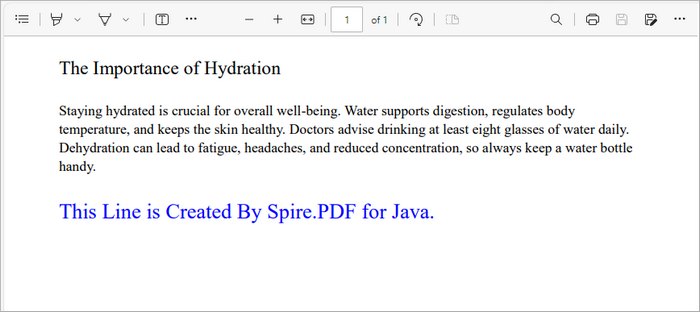
page.getCanvas().drawString("This Line is Created By Spire.PDF for Java.",font, brush, rect);
This snippet retrieves the first page of the document and defines a rectangle where the text will be placed. The Rectangle2D.Float class allows you to specify the exact dimensions for positioning the text. We then draw the specified text with a blue brush and custom font using the drawString method, which ensures that the text is rendered in the defined area.
Add an Image to a PDF File
Inserting images into a PDF is straightforward as well:
// Get a specific page
PdfPageBase page = doc.getPages().get(0);
// Load an image
PdfImage image = PdfImage.fromFile("C:\\Users\\Administrator\\Desktop\\logo.png");
// Specify coordinates for adding image
float x = 54;
float y = 300;
// Draw image on the page at the specified coordinates
page.getCanvas().drawImage(image, x, y);
Here, we load an image from a specified file path and draw it on the first page at the defined coordinates (x, y). The drawImage method allows you to position the image precisely, making it easy to incorporate visuals into your document.

Add a Table to a PDF File
Adding tables is also supported in Spire.PDF:
// Get a specific page
PdfPageBase page = doc.getPages().get(0);
// Create a table
PdfTable table = new PdfTable();
// Define table data
String[][] data = {
        new String[]{"Name", "Age", "Country"},
        new String[]{"Alice", "25", "USA"},
        new String[]{"Bob", "30", "UK"},
        new String[]{"Charlie", "28", "Canada"}
};
// Assign data to the table
table.setDataSource(data);
// Set table style
PdfTableStyle style = new PdfTableStyle();
style.getDefaultStyle().setFont(new PdfTrueTypeFont(new Font("Arial", Font.PLAIN, 12)));
table.setStyle(style);
// Draw the table on the page
table.draw(page, new Point2D.Float(50, 80));
In this example, we create a table and define its data source using a 2D array. After assigning the data, we set a style for the table using PdfTableStyle , which allows you to customize the font and appearance of the table. Finally, we use the draw method to render the table on the first page at the specified coordinates.
Add an Annotation or Comment
Annotations can enhance the interactivity of PDFs:
// Get a specific page
PdfPageBase page = doc.getPages().get(0);
// Create a free text annotation
PdfPopupAnnotation popupAnnotation = new PdfPopupAnnotation();
popupAnnotation.setLocation(new Point2D.Double(90, 260));
// Set the content of the annotation
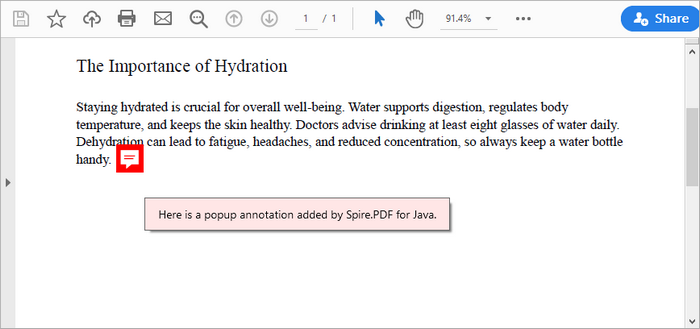
popupAnnotation.setText("Here is a popup annotation added by Spire.PDF for Java.");
// Set the icon and color of the annotation
popupAnnotation.setIcon(PdfPopupIcon.Comment);
popupAnnotation.setColor(new PdfRGBColor(Color.RED));
// Add the annotation to the collection of the annotations
page.getAnnotations().add(popupAnnotation);
This snippet creates a popup annotation at a specified location on the page. By calling setLocation , you definewhere the annotation appears. The setText method allows you to specify the content displayed in the annotation, while you can set the icon and color to customize its appearance. Finally, the annotation is added to the page's collection of annotations.
You may also like: Add Page Numbers to a PDF Document in Java
Replacing Content in a PDF File in Java
Replace Text in a PDF File
To replace existing text within a PDF, you can use the following code:
// Create a PdfTextReplaceOptions object
PdfTextReplaceOptions textReplaceOptions = new PdfTextReplaceOptions();
// Specify the options for text replacement
textReplaceOptions.setReplaceType(EnumSet.of(ReplaceActionType.IgnoreCase));
// Iterate through the pages
for (int i = 0; i < doc.getPages().getCount(); i++) {

// Get a specific page
PdfPageBase page = doc.getPages().get(i);
// Create a PdfTextReplacer object based on the page
PdfTextReplacer textReplacer = new PdfTextReplacer(page);
// Set the replace options
textReplacer.setOptions(textReplaceOptions);
// Replace all occurrences of target text with new text
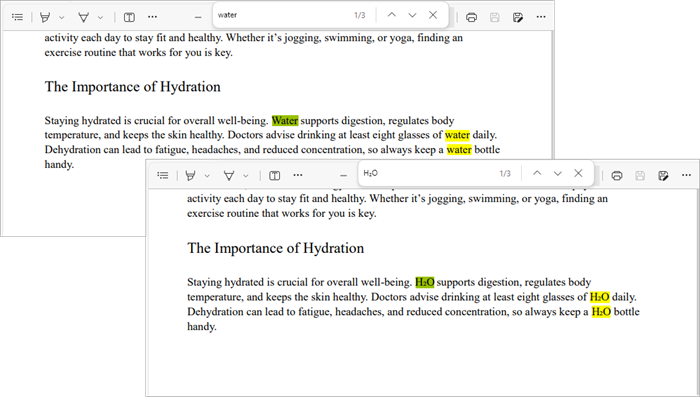
textReplacer.replaceAllText("Water", "H₂O");
}
In this example, we create a PdfTextReplaceOptions object to specify replacement options, such as ignoring case sensitivity. We then iterate through all pages of the document, creating a PdfTextReplacer for each page. The replaceAllText method is called on the text replacer to replace all occurrences of "Water" with "H₂O".
Replace an Image in a PDF File
Replacing an image follows a similar pattern:
// Get a specific page
PdfPageBase page = doc.getPages().get(0);
// Load an image
PdfImage image = PdfImage.fromFile("C:\\Users\\Administrator\\Desktop\\logo.png");
// Get the image information from the page
PdfImageHelper imageHelper = new PdfImageHelper();
PdfImageInfo[] imageInfo = imageHelper.getImagesInfo(page);
// Replace Image
imageHelper.replaceImage(imageInfo[0], image);
This code retrieves the image information from the specified page using the PdfImageHelper class. After loading a new image from a file, we call replaceImage to replace the first image found on the page with the new one.
You may also like: Replace Fonts in PDF Documents in Java
Removing Content from a PDF File in Java
Remove a Page from a PDF File
To remove an entire page from a PDF, use the following code:
// Remove a specific page
doc.getPages().removeAt(0);
This straightforward command removes the first page from the document. By calling removeAt , you specify the index of the page to be removed, simplifying page management in your PDF.
Delete an Image from a PDF File
To remove an image from a page:
// Get a specific page
PdfPageBase page = pdf.getPages().get(0);
// Get the image information from the page
PdfImageHelper imageHelper = new PdfImageHelper();
PdfImageInfo[] imageInfos = imageHelper.getImagesInfo(page);
// Delete the specified image on the page
imageHelper.deleteImage(imageInfos[0]);
This code retrieves all images from the first page and deletes the first image using the deleteImage method from PdfImageHelper .
Delete an Annotation
Removing an annotation is simple as well:
// Get a specific page
PdfPageBase page = pdf.getPages().get(0);
// Remove the specified annotation
page.getAnnotationsWidget().removeAt(0);
This snippet removes the first annotation from the specified page. The removeAt method is used to specify which annotation to remove, ensuring that the document can be kept clean and free of unnecessary comments.
Delete an Attachment
To delete an attachment from a PDF:
// Get the attachments collection
PdfAttachmentCollection attachments = doc.getAttachments();
// Remove a specific attachment
attachments.removeAt(0);
This code retrieves the collection of attachments from the document and removes the first one using the removeAt method.
Securing Your PDF File in Java
Apply a Watermark to a PDF File
Watermarks can be added for branding or copyright purposes:
// Create a font and a brush
PdfTrueTypeFont font = new PdfTrueTypeFont(new Font("Arial Black", Font.PLAIN, 50), true);
PdfBrush brush = PdfBrushes.getBlue();
// Specify the watermark text
String watermarkText = "DO NOT COPY";
// Specify the opacity level
float opacity = 0.6f;
// Iterate through the pages
for (int i = 0; i < doc.getPages().getCount(); i++) {
    PdfPageBase page = doc.getPages().get(i);
    // Set the transparency level for the watermark
    page.getCanvas().setTransparency(opacity);
    // Measure the size of the watermark text
    Dimension2D textSize = font.measureString(watermarkText);
    // Get the width and height of the page
    double pageWidth = page.getActualSize().getWidth();
    double pageHeight = page.getActualSize().getHeight();
    // Calculate the position to center the watermark on the page
    double x = (pageWidth - textSize.getWidth()) / 2;
    double y = (pageHeight - textSize.getHeight()) / 2;
    // Draw the watermark text on the page at the calculated position
    page.getCanvas().drawString(watermarkText, font, brush, x, y);
}
This code configures the appearance of a text watermark and places it at the center of each page in a PDF file using the drawString method, effectively discouraging unauthorized copying.
Password Protect a PDF File
To secure your PDF with a password:
// Specify the user and owner passwords
String userPassword = "open_psd";
String ownerPassword = "permission_psd";
// Create a PdfSecurityPolicy object with the two passwords
PdfSecurityPolicy securityPolicy = new PdfPasswordSecurityPolicy(userPassword, ownerPassword);
// Set encryption algorithm
securityPolicy.setEncryptionAlgorithm(PdfEncryptionAlgorithm.AES_256);
// Set document permissions (If you do not set, the default is Forbid All)
securityPolicy.setDocumentPrivilege(PdfDocumentPrivilege.getAllowAll());
// Restrict editing
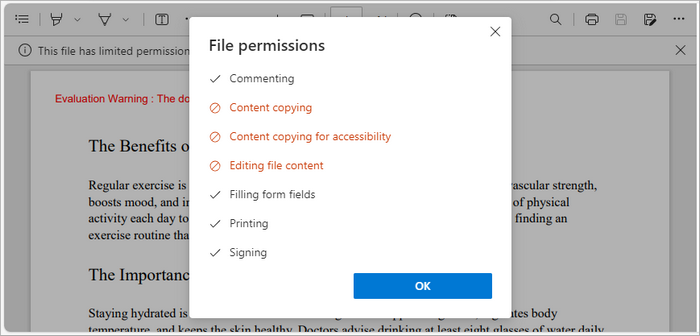
securityPolicy.getDocumentPrivilege().setAllowModifyContents(false);
securityPolicy.getDocumentPrivilege().setAllowCopyContentAccessibility(false);
securityPolicy.getDocumentPrivilege().setAllowContentCopying(false);
// Encrypt the PDF file
doc.encrypt(securityPolicy);
This code applies password protection and encryption to a PDF document by defining a user password (for opening) and an owner password (for permissions like editing and printing). The PdfSecurityPolicy object manages security settings, including the AES-256 encryption algorithm and permission levels. Finally, doc.encrypt(securityPolicy) encrypts the document, ensuring only authorized users can access or modify it.
You may also like: How to Add Digital Signatures to PDF in Java
Conclusion
Editing PDF files in Java is often seen as challenging, but with Spire.PDF for Java, it becomes a straightforward and efficient process. This library provides developers with the flexibility to create, modify, replace, and secure PDF content using clean, easy-to-understand APIs. From adding pages and images to encrypting sensitive documents, Spire.PDF simplifies every step of the workflow while maintaining professional output quality.
Beyond basic editing, Spire.PDF’s capabilities extend to automation and enterprise-level solutions. Whether you’re integrating PDF manipulation into a document management system, or generating customized reports, the library offers a stable and scalable foundation for long-term projects. With its comprehensive feature set and strong performance, Spire.PDF for Java is a reliable choice for developers seeking precision, efficiency, and control over PDF documents.
FAQs About Editing PDF in Java
Q1. What is the best library for editing PDFs in Java?
Spire.PDF for Java is a popular choice among developers worldwide, which provides comprehensive range of features for effective PDF manipulation.
Q2. Can I edit existing text in a PDF using Java?
With Spire.PDF for Java, you can replace or modify existing text using classes like PdfTextReplacer along with customizable options for case sensitivity and matching behavior.
Q3. How to insert or replace images in a PDF in Java?
With Spire.PDF for Java, you can use drawImage() to insert images and PdfImageHelper.replaceImage() to replace existing ones on a specific page.
Q4. Can I annotate a PDF file in Java?
Yes, annotations such as highlights, comments, and stamps can be added using the appropriate annotation classes provided by Spire.PDF for Java.
Q5. Can I extract text and images from an existing PDF file?
Yes, you can. Spire.PDF for Java provides methods to extract text, images, and other elements from PDFs easily. For detailed instructions and code examples, refer to: How to Read PDFs in Java: Extract Text, Images, and More
Get a Free License
To fully experience the capabilities of Spire.PDF for Java without any evaluation limitations, you can request a free 30-day trial license.
Python TXT to CSV Tutorial | Convert TXT Files to CSV in Python

When working with data in Python, converting TXT files to CSV is a common and essential task for data analysis, reporting, or sharing data between applications. TXT files often store unstructured plain text, which can be difficult to process, while CSV files organize data into rows and columns, making it easier to work with and prepare for analysis. This tutorial explains how to convert TXT to CSV in Python efficiently, covering single-file conversion, batch conversion, and tips for handling different delimiters.
Table of Contents
- What is a CSV File
- Python TXT to CSV Library - Installation
- Convert a TXT File to CSV in Python (Step-by-Step)
- Automate Batch Conversion of Multiple TXT Files
- Advanced Tips for Python TXT to CSV Conversion
- Conclusion
- FAQs: Python Text to CSV
What is a CSV File?
A CSV (Comma-Separated Values) file is a simple text-based file format used to store tabular data. Each line in a CSV file represents a row, and values within the row are separated by commas (or another delimiter such as tabs or semicolons).
CSV is widely supported by spreadsheet applications, databases, and programming languages like Python. Its simple format makes it easy to import, export, and use across platforms such as Excel, Google Sheets, R, and SQL for data analysis and automation.
An Example CSV File:
Name, Age, City

John, 28, New York

Alice, 34, Los Angeles

Bob, 25, Chicago
Python TXT to CSV Library - Installation
To perform TXT to CSV conversion in Python, we will use Spire.XLS for Python, a powerful library for creating and manipulating Excel and CSV files, without requiring Microsoft Excel to be installed.

You can install it directly from PyPI with the following command:
pip install Spire.XLS
If you need instructions for the installation, visit the guide on How to Install Spire.XLS for Python.
Convert a TXT File to CSV in Python (Step-by-Step)
Converting a text file to CSV in Python is straightforward. You can complete the task in just a few steps. Below is a basic outline of the process:
- Prepare and read the text file: Load your TXT file and read its content line by line.
- Split the text data: Separate each line into fields using a specific delimiter such as a space, tab, or comma.
- Write data to CSV: Use Spire.XLS to write the processed data into a new CSV file.
- Verify the output: Check the CSV in Excel, Google Sheets, or a text editor.
The following code demonstrates how to export a TXT file to CSV using Python:
from spire.xls import *

# Read the txt file
with open("data.txt", "r", encoding="utf-8") as file:
    lines = file.readlines()

# Process each line by splitting based on spaces (you can change the delimiter if needed)
processed_data = [line.strip().split() for line in lines]

# Create an Excel workbook
workbook = Workbook()
# Get the first worksheet
sheet = workbook.Worksheets[0]

# Write data from the processed list to the worksheet
for row_num, row_data in enumerate(processed_data):
    for col_num, cell_data in enumerate(row_data):
        # Write data into cells
        sheet.Range[row_num + 1, col_num + 1].Value = cell_data

# Save the sheet as CSV file (UTF-8 encoded)
sheet.SaveToFile("TxtToCsv.csv", ",", Encoding.get_UTF8())
# Dispose the workbook to release resources
workbook.Dispose()
TXT to CSV Output:
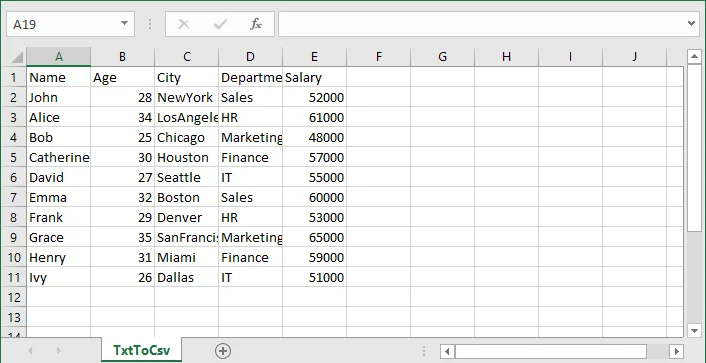
If you are also interested in converting a TXT file to Excel, see the guide on converting TXT to Excel in Python.
Automate Batch Conversion of Multiple TXT Files
If you have multiple text files that you want to convert to CSV automatically, you can loop through all .txt files in a folder and convert them one by one.
The following code demonstrates how to batch convert multiple TXT files to CSV in Python:
import os
from spire.xls import *

# Folder containing TXT files
input_folder = "txt_files"
output_folder = "csv_files"

# Create output folder if it doesn't exist
os.makedirs(output_folder, exist_ok=True)

# Function to process a single TXT file
def convert_txt_to_csv(file_path, output_path):
    # Read the TXT file
    with open(file_path, "r", encoding="utf-8") as f:
        lines = f.readlines()

    # Process each line (split by space, modify if your delimiter is different)
    processed_data = [line.strip().split() for line in lines if line.strip()]

    # Create workbook and access the first worksheet
    workbook = Workbook()
    sheet = workbook.Worksheets[0]

    # Write processed data into the sheet
    for row_num, row_data in enumerate(processed_data):
        for col_num, cell_data in enumerate(row_data):
            sheet.Range[row_num + 1, col_num + 1].Value = cell_data

    # Save the sheet as CSV with UTF-8 encoding
    sheet.SaveToFile(output_path, ",", Encoding.get_UTF8())
    workbook.Dispose()
    print(f"Converted '{file_path}' -> '{output_path}'")

# Loop through all TXT files in the folder and convert each to a CSV file with the same file name
for filename in os.listdir(input_folder):
    if filename.lower().endswith(".txt"):
        input_path = os.path.join(input_folder, filename)
        output_name = os.path.splitext(filename)[0] + ".csv"
        output_path = os.path.join(output_folder, output_name)

        convert_txt_to_csv(input_path, output_path)
Advanced Tips for Python TXT to CSV Conversion
Converting text files to CSV can involve variations in text file layout and potential errors, so these tips will help you handle different scenarios more effectively.
1. Handle Different Delimiters
Not all text files use spaces to separate values. If your TXT file uses tabs, commas, or other characters, you can adjust the split() function to match the delimiter.
- For tab-separated files (.tsv):
processed_data = [line.strip().split('\t') for line in lines]
- For comma-separated files:
processed_data = [line.strip().split(',') for line in lines]
- For custom delimiters (e.g., |):
processed_data = [line.strip().split('|') for line in lines]
This ensures that your data is correctly split into columns before writing to CSV.
2. Add Error Handling
When reading or writing files, it's a good practice to use try-except blocks to catch potential errors. This makes your script more robust and prevents unexpected crashes.
try:
    # your code here
except Exception as e:
print("Error:", e)
Tip: Use descriptive error messages to help understand the problem.
- Skip Empty Lines
Sometimes, text files may have empty lines. You can filter out the blank lines to avoid creating empty rows in CSV:
processed_data = [line.strip().split() for line in lines if line.strip()]
Conclusion
In this article, you learned how to convert a TXT file to CSV format in Python using Spire.XLS for Python. This conversion is an essential step in data preparation, helping organize raw text into a structured format suitable for analysis, reporting, and sharing. With Spire.XLS for Python, you can automate the text to CSV conversion, handle different delimiters, and efficiently manage multiple text files.
If you have any questions or need technical assistance about Python TXT to CSV conversion, visit our Support Forum for help.
FAQs: Python Text to CSV
Q1: Can I convert TXT files to CSV without Microsoft Excel installed?
A1: Yes. Spire.XLS for Python works independently of Microsoft Excel, allowing you to create and export CSV files directly.
Q2: How to batch convert multiple TXT files to CSV in Python?
A2: Use a loop to read all TXT files in a folder and apply the conversion function for each. The tutorial includes a ready-to-use Python example for batch conversion.
Q3: How do I handle empty lines or inconsistent rows in TXT files when converting to CSV?
A3: Filter out empty lines during processing and implement checks for consistent column counts to avoid errors or blank rows in the output CSV.
Q4: How do I convert TXT files with tabs or custom delimiters to CSV in Python?
A4: You can adjust the split() function in your Python script to match the delimiter in your TXT file-tabs (\t), commas, or custom characters-before writing to CSV.
Come adattare automaticamente la larghezza delle colonne in Excel (5 metodi)
Indice
- Cos'è l'Adattamento Automatico in Excel?
- Adattamento Automatico delle Colonne Tramite il Mouse
- Adattamento Automatico delle Colonne Tramite la Barra Multifunzione di Excel
- Adattamento Automatico delle Colonne con Scorciatoie da Tastiera
- Adattamento Automatico delle Colonne Tramite VBA
- Adattamento Automatico della Larghezza delle Colonne Tramite Python
- Problemi Comuni dell'Adattamento Automatico e Come Risolverli
- Conclusione
- Domande Frequenti sull'Adattamento Automatico di Excel
Installa con Pypi
pip install Spire.XLS
Link Correlati

Quando si lavora con Excel, ci si imbatte spesso in colonne troppo strette per visualizzare tutto il testo o troppo larghe, sprecando spazio prezioso. Regolare manualmente ogni colonna può richiedere molto tempo, specialmente in fogli di calcolo di grandi dimensioni. È qui che entra in gioco l'Adattamento Automatico.
La funzione di Adattamento Automatico di Excel regola automaticamente la larghezza delle colonne (e l'altezza delle righe) per adattarla alla dimensione del contenuto. È uno strumento semplice ma potente che aiuta a rendere i fogli di lavoro puliti, leggibili e professionali.
In questo articolo, imparerai cinque modi semplici per adattare automaticamente la larghezza delle colonne in Excel — da rapide azioni con il mouse all'automazione avanzata con VBA e Python. Che tu sia un utente occasionale di Excel o qualcuno che gestisce dati regolarmente, questi metodi ti faranno risparmiare tempo e miglioreranno il tuo flusso di lavoro.
- Metodo 1: Adattamento Automatico delle Colonne Tramite il Mouse
- Metodo 2: Adattamento Automatico delle Colonne Tramite la Barra Multifunzione di Excel
- Metodo 3: Adattamento Automatico delle Colonne con Scorciatoie da Tastiera
- Metodo 4: Adattamento Automatico delle Colonne Tramite VBA
- Metodo 5: Adattamento Automatico della Larghezza delle Colonne Tramite Python
Cos'è l'Adattamento Automatico in Excel?
L'Adattamento Automatico è una funzione integrata in Microsoft Excel che ridimensiona automaticamente la larghezza delle colonne o l'altezza delle righe per adattarle al contenuto al loro interno. Invece di trascinare manualmente il bordo della colonna, l'Adattamento Automatico regola le dimensioni in modo che tutto il testo, i numeri o le intestazioni siano completamente visibili senza essere tagliati o lasciare spazio vuoto extra.
Ad esempio, se una colonna contiene voci di testo di lunghezze diverse, l'Adattamento Automatico assicura che ogni colonna diventi abbastanza larga da visualizzare la voce più lunga. È possibile applicare l'Adattamento Automatico a una singola colonna, a più colonne o persino all'intero foglio di lavoro contemporaneamente.
Metodo 1: Adattamento Automatico delle Colonne Tramite il Mouse
Il modo più rapido e intuitivo per adattare automaticamente le colonne in Excel è usare il mouse. Questo metodo non richiede scorciatoie da tastiera o navigazione nei menu, rendendolo ideale per regolazioni rapide durante la revisione dei dati.
Passaggi:
- Seleziona la/le colonna/e che desideri regolare.
- Per selezionare una singola colonna, fai clic sull'intestazione della colonna (ad es., A , B ,C ).
- Per selezionare più colonne, fai clic e trascina sulle intestazioni o tieni premuto Ctrl (Windows) o Comando (Mac) mentre selezioni ciascuna di esse.
- Passa il mouse sul bordo destro di qualsiasi intestazione di colonna selezionata.
- Il cursore si trasformerà in una freccia a due punte ( ↔) .
- Fai doppio clic sul bordo.
- Excel ridimensionerà istantaneamente la/le colonna/e selezionata/e in modo che il contenuto della cella più largo si adatti perfettamente.
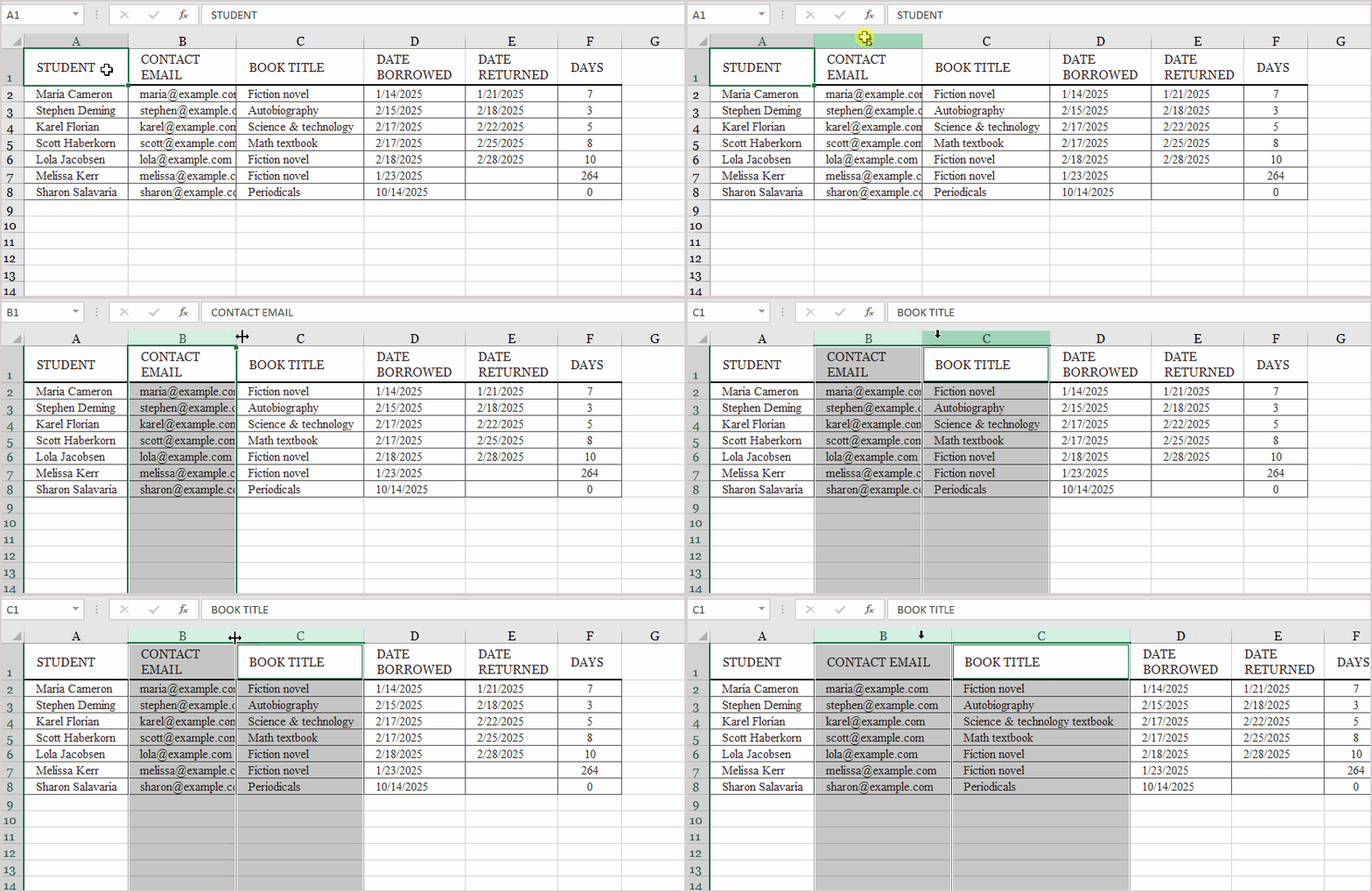
Suggerimenti:
- Puoi adattare automaticamente tutte le colonne contemporaneamente selezionando l'intero foglio (premi Ctrl + A ) e facendo doppio clic su qualsiasi bordo di colonna.
- Se hai unito celle o hai testo a capo, l'Adattamento Automatico di Excel potrebbe non comportarsi come previsto — affronteremo questo argomento nella sezione Problemi Comuni dell'Adattamento Automatico.
- Questo metodo funziona anche per le righe — basta fare doppio clic sul confine della riga.
Metodo 2: Adattamento Automatico delle Colonne Tramite la Barra Multifunzione di Excel
Se preferisci usare i menu di Excel invece delle azioni del mouse, la Barra Multifunzione offre un modo comodo per adattare automaticamente colonne e righe. Questo approccio è particolarmente utile quando si lavora con più celle o quando si desidera esplorare opzioni di formattazione correlate.
Passaggi:
- Seleziona le colonne che desideri regolare.
- Fai clic e trascina sulle intestazioni delle colonne (ad esempio, da A a D), o premi Ctrl + A per selezionare tutte le colonne.
- Vai alla scheda Home sulla Barra Multifunzione.
- Nel gruppo Celle, fai clic sul menu a discesa Formato.
- Scegli Adatta Larghezza Colonne dal menu.
Excel ridimensionerà istantaneamente le colonne selezionate in modo che tutto il contenuto delle celle sia visibile senza sovrapposizioni o troncamenti.

Metodo 3: Adattamento Automatico delle Colonne con Scorciatoie da Tastiera
Le scorciatoie da tastiera sono il modo più veloce per adattare automaticamente le colonne una volta memorizzati i tasti. Eliminano la necessità di navigare nei menu o usare il mouse.
Per Windows:
-
Seleziona la/le colonna/e da regolare.
-
Premi Alt + H , poi O , e poi I . (Premi ogni tasto in sequenza, non tutti insieme.)
Excel ridimensionerà automaticamente le colonne selezionate per adattarle al contenuto.
Per Mac:
-
Seleziona la/le colonna/e.
-
Premi: Comando + Opzione + 0 (zero)
Questo adatta automaticamente all'istante le colonne selezionate.
Suggerimento:
Se vuoi adattare automaticamente tutte le colonne del tuo foglio di lavoro contemporaneamente, premi Ctrl + A (o Comando + A su Mac) per selezionare tutte le celle, quindi usa la scorciatoia sopra.
Metodo 4: Adattamento Automatico delle Colonne Tramite VBA
Se hai spesso bisogno di adattare automaticamente le colonne come parte di un processo ripetitivo — come dopo l'importazione di dati o la generazione di report — usare VBA (Visual Basic for Applications) può farti risparmiare molto tempo.
Passaggi:
-
Premi Alt + F11 per aprire l'editor VBA.
-
Fai clic su Inserisci → Modulo .
-
Copia e incolla il seguente codice:
- Premi F5 o torna a Excel ed esegui la macro.
Sub AutoFit_All_Columns()
    Cells.EntireColumn.AutoFit
End Sub
Questa macro ridimensiona automaticamente tutte le colonne nel foglio di lavoro attivo per adattarle al loro contenuto.
Se vuoi adattare automaticamente solo colonne specifiche, puoi modificare il codice in questo modo:
Sub AutoFit_Specific_Columns()
    Columns("A:D").AutoFit
End Sub
Metodo 5: Adattamento Automatico della Larghezza delle Colonne Tramite Python
Per sviluppatori o analisti di dati che gestiscono file Excel programmaticamente, Python offre un modo potente per automatizzare la formattazione delle colonne. Usando Spire.XLS for Python, puoi facilmente adattare automaticamente le colonne senza aprire Excel.
Passaggio 1: Installa la Libreria
Esegui il seguente comando nel tuo terminale o prompt dei comandi:
pip install Spire.XLS
Passaggio 2: Adattamento Automatico delle Colonne con Spire.XLS
Ecco un esempio completo:
from spire.xls import *

# Create a new workbook
workbook = Workbook()

# Load an existing Excel file or create a new one
workbook.LoadFromFile("input.xlsx")

# Get the first worksheet
sheet = workbook.Worksheets[0]

# AutoFit all columns in the worksheet
sheet.AllocatedRange.AutoFitColumns()

# Save the modified file
workbook.SaveToFile("AutoFit_Output.xlsx", ExcelVersion.Version2016)
workbook.Dispose()
Questa flessibilità rende Spire.XLS un'ottima scelta per attività di reporting automatizzato o esportazione di dati, specialmente quando si gestiscono file Excel in operazioni batch.
Output:

Leggi anche: Adattamento Automatico di Righe e Colonne in Excel Tramite Python
Problemi Comuni dell'Adattamento Automatico e Come Risolverli
A volte l'Adattamento Automatico non si comporta come previsto. Ecco alcuni problemi comuni e soluzioni rapide:
| Problema | Causa | Soluzione |
|---|---|---|
| L'Adattamento Automatico non ridimensiona le celle unite | Excel non può adattare automaticamente le celle unite | Separa temporaneamente le celle, ridimensiona, quindi unisci di nuovo |
| Il testo a capo viene ancora tagliato | L'altezza della riga non si regola automaticamente | Usa Adatta Altezza Righe o abilita Testo a capo |
| Le colonne nascoste non vengono ridimensionate | Le colonne sono nascoste | Mostra colonne prima di applicare l'Adattamento Automatico |
| I risultati delle formule non sono visibili | La formula si aggiorna dopo l'Adattamento Automatico | Ricalcola (premi F9) prima di eseguire l'Adattamento Automatico |
Conclusione
L'Adattamento Automatico è uno degli strumenti di formattazione più semplici ma più utili di Excel. Che tu stia ridimensionando le colonne manualmente, usando scorciatoie o automatizzando con VBA o Python, questi metodi possono migliorare notevolmente la leggibilità e l'efficienza del flusso di lavoro.
Per soluzioni rapide, il doppio clic o l'uso della Barra Multifunzione funzionano meglio. Per l'automazione frequente, VBA o Spire.XLS for Python ti consentono di integrare l'Adattamento Automatico in attività di elaborazione dati più grandi. Qualunque metodo tu scelga, risparmierai tempo e manterrai i tuoi fogli di calcolo puliti e professionali.
Domande Frequenti sull'Adattamento Automatico di Excel
D1. Posso adattare automaticamente sia righe che colonne contemporaneamente?
Sì. Seleziona tutte le celle (Ctrl + A), quindi scegli Formato → Adatta Larghezza Colonne e Adatta Altezza Righe dalla Barra Multifunzione.
D2. Perché l'Adattamento Automatico non funziona con le celle unite?
Excel non può calcolare la larghezza corretta per le celle unite. Dovrai ridimensionarle manualmente.
D3. Posso impostare l'Adattamento Automatico in modo che si esegua automaticamente quando i dati cambiano?
Sì, utilizzando una macro evento VBA (ad es., Worksheet_Change) o uno script Python che si aggiorna dopo ogni aggiornamento dei dati.
D4. Spire.XLS richiede l'installazione di Excel?
No. Spire.XLS for Python è una libreria autonoma che non dipende da Microsoft Excel.
Vedi Anche
Como autoajustar a largura da coluna no Excel (5 maneiras)
Índice
- O que é o AutoFit no Excel?
- AutoAjustar Colunas Usando o Mouse
- AutoAjustar Colunas Usando a Faixa de Opções do Excel
- AutoAjustar Colunas com Atalhos de Teclado
- AutoAjustar Colunas Usando VBA
- AutoAjustar Largura da Coluna Usando Python
- Problemas Comuns do AutoFit e Como Corrigi-los
- Conclusão
- Perguntas Frequentes sobre o AutoFit do Excel
Instalar com Pypi
pip install Spire.XLS
Links Relacionados
Ao trabalhar com o Excel, você frequentemente encontra colunas que são muito estreitas para exibir todo o texto ou muito largas e desperdiçam espaço valioso. Ajustar cada coluna manualmente pode ser demorado, especialmente em planilhas grandes. É aí que o AutoFit entra.
O recurso AutoFit do Excel ajusta automaticamente a largura das colunas (e a altura das linhas) para corresponder ao tamanho do conteúdo. É uma ferramenta simples, mas poderosa, que ajuda a tornar suas planilhas limpas, legíveis e profissionais.
Neste artigo, você aprenderá cinco maneiras fáceis de AutoAjustar a largura da coluna no Excel — desde ações rápidas com o mouse até automação avançada com VBA и Python. Seja você um usuário ocasional do Excel ou alguém que gerencia dados regularmente, esses métodos economizarão seu tempo e melhorarão seu fluxo de trabalho.
- Método 1: AutoAjustar Colunas Usando o Mouse
- Método 2: AutoAjustar Colunas Usando a Faixa de Opções do Excel
- Método 3: AutoAjustar Colunas com Atalhos de Teclado
- Método 4: AutoAjustar Colunas Usando VBA
- Método 5: AutoAjustar Largura da Coluna Usando Python
O que é o AutoFit no Excel?
AutoFit é um recurso integrado no Microsoft Excel que redimensiona automaticamente a largura das colunas ou a altura das linhas para ajustar o conteúdo dentro delas. Em vez de arrastar a borda da coluna manualmente, o AutoFit ajusta as dimensões para que todo o texto, números ou cabeçalhos fiquem totalmente visíveis sem cortar ou deixar espaço em branco extra.
Por exemplo, se uma coluna contiver entradas de texto de comprimentos variados, o AutoFit garante que cada coluna se torne larga o suficiente para exibir a entrada mais longa. Você pode aplicar o AutoFit a uma única coluna, a várias colunas ou até mesmo à planilha inteira de uma vez.
Método 1: AutoAjustar Colunas Usando o Mouse
A maneira mais rápida e intuitiva de AutoAjustar colunas no Excel é usando o mouse. Este método não requer atalhos de teclado ou navegação em menus, tornando-o ideal para ajustes rápidos ao revisar dados.
Passos:
- Selecione a(s) coluna(s) que deseja ajustar.
- Para selecionar uma única coluna, clique no cabeçalho da coluna (por exemplo, A, B, C).
- Para selecionar várias colunas, clique e arraste sobre os cabeçalhos ou mantenha pressionada a tecla Ctrl (Windows) ou Command (Mac) enquanto seleciona cada uma.
- Passe o mouse sobre a borda direita de qualquer cabeçalho de coluna selecionado.
- O cursor mudará para uma seta de duas pontas ( ↔).
- Clique duas vezes na borda.
- O Excel redimensionará instantaneamente a(s) coluna(s) selecionada(s) para que o conteúdo da célula mais larga se ajuste perfeitamente.
Dicas:
- Você pode AutoAjustar todas as colunas de uma vez selecionando a planilha inteira (pressione Ctrl + A) e clicando duas vezes em qualquer borda de coluna.
- Se você mesclou células ou quebrou o texto, o AutoFit do Excel pode não se comportar como esperado — abordaremos isso na seção Problemas Comuns do AutoFit.
- Este método também funciona para linhas — basta clicar duas vezes na borda da linha.
Método 2: AutoAjustar Colunas Usando a Faixa de Opções do Excel
Se você prefere usar os menus do Excel em vez de ações do mouse, a Faixa de Opções oferece uma maneira conveniente de AutoAjustar colunas e linhas. Essa abordagem é especialmente útil ao trabalhar com várias células ou quando você deseja explorar opções de formatação relacionadas.
Passos:
- Selecione as colunas que deseja ajustar.
- Clique e arraste sobre os cabeçalhos das colunas (por exemplo, de A a D) ou pressione Ctrl + A para selecionar todas as colunas.
- Vá para a guia Página Inicial na Faixa de Opções.
- No grupo Células, clique no menu suspenso Formatar.
- Escolha AutoAjustar Largura da Coluna no menu.
O Excel redimensionará instantaneamente as colunas selecionadas para que todo o conteúdo das células fique visível sem sobreposição ou truncamento.
Método 3: AutoAjustar Colunas com Atalhos de Teclado
Os atalhos de teclado são a maneira mais rápida de AutoAjustar colunas depois que você memoriza as teclas. Eles eliminam a necessidade de navegar por menus ou usar o mouse.
Para Windows:
-
Selecione a(s) coluna(s) a serem ajustadas.
-
Pressione Alt + H, depois O e, em seguida, I. (Pressione cada tecla em sequência, não todas de uma vez.)
O Excel redimensionará automaticamente as colunas selecionadas para ajustar o conteúdo.
Para Mac:
-
Selecione a(s) coluna(s).
-
Pressione: Command + Option + 0 (zero)
Isso AutoAjusta instantaneamente as colunas selecionadas.
Dica:
Se você deseja AutoAjustar todas as colunas em sua planilha de uma vez, pressione Ctrl + A (ou Command + A no Mac) para selecionar todas as células e, em seguida, use o atalho acima.
Método 4: AutoAjustar Colunas Usando VBA
Se você precisa frequentemente AutoAjustar colunas como parte de um processo repetitivo — como após a importação de dados ou a geração de relatórios — usar VBA (Visual Basic for Applications) pode economizar um tempo significativo.
Passos:
-
Pressione Alt + F11 para abrir o editor do VBA.
-
Clique em Inserir → Módulo.
-
Copie e cole o seguinte código:
- Pressione F5 ou retorne ao Excel e execute a macro.
Sub AutoFit_All_Columns()
    Cells.EntireColumn.AutoFit
End Sub
Esta macro redimensiona automaticamente todas as colunas na planilha ativa para ajustar seu conteúdo.
Se você deseja AutoAjustar apenas colunas específicas, pode modificar o código da seguinte forma:
Sub AutoFit_Specific_Columns()
    Columns("A:D").AutoFit
End Sub
Método 5: AutoAjustar Largura da Coluna Usando Python
Para desenvolvedores ou analistas de dados que gerenciam arquivos do Excel programaticamente, o Python oferece uma maneira poderosa de automatizar a formatação de colunas. Usando Spire.XLS for Python, você pode facilmente AutoAjustar colunas sem abrir o Excel.
Passo 1: Instale a Biblioteca
Execute o seguinte comando em seu terminal ou prompt de comando:
pip install Spire.XLS
Passo 2: AutoAjustar Colunas com Spire.XLS
Aqui está um exemplo completo:
from spire.xls import *

# Crie uma nova pasta de trabalho
workbook = Workbook()

# Carregue um arquivo Excel existente ou crie um novo
workbook.LoadFromFile("input.xlsx")

# Obtenha a primeira planilha
sheet = workbook.Worksheets[0]

# AutoAjuste todas as colunas na planilha
sheet.AllocatedRange.AutoFitColumns()

# Salve o arquivo modificado
workbook.SaveToFile("AutoFit_Output.xlsx", ExcelVersion.Version2016)
workbook.Dispose()
Essa flexibilidade torna o Spire.XLS uma ótima escolha para tarefas automatizadas de relatórios ou exportação de dados, especialmente ao lidar com arquivos do Excel em operações em lote.
Saída:
Leia mais: AutoAjustar Linhas e Colunas no Excel Usando Python
Problemas Comuns do AutoFit e Como Corrigi-los
Às vezes, o AutoFit não se comporta como esperado. Aqui estão alguns problemas comuns e soluções rápidas:
| Problema | Causa | Solução |
|---|---|---|
| O AutoFit não redimensiona células mescladas | O Excel não consegue AutoAjustar células mescladas | Desfaça a mesclagem das células temporariamente, redimensione e mescle novamente |
| O texto quebrado ainda é cortado | A altura da linha não se ajusta automaticamente | Use AutoAjustar Altura da Linha ou habilite a Quebra de Texto |
| Colunas ocultas não são redimensionadas | As colunas estão ocultas | Reexibir colunas antes de aplicar o AutoFit |
| Resultados de fórmulas não estão visíveis | A fórmula é atualizada após o AutoFit | Recalcule (pressione F9) antes de executar o AutoFit |
Conclusão
O AutoFit é uma das ferramentas de formatação mais simples e úteis do Excel. Seja redimensionando colunas manualmente, usando atalhos ou automatizando com VBA ou Python, esses métodos podem melhorar drasticamente a legibilidade e a eficiência do fluxo de trabalho.
Para correções rápidas, clicar duas vezes ou usar a Faixa de Opções funciona melhor. Para automação frequente, o VBA ou o Spire.XLS for Python permite integrar o AutoFit em tarefas maiores de processamento de dados. Qualquer que seja o método escolhido, você economizará tempo e manterá suas planilhas com aparência limpa e profissional.
Perguntas Frequentes Sobre o AutoFit do Excel
P1. Posso AutoAjustar linhas e colunas ao mesmo tempo?
Sim. Selecione todas as células (Ctrl + A), depois escolha Formatar → AutoAjustar Largura da Coluna e AutoAjustar Altura da Linha na Faixa de Opções.
P2. Por que o AutoFit não funciona com células mescladas?
O Excel não consegue calcular a largura correta para células mescladas. Você precisará redimensioná-las manualmente.
P3. Posso configurar o AutoFit para ser executado automaticamente quando os dados mudam?
Sim, usando uma macro de evento VBA (por exemplo, Worksheet_Change) ou um script Python que atualiza após cada atualização de dados.
P4. O Spire.XLS requer que o Excel esteja instalado?
Não. O Spire.XLS for Python é uma biblioteca autônoma que não depende do Microsoft Excel.
Veja Também
Excel에서 열 너비 자동 맞춤하는 방법 (5가지)
목차
Pypi로 설치
pip install Spire.XLS
관련 링크
Excel로 작업할 때 모든 텍스트를 표시하기에는 너무 좁거나 너무 넓어서 귀중한 공간을 낭비하는 열을 자주 접하게 됩니다. 각 열을 수동으로 조정하는 것은 특히 대규모 스프레드시트에서 시간이 많이 걸릴 수 있습니다. 바로 여기에서 자동 맞춤이 사용됩니다.
Excel의 자동 맞춤 기능은 내용의 크기에 맞게 열 너비(및 행 높이)를 자동으로 조정합니다. 워크시트를 깔끔하고 읽기 쉬우며 전문적으로 보이게 만드는 간단하면서도 강력한 도구입니다.
이 문서에서는 빠른 마우스 작업부터 VBA 및 Python을 사용한 고급 자동화에 이르기까지 Excel에서 열 너비를 자동 맞춤하는 다섯 가지 쉬운 방법을 배웁니다. 가끔 Excel을 사용하는 사용자이든 정기적으로 데이터를 관리하는 사람이든 이러한 방법은 시간을 절약하고 작업 흐름을 개선해 줄 것입니다.
- 방법 1: 마우스를 사용하여 열 자동 맞춤
- 방법 2: Excel 리본을 사용하여 열 자동 맞춤
- 방법 3: 키보드 단축키로 열 자동 맞춤
- 방법 4: VBA를 사용하여 열 자동 맞춤
- 방법 5: Python을 사용하여 열 너비 자동 맞춤
Excel의 자동 맞춤이란 무엇인가요?
자동 맞춤은 Microsoft Excel의 기본 제공 기능으로, 열 너비나 행 높이를 내용에 맞게 자동으로 조정합니다. 열 테두리를 수동으로 끄는 대신, 자동 맞춤은 모든 텍스트, 숫자 또는 머리글이 잘리거나 추가 공백을 남기지 않고 완전히 보이도록 크기를 조정합니다.
예를 들어, 열에 다양한 길이의 텍스트 항목이 포함된 경우 자동 맞춤은 각 열이 가장 긴 항목을 표시할 수 있을 만큼 충분히 넓어지도록 합니다. 단일 열, 여러 열 또는 전체 워크시트에 한 번에 자동 맞춤을 적용할 수 있습니다.
방법 1: 마우스를 사용하여 열 자동 맞춤
Excel에서 열을 자동 맞춤하는 가장 빠르고 직관적인 방법은 마우스를 사용하는 것입니다. 이 방법은 키보드 단축키나 메뉴 탐색이 필요하지 않으므로 데이터를 검토하는 동안 빠른 조정에 이상적입니다.
단계:
- 조정하려는 열을 선택합니다.
- 단일 열을 선택하려면 열 머리글(예: A, B, C)을 클릭합니다.
- 여러 열을 선택하려면 머리글을 클릭하고 드래그하거나 각 열을 선택하는 동안 Ctrl(Windows) 또는 Command(Mac)를 누르고 있습니다.
- 선택한 열 머리글의 오른쪽 테두리 위로 마우스를 가져갑니다.
- 커서가 양방향 화살표(↔)로 바뀝니다.
- 테두리를 두 번 클릭합니다.
- Excel은 가장 넓은 셀 내용이 완벽하게 맞도록 선택한 열의 크기를 즉시 조정합니다.
팁:
- 전체 시트를 선택(Ctrl + A 누름)하고 아무 열 테두리나 두 번 클릭하여 모든 열을 한 번에 자동 맞춤할 수 있습니다.
- 셀을 병합했거나 텍스트를 줄 바꿈한 경우 Excel의 자동 맞춤이 예상대로 작동하지 않을 수 있습니다. 이 문제는 일반적인 자동 맞춤 문제 섹션에서 다루겠습니다.
- 이 방법은 행에도 적용됩니다. 대신 행 경계를 두 번 클릭하기만 하면 됩니다.
방법 2: Excel 리본을 사용하여 열 자동 맞춤
마우스 작업 대신 Excel 메뉴를 사용하는 것을 선호하는 경우 리본은 열과 행을 자동 맞춤하는 편리한 방법을 제공합니다. 이 접근 방식은 여러 셀로 작업하거나 관련 서식 옵션을 탐색하려는 경우에 특히 유용합니다.
단계:
- 조정하려는 열을 선택합니다.
- 열 머리글(예: A부터 D까지)을 클릭하고 드래그하거나 Ctrl + A를 눌러 모든 열을 선택합니다.
- 리본의 홈 탭으로 이동합니다.
- 셀 그룹에서 서식 드롭다운을 클릭합니다.
- 메뉴에서 열 너비 자동 맞춤을 선택합니다.
Excel은 모든 셀 내용이 겹치거나 잘리지 않고 보이도록 선택한 열의 크기를 즉시 조정합니다.
방법 3: 키보드 단축키로 열 자동 맞춤
키보드 단축키는 키를 외우고 나면 열을 자동 맞춤하는 가장 빠른 방법입니다. 메뉴를 탐색하거나 마우스를 사용할 필요가 없습니다.
Windows의 경우:
-
조정할 열을 선택합니다.
-
Alt + H를 누른 다음 O를 누르고 I를 누릅니다. (각 키를 한 번에 누르지 말고 순서대로 누릅니다.)
Excel은 내용에 맞게 선택한 열의 크기를 자동으로 조정합니다.
Mac의 경우:
-
열을 선택합니다.
-
누르기: Command + Option + 0 (영)
이렇게 하면 선택한 열이 즉시 자동 맞춤됩니다.
팁:
워크시트의 모든 열을 한 번에 자동 맞춤하려면 Ctrl + A(Mac의 경우 Command + A)를 눌러 모든 셀을 선택한 다음 위의 단축키를 사용합니다.
방법 4: VBA를 사용하여 열 자동 맞춤
데이터 가져오기 또는 보고서 생성 후와 같이 반복적인 프로세스의 일부로 열을 자주 자동 맞춤해야 하는 경우 VBA(Visual Basic for Applications)를 사용하면 상당한 시간을 절약할 수 있습니다.
단계:
-
Alt + F11을 눌러 VBA 편집기를 엽니다.
-
삽입 → 모듈을 클릭합니다.
-
다음 코드를 복사하여 붙여넣습니다.
- F5를 누르거나 Excel로 돌아가서 매크로를 실행합니다.
Sub AutoFit_All_Columns()
    Cells.EntireColumn.AutoFit
End Sub
이 매크로는 활성 워크시트의 모든 열 크기를 내용에 맞게 자동으로 조정합니다.
특정 열만 자동 맞춤하려면 다음과 같이 코드를 수정할 수 있습니다.
Sub AutoFit_Specific_Columns()
    Columns("A:D").AutoFit
End Sub
방법 5: Python을 사용하여 열 너비 자동 맞춤
프로그래밍 방식으로 Excel 파일을 관리하는 개발자나 데이터 분석가에게 Python은 열 서식을 자동화하는 강력한 방법을 제공합니다. Spire.XLS for Python을 사용하면 Excel을 열지 않고도 열을 쉽게 자동 맞춤할 수 있습니다.
1단계: 라이브러리 설치
터미널 또는 명령 프롬프트에서 다음 명령을 실행합니다.
pip install Spire.XLS
2단계: Spire.XLS로 열 자동 맞춤
다음은 전체 예제입니다.
from spire.xls import *

# Create a new workbook
workbook = Workbook()

# Load an existing Excel file or create a new one
workbook.LoadFromFile("input.xlsx")

# Get the first worksheet
sheet = workbook.Worksheets[0]

# AutoFit all columns in the worksheet
sheet.AllocatedRange.AutoFitColumns()

# Save the modified file
workbook.SaveToFile("AutoFit_Output.xlsx", ExcelVersion.Version2016)
workbook.Dispose()
이러한 유연성 덕분에 Spire.XLS는 자동화된 보고 또는 데이터 내보내기 작업, 특히 일괄 작업에서 Excel 파일을 처리할 때 훌륭한 선택이 됩니다.
출력:
더 읽어보기: Python을 사용하여 Excel에서 행 및 열 자동 맞춤
일반적인 자동 맞춤 문제 및 해결 방법
때로는 자동 맞춤이 예상대로 작동하지 않을 수 있습니다. 다음은 몇 가지 일반적인 문제와 빠른 해결 방법입니다.
| 문제 | 원인 | 해결책 |
|---|---|---|
| 자동 맞춤이 병합된 셀의 크기를 조정하지 않음 | Excel이 병합된 셀을 자동 맞춤할 수 없음 | 셀을 일시적으로 병합 해제하고 크기를 조정한 다음 다시 병합 |
| 줄 바꿈된 텍스트가 여전히 잘림 | 행 높이가 자동으로 조정되지 않음 | 행 높이 자동 맞춤 사용 또는 줄 바꿈 텍스트 활성화 |
| 숨겨진 열 크기 조정 안 됨 | 열이 숨겨져 있음 | 자동 맞춤을 적용하기 전에 열 숨기기 취소 |
| 수식 결과가 보이지 않음 | 자동 맞춤 후 수식 업데이트 | 자동 맞춤을 실행하기 전에 다시 계산(F9 누름) |
결론
자동 맞춤은 Excel의 가장 간단하면서도 가장 유용한 서식 도구 중 하나입니다. 열 크기를 수동으로 조정하든, 바로 가기를 사용하든, VBA 또는 Python으로 자동화하든, 이러한 방법은 가독성과 작업 흐름 효율성을 크게 향상시킬 수 있습니다.
빠른 수정을 위해서는 두 번 클릭하거나 리본을 사용하는 것이 가장 좋습니다. 빈번한 자동화를 위해 VBA 또는 Spire.XLS for Python을 사용하면 자동 맞춤을 더 큰 데이터 처리 작업에 통합할 수 있습니다. 어떤 방법을 선택하든 시간을 절약하고 스프레드시트를 깔끔하고 전문적으로 유지할 수 있습니다.
Excel 자동 맞춤에 대한 FAQ
Q1. 행과 열을 동시에 자동 맞춤할 수 있나요?
예. 모든 셀을 선택(Ctrl + A)한 다음 리본에서 서식 → 열 너비 자동 맞춤 및 행 높이 자동 맞춤을 선택합니다.
Q2. 자동 맞춤이 병합된 셀에서 작동하지 않는 이유는 무엇인가요?
Excel은 병합된 셀의 올바른 너비를 계산할 수 없습니다. 수동으로 크기를 조정해야 합니다.
Q3. 데이터가 변경될 때 자동 맞춤이 자동으로 실행되도록 설정할 수 있나요?
예, VBA 이벤트 매크로(예: Worksheet_Change) 또는 모든 데이터 새로 고침 후에 업데이트되는 Python 스크립트를 사용하여 가능합니다.
Q4. Spire.XLS를 사용하려면 Excel이 설치되어 있어야 하나요?
아니요. Spire.XLS for Python은 Microsoft Excel에 의존하지 않는 독립 실행형 라이브러리입니다.