Maneiras simples de remover o cabeçalho em documentos do Word
Índice
Instalar com o Nuget
PM> Install-Package Spire.Doc
Links Relacionados

Às vezes, os cabeçalhos em documentos do Word podem ser mais irritantes do que úteis — especialmente quando você está editando um relatório, modelo ou documento que não criou. Cabeçalhos extras podem se repetir em todas as páginas, bagunçar seu layout ou mostrar texto desatualizado que você não quer mais. Se você está procurando eliminar cabeçalhos em documentos do Word, removê-los completamente ou excluir um cabeçalho de uma única página, este guia o orienta em cada opção passo a passo. Você aprenderá tanto métodos manuais rápidos quanto uma maneira simples de lidar com isso automaticamente usando código.
- Eliminar Todos os Cabeçalhos no Word
- Excluir Cabeçalho de uma Única Página
- Remover Cabeçalhos de Vários Documentos do Word com C#
- A Conclusão
Eliminar Todos os Cabeçalhos em Documentos do Word
Quando você quer um documento limpo sem cabeçalhos, removê-los todos de uma vez é a solução mais simples. No Word, os cabeçalhos são conectados entre as páginas por padrão, então excluir um cabeçalho em uma página geralmente o remove de todo o documento. Nesta seção, vamos nos concentrar em como remover todos os cabeçalhos em documentos do Word de forma rápida e segura, para que seu arquivo fique exatamente como você deseja antes de começar a editar o conteúdo.
Passos para excluir todos os cabeçalhos em documentos do Word:
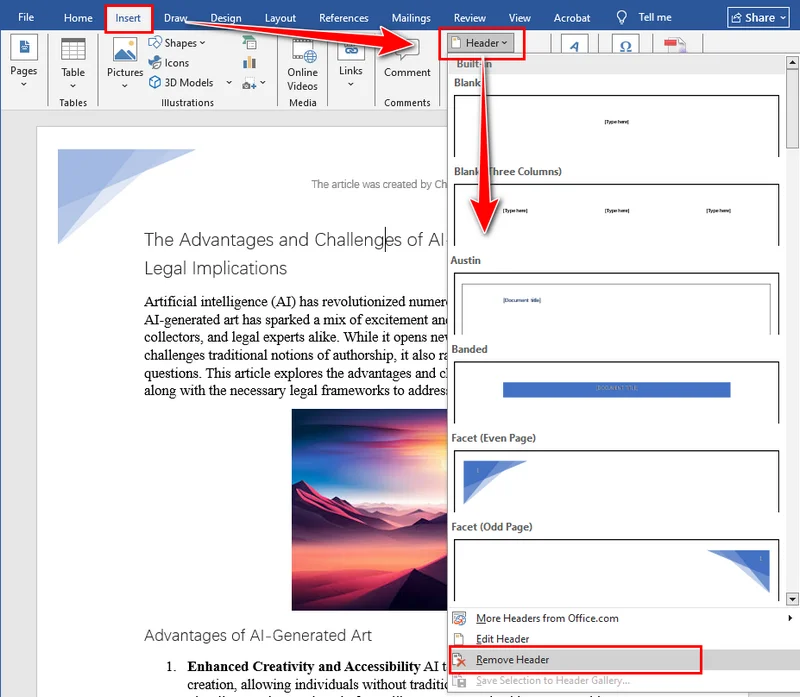
Abra seu documento do Word, vá para a guia Inserir e clique em Cabeçalho. No menu suspenso, role até o final e selecione Remover Cabeçalho. O Word excluirá instantaneamente todos os cabeçalhos do seu documento.
Aqui está uma ilustração mostrando onde encontrar a opção Remover Cabeçalho no Word:
Excluir Cabeçalho de uma Única Página
Claro, você pode nem sempre querer remover todos os cabeçalhos do seu documento. Às vezes, você só precisa excluir o cabeçalho de uma única página — por exemplo, removê-lo da primeira página de um relatório, de uma página de rosto ou de uma seção específica que não deve mostrar nenhum cabeçalho. O Word vincula os cabeçalhos entre as seções por padrão, então excluir um pode afetar outros se você não for cuidadoso. Na próxima parte, veremos como remover um cabeçalho de uma página no Word sem alterar o resto do seu documento.
Remover Cabeçalho da Primeira Página no Word
Se você deseja remover o cabeçalho apenas da primeira página — por exemplo, uma página de rosto ou capa — siga estes passos:
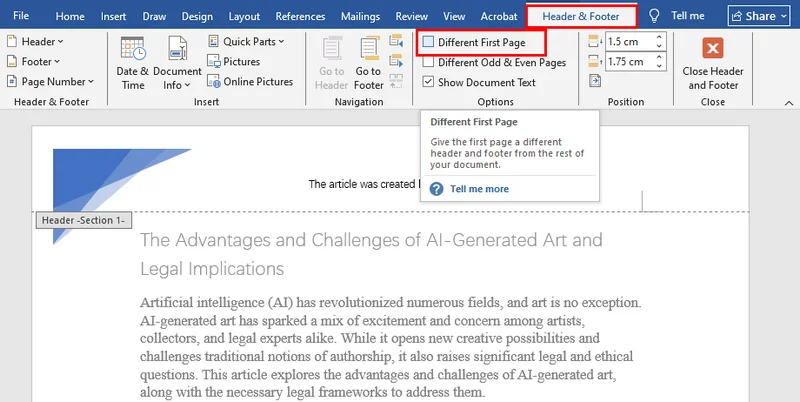
- Clique duas vezes na área do cabeçalho na primeira página para abrir a guia Cabeçalho e Rodapé.
- Na guia Cabeçalho e Rodapé, marque a caixa para Primeira Página Diferente.
- Exclua o conteúdo do cabeçalho na primeira página.
Excluir o Cabeçalho de Qualquer Página Única no Word
Para remover o cabeçalho de uma página específica (não a primeira), você precisará criar uma quebra de seção para que o cabeçalho possa ser editado separadamente:
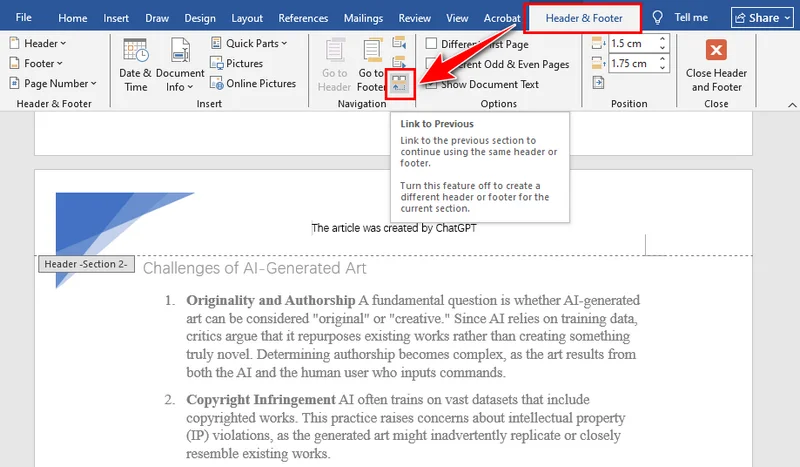
- Clique duas vezes na área do cabeçalho na página que você deseja editar.
- Na guia Cabeçalho e Rodapé, clique em Vincular ao Anterior para desativar o vínculo com o cabeçalho da página anterior.
- Exclua o conteúdo do cabeçalho nesta página.
- (Opcional) Adicione um novo cabeçalho para esta página ou para as páginas seguintes.
Remover Cabeçalhos de Vários Documentos do Word com C#
Excluir manualmente cabeçalhos de vários documentos do Word pode ser demorado, especialmente quando você está trabalhando com relatórios, modelos ou arquivos em massa. Usar C# para remover cabeçalhos de arquivos do Word não apenas economiza tempo, mas também garante consistência em todos os documentos. Com o Spire.Doc, você pode eliminar rapidamente todos os cabeçalhos — incluindo primeira página, páginas ímpares e páginas pares — sem abrir o Word manualmente. Este método é ideal para processamento em lote ou situações em que você precisa de uma maneira rápida e confiável de limpar cabeçalhos em vários documentos.

A instalação do Spire.Doc é simples. Você pode baixá-lo do site oficial e realizar uma instalação personalizada, ou simplesmente procurar por Spire.Doc no NuGet e adicioná-lo diretamente ao seu projeto. Ambos os métodos facilitam o início rápido, sem configuração complicada.
Passos para remover cabeçalhos em documentos do Word com C#:
- Crie uma instância de Document e carregue um arquivo do Word.
- Acesse a seção via Document.Sections[].
- Obtenha cabeçalhos para a primeira página, páginas ímpares e pares usando Section.HeadersFooters[HeaderFooterType hfType].
- Exclua os cabeçalhos chamando HeaderFooter.ChildObjects.Clear().
- Salve o documento usando Document.SaveToFile().
Aqui está o exemplo de código completo:
using Spire.Doc;
using Spire.Doc.Documents;

namespace RemoveHeader
{
    class Program
    {
        static void Main(string[] args)
        {
            //Create a Document instance
            Document doc = new Document();

            //Load a Word document
            doc.LoadFromFile("HeaderFooter.docx");

            //Get the first section
            Section section = doc.Sections[0];

            //Iterate through all paragraphs in the section
            foreach (Paragraph para in section.Paragraphs)
            {
                //Iterate through all child objects in each paragraph
                foreach (DocumentObject obj in para.ChildObjects)
                {
                    //Delete header in the first page
                    HeaderFooter header;
                    header = section.HeadersFooters[HeaderFooterType.HeaderFirstPage];
                    if (header != null)
                        header.ChildObjects.Clear();

                    //Delete headers in the odd pages
                    header = section.HeadersFooters[HeaderFooterType.HeaderOdd];
                    if (header != null)
                        header.ChildObjects.Clear();

                    //Delete headers in the even pages
                    header = section.HeadersFooters[HeaderFooterType.HeaderEven];
                    if (header != null)
                        header.ChildObjects.Clear();
                }
            }

            //Save the result document
            doc.SaveToFile("RemoveHeader.docx", FileFormat.Docx);
        }
    }
}
A Conclusão
Este artigo foca em como eliminar cabeçalhos em documentos do Word. Se você deseja remover todos os cabeçalhos ou apenas o cabeçalho de uma única página, encontrará instruções detalhadas passo a passo neste guia. Para um pequeno número de arquivos, o Microsoft Word é suficiente, mas se você precisar lidar com vários documentos, é altamente recomendável usar o Spire.Doc para remoção automatizada. Os usuários interessados também podem experimentar uma avaliação gratuita de 30 dias para explorar mais recursos.
LEIA TAMBÉM
Word 문서에서 머리글을 제거하는 간단한 방법
Nuget으로 설치
PM> Install-Package Spire.Doc
관련 링크
때로는 Word 문서의 머리글이 도움이 되기보다는 성가실 수 있습니다. 특히 직접 만들지 않은 보고서, 템플릿 또는 문서를 편집할 때 더욱 그렇습니다. 추가 머리글이 모든 페이지에 반복되거나, 레이아웃을 망가뜨리거나, 더 이상 원하지 않는 오래된 텍스트를 표시할 수 있습니다. Word 문서에서 머리글을 제거하거나, 완전히 제거하거나, 단일 페이지에서 머리글을 삭제하려는 경우 이 가이드에서 각 옵션을 단계별로 안내합니다. 빠른 수동 방법과 코드를 사용하여 자동으로 처리하는 간단한 방법을 모두 배우게 됩니다.
Word 문서의 모든 머리글 제거
머리글이 없는 깔끔한 문서를 원할 때 한 번에 모두 제거하는 것이 가장 간단한 해결책입니다. Word에서는 기본적으로 머리글이 페이지 간에 연결되어 있으므로 한 페이지에서 머리글을 삭제하면 종종 전체 문서에서 제거됩니다. 이 섹션에서는 Word 문서의 모든 머리글을 빠르고 안전하게 제거하여 콘텐츠 편집을 시작하기 전에 파일이 원하는 대로 정확하게 보이도록 하는 방법에 중점을 둘 것입니다.
Word 문서의 모든 머리글을 삭제하는 단계:
Word 문서를 열고 삽입 탭으로 이동한 다음 머리글을 클릭합니다. 드롭다운 메뉴에서 아래로 스크롤하여 머리글 제거를 선택합니다. Word는 문서에서 모든 머리글을 즉시 삭제합니다.
다음은 Word에서 머리글 제거 옵션을 찾을 수 있는 위치를 보여주는 그림입니다.
단일 페이지에서 머리글 삭제
물론 항상 문서에서 모든 머리글을 제거하고 싶지는 않을 수 있습니다. 때로는 단일 페이지에서만 머리글을 삭제해야 할 때가 있습니다. 예를 들어 보고서의 첫 페이지, 제목 페이지 또는 머리글이 표시되어서는 안 되는 특정 섹션에서 제거하는 경우입니다. Word는 기본적으로 섹션 간에 머리글을 연결하므로 조심하지 않으면 하나를 삭제하면 다른 머리글에 영향을 줄 수 있습니다. 다음 부분에서는 문서의 나머지 부분을 변경하지 않고 Word의 한 페이지에서 머리글을 제거하는 방법을 살펴보겠습니다.
Word의 첫 페이지에서 머리글 제거
첫 페이지(예: 제목 또는 표지)에서만 머리글을 제거하려면 다음 단계를 따르십시오.
- 첫 페이지의 머리글 영역을 두 번 클릭하여 머리글 및 바닥글 탭을 엽니다.
- 머리글 및 바닥글 탭에서 첫 페이지를 다르게 지정 확인란을 선택합니다.
- 첫 페이지의 머리글 내용을 삭제합니다.
Word의 단일 페이지에서 머리글 삭제
특정 페이지(첫 페이지가 아님)에서 머리글을 제거하려면 머리글을 별도로 편집할 수 있도록 구역 나누기를 만들어야 합니다.
- 편집하려는 페이지의 머리글 영역을 두 번 클릭합니다.
- 머리글 및 바닥글 탭에서 이전 머리글에 연결을 클릭하여 이전 페이지의 머리글과의 연결을 끕니다.
- 이 페이지의 머리글 내용을 삭제합니다.
- (선택 사항) 이 페이지 또는 다음 페이지에 새 머리글을 추가합니다.
C#으로 여러 Word 문서의 머리글 제거
여러 Word 문서에서 수동으로 머리글을 삭제하는 것은 시간이 많이 걸릴 수 있으며, 특히 보고서, 템플릿 또는 대량 파일로 작업할 때 더욱 그렇습니다. C#을 사용하여 Word 파일에서 머리글을 제거하면 시간을 절약할 수 있을 뿐만 아니라 모든 문서에서 일관성을 보장할 수 있습니다. Spire.Doc을 사용하면 Word를 수동으로 열지 않고도 첫 페이지, 홀수 페이지, 짝수 페이지를 포함한 모든 머리글을 빠르게 제거할 수 있습니다. 이 방법은 일괄 처리 또는 여러 문서에서 머리글을 빠르고 안정적으로 정리해야 하는 상황에 이상적입니다.
Spire.Doc 설치는 간단합니다. 공식 웹사이트에서 다운로드하여 사용자 지정 설치를 수행하거나 NuGet에서 Spire.Doc을 검색하여 프로젝트에 직접 추가할 수 있습니다. 두 방법 모두 복잡한 설정 없이 빠르게 시작할 수 있습니다.
C#으로 Word 문서의 머리글을 제거하는 단계:
- Document 인스턴스를 만들고 Word 파일을 로드합니다.
- Document.Sections[]를 통해 섹션에 액세스합니다.
- Section.HeadersFooters[HeaderFooterType hfType]을 사용하여 첫 페이지, 홀수 페이지 및 짝수 페이지의 머리글을 가져옵니다.
- HeaderFooter.ChildObjects.Clear()를 호출하여 머리글을 삭제합니다.
- Document.SaveToFile()을 사용하여 문서를 저장합니다.
다음은 전체 코드 예제입니다.
using Spire.Doc;
using Spire.Doc.Documents;

namespace RemoveHeader
{
    class Program
    {
        static void Main(string[] args)
        {
            //Create a Document instance
            Document doc = new Document();

            //Load a Word document
            doc.LoadFromFile("HeaderFooter.docx");

            //Get the first section
            Section section = doc.Sections[0];

            //Iterate through all paragraphs in the section
            foreach (Paragraph para in section.Paragraphs)
            {
                //Iterate through all child objects in each paragraph
                foreach (DocumentObject obj in para.ChildObjects)
                {
                    //Delete header in the first page
                    HeaderFooter header;
                    header = section.HeadersFooters[HeaderFooterType.HeaderFirstPage];
                    if (header != null)
                        header.ChildObjects.Clear();

                    //Delete headers in the odd pages
                    header = section.HeadersFooters[HeaderFooterType.HeaderOdd];
                    if (header != null)
                        header.ChildObjects.Clear();

                    //Delete headers in the even pages
                    header = section.HeadersFooters[HeaderFooterType.HeaderEven];
                    if (header != null)
                        header.ChildObjects.Clear();
                }
            }

            //Save the result document
            doc.SaveToFile("RemoveHeader.docx", FileFormat.Docx);
        }
    }
}
결론
이 기사에서는 Word 문서에서 머리글을 제거하는 방법에 중점을 둡니다. 모든 머리글을 제거하든 단일 페이지 머리글만 제거하든 이 가이드에서 자세한 단계별 지침을 찾을 수 있습니다. 소수의 파일의 경우 Microsoft Word로 충분하지만 여러 문서를 처리해야 하는 경우 Spire.Doc을 사용하여 자동 제거하는 것이 좋습니다. 관심 있는 사용자는 30일 무료 평가판을 사용하여 더 많은 기능을 탐색할 수도 있습니다.
함께 읽기
Méthodes simples pour supprimer l'en-tête des documents Word
Table des matières
Installer avec Nuget
PM> Install-Package Spire.Doc
Liens connexes
Parfois, les en-têtes dans les documents Word peuvent être plus gênants qu'utiles, surtout lorsque vous modifiez un rapport, un modèle ou un document que vous n'avez pas créé vous-même. Des en-têtes supplémentaires peuvent se répéter sur chaque page, perturber votre mise en page ou afficher un texte obsolète que vous ne voulez plus. Si vous cherchez à éliminer les en-têtes dans les documents Word, à les supprimer complètement ou à supprimer un en-tête d'une seule page, ce guide vous explique chaque option étape par étape. Vous apprendrez à la fois des méthodes manuelles rapides et une manière simple de le gérer automatiquement en utilisant du code.
- Éliminer tous les en-têtes dans Word
- Supprimer l'en-tête d'une seule page
- Supprimer les en-têtes de plusieurs documents Word avec C#
- La conclusion
Éliminer tous les en-têtes dans les documents Word
Lorsque vous voulez un document propre sans aucun en-tête, les supprimer tous en une seule fois est la solution la plus simple. Dans Word, les en-têtes sont liés entre les pages par défaut, donc supprimer un en-tête sur une page le supprime souvent de tout le document. Dans cette section, nous nous concentrerons sur la manière de supprimer tous les en-têtes dans les documents Word rapidement et en toute sécurité, afin que votre fichier ait exactement l'apparence que vous souhaitez avant de commencer à modifier le contenu.
Étapes pour supprimer tous les en-têtes dans les documents Word :
Ouvrez votre document Word, allez dans l'onglet Insertion, et cliquez sur En-tête. Dans le menu déroulant, faites défiler vers le bas et sélectionnez Supprimer l'en-tête. Word supprimera instantanément tous les en-têtes de votre document.
Voici une illustration montrant où trouver l'option Supprimer l'en-tête dans Word :
Supprimer l'en-tête d'une seule page
Bien sûr, vous ne voudrez peut-être pas toujours supprimer tous les en-têtes de votre document. Parfois, vous avez juste besoin de supprimer l'en-tête d'une seule page — par exemple, le retirer de la première page d'un rapport, d'une page de titre ou d'une section spécifique qui ne devrait afficher aucun en-tête. Word lie les en-têtes entre les sections par défaut, donc en supprimer un pourrait affecter les autres si vous n'êtes pas prudent. Dans la partie suivante, nous verrons comment supprimer un en-tête d'une page dans Word sans modifier le reste de votre document.
Retirer l'en-tête de la première page dans Word
Si vous souhaitez uniquement supprimer l'en-tête de la première page — par exemple, une page de titre ou de couverture — suivez ces étapes :
- Double-cliquez sur la zone de l'en-tête de la première page pour ouvrir l'onglet En-tête & Pied de page.
- Dans l'onglet En-tête & Pied de page, cochez la case Première page différente.
- Supprimez le contenu de l'en-tête de la première page.
Supprimer l'en-tête de n'importe quelle page unique dans Word
Pour supprimer l'en-tête d'une page spécifique (pas la première), vous devrez créer un saut de section pour que l'en-tête puisse être modifié séparément :
- Double-cliquez sur la zone de l'en-tête de la page que vous souhaitez modifier.
- Dans l'onglet En-tête & Pied de page, cliquez sur Lier au précédent pour désactiver le lien avec l'en-tête de la page précédente.
- Supprimez le contenu de l'en-tête de cette page.
- (Facultatif) Ajoutez un nouvel en-tête pour cette page ou les pages suivantes.
Supprimer les en-têtes de plusieurs documents Word avec C#
La suppression manuelle des en-têtes de plusieurs documents Word peut prendre beaucoup de temps, surtout lorsque vous travaillez avec des rapports, des modèles ou des fichiers en vrac. Utiliser C# pour supprimer les en-têtes des fichiers Word non seulement fait gagner du temps mais assure également la cohérence entre tous les documents. Avec Spire.Doc, vous pouvez rapidement éliminer tous les en-têtes — y compris ceux de la première page, des pages impaires et des pages paires — sans ouvrir Word manuellement. Cette méthode est idéale pour le traitement par lots ou les situations où vous avez besoin d'un moyen rapide et fiable de nettoyer les en-têtes de plusieurs documents.
L'installation de Spire.Doc est simple. Vous pouvez le télécharger depuis le site officiel et effectuer une installation personnalisée, ou simplement rechercher Spire.Doc dans NuGet et l'ajouter directement à votre projet. Les deux méthodes permettent de démarrer rapidement sans configuration compliquée.
Étapes pour supprimer les en-têtes dans les documents Word avec C# :
- Créez une instance de Document et chargez un fichier Word.
- Accédez à la section via Document.Sections[].
- Obtenez les en-têtes pour la première page, les pages impaires et les pages paires en utilisant Section.HeadersFooters[HeaderFooterType hfType].
- Supprimez les en-têtes en appelant HeaderFooter.ChildObjects.Clear().
- Enregistrez le document en utilisant Document.SaveToFile().
Voici l'exemple de code complet :
using Spire.Doc;
using Spire.Doc.Documents;

namespace RemoveHeader
{
    class Program
    {
        static void Main(string[] args)
        {
            //Create a Document instance
            Document doc = new Document();

            //Load a Word document
            doc.LoadFromFile("HeaderFooter.docx");

            //Get the first section
            Section section = doc.Sections[0];

            //Iterate through all paragraphs in the section
            foreach (Paragraph para in section.Paragraphs)
            {
                //Iterate through all child objects in each paragraph
                foreach (DocumentObject obj in para.ChildObjects)
                {
                    //Delete header in the first page
                    HeaderFooter header;
                    header = section.HeadersFooters[HeaderFooterType.HeaderFirstPage];
                    if (header != null)
                        header.ChildObjects.Clear();

                    //Delete headers in the odd pages
                    header = section.HeadersFooters[HeaderFooterType.HeaderOdd];
                    if (header != null)
                        header.ChildObjects.Clear();

                    //Delete headers in the even pages
                    header = section.HeadersFooters[HeaderFooterType.HeaderEven];
                    if (header != null)
                        header.ChildObjects.Clear();
                }
            }

            //Save the result document
            doc.SaveToFile("RemoveHeader.docx", FileFormat.Docx);
        }
    }
}
La conclusion
Cet article se concentre sur la manière d'éliminer les en-têtes dans les documents Word. Que vous souhaitiez supprimer tous les en-têtes ou seulement l'en-tête d'une seule page, vous trouverez des instructions détaillées étape par étape dans ce guide. Pour un petit nombre de fichiers, Microsoft Word est suffisant, mais si vous devez traiter plusieurs documents, l'utilisation de Spire.Doc pour une suppression automatisée est fortement recommandée. Les utilisateurs intéressés peuvent également essayer un essai gratuit de 30 jours pour explorer plus de fonctionnalités.
LIRE AUSSI
Maneras sencillas de eliminar el encabezado en documentos de Word
Tabla de Contenidos
Instalar con Nuget
PM> Install-Package Spire.Doc
Enlaces Relacionados
A veces, los encabezados en los documentos de Word pueden ser más molestos que útiles, especialmente cuando estás editando un informe, una plantilla o un documento que no creaste tú. Los encabezados adicionales pueden repetirse en cada página, desordenar tu diseño o mostrar texto obsoleto que ya no deseas. Si buscas eliminar encabezados en documentos de Word, quitarlos por completo o borrar un encabezado de una sola página, esta guía te explica cada opción paso a paso. Aprenderás tanto métodos manuales rápidos como una forma sencilla de manejarlo automáticamente usando código.
- Eliminar Todos los Encabezados en Word
- Eliminar Encabezado de una Sola Página
- Eliminar Encabezados de Múltiples Documentos de Word con C#
- La Conclusión
Eliminar Todos los Encabezados en Documentos de Word
Cuando quieres un documento limpio sin encabezados, eliminarlos todos a la vez es la solución más sencilla. En Word, los encabezados están conectados entre páginas por defecto, por lo que eliminar un encabezado en una página a menudo lo elimina de todo el documento. En esta sección, nos centraremos en cómo quitar todos los encabezados en documentos de Word de forma rápida y segura, para que tu archivo se vea exactamente como quieres antes de empezar a editar el contenido.
Pasos para eliminar todos los encabezados en documentos de Word:
Abre tu documento de Word, ve a la pestaña Insertar y haz clic en Encabezado. En el menú desplegable, desplázate hasta la parte inferior y selecciona Quitar encabezado. Word eliminará instantáneamente todos los encabezados de tu documento.
Aquí tienes una ilustración que muestra dónde encontrar la opción Quitar encabezado en Word:
Eliminar Encabezado de una Sola Página
Por supuesto, puede que no siempre quieras quitar todos los encabezados de tu documento. A veces, solo necesitas eliminar el encabezado de una sola página, por ejemplo, quitarlo de la primera página de un informe, una página de título o una sección específica que no debería mostrar ningún encabezado. Word vincula los encabezados entre secciones por defecto, por lo que eliminar uno podría afectar a otros si no tienes cuidado. En la siguiente parte, veremos cómo quitar un encabezado de una página en Word sin cambiar el resto del documento.
Quitar Encabezado de la Primera Página en Word
Si solo quieres quitar el encabezado de la primera página —por ejemplo, una página de título o portada— sigue estos pasos:
- Haz doble clic en el área del encabezado de la primera página para abrir la pestaña Encabezado y pie de página.
- En la pestaña Encabezado y pie de página, marca la casilla Primera página diferente.
- Elimina el contenido del encabezado en la primera página.
Eliminar el Encabezado de Cualquier Página en Word
Para quitar el encabezado de una página específica (que no sea la primera), necesitarás crear un salto de sección para que el encabezado se pueda editar por separado:
- Haz doble clic en el área del encabezado de la página que quieres editar.
- En la pestaña Encabezado y pie de página, haz clic en Vincular al anterior para desactivar el vínculo con el encabezado de la página anterior.
- Elimina el contenido del encabezado en esta página.
- (Opcional) Añade un nuevo encabezado para esta página o las siguientes.
Eliminar Encabezados de Múltiples Documentos de Word con C#
Eliminar manualmente los encabezados de múltiples documentos de Word puede llevar mucho tiempo, especialmente cuando se trabaja con informes, plantillas o archivos masivos. Usar C# para quitar encabezados de archivos de Word no solo ahorra tiempo, sino que también garantiza la coherencia en todos los documentos. Con Spire.Doc, puedes eliminar rápidamente todos los encabezados —incluidos los de la primera página, las páginas impares y las páginas pares— sin abrir Word manualmente. Este método es ideal para el procesamiento por lotes o situaciones en las que necesitas una forma rápida y fiable de limpiar los encabezados en múltiples documentos.
Instalar Spire.Doc es sencillo. Puedes descargarlo desde el sitio web oficial y realizar una instalación personalizada, o simplemente buscar Spire.Doc en NuGet y añadirlo directamente a tu proyecto. Ambos métodos facilitan un inicio rápido sin una configuración complicada.
Pasos para eliminar encabezados en documentos de Word con C#:
- Crea una instancia de Document y carga un archivo de Word.
- Accede a la sección a través de Document.Sections[].
- Obtén los encabezados para las páginas primera, impares y pares usando Section.HeadersFooters[HeaderFooterType hfType].
- Elimina los encabezados llamando a HeaderFooter.ChildObjects.Clear().
- Guarda el documento usando Document.SaveToFile().
Aquí está el ejemplo de código completo:
using Spire.Doc;
using Spire.Doc.Documents;

namespace RemoveHeader
{
    class Program
    {
        static void Main(string[] args)
        {
            //Create a Document instance
            Document doc = new Document();

            //Load a Word document
            doc.LoadFromFile("HeaderFooter.docx");

            //Get the first section
            Section section = doc.Sections[0];

            //Iterate through all paragraphs in the section
            foreach (Paragraph para in section.Paragraphs)
            {
                //Iterate through all child objects in each paragraph
                foreach (DocumentObject obj in para.ChildObjects)
                {
                    //Delete header in the first page
                    HeaderFooter header;
                    header = section.HeadersFooters[HeaderFooterType.HeaderFirstPage];
                    if (header != null)
                        header.ChildObjects.Clear();

                    //Delete headers in the odd pages
                    header = section.HeadersFooters[HeaderFooterType.HeaderOdd];
                    if (header != null)
                        header.ChildObjects.Clear();

                    //Delete headers in the even pages
                    header = section.HeadersFooters[HeaderFooterType.HeaderEven];
                    if (header != null)
                        header.ChildObjects.Clear();
                }
            }

            //Save the result document
            doc.SaveToFile("RemoveHeader.docx", FileFormat.Docx);
        }
    }
}
La Conclusión
Este artículo se centra en cómo eliminar encabezados en documentos de Word. Ya sea que quieras quitar todos los encabezados o solo el encabezado de una página, encontrarás instrucciones detalladas paso a paso en esta guía. Para un número reducido de archivos, Microsoft Word es suficiente, pero si necesitas manejar múltiples documentos, se recomienda encarecidamente usar Spire.Doc para una eliminación automatizada. Los usuarios interesados también pueden probar una prueba gratuita de 30 días para explorar más funciones.
TAMBIÉN LEA
Einfache Wege, Kopfzeilen in Word-Dokumenten zu entfernen
Inhaltsverzeichnis
Mit Nuget installieren
PM> Install-Package Spire.Doc
Verwandte Links
Manchmal können Kopfzeilen in Word-Dokumenten eher lästig als hilfreich sein – besonders wenn Sie einen Bericht, eine Vorlage oder ein Dokument bearbeiten, das Sie nicht selbst erstellt haben. Zusätzliche Kopfzeilen können sich auf jeder Seite wiederholen, Ihr Layout durcheinanderbringen oder veralteten Text anzeigen, den Sie nicht mehr möchten. Wenn Sie Kopfzeilen in Word-Dokumenten entfernen, sie vollständig löschen oder eine Kopfzeile von einer einzelnen Seite entfernen möchten, führt Sie dieser Leitfaden Schritt für Schritt durch jede Option. Sie lernen sowohl schnelle manuelle Methoden als auch eine einfache Möglichkeit kennen, dies automatisch mit Code zu erledigen.
- Alle Kopfzeilen in Word entfernen
- Kopfzeile von einer einzelnen Seite löschen
- Kopfzeilen aus mehreren Word-Dokumenten mit C# entfernen
- Fazit
Alle Kopfzeilen in Word-Dokumenten entfernen
Wenn Sie ein sauberes Dokument ohne Kopfzeilen wünschen, ist das Entfernen aller Kopfzeilen auf einmal die einfachste Lösung. In Word sind Kopfzeilen standardmäßig seitenübergreifend verknüpft, sodass das Löschen einer Kopfzeile auf einer Seite sie oft aus dem gesamten Dokument entfernt. In diesem Abschnitt konzentrieren wir uns darauf, wie Sie alle Kopfzeilen in Word-Dokumenten schnell und sicher entfernen, damit Ihre Datei genau so aussieht, wie Sie es möchten, bevor Sie mit der Bearbeitung des Inhalts beginnen.
Schritte zum Löschen aller Kopfzeilen in Word-Dokumenten:
Öffnen Sie Ihr Word-Dokument, gehen Sie zum Tab Einfügen und klicken Sie auf Kopfzeile. Scrollen Sie im Dropdown-Menü nach unten und wählen Sie Kopfzeile entfernen. Word löscht sofort alle Kopfzeilen aus Ihrem Dokument.
Hier ist eine Abbildung, die zeigt, wo Sie die Option Kopfzeile entfernen in Word finden:
Kopfzeile von einer einzelnen Seite löschen
Natürlich möchten Sie nicht immer jede Kopfzeile aus Ihrem Dokument entfernen. Manchmal müssen Sie nur die Kopfzeile auf einer einzelnen Seite löschen – zum Beispiel von der ersten Seite eines Berichts, einer Titelseite oder einem bestimmten Abschnitt, der keine Kopfzeile anzeigen soll. Word verknüpft Kopfzeilen standardmäßig über Abschnitte hinweg. Wenn Sie also nicht aufpassen, kann das Löschen einer Kopfzeile andere beeinflussen. Im nächsten Teil sehen wir uns an, wie man eine Kopfzeile von einer Seite in Word entfernt, ohne den Rest Ihres Dokuments zu ändern.
Kopfzeile von der ersten Seite in Word entfernen
Wenn Sie die Kopfzeile nur von der ersten Seite entfernen möchten – zum Beispiel einer Titel- oder Deckblattseite – folgen Sie diesen Schritten:
- Doppelklicken Sie auf den Kopfzeilenbereich auf der ersten Seite, um den Tab Kopf- & Fußzeile zu öffnen.
- Aktivieren Sie im Tab Kopf- & Fußzeile das Kontrollkästchen für Erste Seite anders.
- Löschen Sie den Inhalt der Kopfzeile auf der ersten Seite.
Die Kopfzeile von einer beliebigen einzelnen Seite in Word löschen
Um die Kopfzeile von einer bestimmten Seite (nicht der ersten) zu entfernen, müssen Sie einen Abschnittsumbruch erstellen, damit die Kopfzeile separat bearbeitet werden kann:
- Doppelklicken Sie auf den Kopfzeilenbereich der Seite, die Sie bearbeiten möchten.
- Klicken Sie im Tab Kopf- & Fußzeile auf Mit vorheriger verknüpfen, um die Verknüpfung zur Kopfzeile der vorherigen Seite aufzuheben.
- Löschen Sie den Inhalt der Kopfzeile auf dieser Seite.
- (Optional) Fügen Sie eine neue Kopfzeile für diese oder die folgenden Seiten hinzu.
Kopfzeilen aus mehreren Word-Dokumenten mit C# entfernen
Das manuelle Löschen von Kopfzeilen aus mehreren Word-Dokumenten kann zeitaufwändig sein, insbesondere wenn Sie mit Berichten, Vorlagen oder Massendateien arbeiten. Die Verwendung von C# zum Entfernen von Kopfzeilen aus Word-Dateien spart nicht nur Zeit, sondern gewährleistet auch die Konsistenz über alle Dokumente hinweg. Mit Spire.Doc können Sie schnell alle Kopfzeilen – einschließlich der ersten Seite, ungerader Seiten und gerader Seiten – entfernen, ohne Word manuell öffnen zu müssen. Diese Methode ist ideal für die Stapelverarbeitung oder Situationen, in denen Sie eine schnelle und zuverlässige Möglichkeit benötigen, um Kopfzeilen in mehreren Dokumenten zu bereinigen.
Die Installation von Spire.Doc ist unkompliziert. Sie können es von der offiziellen Website herunterladen und eine benutzerdefinierte Installation durchführen oder einfach in NuGet nach Spire.Doc suchen und es direkt zu Ihrem Projekt hinzufügen. Beide Methoden erleichtern den schnellen Einstieg ohne komplizierte Einrichtung.
Schritte zum Entfernen von Kopfzeilen in Word-Dokumenten mit C#:
- Erstellen Sie eine Document-Instanz und laden Sie eine Word-Datei.
- Greifen Sie über Document.Sections[] auf den Abschnitt zu.
- Rufen Sie die Kopfzeilen für die erste, ungerade und gerade Seite mit Section.HeadersFooters[HeaderFooterType hfType] ab.
- Löschen Sie die Kopfzeilen durch Aufrufen von HeaderFooter.ChildObjects.Clear().
- Speichern Sie das Dokument mit Document.SaveToFile().
Hier ist das vollständige Codebeispiel:
using Spire.Doc;
using Spire.Doc.Documents;

namespace RemoveHeader
{
    class Program
    {
        static void Main(string[] args)
        {
            //Create a Document instance
            Document doc = new Document();

            //Load a Word document
            doc.LoadFromFile("HeaderFooter.docx");

            //Get the first section
            Section section = doc.Sections[0];

            //Iterate through all paragraphs in the section
            foreach (Paragraph para in section.Paragraphs)
            {
                //Iterate through all child objects in each paragraph
                foreach (DocumentObject obj in para.ChildObjects)
                {
                    //Delete header in the first page
                    HeaderFooter header;
                    header = section.HeadersFooters[HeaderFooterType.HeaderFirstPage];
                    if (header != null)
                        header.ChildObjects.Clear();

                    //Delete headers in the odd pages
                    header = section.HeadersFooters[HeaderFooterType.HeaderOdd];
                    if (header != null)
                        header.ChildObjects.Clear();

                    //Delete headers in the even pages
                    header = section.HeadersFooters[HeaderFooterType.HeaderEven];
                    if (header != null)
                        header.ChildObjects.Clear();
                }
            }

            //Save the result document
            doc.SaveToFile("RemoveHeader.docx", FileFormat.Docx);
        }
    }
}
Fazit
Dieser Artikel konzentriert sich darauf, wie man Kopfzeilen in Word-Dokumenten entfernt. Ob Sie alle Kopfzeilen oder nur die Kopfzeile einer einzelnen Seite entfernen möchten, in diesem Leitfaden finden Sie detaillierte Schritt-für-Schritt-Anleitungen. Für eine kleine Anzahl von Dateien ist Microsoft Word ausreichend, aber wenn Sie mehrere Dokumente bearbeiten müssen, wird die Verwendung von Spire.Doc zur automatisierten Entfernung dringend empfohlen. Interessierte Benutzer können auch eine 30-tägige kostenlose Testversion ausprobieren, um weitere Funktionen zu erkunden.
LESEN SIE AUCH
Простые способы удалить верхний колонтитул в документах Word
Содержание
Установить с помощью Nuget
PM> Install-Package Spire.Doc
Похожие ссылки
Иногда колонтитулы в документах Word могут быть скорее раздражающими, чем полезными, особенно когда вы редактируете отчет, шаблон или документ, который создали не вы. Лишние колонтитулы могут повторяться на каждой странице, нарушать макет или отображать устаревший текст, который вам больше не нужен. Если вы хотите удалить колонтитулы в документах Word, полностью их убрать или удалить колонтитул с одной страницы, это руководство проведет вас через каждый вариант шаг за шагом. Вы узнаете как быстрые ручные методы, так и простой способ автоматизировать это с помощью кода.
- Удалить все колонтитулы в Word
- Удалить колонтитул с одной страницы
- Удалить колонтитулы из нескольких документов Word с помощью C#
- Заключение
Удалить все колонтитулы в документах Word
Когда вам нужен чистый документ без каких-либо колонтитулов, самое простое решение — удалить их все сразу. В Word колонтитулы по умолчанию связаны между страницами, поэтому удаление колонтитула на одной странице часто удаляет его из всего документа. В этом разделе мы сосредоточимся на том, как быстро и безопасно удалить все колонтитулы в документах Word, чтобы ваш файл выглядел именно так, как вы хотите, прежде чем вы начнете редактировать содержимое.
Шаги по удалению всех колонтитулов в документах Word:
Откройте документ Word, перейдите на вкладку Вставка и нажмите Колонтитул. В выпадающем меню прокрутите вниз и выберите Удалить колонтитул. Word мгновенно удалит все колонтитулы из вашего документа.
Вот иллюстрация, показывающая, где найти опцию Удалить колонтитул в Word:
Удалить колонтитул с одной страницы
Конечно, не всегда нужно удалять все колонтитулы из документа. Иногда нужно удалить колонтитул только на одной странице — например, убрать его с первой страницы отчета, титульного листа или определенного раздела, где не должно быть колонтитула. Word по умолчанию связывает колонтитулы между разделами, поэтому удаление одного может повлиять на другие, если вы не будете осторожны. В следующей части мы рассмотрим, как удалить колонтитул с одной страницы в Word, не изменяя остальную часть документа.
Удалить колонтитул с первой страницы в Word
Если вы хотите удалить колонтитул только с первой страницы — например, с титульного листа или обложки — выполните следующие шаги:
- Дважды щелкните область колонтитула на первой странице, чтобы открыть вкладку Колонтитулы.
- На вкладке Колонтитулы установите флажок Особый колонтитул для первой страницы.
- Удалите содержимое колонтитула на первой странице.
Удалить колонтитул с любой отдельной страницы в Word
Чтобы удалить колонтитул с определенной страницы (не с первой), вам нужно создать разрыв раздела, чтобы колонтитул можно было редактировать отдельно:
- Дважды щелкните область колонтитула на странице, которую вы хотите отредактировать.
- На вкладке Колонтитулы нажмите Как в предыдущем разделе, чтобы отключить связь с колонтитулом предыдущей страницы.
- Удалите содержимое колонтитула на этой странице.
- (Необязательно) Добавьте новый колонтитул для этой страницы или следующих страниц.
Удалить колонтитулы из нескольких документов Word с помощью C#
Ручное удаление колонтитулов из нескольких документов Word может занять много времени, особенно когда вы работаете с отчетами, шаблонами или большим количеством файлов. Использование C# для удаления колонтитулов из файлов Word не только экономит время, но и обеспечивает согласованность во всех документах. С помощью Spire.Doc вы можете быстро удалить все колонтитулы — включая колонтитулы первой страницы, нечетных и четных страниц — не открывая Word вручную. Этот метод идеально подходит для пакетной обработки или ситуаций, когда вам нужен быстрый и надежный способ очистки колонтитулов в нескольких документах.
Установка Spire.Doc проста. Вы можете скачать его с официального сайта и выполнить выборочную установку, или просто найти Spire.Doc в NuGet и добавить его прямо в свой проект. Оба метода позволяют быстро начать работу без сложной настройки.
Шаги по удалению колонтитулов в документах Word с помощью C#:
- Создайте экземпляр Document и загрузите файл Word.
- Получите доступ к разделу через Document.Sections[].
- Получите колонтитулы для первой, нечетных и четных страниц с помощью Section.HeadersFooters[HeaderFooterType hfType].
- Удалите колонтитулы, вызвав HeaderFooter.ChildObjects.Clear().
- Сохраните документ с помощью Document.SaveToFile().
Вот полный пример кода:
using Spire.Doc;
using Spire.Doc.Documents;

namespace RemoveHeader
{
    class Program
    {
        static void Main(string[] args)
        {
            //Create a Document instance
            Document doc = new Document();

            //Load a Word document
            doc.LoadFromFile("HeaderFooter.docx");

            //Get the first section
            Section section = doc.Sections[0];

            //Iterate through all paragraphs in the section
            foreach (Paragraph para in section.Paragraphs)
            {
                //Iterate through all child objects in each paragraph
                foreach (DocumentObject obj in para.ChildObjects)
                {
                    //Delete header in the first page
                    HeaderFooter header;
                    header = section.HeadersFooters[HeaderFooterType.HeaderFirstPage];
                    if (header != null)
                        header.ChildObjects.Clear();

                    //Delete headers in the odd pages
                    header = section.HeadersFooters[HeaderFooterType.HeaderOdd];
                    if (header != null)
                        header.ChildObjects.Clear();

                    //Delete headers in the even pages
                    header = section.HeadersFooters[HeaderFooterType.HeaderEven];
                    if (header != null)
                        header.ChildObjects.Clear();
                }
            }

            //Save the result document
            doc.SaveToFile("RemoveHeader.docx", FileFormat.Docx);
        }
    }
}
Заключение
Эта статья посвящена тому, как удалить колонтитулы в документах Word. Независимо от того, хотите ли вы удалить все колонтитулы или только колонтитул на одной странице, в этом руководстве вы найдете подробные пошаговые инструкции. Для небольшого количества файлов достаточно Microsoft Word, но если вам нужно обработать несколько документов, настоятельно рекомендуется использовать Spire.Doc для автоматического удаления. Заинтересованные пользователи также могут попробовать 30-дневную бесплатную пробную версию, чтобы изучить больше возможностей.
ТАКЖЕ ЧИТАЙТЕ
Simple Ways to Eliminate Header in Word Documents
Table of Contents
Install with Nuget
PM> Install-Package Spire.Doc
Related Links
Sometimes headers in Word documents can be more annoying than helpful — especially when you’re editing a report, template, or document you didn’t create yourself. Extra headers might repeat on every page, mess up your layout, or show outdated text you no longer want. If you’re looking to eliminate headers in Word documents, remove them completely, or delete a header from a single page, this guide walks you through each option step by step. You’ll learn both quick manual methods and a simple way to handle it automatically using code.
- Eliminate All Headers in Word
- Delete Header from a Single Page
- Remove Headers of Multiple Word Documents with C#
- The Conclusion
Eliminate All Headers in Word Documents
When you want a clean document without any headers, removing them all at once is the simplest solution. In Word, headers are connected across pages by default, so deleting a header on one page often removes it from the entire document. In this section, we’ll focus on how to remove all headers in Word documents quickly and safely, so your file looks exactly the way you want before you start editing the content.
Steps to delete all headers in Word documents:
Open your Word document, go to the Insert tab, and click Header. In the drop-down menu, scroll to the bottom and select Remove Header. Word will instantly delete all headers from your document.
Here’s an illustration showing where to find the Remove Header option in Word:
Delete Header from a Single Page
Of course, you may not always want to remove every header from your document. Sometimes, you just need to delete the header on a single page — for example, removing it from the first page of a report, a title page, or a specific section that shouldn’t show any header. Word links headers across sections by default, so deleting one might affect others if you’re not careful. In the next part, we’ll look at how to remove a header from one page in Word without changing the rest of your document.
Remove Header from First Page in Word
If you only want to remove the header from the first page — for example, a title or cover page — follow these steps:
- Double-click the header area on the first page to open the Header & Footer tab.
- In the Header & Footer tab, check the box for Different First Page.
- Delete the header content on the first page.
Delete the Header from Any Single Page in Word
To remove the header from a specific page (not the first one), you’ll need to create a section break so the header can be edited separately:
- Double-click the header area on the page you want to edit.
- In the Header & Footer tab, click Link to Previous to turn off the link to the previous page’s header.
- Delete the header content on this page.
- (Optional) Add a new header for this page or following pages.
Remove Headers of Multiple Word Documents with C#
Manually deleting headers from multiple Word documents can be time-consuming, especially when you’re working with reports, templates, or bulk files. Using C# to remove headers from Word files not only saves time but also ensures consistency across all documents. With Spire.Doc, you can quickly eliminate all headers — including first page, odd pages, and even pages — without opening Word manually. This method is ideal for batch processing or situations where you need a fast, reliable way to clean up headers across multiple documents.
Installing Spire.Doc is straightforward. You can download it from the official website and perform a custom installation, or simply search for Spire.Doc in NuGet and add it directly to your project. Both methods make it easy to get started quickly without complicated setup.
Steps to remove headers in Word documents with C#:
- Create a Document instance and load a Word file.
- Access the section via Document.Sections[].
- Get headers for first, odd, and even pages using Section.HeadersFooters[HeaderFooterType hfType].
- Delete headers by calling HeaderFooter.ChildObjects.Clear().
- Save the document using Document.SaveToFile().
Here's the complete code example:
using Spire.Doc;
using Spire.Doc.Documents;

namespace RemoveHeader
{
    class Program
    {
        static void Main(string[] args)
        {
            //Create a Document instance
            Document doc = new Document();

            //Load a Word document
            doc.LoadFromFile("HeaderFooter.docx");

            //Get the first section
            Section section = doc.Sections[0];

            //Iterate through all paragraphs in the section
            foreach (Paragraph para in section.Paragraphs)
            {
                //Iterate through all child objects in each paragraph
                foreach (DocumentObject obj in para.ChildObjects)
                {
                    //Delete header in the first page
                    HeaderFooter header;
                    header = section.HeadersFooters[HeaderFooterType.HeaderFirstPage];
                    if (header != null)
                        header.ChildObjects.Clear();

                    //Delete headers in the odd pages
                    header = section.HeadersFooters[HeaderFooterType.HeaderOdd];
                    if (header != null)
                        header.ChildObjects.Clear();

                    //Delete headers in the even pages
                    header = section.HeadersFooters[HeaderFooterType.HeaderEven];
                    if (header != null)
                        header.ChildObjects.Clear();
                }
            }

            //Save the result document
            doc.SaveToFile("RemoveHeader.docx", FileFormat.Docx);
        }
    }
}
The Conclusion
This article focuses on how to eliminate headers in Word documents. Whether you want to remove all headers or just a single page header, you’ll find detailed step-by-step instructions in this guide. For a small number of files, Microsoft Word is sufficient, but if you need to handle multiple documents, using Spire.Doc for automated removal is highly recommended. Interested users can also try a 30-day free trial to explore more features.
ALSO READ
Righe a bande in Excel in modo semplice: alternare velocemente i colori delle righe
Indice
Installa con Pypi
pip install Spire.XLS
Link Correlati
Quando si lavora con grandi fogli di calcolo Excel, le righe di dati possono facilmente confondersi, rendendo difficile tenere traccia delle informazioni in modo accurato. Alternare i colori delle righe in Excel — spesso chiamato righe a bande — fornisce un modo semplice ed efficace per migliorare la leggibilità, potenziare la struttura visiva e ridurre gli errori nei report finanziari, nelle liste di inventario o nei grandi riepiloghi di dati.
Excel offre diversi modi rapidi e flessibili per applicare colori alternati alle righe. È possibile utilizzare la Formattazione Condizionale per un controllo preciso, gli Stili Tabella per risultati immediati, o automatizzare il processo su più file utilizzando Python con Spire.XLS for Python. Ogni approccio ha i suoi vantaggi a seconda della frequenza con cui si lavora con i dati di Excel.
Alternare i colori delle righe non solo rende i dati più facili da leggere, ma aiuta anche a mantenere un aspetto pulito e professionale su diversi fogli di lavoro. In questa guida, imparerai come alternare i colori delle righe in Excel passo dopo passo, coprendo sia i metodi integrati che l'automazione con Python per gli utenti avanzati.
Panoramica dei Metodi
Puoi esplorare ogni metodo qui sotto:
- Alternare i Colori delle Righe in Excel con la Formattazione Condizionale
- Applicare Stili Tabella Integrati per Colorare una Riga su Due
- Automatizzare l'Alternanza dei Colori delle Righe in Excel con Python
- Confronto dei Metodi
Perché e Come Alternare i Colori delle Righe in Excel
Alternare i colori delle righe migliora la leggibilità, il confronto dei dati e la presentazione professionale. Questa tecnica aiuta gli occhi a seguire ogni riga attraverso le colonne, riducendo il rischio di errori di lettura. Molti utenti si affidano alla colorazione manuale — selezionando una riga su due e applicando un colore di sfondo — ma questo approccio è inefficiente. Quando si inseriscono o si eliminano righe, i colori non si allineano più correttamente.
Tuttavia, questo metodo manuale diventa rapidamente impraticabile, specialmente quando le righe vengono inserite o eliminate. Fortunatamente, Excel fornisce approcci più intelligenti e dinamici che mantengono automaticamente la coerenza dei colori. Esploriamo come alternare i colori delle righe in Excel utilizzando gli strumenti integrati prima di passare al metodo automatizzato con Python.
Metodo 1 – Usare la Formattazione Condizionale per Alternare i Colori delle Righe
La Formattazione Condizionale è una delle funzionalità più flessibili di Excel. Permette di applicare stili dinamici basati su regole logiche — rendendola perfetta per alternare automaticamente i colori delle righe senza dover regolare manualmente il formato ogni volta.
Passo 1: Selezionare l'Intervallo di Dati
Evidenzia l'intervallo di celle che desideri formattare, come A1:D20. La regola si applicherà solo all'interno di questa selezione.
Passo 2: Creare una Regola di Formattazione Condizionale
Vai su Home → Formattazione Condizionale → Nuova Regola
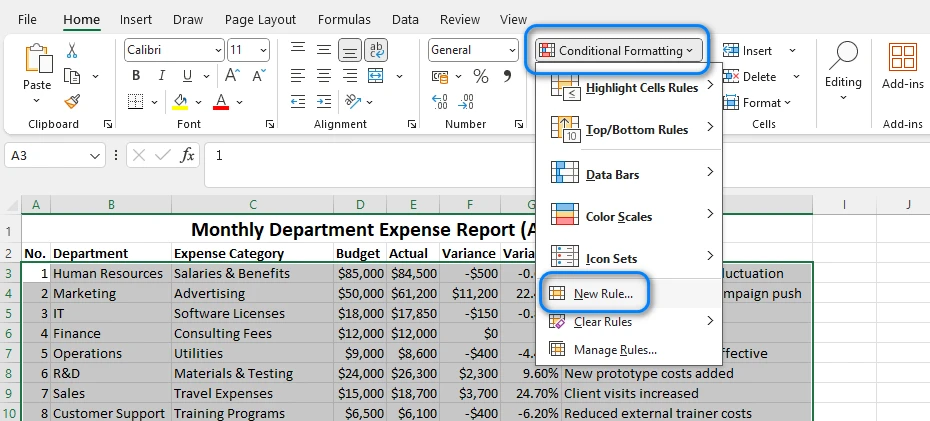
Passo 3: Inserire la Formula
Scegli Utilizza una formula per determinare le celle da formattare. Nella casella della formula, digita:
=MOD(ROW(),2)=0
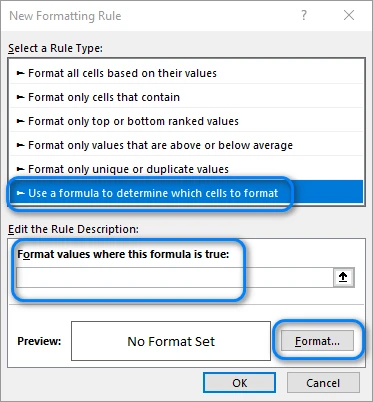
Questa formula controlla se un numero di riga è pari. Puoi cambiare lo "0" in "1" se vuoi che il motivo di colore inizi dalla prima riga invece che dalla seconda.
Passo 4: Scegliere un Colore di Riempimento
Clicca su Formato → Riempimento, seleziona il tuo colore di sfondo preferito (si consiglia una tonalità chiara) e conferma. Una volta applicato, Excel colora automaticamente ogni riga con numero pari. Se inserisci nuove righe, il motivo si aggiornerà dinamicamente.
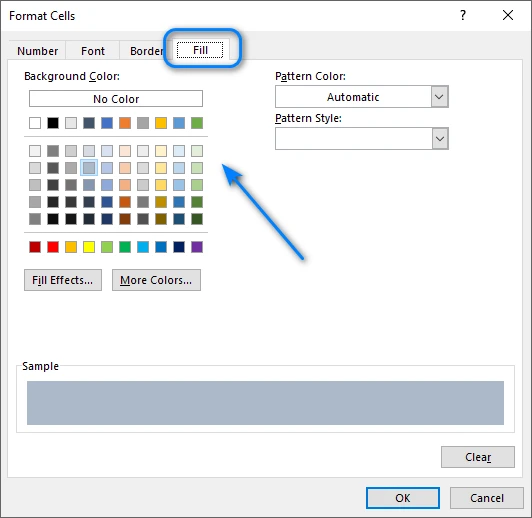
Di seguito è riportato un esempio del risultato:
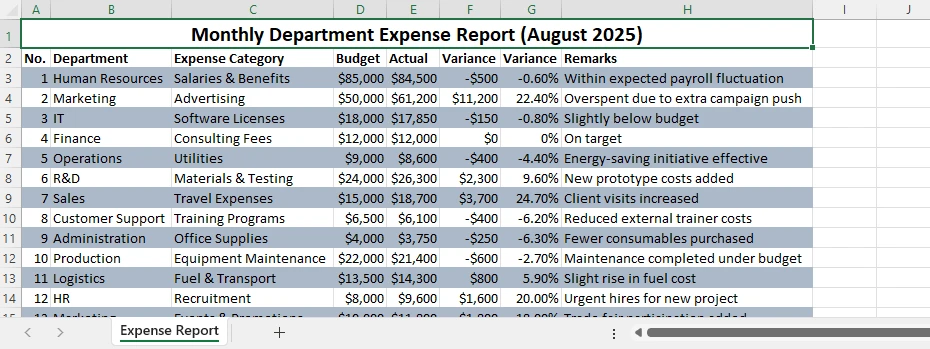
Suggerimenti e Variazioni
- Usa =MOD(ROW(),3)=0 per colorare invece ogni terza riga.
- Combina con la formattazione del testo o dei bordi per uno stile più avanzato.
- Per rimuovere la regola, vai su Formattazione Condizionale → Gestisci Regole → Elimina.
La Formattazione Condizionale offre un'elevata flessibilità e funziona perfettamente quando hai bisogno di un controllo completo su quali righe vengono colorate.
Articolo Correlato: Applicare la Formattazione Condizionale in Excel Usando Python
Metodo 2 – Applicare Stili Tabella per Colori delle Righe Alternati Integrati
Se desideri un'opzione rapida e integrata che non richieda formule, la funzione Formatta come Tabella di Excel può applicare istantaneamente colori alternati alle righe. È ideale per gli utenti che apprezzano la velocità e preferiscono una configurazione minima.
Passo 1: Formattare l'Intervallo come Tabella
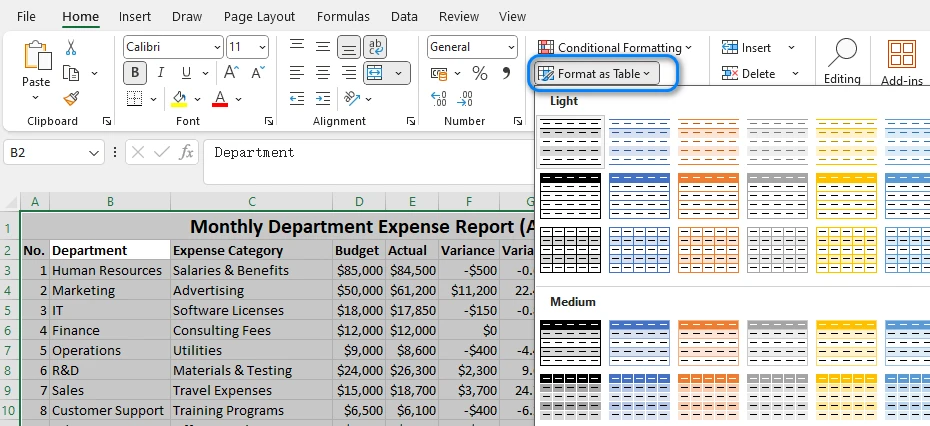
Seleziona i tuoi dati, quindi clicca su Home → Formatta come Tabella e scegli uno stile predefinito. Excel applica istantaneamente righe a bande e crea una struttura di tabella con opzioni di ordinamento e filtro.
Passo 2: Regolare le Impostazioni della Tabella
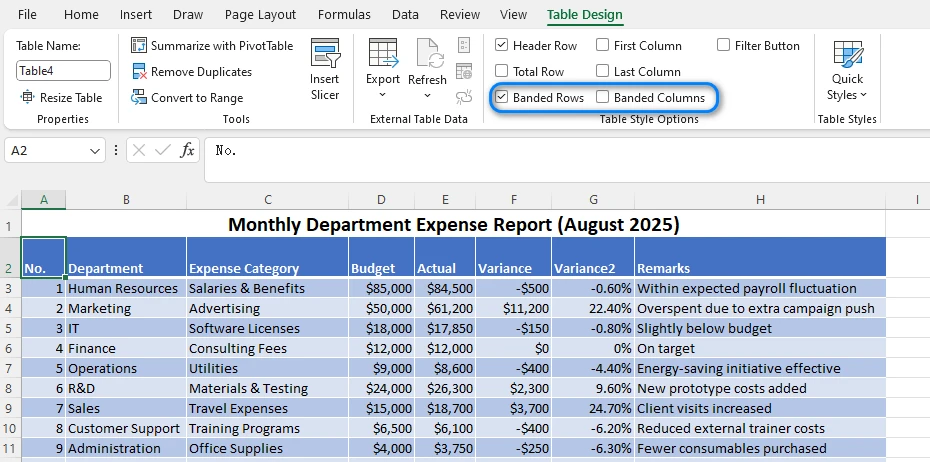
Sotto la scheda Progettazione Tabella, puoi attivare o disattivare Righe a Bande o Colonne a Bande. Puoi anche personalizzare lo schema di colori scegliendo uno stile di tabella diverso.
Passo 3: Personalizzare l'Aspetto della Tabella
Puoi rinominare la tabella, cambiare i colori dell'intestazione o aggiungere una Riga Totale. Quando vengono aggiunte nuove righe, il motivo di colore alternato si espande automaticamente.
Vantaggi e Limitazioni
- Aspetto rapido e professionale
- Si aggiorna automaticamente con i nuovi dati
Ma:
- Meno flessibile della Formattazione Condizionale
- Personalizzazione limitata degli intervalli di colore
Per la maggior parte degli utenti di Excel, gli Stili Tabella sono il modo più veloce per colorare una riga su due senza formule. Questo è il modo più rapido per applicare colori alternati alle righe in Excel per una formattazione rapida dei dati.
Potrebbe piacerti anche: Creare o Eliminare Tabelle in Excel con Python
Metodo 3 – Automatizzare l'Alternanza dei Colori delle Righe in Excel con Python
Mentre le opzioni integrate di Excel funzionano bene per singoli file, diventano dispendiose in termini di tempo se applicate ripetutamente. Se gestisci frequentemente più fogli di calcolo o hai bisogno di uno stile coerente tra i report, l'automazione con Python offre un'alternativa scalabile.
Utilizzando Spire.XLS for Python, puoi controllare facilmente gli stili di formattazione, automatizzare la colorazione delle righe e persino applicare logiche condizionali — risparmiando tempo significativo durante l'elaborazione di attività grandi o ripetute.
Passo 1: Installare e Importare Spire.XLS
Installa il pacchetto usando pip:
pip install spire.xls
Quindi importalo:
from spire.xls import Workbook, Color, ExcelVersion
Passo 2: Caricare e Accedere al Foglio di Lavoro
workbook = Workbook()
workbook.LoadFromFile("input.xlsx")
sheet = workbook.Worksheets[0]
Questo carica il tuo file Excel e accede al primo foglio di lavoro.
Passo 3: Applicare Automaticamente i Colori Alternati alle Righe
for i in range(1, sheet.LastRow):
    if i % 2 == 0:
        style = sheet.Rows.get_Item(i).Style
        style.Color = Color.get_LightGray()
Spiegazione:
- Il ciclo controlla se un numero di riga è pari (
i % 2 == 0). - Se vero, viene applicato un nuovo stile con uno sfondo grigio chiaro.
- Puoi personalizzare il colore utilizzando qualsiasi colore RGB o tema supportato.
- Per ogni terza o quarta riga, regola il valore del modulo (es.
i % 3 == 0).
Questo metodo può essere adattato per diversi motivi o più fogli di lavoro all'interno dello stesso workbook.
Passo 4: Salvare il File
workbook.SaveToFile("output.xlsx", ExcelVersion.Version2016)
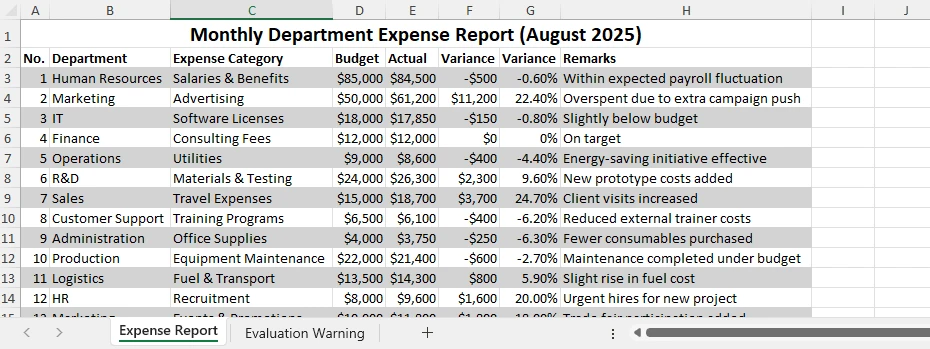
Il nuovo file manterrà tutte le modifiche di formattazione e potrai aprirlo direttamente in Excel. Di seguito è riportato un esempio del file di output:
Vantaggi del Metodo Python
- Automatizza le attività di formattazione ripetitive
- Funziona su più fogli o file
- Riduce gli errori manuali
- Si integra perfettamente con altri flussi di lavoro di elaborazione dati
Per attività grandi o ripetitive, l'automazione con Spire.XLS for Python è un modo pratico per ottimizzare il tuo flusso di lavoro e mantenere una formattazione coerente su più file. Se vuoi imparare altre competenze di automazione Excel con Python, consulta i tutorial di Spire.XLS for Python.
Confronto dei Metodi
| Metodo | Automazione | Personalizzazione | Aggiornamenti Dinamici | Ideale Per |
|---|---|---|---|---|
| Colorazione Manuale | ❌ | Alta | ❌ | Modifiche rapide e una tantum |
| Formattazione Condizionale | ✅ | Alta | ✅ | Formattazione flessibile |
| Stile Tabella | ✅ | Media | ✅ | Progettazione rapida di tabelle |
| Automazione Python | ✅ | Alta | ✅ | Attività in batch o su larga scala |
Ogni approccio ha i suoi vantaggi, ma l'automazione offre la migliore efficienza per la formattazione avanzata o ripetuta di Excel.
Domande Frequenti sull'Alternanza dei Colori delle Righe in Excel
Q1: Come posso alternare automaticamente i colori delle righe in Excel?
Puoi usare la Formattazione Condizionale con la formula =MOD(ROW(),2)=0 o applicare uno Stile Tabella per formattare istantaneamente i tuoi dati.
Q2: Posso alternare i colori delle righe senza usare una tabella?
Sì. La Formattazione Condizionale funziona su qualsiasi intervallo e si aggiorna automaticamente quando aggiungi o rimuovi righe.
Q3: Come colorare una riga su due in Excel usando Python?
Puoi automatizzare il processo usando Spire.XLS for Python, scorrendo le righe e applicando uno stile a quelle con numero pari.
Q4: Posso cambiare il motivo di colore a ogni 3 righe invece di 2?
Sì. Modifica la formula in =MOD(ROW(),3)=0 o cambia la condizione nel tuo codice Python (if i % 3 == 0:).
Conclusione
Alternare i colori delle righe in Excel è uno dei modi più semplici ma efficaci per rendere i tuoi dati più facili da leggere e capire. Puoi alternare i colori delle righe in Excel facilmente usando la Formattazione Condizionale, gli Stili Tabella o l'automazione con Python.
Per coloro che lavorano con grandi set di dati o necessitano di automazione, Spire.XLS for Python rende facile applicare colori alternati e altre attività di formattazione in modo programmatico. Puoi anche usare Free Spire.XLS for Python per attività leggere su Excel.
Qualunque metodo tu scelga, queste tecniche ti aiuteranno a mantenere chiarezza e coerenza nei tuoi fogli Excel.
Vedi Anche
Linhas Listradas no Excel de Forma Simples: Alterne as Cores das Linhas Rapidamente
Índice
Instalar com Pypi
pip install Spire.XLS
Links Relacionados
Ao trabalhar com grandes planilhas do Excel, as linhas de dados podem facilmente se misturar, dificultando o acompanhamento preciso das informações. A alternância de cores das linhas no Excel — muitas vezes chamadas de linhas em faixas — oferece uma maneira fácil e eficaz de melhorar a legibilidade, aprimorar a estrutura visual e reduzir erros em relatórios financeiros, listas de inventário ou grandes resumos de dados.
O Excel oferece várias maneiras rápidas e flexíveis de aplicar cores alternadas nas linhas. Você pode usar a Formatação Condicional para um controle preciso, Estilos de Tabela para resultados instantâneos, ou automatizar o processo em vários arquivos usando Python com Spire.XLS para Python. Cada abordagem tem suas próprias vantagens, dependendo da frequência com que você trabalha com dados do Excel.
A alternância de cores das linhas não apenas torna seus dados mais fáceis de ler, mas também ajuda a manter uma aparência limpa e profissional em diferentes planilhas. Neste guia, você aprenderá como alternar as cores das linhas no Excel passo a passo — cobrindo tanto os métodos integrados quanto a automação com Python para usuários avançados.
Visão Geral dos Métodos
Você pode explorar cada método abaixo:
- Alternar Cores das Linhas no Excel por Formatação Condicional
- Aplicar Estilos de Tabela Integrados para Colorir Linhas Alternadas
- Automatizar a Alternância de Cores das Linhas do Excel com Python
- Comparação de Métodos
Por que e Como Alternar as Cores das Linhas no Excel
A alternância de cores das linhas melhora a legibilidade, a comparação de dados e a apresentação profissional. Essa técnica ajuda seus olhos a seguir cada linha através das colunas, reduzindo o risco de erros de leitura. Muitos usuários dependem da coloração manual — selecionando uma linha sim, outra não e aplicando uma cor de fundo — mas essa abordagem é ineficiente. Quando você insere ou exclui linhas, as cores não se alinham mais corretamente.
No entanto, esse método manual rapidamente se torna impraticável, especialmente quando linhas são inseridas ou excluídas. Felizmente, o Excel oferece abordagens mais inteligentes e dinâmicas que mantêm automaticamente a consistência das cores. Vamos explorar como alternar as cores das linhas no Excel usando ferramentas integradas antes de passar para o método automatizado com Python.
Método 1 – Usar Formatação Condicional para Alternar as Cores das Linhas
A Formatação Condicional é um dos recursos mais flexíveis do Excel. Ele permite aplicar estilos dinâmicos com base em regras lógicas — tornando-o perfeito para alternar automaticamente as cores das linhas sem precisar ajustar o formato manualmente a cada vez.
Passo 1: Selecione o Intervalo de Dados
Destaque o intervalo de células que você deseja formatar, como A1:D20. A regra será aplicada apenas dentro desta seleção.
Passo 2: Crie uma Regra de Formatação Condicional
Navegue até Página Inicial → Formatação Condicional → Nova Regra
Passo 3: Insira a Fórmula
Escolha Usar uma fórmula para determinar quais células formatar. Na caixa de fórmula, digite:
=MOD(ROW(),2)=0
Esta fórmula verifica se o número de uma linha é par. Você pode alterar o “0” para “1” se quiser que o padrão de cores comece na primeira linha em vez da segunda.
Passo 4: Escolha uma Cor de Preenchimento
Clique em Formatar → Preenchimento, selecione sua cor de fundo preferida (recomenda-se um tom claro) e confirme. Uma vez aplicada, o Excel colore automaticamente todas as linhas de número par. Se você inserir novas linhas, o padrão será atualizado dinamicamente.
Abaixo está um exemplo do resultado:
Dicas e Variações
- Use =MOD(ROW(),3)=0 para colorir a cada três linhas.
- Combine com formatação de texto ou borda para um estilo mais avançado.
- Para remover a regra, vá para Formatação Condicional → Gerenciar Regras → Excluir.
A Formatação Condicional oferece alta flexibilidade e funciona perfeitamente quando você precisa de controle total sobre quais linhas são coloridas.
Artigo Relacionado: Aplicar Formatação Condicional no Excel Usando Python
Método 2 – Aplicar Estilos de Tabela para Cores de Linha Alternadas Integradas
Se você quer uma opção rápida e integrada que não requer fórmulas, o recurso do Excel Formatar como Tabela pode aplicar instantaneamente cores de linha alternadas. É ideal para usuários que valorizam a velocidade e preferem uma configuração mínima.
Passo 1: Formate o Intervalo como uma Tabela
Selecione seus dados, depois clique em Página Inicial → Formatar como Tabela e escolha qualquer estilo predefinido. O Excel aplica instantaneamente linhas em faixas e cria uma estrutura de tabela com opções de classificação e filtro.
Passo 2: Ajuste as Configurações da Tabela
Na guia Design da Tabela, você pode ativar ou desativar Linhas em Tiras ou Colunas em Tiras. Você também pode personalizar o esquema de cores escolhendo um estilo de tabela diferente.
Passo 3: Personalize a Aparência da Tabela
Você pode renomear a tabela, alterar as cores do cabeçalho ou adicionar uma Linha de Totais. Quando novas linhas são adicionadas, o padrão de cores alternadas se expande automaticamente.
Vantagens e Limitações
- Aparência rápida e profissional
- Atualiza automaticamente com novos dados
Mas:
- Menos flexível que a Formatação Condicional
- Personalização limitada dos intervalos de cores
Para a maioria dos usuários do Excel, os Estilos de Tabela são a maneira mais rápida de colorir linhas alternadas sem fórmulas. Esta é a maneira mais rápida de aplicar cores de linha alternadas no Excel para formatação rápida de dados.
Você também pode gostar: Criar ou Excluir Tabelas no Excel com Python
Método 3 – Automatizar a Alternância de Cores das Linhas no Excel com Python
Embora as opções integradas do Excel funcionem bem para arquivos únicos, elas se tornam demoradas quando aplicadas repetidamente. Se você lida frequentemente com várias planilhas ou precisa de um estilo consistente em relatórios, a automação com Python oferece uma alternativa escalável.
Usando o Spire.XLS para Python, você pode controlar facilmente os estilos de formatação, automatizar a coloração de linhas e até aplicar lógica condicional — economizando um tempo significativo ao processar tarefas grandes ou repetidas.
Passo 1: Instale e Importe o Spire.XLS
Instale o pacote usando o pip:
pip install spire.xls
Depois, importe-o:
from spire.xls import Workbook, Color, ExcelVersion
Passo 2: Carregue e Acesse a Planilha
workbook = Workbook()
workbook.LoadFromFile("input.xlsx")
sheet = workbook.Worksheets[0]
Isso carrega seu arquivo Excel e acessa a primeira planilha.
Passo 3: Aplique Cores de Linha Alternadas Automaticamente
for i in range(1, sheet.LastRow):
    if i % 2 == 0:
        style = sheet.Rows.get_Item(i).Style
        style.Color = Color.get_LightGray()
Explicação:
- O loop verifica se o número de uma linha é par (
i % 2 == 0). - Se for verdadeiro, um novo estilo é aplicado com um fundo cinza claro.
- Você pode personalizar a cor usando qualquer cor RGB ou de tema suportada.
- Para cada terceira ou quarta linha, ajuste o valor do módulo (por exemplo,
i % 3 == 0).
Este método pode ser adaptado para diferentes padrões ou para várias planilhas na mesma pasta de trabalho.
Passo 4: Salve o Arquivo
workbook.SaveToFile("output.xlsx", ExcelVersion.Version2016)
O novo arquivo manterá todas as alterações de formatação e você poderá abri-lo diretamente no Excel. Abaixo está um exemplo do arquivo de saída:
Benefícios do Método Python
- Automatiza tarefas de formatação repetitivas
- Funciona em várias planilhas ou arquivos
- Reduz erros manuais
- Integra-se perfeitamente com outros fluxos de trabalho de processamento de dados
Para tarefas grandes ou repetitivas, automatizar com o Spire.XLS para Python é uma maneira prática de otimizar seu fluxo de trabalho e manter a formatação consistente em vários arquivos. Se você quiser aprender mais habilidades de automação do Excel com Python, confira os tutoriais do Spire.XLS para Python.
Comparação de Métodos
| Método | Automação | Personalização | Atualizações Dinâmicas | Ideal Para |
|---|---|---|---|---|
| Coloração Manual | ❌ | Alta | ❌ | Edições rápidas e únicas |
| Formatação Condicional | ✅ | Alta | ✅ | Formatação flexível |
| Estilo de Tabela | ✅ | Média | ✅ | Design rápido de tabela |
| Automação com Python | ✅ | Alta | ✅ | Tarefas em lote ou em grande escala |
Cada abordagem tem suas vantagens, mas a automação oferece a melhor eficiência para formatação avançada ou repetida do Excel.
Perguntas Frequentes Sobre a Alternância de Cores das Linhas no Excel
P1: Como alterno as cores das linhas no Excel automaticamente?
Você pode usar a Formatação Condicional com a fórmula =MOD(ROW(),2)=0 ou aplicar um Estilo de Tabela para formatar seus dados instantaneamente.
P2: Posso alternar as cores das linhas sem usar uma tabela?
Sim. A Formatação Condicional funciona em qualquer intervalo e é atualizada automaticamente quando você adiciona ou remove linhas.
P3: Como colorir linhas alternadas no Excel usando Python?
Você pode automatizar o processo usando o Spire.XLS para Python, percorrendo as linhas e aplicando um estilo às de número par.
P4: Posso alterar o padrão de cores para a cada 3 linhas em vez de 2?
Sim. Modifique a fórmula para =MOD(ROW(),3)=0 ou altere a condição no seu código Python (if i % 3 == 0:).
Conclusão
A alternância de cores das linhas no Excel é uma das maneiras mais simples e eficazes de tornar seus dados mais fáceis de ler e entender. Você pode alternar as cores das linhas no Excel facilmente usando Formatação Condicional, Estilos de Tabela ou automação com Python.
Para aqueles que trabalham com grandes conjuntos de dados ou precisam de automação, o Spire.XLS para Python facilita a aplicação de cores alternadas e outras tarefas de formatação programaticamente. Você também pode usar o Free Spire.XLS para Python para tarefas leves do Excel.
Qualquer que seja o método escolhido, essas técnicas ajudarão você a manter a clareza e a consistência em suas planilhas do Excel.
Veja Também
Excel 줄무늬 행 간단히 만들기: 빠르게 행 색 교차 적용하기
Pypi로 설치
pip install Spire.XLS
관련 링크
대규모 Excel 스프레드시트로 작업할 때 데이터 행이 쉽게 섞여 정보 추적이 어려워질 수 있습니다. Excel에서 행 색상 교대로 지정하기(종종 줄무늬 행이라고 함)는 가독성을 높이고 시각적 구조를 개선하며 재무 보고서, 재고 목록 또는 대규모 데이터 요약에서 실수를 줄이는 쉽고 효과적인 방법을 제공합니다.
Excel은 교대 행 색상을 적용하는 여러 빠르고 유연한 방법을 제공합니다. 정밀한 제어를 위해 조건부 서식을 사용하거나, 즉각적인 결과를 위해 표 스타일을 사용하거나, Python과 Spire.XLS for Python을 사용하여 여러 파일에 걸쳐 프로세스를 자동화할 수 있습니다. 각 접근 방식은 Excel 데이터를 얼마나 자주 사용하는지에 따라 고유한 장점이 있습니다.
교대 행 색상은 데이터를 읽기 쉽게 만들 뿐만 아니라 여러 워크시트에서 깔끔하고 전문적인 모양을 유지하는 데 도움이 됩니다. 이 가이드에서는 기본 제공 방법과 고급 사용자를 위한 Python 자동화를 모두 다루면서 Excel에서 행 색상을 교대로 지정하는 방법을 단계별로 배웁니다.
방법 개요
아래에서 각 방법을 살펴볼 수 있습니다.
- 조건부 서식을 사용하여 Excel에서 행 색상 교대로 지정하기
- 기본 제공 표 스타일을 적용하여 다른 모든 행 색칠하기
- Python으로 Excel 행 색상 교대 자동화하기
- 방법 비교
Excel에서 행 색상을 교대로 사용하는 이유와 방법
교대 행 색상은 가독성, 데이터 비교 및 전문적인 프레젠테이션을 향상시킵니다. 이 기술은 눈이 열을 가로질러 각 행을 따라가도록 도와 읽기 오류의 위험을 줄입니다. 많은 사용자가 다른 모든 행을 선택하고 배경색을 적용하는 수동 색칠에 의존하지만 이 접근 방식은 비효율적입니다. 행을 삽입하거나 삭제하면 색상이 더 이상 제대로 정렬되지 않습니다.
그러나 이 수동 방법은 특히 행이 삽입되거나 삭제될 때 빠르게 비실용적이 됩니다. 다행히 Excel은 색상 일관성을 자동으로 유지하는 더 스마트하고 동적인 접근 방식을 제공합니다. 자동화된 Python 방법으로 넘어가기 전에 기본 제공 도구를 사용하여 Excel에서 행 색상을 교대로 지정하는 방법을 살펴보겠습니다.
방법 1 – 조건부 서식을 사용하여 행 색상 교대로 지정하기
조건부 서식은 Excel의 가장 유연한 기능 중 하나입니다. 논리적 규칙에 따라 동적 스타일을 적용할 수 있어 매번 서식을 수동으로 조정하지 않고도 자동으로 행 색상을 교대로 지정하는 데 적합합니다.
1단계: 데이터 범위 선택
서식을 지정할 셀 범위(예: A1:D20)를 강조 표시합니다. 규칙은 이 선택 영역 내에서만 적용됩니다.
2단계: 조건부 서식 규칙 만들기
홈 → 조건부 서식 → 새 규칙으로 이동합니다.
3단계: 수식 입력
수식을 사용하여 서식을 지정할 셀 결정을 선택합니다. 수식 상자에 다음을 입력합니다.
=MOD(ROW(),2)=0
이 수식은 행 번호가 짝수인지 확인합니다. 색상 패턴을 두 번째 행 대신 첫 번째 행에서 시작하려면 "0"을 "1"로 변경할 수 있습니다.
4단계: 채우기 색상 선택
서식 → 채우기를 클릭하고 선호하는 배경색(밝은 음영 권장)을 선택한 다음 확인합니다. 적용되면 Excel은 모든 짝수 번호 행을 자동으로 색칠합니다. 새 행을 삽입하면 패턴이 동적으로 업데이트됩니다.
아래는 결과 예시입니다.
팁 및 변형
- 세 번째 행마다 색칠하려면 =MOD(ROW(),3)=0을 사용합니다.
- 더 고급 스타일링을 위해 텍스트 또는 테두리 서식과 결합합니다.
- 규칙을 제거하려면 조건부 서식 → 규칙 관리 → 삭제로 이동합니다.
조건부 서식은 높은 유연성을 제공하며 어떤 행을 색칠할지 완전히 제어해야 할 때 완벽하게 작동합니다.
관련 기사: Python을 사용하여 Excel에 조건부 서식 적용하기
방법 2 – 기본 제공 교대 행 색상에 표 스타일 적용하기
수식이 필요 없는 빠르고 기본 제공 옵션을 원한다면 Excel의 표로 서식 지정 기능으로 즉시 교대 행 색상을 적용할 수 있습니다. 속도를 중시하고 최소한의 설정을 선호하는 사용자에게 이상적입니다.
1단계: 범위를 표로 서식 지정
데이터를 선택한 다음 홈 → 표로 서식 지정을 클릭하고 미리 정의된 스타일을 선택합니다. Excel은 즉시 줄무늬 행을 적용하고 정렬 및 필터링 옵션이 있는 표 구조를 만듭니다.
2단계: 표 설정 조정
표 디자인 탭에서 줄무늬 행 또는 줄무늬 열을 켜거나 끌 수 있습니다. 다른 표 스타일을 선택하여 색 구성표를 사용자 지정할 수도 있습니다.
3단계: 표 모양 사용자 지정
표 이름을 바꾸거나, 머리글 색상을 변경하거나, 합계 행을 추가할 수 있습니다. 새 행이 추가되면 교대 색상 패턴이 자동으로 확장됩니다.
장점과 한계
- 빠르고 전문적인 모양
- 새 데이터로 자동 업데이트
하지만:
- 조건부 서식보다 유연성이 떨어짐
- 색상 간격의 사용자 지정 제한
대부분의 Excel 사용자에게 표 스타일은 수식 없이 다른 모든 행을 색칠하는 가장 빠른 방법입니다. 이것은 빠른 데이터 서식을 위해 Excel에서 교대 행 색상을 적용하는 가장 빠른 방법입니다.
관심 있을 만한 내용: Python으로 Excel에서 표 만들기 또는 삭제하기
방법 3 – Python으로 Excel에서 교대 행 색상 자동화하기
Excel의 기본 제공 옵션은 단일 파일에 잘 작동하지만 반복적으로 적용하면 시간이 많이 걸립니다. 여러 스프레드시트를 자주 처리하거나 보고서 전반에 걸쳐 일관된 스타일링이 필요한 경우 Python 자동화는 확장 가능한 대안을 제공합니다.
Spire.XLS for Python을 사용하면 서식 스타일을 쉽게 제어하고, 행 색칠을 자동화하고, 조건부 논리를 적용하여 대규모 또는 반복적인 작업을 처리할 때 상당한 시간을 절약할 수 있습니다.
1단계: Spire.XLS 설치 및 가져오기
pip를 사용하여 패키지를 설치합니다.
pip install spire.xls
그런 다음 가져옵니다.
from spire.xls import Workbook, Color, ExcelVersion
2단계: 워크시트 로드 및 액세스
workbook = Workbook()
workbook.LoadFromFile("input.xlsx")
sheet = workbook.Worksheets[0]
이렇게 하면 Excel 파일이 로드되고 첫 번째 워크시트에 액세스합니다.
3단계: 교대 행 색상 자동 적용
for i in range(1, sheet.LastRow):
    if i % 2 == 0:
        style = sheet.Rows.get_Item(i).Style
        style.Color = Color.get_LightGray()
설명:
- 루프는 행 번호가 짝수인지 확인합니다(
i % 2 == 0). - 참이면 밝은 회색 배경의 새 스타일이 적용됩니다.
- 지원되는 RGB 또는 테마 색상을 사용하여 색상을 사용자 지정할 수 있습니다.
- 세 번째 또는 네 번째 행마다 모듈러스 값을 조정합니다(예:
i % 3 == 0).
이 방법은 동일한 통합 문서 내의 다른 패턴이나 여러 워크시트에 적용할 수 있습니다.
4단계: 파일 저장
workbook.SaveToFile("output.xlsx", ExcelVersion.Version2016)
새 파일은 모든 서식 변경 사항을 유지하며 Excel에서 직접 열 수 있습니다. 아래는 출력 파일의 예시입니다.
Python 방법의 이점
- 반복적인 서식 작업 자동화
- 여러 시트 또는 파일에서 작동
- 수동 오류 감소
- 다른 데이터 처리 워크플로와 원활하게 통합
대규모 또는 반복적인 작업의 경우 Spire.XLS for Python으로 자동화하는 것은 워크플로를 간소화하고 여러 파일에서 일관된 서식을 유지하는 실용적인 방법입니다. 더 많은 Python Excel 자동화 기술을 배우고 싶다면 Spire.XLS for Python 튜토리얼을 확인하세요.
방법 비교
| 방법 | 자동화 | 사용자 지정 | 동적 업데이트 | 최적 대상 |
|---|---|---|---|---|
| 수동 색칠 | ❌ | 높음 | ❌ | 빠른, 일회성 편집 |
| 조건부 서식 | ✅ | 높음 | ✅ | 유연한 서식 |
| 표 스타일 | ✅ | 중간 | ✅ | 빠른 표 디자인 |
| Python 자동화 | ✅ | 높음 | ✅ | 배치 또는 대규모 작업 |
각 접근 방식에는 장점이 있지만 자동화는 고급 또는 반복적인 Excel 서식에 가장 좋은 효율성을 제공합니다.
Excel에서 교대 행 색상에 대한 자주 묻는 질문
Q1: Excel에서 행 색상을 자동으로 교대로 지정하려면 어떻게 해야 하나요?
수식 =MOD(ROW(),2)=0을 사용하는 조건부 서식을 사용하거나 표 스타일을 적용하여 데이터를 즉시 서식 지정할 수 있습니다.
Q2: 표를 사용하지 않고 행 색상을 교대로 지정할 수 있나요?
예. 조건부 서식은 모든 범위에서 작동하며 행을 추가하거나 제거할 때 자동으로 업데이트됩니다.
Q3: Python을 사용하여 Excel에서 다른 모든 행을 색칠하는 방법은 무엇인가요?
Spire.XLS for Python을 사용하여 프로세스를 자동화하고, 행을 반복하며 짝수 번호 행에 스타일을 적용할 수 있습니다.
Q4: 색상 패턴을 2행 대신 3행마다 변경할 수 있나요?
예. 수식을 =MOD(ROW(),3)=0으로 수정하거나 Python 코드의 조건을 변경합니다(if i % 3 == 0:).
결론
Excel에서 행 색상을 교대로 지정하는 것은 데이터를 더 쉽게 읽고 이해할 수 있도록 만드는 가장 간단하면서도 효과적인 방법 중 하나입니다. 조건부 서식, 표 스타일 또는 Python 자동화를 사용하여 Excel에서 행 색상을 쉽게 교대로 지정할 수 있습니다.
대규모 데이터 세트로 작업하거나 자동화가 필요한 사람들을 위해 Spire.XLS for Python은 프로그래밍 방식으로 교대 색상 및 기타 서식 작업을 쉽게 적용할 수 있도록 합니다. 가벼운 Excel 작업에는 Free Spire.XLS for Python을 사용할 수도 있습니다.
어떤 방법을 선택하든 이러한 기술은 Excel 시트에서 명확성과 일관성을 유지하는 데 도움이 될 것입니다.