PowerPoint locks content inside slides. Each page is a canvas, and titles and body text sit in separate shape frames. To move that content into documents, a knowledge base, or a large language model, you first need to turn it back into editable plain text. Markdown works well for that layer, and in a Git repository it also shows line-by-line diffs.
This article uses Spire.Presentation for Python to convert PowerPoint presentations to Markdown. You can also export only one slide, or export several slides in a loop. The process runs without Microsoft PowerPoint installed.
This article covers:
- Install the Python PowerPoint to Markdown library
- Convert a whole PowerPoint presentation to Markdown
- Export a specific slide to Markdown
- Summary
- FAQ
Install the Python PowerPoint to Markdown Library
Install Command
Before converting, install the library with pip:
pip install Spire.Presentation
For installation help, see How to Install Spire.Presentation for Python in VS Code.
Convert a Whole PowerPoint Presentation to Markdown
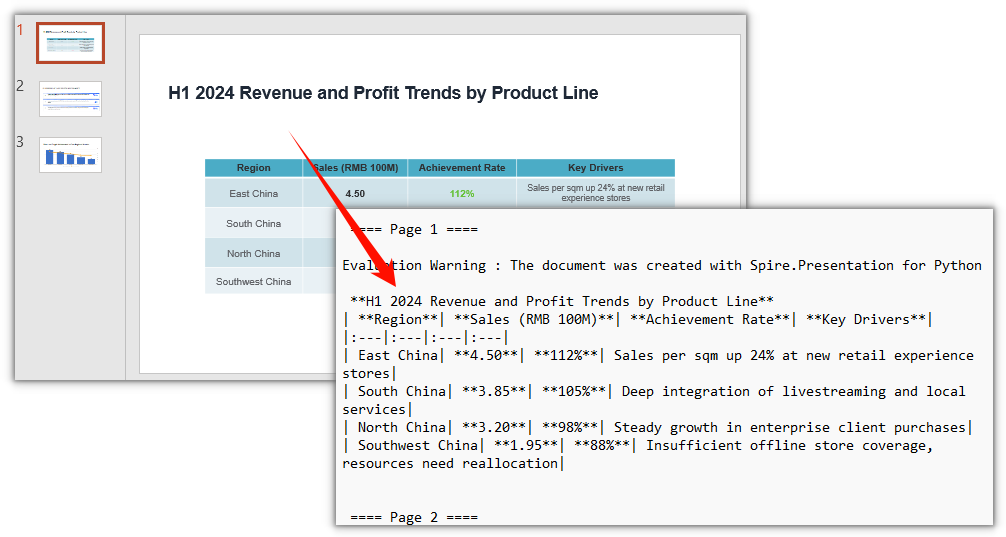
Presentation.SaveToFile with FileFormat.Markdown converts a whole PowerPoint presentation to Markdown in one call. Titles, paragraphs and tables keep their original hierarchy, and slides are separated by ==== Page N ==== page markers.
Steps:
- Create a
Presentationobject. - Load the PPT/PPTX file with
Presentation.LoadFromFile. - Save the whole presentation as Markdown with
Presentation.SaveToFileandFileFormat.Markdown. - Release resources.
from spire.presentation import *

# Create a Presentation object
presentation = Presentation()

# Load the PowerPoint file
presentation.LoadFromFile("DataBriefing.pptx")

# Save the whole presentation as a Markdown file
presentation.SaveToFile("DataBriefing.md", FileFormat.Markdown)

# Release resources
presentation.Dispose()
The Markdown file produced by converting the whole PowerPoint presentation:
Export a Specific Slide to Markdown
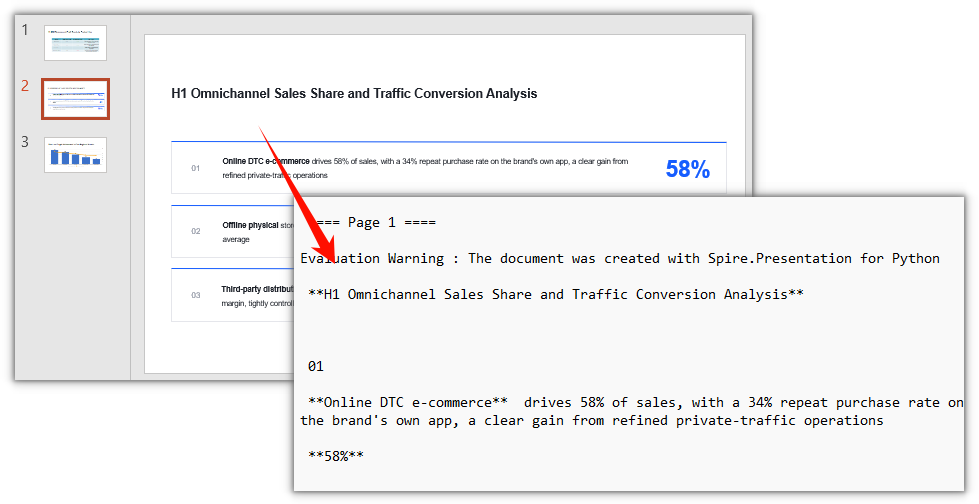
When you need just one page, there is no need to export the whole deck and trim it afterward. ISlide.SaveToFile exports a specific slide to Markdown: get the target page with Slides[index], then save it as Markdown on its own.
Steps:
- Create a
Presentationobject. - Load the PPT/PPTX file with
Presentation.LoadFromFile. - Get the target slide with
Presentation.Slides[index]. - Save that slide as Markdown with
ISlide.SaveToFileandFileFormat.Markdown. - Release resources.
from spire.presentation import *

# Create a Presentation object
presentation = Presentation()

# Load the PowerPoint file
presentation.LoadFromFile("DataBriefing.pptx")

# Get the second slide (index starts at 0)
slide = presentation.Slides[1]

# Save the specified slide as a Markdown file
slide.SaveToFile("Slide-2.md", FileFormat.Markdown)

# Release resources
presentation.Dispose()
The Markdown file produced by exporting a specific slide:
Export Multiple Slides to Markdown at Once
When you need more than one page, put the slide indexes in a loop and call Slides[index].SaveToFile page by page. Each slide is saved as its own Markdown file:
from spire.presentation import *

# Create a Presentation object
presentation = Presentation()

# Load the PowerPoint file
presentation.LoadFromFile("DataBriefing.pptx")

# Export the first and second slides in order
for index in (0, 1):
    slide = presentation.Slides[index]
    slide.SaveToFile(f"Slide-{index + 1}.md", FileFormat.Markdown)

# Release resources
presentation.Dispose()
Each slide is exported separately, so page numbers in the Markdown restart from Page 1.
Summary
Whole-deck conversion and single-slide export both work on the same Presentation object. LoadFromFile reads the file, FileFormat.Markdown sets the output format, and SaveToFile writes it out. Export the whole deck directly when that is what you need. To take only a few pages, pull out the target slides and save them individually, or put them in a loop.
FAQ
Do I need Microsoft PowerPoint installed to convert
Reason: Spire.Presentation for Python parses the PPT/PPTX file structure itself and does not call Office components.
Solution: No. Install the Python library and the conversion runs.
Can I convert multiple PowerPoint files at once
Reason: One Presentation object maps to one presentation, so it handles one file at a time.
Solution: Put the conversion logic in a loop and process each PPT/PPTX in a directory:
import os
from spire.presentation import *

for name in os.listdir("presentations"):
    if name.endswith(".pptx"):
        presentation = Presentation()
        presentation.LoadFromFile(os.path.join("presentations", name))
        base = os.path.splitext(name)[0]
        presentation.SaveToFile(os.path.join("markdown", base + ".md"), FileFormat.Markdown)
        presentation.Dispose()
Why does each page in the exported Markdown start with a warning line
Reason: Without a license applied, Spire.Presentation for Python inserts an Evaluation Warning line into the exported content.
Solution: Apply a temporary license and the line no longer appears. See "Get a Free License" below.
Get a Free License
If you want to remove the evaluation message from the result document or lift the feature limits, contact sales for a temporary license valid for 30 days.
