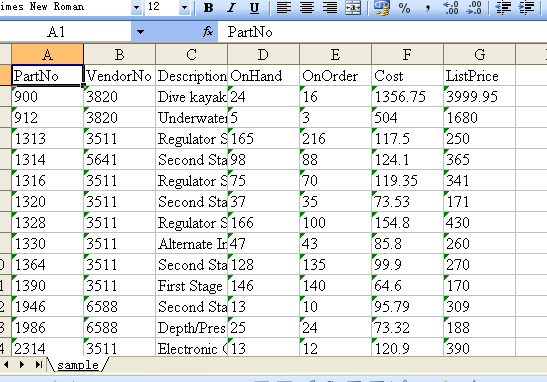
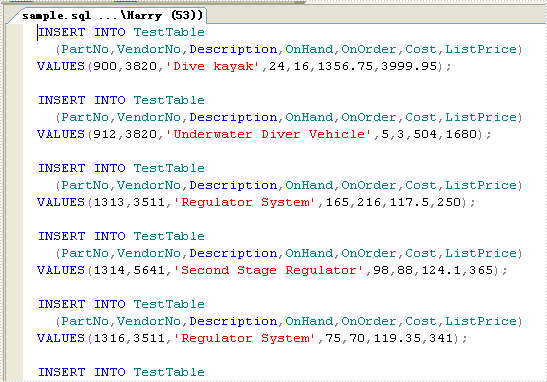
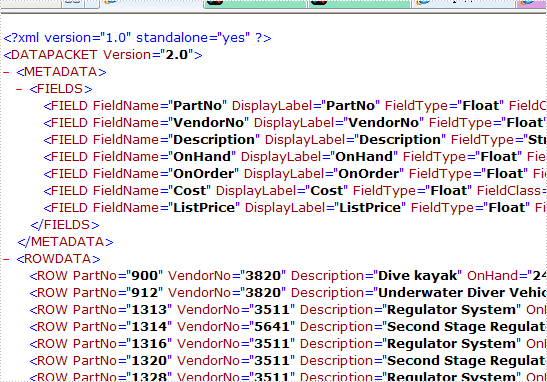
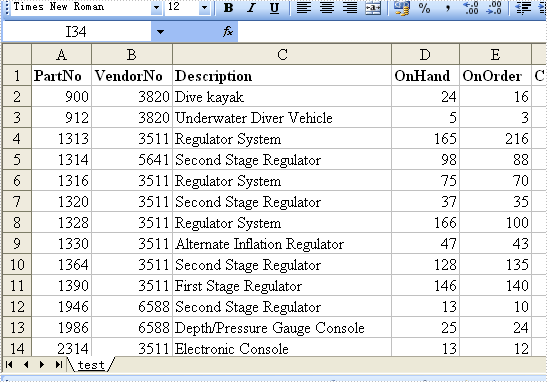
Data Export Pie3D Chart in C#, VB.NET
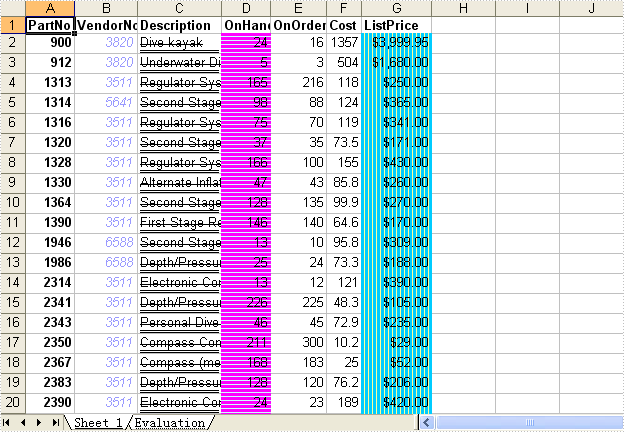
Not needing to have Microsoft Excel installed on the machine, The Spire.DataExport can create Excel spreadsheet. This sample demonstrates how to export data table into xls and create pie-3d chart.

private void button1_Click(object sender, EventArgs e)
{
System.Data.OleDb.OleDbConnection oleDbConnection1
= new System.Data.OleDb.OleDbConnection();
oleDbConnection1.ConnectionString
= @"Provider=Microsoft.Jet.OLEDB.4.0;Data Source=..\..\..\..\Database\demo.mdb";
System.Data.OleDb.OleDbCommand oleDbCommand1
= new System.Data.OleDb.OleDbCommand();
oleDbCommand1.CommandText = "select * from parts";
oleDbCommand1.Connection = oleDbConnection1;
System.Data.OleDb.OleDbCommand oleDbCommand2
= new System.Data.OleDb.OleDbCommand();
oleDbCommand2.CommandText = "select * from country";
oleDbCommand2.Connection = oleDbConnection1;
Spire.DataExport.XLS.CellExport cellExport2
= new Spire.DataExport.XLS.CellExport();
Spire.DataExport.XLS.WorkSheet workSheet3 = new Spire.DataExport.XLS.WorkSheet();
Spire.DataExport.XLS.Chart chart1 = new Spire.DataExport.XLS.Chart();
Spire.DataExport.XLS.ChartSeries chartSeries1 = new Spire.DataExport.XLS.ChartSeries();
Spire.DataExport.XLS.StripStyle stripStyle5 = new Spire.DataExport.XLS.StripStyle();
Spire.DataExport.XLS.StripStyle stripStyle6 = new Spire.DataExport.XLS.StripStyle();
cellExport2.ActionAfterExport = Spire.DataExport.Common.ActionType.OpenView;
cellExport2.AutoFitColWidth = true;
cellExport2.DataFormats.CultureName = "zh-CN";
cellExport2.DataFormats.Currency = "¥#,###,##0.00";
cellExport2.DataFormats.DateTime = "yyyy-M-d H:mm";
cellExport2.DataFormats.Float = "#,###,##0.00";
cellExport2.DataFormats.Integer = "#,###,##0";
cellExport2.DataFormats.Time = "H:mm";
cellExport2.FileName = "chart1.xls";
cellExport2.SheetOptions.AggregateFormat.Font.Name = "Arial";
cellExport2.SheetOptions.CustomDataFormat.Font.Name = "Arial";
cellExport2.SheetOptions.DefaultFont.Name = "Arial";
cellExport2.SheetOptions.FooterFormat.Font.Name = "Arial";
cellExport2.SheetOptions.HeaderFormat.Font.Name = "Arial";
cellExport2.SheetOptions.HyperlinkFormat.Font.Color = Spire.DataExport.XLS.CellColor.Blue;
cellExport2.SheetOptions.HyperlinkFormat.Font.Name = "Arial";
cellExport2.SheetOptions.HyperlinkFormat.Font.Underline = Spire.DataExport.XLS.XlsFontUnderline.Single;
cellExport2.SheetOptions.NoteFormat.Alignment.Horizontal = Spire.DataExport.XLS.HorizontalAlignment.Left;
cellExport2.SheetOptions.NoteFormat.Alignment.Vertical = Spire.DataExport.XLS.VerticalAlignment.Top;
cellExport2.SheetOptions.NoteFormat.Font.Bold = true;
cellExport2.SheetOptions.NoteFormat.Font.Name = "Tahoma";
cellExport2.SheetOptions.NoteFormat.Font.Size = 8F;
cellExport2.SheetOptions.TitlesFormat.Font.Bold = true;
cellExport2.SheetOptions.TitlesFormat.Font.Name = "Arial";
workSheet3.AutoFitColWidth = true;
chart1.CategoryLabels.ColX = ((System.Byte)(1));
chart1.CategoryLabels.ColY = ((System.Byte)(1));
chart1.CategoryLabels.RowX = 1;
chart1.CategoryLabels.RowY = 9;
chart1.CategoryLabelsColumn = "Name";
chart1.DataRangeSheet = "charts";
chart1.Position.AutoPosition.Height = 12;
chart1.Position.AutoPosition.Top = 1;
chart1.Position.AutoPosition.Width = 6;
chartSeries1.DataColumn = "Population";
chartSeries1.DataRangeSheet = "charts";
chartSeries1.Title = "Population";
chart1.Series.Add(chartSeries1);
chart1.Style = Spire.DataExport.XLS.ChartStyle.Pie3d;
chart1.Title = "Chart demo";
workSheet3.Charts.Add(chart1);
workSheet3.FormatsExport.CultureName = "zh-CN";
workSheet3.FormatsExport.Currency = "¥#,###,##0.00";
workSheet3.FormatsExport.DateTime = "yyyy-M-d H:mm";
workSheet3.FormatsExport.Float = "#,###,##0.00";
workSheet3.FormatsExport.Integer = "#,###,##0";
workSheet3.FormatsExport.Time = "H:mm";
stripStyle5.Borders.Bottom.Style = Spire.DataExport.XLS.CellBorderStyle.Medium;
stripStyle5.Borders.Left.Style = Spire.DataExport.XLS.CellBorderStyle.Medium;
stripStyle5.Borders.Right.Style = Spire.DataExport.XLS.CellBorderStyle.Medium;
stripStyle5.Borders.Top.Style = Spire.DataExport.XLS.CellBorderStyle.Medium;
stripStyle5.FillStyle.Background = Spire.DataExport.XLS.CellColor.LightGreen;
stripStyle5.FillStyle.Pattern = Spire.DataExport.XLS.Pattern.Solid;
stripStyle5.Font.Name = "Arial";
stripStyle6.Borders.Bottom.Style = Spire.DataExport.XLS.CellBorderStyle.Medium;
stripStyle6.Borders.Left.Style = Spire.DataExport.XLS.CellBorderStyle.Medium;
stripStyle6.Borders.Right.Style = Spire.DataExport.XLS.CellBorderStyle.Medium;
stripStyle6.Borders.Top.Style = Spire.DataExport.XLS.CellBorderStyle.Medium;
stripStyle6.FillStyle.Background = Spire.DataExport.XLS.CellColor.LightTurquoise;
stripStyle6.FillStyle.Pattern = Spire.DataExport.XLS.Pattern.Solid;
stripStyle6.Font.Name = "Arial";
workSheet3.ItemStyles.Add(stripStyle5);
workSheet3.ItemStyles.Add(stripStyle6);
workSheet3.ItemType = Spire.DataExport.XLS.CellItemType.Col;
workSheet3.Options.AggregateFormat.Font.Name = "Arial";
workSheet3.Options.CustomDataFormat.Font.Name = "Arial";
workSheet3.Options.DefaultFont.Name = "Arial";
workSheet3.Options.FooterFormat.Font.Name = "Arial";
workSheet3.Options.HeaderFormat.Font.Bold = true;
workSheet3.Options.HeaderFormat.Font.Color = Spire.DataExport.XLS.CellColor.Blue;
workSheet3.Options.HeaderFormat.Font.Name = "Arial";
workSheet3.Options.HyperlinkFormat.Font.Color = Spire.DataExport.XLS.CellColor.Blue;
workSheet3.Options.HyperlinkFormat.Font.Name = "Arial";
workSheet3.Options.HyperlinkFormat.Font.Underline = Spire.DataExport.XLS.XlsFontUnderline.Single;
workSheet3.Options.NoteFormat.Alignment.Horizontal = Spire.DataExport.XLS.HorizontalAlignment.Left;
workSheet3.Options.NoteFormat.Alignment.Vertical = Spire.DataExport.XLS.VerticalAlignment.Top;
workSheet3.Options.NoteFormat.Font.Bold = true;
workSheet3.Options.NoteFormat.Font.Name = "Tahoma";
workSheet3.Options.NoteFormat.Font.Size = 8F;
workSheet3.Options.TitlesFormat.Borders.Bottom.Style = Spire.DataExport.XLS.CellBorderStyle.Medium;
workSheet3.Options.TitlesFormat.Borders.Left.Style = Spire.DataExport.XLS.CellBorderStyle.Medium;
workSheet3.Options.TitlesFormat.Borders.Right.Style = Spire.DataExport.XLS.CellBorderStyle.Medium;
workSheet3.Options.TitlesFormat.Borders.Top.Style = Spire.DataExport.XLS.CellBorderStyle.Medium;
workSheet3.Options.TitlesFormat.FillStyle.Background = Spire.DataExport.XLS.CellColor.LightYellow;
workSheet3.Options.TitlesFormat.FillStyle.Pattern = Spire.DataExport.XLS.Pattern.Solid;
workSheet3.Options.TitlesFormat.Font.Bold = true;
workSheet3.Options.TitlesFormat.Font.Name = "Arial";
workSheet3.SheetName = "charts";
workSheet3.SQLCommand = oleDbCommand2;
workSheet3.StartDataCol = ((System.Byte)(0));
cellExport2.Sheets.Add(workSheet3);
cellExport2.SQLCommand = oleDbCommand1;
oleDbConnection1.Open();
try
{
cellExport2.SaveToFile();
}
finally
{
oleDbConnection1.Close();
}
}
Private Sub Button1_Click(ByVal sender As System.Object, ByVal e As System.EventArgs) Handles Button1.Click
Dim oleDbConnection1 As New System.Data.OleDb.OleDbConnection()
oleDbConnection1.ConnectionString = "Provider=Microsoft.Jet.OLEDB.4.0;Data Source=..\..\..\..\Database\demo.mdb"
Dim oleDbCommand1 As New System.Data.OleDb.OleDbCommand()
oleDbCommand1.CommandText = "select * from parts"
oleDbCommand1.Connection = oleDbConnection1
Dim oleDbCommand2 As New System.Data.OleDb.OleDbCommand()
oleDbCommand2.CommandText = "select * from country"
oleDbCommand2.Connection = oleDbConnection1
Dim cellExport2 As New Spire.DataExport.XLS.CellExport()
Dim workSheet3 As New Spire.DataExport.XLS.WorkSheet()
Dim chart1 As New Spire.DataExport.XLS.Chart()
Dim chartSeries1 As New Spire.DataExport.XLS.ChartSeries()
Dim stripStyle5 As New Spire.DataExport.XLS.StripStyle()
Dim stripStyle6 As New Spire.DataExport.XLS.StripStyle()
cellExport2.ActionAfterExport = Spire.DataExport.Common.ActionType.OpenView
cellExport2.AutoFitColWidth = True
cellExport2.DataFormats.CultureName = "zh-CN"
cellExport2.DataFormats.Currency = "¥#,###,##0.00"
cellExport2.DataFormats.DateTime = "yyyy-M-d H:mm"
cellExport2.DataFormats.Float = "#,###,##0.00"
cellExport2.DataFormats.[Integer] = "#,###,##0"
cellExport2.DataFormats.Time = "H:mm"
cellExport2.FileName = "chart1.xls"
cellExport2.SheetOptions.AggregateFormat.Font.Name = "Arial"
cellExport2.SheetOptions.CustomDataFormat.Font.Name = "Arial"
cellExport2.SheetOptions.DefaultFont.Name = "Arial"
cellExport2.SheetOptions.FooterFormat.Font.Name = "Arial"
cellExport2.SheetOptions.HeaderFormat.Font.Name = "Arial"
cellExport2.SheetOptions.HyperlinkFormat.Font.Color = Spire.DataExport.XLS.CellColor.Blue
cellExport2.SheetOptions.HyperlinkFormat.Font.Name = "Arial"
cellExport2.SheetOptions.HyperlinkFormat.Font.Underline = Spire.DataExport.XLS.XlsFontUnderline.[Single]
cellExport2.SheetOptions.NoteFormat.Alignment.Horizontal = Spire.DataExport.XLS.HorizontalAlignment.Left
cellExport2.SheetOptions.NoteFormat.Alignment.Vertical = Spire.DataExport.XLS.VerticalAlignment.Top
cellExport2.SheetOptions.NoteFormat.Font.Bold = True
cellExport2.SheetOptions.NoteFormat.Font.Name = "Tahoma"
cellExport2.SheetOptions.NoteFormat.Font.Size = 8.0F
cellExport2.SheetOptions.TitlesFormat.Font.Bold = True
cellExport2.SheetOptions.TitlesFormat.Font.Name = "Arial"
workSheet3.AutoFitColWidth = True
chart1.CategoryLabels.ColX = CByte(1)
chart1.CategoryLabels.ColY = CByte(1)
chart1.CategoryLabels.RowX = 1
chart1.CategoryLabels.RowY = 9
chart1.CategoryLabelsColumn = "Name"
chart1.DataRangeSheet = "charts"
chart1.Position.AutoPosition.Height = 12
chart1.Position.AutoPosition.Top = 1
chart1.Position.AutoPosition.Width = 6
chartSeries1.DataColumn = "Population"
chartSeries1.DataRangeSheet = "charts"
chartSeries1.Title = "Population"
chart1.Series.Add(chartSeries1)
chart1.Style = Spire.DataExport.XLS.ChartStyle.Pie3d
chart1.Title = "Chart demo"
workSheet3.Charts.Add(chart1)
workSheet3.FormatsExport.CultureName = "zh-CN"
workSheet3.FormatsExport.Currency = "¥#,###,##0.00"
workSheet3.FormatsExport.DateTime = "yyyy-M-d H:mm"
workSheet3.FormatsExport.Float = "#,###,##0.00"
workSheet3.FormatsExport.[Integer] = "#,###,##0"
workSheet3.FormatsExport.Time = "H:mm"
stripStyle5.Borders.Bottom.Style = Spire.DataExport.XLS.CellBorderStyle.Medium
stripStyle5.Borders.Left.Style = Spire.DataExport.XLS.CellBorderStyle.Medium
stripStyle5.Borders.Right.Style = Spire.DataExport.XLS.CellBorderStyle.Medium
stripStyle5.Borders.Top.Style = Spire.DataExport.XLS.CellBorderStyle.Medium
stripStyle5.FillStyle.Background = Spire.DataExport.XLS.CellColor.LightGreen
stripStyle5.FillStyle.Pattern = Spire.DataExport.XLS.Pattern.Solid
stripStyle5.Font.Name = "Arial"
stripStyle6.Borders.Bottom.Style = Spire.DataExport.XLS.CellBorderStyle.Medium
stripStyle6.Borders.Left.Style = Spire.DataExport.XLS.CellBorderStyle.Medium
stripStyle6.Borders.Right.Style = Spire.DataExport.XLS.CellBorderStyle.Medium
stripStyle6.Borders.Top.Style = Spire.DataExport.XLS.CellBorderStyle.Medium
stripStyle6.FillStyle.Background = Spire.DataExport.XLS.CellColor.LightTurquoise
stripStyle6.FillStyle.Pattern = Spire.DataExport.XLS.Pattern.Solid
stripStyle6.Font.Name = "Arial"
workSheet3.ItemStyles.Add(stripStyle5)
workSheet3.ItemStyles.Add(stripStyle6)
workSheet3.ItemType = Spire.DataExport.XLS.CellItemType.Col
workSheet3.Options.AggregateFormat.Font.Name = "Arial"
workSheet3.Options.CustomDataFormat.Font.Name = "Arial"
workSheet3.Options.DefaultFont.Name = "Arial"
workSheet3.Options.FooterFormat.Font.Name = "Arial"
workSheet3.Options.HeaderFormat.Font.Bold = True
workSheet3.Options.HeaderFormat.Font.Color = Spire.DataExport.XLS.CellColor.Blue
workSheet3.Options.HeaderFormat.Font.Name = "Arial"
workSheet3.Options.HyperlinkFormat.Font.Color = Spire.DataExport.XLS.CellColor.Blue
workSheet3.Options.HyperlinkFormat.Font.Name = "Arial"
workSheet3.Options.HyperlinkFormat.Font.Underline = Spire.DataExport.XLS.XlsFontUnderline.[Single]
workSheet3.Options.NoteFormat.Alignment.Horizontal = Spire.DataExport.XLS.HorizontalAlignment.Left
workSheet3.Options.NoteFormat.Alignment.Vertical = Spire.DataExport.XLS.VerticalAlignment.Top
workSheet3.Options.NoteFormat.Font.Bold = True
workSheet3.Options.NoteFormat.Font.Name = "Tahoma"
workSheet3.Options.NoteFormat.Font.Size = 8.0F
workSheet3.Options.TitlesFormat.Borders.Bottom.Style = Spire.DataExport.XLS.CellBorderStyle.Medium
workSheet3.Options.TitlesFormat.Borders.Left.Style = Spire.DataExport.XLS.CellBorderStyle.Medium
workSheet3.Options.TitlesFormat.Borders.Right.Style = Spire.DataExport.XLS.CellBorderStyle.Medium
workSheet3.Options.TitlesFormat.Borders.Top.Style = Spire.DataExport.XLS.CellBorderStyle.Medium
workSheet3.Options.TitlesFormat.FillStyle.Background = Spire.DataExport.XLS.CellColor.LightYellow
workSheet3.Options.TitlesFormat.FillStyle.Pattern = Spire.DataExport.XLS.Pattern.Solid
workSheet3.Options.TitlesFormat.Font.Bold = True
workSheet3.Options.TitlesFormat.Font.Name = "Arial"
workSheet3.SheetName = "charts"
workSheet3.SQLCommand = oleDbCommand2
workSheet3.StartDataCol = CByte(0)
cellExport2.Sheets.Add(workSheet3)
cellExport2.SQLCommand = oleDbCommand1
oleDbConnection1.Open()
Try
cellExport2.SaveToFile()
Finally
oleDbConnection1.Close()
End Try
End Sub
Data Export Formula in C#, VB.NET
Not needing to have Microsoft Excel installed on the machine, The Spire.DataExport can create Excel spreadsheet. This sample demonstrates how to add formulas into xls.

private void button1_Click(object sender, EventArgs e)
{
Spire.DataExport.XLS.CellExport cellExport5
= new Spire.DataExport.XLS.CellExport();
cellExport5.ActionAfterExport = Spire.DataExport.Common.ActionType.OpenView;
cellExport5.ColumnsWidth.AddRange(new object[] {
"100",
"200"});
cellExport5.DataExported = false;
cellExport5.DataFormats.CultureName = "zh-CN";
cellExport5.DataFormats.Currency = "¥#,###,##0.00";
cellExport5.DataFormats.DateTime = "yyyy-M-d H:mm";
cellExport5.DataFormats.Float = "#,###,##0.00";
cellExport5.DataFormats.Integer = "#,###,##0";
cellExport5.DataFormats.Time = "H:mm";
cellExport5.FileName = "formula.xls";
cellExport5.SheetOptions.AggregateFormat.Font.Name = "Arial";
cellExport5.SheetOptions.CustomDataFormat.Font.Name = "Arial";
cellExport5.SheetOptions.DefaultFont.Name = "Arial";
cellExport5.SheetOptions.FooterFormat.Font.Name = "Arial";
cellExport5.SheetOptions.HeaderFormat.Font.Name = "Arial";
cellExport5.SheetOptions.HyperlinkFormat.Font.Color = Spire.DataExport.XLS.CellColor.Blue;
cellExport5.SheetOptions.HyperlinkFormat.Font.Name = "Arial";
cellExport5.SheetOptions.HyperlinkFormat.Font.Underline = Spire.DataExport.XLS.XlsFontUnderline.Single;
cellExport5.SheetOptions.NoteFormat.Alignment.Horizontal = Spire.DataExport.XLS.HorizontalAlignment.Left;
cellExport5.SheetOptions.NoteFormat.Alignment.Vertical = Spire.DataExport.XLS.VerticalAlignment.Top;
cellExport5.SheetOptions.NoteFormat.Font.Bold = true;
cellExport5.SheetOptions.NoteFormat.Font.Name = "Tahoma";
cellExport5.SheetOptions.NoteFormat.Font.Size = 8F;
cellExport5.SheetOptions.TitlesFormat.Font.Bold = true;
cellExport5.SheetOptions.TitlesFormat.Font.Name = "Arial";
ushort currentRow = 1;
string currentFormula = string.Empty;
Spire.DataExport.XLS.Cell cell = null;
cellExport5.Cells.Clear();
cellExport5.SetColumnWidth(1, 32);
cellExport5.SetColumnWidth(2, 16);
cellExport5.SetColumnWidth(3, 16);
cell = cellExport5.AddString(1, currentRow++, "Examples of formulas :");
cell.Format.Font.Bold = true;
cell.Format.FillStyle.Background = Spire.DataExport.XLS.CellColor.LightGreen;
cell.Format.FillStyle.Pattern = Spire.DataExport.XLS.Pattern.Solid;
cell.Format.Borders.Bottom.Style = Spire.DataExport.XLS.CellBorderStyle.Medium;
cell = cellExport5.AddString(1, ++currentRow, "Test data:");
cell.Format.Font.Bold = true;
cell.Format.FillStyle.Background = Spire.DataExport.XLS.CellColor.LightGreen;
cell.Format.FillStyle.Pattern = Spire.DataExport.XLS.Pattern.Solid;
cell.Format.Borders.Bottom.Style = Spire.DataExport.XLS.CellBorderStyle.Medium;
//test data
cellExport5.AddNumeric(2, currentRow, 7.3);
cellExport5.AddNumeric(3, currentRow, 5);
cellExport5.AddNumeric(4, currentRow, 8.2);
cellExport5.AddNumeric(5, currentRow, 4);
cellExport5.AddNumeric(6, currentRow, 3);
cellExport5.AddNumeric(7, currentRow++, 11.3);
cell = cellExport5.AddString(1, ++currentRow, "Formulas");
cell.Format.Font.Bold = true;
cell.Format.FillStyle.Background = Spire.DataExport.XLS.CellColor.LightGreen;
cell.Format.FillStyle.Pattern = Spire.DataExport.XLS.Pattern.Solid;
cell.Format.Borders.Bottom.Style = Spire.DataExport.XLS.CellBorderStyle.Medium;
cell = cellExport5.AddString(2, currentRow, "Results");
cell.Format.Font.Bold = true;
cell.Format.FillStyle.Background = Spire.DataExport.XLS.CellColor.LightGreen;
cell.Format.FillStyle.Pattern = Spire.DataExport.XLS.Pattern.Solid;
cell.Format.Borders.Bottom.Style = Spire.DataExport.XLS.CellBorderStyle.Medium;
//str.
currentFormula = "=\"hello\"";
cellExport5.AddString(1, ++currentRow, currentFormula);
cellExport5.AddFormula(2, currentRow, "=\"hello\"");
cellExport5.AddFormula(3, currentRow, "=\"" + new string(new char[] { '\u4f60', '\u597d' }) + "\"");
//int.
currentFormula = "=300";
cellExport5.AddString(1, ++currentRow, currentFormula);
cellExport5.AddFormula(2, currentRow, currentFormula);
// float
currentFormula = "=3389.639421";
cellExport5.AddString(1, ++currentRow, currentFormula);
cellExport5.AddFormula(2, currentRow, currentFormula);
//bool.
currentFormula = "=false";
cellExport5.AddString(1, ++currentRow, currentFormula);
cellExport5.AddFormula(2, currentRow, currentFormula);
currentFormula = "=1+2+3+4+5-6-7+8-9";
cellExport5.AddString(1, ++currentRow, currentFormula);
cellExport5.AddFormula(2, currentRow, currentFormula);
currentFormula = "=33*3/4-2+10";
cellExport5.AddString(1, ++currentRow, currentFormula);
cellExport5.AddFormula(2, currentRow, currentFormula);
// sheet reference
currentFormula = "=Sheet1!$B$3";
cellExport5.AddString(1, ++currentRow, currentFormula);
cellExport5.AddFormula(2, currentRow, currentFormula);
// sheet area reference
currentFormula = "=AVERAGE(Sheet1!$D$3:G$3)";
cellExport5.AddString(1, ++currentRow, currentFormula);
cellExport5.AddFormula(2, currentRow, currentFormula);
// Functions
currentFormula = "=Count(3,5,8,10,2,34)";
cellExport5.AddString(1, ++currentRow, currentFormula);
cellExport5.AddFormula(2, currentRow++, currentFormula);
currentFormula = "=NOW()";
cellExport5.AddString(1, currentRow, currentFormula);
cellExport5.AddFormula(2, currentRow++, currentFormula);
currentFormula = "=SECOND(11)";
cellExport5.AddString(1, currentRow, currentFormula);
cellExport5.AddFormula(2, currentRow++, currentFormula);
currentFormula = "=MINUTE(12)";
cellExport5.AddString(1, currentRow, currentFormula);
cellExport5.AddFormula(2, currentRow++, currentFormula);
currentFormula = "=MONTH(9)";
cellExport5.AddString(1, currentRow, currentFormula);
cellExport5.AddFormula(2, currentRow++, currentFormula);
currentFormula = "=DAY(10)";
cellExport5.AddString(1, currentRow, currentFormula);
cellExport5.AddFormula(2, currentRow++, currentFormula);
currentFormula = "=TIME(4,5,7)";
cellExport5.AddString(1, currentRow, currentFormula);
cellExport5.AddFormula(2, currentRow++, currentFormula);
currentFormula = "=DATE(6,4,2)";
cellExport5.AddString(1, currentRow, currentFormula);
cellExport5.AddFormula(2, currentRow++, currentFormula);
currentFormula = "=RAND()";
cellExport5.AddString(1, currentRow, currentFormula);
cellExport5.AddFormula(2, currentRow++, currentFormula);
currentFormula = "=HOUR(12)";
cellExport5.AddString(1, currentRow, currentFormula);
cellExport5.AddFormula(2, currentRow++, currentFormula);
currentFormula = "=TEXT(\"world\", \"$d\")";
cellExport5.AddString(1, currentRow, currentFormula);
cellExport5.AddFormula(2, currentRow++, currentFormula);
currentFormula = "=MOD(5,3)";
cellExport5.AddString(1, currentRow, currentFormula);
cellExport5.AddFormula(2, currentRow++, currentFormula);
currentFormula = "=WEEKDAY(3)";
cellExport5.AddString(1, currentRow, currentFormula);
cellExport5.AddFormula(2, currentRow++, currentFormula);
currentFormula = "=YEAR(23)";
cellExport5.AddString(1, currentRow, currentFormula);
cellExport5.AddFormula(2, currentRow++, currentFormula);
currentFormula = "=NOT(true)";
cellExport5.AddString(1, currentRow, currentFormula);
cellExport5.AddFormula(2, currentRow++, currentFormula);
currentFormula = "=OR(true)";
cellExport5.AddString(1, currentRow, currentFormula);
cellExport5.AddFormula(2, currentRow++, currentFormula);
currentFormula = "=AND(TRUE)";
cellExport5.AddString(1, currentRow, currentFormula);
cellExport5.AddFormula(2, currentRow++, currentFormula);
currentFormula = "=VALUE(30)";
cellExport5.AddString(1, currentRow, currentFormula);
cellExport5.AddFormula(2, currentRow++, currentFormula);
currentFormula = "=LEN(\"world\")";
cellExport5.AddString(1, currentRow, currentFormula);
cellExport5.AddFormula(2, currentRow++, currentFormula);
currentFormula = "=MID(\"world\",4,2)";
cellExport5.AddString(1, currentRow, currentFormula);
cellExport5.AddFormula(2, currentRow++, currentFormula);
currentFormula = "=ROUND(7,3)";
cellExport5.AddString(1, currentRow, currentFormula);
cellExport5.AddFormula(2, currentRow++, currentFormula);
currentFormula = "=SIGN(4)";
cellExport5.AddString(1, currentRow, currentFormula);
cellExport5.AddFormula(2, currentRow++, currentFormula);
currentFormula = "=INT(200)";
cellExport5.AddString(1, currentRow, currentFormula);
cellExport5.AddFormula(2, currentRow++, currentFormula);
currentFormula = "=ABS(-1.21)";
cellExport5.AddString(1, currentRow, currentFormula);
cellExport5.AddFormula(2, currentRow++, currentFormula);
currentFormula = "=LN(15)";
cellExport5.AddString(1, currentRow, currentFormula);
cellExport5.AddFormula(2, currentRow++, currentFormula);
currentFormula = "=EXP(20)";
cellExport5.AddString(1, currentRow, currentFormula);
cellExport5.AddFormula(2, currentRow++, currentFormula);
currentFormula = "=SQRT(40)";
cellExport5.AddString(1, currentRow, currentFormula);
cellExport5.AddFormula(2, currentRow++, currentFormula);
currentFormula = "=PI()";
cellExport5.AddString(1, currentRow, currentFormula);
cellExport5.AddFormula(2, currentRow++, currentFormula);
currentFormula = "=COS(9)";
cellExport5.AddString(1, currentRow, currentFormula);
cellExport5.AddFormula(2, currentRow++, currentFormula);
currentFormula = "=SIN(45)";
cellExport5.AddString(1, currentRow, currentFormula);
cellExport5.AddFormula(2, currentRow++, currentFormula);
currentFormula = "=MAX(10,30)";
cellExport5.AddString(1, currentRow, currentFormula);
cellExport5.AddFormula(2, currentRow++, currentFormula);
currentFormula = "=MIN(5,7)";
cellExport5.AddString(1, currentRow, currentFormula);
cellExport5.AddFormula(2, currentRow++, currentFormula);
currentFormula = "=AVERAGE(12,45)";
cellExport5.AddString(1, currentRow, currentFormula);
cellExport5.AddFormula(2, currentRow++, currentFormula);
currentFormula = "=SUM(18,29)";
cellExport5.AddString(1, currentRow, currentFormula);
cellExport5.AddFormula(2, currentRow++, currentFormula);
currentFormula = "=IF(4,2,2)";
cellExport5.AddString(1, currentRow, currentFormula);
cellExport5.AddFormula(2, currentRow++, currentFormula);
currentFormula = "=SUBTOTAL(3,Sheet1!B2:E3)";
cellExport5.AddString(1, currentRow, currentFormula);
cellExport5.AddFormula(2, currentRow++, currentFormula);
cellExport5.SaveToFile();
}
Private Sub Button1_Click(ByVal sender As System.Object, ByVal e As System.EventArgs) Handles Button1.Click
Dim cellExport5 As Spire.DataExport.XLS.CellExport
cellExport5 = New Spire.DataExport.XLS.CellExport
cellExport5.ActionAfterExport = Spire.DataExport.Common.ActionType.OpenView
cellExport5.ColumnsWidth.AddRange(New Object() {"100", "200"})
cellExport5.DataExported = False
cellExport5.DataFormats.CultureName = "zh-CN"
cellExport5.DataFormats.Currency = "¥#,###,##0.00"
cellExport5.DataFormats.DateTime = "yyyy-M-d H:mm"
cellExport5.DataFormats.Float = "#,###,##0.00"
cellExport5.DataFormats.Integer = "#,###,##0"
cellExport5.DataFormats.Time = "H:mm"
cellExport5.FileName = "formula.xls"
cellExport5.SheetOptions.AggregateFormat.Font.Name = "Arial"
cellExport5.SheetOptions.CustomDataFormat.Font.Name = "Arial"
cellExport5.SheetOptions.DefaultFont.Name = "Arial"
cellExport5.SheetOptions.FooterFormat.Font.Name = "Arial"
cellExport5.SheetOptions.HeaderFormat.Font.Name = "Arial"
cellExport5.SheetOptions.HyperlinkFormat.Font.Color = Spire.DataExport.XLS.CellColor.Blue
cellExport5.SheetOptions.HyperlinkFormat.Font.Name = "Arial"
cellExport5.SheetOptions.HyperlinkFormat.Font.Underline = Spire.DataExport.XLS.XlsFontUnderline.Single
cellExport5.SheetOptions.NoteFormat.Alignment.Horizontal = Spire.DataExport.XLS.HorizontalAlignment.Left
cellExport5.SheetOptions.NoteFormat.Alignment.Vertical = Spire.DataExport.XLS.VerticalAlignment.Top
cellExport5.SheetOptions.NoteFormat.Font.Bold = True
cellExport5.SheetOptions.NoteFormat.Font.Name = "Tahoma"
cellExport5.SheetOptions.NoteFormat.Font.Size = 8.0!
cellExport5.SheetOptions.TitlesFormat.Font.Bold = True
cellExport5.SheetOptions.TitlesFormat.Font.Name = "Arial"
Dim currentRow As Integer = 1
Dim firstCol As UInt16 = Convert.ToUInt16(1)
Dim secondCol As UInt16 = Convert.ToUInt16(2)
Dim currentFormula As String = String.Empty
Dim cell As cell = Nothing
cellExport5.Cells.Clear()
cellExport5.SetColumnWidth(System.Convert.ToUInt16(1), System.Convert.ToUInt16(32))
cellExport5.SetColumnWidth(System.Convert.ToUInt16(2), System.Convert.ToUInt16(16))
cellExport5.SetColumnWidth(System.Convert.ToUInt16(3), System.Convert.ToUInt16(16))
cell = cellExport5.AddString(System.Convert.ToUInt16(1), System.Convert.ToUInt16(currentRow), "Examples of formulas :")
currentRow += 1
cell.Format.Font.Bold = True
cell.Format.FillStyle.Background = CellColor.LightGreen
cell.Format.FillStyle.Pattern = Pattern.Solid
cell.Format.Borders.Bottom.Style = CellBorderStyle.Medium
cell = cellExport5.AddString(System.Convert.ToUInt16(1), System.Convert.ToUInt16(currentRow), "Test data:")
currentRow += 1
cell.Format.Font.Bold = True
cell.Format.FillStyle.Background = CellColor.LightGreen
cell.Format.FillStyle.Pattern = Pattern.Solid
cell.Format.Borders.Bottom.Style = CellBorderStyle.Medium
'test data
cellExport5.AddNumeric(System.Convert.ToUInt16(2), System.Convert.ToUInt16(currentRow), 7.3)
cellExport5.AddNumeric(System.Convert.ToUInt16(3), System.Convert.ToUInt16(currentRow), 5)
cellExport5.AddNumeric(System.Convert.ToUInt16(4), System.Convert.ToUInt16(currentRow), 8.2)
cellExport5.AddNumeric(System.Convert.ToUInt16(5), System.Convert.ToUInt16(currentRow), 4)
cellExport5.AddNumeric(System.Convert.ToUInt16(6), System.Convert.ToUInt16(currentRow), 3)
cellExport5.AddNumeric(System.Convert.ToUInt16(7), System.Convert.ToUInt16(currentRow), 11.3)
currentRow += 1
currentRow += 1
cell = cellExport5.AddString(Convert.ToUInt16(1), Convert.ToUInt16(currentRow), "Formulas")
cell.Format.Font.Bold = True
cell.Format.FillStyle.Background = CellColor.LightGreen
cell.Format.FillStyle.Pattern = Pattern.Solid
cell.Format.Borders.Bottom.Style = CellBorderStyle.Medium
cell = cellExport5.AddString(secondCol, Convert.ToUInt16(currentRow), "Results")
currentRow += 1
cell.Format.Font.Bold = True
cell.Format.FillStyle.Background = CellColor.LightGreen
cell.Format.FillStyle.Pattern = Pattern.Solid
cell.Format.Borders.Bottom.Style = CellBorderStyle.Medium
'str.
currentFormula = "=""hello"""
cellExport5.AddString(firstCol, Convert.ToUInt16(currentRow), currentFormula)
cellExport5.AddFormula(secondCol, Convert.ToUInt16(currentRow), "=""hello""")
cellExport5.AddFormula(Convert.ToUInt16(3), Convert.ToUInt16(currentRow), "=""" & ChrW(20320) & ChrW(22909) + """")
currentRow += 1
'int.
currentFormula = "=300"
cellExport5.AddString(firstCol, Convert.ToUInt16(currentRow), currentFormula)
cellExport5.AddFormula(secondCol, Convert.ToUInt16(currentRow), currentFormula)
currentRow += 1
' float
currentFormula = "=3389.639421"
cellExport5.AddString(firstCol, Convert.ToUInt16(currentRow), currentFormula)
cellExport5.AddFormula(secondCol, Convert.ToUInt16(currentRow), currentFormula)
currentRow += 1
'bool.
currentFormula = "=false"
cellExport5.AddString(firstCol, Convert.ToUInt16(currentRow), currentFormula)
cellExport5.AddFormula(secondCol, Convert.ToUInt16(currentRow), currentFormula)
currentRow += 1
currentFormula = "=1+2+3+4+5-6-7+8-9"
cellExport5.AddString(firstCol, Convert.ToUInt16(currentRow), currentFormula)
cellExport5.AddFormula(secondCol, Convert.ToUInt16(currentRow), currentFormula)
currentRow += 1
currentFormula = "=33*3/4-2+10"
cellExport5.AddString(firstCol, Convert.ToUInt16(currentRow), currentFormula)
cellExport5.AddFormula(secondCol, Convert.ToUInt16(currentRow), currentFormula)
currentRow += 1
' sheet reference
currentFormula = "=Sheet1!$B$3"
cellExport5.AddString(firstCol, Convert.ToUInt16(currentRow), currentFormula)
cellExport5.AddFormula(secondCol, Convert.ToUInt16(currentRow), currentFormula)
currentRow += 1
' sheet area reference
currentFormula = "=AVERAGE(Sheet1!$D$3:G$3)"
cellExport5.AddString(firstCol, Convert.ToUInt16(currentRow), currentFormula)
cellExport5.AddFormula(secondCol, Convert.ToUInt16(currentRow), currentFormula)
currentRow += 1
' Functions
currentFormula = "=Count(3,5,8,10,2,34)"
cellExport5.AddString(firstCol, Convert.ToUInt16(currentRow), currentFormula)
cellExport5.AddFormula(secondCol, Convert.ToUInt16(currentRow), currentFormula)
currentRow += 1
currentFormula = "=NOW()"
cellExport5.AddString(firstCol, Convert.ToUInt16(currentRow), currentFormula)
cellExport5.AddFormula(secondCol, Convert.ToUInt16(currentRow), currentFormula)
currentRow += 1
currentFormula = "=SECOND(11)"
cellExport5.AddString(firstCol, Convert.ToUInt16(currentRow), currentFormula)
cellExport5.AddFormula(secondCol, Convert.ToUInt16(currentRow), currentFormula)
currentRow += 1
currentFormula = "=MINUTE(12)"
cellExport5.AddString(firstCol, Convert.ToUInt16(currentRow), currentFormula)
cellExport5.AddFormula(secondCol, Convert.ToUInt16(currentRow), currentFormula)
currentRow += 1
currentFormula = "=MONTH(9)"
cellExport5.AddString(firstCol, Convert.ToUInt16(currentRow), currentFormula)
cellExport5.AddFormula(secondCol, Convert.ToUInt16(currentRow), currentFormula)
currentRow += 1
currentFormula = "=DAY(10)"
cellExport5.AddString(firstCol, Convert.ToUInt16(currentRow), currentFormula)
cellExport5.AddFormula(secondCol, Convert.ToUInt16(currentRow), currentFormula)
currentRow += 1
currentFormula = "=TIME(4,5,7)"
cellExport5.AddString(firstCol, Convert.ToUInt16(currentRow), currentFormula)
cellExport5.AddFormula(secondCol, Convert.ToUInt16(currentRow), currentFormula)
currentRow += 1
currentFormula = "=DATE(6,4,2)"
cellExport5.AddString(firstCol, Convert.ToUInt16(currentRow), currentFormula)
cellExport5.AddFormula(secondCol, Convert.ToUInt16(currentRow), currentFormula)
currentRow += 1
currentFormula = "=RAND()"
cellExport5.AddString(firstCol, Convert.ToUInt16(currentRow), currentFormula)
cellExport5.AddFormula(secondCol, Convert.ToUInt16(currentRow), currentFormula)
currentRow += 1
currentFormula = "=HOUR(12)"
cellExport5.AddString(firstCol, Convert.ToUInt16(currentRow), currentFormula)
cellExport5.AddFormula(secondCol, Convert.ToUInt16(currentRow), currentFormula)
currentRow += 1
currentFormula = "=TEXT(""world"", ""$d"")"
cellExport5.AddString(firstCol, Convert.ToUInt16(currentRow), currentFormula)
cellExport5.AddFormula(secondCol, Convert.ToUInt16(currentRow), currentFormula)
currentRow += 1
currentFormula = "=MOD(5,3)"
cellExport5.AddString(firstCol, Convert.ToUInt16(currentRow), currentFormula)
cellExport5.AddFormula(secondCol, Convert.ToUInt16(currentRow), currentFormula)
currentRow += 1
currentFormula = "=WEEKDAY(3)"
cellExport5.AddString(firstCol, Convert.ToUInt16(currentRow), currentFormula)
cellExport5.AddFormula(secondCol, Convert.ToUInt16(currentRow), currentFormula)
currentRow += 1
currentFormula = "=YEAR(23)"
cellExport5.AddString(firstCol, Convert.ToUInt16(currentRow), currentFormula)
cellExport5.AddFormula(secondCol, Convert.ToUInt16(currentRow), currentFormula)
currentRow += 1
currentFormula = "=NOT(true)"
cellExport5.AddString(firstCol, Convert.ToUInt16(currentRow), currentFormula)
cellExport5.AddFormula(secondCol, Convert.ToUInt16(currentRow), currentFormula)
currentRow += 1
currentFormula = "=OR(true)"
cellExport5.AddString(firstCol, Convert.ToUInt16(currentRow), currentFormula)
cellExport5.AddFormula(secondCol, Convert.ToUInt16(currentRow), currentFormula)
currentRow += 1
currentFormula = "=AND(TRUE)"
cellExport5.AddString(firstCol, Convert.ToUInt16(currentRow), currentFormula)
cellExport5.AddFormula(secondCol, Convert.ToUInt16(currentRow), currentFormula)
currentRow += 1
currentFormula = "=VALUE(30)"
cellExport5.AddString(firstCol, Convert.ToUInt16(currentRow), currentFormula)
cellExport5.AddFormula(secondCol, Convert.ToUInt16(currentRow), currentFormula)
currentRow += 1
currentFormula = "=LEN(""world"")"
cellExport5.AddString(firstCol, Convert.ToUInt16(currentRow), currentFormula)
cellExport5.AddFormula(secondCol, Convert.ToUInt16(currentRow), currentFormula)
currentRow += 1
currentFormula = "=MID(""world"",4,2)"
cellExport5.AddString(firstCol, Convert.ToUInt16(currentRow), currentFormula)
cellExport5.AddFormula(secondCol, Convert.ToUInt16(currentRow), currentFormula)
currentRow += 1
currentFormula = "=ROUND(7,3)"
cellExport5.AddString(firstCol, Convert.ToUInt16(currentRow), currentFormula)
cellExport5.AddFormula(secondCol, Convert.ToUInt16(currentRow), currentFormula)
currentRow += 1
currentFormula = "=SIGN(4)"
cellExport5.AddString(firstCol, Convert.ToUInt16(currentRow), currentFormula)
cellExport5.AddFormula(secondCol, Convert.ToUInt16(currentRow), currentFormula)
currentRow += 1
currentFormula = "=INT(200)"
cellExport5.AddString(firstCol, Convert.ToUInt16(currentRow), currentFormula)
cellExport5.AddFormula(secondCol, Convert.ToUInt16(currentRow), currentFormula)
currentRow += 1
currentFormula = "=ABS(-1.21)"
cellExport5.AddString(firstCol, Convert.ToUInt16(currentRow), currentFormula)
cellExport5.AddFormula(secondCol, Convert.ToUInt16(currentRow), currentFormula)
currentRow += 1
currentFormula = "=LN(15)"
cellExport5.AddString(firstCol, Convert.ToUInt16(currentRow), currentFormula)
cellExport5.AddFormula(secondCol, Convert.ToUInt16(currentRow), currentFormula)
currentRow += 1
currentFormula = "=EXP(20)"
cellExport5.AddString(firstCol, Convert.ToUInt16(currentRow), currentFormula)
cellExport5.AddFormula(secondCol, Convert.ToUInt16(currentRow), currentFormula)
currentRow += 1
currentFormula = "=SQRT(40)"
cellExport5.AddString(firstCol, Convert.ToUInt16(currentRow), currentFormula)
cellExport5.AddFormula(secondCol, Convert.ToUInt16(currentRow), currentFormula)
currentRow += 1
currentFormula = "=PI()"
cellExport5.AddString(firstCol, Convert.ToUInt16(currentRow), currentFormula)
cellExport5.AddFormula(secondCol, Convert.ToUInt16(currentRow), currentFormula)
currentRow += 1
currentFormula = "=COS(9)"
cellExport5.AddString(firstCol, Convert.ToUInt16(currentRow), currentFormula)
cellExport5.AddFormula(secondCol, Convert.ToUInt16(currentRow), currentFormula)
currentRow += 1
currentFormula = "=SIN(45)"
cellExport5.AddString(firstCol, Convert.ToUInt16(currentRow), currentFormula)
cellExport5.AddFormula(secondCol, Convert.ToUInt16(currentRow), currentFormula)
currentRow += 1
currentFormula = "=MAX(10,30)"
cellExport5.AddString(firstCol, Convert.ToUInt16(currentRow), currentFormula)
cellExport5.AddFormula(secondCol, Convert.ToUInt16(currentRow), currentFormula)
currentRow += 1
currentFormula = "=MIN(5,7)"
cellExport5.AddString(firstCol, Convert.ToUInt16(currentRow), currentFormula)
cellExport5.AddFormula(secondCol, Convert.ToUInt16(currentRow), currentFormula)
currentRow += 1
currentFormula = "=AVERAGE(12,45)"
cellExport5.AddString(firstCol, Convert.ToUInt16(currentRow), currentFormula)
cellExport5.AddFormula(secondCol, Convert.ToUInt16(currentRow), currentFormula)
currentRow += 1
currentFormula = "=SUM(18,29)"
cellExport5.AddString(firstCol, Convert.ToUInt16(currentRow), currentFormula)
cellExport5.AddFormula(secondCol, Convert.ToUInt16(currentRow), currentFormula)
currentRow += 1
currentFormula = "=IF(4,2,2)"
cellExport5.AddString(firstCol, Convert.ToUInt16(currentRow), currentFormula)
cellExport5.AddFormula(secondCol, Convert.ToUInt16(currentRow), currentFormula)
currentRow += 1
currentFormula = "=SUBTOTAL(3,Sheet1!B2:E3)"
cellExport5.AddString(firstCol, Convert.ToUInt16(currentRow), currentFormula)
cellExport5.AddFormula(secondCol, Convert.ToUInt16(currentRow), currentFormula)
currentRow += 1
cellExport5.SaveToFile()
End Sub
Data Export Multiple Sheets in C#, VB.NET
How to export multiple data tables to different worksheets.

private void button1_Click(object sender, EventArgs e)
{
System.Data.OleDb.OleDbConnection oleDbConnection1
= new System.Data.OleDb.OleDbConnection();
oleDbConnection1.ConnectionString
= @"Provider=Microsoft.Jet.OLEDB.4.0;Data Source=..\..\..\..\Database\demo.mdb";
System.Data.OleDb.OleDbCommand oleDbCommand1
= new System.Data.OleDb.OleDbCommand();
oleDbCommand1.CommandText = "select * from parts";
oleDbCommand1.Connection = oleDbConnection1;
System.Data.OleDb.OleDbCommand oleDbCommand2
= new System.Data.OleDb.OleDbCommand();
oleDbCommand2.CommandText = "select * from country";
oleDbCommand2.Connection = oleDbConnection1;
Spire.DataExport.XLS.CellExport cellExport1
= new Spire.DataExport.XLS.CellExport();
Spire.DataExport.XLS.WorkSheet workSheet1 = new Spire.DataExport.XLS.WorkSheet();
Spire.DataExport.XLS.StripStyle stripStyle1 = new Spire.DataExport.XLS.StripStyle();
Spire.DataExport.XLS.StripStyle stripStyle2 = new Spire.DataExport.XLS.StripStyle();
Spire.DataExport.XLS.WorkSheet workSheet2 = new Spire.DataExport.XLS.WorkSheet();
Spire.DataExport.XLS.StripStyle stripStyle3 = new Spire.DataExport.XLS.StripStyle();
Spire.DataExport.XLS.StripStyle stripStyle4 = new Spire.DataExport.XLS.StripStyle();
cellExport1.ActionAfterExport = Spire.DataExport.Common.ActionType.OpenView;
cellExport1.AutoFitColWidth = true;
cellExport1.AutoFormula = true;
cellExport1.DataFormats.CultureName = "zh-CN";
cellExport1.DataFormats.Currency = "$#,###,##0.00";
cellExport1.DataFormats.DateTime = "yyyy-M-d H:mm";
cellExport1.DataFormats.Float = "#,###,##0.00";
cellExport1.DataFormats.Integer = "#,###,##0";
cellExport1.DataFormats.Time = "H:mm";
cellExport1.FileName = "Sheets.xls";
cellExport1.SheetOptions.AggregateFormat.Font.Name = "Arial";
cellExport1.SheetOptions.CustomDataFormat.Font.Name = "Arial";
cellExport1.SheetOptions.DefaultFont.Name = "Arial";
cellExport1.SheetOptions.FooterFormat.Font.Name = "Arial";
cellExport1.SheetOptions.HeaderFormat.Font.Name = "Arial";
cellExport1.SheetOptions.HyperlinkFormat.Font.Color = Spire.DataExport.XLS.CellColor.Blue;
cellExport1.SheetOptions.HyperlinkFormat.Font.Name = "Arial";
cellExport1.SheetOptions.HyperlinkFormat.Font.Underline = Spire.DataExport.XLS.XlsFontUnderline.Single;
cellExport1.SheetOptions.NoteFormat.Alignment.Horizontal = Spire.DataExport.XLS.HorizontalAlignment.Left;
cellExport1.SheetOptions.NoteFormat.Alignment.Vertical = Spire.DataExport.XLS.VerticalAlignment.Top;
cellExport1.SheetOptions.NoteFormat.Font.Bold = true;
cellExport1.SheetOptions.NoteFormat.Font.Name = "Tahoma";
cellExport1.SheetOptions.NoteFormat.Font.Size = 8F;
cellExport1.SheetOptions.TitlesFormat.Font.Bold = true;
cellExport1.SheetOptions.TitlesFormat.Font.Name = "Arial";
workSheet1.AutoFitColWidth = true;
workSheet1.FormatsExport.CultureName = "zh-CN";
workSheet1.FormatsExport.Currency = "¥#,###,##0.00";
workSheet1.FormatsExport.DateTime = "yyyy-M-d H:mm";
workSheet1.FormatsExport.Float = "#,###,##0.00";
workSheet1.FormatsExport.Integer = "#,###,##0";
workSheet1.FormatsExport.Time = "H:mm";
stripStyle1.Borders.Bottom.Style = Spire.DataExport.XLS.CellBorderStyle.Medium;
stripStyle1.Borders.Left.Style = Spire.DataExport.XLS.CellBorderStyle.Medium;
stripStyle1.Borders.Right.Style = Spire.DataExport.XLS.CellBorderStyle.Medium;
stripStyle1.Borders.Top.Style = Spire.DataExport.XLS.CellBorderStyle.Medium;
stripStyle1.FillStyle.Background = Spire.DataExport.XLS.CellColor.LightGreen;
stripStyle1.FillStyle.Pattern = Spire.DataExport.XLS.Pattern.Solid;
stripStyle1.Font.Name = "Arial";
stripStyle2.Borders.Bottom.Style = Spire.DataExport.XLS.CellBorderStyle.Medium;
stripStyle2.Borders.Left.Style = Spire.DataExport.XLS.CellBorderStyle.Medium;
stripStyle2.Borders.Right.Style = Spire.DataExport.XLS.CellBorderStyle.Medium;
stripStyle2.Borders.Top.Style = Spire.DataExport.XLS.CellBorderStyle.Medium;
stripStyle2.FillStyle.Background = Spire.DataExport.XLS.CellColor.LightTurquoise;
stripStyle2.FillStyle.Pattern = Spire.DataExport.XLS.Pattern.Solid;
stripStyle2.Font.Name = "Arial";
workSheet1.ItemStyles.Add(stripStyle1);
workSheet1.ItemStyles.Add(stripStyle2);
workSheet1.ItemType = Spire.DataExport.XLS.CellItemType.Col;
workSheet1.Options.AggregateFormat.Font.Name = "Arial";
workSheet1.Options.CustomDataFormat.Font.Name = "Arial";
workSheet1.Options.DefaultFont.Name = "Arial";
workSheet1.Options.FooterFormat.Font.Name = "Arial";
workSheet1.Options.HeaderFormat.Font.Bold = true;
workSheet1.Options.HeaderFormat.Font.Color = Spire.DataExport.XLS.CellColor.Blue;
workSheet1.Options.HeaderFormat.Font.Name = "Arial";
workSheet1.Options.HyperlinkFormat.Font.Color = Spire.DataExport.XLS.CellColor.Blue;
workSheet1.Options.HyperlinkFormat.Font.Name = "Arial";
workSheet1.Options.HyperlinkFormat.Font.Underline = Spire.DataExport.XLS.XlsFontUnderline.Single;
workSheet1.Options.NoteFormat.Alignment.Horizontal = Spire.DataExport.XLS.HorizontalAlignment.Left;
workSheet1.Options.NoteFormat.Alignment.Vertical = Spire.DataExport.XLS.VerticalAlignment.Top;
workSheet1.Options.NoteFormat.Font.Bold = true;
workSheet1.Options.NoteFormat.Font.Name = "Tahoma";
workSheet1.Options.NoteFormat.Font.Size = 8F;
workSheet1.Options.TitlesFormat.Borders.Bottom.Style = Spire.DataExport.XLS.CellBorderStyle.Medium;
workSheet1.Options.TitlesFormat.Borders.Left.Style = Spire.DataExport.XLS.CellBorderStyle.Medium;
workSheet1.Options.TitlesFormat.Borders.Right.Style = Spire.DataExport.XLS.CellBorderStyle.Medium;
workSheet1.Options.TitlesFormat.Borders.Top.Style = Spire.DataExport.XLS.CellBorderStyle.Medium;
workSheet1.Options.TitlesFormat.FillStyle.Background = Spire.DataExport.XLS.CellColor.LightYellow;
workSheet1.Options.TitlesFormat.FillStyle.Pattern = Spire.DataExport.XLS.Pattern.Solid;
workSheet1.Options.TitlesFormat.Font.Bold = true;
workSheet1.Options.TitlesFormat.Font.Name = "Arial";
workSheet1.SheetName = "parts";
workSheet1.SQLCommand = oleDbCommand1;
workSheet1.StartDataCol = ((System.Byte)(0));
workSheet2.AutoFitColWidth = true;
workSheet2.FormatsExport.CultureName = "zh-CN";
workSheet2.FormatsExport.Currency = "¥#,###,##0.00";
workSheet2.FormatsExport.DateTime = "yyyy-M-d H:mm";
workSheet2.FormatsExport.Float = "#,###,##0.00";
workSheet2.FormatsExport.Integer = "#,###,##0";
workSheet2.FormatsExport.Time = "H:mm";
stripStyle3.Borders.Bottom.Style = Spire.DataExport.XLS.CellBorderStyle.Medium;
stripStyle3.Borders.Left.Style = Spire.DataExport.XLS.CellBorderStyle.Medium;
stripStyle3.Borders.Right.Style = Spire.DataExport.XLS.CellBorderStyle.Medium;
stripStyle3.Borders.Top.Style = Spire.DataExport.XLS.CellBorderStyle.Medium;
stripStyle3.FillStyle.Background = Spire.DataExport.XLS.CellColor.LightGreen;
stripStyle3.FillStyle.Pattern = Spire.DataExport.XLS.Pattern.Solid;
stripStyle3.Font.Name = "Arial";
stripStyle4.Borders.Bottom.Style = Spire.DataExport.XLS.CellBorderStyle.Medium;
stripStyle4.Borders.Left.Style = Spire.DataExport.XLS.CellBorderStyle.Medium;
stripStyle4.Borders.Right.Style = Spire.DataExport.XLS.CellBorderStyle.Medium;
stripStyle4.Borders.Top.Style = Spire.DataExport.XLS.CellBorderStyle.Medium;
stripStyle4.FillStyle.Background = Spire.DataExport.XLS.CellColor.LightTurquoise;
stripStyle4.FillStyle.Foreground = Spire.DataExport.XLS.CellColor.White;
stripStyle4.FillStyle.Pattern = Spire.DataExport.XLS.Pattern.Solid;
stripStyle4.Font.Name = "Arial";
workSheet2.ItemStyles.Add(stripStyle3);
workSheet2.ItemStyles.Add(stripStyle4);
workSheet2.ItemType = Spire.DataExport.XLS.CellItemType.Col;
workSheet2.Options.AggregateFormat.Font.Name = "Arial";
workSheet2.Options.CustomDataFormat.Font.Name = "Arial";
workSheet2.Options.DefaultFont.Name = "Arial";
workSheet2.Options.FooterFormat.Font.Color = Spire.DataExport.XLS.CellColor.Blue;
workSheet2.Options.FooterFormat.Font.Name = "Arial";
workSheet2.Options.HeaderFormat.Font.Bold = true;
workSheet2.Options.HeaderFormat.Font.Color = Spire.DataExport.XLS.CellColor.Blue;
workSheet2.Options.HeaderFormat.Font.Name = "Arial";
workSheet2.Options.HyperlinkFormat.Font.Color = Spire.DataExport.XLS.CellColor.Blue;
workSheet2.Options.HyperlinkFormat.Font.Name = "Arial";
workSheet2.Options.HyperlinkFormat.Font.Underline = Spire.DataExport.XLS.XlsFontUnderline.Single;
workSheet2.Options.NoteFormat.Alignment.Horizontal = Spire.DataExport.XLS.HorizontalAlignment.Left;
workSheet2.Options.NoteFormat.Alignment.Vertical = Spire.DataExport.XLS.VerticalAlignment.Top;
workSheet2.Options.NoteFormat.Font.Bold = true;
workSheet2.Options.NoteFormat.Font.Name = "Tahoma";
workSheet2.Options.NoteFormat.Font.Size = 8F;
workSheet2.Options.TitlesFormat.Borders.Bottom.Style = Spire.DataExport.XLS.CellBorderStyle.Medium;
workSheet2.Options.TitlesFormat.Borders.Left.Style = Spire.DataExport.XLS.CellBorderStyle.Medium;
workSheet2.Options.TitlesFormat.Borders.Right.Style = Spire.DataExport.XLS.CellBorderStyle.Medium;
workSheet2.Options.TitlesFormat.Borders.Top.Style = Spire.DataExport.XLS.CellBorderStyle.Medium;
workSheet2.Options.TitlesFormat.FillStyle.Background = Spire.DataExport.XLS.CellColor.LightYellow;
workSheet2.Options.TitlesFormat.FillStyle.Pattern = Spire.DataExport.XLS.Pattern.Solid;
workSheet2.Options.TitlesFormat.Font.Bold = true;
workSheet2.Options.TitlesFormat.Font.Name = "Arial";
workSheet2.SheetName = "country";
workSheet2.SQLCommand = oleDbCommand2;
workSheet2.StartDataCol = ((System.Byte)(0));
cellExport1.Sheets.Add(workSheet1);
cellExport1.Sheets.Add(workSheet2);
cellExport1.SQLCommand = oleDbCommand1;
cellExport1.GetDataParams += new Spire.DataExport.Delegates.DataParamsEventHandler(cellExport1_GetDataParams);
oleDbConnection1.Open();
try
{
cellExport1.SaveToFile();
}
finally
{
oleDbConnection1.Close();
}
}
private void cellExport1_GetDataParams(object sender, Spire.DataExport.EventArgs.DataParamsEventArgs e)
{
if ((e.Sheet == 0) && (e.Col == 6))
{
e.FormatText = (sender as Spire.DataExport.XLS.WorkSheet).ExportCell.DataFormats.Currency;
}
}
Private WithEvents cellExport1 As Spire.DataExport.XLS.CellExport
Private Sub Button1_Click(ByVal sender As System.Object, ByVal e As System.EventArgs) Handles Button1.Click
Dim oleDbConnection1 As System.Data.OleDb.OleDbConnection
oleDbConnection1 = New System.Data.OleDb.OleDbConnection
oleDbConnection1.ConnectionString = _
"Provider=Microsoft.Jet.OLEDB.4.0;Data Source=..\..\..\..\Database\demo.mdb"
Dim oleDbCommand1 As System.Data.OleDb.OleDbCommand
oleDbCommand1 = New System.Data.OleDb.OleDbCommand
oleDbCommand1.CommandText = "select * from parts"
oleDbCommand1.Connection = oleDbConnection1
Dim oleDbCommand2 As System.Data.OleDb.OleDbCommand
oleDbCommand2 = New System.Data.OleDb.OleDbCommand
oleDbCommand2.CommandText = "select * from country"
oleDbCommand2.Connection = oleDbConnection1
Dim WorkSheet1 As Spire.DataExport.XLS.WorkSheet = New Spire.DataExport.XLS.WorkSheet
Dim StripStyle1 As Spire.DataExport.XLS.StripStyle = New Spire.DataExport.XLS.StripStyle
Dim StripStyle2 As Spire.DataExport.XLS.StripStyle = New Spire.DataExport.XLS.StripStyle
Dim WorkSheet2 As Spire.DataExport.XLS.WorkSheet = New Spire.DataExport.XLS.WorkSheet
Dim StripStyle3 As Spire.DataExport.XLS.StripStyle = New Spire.DataExport.XLS.StripStyle
Dim StripStyle4 As Spire.DataExport.XLS.StripStyle = New Spire.DataExport.XLS.StripStyle
cellExport1 = New Spire.DataExport.XLS.CellExport
cellExport1.ActionAfterExport = Spire.DataExport.Common.ActionType.OpenView
cellExport1.AutoFitColWidth = True
cellExport1.AutoFormula = True
cellExport1.DataFormats.CultureName = "zh-CN"
cellExport1.DataFormats.Currency = "$#,###,##0.00"
cellExport1.DataFormats.DateTime = "yyyy-M-d H:mm"
cellExport1.DataFormats.Float = "#,###,##0.00"
cellExport1.DataFormats.Integer = "#,###,##0"
cellExport1.DataFormats.Time = "H:mm"
cellExport1.FileName = "Sheets.xls"
cellExport1.SheetOptions.AggregateFormat.Font.Name = "Arial"
cellExport1.SheetOptions.CustomDataFormat.Font.Name = "Arial"
cellExport1.SheetOptions.DefaultFont.Name = "Arial"
cellExport1.SheetOptions.FooterFormat.Font.Name = "Arial"
cellExport1.SheetOptions.HeaderFormat.Font.Name = "Arial"
cellExport1.SheetOptions.HyperlinkFormat.Font.Color = Spire.DataExport.XLS.CellColor.Blue
cellExport1.SheetOptions.HyperlinkFormat.Font.Name = "Arial"
cellExport1.SheetOptions.HyperlinkFormat.Font.Underline = Spire.DataExport.XLS.XlsFontUnderline.Single
cellExport1.SheetOptions.NoteFormat.Alignment.Horizontal = Spire.DataExport.XLS.HorizontalAlignment.Left
cellExport1.SheetOptions.NoteFormat.Alignment.Vertical = Spire.DataExport.XLS.VerticalAlignment.Top
cellExport1.SheetOptions.NoteFormat.Font.Bold = True
cellExport1.SheetOptions.NoteFormat.Font.Name = "Tahoma"
cellExport1.SheetOptions.NoteFormat.Font.Size = 8.0!
cellExport1.SheetOptions.TitlesFormat.Font.Bold = True
cellExport1.SheetOptions.TitlesFormat.Font.Name = "Arial"
WorkSheet1.AutoFitColWidth = True
WorkSheet1.FormatsExport.CultureName = "zh-CN"
WorkSheet1.FormatsExport.Currency = "¥#,###,##0.00"
WorkSheet1.FormatsExport.DateTime = "yyyy-M-d H:mm"
WorkSheet1.FormatsExport.Float = "#,###,##0.00"
WorkSheet1.FormatsExport.Integer = "#,###,##0"
WorkSheet1.FormatsExport.Time = "H:mm"
StripStyle1.Borders.Bottom.Style = Spire.DataExport.XLS.CellBorderStyle.Medium
StripStyle1.Borders.Left.Style = Spire.DataExport.XLS.CellBorderStyle.Medium
StripStyle1.Borders.Right.Style = Spire.DataExport.XLS.CellBorderStyle.Medium
StripStyle1.Borders.Top.Style = Spire.DataExport.XLS.CellBorderStyle.Medium
StripStyle1.FillStyle.Background = Spire.DataExport.XLS.CellColor.LightGreen
StripStyle1.FillStyle.Pattern = Spire.DataExport.XLS.Pattern.Solid
StripStyle1.Font.Name = "Arial"
StripStyle2.Borders.Bottom.Style = Spire.DataExport.XLS.CellBorderStyle.Medium
StripStyle2.Borders.Left.Style = Spire.DataExport.XLS.CellBorderStyle.Medium
StripStyle2.Borders.Right.Style = Spire.DataExport.XLS.CellBorderStyle.Medium
StripStyle2.Borders.Top.Style = Spire.DataExport.XLS.CellBorderStyle.Medium
StripStyle2.FillStyle.Background = Spire.DataExport.XLS.CellColor.LightTurquoise
StripStyle2.FillStyle.Pattern = Spire.DataExport.XLS.Pattern.Solid
StripStyle2.Font.Name = "Arial"
WorkSheet1.ItemStyles.Add(StripStyle1)
WorkSheet1.ItemStyles.Add(StripStyle2)
WorkSheet1.ItemType = Spire.DataExport.XLS.CellItemType.Col
WorkSheet1.Options.AggregateFormat.Font.Name = "Arial"
WorkSheet1.Options.CustomDataFormat.Font.Name = "Arial"
WorkSheet1.Options.DefaultFont.Name = "Arial"
WorkSheet1.Options.FooterFormat.Font.Name = "Arial"
WorkSheet1.Options.HeaderFormat.Font.Bold = True
WorkSheet1.Options.HeaderFormat.Font.Color = Spire.DataExport.XLS.CellColor.Blue
WorkSheet1.Options.HeaderFormat.Font.Name = "Arial"
WorkSheet1.Options.HyperlinkFormat.Font.Color = Spire.DataExport.XLS.CellColor.Blue
WorkSheet1.Options.HyperlinkFormat.Font.Name = "Arial"
WorkSheet1.Options.HyperlinkFormat.Font.Underline = Spire.DataExport.XLS.XlsFontUnderline.Single
WorkSheet1.Options.NoteFormat.Alignment.Horizontal = Spire.DataExport.XLS.HorizontalAlignment.Left
WorkSheet1.Options.NoteFormat.Alignment.Vertical = Spire.DataExport.XLS.VerticalAlignment.Top
WorkSheet1.Options.NoteFormat.Font.Bold = True
WorkSheet1.Options.NoteFormat.Font.Name = "Tahoma"
WorkSheet1.Options.NoteFormat.Font.Size = 8.0!
WorkSheet1.Options.TitlesFormat.Borders.Bottom.Style = Spire.DataExport.XLS.CellBorderStyle.Medium
WorkSheet1.Options.TitlesFormat.Borders.Left.Style = Spire.DataExport.XLS.CellBorderStyle.Medium
WorkSheet1.Options.TitlesFormat.Borders.Right.Style = Spire.DataExport.XLS.CellBorderStyle.Medium
WorkSheet1.Options.TitlesFormat.Borders.Top.Style = Spire.DataExport.XLS.CellBorderStyle.Medium
WorkSheet1.Options.TitlesFormat.FillStyle.Background = Spire.DataExport.XLS.CellColor.LightYellow
WorkSheet1.Options.TitlesFormat.FillStyle.Pattern = Spire.DataExport.XLS.Pattern.Solid
WorkSheet1.Options.TitlesFormat.Font.Bold = True
WorkSheet1.Options.TitlesFormat.Font.Name = "Arial"
WorkSheet1.SheetName = "parts"
WorkSheet1.SQLCommand = oleDbCommand1
WorkSheet1.StartDataCol = CType(0, Byte)
WorkSheet2.AutoFitColWidth = True
WorkSheet2.FormatsExport.CultureName = "zh-CN"
WorkSheet2.FormatsExport.Currency = "¥#,###,##0.00"
WorkSheet2.FormatsExport.DateTime = "yyyy-M-d H:mm"
WorkSheet2.FormatsExport.Float = "#,###,##0.00"
WorkSheet2.FormatsExport.Integer = "#,###,##0"
WorkSheet2.FormatsExport.Time = "H:mm"
StripStyle3.Borders.Bottom.Style = Spire.DataExport.XLS.CellBorderStyle.Medium
StripStyle3.Borders.Left.Style = Spire.DataExport.XLS.CellBorderStyle.Medium
StripStyle3.Borders.Right.Style = Spire.DataExport.XLS.CellBorderStyle.Medium
StripStyle3.Borders.Top.Style = Spire.DataExport.XLS.CellBorderStyle.Medium
StripStyle3.FillStyle.Background = Spire.DataExport.XLS.CellColor.LightGreen
StripStyle3.FillStyle.Pattern = Spire.DataExport.XLS.Pattern.Solid
StripStyle3.Font.Name = "Arial"
StripStyle4.Borders.Bottom.Style = Spire.DataExport.XLS.CellBorderStyle.Medium
StripStyle4.Borders.Left.Style = Spire.DataExport.XLS.CellBorderStyle.Medium
StripStyle4.Borders.Right.Style = Spire.DataExport.XLS.CellBorderStyle.Medium
StripStyle4.Borders.Top.Style = Spire.DataExport.XLS.CellBorderStyle.Medium
StripStyle4.FillStyle.Background = Spire.DataExport.XLS.CellColor.LightTurquoise
StripStyle4.FillStyle.Foreground = Spire.DataExport.XLS.CellColor.White
StripStyle4.FillStyle.Pattern = Spire.DataExport.XLS.Pattern.Solid
StripStyle4.Font.Name = "Arial"
WorkSheet2.ItemStyles.Add(StripStyle3)
WorkSheet2.ItemStyles.Add(StripStyle4)
WorkSheet2.ItemType = Spire.DataExport.XLS.CellItemType.Col
WorkSheet2.Options.AggregateFormat.Font.Name = "Arial"
WorkSheet2.Options.CustomDataFormat.Font.Name = "Arial"
WorkSheet2.Options.DefaultFont.Name = "Arial"
WorkSheet2.Options.FooterFormat.Font.Color = Spire.DataExport.XLS.CellColor.Blue
WorkSheet2.Options.FooterFormat.Font.Name = "Arial"
WorkSheet2.Options.HeaderFormat.Font.Bold = True
WorkSheet2.Options.HeaderFormat.Font.Color = Spire.DataExport.XLS.CellColor.Blue
WorkSheet2.Options.HeaderFormat.Font.Name = "Arial"
WorkSheet2.Options.HyperlinkFormat.Font.Color = Spire.DataExport.XLS.CellColor.Blue
WorkSheet2.Options.HyperlinkFormat.Font.Name = "Arial"
WorkSheet2.Options.HyperlinkFormat.Font.Underline = Spire.DataExport.XLS.XlsFontUnderline.Single
WorkSheet2.Options.NoteFormat.Alignment.Horizontal = Spire.DataExport.XLS.HorizontalAlignment.Left
WorkSheet2.Options.NoteFormat.Alignment.Vertical = Spire.DataExport.XLS.VerticalAlignment.Top
WorkSheet2.Options.NoteFormat.Font.Bold = True
WorkSheet2.Options.NoteFormat.Font.Name = "Tahoma"
WorkSheet2.Options.NoteFormat.Font.Size = 8.0!
WorkSheet2.Options.TitlesFormat.Borders.Bottom.Style = Spire.DataExport.XLS.CellBorderStyle.Medium
WorkSheet2.Options.TitlesFormat.Borders.Left.Style = Spire.DataExport.XLS.CellBorderStyle.Medium
WorkSheet2.Options.TitlesFormat.Borders.Right.Style = Spire.DataExport.XLS.CellBorderStyle.Medium
WorkSheet2.Options.TitlesFormat.Borders.Top.Style = Spire.DataExport.XLS.CellBorderStyle.Medium
WorkSheet2.Options.TitlesFormat.FillStyle.Background = Spire.DataExport.XLS.CellColor.LightYellow
WorkSheet2.Options.TitlesFormat.FillStyle.Pattern = Spire.DataExport.XLS.Pattern.Solid
WorkSheet2.Options.TitlesFormat.Font.Bold = True
WorkSheet2.Options.TitlesFormat.Font.Name = "Arial"
WorkSheet2.SheetName = "country"
WorkSheet2.SQLCommand = oleDbCommand2
WorkSheet2.StartDataCol = CType(0, Byte)
cellExport1.Sheets.Add(WorkSheet1)
cellExport1.Sheets.Add(WorkSheet2)
cellExport1.SQLCommand = oleDbCommand1
oleDbConnection1.Open()
Try
cellExport1.SaveToFile()
Finally
oleDbConnection1.Close()
End Try
End Sub
Private Sub cellExport1_GetDataParams(ByVal sender As Object, ByVal e As Spire.DataExport.EventArgs.DataParamsEventArgs) Handles cellExport1.GetDataParams
If (e.Sheet = 0) AndAlso (e.Col = 6) Then
e.FormatText = cellExport1.DataFormats.Currency
End If
End Sub
Data Export Html in C#, VB.NET
This sample demonstrates how to export data table to HTML.

private void button1_Click(object sender, EventArgs e)
{
System.Data.OleDb.OleDbConnection oleDbConnection1
= new System.Data.OleDb.OleDbConnection();
oleDbConnection1.ConnectionString
= @"Provider=Microsoft.Jet.OLEDB.4.0;Data Source=..\..\..\..\Database\demo.mdb";
System.Data.OleDb.OleDbCommand oleDbCommand1
= new System.Data.OleDb.OleDbCommand();
oleDbCommand1.CommandText = "select * from parts";
oleDbCommand1.Connection = oleDbConnection1;
Spire.DataExport.HTML.HTMLExport htmlExport1
= new Spire.DataExport.HTML.HTMLExport();
htmlExport1.ActionAfterExport = Spire.DataExport.Common.ActionType.OpenView;
htmlExport1.DataFormats.CultureName = "zh-CN";
htmlExport1.DataFormats.Currency = "c";
htmlExport1.DataFormats.DateTime = "yyyy-M-d H:mm";
htmlExport1.DataFormats.Float = "g";
htmlExport1.DataFormats.Integer = "g";
htmlExport1.DataFormats.Time = "H:mm";
htmlExport1.FileName = "test.html";
htmlExport1.HtmlTableOptions.BackColor = System.Drawing.Color.FromArgb(((System.Byte)(0)), ((System.Byte)(122)), ((System.Byte)(236)));
htmlExport1.HtmlTableOptions.FontColor = System.Drawing.Color.FromArgb(((System.Byte)(255)), ((System.Byte)(255)), ((System.Byte)(255)));
htmlExport1.HtmlTableOptions.HeadersBackColor = System.Drawing.Color.FromArgb(((System.Byte)(255)), ((System.Byte)(0)), ((System.Byte)(0)));
htmlExport1.HtmlTableOptions.HeadersFontColor = System.Drawing.Color.FromArgb(((System.Byte)(255)), ((System.Byte)(255)), ((System.Byte)(255)));
htmlExport1.HtmlTableOptions.OddBackColor = System.Drawing.Color.FromArgb(((System.Byte)(0)), ((System.Byte)(107)), ((System.Byte)(206)));
htmlExport1.HtmlTextOptions.BackgroundColor = System.Drawing.Color.FromArgb(((System.Byte)(51)), ((System.Byte)(51)), ((System.Byte)(153)));
htmlExport1.HtmlTextOptions.Font = new System.Drawing.Font("Arial", 8F);
htmlExport1.HtmlTextOptions.FontColor = System.Drawing.Color.FromArgb(((System.Byte)(255)), ((System.Byte)(255)), ((System.Byte)(255)));
htmlExport1.HtmlTextOptions.LinkActiveColor = System.Drawing.Color.FromArgb(((System.Byte)(0)), ((System.Byte)(255)), ((System.Byte)(0)));
htmlExport1.HtmlTextOptions.LinkColor = System.Drawing.Color.FromArgb(((System.Byte)(105)), ((System.Byte)(239)), ((System.Byte)(125)));
htmlExport1.HtmlTextOptions.LinkVisitedColor = System.Drawing.Color.FromArgb(((System.Byte)(255)), ((System.Byte)(0)), ((System.Byte)(255)));
htmlExport1.SQLCommand = oleDbCommand1;
oleDbConnection1.Open();
try
{
htmlExport1.HtmlStyle = Spire.DataExport.HTML.HtmlStyle.Plain;
htmlExport1.SaveToFile();
}
finally
{
oleDbConnection1.Close();
}
}
Private Sub Button1_Click(ByVal sender As System.Object, ByVal e As System.EventArgs) Handles Button1.Click
Dim oleDbConnection1 As New System.Data.OleDb.OleDbConnection()
oleDbConnection1.ConnectionString = "Provider=Microsoft.Jet.OLEDB.4.0;Data Source=..\..\..\..\Database\demo.mdb"
Dim oleDbCommand1 As New System.Data.OleDb.OleDbCommand()
oleDbCommand1.CommandText = "select * from parts"
oleDbCommand1.Connection = oleDbConnection1
Dim htmlExport1 As New Spire.DataExport.HTML.HTMLExport()
htmlExport1.ActionAfterExport = Spire.DataExport.Common.ActionType.OpenView
htmlExport1.DataFormats.CultureName = "zh-CN"
htmlExport1.DataFormats.Currency = "c"
htmlExport1.DataFormats.DateTime = "yyyy-M-d H:mm"
htmlExport1.DataFormats.Float = "g"
htmlExport1.DataFormats.[Integer] = "g"
htmlExport1.DataFormats.Time = "H:mm"
htmlExport1.FileName = "test.html"
htmlExport1.HtmlTableOptions.BackColor = System.Drawing.Color.FromArgb(CByte(0), CByte(122), CByte(236))
htmlExport1.HtmlTableOptions.FontColor = System.Drawing.Color.FromArgb(CByte(255), CByte(255), CByte(255))
htmlExport1.HtmlTableOptions.HeadersBackColor = System.Drawing.Color.FromArgb(CByte(255), CByte(0), CByte(0))
htmlExport1.HtmlTableOptions.HeadersFontColor = System.Drawing.Color.FromArgb(CByte(255), CByte(255), CByte(255))
htmlExport1.HtmlTableOptions.OddBackColor = System.Drawing.Color.FromArgb(CByte(0), CByte(107), CByte(206))
htmlExport1.HtmlTextOptions.BackgroundColor = System.Drawing.Color.FromArgb(CByte(51), CByte(51), CByte(153))
htmlExport1.HtmlTextOptions.Font = New System.Drawing.Font("Arial", 8.0F)
htmlExport1.HtmlTextOptions.FontColor = System.Drawing.Color.FromArgb(CByte(255), CByte(255), CByte(255))
htmlExport1.HtmlTextOptions.LinkActiveColor = System.Drawing.Color.FromArgb(CByte(0), CByte(255), CByte(0))
htmlExport1.HtmlTextOptions.LinkColor = System.Drawing.Color.FromArgb(CByte(105), CByte(239), CByte(125))
htmlExport1.HtmlTextOptions.LinkVisitedColor = System.Drawing.Color.FromArgb(CByte(255), CByte(0), CByte(255))
htmlExport1.SQLCommand = oleDbCommand1
oleDbConnection1.Open()
Try
htmlExport1.HtmlStyle = Spire.DataExport.HTML.HtmlStyle.Plain
htmlExport1.SaveToFile()
Finally
oleDbConnection1.Close()
End Try
End Sub
Data Export Cell in C#, VB.NET
Not needing to have Microsoft Excel installed on the machine, The Spire.DataExport can create Excel spreadsheet.

private void btnRun_Click(object sender, System.EventArgs e)
{
oleDbConnection1.Open();
try
{
cellExport1.SaveToFile();
}
finally
{
this.oleDbConnection1.Close();
}
}
private void Form1_Load(object sender, System.EventArgs e)
{
LoadData();
}
private void button2_Click(object sender, System.EventArgs e)
{
LoadData();
}
private void btnAbout_Click(object sender, System.EventArgs e)
{
Close();
}
private void button1_Click(object sender, System.EventArgs e)
{
oleDbConnection1.Open();
try
{
cellExport2.SaveToFile();
}
finally
{
this.oleDbConnection1.Close();
}
}
private void button3_Click(object sender, System.EventArgs e)
{
oleDbConnection1.Open();
try
{
cellExport3.SaveToFile();
}
finally
{
this.oleDbConnection1.Close();
}
}
private void button4_Click(object sender, System.EventArgs e)
{
oleDbConnection1.Open();
try
{
cellExport4.SaveToFile();
}
finally
{
this.oleDbConnection1.Close();
}
}
private void button5_Click(object sender, System.EventArgs e)
{
ushort currentRow = 1;
string currentFormula = string.Empty;
Cell cell = null;
cellExport5.Cells.Clear();
cellExport5.SetColumnWidth(1, 32);
cellExport5.SetColumnWidth(2, 16);
cellExport5.SetColumnWidth(3, 16);
cell = cellExport5.AddString(1,currentRow++,"Examples of formulas :");
cell.Format.Font.Bold = true;
cell.Format.FillStyle.Background = CellColor.LightGreen;
cell.Format.FillStyle.Pattern = Pattern.Solid;
cell.Format.Borders.Bottom.Style = CellBorderStyle.Medium;
cell = cellExport5.AddString(1,++currentRow,"Test data:");
cell.Format.Font.Bold = true;
cell.Format.FillStyle.Background = CellColor.LightGreen;
cell.Format.FillStyle.Pattern = Pattern.Solid;
cell.Format.Borders.Bottom.Style = CellBorderStyle.Medium;
//test data
cellExport5.AddNumeric(2,currentRow, 7.3);
cellExport5.AddNumeric(3,currentRow,5);
cellExport5.AddNumeric(4,currentRow,8.2);
cellExport5.AddNumeric(5,currentRow, 4);
cellExport5.AddNumeric(6,currentRow, 3);
cellExport5.AddNumeric(7,currentRow++, 11.3);
cell = cellExport5.AddString(1,++currentRow, "Formulas");
cell.Format.Font.Bold = true;
cell.Format.FillStyle.Background = CellColor.LightGreen;
cell.Format.FillStyle.Pattern = Pattern.Solid;
cell.Format.Borders.Bottom.Style = CellBorderStyle.Medium;
cell = cellExport5.AddString(2,currentRow, "Results");
cell.Format.Font.Bold = true;
cell.Format.FillStyle.Background = CellColor.LightGreen;
cell.Format.FillStyle.Pattern = Pattern.Solid;
cell.Format.Borders.Bottom.Style = CellBorderStyle.Medium;
//str.
currentFormula = "=\"hello\"";
cellExport5.AddString(1, ++currentRow, currentFormula);
cellExport5.AddFormula(2, currentRow, "=\"hello\"");
cellExport5.AddFormula(3, currentRow, "=\"" + new string(new char[]{'\u4f60', '\u597d'})+ "\"");
//int.
currentFormula = "=300";
cellExport5.AddString(1, ++currentRow,currentFormula);
cellExport5.AddFormula(2,currentRow, currentFormula);
// float
currentFormula = "=3389.639421";
cellExport5.AddString(1, ++currentRow, currentFormula);
cellExport5.AddFormula(2,currentRow,currentFormula);
//bool.
currentFormula = "=false";
cellExport5.AddString(1, ++currentRow, currentFormula);
cellExport5.AddFormula(2, currentRow, currentFormula);
currentFormula = "=1+2+3+4+5-6-7+8-9";
cellExport5.AddString( 1, ++currentRow, currentFormula);
cellExport5.AddFormula(2, currentRow, currentFormula);
currentFormula = "=33*3/4-2+10";
cellExport5.AddString( 1,++currentRow,currentFormula);
cellExport5.AddFormula(2, currentRow, currentFormula);
// sheet reference
currentFormula = "=Sheet1!$B$3";
cellExport5.AddString(1,++currentRow, currentFormula);
cellExport5.AddFormula(2,currentRow, currentFormula);
// sheet area reference
currentFormula = "=AVERAGE(Sheet1!$D$3:G$3)";
cellExport5.AddString(1, ++currentRow, currentFormula);
cellExport5.AddFormula(2,currentRow, currentFormula);
// Functions
currentFormula = "=Count(3,5,8,10,2,34)";
cellExport5.AddString(1,++currentRow, currentFormula);
cellExport5.AddFormula(2,currentRow++, currentFormula);
currentFormula = "=NOW()";
cellExport5.AddString( 1, currentRow, currentFormula);
cellExport5.AddFormula( 2, currentRow++, currentFormula);
currentFormula = "=SECOND(11)";
cellExport5.AddString(1 ,currentRow, currentFormula);
cellExport5.AddFormula(2, currentRow++, currentFormula);
currentFormula = "=MINUTE(12)";
cellExport5.AddString(1, currentRow,currentFormula);
cellExport5.AddFormula(2, currentRow++, currentFormula);
currentFormula = "=MONTH(9)";
cellExport5.AddString( 1, currentRow, currentFormula);
cellExport5.AddFormula( 2, currentRow++, currentFormula);
currentFormula = "=DAY(10)";
cellExport5.AddString( 1, currentRow, currentFormula);
cellExport5.AddFormula( 2, currentRow++, currentFormula);
currentFormula = "=TIME(4,5,7)";
cellExport5.AddString( 1, currentRow, currentFormula);
cellExport5.AddFormula( 2, currentRow++, currentFormula);
currentFormula = "=DATE(6,4,2)";
cellExport5.AddString( 1, currentRow, currentFormula);
cellExport5.AddFormula( 2, currentRow++, currentFormula);
currentFormula = "=RAND()";
cellExport5.AddString( 1, currentRow, currentFormula);
cellExport5.AddFormula( 2, currentRow++, currentFormula);
currentFormula = "=HOUR(12)";
cellExport5.AddString(1, currentRow,currentFormula);
cellExport5.AddFormula(2, currentRow++, currentFormula);
currentFormula = "=TEXT(\"world\", \"$d\")";
cellExport5.AddString( 1, currentRow, currentFormula);
cellExport5.AddFormula( 2, currentRow++, currentFormula);
currentFormula = "=MOD(5,3)";
cellExport5.AddString( 1, currentRow, currentFormula);
cellExport5.AddFormula( 2, currentRow++, currentFormula);
currentFormula = "=WEEKDAY(3)";
cellExport5.AddString(1, currentRow, currentFormula);
cellExport5.AddFormula(2, currentRow++, currentFormula);
currentFormula = "=YEAR(23)";
cellExport5.AddString(1, currentRow, currentFormula);
cellExport5.AddFormula(2, currentRow++, currentFormula);
currentFormula = "=NOT(true)";
cellExport5.AddString( 1, currentRow, currentFormula);
cellExport5.AddFormula( 2, currentRow++, currentFormula);
currentFormula = "=OR(true)";
cellExport5.AddString( 1, currentRow, currentFormula);
cellExport5.AddFormula( 2, currentRow++, currentFormula);
currentFormula = "=AND(TRUE)";
cellExport5.AddString( 1, currentRow, currentFormula);
cellExport5.AddFormula( 2, currentRow++, currentFormula);
currentFormula = "=VALUE(30)";
cellExport5.AddString( 1, currentRow, currentFormula);
cellExport5.AddFormula( 2, currentRow++, currentFormula);
currentFormula = "=LEN(\"world\")";
cellExport5.AddString( 1, currentRow, currentFormula);
cellExport5.AddFormula( 2, currentRow++, currentFormula);
currentFormula = "=MID(\"world\",4,2)";
cellExport5.AddString( 1, currentRow, currentFormula);
cellExport5.AddFormula( 2, currentRow++, currentFormula);
currentFormula = "=ROUND(7,3)";
cellExport5.AddString( 1, currentRow, currentFormula);
cellExport5.AddFormula( 2, currentRow++, currentFormula);
currentFormula = "=SIGN(4)";
cellExport5.AddString( 1, currentRow, currentFormula);
cellExport5.AddFormula( 2, currentRow++, currentFormula);
currentFormula = "=INT(200)";
cellExport5.AddString( 1, currentRow, currentFormula);
cellExport5.AddFormula( 2, currentRow++, currentFormula);
currentFormula = "=ABS(-1.21)";
cellExport5.AddString( 1, currentRow, currentFormula);
cellExport5.AddFormula( 2, currentRow++, currentFormula);
currentFormula = "=LN(15)";
cellExport5.AddString( 1, currentRow, currentFormula);
cellExport5.AddFormula( 2, currentRow++, currentFormula);
currentFormula = "=EXP(20)";
cellExport5.AddString( 1, currentRow, currentFormula);
cellExport5.AddFormula( 2, currentRow++, currentFormula);
currentFormula = "=SQRT(40)";
cellExport5.AddString( 1, currentRow, currentFormula);
cellExport5.AddFormula( 2, currentRow++, currentFormula);
currentFormula = "=PI()";
cellExport5.AddString( 1, currentRow, currentFormula);
cellExport5.AddFormula( 2, currentRow++, currentFormula);
currentFormula = "=COS(9)";
cellExport5.AddString( 1, currentRow, currentFormula);
cellExport5.AddFormula( 2, currentRow++, currentFormula);
currentFormula = "=SIN(45)";
cellExport5.AddString( 1, currentRow, currentFormula);
cellExport5.AddFormula( 2, currentRow++, currentFormula);
currentFormula = "=MAX(10,30)";
cellExport5.AddString( 1, currentRow, currentFormula);
cellExport5.AddFormula( 2, currentRow++, currentFormula);
currentFormula = "=MIN(5,7)";
cellExport5.AddString( 1, currentRow, currentFormula);
cellExport5.AddFormula( 2, currentRow++, currentFormula);
currentFormula = "=AVERAGE(12,45)";
cellExport5.AddString( 1, currentRow, currentFormula);
cellExport5.AddFormula( 2, currentRow++, currentFormula);
currentFormula = "=SUM(18,29)";
cellExport5.AddString( 1, currentRow, currentFormula);
cellExport5.AddFormula( 2, currentRow++, currentFormula);
currentFormula = "=IF(4,2,2)";
cellExport5.AddString( 1, currentRow, currentFormula);
cellExport5.AddFormula( 2, currentRow++, currentFormula);
currentFormula = "=SUBTOTAL(3,Sheet1!B2:E3)";
cellExport5.AddString( 1, currentRow, currentFormula);
cellExport5.AddFormula( 2, currentRow++, currentFormula);
this.cellExport5.SaveToFile();
}
private void cellExport1_GetDataParams(object sender, Spire.DataExport.EventArgs.DataParamsEventArgs e)
{
if ((e.Sheet == 0) && (e.Col == 6))
{
e.FormatText = cellExport1.DataFormats.Currency;
}
}
Private Sub btnRun_Click(ByVal sender As Object, ByVal e As System.EventArgs) Handles btnRun.Click
oleDbConnection1.Open()
Try
cellExport1.SaveToFile()
Finally
Me.oleDbConnection1.Close()
End Try
End Sub
Private Sub Form1_Load(ByVal sender As Object, ByVal e As System.EventArgs) Handles MyBase.Load
LoadData()
End Sub
Private Sub button2_Click(ByVal sender As Object, ByVal e As System.EventArgs) Handles button2.Click
LoadData()
End Sub
Private Sub btnAbout_Click(ByVal sender As Object, ByVal e As System.EventArgs) Handles btnAbout.Click
Close()
End Sub
Private Sub button1_Click(ByVal sender As Object, ByVal e As System.EventArgs) Handles button1.Click
oleDbConnection1.Open()
Try
cellExport2.SaveToFile()
Finally
Me.oleDbConnection1.Close()
End Try
End Sub
Private Sub button3_Click(ByVal sender As Object, ByVal e As System.EventArgs) Handles button3.Click
oleDbConnection1.Open()
Try
cellExport3.SaveToFile()
Finally
Me.oleDbConnection1.Close()
End Try
End Sub
Private Sub button4_Click(ByVal sender As Object, ByVal e As System.EventArgs) Handles button4.Click
oleDbConnection1.Open()
Try
cellExport4.SaveToFile()
Finally
Me.oleDbConnection1.Close()
End Try
End Sub
Private Sub button5_Click(ByVal sender As Object, ByVal e As System.EventArgs) Handles button5.Click
Dim currentRow As Integer = 1
Dim firstCol As UInt16 = Convert.ToUInt16(1)
Dim secondCol As UInt16 = Convert.ToUInt16(2)
Dim currentFormula As String = String.Empty
Dim cell As cell = Nothing
cellExport5.Cells.Clear()
cellExport5.SetColumnWidth(System.Convert.ToUInt16(1), System.Convert.ToUInt16(32))
cellExport5.SetColumnWidth(System.Convert.ToUInt16(2), System.Convert.ToUInt16(16))
cellExport5.SetColumnWidth(System.Convert.ToUInt16(3), System.Convert.ToUInt16(16))
cell = cellExport5.AddString(System.Convert.ToUInt16(1), System.Convert.ToUInt16(currentRow), "Examples of formulas :")
currentRow += 1
cell.Format.Font.Bold = True
cell.Format.FillStyle.Background = CellColor.LightGreen
cell.Format.FillStyle.Pattern = Pattern.Solid
cell.Format.Borders.Bottom.Style = CellBorderStyle.Medium
cell = cellExport5.AddString(System.Convert.ToUInt16(1), System.Convert.ToUInt16(currentRow), "Test data:")
currentRow += 1
cell.Format.Font.Bold = True
cell.Format.FillStyle.Background = CellColor.LightGreen
cell.Format.FillStyle.Pattern = Pattern.Solid
cell.Format.Borders.Bottom.Style = CellBorderStyle.Medium
'test data
cellExport5.AddNumeric(System.Convert.ToUInt16(2), System.Convert.ToUInt16(currentRow), 7.3)
cellExport5.AddNumeric(System.Convert.ToUInt16(3), System.Convert.ToUInt16(currentRow), 5)
cellExport5.AddNumeric(System.Convert.ToUInt16(4), System.Convert.ToUInt16(currentRow), 8.2)
cellExport5.AddNumeric(System.Convert.ToUInt16(5), System.Convert.ToUInt16(currentRow), 4)
cellExport5.AddNumeric(System.Convert.ToUInt16(6), System.Convert.ToUInt16(currentRow), 3)
cellExport5.AddNumeric(System.Convert.ToUInt16(7), System.Convert.ToUInt16(currentRow), 11.3)
currentRow += 1
currentRow += 1
cell = cellExport5.AddString(Convert.ToUInt16(1), Convert.ToUInt16(currentRow), "Formulas")
cell.Format.Font.Bold = True
cell.Format.FillStyle.Background = CellColor.LightGreen
cell.Format.FillStyle.Pattern = Pattern.Solid
cell.Format.Borders.Bottom.Style = CellBorderStyle.Medium
cell = cellExport5.AddString(secondCol, Convert.ToUInt16(currentRow), "Results")
currentRow += 1
cell.Format.Font.Bold = True
cell.Format.FillStyle.Background = CellColor.LightGreen
cell.Format.FillStyle.Pattern = Pattern.Solid
cell.Format.Borders.Bottom.Style = CellBorderStyle.Medium
'str.
currentFormula = "=""hello"""
cellExport5.AddString(firstCol, Convert.ToUInt16(currentRow), currentFormula)
cellExport5.AddFormula(secondCol, Convert.ToUInt16(currentRow), "=""hello""")
cellExport5.AddFormula(Convert.ToUInt16(3), Convert.ToUInt16(currentRow), "=""" & ChrW(20320) & ChrW(22909) + """")
currentRow += 1
'int.
currentFormula = "=300"
cellExport5.AddString(firstCol, Convert.ToUInt16(currentRow), currentFormula)
cellExport5.AddFormula(secondCol, Convert.ToUInt16(currentRow), currentFormula)
currentRow += 1
' float
currentFormula = "=3389.639421"
cellExport5.AddString(firstCol, Convert.ToUInt16(currentRow), currentFormula)
cellExport5.AddFormula(secondCol, Convert.ToUInt16(currentRow), currentFormula)
currentRow += 1
'bool.
currentFormula = "=false"
cellExport5.AddString(firstCol, Convert.ToUInt16(currentRow), currentFormula)
cellExport5.AddFormula(secondCol, Convert.ToUInt16(currentRow), currentFormula)
currentRow += 1
currentFormula = "=1+2+3+4+5-6-7+8-9"
cellExport5.AddString(firstCol, Convert.ToUInt16(currentRow), currentFormula)
cellExport5.AddFormula(secondCol, Convert.ToUInt16(currentRow), currentFormula)
currentRow += 1
currentFormula = "=33*3/4-2+10"
cellExport5.AddString(firstCol, Convert.ToUInt16(currentRow), currentFormula)
cellExport5.AddFormula(secondCol, Convert.ToUInt16(currentRow), currentFormula)
currentRow += 1
' sheet reference
currentFormula = "=Sheet1!$B$3"
cellExport5.AddString(firstCol, Convert.ToUInt16(currentRow), currentFormula)
cellExport5.AddFormula(secondCol, Convert.ToUInt16(currentRow), currentFormula)
currentRow += 1
' sheet area reference
currentFormula = "=AVERAGE(Sheet1!$D$3:G$3)"
cellExport5.AddString(firstCol, Convert.ToUInt16(currentRow), currentFormula)
cellExport5.AddFormula(secondCol, Convert.ToUInt16(currentRow), currentFormula)
currentRow += 1
' Functions
currentFormula = "=Count(3,5,8,10,2,34)"
cellExport5.AddString(firstCol, Convert.ToUInt16(currentRow), currentFormula)
cellExport5.AddFormula(secondCol, Convert.ToUInt16(currentRow), currentFormula)
currentRow += 1
currentFormula = "=NOW()"
cellExport5.AddString(firstCol, Convert.ToUInt16(currentRow), currentFormula)
cellExport5.AddFormula(secondCol, Convert.ToUInt16(currentRow), currentFormula)
currentRow += 1
currentFormula = "=SECOND(11)"
cellExport5.AddString(firstCol, Convert.ToUInt16(currentRow), currentFormula)
cellExport5.AddFormula(secondCol, Convert.ToUInt16(currentRow), currentFormula)
currentRow += 1
currentFormula = "=MINUTE(12)"
cellExport5.AddString(firstCol, Convert.ToUInt16(currentRow), currentFormula)
cellExport5.AddFormula(secondCol, Convert.ToUInt16(currentRow), currentFormula)
currentRow += 1
currentFormula = "=MONTH(9)"
cellExport5.AddString(firstCol, Convert.ToUInt16(currentRow), currentFormula)
cellExport5.AddFormula(secondCol, Convert.ToUInt16(currentRow), currentFormula)
currentRow += 1
currentFormula = "=DAY(10)"
cellExport5.AddString(firstCol, Convert.ToUInt16(currentRow), currentFormula)
cellExport5.AddFormula(secondCol, Convert.ToUInt16(currentRow), currentFormula)
currentRow += 1
currentFormula = "=TIME(4,5,7)"
cellExport5.AddString(firstCol, Convert.ToUInt16(currentRow), currentFormula)
cellExport5.AddFormula(secondCol, Convert.ToUInt16(currentRow), currentFormula)
currentRow += 1
currentFormula = "=DATE(6,4,2)"
cellExport5.AddString(firstCol, Convert.ToUInt16(currentRow), currentFormula)
cellExport5.AddFormula(secondCol, Convert.ToUInt16(currentRow), currentFormula)
currentRow += 1
currentFormula = "=RAND()"
cellExport5.AddString(firstCol, Convert.ToUInt16(currentRow), currentFormula)
cellExport5.AddFormula(secondCol, Convert.ToUInt16(currentRow), currentFormula)
currentRow += 1
currentFormula = "=HOUR(12)"
cellExport5.AddString(firstCol, Convert.ToUInt16(currentRow), currentFormula)
cellExport5.AddFormula(secondCol, Convert.ToUInt16(currentRow), currentFormula)
currentRow += 1
currentFormula = "=TEXT(""world"", ""$d"")"
cellExport5.AddString(firstCol, Convert.ToUInt16(currentRow), currentFormula)
cellExport5.AddFormula(secondCol, Convert.ToUInt16(currentRow), currentFormula)
currentRow += 1
currentFormula = "=MOD(5,3)"
cellExport5.AddString(firstCol, Convert.ToUInt16(currentRow), currentFormula)
cellExport5.AddFormula(secondCol, Convert.ToUInt16(currentRow), currentFormula)
currentRow += 1
currentFormula = "=WEEKDAY(3)"
cellExport5.AddString(firstCol, Convert.ToUInt16(currentRow), currentFormula)
cellExport5.AddFormula(secondCol, Convert.ToUInt16(currentRow), currentFormula)
currentRow += 1
currentFormula = "=YEAR(23)"
cellExport5.AddString(firstCol, Convert.ToUInt16(currentRow), currentFormula)
cellExport5.AddFormula(secondCol, Convert.ToUInt16(currentRow), currentFormula)
currentRow += 1
currentFormula = "=NOT(true)"
cellExport5.AddString(firstCol, Convert.ToUInt16(currentRow), currentFormula)
cellExport5.AddFormula(secondCol, Convert.ToUInt16(currentRow), currentFormula)
currentRow += 1
currentFormula = "=OR(true)"
cellExport5.AddString(firstCol, Convert.ToUInt16(currentRow), currentFormula)
cellExport5.AddFormula(secondCol, Convert.ToUInt16(currentRow), currentFormula)
currentRow += 1
currentFormula = "=AND(TRUE)"
cellExport5.AddString(firstCol, Convert.ToUInt16(currentRow), currentFormula)
cellExport5.AddFormula(secondCol, Convert.ToUInt16(currentRow), currentFormula)
currentRow += 1
currentFormula = "=VALUE(30)"
cellExport5.AddString(firstCol, Convert.ToUInt16(currentRow), currentFormula)
cellExport5.AddFormula(secondCol, Convert.ToUInt16(currentRow), currentFormula)
currentRow += 1
currentFormula = "=LEN(""world"")"
cellExport5.AddString(firstCol, Convert.ToUInt16(currentRow), currentFormula)
cellExport5.AddFormula(secondCol, Convert.ToUInt16(currentRow), currentFormula)
currentRow += 1
currentFormula = "=MID(""world"",4,2)"
cellExport5.AddString(firstCol, Convert.ToUInt16(currentRow), currentFormula)
cellExport5.AddFormula(secondCol, Convert.ToUInt16(currentRow), currentFormula)
currentRow += 1
currentFormula = "=ROUND(7,3)"
cellExport5.AddString(firstCol, Convert.ToUInt16(currentRow), currentFormula)
cellExport5.AddFormula(secondCol, Convert.ToUInt16(currentRow), currentFormula)
currentRow += 1
currentFormula = "=SIGN(4)"
cellExport5.AddString(firstCol, Convert.ToUInt16(currentRow), currentFormula)
cellExport5.AddFormula(secondCol, Convert.ToUInt16(currentRow), currentFormula)
currentRow += 1
currentFormula = "=INT(200)"
cellExport5.AddString(firstCol, Convert.ToUInt16(currentRow), currentFormula)
cellExport5.AddFormula(secondCol, Convert.ToUInt16(currentRow), currentFormula)
currentRow += 1
currentFormula = "=ABS(-1.21)"
cellExport5.AddString(firstCol, Convert.ToUInt16(currentRow), currentFormula)
cellExport5.AddFormula(secondCol, Convert.ToUInt16(currentRow), currentFormula)
currentRow += 1
currentFormula = "=LN(15)"
cellExport5.AddString(firstCol, Convert.ToUInt16(currentRow), currentFormula)
cellExport5.AddFormula(secondCol, Convert.ToUInt16(currentRow), currentFormula)
currentRow += 1
currentFormula = "=EXP(20)"
cellExport5.AddString(firstCol, Convert.ToUInt16(currentRow), currentFormula)
cellExport5.AddFormula(secondCol, Convert.ToUInt16(currentRow), currentFormula)
currentRow += 1
currentFormula = "=SQRT(40)"
cellExport5.AddString(firstCol, Convert.ToUInt16(currentRow), currentFormula)
cellExport5.AddFormula(secondCol, Convert.ToUInt16(currentRow), currentFormula)
currentRow += 1
currentFormula = "=PI()"
cellExport5.AddString(firstCol, Convert.ToUInt16(currentRow), currentFormula)
cellExport5.AddFormula(secondCol, Convert.ToUInt16(currentRow), currentFormula)
currentRow += 1
currentFormula = "=COS(9)"
cellExport5.AddString(firstCol, Convert.ToUInt16(currentRow), currentFormula)
cellExport5.AddFormula(secondCol, Convert.ToUInt16(currentRow), currentFormula)
currentRow += 1
currentFormula = "=SIN(45)"
cellExport5.AddString(firstCol, Convert.ToUInt16(currentRow), currentFormula)
cellExport5.AddFormula(secondCol, Convert.ToUInt16(currentRow), currentFormula)
currentRow += 1
currentFormula = "=MAX(10,30)"
cellExport5.AddString(firstCol, Convert.ToUInt16(currentRow), currentFormula)
cellExport5.AddFormula(secondCol, Convert.ToUInt16(currentRow), currentFormula)
currentRow += 1
currentFormula = "=MIN(5,7)"
cellExport5.AddString(firstCol, Convert.ToUInt16(currentRow), currentFormula)
cellExport5.AddFormula(secondCol, Convert.ToUInt16(currentRow), currentFormula)
currentRow += 1
currentFormula = "=AVERAGE(12,45)"
cellExport5.AddString(firstCol, Convert.ToUInt16(currentRow), currentFormula)
cellExport5.AddFormula(secondCol, Convert.ToUInt16(currentRow), currentFormula)
currentRow += 1
currentFormula = "=SUM(18,29)"
cellExport5.AddString(firstCol, Convert.ToUInt16(currentRow), currentFormula)
cellExport5.AddFormula(secondCol, Convert.ToUInt16(currentRow), currentFormula)
currentRow += 1
currentFormula = "=IF(4,2,2)"
cellExport5.AddString(firstCol, Convert.ToUInt16(currentRow), currentFormula)
cellExport5.AddFormula(secondCol, Convert.ToUInt16(currentRow), currentFormula)
currentRow += 1
currentFormula = "=SUBTOTAL(3,Sheet1!B2:E3)"
cellExport5.AddString(firstCol, Convert.ToUInt16(currentRow), currentFormula)
cellExport5.AddFormula(secondCol, Convert.ToUInt16(currentRow), currentFormula)
currentRow += 1
Me.cellExport5.SaveToFile()
End Sub
Private Sub cellExport1_GetDataParams(ByVal sender As Object, ByVal e As Spire.DataExport.EventArgs.DataParamsEventArgs) Handles cellExport1.GetDataParams, cellExport3.GetDataParams
If (e.Sheet = 0) AndAlso (e.Col = 6) Then
e.FormatText = cellExport1.DataFormats.Currency
End If
End Sub
Word Merge in C#, VB.NET
The sample demonstrates how to merge two documents.

private void button1_Click(object sender, EventArgs e)
{
string fileName = OpenFile();
string fileMerge = OpenFile();
if ((!string.IsNullOrEmpty(fileName)) && (!string.IsNullOrEmpty(fileMerge)))
{
//Create word document
Document document = new Document();
document.LoadFromFile(fileName,FileFormat.Doc);
Document documentMerge = new Document();
documentMerge.LoadFromFile(fileMerge, FileFormat.Doc);
foreach( Section sec in documentMerge.Sections)
{
document.Sections.Add(sec.Clone());
}
//Save doc file.
document.SaveToFile("Sample.doc", FileFormat.Doc);
//Launching the MS Word file.
WordDocViewer("Sample.doc");
}
}
private string OpenFile()
{
openFileDialog1.Filter = "Word Document (*.doc)|*.doc";
openFileDialog1.Title = "Choose a document to merage";
openFileDialog1.RestoreDirectory = true;
if (openFileDialog1.ShowDialog() == DialogResult.OK)
{
return openFileDialog1.FileName;
}
return string.Empty;
}
private void WordDocViewer(string fileName)
{
try
{
System.Diagnostics.Process.Start(fileName);
}
catch { }
}
Private Sub button1_Click(ByVal sender As Object, ByVal e As EventArgs) Handles button1.Click
Dim fileName As String = OpenFile()
Dim fileMerge As String = OpenFile()
If ((Not String.IsNullOrEmpty(fileName))) AndAlso ((Not String.IsNullOrEmpty(fileMerge))) Then
'Create word document
Dim document_Renamed As New Document()
document_Renamed.LoadFromFile(fileName,FileFormat.Doc)
Dim documentMerge As New Document()
documentMerge.LoadFromFile(fileMerge, FileFormat.Doc)
For Each sec As Section In documentMerge.Sections
document_Renamed.Sections.Add(sec.Clone())
Next sec
'Save doc file.
document_Renamed.SaveToFile("Sample.doc", FileFormat.Doc)
'Launching the MS Word file.
WordDocViewer("Sample.doc")
End If
End Sub
Private Function OpenFile() As String
openFileDialog1.Filter = "Word Document (*.doc)|*.doc"
openFileDialog1.Title = "Choose a document to merage"
openFileDialog1.RestoreDirectory = True
If openFileDialog1.ShowDialog() = DialogResult.OK Then
Return openFileDialog1.FileName
End If
Return String.Empty
End Function
Private Sub WordDocViewer(ByVal fileName As String)
Try
Process.Start(fileName)
Catch
End Try
End Sub
Word Insert Break in C#, VB.NET
The sample demonstrates how to insert break.

private void button1_Click(object sender, EventArgs e)
{
//Create word document
Document document = new Document();
InsertBreak(document);
//Save doc file.
document.SaveToFile("Sample.doc",FileFormat.Doc);
//Launching the MS Word file.
WordDocViewer("Sample.doc");
}
private void InsertBreak(Document document)
{
Section section = document.AddSection();
Paragraph paragraph = section.AddParagraph();
paragraph.AppendText("The sample demonstrates how to insert break.");
paragraph.ApplyStyle(BuiltinStyle.Heading2);
section.AddParagraph();
paragraph = section.AddParagraph();
paragraph.AppendText("Insert new page.");
paragraph.ApplyStyle(BuiltinStyle.Heading4);
section = document.AddSection();
section.BreakCode = SectionBreakType.NewPage;
section.AddParagraph();
paragraph = section.AddParagraph();
paragraph.AppendText("Next page.");
paragraph.ApplyStyle(BuiltinStyle.Heading4);
}
private void WordDocViewer(string fileName)
{
try
{
System.Diagnostics.Process.Start(fileName);
}
catch { }
}
Private Sub button1_Click(ByVal sender As Object, ByVal e As EventArgs) Handles button1.Click
'Create word document
Dim document_Renamed As New Document()
InsertBreak(document_Renamed)
'Save doc file.
document_Renamed.SaveToFile("Sample.doc",FileFormat.Doc)
'Launching the MS Word file.
WordDocViewer("Sample.doc")
End Sub
Private Sub InsertBreak(ByVal document_Renamed As Document)
Dim section_Renamed As Section = document_Renamed.AddSection()
Dim paragraph_Renamed As Paragraph = section_Renamed.AddParagraph()
paragraph_Renamed.AppendText("The sample demonstrates how to insert break.")
paragraph_Renamed.ApplyStyle(BuiltinStyle.Heading2)
section_Renamed.AddParagraph()
paragraph_Renamed = section_Renamed.AddParagraph()
paragraph_Renamed.AppendText("Insert new page.")
paragraph_Renamed.ApplyStyle(BuiltinStyle.Heading4)
section_Renamed = document_Renamed.AddSection()
section_Renamed.BreakCode = SectionBreakType.NewPage
section_Renamed.AddParagraph()
paragraph_Renamed = section_Renamed.AddParagraph()
paragraph_Renamed.AppendText("Next page.")
paragraph_Renamed.ApplyStyle(BuiltinStyle.Heading4)
End Sub
Private Sub WordDocViewer(ByVal fileName As String)
Try
Process.Start(fileName)
Catch
End Try
End Sub
Word Nested Mail Merge in C#, VB.NET
The sample demonstrates how to merge nestedmail into a document.

private void button1_Click(object sender, EventArgs e)
{
List list = new List();
DataSet dsData = new DataSet();
dsData.ReadXml(@"..\..\..\..\..\..\Data\Orders.xml");
//Create word document
Document document = new Document();
document.LoadFromFile(@"..\..\..\..\..\..\Data\Invoice.doc");
DictionaryEntry dictionaryEntry = new DictionaryEntry("Customer", string.Empty);
list.Add(dictionaryEntry);
dictionaryEntry = new DictionaryEntry("Order", "Customer_Id = %Customer.Customer_Id%");
list.Add(dictionaryEntry);
document.MailMerge.ExecuteWidthNestedRegion(dsData, list);
//Save doc file.
document.SaveToFile("Sample.doc", FileFormat.Doc);
//Launching the MS Word file.
WordDocViewer("Sample.doc");
}
private void WordDocViewer(string fileName)
{
try
{
System.Diagnostics.Process.Start(fileName);
}
catch { }
}
Private Sub button1_Click(ByVal sender As Object, ByVal e As EventArgs) Handles button1.Click
Dim list_Renamed As New List(Of DictionaryEntry)()
Dim dsData As New DataSet()
dsData.ReadXml("..\..\..\..\..\..\Data\Orders.xml")
'Create word document
Dim document_Renamed As New Document()
document_Renamed.LoadFromFile("..\..\..\..\..\..\Data\Invoice.doc")
Dim dictionaryEntry_Renamed As New DictionaryEntry("Customer", String.Empty)
list_Renamed.Add(dictionaryEntry_Renamed)
dictionaryEntry_Renamed = New DictionaryEntry("Order", "Customer_Id = %Customer.Customer_Id%")
list_Renamed.Add(dictionaryEntry_Renamed)
document_Renamed.MailMerge.ExecuteWidthNestedRegion(dsData, list_Renamed)
'Save doc file.
document_Renamed.SaveToFile("Sample.doc", FileFormat.Doc)
'Launching the MS Word file.
WordDocViewer("Sample.doc")
End Sub
Private Sub WordDocViewer(ByVal fileName As String)
Try
Process.Start(fileName)
Catch
End Try
End Sub
Word Mail Merge in C#, VB.NET
The sample demonstrates how to merge mail into a document.

private void button1_Click(object sender, EventArgs e)
{
//Create word document
Document document = new Document();
document.LoadFromFile(@"..\..\..\..\..\..\Data\Fax.doc");
string[] filedNames = new string[]{"Contact Name","Fax","Date"};
string[] filedValues = new string[]{"John Smith","+1 (69) 123456",System.DateTime.Now.Date.ToString()};
document.MailMerge.Execute(filedNames, filedValues);
//Save doc file.
document.SaveToFile("Sample.doc", FileFormat.Doc);
//Launching the MS Word file.
WordDocViewer("Sample.doc");
}
private void WordDocViewer(string fileName)
{
try
{
System.Diagnostics.Process.Start(fileName);
}
catch { }
}
Private Sub button1_Click(ByVal sender As Object, ByVal e As EventArgs) Handles button1.Click
'Create word document
Dim document_Renamed As New Document()
document_Renamed.LoadFromFile("..\..\..\..\..\..\Data\Fax.doc")
Dim filedNames() As String = {"Contact Name","Fax","Date"}
Dim filedValues() As String = {"John Smith","+1 (69) 123456",Date.Now.Date.ToString()}
document_Renamed.MailMerge.Execute(filedNames, filedValues)
'Save doc file.
document_Renamed.SaveToFile("Sample.doc", FileFormat.Doc)
'Launching the MS Word file.
WordDocViewer("Sample.doc")
End Sub
Private Sub WordDocViewer(ByVal fileName As String)
Try
Process.Start(fileName)
Catch
End Try
End Sub
Word Encrypt in C#, VB.NET
The sample demonstrates how to encrypt a document.

private void button1_Click(object sender, EventArgs e)
{
//Create word document
Document document = new Document();
//Create a new paragraph
Paragraph paragraph = document.AddSection().AddParagraph();
//Append Text
paragraph.AppendText("The sample demonstrates how to encryt a document.");
paragraph.ApplyStyle(BuiltinStyle.Heading4);
paragraph = document.Sections[0].AddParagraph();
paragraph.AppendText("Microsoft Word is a word processor designed by Microsoft. It was first released in 1983 under the name Multi-Tool Word for Xenix systems. Subsequent versions were later written for several other platforms including IBM PCs running DOS (1983), the Apple Macintosh (1984), the AT&T Unix PC (1985), Atari ST (1986), SCO UNIX, OS/2, and Microsoft Windows (1989).");
paragraph = document.Sections[0].AddParagraph();
paragraph.AppendText("Microsoft Word is a word processor designed by Microsoft. It was first released in 1983 under the name Multi-Tool Word for Xenix systems. Subsequent versions were later written for several other platforms including IBM PCs running DOS (1983), the Apple Macintosh (1984), the AT&T Unix PC (1985), Atari ST (1986), SCO UNIX, OS/2, and Microsoft Windows (1989).");
document.Encrypt(this.textBox1.Text);
//Save doc file.
document.SaveToFile("Sample.doc",FileFormat.Doc);
//Launching the MS Word file.
WordDocViewer("Sample.doc");
}
private void WordDocViewer(string fileName)
{
try
{
System.Diagnostics.Process.Start(fileName);
}
catch { }
}
Private Sub button1_Click(ByVal sender As Object, ByVal e As EventArgs) Handles button1.Click
'Create word document
Dim document_Renamed As New Document()
'Create a new paragraph
Dim paragraph_Renamed As Paragraph = document_Renamed.AddSection().AddParagraph()
'Append Text
paragraph_Renamed.AppendText("The sample demonstrates how to encryt a document.")
paragraph_Renamed.ApplyStyle(BuiltinStyle.Heading4)
document_Renamed.Encrypt(Me.textBox1.Text)
'Save doc file.
document_Renamed.SaveToFile("Sample.doc",FileFormat.Doc)
'Launching the MS Word file.
WordDocViewer("Sample.doc")
End Sub
Private Sub WordDocViewer(ByVal fileName As String)
Try
Process.Start(fileName)
Catch
End Try
End Sub