Конвертировать Python в PDF: Полное руководство по экспорту файлов .py
Скрипты Python обычно используются в рабочих процессах разработки, конвейерах документации, учебных курсах и академической среде. Преобразование файлов Python (.py) в PDF обеспечивает единообразное форматирование, улучшает читаемость при распространении и предоставляет нередактируемую версию вашего кода, подходящую для архивирования, печати или публикации.
В этом руководстве объясняется каждый практический метод преобразования кода Python в PDF, включая онлайн-инструменты, рабочие процессы печати в PDF в IDE, автоматизированные преобразования с помощью Python с подсветкой синтаксиса или без нее, а также решения для пакетной обработки. Каждый метод включает подробные шаги, технические примечания и руководство по установке, где это необходимо.
Обзор:
- Онлайн-конвертеры Python в PDF
- Рабочие процессы печати в PDF в IDE
- Автоматизированное преобразование Python в PDF с помощью Python
- Сравнение методов
- Часто задаваемые вопросы
1. Онлайн-конвертеры Python в PDF
Онлайн-инструменты предлагают самый быстрый способ преобразовать файл .py в PDF без настройки программного обеспечения. Они удобны для пользователей, которым просто нужна читаемая PDF-версия своего кода.
Как работают онлайн-конвертеры
После загрузки файла .py сервис обрабатывает содержимое и выводит PDF-файл, сохраняющий отступы кода и базовое форматирование. Некоторые платформы предоставляют дополнительные настройки, такие как размер шрифта, поля страницы и нумерация строк.
Пример: Преобразование кода Python в PDF с помощью CodeConvert AI
Шаги
-
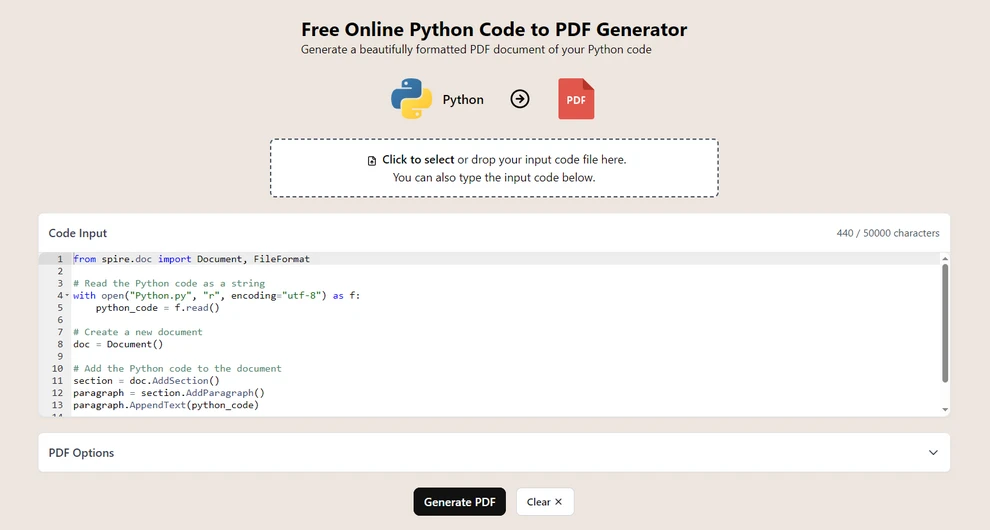
Перейдите на CodeConvert AI (платформа для преобразования кода в браузере).
-
Загрузите свой файл .py или вставьте код в редактор.
-
Выберите Создать PDF, чтобы сгенерировать PDF-документ.
-
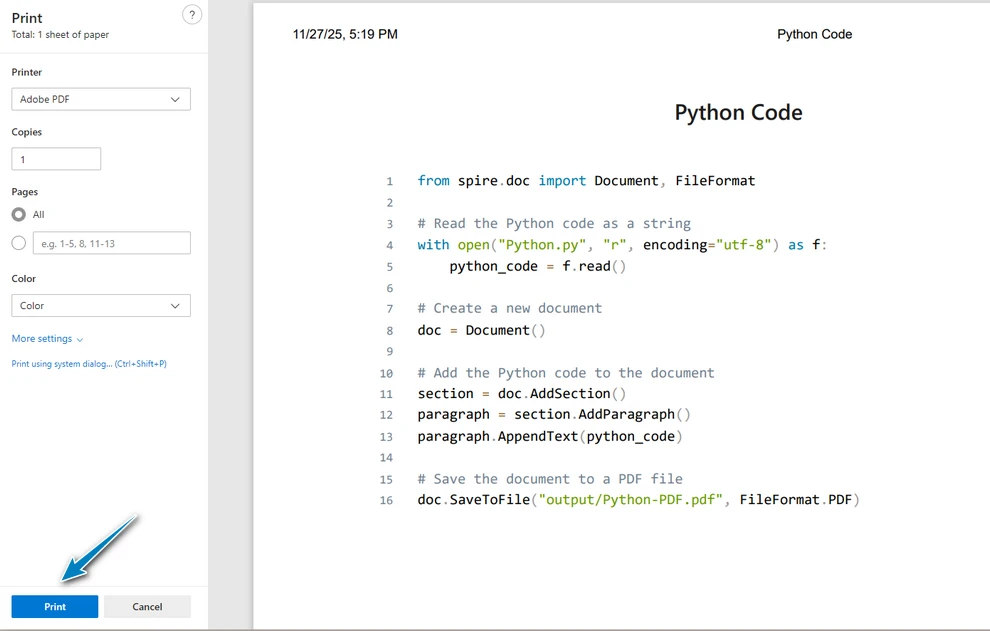
Распечатайте документ как PDF-файл во всплывающем меню.
Преимущества
- Не требуется установка или настройка.
- Работает на разных операционных системах и устройствах.
- Подходит для быстрых преобразований и небольших потребностей.
Ограничения
- Избегайте загрузки конфиденциальных или проприетарных скриптов.
- Параметры форматирования зависят от сервиса.
- Качество подсветки синтаксиса варьируется на разных платформах.
2. Преобразование Python в PDF через «Печать в PDF» в IDE
Большинство редакторов для разработки, включая VS Code, PyCharm, Sublime Text и Notepad++, поддерживают экспорт файлов в PDF через подсистему печати операционной системы.
Как это работает
При печати IDE отображает код, используя свой внутренний движок подсветки синтаксиса, и передает стилизованный вывод в ОС, которая затем генерирует PDF.
Шаги (пример для PyCharm)
-
Откройте свой файл Python.
-
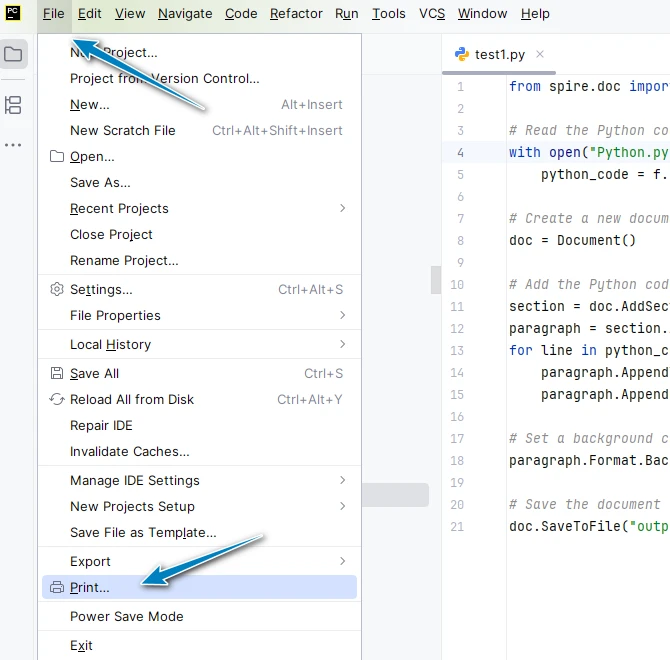
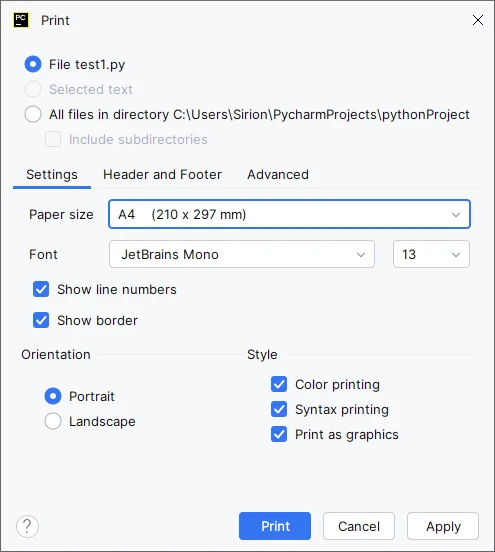
Перейдите в Файл → Печать.
-
При необходимости настройте параметры страницы (поля, ориентация, масштабирование).
-
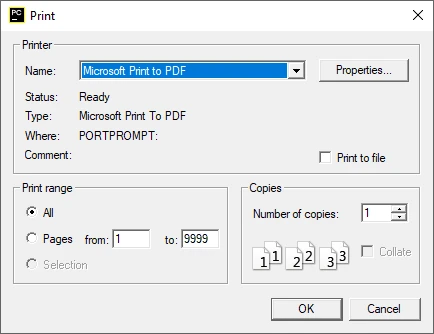
Выберите Microsoft Print to PDF в качестве принтера и сохраните PDF-документ.
Преимущества
- Чистое, читаемое форматирование.
- Подсветка синтаксиса обычно сохраняется.
- Не требуются дополнительные библиотеки.
Ограничения
- Минимальный контроль над переносом строк или макетом.
- Не предназначено для пакетных рабочих процессов.
- Качество вывода зависит от темы IDE.
3. Преобразование PY в PDF на основе скриптов Python (автоматизированное и настраиваемое)
Инструменты на основе Python предоставляют гибкие способы преобразования файлов .py в PDF, поддерживая автоматизированные конвейеры, единообразное форматирование и дополнительную подсветку синтаксиса.
Перед использованием следующих методов установите необходимые компоненты.
Необходимые пакеты
Free Spire.Doc for Python – обрабатывает экспорт в PDF
pip install spire.doc.free
Pygments – генерирует HTML с подсветкой синтаксиса
pip install pygments
3.1 Метод А: Прямое преобразование текста в PDF (без подсветки синтаксиса)
Этот метод считывает файл .py как обычный текст и записывает его в PDF. Он подходит для простого экспорта, снимков документации и внутреннего архивирования, которые могут не требовать подсветки синтаксиса.
Пример кода
from spire.doc import Document, FileFormat, BreakType, Color, LineSpacingRule, LineNumberingRestartMode, TextRange

# Прочитать код Python как строку
with open("Python.py", "r", encoding="utf-8") as f:
    python_code = f.read()

# Создать новый документ
doc = Document()

# Добавить код Python в документ
section = doc.AddSection()
paragraph = section.AddParagraph()
for line_number, line in enumerate(python_code.split("\n")):
    tr = paragraph.AppendText(line)
    # Установить формат символов
    tr.CharacterFormat.FontName = "Consolas"
    tr.CharacterFormat.FontSize = 10.0
    if line_number < len(python_code.split("\n")) - 1:
        paragraph.AppendBreak(BreakType.LineBreak)

# Дополнительные настройки
# Установить цвет фона и межстрочный интервал
paragraph.Format.BackColor = Color.get_LightGray()
paragraph.Format.LineSpacingRule = LineSpacingRule.Multiple
paragraph.Format.LineSpacing = 12.0 # 12pt означает одинарный интервал
# Установить нумерацию строк
section.PageSetup.LineNumberingStartValue = 1
section.PageSetup.LineNumberingStep = 1
section.PageSetup.LineNumberingRestartMode = LineNumberingRestartMode.RestartPage
section.PageSetup.LineNumberingDistanceFromText = 10.0

# Сохранить документ в файл PDF
doc.SaveToFile("output/Python-PDF.docx", FileFormat.Docx)
doc.SaveToFile("output/Python-PDF.pdf", FileFormat.PDF)
Как это работает
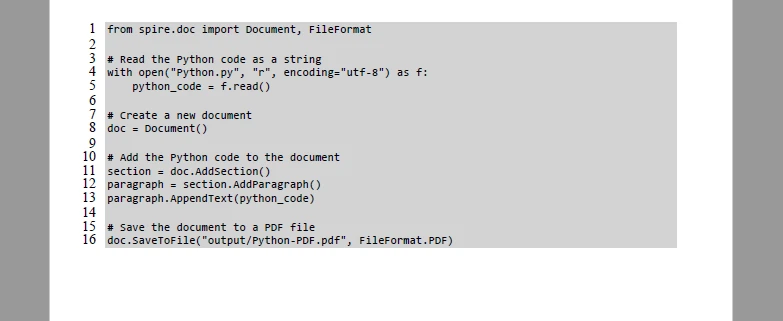
Этот метод вставляет код Python построчно с помощью AppendText(), добавляет разрывы строк с помощью AppendBreak() и экспортирует окончательный документ через SaveToFile().
Ниже показан результат применения этого метода:
Для получения более подробной информации о настройке и вставке текста в PDF-документ см. наше руководство по добавлению текста в PDF-документы с помощью Python.
3.2 Метод Б: PDF с подсветкой синтаксиса (HTML → PDF)
При создании учебных пособий или читаемой документации подсветка синтаксиса помогает различать ключевые слова и улучшает общую ясность. Этот метод использует Pygments для генерации HTML со встроенными стилями, а затем вставляет HTML в документ.
Пример кода
from spire.doc import Document, FileFormat, ParagraphStyle, IParagraphStyle
from pygments import highlight
from pygments.lexers import PythonLexer
from pygments.formatters import HtmlFormatter

def py_to_inline_html(py_file_path):
    with open(py_file_path, "r", encoding="utf-8") as f:
        code = f.read()

    formatter = HtmlFormatter(noclasses=True, linenostart=1, linenos='inline') # Номера строк необязательны
    inline_html = highlight(code, PythonLexer(), formatter)
    return inline_html

html_result = py_to_inline_html("Python.py")

doc = Document()
section = doc.AddSection()
paragraph = section.AddParagraph()

# Вставить отформатированный HTML
paragraph.AppendHTML(html_result)

doc.SaveToFile("output/Python-PDF-Highlighted.pdf", FileFormat.PDF)
Как это работает
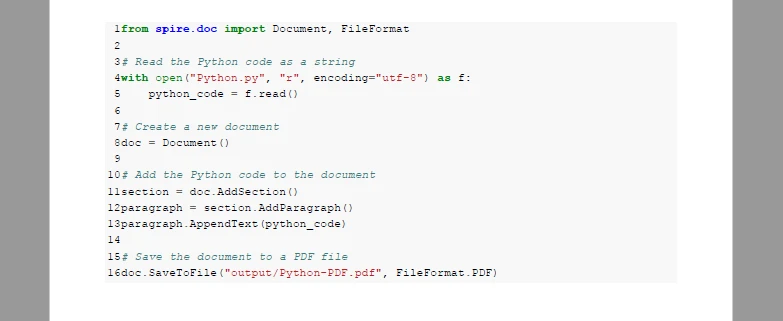
Pygments сначала форматирует код как HTML на основе встроенного CSS. HTML добавляется через AppendHTML(), а готовый документ экспортируется с помощью SaveToFile().
Ниже приведен визуальный результат, сгенерированный этим методом стилизованного HTML:
3.3 Пакетное преобразование (рабочие процессы «Папка в PDF»)
Для одновременного преобразования нескольких файлов .py вам понадобится всего лишь короткий цикл для обработки всех файлов в каталоге и сохранения их в формате PDF.
Пример кода (минимальная пакетная обработка)
import os

input_folder = "scripts"
output_folder = "pdf-output"
os.makedirs(output_folder, exist_ok=True)

for file in os.listdir(input_folder):
    if file.endswith(".py"):
        py_path = os.path.join(input_folder, file)
        pdf_path = os.path.join(output_folder, file.replace(".py", ".pdf"))

        # Вызовите здесь выбранную вами функцию преобразования
        convert_py_to_pdf(py_path, pdf_path)
Примечания
- Повторно использует функцию преобразования, определенную ранее.
- Автоматически сохраняет каждый файл .py как PDF с тем же именем файла.
- Работает как для методов с обычным текстом, так и с подсветкой синтаксиса.
Вы также можете обратиться к нашему руководству «Прямое преобразование HTML в PDF на Python», чтобы узнать больше.
4. Сравнительная таблица: выбор правильного метода преобразования
| Метод | Преимущества | Недостатки | Лучший вариант использования |
|---|---|---|---|
| Онлайн-конвертеры | Быстро, без установки | Проблемы с конфиденциальностью, ограниченное форматирование | Небольшие, неконфиденциальные файлы |
| Печать в PDF в IDE | Просто, сохраняет синтаксис (часто) | Нет автоматизации | Преобразование одного файла |
| Скрипт Python (прямой/HTML) | Автоматизация, пакетная обработка, настройка | Требуются знания в области написания скриптов | Документация, учебные пособия, конвейеры |
5. Лучшие практики для создания четкого и читаемого PDF-кода
Следуйте этим практикам, чтобы ваши PDF-файлы с кодом Python были легко читаемыми, хорошо отформатированными и выглядели профессионально.
Используйте моноширинный шрифт
Моноширинные шрифты сохраняют отступы и выравнивание, что облегчает чтение и отладку кода.
Управляйте длинными строками и переносом
Включите перенос строк или настройте поля страницы, чтобы предотвратить горизонтальную прокрутку и обрезку строк кода.
Поддерживайте единообразное форматирование
Сохраняйте единообразие размеров шрифтов, цветов, интервалов и макета страниц в нескольких PDF-файлах, особенно при пакетной обработке.
Сохраняйте логические блоки кода
Избегайте разделения функций, циклов или многострочных операторов между страницами, чтобы сохранить читаемость и структуру.
Организуйте именование файлов и структуру папок
Используйте систематические имена файлов и организацию папок для пакетного экспорта, автоматизированной документации или архивов проектов.
6. Заключение
Преобразование файлов Python (.py) в PDF обеспечивает надежный способ сохранения форматирования кода, улучшения читаемости и создания документов для совместного использования или архивирования. Будь то для документации, учебных пособий, образовательных целей или личного использования, эти методы позволяют разработчикам, командам и отдельным пользователям создавать единообразные и профессионально выглядящие PDF-файлы из своего исходного кода Python.
7. Часто задаваемые вопросы о преобразовании файлов Python в PDF
Ниже приведены некоторые распространенные вопросы, которые задают разработчики, преподаватели и студенты о преобразовании файлов Python в PDF. Эти ответы основаны на методах, описанных в этом руководстве.
Как превратить файл с кодом Python (.py) в PDF?
Вы можете преобразовать файл Python .py в PDF с помощью онлайн-конвертеров, таких как CodeConvert AI, функций печати в PDF в IDE или скриптов на основе Python с Spire.Doc для автоматизированной и пакетной обработки. Выберите метод в зависимости от вашего рабочего процесса, потребностей в форматировании и необходимости подсветки синтаксиса.
Как я могу преобразовать блокнот Python Jupyter в PDF?
Для блокнотов Jupyter (.ipynb) вы можете использовать встроенную опцию Файл → Скачать как → PDF, если установлен LaTeX, или сначала экспортировать блокнот в скрипт .py, а затем применить методы преобразования Python в PDF, описанные в этом руководстве.
Как убедиться, что подсветка синтаксиса сохранена в PDF?
Чтобы сохранить цвета и форматирование синтаксиса, преобразуйте код в HTML со встроенными стилями CSS с помощью Pygments, а затем добавьте его в PDF-документ с помощью AppendHTML(). Это сохраняет ключевые слова, комментарии и отступы для более четкого и профессионально выглядящего вывода.
Как преобразовать текстовый файл в PDF с помощью Python в Windows?
В Windows вы можете использовать бесплатные библиотеки Python, такие как Spire.Doc, чтобы прочитать файл .txt или .py, записать его в PDF и при необходимости стилизовать. Печать в PDF в IDE — это еще один вариант для преобразования одного файла без написания кода. Пакетные скрипты могут автоматизировать обработку нескольких файлов при сохранении единообразного форматирования.
Смотрите также
Como desfazer a mesclagem de células no Excel (Manual, VBA e Python)
Índice

Desfazer a mesclagem de células no Excel é uma tarefa simples que pode melhorar significativamente a usabilidade da sua planilha. Seja para limpar um documento, preparar dados para análise ou garantir a compatibilidade com fórmulas, desfazer a mesclagem de células é um passo crucial. Este guia apresentará vários métodos para desfazer a mesclagem de células no Excel - desde técnicas manuais simples até automação avançada com VBA e Python - ajudando você a dominar o layout do Excel e a melhorar o gerenciamento de dados.
O Que Você Aprenderá
- Por que Desfazer a Mesclagem de Células no Excel
- Como Desfazer a Mesclagem de Células no Excel
- Desfazer a Mesclagem de Células Usando o Botão Mesclar e Centralizar
- Desfazer a Mesclagem de Células Usando a Caixa de Diálogo Formatar Células
- Desfazer a Mesclagem de Células Usando um Atalho de Teclado
- Encontrar e Desfazer a Mesclagem de Todas as Células Mescladas no Excel
- Desfazer a Mesclagem de Células Usando VBA
- Desfazer a Mesclagem de Células Usando Python
Por que Desfazer a Mesclagem de Células no Excel?
A mesclagem de células pode ajudar na formatação e na criação de cabeçalhos, mas frequentemente cria problemas ao classificar, filtrar ou aplicar fórmulas. Desfazer a mesclagem restaura a funcionalidade individual das células, tornando seus dados mais gerenciáveis. Aqui estão algumas razões pelas quais você pode precisar desfazer a mesclagem de células:
- Classificação e Filtragem: Células mescladas podem interferir nas operações de classificação e filtragem.
- Aplicação de Fórmulas: Fórmulas frequentemente não funcionam corretamente com células mescladas.
- Layout Consistente: Desfazer a mesclagem de células garante tamanhos uniformes de linha e coluna, especialmente para impressão.
Como Desfazer a Mesclagem de Células no Excel?
Desfazer a mesclagem de células no Excel pode ser feito de várias maneiras, dependendo das suas necessidades. Abaixo, guiaremos você por cada método passo a passo e ajudaremos a encontrar o método que melhor se adapta às suas necessidades.
Desfazer a Mesclagem de Células Usando o Botão Mesclar e Centralizar
A maneira mais rápida e direta de desfazer a mesclagem de células no Excel é através do botão Mesclar e Centralizar na guia Página Inicial. Este método é ideal para tarefas ocasionais onde você precisa desfazer a mesclagem de algumas células rapidamente. Siga estes passos para desfazer a mesclagem de suas células:
-
Selecione a Célula Mesclada: Clique na célula mesclada ou no intervalo de células cuja mesclagem você deseja desfazer.
-
Vá para a Guia Página Inicial: Navegue até a guia Página Inicial na faixa de opções do Excel.
-
Clique em Mesclar e Centralizar: No grupo Alinhamento, clique na pequena seta suspensa ao lado do botão Mesclar e Centralizar.
-
Escolha Desfazer Mesclagem de Células: Selecione Desfazer Mesclagem de Células no menu suspenso.
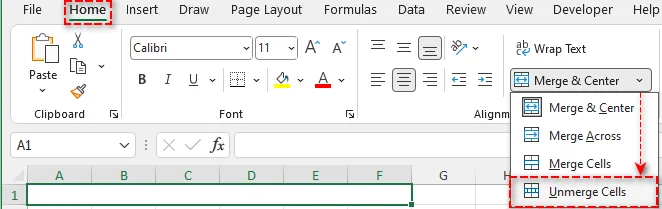
Dica Profissional: Após desfazer a mesclagem, o Excel preserva o conteúdo da célula superior esquerda, deixando as outras células vazias. Se necessário, você pode copiar o conteúdo para as outras células para manter a consistência.
Desfazer a Mesclagem de Células Usando a Caixa de Diálogo Formatar Células
Para situações em que você deseja mais controle sobre a formatação da célula - como o alinhamento do texto - a caixa de diálogo Formatar Células do Excel oferece outro método para desfazer a mesclagem de células. Veja como fazer isso passo a passo:
-
Selecione as Células Mescladas: Clique na(s) célula(s) mesclada(s) cuja mesclagem você deseja desfazer.
-
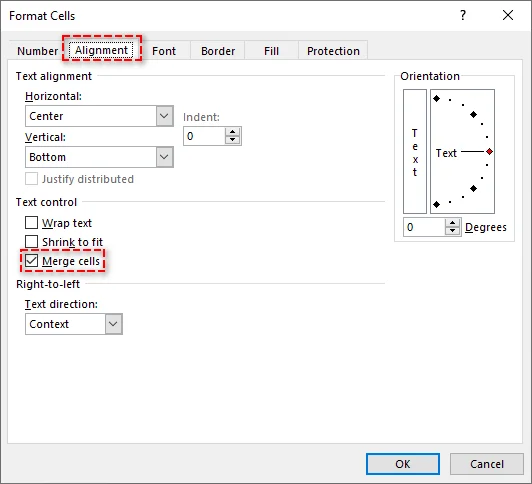
Abra o Menu Formatar Células: Clique com o botão direito na célula selecionada e escolha Formatar Células.
-
Vá para a Guia Alinhamento: Na caixa de diálogo, clique na guia Alinhamento.
-
Desmarque Mesclar Células: Em Controle de Texto, desmarque a caixa de seleção Mesclar células.
-
Clique em OK: As células selecionadas agora serão desfeitas.
Este método é útil se você deseja manter ou ajustar outras configurações de formatação ao desfazer a mesclagem.
Desfazer a Mesclagem de Células Usando um Atalho de Teclado
Atalhos de teclado são a maneira mais rápida de desfazer a mesclagem de células, especialmente quando a velocidade e a eficiência são importantes. Aqui está a sequência de atalhos para desfazer rapidamente a mesclagem de células no Excel:
-
Selecione as Células Mescladas: Destaque as células mescladas cuja mesclagem você deseja desfazer usando o mouse ou o teclado.
-
Use o Atalho: Pressione Alt + C, depois C e, finalmente, D. A mesclagem das células selecionadas será desfeita instantaneamente.

Este método elimina a necessidade de navegar pelos menus, tornando-o ideal para usuários avançados que trabalham frequentemente com células mescladas.
Encontrar e Desfazer a Mesclagem de Todas as Células Mescladas no Excel
Ao trabalhar com planilhas grandes, encontrar células mescladas manualmente pode ser lento. A ferramenta Localizar e Selecionar do Excel ajuda a localizar e limpar rapidamente células mescladas em massa. Siga estes passos para agilizar o processo:
-
Selecione a Planilha Inteira: Clique no pequeno triângulo no canto superior esquerdo da planilha para selecionar a planilha inteira.
-
Abra a Caixa de Diálogo Localizar e Substituir:
- Vá para a guia Página Inicial, clique em Localizar e Selecionar no grupo Edição e escolha Localizar…
- Ou pressione Ctrl + L para abrir a caixa de diálogo diretamente.
-
Encontrar Todas as Células Mescladas:
-
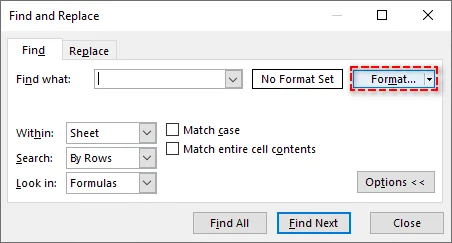
Na caixa de diálogo Localizar, clique em Opções para expandir as opções de pesquisa. Em seguida, clique em Formatar.
-
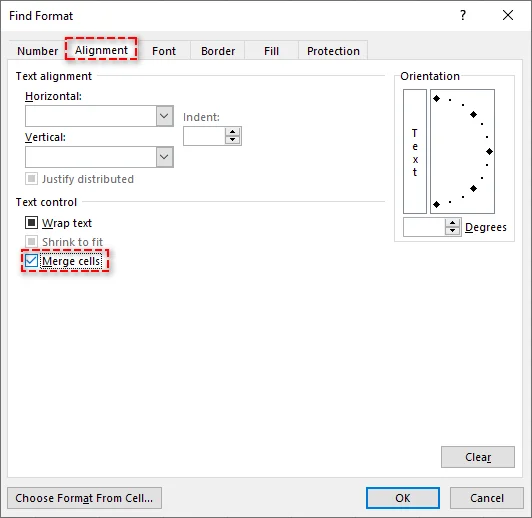
Na janela Localizar Formato, vá para a guia Alinhamento e marque a caixa de seleção Mesclar células em Controle de Texto.
-
Clique em OK e, em seguida, clique em Localizar Tudo. O Excel exibirá todas as células mescladas no intervalo selecionado.
-
-
Selecione Todas as Células Mescladas: Pressione Ctrl + T para selecionar todos os resultados da lista e, em seguida, feche a caixa de diálogo Localizar.
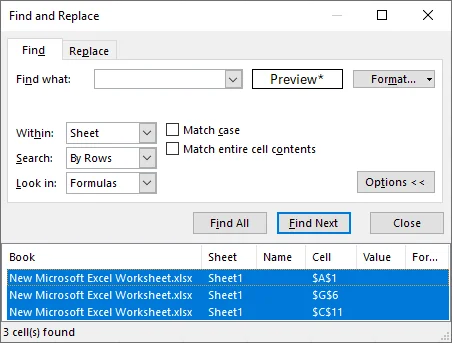
-
Desfaça a Mesclagem das Células: Use qualquer um dos métodos descritos anteriormente para desfazer a mesclagem de todas as células selecionadas simultaneamente.
Esta abordagem é altamente eficiente para limpar grandes conjuntos de dados ou preparar arquivos do Excel para análise.
Desfazer a Mesclagem de Células Usando VBA
O VBA (Visual Basic for Applications) permite que os usuários automatizem o processo de desfazer a mesclagem, especialmente para tarefas repetitivas ou ao lidar com várias planilhas. Se você precisa frequentemente desfazer a mesclagem de células em diferentes planilhas, o VBA é uma excelente escolha.
Aqui está um script VBA simples para desfazer a mesclagem de todas as células em uma planilha específica:
Sub UnmergeAllCells()
    Dim ws As Worksheet
    Set ws = ThisWorkbook.Sheets("Sheet1")  ' Substitua pelo nome da sua planilha

    ' Percorre todas as células mescladas e desfaz a mesclagem
    Dim cell As Range
    For Each cell In ws.UsedRange
        If cell.MergeCells Then
            cell.UnMerge
        End If
    Next cell
End Sub
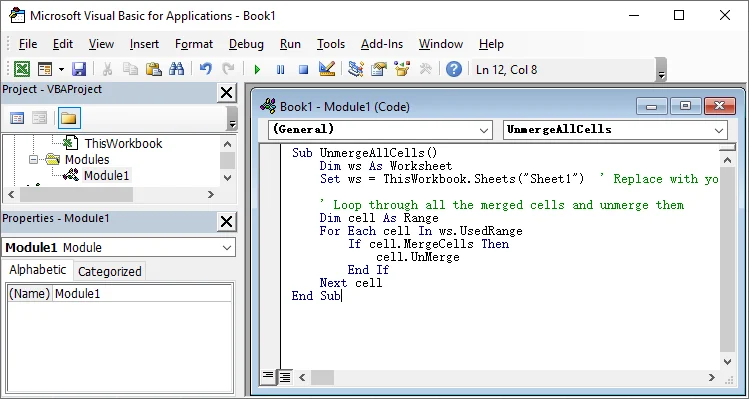
Passos para Usar o Script VBA:
- Abra a pasta de trabalho do Excel e pressione Alt + F11 para abrir o editor do Visual Basic for Applications.
- Insira um novo módulo clicando em Inserir > Módulo.
- Cole o script acima na janela do módulo.
- Pressione F5 para executar a macro e desfazer a mesclagem de todas as células na planilha.
Para mais detalhes sobre o método UnMerge usado neste script VBA, consulte a documentação oficial da Microsoft: Método Range.UnMerge (Excel).
Desfazer a Mesclagem de Células Usando Python
Se você prefere não usar Excel ou VBA, o Python oferece uma solução flexível para desfazer a mesclagem de células programaticamente. Utilizando bibliotecas como Spire.XLS for Python, você pode facilmente criar, editar e manipular arquivos do Excel - incluindo mesclar e dividir células - sem a necessidade do Microsoft Excel.
Aqui está um exemplo de como você pode desfazer a mesclagem de células no Excel usando Python:
-
Instale o Spire.XLS:
Primeiro, instale a biblioteca Spire.XLS for Python do PyPI executando o seguinte comando:
pip install spire-xls -
Escreva o Script Python para desfazer a mesclagem de células:
Depois de instalar a biblioteca, você pode escrever um script Python para desfazer a mesclagem de todas as células em uma planilha do Excel. Aqui está um exemplo simples:
from spire.xls import * # Carregue o arquivo Excel workbook = Workbook() workbook.LoadFromFile("seu_arquivo.xlsx") # Substitua pelo caminho do seu arquivo # Obtenha a primeira planilha sheet = workbook.Worksheets[0] # Obtenha todas as células mescladas ranges = sheet.MergedCells # Percorra cada intervalo mesclado e desfaça a mesclagem for cell in ranges: cell.UnMerge() # Salve a pasta de trabalho modificada workbook.SaveToFile("arquivo_desmesclado.xlsx", ExcelVersion.Version2013) # Salve em um novo arquivo workbook.Dispose() # Limpe os recursos -
Execute o Script:
Depois de escrever o script, simplesmente execute-o. O script irá desfazer a mesclagem de todas as células mescladas na primeira planilha e salvar as alterações em um novo arquivo do Excel.
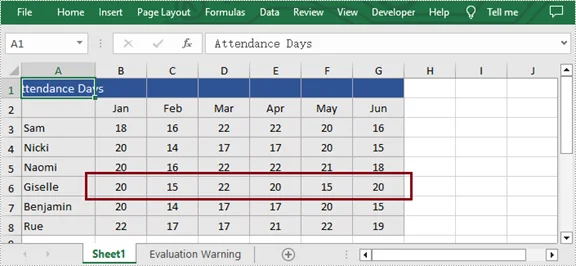
Para técnicas adicionais, como desfazer a mesclagem de células em uma linha, coluna ou intervalo específico, consulte o guia completo de Python: Python: Mesclar ou Desfazer a Mesclagem de Células no Excel.
Conclusão: Escolha o Método Certo para Desfazer a Mesclagem de Células no Excel
Desfazer a mesclagem de células é uma tarefa crucial no Excel para manter seus dados organizados e funcionais. Aqui está um guia rápido para ajudá-lo a escolher o melhor método com base em suas necessidades:
- Solução Rápida para Tarefas Pequenas: Use o botão Mesclar e Centralizar ou a caixa de diálogo Formatar Células para desfazer a mesclagem de algumas células rapidamente.
- Desfazer a Mesclagem de Todas as Células Mescladas: Use a ferramenta Localizar e Selecionar para localizar e desfazer a mesclagem de todas as células mescladas em sua planilha com apenas alguns cliques.
- Automatizar para Várias Planilhas: Use o VBA para automatizar o desfazimento da mesclagem em várias planilhas, economizando tempo ao lidar com tarefas repetitivas.
- Processamento em Lote com Python: Para lidar com vários arquivos do Excel ou desfazer a mesclagem de células em grandes conjuntos de dados, o Python oferece uma solução confiável sem a necessidade de ter o Excel instalado.
Selecione o método que melhor se adapta ao seu fluxo de trabalho e otimize suas tarefas de gerenciamento de dados hoje mesmo.
Perguntas Frequentes
P1: Por que devo desfazer a mesclagem de células no Excel?
R1: Desfazer a mesclagem de células ajuda a garantir que os dados possam ser classificados, filtrados e funcionem com fórmulas, evitando problemas em cálculos e análises de dados.
P2: Qual é a maneira mais rápida de desfazer a mesclagem de células no Excel?
R2: Use o atalho de teclado: pressione Alt + C, depois C, seguido por D para desfazer instantaneamente a mesclagem das células selecionadas.
P3: Como desfazer a mesclagem de todas as células no Excel?
R3: Use Localizar e Selecionar para localizar e desfazer a mesclagem de todas as células mescladas na planilha de uma só vez.
P4: Como desfazer a mesclagem de células em várias planilhas no Excel?
R4: Use o VBA para desfazer a mesclagem de células em várias planilhas executando um script simples que percorre todas as planilhas e desfaz a mesclagem das células.
P5: Posso desfazer a mesclagem de células automaticamente sem ter o Excel instalado?
R5: Sim. Use Python junto com a biblioteca Spire.XLS para desfazer automaticamente a mesclagem de células em um ou mais arquivos do Excel, tudo sem a necessidade de instalar o Microsoft Excel.
Veja Também
- Como Copiar uma Planilha no Excel (Manual, VBA e Python)
- Como Remover Linhas Duplicadas do Excel - 6 Maneiras Fáceis
- Como Converter Números em Texto no Excel (5 Maneiras Fáceis)
- Converter Excel para XML: Ferramentas Gratuitas + Automação com Python
- 5 Métodos Fáceis para Congelar Linhas e Colunas no Excel
엑셀에서 셀 병합을 해제하는 방법 (수동, VBA 및 파이썬)
Excel에서 셀 병합을 해제하는 것은 스프레드시트의 사용성을 크게 향상시킬 수 있는 간단한 작업입니다. 문서를 정리하거나, 데이터 분석을 준비하거나, 수식과의 호환성을 보장할 때 셀 병합 해제는 중요한 단계입니다. 이 가이드는 간단한 수동 기술부터 VBA 및 Python을 사용한 고급 자동화에 이르기까지 Excel에서 셀 병합을 해제하는 여러 방법을 안내하여 Excel의 레이아웃을 마스터하고 데이터 관리를 개선하는 데 도움을 줄 것입니다.
학습할 내용
Excel에서 셀 병합을 해제해야 하는 이유?
셀 병합은 서식을 지정하고 머리글을 만드는 데 도움이 될 수 있지만, 정렬, 필터링 또는 수식을 적용할 때 종종 문제를 일으킵니다. 셀 병합을 해제하면 개별 셀 기능이 복원되어 데이터를 더 쉽게 관리할 수 있습니다. 셀 병합을 해제해야 하는 몇 가지 이유는 다음과 같습니다.
- 정렬 및 필터링: 병합된 셀은 정렬 및 필터링 작업을 방해할 수 있습니다.
- 수식 적용: 수식은 종종 병합된 셀에서 올바르게 작동하지 않습니다.
- 일관된 레이아웃: 셀 병합을 해제하면 특히 인쇄 시 행과 열의 크기가 균일하게 유지됩니다.
Excel에서 셀 병합을 해제하는 방법?
Excel에서 셀 병합을 해제하는 방법은 필요에 따라 여러 가지가 있습니다. 아래에서는 각 방법을 단계별로 안내하고 필요에 맞는 방법을 찾도록 도와드리겠습니다.
병합하고 가운데 맞춤 버튼을 사용하여 셀 병합 해제
Excel에서 셀 병합을 해제하는 가장 빠르고 간단한 방법은 홈 탭의 병합하고 가운데 맞춤 버튼을 사용하는 것입니다. 이 방법은 몇 개의 셀을 빠르게 병합 해제해야 하는 가끔의 작업에 이상적입니다. 다음 단계에 따라 셀 병합을 해제하십시오.
-
병합된 셀 선택: 병합을 해제하려는 병합된 셀 또는 셀 범위를 클릭합니다.
-
홈 탭으로 이동: Excel 리본에서 홈 탭으로 이동합니다.
-
병합하고 가운데 맞춤 클릭: 맞춤 그룹에서 병합하고 가운데 맞춤 버튼 옆의 작은 드롭다운 화살표를 클릭합니다.
-
셀 병합 해제 선택: 드롭다운 메뉴에서 셀 병합 해제를 선택합니다.
전문가 팁: 병합을 해제한 후 Excel은 왼쪽 상단 셀의 내용을 보존하고 다른 셀은 비워 둡니다. 필요한 경우 일관성을 위해 내용을 다른 셀에 복사할 수 있습니다.
셀 서식 대화 상자를 사용하여 셀 병합 해제
텍스트 맞춤과 같이 셀 서식에 대한 더 많은 제어를 원하는 경우 Excel의 셀 서식 대화 상자는 셀 병합을 해제하는 또 다른 방법을 제공합니다. 단계별 방법은 다음과 같습니다.
-
병합된 셀 선택: 병합을 해제하려는 병합된 셀을 클릭합니다.
-
셀 서식 메뉴 열기: 선택한 셀을 마우스 오른쪽 버튼으로 클릭하고 셀 서식을 선택합니다.
-
맞춤 탭으로 이동: 대화 상자에서 맞춤 탭을 클릭합니다.
-
셀 병합 선택 취소: 텍스트 컨트롤에서 셀 병합 확인란의 선택을 취소합니다.
-
확인 클릭: 선택한 셀이 이제 병합 해제됩니다.
이 방법은 병합을 해제하는 동안 다른 서식 설정을 유지하거나 조정하려는 경우에 유용합니다.
키보드 단축키를 사용하여 셀 병합 해제
키보드 단축키는 특히 속도와 효율성이 중요할 때 셀 병합을 해제하는 가장 빠른 방법입니다. Excel에서 셀 병합을 빠르게 해제하는 단축키 순서는 다음과 같습니다.
-
병합된 셀 선택: 마우스나 키보드를 사용하여 병합을 해제하려는 병합된 셀을 강조 표시합니다.
-
단축키 사용: Alt + H를 누른 다음 M을 누르고 마지막으로 U를 누릅니다. 선택한 셀이 즉시 병합 해제됩니다.
이 방법은 메뉴를 탐색할 필요가 없으므로 병합된 셀을 자주 사용하는 고급 사용자에게 이상적입니다.
Excel에서 모든 병합된 셀 찾아 병합 해제하기
큰 워크시트에서 작업할 때 병합된 셀을 수동으로 찾는 것은 느릴 수 있습니다. Excel의 찾기 및 선택 도구를 사용하면 병합된 셀을 대량으로 신속하게 찾아 정리할 수 있습니다. 다음 단계에 따라 프로세스를 간소화하십시오.
-
전체 시트 선택: 시트의 왼쪽 상단 모서리에 있는 작은 삼각형을 클릭하여 전체 워크시트를 선택합니다.
-
찾기 및 바꾸기 대화 상자 열기:
- 홈 탭으로 이동하여 편집 그룹에서 찾기 및 선택을 클릭하고 찾기…를 선택합니다.
- 또는 Ctrl + F를 눌러 대화 상자를 직접 엽니다.
-
모든 병합된 셀 찾기:
-
찾기 대화 상자에서 옵션을 클릭하여 검색 옵션을 확장합니다. 그런 다음 서식을 클릭합니다.
-
찾기 서식 창에서 맞춤 탭으로 이동하여 텍스트 컨트롤 아래의 셀 병합 확인란을 선택합니다.
-
확인을 클릭한 다음 모두 찾기를 클릭합니다. Excel은 선택한 범위의 모든 병합된 셀을 표시합니다.
-
-
모든 병합된 셀 선택: Ctrl + A를 눌러 목록에서 모든 결과를 선택한 다음 찾기 대화 상자를 닫습니다.
-
셀 병합 해제: 이전에 설명한 방법 중 하나를 사용하여 선택한 모든 셀을 동시에 병합 해제합니다.
이 접근 방식은 대규모 데이터 세트를 정리하거나 분석을 위해 Excel 파일을 준비하는 데 매우 효율적입니다.
VBA를 사용하여 셀 병합 해제
VBA(Visual Basic for Applications)를 사용하면 특히 반복적인 작업이나 여러 워크시트를 처리할 때 병합 해제 프로세스를 자동화할 수 있습니다. 여러 시트에서 셀 병합을 자주 해제해야 하는 경우 VBA는 훌륭한 선택입니다.
다음은 특정 워크시트의 모든 셀을 병합 해제하는 간단한 VBA 스크립트입니다.
Sub UnmergeAllCells()
    Dim ws As Worksheet
    Set ws = ThisWorkbook.Sheets("Sheet1")  ' 시트 이름으로 바꾸세요

    ' 모든 병합된 셀을 반복하고 병합을 해제합니다
    Dim cell As Range
    For Each cell In ws.UsedRange
        If cell.MergeCells Then
            cell.UnMerge
        End If
    Next cell
End Sub
VBA 스크립트 사용 단계:
- Excel 통합 문서를 열고 Alt + F11을 눌러 Visual Basic for Applications 편집기를 엽니다.
- 삽입 > 모듈을 클릭하여 새 모듈을 삽입합니다.
- 위의 스크립트를 모듈 창에 붙여넣습니다.
- F5 키를 눌러 매크로를 실행하여 워크시트의 모든 셀을 병합 해제합니다.
이 VBA 스크립트에서 사용되는 UnMerge 메서드에 대한 자세한 내용은 Microsoft의 공식 설명서를 확인하십시오: Range.UnMerge 메서드(Excel).
Python을 사용하여 셀 병합 해제
Excel이나 VBA를 사용하지 않으려면 Python은 프로그래밍 방식으로 셀 병합을 해제할 수 있는 유연한 솔루션을 제공합니다. Spire.XLS for Python과 같은 라이브러리를 활용하면 Microsoft Excel 없이도 셀 병합 및 분할을 포함하여 Excel 파일을 쉽게 만들고, 편집하고, 조작할 수 있습니다.
다음은 Python을 사용하여 Excel에서 셀 병합을 해제하는 방법의 예입니다.
-
Spire.XLS 설치:
먼저 다음 명령을 실행하여 PyPI에서 Spire.XLS for Python 라이브러리를 설치합니다.
pip install spire-xls -
셀 병합을 해제하는 Python 스크립트 작성:
라이브러리를 설치했으면 Excel 워크시트의 모든 셀을 병합 해제하는 Python 스크립트를 작성할 수 있습니다. 다음은 간단한 예입니다.
from spire.xls import * # Excel 파일 로드 workbook = Workbook() workbook.LoadFromFile("your_file.xlsx") # 파일 경로로 바꾸세요 # 첫 번째 워크시트 가져오기 sheet = workbook.Worksheets[0] # 모든 병합된 셀 가져오기 ranges = sheet.MergedCells # 각 병합된 범위를 반복하고 병합 해제 for cell in ranges: cell.UnMerge() # 수정된 통합 문서 저장 workbook.SaveToFile("unmerged_file.xlsx", ExcelVersion.Version2013) # 새 파일에 저장 workbook.Dispose() # 리소스 정리 -
스크립트 실행:
스크립트를 작성한 후 간단히 실행하십시오. 스크립트는 첫 번째 워크시트의 모든 병합된 셀을 병합 해제하고 변경 사항을 새 Excel 파일에 저장합니다.
특정 행, 열 또는 범위에서 셀 병합 해제와 같은 추가 기술은 전체 Python 가이드를 확인하십시오: Python: Excel에서 셀 병합 또는 병합 해제.
결론: Excel에서 셀 병합을 해제하는 올바른 방법 선택
셀 병합 해제는 데이터를 체계적이고 기능적으로 유지하기 위해 Excel에서 중요한 작업입니다. 필요에 따라 최상의 방법을 선택하는 데 도움이 되는 빠른 가이드는 다음과 같습니다.
- 작은 작업을 위한 빠른 수정: 병합하고 가운데 맞춤 버튼 또는 셀 서식 대화 상자를 사용하여 몇 개의 셀을 빠르게 병합 해제합니다.
- 모든 병합된 셀 병합 해제: 찾기 및 선택 도구를 사용하여 몇 번의 클릭만으로 워크시트의 모든 병합된 셀을 찾아 병합 해제합니다.
- 여러 시트에 대한 자동화: VBA를 사용하여 여러 시트에서 병합 해제를 자동화하여 반복적인 작업을 처리할 때 시간을 절약합니다.
- Python을 사용한 일괄 처리: 여러 Excel 파일을 처리하거나 대규모 데이터 세트에서 셀 병합을 해제하는 경우 Python은 Excel을 설치할 필요 없이 신뢰할 수 있는 솔루션을 제공합니다.
워크플로에 가장 적합한 방법을 선택하고 오늘 데이터 관리 작업을 간소화하십시오.
자주 묻는 질문
Q1: Excel에서 셀 병합을 해제해야 하는 이유는 무엇입니까?
A1: 셀 병합을 해제하면 데이터를 정렬, 필터링하고 수식과 함께 사용할 수 있으므로 계산 및 데이터 분석에서 문제를 피할 수 있습니다.
Q2: Excel에서 셀 병합을 해제하는 가장 빠른 방법은 무엇입니까?
A2: 키보드 단축키를 사용하십시오: Alt + H를 누른 다음 M을 누르고 U를 눌러 선택한 셀을 즉시 병합 해제합니다.
Q3: Excel에서 모든 셀을 병합 해제하는 방법은 무엇입니까?
A3: 찾기 및 선택을 사용하여 워크시트의 모든 병합된 셀을 한 번에 찾아 병합 해제합니다.
Q4: Excel의 여러 시트에서 셀 병합을 해제하는 방법은 무엇입니까?
A4: VBA를 사용하여 모든 시트를 반복하고 셀을 병합 해제하는 간단한 스크립트를 실행하여 여러 시트에서 셀 병합을 해제합니다.
Q5: Excel을 설치하지 않고도 셀 병합을 자동으로 해제할 수 있습니까?
A5: 예. Python을 Spire.XLS 라이브러리와 함께 사용하여 Microsoft Excel을 설치할 필요 없이 하나 이상의 Excel 파일에서 셀 병합을 자동으로 해제할 수 있습니다.
참고 항목
Come dividere le celle in Excel (Manuale, VBA e Python)
Dividere le celle in Excel è un'operazione semplice che può migliorare significativamente l'usabilità del tuo foglio di calcolo. Che tu stia pulendo un documento, preparando dati per l'analisi o garantendo la compatibilità con le formule, dividere le celle è un passaggio fondamentale. Questa guida ti illustrerà diversi metodi per dividere le celle in Excel - dalle semplici tecniche manuali all'automazione avanzata con VBA e Python - aiutandoti a padroneggiare il layout di Excel e a migliorare la gestione dei dati.
Cosa Imparerai
Perché dividere le celle in Excel?
L'unione di celle può aiutare con la formattazione e la creazione di intestazioni, ma spesso crea problemi durante l'ordinamento, il filtraggio o l'applicazione di formule. La divisione delle celle ripristina la funzionalità delle singole celle, rendendo i dati più gestibili. Ecco alcuni motivi per cui potresti dover dividere le celle:
- Ordinamento e filtraggio: le celle unite possono interferire con le operazioni di ordinamento e filtraggio.
- Applicazione delle formule: le formule spesso non funzionano correttamente con le celle unite.
- Layout coerente: la divisione delle celle garantisce dimensioni uniformi di righe e colonne, specialmente per la stampa.
Come dividere le celle in Excel?
La divisione delle celle in Excel può essere eseguita in diversi modi, a seconda delle tue esigenze. Di seguito, ti guideremo attraverso ogni metodo passo dopo passo e ti aiuteremo a trovare il metodo più adatto alle tue esigenze.
Dividere le celle usando il pulsante Unisci e centra
Il modo più rapido e diretto per dividere le celle in Excel è tramite il pulsante Unisci e centra nella scheda Home. Questo metodo è ideale per attività occasionali in cui è necessario dividere rapidamente alcune celle. Segui questi passaggi per dividere le tue celle:
-
Seleziona la cella unita: fai clic sulla cella unita o sull'intervallo di celle che desideri dividere.
-
Vai alla scheda Home: vai alla scheda Home sulla barra multifunzione di Excel.
-
Fai clic su Unisci e centra: nel gruppo Allineamento, fai clic sulla piccola freccia a discesa accanto al pulsante Unisci e centra.
-
Scegli Dividi celle: seleziona Dividi celle dal menu a discesa.
Suggerimento: dopo la divisione, Excel conserva il contenuto della cella in alto a sinistra, lasciando le altre celle vuote. Se necessario, puoi copiare il contenuto nelle altre celle per coerenza.
Dividere le celle usando la finestra di dialogo Formato celle
Per le situazioni in cui desideri un maggiore controllo sulla formattazione delle celle, come l'allineamento del testo, la finestra di dialogo Formato celle di Excel fornisce un altro metodo per dividere le celle. Ecco come farlo passo dopo passo:
-
Seleziona le celle unite: fai clic sulla cella o sulle celle unite che desideri dividere.
-
Apri il menu Formato celle: fai clic con il pulsante destro del mouse sulla cella selezionata e scegli Formato celle.
-
Vai alla scheda Allineamento: nella finestra di dialogo, fai clic sulla scheda Allineamento.
-
Deseleziona Unisci celle: sotto Controllo testo, deseleziona la casella di controllo Unisci celle.
-
Fai clic su OK: le celle selezionate verranno ora divise.
Questo metodo è utile se si desidera mantenere o regolare altre impostazioni di formattazione durante la divisione.
Dividere le celle usando una scorciatoia da tastiera
Le scorciatoie da tastiera sono il modo più veloce per dividere le celle, specialmente quando la velocità e l'efficienza sono importanti. Ecco la sequenza di scorciatoie per dividere rapidamente le celle in Excel:
-
Seleziona le celle unite: evidenzia le celle unite che desideri dividere usando il mouse o la tastiera.
-
Usa la scorciatoia: premi Alt + H, quindi M e infine U. Le celle selezionate si divideranno istantaneamente.
Questo metodo elimina la necessità di navigare nei menu, rendendolo ideale per gli utenti esperti che lavorano frequentemente con celle unite.
Trovare e dividere tutte le celle unite in Excel
Quando si lavora con fogli di lavoro di grandi dimensioni, trovare manualmente le celle unite può essere lento. Lo strumento Trova e seleziona di Excel ti aiuta a individuare e pulire rapidamente le celle unite in blocco. Segui questi passaggi per semplificare il processo:
-
Seleziona l'intero foglio: fai clic sul piccolo triangolo nell'angolo in alto a sinistra del foglio per selezionare l'intero foglio di lavoro.
-
Apri la finestra di dialogo Trova e sostituisci:
- Vai alla scheda Home, fai clic su Trova e seleziona nel gruppo Modifica e scegli Trova...
- Oppure premi Ctrl + F per aprire direttamente la finestra di dialogo.
-
Trova tutte le celle unite:
-
Nella finestra di dialogo Trova, fai clic su Opzioni per espandere le opzioni di ricerca. Quindi fai clic su Formato.
-
Nella finestra Trova formato, vai alla scheda Allineamento e seleziona la casella di controllo Unisci celle sotto Controllo testo.
-
Fai clic su OK, quindi fai clic su Trova tutti. Excel visualizzerà tutte le celle unite nell'intervallo selezionato.
-
-
Seleziona tutte le celle unite: premi Ctrl + A per selezionare tutti i risultati dall'elenco, quindi chiudi la finestra di dialogo Trova.
-
Dividi le celle: usa uno dei metodi descritti in precedenza per dividere contemporaneamente tutte le celle selezionate.
Questo approccio è molto efficiente per la pulizia di grandi set di dati o per la preparazione di file Excel per l'analisi.
Dividere le celle usando VBA
VBA (Visual Basic for Applications) consente agli utenti di automatizzare il processo di divisione, specialmente per attività ripetitive o per la gestione di più fogli di lavoro. Se hai spesso bisogno di dividere celle su fogli diversi, VBA è una scelta eccellente.
Ecco un semplice script VBA per dividere tutte le celle in un foglio di lavoro specifico:
Sub UnmergeAllCells()
    Dim ws As Worksheet
    Set ws = ThisWorkbook.Sheets("Sheet1")  ' Sostituisci con il nome del tuo foglio

    ' Scansiona tutte le celle unite e dividile
    Dim cell As Range
    For Each cell In ws.UsedRange
        If cell.MergeCells Then
            cell.UnMerge
        End If
    Next cell
End Sub
Passaggi per utilizzare lo script VBA:
- Apri la cartella di lavoro di Excel e premi Alt + F11 per aprire l'editor di Visual Basic for Applications.
- Inserisci un nuovo modulo facendo clic su Inserisci > Modulo.
- Incolla lo script sopra nella finestra del modulo.
- Premi F5 per eseguire la macro per dividere tutte le celle nel foglio di lavoro.
Per maggiori dettagli sul metodo UnMerge utilizzato in questo script VBA, consulta la documentazione ufficiale di Microsoft: Metodo Range.UnMerge (Excel).
Dividere le celle usando Python
Se preferisci non usare Excel o VBA, Python offre una soluzione flessibile per dividere le celle a livello di codice. Sfruttando librerie come Spire.XLS for Python, puoi creare, modificare e manipolare facilmente file Excel, inclusa l'unione e la divisione di celle, senza bisogno di Microsoft Excel.
Ecco un esempio di come puoi dividere le celle in Excel usando Python:
-
Installa Spire.XLS:
Innanzitutto, installa la libreria Spire.XLS for Python da PyPI eseguendo il seguente comando:
pip install spire-xls -
Scrivi lo script Python per dividere le celle:
Una volta installata la libreria, puoi scrivere uno script Python per dividere tutte le celle in un foglio di lavoro Excel. Ecco un semplice esempio:
from spire.xls import * # Carica il file Excel workbook = Workbook() workbook.LoadFromFile("your_file.xlsx") # Sostituisci con il percorso del tuo file # Ottieni il primo foglio di lavoro sheet = workbook.Worksheets[0] # Ottieni tutte le celle unite ranges = sheet.MergedCells # Scansiona ogni intervallo unito e dividilo for cell in ranges: cell.UnMerge() # Salva la cartella di lavoro modificata workbook.SaveToFile("unmerged_file.xlsx", ExcelVersion.Version2013) # Salva in un nuovo file workbook.Dispose() # Pulisci le risorse -
Esegui lo script:
Dopo aver scritto lo script, eseguilo semplicemente. Lo script dividerà tutte le celle unite nel primo foglio di lavoro e salverà le modifiche in un nuovo file Excel.
Per tecniche aggiuntive come la divisione di celle in una riga, colonna o intervallo specifico, consulta la guida completa di Python: Python: Unire o dividere celle in Excel.
Conclusione: scegli il metodo giusto per dividere le celle in Excel
La divisione delle celle è un'attività cruciale in Excel per mantenere i dati organizzati e funzionali. Ecco una guida rapida per aiutarti a scegliere il metodo migliore in base alle tue esigenze:
- Soluzione rapida per piccole attività: utilizza il pulsante Unisci e centra o la finestra di dialogo Formato celle per dividere rapidamente alcune celle.
- Dividi tutte le celle unite: utilizza lo strumento Trova e seleziona per individuare e dividere tutte le celle unite nel tuo foglio di lavoro con pochi clic.
- Automatizza per più fogli: utilizza VBA per automatizzare la divisione su più fogli, risparmiando tempo quando si ha a che fare con attività ripetitive.
- Elaborazione batch con Python: per la gestione di più file Excel o la divisione di celle in grandi set di dati, Python offre una soluzione affidabile senza la necessità di installare Excel.
Seleziona il metodo che meglio si adatta al tuo flusso di lavoro e semplifica oggi stesso le tue attività di gestione dei dati.
Domande frequenti
D1: Perché dovrei dividere le celle in Excel?
R1: La divisione delle celle aiuta a garantire che i dati siano ordinabili, filtrabili e funzionino con le formule, evitando problemi nei calcoli e nell'analisi dei dati.
D2: Qual è il modo più rapido per dividere le celle in Excel?
R2: Usa la scorciatoia da tastiera: premi Alt + H, quindi M, seguito da U per dividere istantaneamente le celle selezionate.
D3: Come dividere tutte le celle in Excel?
R3: Usa Trova e seleziona per individuare e dividere tutte le celle unite nel foglio di lavoro contemporaneamente.
D4: Come dividere le celle su più fogli in Excel?
R4: Usa VBA per dividere le celle in più fogli eseguendo un semplice script che scorre tutti i fogli e divide le celle.
D5: Posso dividere le celle automaticamente senza avere Excel installato?
R5: Sì. Usa Python insieme alla libreria Spire.XLS per dividere automaticamente le celle in uno o più file Excel, il tutto senza la necessità di installare Microsoft Excel.
Vedi anche
- Come copiare un foglio di lavoro in Excel (Manuale, VBA e Python)
- Come rimuovere le righe duplicate da Excel - 6 modi semplici
- Come convertire i numeri in testo in Excel (5 modi semplici)
- Converti Excel in XML: strumenti gratuiti + automazione Python
- 5 semplici metodi per bloccare righe e colonne in Excel
Comment annuler la fusion de cellules dans Excel (Manuel, VBA et Python)
Table des matières
Défusionner les cellules dans Excel est une tâche simple qui peut améliorer considérablement l'ergonomie de votre feuille de calcul. Que vous nettoyiez un document, prépariez des données pour une analyse ou assuriez la compatibilité avec des formules, la défusion des cellules est une étape cruciale. Ce guide vous présentera plusieurs méthodes pour défusionner les cellules dans Excel - des techniques manuelles simples à l'automatisation avancée avec VBA et Python - vous aidant à maîtriser la mise en page d'Excel et à améliorer la gestion des données.
Ce que vous apprendrez
- Pourquoi Défusionner les Cellules dans Excel
- Comment Défusionner les Cellules dans Excel
- Défusionner les cellules à l'aide du bouton Fusionner et centrer
- Défusionner les cellules à l'aide de la boîte de dialogue Format de cellule
- Défusionner les cellules à l'aide d'un raccourci clavier
- Rechercher et défusionner toutes les cellules fusionnées dans Excel
- Défusionner les cellules à l'aide de VBA
- Défusionner les cellules à l'aide de Python
Pourquoi Défusionner les Cellules dans Excel ?
La fusion de cellules peut aider à la mise en forme et à la création d'en-têtes, mais elle crée souvent des problèmes lors du tri, du filtrage ou de l'application de formules. La défusion des cellules restaure la fonctionnalité de chaque cellule individuelle, rendant vos données plus faciles à gérer. Voici quelques raisons pour lesquelles vous pourriez avoir besoin de défusionner des cellules :
- Tri et filtrage : Les cellules fusionnées peuvent interférer avec les opérations de tri et de filtrage.
- Application de formules : Les formules ne fonctionnent souvent pas correctement avec les cellules fusionnées.
- Mise en page cohérente : La défusion des cellules garantit des tailles de lignes et de colonnes uniformes, en particulier pour l'impression.
Comment Défusionner les Cellules dans Excel ?
La défusion des cellules dans Excel peut se faire de plusieurs manières, en fonction de vos besoins. Ci-dessous, nous vous guiderons à travers chaque méthode étape par étape et vous aiderons à trouver celle qui correspond à vos besoins.
Défusionner les cellules à l'aide du bouton Fusionner et centrer
Le moyen le plus rapide et le plus simple de défusionner des cellules dans Excel est d'utiliser le bouton Fusionner et centrer de l'onglet Accueil. Cette méthode est idéale pour les tâches occasionnelles où vous devez défusionner rapidement quelques cellules. Suivez ces étapes pour défusionner vos cellules :
-
Sélectionnez la cellule fusionnée : Cliquez sur la cellule ou la plage de cellules fusionnées que vous souhaitez défusionner.
-
Allez à l'onglet Accueil : Accédez à l'onglet Accueil du ruban Excel.
-
Cliquez sur Fusionner et centrer : Dans le groupe Alignement, cliquez sur la petite flèche déroulante à côté du bouton Fusionner et centrer.
-
Choisissez Défusionner les cellules : Sélectionnez Défusionner les cellules dans le menu déroulant.
Conseil de pro : Après la défusion, Excel conserve le contenu de la cellule en haut à gauche, laissant les autres cellules vides. Si nécessaire, vous pouvez copier le contenu dans les autres cellules pour plus de cohérence.
Défusionner les cellules à l'aide de la boîte de dialogue Format de cellule
Pour les situations où vous souhaitez plus de contrôle sur la mise en forme des cellules, comme l'alignement du texte, la boîte de dialogue Format de cellule d'Excel offre une autre méthode pour défusionner les cellules. Voici comment procéder étape par étape :
-
Sélectionnez les cellules fusionnées : Cliquez sur la ou les cellules fusionnées que vous souhaitez défusionner.
-
Ouvrez le menu Format de cellule : Faites un clic droit sur la cellule sélectionnée et choisissez Format de cellule.
-
Allez à l'onglet Alignement : Dans la boîte de dialogue, cliquez sur l'onglet Alignement.
-
Décochez Fusionner les cellules : Sous Contrôle du texte, décochez la case Fusionner les cellules.
-
Cliquez sur OK : Les cellules sélectionnées seront maintenant défusionnées.
Cette méthode est utile si vous souhaitez conserver ou ajuster d'autres paramètres de mise en forme lors de la défusion.
Défusionner les cellules à l'aide d'un raccourci clavier
Les raccourcis clavier sont le moyen le plus rapide de défusionner des cellules, en particulier lorsque la vitesse et l'efficacité sont importantes. Voici la séquence de raccourcis pour défusionner rapidement des cellules dans Excel :
-
Sélectionnez les cellules fusionnées : Mettez en surbrillance les cellules fusionnées que vous souhaitez défusionner à l'aide de votre souris ou de votre clavier.
-
Utilisez le raccourci : Appuyez sur Alt + H, puis M, et enfin U. Les cellules sélectionnées se défusionneront instantanément.
Cette méthode élimine le besoin de naviguer dans les menus, ce qui la rend idéale pour les utilisateurs expérimentés qui travaillent fréquemment avec des cellules fusionnées.
Rechercher et défusionner toutes les cellules fusionnées dans Excel
Lorsque vous travaillez avec de grandes feuilles de calcul, trouver manuellement les cellules fusionnées peut être lent. L'outil Rechercher et sélectionner d'Excel vous aide à localiser et à nettoyer rapidement les cellules fusionnées en masse. Suivez ces étapes pour rationaliser le processus :
-
Sélectionnez votre feuille entière : Cliquez sur le petit triangle dans le coin supérieur gauche de la feuille pour sélectionner toute la feuille de calcul.
-
Ouvrez la boîte de dialogue Rechercher et remplacer :
- Allez à l'onglet Accueil, cliquez sur Rechercher et sélectionner dans le groupe Édition, et choisissez Rechercher…
- Ou appuyez sur Ctrl + F pour ouvrir directement la boîte de dialogue.
-
Rechercher toutes les cellules fusionnées :
-
Dans la boîte de dialogue Rechercher, cliquez sur Options pour développer les options de recherche. Cliquez ensuite sur Format.
-
Dans la fenêtre Rechercher un format, allez à l'onglet Alignement, et cochez la case Fusionner les cellules sous Contrôle du texte.
-
Cliquez sur OK, puis sur Rechercher tout. Excel affichera toutes les cellules fusionnées dans la plage sélectionnée.
-
-
Sélectionner toutes les cellules fusionnées : Appuyez sur Ctrl + A pour sélectionner tous les résultats de la liste, puis fermez la boîte de dialogue Rechercher.
-
Défusionner les cellules : Utilisez l'une des méthodes décrites précédemment pour défusionner toutes les cellules sélectionnées simultanément.
Cette approche est très efficace pour nettoyer de grands ensembles de données ou préparer des fichiers Excel pour l'analyse.
Défusionner les cellules à l'aide de VBA
VBA (Visual Basic for Applications) permet aux utilisateurs d'automatiser le processus de défusion, en particulier pour les tâches répétitives ou la gestion de plusieurs feuilles de calcul. Si vous avez souvent besoin de défusionner des cellules sur différentes feuilles, VBA est un excellent choix.
Voici un script VBA simple pour défusionner toutes les cellules d'une feuille de calcul spécifique :
Sub UnmergeAllCells()
    Dim ws As Worksheet
    Set ws = ThisWorkbook.Sheets("Sheet1")  ' Remplacez par le nom de votre feuille

    ' Parcourir toutes les cellules fusionnées et les défusionner
    Dim cell As Range
    For Each cell In ws.UsedRange
        If cell.MergeCells Then
            cell.UnMerge
        End If
    Next cell
End Sub
Étapes pour utiliser le script VBA :
- Ouvrez le classeur Excel et appuyez sur Alt + F11 pour ouvrir l'éditeur Visual Basic for Applications.
- Insérez un nouveau module en cliquant sur Insertion > Module.
- Collez le script ci-dessus dans la fenêtre du module.
- Appuyez sur F5 pour exécuter la macro afin de défusionner toutes les cellules de la feuille de calcul.
Pour plus de détails sur la méthode UnMerge utilisée dans ce script VBA, veuillez consulter la documentation officielle de Microsoft : Méthode Range.UnMerge (Excel).
Défusionner les cellules à l'aide de Python
Si vous préférez ne pas utiliser Excel ou VBA, Python offre une solution flexible pour défusionner les cellules par programme. En tirant parti de bibliothèques comme Spire.XLS for Python, vous pouvez facilement créer, modifier et manipuler des fichiers Excel - y compris la fusion et la division de cellules - sans avoir besoin de Microsoft Excel.
Voici un exemple de la façon dont vous pouvez défusionner des cellules dans Excel à l'aide de Python :
-
Installer Spire.XLS :
Tout d'abord, installez la bibliothèque Spire.XLS for Python à partir de PyPI en exécutant la commande suivante :
pip install spire-xls -
Écrire le script Python pour défusionner les cellules :
Une fois la bibliothèque installée, vous pouvez écrire un script Python pour défusionner toutes les cellules d'une feuille de calcul Excel. Voici un exemple simple :
from spire.xls import * # Charger le fichier Excel workbook = Workbook() workbook.LoadFromFile("votre_fichier.xlsx") # Remplacez par le chemin de votre fichier # Obtenir la première feuille de calcul sheet = workbook.Worksheets[0] # Obtenir toutes les cellules fusionnées ranges = sheet.MergedCells # Parcourir chaque plage fusionnée et la défusionner for cell in ranges: cell.UnMerge() # Enregistrer le classeur modifié workbook.SaveToFile("fichier_defusionne.xlsx", ExcelVersion.Version2013) # Enregistrer dans un nouveau fichier workbook.Dispose() # Nettoyer les ressources -
Exécuter le script :
Après avoir écrit le script, exécutez-le simplement. Le script défusionnera toutes les cellules fusionnées de la première feuille de calcul et enregistrera les modifications dans un nouveau fichier Excel.
Pour des techniques supplémentaires comme la défusion de cellules dans une ligne, une colonne ou une plage spécifique, consultez le guide Python complet : Python : Fusionner ou défusionner des cellules dans Excel.
Conclusion : Choisissez la bonne méthode pour défusionner les cellules dans Excel
La défusion des cellules est une tâche cruciale dans Excel pour garder vos données organisées et fonctionnelles. Voici un guide rapide pour vous aider à choisir la meilleure méthode en fonction de vos besoins :
- Solution rapide pour les petites tâches : Utilisez le bouton Fusionner et centrer ou la boîte de dialogue Format de cellule pour défusionner rapidement quelques cellules.
- Défusionner toutes les cellules fusionnées : Utilisez l'outil Rechercher et sélectionner pour localiser et défusionner toutes les cellules fusionnées de votre feuille de calcul en quelques clics.
- Automatiser pour plusieurs feuilles : Utilisez VBA pour automatiser la défusion sur plusieurs feuilles, ce qui vous fait gagner du temps lorsque vous traitez des tâches répétitives.
- Traitement par lots avec Python : Pour gérer plusieurs fichiers Excel ou défusionner des cellules dans de grands ensembles de données, Python offre une solution fiable sans avoir besoin d'installer Excel.
Sélectionnez la méthode qui correspond le mieux à votre flux de travail et rationalisez vos tâches de gestion de données dès aujourd'hui.
FAQ
Q1 : Pourquoi devrais-je défusionner les cellules dans Excel ?
R1 : La défusion des cellules permet de s'assurer que les données peuvent être triées, filtrées et fonctionnent avec des formules, évitant ainsi les problèmes de calcul et d'analyse de données.
Q2 : Quel est le moyen le plus rapide de défusionner des cellules dans Excel ?
R2 : Utilisez le raccourci clavier : appuyez sur Alt + H, puis M, suivi de U pour défusionner instantanément les cellules sélectionnées.
Q3 : Comment défusionner toutes les cellules dans Excel ?
R3 : Utilisez Rechercher et sélectionner pour localiser et défusionner toutes les cellules fusionnées de la feuille de calcul en une seule fois.
Q4 : Comment défusionner des cellules sur plusieurs feuilles dans Excel ?
R4 : Utilisez VBA pour défusionner des cellules dans plusieurs feuilles en exécutant un script simple qui parcourt toutes les feuilles et défusionne les cellules.
Q5 : Puis-je défusionner des cellules automatiquement sans avoir Excel d'installé ?
R5 : Oui. Utilisez Python avec la bibliothèque Spire.XLS pour défusionner automatiquement les cellules d'un ou plusieurs fichiers Excel, le tout sans avoir besoin d'installer Microsoft Excel.
Voir aussi
- Comment copier une feuille de calcul dans Excel (Manuel, VBA & Python)
- Comment supprimer les lignes en double d'Excel - 6 façons simples
- Comment convertir des nombres en texte dans Excel (5 façons simples)
- Convertir Excel en XML : Outils gratuits + Automatisation Python
- 5 méthodes simples pour figer les lignes et les colonnes dans Excel
Cómo separar celdas en Excel (Manual, VBA y Python)
Tabla de Contenidos
Descombinar celdas en Excel es una tarea sencilla que puede mejorar significativamente la usabilidad de tu hoja de cálculo. Ya sea que estés limpiando un documento, preparando datos para análisis o asegurando la compatibilidad con fórmulas, descombinar celdas es un paso crítico. Esta guía te mostrará múltiples métodos para descombinar celdas en Excel, desde técnicas manuales simples hasta automatización avanzada con VBA y Python, ayudándote a dominar el diseño de Excel y mejorar la gestión de datos.
Lo Que Aprenderás
¿Por Qué Descombinar Celdas en Excel?
Combinar celdas puede ayudar con el formato y la creación de encabezados, pero a menudo crea problemas al ordenar, filtrar o aplicar fórmulas. Descombinar celdas restaura la funcionalidad individual de cada celda, haciendo que tus datos sean más manejables. Aquí hay algunas razones por las que podrías necesitar descombinar celdas:
- Ordenar y Filtrar: Las celdas combinadas pueden interferir con las operaciones de ordenamiento y filtrado.
- Aplicación de Fórmulas: Las fórmulas a menudo no funcionan correctamente con celdas combinadas.
- Diseño Consistente: Descombinar celdas asegura tamaños de fila y columna uniformes, especialmente para la impresión.
¿Cómo Descombinar Celdas en Excel?
Descombinar celdas en Excel se puede hacer de varias maneras, dependiendo de tus necesidades. A continuación, te guiaremos a través de cada método paso a paso y te ayudaremos a encontrar el que mejor se adapte a tus necesidades.
Descombinar Celdas Usando el Botón Combinar y Centrar
La forma más rápida y sencilla de descombinar celdas en Excel es a través del botón Combinar y Centrar en la pestaña Inicio. Este método es ideal para tareas ocasionales en las que necesitas descombinar unas pocas celdas rápidamente. Sigue estos pasos para descombinar tus celdas:
-
Selecciona la Celda Combinada: Haz clic en la celda o rango de celdas combinadas que deseas descombinar.
-
Ve a la Pestaña Inicio: Navega a la pestaña Inicio en la cinta de opciones de Excel.
-
Haz Clic en Combinar y Centrar: En el grupo Alineación, haz clic en la pequeña flecha desplegable junto al botón Combinar y Centrar.
-
Elige Descombinar Celdas: Selecciona Descombinar Celdas en el menú desplegable.
Consejo Profesional: Después de descombinar, Excel conserva el contenido de la celda superior izquierda, dejando las otras celdas vacías. Si es necesario, puedes copiar el contenido en las otras celdas para mantener la consistencia.
Descombinar Celdas Usando el Cuadro de Diálogo Formato de Celdas
Para situaciones en las que deseas más control sobre el formato de las celdas, como la alineación del texto, el cuadro de diálogo Formato de Celdas de Excel proporciona otro método para descombinar celdas. Aquí te explicamos cómo hacerlo paso a paso:
-
Selecciona las Celdas Combinadas: Haz clic en la(s) celda(s) combinada(s) que deseas descombinar.
-
Abre el Menú Formato de Celdas: Haz clic derecho en la celda seleccionada y elige Formato de Celdas.
-
Ve a la Pestaña Alineación: En el cuadro de diálogo, haz clic en la pestaña Alineación.
-
Desmarca Combinar Celdas: Bajo Control del texto, desmarca la casilla Combinar celdas.
-
Haz Clic en Aceptar: Las celdas seleccionadas ahora estarán descombinadas.
Este método es útil si deseas mantener o ajustar otras configuraciones de formato mientras descombinas.
Descombinar Celdas Usando un Atajo de Teclado
Los atajos de teclado son la forma más rápida de descombinar celdas, especialmente cuando la velocidad y la eficiencia son importantes. Aquí está la secuencia de atajos para descombinar celdas rápidamente en Excel:
-
Selecciona las Celdas Combinadas: Resalta las celdas combinadas que deseas descombinar usando el ratón o el teclado.
-
Usa el Atajo: Presiona Alt + H, luego M, y finalmente U. Las celdas seleccionadas se descombinarán instantáneamente.
Este método elimina la necesidad de navegar por los menús, lo que lo hace ideal para usuarios avanzados que trabajan frecuentemente con celdas combinadas.
Buscar y Descombinar Todas las Celdas Combinadas en Excel
Cuando se trabaja con hojas de cálculo grandes, encontrar celdas combinadas manualmente puede ser lento. La herramienta Buscar y Seleccionar de Excel te ayuda a localizar y limpiar rápidamente celdas combinadas en masa. Sigue estos pasos para agilizar el proceso:
-
Selecciona Tu Hoja Completa: Haz clic en el pequeño triángulo en la esquina superior izquierda de la hoja para seleccionar toda la hoja de cálculo.
-
Abre el Cuadro de Diálogo Buscar y Reemplazar:
- Ve a la pestaña Inicio, haz clic en Buscar y Seleccionar en el grupo Edición, y elige Buscar…
- O presiona Ctrl + F para abrir el diálogo directamente.
-
Encuentra Todas las Celdas Combinadas:
-
En el diálogo Buscar, haz clic en Opciones para expandir las opciones de búsqueda. Luego haz clic en Formato.
-
En la ventana Buscar Formato, ve a la pestaña Alineación y marca la casilla Combinar celdas bajo Control del texto.
-
Haz clic en Aceptar, luego haz clic en Buscar Todos. Excel mostrará todas las celdas combinadas en el rango seleccionado.
-
-
Selecciona Todas las Celdas Combinadas: Presiona Ctrl + A para seleccionar todos los resultados de la lista, luego cierra el diálogo Buscar.
-
Descombina las Celdas: Usa cualquiera de los métodos descritos anteriormente para descombinar todas las celdas seleccionadas simultáneamente.
Este enfoque es muy eficiente para limpiar grandes conjuntos de datos o preparar archivos de Excel para el análisis.
Descombinar Celdas Usando VBA
VBA (Visual Basic para Aplicaciones) permite a los usuarios automatizar el proceso de descombinación, especialmente para tareas repetitivas o para manejar múltiples hojas de cálculo. Si necesitas descombinar celdas con frecuencia en diferentes hojas, VBA es una excelente opción.
Aquí tienes un script de VBA simple para descombinar todas las celdas en una hoja de cálculo específica:
Sub UnmergeAllCells()
    Dim ws As Worksheet
    Set ws = ThisWorkbook.Sheets("Sheet1")  ' Reemplaza con el nombre de tu hoja

    ' Recorre todas las celdas combinadas y las descombina
    Dim cell As Range
    For Each cell In ws.UsedRange
        If cell.MergeCells Then
            cell.UnMerge
        End If
    Next cell
End Sub
Pasos para Usar el Script de VBA:
- Abre el libro de Excel y presiona Alt + F11 para abrir el editor de Visual Basic para Aplicaciones.
- Inserta un nuevo módulo haciendo clic en Insertar > Módulo.
- Pega el script anterior en la ventana del módulo.
- Presiona F5 para ejecutar la macro y descombinar todas las celdas de la hoja de cálculo.
Para más detalles sobre el método UnMerge utilizado en este script de VBA, consulta la documentación oficial de Microsoft: Método Range.UnMerge (Excel).
Descombinar Celdas Usando Python
Si prefieres no usar Excel o VBA, Python ofrece una solución flexible para descombinar celdas programáticamente. Aprovechando bibliotecas como Spire.XLS for Python, puedes crear, editar y manipular fácilmente archivos de Excel, incluyendo la combinación y división de celdas, sin necesidad de tener Microsoft Excel.
Aquí tienes un ejemplo de cómo puedes descombinar celdas en Excel usando Python:
-
Instalar Spire.XLS:
Primero, instala la biblioteca Spire.XLS for Python desde PyPI ejecutando el siguiente comando:
pip install spire-xls -
Escribe el Script de Python para descombinar celdas:
Una vez que tengas la biblioteca instalada, puedes escribir un script de Python para descombinar todas las celdas en una hoja de cálculo de Excel. Aquí tienes un ejemplo simple:
from spire.xls import * # Cargar el archivo de Excel workbook = Workbook() workbook.LoadFromFile("your_file.xlsx") # Reemplaza con la ruta de tu archivo # Obtener la primera hoja de cálculo sheet = workbook.Worksheets[0] # Obtener todas las celdas combinadas ranges = sheet.MergedCells # Recorrer cada rango combinado y descombinar for cell in ranges: cell.UnMerge() # Guardar el libro de trabajo modificado workbook.SaveToFile("unmerged_file.xlsx", ExcelVersion.Version2013) # Guardar en un nuevo archivo workbook.Dispose() # Limpiar los recursos -
Ejecuta el Script:
Después de escribir el script, simplemente ejecútalo. El script descombinará todas las celdas combinadas en la primera hoja de cálculo y guardará los cambios en un nuevo archivo de Excel.
Para técnicas adicionales como descombinar celdas en una fila, columna o rango específico, consulta la guía completa de Python: Python: Combinar o Descombinar Celdas en Excel.
Conclusión: Elige el Método Correcto para Descombinar Celdas en Excel
Descombinar celdas es una tarea crucial en Excel para mantener tus datos organizados y funcionales. Aquí tienes una guía rápida para ayudarte a elegir el mejor método según tus necesidades:
- Solución Rápida para Tareas Pequeñas: Usa el botón Combinar y Centrar o el cuadro de diálogo Formato de Celdas para descombinar unas pocas celdas rápidamente.
- Descombinar Todas las Celdas Combinadas: Usa la herramienta Buscar y Seleccionar para localizar y descombinar todas las celdas combinadas en tu hoja de cálculo con solo unos pocos clics.
- Automatizar para Múltiples Hojas: Usa VBA para automatizar la descombinación en varias hojas, ahorrando tiempo al lidiar con tareas repetitivas.
- Procesamiento por Lotes con Python: Para manejar múltiples archivos de Excel o descombinar celdas en grandes conjuntos de datos, Python ofrece una solución confiable sin necesidad de tener Excel instalado.
Selecciona el método que mejor se adapte a tu flujo de trabajo y agiliza tus tareas de gestión de datos hoy mismo.
Preguntas Frecuentes
P1: ¿Por Qué Debería Descombinar Celdas en Excel?
R1: Descombinar celdas ayuda a asegurar que los datos se puedan ordenar, filtrar y funcionen con fórmulas, evitando problemas en los cálculos y el análisis de datos.
P2: ¿Cuál es la Forma Más Rápida de Descombinar Celdas en Excel?
R2: Usa el atajo de teclado: presiona Alt + H, luego M, seguido de U para descombinar instantáneamente las celdas seleccionadas.
P3: ¿Cómo Descombinar Todas las Celdas en Excel?
R3: Usa Buscar y Seleccionar para localizar y descombinar todas las celdas combinadas en la hoja de cálculo de una sola vez.
P4: ¿Cómo Descombinar Celdas en Múltiples Hojas en Excel?
R4: Usa VBA para descombinar celdas en múltiples hojas ejecutando un script simple que recorre todas las hojas y descombina las celdas.
P5: ¿Puedo descombinar celdas automáticamente sin tener Excel instalado?
A5: Sí. Usa Python junto con la biblioteca Spire.XLS para descombinar celdas automáticamente en uno o más archivos de Excel, todo sin necesidad de instalar Microsoft Excel.
Ver También
- Cómo Copiar una Hoja de Cálculo en Excel (Manual, VBA y Python)
- Cómo Eliminar Filas Duplicadas de Excel - 6 Maneras Fáciles
- Cómo Convertir Números a Texto en Excel (5 Maneras Fáciles)
- Convertir Excel a XML: Herramientas Gratuitas + Automatización con Python
- 5 Métodos Fáciles para Inmovilizar Filas y Columnas en Excel
Wie man den Zellenverbund in Excel aufhebt (Manuell, VBA & Python)
Inhaltsverzeichnis
Das Aufheben der Zellverbindung in Excel ist eine unkomplizierte Aufgabe, die die Benutzerfreundlichkeit Ihrer Tabelle erheblich verbessern kann. Ob Sie ein Dokument bereinigen, Daten für die Analyse vorbereiten oder die Kompatibilität mit Formeln sicherstellen, das Aufheben der Zellverbindung ist ein entscheidender Schritt. Diese Anleitung führt Sie durch verschiedene Methoden zum Aufheben der Zellverbindung in Excel – von einfachen manuellen Techniken bis hin zur fortgeschrittenen Automatisierung mit VBA und Python – und hilft Ihnen, das Layout von Excel zu meistern und die Datenverwaltung zu verbessern.
Was Sie lernen werden
- Warum die Zellverbindung in Excel aufheben
- Wie man die Zellverbindung in Excel aufhebt
- Zellverbindung mit der Schaltfläche "Verbinden und zentrieren" aufheben
- Zellverbindung über das Dialogfeld "Zellen formatieren" aufheben
- Zellverbindung mit einer Tastenkombination aufheben
- Alle verbundenen Zellen in Excel suchen und deren Verbindung aufheben
- Zellverbindung mit VBA aufheben
- Zellverbindung mit Python aufheben
Warum die Zellverbindung in Excel aufheben?
Das Verbinden von Zellen kann bei der Formatierung und Erstellung von Überschriften helfen, verursacht jedoch häufig Probleme beim Sortieren, Filtern oder Anwenden von Formeln. Das Aufheben der Zellverbindung stellt die Funktionalität einzelner Zellen wieder her und macht Ihre Daten besser verwaltbar. Hier sind einige Gründe, warum Sie die Zellverbindung aufheben müssen:
- Sortieren & Filtern: Verbundene Zellen können Sortier- und Filtervorgänge beeinträchtigen.
- Formelanwendung: Formeln funktionieren oft nicht korrekt mit verbundenen Zellen.
- Einheitliches Layout: Das Aufheben der Zellverbindung gewährleistet einheitliche Zeilen- und Spaltengrößen, insbesondere beim Drucken.
Wie hebt man die Zellverbindung in Excel auf?
Das Aufheben der Zellverbindung in Excel kann auf verschiedene Weisen erfolgen, je nach Ihren Bedürfnissen. Im Folgenden führen wir Sie Schritt für Schritt durch jede Methode und helfen Ihnen, eine Methode zu finden, die Ihren Anforderungen entspricht.
Zellverbindung mit der Schaltfläche "Verbinden und zentrieren" aufheben
Der schnellste und einfachste Weg, die Zellverbindung in Excel aufzuheben, ist über die Schaltfläche Verbinden und zentrieren auf der Registerkarte Start. Diese Methode ist ideal für gelegentliche Aufgaben, bei denen Sie schnell die Verbindung einiger Zellen aufheben müssen. Befolgen Sie diese Schritte, um die Verbindung Ihrer Zellen aufzuheben:
-
Verbundene Zelle auswählen: Klicken Sie auf die verbundene Zelle oder den Zellbereich, dessen Verbindung Sie aufheben möchten.
-
Zur Registerkarte Start gehen: Navigieren Sie zur Registerkarte Start im Excel-Menüband.
-
Auf Verbinden und zentrieren klicken: Klicken Sie in der Gruppe Ausrichtung auf den kleinen Dropdown-Pfeil neben der Schaltfläche Verbinden und zentrieren.
-
Zellverbindung aufheben wählen: Wählen Sie Zellverbindung aufheben aus dem Dropdown-Menü.
Profi-Tipp: Nach dem Aufheben der Verbindung behält Excel den Inhalt der Zelle oben links bei und lässt andere Zellen leer. Bei Bedarf können Sie den Inhalt zur Konsistenz in die anderen Zellen kopieren.
Zellverbindung über das Dialogfeld "Zellen formatieren" aufheben
Für Situationen, in denen Sie mehr Kontrolle über die Zellformatierung wünschen – wie z. B. die Textausrichtung – bietet das Dialogfeld Zellen formatieren von Excel eine weitere Methode zum Aufheben der Zellverbindung. So geht's Schritt für Schritt:
-
Verbundene Zellen auswählen: Klicken Sie auf die verbundene(n) Zelle(n), deren Verbindung Sie aufheben möchten.
-
Menü "Zellen formatieren" öffnen: Klicken Sie mit der rechten Maustaste auf die ausgewählte Zelle und wählen Sie Zellen formatieren.
-
Zur Registerkarte Ausrichtung gehen: Klicken Sie im Dialogfeld auf die Registerkarte Ausrichtung.
-
Häkchen bei "Zellen verbinden" entfernen: Entfernen Sie unter Textsteuerung das Häkchen bei Zellen verbinden.
-
Auf OK klicken: Die Verbindung der ausgewählten Zellen wird nun aufgehoben.
Diese Methode ist nützlich, wenn Sie während des Aufhebens der Verbindung andere Formatierungseinstellungen beibehalten oder anpassen möchten.
Zellverbindung mit einer Tastenkombination aufheben
Tastenkombinationen sind der schnellste Weg, um die Zellverbindung aufzuheben, besonders wenn es auf Geschwindigkeit und Effizienz ankommt. Hier ist die Tastenkombination, um die Zellverbindung in Excel schnell aufzuheben:
-
Verbundene Zellen auswählen: Markieren Sie die verbundenen Zellen, deren Verbindung Sie aufheben möchten, mit der Maus oder der Tastatur.
-
Tastenkombination verwenden: Drücken Sie Alt + H, dann M und schließlich U. Die Verbindung der ausgewählten Zellen wird sofort aufgehoben.
Diese Methode macht das Navigieren durch Menüs überflüssig und ist daher ideal für Power-User, die häufig mit verbundenen Zellen arbeiten.
Alle verbundenen Zellen in Excel suchen und deren Verbindung aufheben
Bei der Arbeit mit großen Arbeitsblättern kann das manuelle Suchen nach verbundenen Zellen langsam sein. Das Werkzeug Suchen & Auswählen von Excel hilft Ihnen, verbundene Zellen schnell in großen Mengen zu finden und zu bereinigen. Befolgen Sie diese Schritte, um den Prozess zu optimieren:
-
Gesamtes Blatt auswählen: Klicken Sie auf das kleine Dreieck in der oberen linken Ecke des Blattes, um das gesamte Arbeitsblatt auszuwählen.
-
Dialogfeld "Suchen und Ersetzen" öffnen:
- Gehen Sie zur Registerkarte Start, klicken Sie in der Gruppe Bearbeiten auf Suchen & Auswählen und wählen Sie Suchen…
- Oder drücken Sie Strg + F, um das Dialogfeld direkt zu öffnen.
-
Alle verbundenen Zellen finden:
-
Klicken Sie im Suchen-Dialog auf Optionen, um die Suchoptionen zu erweitern. Klicken Sie dann auf Format.
-
Gehen Sie im Fenster Format suchen zur Registerkarte Ausrichtung und aktivieren Sie das Kontrollkästchen Zellen verbinden unter Textsteuerung.
-
Klicken Sie auf OK und dann auf Alle suchen. Excel zeigt alle verbundenen Zellen im ausgewählten Bereich an.
-
-
Alle verbundenen Zellen auswählen: Drücken Sie Strg + A, um alle Ergebnisse aus der Liste auszuwählen, und schließen Sie dann das Suchen-Dialogfeld.
-
Zellverbindung aufheben: Verwenden Sie eine der zuvor beschriebenen Methoden, um die Verbindung aller ausgewählten Zellen gleichzeitig aufzuheben.
Dieser Ansatz ist äußerst effizient zum Bereinigen großer Datensätze oder zur Vorbereitung von Excel-Dateien für die Analyse.
Zellverbindung mit VBA aufheben
VBA (Visual Basic for Applications) ermöglicht es Benutzern, den Prozess des Aufhebens der Zellverbindung zu automatisieren, insbesondere bei sich wiederholenden Aufgaben oder der Handhabung mehrerer Arbeitsblätter. Wenn Sie häufig die Zellverbindung über verschiedene Blätter hinweg aufheben müssen, ist VBA eine ausgezeichnete Wahl.
Hier ist ein einfaches VBA-Skript, um die Verbindung aller Zellen in einem bestimmten Arbeitsblatt aufzuheben:
Sub UnmergeAllCells()
    Dim ws As Worksheet
    Set ws = ThisWorkbook.Sheets("Tabelle1")  ' Ersetzen Sie dies durch Ihren Blattnamen

    ' Alle verbundenen Zellen durchlaufen und deren Verbindung aufheben
    Dim cell As Range
    For Each cell In ws.UsedRange
        If cell.MergeCells Then
            cell.UnMerge
        End If
    Next cell
End Sub
Schritte zur Verwendung des VBA-Skripts:
- Öffnen Sie die Excel-Arbeitsmappe und drücken Sie Alt + F11, um den Visual Basic for Applications-Editor zu öffnen.
- Fügen Sie ein neues Modul ein, indem Sie auf Einfügen > Modul klicken.
- Fügen Sie das obige Skript in das Modulfenster ein.
- Drücken Sie F5, um das Makro auszuführen und die Verbindung aller Zellen im Arbeitsblatt aufzuheben.
Weitere Details zur UnMerge-Methode, die in diesem VBA-Skript verwendet wird, finden Sie in der offiziellen Dokumentation von Microsoft: Range.UnMerge-Methode (Excel).
Zellverbindung mit Python aufheben
Wenn Sie lieber nicht Excel oder VBA verwenden möchten, bietet Python eine flexible Lösung zum programmgesteuerten Aufheben der Zellverbindung. Durch die Nutzung von Bibliotheken wie Spire.XLS for Python können Sie Excel-Dateien einfach erstellen, bearbeiten und manipulieren – einschließlich des Verbindens und Aufteilens von Zellen – ohne Microsoft Excel zu benötigen.
Hier ist ein Beispiel, wie Sie die Zellverbindung in Excel mit Python aufheben können:
-
Spire.XLS installieren:
Installieren Sie zuerst die Spire.XLS for Python-Bibliothek von PyPI, indem Sie den folgenden Befehl ausführen:
pip install spire-xls -
Python-Skript zum Aufheben der Zellverbindung schreiben:
Sobald Sie die Bibliothek installiert haben, können Sie ein Python-Skript schreiben, um die Verbindung aller Zellen in einem Excel-Arbeitsblatt aufzuheben. Hier ist ein einfaches Beispiel:
from spire.xls import * # Excel-Datei laden workbook = Workbook() workbook.LoadFromFile("Ihre_Datei.xlsx") # Ersetzen Sie dies durch Ihren Dateipfad # Das erste Arbeitsblatt abrufen sheet = workbook.Worksheets[0] # Alle verbundenen Zellen abrufen ranges = sheet.MergedCells # Jede verbundene Reichweite durchlaufen und die Verbindung aufheben for cell in ranges: cell.UnMerge() # Die geänderte Arbeitsmappe speichern workbook.SaveToFile("unmerged_file.xlsx", ExcelVersion.Version2013) # In einer neuen Datei speichern workbook.Dispose() # Ressourcen bereinigen -
Skript ausführen:
Nachdem Sie das Skript geschrieben haben, führen Sie es einfach aus. Das Skript hebt die Verbindung aller verbundenen Zellen im ersten Arbeitsblatt auf und speichert die Änderungen in einer neuen Excel-Datei.
Für zusätzliche Techniken wie das Aufheben der Zellverbindung in einer bestimmten Zeile, Spalte oder einem bestimmten Bereich, lesen Sie die vollständige Python-Anleitung: Python: Zellen in Excel verbinden oder deren Verbindung aufheben.
Fazit: Wählen Sie die richtige Methode zum Aufheben der Zellverbindung in Excel
Das Aufheben der Zellverbindung ist eine entscheidende Aufgabe in Excel, um Ihre Daten organisiert und funktionsfähig zu halten. Hier ist eine Kurzanleitung, die Ihnen hilft, die beste Methode für Ihre Bedürfnisse auszuwählen:
- Schnelle Lösung für kleine Aufgaben: Verwenden Sie die Schaltfläche Verbinden & Zentrieren oder das Dialogfeld Zellen formatieren, um schnell die Verbindung einiger Zellen aufzuheben.
- Verbindung aller verbundenen Zellen aufheben: Verwenden Sie das Werkzeug Suchen & Auswählen, um alle verbundenen Zellen in Ihrem Arbeitsblatt mit nur wenigen Klicks zu finden und deren Verbindung aufzuheben.
- Automatisierung für mehrere Blätter: Verwenden Sie VBA, um das Aufheben der Verbindung über mehrere Blätter hinweg zu automatisieren und Zeit bei sich wiederholenden Aufgaben zu sparen.
- Stapelverarbeitung mit Python: Für die Handhabung mehrerer Excel-Dateien oder das Aufheben der Zellverbindung in großen Datensätzen bietet Python eine zuverlässige Lösung, ohne dass Excel installiert sein muss.
Wählen Sie die Methode, die am besten zu Ihrem Arbeitsablauf passt, und optimieren Sie noch heute Ihre Datenverwaltungsaufgaben.
Häufig gestellte Fragen
F1: Warum sollte ich die Zellverbindung in Excel aufheben?
A1: Das Aufheben der Zellverbindung stellt sicher, dass Daten sortierbar und filterbar sind und mit Formeln funktionieren, wodurch Probleme bei Berechnungen und Datenanalysen vermieden werden.
F2: Was ist der schnellste Weg, die Zellverbindung in Excel aufzuheben?
A2: Verwenden Sie die Tastenkombination: Drücken Sie Alt + H, dann M und anschließend U, um die Verbindung ausgewählter Zellen sofort aufzuheben.
F3: Wie hebt man die Verbindung aller Zellen in Excel auf?
A3: Verwenden Sie Suchen & Auswählen, um alle verbundenen Zellen im Arbeitsblatt auf einmal zu finden und deren Verbindung aufzuheben.
F4: Wie hebt man die Zellverbindung über mehrere Blätter in Excel auf?
A4: Verwenden Sie VBA, um die Zellverbindung in mehreren Blättern aufzuheben, indem Sie ein einfaches Skript ausführen, das alle Blätter durchläuft und die Zellverbindung aufhebt.
F5: Kann ich die Zellverbindung automatisch aufheben, ohne Excel installiert zu haben?
A5: Ja. Verwenden Sie Python zusammen mit der Spire.XLS-Bibliothek, um die Zellverbindung in einer oder mehreren Excel-Dateien automatisch aufzuheben, ohne dass Microsoft Excel installiert sein muss.
Siehe auch
- Wie man ein Arbeitsblatt in Excel kopiert (Manuell, VBA & Python)
- Wie man doppelte Zeilen aus Excel entfernt - 6 einfache Wege
- Wie man Zahlen in Text in Excel umwandelt (5 einfache Wege)
- Excel in XML konvertieren: Kostenlose Tools + Python-Automatisierung
- 5 einfache Methoden zum Einfrieren von Zeilen und Spalten in Excel
Как отменить объединение ячеек в Excel (вручную, VBA и Python)
Разъединение ячеек в Excel — это простая задача, которая может значительно улучшить удобство использования вашей электронной таблицы. Независимо от того, приводите ли вы в порядок документ, готовите данные для анализа или обеспечиваете совместимость с формулами, разъединение ячеек является важным шагом. Это руководство проведет вас через несколько методов разъединения ячеек в Excel — от простых ручных техник до продвинутой автоматизации с помощью VBA и Python — помогая вам освоить макет Excel и улучшить управление данными.
Что вы узнаете
Зачем разъединять ячейки в Excel?
Объединение ячеек может помочь с форматированием и созданием заголовков, но часто создает проблемы при сортировке, фильтрации или применении формул. Разъединение ячеек восстанавливает функциональность отдельных ячеек, делая ваши данные более управляемыми. Вот несколько причин, по которым вам может понадобиться разъединить ячейки:
- Сортировка и фильтрация: Объединенные ячейки могут мешать операциям сортировки и фильтрации.
- Применение формул: Формулы часто не работают корректно с объединенными ячейками.
- Единообразный макет: Разъединение ячеек обеспечивает одинаковые размеры строк и столбцов, особенно для печати.
Как разъединить ячейки в Excel?
Разъединение ячеек в Excel можно выполнить несколькими способами, в зависимости от ваших потребностей. Ниже мы пошагово проведем вас по каждому методу и поможем найти тот, который подходит именно вам.
Разъединить ячейки с помощью кнопки 'Объединить и поместить в центре'
Самый быстрый и простой способ разъединить ячейки в Excel — это использовать кнопку Объединить и поместить в центре на вкладке 'Главная'. Этот метод идеально подходит для редких задач, когда нужно быстро разъединить несколько ячеек. Следуйте этим шагам, чтобы разъединить ваши ячейки:
-
Выберите объединенную ячейку: Щелкните по объединенной ячейке или диапазону ячеек, которые вы хотите разъединить.
-
Перейдите на вкладку 'Главная': Перейдите на вкладку Главная на ленте Excel.
-
Нажмите 'Объединить и поместить в центре': В группе Выравнивание щелкните маленькую стрелку выпадающего списка рядом с кнопкой Объединить и поместить в центре.
-
Выберите 'Разъединить ячейки': Выберите Разъединить ячейки из выпадающего меню.
Совет: После разъединения Excel сохраняет содержимое верхней левой ячейки, оставляя другие ячейки пустыми. При необходимости вы можете скопировать содержимое в другие ячейки для единообразия.
Разъединить ячейки с помощью диалогового окна 'Формат ячеек'
В ситуациях, когда вам нужен больший контроль над форматированием ячеек, например, выравниванием текста, диалоговое окно Формат ячеек в Excel предоставляет еще один метод для разъединения ячеек. Вот как это сделать пошагово:
-
Выберите объединенные ячейки: Щелкните по объединенной ячейке(ам), которую вы хотите разъединить.
-
Откройте меню 'Формат ячеек': Щелкните правой кнопкой мыши по выделенной ячейке и выберите Формат ячеек.
-
Перейдите на вкладку 'Выравнивание': В диалоговом окне щелкните вкладку Выравнивание.
-
Снимите флажок 'Объединение ячеек': В разделе Отображение снимите флажок Объединение ячеек.
-
Нажмите OK: Выбранные ячейки будут разъединены.
Этот метод полезен, если вы хотите сохранить или настроить другие параметры форматирования во время разъединения.
Разъединить ячейки с помощью сочетания клавиш
Сочетания клавиш — это самый быстрый способ разъединить ячейки, особенно когда важны скорость и эффективность. Вот последовательность клавиш для быстрого разъединения ячеек в Excel:
-
Выберите объединенные ячейки: Выделите объединенные ячейки, которые вы хотите разъединить, с помощью мыши или клавиатуры.
-
Используйте сочетание клавиш: Нажмите Alt + H, затем M и, наконец, U. Выбранные ячейки мгновенно разъединятся.
Этот метод устраняет необходимость навигации по меню, что делает его идеальным для опытных пользователей, которые часто работают с объединенными ячейками.
Найти и разъединить все объединенные ячейки в Excel
При работе с большими листами поиск объединенных ячеек вручную может быть медленным. Инструмент Excel Найти и выделить помогает быстро находить и очищать объединенные ячейки массово. Следуйте этим шагам, чтобы упростить процесс:
-
Выберите весь лист: Щелкните маленький треугольник в левом верхнем углу листа, чтобы выделить весь лист.
-
Откройте диалоговое окно 'Найти и заменить':
- Перейдите на вкладку Главная, нажмите Найти и выделить в группе 'Редактирование' и выберите Найти…
- Или нажмите Ctrl + F, чтобы открыть диалоговое окно напрямую.
-
Найти все объединенные ячейки:
-
В диалоговом окне 'Найти' нажмите Параметры, чтобы развернуть параметры поиска. Затем нажмите Формат.
-
В окне Найти формат перейдите на вкладку Выравнивание и установите флажок Объединение ячеек в разделе Отображение.
-
Нажмите OK, затем нажмите Найти все. Excel отобразит все объединенные ячейки в выбранном диапазоне.
-
-
Выберите все объединенные ячейки: Нажмите Ctrl + A, чтобы выделить все результаты из списка, затем закройте диалоговое окно 'Найти'.
-
Разъедините ячейки: Используйте любой из ранее описанных методов, чтобы одновременно разъединить все выделенные ячейки.
Этот подход очень эффективен для очистки больших наборов данных или подготовки файлов Excel к анализу.
Разъединить ячейки с помощью VBA
VBA (Visual Basic for Applications) позволяет пользователям автоматизировать процесс разъединения, особенно для повторяющихся задач или обработки нескольких листов. Если вам часто нужно разъединять ячейки на разных листах, VBA — отличный выбор.
Вот простой скрипт VBA для разъединения всех ячеек на определенном листе:
Sub UnmergeAllCells()
    Dim ws As Worksheet
    Set ws = ThisWorkbook.Sheets("Sheet1")  ' Замените на имя вашего листа

    ' Проходим по всем объединенным ячейкам и разъединяем их
    Dim cell As Range
    For Each cell In ws.UsedRange
        If cell.MergeCells Then
            cell.UnMerge
        End If
    Next cell
End Sub
Шаги по использованию скрипта VBA:
- Откройте книгу Excel и нажмите Alt + F11, чтобы открыть редактор Visual Basic for Applications.
- Вставьте новый модуль, нажав Insert > Module.
- Вставьте приведенный выше скрипт в окно модуля.
- Нажмите F5, чтобы запустить макрос для разъединения всех ячеек на листе.
Для получения более подробной информации о методе UnMerge, используемом в этом скрипте VBA, пожалуйста, ознакомьтесь с официальной документацией Microsoft: Метод Range.UnMerge (Excel).
Разъединить ячейки с помощью Python
Если вы предпочитаете не использовать Excel или VBA, Python предлагает гибкое решение для программного разъединения ячеек. Используя библиотеки, такие как Spire.XLS for Python, вы можете легко создавать, редактировать и управлять файлами Excel, включая объединение и разделение ячеек, без необходимости установки Microsoft Excel.
Вот пример того, как можно разъединить ячейки в Excel с помощью Python:
-
Установите Spire.XLS:
Сначала установите библиотеку Spire.XLS for Python из PyPI, выполнив следующую команду:
pip install spire-xls -
Напишите скрипт Python для разъединения ячеек:
После установки библиотеки вы можете написать скрипт Python для разъединения всех ячеек на листе Excel. Вот простой пример:
from spire.xls import * # Загружаем файл Excel workbook = Workbook() workbook.LoadFromFile("your_file.xlsx") # Замените на путь к вашему файлу # Получаем первый лист sheet = workbook.Worksheets[0] # Получаем все объединенные ячейки ranges = sheet.MergedCells # Проходим по каждому объединенному диапазону и разъединяем for cell in ranges: cell.UnMerge() # Сохраняем измененную книгу workbook.SaveToFile("unmerged_file.xlsx", ExcelVersion.Version2013) # Сохраняем в новый файл workbook.Dispose() # Очищаем ресурсы -
Запустите скрипт:
После написания скрипта просто выполните его. Скрипт разъединит все объединенные ячейки на первом листе и сохранит изменения в новом файле Excel.
Для дополнительных техник, таких как разъединение ячеек в определенной строке, столбце или диапазоне, ознакомьтесь с полным руководством по Python: Python: Объединение и разъединение ячеек в Excel.
Заключение: выберите правильный метод для разъединения ячеек в Excel
Разъединение ячеек — важная задача в Excel для поддержания организованности и функциональности ваших данных. Вот краткое руководство, которое поможет вам выбрать лучший метод в зависимости от ваших потребностей:
- Быстрое решение для небольших задач: Используйте кнопку Объединить и поместить в центре или диалоговое окно Формат ячеек, чтобы быстро разъединить несколько ячеек.
- Разъединить все объединенные ячейки: Используйте инструмент Найти и выделить, чтобы найти и разъединить все объединенные ячейки на вашем листе всего за несколько кликов.
- Автоматизация для нескольких листов: Используйте VBA для автоматизации разъединения на нескольких листах, экономя время при выполнении повторяющихся задач.
- Пакетная обработка с помощью Python: для обработки нескольких файлов Excel или разъединения ячеек в больших наборах данных Python предлагает надежное решение, не требующее установки Excel.
Выберите метод, который лучше всего подходит для вашего рабочего процесса, и оптимизируйте свои задачи по управлению данными уже сегодня.
Часто задаваемые вопросы
В1: Зачем мне разъединять ячейки в Excel?
О1: Разъединение ячеек помогает обеспечить возможность сортировки, фильтрации данных и их работы с формулами, избегая проблем при вычислениях и анализе данных.
В2: Какой самый быстрый способ разъединить ячейки в Excel?
О2: Используйте сочетание клавиш: нажмите Alt + H, затем M, а затем U, чтобы мгновенно разъединить выделенные ячейки.
В3: Как разъединить все ячейки в Excel?
О3: Используйте Найти и выделить, чтобы найти и разъединить все объединенные ячейки на листе за один раз.
В4: Как разъединить ячейки на нескольких листах в Excel?
О4: Используйте VBA для разъединения ячеек на нескольких листах, запустив простой скрипт, который проходит по всем листам и разъединяет ячейки.
В5: Могу ли я автоматически разъединять ячейки без установленного Excel?
О5: Да. Используйте Python вместе с библиотекой Spire.XLS для автоматического разъединения ячеек в одном или нескольких файлах Excel, и все это без необходимости установки Microsoft Excel.
Смотрите также
- Как скопировать лист в Excel (вручную, VBA и Python)
- Как удалить дублирующиеся строки из Excel — 6 простых способов
- Как преобразовать числа в текст в Excel (5 простых способов)
- Конвертировать Excel в XML: бесплатные инструменты + автоматизация на Python
- 5 простых способов закрепить строки и столбцы в Excel
Localizar e substituir texto em documentos do Word: 5 métodos fáceis
Índice
- Método 1: Usar a Ferramenta Embutida de Localizar e Substituir do Word
- Método 2: Usar a Busca e Substituição Avançada do Word
- Método 3: Localizar e Substituir Formatação no Word
- Método 4: Localizar e Substituir em Lote Usando Macros do Word
- Método 5: Automatizar Localizar e Substituir com Python
- Comparação: Qual Método Você Deve Usar?
- Conclusão
- Perguntas Frequentes (FAQ)

Localizar e substituir texto é uma das tarefas mais comuns ao trabalhar com documentos do Word. Seja para corrigir erros de digitação, atualizar nomes, alterar a formatação ou processar documentos em massa, o Word — e as ferramentas modernas — oferecem várias maneiras confiáveis de fazer o trabalho de forma rápida e precisa.
Este guia aborda as cinco maneiras mais práticas de localizar e substituir texto em documentos do Word, desde recursos embutidos simples até a automação completa com Python.
Visão Geral dos Métodos:
- Método 1: Usar a Ferramenta Embutida de Localizar e Substituir do Word
- Método 2: Usar a Busca e Substituição Avançada do Word
- Método 3: Localizar e Substituir Formatação no Word
- Método 4: Localizar e Substituir em Lote Usando Macros do Word
- Método 5: Automatizar Localizar e Substituir com Python
Método 1: Usar a Ferramenta Embutida de Localizar e Substituir do Word
Esta é a maneira mais rápida de atualizar palavras ou frases em um único documento. Ele destaca cada correspondência e permite que você substitua itens individualmente ou todos de uma vez, tornando-o ideal para edições simples e rápidas, sem a necessidade de etapas técnicas.
Como fazer
-
Abra o documento do Word.
-
Pressione Ctrl + H (Windows) ou Command + H (Mac).
-
Na caixa de diálogo:
- Digite o texto que deseja localizar.
- Digite o texto pelo qual deseja substituí-lo.
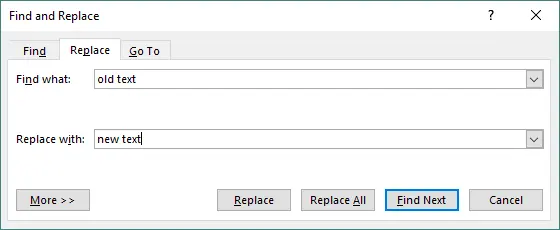
-
Clique em Localizar Próxima, Substituir ou Substituir Tudo.
Exemplos de casos de uso
- Corrigindo erros de ortografia.
- Substituindo nomes de produtos desatualizados.
- Atualizando marcadores de posição como [Nome] ou [Data].
- Alterando frases repetidas em todo o documento.
Método 2: Usar a Busca e Substituição Avançada do Word (Padrões, Opções e Caracteres Especiais)
A Localização e Substituição Avançada oferece controle preciso com curingas, diferenciação de maiúsculas e minúsculas, correspondência de palavras inteiras e pesquisa de caracteres especiais. É ótimo para refinar documentos complexos, corrigir inconsistências de layout ou aplicar alterações estruturadas.
Como fazer
-
Abra Localizar e Substituir → clique em Mais >>.
-
Use opções como:
- Diferenciar maiúsculas de minúsculas
- Localizar apenas palavras inteiras
- Usar curingas
- Especial (tabulações, quebras de linha, marcas de parágrafo)
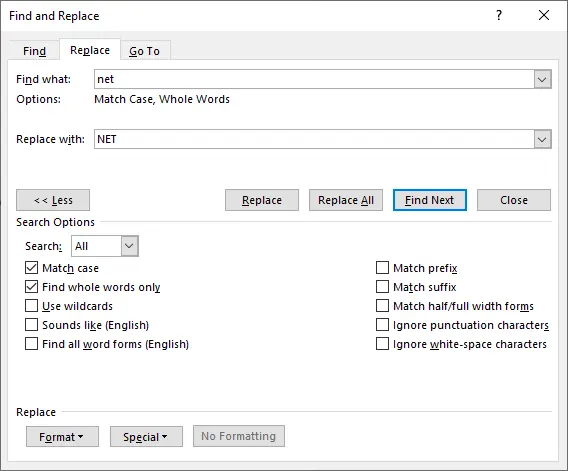
-
Clique em Localizar Próxima, Substituir ou Substituir Tudo.
Exemplos de casos de uso
- Localizando endereços de e-mail ou datas usando padrões de curinga.
- Substituindo espaços duplos por espaços simples.
- Removendo quebras de parágrafo extras.
- Alterando apenas texto em maiúsculas ou minúsculas.
Método 3: Localizar e Substituir Formatação no Word
Este método foca na consistência visual. Você pode alterar estilos de fonte, cores, destaques ou até mesmo mudar o texto de um estilo para outro. É perfeito para atualizar a formatação de documentos ou alinhar o conteúdo com as diretrizes da marca.
Como fazer
-
Abra Localizar e Substituir → clique em Mais >>.
-
Clique em Formatar sob a caixa Localizar ou Substituir.
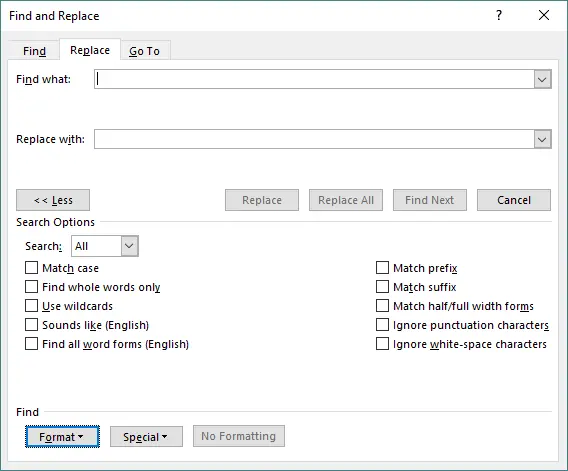
-
Selecione a formatação a ser localizada (por exemplo, negrito, tamanho, cor).
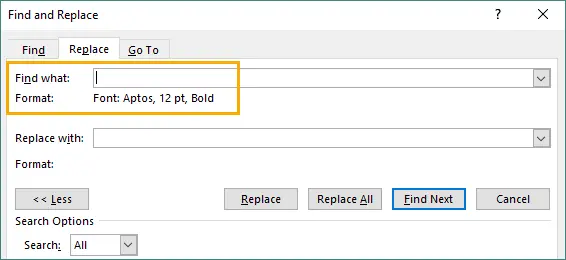
-
Escolha a formatação a ser aplicada OU deixe o texto de Substituir em branco para manter as mesmas palavras.
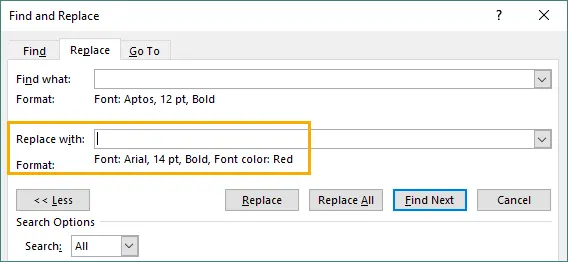
-
Clique em Substituir Tudo.
Exemplos de casos de uso
- Alterar todo o texto em negrito para normal.
- Atualizar todo o texto de 11pt para 12pt.
- Remover cores de destaque indesejadas.
- Mudar estilos antigos para um novo estilo de marca.
Método 4: Localizar e Substituir em Lote Usando Macros do Word (VBA)
As Macros VBA permitem automatizar tarefas repetidas de localizar e substituir em um ou vários documentos. É eficiente para edições recorrentes, atualizações de modelos ou migrações de versão onde o trabalho manual seria muito lento.
Como fazer
-
Pressione Alt + F11 para abrir o editor VBA.
-
Vá para Inserir → Módulo.
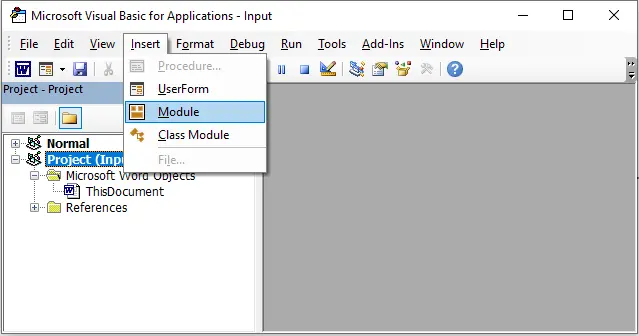
-
Cole o código da sua macro.
-
Execute a macro (Alt+F8) para realizar as substituições automaticamente.

Exemplo de VBA
Sub BatchReplace()
    With ActiveDocument.Content.Find
        .Text = "OldText"
        .Replacement.Text = "NewText"
        .Forward = True
        .Wrap = wdFindContinue
        .Execute Replace:=wdReplaceAll
    End With
End Sub
Exemplos de casos de uso
- Atualizando a terminologia do relatório mensal.
- Substituindo nomes de empresas em modelos.
- Corrigindo problemas de formatação em vários arquivos.
- Automatizando tarefas editoriais repetidas.
Método 5: Automatizar Localizar e Substituir com Python (Usando Spire.Doc)
Para fluxos de trabalho de grande escala ou de backend, o uso de Python oferece substituição de texto automatizada e de alta velocidade sem abrir o Word. É ideal para processar centenas de documentos, gerar relatórios ou integrar edições de documentos em sistemas de software. Entre as muitas bibliotecas disponíveis, Spire.Doc for Python é uma API poderosa e completa que funciona sem o Microsoft Word instalado.
Como fazer
-
Instale o Spire.Doc for Python.
pip install spire.doc -
Carregue o documento em Python.
-
Chame o método Replace() para substituições de texto.
-
Salve o documento atualizado.
Exemplo em Python
from spire.doc import *

# Carregue o arquivo do Word
doc = Document()
doc.LoadFromFile("input.docx")

# Substitua texto simples
doc.Replace("OldText", "NewText", True, True) # Os dois parâmetros True ativam a correspondência sem diferenciar maiúsculas de minúsculas e de palavras inteiras.

# Salve o arquivo atualizado
doc.SaveToFile("output.docx", FileFormat.Docx)
doc.Close()
Exemplos de substituição avançada
-
Substituir texto usando regex
regex = Regex("""\\#\\w+\\b""") document.Replace(regex, "NewText") -
Substituir várias palavras-chave dinamicamente
replacements = {
"CompanyName": "TechNova",
"Year": "2025",
"Product": "VisionX"
}

for key, value in replacements.items():
    doc.Replace(key, value, True, True)
Leia mais: Localizar e Substituir Texto no Word Usando Python
Por que escolher o método Python/automação?
- Extremamente rápido para grandes lotes.
- Nenhuma interação do usuário é necessária.
- Funciona em servidores, pipelines de CI/CD e ambientes em nuvem.
- Suporta formatação avançada e substituição baseada em padrões.
- Ideal para fluxos de trabalho de documentos em escala empresarial.
Comparação: Qual Método Você Deve Usar?
| Método | Melhor Para | Facilidade de Uso | Automação | Flexibilidade | Limitações |
|---|---|---|---|---|---|
| Localizar e Substituir Embutido do Word | Edições rápidas; substituições simples | Muito fácil | Nenhuma | Média — suporta curingas e formatação | Não é ideal para processamento em lote ou lógica complexa |
| Localização e Substituição Avançada | Localizando muitas ocorrências visualmente | Fácil | Nenhuma | Baixa — principalmente visual | Não é adequado para substituições em massa |
| Substituir Conteúdo Específico de Formatação | Atualizando estilos, fontes, atributos de formatação | Média | Nenhuma | Média — funciona bem para alterações orientadas por estilo | Ainda manual; lógica limitada |
| Macro VBA (Localizar e Substituir Automatizado) | Substituições repetitivas; alterações em lote; lógica baseada em regras | Média | Automação semi/completa | Alta — suporta loops, condições, regras personalizadas | Requer script; não é amigável para iniciantes |
| Automatizar com Python (Spire.Doc) | Processamento em massa; tarefas repetitivas; automação em grande escala | Média | Automação completa | Muito alta — controle sobre conteúdo, formatação, loops, logs | Requer Python; instalação de biblioteca necessária |
Conclusão
Localizar e substituir texto em documentos do Word é uma tarefa fundamental, mas o método que você escolhe afeta muito sua velocidade e eficiência. Para pequenas edições diárias, as ferramentas embutidas do Word são mais do que suficientes. Para ajustes de formatação complexos, os recursos avançados oferecem controle fino. E para necessidades empresariais ou de grande escala, a automação com VBA ou Python oferece poder e escalabilidade incomparáveis.
Ao entender os pontos fortes de cada abordagem, você pode escolher o método que melhor se adapta ao seu fluxo de trabalho — seja editando uma única página ou gerando milhares de documentos automaticamente.
Perguntas Frequentes (FAQ)
P1. O Word pode localizar e substituir texto dentro de cabeçalhos, rodapés ou caixas de texto?
Sim, mas as caixas de texto às vezes são ignoradas. Para uma cobertura completa, use a automação com VBA ou Python.
P2. Como localizo e substituo texto com formatação no Word?
Use Mais > Formatar em Localizar e Substituir para corresponder ou aplicar formatação como negrito, fonte e cor.
P3. Qual é a melhor maneira de substituir texto em vários arquivos do Word de uma só vez?
Use a automação com VBA ou Python, pois a ferramenta embutida do Word não pode processar vários arquivos automaticamente.
P4. Python ou VBA é melhor para automatizar a localização e substituição?
O VBA é mais rápido para tarefas simples de desktop. O Python é melhor para operações em grande escala, em lote ou do lado do servidor.
Você Também Pode Se Interessar Por
Word 문서에서 텍스트 찾기 및 바꾸기: 5가지 쉬운 방법
텍스트를 찾고 바꾸는 것은 Word 문서로 작업할 때 가장 일반적인 작업 중 하나입니다. 오타 수정, 이름 업데이트, 서식 변경, 대량 문서 처리 등 어떤 작업을 하든 Word와 최신 도구들은 빠르고 정확하게 작업을 완료할 수 있는 여러 신뢰할 수 있는 방법을 제공합니다.
이 가이드에서는 간단한 내장 기능부터 Python을 사용한 완전 자동화에 이르기까지 Word 문서에서 텍스트를 찾고 바꾸는 가장 실용적인 다섯 가지 방법을 다룹니다.
방법 개요:
- 방법 1: Word의 기본 제공 찾기 및 바꾸기 도구 사용
- 방법 2: Word의 고급 찾기 및 바꾸기 사용
- 방법 3: Word에서 서식 찾아 바꾸기
- 방법 4: Word 매크로를 사용하여 일괄 찾기 및 바꾸기
- 방법 5: Python으로 찾기 및 바꾸기 자동화
방법 1: Word의 기본 제공 찾기 및 바꾸기 도구 사용
이것은 단일 문서에서 단어나 구문을 업데이트하는 가장 빠른 방법입니다. 각 일치 항목을 강조 표시하고 항목을 개별적으로 또는 한 번에 모두 바꿀 수 있어 기술적인 단계 없이 간단하고 빠른 편집에 이상적입니다.
수행 방법
-
Word 문서를 엽니다.
-
Ctrl + H(Windows) 또는 Command + H(Mac)를 누릅니다.
-
대화 상자에서:
- 찾을 텍스트를 입력합니다.
- 바꿀 텍스트를 입력합니다.
-
다음 찾기, 바꾸기 또는 모두 바꾸기를 클릭합니다.
사용 사례 예시
- 오타 수정.
- 오래된 제품 이름 교체.
- [이름] 또는 [날짜]와 같은 자리 표시자 업데이트.
- 문서 전체에서 반복되는 구문 변경.
방법 2: Word의 고급 찾기 및 바꾸기 사용(패턴, 옵션 및 특수 문자)
고급 찾기 및 바꾸기는 와일드카드, 대/소문자 구분, 전체 단어 일치 및 특수 문자 검색을 통해 정밀한 제어를 제공합니다. 복잡한 문서를 다듬거나, 레이아웃 불일치를 수정하거나, 구조화된 변경 사항을 적용하는 데 유용합니다.
수행 방법
-
찾기 및 바꾸기를 열고 → 자세히 >>를 클릭합니다.
-
다음과 같은 옵션을 사용합니다:
- 대/소문자 구분
- 전체 단어만 찾기
- 와일드카드 사용
- 특수 (탭, 줄 바꿈, 단락 기호)
-
다음 찾기, 바꾸기 또는 모두 바꾸기를 클릭합니다.
사용 사례 예시
- 와일드카드 패턴을 사용하여 이메일 주소나 날짜 찾기.
- 이중 공백을 단일 공백으로 바꾸기.
- 추가 단락 나누기 제거.
- 대문자 또는 소문자 텍스트만 변경.
방법 3: Word에서 서식 찾아 바꾸기
이 방법은 시각적 일관성에 중점을 둡니다. 글꼴 스타일, 색상, 강조 표시를 변경하거나 텍스트를 한 스타일에서 다른 스타일로 전환할 수 있습니다. 문서 서식을 새로 고치거나 콘텐츠를 브랜딩 가이드라인에 맞추는 데 적합합니다.
수행 방법
-
찾기 및 바꾸기를 열고 → 자세히 >>를 클릭합니다.
-
찾기 또는 바꾸기 상자 아래의 서식을 클릭합니다.
-
찾을 서식(예: 굵게, 크기, 색상)을 선택합니다.
-
적용할 서식을 선택하거나, 같은 단어를 유지하려면 바꾸기 텍스트를 비워 둡니다.
-
모두 바꾸기를 클릭합니다.
사용 사례 예시
- 모든 굵은 텍스트를 보통으로 변경.
- 모든 11pt 텍스트를 12pt로 업데이트.
- 원치 않는 강조 색상 제거.
- 이전 스타일을 새로운 브랜딩 스타일로 전환.
방법 4: Word 매크로(VBA)를 사용하여 일괄 찾기 및 바꾸기
VBA 매크로를 사용하면 하나 또는 여러 문서에서 반복적인 찾기 및 바꾸기 작업을 자동화할 수 있습니다. 수동 작업이 너무 느릴 수 있는 반복적인 편집, 템플릿 업데이트 또는 버전 마이그레이션에 효율적입니다.
수행 방법
-
Alt + F11을 눌러 VBA 편집기를 엽니다.
-
삽입 → 모듈로 이동합니다.
-
매크로 코드를 붙여넣습니다.
-
매크로를 실행(Alt+F8)하여 자동으로 바꾸기를 수행합니다.
VBA 예제
Sub BatchReplace()
    With ActiveDocument.Content.Find
        .Text = "OldText"
        .Replacement.Text = "NewText"
        .Forward = True
        .Wrap = wdFindContinue
        .Execute Replace:=wdReplaceAll
    End With
End Sub
사용 사례 예시
- 월간 보고서 용어 업데이트.
- 템플릿 전체에서 회사 이름 교체.
- 여러 파일의 서식 문제 수정.
- 반복적인 편집 작업 자동화.
방법 5: Python(Spire.Doc 사용)으로 찾기 및 바꾸기 자동화
대규모 또는 백엔드 워크플로의 경우, Python을 사용하면 Word를 열지 않고도 고속으로 자동화된 텍스트 교체가 가능합니다. 수백 개의 문서를 처리하거나, 보고서를 생성하거나, 문서 편집을 소프트웨어 시스템에 통합하는 데 이상적입니다. 사용 가능한 많은 라이브러리 중에서 Spire.Doc for Python은 Microsoft Word가 설치되어 있지 않아도 작동하는 강력하고 모든 기능을 갖춘 API입니다.
수행 방법
-
Spire.Doc for Python을 설치합니다.
pip install spire.doc -
Python에서 문서를 로드합니다.
-
텍스트 대체를 위해 Replace() 메서드를 호출합니다.
-
업데이트된 문서를 저장합니다.
Python 예제
from spire.doc import *

# Word 파일 로드
doc = Document()
doc.LoadFromFile("input.docx")

# 간단한 텍스트 바꾸기
doc.Replace("OldText", "NewText", True, True) # 두 개의 True 매개변수는 대/소문자를 구분하지 않고 전체 단어 일치를 활성화합니다.

# 업데이트된 파일 저장
doc.SaveToFile("output.docx", FileFormat.Docx)
doc.Close()
고급 바꾸기 예제
-
정규식을 사용하여 텍스트 바꾸기
regex = Regex("""\\#\\w+\\b""") document.Replace(regex, "NewText") -
여러 키워드를 동적으로 바꾸기
replacements = {
"CompanyName": "TechNova",
"Year": "2025",
"Product": "VisionX"
}

for key, value in replacements.items():
    doc.Replace(key, value, True, True)
더 읽어보기: Python을 사용하여 Word에서 텍스트 찾기 및 바꾸기
Python/자동화 방법을 선택하는 이유는 무엇입니까?
- 대규모 배치 작업에 매우 빠릅니다.
- 사용자 상호 작용이 필요 없습니다.
- 서버, CI/CD 파이프라인 및 클라우드 환경에서 작동합니다.
- 고급 서식 및 패턴 기반 교체를 지원합니다.
- 엔터프라이즈 규모의 문서 워크플로에 이상적입니다.
비교: 어떤 방법을 사용해야 할까요?
| 방법 | 가장 적합한 경우 | 사용 용이성 | 자동화 | 유연성 | 제한 사항 |
|---|---|---|---|---|---|
| Word의 기본 제공 찾기 및 바꾸기 | 빠른 편집; 간단한 교체 | 매우 쉬움 | 없음 | 중간 — 와일드카드 및 서식 지원 | 일괄 처리나 복잡한 로직에는 적합하지 않음 |
| 고급 찾기 및 바꾸기 | 많은 발생 항목을 시각적으로 찾기 | 쉬움 | 없음 | 낮음 — 대부분 시각적 | 대량 교체에는 적합하지 않음 |
| 서식별 콘텐츠 바꾸기 | 스타일, 글꼴, 서식 속성 업데이트 | 중간 | 없음 | 중간 — 스타일 기반 변경에 효과적 | 여전히 수동; 제한된 로직 |
| VBA 매크로(자동 찾기 및 바꾸기) | 반복적인 교체; 일괄 변경; 규칙 기반 로직 | 중간 | 반/완전 자동화 | 높음 — 루프, 조건, 사용자 지정 규칙 지원 | 스크립팅 필요; 초보자에게는 어려움 |
| Python으로 자동화(Spire.Doc) | 대량 처리; 반복 작업; 대규모 자동화 | 중간 | 완전 자동화 | 매우 높음 — 콘텐츠, 서식, 루프, 로그 제어 | Python 필요; 라이브러리 설치 필요 |
결론
Word 문서에서 텍스트를 찾고 바꾸는 것은 기본적인 작업이지만, 선택하는 방법에 따라 속도와 효율성이 크게 달라집니다. 일상적인 소규모 편집에는 Word의 내장 도구만으로도 충분합니다. 복잡한 서식 조정의 경우 고급 기능이 정밀한 제어를 제공합니다. 그리고 기업이나 대규모 요구 사항의 경우 VBA 또는 Python을 사용한 자동화는 타의 추종을 불허하는 성능과 확장성을 제공합니다.
각 접근 방식의 장점을 이해함으로써 단일 페이지를 편집하든 수천 개의 문서를 자동으로 생성하든 워크플로에 가장 적합한 방법을 선택할 수 있습니다.
자주 묻는 질문(FAQ)
Q1. Word에서 머리글, 바닥글 또는 텍스트 상자 안의 텍스트를 찾아 바꿀 수 있나요?
예, 하지만 텍스트 상자는 때때로 건너뛸 수 있습니다. 전체 범위를 다루려면 VBA 또는 Python 자동화를 사용하세요.
Q2. Word에서 서식이 있는 텍스트를 어떻게 찾아 바꾸나요?
찾기 및 바꾸기에서 자세히 > 서식을 사용하여 굵게, 글꼴, 색상과 같은 서식을 일치시키거나 적용하세요.
Q3. 여러 Word 파일의 텍스트를 한 번에 바꾸는 가장 좋은 방법은 무엇인가요?
Word의 내장 도구는 여러 파일을 자동으로 처리할 수 없으므로 VBA 또는 Python 자동화를 사용하세요.
Q4. 찾기 및 바꾸기 자동화에는 Python과 VBA 중 어느 것이 더 낫나요?
간단한 데스크톱 작업에는 VBA가 더 빠릅니다. 대규모, 일괄 또는 서버 측 작업에는 Python이 더 좋습니다.