Delete Text Box in Word — Manual Steps and C# Automation
Table of Contents
Install with Nuget
PM> Install-Package Spire.Doc
Related Links
Text boxes are commonly used when creating Word documents. They help highlight content, display quotes, or enhance layout design. However, when you need to clean up or reformat a document, these text boxes may no longer be necessary. In this article, you’ll learn how to delete a text box in Word—either manually or by using C# code to remove one or all text boxes automatically.
- Delete Text Boxes in Word Documents Manually
- Delete Text Box in Word Files with C#
- Delete Single Text Box
- Delete All Text Boxes
- FAQs
Delete Text Boxes in Word Documents Manually with Microsoft Word
First, let's look at how to manually delete text boxes in Word documents. As one of the most widely used word processing tools, Microsoft Word makes it easy to insert and remove text boxes. Deleting a text box is a straightforward two-step process: select the text box you want to remove, then press the Delete key. Below, we will walk you through these steps in detail.
1. Steps to delete a text box in a Word file:
- Open the Word document and locate the text box you want to remove.
- Click the text box to select it.
- Press the Backspace key to delete it, or use the shortcut Ctrl + X to cut it from the document.
2. Steps to batch delete text boxes in Word documents:
- Hold down the Ctrl key on your keyboard.
- While holding Ctrl, left-click each text box you want to delete to select them all.
- Once selected, press the Backspace key to remove all selected text boxes at once.
Note: Make sure to click the border of each text box when selecting, not the text inside it.
Also read: How to Insert Text Box in Word Using C# >>
Delete Text Box in Word Files with C# Automatically
Manually deleting a text box in Word is easy—but what if your document contains dozens of them? Even using the Ctrl key to select multiple boxes can be time-consuming and error-prone. Fortunately, with C#, you can automate this task. Whether you need to remove a single text box or delete them all in bulk, C# makes the process fast and effortless.
In this tutorial, we'll use Spire.Doc for .NET to demonstrate how to quickly delete text boxes in Word documents through code. You can install this powerful library either by downloading it from the official website or via NuGet. It supports all the core features available in Microsoft Word—such as text editing, formatting, and layout—and even offers additional advanced capabilities for developers.
1. Delete Specific Text Box in Word with C#
Removing a specific text box in Word using C# is straightforward. The process involves three main steps: loading the document, locating the target text box, and removing it. Below is the complete code example. We'll break down how each part works right after the snippet.
Code example—Delete the first text box in Word:
using Spire.Doc;

namespace Removetextbox
{
    class Program
    {
        static void Main(string[] args)
        {
            // Create a Document instance
            Document Doc = new Document();

            // Load a Word document
            Doc.LoadFromFile("E:/Administrator/Python1/input/textbox.docx");

            // Remove the earliest inserted text box (last in the collection)
            if (Doc.TextBoxes.Count > 0)
            {
                Doc.TextBoxes.RemoveAt(Doc.TextBoxes.Count - 1);
            }

            // Save the modified document
            Doc.SaveToFile("E:/Administrator/Python1/output/removefirsttextbox.docx", FileFormat.Docx);
        }
    }
}
Result Preview: 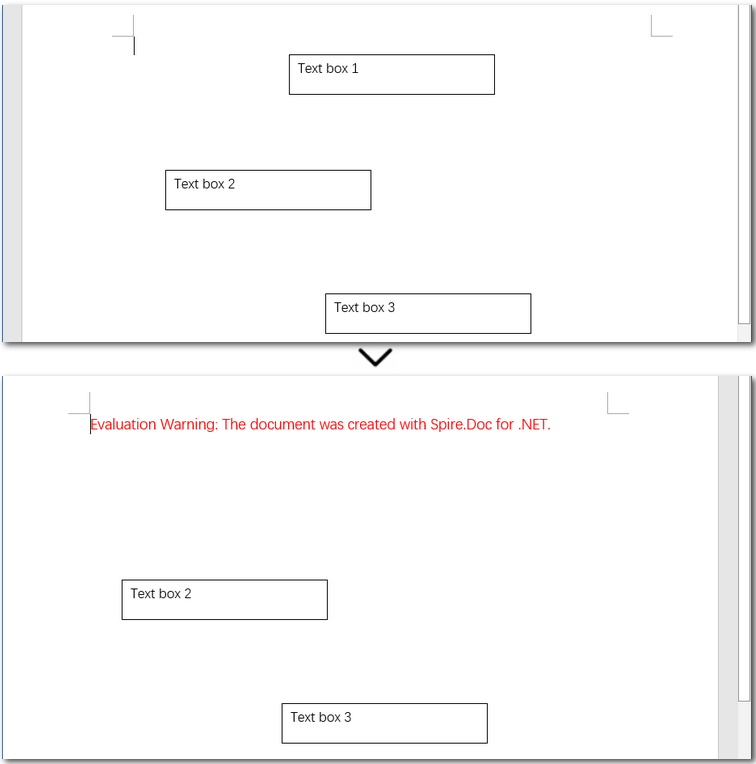
Detailed steps explained:
- Create an object of the Document class and load a Word document.
- Remove the first text box using the Document.TextBoxes.RemoveAt() method.
- Save the modified Word file as a new one.
Note: Due to how Word internally stores text boxes, the last one inserted appears first in the TextBoxes collection. This is not specific to Spire.Doc, but rather a result of Word’s document structure. As a result, this example uses reverse indexing to target the earliest inserted text box.
2. Batch Delete All Text Boxes in Word with C#
Compared to deleting a specific text box, removing all text boxes in a Word document with C# is much simpler. You don’t need to worry about indexes—just call the Document.TextBoxes.Clear() method to remove them all at once.
Code example—delete all text boxes in Word files at once:
using Spire.Doc;

namespace Removetextbox
{
    class Program
    {
        static void Main(string[] args)
        {
            // Create a Document instance
            Document Doc = new Document();

            // Load a Word document
            Doc.LoadFromFile("E:/Administrator/Python1/input/textbox.docx");

            // Delete all text boxes
            Doc.TextBoxes.Clear();

            // Save the modified document
            Doc.SaveToFile("E:/Administrator/Python1/output/removealltextbox.docx", FileFormat.Docx);
        }
    }
}
The Conclusion
In this article, we explored how to delete text boxes in Word documents—both manually and programmatically using C#. Whether you need to remove a single text box or clear them all, this guide has you covered. For documents with only a few text boxes, manual deletion works just fine. But if you're dealing with a large number of them, automating the task with C# is a much more efficient solution.
FAQs about Deleting Text Boxes in Word
Q1: How do I remove a text box from a Word document?
To remove a text box manually, click on its border to select it, then press the Backspace or Delete key on your keyboard. You can also right-click and choose “Cut” or use the shortcut Ctrl + X.
Q2: Can I delete all text boxes in a Word document at once using C#?
Yes. If you're working with multiple text boxes, using C# is an efficient way to delete them all at once. With the Spire.Doc for .NET library, you can simply call Document.TextBoxes.Clear() to remove every text box in the document programmatically.
Q3: How do I remove an anchored text box in Word?
Anchored text boxes are linked to a specific paragraph or location in the document. You can delete them the same way as regular text boxes—just click on the border of the box (not inside the text), then press Delete. For precise control, you can also use C# to locate and remove them programmatically.
ALSO READ:
How to Add Text to PDF in Python (Create & Edit with Examples)

Adding text to a PDF is a common task in Python — whether you're generating reports, adding annotations, filling templates, or labeling documents. This guide will walk you through how to write text in a PDF file using Python, including both creating new PDF documents and updating existing ones.
We’ll be using a dedicated Python PDF library - Spire.PDF for Python, which allows precise control over text placement, font styling, and batch processing. The examples are concise, beginner-friendly, and ready for real-world projects.
Sections Covered
- Setup: Install the PDF Library in Python
- Add Text to a New PDF
- Add Text to an Existing PDF
- Control Text Style, Position, Transparency, and Rotation
- Common Pitfalls and Cross-Platform Tips
- Conclusion
- FAQ
Setup: Install the PDF Library in Python
To get started, install Spire.PDF for Python, a flexible and cross-platform PDF library.
pip install Spire.PDF
Or use Free Spire.PDF for Python:
pip install spire.pdf.free
Why use this library?
- Works without Adobe Acrobat or Microsoft Office
- Add and format text at exact positions
- Supports both new and existing PDF editing
- Runs on Windows, macOS, and Linux
Add Text to a New PDF Using Python
If you want to create a PDF from text using Python, the example below shows how to insert a line of text into a blank PDF page using custom font and position settings.
Example: Create and write text to a blank PDF
from spire.pdf import PdfDocument, PdfTrueTypeFont, PdfFontStyle, PdfSolidBrush, PdfRGBColor, PointF, RectangleF, \
    PdfStringFormat, PdfTextAlignment, PdfVerticalAlignment

# Create a new PDF document and add a new page
pdf = PdfDocument()
page = pdf.Pages.Add()

text = ("This report summarizes the sales performance of various products in the first quarter of 2025. " +
        "Below is a breakdown of the total sales by product category, " +
        "followed by a comparison of sales in different regions.")

# Set the font, brush, and point
font = PdfTrueTypeFont("Arial", 14.0, PdfFontStyle.Regular, True)
brush = PdfSolidBrush(PdfRGBColor(0, 0, 0))  # black
point = PointF(50.0, 100.0)

# Set the layout area and string format
layoutArea = RectangleF(50.0, 50.0, page.GetClientSize().Width - 100.0, page.GetClientSize().Height)
stringFormat = PdfStringFormat(PdfTextAlignment.Left, PdfVerticalAlignment.Top)

page.Canvas.DrawString(text, font, brush, layoutArea, stringFormat, False)

pdf.SaveToFile("output/new.pdf")
pdf.Close()
Technical Notes
- PdfTrueTypeFont() loads a TrueType font from the system with customizable size and style (e.g., regular, bold). It ensures consistent text rendering in the PDF.
- PdfSolidBrush() defines the fill color for text or shapes using RGB values. In this example, it's set to black ((0, 0, 0)).
- RectangleF(x, y, width, height) specifies a rectangular layout area for drawing text. It enables automatic line wrapping and precise control of text boundaries.
- PdfStringFormat() controls the alignment of the text inside the rectangle. Here, text is aligned to the top-left (Left and Top).
- DrawString() draws the specified text within the defined layout area without affecting existing content on the page.
Example output PDF showing wrapped black text starting at coordinates (50, 50).

Tip: To display multiple paragraphs or line breaks, consider adjusting the Y-coordinate dynamically or using multiple DrawString() calls with updated positions.
If you want to learn how to convert TXT files to PDF directly using Python, please check: How to Convert Text Files to PDF Using Python.
Add Text to an Existing PDF in Python
Need to add text to an existing PDF using Python? This method lets you load a PDF, access a page, and write new text anywhere on the canvas.
This is helpful for:
- Adding comments or annotations
- Labeling document versions
- Filling pre-designed templates
Example: Open an existing PDF and insert text
from spire.pdf import PdfDocument, PdfFontStyle, PdfSolidBrush, PdfRGBColor, PointF, PdfFont, PdfFontFamily

pdf = PdfDocument()
pdf.LoadFromFile("input.pdf")
page = pdf.Pages.get_Item(0)

font = PdfFont(PdfFontFamily.TimesRoman, 12.0, PdfFontStyle.Bold)
brush = PdfSolidBrush(PdfRGBColor(255, 0, 0))  # red
location = PointF(150.0, 110.0)

page.Canvas.DrawString("This document is approved.", font, brush, location)

pdf.SaveToFile("output/modified.pdf")
pdf.Close()
Technical Notes
- LoadFromFile() loads an existing PDF into memory.
- You can access specific pages via pdf.Pages[index].
- New content is drawn on top of the existing layout, non-destructively.
- The text position is again controlled via PointF(x, y).
Modified PDF page with newly added red text annotation on the first page.
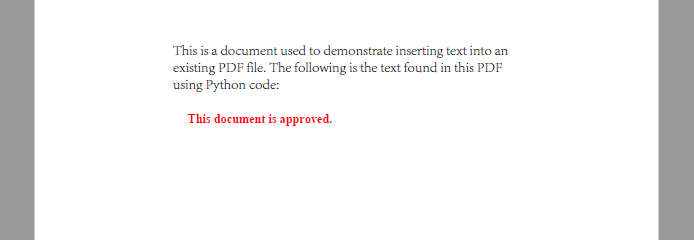
Use different x, y coordinates to insert content at custom positions.
Related article: Replace Text in PDF with Python
Control Text Style, Positioning, Transparency, and Rotation
When adding text to a PDF, you often need more than just plain content—you may want to customize the font, color, placement, rotation, and transparency, especially for annotations or watermarks.
Spire.PDF for Python offers fine-grained control for these visual elements, whether you’re building structured reports or stamping dynamic text overlays.
Set Font Style and Color
# Create PdfTrueTypeFont
font = PdfTrueTypeFont("Calibri", 16.0, PdfFontStyle.Italic, True)

# Create PdfFont
font = PdfFont(PdfFontFamily.TimesRoman, 16.0, PdfFontStyle.Italic)

# Create PdfBrush to specify text drawing color
brush = PdfSolidBrush(PdfRGBColor(34, 139, 34))  # forest green
PdfTrueTypeFont will embed the font into the PDF file. To reduce file size, you may use PdfFont, which uses system fonts without embedding them.
Apply Transparency and Rotation
You can adjust transparency and rotation when drawing text to achieve effects like watermarks or angled labels.
# Save the current canvas state
state = page.Canvas.Save()

# Set semi-transparency (0.0 = fully transparent, 1.0 = fully opaque)
page.Canvas.SetTransparency(0.4)

# Move the origin to the center of the page
page.Canvas.TranslateTransform(page.Size.Width / 2, page.Size.Height / 2)

# Rotate the canvas -45 degrees (counterclockwise)
page.Canvas.RotateTransform(-45)

# Draw text at new origin
page.Canvas.DrawString("DRAFT", font, brush, PointF(-50, -20))
Example: Add a Diagonal Watermark to the Center of the Page
The following example demonstrates how to draw a centered, rotated, semi-transparent watermark using all the style controls above:
from spire.pdf import PdfDocument, PdfTrueTypeFont, PdfFontStyle, PdfSolidBrush, PdfRGBColor, PointF
from spire.pdf.common import Color

pdf = PdfDocument()
pdf.LoadFromFile("input1.pdf")
page = pdf.Pages.get_Item(0)

text = "Confidential"
font = PdfTrueTypeFont("Arial", 40.0, PdfFontStyle.Bold, True)
brush = PdfSolidBrush(PdfRGBColor(Color.get_DarkBlue()))  # gray

# Measure text size to calculate center
size = font.MeasureString(text)
x = (page.Canvas.ClientSize.Width - size.Width) / 2
y = (page.Canvas.ClientSize.Height - size.Height) / 2

state = page.Canvas.Save()
page.Canvas.SetTransparency(0.3)
page.Canvas.TranslateTransform(x + size.Width / 2, y + size.Height / 2)
page.Canvas.RotateTransform(-45.0)
page.Canvas.DrawString(text, font, brush, PointF(-size.Width / 2, -size.Height / 2))
page.Canvas.Restore(state)

pdf.SaveToFile("output/with_watermark.pdf")
pdf.Close()
PDF page displaying a centered, rotated, semi-transparent watermark text.
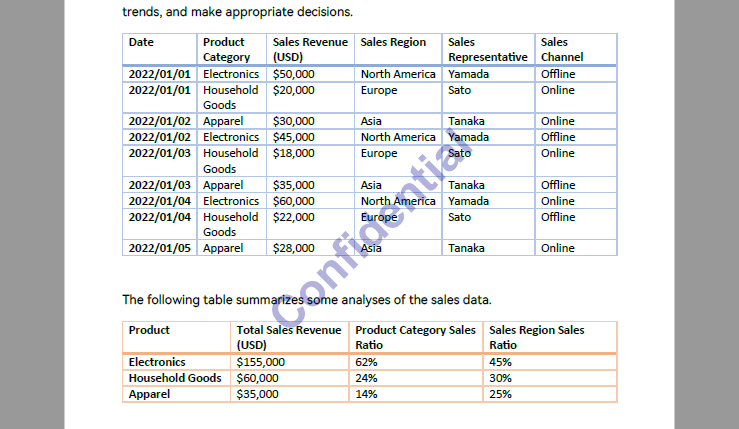
This approach works well for dynamic watermarking, diagonal stamps like "VOID", "COPY", or "ARCHIVED", and supports full automation.
Make sure all files are closed and not in use to avoid PermissionError.
For more details on inserting watermarks into PDF with Python, please refer to: How to Insert Text Watermarks into PDFs Using Python.
Common Pitfalls and Cross-Platform Considerations
Even with the right API, issues can arise when deploying PDF text operations across different environments or font configurations. Here are some common problems and how to resolve them:
| Issue | Cause | Recommended Fix |
|---|---|---|
| Text appears in wrong position | Hardcoded coordinates not accounting for page size | Use ClientSize and MeasureString() for dynamic layout |
| Font not rendered | Font lacks glyphs or isn't supported | Use PdfTrueTypeFont to embed supported fonts like Arial Unicode |
| Unicode text not displayed | Font does not support full Unicode range | Use universal fonts (e.g., Arial Unicode, Noto Sans) |
| Text overlaps existing content | Positioning too close to body text | Adjust Y-offsets or add padding with MeasureString() |
| Watermark text appears on output | You are using the paid version without a license | Use the free version or apply for a temporary license |
| Font file too large | Embedded font increases PDF size | Use PdfFont for system fonts (non-embedded), if portability is not a concern |
| Inconsistent results on macOS/Linux | Fonts not available or different metrics | Ship fonts with your application, or use built-in cross-platform fonts |
Conclusion
With Spire.PDF for Python, adding text to PDFs—whether creating new files, updating existing ones, or automating batch edits—can be done easily and precisely. From annotations to watermarks, the library gives you full control over layout and styling.
You can start with the free version right away, or apply for a temporary license to unlock full features.
FAQ
How to add text to a PDF using Python?
Use a PDF library such as Spire.PDF to insert text via the DrawString() method. You can define font, position, and styling.
Can I write text into an existing PDF file with Python?
Yes. Load the file with LoadFromFile(), then use DrawString() to add text at a specific location.
How do I generate a PDF from text using Python?
Create a new document and use drawing methods to write content line by line with precise positioning.
Can I add the same text to many PDFs automatically?
Yes. Use a loop to process multiple files and insert text programmatically using a template script.
Spire.Doc for Java 13.7.2 enhances the conversion from Word to PDF
We're pleased to announce the release of Spire.Doc for Java 13.7.2. The latest version enhances the conversion from Word to PDF. Besides, some known bugs are fixed successfully in this version, such as the issue where MailMerge.executeWidthRegion(dataSource) incorrectly reads image paths from XML. More details are listed below.
Here is a list of changes made in this release
| Category | ID | Description |
| Bug | SPIREDOC-11280 | Fixes the issue where MailMerge.executeWidthRegion(dataSource) incorrectly reads image paths from XML. |
| Bug | SPIREDOC-11283 | Fixes the issue that Word document comparison results were incorrect. |
| Bug | SPIREDOC-11296 | Fixes the issue that the program threw the "java.lang.ClassCastException" when loading Word documents. |
| Bug | SPIREDOC-11297 | Fixes the issue where the program would hang for extended periods when loading Word documents. |
| Bug | SPIREDOC-11300 | Fixes the issue that page numbers were incorrect when converting Word to PDF. |
| Bug | SPIREDOC-11304 | Fixes the issue that output file sizes were excessively large when converting Word to PDF. |
| Bug | SPIREDOC-11306 | Fixes the issue that content was missing during Word to PDF conversion. |
| Bug | SPIREDOC-11337 | Fixes the issue that the program threw "Culture Name: - is not a supported culture" when loading .odt documents. |
Generate Excel File in C# – Create and Export in .NET & ASP.NET
Generating Excel files in C# is a common task for developers building reporting systems, exporting structured data, or automating Excel-based workflows. Whether you're building desktop tools, web APIs with ASP.NET Core, or cross-platform apps using .NET, the ability to generate .xlsx files programmatically can simplify many data exchange scenarios.
In this guide, you'll learn how to generate Excel files in C# using Spire.XLS for .NET — a standalone Excel library that works seamlessly across different types of .NET applications — from desktop tools to web services and background jobs. We’ll cover use cases such as creating spreadsheets from scratch, exporting data from a DataTable, generating files on the server side, and applying formatting or formulas, all with practical code examples.
Table of Contents
- Set Up the Environment
- Create Excel Files from Scratch in C#
- Export DataTable to Excel in C#
- Apply Formatting and Formulas in Excel
- Generate Excel Files in ASP.NET Core
- Generate Excel Files in ASP.NET Web Forms
- FAQ
- Conclusion
Set Up the Environment
Spire.XLS for .NET is a lightweight Excel library that allows you to create .xlsx/.xls files entirely through code — without installing Microsoft Office or using COM Interop. This makes it an ideal solution for web servers, microservices, and cloud-hosted applications.
You can install the library via NuGet:
Install-Package Spire.XLS
For smaller tasks, Free Spire.XLS for .NET is also a good choice:
Install-Package FreeSpire.XLS
Create Excel Files from Scratch in C#
For simple tasks like configuration files, small datasets, or template generation, creating an Excel file from scratch in C# provides full control over content and layout.
The example below shows how to generate a basic worksheet with text and numeric data:
using Spire.Xls;

// Create a new workbook and worksheet
Workbook workbook = new Workbook();
Worksheet sheet = workbook.Worksheets[0];
sheet.Name = "Summary";

// Fill in headers and data
// Access cells by name
sheet.Range["A1"].Text = "Employee";
sheet.Range["B1"].Text = "Department";
sheet.Range["C1"].Text = "Salary";

// Access cells by row and column
sheet.Range[2, 1].Text = "Alice";
sheet.Range[2, 2].Text = "HR";
sheet.Range[2, 3].NumberValue = 6500;

sheet.Range[3, 1].Text = "Bob";
sheet.Range[3, 2].Text = "IT";
sheet.Range[3, 3].NumberValue = 7200;

// Apply styles
CellStyle headerStyle = workbook.Styles.Add("Header");
headerStyle.Font.IsBold = true;
sheet.Range["A1:C1"].Style = headerStyle;
// sheet.Range[1, 1, 1, 3].Style = headerStyle;

// Auto-fit columns
sheet.AllocatedRange.AutoFitColumns();

// Save the file
workbook.SaveToFile("BasicExcel.xlsx", ExcelVersion.Version2016);
workbook.Dispose();
Example output: A basic Excel file with employee names, departments, and salaries created in C#.
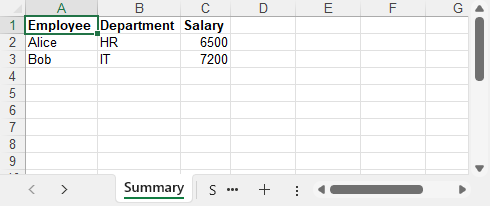
This approach works entirely without Excel installed, and is ideal for lightweight, structured exports.
Export DataTable to Excel in C#
When working with databases or APIs, exporting a DataTable directly to Excel in C# is often necessary. Instead of looping through rows manually, Spire.XLS provides an efficient way to load structured data in one line.
Here’s how you can convert a DataTable into a worksheet, including headers:
using System.Data;
using Spire.Xls;

// Create a simulated data table
DataTable dt = new DataTable("Products");
dt.Columns.Add("Product Name", typeof(string));
dt.Columns.Add("Price", typeof(double));
dt.Columns.Add("Stock", typeof(int));

dt.Rows.Add("Laptop", 1299.99, 20);
dt.Rows.Add("Monitor", 199.5, 50);
dt.Rows.Add("Mouse", 25.75, 150);

// Import into Excel
Workbook workbook = new Workbook();
Worksheet sheet = workbook.Worksheets[0];
sheet.Name = "Inventory";
sheet.InsertDataTable(dt, true, 1, 1);

// Auto-fit column widths
sheet.AllocatedRange.AutoFitColumns();

// Save the file
workbook.SaveToFile("InventoryReport.xlsx", ExcelVersion.Version2016);
workbook.Dispose();
Example output: Excel spreadsheet generated from a DataTable containing product details, prices, and stock levels.
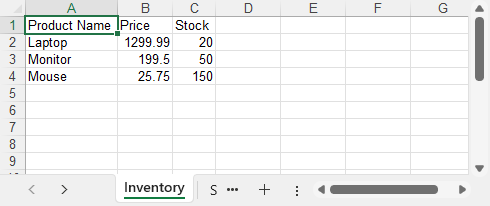
This is a common approach for exporting reports, inventory lists, and analytics — with no Excel or Interop automation required.
Related article: Convert Data Between Excel Files and DataTable in C#
Apply Formatting and Formulas in Excel Using C#
In addition to exporting raw data, you can generate professional Excel files in C# by applying formatting, styling, and formulas — improving readability and enabling automatic calculations.
Below is an example that demonstrates basic styling and formula use:
using Spire.Xls;
using System.Drawing;

Workbook workbook = new Workbook();
Worksheet sheet = workbook.Worksheets[0];
sheet.Name = "Sales Report";

// Set header labels
sheet.Range["A1"].Text = "Item";
sheet.Range["B1"].Text = "Price";
sheet.Range["C1"].Text = "Quantity";
sheet.Range["D1"].Text = "Total";

// Add sample data
string[,] items = {
    { "Pen", "1.5", "10" },
    { "Notebook", "3.75", "5" },
    { "Eraser", "0.99", "20" }
};

for (int i = 0; i < items.GetLength(0); i++)
{
    int row = i + 2;
    sheet.Range[$"A{row}"].Text = items[i, 0];
    sheet.Range[$"B{row}"].NumberValue = double.Parse(items[i, 1]);
    sheet.Range[$"C{row}"].NumberValue = double.Parse(items[i, 2]);
    sheet.Range[$"D{row}"].Formula = $"=B{row}*C{row}";
}

// Style: Header row
CellStyle headerStyle = workbook.Styles.Add("HeaderStyle");
headerStyle.Font.IsBold = true;
headerStyle.Font.Color = Color.White;
headerStyle.Font.Size = 12;
headerStyle.KnownColor = ExcelColors.DarkBlue;
headerStyle.HorizontalAlignment = HorizontalAlignType.Center;
headerStyle.VerticalAlignment = VerticalAlignType.Center;
headerStyle.Borders[BordersLineType.EdgeTop].LineStyle = LineStyleType.Thick;
headerStyle.Borders[BordersLineType.EdgeLeft].LineStyle = LineStyleType.Thick;
sheet.Range["A1:D1"].Style = headerStyle;
sheet.Range["A1:D1"].RowHeight = 22;

// Style: Data cells
CellStyle dataStyle = workbook.Styles.Add("DataStyle");
dataStyle.NumberFormat = "\"$\"#,##0.00";
dataStyle.HorizontalAlignment = HorizontalAlignType.Right;
dataStyle.VerticalAlignment = VerticalAlignType.Center;
dataStyle.Borders[BordersLineType.EdgeLeft].LineStyle = LineStyleType.Thin;
dataStyle.Borders[BordersLineType.EdgeBottom].LineStyle = LineStyleType.Thin;

// Apply data style to Price, Quantity, Total
sheet.Range["B2:D4"].Style = dataStyle;

// Optional: Alternating row colors for readability
for (int r = 2; r <= 4; r++)
{
    if (r % 2 == 0)
        sheet.Range[$"A{r}:D{r}"].Style.KnownColor = ExcelColors.LightYellow;
}

// Adjust widths and heights
sheet.AllocatedRange.AutoFitColumns();
sheet.AllocatedRange.RowHeight = 20;

// Save file
workbook.SaveToFile("styled.xlsx", FileFormat.Version2016);
workbook.Dispose();
Example output: A styled Excel sheet with headers, formulas, alternating row colors, and formatted currency values.
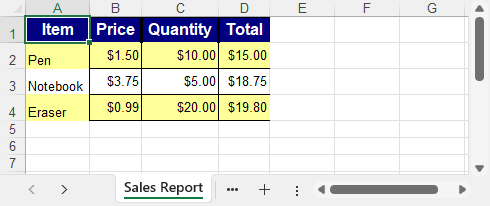
By using C# and Spire.XLS, you can apply styles, borders, colors, alignments, and Excel-compatible formulas to generate clean, automated, and user-friendly Excel reports.
To further enhance your Excel reports, you can also apply number formats such as currency, percentage, or custom formats. Learn more about setting number formats in C#
Generate Excel Files in ASP.NET Core
In modern ASP.NET Core applications (e.g., .NET 6/7/8), generating Excel files is a common requirement for admin dashboards, data exports, and reporting features. The example below shows how to generate an Excel file on the server and return it as a downloadable file from a Razor Page handler.
Here’s how you can implement it in a Razor Pages project:
using Microsoft.AspNetCore.Mvc;
using Microsoft.AspNetCore.Mvc.RazorPages;
using Spire.Xls;
using System.Data;

public class ExportModel : PageModel
{
    public IActionResult OnGet()
    {
        // Simulated data
        DataTable dt = new DataTable("Sales");
        dt.Columns.Add("Date", typeof(DateTime));
        dt.Columns.Add("Product", typeof(string));
        dt.Columns.Add("Revenue", typeof(double));

        dt.Rows.Add(DateTime.Today.AddDays(-2), "Laptop", 1250.00);
        dt.Rows.Add(DateTime.Today.AddDays(-1), "Monitor", 320.50);
        dt.Rows.Add(DateTime.Today, "Mouse", 25.99);

        // Create Excel workbook and sheet
        Workbook workbook = new Workbook();
        Worksheet sheet = workbook.Worksheets[0];
        sheet.Name = "DailySales";

        // Insert data
        sheet.InsertDataTable(dt, true, 1, 1);

        // Apply simple header style
        CellStyle headerStyle = workbook.Styles.Add("HeaderStyle");
        headerStyle.Font.IsBold = true;
        sheet.Rows[0].Style = headerStyle;
        sheet.AllocatedRange.AutoFitColumns();

        // Save to memory stream
        using var stream = new MemoryStream();
        workbook.SaveToStream(stream, FileFormat.Version2016);
        stream.Position = 0;

        // Return file to browser
        return File(stream.ToArray(),
            "application/vnd.openxmlformats-officedocument.spreadsheetml.sheet",
            "SalesReport.xlsx");
    }
}
Example output: Daily sales report generated in a .NET 8 console app with date, product, and revenue columns.
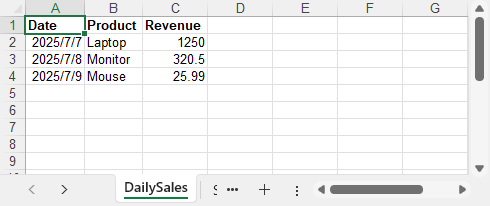
This method is ideal for web-based reporting tools, internal portals, and admin dashboards that require dynamic Excel downloads.
- ✅ Works in ASP.NET Core 3.1, .NET 5, .NET 6, .NET 7, .NET 8
- ✅ Suitable for: Razor Pages, MVC, and API endpoints with file download support
Generate Excel Files in ASP.NET Web Forms
If you're building an internal admin panel or classic ASP.NET Web Forms application, you may want to allow users to download Excel files directly from the browser. The example below demonstrates how to create an Excel file entirely in memory and return it in the HTTP response for immediate download — without saving it to disk.
using Spire.Xls;
using System;
using System.IO;

namespace YourNamespace
{
    public partial class Default : System.Web.UI.Page
    {
        protected void btnExport_Click(object sender, EventArgs e)
        {
            // Create Excel file and output for download
            Workbook workbook = new Workbook();
            Worksheet sheet = workbook.Worksheets[0];
            sheet.Name = "Users";

            // Headers
            string[] headers = { "ID", "Name", "Department", "Join Date" };
            for (int i = 0; i < headers.Length; i++)
            {
                sheet.Range[1, i + 1].Text = headers[i];
                sheet.Range[1, i + 1].Style.Font.IsBold = true;
            }

            // Sample data
            string[,] data = {
                { "U001", "Gemma", "HR", "2023-01-15" },
                { "U002", "Bill", "IT", "2022-11-03" }
            };

            // Fill data
            for (int r = 0; r < data.GetLength(0); r++)
                for (int c = 0; c < data.GetLength(1); c++)
                    sheet.Range[r + 2, c + 1].Text = data[r, c];

            // Auto-fit column widths
            sheet.AllocatedRange.AutoFitColumns();

            // Export for browser download
            using (MemoryStream ms = new MemoryStream())
            {
                workbook.SaveToStream(ms, FileFormat.Version2016);
                byte[] bytes = ms.ToArray();
                Response.Clear();
                Response.ContentType = "application/vnd.openxmlformats-officedocument.spreadsheetml.sheet";
                Response.AddHeader("Content-Disposition", "attachment; filename=Users.xlsx");
                Response.BinaryWrite(bytes);
                Response.End();
            }
        }
    }
}
Example output: Excel file created and streamed to browser in ASP.NET containing employee records.
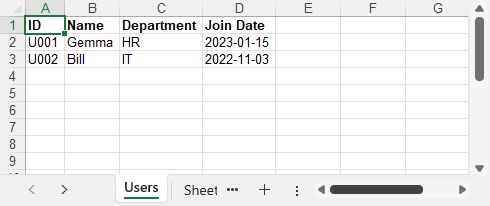
This pattern allows Excel files to be generated and downloaded dynamically, without writing to disk or requiring Office installed on the server.
FAQ
How to create an Excel file from C#?
You can use a library like Spire.XLS to create a new workbook, write data to worksheets, and save it as an Excel file — all without Office installed.
How to export an Excel file in C#?
If you want to export data (e.g. from a DataTable), you can load it into a worksheet and save the file using Spire.XLS. It supports automatic column headers and formatting.
How to generate Excel files in ASP.NET using C#?
You can generate Excel files in both ASP.NET Web Forms and ASP.NET Core using Spire.XLS. In ASP.NET Core, create the file in memory and return it in the HTTP response. In Web Forms, use a similar approach with Response.BinaryWrite() to stream the file to the browser.
Is Spire.XLS compatible with .NET Core?
Yes. It supports .NET Core 3.1+, .NET 5, .NET 6, .NET 7, and .NET 8, making it suitable for cross-platform Excel generation.
Conclusion
With Spire.XLS for .NET, you can easily generate Excel files in C# for any scenario — including desktop, ASP.NET Core, and classic Web Forms applications. Whether you need to export a DataTable, generate formatted reports, or automate Excel output, this guide helps you build Excel files in C# with zero dependencies.
Apply for a Free Temporary License to unlock all features and remove evaluation warnings.
Spire.PDF 11.7.2 adds support for extracting custom PDF data
We're pleased to announce the release of Spire.PDF 11.7.2. This version adds support for extracting custom data values from PDFs. Additionally, it includes multiple bug fixes that improve PDF conversion, rendering, form field flattening, printing, and exception handling. More details are listed below.
Here is a list of changes made in this release
| Category | ID | Description |
| New feature | SPIREPDF-7505 | Adds GetCustomApplicationData() to support extracting custom PDF data values.
PdfDocument doc = new PdfDocument(inputFile); PdfApplicationData appplicationDataObject = doc.GetCustomApplicationData(); Dictionary<object, object> privateDataObject = appplicationDataObject.Private as Dictionary<object, object>; string privateData = privateDataObject["WinsertPrivateCatalogData"] as string; |
| Bug | SPIREPDF-5089 | Optimizes the time consumption of converting PDF to images. |
| Bug | SPIREPDF-6354 | Fixes the issue where Thai text displayed incorrectly when converting PDF to PDF/A-1A. |
| Bug | SPIREPDF-6689 | Fixes the incorrect transparency effect when highlighting PDF text. |
| Bug | SPIREPDF-7359 | Fixes incorrect rendering when drawing images to PDF pages. |
| Bug | SPIREPDF-7459 | Fixes the incorrect Flatten effect for PDF form fields. |
| Bug | SPIREPDF-7486 | Fixes the "ArgumentException" thrown during PDF compression. |
| Bug | SPIREPDF-7495 SPIREPDF-7561 |
Fixes the "NullReferenceException" thrown when converting PDF to TIFF. |
| Bug | SPIREPDF-7529 | Fixes shadow issues in printed PDF content. |
| Bug | SPIREPDF-7570 | Fixes Adobe errors when converting OFD to PDF. |
| Bug | SPIREPDF-7571 | Fixes the "InvalidOperationException" thrown when defining fonts. |
| Bug | SPIREPDF-7579 | Fixes the "NullReferenceException" thrown when converting PDF to images. |
| Bug | SPIREPDF-7581 | Fixes the "System.Exception" thrown when canceling print operations in netstandard DLL. |
| Bug | SPIREPDF-7589 | Fixes the "Value cannot be null" error when merging PDF files. |
Spire.PDF for Java 11.7.0 enhances the conversion from SVG to PDF
We’re pleased to announce the release of Spire.PDF for Java 11.7.0. This version enhances the conversion result from SVG to PDF and resolves two additional issues. More details are listed below.
Here is a list of changes made in this release
| Category | ID | Description |
| Bug | SPIREPDF-7513 | Fixed the issue where text search was failing. |
| Bug | SPIREPDF-7532 | Fixed the issue where the printed PDF content was scaled down when the system DPI was set to 150%. |
| Bug | SPIREPDF-7548 | Fixed the issue where SVG-to-PDF conversion produced incorrect results. |
Inserting Subscript in Excel with Java [Quick Guide]
Inserting subscript in Excel is a common requirement, especially when dealing with chemical formulas like CO₂, statistical footnotes, or scientific data. Using subscripts helps make data clearer and more polished, enhancing the professionalism of your documents. However, Excel’s built-in subscript feature is cumbersome and doesn’t support batch application, which can significantly slow down your workflow.
Fortunately, with the help of Java code, you can efficiently insert subscripts in Excel, freeing yourself from tedious manual work and making your tasks faster and more professional.
- Preparation
- Insert New Text with Subscript
- Apply Subscript to Existing Text
- Insert Subscript for Multiple Matches in Single Cell
- Conclusion
Preparation
Inserting a subscript in Excel using Java involves adding Java libraries. In today’s blog, we will use Spire.XLS for Java as an example to accomplish this task. Spire.XLS is a powerful Java component that works independently without relying on Microsoft Office. In addition to reading, editing, and converting Excel files, it allows users to perform advanced tasks as well.
To install it on your device, there are two options:
- If you are using Maven, add the following code to your pom.xml file:
<repositories>
    <repository>
        <id>com.e-iceblue</id>
        <name>e-iceblue</name>
        <url>https://repo.e-iceblue.com/nexus/content/groups/public/</url>
    </repository>
</repositories>
<dependencies>
    <dependency>
        <groupId>e-iceblue</groupId>
        <artifactId>spire.xls</artifactId>
        <version>16.8.4</version>
    </dependency>
</dependencies>
- If you prefer manual installation, download the Spire.XLS package and add the .jar file to your Java IDE.
Inserting Subscript in Excel: How to Insert New Text with Subscript
First, let’s see how to insert new text into an Excel cell with subscript formatting already applied. By setting the subscript when creating a new document, you can generate the final file directly without needing to reopen and adjust it later.
Steps—Inserting subscript in Excel when adding new text with Java:
- Create a Workbook and get a worksheet.
- Get a cell range using Worksheet.getCellRange() method.
- Specify text through CellRange.getRichText().setText() method.
- Create a font through Workbook.createFont() method.
- Set ExcelFont.isSubscript() to true.
- Apply the font to a text range in the cell using RichText.setFont(startIndex, endIndex, font) method.
The following code shows how to insert the text "R100-0.06" into cell B2 and set the subscript:
import com.spire.xls.*;

import java.awt.*;

public class InsertSubscriptNewText {

    public static void main(String[] args) {

        // Create a Workbook instance
        Workbook workbook = new Workbook();

        // Get the first worksheet
        Worksheet sheet = workbook.getWorksheets().get(0);

        // Insert text to B2
        sheet.getCellRange("B2").setText("This is an example of Subscript:");

        // Insert text to B3 and apply subscript effect
        CellRange range = sheet.getCellRange("B3");
        range.getRichText().setText("R100-0.06");
        ExcelFont font = workbook.createFont();
        font.isSubscript(true);
        font.setColor(Color.red);
        range.getRichText().setFont(4, 8, font);

        // Auto fit column width
        sheet.getAllocatedRange().autoFitColumns();

        // Save the document
        workbook.saveToFile("/SubscriptNewText.xlsx", ExcelVersion.Version2016);
    }
}
Result Preview:

Tip: By setting ExcelFont.isSuperscript() to true, you can apply superscript to text in Excel files.
Inserting Subscript in Excel: Apply Subscript to Existing Text
Although inserting subscripts while creating a new Excel file can simplify later work, in most cases, you’ll need to deal with existing files that already contain content. This section shows you how to quickly apply subscript formatting to existing text in Excel using Java.
Steps—Inserting subscript to Excel file with existing text:
- Create a Workbook instance and read an Excel file.
- Get a worksheet and get the cell range.
- Loop through cells in the cell range and find the text to apply subscript.
- Set the text in the cell’s rich text using RichText.setText() to preserve the existing content.
- Create a font by calling Workbook.createFont() method and configure it as Subscript by setting ExcelFont.isSubscript() to true.
- Apply the subscript using RichText.setFont(index, index, subFont) method.
The following code demonstrates how to set subscripts for chemical formulas in the cells within the A1:A3 range:
import com.spire.xls.*;

public class SubscriptExistingContent {

    public static void main(String[] args) {
        // Create a Workbook and load an Excel file
        Workbook workbook = new Workbook();
        // Load an Excel file
        workbook.loadFromFile(("/test.xlsx"));

        // Get a worksheet
        Worksheet sheet = workbook.getWorksheets().get(0);

        // Loop through A1:A3
        for (int i = 1; i <= 3; i++) {
            CellRange cell = sheet.getCellRange("A" + i);
            String text = cell.getText();

            // Find "2" in cells
            int index = text.indexOf("2");
            if (index != -1) {
                // Set RichText to keep original text
cell.getRichText().setText(text);

                // Create font and set as subscript
                ExcelFont subFont = workbook.createFont();
                subFont.isSubscript(true);

                // Apply subscript to "2"
                cell.getRichText().setFont(index, index, subFont);
            }
        }

        // Auto fit columns
        sheet.getAllocatedRange().autoFitColumns();

        // Save the Excel file
        workbook.saveToFile("/SubscriptExistingContent.xlsx", ExcelVersion.Version2016);
    }
}
Result Preview:
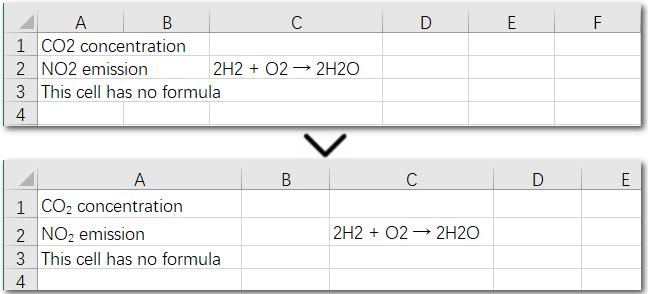
The above code helps us find and set the first matching character as a subscript in an existing cell. But what if the same character appears multiple times in the same cell? How can we apply subscripts to all of them at once? Let’s explore this in the next section.
Inserting Subscript in Excel: Handle Multiple Matches in a Single Cell
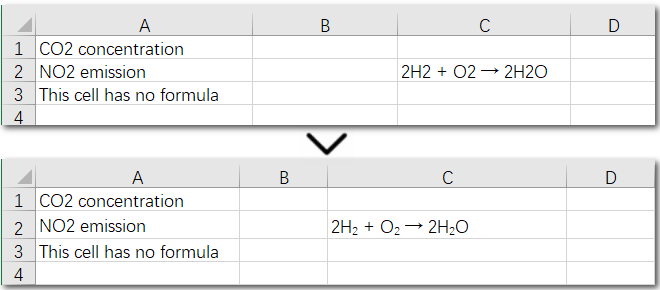
Using a search-and-apply method to set subscript formatting works well when there is only one instance in the cell that needs to be subscripted, such as in H₂. However, if the cell contains a chemical equation, the situation becomes more complex: there might be multiple places where subscripts are needed, along with normal numbers representing coefficients (e.g., 2H₂ + O₂ → 2H₂O). In this case, the solution is to set subscripts precisely by specifying the exact positions of the target characters in the text. Let’s take a look at the detailed steps.
Steps—Inserting multiple subscripts in Excel cells:
- Create a Workbook object and read an Excel file.
- Get a worksheet and a cell range.
- Read text in the cell range and set it to rich text using CellRange.getRichText().setText() method.
- Create a font by calling Workbook.createFont() method and configure it as subscript by setting ExcelFont.isSubscript() to true.
- Apply subscript to specific characters with CellRange.getRichText().setFont(index, index, subFont) method.
The following code demonstrates how to set subscripts for the necessary parts of the chemical equation “2H₂ + O₂ → 2H₂O” in cell C2:
import com.spire.xls.*;

public class SubscriptSpecificCell {

    public static void main(String[] args) {
        // Create a Workbook instance and load an Excel file
        Workbook workbook = new Workbook();
        workbook.loadFromFile(("/test.xlsx"));

        // Get the first worksheet
        Worksheet sheet = workbook.getWorksheets().get(0);

        // Get a cell range
        CellRange cell = sheet.getCellRange("C2");

        // Read text from C2
        String text = cell.getText();


        // Set text to RichText
        cell.getRichText().setText(text);

        // Create font object and set it as subscript
        ExcelFont subFont = workbook.createFont();
        subFont.isSubscript(true);

        // Set subscript for specific cell
        cell.getRichText().setFont(2, 2, subFont);
        cell.getRichText().setFont(7, 7, subFont);
        cell.getRichText().setFont(13, 13, subFont);

        // Auto fit columns
        sheet.getAllocatedRange().autoFitColumns();

        // Save the Excel file
        workbook.saveToFile("/SubscriptSpecificCell.xlsx", ExcelVersion.Version2016);
    }
}
Result Preview:
Conclusion
This guide provides a detailed explanation of how to set subscripts in Excel, whether you need to apply them to a single cell or a range of cells, and whether you’re formatting one instance or multiple occurrences. By the end of this page, inserting subscript in Excel will be a breeze for you. Give Spire.XLS a try and start creating professional Excel workbooks today!
Creating Word Documents with Python: A Step-By-Step Guide

Automating the creation of Word documents is a powerful way to generate reports, and produce professional-looking files. With Python, you can utilize various libraries for this purpose, and one excellent option is Spire.Doc for Python, specifically designed for handling Word documents.
This guide will provide a clear, step-by-step process for creating Word documents in Python using Spire.Doc. We’ll cover everything from setting up the library to adding formatted text, images, tables, and more. Whether you're generating reports, invoices, or any other type of document, thes techniques will equip you with the essential tools to enhance your workflow effectively.
Table of Contents:
- What's Sprie.Doc for Python?
- Set Up Spire.Doc in Your Python Project
- Step 1: Create a Blank Word Document
- Step 2: Add Formatted Text (Headings, Paragraphs)
- Step 3: Insert Images to a Word Document
- Step 4: Create and Format Tables
- Step 5: Add Numbered or Bulleted Lists
- Best Practices for Word Document Creation in Python
- FAQs
- Conclusion
What's Spire.Doc for Python?
Spire.Doc is a powerful library for creating, manipulating, and converting Word documents in Python. It enables developers to generate professional-quality documents programmatically without needing Microsoft Word. Here are some key features:
- Supports Multiple Formats : Works with DOCX, DOC, RTF, and HTML.
- Extensive Functionalities : Add text, images, tables, and charts.
- Styling and Formatting : Apply various styles for consistent document appearance.
- User-Friendly API: Simplifies automation of document generation processes.
- Versatile Applications : Ideal for generating reports, invoices, and other documents.
With Spire.Doc, you have the flexibility and tools to streamline your Word document creation tasks effectively.
Set Up Spire.Doc in Your Python Project
To get started with Spire.Doc in your Python project, follow these simple steps:
- Install Spire.Doc : First, you need to install the Spire.Doc library. You can do this using pip. Open your terminal or command prompt and run the following command:
pip install spire.doc
- Import the Library : Once installed, import the Spire.Doc module in your Python script to access its functionalities. You can do this with the following import statement:
from spire.doc import *
from spire.doc.common import *
With the setup complete, you can begin writing your Python code to create Word documents according to your needs.
Step 1: Create a Blank Word Document in Python
The first step in automating Word document creation is to create a blank document. To begin with, we create a Document object, which serves as the foundation of our Word document. We then add a section to organize content, and set the page size to A4 with 60-unit margins . These configurations are crucial for ensuring proper document layout and readability.
Below is the code to initialize a document and set up the page configuration:
# Create a Document object
doc = Document()

# Add a section
section = doc.AddSection()

# Set page size and page margins
section.PageSetup.PageSize = PageSize.A4()
section.PageSetup.Margins.All = 60

# Save the document
doc.SaveToFile("BlankDocument.docx")
doc.Dispose
Step 2: Add Formatted Text (Headings, Paragraphs)
1. Add Title, Headings, Paragraphs
In this step, we add text content by first creating paragraphs using the AddParagraph method, followed by inserting text with the AppendText method.
Different paragraphs can be styled using various BuiltInStyle options, such as Title , Heading1 , and Normal , allowing for quick generation of document elements. Additionally, the TextRange.CharacterFormat property can be used to adjust the font, size, and other styles of the text, ensuring a polished and organized presentation.
Below is the code to insert and format these elements:
# Add a title
title_paragraph = section.AddParagraph()
textRange = title_paragraph.AppendText("My First Document")
title_paragraph.ApplyStyle(BuiltinStyle.Title)
textRange.CharacterFormat.FontName = "Times New Properties"
textRange.CharacterFormat.FontSize = 24

# Add a heading
heading_paragraph = section.AddParagraph()
textRange = heading_paragraph.AppendText("This Is Heading1")
heading_paragraph.ApplyStyle(BuiltinStyle.Heading1)
textRange.CharacterFormat.FontName = "Times New Properties"
textRange.CharacterFormat.FontSize = 16

# Add a paragraph
normal_paragraph = section.AddParagraph()
textRange = normal_paragraph .AppendText("This is a sample paragraph.")
normal_paragraph .ApplyStyle(BuiltinStyle.Normal)
textRange.CharacterFormat.FontName = "Times New Properties"
textRange.CharacterFormat.FontSize = 12
2. Apply Formatting to Paragraph
To ensure consistent formatting across multiple paragraphs, we can create a ParagraphStyle that defines key properties such as font attributes (name, size, color, boldness) and paragraph settings (spacing, indentation, alignment) within a single object. This style can then be easily applied to the selected paragraphs for uniformity.
Below is the code to define and apply the paragraph style:
# Defined paragraph style
style = ParagraphStyle(doc)
style.Name = "paraStyle"
style.CharacterFormat.FontName = "Arial"
style.CharacterFormat.FontSize = 13
style.CharacterFormat.TextColor = Color.get_Red()
style.CharacterFormat.Bold = True
style.ParagraphFormat.AfterSpacing = 12
style.ParagraphFormat.BeforeSpacing = 12
style.ParagraphFormat.FirstLineIndent = 4
style.ParagraphFormat.LineSpacing = 10
style.ParagraphFormat.HorizontalAlignment = HorizontalAlignment.Left
doc.Styles.Add(style)

# Apply the style to the specific paragraph
normal_paragraph.ApplyStyle("paraStyle")
You may also like: How to Convert Text to Word and Word to Text in Python
Step 3: Insert Images to a Word Document
1. Insert an Image
In this step, we add an image to our document, allowing for visual enhancements that complement the text. We begin by creating a paragraph to host the image and then proceed to insert the desired image file usingthe Paragraph.AppendPicture method. After the image is inserted, we can adjust its dimensions and alignment to ensure it fits well within the document layout.
Below is the code to insert and format the image:
# Add a paragraph
paragraph = section.AddParagraph()

# Insert an image
picture = paragraph.AppendPicture("C:\\Users\\Administrator\\Desktop\\logo.png")

# Scale the image dimensions
picture.Width = picture.Width * 0.9
picture.Height = picture.Height * 0.9

# Set text wrapping style
picture.TextWrappingStyle = TextWrappingStyle.TopAndBottom

# Center-align the image horizontally
picture.HorizontalAlignment = HorizontalAlignment.Center
2. Position Image at Precise Location
To gain precise control over the positioning of images within your Word document, you can adjust both the horizontal and vertical origins and specify the image's coordinates in relation to these margins. This allows for accurate placement of the image, ensuring it aligns perfectly with the overall layout of your document.
Below is the code to set the image's position.
picture.HorizontalOrigin = HorizontalOrigin.LeftMarginArea
picture.VerticalOrigin = VerticalOrigin.TopMarginArea
picture.HorizontalPosition = 180.0
picture.VerticalPosition = 165.0
Note : Absolute positioning does not apply when using the Inline text wrapping style.
Step 4: Create and Format Tables
In this step, we will create a table within the document and customize its appearance and functionality. This includes defining the table's structure, adding header and data rows, and setting formatting options to enhance readability.
Steps for creating and customizing a table in Word:
- Add a Table : Use the Section.AddTablemethod to create a new table.
- Specify Table Data : Define the data that will populate the table.
- Set Rows and Columns : Specify the number of rows and columns with the Table.ResetCells method.
- Access Rows and Cells : Retrieve a specific row using Table.Rows[rowIndex] and a specific cell using TableRow.Cells[cellIndex] .
- Populate the Table : Add paragraphs with text to the designated cells.
- Customize Appearance : Modify the table and cell styles through the Table.TableFormat and TableCell.CellFormat properties.
The following code demonstrates how to add a teble when creating Word documents in Python:
# Add a table
table = section.AddTable(True)

# Specify table data
header_data = ["Header 1", "Header 2", "Header 3"]
row_data = [["Row 1, Col 1", "Row 1, Col 2", "Row 1, Col 3"],
            ["Row 2, Col 1", "Row 2, Col 2", "Row 2, Col 3"]]

# Set the row number and column number of table
table.ResetCells(len(row_data) + 1, len(header_data))

# Set the width of table
table.PreferredWidth = PreferredWidth(WidthType.Percentage, int(100))

# Get header row
headerRow = table.get_Item(0)
headerRow.IsHeader = True
headerRow.Height = 23
headerRow.RowFormat.BackColor = Color.get_DarkBlue()  # Header color

# Fill the header row with data and set the text formatting
for i in range(len(header_data)):
    headerRow.get_Item(i).CellFormat.VerticalAlignment = VerticalAlignment.Middle
    paragraph = headerRow.get_Item(i).AddParagraph()
    paragraph.Format.HorizontalAlignment = HorizontalAlignment.Center
    txtRange = paragraph.AppendText(header_data[i])
    txtRange.CharacterFormat.Bold = True
    txtRange.CharacterFormat.FontSize = 15
    txtRange.CharacterFormat.TextColor = Color.get_White()  # White text color

# Fill the rest rows with data and set the text formatting
for r in range(len(row_data)):
    dataRow = table.Rows.get_Item(r + 1)
    dataRow.Height = 20
    dataRow.HeightType = TableRowHeightType.Exactly

    for c in range(len(row_data[r])):
        dataRow.Cells[c].CellFormat.VerticalAlignment = VerticalAlignment.Middle
        paragraph = dataRow.Cells[c].AddParagraph()
        paragraph.Format.HorizontalAlignment = HorizontalAlignment.Center
        txtRange = paragraph.AppendText(row_data[r][c])
        txtRange.CharacterFormat.FontSize = 13

# Alternate row color
for j in range(1, table.Rows.Count):
    if j % 2 == 0:
        row2 = table.Rows[j]
        for f in range(row2.Cells.Count):
            row2.Cells[f].CellFormat.BackColor = Color.get_LightGray()  # Alternate row color

# Set the border of table
table.TableFormat.Borders.BorderType = BorderStyle.Single
table.TableFormat.Borders.LineWidth = 1.0
table.TableFormat.Borders.Color = Color.get_Black()
You may also like: How to Create Tables in Word Documents in Python
Step 5: Add Numbered or Bulleted Lists
In this step, we create and apply both numbered and bulleted lists to enhance the document's organization. Spire.Doc offers the ListStyle class to define and manage different types of lists with customizable formatting options. Once created, these styles can be applied to any paragraph in the document, ensuring a consistent look across all list items.
Steps for generating numbered/bulleted lists in Word:
- Define the List Style : Initialize a ListStyle for the numbered or bulleted list, specifying properties such as name, pattern type, and text position.
- Add the List Style to Document : Use the Document.ListStyles.Add() method to incorporate the new list style into the document's styles collection.
- Create List Items : For each item, create a paragraph and apply the corresponding list style using the Paragraph.ListFormat.ApplyStyle() method.
- Format Text Properties : Adjust font size and type for each item to ensure consistency and readability.
Below is the code to generate numbered and bulleted lists:
# Create a numbered list style
listStyle = ListStyle(doc, ListType.Numbered)
listStyle.Name = "numberedList"
listStyle.Levels[0].PatternType = ListPatternType.Arabic
listStyle.Levels[0].TextPosition = 60;
doc.ListStyles.Add(listStyle)

# Create a numbered list
for item in ["First item", "Second item", "Third item"]:
    paragraph = section.AddParagraph()
    textRange = paragraph.AppendText(item)
    textRange.CharacterFormat.FontSize = 13
    textRange.CharacterFormat.FontName = "Times New Roman"
    paragraph.ListFormat.ApplyStyle("numberedList")

# Create a bulleted list style
listStyle = ListStyle(doc, ListType.Bulleted)
listStyle.Name = "bulletedList"
listStyle.Levels[0].BulletCharacter = "\u00B7"
listStyle.Levels[0].CharacterFormat.FontName = "Symbol"
listStyle.Levels[0].TextPosition = 20
doc.ListStyles.Add(listStyle)

# Create a bulleted list
for item in ["Bullet item one", "Bullet item two", "Bullet item three"]:
    paragraph = section.AddParagraph()
    textRange = paragraph.AppendText(item)
    textRange.CharacterFormat.FontSize = 13
    textRange.CharacterFormat.FontName = "Times New Roman"
paragraph.ListFormat.ApplyStyle("bulletedList")
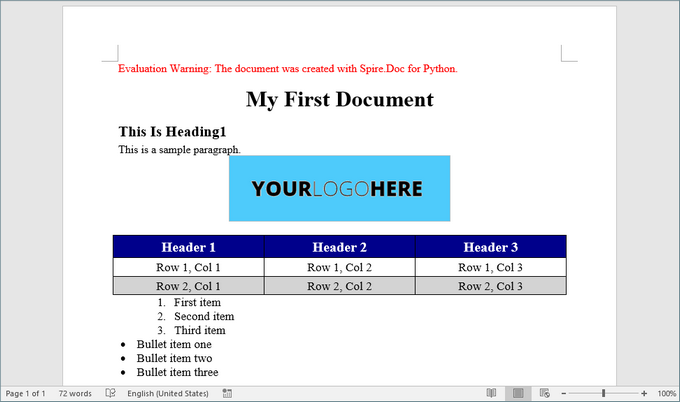
Here’s a screenshot of the Word document created using the code snippets provided above:
Best Practices for Word Document Creation in Python
- Reuse Styles : Define paragraph and list styles upfront to maintain consistency.
- Modular Code : Break document generation into functions (e.g., add_heading(), insert_table()) for reusability.
- Error Handling : Validate file paths and inputs to avoid runtime errors.
- Performance Optimization: Dispose of document objects (doc.Dispose()) to free resources.
- Use Templates : For complex documents, create MS Word templates with placeholders and replace them programmatically to save development time.
By implementing these practices, you can streamline document automation, reduce manual effort, and ensure professional-quality outputs.
FAQs
Q1: Does Spire.Doc support adding headers and footers to a Word document?
Yes, you can add and customize headers and footers, including page numbers, images, and custom text.
Q2. Can I generate Word documents on a server without Microsoft Office installed?
Yes, Spire.Doc works without Office dependencies, making it ideal for server-side automation.
Q3: Can I create Word documents from a template using Spire.Doc?
Of course, you can. Refer to the tutorial: Create Word Documents from Templates with Python
Q4: Can I convert Word documents to other formats using Spire.Doc?
Yes, Spire.Doc supports converting Word documents to various formats, including PDF, HTML, and plain text.
Q5. Can Spire.Doc edit existing Word documents?
Yes, Spire.Doc supports reading, editing, and saving DOCX/DOC files programmatically. Check out this documentation: How to Edit or Modify Word Documents in Pyhton
Conclusion
In this article, we've explored how to create Word documents in Python using the Spire.Doc library, highlighting its potential to enhance productivity while enabling the generation of highly customized and professional documents. By following the steps outlined in this guide, you can fully leverage Spire.Doc, making your document creation process both efficient and straightforward.
As you implement best practices and delve into the library's extensive functionalities, you'll discover that automating document generation significantly reduces manual effort, allowing you to concentrate on more critical tasks. Embrace the power of Python and elevate your document creation capabilities today!
Spire.Presentation for Python 10.6.4 adds support for the Linux arm64 platform
We're glad to announce the release of Spire.Presentation for Python 10.6.4. This version adds support for the Linux arm64 platform and a new feature to save shapes as SVG. What’s more, several issues that occurred when converting PowerPoint to images and loading files have been successfully fixed. Check below for the details.
Here is a list of all changes made in this release.
| Category | ID | Description |
| Adjustment | - | Upgrades the dependent SkiaSharp version to 3.116.1. |
| New feature | - | Adds support for Linux arm64 platform. |
| New feature |
SPIREPPT-2739 |
Supports saving shapes to SVG.
presentation = Presentation()
presentation.LoadFromFile(inputFile)
m=0
for i in range(presentation.Slides.Count):
    slide = presentation.Slides[i]
    for j in range (slide.Shapes.Count):
        shape = slide.Shapes[j]
        #stream = shape.SaveAsSvg()
        stream = shape.SaveAsSvgInSlide()
        stream.Save(outputFile+"Bug_2739_1_"+str(m)+".svg")
        stream.Flush()
        stream.Close()
        m=m+1
|
| Bug | SPIREPPT-2649 | Fixes the issue of incorrect content formatting when converting PowerPoint to images. |
| Bug | SPIREPPT-2674 | Fixes the issue that errors occurred when loading PowerPoint files. |
| Bug | SPIREPPT-2747 | Fixes the issue where setting “shape.TextFrame.AutofitType = TextAutofitType.Normal” did not work correctly. |
How to Convert TXT to Word or Word to TXT with Java Code

Plain text (.txt) files are simple and widely used, but they lack formatting and structure. If you need to enhance a TXT file with headings, fonts, tables, or images, converting it to a Word (.docx) file is a great solution.
In this tutorial, you'll learn how to convert a .txt file to a .docx Word document in Java using Spire.Doc for Java — a powerful library for Word document processing.
Why choose Spire.Doc for Java:
- The converted Word document preserves the line breaks and content from the TXT file.
- You can further modify fonts, add styles, or insert images using Spire.Doc's rich formatting APIs.
- Supported various output formats, including converting Word to PDF, Excel, TIFF, PostScript, etc.
Prerequisites
To convert TXT to Word with Spire.Doc for Java smoothly, you should download it from its official download page and add the Spire.Doc.jar file as a dependency in your Java program.
If you are using Maven, you can easily import the JAR file by adding the following code to your project's pom.xml file:
<repositories>
    <repository>
        <id>com.e-iceblue</id>
        <name>e-iceblue</name>
        <url>https://repo.e-iceblue.com/nexus/content/groups/public/</url>
    </repository>
</repositories>
<dependencies>
    <dependency>
        <groupId>e-iceblue</groupId>
        <artifactId>spire.doc</artifactId>
        <version>13.6.2</version>
    </dependency>
</dependencies>
Steps to Convert TXT to Word in Java
Now let's take a look at how to implement it in code. With Spire.Doc for Java, the process is straightforward. You can complete the conversion with just a few lines — no need for manual formatting or additional dependencies.
To help you better understand the code:
- Document is the core class that acts as an in-memory representation of a Word document.
- loadFromFile() uses internal parsers to read .txt content and wrap it into a single Word section with default font and margins.
- When saveToFile() is called, Spire.Doc automatically converts the plain text into a .docx file by generating a structured Word document in the OpenXML format.
Below is a step-by-step code example to help you get started quickly:
import com.spire.doc.Document;
import com.spire.doc.FileFormat;

public class ConvertTextToWord {

    public static void main(String[] args) {

        // Create a Text object
        Document txt = new Document();

        // Load a Word document
        txt.loadFromFile("C:\\Users\\Administrator\\Desktop\\Input.txt");

        // Save the document to Word
        txt.saveToFile("ToWord.docx", FileFormat.Docx);

        // Dispose resources
        doc.dispose();
    }
}
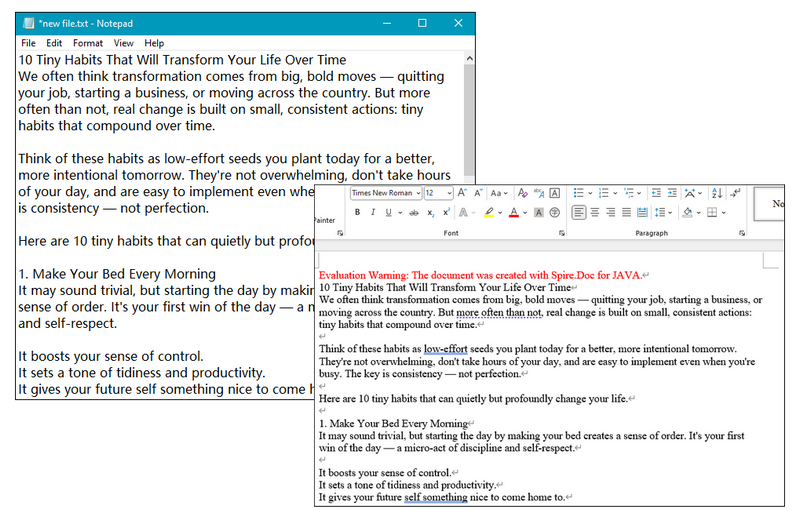
RESULT:
Tip:
After converting TXT files to DOC/DOCX, you can further customize the document's formatting as needed. To simplify this process, Spire.Doc for Java provides built-in support for editing text properties such as changing font color, inserting footnote, adding text and image watermark, etc.
How to Convert Word to TXT with Java
Except for TXT to Word conversion, Spire.Doc for Java also supports converting DOC/DOCX files to TXT format, making it easy to extract plain text from richly formatted Word documents. This functionality is especially useful when you need to strip out styling and layout to work with clean, raw content — such as for text analysis, search indexing, archiving, or importing into other systems that only support plain text.
Simply copy the code below and run the code to manage conversion:
import com.spire.doc.Document;
import com.spire.doc.FileFormat;

public class ConvertWordtoText {

    public static void main(String[] args) {

        // Create a Doc object
        Document doc = new Document();

        // Load a Word document
        doc.loadFromFile("C:\\Users\\Administrator\\Desktop\\Input.doc");

        // Save the document to Word
        doc.saveToFile("ToText.txt", FileFormat.Txt);

        // Dispose resources
        doc.dispose();
    }
}
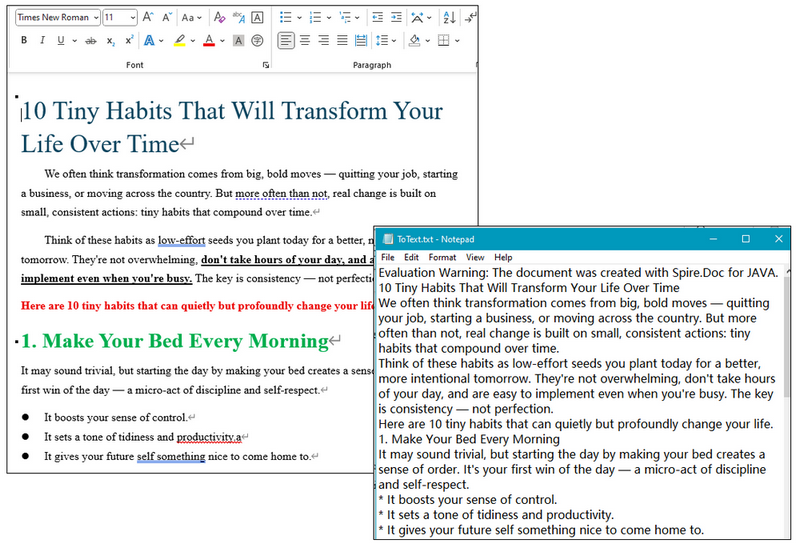
RESULT:
Get a Free License
To remove evaluation watermarks and unlock full features, you can request a free 30-day license.
Conclusion
With Spire.Doc for Java, converting TXT to Word is fast, accurate, and doesn't require Microsoft Word to be installed. This is especially useful for Java developers working on reporting, document generation, or file conversion tools. Don't hesitate and give it a try now.