Reading a PDF with pypdf is a ten-minute job. The trouble starts when the same script is asked to pull a summary table from page one, drop the appendix, hand back an editable Word copy and lock the archive with a password. Each request has a good Python answer, but they rarely come from the same package.
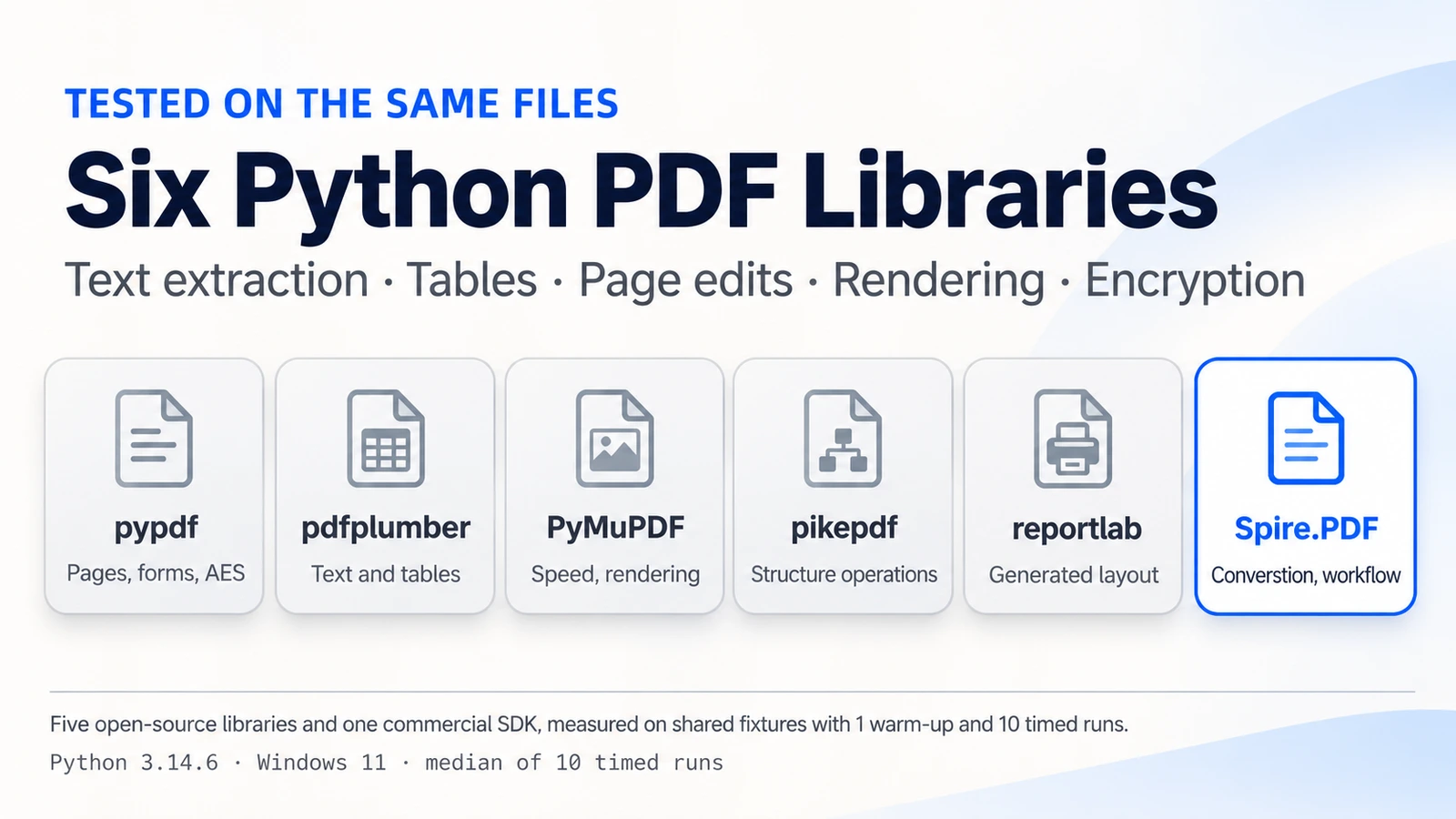
This guide compares six options on one set of test files: pypdf, pdfplumber, PyMuPDF, pikepdf, reportlab and Spire.PDF for Python. Disclosure: Spire.PDF is a commercial product of E-iceblue, the publisher of this article, and E-iceblue ran the tests. Fixtures, versions and timing method are listed in the "How We Tested" section so you can repeat any result. Every library below is a reasonable choice for the job it was built for.
Which Python PDF Library Should You Choose?
If your work is one operation, pick the specialist for it. The open-source libraries in this comparison are strong at their own jobs. Spire.PDF is aimed at the other case: a pipeline in which one document passes through extraction, editing, conversion and encryption, and you would rather maintain one SDK than three libraries.
| Library | Best for | Key consideration | Licence |
|---|---|---|---|
| pypdf | Merging, splitting, rotating and encrypting pages in pure Python | AES encryption needs the pypdf[crypto] extra |
BSD-3 |
| pdfplumber | Layout analysis, table extraction, visual debugging | Built for reading, not for modifying pages | MIT |
| PyMuPDF | Fast text extraction and page rendering | AGPL-3.0 or commercial; assess against how you distribute | AGPL-3.0 or commercial |
| pikepdf | Low-level structure work, linearization, encryption | No text extraction API | MPL-2.0 |
| reportlab | Generating PDFs from code | Generation only | BSD |
| Spire.PDF | Mixed jobs (extract, edit, convert, encrypt) in one SDK | Commercial licence; free, evaluation and temporary licence options | Commercial |
Read the table by job rather than by name. If your pipeline needs only the operation in a library's first column, the third column is the only thing left to weigh. Licence terms and install weight tend to decide between close candidates, and the sections below put numbers on both.
Scope note: this is five selected open-source libraries and one commercial SDK. It does not cover every specialist PDF tool in the Python ecosystem.
What Selected Open-Source Python PDF Libraries Do Best
People who search for a Python PDF parser library or a Python PDF reader library usually mean one of two things: pulling text and tables out of existing files, or restructuring the files themselves. The five libraries below split along that line. pdfplumber and PyMuPDF are strongest on the reading side, pypdf and pikepdf on the page-structure side, and reportlab on creating documents from scratch. Each entry gives the library's focus, what we measured and where its scope ends.
pypdf
pypdf is a pure-Python library for page-level work, with an installed footprint of 1.8 MB in our clean environment. In our runs it extracted a 10-page text document in 43.1 ms, rotated a page in 9.2 ms, deleted one in 8.6 ms, merged two files in 14.7 ms, split three pages out in 10.2 ms and applied AES-256 encryption in 19.6 ms. AES needs the pypdf[crypto] extra, which raises the install to 13.2 MB. It is a natural first choice when you reorganize pages and want no compiled dependencies; AES protection brings in the crypto extra noted above.
from pypdf import PdfReader, PdfWriter

writer = PdfWriter()
for path in ("report.pdf", "appendix.pdf"):
    writer.append(PdfReader(path))

writer.pages[0].rotate(90)
writer.encrypt("open-password", algorithm="AES-256")
with open("merged.pdf", "wb") as f:
    writer.write(f)
The script merges two files, rotates the first page and writes an AES-256 protected copy.
pdfplumber
pdfplumber is the tool to reach for when you need to see how a page is laid out. It exposes character, line and rectangle positions, which makes table extraction and visual debugging practical. The bordered 21 × 4 table in our fixture came out in 44.6 ms, and plain text extraction over ten pages took 320.4 ms, longer than the text-focused readers, while the library also exposes the positional detail that layout analysis and table work rely on. A single-page Chinese invoice was read in 7.7 ms and returned the expected phrase "发票编号". It reads PDFs and does not modify them, so it usually sits next to a second library.
import pdfplumber

with pdfplumber.open("report.pdf") as pdf:
    table = pdf.pages[0].extract_tables()[0]

print(len(table), "rows,", len(table[0]), "columns")
The call returns the first table on page one as a list of rows.
PyMuPDF
PyMuPDF combines text processing and rendering on top of a compiled engine. It had the lowest text extraction time in the test, 7.2 ms for ten pages, deleted a page in 3.0 ms and rendered a page at 150 DPI in 48.8 ms. The default install is 201.3 MB with its dependencies (104.5 MB with --no-deps), so it is the heaviest option here, and the licence is AGPL-3.0 or commercial. If your service renders thumbnails or pushes many pages through text extraction, the numbers explain its popularity.
import pymupdf

doc = pymupdf.open("report.pdf")
text = doc[0].get_text()
doc[0].get_pixmap(dpi=150).save("page1.png")
The snippet reads the first page's text and saves a 150 DPI PNG of it.
pikepdf
pikepdf wraps the QPDF library and works on the PDF object structure itself. That suits jobs such as rotating or deleting pages (6.4 ms and 5.8 ms), reordering them (6.5 ms), applying AES-256 encryption with a revision 6 handler (32.0 ms) and saving a linearized file for web delivery (7.8 ms). It does not offer a text extraction API, so teams usually pair it with a reader. Choose it when you need low-level PDF object manipulation, page restructuring, encryption or linearization.
import pikepdf

with pikepdf.open("report.pdf") as pdf:
    pdf.pages[0].rotate(90, relative=False)
    pdf.save("rotated.pdf")
The code sets the first page to a 90 degree rotation and saves the result.
reportlab
reportlab exists to create PDFs, and it does that with full control over fonts, coordinates and flowing layouts. In the test it generated a 10-page document, 40 lines per page in Arial 10 pt, in 14.1 ms. It has no job reading or editing existing files, which is a clear boundary rather than a gap: invoices, labels and generated reports are where it earns its place.
from reportlab.lib.pagesizes import A4
from reportlab.pdfgen import canvas

c = canvas.Canvas("generated.pdf", pagesize=A4)
c.setFont("Helvetica", 10)  # the benchmark used Arial 10 pt
for page in range(10):
    for line in range(40):
        c.drawString(50, 800 - line * 18, f"Page {page + 1} line {line + 1}")
    c.showPage()
c.save()
The loop produces a 10-page A4 file with 40 lines per page.
When a Multi-Library PDF Workflow Becomes Difficult to Maintain
Nothing above is a flaw. The friction shows up when one requirement needs several of these libraries in sequence, and each added tool carries costs that do not appear in a single benchmark row:
- Conversion needs a separate converter. PDF to Word is not part of the readers and page editors above, so you add one, and layout fidelity has to be checked file by file.
- Editing text in place is its own task. Page operations move or remove whole pages; changing words inside a page calls for something else.
- Complex forms are a separate topic. Reading simple fields is one thing, building and flattening forms is another, and the libraries differ in how far they go.
- Signatures and PDF/A need extra tooling. Archival and signing workflows usually bring in additional packages.
- OCR is external by design. Scanned pages require an engine outside any of these libraries.
A concrete picture helps. A typical glue script opens the file in one library, writes an intermediate file, reopens that file in a second library, saves again, then passes the result to a converter that parses it a third time. Every hand-off is a place where fonts, page boxes or encryption flags can change, and every one needs a test of its own. None of this is hard to write; it is the part that keeps growing as requirements change.
Underneath all five sits the same overhead: another API to learn, another dependency tree, another compatibility matrix and another error-handling path, plus a hand-off of files between tools.
Licensing deserves its own line. The common converter pdf2docx is MIT-licensed, and it depends on PyMuPDF, which is AGPL-3.0 or commercial. Those are two separate facts, and a distributed product should assess both. For a deeper look at the reading side of the problem, see our guide to parsing PDFs in Python.
What Spire.PDF for Python Adds to PDF Workflows
Spire.PDF for Python is a commercial SDK that handles reading, editing, conversion, security and generation inside one package. Four areas matter for the comparison.
1. A Shared Document Model and a Consistent API
A shared document model and a consistent Python API allow developers to perform multiple PDF operations within one SDK. Specialized helper classes, such as PdfTableExtractor, work with the loaded PdfDocument. The same loaded PdfDocument can be used for multiple operations, without passing intermediate PDF files between separate libraries. It also means one error-handling pattern and one set of version constraints to track when you upgrade.
2. Table Extraction Performance in Our Benchmark
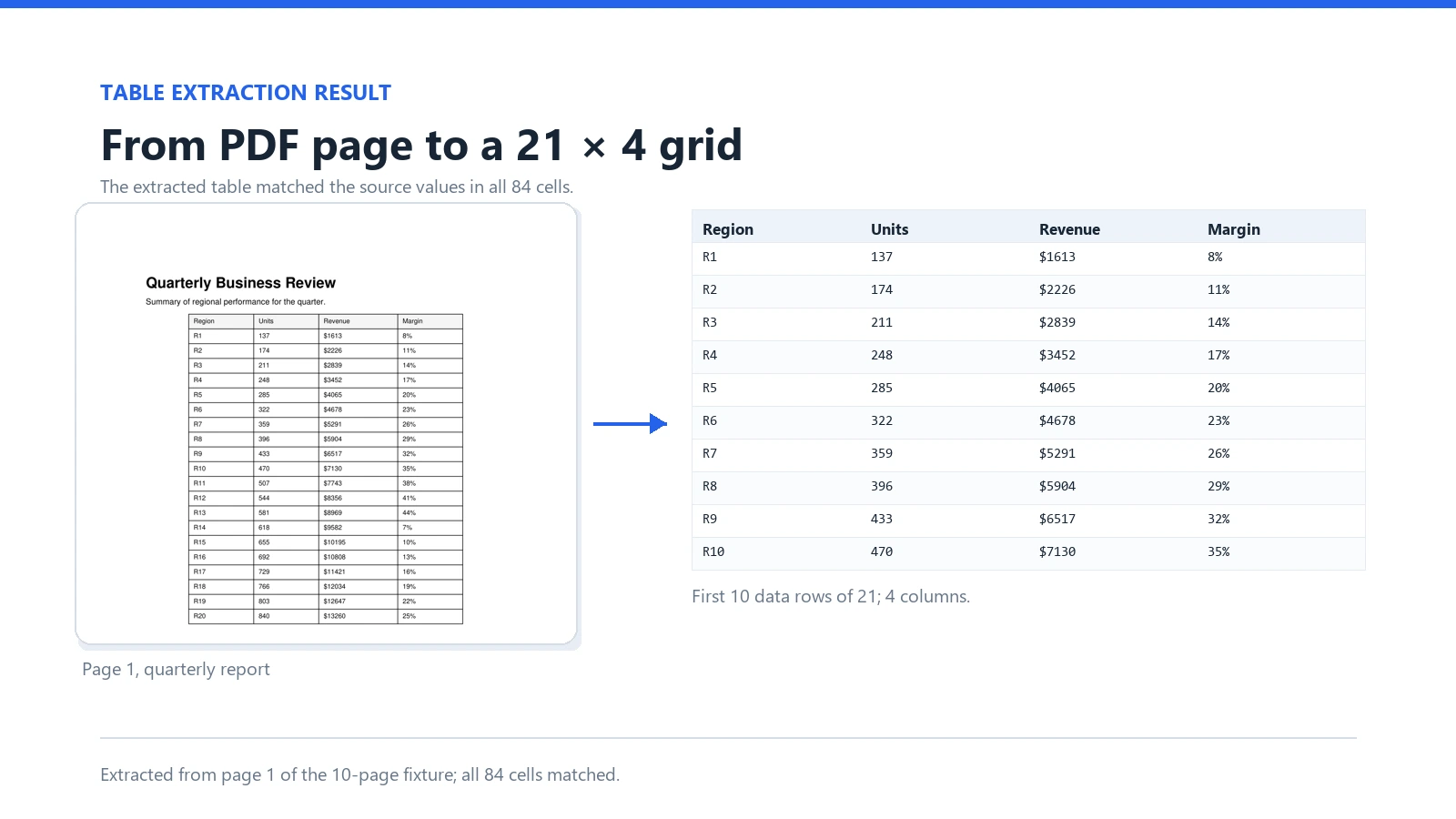
We ran the same bordered table through three libraries. The fixture is 21 rows by 4 columns, has clearly drawn borders and no merged cells. The official documentation says table extraction works best with clearly formatted tables, so these results describe that kind of table only.
| Library | Median | Range | Result |
|---|---|---|---|
| Spire.PDF | 18.9 ms | 16.2 to 26.4 ms | 21 × 4, all 84 cells correct |
| pdfplumber | 44.6 ms | 42.3 to 53.7 ms | 21 × 4, all 84 cells correct |
| PyMuPDF | 363.4 ms | 341.6 to 385.7 ms | 21 × 4, all 84 cells correct |
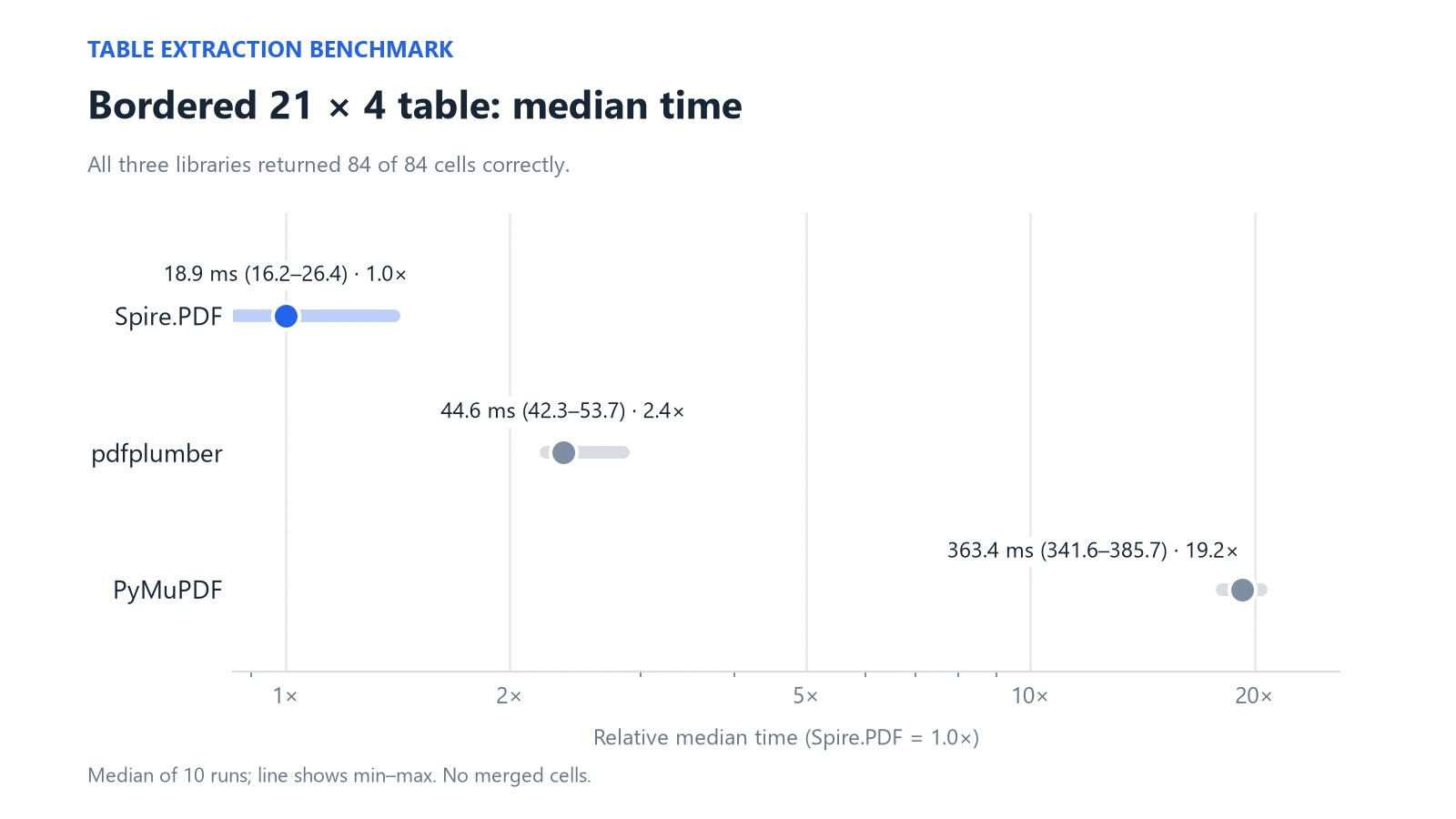
All three returned identical cell contents, so the comparison is about time at equal correctness. Spire.PDF recorded the lowest median in this test. Tables with merged cells, missing borders or scanned pages were not measured and may rank differently. For a step-by-step walkthrough of the same API, see extracting tables from PDF in Python.
3. Forms
Spire.PDF for Python documents APIs for creating and filling form fields, and for flattening them into static content. Form handling was not included in our performance benchmark, so this section describes documented capability only.
4. Export to Other Formats
The same loaded document can be saved in several formats. In our runs, the outputs below were produced from a 10-page report.
| Direction | Verification depth |
|---|---|
| PDF to DOCX, HTML, Markdown | Output generated; text content checked |
| PDF to XLSX | Output generated; cell content present; structure depends on the source layout |
| PDF to PNG, XPS, SVG, PPTX | Output generated; visual fidelity depends on the source layout |
| PDF to PDF/A-1a and PDF/A-1b | Conversion methods available; output generated and XMP identifiers checked; formal PDF/A conformance not independently validated |
Conversion output depends on the source layout; validate representative files before production use. For the DOCX route in detail, see the tutorial on converting PDF to Word in Python.
A Multi-Step PDF Workflow in Python
To see the maintenance argument in code, we took a realistic job. A 40-page quarterly report needs its summary table extracted and its appendix pages removed. From the updated file, two outputs are required: an editable DOCX and an AES-256 encrypted PDF archive.
Original PDF (40 pages)
   └─ extract table + remove appendix
        └─ Updated PDF
             ├─ DOCX copy      → editable Word document
             └─ encrypt + save → encrypted PDF archive
The open-source implementation uses pdfplumber for the table, pypdf[crypto] for page deletion and encryption, and pdf2docx for the Word copy. That is three packages that touch PDFs directly. Installed together in a clean environment they come to 29 distributions and 388.9 MB, against 70.5 MB for Spire.PDF measured the same way.
With Spire.PDF the whole flow stays inside one document object:
from spire.pdf.common import *
from spire.pdf import *

doc = PdfDocument()
doc.LoadFromFile("report.pdf")

# 1. Extract the summary table from page 1
extractor = PdfTableExtractor(doc)
table = extractor.ExtractTable(0)[0]
rows = [[table.GetText(r, c) for c in range(table.GetColumnCount())]
        for r in range(table.GetRowCount())]

# 2. Remove the last page (appendix)
doc.Pages.RemoveAt(doc.Pages.Count - 1)

# 3. Output one: editable Word copy
doc.SaveToFile("report.docx", FileFormat.DOCX)

# 4. Output two: AES-256 encrypted archive
doc.Security.Encrypt("open-password", "owner-password",
                     PdfPermissionsFlags.Default, PdfEncryptionKeySize.Key256Bit)
doc.SaveToFile("report-archive.pdf")
doc.Close()
For a like-for-like timing comparison, both implementations were run on the 10-page version of the report. The three open-source packages took a median of 1,346.2 ms in total and Spire.PDF took 267.3 ms. Both extracted all 84 table cells correctly, and both produced a 9-page encrypted PDF that reopened with the password. Both archives refused to open without the password. On the 40-page report the open-source stack took 3,241.4 ms and produced 39 pages; the evaluation build of Spire.PDF handles only the first 10 pages, so we do not compare that run (see the editions section).
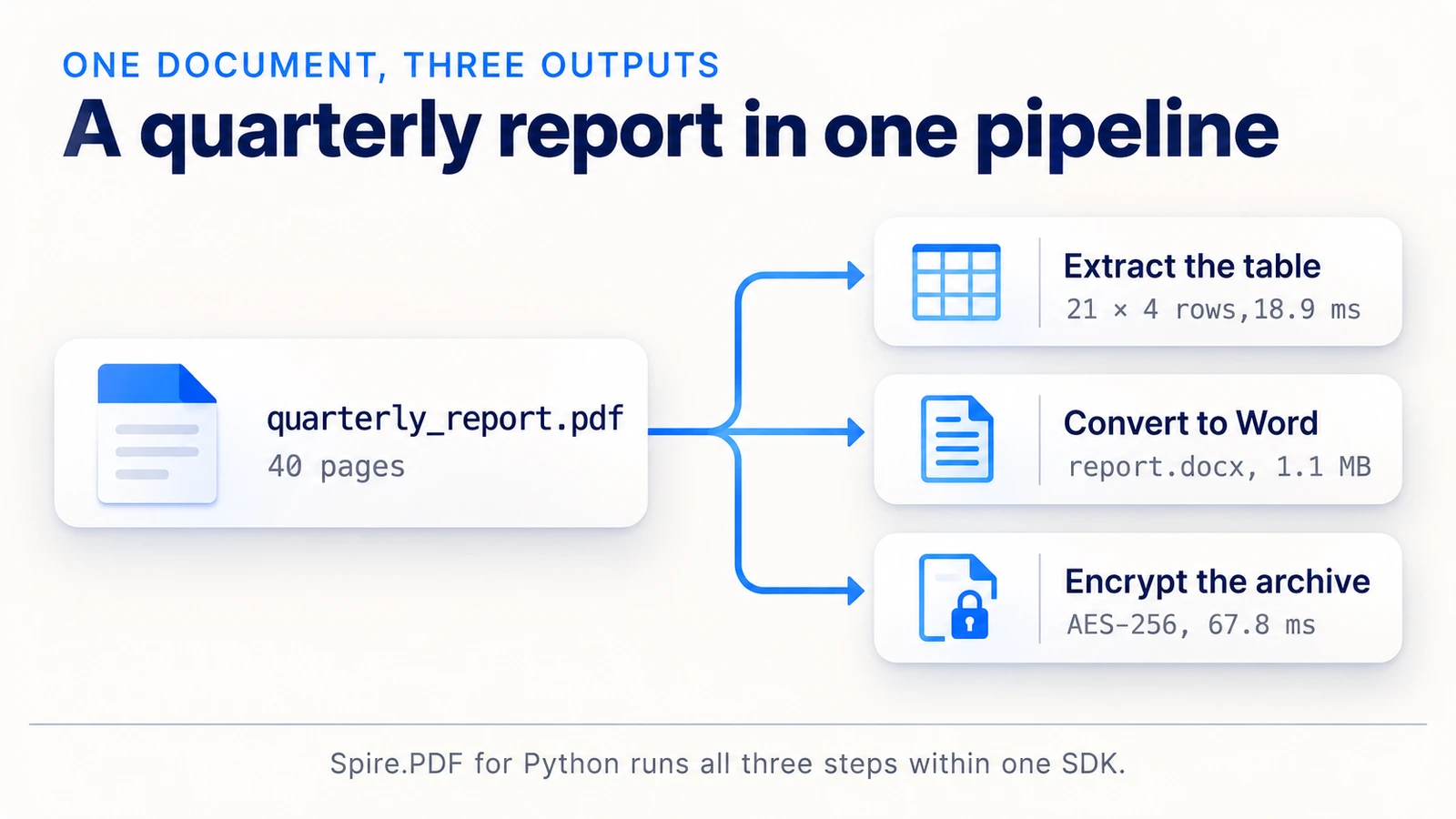
This comparison covers table extraction, page deletion, DOCX and PDF generation, encryption and elapsed time; DOCX layout fidelity is outside this timing comparison and should be validated on your own files. Most of the time difference sits in the DOCX step, where the open-source converter spent about 1.3 s. The point of the exercise is less the stopwatch than the shape of the code: one import, one document object, no files passed between packages. For password handling in more detail, see protecting or unprotecting PDF documents in Python.
Performance and Installation Size
Every number below is a median of 10 timed runs after one warm-up run, in milliseconds, with the minimum and maximum in parentheses. Each figure is an end-to-end time for the operation: opening the fixture and saving output are included where they apply. "n/a" means the library has no such operation.
| Task | pypdf | pdfplumber | PyMuPDF | pikepdf | reportlab | Spire.PDF |
|---|---|---|---|---|---|---|
| Text, 10 pages | 43.1 (39.9–46.1) | 320.4 (295.5–573.8) | 7.2 (6.7–8.4) | n/a | n/a | 58.2 (53.8–64.6) |
| Table, 84 cells | n/a | 44.6 (42.3–53.7) | 363.4 (341.6–385.7) | n/a | n/a | 18.9 (16.2–26.4) |
| Rotate one page | 9.2 (8.5–13.1) | n/a | 3.8 (2.7–11.0) | 6.4 (5.6–7.7) | n/a | 22.4 (20.6–29.9) |
| Delete one page | 8.6 (8.2–14.7) | n/a | 3.0 (2.8–3.4) | 5.8 (5.5–6.9) | n/a | 23.3 (20.2–27.8) |
| Render at 150 DPI | n/a | n/a | 48.8 (47.2–52.3) | n/a | n/a | 161.4 (153.8–180.3) |
| AES-256 encryption | 19.6 (17.2–24.6) | n/a | n/a | 32.0 (30.9–34.4) | n/a | 67.8 (62.1–72.2) |
| Generate 10 pages | n/a | n/a | n/a | n/a | 14.1 (13.7–15.3) | 85.3 (79.4–106.9) |
On single operations the specialists lead in most rows: PyMuPDF for text, rotation, deletion and rendering, pypdf for pure-Python page edits, pikepdf for structural work, and both for encryption, with reportlab for generation. Spire.PDF's lowest median was in the table test. Generation compared 10 pages of 40 lines each, A4, Arial 10 pt. In the rendering test, PyMuPDF and Spire.PDF both produced 1241 × 1754 pixel images at 150 DPI. The value of one SDK shows up in combined workflows, not in any single row.
Installation, measured in a clean virtual environment and excluding the interpreter, pip, setuptools, wheel and __pycache__:
| Target | Installed size | Packages | Import in new process |
|---|---|---|---|
| pypdf | 1.8 MB | 1 | 219.9 ms |
| pypdf[crypto] | 13.2 MB | 4 | 331.8 ms |
| pdfplumber | 43.9 MB | 8 | 246.5 ms |
| PyMuPDF (default) | 201.3 MB | 12 | 223.8 ms |
PyMuPDF (--no-deps) |
104.5 MB | 1 | 217.0 ms |
| pikepdf | 35.2 MB | 4 | 178.4 ms |
| reportlab | 20.4 MB | 3 | 9.0 ms |
| Spire.PDF | 70.5 MB | 2 | 640.6 ms |
| Three-package workflow stack | 388.9 MB | 29 | n/a |
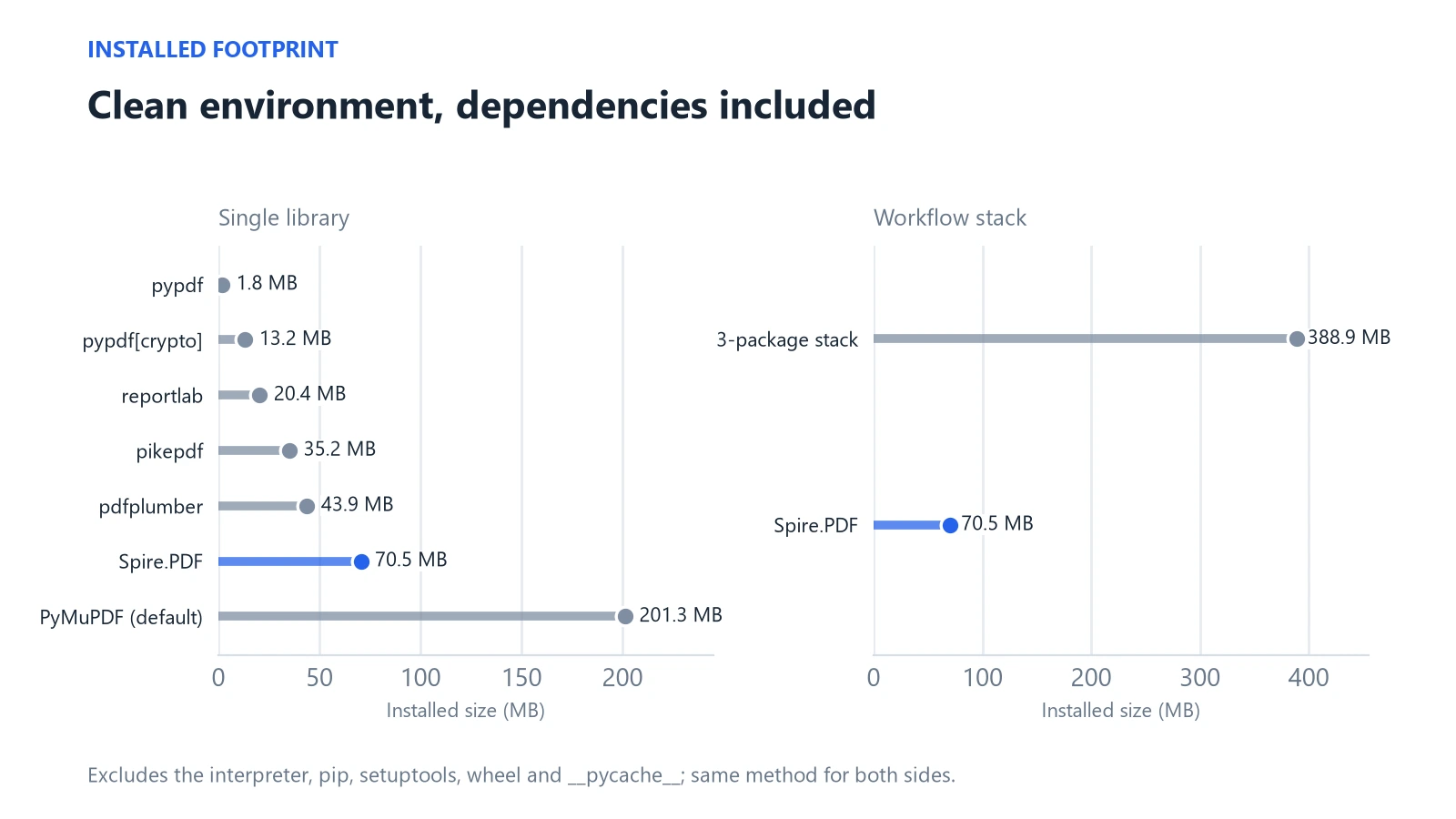
Two details are worth reading into the install table. Import time is a one-off cost per process, so it matters for short-lived command-line jobs and serverless functions more than for long-running services; Spire.PDF's cold import measured 640.6 ms, still under a second, while reportlab's was the shortest at 9.0 ms. Install size matters for container images and desktop packaging, where PyMuPDF's 201.3 MB default and the 388.9 MB three-package stack stand out.
Licences in one line each: pypdf BSD-3, pdfplumber MIT, PyMuPDF AGPL-3.0 or commercial, pikepdf MPL-2.0, reportlab BSD, Spire.PDF commercial. AGPL terms should be evaluated against how you distribute your software.
Free Edition, Evaluation, Temporary and Commercial
Spire.PDF is a commercial product with several editions, and they behave differently, so check which one you have installed before benchmarking or shipping.
| Package / version | Status | Limits |
|---|---|---|
| Spire.Pdf.Free 10.12.0 (2025-01-16) | Free Edition | Output limited to 10 pages; image, XPS, Word and HTML conversion limited to the first 3 pages |
| spire-pdf 12.10.0 (2026-10-12) | Evaluation | Evaluation warning; first 10 pages processed |
| spire-pdf 12.10.0 | Temporary License (30 days) | Evaluation limits removed |
| spire-pdf 12.10.0 | Commercial | None of the limits above |
Beyond the API, a commercial licence is also a maintenance relationship. The package ships wheels for Windows, Linux and macOS, recorded seven releases between January and October 2026 (12.1.3 through 12.10.0), and commercial licences include updates and technical support through the vendor's forum and email, with response targets that depend on the licence tier.
The page cap is easy to verify: a 40-page file loaded in the evaluation build produces only 10 processed pages. That is a property of the evaluation edition, not of the product's capability, and it is the reason our 40-page workflow run is reported for the open-source stack only. Evaluation builds are for assessment, not for production. For teams new to the product, a sensible sequence is to start with the evaluation build on your own files, request a temporary license when you need to test beyond 10 pages, and move to a commercial licence before shipping.
Choosing the Right PDF Library for Your Project
Three profiles cover most teams:
- One specialized job. Extracting text at volume, rendering pages, merging files or generating reports: choose the library built for that operation, such as PyMuPDF, pypdf or reportlab. Check the licence if you redistribute.
- Layout-aware reading. If tables and positions are the focus, pdfplumber is the tool to start from, with pypdf or pikepdf for any page edits.
- Chained jobs on the same file. When extraction, page edits, conversion and encryption belong to one pipeline, a single SDK reduces the number of APIs and dependency trees you maintain. This is where Spire.PDF is designed to fit; a commercial licence covers updates and support.
A quick test before you commit: write down every operation the project needs over the next year, including conversion, encryption and archiving, and mark which library covers each. If one library covers the whole list, you are done. If the list needs three, compare the cost of three dependencies against one licence.
Count the jobs, not the features. If you can name the operations your project needs in a sentence and it is one or two, a specialist is probably enough. If the list keeps growing, try Spire.PDF for Python on your own files.
How We Tested
Disclosure: Spire.PDF for Python is an E-iceblue product, and this benchmark was run by the publisher. We therefore published fixtures, versions and method, and the open-source libraries were tested on exactly the same files.
- Environment: Windows 11, Intel Core i3-10105 at 3.70 GHz (4 cores, 8 threads), 8.4 GB RAM, Python 3.14.6.
- Versions: pypdf 6.21.4, pdfplumber 0.11.10, PyMuPDF 2.1, pikepdf 10.17.0, reportlab 5.1.0, pdf2docx 0.5.13, python-docx 1.2.0, Spire.PDF 12.10.0.
- Fixtures: a 10-page text document, a bordered 21 × 4 table on page one, a Chinese-language invoice, a mixed-content page for rendering, and generated 10- and 40-page quarterly reports. Page counts, sizes and SHA-256 hashes are recorded in a fixture manifest.
- Timing: one warm-up and 10 measured runs per test, reported as medians with minimum and maximum. Opening, operating and saving were timed in separate phases.
- Correctness: text compared by unique-token coverage and sequence similarity (not raw character counts, since whitespace conventions differ); tables compared cell by cell; encrypted files reopened with the password and checked for blocked access without it.
- Not covered: one machine and one workload; scanned documents, OCR, signatures, form handling, merged-cell tables and arbitrary damaged files were not measured. Timings will differ on your hardware and documents.
Frequently Asked Questions
Which is the best Python PDF library overall? There is no single winner. PyMuPDF leads on text and rendering speed, pypdf is the simple choice for page operations, pdfplumber for tables, reportlab for generation. For pipelines that chain several jobs, a single SDK such as Spire.PDF can reduce the number of directly integrated PDF packages.
pypdf vs PyMuPDF: which should I use? Choose pypdf for page operations in a small, pure-Python package with a BSD licence. Choose PyMuPDF for faster text extraction and page rendering, and check its AGPL-3.0 or commercial terms first. In our test PyMuPDF took 7.2 ms for text against 43.1 ms.
How do I extract a table from a PDF in Python?
For bordered tables, call extract_tables() in pdfplumber, or use a table extractor in PyMuPDF or Spire.PDF. On our 21 × 4 fixture all three matched 84 of 84 cells. Tables without borders or with merged cells need separate testing.
Can Python convert a PDF to Word? Yes. pdf2docx is a common open-source option, and Spire.PDF can save a loaded document as DOCX. Conversion output depends on the source layout; validate representative files before production use.
Are these libraries free for commercial use? pypdf, pdfplumber, pikepdf and reportlab use permissive or weak-copyleft licences (BSD-3, MIT, MPL-2.0, BSD). PyMuPDF is AGPL-3.0 or commercial, so evaluate it against how you distribute. Spire.PDF requires a commercial licence for production; commercial licences include updates and technical support, while the free and evaluation editions have page limits.
Sources
- pypdf documentation
- pdfplumber repository
- PyMuPDF documentation
- pikepdf documentation
- ReportLab documentation
- pdf2docx documentation
- Spire.PDF for Python program guide