In real-world document development workflows, maintaining headers and footers is just as important as adding them — copying headers and footers from a template document for quick reuse, removing old headers and footers for document cleanup, and locking headers to prevent content tampering are all common daily requirements. Spire.Doc for JavaScript leverages WebAssembly to process Word documents directly in the browser, managing fonts and file resources through a virtual file system (VFS) with no backend server required.
This article covers three core features:
For installation and project setup, refer to Integrating Spire.Doc for JavaScript in a React Project. The examples below assume Spire.Doc is installed and the WebAssembly module is initialized.
Copy Headers and Footers
In enterprise document production, a standard template document typically defines unified headers (company logo + document title) and footers (page number + copyright notice). When creating new documents, the headers and footers from the template need to be copied over to maintain consistent corporate document styling. Spire.Doc uses the ChildObjects collection and the Clone method to copy header objects across documents. The core workflow has three phases: first, load font files and two Word files (source and destination documents) into the WASM virtual file system via FetchFileToVFS; then instantiate two Document objects, retrieve the header's child objects from the source document, iterate and clone them into each section's header of the destination document; finally, save the destination document, read the generated file from VFS, wrap it as a Blob, and trigger a browser download.
function App() {
  const CopyHeaderAndFooter = async () => {
    // Get the Spire.Doc WASM module
    const wasmModule = window.wasmModule?.spiredoc;

    // Check if the module is ready
    if (!wasmModule) {
      alert('Spire.Doc is not ready yet');
      return;
    }

    // Load fonts and the document files into VFS
    await window.spire.FetchFileToVFS('ARIALUNI.TTF', '/Library/Fonts/', `${process.env.PUBLIC_URL}/font/`);

    // Load the source and destination files into VFS
    let inputFileName = "HeaderAndFooter.docx";
    await window.spire.FetchFileToVFS(inputFileName, "", `${process.env.PUBLIC_URL}/data/`);
    const inputFileName_1 = "Template.docx";
    await window.spire.FetchFileToVFS(inputFileName_1, "", `${process.env.PUBLIC_URL}/data/`);

    // Load the source document
    let doc1 = new wasmModule.Document();
    doc1.LoadFromFile(inputFileName);

    // Get the header from the source document
    let header = doc1.Sections.get_Item(0).HeadersFooters.Header;

    // Load the destination document
    let doc2 = new wasmModule.Document();
    doc2.LoadFromFile(inputFileName_1);

    // Clone each child object from the source header into all sections of the destination document
    for (let i = 0; i < doc2.Sections.Count; i++) {
      let section = doc2.Sections.get_Item(i);
      for (let j = 0; j < header.ChildObjects.Count; j++) {
        let obj = header.ChildObjects.get_Item(j);
        section.HeadersFooters.Header.ChildObjects.Add(obj.Clone());
      }
    }

    // Define the output file name
    const outputFileName = "CopyHeaderAndFooter_output.docx";

    // Save the document
    doc2.SaveToFile({ fileName: outputFileName, fileFormat: wasmModule.FileFormat.Docx2013 });

    // Release resources
    doc1.Close();
    doc2.Close();
    doc1.Dispose();
    doc2.Dispose();

    // Read the generated file from VFS and trigger download
    const modifiedFileArray = window.dotnetRuntime.Module.FS.readFile(outputFileName);
    const blob = new Blob([modifiedFileArray], { type: 'application/vnd.openxmlformats-officedocument.wordprocessingml.document'});
    const url = URL.createObjectURL(blob);
    const a = document.createElement('a');
    a.href = url;
    a.download = outputFileName;
    a.click();
    URL.revokeObjectURL(url);
  };

  return (
    <div style={{ textAlign: 'center', height: '300px' }}>
      <h1>Copy Headers And Footers To Another Word Document</h1>
      <button onClick={CopyHeaderAndFooter}>
        Generate
      </button>
    </div>
  );
}

export default App;
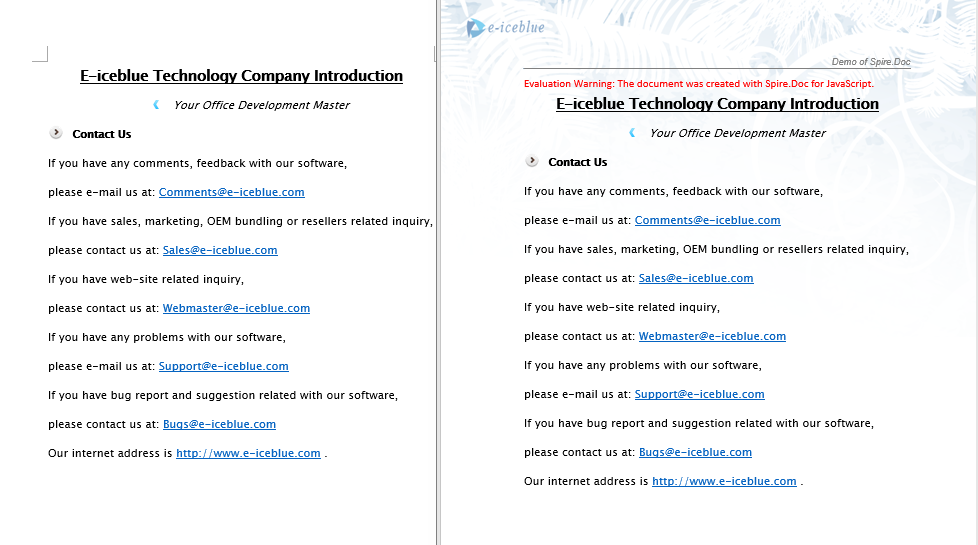
The code above clones the header content from the source document into all sections of the destination document.
Remove Headers and Footers
In document cleanup or template replacement scenarios, it is often necessary to remove existing headers or footers from a document. For example, when taking over someone else's document and needing to redesign the headers and footers, clearing the original content first; or when documents exported from a customer system contain default headers that need to be removed before replacing with corporate templates. Spire.Doc uses HeadersFooters.get_Item to retrieve header or footer objects by type (first page, odd page, even page), and then calls ChildObjects.Clear() to remove all their content.
function App() {
  const RemoveHeaderFooter = async () => {
    // Get the Spire.Doc WASM module
    const wasmModule = window.wasmModule?.spiredoc;

    // Check if the module is ready
    if (!wasmModule) {
      alert('Spire.Doc is not ready yet');
      return;
    }

    // Load fonts and the document file into VFS
    await window.spire.FetchFileToVFS('ARIALUNI.TTF', '/Library/Fonts/', `${process.env.PUBLIC_URL}/font/`);

    // Load the sample file into VFS
    let inputFileName = "HeaderAndFooter.docx";
    await window.spire.FetchFileToVFS(inputFileName, "", `${process.env.PUBLIC_URL}/data/`);

    // Load the document
    let doc = new wasmModule.Document();
    doc.LoadFromFile(inputFileName);

    // Get the first section
    let section = doc.Sections.get_Item(0);

    // Clear all types of header content (first page, odd page, even page)
    let header;
    header = section.HeadersFooters.get_Item({ hfType: wasmModule.HeaderFooterType.HeaderFirstPage });
    if (header != null)
      header.ChildObjects.Clear();

    header = section.HeadersFooters.get_Item({ hfType: wasmModule.HeaderFooterType.HeaderOdd });
    if (header != null)
      header.ChildObjects.Clear();

    header = section.HeadersFooters.get_Item({ hfType: wasmModule.HeaderFooterType.HeaderEven });
    if (header != null)
      header.ChildObjects.Clear();

    // Clear all types of footer content (first page, odd page, even page)
    let footer;
    footer = section.HeadersFooters.get_Item({ hfType: wasmModule.HeaderFooterType.FooterFirstPage });
    if (footer != null)
      footer.ChildObjects.Clear();

    footer = section.HeadersFooters.get_Item({ hfType: wasmModule.HeaderFooterType.FooterOdd });
    if (footer != null)
      footer.ChildObjects.Clear();

    footer = section.HeadersFooters.get_Item({ hfType: wasmModule.HeaderFooterType.FooterEven });
    if (footer != null)
      footer.ChildObjects.Clear();

    // Define the output file name
    const outputFileName = "RemoveHeaderFooter_output.docx";

    // Save the document
    doc.SaveToFile({ fileName: outputFileName, fileFormat: wasmModule.FileFormat.Docx2013 });

    // Release resources
    doc.Close();
    doc.Dispose();

    // Read the generated file from VFS and trigger download
    const modifiedFileArray = window.dotnetRuntime.Module.FS.readFile(outputFileName);
    const blob = new Blob([modifiedFileArray], { type: 'application/vnd.openxmlformats-officedocument.wordprocessingml.document'});
    const url = URL.createObjectURL(blob);
    const a = document.createElement('a');
    a.href = url;
    a.download = outputFileName;
    a.click();
    URL.revokeObjectURL(url);
  };

  return (
    <div style={{ textAlign: 'center', height: '300px' }}>
      <h1>Remove Headers And Footers From Word Document</h1>
      <button onClick={RemoveHeaderFooter}>
        Generate
      </button>
    </div>
  );
}

export default App;
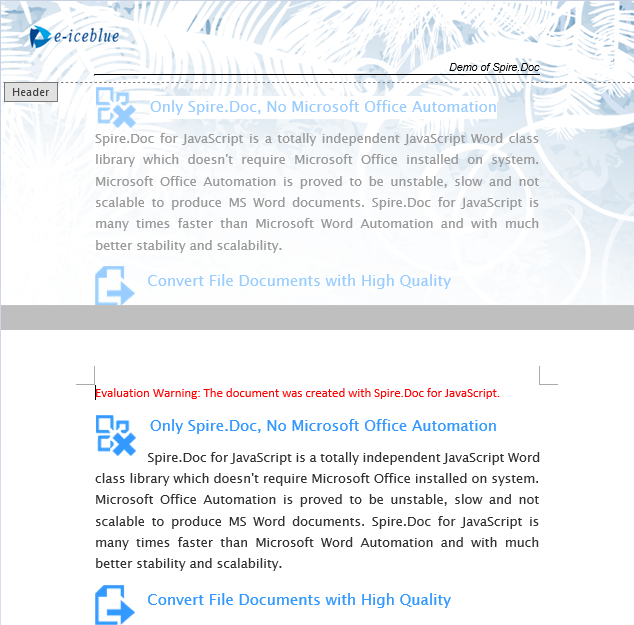
The document after removing the header.
Lock Headers to Prevent Editing
When distributing documents to clients or team members, it is often desirable to prevent fixed information such as the company logo and document number in the header from being modified, while allowing the body text to remain editable. Spire.Doc achieves this through document protection: set the protection type to AllowOnlyFormFields, then set the section's ProtectForm property to false, so the body area stays editable while the header area is protected from modification.
function App() {
  const LockHeader = async () => {
    // Get the Spire.Doc WASM module
    const wasmModule = window.wasmModule?.spiredoc;

    // Check if the module is ready
    if (!wasmModule) {
      alert('Spire.Doc is not ready yet');
      return;
    }

    // Load fonts and the document file into VFS
    await window.spire.FetchFileToVFS('ARIALUNI.TTF', '/Library/Fonts/', `${process.env.PUBLIC_URL}/font/`);

    // Load the sample file into VFS
    let inputFileName = "HeaderAndFooter.docx";
    await window.spire.FetchFileToVFS(inputFileName, "", `${process.env.PUBLIC_URL}/data/`);

      // Load the document
    let doc = new wasmModule.Document();
    doc.LoadFromFile(inputFileName);

    // Get the first section
    let section = doc.Sections.get_Item(0);

    // Protect the document with AllowOnlyFormFields type
    doc.Protect({ type: wasmModule.ProtectionType.AllowOnlyFormFields, password: "123" });

    // Set the section as editable, so the body area is not locked
    section.ProtectForm = false;

    // Define the output file name
    const outputFileName = "LockHeader_output.docx";

    // Save the document
    doc.SaveToFile({ fileName: outputFileName, fileFormat: wasmModule.FileFormat.Docx2013 });

    // Release resources
    doc.Close();
    doc.Dispose();

    // Read the generated file from VFS and trigger download
    const modifiedFileArray = window.dotnetRuntime.Module.FS.readFile(outputFileName);
    const blob = new Blob([modifiedFileArray], { type: 'application/vnd.openxmlformats-officedocument.wordprocessingml.document'});
    const url = URL.createObjectURL(blob);
    const a = document.createElement('a');
    a.href = url;
    a.download = outputFileName;
    a.click();
    URL.revokeObjectURL(url);
  };

  return (
    <div style={{ textAlign: 'center', height: '300px' }}>
      <h1>Lock Header In Word Document</h1>
      <button onClick={LockHeader}>
        Generate
      </button>
    </div>
  );
}

export default App;
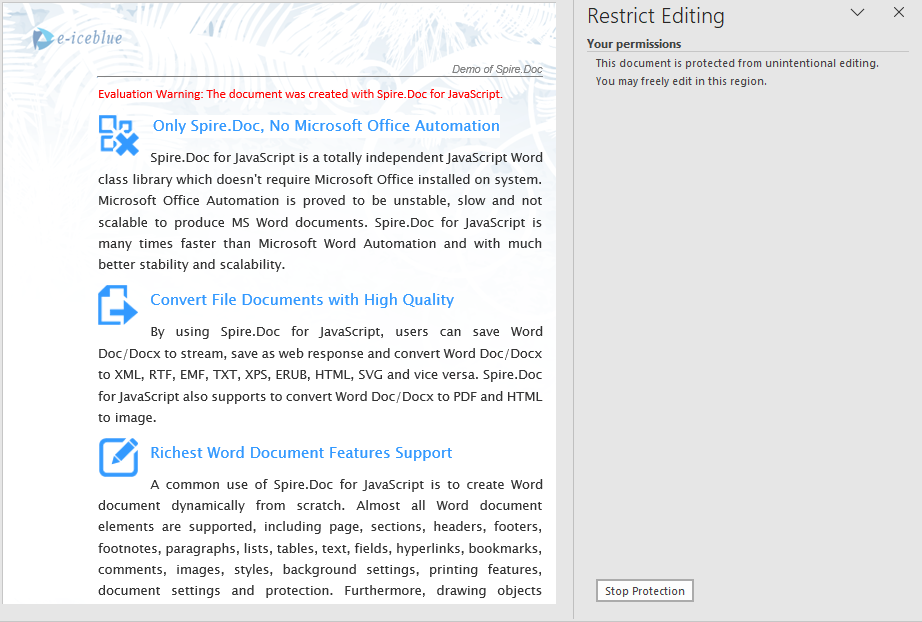
When the header is locked, the header area cannot be edited when opening the document in Word, while the body area remains modifiable.
FAQ
Copied header content does not display in the destination document
Cause: The destination document contains multiple sections, but the copy operation only processes the first section's header, leaving headers in other sections unchanged.
Solution: Iterate through all sections of the destination document and copy the source header content to each section:
for (let i = 0; i < doc2.Sections.Count; i++) {
  let section = doc2.Sections.get_Item(i);
  for (let j = 0; j < header.ChildObjects.Count; j++) {
    let obj = header.ChildObjects.get_Item(j);
    section.HeadersFooters.Header.ChildObjects.Add(obj.Clone());
  }
}
The entire document becomes uneditable after locking the header
Cause: doc.Protect({ type: AllowOnlyFormFields }) locks the entire document by default, including the body area.
Solution: After applying protection, set the section's ProtectForm property to false to keep the body area editable:
doc.Protect({ type: wasmModule.ProtectionType.AllowOnlyFormFields, password: "123" });
section.ProtectForm = false;
Footer content is also cleared when removing headers
Cause: The header removal logic is mistakenly applied to the footer, or the same ChildObjects.Clear() operation is used on the wrong object.
Solution: Use different HeaderFooterType parameters for removing headers versus removing footers, ensuring the correct object is targeted:
// Use Header type when removing headers
section.HeadersFooters.get_Item({ hfType: wasmModule.HeaderFooterType.HeaderFirstPage });
// Use Footer type when removing footers
section.HeadersFooters.get_Item({ hfType: wasmModule.HeaderFooterType.FooterFirstPage });
Get a Free License
If you wish to remove the evaluation message from the resulting document, or to eliminate functional limitations, please contact our sales team to request a 30-day temporary license.
