A bookmark in a PDF records the document's outline structure, and a bookmark can hold child bookmarks of its own, nesting level by level into a tree. Reading that information has plenty of practical uses — exporting it as a table of contents, generating site navigation from bookmark titles, or locating a specific page for further processing. All of it calls for a program that can walk the whole bookmark tree and pull out the content of each node.
Spire.PDF for JavaScript processes PDF documents directly in the browser based on WebAssembly, managing input and output files through a virtual file system (VFS), with no backend service required. The core entry point for extracting bookmarks is the PdfDocument.Bookmarks property, which returns a PdfBookmarkCollection; each PdfBookmark object in it exposes its own child bookmark collection, so together they form the complete bookmark tree. Every bookmark node provides properties such as Title and DisplayStyle for reading its appearance, and Destination.Page combined with PdfPageCollection.IndexOf gives you the page number the bookmark points to.
This article covers two core features:
For installation and project configuration, refer to Integrating Spire.PDF for JavaScript in a React Project. The following examples assume Spire.PDF is installed and the WebAssembly module has been initialized.
Extracting All PDF Bookmarks
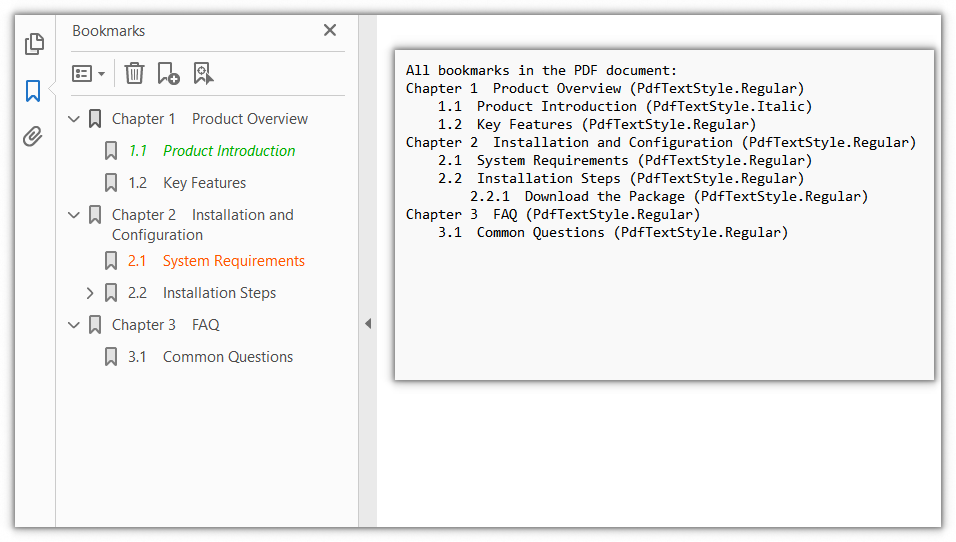
PdfDocument.Bookmarks returns only the top-level bookmark collection, while bookmarks themselves can contain child bookmarks. To read out every bookmark in the document you need a recursive function that walks the PdfBookmarkCollection level by level, reads the Title (bookmark title) and DisplayStyle (text style) of each node, and records them with indentation by level, producing a complete outline list in the end.
function App() {
  const extractAllBookmarks = async () => {
    // Get the Spire.PDF WASM module
    const pdfModule = window.wasmModule?.spirepdf;

    // Check whether the module is ready
    if (!pdfModule) {
      alert('Spire.PDF is not ready yet');
      return;
    }

    // Load the PDF file to be processed into the VFS
    const inputFileName = 'Sample.pdf';
    await window.spire.FetchFileToVFS(inputFileName, "", `${process.env.PUBLIC_URL}/data/`);

    // Create a PdfDocument object and load the PDF document
    let doc = new pdfModule.PdfDocument();
    doc.LoadFromFile(inputFileName);

    // String that holds the extracted result
    let content = 'All bookmarks in the PDF document:\r\n';

    // Recursively traverse the bookmark collection, recording each title and text style with indentation by level
    const collectBookmarks = (bookmarks, indent) => {
      for (let i = 0; i < bookmarks.Count; i++) {
        let bookmark = bookmarks.get_Item(i);

        // Record the title and text style of the current bookmark
        content += indent + bookmark.Title + ' (' + bookmark.DisplayStyle.toString() + ')\r\n';

        // If there are child bookmarks, process them recursively with more indentation
        if (bookmark.Count > 0) {
          collectBookmarks(bookmark, indent + '    ');
        }
      }
    };

    // Start extracting from the top-level bookmarks
    collectBookmarks(doc.Bookmarks, '');

    // Write the extracted result to a file and trigger the download
    const outputFileName = 'AllBookmarks.txt';
    window.dotnetRuntime.Module.FS.writeFile(outputFileName, content);
    doc.Close();

    const fileArray = window.dotnetRuntime.Module.FS.readFile(outputFileName);
    const blob = new Blob([fileArray], { type: 'text/plain' });
    const url = URL.createObjectURL(blob);
    const a = document.createElement('a');
    a.href = url;
    a.download = outputFileName;
    a.click();
    URL.revokeObjectURL(url);
  };

  return (
    <div style={{ textAlign: 'center', height: '300px' }}>
      <h1>Extract All PDF Bookmarks</h1>
      <button onClick={extractAllBookmarks}>
        Start Extracting
      </button>
    </div>
  );
}

export default App;
The list of all bookmark titles and text styles extracted recursively
Getting the Page Number of a Bookmark
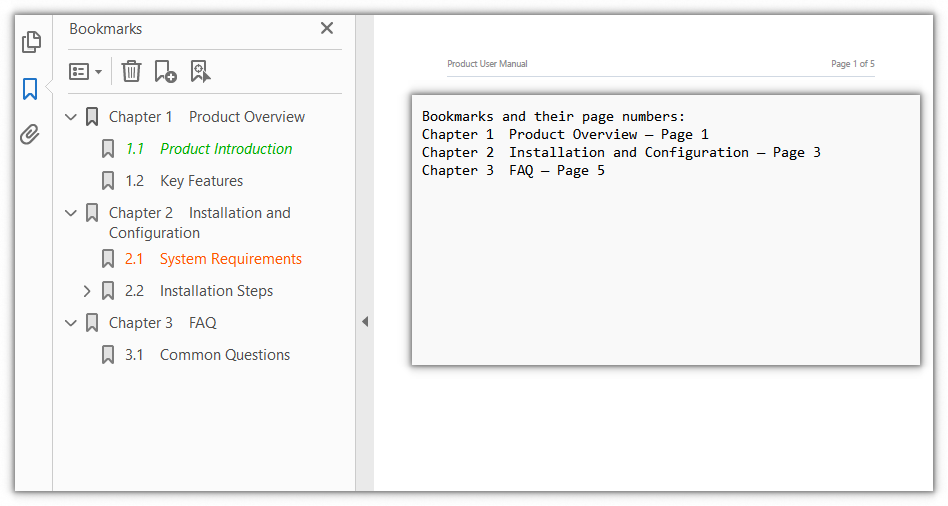
Besides its title, a bookmark also carries a jump destination. Through PdfBookmark.Destination.Page you can obtain the PdfPage object the bookmark points to, and then use PdfPageCollection.IndexOf to get its index within the document. Because the index starts from 0, adding 1 gives the page number shown in a reader. This is commonly used to export a bookmark list as a "title — page number" table of contents.
function App() {
  const getBookmarkPageNumber = async () => {
    // Get the Spire.PDF WASM module
    const pdfModule = window.wasmModule?.spirepdf;

    // Check whether the module is ready
    if (!pdfModule) {
      alert('Spire.PDF is not ready yet');
      return;
    }

    // Load the PDF file to be processed into the VFS
    const inputFileName = 'Sample.pdf';
    await window.spire.FetchFileToVFS(inputFileName, "", `${process.env.PUBLIC_URL}/data/`);

    // Create a PdfDocument object and load the PDF document
    let doc = new pdfModule.PdfDocument();
    doc.LoadFromFile(inputFileName);

    // Read the page number each top-level bookmark points to, one by one
    let content = 'Bookmarks and their page numbers:\r\n';
    for (let i = 0; i < doc.Bookmarks.Count; i++) {
      let bookmark = doc.Bookmarks.get_Item(i);

      // Destination.Page gives the page the bookmark points to; IndexOf returns its 0-based index
      let pageNumber = doc.Pages.IndexOf(bookmark.Destination.Page) + 1;

      content += bookmark.Title + ' — Page ' + pageNumber + '\r\n';
    }

    // Write the extracted result to a file and trigger the download
    const outputFileName = 'BookmarkPageNumber.txt';
    window.dotnetRuntime.Module.FS.writeFile(outputFileName, content);
    doc.Close();

    const fileArray = window.dotnetRuntime.Module.FS.readFile(outputFileName);
    const blob = new Blob([fileArray], { type: 'text/plain' });
    const url = URL.createObjectURL(blob);
    const a = document.createElement('a');
    a.href = url;
    a.download = outputFileName;
    a.click();
    URL.revokeObjectURL(url);
  };

  return (
    <div style={{ textAlign: 'center', height: '300px' }}>
      <h1>Get the Page Number of a Bookmark</h1>
      <button onClick={getBookmarkPageNumber}>
        Start Extracting
      </button>
    </div>
  );
}

export default App;
The title of each bookmark and the page number it points to
FAQ
Why is the number of extracted bookmarks smaller than the outline shown in a reader
Reason: doc.Bookmarks returns only the top-level bookmark collection, and its Count counts only the nodes at that level. Child bookmarks nested under a chapter are reached through the node's own collection and are otherwise not counted.
Solution: Traverse the whole bookmark tree recursively and add up the nodes at every level:
function countBookmarks(bookmarks) {
  let total = 0;
  for (let i = 0; i < bookmarks.Count; i++) {
    total += 1;
    // Recursively add the child bookmarks
    total += countBookmarks(bookmarks.get_Item(i));
  }
  return total;
}

const total = countBookmarks(doc.Bookmarks);
Why is the extracted DisplayStyle always Regular
Reason: PdfBookmark.DisplayStyle returns the text style a bookmark is displayed with in the outline panel. Only when the bookmark itself is explicitly set to a style such as Bold or Italic will the value read back differ from the default Regular. It reflects the bookmark's appearance setting, not the font used by the bookmark title in the page content.
Solution: Record the enum value as it is; if you only need to tell whether it is bold or italic, compare it against the PdfTextStyle values one by one:
let style = 'Regular';
if (bookmark.DisplayStyle === pdfModule.PdfTextStyle.Bold) {
  style = 'Bold';
} else if (bookmark.DisplayStyle === pdfModule.PdfTextStyle.Italic) {
  style = 'Italic';
}
Why does the page number from Destination.Page differ from the one shown in a reader
Reason: PdfPageCollection.IndexOf returns the page's index within the collection, counting from 0, while a reader shows page numbers from 1, so using the index directly is off by one.
Solution: Add 1 to the index to match what the reader shows:
// The index is 0-based, so add 1 to get the page number shown in a reader
let pageNumber = doc.Pages.IndexOf(bookmark.Destination.Page) + 1;
In addition, if a bookmark points to a page that no longer exists (for example, the target page was deleted), Destination may be empty, so check for null before reading it:
if (bookmark.Destination && bookmark.Destination.Page) {
  let pageNumber = doc.Pages.IndexOf(bookmark.Destination.Page) + 1;
}
Get a Free License
If you wish to remove the evaluation message from the result document or remove feature limitations, please contact sales to obtain a temporary license valid for 30 days.
