Some of the PDFs users upload are password protected. If the code processes them without checking first, it either throws and stops, or writes out an incomplete result. Checking at the entry point is cheaper than debugging afterwards: is the document encrypted, which password does it need, and are the candidate passwords in hand correct?
Spire.PDF for JavaScript reads PDF documents in the browser through WebAssembly and manages input files in a virtual file system (VFS), so no backend is involved. PdfDocument.IsPasswordProtected() is a static method: it reads the file directly, without opening the document and without a password. Once a document is loaded, PdfDocument.Security records whether the password used this time is in UserPassword or OwnerPassword, which identifies the role of that password.
This article covers three features:
- Checking whether a PDF is password protected
- Checking whether a document requires an open password
- Verifying candidate passwords and confirming the password role
For installation and project configuration, refer to Integrating Spire.PDF for JavaScript in a React Project. The following examples assume Spire.PDF is installed and the WebAssembly module has been initialized.
Checking whether a PDF is password protected
PdfDocument.IsPasswordProtected() takes a file name in the virtual file system and returns a boolean. It checks whether the document carries an encryption dictionary, so it needs neither an opened document nor a password. It reads a path inside the virtual file system, so window.spire.FetchFileToVFS() must run first; otherwise it throws File doesn't exist.
function App() {
  const checkPasswordProtection = async () => {
    // Get the Spire.PDF WASM module
    const pdfModule = window.wasmModule?.spirepdf;

    // Check that the module is ready
    if (!pdfModule) {
      alert('Spire.PDF is not ready yet');
      return;
    }

    // File names to check
    const plainFileName = 'ContractTemplate.pdf';
    const lockedFileName = 'EncryptedContract.pdf';

    // The static method reads the virtual file system, so load the files first
    await window.spire.FetchFileToVFS(plainFileName, "", `${process.env.PUBLIC_URL}/data/`);
    await window.spire.FetchFileToVFS(lockedFileName, "", `${process.env.PUBLIC_URL}/data/`);

    // Check each file without opening the document or supplying a password
    const reportLines = [];
    for (const fileName of [plainFileName, lockedFileName]) {
      const isProtected = pdfModule.PdfDocument.IsPasswordProtected(fileName);
      reportLines.push(`${fileName}: ${isProtected ? 'password protected' : 'not encrypted'}`);
    }

    // Write the report into the virtual file system, then export it
    const outputFileName = 'EncryptionCheckResult.txt';
    const report = reportLines.join('\r\n');
    window.dotnetRuntime.Module.FS.writeFile(outputFileName, new TextEncoder().encode(report));

    // Read the generated file back from the VFS and trigger the download
    const fileArray = window.dotnetRuntime.Module.FS.readFile(outputFileName);
    const blob = new Blob([fileArray], { type: 'text/plain;charset=utf-8' });
    const url = URL.createObjectURL(blob);
    const a = document.createElement('a');
    a.href = url;
    a.download = outputFileName;
    a.click();
    URL.revokeObjectURL(url);
  };

  return (
    <div style={{ textAlign: 'center', height: '300px' }}>
      <h1>Checking Whether a PDF Is Password Protected</h1>
      <button onClick={checkPasswordProtection}>
        Run Check
      </button>
    </div>
  );
}

export default App;
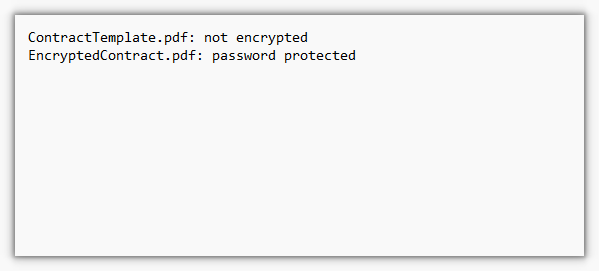
Exported report: ContractTemplate.pdf is not encrypted, EncryptedContract.pdf is password protected
Checking whether a document requires an open password
IsPasswordProtected() returning true only means the document carries an encryption dictionary, not that a password is required to open it: a document with only a permission password still opens without one. To tell the two apart, call LoadFromFile() once without a password. A thrown exception means an open password is missing; a successful load means the document is merely restricted.
function App() {
  const checkOpenPassword = async () => {
    // Get the Spire.PDF WASM module
    const pdfModule = window.wasmModule?.spirepdf;

    // Check that the module is ready
    if (!pdfModule) {
      alert('Spire.PDF is not ready yet');
      return;
    }

    // File names to check
    const fileNames = ['ContractTemplate.pdf', 'EncryptedContract.pdf'];
    for (const fileName of fileNames) {
      await window.spire.FetchFileToVFS(fileName, "", `${process.env.PUBLIC_URL}/data/`);
    }

    // Load without a password: a thrown exception means an open password is required
    const reportLines = [];
    for (const fileName of fileNames) {
      try {
        const doc = new pdfModule.PdfDocument();
        doc.LoadFromFile(fileName);
        reportLines.push(`${fileName}: ${doc.IsEncrypted ? 'opens directly, but the document is still restricted by permissions' : 'not encrypted, opens directly'}`);
        doc.Close();
      } catch (error) {
        reportLines.push(`${fileName}: open password required`);
      }
    }

    // Write the report into the virtual file system, then export it
    const outputFileName = 'OpenPasswordCheck.txt';
    const report = reportLines.join('\r\n');
    window.dotnetRuntime.Module.FS.writeFile(outputFileName, new TextEncoder().encode(report));

    // Read the generated file back from the VFS and trigger the download
    const fileArray = window.dotnetRuntime.Module.FS.readFile(outputFileName);
    const blob = new Blob([fileArray], { type: 'text/plain;charset=utf-8' });
    const url = URL.createObjectURL(blob);
    const a = document.createElement('a');
    a.href = url;
    a.download = outputFileName;
    a.click();
    URL.revokeObjectURL(url);
  };

  return (
    <div style={{ textAlign: 'center', height: '300px' }}>
      <h1>Checking Whether a Document Requires an Open Password</h1>
      <button onClick={checkOpenPassword}>
        Run Check
      </button>
    </div>
  );
}

export default App;
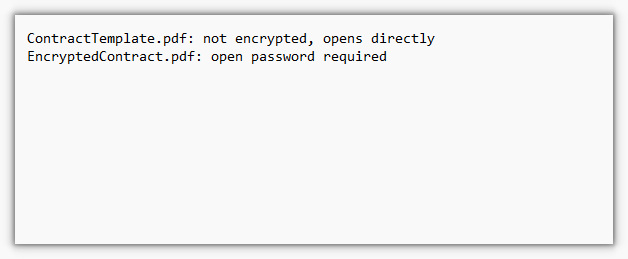
Exported result: ContractTemplate.pdf opens directly, EncryptedContract.pdf requires an open password
Verifying candidate passwords and confirming the password role
Whether a password is correct is answered by whether LoadFromFile() loads successfully. On failure it always throws Can not open an encrypted document. The password is invalid., without distinguishing "no password supplied" from "wrong password". So check first whether the document is encrypted, skip the ones that are not, try passwords one by one on the encrypted ones, then read PdfDocument.Security to see whether the password used this time landed in UserPassword or OwnerPassword and confirm whether it is the open password or the permission password.
function App() {
  const verifyPassword = async () => {
    // Get the Spire.PDF WASM module
    const pdfModule = window.wasmModule?.spirepdf;

    // Check that the module is ready
    if (!pdfModule) {
      alert('Spire.PDF is not ready yet');
      return;
    }

    // Files to verify and candidate passwords
    const fileNames = ['ContractTemplate.pdf', 'EncryptedContract.pdf'];
    const candidates = ['wrong123', 'spire123', 'owner123'];

    // Both the static method and loading read the virtual file system, so load the files first
    for (const fileName of fileNames) {
      await window.spire.FetchFileToVFS(fileName, "", `${process.env.PUBLIC_URL}/data/`);
    }

    const reportLines = [];
    for (const fileName of fileNames) {
      // An unencrypted document needs no password verification
      if (!pdfModule.PdfDocument.IsPasswordProtected(fileName)) {
        reportLines.push(`${fileName}: this PDF document is not encrypted, no password verification needed`);
        continue;
      }

      // Encrypted: try each candidate; loading successfully means the password is correct
      for (const password of candidates) {
        try {
          const doc = new pdfModule.PdfDocument();
          doc.LoadFromFile(fileName, password);

          // Security records the password used this time, which gives its role
          const role = doc.Security.UserPassword ? 'open password' : 'permission password';
          reportLines.push(`${fileName}: password "${password}" is correct (${role})`);
          doc.Close();
        } catch (error) {
          reportLines.push(`${fileName}: password "${password}" is incorrect`);
        }
      }
    }

    // Write the report into the virtual file system, then export it
    const outputFileName = 'PasswordVerificationResult.txt';
    const report = reportLines.join('\r\n');
    window.dotnetRuntime.Module.FS.writeFile(outputFileName, new TextEncoder().encode(report));

    // Read the generated file back from the VFS and trigger the download
    const fileArray = window.dotnetRuntime.Module.FS.readFile(outputFileName);
    const blob = new Blob([fileArray], { type: 'text/plain;charset=utf-8' });
    const url = URL.createObjectURL(blob);
    const a = document.createElement('a');
    a.href = url;
    a.download = outputFileName;
    a.click();
    URL.revokeObjectURL(url);
  };

  return (
    <div style={{ textAlign: 'center', height: '300px' }}>
      <h1>Verifying Candidate Passwords and Confirming the Password Role</h1>
      <button onClick={verifyPassword}>
        Run Verification
      </button>
    </div>
  );
}

export default App;
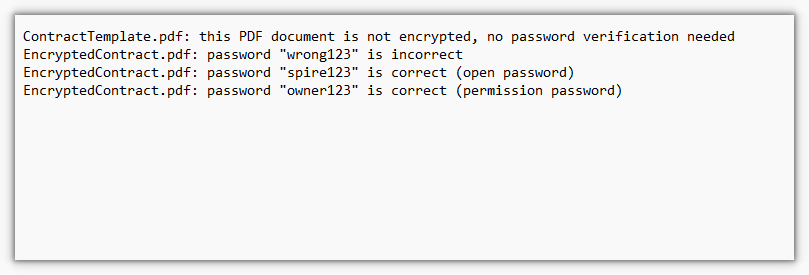
Exported result: the incorrect password is rejected, spire123 is the open password, owner123 is the permission password
FAQ
IsPasswordProtected() throws File doesn't exist
Cause: the method reads a path inside the virtual file system, not an address the browser can fetch directly. When the file has not been loaded into the virtual file system, Spire.PDF cannot find the target and throws File doesn't exist Arg_ParamName_Name, fileName.
Solution: load the file into the virtual file system with FetchFileToVFS before calling the method, using the same name you pass afterwards:
// Load into the virtual file system first, then check
await window.spire.FetchFileToVFS('EncryptedContract.pdf', "", `${process.env.PUBLIC_URL}/data/`);
const isProtected = pdfModule.PdfDocument.IsPasswordProtected('EncryptedContract.pdf');
The document needs a password, but the error says the password is invalid
Cause: Spire.PDF returns the same message, Can not open an encrypted document. The password is invalid., for "no password supplied" and for "wrong password". The error text alone cannot tell them apart.
Solution: work in three steps. Use IsPasswordProtected() to check whether the document carries an encryption dictionary, load it without a password to separate "open password required" from "restricted by permissions only", and only then try candidate passwords, deciding correctness by whether an exception is thrown:
// Loading without a password fails → an open password is required; retry with a password → a throw means a miss
try {
  const doc = new pdfModule.PdfDocument();
  doc.LoadFromFile(fileName, password);
  // Loaded: read Security to confirm the role
} catch (error) {
  // Failed to load: this password does not work
}
Reading Security.Permissions after loading throws
Cause: the permission bits are a combination of several flags and do not necessarily match a member of the PdfPermissionsFlags enumeration, so reading them throws Invalid value for spirepdfPdfPermissionsFlags. In the same version, HasExtendedRight() throws ArgumentNullException as well.
Solution: use Security.UserPassword and Security.OwnerPassword instead to determine the role of the password used this time. A document loaded with the permission password carries all permissions, so Decrypt() can remove the protection directly; a document loaded with the open password needs the permission password supplied separately. To control permissions precisely, set them with PdfDocumentPrivilege while encrypting and keep a record yourself:
const role = doc.Security.UserPassword ? 'open password' : 'permission password';

// Loaded with the permission password: the protection can be removed directly
if (role === 'permission password') {
  doc.Decrypt();
}
Get a Free License
If you want to remove the evaluation message from the resulting documents, or to get rid of the feature limitations, please contact our sales team to obtain a temporary license valid for 30 days.
