Once a contract, a quotation or a financial statement leaves the office as a PDF, its content is essentially wide open — anyone can open it, save a copy, edit it and send it on. Setting a password, or allowing reading only while switching off printing and copying, is the most direct way to close that gap at the distribution stage. Doing this used to mean either desktop software, which is hard to embed in a web workflow, or uploading the file to a server, which means the document leaves the user's device.
Spire.PDF for JavaScript loads, modifies and saves PDF documents directly in the browser based on WebAssembly, so the whole encryption process runs locally and reads and writes files through a virtual file system (VFS), with no backend service required.
This article covers three core features:
For installation and project configuration, refer to Integrating Spire.PDF for JavaScript in a React Project. The following examples assume Spire.PDF is installed and the WebAssembly module has been initialized.
Encrypting a PDF Document
The constructor of PdfPasswordSecurityPolicy takes two arguments: a user password and an owner password. Whoever receives the document needs the first one to open it; the second stays with the document owner and is used to lift the restrictions later. The algorithm is set through EncryptionAlgorithm, here AES-128; DocumentPrivilege decides which operations are allowed once the document is open, and get_AllowAll() grants all of them.
function App() {
  const encryptPdf = async () => {
    // Get the Spire.PDF WASM module
    const pdfModule = window.wasmModule?.spirepdf;

    // Check whether the module is ready
    if (!pdfModule) {
      alert('Spire.PDF is not ready yet');
      return;
    }

    // Load the PDF file to be encrypted into the VFS
    const inputFileName = 'ContractTemplate.pdf';
    await window.spire.FetchFileToVFS(inputFileName, "", `${process.env.PUBLIC_URL}/data/`);

    // Create a PdfDocument object and load the PDF document
    let doc = new pdfModule.PdfDocument();
    doc.LoadFromFile(inputFileName);

    // Create the password security policy: the first argument is the user password, the second the owner password
    const policy = new pdfModule.PdfPasswordSecurityPolicy('spire123', 'owner123');

    // Specify the encryption algorithm
    policy.EncryptionAlgorithm = pdfModule.PdfEncryptionAlgorithm.AES_128;

    // Specify the privileges: get_AllowAll() means no operation is restricted
    policy.DocumentPrivilege = pdfModule.PdfDocumentPrivilege.get_AllowAll();

    // Apply the policy and save the document
    doc.Encrypt(policy);
    const outputFileName = 'Encrypted.pdf';
    doc.SaveToFile(outputFileName);
    doc.Close();

    // Read the generated file from the VFS and trigger the download
    const fileArray = window.dotnetRuntime.Module.FS.readFile(outputFileName);
    const blob = new Blob([fileArray], { type: 'application/pdf' });
    const url = URL.createObjectURL(blob);
    const a = document.createElement('a');
    a.href = url;
    a.download = outputFileName;
    a.click();
    URL.revokeObjectURL(url);
  };

  return (
    <div style={{ textAlign: 'center', height: '300px' }}>
      <h1>Encrypt a PDF</h1>
      <button onClick={encryptPdf}>
        Start Encrypting
      </button>
    </div>
  );
}

export default App;
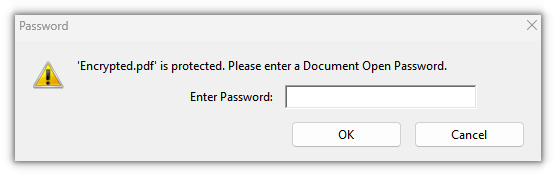
The PDF document after a user password and an owner password are set
Restricting the Permissions of a PDF Document
Leave the user password empty and set only an owner password, and the document opens without a password while printing, copying and editing are granted or forbidden item by item — a good fit for distribution scenarios where the file may be read but not taken away. The permissions themselves are described by PdfDocumentPrivilege: start from a fully permissive baseline, then switch off what is not needed. Here printing, copying content and modifying content are switched off.
function App() {
  const restrictPdfPermissions = async () => {
    // Get the Spire.PDF WASM module
    const pdfModule = window.wasmModule?.spirepdf;

    // Check whether the module is ready
    if (!pdfModule) {
      alert('Spire.PDF is not ready yet');
      return;
    }

    // Load the PDF file to be processed into the VFS
    const inputFileName = 'ContractTemplate.pdf';
    await window.spire.FetchFileToVFS(inputFileName, "", `${process.env.PUBLIC_URL}/data/`);

    // Create a PdfDocument object and load the PDF document
    let doc = new pdfModule.PdfDocument();
    doc.LoadFromFile(inputFileName);

    // Leave the user password empty: the document opens directly; the owner password lifts the restrictions later
    const policy = new pdfModule.PdfPasswordSecurityPolicy('', 'owner123');
    policy.EncryptionAlgorithm = pdfModule.PdfEncryptionAlgorithm.AES_128;

    // Start from full permissions and switch off the ones that are not needed
    const privilege = pdfModule.PdfDocumentPrivilege.get_AllowAll();
    privilege.AllowPrint = false;
    privilege.AllowContentCopying = false;
    privilege.AllowModifyContents = false;
    policy.DocumentPrivilege = privilege;

    // Apply the policy and save the document
    doc.Encrypt(policy);
    const outputFileName = 'PermissionRestricted.pdf';
    doc.SaveToFile(outputFileName);
    doc.Close();

    // Read the generated file from the VFS and trigger the download
    const fileArray = window.dotnetRuntime.Module.FS.readFile(outputFileName);
    const blob = new Blob([fileArray], { type: 'application/pdf' });
    const url = URL.createObjectURL(blob);
    const a = document.createElement('a');
    a.href = url;
    a.download = outputFileName;
    a.click();
    URL.revokeObjectURL(url);
  };

  return (
    <div style={{ textAlign: 'center', height: '300px' }}>
      <h1>Restrict PDF Permissions</h1>
      <button onClick={restrictPdfPermissions}>
        Start Restricting
      </button>
    </div>
  );
}

export default App;
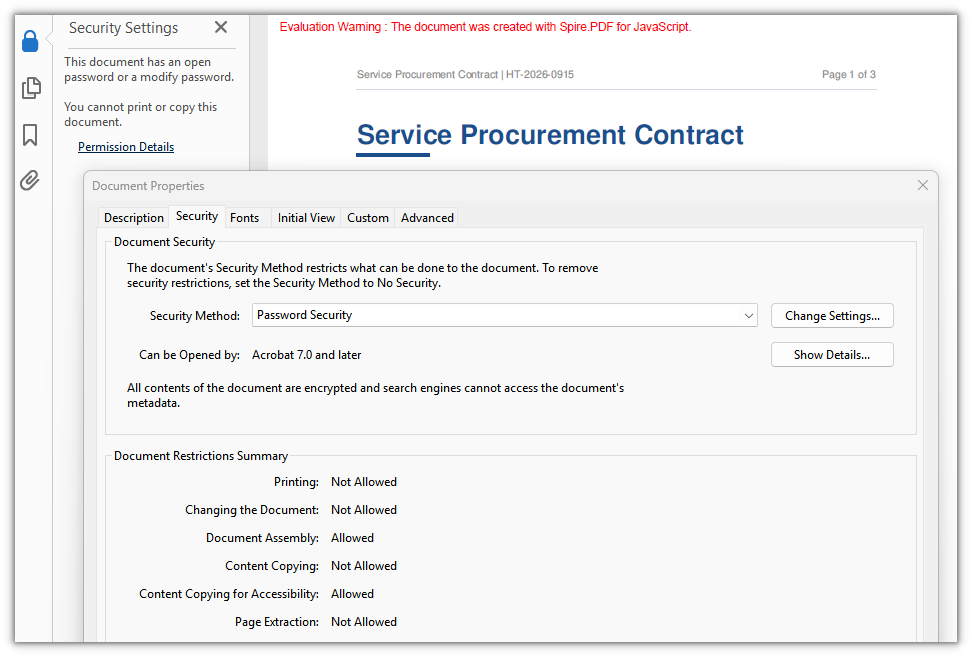
A PDF document that opens without a password but whose printing, copying and editing are forbidden
Decrypting a PDF Document
Decryption means removing the existing password protection, and it presupposes that the password is at hand. If only the user password is available, Decrypt needs the owner password as well before the restrictions can be lifted; calling the parameterless Decrypt() with just the user password is rejected.
function App() {
  const decryptPdf = async () => {
    // Get the Spire.PDF WASM module
    const pdfModule = window.wasmModule?.spirepdf;

    // Check whether the module is ready
    if (!pdfModule) {
      alert('Spire.PDF is not ready yet');
      return;
    }

    // Load the PDF file to be decrypted into the VFS
    const inputFileName = 'EncryptedContract.pdf';
    await window.spire.FetchFileToVFS(inputFileName, "", `${process.env.PUBLIC_URL}/data/`);

    // Create a PdfDocument object and load the encrypted document with its user password
    let doc = new pdfModule.PdfDocument();
    doc.LoadFromFile(inputFileName, 'spire123');

    // Confirm that the document really is password protected
    if (!doc.IsEncrypted) {
      alert('This document is not encrypted, no decryption needed');
      return;
    }

    // Remove the protection with the owner password
    doc.Decrypt('owner123');

    const outputFileName = 'Decrypted.pdf';
    doc.SaveToFile(outputFileName);
    doc.Close();

    // Read the generated file from the VFS and trigger the download
    const fileArray = window.dotnetRuntime.Module.FS.readFile(outputFileName);
    const blob = new Blob([fileArray], { type: 'application/pdf' });
    const url = URL.createObjectURL(blob);
    const a = document.createElement('a');
    a.href = url;
    a.download = outputFileName;
    a.click();
    URL.revokeObjectURL(url);
  };

  return (
    <div style={{ textAlign: 'center', height: '300px' }}>
      <h1>Decrypt a PDF</h1>
      <button onClick={decryptPdf}>
        Start Decrypting
      </button>
    </div>
  );
}

export default App;
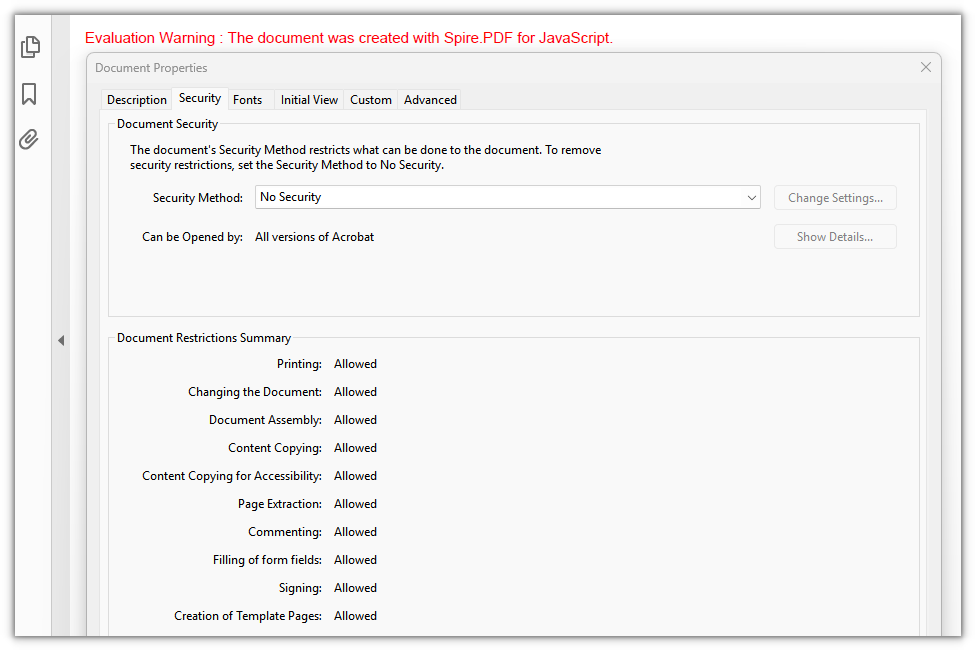
The PDF document after the password protection is removed, ready to open directly
FAQ
Opening an encrypted document reports an invalid password
Reason: LoadFromFile was called without a password, or the password passed in does not match the user password of the document. In that case Spire.PDF throws Can not open an encrypted document. The password is invalid. instead of returning an empty PdfDocument.
Solution: Pass the user password as the second argument of LoadFromFile:
// The second argument is the user password
doc.LoadFromFile(inputFileName, 'spire123');
Calling Decrypt() reports "Cannot decrypt documents without permission password"
Reason: The document was loaded with the user password, so only reading rights are available. Removing the encryption is an owner-level operation and requires the owner password (also called the permissions password).
Solution: Both forms work — load with the owner password and call the parameterless Decrypt(), or keep the user password for loading and hand the owner password to Decrypt:
// Form 1: load with the owner password, then remove the protection directly
doc.LoadFromFile(inputFileName, 'owner123');
doc.Decrypt();

// Form 2: load with the user password and pass the owner password to Decrypt
doc.LoadFromFile(inputFileName, 'spire123');
doc.Decrypt('owner123');
Which encryption algorithm should I choose
Reason: PdfEncryptionKeySize and PdfEncryptionAlgorithm list RC4_40, RC4_128, AES_128, AES_256 and more, but the WebAssembly build that runs in the browser does not support AES-256 yet — setting EncryptionAlgorithm to AES_256 throws Cryptography_AlgorithmNotSupported.
Solution: Use AES_128 on the web; when a legacy reader that only understands RC4 really has to be supported, switch to RC4_128:
// Recommended on the web: AES-128
policy.EncryptionAlgorithm = pdfModule.PdfEncryptionAlgorithm.AES_128;

// For legacy readers: RC4-128
policy.EncryptionAlgorithm = pdfModule.PdfEncryptionAlgorithm.RC4_128;
Get a Free License
If you wish to remove the evaluation message from the result document or remove feature limitations, please contact sales to obtain a temporary license valid for 30 days.
