C#/VB.NET: преобразование Word в XPS
Установлено через NuGet
PM> Install-Package Spire.Doc
Ссылки по теме
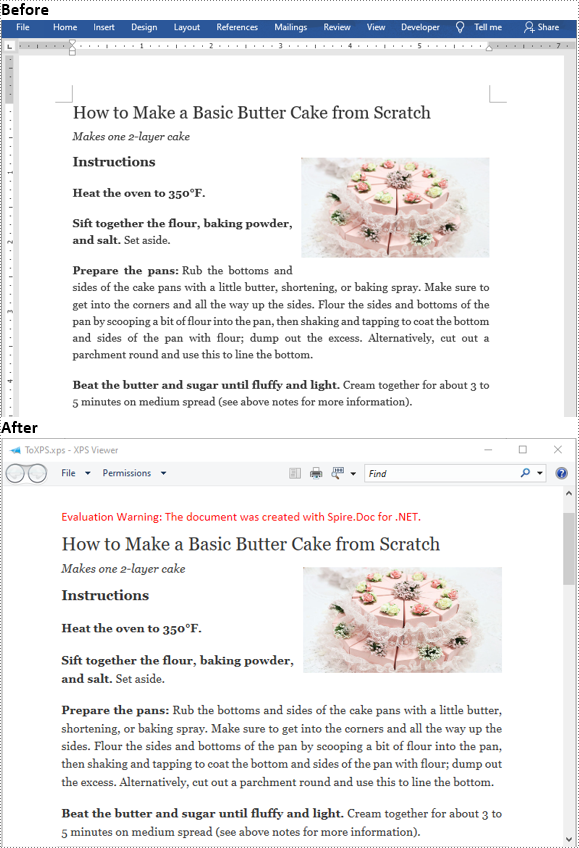
XPS (XML Paper Specification) — это формат документа с фиксированным макетом, предназначенный для сохранения точности документа и обеспечения независимого от устройства внешнего вида документа. Он похож на PDF, но основан на XML, а не на PostScript. Если вы хотите сохранить документ Word в формате файла с фиксированным макетом, вам подойдет XPS. В этой статье показано, как преобразовать документы Word в XPS на C# и VB.NET с помощью Spire.Doc for .NET.
Установите Spire.Doc for .NET
Для начала вам необходимо добавить файлы DLL, включенные в пакет Spire.Doc for .NET, в качестве ссылок в ваш проект .NET. Файлы DLL можно загрузить по этой ссылке или установить через NuGet.
PM> Install-Package Spire.Doc
Преобразование Word в XPS в C# и VB.NET
Ниже приведены подробные инструкции по преобразованию документа Word в XPS с помощью Spire.Doc for .NET:
- Инициализировать экземпляр класса Document.
- Загрузите документ Word с помощью метода Document.LoadFromFile().
- Сохраните документ Word в XPS, используя метод Document.SaveToFile(string filePath, FileFormat fileFormat).
- C#
- VB.NET
using Spire.Doc;
    namespace ConvertWordToXps
    {
        class Program
        {
            static void Main(string[] args)
            {
                //Create a Document instance
                Document doc = new Document();
                //Load a Word document
                doc.LoadFromFile("Sample.docx");
                //convert the document to XPS
                doc.SaveToFile("ToXPS.xps", FileFormat.XPS);
            }
        }
    }
Подать заявку на временную лицензию
Если вы хотите удалить оценочное сообщение из сгенерированных документов или избавиться от функциональных ограничений, пожалуйста запросить 30-дневную пробную лицензию для себя.
C#/VB.NET: Word in XPS konvertieren
Inhaltsverzeichnis
Über NuGet installiert
PM> Install-Package Spire.Doc
verwandte Links
XPS (XML Paper Specification) ist ein Dokumentformat mit festem Layout, das darauf ausgelegt ist, die Wiedergabetreue des Dokuments zu wahren und ein geräteunabhängiges Erscheinungsbild des Dokuments zu ermöglichen. Es ähnelt PDF, basiert jedoch auf XML und nicht auf PostScript. Wenn Sie ein Word-Dokument in einem Dateiformat mit festem Layout speichern möchten, wäre XPS eine Option. Dieser Artikel zeigt, wie das geht Konvertieren Sie Word-Dokumente in XPS in C# und VB.NET verwenden Spire.Doc for .NET.
Installieren Spire.Doc for .NET
Zunächst müssen Sie die im Spire.Doc for.NET-Paket enthaltenen DLL-Dateien als Referenzen in Ihrem .NET-Projekt hinzufügen. Die DLL-Dateien können entweder über diesen Link heruntergeladen oder über NuGet installiert werden.
PM> Install-Package Spire.Doc
Konvertieren Sie Word in XPS in C# und VB.NET
Im Folgenden finden Sie die detaillierten Schritte zum Konvertieren eines Word-Dokuments in XPS mit Spire.Doc for .NET:
- Initialisieren Sie eine Instanz der Document-Klasse.
- Laden Sie ein Word-Dokument mit der Methode Document.LoadFromFile().
- Speichern Sie das Word-Dokument mit der Methode Document.SaveToFile(string filePath, FileFormat fileFormat) in XPS.
- C#
- VB.NET
using Spire.Doc;
    namespace ConvertWordToXps
    {
        class Program
        {
            static void Main(string[] args)
            {
                //Create a Document instance
                Document doc = new Document();
                //Load a Word document
                doc.LoadFromFile("Sample.docx");
                //convert the document to XPS
                doc.SaveToFile("ToXPS.xps", FileFormat.XPS);
            }
        }
    }
Beantragen Sie eine temporäre Lizenz
Wenn Sie die Bewertungsmeldung aus den generierten Dokumenten entfernen oder die Funktionseinschränkungen beseitigen möchten, wenden Sie sich bitte an uns Fordern Sie eine 30-Tage-Testlizenz an für sich selbst.
C#/VB.NET: convertir Word a XPS
Tabla de contenido
Instalado a través de NuGet
PM> Install-Package Spire.Doc
enlaces relacionados
XPS (Especificación de papel XML) es un formato de documento de diseño fijo diseñado para preservar la fidelidad del documento y proporcionar una apariencia de documento independiente del dispositivo. Es similar a PDF, pero se basa en XML en lugar de PostScript. Si desea guardar un documento de Word en un formato de archivo de diseño fijo, XPS sería una opción. Este artículo demostrará cómo convertir documentos de Word a XPS en C# y VB.NET usando Spire.Doc for .NET.
Instalar Spire.Doc for .NET
Para empezar, debe agregar los archivos DLL incluidos en el paquete Spire.Doc for .NET como referencias en su proyecto .NET. Los archivos DLL se pueden descargar desde este enlace o instalado a través de NuGet.
PM> Install-Package Spire.Doc
Convierta Word a XPS en C# y VB.NET
Los siguientes son los pasos detallados para convertir un documento de Word a XPS utilizando Spire.Doc for .NET:
- Inicializa una instancia de la clase Documento.
- Cargue un documento de Word utilizando el método Document.LoadFromFile().
- Guarde el documento de Word en XPS usando el método Document.SaveToFile(string filePath, FileFormat fileFormat).
- C#
- VB.NET
using Spire.Doc;
    namespace ConvertWordToXps
    {
        class Program
        {
            static void Main(string[] args)
            {
                //Create a Document instance
                Document doc = new Document();
                //Load a Word document
                doc.LoadFromFile("Sample.docx");
                //convert the document to XPS
                doc.SaveToFile("ToXPS.xps", FileFormat.XPS);
            }
        }
    }
Solicitar una Licencia Temporal
Si desea eliminar el mensaje de evaluación de los documentos generados o deshacerse de las limitaciones de la función, por favor solicitar una licencia de prueba de 30 días para ti.
C#/VB.NET: Word를 XPS로 변환
NuGet을 통해 설치됨
PM> Install-Package Spire.Doc
관련된 링크들
XPS(XML Paper Specification)는 문서 충실도를 유지하고 장치 독립적인 문서 모양을 제공하도록 설계된 고정 레이아웃 문서 형식입니다. PDF와 유사하지만 PostScript가 아닌 XML을 기반으로 합니다. Word 문서를 고정 레이아웃 파일 형식으로 저장하려면 XPS가 옵션입니다. 이 문서에서는 다음을 수행하는 방법을 보여줍니다 C# 및 VB.NET에서 Word 문서를 XPS로 변환 Spire.Doc for .NET 사용.
Spire.Doc for .NET 설치
먼저 Spire.Doc for.NET 패키지에 포함된 DLL 파일을 .NET 프로젝트의 참조로 추가해야 합니다. DLL 파일은 이 링크에서 다운로드하거나 NuGet을 통해 설치할 수 있습니다.
PM> Install-Package Spire.Doc
C# 및 VB.NET에서 Word를 XPS로 변환
다음은 Spire.Doc for .NET을 사용하여 Word 문서를 XPS로 변환하는 자세한 단계입니다.
- Document 클래스의 인스턴스를 초기화합니다.
- Document.LoadFromFile() 메서드를 사용하여 Word 문서를 로드합니다.
- Document.SaveToFile(string filePath, FileFormat fileFormat) 메서드를 사용하여 Word 문서를 XPS에 저장합니다.
- C#
- VB.NET
using Spire.Doc;
    namespace ConvertWordToXps
    {
        class Program
        {
            static void Main(string[] args)
            {
                //Create a Document instance
                Document doc = new Document();
                //Load a Word document
                doc.LoadFromFile("Sample.docx");
                //convert the document to XPS
                doc.SaveToFile("ToXPS.xps", FileFormat.XPS);
            }
        }
    }
임시 면허 신청
생성된 문서에서 평가 메시지를 제거하거나 기능 제한을 제거하려면 다음을 수행하십시오 30일 평가판 라이선스 요청 자신을 위해.
C#/VB.NET: Converti Word in XPS
Installato tramite NuGet
PM> Install-Package Spire.Doc
Link correlati
XPS (XML Paper Specification) è un formato di documento a layout fisso progettato per preservare la fedeltà del documento e fornire un aspetto del documento indipendente dal dispositivo. È simile al PDF, ma si basa su XML anziché su PostScript. Se desideri salvare un documento Word in un formato di file a layout fisso, XPS sarebbe un'opzione. Questo articolo dimostrerà come convertire i documenti di Word in XPS in C# e VB.NET utilizzando Spire.Doc for .NET.
Installa Spire.Doc for .NET
Per cominciare, è necessario aggiungere i file DLL inclusi nel pacchetto Spire.Doc for.NET come riferimenti nel progetto .NET. I file DLL possono essere scaricati da questo link o installato tramite NuGet.
PM> Install-Package Spire.Doc
Converti Word in XPS in C# e VB.NET
Di seguito sono riportati i passaggi dettagliati per convertire un documento Word in XPS utilizzando Spire.Doc for .NET:
- Inizializza un'istanza della classe Document.
- Carica un documento Word usando il metodo Document.LoadFromFile().
- Salvare il documento Word in XPS utilizzando il metodo Document.SaveToFile(string filePath, FileFormat fileFormat).
- C#
- VB.NET
using Spire.Doc;
    namespace ConvertWordToXps
    {
        class Program
        {
            static void Main(string[] args)
            {
                //Create a Document instance
                Document doc = new Document();
                //Load a Word document
                doc.LoadFromFile("Sample.docx");
                //convert the document to XPS
                doc.SaveToFile("ToXPS.xps", FileFormat.XPS);
            }
        }
    }
Richiedi una licenza temporanea
Se desideri rimuovere il messaggio di valutazione dai documenti generati o eliminare le limitazioni delle funzioni, per favore richiedere una licenza di prova di 30 giorni per te.
C#/VB.NET : convertir Word en XPS
Table des matières
Installé via NuGet
PM> Install-Package Spire.Doc
Liens connexes
XPS (XML Paper Specification) est un format de document à mise en page fixe conçu pour préserver la fidélité du document et fournir une apparence de document indépendante du périphérique. Il est similaire au PDF, mais est basé sur XML plutôt que sur PostScript. Si vous souhaitez enregistrer un document Word dans un format de fichier à mise en page fixe, XPS serait une option. Cet article explique comment onvertir des documents Word en XPS en C# et VB.NET à l'aide de Spire.Doc for .NET.
Installer Spire.Doc for .NET
Pour commencer, vous devez ajouter les fichiers DLL inclus dans le package Spire.Doc for.NET en tant que références dans votre projet .NET. Les fichiers DLL peuvent être téléchargés à partir de ce lien ou installés via NuGet.
PM> Install-Package Spire.Doc
Convertir Word en XPS en C# et VB.NET
Voici les étapes détaillées pour convertir un document Word en XPS à l'aide de Spire.Doc for .NET:
- Initialiser une instance de la classe Document.
- Chargez un document Word à l'aide de la méthode Document.LoadFromFile().
- Enregistrez le document Word dans XPS à l'aide de la méthode Document.SaveToFile (string filePath, FileFormat fileFormat).
- C#
- VB.NET
using Spire.Doc;
    namespace ConvertWordToXps
    {
        class Program
        {
            static void Main(string[] args)
            {
                //Create a Document instance
                Document doc = new Document();
                //Load a Word document
                doc.LoadFromFile("Sample.docx");
                //convert the document to XPS
                doc.SaveToFile("ToXPS.xps", FileFormat.XPS);
            }
        }
    }
Demander une licence temporaire
Si vous souhaitez supprimer le message d'évaluation des documents générés ou vous débarrasser des limitations de la fonction, veuillez demander une licence d'essai de 30 jours pour toi.
C#/VB.NET: Converter HTML em PDF
Índice
Instalado via NuGet
PM> Install-Package Spire.PDF
Links Relacionados
A conversão de conteúdo HTML em PDF oferece muitas vantagens, incluindo a capacidade de lê-lo off-line, além de preservar o conteúdo e a formatação com alta fidelidade. O Spire.PDF fornece dois métodos para converter HTML em PDF, um é usar o plugin QT Web, o outro é não usar o plugin. Recomendamos que você use o plugin QT para fazer a conversão.
As seções a seguir demonstram como renderizar uma página da Web HTML (URL) ou uma string HTML em um documento PDF usando Spire.PDF for .NET com ou sem plug-in QT.
- Converta um URL para PDF com o QT Plugin
- Converter uma string HTML em PDF com o plug-in QT
- Converter um URL em PDF sem plug-in
- Converter uma string HTML em PDF sem plug-in
Instalar o Spire.PDF for .NET
Para começar, você precisa adicionar os arquivos DLL incluídos no pacote Spire.PDF for .NET como referências em seu projeto .NET. Os arquivos DLL podem ser baixados deste link ou instalados via NuGet.
PM> Install-Package Spire.PDF
Baixar plug-in
Se você escolher o método de plug-in, faça o download do plug-in adequado ao seu sistema operacional no link a seguir.
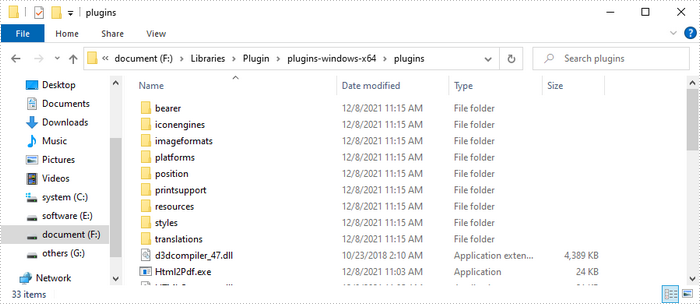
Descompacte o pacote em algum lugar do seu disco para obter a pasta "plugins". Neste exemplo, salvamos o plug-in no caminho "F:\Libraries\Plugin\plugins-windows-x64\plugins".
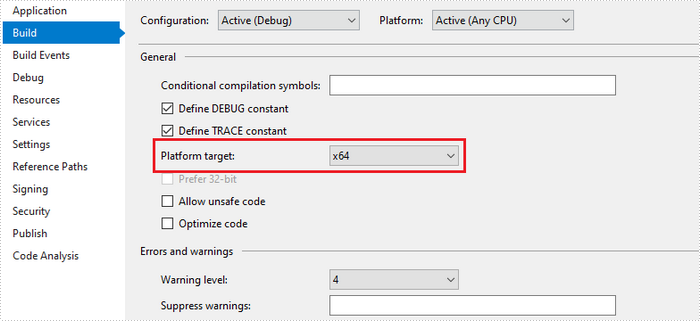
Além disso, recomendamos que você defina a "Platform target" do seu projeto para x64 ou x86 de acordo.
Converta um URL para PDF com o QT Plugin
A seguir estão as etapas para converter um URL em PDF usando o Spire.PDF com o plug-in QT.
- Especifique o caminho da URL para converter.
- Especifique o caminho do arquivo PDF gerado.
- Especifique o caminho do plug-in e atribua-o como o valor da propriedade HtmlConverter.PluginPath.
- Chame o método HtmlConverter.Convert(string url, string fileName, bool enableJavaScript, int timeout, SizeF pageSize, margens PdfMargins) para converter um URL em um documento PDF.
- C#
- VB.NET
using Spire.Pdf.Graphics;
    using Spire.Pdf.HtmlConverter.Qt;
    using System.Drawing;

    namespace ConvertUrlToPdf
    {
        class Program
        {
            static void Main(string[] args)
            {
                //Specify the URL path
                string url = "https://www.wikipedia.org/";

                //Specify the output file path
                string fileName = "UrlToPdf.pdf";

                //Specify the plugin path
                 string pluginPath = "F:\\Libraries\\Plugin\\plugins-windows-x64\\plugins";

                //Set the plugin path
                 HtmlConverter.PluginPath = pluginPath;

                //Convert URL to PDF
                HtmlConverter.Convert(url, fileName, true, 100000, new Size(1080, 1000), new PdfMargins(0));
            }
        }
    }
Converter uma string HTML em PDF com o plug-in QT
A seguir estão as etapas para converter uma string HTML em PDF usando o Spire.PDF com o plug-in QT.
- Obtenha a string HTML de um arquivo .html.
- Especifique o caminho do arquivo PDF gerado.
- Especifique o caminho do plug-in e atribua-o como o valor da propriedade HtmlConverter.PluginPath.
- Chame o método HtmlConverter.Convert(string htmlString, string fileName, bool enableJavaScript, int timeout, SizeF pageSize, PdfMargins, Spire.Pdf.HtmlConverter.LoadHtmlType htmlType) para converter string HTML em um documento PDF.
Observação: somente o estilo CSS embutido e o estilo CSS interno podem ser renderizados corretamente no PDF. Se você tiver uma folha de estilo CSS externa, converta-a em estilo CSS embutido ou interno.
- C#
- VB.NET
using System.IO;
    using Spire.Pdf.HtmlConverter.Qt;
    using System.Drawing;
    using Spire.Pdf.Graphics;

    namespace ConvertHtmlStringToPdfWithPlugin
    {
        class Program
        {
            static void Main(string[] args)
            {
                //Get the HTML string from a .html file
                string htmlString = File.ReadAllText(@"C:\Users\Administrator\Desktop\Document\Html\Sample.html");

                //Specify the output file path
                string fileName = "HtmlStringToPdf.pdf";

                //Specify the plugin path
                string pluginPath = "F:\\Libraries\\Plugin\\plugins-windows-x64\\plugins";

                //Set plugin path
                HtmlConverter.PluginPath = pluginPath;

                //Convert HTML string to PDF
                HtmlConverter.Convert(htmlString, fileName, true, 100000, new Size(1080, 1000), new PdfMargins(0), Spire.Pdf.HtmlConverter.LoadHtmlType.SourceCode);
            }
        }
    }
Converter um URL em PDF sem plug-in
A seguir estão as etapas para converter um URL em PDF usando Spire.PDF sem plug-in.
- Crie um objeto PdfDocument.
- Crie um objeto PdfPageSettings e defina o tamanho da página e as margens por meio dele.
- Crie um objeto PdfHtmlLayoutFormat e defina a propriedade sWaiting dele como true.
- Especifique o caminho da URL para converter.
- Carregue o HTML do caminho da URL usando o método PdfDocument.LoadFromHTML().
- Salve o documento em um arquivo PDF usando o método PdfDocument.SaveToFile().
- C#
- VB.NET
using System;
    using Spire.Pdf;
    using System.Threading;
    using Spire.Pdf.HtmlConverter;
    using System.Drawing;

    namespace ConverUrlToPdfWithoutPlugin
    {
        class Program
        {
            static void Main(string[] args)
            {
                //Create a PdfDocument object
                PdfDocument doc = new PdfDocument();

                //Create a PdfPageSettings object
                PdfPageSettings setting = new PdfPageSettings();

                //Save page size and margins through the object
                setting.Size = new SizeF(1000, 1000);
                setting.Margins = new Spire.Pdf.Graphics.PdfMargins(20);

                //Create a PdfHtmlLayoutFormat object
                PdfHtmlLayoutFormat htmlLayoutFormat = new PdfHtmlLayoutFormat();

                //Set IsWaiting property to true
                htmlLayoutFormat.IsWaiting = true;

                //Specific the URL path to convert
                String url = "https://www.wikipedia.org/";

                //Load HTML from a URL path using LoadFromHTML method
                Thread thread = new Thread(() =>
                { doc.LoadFromHTML(url, true, true, false, setting, htmlLayoutFormat); });
                thread.SetApartmentState(ApartmentState.STA);
                thread.Start();
                thread.Join();

                //Save the document to a PDF file
                doc.SaveToFile("UrlToPdf.pdf");
                doc.Close();
            }
        }
    }
Converter uma string HTML em PDF sem plug-in
A seguir estão as etapas para converter uma string HTML em PDF usando Spire.PDF sem plug-in.
- Crie um objeto PdfDocument.
- Crie um objeto PdfPageSettings e defina o tamanho da página e as margens por meio dele.
- Crie um objeto PdfHtmlLayoutFormat e defina a propriedade IsWaiting dele como true.
- Leia a string HTML de um arquivo .html.
- Carregue o HTML da string HTML usando o método PdfDocument.LoadFromHTML().
- Salve o documento em um arquivo PDF usando o método PdfDocument.SaveToFile().
- C#
- VB.NET
using Spire.Pdf;
    using Spire.Pdf.HtmlConverter;
    using System.IO;
    using System.Threading;
    using System.Drawing;

    namespace ConvertHtmlStringToPdfWithoutPlugin
    {
        class Program
        {
            static void Main(string[] args)
            {
                //Create a PdfDocument object
                PdfDocument doc = new PdfDocument();

                //Create a PdfPageSettings object
                PdfPageSettings setting = new PdfPageSettings();

                //Save page size and margins through the object
                setting.Size = new SizeF(1000, 1000);
                setting.Margins = new Spire.Pdf.Graphics.PdfMargins(20);

                //Create a PdfHtmlLayoutFormat object
                PdfHtmlLayoutFormat htmlLayoutFormat = new PdfHtmlLayoutFormat();

                //Set IsWaiting property to true
                htmlLayoutFormat.IsWaiting = true;

                //Read html string from a .html file
                string htmlString = File.ReadAllText(@"C:\Users\Administrator\Desktop\Document\Html\Sample.html");

                //Load HTML from html string using LoadFromHTML method
                Thread thread = new Thread(() =>
                { doc.LoadFromHTML(htmlString, true, setting, htmlLayoutFormat); });
                thread.SetApartmentState(ApartmentState.STA);
                thread.Start();
                thread.Join();

                //Save to a PDF file
                doc.SaveToFile("HtmlStringToPdf.pdf");
            }
        }
    }
Solicitar uma licença temporária
Se você deseja remover a mensagem de avaliação dos documentos gerados ou se livrar das limitações de função, por favor solicite uma licença de teste de 30 dias para você mesmo.
C#/VB.NET: преобразование HTML в PDF
Оглавление
Установлено через NuGet
PM> Install-Package Spire.PDF
Ссылки по теме
Преобразование содержимого HTML в формат PDF дает множество преимуществ, в том числе возможность чтения в автономном режиме, а также сохранение содержимого и форматирования с высокой точностью. Spire.PDF предоставляет два метода преобразования HTML в PDF: один заключается в использовании веб-плагина QT, а другой — без использования плагина. Мы рекомендуем вам использовать плагин QT для преобразования.
В следующих разделах показано, как визуализировать Веб-страница в формате HTML (URL) или строку HTML в документ PDF с использованием Spire.PDF for .NET с подключаемым модулем QT или без него.
- Преобразование URL-адреса в PDF с помощью плагина QT
- Преобразование строки HTML в PDF с помощью плагина QT
- Преобразование URL в PDF без плагина
- Преобразование строки HTML в PDF без плагина
Установите Spire.PDF for .NET
Для начала вам нужно добавить файлы DLL, включенные в пакет Spire.PDF for .NET, в качестве ссылок в ваш проект .NET. Файлы DLL можно загрузить по этой ссылке или установить через NuGet.
PM> Install-Package Spire.PDF
Скачать плагин
Если вы выберете метод плагина, загрузите плагин, который подходит для вашей операционной системы, по следующей ссылке.
Разархивируйте пакет где-нибудь на вашем диске, чтобы получить папку «плагины». В этом примере мы сохранили плагин по пути "F:\Libraries\Plugin\plugins-windows-x64\plugins".
Кроме того, мы рекомендуем вам установить «Целевая платформа» вашего проекта на x64 или x86 соответственно.
Преобразование URL-адреса в PDF с помощью плагина QT
Ниже приведены шаги для преобразования URL-адреса в PDF с помощью Spire.PDF с подключаемым модулем QT.
- Укажите URL-адрес для преобразования.
- Укажите путь к сгенерированному файлу PDF.
- Укажите путь к подключаемому модулю и назначьте его в качестве значения свойства HtmlConverter.PluginPath.
- Вызовите метод HtmlConverter.Convert(string url, string fileName, bool enableJavaScript, int timeout, SizeF pageSize, PdfMargins margins) для преобразования URL-адреса в документ PDF.
- C#
- VB.NET
using Spire.Pdf.Graphics;
    using Spire.Pdf.HtmlConverter.Qt;
    using System.Drawing;

    namespace ConvertUrlToPdf
    {
        class Program
        {
            static void Main(string[] args)
            {
                //Specify the URL path
                string url = "https://www.wikipedia.org/";

                //Specify the output file path
                string fileName = "UrlToPdf.pdf";

                //Specify the plugin path
                 string pluginPath = "F:\\Libraries\\Plugin\\plugins-windows-x64\\plugins";

                //Set the plugin path
                 HtmlConverter.PluginPath = pluginPath;

                //Convert URL to PDF
                HtmlConverter.Convert(url, fileName, true, 100000, new Size(1080, 1000), new PdfMargins(0));
            }
        }
    }
Преобразование строки HTML в PDF с помощью плагина QT
Ниже приведены шаги для преобразования строки HTML в PDF с помощью Spire.PDF с подключаемым модулем QT.
- Получите строку HTML из файла .html.
- Укажите путь к сгенерированному файлу PDF.
- Укажите путь к подключаемому модулю и назначьте его в качестве значения свойства HtmlConverter.PluginPath.
- Вызовите метод HtmlConverter.Convert(string htmlString, string fileName, bool enableJavaScript, int timeout, SizeF pageSize, PdfMargins margins, Spire.Pdf.HtmlConverter.LoadHtmlType htmlType) для преобразования строки HTML в документ PDF.
Примечание. Только встроенный стиль CSS и внутренний стиль CSS могут правильно отображаться в PDF. Если у вас есть внешняя таблица стилей CSS, преобразуйте ее во встроенный или внутренний стиль CSS.
- C#
- VB.NET
using System.IO;
    using Spire.Pdf.HtmlConverter.Qt;
    using System.Drawing;
    using Spire.Pdf.Graphics;

    namespace ConvertHtmlStringToPdfWithPlugin
    {
        class Program
        {
            static void Main(string[] args)
            {
                //Get the HTML string from a .html file
                string htmlString = File.ReadAllText(@"C:\Users\Administrator\Desktop\Document\Html\Sample.html");

                //Specify the output file path
                string fileName = "HtmlStringToPdf.pdf";

                //Specify the plugin path
                string pluginPath = "F:\\Libraries\\Plugin\\plugins-windows-x64\\plugins";

                //Set plugin path
                HtmlConverter.PluginPath = pluginPath;

                //Convert HTML string to PDF
                HtmlConverter.Convert(htmlString, fileName, true, 100000, new Size(1080, 1000), new PdfMargins(0), Spire.Pdf.HtmlConverter.LoadHtmlType.SourceCode);
            }
        }
    }
Преобразование URL в PDF без плагина
Ниже приведены шаги для преобразования URL-адреса в PDF с помощью Spire.PDF без плагина.
- Создайте объект PdfDocument.
- Создайте объект PdfPageSettings и задайте через него размер страницы и поля.
- Создайте объект PdfHtmlLayoutFormat и задайте для его свойства IsWaiting значение true.
- Укажите URL-адрес для преобразования.
- Загрузите HTML из пути URL, используя метод PdfDocument.LoadFromHTML().
- Сохраните документ в файл PDF с помощью метода PdfDocument.SaveToFile().
- C#
- VB.NET
using System;
    using Spire.Pdf;
    using System.Threading;
    using Spire.Pdf.HtmlConverter;
    using System.Drawing;

    namespace ConverUrlToPdfWithoutPlugin
    {
        class Program
        {
            static void Main(string[] args)
            {
                //Create a PdfDocument object
                PdfDocument doc = new PdfDocument();

                //Create a PdfPageSettings object
                PdfPageSettings setting = new PdfPageSettings();

                //Save page size and margins through the object
                setting.Size = new SizeF(1000, 1000);
                setting.Margins = new Spire.Pdf.Graphics.PdfMargins(20);

                //Create a PdfHtmlLayoutFormat object
                PdfHtmlLayoutFormat htmlLayoutFormat = new PdfHtmlLayoutFormat();

                //Set IsWaiting property to true
                htmlLayoutFormat.IsWaiting = true;

                //Specific the URL path to convert
                String url = "https://www.wikipedia.org/";

                //Load HTML from a URL path using LoadFromHTML method
                Thread thread = new Thread(() =>
                { doc.LoadFromHTML(url, true, true, false, setting, htmlLayoutFormat); });
                thread.SetApartmentState(ApartmentState.STA);
                thread.Start();
                thread.Join();

                //Save the document to a PDF file
                doc.SaveToFile("UrlToPdf.pdf");
                doc.Close();
            }
        }
    }
Преобразование строки HTML в PDF без плагина
Ниже приведены шаги для преобразования строки HTML в PDF с помощью Spire.PDF без подключаемого модуля.
- Создайте объект PdfDocument.
- Создайте объект PdfPageSettings и задайте через него размер страницы и поля.
- Создайте объект PdfHtmlLayoutFormat и задайте для его свойства IsWaiting значение true.
- Прочитайте строку HTML из файла .html.
- Загрузите HTML из строки HTML, используя метод PdfDocument.LoadFromHTML().
- Сохраните документ в файл PDF с помощью метода PdfDocument.SaveToFile().
- C#
- VB.NET
using Spire.Pdf;
    using Spire.Pdf.HtmlConverter;
    using System.IO;
    using System.Threading;
    using System.Drawing;

    namespace ConvertHtmlStringToPdfWithoutPlugin
    {
        class Program
        {
            static void Main(string[] args)
            {
                //Create a PdfDocument object
                PdfDocument doc = new PdfDocument();

                //Create a PdfPageSettings object
                PdfPageSettings setting = new PdfPageSettings();

                //Save page size and margins through the object
                setting.Size = new SizeF(1000, 1000);
                setting.Margins = new Spire.Pdf.Graphics.PdfMargins(20);

                //Create a PdfHtmlLayoutFormat object
                PdfHtmlLayoutFormat htmlLayoutFormat = new PdfHtmlLayoutFormat();

                //Set IsWaiting property to true
                htmlLayoutFormat.IsWaiting = true;

                //Read html string from a .html file
                string htmlString = File.ReadAllText(@"C:\Users\Administrator\Desktop\Document\Html\Sample.html");

                //Load HTML from html string using LoadFromHTML method
                Thread thread = new Thread(() =>
                { doc.LoadFromHTML(htmlString, true, setting, htmlLayoutFormat); });
                thread.SetApartmentState(ApartmentState.STA);
                thread.Start();
                thread.Join();

                //Save to a PDF file
                doc.SaveToFile("HtmlStringToPdf.pdf");
            }
        }
    }
Подать заявку на временную лицензию
Если вы хотите удалить оценочное сообщение из сгенерированных документов или избавиться от функциональных ограничений, пожалуйста запросить 30-дневную пробную лицензию для себя.
C#/VB.NET: HTML in PDF konvertieren
Inhaltsverzeichnis
Über NuGet installiert
PM> Install-Package Spire.PDF
verwandte Links
Das Konvertieren von HTML-Inhalten in PDF bietet viele Vorteile, darunter die Möglichkeit, sie offline zu lesen sowie den Inhalt und die Formatierung mit hoher Wiedergabetreue beizubehalten. Spire.PDF bietet zwei Methoden zum Konvertieren von HTML in PDF: Eine besteht darin, das QT-Web-Plugin zu verwenden, die andere darin, kein Plugin zu verwenden. Wir empfehlen Ihnen, für die Konvertierung das QT-Plugin zu verwenden.
In den folgenden Abschnitten wird gezeigt, wie Sie mit Spire.PDF for .NET mit oder ohne QT-Plugin eine HTML-Webseite (URL) oder einen HTML-String in ein PDF-Dokument rendern.
- Konvertieren Sie eine URL mit dem QT-Plugin in PDF
- Konvertieren Sie einen HTML-String in PDF mit dem QT-Plugin
- Konvertieren Sie eine URL ohne Plugin in PDF
- Konvertieren Sie einen HTML-String in PDF ohne Plugin
Installieren Spire.PDF for .NET
Zunächst müssen Sie die im Spire.PDF for.NET-Paket enthaltenen DLL-Dateien als Referenzen in Ihrem .NET-Projekt hinzufügen. Die DLL-Dateien können entweder über diesen Link heruntergeladen oder über NuGet installiert werden.
PM> Install-Package Spire.PDF
Plugin herunterladen
Wenn Sie sich für die Plugin-Methode entscheiden, laden Sie bitte über den folgenden Link das Plugin herunter, das zu Ihrem Betriebssystem passt.
Entpacken Sie das Paket irgendwo auf Ihrer Festplatte, um den Ordner „plugins“ zu erhalten. In diesem Beispiel haben wir das Plugin unter dem Pfad "F:\Libraries\Plugin\plugins-windows-x64\plugins".
Außerdem empfehlen wir Ihnen, das „Plattformziel“ Ihres Projekts entsprechend auf x64 oder x86 festzulegen.
Konvertieren Sie eine URL mit dem QT-Plugin in PDF
Im Folgenden finden Sie die Schritte zum Konvertieren einer URL in PDF mithilfe von Spire.PDF mit dem QT-Plugin.
- Geben Sie den zu konvertierenden URL-Pfad an.
- Geben Sie den Pfad der generierten PDF-Datei an.
- Geben Sie den Plugin-Pfad an und weisen Sie ihn als Wert der HtmlConverter.PluginPath-Eigenschaft zu.
- Rufen Sie die Methode HtmlConverter.Convert(string url, string fileName, bool enableJavaScript, int timeout, SizeF pageSize, PdfMargins margins) auf, um eine URL in ein PDF-Dokument zu konvertieren.
- C#
- VB.NET
using Spire.Pdf.Graphics;
    using Spire.Pdf.HtmlConverter.Qt;
    using System.Drawing;

    namespace ConvertUrlToPdf
    {
        class Program
        {
            static void Main(string[] args)
            {
                //Specify the URL path
                string url = "https://www.wikipedia.org/";

                //Specify the output file path
                string fileName = "UrlToPdf.pdf";

                //Specify the plugin path
                 string pluginPath = "F:\\Libraries\\Plugin\\plugins-windows-x64\\plugins";

                //Set the plugin path
                 HtmlConverter.PluginPath = pluginPath;

                //Convert URL to PDF
                HtmlConverter.Convert(url, fileName, true, 100000, new Size(1080, 1000), new PdfMargins(0));
            }
        }
    }
Konvertieren Sie einen HTML-String in PDF mit dem QT-Plugin
Im Folgenden finden Sie die Schritte zum Konvertieren einer HTML-Zeichenfolge in PDF mithilfe von Spire.PDF mit dem QT-Plugin.
- Holen Sie sich die HTML-Zeichenfolge aus einer .html-Datei.
- Geben Sie den Pfad der generierten PDF-Datei an.
- Geben Sie den Plugin-Pfad an und weisen Sie ihn als Wert der HtmlConverter.PluginPath-Eigenschaft zu.
- Rufen Sie die Methode HtmlConverter.Convert(string htmlString, string fileName, bool enableJavaScript, int timeout, SizeF pageSize, PdfMargins margins, Spire.Pdf.HtmlConverter.LoadHtmlType htmlType) auf, um eine HTML-Zeichenfolge in ein PDF-Dokument zu konvertieren.
Hinweis: Nur der Inline-CSS-Stil und der interne CSS-Stil können in PDF korrekt gerendert werden. Wenn Sie über ein externes CSS-Stylesheet verfügen, konvertieren Sie es bitte in einen Inline- oder internen CSS-Stil.
- C#
- VB.NET
using System.IO;
    using Spire.Pdf.HtmlConverter.Qt;
    using System.Drawing;
    using Spire.Pdf.Graphics;

    namespace ConvertHtmlStringToPdfWithPlugin
    {
        class Program
        {
            static void Main(string[] args)
            {
                //Get the HTML string from a .html file
                string htmlString = File.ReadAllText(@"C:\Users\Administrator\Desktop\Document\Html\Sample.html");

                //Specify the output file path
                string fileName = "HtmlStringToPdf.pdf";

                //Specify the plugin path
                string pluginPath = "F:\\Libraries\\Plugin\\plugins-windows-x64\\plugins";

                //Set plugin path
                HtmlConverter.PluginPath = pluginPath;

                //Convert HTML string to PDF
                HtmlConverter.Convert(htmlString, fileName, true, 100000, new Size(1080, 1000), new PdfMargins(0), Spire.Pdf.HtmlConverter.LoadHtmlType.SourceCode);
            }
        }
    }
Konvertieren Sie eine URL ohne Plugin in PDF
Im Folgenden finden Sie die Schritte zum Konvertieren einer URL in PDF mit Spire.PDF ohne Plugin.
- Erstellen Sie ein PdfDocument-Objekt.
- Erstellen Sie ein PdfPageSettings-Objekt und legen Sie damit die Seitengröße und die Ränder fest.
- Erstellen Sie ein PdfHtmlLayoutFormat-Objekt und setzen Sie dessen IsWaiting-Eigenschaft auf true.
- Geben Sie den zu konvertierenden URL-Pfad an.
- Laden Sie HTML aus dem URL-Pfad mit der Methode PdfDocument.LoadFromHTML().
- Speichern Sie das Dokument mit der Methode PdfDocument.SaveToFile() in einer PDF-Datei.
- C#
- VB.NET
using System;
    using Spire.Pdf;
    using System.Threading;
    using Spire.Pdf.HtmlConverter;
    using System.Drawing;

    namespace ConverUrlToPdfWithoutPlugin
    {
        class Program
        {
            static void Main(string[] args)
            {
                //Create a PdfDocument object
                PdfDocument doc = new PdfDocument();

                //Create a PdfPageSettings object
                PdfPageSettings setting = new PdfPageSettings();

                //Save page size and margins through the object
                setting.Size = new SizeF(1000, 1000);
                setting.Margins = new Spire.Pdf.Graphics.PdfMargins(20);

                //Create a PdfHtmlLayoutFormat object
                PdfHtmlLayoutFormat htmlLayoutFormat = new PdfHtmlLayoutFormat();

                //Set IsWaiting property to true
                htmlLayoutFormat.IsWaiting = true;

                //Specific the URL path to convert
                String url = "https://www.wikipedia.org/";

                //Load HTML from a URL path using LoadFromHTML method
                Thread thread = new Thread(() =>
                { doc.LoadFromHTML(url, true, true, false, setting, htmlLayoutFormat); });
                thread.SetApartmentState(ApartmentState.STA);
                thread.Start();
                thread.Join();

                //Save the document to a PDF file
                doc.SaveToFile("UrlToPdf.pdf");
                doc.Close();
            }
        }
    }
Konvertieren Sie einen HTML-String in PDF ohne Plugin
Im Folgenden finden Sie die Schritte zum Konvertieren einer HTML-Zeichenfolge in PDF mit Spire.PDF ohne Plugin.
- Erstellen Sie ein PdfDocument-Objekt.
- Erstellen Sie ein PdfPageSettings-Objekt und legen Sie damit die Seitengröße und die Ränder fest.
- Erstellen Sie ein PdfHtmlLayoutFormat-Objekt und setzen Sie dessen IsWaiting-Eigenschaft auf true.
- Lesen Sie die HTML-Zeichenfolge aus einer .html-Datei.
- Laden Sie HTML aus der HTML-Zeichenfolge mit der Methode PdfDocument.LoadFromHTML().
- Speichern Sie das Dokument mit der Methode PdfDocument.SaveToFile() in einer PDF-Datei.
- C#
- VB.NET
using Spire.Pdf;
    using Spire.Pdf.HtmlConverter;
    using System.IO;
    using System.Threading;
    using System.Drawing;

    namespace ConvertHtmlStringToPdfWithoutPlugin
    {
        class Program
        {
            static void Main(string[] args)
            {
                //Create a PdfDocument object
                PdfDocument doc = new PdfDocument();

                //Create a PdfPageSettings object
                PdfPageSettings setting = new PdfPageSettings();

                //Save page size and margins through the object
                setting.Size = new SizeF(1000, 1000);
                setting.Margins = new Spire.Pdf.Graphics.PdfMargins(20);

                //Create a PdfHtmlLayoutFormat object
                PdfHtmlLayoutFormat htmlLayoutFormat = new PdfHtmlLayoutFormat();

                //Set IsWaiting property to true
                htmlLayoutFormat.IsWaiting = true;

                //Read html string from a .html file
                string htmlString = File.ReadAllText(@"C:\Users\Administrator\Desktop\Document\Html\Sample.html");

                //Load HTML from html string using LoadFromHTML method
                Thread thread = new Thread(() =>
                { doc.LoadFromHTML(htmlString, true, setting, htmlLayoutFormat); });
                thread.SetApartmentState(ApartmentState.STA);
                thread.Start();
                thread.Join();

                //Save to a PDF file
                doc.SaveToFile("HtmlStringToPdf.pdf");
            }
        }
    }
Beantragen Sie eine temporäre Lizenz
Wenn Sie die Bewertungsmeldung aus den generierten Dokumenten entfernen oder die Funktionseinschränkungen beseitigen möchten, wenden Sie sich bitte an uns Fordern Sie eine 30-Tage-Testlizenz an für sich selbst.
C#/VB.NET: convertir HTML a PDF
Tabla de contenido
Instalado a través de NuGet
PM> Install-Package Spire.PDF
enlaces relacionados
La conversión de contenido HTML a PDF ofrece muchas ventajas, incluida la capacidad de leerlo sin conexión, así como la conservación del contenido y el formato con alta fidelidad. Spire.PDF proporciona dos métodos para convertir HTML a PDF, uno es usar el complemento web QT, el otro es no usar el complemento. Le recomendamos que utilice el complemento QT para realizar la conversión.
Las siguientes secciones muestran cómo representar una página web HTML (URL) o una cadena HTML en un documento PDF usando Spire.PDF for .NET con o sin el complemento QT.
- Convierta una URL a PDF con el complemento QT
- Convierta una cadena HTML a PDF con el complemento QT
- Convertir una URL a PDF sin complemento
- Convierta una cadena HTML a PDF sin complemento
Instalar Spire.PDF for .NET
Para empezar, debe agregar los archivos DLL incluidos en el paquete Spire.PDF for .NET como referencias en su proyecto .NET. Los archivos DLL se pueden descargar desde este enlace o instalar a través de NuGet.
PM> Install-Package Spire.PDF
Descargar complemento
Si elige el método de complemento, descargue el complemento que se ajuste a su sistema operativo desde el siguiente enlace.
Descomprima el paquete en algún lugar de su disco para obtener la carpeta "complementos". En este ejemplo, guardamos el complemento en la ruta "F:\Libraries\Plugin\plugins-windows-x64\plugins".
Además, le recomendamos que establezca el "Objetivo de la plataforma" de su proyecto en x64 o x86 según corresponda.
Convierta una URL a PDF con el complemento QT
Los siguientes son los pasos para convertir una URL a PDF usando Spire.PDF con el complemento QT.
- Especifique la ruta URL para convertir.
- Especifique la ruta del archivo PDF generado.
- Especifique la ruta del complemento y asígnela como el valor de la propiedad HtmlConverter.PluginPath.
- Llame al método HtmlConverter.Convert(string url, string fileName, bool enableJavaScript, int timeout, SizeF pageSize, PdfMargins margins) para convertir una URL en un documento PDF.
- C#
- VB.NET
using Spire.Pdf.Graphics;
    using Spire.Pdf.HtmlConverter.Qt;
    using System.Drawing;

    namespace ConvertUrlToPdf
    {
        class Program
        {
            static void Main(string[] args)
            {
                //Specify the URL path
                string url = "https://www.wikipedia.org/";

                //Specify the output file path
                string fileName = "UrlToPdf.pdf";

                //Specify the plugin path
                 string pluginPath = "F:\\Libraries\\Plugin\\plugins-windows-x64\\plugins";

                //Set the plugin path
                 HtmlConverter.PluginPath = pluginPath;

                //Convert URL to PDF
                HtmlConverter.Convert(url, fileName, true, 100000, new Size(1080, 1000), new PdfMargins(0));
            }
        }
    }
Convierta una cadena HTML a PDF con el complemento QT
Los siguientes son los pasos para convertir una cadena HTML a PDF usando Spire.PDF con el complemento QT.
- Obtenga la cadena HTML de un archivo .html.
- Especifique la ruta del archivo PDF generado.
- Especifique la ruta del complemento y asígnela como el valor de la propiedad HtmlConverter.PluginPath.
- Llame al método HtmlConverter.Convert(string htmlString, string fileName, bool enableJavaScript, int timeout, SizeF pageSize, PdfMargins margins, Spire.Pdf.HtmlConverter.LoadHtmlType htmlType) para convertir una cadena HTML en un documento PDF.
Nota: Solo el estilo CSS en línea y el estilo CSS interno se pueden representar correctamente en PDF. Si tiene una hoja de estilo CSS externa, conviértala a un estilo CSS en línea o interno.
- C#
- VB.NET
using System.IO;
    using Spire.Pdf.HtmlConverter.Qt;
    using System.Drawing;
    using Spire.Pdf.Graphics;

    namespace ConvertHtmlStringToPdfWithPlugin
    {
        class Program
        {
            static void Main(string[] args)
            {
                //Get the HTML string from a .html file
                string htmlString = File.ReadAllText(@"C:\Users\Administrator\Desktop\Document\Html\Sample.html");

                //Specify the output file path
                string fileName = "HtmlStringToPdf.pdf";

                //Specify the plugin path
                string pluginPath = "F:\\Libraries\\Plugin\\plugins-windows-x64\\plugins";

                //Set plugin path
                HtmlConverter.PluginPath = pluginPath;

                //Convert HTML string to PDF
                HtmlConverter.Convert(htmlString, fileName, true, 100000, new Size(1080, 1000), new PdfMargins(0), Spire.Pdf.HtmlConverter.LoadHtmlType.SourceCode);
            }
        }
    }
Convertir una URL a PDF sin complemento
Los siguientes son los pasos para convertir una URL a PDF usando Spire.PDF sin complemento.
- Cree un objeto PdfDocument.
- Cree un objeto PdfPageSettings y establezca el tamaño de página y los márgenes a través de él.
- Cree un objeto PdfHtmlLayoutFormat y establezca su propiedad IsWaiting en true.
- Especifique la ruta URL para convertir.
- Cargue HTML desde la ruta URL usando el método PdfDocument.LoadFromHTML().
- Guarde el documento en un archivo PDF utilizando el método PdfDocument.SaveToFile().
- C#
- VB.NET
using System;
    using Spire.Pdf;
    using System.Threading;
    using Spire.Pdf.HtmlConverter;
    using System.Drawing;

    namespace ConverUrlToPdfWithoutPlugin
    {
        class Program
        {
            static void Main(string[] args)
            {
                //Create a PdfDocument object
                PdfDocument doc = new PdfDocument();

                //Create a PdfPageSettings object
                PdfPageSettings setting = new PdfPageSettings();

                //Save page size and margins through the object
                setting.Size = new SizeF(1000, 1000);
                setting.Margins = new Spire.Pdf.Graphics.PdfMargins(20);

                //Create a PdfHtmlLayoutFormat object
                PdfHtmlLayoutFormat htmlLayoutFormat = new PdfHtmlLayoutFormat();

                //Set IsWaiting property to true
                htmlLayoutFormat.IsWaiting = true;

                //Specific the URL path to convert
                String url = "https://www.wikipedia.org/";

                //Load HTML from a URL path using LoadFromHTML method
                Thread thread = new Thread(() =>
                { doc.LoadFromHTML(url, true, true, false, setting, htmlLayoutFormat); });
                thread.SetApartmentState(ApartmentState.STA);
                thread.Start();
                thread.Join();

                //Save the document to a PDF file
                doc.SaveToFile("UrlToPdf.pdf");
                doc.Close();
            }
        }
    }
Convierta una cadena HTML a PDF sin complemento
Los siguientes son los pasos para convertir una cadena HTML a PDF usando Spire.PDF sin complemento.
- Cree un objeto PdfDocument.
- Cree un objeto PdfPageSettings y establezca el tamaño de página y los márgenes a través de él.
- Cree un objeto PdfHtmlLayoutFormat y establezca su propiedad IsWaiting en true.
- Lea la cadena HTML de un archivo .html.
- Cargue HTML desde la cadena HTML utilizando el método PdfDocument.LoadFromHTML().
- Guarde el documento en un archivo PDF utilizando el método PdfDocument.SaveToFile().
- C#
- VB.NET
using Spire.Pdf;
    using Spire.Pdf.HtmlConverter;
    using System.IO;
    using System.Threading;
    using System.Drawing;

    namespace ConvertHtmlStringToPdfWithoutPlugin
    {
        class Program
        {
            static void Main(string[] args)
            {
                //Create a PdfDocument object
                PdfDocument doc = new PdfDocument();

                //Create a PdfPageSettings object
                PdfPageSettings setting = new PdfPageSettings();

                //Save page size and margins through the object
                setting.Size = new SizeF(1000, 1000);
                setting.Margins = new Spire.Pdf.Graphics.PdfMargins(20);

                //Create a PdfHtmlLayoutFormat object
                PdfHtmlLayoutFormat htmlLayoutFormat = new PdfHtmlLayoutFormat();

                //Set IsWaiting property to true
                htmlLayoutFormat.IsWaiting = true;

                //Read html string from a .html file
                string htmlString = File.ReadAllText(@"C:\Users\Administrator\Desktop\Document\Html\Sample.html");

                //Load HTML from html string using LoadFromHTML method
                Thread thread = new Thread(() =>
                { doc.LoadFromHTML(htmlString, true, setting, htmlLayoutFormat); });
                thread.SetApartmentState(ApartmentState.STA);
                thread.Start();
                thread.Join();

                //Save to a PDF file
                doc.SaveToFile("HtmlStringToPdf.pdf");
            }
        }
    }
Solicitar una Licencia Temporal
Si desea eliminar el mensaje de evaluación de los documentos generados o deshacerse de las limitaciones de la función, por favor solicitar una licencia de prueba de 30 días para ti.