C# Konvertieren Sie Excel in HTML
Inhaltsverzeichnis
Über NuGet installiert
PM> Install-Package Spire.XLS
verwandte Links
Wenn Sie eine Excel-Tabelle erstellen und diese als Webseite online veröffentlichen möchten, ist es am einfachsten, sie in eine HTML-Datei zu konvertieren. Dieser Artikel wird es demonstrieren So konvertieren Sie Excel programmgesteuert in HTML aus den folgenden zwei Aspekten bei der Verwendung von Spire.XLS for .NET.
Installieren Sie Spire.XLS for .NET
Zunächst müssen Sie die im Spire.XLS for .NET-Paket enthaltenen DLL-Dateien als Referenzen in Ihrem .NET-Projekt hinzufügen. Die DLL-Dateien können entweder über diesen Link heruntergeladen oder über NuGet installiert werden.
PM> Install-Package Spire.XLS
Konvertieren Sie Excel in HTML
Spire.XLS for .NET unterstützt die Konvertierung eines bestimmten Excel-Arbeitsblatts in HTML mithilfe der Worksheet.SaveToHtml()-Methode. Detaillierte Schritte sind unten aufgeführt.
- Erstellen Sie eine Arbeitsmappeninstanz.
- Laden Sie ein Excel-Beispieldokument mit der Methode Workbook.LoadFromFile().
- Rufen Sie ein bestimmtes Arbeitsblatt mit der Eigenschaft Workbook.Worksheets[] ab
- Speichern Sie das Arbeitsblatt als HTML-Datei mit der Methode Worksheet.SaveToHtml().
- C#
- VB.NET
using Spire.Xls;

    namespace XLSToHTML

    {
        class Program
        {
            static void Main(string[] args)
            {
                //Create a Workbook instance
                Workbook workbook = new Workbook();

                //Load an Excel sample document
                workbook.LoadFromFile(@"sample.xlsx");

                //Get the first worksheet of the document
                Worksheet sheet = workbook.Worksheets[0];

                //Save the worksheet to HTML
                sheet.SaveToHtml("ExcelToHTML.html");
            }
        }
    }
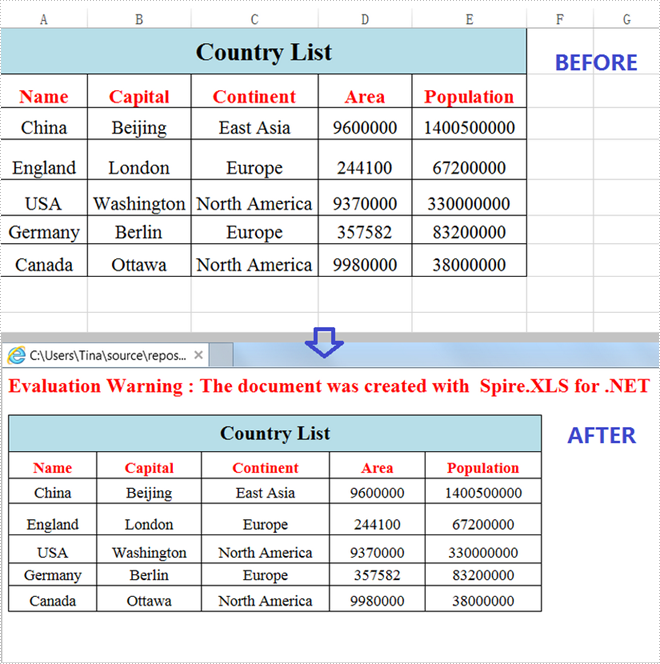
Konvertieren Sie Excel mit eingebetteten Bildern in HTML
Im Folgenden finden Sie Schritte zum Konvertieren eines Excel-Arbeitsblatts in HTML mit eingebetteten Bildern.
- Erstellen Sie eine Arbeitsmappeninstanz.
- Laden Sie ein Excel-Beispieldokument mit der Methode Workbook.LoadFromFile().
- Rufen Sie ein bestimmtes Arbeitsblatt mit der Eigenschaft Workbook.Worksheets[] ab.
- Erstellen Sie eine HTMLOptions-Instanz.
- Legen Sie ImageEmbedded auf „true“ fest, um Bilder in HTML einzubetten.
- Speichern Sie das Arbeitsblatt als HTML-Datei mit der Methode Worksheet.SaveToHtml().
- C#
- VB.NET
using Spire.Xls;
    using Spire.Xls.Core.Spreadsheet;

    namespace XLSToHTML

    {
        class Program
        {
            static void Main(string[] args)
            {
                //Create a Workbook instance
                Workbook workbook = new Workbook();

                //Load an Excel sample document
                workbook.LoadFromFile(@"sample.xlsx");

                //Get the first worksheet of the document
                Worksheet sheet = workbook.Worksheets[0];

                //Create an HTMLOptions instance
                HTMLOptions options = new HTMLOptions();

                //Embed images to HTML
                options.ImageEmbedded = true;

                //Save the worksheet to HTML
                sheet.SaveToHtml("XLS2HTML.html", options);
            }
        }
    }

Beantragen Sie eine temporäre Lizenz
Wenn Sie die Bewertungsmeldung aus den generierten Dokumenten entfernen oder die Funktionseinschränkungen beseitigen möchten, wenden Sie sich bitte an uns Fordern Sie eine 30-Tage-Testlizenz an für sich selbst.
C# Convertir Excel a HTML
Tabla de contenido
Instalado a través de NuGet
PM> Install-Package Spire.XLS
enlaces relacionados
Cuando crea una tabla de Excel y desea publicarla en línea como una página web, la forma más sencilla es convertirla en un archivo HTML. Este artículo demostrará cómo convertir Excel a HTML mediante programación de los dos aspectos siguientes usando Spire.XLS for .NET.
Instalar Spire.XLS for .NET
Para empezar, debe agregar los archivos DLL incluidos en el paquete Spire.XLS for .NET como referencias en su proyecto .NET. Los archivos DLL se pueden descargar desde este enlace o instalar a través de NuGet.
PM> Install-Package Spire.XLS
Convertir Excel a HTML
Spire.XLS for .NET admite la conversión de una hoja de cálculo de Excel específica a HTML mediante el método Worksheet.SaveToHtml(). Los pasos detallados se enumeran a continuación.
- Cree una instancia de libro de trabajo.
- Cargue un documento de muestra de Excel utilizando el método Workbook.LoadFromFile().
- Obtenga una hoja de trabajo específica usando la propiedad Workbook.Worksheets[]
- Guarde la hoja de trabajo como un archivo HTML usando el método Worksheet.SaveToHtml().
- C#
- VB.NET
using Spire.Xls;

    namespace XLSToHTML

    {
        class Program
        {
            static void Main(string[] args)
            {
                //Create a Workbook instance
                Workbook workbook = new Workbook();

                //Load an Excel sample document
                workbook.LoadFromFile(@"sample.xlsx");

                //Get the first worksheet of the document
                Worksheet sheet = workbook.Worksheets[0];

                //Save the worksheet to HTML
                sheet.SaveToHtml("ExcelToHTML.html");
            }
        }
    }
Convierta Excel a HTML con imágenes incrustadas
Los siguientes son pasos para convertir una hoja de cálculo de Excel a HTML con imágenes incrustadas.
- Cree una instancia de libro de trabajo.
- Cargue un documento de muestra de Excel utilizando el método Workbook.LoadFromFile().
- Obtenga una hoja de trabajo específica usando la propiedad Workbook.Worksheets[].
- Cree una instancia de HTMLOptions.
- Establezca ImageEmbedded como verdadero para incrustar imágenes en HTML.
- Guarde la hoja de trabajo como un archivo HTML usando el método Worksheet.SaveToHtml().
- C#
- VB.NET
using Spire.Xls;
    using Spire.Xls.Core.Spreadsheet;

    namespace XLSToHTML

    {
        class Program
        {
            static void Main(string[] args)
            {
                //Create a Workbook instance
                Workbook workbook = new Workbook();

                //Load an Excel sample document
                workbook.LoadFromFile(@"sample.xlsx");

                //Get the first worksheet of the document
                Worksheet sheet = workbook.Worksheets[0];

                //Create an HTMLOptions instance
                HTMLOptions options = new HTMLOptions();

                //Embed images to HTML
                options.ImageEmbedded = true;

                //Save the worksheet to HTML
                sheet.SaveToHtml("XLS2HTML.html", options);
            }
        }
    }
Solicite una licencia temporal
Si desea eliminar el mensaje de evaluación de los documentos generados o deshacerse de las limitaciones de la función, por favor solicitar una licencia de prueba de 30 días para ti.
C# 엑셀을 HTML로 변환
NuGet을 통해 설치됨
PM> Install-Package Spire.XLS
관련된 링크들
Excel 표를 만들어 온라인에 웹 페이지로 게시하려는 경우 가장 간단한 방법은 HTML 파일로 변환하는 것입니다. 이 기사에서는 설명합니다 프로그래밍 방식으로 Excel을 HTML로 변환하는 방법 Spire.XLS for .NET 사용하여 다음 두 가지 측면에서.
Spire.XLS for .NET 설치
먼저 .NET 프로젝트의 참조로 Spire.XL S for .NET 패키지에 포함된 DLL 파일을 추가해야 합니다. DLL 파일은 이 링크에서 다운로드하거나 NuGet을 통해 설치할 수 있습니다.
PM> Install-Package Spire.XLS
엑셀을 HTML로 변환
Spire.XLS for .NET Worksheet.SaveToHtml() 메서드를 사용하여 특정 Excel 워크시트를 HTML로 변환하는 것을 지원합니다. 자세한 단계는 다음과 같습니다.
- 통합 문서 인스턴스를 만듭니다.
- Workbook.LoadFromFile() 메서드를 사용하여 Excel 샘플 문서를 로드합니다.
- Workbook.Worksheets[] 속성을 사용하여 특정 워크시트 가져오기
- Worksheet.SaveToHtml() 메서드를 사용하여 워크시트를 HTML 파일로 저장합니다.
- C#
- VB.NET
using Spire.Xls;

    namespace XLSToHTML

    {
        class Program
        {
            static void Main(string[] args)
            {
                //Create a Workbook instance
                Workbook workbook = new Workbook();

                //Load an Excel sample document
                workbook.LoadFromFile(@"sample.xlsx");

                //Get the first worksheet of the document
                Worksheet sheet = workbook.Worksheets[0];

                //Save the worksheet to HTML
                sheet.SaveToHtml("ExcelToHTML.html");
            }
        }
    }
이미지가 포함된 Excel을 HTML로 변환
다음은 Excel 워크시트를 이미지가 포함된 HTML로 변환하는 단계입니다.
- 통합 문서 인스턴스를 만듭니다.
- Workbook.LoadFromFile() 메서드를 사용하여 Excel 샘플 문서를 로드합니다.
- Workbook.Worksheets[] 속성을 사용하여 특정 워크시트를 가져옵니다.
- HTMLOptions 인스턴스를 만듭니다.
- 이미지를 HTML에 포함하려면 ImageEmbedded를 true로 설정하세요.
- Worksheet.SaveToHtml() 메서드를 사용하여 워크시트를 HTML 파일로 저장합니다.
- C#
- VB.NET
using Spire.Xls;
    using Spire.Xls.Core.Spreadsheet;

    namespace XLSToHTML

    {
        class Program
        {
            static void Main(string[] args)
            {
                //Create a Workbook instance
                Workbook workbook = new Workbook();

                //Load an Excel sample document
                workbook.LoadFromFile(@"sample.xlsx");

                //Get the first worksheet of the document
                Worksheet sheet = workbook.Worksheets[0];

                //Create an HTMLOptions instance
                HTMLOptions options = new HTMLOptions();

                //Embed images to HTML
                options.ImageEmbedded = true;

                //Save the worksheet to HTML
                sheet.SaveToHtml("XLS2HTML.html", options);
            }
        }
    }
임시 라이센스 신청
생성된 문서에서 평가 메시지를 제거하고 싶거나, 기능 제한을 없애고 싶다면 30일 평가판 라이센스 요청 자신을 위해.
C# Converti Excel in HTML
Sommario
Installato tramite NuGet
PM> Install-Package Spire.XLS
Link correlati
Quando crei una tabella Excel e desideri pubblicarla online come pagina web, il modo più semplice è convertirla in un file HTML. Questo articolo lo dimostrerà come convertire Excel in HTML a livello di codice dai seguenti due aspetti utilizzando Spire.XLS for .NET.
Installa Spire.XLS for .NET
Per cominciare, devi aggiungere i file DLL inclusi nel pacchetto Spire.XLS for .NET come riferimenti nel tuo progetto .NET. I file DLL possono essere scaricati da questo link o installato tramite NuGet.
PM> Install-Package Spire.XLS
Converti Excel in HTML
Spire.XLS for .NET supporta la conversione di un foglio di lavoro Excel specifico in HTML utilizzando il metodo Worksheet.SaveToHtml(). I passaggi dettagliati sono elencati di seguito.
- Crea un'istanza della cartella di lavoro.
- Carica un documento di esempio di Excel utilizzando il metodo Workbook.LoadFromFile().
- Ottieni un foglio di lavoro specifico utilizzando la proprietà Workbook.Worksheets[].
- Salvare il foglio di lavoro come file HTML utilizzando il metodo Worksheet.SaveToHtml().
- C#
- VB.NET
using Spire.Xls;

        namespace XLSToHTML

        {
            class Program
            {
                static void Main(string[] args)
                {
                    //Create a Workbook instance
                    Workbook workbook = new Workbook();

                    //Load an Excel sample document
                    workbook.LoadFromFile(@"sample.xlsx");

                    //Get the first worksheet of the document
                    Worksheet sheet = workbook.Worksheets[0];

                    //Save the worksheet to HTML
                    sheet.SaveToHtml("ExcelToHTML.html");
                }
            }
        }
Converti Excel in HTML con immagini incorporate
Di seguito sono riportati i passaggi per convertire un foglio di lavoro Excel in HTML con immagini incorporate.
- Crea un'istanza della cartella di lavoro.
- Carica un documento di esempio di Excel utilizzando il metodo Workbook.LoadFromFile().
- Ottieni un foglio di lavoro specifico utilizzando la proprietà Workbook.Worksheets[].
- Crea un'istanza HTMLOptions.
- Imposta ImageEmbedded come true per incorporare immagini in HTML.
- Salvare il foglio di lavoro come file HTML utilizzando il metodo Worksheet.SaveToHtml().
- C#
- VB.NET
using Spire.Xls;
        using Spire.Xls.Core.Spreadsheet;

        namespace XLSToHTML

        {
            class Program
            {
                static void Main(string[] args)
                {
                    //Create a Workbook instance
                    Workbook workbook = new Workbook();

                    //Load an Excel sample document
                    workbook.LoadFromFile(@"sample.xlsx");

                    //Get the first worksheet of the document
                    Worksheet sheet = workbook.Worksheets[0];

                    //Create an HTMLOptions instance
                    HTMLOptions options = new HTMLOptions();

                    //Embed images to HTML
                    options.ImageEmbedded = true;

                    //Save the worksheet to HTML
                    sheet.SaveToHtml("XLS2HTML.html", options);
                }
            }
        }
Richiedi una licenza temporanea
Se desideri rimuovere il messaggio di valutazione dai documenti generati o eliminare le limitazioni della funzione, per favore richiedere una licenza di prova di 30 giorni per te.
C# Convertir Excel en HTML
Table des matières
Installé via NuGet
PM> Install-Package Spire.XLS
Liens connexes
Lorsque vous créez un tableau Excel et que vous souhaitez le publier en ligne sous forme de page Web, le moyen le plus simple est de le convertir en fichier HTML. Cet article démontrera comment convertir Excel en HTML par programme des deux aspects suivants en utilisant Spire.XLS for .NET.
Installez Spire.XLS for .NET
Pour commencer, vous devez ajouter les fichiers DLL inclus dans le package Spire.XLS for .NET comme références dans votre projet .NET. Les fichiers DLL peuvent être téléchargés à partir de ce lien ou installés via NuGet.
PM> Install-Package Spire.XLS
Convertir Excel en HTML
Spire.XLS for .NET prend en charge la conversion d'une feuille de calcul Excel spécifique en HTML à l'aide de la méthode Worksheet.SaveToHtml(). Les étapes détaillées sont répertoriées ci-dessous.
- Créez une instance de classeur.
- Chargez un exemple de document Excel à l’aide de la méthode Workbook.LoadFromFile().
- Obtenez une feuille de calcul spécifique à l'aide de la propriété Workbook.Worksheets[]
- Enregistrez la feuille de calcul sous forme de fichier HTML à l'aide de la méthode Worksheet.SaveToHtml().
- C#
- VB.NET
using Spire.Xls;

    namespace XLSToHTML

    {
        class Program
        {
            static void Main(string[] args)
            {
                //Create a Workbook instance
                Workbook workbook = new Workbook();

                //Load an Excel sample document
                workbook.LoadFromFile(@"sample.xlsx");

                //Get the first worksheet of the document
                Worksheet sheet = workbook.Worksheets[0];

                //Save the worksheet to HTML
                sheet.SaveToHtml("ExcelToHTML.html");
            }
        }
    }
Convertir Excel en HTML avec des images intégrées
Voici les étapes pour convertir une feuille de calcul Excel en HTML avec des images intégrées.
- Créez une instance de classeur.
- Chargez un exemple de document Excel à l’aide de la méthode Workbook.LoadFromFile().
- Obtenez une feuille de calcul spécifique à l’aide de la propriété Workbook.Worksheets[].
- Créez une instance HTMLOptions.
- Définissez ImageEmbedded sur true pour intégrer des images au format HTML.
- Enregistrez la feuille de calcul sous forme de fichier HTML à l'aide de la méthode Worksheet.SaveToHtml().
- C#
- VB.NET
using Spire.Xls;
    using Spire.Xls.Core.Spreadsheet;

    namespace XLSToHTML

    {
        class Program
        {
            static void Main(string[] args)
            {
                //Create a Workbook instance
                Workbook workbook = new Workbook();

                //Load an Excel sample document
                workbook.LoadFromFile(@"sample.xlsx");

                //Get the first worksheet of the document
                Worksheet sheet = workbook.Worksheets[0];

                //Create an HTMLOptions instance
                HTMLOptions options = new HTMLOptions();

                //Embed images to HTML
                options.ImageEmbedded = true;

                //Save the worksheet to HTML
                sheet.SaveToHtml("XLS2HTML.html", options);
            }
        }
    }
Demander une licence temporaire
Si vous souhaitez supprimer le message d'évaluation des documents générés ou vous débarrasser des limitations fonctionnelles, veuillez demander une licence d'essai de 30 jours pour toi.
C# Convert Excel to PDF
Table of Contents
Installed via NuGet
PM> Install-Package Spire.XLS
Related Links
By converting an Excel file to PDF format, anyone can open the file even when there is no Office installed in the system. Also, converting Excel documents to PDF is useful as PDF files can be easily shared and printed. In this article, you will learn how to convert a whole Excel document or a specific worksheet into PDF by using Spire.XLS for .NET.
Install Spire.XLS for .NET
To begin with, you need to add the DLL files included in the Spire.XLS for .NET package as references in your .NET project. The DLL files can be either downloaded from this link or installed via NuGet.
PM> Install-Package Spire.XLS
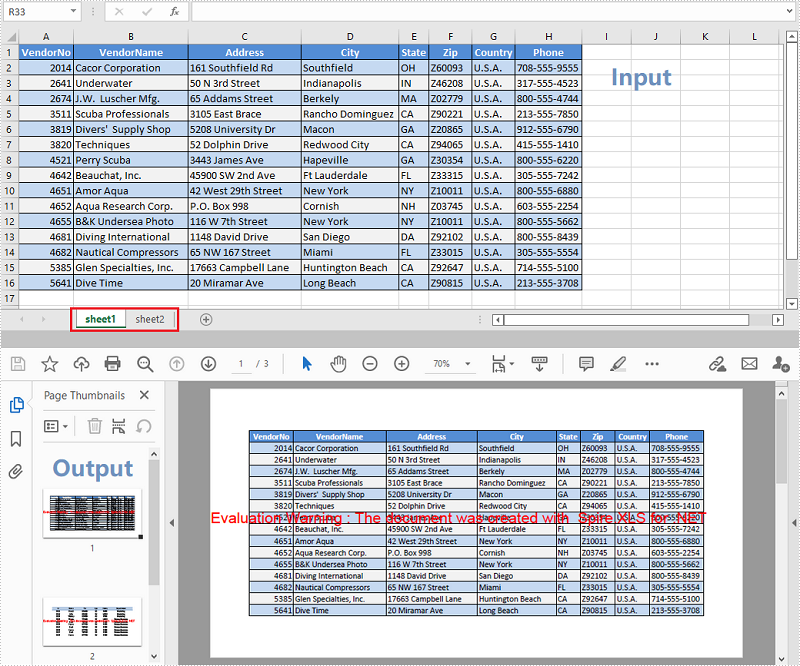
Convert a Whole Excel Document to PDF
The following are the steps to convert a whole Excel document to PDF using Spire.XLS for .NET.
- Create a Workbook object.
- Load a sample Excel document using Workbook.LoadFromFile() method.
- Set the Excel to PDF conversion options through the properties under the ConverterSetting class.
- Convert the whole Excel document to PDF using Workbook.SaveToFile() method.
- C#
- VB.NET
using Spire.Xls;

    namespace ConvertExcelToPDF
    {
        class Program
        {
            static void Main(string[] args)
            {
                //Create a Workbook instance
                Workbook workbook = new Workbook();

                //Load a sample Excel file
                workbook.LoadFromFile("C:\\Users\\Administrator\\Desktop\\Sample.xlsx");

                //Set worksheets to fit to page when converting
                workbook.ConverterSetting.SheetFitToPage = true;

                //Save to PDF
                workbook.SaveToFile("ExcelToPdf.pdf", FileFormat.PDF);
            }
        }
    }
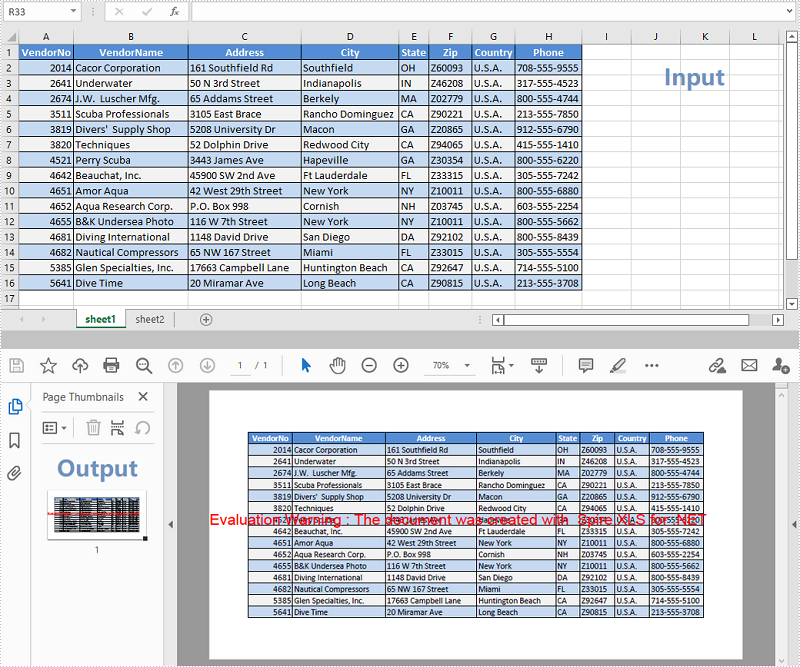
Convert a Specific Worksheet to PDF
The following are the steps to convert a specific worksheet to PDF using Spire.XLS for .NET.
- Create a Workbook object.
- Load a sample Excel document using Workbook.LoadFromFile() method.
- Set the Excel to PDF conversion options through the properties under the ConverterSetting class.
- Get a specific worksheet through the Workbook.Worksheets[index] property.
- Convert the worksheet to PDF using Worksheet.SaveToPdf() method.
- C#
- VB.NET
using Spire.Xls;

    namespace ConvertWorksheetToPdf
    {
        class Program
        {
            static void Main(string[] args)
            {
                //Create a Workbook instance
                Workbook workbook = new Workbook();

                //Load a sample Excel file
                workbook.LoadFromFile("C:\\Users\\Administrator\\Desktop\\Sample.xlsx");

                //Set worksheets to fit to page when converting
                workbook.ConverterSetting.SheetFitToPage = true;

                //Get the first worksheet
                Worksheet worksheet = workbook.Worksheets[0];

                //Save to PDF
                worksheet.SaveToPdf("WorksheetToPdf.pdf");
            }
        }
    }
Apply for a Temporary License
If you'd like to remove the evaluation message from the generated documents, or to get rid of the function limitations, please request a 30-day trial license for yourself.
C# Converter Excel em PDF
Ao converter um arquivo Excel para o formato PDF, qualquer pessoa pode abrir o arquivo mesmo quando não há nenhum Office instalado no sistema. Além disso, converter documentos Excel em PDF é útil porque os arquivos PDF podem ser facilmente compartilhados e impressos. Neste artigo você aprenderá como converter um documento Excel inteiro ou uma planilha específica em PDF usando Spire.XLS for .NET.
Instale o Spire.XLS for .NET
Para começar, você precisa adicionar os arquivos DLL incluídos no pacote Spire.XLS for .NET como referências em seu projeto .NET. Os arquivos DLL podem ser baixados de esse link ou instalado via NuGet.
PM> Install-Package Spire.XLS
Converta um documento Excel inteiro em PDF
A seguir estão as etapas para converter um documento Excel inteiro em PDF usando Spire.XLS for .NET.
- Crie um objeto Pasta de Trabalho.
- Carregue um documento Excel de amostra usando o método Workbook.LoadFromFile().
- Defina as opções de conversão de Excel para PDF por meio das propriedades da classe ConverterSetting.
- Converta todo o documento Excel em PDF usando o método Workbook.SaveToFile().
- C#
- VB.NET
using Spire.Xls;

namespace ConvertExcelToPDF
{
    class Program
    {
        static void Main(string[] args)
        {
            //Create a Workbook instance
            Workbook workbook = new Workbook();

            //Load a sample Excel file
            workbook.LoadFromFile("C:\\Users\\Administrator\\Desktop\\Sample.xlsx");

            //Set worksheets to fit to page when converting
            workbook.ConverterSetting.SheetFitToPage = true;

            //Save to PDF
            workbook.SaveToFile("ExcelToPdf.pdf", FileFormat.PDF);
        }
    }
}
Converter uma planilha específica em PDF
A seguir estão as etapas para converter uma planilha específica em PDF usando Spire.XLS for .NET.
- Crie um objeto Pasta de Trabalho.
- Carregue um documento Excel de amostra usando o método Workbook.LoadFromFile().
- Defina as opções de conversão de Excel para PDF por meio das propriedades da classe ConverterSetting.
- Obtenha uma planilha específica através da propriedade Workbook.Worksheets[index].
- Converta a planilha em PDF usando o método Worksheet.SaveToPdf().
- C#
- VB.NET
using Spire.Xls;

namespace ConvertWorksheetToPdf
{
    class Program
    {
        static void Main(string[] args)
        {
            //Create a Workbook instance
            Workbook workbook = new Workbook();

            //Load a sample Excel file
            workbook.LoadFromFile("C:\\Users\\Administrator\\Desktop\\Sample.xlsx");

            //Set worksheets to fit to page when converting
            workbook.ConverterSetting.SheetFitToPage = true;

            //Get the first worksheet
            Worksheet worksheet = workbook.Worksheets[0];

            //Save to PDF
            worksheet.SaveToPdf("WorksheetToPdf.pdf");
        }
    }
}
Solicite uma licença temporária
Se desejar remover a mensagem de avaliação dos documentos gerados ou se livrar das limitações de função, por favor solicite uma licença de teste de 30 dias para você mesmo.
C# конвертировать Excel в PDF
Преобразовав файл Excel в формат PDF, любой сможет открыть файл, даже если в системе не установлен Office. Кроме того, преобразование документов Excel в PDF полезно, поскольку файлы PDF можно легко публиковать и распечатывать. В этой статье вы узнаете, как конвертировать весь документ Excel или конкретный рабочий лист в PDF с помощью Spire.XLS for .NET.
Установите Spire.XLS for .NET
Для начала вам необходимо добавить файлы DLL, включенные в пакет Spire.XLS for .NET, в качестве ссылок в ваш проект .NET. Файлы DLL можно загрузить по этой ссылке или установить через NuGet.
PM> Install-Package Spire.XLS
Преобразование всего документа Excel в PDF
Ниже приведены шаги по преобразованию всего документа Excel в PDF с помощью Spire.XLS for .NET.
- Создайте объект Workbook.
- Загрузите образец документа Excel с помощью метода Workbook.LoadFromFile().
- Задайте параметры преобразования Excel в PDF с помощью свойств класса ConverterSetting.
- Преобразуйте весь документ Excel в PDF с помощью метода Workbook.SaveToFile().
- C#
- VB.NET
using Spire.Xls;

namespace ConvertExcelToPDF
{
    class Program
    {
        static void Main(string[] args)
        {
            //Create a Workbook instance
            Workbook workbook = new Workbook();

            //Load a sample Excel file
            workbook.LoadFromFile("C:\\Users\\Administrator\\Desktop\\Sample.xlsx");

            //Set worksheets to fit to page when converting
            workbook.ConverterSetting.SheetFitToPage = true;

            //Save to PDF
            workbook.SaveToFile("ExcelToPdf.pdf", FileFormat.PDF);
        }
    }
}
Преобразование определенного листа в PDF
Ниже приведены шаги по преобразованию определенного листа в PDF с помощью Spire.XLS for .NET.
- Создайте объект Workbook.
- Загрузите образец документа Excel с помощью метода Workbook.LoadFromFile().
- Задайте параметры преобразования Excel в PDF с помощью свойств класса ConverterSetting.
- Получите конкретный лист с помощью свойства Workbook.Worksheets[index].
- Преобразуйте рабочий лист в PDF с помощью метода Worksheet.SaveToPdf().
- C#
- VB.NET
using Spire.Xls;

namespace ConvertWorksheetToPdf
{
    class Program
    {
        static void Main(string[] args)
        {
            //Create a Workbook instance
            Workbook workbook = new Workbook();

            //Load a sample Excel file
            workbook.LoadFromFile("C:\\Users\\Administrator\\Desktop\\Sample.xlsx");

            //Set worksheets to fit to page when converting
            workbook.ConverterSetting.SheetFitToPage = true;

            //Get the first worksheet
            Worksheet worksheet = workbook.Worksheets[0];

            //Save to PDF
            worksheet.SaveToPdf("WorksheetToPdf.pdf");
        }
    }
}
Подать заявку на временную лицензию
Если вы хотите удалить сообщение об оценке из сгенерированных документов или избавиться от ограничений функции, пожалуйста запросите 30-дневную пробную лицензию для себя.
C# Excel in PDF konvertieren
Durch die Konvertierung einer Excel-Datei in das PDF-Format kann jeder die Datei öffnen, auch wenn kein Office auf dem System installiert ist. Auch das Konvertieren von Excel-Dokumenten in PDF ist nützlich, da PDF-Dateien problemlos geteilt und gedruckt werden können. In diesem Artikel erfahren Sie, wie das geht Konvertieren Sie ein ganzes Excel-Dokument oder ein bestimmtes Arbeitsblatt in PDF mithilfe von Spire.XLS for .NET.
- Konvertieren Sie ein ganzes Excel-Dokument in PDF
- Konvertieren Sie ein bestimmtes Arbeitsblatt in PDF
Installieren Sie Spire.XLS for .NET
Zunächst müssen Sie die im Spire.XLS for .NET-Paket enthaltenen DLL-Dateien als Referenzen in Ihrem .NET-Projekt hinzufügen. Die DLL-Dateien können entweder über diesen Link heruntergeladen oder über NuGet installiert werden.
PM> Install-Package Spire.XLS
Konvertieren Sie ein ganzes Excel-Dokument in PDF
Im Folgenden finden Sie die Schritte zum Konvertieren eines gesamten Excel-Dokuments in PDF mit Spire.XLS for .NET.
- Erstellen Sie ein Workbook-Objekt.
- Laden Sie ein Beispiel-Excel-Dokument mit der Methode Workbook.LoadFromFile().
- Legen Sie die Optionen für die Konvertierung von Excel in PDF über die Eigenschaften unter der Klasse „ConverterSetting“ fest.
- Konvertieren Sie das gesamte Excel-Dokument mit der Methode Workbook.SaveToFile() in PDF.
- C#
- VB.NET
using Spire.Xls;

namespace ConvertExcelToPDF
{
    class Program
    {
        static void Main(string[] args)
        {
            //Create a Workbook instance
            Workbook workbook = new Workbook();

            //Load a sample Excel file
            workbook.LoadFromFile("C:\\Users\\Administrator\\Desktop\\Sample.xlsx");

            //Set worksheets to fit to page when converting
            workbook.ConverterSetting.SheetFitToPage = true;

            //Save to PDF
            workbook.SaveToFile("ExcelToPdf.pdf", FileFormat.PDF);
        }
    }
}
Konvertieren Sie ein bestimmtes Arbeitsblatt in PDF
Im Folgenden finden Sie die Schritte zum Konvertieren eines bestimmten Arbeitsblatts in PDF mit Spire.XLS for .NET.
- Erstellen Sie ein Workbook-Objekt.
- Laden Sie ein Beispiel-Excel-Dokument mit der Methode Workbook.LoadFromFile().
- Legen Sie die Optionen für die Konvertierung von Excel in PDF über die Eigenschaften unter der Klasse „ConverterSetting“ fest.
- Rufen Sie ein bestimmtes Arbeitsblatt über die Eigenschaft Workbook.Worksheets[index] ab.
- Konvertieren Sie das Arbeitsblatt mit der Methode Worksheet.SaveToPdf() in PDF.
- C#
- VB.NET
using Spire.Xls;

namespace ConvertWorksheetToPdf
{
    class Program
    {
        static void Main(string[] args)
        {
            //Create a Workbook instance
            Workbook workbook = new Workbook();

            //Load a sample Excel file
            workbook.LoadFromFile("C:\\Users\\Administrator\\Desktop\\Sample.xlsx");

            //Set worksheets to fit to page when converting
            workbook.ConverterSetting.SheetFitToPage = true;

            //Get the first worksheet
            Worksheet worksheet = workbook.Worksheets[0];

            //Save to PDF
            worksheet.SaveToPdf("WorksheetToPdf.pdf");
        }
    }
}
Beantragen Sie eine temporäre Lizenz
Wenn Sie die Bewertungsmeldung aus den generierten Dokumenten entfernen oder die Funktionseinschränkungen beseitigen möchten, wenden Sie sich bitte an uns Fordern Sie eine 30-Tage-Testlizenz an für sich selbst.
C# Convertir Excel a PDF
Al convertir un archivo de Excel a formato PDF, cualquiera puede abrir el archivo incluso cuando no hay Office instalado en el sistema. Además, convertir documentos de Excel a PDF es útil ya que los archivos PDF se pueden compartir e imprimir fácilmente. En este artículo, aprenderá cómo convertir un documento completo de Excel o una hoja de trabajo específica en PDF utilizando Spire.XLS for .NET.
Instalar Spire.XLS for .NET
Para empezar, debe agregar los archivos DLL incluidos en el paquete Spire.XLS for .NET como referencias en su proyecto .NET. Los archivos DLL se pueden descargar desde este enlace o instalado a través de NuGet.
PM> Install-Package Spire.XLS
Convertir un documento completo de Excel a PDF
Los siguientes son los pasos para convertir un documento completo de Excel a PDF usando Spire.XLS for .NET.
- Cree un objeto de libro de trabajo.
- Cargue un documento de Excel de muestra utilizando el método Workbook.LoadFromFile().
- Configure las opciones de conversión de Excel a PDF a través de las propiedades de la clase ConverterSetting.
- Convierta todo el documento de Excel a PDF utilizando el método Workbook.SaveToFile().
- C#
- VB.NET
using Spire.Xls;

namespace ConvertExcelToPDF
{
    class Program
    {
        static void Main(string[] args)
        {
            //Create a Workbook instance
            Workbook workbook = new Workbook();

            //Load a sample Excel file
            workbook.LoadFromFile("C:\\Users\\Administrator\\Desktop\\Sample.xlsx");

            //Set worksheets to fit to page when converting
            workbook.ConverterSetting.SheetFitToPage = true;

            //Save to PDF
            workbook.SaveToFile("ExcelToPdf.pdf", FileFormat.PDF);
        }
    }
}
Convertir una hoja de trabajo específica a PDF
Los siguientes son los pasos para convertir una hoja de trabajo específica a PDF usando Spire.XLS for .NET.
- Cree un objeto de libro de trabajo.
- Cargue un documento de Excel de muestra utilizando el método Workbook.LoadFromFile().
- Configure las opciones de conversión de Excel a PDF a través de las propiedades de la clase ConverterSetting.
- Obtenga una hoja de trabajo específica a través de la propiedad Workbook.Worksheets[index].
- Convierta la hoja de trabajo a PDF usando el método Worksheet.SaveToPdf().
- C#
- VB.NET
using Spire.Xls;

namespace ConvertWorksheetToPdf
{
    class Program
    {
        static void Main(string[] args)
        {
            //Create a Workbook instance
            Workbook workbook = new Workbook();

            //Load a sample Excel file
            workbook.LoadFromFile("C:\\Users\\Administrator\\Desktop\\Sample.xlsx");

            //Set worksheets to fit to page when converting
            workbook.ConverterSetting.SheetFitToPage = true;

            //Get the first worksheet
            Worksheet worksheet = workbook.Worksheets[0];

            //Save to PDF
            worksheet.SaveToPdf("WorksheetToPdf.pdf");
        }
    }
}
Solicite una licencia temporal
Si desea eliminar el mensaje de evaluación de los documentos generados o deshacerse de las limitaciones de la función, por favor solicitar una licencia de prueba de 30 días para ti.