
Spire.Doc for .NET (338)
Children categories
This program guide focus on helping you how to make Spire.Doc workable on Windows and Linux.
Starts from V 6.7.4, Spire.Doc supports .NET Core 2.0. Spire.Doc uses System.Drawing.Common, which depends on Libgdiplus library. So when you use Spire.Doc on .NET core, you need to install Libgdiplus library.
On Windows, we recommend you to get Spire.Doc package via Nuget. The Libgdiplus library will be installed automatically.

On Linux, you need to install Libgdiplus library independently. Please follow the below three steps to install it successfully.
Step1: Open xxxx.csproj file and write the code snippet into it.
<ItemGroup>
<PackageReference Include=”Spire.Doc” Version=”6.7.13”/>
</ItemGroup>
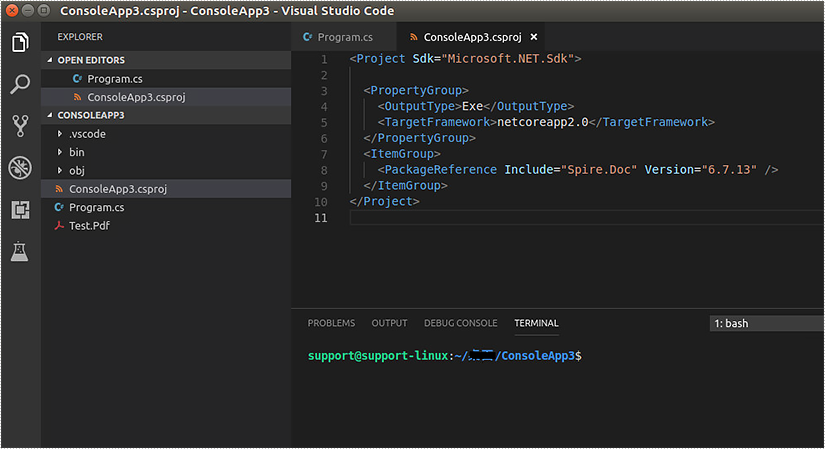
Step 2. Execute "dotnet build" command on terminal window of Visual Studio Code. It will install Spire.Doc package.

Step 3. Open terminal window on Linux and execute Libgdiplus library installation command, for example, the command on Linux Ubuntu is "sudo apt-get install libgdiplus".

Then you can use Spire.Doc on .NET core.
If you have any question, please feel free to contact us.
Spire.Doc provides several overloaded Replace methods to replace text in different scenarios. This article is going to show you how to replace a specified text in a template document with another document using Spire.Doc.
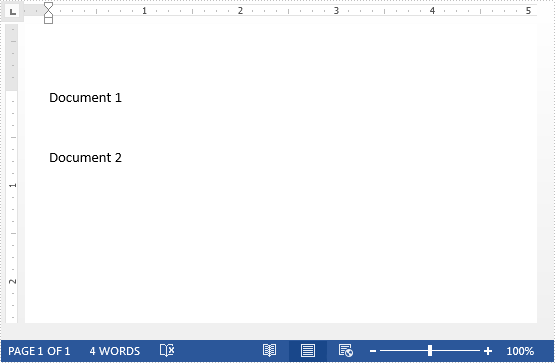
The template document:
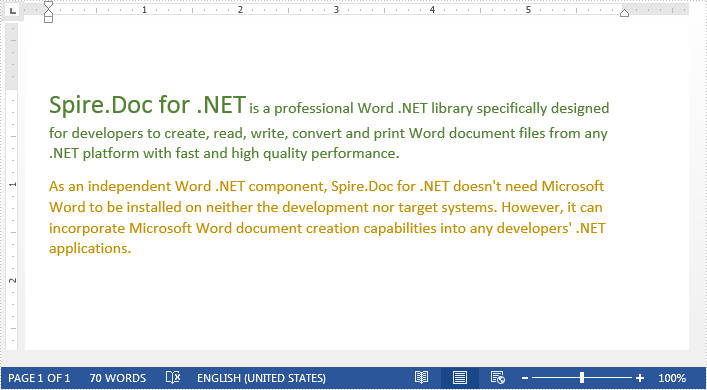
The document to replace text:
Detail steps:
Step 1: Load a template document.
Document document = new Document("Template.docx");
Step 2: Load another document to replace text.
IDocument replaceDocument = new Document("Document1.docx");
Step 3: Replace specified text with the other document.
document.Replace("Document 1", replaceDocument, false, true);
Step 4: Save the file.
document.SaveToFile("Output.docx", FileFormat.Docx2013);
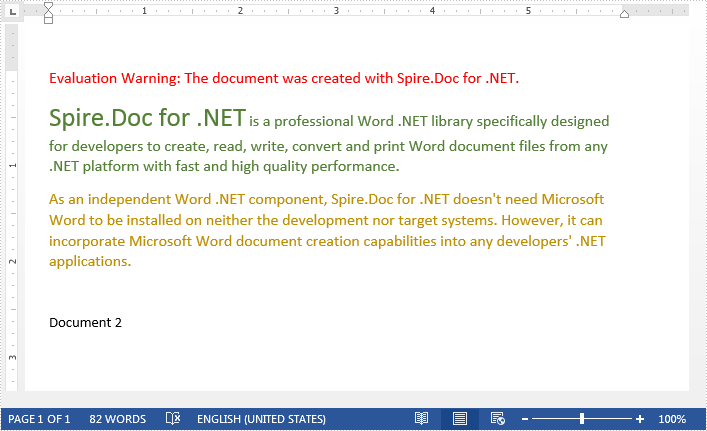
Output:
Full code:
using Spire.Doc;
using Spire.Doc.Interface;

namespace Replace_Text_With_Document
{
    class Program
    {
        static void Main(string[] args)
        {
            //Load a template document
            Document document = new Document("Template.docx");

            //Load another document to replace text
            IDocument replaceDocument = new Document("Document1.docx");

            //Replace specified text with the other document
            document.Replace("Document 1", replaceDocument, false, true);

            //Save the file
            document.SaveToFile("Output.docx", FileFormat.Docx2013);
        }
    }
}
When processing a Word document, you may need to remove some paragraphs. For example, after you copied contents from the Internet with a lot of redundant paragraphs to your document, you need to delete the extra paragraphs and keep only those that are useful. The deletion can be easily achieved by Spire.Doc for .NET by programming with no need for other software. This article will show you the detailed steps of removing paragraphs in a Word document using Spire.Doc for .NET.
Install Spire.Doc for .NET
To begin with, you need to add the DLL files included in the Spire.Doc for.NET package as references in your .NET project. The DLL files can be either downloaded from this link or installed via NuGet.
PM> Install-Package Spire.Doc
Delete a Specific Paragraph in a Word Document
Spire.Doc for .NET provides a method RemoveAt() under ParagraphCollection to remove paragraphs.
The detailed steps of removing a specific paragraph are as follows:
- Create an object of Document class.
- Load a Word document using Document.LoadFromFile() method.
- Get the first section using Document.Section[] property.
- Remove the 4th paragraph using Section.Paragraphs.RemoveAt() method.
- Save the document using Document.SaveToFile() method.
- C#
- VB.NET
using System;
using Spire.Doc;

namespace RemoveParagraphs
{
    internal class Program
    {
        static void Main(string[] args)
        {
            //Create an object of Document class
            Document document = new Document();

            //Load a Word document
            document.LoadFromFile("Sample.docx");

            //Get the first section
            Section section = document.Sections[0];

            //Remove the first paragraph in the section
            section.Paragraphs.RemoveAt(3);

            //Save the document
            document.SaveToFile("RemoveParagraphs.docx", FileFormat.Docx2013);
        }
    }
}
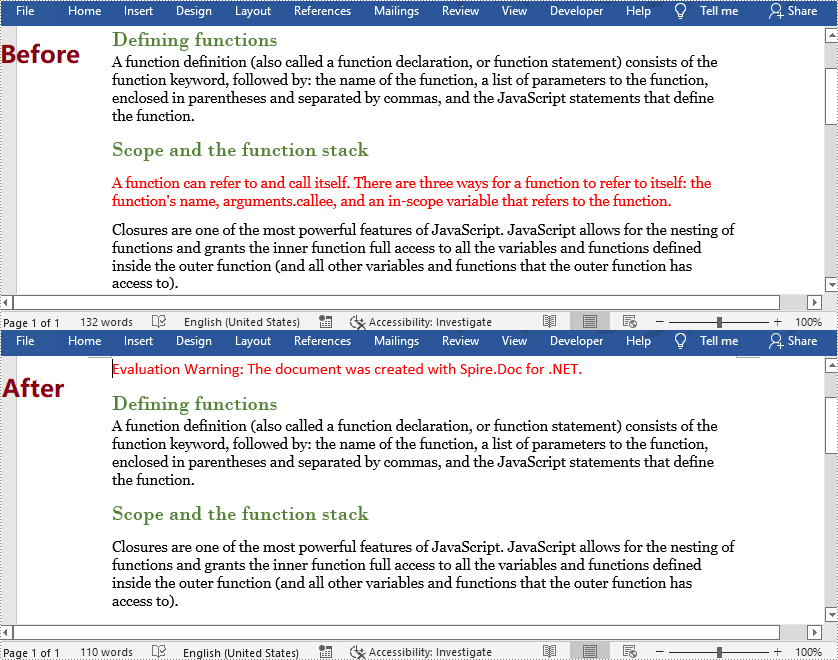
Delete All Paragraphs in a Word Document
To remove all paragraphs, you can use the method Clear() under ParagraphCollection provided by Spire.Doc for .NET.
The detailed steps are as follows:
- Create an object of Document class.
- Load a Word Document using Document.LoadFromFile() method.
- Loop through all sections, and remove all paragraphs in each section using Section.Paragraphs.Clear() method.
- Save the document using Document.SaveToFile() method.
- C#
- VB.NET
using System;
using Spire.Doc;

namespace RemoveAllParagraphs
{
    internal class Program
    {
        static void Main(string[] args)
        {
            //Create an object of Document class
            Document document = new Document();

            //Load a Word document
            document.LoadFromFile("Sample.docx");

            //Loop through all sections
            foreach (Section section in document.Sections)
            {
                //Remove all paragraphs in the section
                section.Paragraphs.Clear();
            }

            //Save the document
            document.SaveToFile("RemoveAllParagraphs.docx", FileFormat.Docx2013);
        }
    }
}
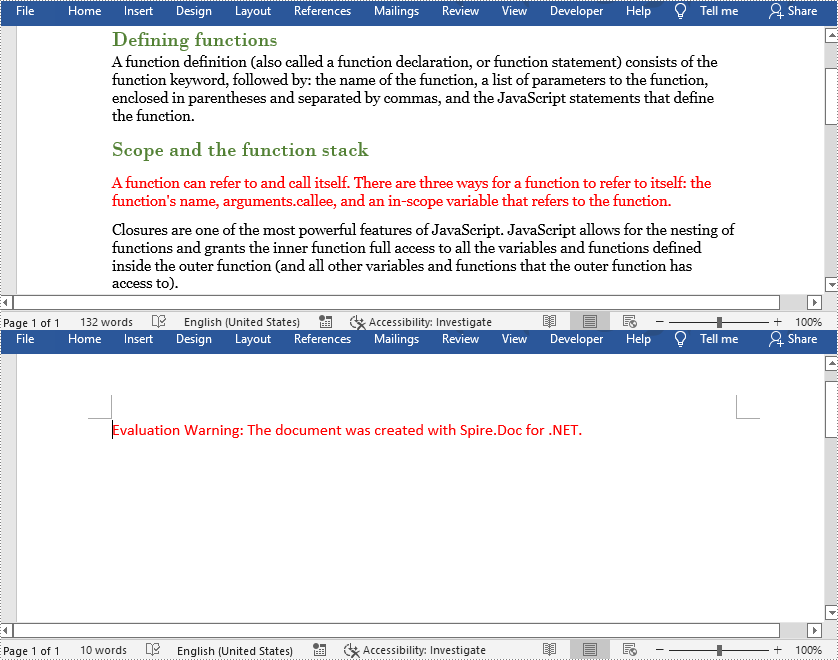
Apply for a Temporary License
If you'd like to remove the evaluation message from the generated documents, or to get rid of the function limitations, please request a 30-day trial license for yourself.
