
Product Overview (1)
Spire.OfficeJS consists of a set of browser-side editor resources (web) plus optional server-side components. The example service (the demo service, default port 3000) and service/OfficeServer (the editor service, default port 8000) in the product package are not mandatory: the web resources can be served by the editor service, or copied into your own front-end project and published with it.
Product Components
| Component | Location | Responsibility | When needed |
|---|---|---|---|
| Front-end resources | web |
Editor UI, WebAssembly engine, fonts, third-party dependencies | Required |
| Editor service | service/OfficeServer |
Resource delivery, runtime APIs, collaborative editing, cache, license configuration | Required for out-of-the-box use; optional for self-hosted front-end integration |
| Example service | example |
Demo document management system and sample documents | Trial and demos only |
| Font generation tool | generateWebFonts |
Provides the font install and generation component used to build web/fontsweb |
Before first deployment or copying resources |
The product package also includes two deployment scripts, run_servers_* and run_genallfonts_*. The first starts the example service (3000) and the editor service (8000) in one step; the second generates the web/fontsweb web font resources. Both are wrappers around the product components.
Runtime Architecture
Whichever deployment mode you use, the editor in the browser works the same way:
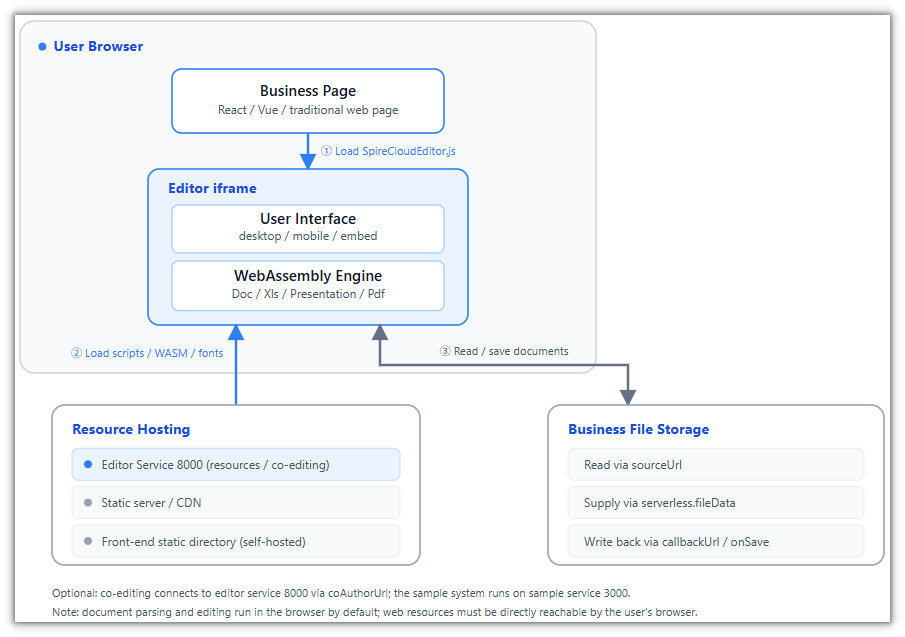
The three flows cover the key steps of an editing session:
- Load resources: The business page loads
SpireCloudEditor.js. The editor iframe infers thewebresource root from the entry script URL, then loads the editor UI, the WebAssembly engine, and fonts. - Read documents: The browser reads files from business storage through
fileAttrs.sourceUrl. In serverless mode, document content is passed in througheditorAttrs.serverless.fileData. - Save documents: Results go back to the business system through
fileAttrs.callbackUrloreditorAttrs.events.onSave. For collaboration, edits are also synchronized throughcoAuthorUrl.
The business system handles the file list, permissions, and file storage. The editor parses, renders, and edits. Resources are hosted by the editor service or a static site, and collaborative editing is provided by the editor service that coAuthorUrl points to.
Deployment Modes
The same web resources can be hosted in two common ways. They are not two product versions, but two placements of the same editor resources:
| Out of the box | Embedded in your own front end | |
|---|---|---|
| Startup | Run run_servers_* |
Run or publish your own front-end project |
| Example service 3000 | Used; provides the demo document system | Not used |
| Editor service 8000 | Used; provides resources and APIs | Usually not used; deploy only when server-side features such as collaboration are needed |
web resources |
Served by the editor service | Copied into the front-end static directory and published with the project |
| Document source | Demo documents, or sourceUrl |
serverless.fileData, or sourceUrl |
| Save method | Demo system save, callbackUrl |
events.onSave, or callbackUrl |
| Use case | Trial, validation, demos | Production integration into your own product |
Out of the Box
Running the startup scripts included in the product package starts both the example service on 3000 and the editor service on 8000. Open http://localhost:3000 to enter the demo document system. See Run the demo.
Embedded in Your Own Front End
In this mode, the front-end project hosts the web resources. For the directory layout, initial configuration, and how documents are passed in and saved, see Integration example. File storage, permissions, and the file list remain the business system's responsibility.
Common Misconceptions
- "Ports 3000 and 8000 must both run": No. They belong to the out-of-the-box deployment mode only. When embedding into your own front end, you can put the
webresources in the project's static directory and publish them directly with the front-end project. - "A pure front end means no service deployment at all": No. Document processing runs in the browser, but the
webresources still need to be hosted by a static server, Nginx, or a CDN. - "The example service must ship to production too": It doesn't. The example service is for trial and demos only; you can stop it in production.
