Formulas, chemical formulas, unit symbols, and footnote markers all carry superscripts and subscripts: a² + b² = c², H₂SO₄, 30m². Laying them out in a PDF is not a matter of drawing one line of plain text — the raised characters have to be smaller than the body text with their baseline lifted or dropped, and being a few points off is enough to break the expression apart.
This article shows how to use Spire.PDF for JavaScript to draw superscripts and subscripts on PDF pages. It runs on WebAssembly to create and save PDF documents directly in the browser, doing all the work locally and reading and writing files through a virtual file system (VFS) with no backend involved.
This article covers two core features:
For installation and project configuration, see Integrate Spire.PDF for JavaScript into a React Project. The examples below assume Spire.PDF is installed and the WebAssembly module is initialized.
Draw Superscripts and Subscripts
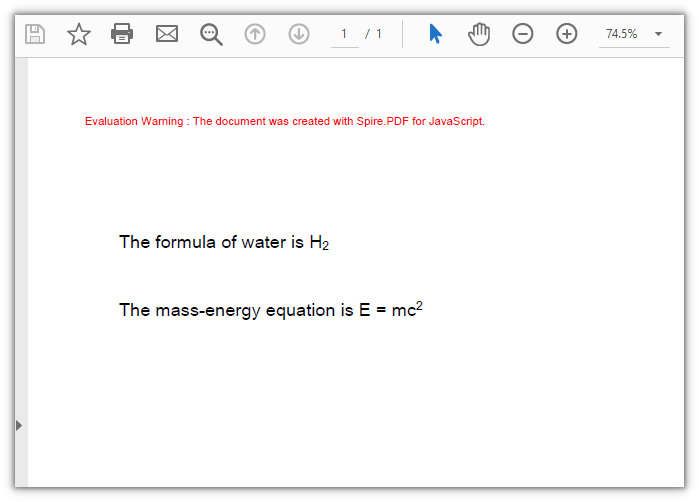
Whether text is raised or lowered comes from SubSuperScript on PdfStringFormat: PdfSubSuperScript.SuperScript lifts the baseline and shrinks the glyphs, while SubScript drops it. It applies to the whole run drawn by one DrawString call, so the body text and the marker are drawn as two runs, with the second anchored at the width measured by MeasureString.
function App() {
  const drawSuperAndSubScript = async () => {
    // Get the Spire.PDF WASM module
    const pdfModule = window.wasmModule?.spirepdf;

    // Check whether the module is ready
    if (!pdfModule) {
      alert('Spire.PDF is not ready yet');
      return;
    }

    // Load the font into the VFS for the page text
    await window.spire.FetchFileToVFS('ARIAL UNICODE MS.TTF', '/Library/Fonts/', `${process.env.PUBLIC_URL}/font/`);

    // Create a PDF document and add a blank page
    const doc = new pdfModule.PdfDocument();
    const page = doc.Pages.Add();

    const font = new pdfModule.PdfTrueTypeFont({ fontFile: '/Library/Fonts/ARIAL UNICODE MS.TTF', size: 16 });
    const brush = new pdfModule.PdfSolidBrush({ pdfRGBColor: new pdfModule.PdfRGBColor({ color: pdfModule.Color.get_Black() }) });

    // Subscript: draw the body text as usual
    let text = 'The formula of water is H';
    page.Canvas.DrawString({ s: text, font: font, brush: brush, x: 40, y: 110 });

    // Measure the body text so the subscript lands right after its right edge
    let x = 40 + font.MeasureString({ text: text }).Width;

    // SubSuperScript set to SubScript shrinks this run and drops it below the baseline
    const subFormat = new pdfModule.PdfStringFormat();
    subFormat.SubSuperScript = pdfModule.PdfSubSuperScript.SubScript;
    page.Canvas.DrawString({ s: '2', font: font, brush: brush, x: x, y: 110, format: subFormat });

    // Superscript: also two runs, with the anchor continuing after the body text
    text = 'The mass-energy equation is E = mc';
    page.Canvas.DrawString({ s: text, font: font, brush: brush, x: 40, y: 170 });
    x = 40 + font.MeasureString({ text: text }).Width;

    // SubSuperScript set to SuperScript shrinks this run and lifts it above the baseline
    const superFormat = new pdfModule.PdfStringFormat();
    superFormat.SubSuperScript = pdfModule.PdfSubSuperScript.SuperScript;
    page.Canvas.DrawString({ s: '2', font: font, brush: brush, x: x, y: 170, format: superFormat });

    // Define the output file name and save the document
    const outputFileName = 'SuperscriptAndSubscript.pdf';
    doc.SaveToFile(outputFileName);
    doc.Close();

    // Read the generated file from the VFS and trigger a download
    const fileArray = window.dotnetRuntime.Module.FS.readFile(outputFileName);
    const blob = new Blob([fileArray], { type: 'application/pdf' });
    const url = URL.createObjectURL(blob);
    const a = document.createElement('a');
    a.href = url;
    a.download = outputFileName;
    a.click();
    URL.revokeObjectURL(url);
  };

  return (
    <div style={{ textAlign: 'center', height: '300px' }}>
      <h1>Draw Superscripts and Subscripts</h1>
      <button onClick={drawSuperAndSubScript}>
        Draw
      </button>
    </div>
  );
}

export default App;
The subscript and the superscript drawn with the two SubSuperScript values:
Control the Scale and Offset of Superscripts and Subscripts
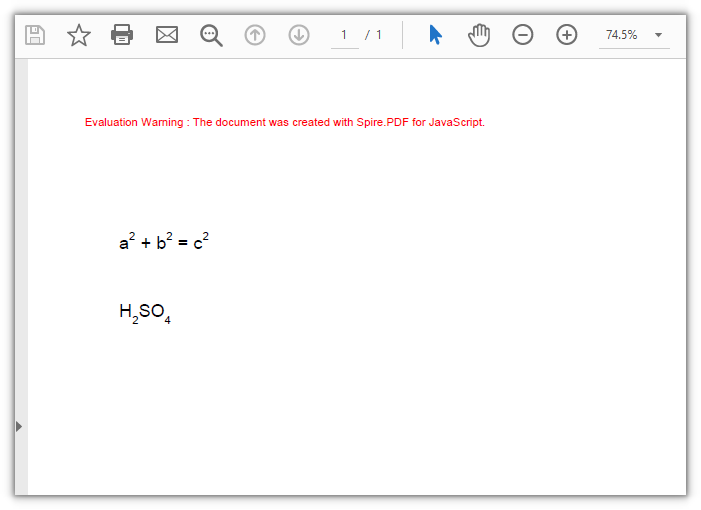
SubSuperScript sets a whole run to one form, so superscripts and subscripts that alternate with body text inside a line have to be laid out by hand: measure how wide the run you just drew is with MeasureString, advance x, then switch to a smaller font and offset y in points. You pick the size and the lift — nothing is bound to the ratio the library has built in.
function App() {
  const drawInlineSuperAndSubScript = async () => {
    // Get the Spire.PDF WASM module
    const pdfModule = window.wasmModule?.spirepdf;

    // Check whether the module is ready
    if (!pdfModule) {
      alert('Spire.PDF is not ready yet');
      return;
    }

    // Load the font into the VFS for the page text
    await window.spire.FetchFileToVFS('ARIAL UNICODE MS.TTF', '/Library/Fonts/', `${process.env.PUBLIC_URL}/font/`);

    // Create a PDF document and add a blank page
    const doc = new pdfModule.PdfDocument();
    const page = doc.Pages.Add();

    const brush = new pdfModule.PdfSolidBrush({ pdfRGBColor: new pdfModule.PdfRGBColor({ color: pdfModule.Color.get_Black() }) });

    // Body text at 16 points; the markers get their own size, 10 points here
    const BASE_SIZE = 16;
    const MARK_SIZE = 10;
    const baseFont = new pdfModule.PdfTrueTypeFont({ fontFile: '/Library/Fonts/ARIAL UNICODE MS.TTF', size: BASE_SIZE });
    const markFont = new pdfModule.PdfTrueTypeFont({ fontFile: '/Library/Fonts/ARIAL UNICODE MS.TTF', size: MARK_SIZE });

    // Superscripts lift 8 points, subscripts drop 6; the y axis points down, so a lift is a subtraction
    const SUPER_RISE = 8;
    const SUB_SINK = 6;

    // Draw run by run: after each run, measure it with its own font and push x to its right edge
    const writeRuns = (runs, lineY) => {
      let x = 40;
      runs.forEach((run) => {
        const runFont = run.kind === 'base' ? baseFont : markFont;
        // The anchor is the top-left of the run and the baseline sits one font size below it,
        // so a smaller run makes up that difference first
        const baselineFix = run.kind === 'base' ? 0 : BASE_SIZE - MARK_SIZE;
        const riseFix = run.kind === 'super' ? -SUPER_RISE : run.kind === 'sub' ? SUB_SINK : 0;
        const runY = lineY + baselineFix + riseFix;
        page.Canvas.DrawString({ s: run.s, font: runFont, brush: brush, x: x, y: runY });
        x += runFont.MeasureString({ text: run.s }).Width;
      });
    };

    // Formula: a² + b² = c²
    writeRuns([
      { s: 'a', kind: 'base' }, { s: '2', kind: 'super' },
      { s: ' + b', kind: 'base' }, { s: '2', kind: 'super' },
      { s: ' = c', kind: 'base' }, { s: '2', kind: 'super' },
    ], 110);

    // Chemical formula: H₂SO₄
    writeRuns([
      { s: 'H', kind: 'base' }, { s: '2', kind: 'sub' },
      { s: 'SO', kind: 'base' }, { s: '4', kind: 'sub' },
    ], 170);

    // Define the output file name and save the document
    const outputFileName = 'InlineSuperscriptAndSubscript.pdf';
    doc.SaveToFile(outputFileName);
    doc.Close();

    // Read the generated file from the VFS and trigger a download
    const fileArray = window.dotnetRuntime.Module.FS.readFile(outputFileName);
    const blob = new Blob([fileArray], { type: 'application/pdf' });
    const url = URL.createObjectURL(blob);
    const a = document.createElement('a');
    a.href = url;
    a.download = outputFileName;
    a.click();
    URL.revokeObjectURL(url);
  };

  return (
    <div style={{ textAlign: 'center', height: '300px' }}>
      <h1>Control the Scale and Offset of Superscripts and Subscripts</h1>
      <button onClick={drawInlineSuperAndSubScript}>
        Draw
      </button>
    </div>
  );
}

export default App;
Body text and smaller markers joined up run by run, one line of formula and one of chemical formula:
FAQ
Why did the whole line turn into a superscript
Cause: SubSuperScript lives on PdfStringFormat, and it applies to every character drawn by that one DrawString call, not to a few of them. Put the body text and the superscript into the same call and both are shrunk and raised together.
Solution: split it into two calls — the body text with no format, the marker on its own with the format, anchored at the width measured by MeasureString:
// Body text, no format
page.Canvas.DrawString({ s: 'E = mc', font: font, brush: brush, x: 40, y: 170 });

// Measure the body text, then set only the marker run as a superscript
const x = 40 + font.MeasureString({ text: 'E = mc' }).Width;
const superFormat = new pdfModule.PdfStringFormat();
superFormat.SubSuperScript = pdfModule.PdfSubSuperScript.SuperScript;
page.Canvas.DrawString({ s: '2', font: font, brush: brush, x: x, y: 170, format: superFormat });
Hand-placed superscripts and subscripts do not line up, or leave a gap
Cause: The anchor is the top-left corner of the run, not the baseline — the baseline sits one font size below that corner, so shrinking the font also shortens the drop to the baseline. Hand a superscript an offset worked out from the body text's anchor and the baseline shift you get is not the one you asked for: the smaller marker rises further than intended, while a subscript can end up sitting right on the baseline. Advance x using a width measured with the wrong font and the runs either overlap or leave a gap.
Solution: Turn the baseline shift you want back into an anchor — anchor plus font size gives the baseline — and measure the width with the font you actually draw with:
// The baseline of the body text sits one font size below its anchor
const baselineY = lineY + BASE_SIZE;

// To lift the superscript 8 points, the anchor is the target baseline minus its own font size
const superY = baselineY - 8 - MARK_SIZE;
page.Canvas.DrawString({ s: '2', font: markFont, brush: brush, x: x, y: superY });

// Measure with the font that actually draws the run
x += markFont.MeasureString({ text: '2' }).Width;
There is no parameter for making the superscript larger or smaller
Cause: PdfStringFormat exposes SubSuperScript as a switch only. The scale factor and the lift are fixed by the library, with no public value to adjust.
Solution: lay the markers out by hand when you need a different ratio — draw them with a smaller font object and set the offset in points yourself (see feature 2).
Get a Free License
If you want to remove the evaluation message from the resulting documents, or lift the feature limits, contact sales for a temporary license valid for 30 days.
