Java (485)
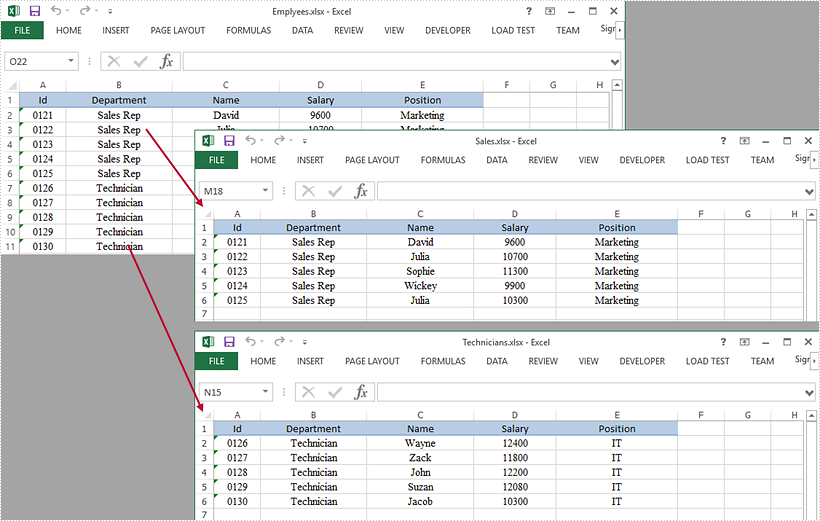
This article demonstrates how to split a worksheet into several Excel documents by using Spire.XLS for Java.
import com.spire.xls.CellRange;
import com.spire.xls.ExcelVersion;
import com.spire.xls.Workbook;
import com.spire.xls.Worksheet;

public class SplitWorksheet {

    public static void main(String[] args) {

        //Create a Workbook object to load the original Excel document
        Workbook bookOriginal = new Workbook();
        bookOriginal.loadFromFile("C:\\Users\\Administrator\\Desktop\\Emplyees.xlsx");

        //Get the first worksheet
        Worksheet sheet = bookOriginal.getWorksheets().get(0);

        //Get the header row
        CellRange headerRow = sheet.getCellRange(1, 1, 1, 5);

        //Get two cell ranges
        CellRange range1 = sheet.getCellRange(2, 1, 6, 5);
        CellRange range2 = sheet.getCellRange(7, 1, 11, 5);

        //Create a new workbook
        Workbook newBook1 = new Workbook();

        //Copy the header row and range 1 to the new workbook
        sheet.copy(headerRow, newBook1.getWorksheets().get(0), 1, 1, true, false);
        sheet.copy(range1, newBook1.getWorksheets().get(0), 2, 1, true, false);

        //Copy the column width from the original workbook to the new workbook
        for (int i = 0; i < sheet.getLastColumn(); i++) {

            newBook1.getWorksheets().get(0).setColumnWidth(i + 1, sheet.getColumnWidth(i + 1));
        }

        //Save the new workbook to an Excel file
        newBook1.saveToFile("Sales.xlsx", ExcelVersion.Version2016);

        //Copy the header row and range 2 to another workbook, and save it to another Excel file
        Workbook newBook2 = new Workbook();
        sheet.copy(headerRow, newBook2.getWorksheets().get(0), 1, 1, true, false);
        sheet.copy(range2, newBook2.getWorksheets().get(0), 2, 1, true, false);
        for (int i = 0; i < sheet.getLastColumn(); i++) {

            newBook2.getWorksheets().get(0).setColumnWidth(i + 1, sheet.getColumnWidth(i + 1));
        }
        newBook2.saveToFile("Technicians.xlsx", ExcelVersion.Version2016);
    }
}
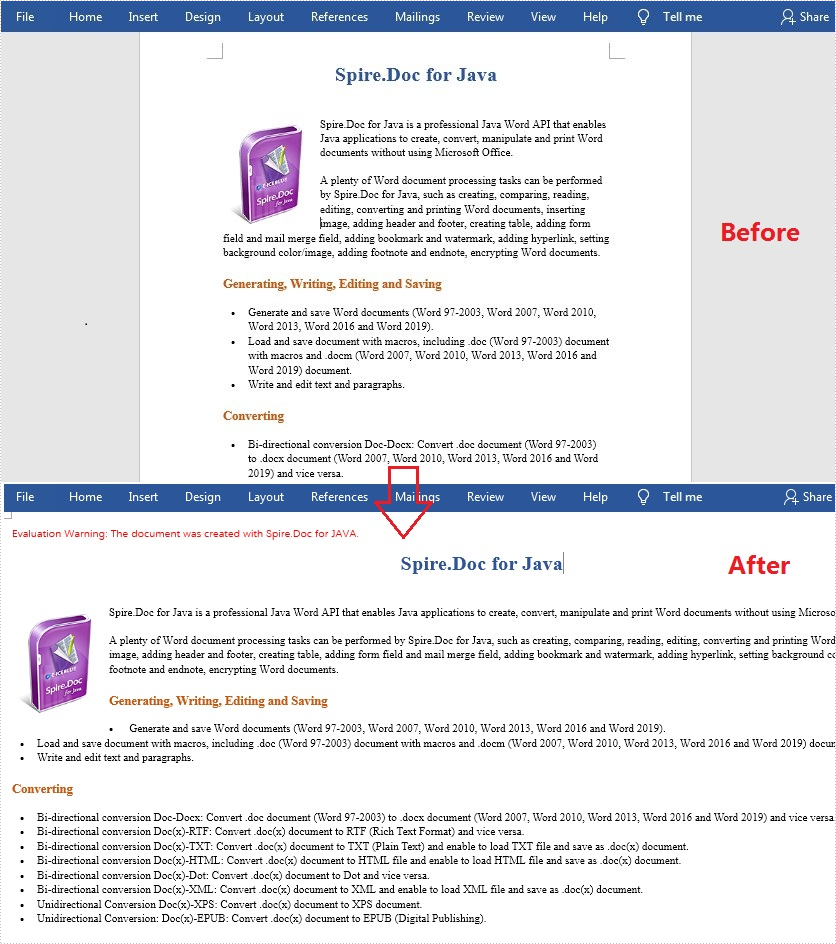
Normally, the default page size of a Word document is “Letter” (8.5 x 11 inches), and the default page orientation is “Portrait”. In most cases, the general page setup can meet the needs of most users, but sometimes you may also need to adjust the page size and orientation to design a different document such as an application form, certificate, or brochure. In this article, you will learn how to programmatically change the page size and page orientation in a Word document using Spire.Doc for Java.
Install Spire.Doc for Java
First of all, you're required to add the Spire.Doc.jar file as a dependency in your Java program. The JAR file can be downloaded from this link. If you use Maven, you can easily import the JAR file in your application by adding the following code to your project's pom.xml file.
<repositories>
    <repository>
        <id>com.e-iceblue</id>
        <name>e-iceblue</name>
        <url>https://repo.e-iceblue.com/nexus/content/groups/public/</url>
    </repository>
</repositories>
<dependencies>
    <dependency>
        <groupId>e-iceblue</groupId>
        <artifactId>spire.doc</artifactId>
        <version>14.8.4</version>
    </dependency>
</dependencies>
Change Page Size and Page Orientation in Word
The detailed steps are as follows:
- Create a Document instance.
- Load a sample Word document using Document.loadFromFile() method.
- Get the first section using Document.getSections().get() method.
- Change the default page size using Section.getPageSetup().setPageSize() method.
- Change the default page orientation using Section.getPageSetup().setOrientation() method.
- Save the document to file using Document.saveToFile() method.
- Java
import com.spire.doc.*;
import com.spire.doc.documents.*;

public class WordPageSetup {
    public static void main(String[] args) throws Exception {
        //Create a Document instance
        Document doc= new Document();

        //Load a sample Word document
        doc.loadFromFile("sample.docx");

        //Get the first section
        Section section = doc.getSections().get(0);

        //Change the page size to A3
        section.getPageSetup().setPageSize(PageSize.A3);

        //Change the page orientation to Landscape
        section.getPageSetup().setOrientation(PageOrientation.Landscape);

        //Save the document to file
        doc.saveToFile("Result.docx",FileFormat.Docx_2013);
    }
}
Apply for a Temporary License
If you'd like to remove the evaluation message from the generated documents, or to get rid of the function limitations, please request a 30-day trial license for yourself.
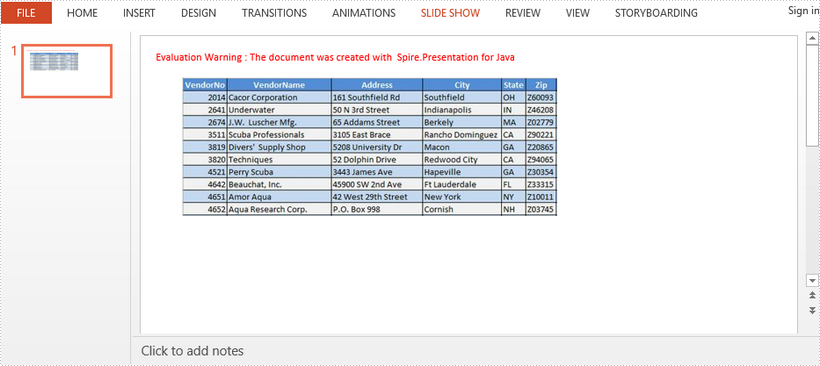
This article demonstrates how to insert an Excel file as an OEL object into a PowerPoint document using Spire.Presentation for Java.
import com.spire.presentation.FileFormat;
import com.spire.presentation.IOleObject;
import com.spire.presentation.Presentation;
import com.spire.presentation.SlideSizeType;
import com.spire.presentation.drawing.IImageData;
import javax.imageio.ImageIO;
import java.awt.geom.Rectangle2D;
import java.awt.image.BufferedImage;
import java.io.File;
import java.io.FileInputStream;

public class EmbedExcel {

    public static void main(String[] args) throws Exception {

        //Create a Presentation object
        Presentation ppt = new Presentation();
        ppt.getSlideSize().setType(SlideSizeType.SCREEN_16_X_9);

        //Load an image file and add it to the image collection of the presentation
        File file = new File("C:\\Users\\Administrator\\Desktop\\image.png");
        BufferedImage image = ImageIO.read(file);
        IImageData oleImage = ppt.getImages().append(image);

        //Load an Excel file and convert it to byte[] object
        String excelPath = "C:\\Users\\Administrator\\Desktop\\data.xlsx";
        File excelFile = new File(excelPath);
        FileInputStream inputStream = new FileInputStream(excelFile);
        byte[] data = new byte[(int) excelFile.length()];
        inputStream.read(data, 0, data.length);

        //Create a Rectangle2D object
        Rectangle2D rect = new Rectangle2D.Float(60, 60, image.getWidth(), image.getHeight());

        //Insert the Excel file as an OLE object to the first slide
        IOleObject oleObject = ppt.getSlides().get(0).getShapes().appendOleObject("excel", data, rect);
        oleObject.getSubstituteImagePictureFillFormat().getPicture().setEmbedImage(oleImage);
        oleObject.setProgId("Excel.Sheet.12");

        //Save to another file
        ppt.saveToFile("InsertOle.pptx", FileFormat.PPTX_2013);
    }
}