
.NET (1327)
Children categories
class Program
    {
        static void Main(string[] args)
        {
            GetSheetInfo(@"..\..\Documents\Sheet4.xlsx");
        }
        public static void GetSheetInfo(string fileName)
        {
            // Open file as read-only.
            using (SpreadsheetDocument mySpreadsheet = SpreadsheetDocument.Open(fileName, false))
            {
                S sheets = mySpreadsheet.WorkbookPart.Workbook.Sheets;

                // For each sheet, display the sheet information.
                foreach (E sheet in sheets)
                {
                    foreach (A attr in sheet.GetAttributes())
                    {
                        Console.WriteLine("{0}: {1}", attr.LocalName, attr.Value);
                    }
                }
            }
            Console.ReadLine();
        }
    }
class Program
    {
        static void Main(string[] args)
        {
            string docName = @"..\..\Documents\Sheet3.xlsx";
            string sheetName = "Sheet1";
            string colName = "A";
            uint rowIndex = 3;
            DeleteTextFromCell(docName, sheetName, colName, rowIndex);
        }
        // Given a document, a worksheet name, a column name, and a one-based row index,
        // deletes the text from the cell at the specified column and row on the specified worksheet.
        public static void DeleteTextFromCell(string docName, string sheetName, string colName, uint rowIndex)
        {
            // Open the document for editing.
            using (SpreadsheetDocument document = SpreadsheetDocument.Open(docName, true))
            {
                IEnumerable sheets = document.WorkbookPart.Workbook.GetFirstChild().Elements().Where(s => s.Name == sheetName);
                if (sheets.Count() == 0)
                {
                    // The specified worksheet does not exist.
                    return;
                }
                string relationshipId = sheets.First().Id.Value;
                WorksheetPart worksheetPart = (WorksheetPart)document.WorkbookPart.GetPartById(relationshipId);

                // Get the cell at the specified column and row.
                Cell cell = GetSpreadsheetCell(worksheetPart.Worksheet, colName, rowIndex);
                if (cell == null)
                {
                    // The specified cell does not exist.
                    return;
                }

                cell.Remove();
                worksheetPart.Worksheet.Save();
            }
        }

        // Given a worksheet, a column name, and a row index, gets the cell at the specified column and row.
        private static Cell GetSpreadsheetCell(Worksheet worksheet, string columnName, uint rowIndex)
        {
            IEnumerable rows = worksheet.GetFirstChild().Elements().Where(r => r.RowIndex == rowIndex);
            if (rows.Count() == 0)
            {
                // A cell does not exist at the specified row.
                return null;
            }

            IEnumerable cells = rows.First().Elements().Where(c => string.Compare(c.CellReference.Value, columnName + rowIndex, true) == 0);
            if (cells.Count() == 0)
            {
                // A cell does not exist at the specified column, in the specified row.
                return null;
            }

            return cells.First();
        }

        // Given a shared string ID and a SpreadsheetDocument, verifies that other cells in the document no longer
        // reference the specified SharedStringItem and removes the item.
        private static void RemoveSharedStringItem(int shareStringId, SpreadsheetDocument document)
        {
            bool remove = true;

            foreach (var part in document.WorkbookPart.GetPartsOfType())
            {
                Worksheet worksheet = part.Worksheet;
                foreach (var cell in worksheet.GetFirstChild().Descendants())
                {
                    // Verify if other cells in the document reference the item.
                    if (cell.DataType != null &&
                        cell.DataType.Value == CellValues.SharedString &&
                        cell.CellValue.Text == shareStringId.ToString())
                    {
                        // Other cells in the document still reference the item. Do not remove the item.
                        remove = false;
                        break;
                    }
                }

                if (!remove)
                {
                    break;
                }
            }

            // Other cells in the document do not reference the item. Remove the item.
            if (remove)
            {
                SharedStringTablePart shareStringTablePart = document.WorkbookPart.SharedStringTablePart;
                if (shareStringTablePart == null)
                {
                    return;
                }

                SharedStringItem item = shareStringTablePart.SharedStringTable.Elements().ElementAt(shareStringId);
                if (item != null)
                {
                    item.Remove();

                    // Refresh all the shared string references.
                    foreach (var part in document.WorkbookPart.GetPartsOfType())
                    {
                        Worksheet worksheet = part.Worksheet;
                        foreach (var cell in worksheet.GetFirstChild().Descendants())
                        {
                            if (cell.DataType != null &&
                                cell.DataType.Value == CellValues.SharedString)
                            {
                                int itemIndex = int.Parse(cell.CellValue.Text);
                                if (itemIndex > shareStringId)
                                {
                                    cell.CellValue.Text = (itemIndex - 1).ToString();
                                }
                            }
                        }
                        worksheet.Save();
                    }

                    document.WorkbookPart.SharedStringTablePart.SharedStringTable.Save();
                }
            }
        }
    }
class Program
    {
        static void Main(string[] args)
        {
            CreateSpreadsheetWorkbook(@"..\..\Documents\Sheet2.xlsx");
        }
        public static void CreateSpreadsheetWorkbook(string filepath)
        {
            // Create a spreadsheet document by supplying the filepath.
            // By default, AutoSave = true, Editable = true, and Type = xlsx.
            SpreadsheetDocument spreadsheetDocument = SpreadsheetDocument.Create(filepath, SpreadsheetDocumentType.Workbook);

            // Add a WorkbookPart to the document.
            WorkbookPart workbookpart = spreadsheetDocument.AddWorkbookPart();
            workbookpart.Workbook = new Workbook();

            // Add a WorksheetPart to the WorkbookPart.
            WorksheetPart worksheetPart = workbookpart.AddNewPart();
            worksheetPart.Worksheet = new Worksheet(new SheetData());

            // Add Sheets to the Workbook.
            Sheets sheets = spreadsheetDocument.WorkbookPart.Workbook.
                AppendChild(new Sheets());

            // Append a new worksheet and associate it with the workbook.
            Sheet sheet = new Sheet()
            {
                Id = spreadsheetDocument.WorkbookPart.
                GetIdOfPart(worksheetPart),
                SheetId = 1,
                Name = "mySheet"
            };
            sheets.Append(sheet);

            workbookpart.Workbook.Save();

            // Close the document.
            spreadsheetDocument.Close();
        }
    }
Calculate the sum of a range of cells in a spreadsheet document
2016-01-15 06:33:57 Written by Koohji
class Program
    {
        static void Main(string[] args)
        {
            string docName = @"..\..\documents\Sheet1.xlsx";
            string worksheetName = "John";
            string firstCellName = "A1";
            string lastCellName = "A3";
            string resultCell = "A4";
            CalculateSumOfCellRange(docName, worksheetName, firstCellName, lastCellName, resultCell);
        }
        private static void CalculateSumOfCellRange(string docName, string worksheetName, string firstCellName, string lastCellName, string resultCell)
        {
            // Open the document for editing.
            using (SpreadsheetDocument document = SpreadsheetDocument.Open(docName, true))
            {
                IEnumerable sheets = document.WorkbookPart.Workbook.Descendants().Where(s => s.Name == worksheetName);
                if (sheets.Count() == 0)
                {
                    // The specified worksheet does not exist.
                    return;
                }

                WorksheetPart worksheetPart = (WorksheetPart)document.WorkbookPart.GetPartById(sheets.First().Id);
                Worksheet worksheet = worksheetPart.Worksheet;

                // Get the row number and column name for the first and last cells in the range.
                uint firstRowNum = GetRowIndex(firstCellName);
                uint lastRowNum = GetRowIndex(lastCellName);
                string firstColumn = GetColumnName(firstCellName);
                string lastColumn = GetColumnName(lastCellName);

                double sum = 0;

                // Iterate through the cells within the range and add their values to the sum.
                foreach (Row row in worksheet.Descendants().Where(r => r.RowIndex.Value >= firstRowNum && r.RowIndex.Value <= lastRowNum))
                {
                    foreach (Cell cell in row)
                    {
                        string columnName = GetColumnName(cell.CellReference.Value);
                        if (CompareColumn(columnName, firstColumn) >= 0 && CompareColumn(columnName, lastColumn) <= 0)
                        {
                            sum += double.Parse(cell.CellValue.Text);
                        }
                    }
                }

                // Get the SharedStringTablePart and add the result to it.
                // If the SharedStringPart does not exist, create a new one.
                SharedStringTablePart shareStringPart;
                if (document.WorkbookPart.GetPartsOfType().Count() > 0)
                {
                    shareStringPart = document.WorkbookPart.GetPartsOfType().First();
                }
                else
                {
                    shareStringPart = document.WorkbookPart.AddNewPart();
                }

                // Insert the result into the SharedStringTablePart.
                int index = InsertSharedStringItem("Result: " + sum, shareStringPart);

                Cell result = InsertCellInWorksheet(GetColumnName(resultCell), GetRowIndex(resultCell), worksheetPart);

                // Set the value of the cell.
                result.CellValue = new CellValue(index.ToString());
                result.DataType = new EnumValue(CellValues.SharedString);

                worksheetPart.Worksheet.Save();
            }
        }

        // Given a cell name, parses the specified cell to get the row index.
        private static uint GetRowIndex(string cellName)
        {
            // Create a regular expression to match the row index portion the cell name.
            Regex regex = new Regex(@"\d+");
            Match match = regex.Match(cellName);

            return uint.Parse(match.Value);
        }
        // Given a cell name, parses the specified cell to get the column name.
        private static string GetColumnName(string cellName)
        {
            // Create a regular expression to match the column name portion of the cell name.
            Regex regex = new Regex("[A-Za-z]+");
            Match match = regex.Match(cellName);

            return match.Value;
        }
        // Given two columns, compares the columns.
        private static int CompareColumn(string column1, string column2)
        {
            if (column1.Length > column2.Length)
            {
                return 1;
            }
            else if (column1.Length < column2.Length)
            {
                return -1;
            }
            else
            {
                return string.Compare(column1, column2, true);
            }
        }
        // Given text and a SharedStringTablePart, creates a SharedStringItem with the specified text
        // and inserts it into the SharedStringTablePart. If the item already exists, returns its index.
        private static int InsertSharedStringItem(string text, SharedStringTablePart shareStringPart)
        {
            // If the part does not contain a SharedStringTable, create it.
            if (shareStringPart.SharedStringTable == null)
            {
                shareStringPart.SharedStringTable = new SharedStringTable();
            }

            int i = 0;
            foreach (SharedStringItem item in shareStringPart.SharedStringTable.Elements())
            {
                if (item.InnerText == text)
                {
                    // The text already exists in the part. Return its index.
                    return i;
                }

                i++;
            }

            // The text does not exist in the part. Create the SharedStringItem.
            shareStringPart.SharedStringTable.AppendChild(new SharedStringItem(new DocumentFormat.OpenXml.Spreadsheet.Text(text)));
            shareStringPart.SharedStringTable.Save();

            return i;
        }
        // Given a column name, a row index, and a WorksheetPart, inserts a cell into the worksheet.
        // If the cell already exists, returns it.
        private static Cell InsertCellInWorksheet(string columnName, uint rowIndex, WorksheetPart worksheetPart)
        {
            Worksheet worksheet = worksheetPart.Worksheet;
            SheetData sheetData = worksheet.GetFirstChild();
            string cellReference = columnName + rowIndex;

            // If the worksheet does not contain a row with the specified row index, insert one.
            Row row;
            if (sheetData.Elements().Where(r => r.RowIndex == rowIndex).Count() != 0)
            {
                row = sheetData.Elements().Where(r => r.RowIndex == rowIndex).First();
            }
            else
            {
                row = new Row() { RowIndex = rowIndex };
                sheetData.Append(row);
            }

            // If there is not a cell with the specified column name, insert one.
            if (row.Elements().Where(c => c.CellReference.Value == columnName + rowIndex).Count() > 0)
            {
                return row.Elements().Where(c => c.CellReference.Value == cellReference).First();
            }
            else
            {
                // Cells must be in sequential order according to CellReference. Determine where to insert the new cell.
                Cell refCell = null;
                foreach (Cell cell in row.Elements())
                {
                    if (string.Compare(cell.CellReference.Value, cellReference, true) > 0)
                    {
                        refCell = cell;
                        break;
                    }
                }

                Cell newCell = new Cell() { CellReference = cellReference };
                row.InsertBefore(newCell, refCell);

                worksheet.Save();
                return newCell;
            }
        }
    }
Adding column(s) in Word is a way to set page layout, which separates the whole document or selected sections into two or more columns. You can also set the column width and the spacing between columns to have the satisfied layout. This article is aimed at introducing how to add a column to Word in WPF using Spire.Doc for WPF.
Create a new project by choosing WPF Application in Visual Studio, add a button in MainWindow. Add Spire.Doc.Wpf.dll as reference to your project, then double click the button to write code.
Step 1: Initialize a new instance of Document class and load a sample Word file.
Document document = new Document();
document.LoadFromFile("sample.docx");
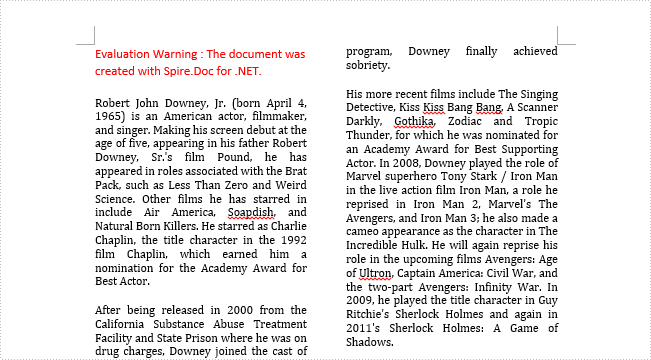
Step 2: Add a column to section one, set the two parameters in AddColumn() method, which stand for the width of columns and the spacing between columns.
document.Sections[0].AddColumn(200f, 20f);
Step 3: Save and launch the file.
document.SaveToFile("result.docx");
System.Diagnostics.Process.Start("result.docx");
Output:
Entire Code:
using Spire.Doc;
using System.Windows;

namespace WpfApplication1
{
    public partial class MainWindow : Window
    {
        public MainWindow()
        {
            InitializeComponent();
        }
        private void button1_Click(object sender, RoutedEventArgs e)
        {

            Document document = new Document();
            document.LoadFromFile("sample.docx");

            document.Sections[0].AddColumn(200f, 20f);

            document.SaveToFile("result.docx");
            System.Diagnostics.Process.Start("result.docx");
        }


    }
}
Borders can make the associative perception of a table stronger, but sometimes, especially in PowerPoint, you may want to remove them in order to achieve a better visual effect. In this part, we're going to introduce how to set and remove border of an existing table in PowerPoint by using Spire.Presentation for .NET.
Before start, please download and install Spire.Presentation correctly, after that add the Spire.Presentation.dll file as the reference of your project.
Detail steps overview:
Set table border:
Step 1: Create a new presentation instance and load the sample document from file.
Presentation presentation = new Presentation();
presentation.LoadFromFile("testTable.pptx");
Step 2: Find the table by looping through all the slides, and then set borders for it. Users can set different border styles according to their requirements.
foreach (ISlide slide in presentation.Slides)
{
    foreach (IShape shape in slide.Shapes)
    {
        if (shape is ITable)
        {
            foreach (TableRow row in (shape as ITable).TableRows)
            {
                foreach (Cell cell in row)
                {
                    cell.BorderTop.FillType = FillFormatType.Solid;
                    cell.BorderBottom.FillType = FillFormatType.Solid;
                    cell.BorderLeft.FillType = FillFormatType.Solid;
                    cell.BorderRight.FillType = FillFormatType.Solid;
                }
            }
        }
    }
}
Step 3: Save the file as Border.pptx.
presentation.SaveToFile("Border.pptx", FileFormat.Pptx2010);
Remove table border:
Remove table border is very simple, refer to the following codes:
cell.BorderTop.FillType = FillFormatType.None;
cell.BorderBottom.FillType = FillFormatType.None;
cell.BorderLeft.FillType = FillFormatType.None;
cell.BorderRight.FillType = FillFormatType.None;
Effective screenshots:
Before:

After:

Full codes:
using Spire.Presentation;
using Spire.Presentation.Drawing;

namespace Set_and_Remove_Table_Border_in_PPT
{
    class Program
    {
        static void Main(string[] args)
        {
            Presentation presentation = new Presentation();
            presentation.LoadFromFile("testTable.pptx");
            foreach (ISlide slide in presentation.Slides)
            {
                foreach (IShape shape in slide.Shapes)
                {
                    if (shape is ITable)
                    {
                        foreach (TableRow row in (shape as ITable).TableRows)
                        {
                            foreach (Cell cell in row)
                            {
                                //Add top border and set its FillType as Solid.
                                cell.BorderTop.FillType = FillFormatType.Solid;
                                //Remove top border
                                //cell.BorderTop.FillType = FillFormatType.None;

                                cell.BorderBottom.FillType = FillFormatType.Solid;
                                //cell.BorderBottom.FillType = FillFormatType.None;

                                cell.BorderLeft.FillType = FillFormatType.Solid;
                                //cell.BorderLeft.FillType = FillFormatType.None;

                                cell.BorderRight.FillType = FillFormatType.Solid;
                                //cell.BorderRight.FillType = FillFormatType.None;
                            }
                        }
                    }
                }
            }
            presentation.SaveToFile("Border.pptx", FileFormat.Pptx2010);
        }
    }
}
PDF and Word are the two most commonly used files in our daily life, however, sometimes we need to do conversion between them due to their own advantages, disadvantages or our different requirements. Spire.Doc for WPF as a professional word component enables developers to convert Word to PDF easily by invoking the document.SaveToFile() method.
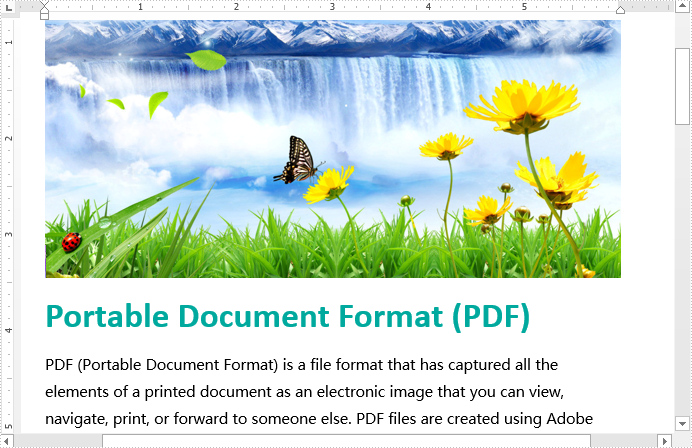
This is the screenshot of the original word document:
Now follow the steps below:
First, please download and install Spire.Doc correctly, then create a WPF application project and add the Spire.Doc.Wpf.dll as the reference of your project.
Second, drag a button to the MainWindow, double click the button to add following codes to convert Word to PDF.
//Load document
Document document = new Document();
document.LoadFromFile("sample.docx");

//convert to PDF
document.SaveToFile("toPDF.PDF",FileFormat.PDF);

//Launch the file
System.Diagnostics.Process.Start("toPDF.PDF");
'Load document
Dim document As New Document()
document.LoadFromFile("sample.docx")

'convert to PDF
document.SaveToFile("toPDF.PDF",FileFormat.PDF)

'Launch the file
System.Diagnostics.Process.Start("toPDF.PDF")
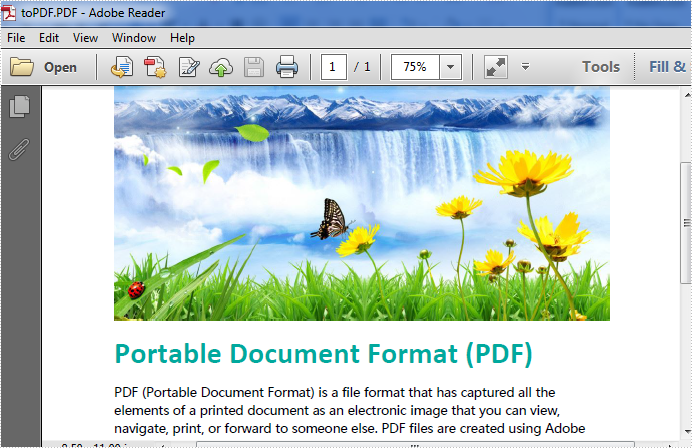
Effective screenshot:
With the help of Spire.Doc for WPF, developers can create and edit word documents easily and flexibly for their WPF applications. Sometimes developers need to protect their word documents for being read and edit by others. They may need to add password for the word files to protect them confidential. Then others have to enter the password to open the view the encrypted word documents. Spire.Doc for WPF offers a method of Document.Encrypt(); to enable developers to set the password for word documents and Document.RemoveEncryption(); to remove the encryption for word documents.
This article will demonstrate how to encrypt and word documents with password and decrypt the word documents in C# for WPF applications.
Note: Before Start, please download the latest version of Spire.Doc and add Spire.Doc.Wpf.dll in the bin folder as the reference of Visual Studio.
Here comes to the code snippets:
Step 1: Create a new word document and load the document from file.
Document document = new Document();
document.LoadFromFile("Sample.docx");
Step 2: Encrypt the document with password.
document.Encrypt("eiceblue");
Step 3: Save the encrypted document to file.
document.SaveToFile("Encryption.docx", FileFormat.Docx);
Step 4: Create a second new word document and load the encrypted document from file with the password.
Document document2 = new Document();
document2.LoadFromFile("Encryption.docx",FileFormat.Docx,"eiceblue");
Step 5: Decrypted the word document.
document2.RemoveEncryption();
Step 6: Save the decrypted document to file.
document2.SaveToFile("Decrytion.docx", FileFormat.Docx);
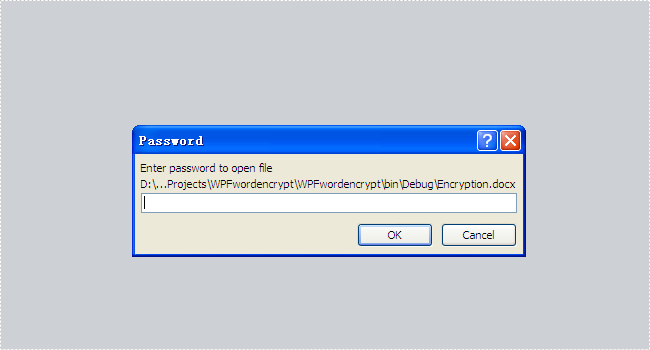
Please check the effective screenshots of the encrypted word document and the decrypted word documents as below:
Encrypted document with password:
Decrypted word document:

Full codes:
using Spire.Doc;
using System.Windows;

namespace WpfApplication1
{
    public partial class MainWindow : Window
    {
        public MainWindow()
        {
            InitializeComponent();
        }
        private void button1_Click(object sender, RoutedEventArgs e)
        {
            Document document = new Document();
            document.LoadFromFile("Sample.docx");

            document.Encrypt("eiceblue");

            document.SaveToFile("Encryption.docx", FileFormat.Docx);

            Document document2 = new Document();
            document2.LoadFromFile("Encryption.docx", FileFormat.Docx, "eiceblue");
            document2.RemoveEncryption();

            document2.SaveToFile("Decrytion.docx", FileFormat.Docx);

        }
    }
}
class Program
    {
        static void Main(string[] args)
        {
            const string fileName = "SetCustomProperty.docx";
            Console.WriteLine("Manager = " +
                SetCustomProperty(fileName, "Manager", "Peter", PropertyTypes.Text));
            Console.WriteLine("ReviewDate = " +
                SetCustomProperty(fileName, "ReviewDate",
                DateTime.Parse("12/21/2010"), PropertyTypes.DateTime));
        }
        public enum PropertyTypes : int
        {
            YesNo,
            Text,
            DateTime,
            NumberInteger,
            NumberDouble
        }

        public static string SetCustomProperty(
            string fileName,
            string propertyName,
            object propertyValue,
            PropertyTypes propertyType)
        {
            // Given a document name, a property name/value, and the property type,
            // add a custom property to a document. The method returns the original
            // value, if it existed.

            string returnValue = null;

            var newProp = new CustomDocumentProperty();
            bool propSet = false;

            // Calculate the correct type.
            switch (propertyType)
            {
                case PropertyTypes.DateTime:

                    // Be sure you were passed a real date,
                    // and if so, format in the correct way.
                    // The date/time value passed in should
                    // represent a UTC date/time.
                    if ((propertyValue) is DateTime)
                    {
                        newProp.VTFileTime =
                            new VTFileTime(string.Format("{0:s}Z",
                                Convert.ToDateTime(propertyValue)));
                        propSet = true;
                    }

                    break;

                case PropertyTypes.NumberInteger:
                    if ((propertyValue) is int)
                    {
                        newProp.VTInt32 = new VTInt32(propertyValue.ToString());
                        propSet = true;
                    }

                    break;

                case PropertyTypes.NumberDouble:
                    if (propertyValue is double)
                    {
                        newProp.VTFloat = new VTFloat(propertyValue.ToString());
                        propSet = true;
                    }

                    break;

                case PropertyTypes.Text:
                    newProp.VTLPWSTR = new VTLPWSTR(propertyValue.ToString());
                    propSet = true;

                    break;

                case PropertyTypes.YesNo:
                    if (propertyValue is bool)
                    {
                        // Must be lowercase.
                        newProp.VTBool = new VTBool(
                          Convert.ToBoolean(propertyValue).ToString().ToLower());
                        propSet = true;
                    }
                    break;
            }

            if (!propSet)
            {
                // If the code was not able to convert the
                // property to a valid value, throw an exception.
                throw new InvalidDataException("propertyValue");
            }

            // Now that you have handled the parameters, start
            // working on the document.
            newProp.FormatId = "{D5CDD505-2E9C-101B-9397-08002B2CF9AE}";
            newProp.Name = propertyName;

            using (var document = WordprocessingDocument.Open(fileName, true))
            {
                var customProps = document.CustomFilePropertiesPart;
                if (customProps == null)
                {
                    // No custom properties? Add the part, and the
                    // collection of properties now.
                    customProps = document.AddCustomFilePropertiesPart();
                    customProps.Properties =
                        new DocumentFormat.OpenXml.CustomProperties.Properties();
                }

                var props = customProps.Properties;
                if (props != null)
                {
                    // This will trigger an exception if the property's Name
                    // property is null, but if that happens, the property is damaged,
                    // and probably should raise an exception.
                    var prop =
                        props.Where(
                        p => ((CustomDocumentProperty)p).Name.Value
                            == propertyName).FirstOrDefault();

                    // Does the property exist? If so, get the return value,
                    // and then delete the property.
                    if (prop != null)
                    {
                        returnValue = prop.InnerText;
                        prop.Remove();
                    }

                    // Append the new property, and
                    // fix up all the property ID values.
                    // The PropertyId value must start at 2.
                    props.AppendChild(newProp);
                    int pid = 2;
                    foreach (CustomDocumentProperty item in props)
                    {
                        item.PropertyId = pid++;
                    }
                    props.Save();
                }
            }
            return returnValue;
        }
    }
class Program
    {
        static void Main(string[] args)
        {
            string fileName = "OpenXML.docx";
            GetCommentsFromDocument(fileName);
        }
        public static void GetCommentsFromDocument(string fileName)
        {
            using (WordprocessingDocument wordDoc =
                WordprocessingDocument.Open(fileName, false))
            {
                WordprocessingCommentsPart commentsPart =
                    wordDoc.MainDocumentPart.WordprocessingCommentsPart;

                if (commentsPart != null && commentsPart.Comments != null)
                {
                    foreach (Comment comment in commentsPart.Comments.Elements())
                    {
                        Console.WriteLine(comment.InnerText);

                    }
                }
            }
            Console.ReadLine();
        }
    }
