Как конвертировать Word в Markdown с изображениями и таблицами
```html

Преобразование документов Word в Markdown (MD) становится все более важным для разработчиков, технических писателей и команд по документированию, работающих с рабочими процессами на основе Git или генераторами статических сайтов, такими как Hugo, Jekyll и MkDocs. Markdown — это легкий, читаемый и удобный для контроля версий формат, что делает его идеальным для современных конвейеров документации.
Это руководство охватывает все практические способы преобразования Word в Markdown, включая онлайн-инструменты, утилиты командной строки, такие как Pandoc, и автоматическое преобразование с помощью Python. Вы также узнаете, как сохранить изображения, таблицы и форматирование для получения чистых, готовых к публикации файлов Markdown.
Обзор методов
| Метод | Лучше всего подходит для | Плюсы | Ограничения |
|---|---|---|---|
| Онлайн-инструменты | Быстрых разовых преобразований | Не требует установки, прост в использовании | Ограниченная точность форматирования, проблемы с конфиденциальностью |
| Настольное ПО | Файлов средней сложности | Более высокая стабильность, использование в автономном режиме | Нет автоматизации, возможна потеря стилей/таблиц |
| Автоматизация на Python | Крупномасштабных или точных рабочих процессов | Полный контроль, изображения в Base64, сохранение структуры, возможность написания скриптов | Требуются базовые знания в написании скриптов |
Зачем конвертировать документы Word в Markdown?
Markdown — это удобочитаемый, дружественный к Git формат обычного текста, идеально подходящий для технической документации и совместного написания.
Улучшенная интеграция с Git
В отличие от файлов DOCX, Markdown позволяет:
- Чистые, читаемые различия в запросах на слияние
- Более простое разрешение конфликтов слияния
- Бесшовная совместимость с GitHub, GitLab и Bitbucket
Встроенная поддержка в генераторах статических сайтов
Платформы, такие как Hugo, Jekyll, MkDocs и Docusaurus, ожидают Markdown. Преобразование файлов Word устраняет необходимость в ручном переформатировании.
Масштабная автоматизация
Как только контент находится в Markdown, его можно:
- Обрабатывать через конвейеры CI/CD
- Переводить или локализовать
- Легко индексировать, проверять, анализировать или обновлять пакетами
Это делает надежный рабочий процесс DOCX → MD необходимым для многих команд.
Основные трудности при преобразовании Word в Markdown
Документы Word часто содержат элементы, которые не всегда корректно преобразуются в Markdown:
- Сложные таблицы или объединенные ячейки
- Встроенные изображения с настраиваемым позиционированием
- Непоследовательные стили заголовков
- Сноски, колонтитулы, текстовые поля
- Отслеживаемые изменения или скрытое форматирование
Выбор правильного метода преобразования минимизирует ручную очистку.
Метод 1: Преобразование Word в Markdown онлайн
Онлайн-инструменты — это самый быстрый способ преобразовать DOC/DOCX в Markdown без установки программного обеспечения.
На что обращать внимание в онлайн-конвертере
Выбирайте онлайн-инструменты, которые:
- Поддерживают как DOC, так и DOCX
- Сохраняют правильные уровни заголовков и структуры списков
- Сохраняют форматирование (жирный, курсив, ссылки, таблицы)
- Сохраняют изображения в формате base64 или извлекают их в отдельную папку
CLOUDXDOCS — один из вариантов, который создает чистый Markdown с поддержкой изображений.
Пошаговая инструкция: Использование CLOUDXDOCS
- Посетите конвертер Word в Markdown от CLOUDXDOCS.
- Загрузите ваш файл .doc или .docx.
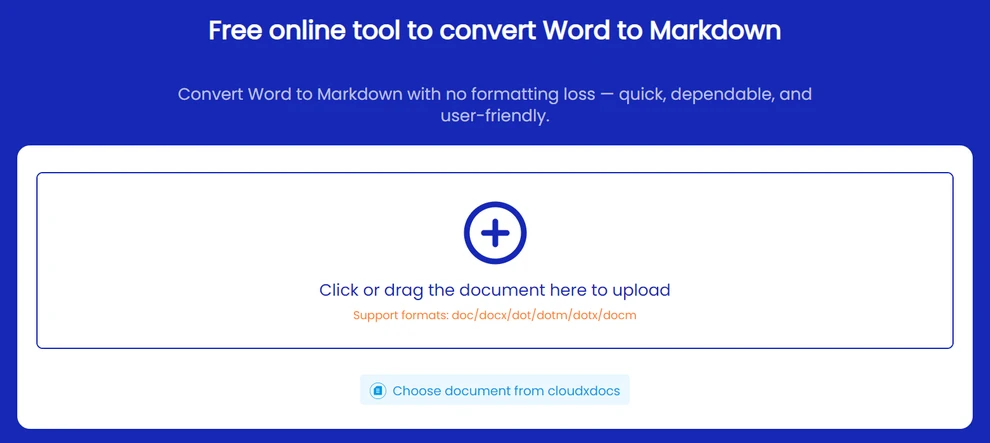
- Выберите Markdown (.md).
- Начните преобразование.
- Загрузите сгенерированный файл .md.
Совет: Избегайте загрузки конфиденциальных документов — используйте локальные или офлайн-инструменты для чувствительного контента.
После преобразования в Markdown вы также можете преобразовать его в HTML.
Метод 2: Преобразование DOCX в Markdown с помощью Pandoc (офлайн)
Pandoc — это легкая утилита командной строки, которая работает локально и может преобразовывать современные файлы DOCX в Markdown. Она подходит, если вы предпочитаете не загружать документы в интернет.
Как использовать Pandoc
- Установите Pandoc с официального сайта.
- Откройте терминал (Windows: Command Prompt или PowerShell; macOS / Linux: Terminal).
- Введите команду преобразования.
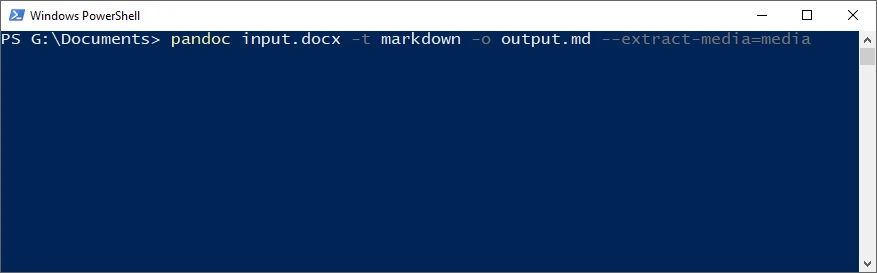
Базовое преобразование DOCX → Markdown
pandoc input.docx -t markdown -o output.md
Это создает файл Markdown с сохраненными заголовками, списками, ссылками и общим форматированием.
Экспорт изображений
pandoc input.docx -t markdown -o output.md --extract-media=media
Pandoc сохранит все изображения в локальную папку media и автоматически обновит ссылки в Markdown.
Примечание: Pandoc не может преобразовывать устаревшие файлы .doc и не встраивает изображения в виде содержимого Base64 Markdown.
Если вы хотите опубликовать свой документ на веб-странице, вы также можете преобразовать Word напрямую в HTML.
Метод 3: Преобразование Word в Markdown с использованием Python
Для крупномасштабной обработки документов, такой как пакетные задания, скрипты автоматизации или конвейеры CI/CD, программное решение обеспечивает наивысшую эффективность и согласованность. Библиотеки с открытым исходным кодом подходят для основного текста, но часто не могут точно сохранить форматирование в сложных документах.
Если вам нужен высококачественный вывод в формате Markdown, Spire.Doc for Python предлагает прямой, не требующий настольных приложений способ преобразования файлов .doc и .docx с надежным сохранением форматирования.
Почему стоит рассмотреть Spire.Doc for Python?
- Прямое преобразование DOC и DOCX
- Изображения автоматически кодируются в Base64 и встраиваются
- Не требуется Microsoft Office или LibreOffice
- Обрабатывает стили, списки, таблицы, колонтитулы
- Идеально подходит для автоматизированных или серверных рабочих процессов
Установка Spire.Doc for Python
Вы можете установить Spire.Doc for Python через pip:
pip install spire.doc
Кроме того, вы можете получить библиотеку путем ручной загрузки, включая бесплатную версию Free Spire.Doc for Python для проектов с меньшими требованиями.
Базовое преобразование DOC/DOCX в Markdown
Перед запуском кода убедитесь, что у вашего скрипта есть разрешение на чтение входного файла и разрешение на запись в выходной каталог.
from spire.doc import Document, FileFormat

doc = Document()
doc.LoadFromFile("input.docx")   # .doc также поддерживается
doc.SaveToFile("output.md", FileFormat.Markdown)
doc.Close()
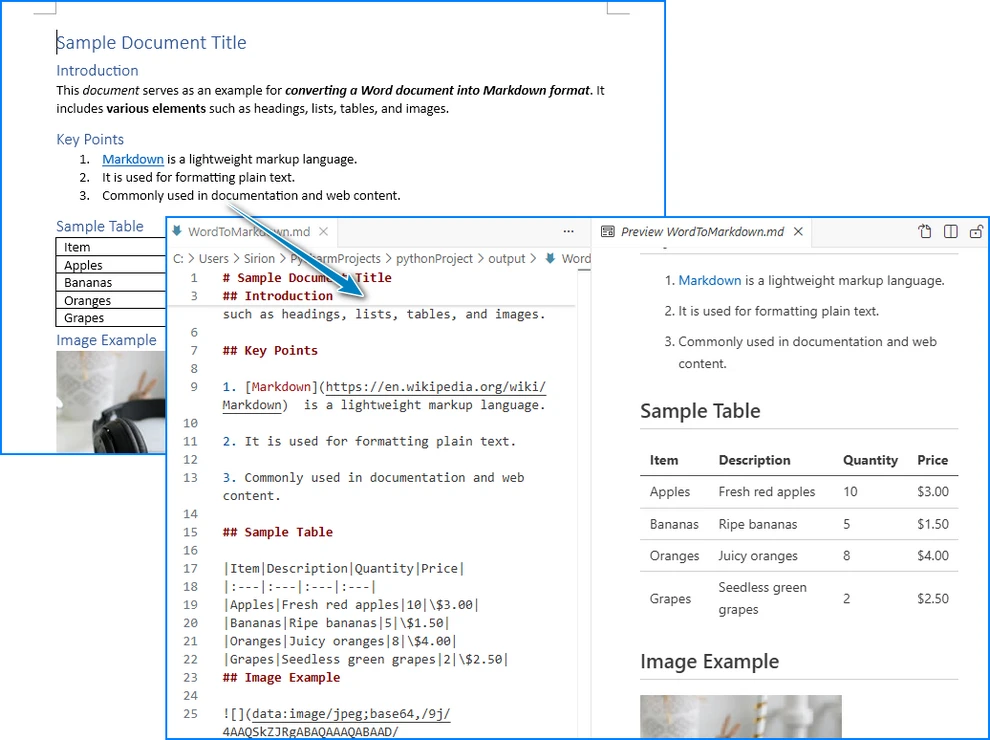
Это выводит файл Markdown с сохраненной структурой и изображениями, закодированными в Base64.
Ключевые классы и методы
- Document: Основной класс для открытия и преобразования файлов Word.
- LoadFromFile(): Автоматически загружает .doc или .docx.
- SaveToFile(..., FileFormat.Markdown): Преобразует в Markdown со встроенными изображениями.
- FileFormat.Markdown: Значение формата экспорта.
Ниже приведен пример документа Word и его вывода в формате Markdown:
Пакетное преобразование: несколько файлов Word в Markdown
Если вам нужно преобразовать несколько документов Word в Markdown одновременно, вы можете использовать простой скрипт на Python для автоматизации процесса, сохраняя форматирование и изображения для всех файлов в папке.
import os
from spire.doc import Document, FileFormat

input_folder = "input_docs"
output_folder = "output_md"

# Убедитесь, что выходная папка существует
os.makedirs(output_folder, exist_ok=True)

for filename in os.listdir(input_folder):
    if filename.endswith(".docx") or filename.endswith(".doc"):
        doc = Document()
        doc.LoadFromFile(os.path.join(input_folder, filename))
        output_path = os.path.join(output_folder, filename.rsplit(".", 1)[0] + ".md")
        doc.SaveToFile(output_path, FileFormat.Markdown)
        doc.Close()
        print(f"Преобразовано: {filename} → {output_path}")
Советы:
- Поддерживайте надлежащие разрешения на чтение/запись для входных/выходных папок.
- Файлы автоматически сохраняются с тем же базовым именем и расширением .md.
- Изображения, закодированные в Base64, сохраняются в каждом файле Markdown.
Для получения подробных примеров преобразования между Word и Markdown на Python см. наше руководство: Преобразование Python Word ↔ Markdown.
Лучшие практики для чистого вывода Markdown
Чтобы ваши файлы Markdown были последовательными, читаемыми и простыми в обслуживании:
- Поддерживайте последовательную иерархию заголовков во всем документе.
- Проверяйте пути к изображениям или содержимое Base64, чтобы убедиться, что изображения отображаются правильно.
- Избегайте объединенных ячеек таблиц, где это возможно — более простые таблицы преобразуются надежнее.
- Примите отслеживаемые изменения и удалите комментарии в Word перед преобразованием.
- Предварительно просмотрите Markdown в редакторах, таких как VS Code, Typora или GitHub, перед публикацией.
- Проверьте списки, ссылки и форматирование, чтобы убедиться, что они отображаются так, как ожидается на вашей целевой платформе.
Устранение распространенных проблем
| Проблема | Решение |
|---|---|
| Отсутствующие изображения | Проверьте, сохранены ли изображения в формате Base64, или проверьте папку с медиафайлами. |
| Неправильно выровненные таблицы | Упростите структуру таблицы в Word или настройте вручную. |
| Ошибка с файлом DOC | Сначала преобразуйте в DOCX, особенно при использовании Pandoc. |
| Проблемы с кодировкой | Убедитесь, что на выходе используется кодировка UTF-8. |
| Неправильные списки или заголовки | Используйте последовательное форматирование в Word; избегайте ручных разрывов строк. |
Совет: Всегда тестируйте выходной Markdown в среде, где он будет использоваться, особенно для генераторов статических сайтов.
Часто задаваемые вопросы: Преобразование Word в Markdown
В1: Могу ли я преобразовать документы Word с изображениями в Markdown?
Да. Используйте инструменты, поддерживающие извлечение и встраивание изображений, такие как CLOUDXDOCS, Pandoc (--extract-media) или Spire.Doc for Python.
В2: Как мне преобразовать устаревшие файлы .DOC?
Большинство онлайн-инструментов и библиотек, таких как Spire.Doc for Python, поддерживают файлы .DOC напрямую. Однако при использовании Pandoc вам необходимо сначала преобразовать .DOC в .DOCX.
В3: Является ли Pandoc бесплатным для использования?
Да, Pandoc — это бесплатный инструмент с открытым исходным кодом. Он хорошо работает с файлами DOCX, но по умолчанию не может встраивать изображения в формате Base64.
В4: Какой метод дает наиболее точные результаты для сложных документов?
Для получения высококачественного вывода Spire.Doc for Python обычно наиболее надежно сохраняет стили, таблицы, заголовки и изображения.
Заключение
Преобразование документов Word в Markdown необходимо для команд, работающих с Git, генераторами статических сайтов и автоматизированными рабочими процессами документирования. Независимо от того, предпочитаете ли вы быстрое онлайн-преобразование, гибкость Pandoc или надежность программного решения на Python, современные инструменты позволяют легко создавать чистый и структурированный вывод в формате Markdown. Выбирая метод, который соответствует вашему рабочему процессу, и проверяя конечный файл .md, вы можете поддерживать последовательное форматирование, сохранять изображения и таблицы и оптимизировать публикацию контента на разных платформах.
Смотрите также
```
How to Convert Word to Markdown with Images and Tables
Table of Contents
Converting Word documents to Markdown (MD) is increasingly important for developers, technical writers, and documentation teams working with Git-based workflows or static site generators like Hugo, Jekyll, and MkDocs. Markdown is lightweight, readable, and version-control-friendly, making it ideal for modern documentation pipelines.
This guide covers all practical ways to convert Word to Markdown—including online tools, command-line utilities like Pandoc, and automated Python conversion. You will also learn how to preserve images, tables, and formatting for clean, ready-to-publish Markdown files.
Methods Overview
| Method | Best For | Pros | Limitations |
|---|---|---|---|
| Online Tools | Quick ad-hoc conversions | No installation, easy to use | Limited formatting accuracy, privacy concerns |
| Desktop Software | Medium complexity files | Better stability, offline use | No automation, may lose styles/tables |
| Python Automation | Large-scale or precise workflows | Full control, Base64 images, preserves structure, scriptable | Requires basic scripting knowledge |
Why Convert Word Documents to Markdown?
Markdown is a human-readable, Git-friendly plain-text format—perfect for technical documentation and collaborative writing.
Better Git Integration
Unlike DOCX files, Markdown enables:
- Clean, readable diffs in pull requests
- Easier merge conflict resolution
- Seamless compatibility with GitHub, GitLab, and Bitbucket
Native Support in Static Site Generators
Platforms like Hugo, Jekyll, MkDocs, and Docusaurus expect Markdown. Converting Word files removes the need for manual reformatting.
Automation at Scale
Once content is in Markdown, it can be:
- Processed through CI/CD pipelines
- Translated or localized
- Indexed, validated, linted, or batch-updated easily
This makes a reliable DOCX → MD workflow essential for many teams.
Common Challenges in Word-to-Markdown Conversion
Word documents often contain elements that don’t map cleanly to Markdown:
- Complex tables or merged cells
- Embedded images with custom positioning
- Inconsistent heading styles
- Footnotes, headers/footers, text boxes
- Tracked changes or hidden formatting
Choosing the right conversion method minimizes manual cleanup.
Method 1: Convert Word to Markdown Online
Online tools are the fastest way to convert DOC/DOCX to Markdown without installing software.
What to Look for in an Online Converter
Choose online tools that:
- Support both DOC and DOCX
- Preserve proper heading levels and list structures
- Maintain formatting (bold, italics, links, tables)
- Save images as base64 or extract them to a separate folder
CLOUDXDOCS is one option that produces clean Markdown with image support.
Step-by-Step: Using CLOUDXDOCS
- Visit the CLOUDXDOCS Word-to-Markdown converter.
- Upload your .doc or .docx file.
- Select Markdown (.md).
- Start the conversion.
- Download the generated .md file.
Tip: Avoid uploading confidential documents—use local or offline tools for sensitive content.
After converting to Markdown, you can also convert it to HTML.
Method 2: Convert DOCX to Markdown with Pandoc (Offline)
Pandoc is a lightweight command-line tool that runs locally and can convert modern DOCX files into Markdown. It is suitable when you prefer not to upload documents online.
How to Use Pandoc
- Install Pandoc from the official website.
- Open a terminal (Windows: Command Prompt or PowerShell; macOS / Linux: Terminal).
- Enter the conversion command.
Basic DOCX → Markdown Conversion
pandoc input.docx -t markdown -o output.md
This creates a Markdown file with headings, lists, links, and common formatting preserved.
Export Images
pandoc input.docx -t markdown -o output.md --extract-media=media
Pandoc will save all images into a local media folder and update the Markdown references automatically.
Note: Pandoc cannot convert legacy .doc files and does not embed images as base64 Markdown content.
If you want to publish your document on a webpage, you can also convert Word directly to HTML.
Method 3: Convert Word to Markdown Using Python
For large-scale document processing—such as batch jobs, automation scripts, or CI/CD pipelines—a programmatic solution provides the highest efficiency and consistency. Open-source libraries work for basic text but often fail to preserve formatting accurately in complex documents.
If you need high-fidelity Markdown output, Spire.Doc for Python offers a direct, desktop-free way to convert both .doc and .docx files with reliable formatting preservation.
Why Consider Spire.Doc for Python?
- Direct DOC and DOCX conversion
- Images automatically encoded as Base64 and embedded
- No Microsoft Office or LibreOffice required
- Handles styles, lists, tables, headers/footers
- Ideal for automated or server-side workflows
Install Spire.Doc for Python
You can install Spire.Doc for Python via pip:
pip install spire.doc
Alternatively, you may obtain the library through a manual download, including the free edition Free Spire.Doc for Python for projects with lighter requirements.
Basic DOC/DOCX to Markdown Conversion
Before running the code, ensure your script has read permission for the input file and write permission for the output directory.
from spire.doc import Document, FileFormat

doc = Document()
doc.LoadFromFile("input.docx")   # .doc also supported
doc.SaveToFile("output.md", FileFormat.Markdown)
doc.Close()
This outputs a Markdown file with preserved structure and Base64-encoded images.
Key Classes and Methods
- Document: Main class for opening and converting Word files.
- LoadFromFile(): Loads .doc or .docx automatically.
- SaveToFile(..., FileFormat.Markdown): Converts to Markdown with embedded images.
- FileFormat.Markdown: The export format value.
Below is an example of the Word document and its Markdown output:
Batch Conversion: Multiple Word Files to Markdown
If you need to convert multiple Word documents to Markdown at once, you can use a simple Python script to automate the process, preserving formatting and images for all files in a folder.
import os
from spire.doc import Document, FileFormat

input_folder = "input_docs"
output_folder = "output_md"

# Ensure output folder exists
os.makedirs(output_folder, exist_ok=True)

for filename in os.listdir(input_folder):
    if filename.endswith(".docx") or filename.endswith(".doc"):
        doc = Document()
        doc.LoadFromFile(os.path.join(input_folder, filename))
        output_path = os.path.join(output_folder, filename.rsplit(".", 1)[0] + ".md")
        doc.SaveToFile(output_path, FileFormat.Markdown)
        doc.Close()
        print(f"Converted: {filename} → {output_path}")
Tips:
- Maintain proper read/write permissions for input/output folders.
- Files are automatically saved with the same base name and .md extension.
- Base64-encoded images are preserved in each Markdown file.
For detailed examples of converting between Word and Markdown in Python, see our tutorial: Python Word ↔ Markdown Conversion.
Best Practices for Clean Markdown Output
To ensure your Markdown files are consistent, readable, and easy to maintain:
- Maintain a consistent heading hierarchy throughout the document.
- Confirm image paths or Base64 content to ensure images display correctly.
- Avoid merged table cells where possible—simpler tables convert more reliably.
- Accept tracked changes and remove comments in Word before conversion.
- Preview the Markdown in editors like VS Code, Typora, or GitHub before publishing.
- Test lists, links, and formatting to ensure they render as expected in your target platform.
Troubleshooting Common Issues
| Issue | Solution |
|---|---|
| Missing images | Check if images are saved as Base64 or verify media folder. |
| Misaligned tables | Simplify table structure in Word or adjust manually. |
| DOC file fails | Convert to DOCX first, especially when using Pandoc. |
| Encoding issues | Ensure the output uses UTF-8 encoding. |
| Lists or headings incorrect | Use consistent Word formatting; avoid manual line breaks. |
Tip: Always test the output Markdown in the environment where it will be used, especially for static site generators.
FAQ: Word to Markdown Conversion
Q1: Can I convert Word documents with images to Markdown?
Yes. Use tools that support image extraction and embedding, such as CLOUDXDOCS, Pandoc (--extract-media), or Spire.Doc for Python.
Q2: How do I convert legacy .DOC files?
Most online tools and libraries like Spire.Doc for Python support .DOC files directly. If using Pandoc, however, you need to convert .DOC to .DOCX first.
Q3: Is Pandoc free to use?
Yes, Pandoc is an open-source, free tool. It works well for DOCX files, but cannot embed images as Base64 by default.
Q4: Which method gives the most accurate results for complex documents?
For high-fidelity output, Spire.Doc for Python generally preserves styles, tables, headings, and images most reliably.
Conclusion
Converting Word documents to Markdown is essential for teams working with Git, static site generators, and automated documentation workflows. Whether you prefer a quick online conversion, the flexibility of Pandoc, or the reliability of a programmatic Python solution, modern tools make it easy to produce clean and structured Markdown output. By choosing the method that fits your workflow and validating the final .md file, you can maintain consistent formatting, preserve images and tables, and streamline content publishing across platforms.
See Also
Come convertire EPUB in PDF (Guida veloce e semplice)
EPUB, acronimo di Electronic Publication, è uno dei formati di eBook più popolari ed è supportato da molti e-reader, offrendo un'esperienza di lettura confortevole. Tuttavia, non è compatibile con tutti i dispositivi o piattaforme. Confrontando EPUB e PDF, il PDF si rivela spesso più versatile: funziona in modo affidabile su computer, tablet e dispositivi che non supportano l'EPUB e mantiene un layout coerente per la stampa, la condivisione e il trasferimento di file. In questa guida, esamineremo diversi modi semplici per convertire EPUB in PDF, aiutandoti a scegliere il metodo più adatto alle tue esigenze.
- Come Convertire EPUB in PDF Online
- Convertire un File EPUB in PDF su Windows o Mac
- Come Convertire in Blocco EPUB in PDF con Codice Semplice
- La Conclusione
Come Convertire EPUB in PDF Online
Quando si tratta di come convertire EPUB in PDF, la prima soluzione che viene in mente è l'utilizzo di strumenti online. Questi strumenti funzionano su qualsiasi dispositivo con una connessione Internet, che si tratti di uno smartphone, un tablet o un computer. Solitamente sono molto facili da usare e la velocità di conversione dipende dalla tua rete, quindi in genere non dovrai aspettare a lungo. La maggior parte dei convertitori da EPUB a PDF non richiede nemmeno la registrazione, rendendoli un'opzione rapida e conveniente. Qui, dimostreremo come convertire un file EPUB in PDF utilizzando PDFgear.
Passaggi per cambiare EPUB in PDF online con PDFgear:
- Vai alla pagina di conversione di PDFgear.
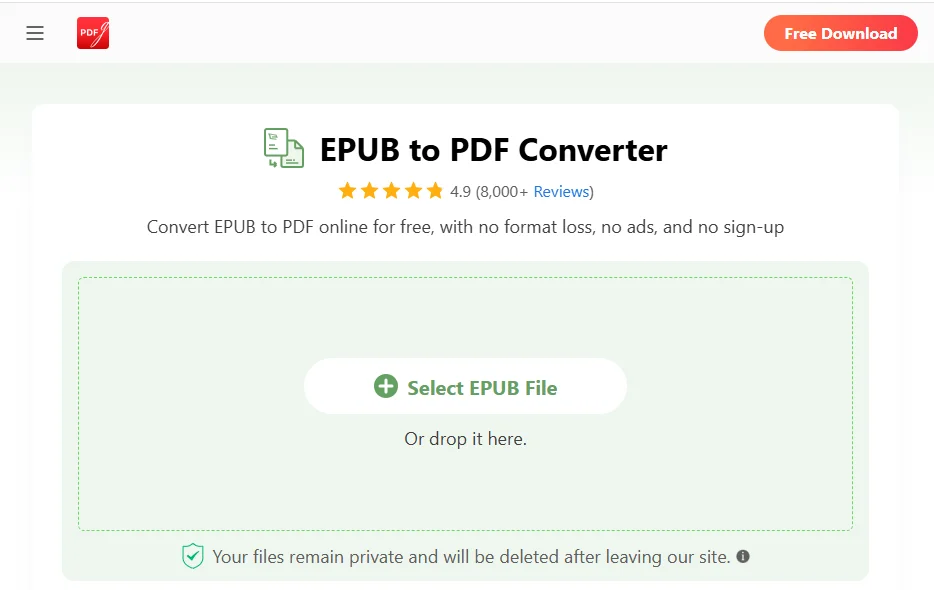
- Fai clic su Seleziona File Epub per caricare il tuo file e la conversione inizierà automaticamente.
- Una volta completata la conversione, fai clic su Scarica File per salvare il PDF convertito sul tuo dispositivo.
Sebbene i convertitori online da EPUB a PDF siano convenienti, presentano anche alcuni svantaggi, come la necessità di una connessione Internet e potenziali rischi per la privacy o la fuga di dati. Per questi motivi, è meglio utilizzarli solo per file di piccole dimensioni o documenti che non contengono informazioni sensibili.
Convertire un File EPUB in PDF su Windows o Mac
Se preferisci convertire i tuoi file in un ambiente più sicuro e stabile, utilizzare uno strumento desktop dedicato è un'ottima opzione. Una delle scelte più popolari è Calibre, uno strumento di gestione di eBook open source e potente. Supporta la conversione tra più formati, inclusi EPUB, MOBI e PDF. Calibre funziona sia su Windows che su macOS, rendendolo ideale per convertire file di grandi dimensioni o eseguire conversioni offline senza fare affidamento su una connessione Internet.
Dopo aver installato lo strumento, puoi convertire EPUB in PDF seguendo questi passaggi:
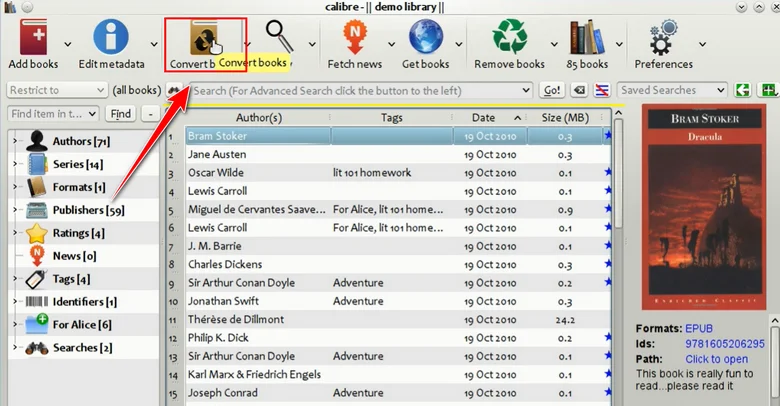
- Fai clic su Aggiungi libri per importare i file EPUB che desideri convertire.
- Seleziona i file EPUB importati dalla tua libreria di Calibre.
- Fai clic su Converti libri e scegli PDF come formato di output.
- Modifica i metadati se necessario, come il titolo, l'autore o la copertina.
- Fai clic su OK per avviare la conversione e torna alla tua libreria di Calibre per scaricare il PDF generato.
Come Convertire in Blocco EPUB in PDF con Codice Semplice
Oltre ai due metodi comuni menzionati sopra, puoi anche cambiare EPUB in PDF con poche righe di codice. L'uso del codice non solo riduce il numero di passaggi da eseguire, ma supporta anche la conversione in blocco ed elimina qualsiasi rischio di fuga di dati poiché tutto viene eseguito localmente sul tuo dispositivo.
In questo capitolo, useremo Free Spire.Doc for Python per mostrarti come convertire da EPUB a PDF in Python. Essendo una libreria professionale per l'elaborazione di documenti, supporta molte conversioni di formato, inclusa la trasformazione di EPUB in Word o la conversione di documenti Word in PDF.
Se stai cercando un modo più efficiente, controllabile e favorevole all'automazione per gestire le conversioni di documenti, Free Spire.Doc merita sicuramente di essere preso in considerazione.
Passaggi per Convertire un File EPUB in PDF con Free Spire.Doc
- Installa Free Spire.Doc
Usa il seguente comando pip per installare Free Spire.Doc nel tuo ambiente Python (ad es. VS Code), oppure scarica il programma di installazione per una configurazione personalizzata:
pip install spire.doc
- Importa i Moduli Richiesti
Importa le classi necessarie per l'elaborazione dei documenti:
from spire.doc import Document, FileFormat
- Crea un Oggetto Document
Crea un oggetto Document per caricare e gestire il file EPUB:
document = Document()
- Carica il File EPUB
Usa il metodo LoadFromFile() per caricare il tuo file EPUB. Assicurati che il percorso del file sia corretto:
document.LoadFromFile("E:/DownloadsNew/wasteland.epub")
- Salva come PDF
Salva il file EPUB caricato come PDF:
document.SaveToFile("E:/DownloadsNew/output.pdf", FileFormat.PDF)
Esempio di Codice Completo:
from spire.doc import Document, FileFormat

# Crea un oggetto Document
document = Document()

# Carica un file EPUB
document.LoadFromFile("E:/DownloadsNew/wasteland.epub")

# Salva il documento EPUB come PDF
document.SaveToFile("E:/DownloadsNew/output.pdf", FileFormat.PDF)
Ecco l'anteprima del PDF di output: 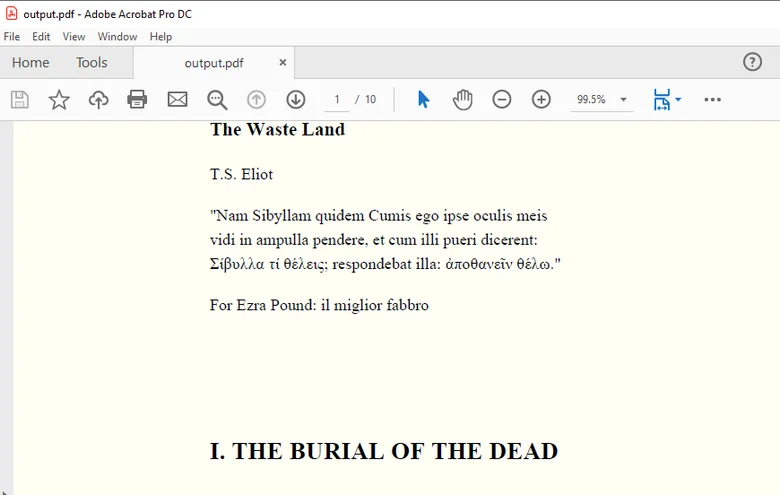
Suggerimento: Se hai anche bisogno di elaborare i file PDF convertiti, ad esempio unendo più PDF o dividendo un PDF, puoi usare Free Spire.PDF, una libreria progettata specificamente per la gestione di documenti PDF.
Converti in Blocco più File Epub in PDF
La logica per la conversione in blocco è la stessa della conversione di un singolo file, ma è meglio mettere tutti i file nella stessa cartella per renderli più facili da scorrere. Ecco il codice di esempio:
from spire.doc import Document, FileFormat

# Specifica il percorso del file
folder_path = "E:/DownloadsNew/"

# Ottieni i file EPUB da convertire
epub_files = ["wasteland.epub", "sample.epub", "script.epub"]

for epub_name in epub_files:
    epub_path = folder_path + epub_name
    pdf_name = epub_name.replace(".epub", ".pdf")
    pdf_path = folder_path + pdf_name

    # Crea un oggetto Document
    document = Document()

    # Carica ogni documento EPUB
    document.LoadFromFile(epub_path)

    # Converti il file EPUB in PDF
    document.SaveToFile(pdf_path, FileFormat.PDF)
In Conclusione
Che tu utilizzi strumenti online, software desktop o codice per convertire file EPUB in PDF, ogni metodo ha i suoi vantaggi. Se desideri convertire PDF avendo anche la flessibilità di gestire il contenuto dei documenti o eseguire conversioni tra diversi formati, Free Spire.Doc fornisce una soluzione locale affidabile, rendendo facile lavorare con EPUB, Word, PDF e altri tipi di documenti.
Leggi Anche
Como converter EPUB para PDF (Guia rápido e fácil)
EPUB, abreviação de Publicação Eletrônica, é um dos formatos de eBook mais populares e é suportado por muitos e-readers, oferecendo uma experiência de leitura confortável. No entanto, não é compatível com todos os dispositivos ou plataformas. Ao comparar EPUB vs PDF, o PDF muitas vezes se mostra mais versátil: funciona de forma confiável em computadores, tablets e dispositivos que não suportam EPUB, e mantém um layout consistente para impressão, compartilhamento e transferência de arquivos. Neste guia, vamos percorrer várias maneiras fáceis de converter EPUB para PDF, ajudando você a escolher o método que melhor se adapta às suas necessidades.
- Como Converter EPUB para PDF Online
- Converter um Arquivo EPUB para PDF no Windows ou Mac
- Como Converter EPUB para PDF em Lote com Código Simples
- A Conclusão
Como Converter EPUB para PDF Online
Quando se trata de como converter EPUB para PDF, a primeira solução que muitas vezes vem à mente é usar ferramentas online. Essas ferramentas funcionam em qualquer dispositivo com conexão à internet, seja um smartphone, tablet ou computador. Geralmente são muito fáceis de usar, e a velocidade de conversão depende da sua rede, então você normalmente não terá que esperar muito. A maioria dos conversores de EPUB para PDF nem exige inscrição, tornando-os uma opção rápida e conveniente. Aqui, demonstraremos como converter um arquivo EPUB para PDF usando o PDFgear.
Passos para transformar EPUB em PDF online com o PDFgear:
- Acesse a página de conversão do PDFgear.
- Clique em Selecionar Arquivo Epub para carregar seu arquivo, e a conversão começará automaticamente.
- Assim que a conversão estiver concluída, clique em Baixar Arquivo para salvar o PDF convertido no seu dispositivo.
Embora os conversores online de EPUB para PDF sejam convenientes, eles também têm algumas desvantagens — como exigir uma conexão com a internet e apresentar potenciais riscos de privacidade ou vazamento de dados. Por esses motivos, é melhor usá-los apenas para arquivos menores ou documentos que não contenham informações sensíveis.
Converter um Arquivo EPUB para PDF no Windows ou Mac
Se você prefere converter seus arquivos em um ambiente mais seguro e estável, usar uma ferramenta de desktop dedicada é uma ótima opção. Uma das escolhas mais populares é o Calibre, uma ferramenta de gerenciamento de eBooks de código aberto e poderosa. Ele suporta a conversão entre múltiplos formatos — incluindo EPUB, MOBI e PDF. O Calibre funciona tanto no Windows quanto no macOS, tornando-o ideal para converter arquivos grandes ou realizar conversões offline sem depender de uma conexão com a internet.
Após instalar a ferramenta, você pode converter EPUB para PDF seguindo os passos:
- Clique em Adicionar livros para importar os arquivos EPUB que você deseja converter.
- Selecione os arquivos EPUB importados da sua biblioteca do Calibre.
- Clique em Converter livros e escolha PDF como o formato de saída.
- Edite os metadados se necessário, como o título, autor ou capa.
- Clique em OK para iniciar a conversão e retorne à sua biblioteca do Calibre para baixar o PDF gerado.
Como Converter EPUB para PDF em Lote com Código Simples
Além dos dois métodos comuns mencionados acima, você também pode transformar EPUB em PDF com apenas algumas linhas de código. Usar código não apenas reduz o número de passos que você precisa realizar, mas também suporta a conversão em lote e elimina qualquer risco de vazamento de dados, já que tudo é executado localmente no seu dispositivo.
Neste capítulo, usaremos o Free Spire.Doc for Python para mostrar como converter de EPUB para PDF em Python. Como uma biblioteca profissional de processamento de documentos, ela suporta muitas conversões de formato — incluindo transformar EPUB em Word ou converter documentos do Word para PDF.
Se você está procurando uma maneira mais eficiente, controlável e amigável à automação para lidar com conversões de documentos, o Free Spire.Doc definitivamente vale a pena ser considerado.
Passos para Converter um Arquivo EPUB para PDF com o Free Spire.Doc
- Instale o Free Spire.Doc
Use o seguinte comando pip para instalar o Free Spire.Doc no seu ambiente Python (por exemplo, VS Code), ou baixe o instalador para uma configuração personalizada:
pip install spire.doc
- Importe os Módulos Necessários
Importe as classes necessárias para o processamento de documentos:
from spire.doc import Document, FileFormat
- Crie um Objeto Document
Crie um objeto Document para carregar e manipular o arquivo EPUB:
document = Document()
- Carregue o Arquivo EPUB
Use o método LoadFromFile() para carregar seu arquivo EPUB. Certifique-se de que o caminho do arquivo está correto:
document.LoadFromFile("E:/DownloadsNew/wasteland.epub")
- Salvar como PDF
Salve o arquivo EPUB carregado como um PDF:
document.SaveToFile("E:/DownloadsNew/output.pdf", FileFormat.PDF)
Exemplo de Código Completo:
from spire.doc import Document, FileFormat

# Cria um objeto Document
document = Document()

# Carrega um arquivo EPUB
document.LoadFromFile("E:/DownloadsNew/wasteland.epub")

# Salva o documento EPUB como um PDF
document.SaveToFile("E:/DownloadsNew/output.pdf", FileFormat.PDF)
Aqui está a pré-visualização do PDF de saída:
Dica: Se você também precisa processar os arquivos PDF convertidos — como mesclar múltiplos PDFs ou dividir um PDF — você pode usar o Free Spire.PDF, uma biblioteca projetada especificamente para manipular documentos PDF.
Converter Vários Arquivos Epub para PDFs em Lote
A lógica para a conversão em lote é a mesma que a conversão de um único arquivo, mas é melhor colocar todos os arquivos na mesma pasta para facilitar a iteração sobre eles. Aqui está o código de exemplo:
from spire.doc import Document, FileFormat

# Especifique o caminho do arquivo
folder_path = "E:/DownloadsNew/"

# Obtenha os arquivos EPUB para converter
epub_files = ["wasteland.epub", "sample.epub", "script.epub"]

for epub_name in epub_files:
    epub_path = folder_path + epub_name
    pdf_name = epub_name.replace(".epub", ".pdf")
    pdf_path = folder_path + pdf_name

    # Cria um objeto Document
    document = Document()

    # Carrega cada documento EPUB
    document.LoadFromFile(epub_path)

    # Converte o arquivo EPUB para PDF
    document.SaveToFile(pdf_path, FileFormat.PDF)
Conclusão
Seja usando ferramentas online, software de desktop ou código para converter arquivos EPUB para PDFs, cada método tem suas vantagens. Se você deseja converter PDFs e ao mesmo tempo ter a flexibilidade de manipular o conteúdo do documento ou realizar conversões entre diferentes formatos, o Free Spire.Doc oferece uma solução local confiável, facilitando o trabalho com EPUB, Word, PDF e outros tipos de documentos.
Leia Também
EPUB을 PDF로 변환하는 방법 (빠르고 쉬운 가이드)
전자 출판(Electronic Publication)의 약자인 EPUB은 가장 인기 있는 eBook 형식 중 하나이며 많은 전자책 리더기에서 지원되어 편안한 독서 경험을 제공합니다. 그러나 모든 장치나 플랫폼과 호환되는 것은 아닙니다. EPUB과 PDF를 비교할 때 PDF는 종종 더 다재다능한 것으로 입증됩니다. 컴퓨터, 태블릿 및 EPUB을 지원하지 않는 장치에서 안정적으로 작동하며 인쇄, 공유 및 파일 전송을 위해 일관된 레이아웃을 유지합니다. 이 가이드에서는 EPUB을 PDF로 변환하는 몇 가지 쉬운 방법을 안내하여 필요에 가장 적합한 방법을 선택하는 데 도움을 드립니다.
온라인에서 EPUB을 PDF로 변환하는 방법
EPUB을 PDF로 변환하는 방법에 관해서는 가장 먼저 떠오르는 해결책이 온라인 도구를 사용하는 것입니다. 이러한 도구는 스마트폰, 태블릿, 컴퓨터 등 인터넷에 연결된 모든 장치에서 작동합니다. 일반적으로 사용하기 매우 쉬우며 변환 속도는 네트워크에 따라 다르므로 일반적으로 오래 기다릴 필요가 없습니다. 대부분의 EPUB to PDF 변환기는 가입조차 필요하지 않아 빠르고 편리한 옵션입니다. 여기서는 PDFgear를 사용하여 EPUB 파일을 PDF로 변환하는 방법을 보여 드리겠습니다.
PDFgear를 사용하여 온라인에서 EPUB을 PDF로 변경하는 단계:
- PDFgear 변환 페이지로 이동합니다.
- Epub 파일 선택을 클릭하여 파일을 업로드하면 변환이 자동으로 시작됩니다.
- 변환이 완료되면 파일 다운로드를 클릭하여 변환된 PDF를 장치에 저장합니다.
온라인 EPUB-PDF 변환기는 편리하지만 인터넷 연결이 필요하고 잠재적인 개인 정보 보호 또는 데이터 유출 위험이 있다는 몇 가지 단점도 있습니다. 이러한 이유로 민감한 정보가 포함되지 않은 작은 파일이나 문서에만 사용하는 것이 가장 좋습니다.
Windows 또는 Mac에서 EPUB 파일을 PDF로 변환하기
보다 안전하고 안정적인 환경에서 파일을 변환하는 것을 선호한다면 전용 데스크톱 도구를 사용하는 것이 좋습니다. 가장 인기 있는 선택 중 하나는 오픈 소스이자 강력한 eBook 관리 도구인 Calibre입니다. EPUB, MOBI 및 PDF를 포함한 여러 형식 간의 변환을 지원합니다. Calibre는 Windows와 macOS 모두에서 작동하므로 인터넷 연결에 의존하지 않고 대용량 파일을 변환하거나 오프라인 변환을 수행하는 데 이상적입니다.
도구를 설치한 후 다음 단계에 따라 EPUB을 PDF로 변환할 수 있습니다.
- 책 추가를 클릭하여 변환하려는 EPUB 파일을 가져옵니다.
- Calibre 라이브러리에서 가져온 EPUB 파일을 선택합니다.
- 책 변환을 클릭하고 출력 형식으로 PDF를 선택합니다.
- 필요한 경우 제목, 저자 또는 표지와 같은 메타데이터를 편집합니다.
- 확인을 클릭하여 변환을 시작하고 Calibre 라이브러리로 돌아가 생성된 PDF를 다운로드합니다.
간단한 코드로 EPUB을 PDF로 일괄 변환하는 방법
위에서 언급한 두 가지 일반적인 방법 외에도 단 몇 줄의 코드로 EPUB을 PDF로 변경할 수도 있습니다. 코드를 사용하면 수행해야 하는 단계 수가 줄어들 뿐만 아니라 일괄 변환을 지원하고 모든 것이 장치에서 로컬로 실행되므로 데이터 유출 위험이 없습니다.
이 장에서는 Free Spire.Doc for Python을 사용하여 Python에서 EPUB을 PDF로 변환하는 방법을 보여줍니다. 전문적인 문서 처리 라이브러리로서 EPUB을 Word로 바꾸거나 Word 문서를 PDF로 변환하는 등 다양한 형식 변환을 지원합니다.
문서 변환을 처리하는 보다 효율적이고 제어 가능하며 자동화 친화적인 방법을 찾고 있다면 Free Spire.Doc을 고려해 볼 가치가 있습니다.
Free Spire.Doc으로 EPUB 파일을 PDF로 변환하는 단계
- Free Spire.Doc 설치
다음 pip 명령을 사용하여 Python 환경(예: VS Code)에 Free Spire.Doc을 설치하거나 사용자 지정 설정을 위해 설치 프로그램을 다운로드하십시오.
pip install spire.doc
- 필요한 모듈 가져오기
문서 처리에 필요한 클래스를 가져옵니다.
from spire.doc import Document, FileFormat
- Document 객체 생성
EPUB 파일을 로드하고 처리할 Document 객체를 만듭니다.
document = Document()
- EPUB 파일 로드
LoadFromFile() 메서드를 사용하여 EPUB 파일을 로드합니다. 파일 경로가 올바른지 확인하십시오.
document.LoadFromFile("E:/DownloadsNew/wasteland.epub")
- PDF로 저장
로드된 EPUB 파일을 PDF로 저장합니다.
document.SaveToFile("E:/DownloadsNew/output.pdf", FileFormat.PDF)
전체 코드 예제:
from spire.doc import Document, FileFormat

# Document 객체 생성
document = Document()

# EPUB 파일 로드
document.LoadFromFile("E:/DownloadsNew/wasteland.epub")

# EPUB 문서를 PDF로 저장
document.SaveToFile("E:/DownloadsNew/output.pdf", FileFormat.PDF)
다음은 출력 PDF의 미리보기입니다.
팁: 변환된 PDF 파일(예: 여러 PDF 병합 또는 PDF 분할)도 처리해야 하는 경우 PDF 문서 처리를 위해 특별히 설계된 라이브러리인 Free Spire.PDF를 사용할 수 있습니다.
여러 Epub 파일을 PDF로 일괄 변환
일괄 변환의 논리는 단일 파일을 변환하는 것과 동일하지만 반복하기 쉽도록 모든 파일을 동일한 폴더에 넣는 것이 가장 좋습니다. 다음은 샘플 코드입니다.
from spire.doc import Document, FileFormat

# 파일 경로 지정
folder_path = "E:/DownloadsNew/"

# 변환할 EPUB 파일 가져오기
epub_files = ["wasteland.epub", "sample.epub", "script.epub"]

for epub_name in epub_files:
    epub_path = folder_path + epub_name
    pdf_name = epub_name.replace(".epub", ".pdf")
    pdf_path = folder_path + pdf_name

    # Document 객체 생성
    document = Document()

    # 각 EPUB 문서 로드
    document.LoadFromFile(epub_path)

    # EPUB 파일을 PDF로 변환
    document.SaveToFile(pdf_path, FileFormat.PDF)
결론
온라인 도구, 데스크톱 소프트웨어 또는 코드를 사용하여 EPUB 파일을 PDF로 변환하든 각 방법에는 장점이 있습니다. 문서 내용을 처리하거나 다른 형식 간의 변환을 수행할 수 있는 유연성을 가지면서 PDF를 변환하려는 경우 Free Spire.Doc은 신뢰할 수 있는 로컬 솔루션을 제공하여 EPUB, Word, PDF 및 기타 문서 유형으로 쉽게 작업할 수 있도록 합니다.
함께 읽기
Comment convertir EPUB en PDF (Guide rapide et facile)
EPUB, abréviation de Publication Électronique, est l'un des formats de livre électronique les plus populaires et est pris en charge par de nombreux lecteurs électroniques, offrant une expérience de lecture confortable. Cependant, il n'est pas compatible avec tous les appareils ou plateformes. En comparant EPUB et PDF, le PDF se révèle souvent plus polyvalent : il fonctionne de manière fiable sur les ordinateurs, les tablettes et les appareils qui ne prennent pas en charge l'EPUB, et il conserve une mise en page cohérente pour l'impression, le partage et le transfert de fichiers. Dans ce guide, nous allons vous présenter plusieurs moyens faciles de convertir un EPUB en PDF, afin de vous aider à choisir la méthode qui correspond le mieux à vos besoins.
- Comment convertir EPUB en PDF en ligne
- Convertir un fichier EPUB en PDF sous Windows ou Mac
- Comment convertir par lots des EPUB en PDF avec un code simple
- La conclusion
Comment convertir EPUB en PDF en ligne
Lorsqu'il s'agit de convertir un EPUB en PDF, la première solution qui vient souvent à l'esprit est d'utiliser des outils en ligne. Ces outils fonctionnent sur n'importe quel appareil disposant d'une connexion Internet, que ce soit un smartphone, une tablette ou un ordinateur. Ils sont généralement très faciles à utiliser, et la vitesse de conversion dépend de votre réseau, vous n'aurez donc généralement pas à attendre longtemps. La plupart des convertisseurs EPUB en PDF ne nécessitent même pas d'inscription, ce qui en fait une option rapide et pratique. Ici, nous allons vous montrer comment convertir un fichier EPUB en PDF en utilisant PDFgear.
Étapes pour changer un EPUB en PDF en ligne avec PDFgear :
- Allez sur la page de conversion de PDFgear.
- Cliquez sur Sélectionner un fichier Epub pour télécharger votre fichier, et la conversion commencera automatiquement.
- Une fois la conversion terminée, cliquez sur Télécharger le fichier pour enregistrer le PDF converti sur votre appareil.
Bien que les convertisseurs EPUB en PDF en ligne soient pratiques, ils présentent également quelques inconvénients, comme la nécessité d'une connexion Internet et les risques potentiels de confidentialité ou de fuite de données. Pour ces raisons, il est préférable de les utiliser uniquement pour les fichiers de petite taille ou les documents qui ne contiennent pas d'informations sensibles.
Convertir un fichier EPUB en PDF sous Windows ou Mac
Si vous préférez convertir vos fichiers dans un environnement plus sécurisé et stable, l'utilisation d'un outil de bureau dédié est une excellente option. L'un des choix les plus populaires est Calibre, un outil de gestion de livres électroniques open-source et puissant. Il prend en charge la conversion entre plusieurs formats, notamment EPUB, MOBI et PDF. Calibre fonctionne à la fois sur Windows et macOS, ce qui le rend idéal pour convertir des fichiers volumineux ou effectuer des conversions hors ligne sans dépendre d'une connexion Internet.
Après avoir installé l'outil, vous pouvez convertir un EPUB en PDF en suivant les étapes suivantes :
- Cliquez sur Ajouter des livres pour importer les fichiers EPUB que vous souhaitez convertir.
- Sélectionnez les fichiers EPUB importés depuis votre bibliothèque Calibre.
- Cliquez sur Convertir des livres et choisissez PDF comme format de sortie.
- Modifiez les métadonnées si nécessaire, comme le titre, l'auteur ou la couverture.
- Cliquez sur OK pour démarrer la conversion et retournez à votre bibliothèque Calibre pour télécharger le PDF généré.
Comment convertir par lots des EPUB en PDF avec un code simple
Outre les deux méthodes courantes mentionnées ci-dessus, vous pouvez également changer un EPUB en PDF avec seulement quelques lignes de code. L'utilisation de code réduit non seulement le nombre d'étapes à effectuer, mais prend également en charge la conversion par lots et élimine tout risque de fuite de données, car tout s'exécute localement sur votre appareil.
Dans ce chapitre, nous utiliserons Free Spire.Doc for Python pour vous montrer comment convertir un EPUB en PDF en Python. En tant que bibliothèque de traitement de documents professionnelle, elle prend en charge de nombreuses conversions de formats, y compris la transformation d'EPUB en Word ou la conversion de documents Word en PDF.
Si vous recherchez un moyen plus efficace, contrôlable et convivial pour l'automatisation de la gestion des conversions de documents, Free Spire.Doc vaut vraiment la peine d'être considéré.
Étapes pour convertir un fichier EPUB en PDF avec Free Spire.Doc
- Installer Free Spire.Doc
Utilisez la commande pip suivante pour installer Free Spire.Doc dans votre environnement Python (par exemple, VS Code), ou téléchargez l'installateur pour une configuration personnalisée :
pip install spire.doc
- Importer les modules requis
Importez les classes nécessaires au traitement des documents :
from spire.doc import Document, FileFormat
- Créer un objet Document
Créez un objet Document pour charger et gérer le fichier EPUB :
document = Document()
- Charger le fichier EPUB
Utilisez la méthode LoadFromFile() pour charger votre fichier EPUB. Assurez-vous que le chemin du fichier est correct :
document.LoadFromFile("E:/DownloadsNew/wasteland.epub")
- Enregistrer en PDF
Enregistrez le fichier EPUB chargé en tant que PDF :
document.SaveToFile("E:/DownloadsNew/output.pdf", FileFormat.PDF)
Exemple de code complet :
from spire.doc import Document, FileFormat

# Créer un objet Document
document = Document()

# Charger un fichier EPUB
document.LoadFromFile("E:/DownloadsNew/wasteland.epub")

# Enregistrer le document EPUB en tant que PDF
document.SaveToFile("E:/DownloadsNew/output.pdf", FileFormat.PDF)
Voici l'aperçu du PDF de sortie :
Conseil : Si vous avez également besoin de traiter les fichiers PDF convertis, comme fusionner plusieurs PDF ou diviser un PDF, vous pouvez utiliser Free Spire.PDF, une bibliothèque spécialement conçue pour la gestion des documents PDF.
Conversion par lots de plusieurs fichiers Epub en PDF
La logique de la conversion par lots est la même que pour la conversion d'un seul fichier, mais il est préférable de placer tous les fichiers dans le même dossier pour faciliter leur itération. Voici l'exemple de code :
from spire.doc import Document, FileFormat

# Spécifiez le chemin du fichier
folder_path = "E:/DownloadsNew/"

# Obtenir les fichiers EPUB à convertir
epub_files = ["wasteland.epub", "sample.epub", "script.epub"]

for epub_name in epub_files:
    epub_path = folder_path + epub_name
    pdf_name = epub_name.replace(".epub", ".pdf")
    pdf_path = folder_path + pdf_name

    # Créer un objet Document
    document = Document()

    # Charger chaque document EPUB
    document.LoadFromFile(epub_path)

    # Convertir le fichier EPUB en PDF
    document.SaveToFile(pdf_path, FileFormat.PDF)
En résumé
Que vous utilisiez des outils en ligne, des logiciels de bureau ou du code pour convertir des fichiers EPUB en PDF, chaque méthode a ses avantages. Si vous souhaitez convertir des PDF tout en ayant la flexibilité de gérer le contenu des documents ou d'effectuer des conversions entre différents formats, Free Spire.Doc offre une solution locale fiable, facilitant le travail avec les formats EPUB, Word, PDF et autres types de documents.
À lire également
Cómo convertir EPUB a PDF (Guía rápida y fácil)
Tabla de Contenidos
EPUB, abreviatura de Publicación Electrónica, es uno de los formatos de libros electrónicos más populares y es compatible con muchos lectores electrónicos, ofreciendo una experiencia de lectura cómoda. Sin embargo, no es compatible con todos los dispositivos o plataformas. Al comparar EPUB vs PDF, el PDF a menudo demuestra ser más versátil: funciona de manera confiable en computadoras, tabletas y dispositivos que no admiten EPUB, y mantiene un diseño consistente para imprimir, compartir y transferir archivos. En esta guía, recorreremos varias formas sencillas de convertir EPUB a PDF, ayudándote a elegir el método que mejor se adapte a tus necesidades.
- Cómo Convertir EPUB a PDF en Línea
- Convertir un Archivo EPUB a PDF en Windows o Mac
- Cómo Convertir por Lotes EPUB a PDF con Código Simple
- La Conclusión
Cómo Convertir EPUB a PDF en Línea
Cuando se trata de cómo convertir EPUB a PDF, la primera solución que suele venir a la mente es usar herramientas en línea. Estas herramientas funcionan en cualquier dispositivo con conexión a internet, ya sea un teléfono inteligente, una tableta o una computadora. Suelen ser muy fáciles de usar, y la velocidad de conversión depende de tu red, por lo que normalmente no tendrás que esperar mucho. La mayoría de los convertidores de EPUB a PDF ni siquiera requieren registrarse, lo que los convierte en una opción rápida y conveniente. Aquí, demostraremos cómo convertir un archivo EPUB a PDF usando PDFgear.
Pasos para cambiar EPUB a PDF en línea con PDFgear:
- Ve a la página de conversión de PDFgear.
- Haz clic en Seleccionar archivo Epub para subir tu archivo, y la conversión comenzará automáticamente.
- Una vez que la conversión esté completa, haz clic en Descargar archivo para guardar el PDF convertido en tu dispositivo.
Aunque los convertidores de EPUB a PDF en línea son convenientes, también tienen algunas desventajas, como requerir una conexión a internet y presentar posibles riesgos de privacidad o fuga de datos. Por estas razones, es mejor usarlos solo para archivos más pequeños o documentos que no contengan información sensible.
Convertir un Archivo EPUB a PDF en Windows o Mac
Si prefieres convertir tus archivos en un entorno más seguro y estable, usar una herramienta de escritorio dedicada es una excelente opción. Una de las opciones más populares es Calibre, una herramienta de gestión de libros electrónicos de código abierto y potente. Admite la conversión entre múltiples formatos, incluidos EPUB, MOBI y PDF. Calibre funciona tanto en Windows como en macOS, lo que lo hace ideal para convertir archivos grandes o realizar conversiones sin conexión sin depender de una conexión a internet.
Después de instalar la herramienta, puedes convertir EPUB a PDF siguiendo estos pasos:
- Haz clic en Añadir libros para importar los archivos EPUB que quieres convertir.
- Selecciona los archivos EPUB importados de tu biblioteca de Calibre.
- Haz clic en Convertir libros y elige PDF como formato de salida.
- Edita los metadatos si es necesario, como el título, el autor o la portada.
- Haz clic en Aceptar para iniciar la conversión y volver a tu biblioteca de Calibre para descargar el PDF generado.
Cómo Convertir por Lotes EPUB a PDF con Código Simple
Además de los dos métodos comunes mencionados anteriormente, también puedes cambiar EPUB a PDF con solo unas pocas líneas de código. Usar código no solo reduce la cantidad de pasos que necesitas realizar, sino que también admite la conversión por lotes y elimina cualquier riesgo de fuga de datos, ya que todo se ejecuta localmente en tu dispositivo.
En este capítulo, usaremos Free Spire.Doc for Python para mostrarte cómo convertir de EPUB a PDF en Python. Como una biblioteca profesional de procesamiento de documentos, admite muchas conversiones de formato, incluida la conversión de EPUB a Word o la conversión de documentos de Word a PDF.
Si buscas una forma más eficiente, controlable y amigable con la automatización para manejar las conversiones de documentos, definitivamente vale la pena considerar Free Spire.Doc.
Pasos para Convertir un Archivo EPUB a PDF con Free Spire.Doc
- Instalar Free Spire.Doc
Usa el siguiente comando pip para instalar Free Spire.Doc en tu entorno de Python (p. ej., VS Code), o descarga el instalador para una configuración personalizada:
pip install spire.doc
- Importar los Módulos Requeridos
Importa las clases necesarias para el procesamiento de documentos:
from spire.doc import Document, FileFormat
- Crear un Objeto Document
Crea un objeto Document para cargar y manejar el archivo EPUB:
document = Document()
- Cargar el Archivo EPUB
Usa el método LoadFromFile() para cargar tu archivo EPUB. Asegúrate de que la ruta del archivo sea correcta:
document.LoadFromFile("E:/DownloadsNew/wasteland.epub")
- Guardar como PDF
Guarda el archivo EPUB cargado como un PDF:
document.SaveToFile("E:/DownloadsNew/output.pdf", FileFormat.PDF)
Ejemplo de Código Completo:
from spire.doc import Document, FileFormat

# Crear un objeto Document
document = Document()

# Cargar un archivo EPUB
document.LoadFromFile("E:/DownloadsNew/wasteland.epub")

# Guardar el documento EPUB como un PDF
document.SaveToFile("E:/DownloadsNew/output.pdf", FileFormat.PDF)
Aquí está la vista previa del PDF de salida:
Consejo: Si también necesitas procesar los archivos PDF convertidos, como fusionar múltiples PDF o dividir un PDF, puedes usar Free Spire.PDF, una biblioteca diseñada específicamente para manejar documentos PDF.
Convertir por Lotes Múltiples Archivos Epub a PDF
La lógica para la conversión por lotes es la misma que para convertir un solo archivo, pero es mejor poner todos los archivos en la misma carpeta para que sea más fácil iterar sobre ellos. Aquí está el código de muestra:
from spire.doc import Document, FileFormat

# Especificar la ruta del archivo
folder_path = "E:/DownloadsNew/"

# Obtener archivos EPUB para convertir
epub_files = ["wasteland.epub", "sample.epub", "script.epub"]

for epub_name in epub_files:
    epub_path = folder_path + epub_name
    pdf_name = epub_name.replace(".epub", ".pdf")
    pdf_path = folder_path + pdf_name

    # Crear un objeto Document
    document = Document()

    # Cargar cada documento EPUB
    document.LoadFromFile(epub_path)

    # Convertir el archivo EPUB a PDF
    document.SaveToFile(pdf_path, FileFormat.PDF)
La Conclusión Final
Ya sea que uses herramientas en línea, software de escritorio o código para convertir archivos EPUB a PDF, cada método tiene sus ventajas. Si deseas convertir PDF y al mismo tiempo tener la flexibilidad de manejar el contenido del documento o realizar conversiones entre diferentes formatos, Free Spire.Doc proporciona una solución local confiable, facilitando el trabajo con EPUB, Word, PDF y otros tipos de documentos.
También Leer
Wie man EPUB in PDF umwandelt (Schnelle & einfache Anleitung)
EPUB, kurz für Electronic Publication, ist eines der beliebtesten E-Book-Formate und wird von vielen E-Readern unterstützt, was ein komfortables Leseerlebnis bietet. Es ist jedoch nicht mit jedem Gerät oder jeder Plattform kompatibel. Beim Vergleich von EPUB vs. PDF erweist sich PDF oft als vielseitiger: Es funktioniert zuverlässig auf Computern, Tablets und Geräten, die EPUB nicht unterstützen, und behält ein konsistentes Layout für Druck, Weitergabe und Dateiübertragung bei. In dieser Anleitung führen wir Sie durch mehrere einfache Möglichkeiten, EPUB in PDF zu konvertieren, und helfen Ihnen bei der Auswahl der Methode, die für Ihre Bedürfnisse am besten geeignet ist.
- Wie man EPUB online in PDF umwandelt
- Eine EPUB-Datei auf Windows oder Mac in PDF umwandeln
- Wie man EPUB-Dateien mit einfachem Code stapelweise in PDF umwandelt
- Das Fazit
Wie man EPUB online in PDF umwandelt
Wenn es darum geht, wie man EPUB in PDF umwandelt, ist die erste Lösung, die einem oft in den Sinn kommt, die Verwendung von Online-Tools. Diese Tools funktionieren auf jedem Gerät mit einer Internetverbindung, sei es ein Smartphone, Tablet oder Computer. Sie sind in der Regel sehr einfach zu bedienen, und die Konvertierungsgeschwindigkeit hängt von Ihrem Netzwerk ab, sodass Sie normalerweise nicht lange warten müssen. Die meisten EPUB-zu-PDF-Konverter erfordern nicht einmal eine Anmeldung, was sie zu einer schnellen und bequemen Option macht. Hier zeigen wir, wie man eine EPUB-Datei mit PDFgear in PDF umwandelt.
Schritte, um EPUB online mit PDFgear in PDF zu ändern:
- Gehen Sie zur PDFgear-Konvertierungsseite.
- Klicken Sie auf Epub-Datei auswählen, um Ihre Datei hochzuladen, und die Konvertierung startet automatisch.
- Sobald die Konvertierung abgeschlossen ist, klicken Sie auf Datei herunterladen, um die konvertierte PDF-Datei auf Ihrem Gerät zu speichern.
Obwohl Online-EPUB-zu-PDF-Konverter praktisch sind, haben sie auch einige Nachteile – wie die Notwendigkeit einer Internetverbindung und potenzielle Risiken für den Datenschutz oder Datenlecks. Aus diesen Gründen ist es am besten, sie nur für kleinere Dateien oder Dokumente zu verwenden, die keine sensiblen Informationen enthalten.
Eine EPUB-Datei auf Windows oder Mac in PDF umwandeln
Wenn Sie Ihre Dateien lieber in einer sichereren und stabileren Umgebung konvertieren, ist die Verwendung eines dedizierten Desktop-Tools eine gute Option. Eine der beliebtesten Optionen ist Calibre, ein Open-Source- und leistungsstarkes E-Book-Verwaltungstool. Es unterstützt die Konvertierung zwischen mehreren Formaten – einschließlich EPUB, MOBI und PDF. Calibre funktioniert sowohl unter Windows als auch unter macOS und ist somit ideal für die Konvertierung großer Dateien oder die Durchführung von Offline-Konvertierungen ohne Internetverbindung.
Nach der Installation des Tools können Sie EPUB in PDF konvertieren, indem Sie die folgenden Schritte ausführen:
- Klicken Sie auf Bücher hinzufügen, um die EPUB-Dateien zu importieren, die Sie konvertieren möchten.
- Wählen Sie die importierten EPUB-Dateien aus Ihrer Calibre-Bibliothek aus.
- Klicken Sie auf Bücher konvertieren und wählen Sie PDF als Ausgabeformat.
- Bearbeiten Sie bei Bedarf die Metadaten, wie z. B. Titel, Autor oder Cover.
- Klicken Sie auf OK, um die Konvertierung zu starten, und kehren Sie zu Ihrer Calibre-Bibliothek zurück, um die generierte PDF-Datei herunterzuladen.
Wie man EPUB-Dateien mit einfachem Code stapelweise in PDF umwandelt
Neben den beiden oben genannten gängigen Methoden können Sie EPUB auch mit nur wenigen Codezeilen in PDF umwandeln. Die Verwendung von Code reduziert nicht nur die Anzahl der auszuführenden Schritte, sondern unterstützt auch die Stapelkonvertierung und eliminiert jegliches Risiko von Datenlecks, da alles lokal auf Ihrem Gerät ausgeführt wird.
In diesem Kapitel verwenden wir Free Spire.Doc for Python, um Ihnen zu zeigen, wie Sie von EPUB in PDF in Python konvertieren. Als professionelle Bibliothek zur Dokumentenverarbeitung unterstützt sie viele Formatkonvertierungen – einschließlich der Umwandlung von EPUB in Word oder der Konvertierung von Word-Dokumenten in PDF.
Wenn Sie nach einer effizienteren, kontrollierbareren und automatisierungsfreundlicheren Möglichkeit zur Handhabung von Dokumentenkonvertierungen suchen, ist Free Spire.Doc definitiv eine Überlegung wert.
Schritte zum Konvertieren einer EPUB-Datei in PDF mit Free Spire.Doc
- Installieren Sie Free Spire.Doc
Verwenden Sie den folgenden pip-Befehl, um Free Spire.Doc in Ihrer Python-Umgebung (z. B. VS Code) zu installieren, oder laden Sie das Installationsprogramm für eine benutzerdefinierte Einrichtung herunter:
pip install spire.doc
- Importieren Sie die erforderlichen Module
Importieren Sie die notwendigen Klassen für die Dokumentenverarbeitung:
from spire.doc import Document, FileFormat
- Erstellen Sie ein Document-Objekt
Erstellen Sie ein Document-Objekt, um die EPUB-Datei zu laden und zu verarbeiten:
document = Document()
- Laden Sie die EPUB-Datei
Verwenden Sie die Methode LoadFromFile(), um Ihre EPUB-Datei zu laden. Stellen Sie sicher, dass der Dateipfad korrekt ist:
document.LoadFromFile("E:/DownloadsNew/wasteland.epub")
- Als PDF speichern
Speichern Sie die geladene EPUB-Datei als PDF:
document.SaveToFile("E:/DownloadsNew/output.pdf", FileFormat.PDF)
Vollständiges Codebeispiel:
from spire.doc import Document, FileFormat

# Erstellen Sie ein Document-Objekt
document = Document()

# Laden Sie eine EPUB-Datei
document.LoadFromFile("E:/DownloadsNew/wasteland.epub")

# Speichern Sie das EPUB-Dokument als PDF
document.SaveToFile("E:/DownloadsNew/output.pdf", FileFormat.PDF)
Hier ist die Vorschau der ausgegebenen PDF-Datei:
Tipp: Wenn Sie auch die konvertierten PDF-Dateien verarbeiten müssen – wie z. B. das Zusammenführen mehrerer PDFs oder das Aufteilen einer PDF – können Sie Free Spire.PDF verwenden, eine Bibliothek, die speziell für die Verarbeitung von PDF-Dokumenten entwickelt wurde.
Stapelkonvertierung mehrerer Epub-Dateien in PDFs
Die Logik für die Stapelkonvertierung ist dieselbe wie bei der Konvertierung einer einzelnen Datei, aber es ist am besten, alle Dateien im selben Ordner abzulegen, um das Iterieren zu erleichtern. Hier ist der Beispielcode:
from spire.doc import Document, FileFormat

# Geben Sie den Dateipfad an
folder_path = "E:/DownloadsNew/"

# Holen Sie sich EPUB-Dateien zum Konvertieren
epub_files = ["wasteland.epub", "sample.epub", "script.epub"]

for epub_name in epub_files:
    epub_path = folder_path + epub_name
    pdf_name = epub_name.replace(".epub", ".pdf")
    pdf_path = folder_path + pdf_name

    # Erstellen Sie ein Document-Objekt
    document = Document()

    # Laden Sie jedes EPUB-Dokument
    document.LoadFromFile(epub_path)

    # Konvertieren Sie die EPUB-Datei als PDF
    document.SaveToFile(pdf_path, FileFormat.PDF)
Das Fazit
Ob Sie Online-Tools, Desktop-Software oder Code zum Konvertieren von EPUB-Dateien in PDFs verwenden, jede Methode hat ihre Vorteile. Wenn Sie PDFs konvertieren und gleichzeitig die Flexibilität haben möchten, Dokumenteninhalte zu bearbeiten oder Konvertierungen zwischen verschiedenen Formaten durchzuführen, bietet Free Spire.Doc eine zuverlässige lokale Lösung, die die Arbeit mit EPUB, Word, PDF und anderen Dokumenttypen erleichtert.
Lesen Sie auch
Как конвертировать EPUB в PDF (Быстрое и простое руководство)
EPUB, сокращение от Electronic Publication, является одним из самых популярных форматов электронных книг и поддерживается многими электронными читалками, предлагая комфортный опыт чтения. Однако он не совместим со всеми устройствами или платформами. При сравнении EPUB и PDF, PDF часто оказывается более универсальным: он надежно работает на компьютерах, планшетах и устройствах, которые не поддерживают EPUB, и сохраняет постоянный макет для печати, обмена и передачи файлов. В этом руководстве мы рассмотрим несколько простых способов конвертировать EPUB в PDF, помогая вам выбрать метод, который лучше всего подходит для ваших нужд.
- Как конвертировать EPUB в PDF онлайн
- Конвертировать файл EPUB в PDF на Windows или Mac
- Как пакетно конвертировать EPUB в PDF с помощью простого кода
- Заключение
Как конвертировать EPUB в PDF онлайн
Когда речь заходит о том, как конвертировать EPUB в PDF, первое решение, которое часто приходит на ум, — это использование онлайн-инструментов. Эти инструменты работают на любом устройстве с подключением к Интернету, будь то смартфон, планшет или компьютер. Они обычно очень просты в использовании, а скорость конвертации зависит от вашей сети, поэтому вам, как правило, не придется долго ждать. Большинство конвертеров EPUB в PDF даже не требуют регистрации, что делает их быстрым и удобным вариантом. Здесь мы продемонстрируем, как конвертировать файл EPUB в PDF с помощью PDFgear.
Шаги по преобразованию EPUB в PDF онлайн с помощью PDFgear:
- Перейдите на страницу конвертации PDFgear.
- Нажмите Выбрать файл Epub, чтобы загрузить ваш файл, и конвертация начнется автоматически.
- После завершения конвертации нажмите Скачать файл, чтобы сохранить преобразованный PDF на вашем устройстве.
Хотя онлайн-конвертеры EPUB в PDF удобны, у них также есть несколько недостатков, таких как необходимость подключения к Интернету и потенциальные риски для конфиденциальности или утечки данных. По этим причинам лучше использовать их только для небольших файлов или документов, которые не содержат конфиденциальной информации.
Конвертировать файл EPUB в PDF на Windows или Mac
Если вы предпочитаете конвертировать файлы в более безопасной и стабильной среде, использование специального настольного инструмента — отличный вариант. Одним из самых популярных вариантов является Calibre, мощный инструмент для управления электронными книгами с открытым исходным кодом. Он поддерживает конвертацию между несколькими форматами, включая EPUB, MOBI и PDF. Calibre работает как на Windows, так и на macOS, что делает его идеальным для конвертации больших файлов или выполнения офлайн-конвертаций без зависимости от подключения к Интернету.
После установки инструмента вы можете конвертировать EPUB в PDF, выполнив следующие шаги:
- Нажмите Добавить книги, чтобы импортировать файлы EPUB, которые вы хотите конвертировать.
- Выберите импортированные файлы EPUB из вашей библиотеки Calibre.
- Нажмите Конвертировать книги и выберите PDF в качестве выходного формата.
- При необходимости отредактируйте метаданные, такие как название, автор или обложка.
- Нажмите OK, чтобы начать конвертацию, и вернитесь в свою библиотеку Calibre, чтобы загрузить сгенерированный PDF.
Как пакетно конвертировать EPUB в PDF с помощью простого кода
Помимо двух распространенных методов, упомянутых выше, вы также можете преобразовать EPUB в PDF всего несколькими строками кода. Использование кода не только сокращает количество шагов, которые вам нужно выполнить, но также поддерживает пакетную конвертацию и устраняет любой риск утечки данных, поскольку все выполняется локально на вашем устройстве.
В этой главе мы будем использовать Free Spire.Doc for Python, чтобы показать вам, как конвертировать из EPUB в PDF на Python. Как профессиональная библиотека для обработки документов, она поддерживает множество преобразований форматов, включая превращение EPUB в Word или конвертацию документов Word в PDF.
Если вы ищете более эффективный, контролируемый и удобный для автоматизации способ обработки преобразований документов, Free Spire.Doc определенно стоит рассмотреть.
Шаги по конвертации файла EPUB в PDF с помощью Free Spire.Doc
- Установите Free Spire.Doc
Используйте следующую команду pip для установки Free Spire.Doc в вашей среде Python (например, VS Code) или загрузите установщик для пользовательской настройки:
pip install spire.doc
- Импортируйте необходимые модули
Импортируйте необходимые классы для обработки документов:
from spire.doc import Document, FileFormat
- Создайте объект Document
Создайте объект Document для загрузки и обработки файла EPUB:
document = Document()
- Загрузите файл EPUB
Используйте метод LoadFromFile() для загрузки вашего файла EPUB. Убедитесь, что путь к файлу указан правильно:
document.LoadFromFile("E:/DownloadsNew/wasteland.epub")
- Сохранить как PDF
Сохраните загруженный файл EPUB как PDF:
document.SaveToFile("E:/DownloadsNew/output.pdf", FileFormat.PDF)
Полный пример кода:
from spire.doc import Document, FileFormat

# Создайте объект Document
document = Document()

# Загрузите файл EPUB
document.LoadFromFile("E:/DownloadsNew/wasteland.epub")

# Сохраните документ EPUB как PDF
document.SaveToFile("E:/DownloadsNew/output.pdf", FileFormat.PDF)
Вот предварительный просмотр выходного PDF-файла:
Совет: Если вам также нужно обрабатывать преобразованные PDF-файлы, например, объединять несколько PDF-файлов или разделять PDF, вы можете использовать Free Spire.PDF, библиотеку, специально разработанную для работы с PDF-документами.
Пакетное преобразование нескольких файлов Epub в PDF
Логика пакетного преобразования такая же, как и при преобразовании одного файла, но лучше всего поместить все файлы в одну папку, чтобы их было легче перебирать. Вот пример кода:
from spire.doc import Document, FileFormat

# Укажите путь к папке
folder_path = "E:/DownloadsNew/"

# Получите файлы EPUB для конвертации
epub_files = ["wasteland.epub", "sample.epub", "script.epub"]

for epub_name in epub_files:
    epub_path = folder_path + epub_name
    pdf_name = epub_name.replace(".epub", ".pdf")
    pdf_path = folder_path + pdf_name

    # Создайте объект Document
    document = Document()

    # Загрузите каждый документ EPUB
    document.LoadFromFile(epub_path)

    # Преобразуйте файл EPUB в PDF
    document.SaveToFile(pdf_path, FileFormat.PDF)
Итог
Независимо от того, используете ли вы онлайн-инструменты, настольное программное обеспечение или код для преобразования файлов EPUB в PDF, у каждого метода есть свои преимущества. Если вы хотите конвертировать PDF-файлы, а также иметь гибкость для обработки содержимого документов или выполнения преобразований между различными форматами, Free Spire.Doc предоставляет надежное локальное решение, облегчающее работу с EPUB, Word, PDF и другими типами документов.
Также читайте
Come copiare un foglio di lavoro in Excel (Manuale, VBA e Python)
Indice
Copiare un foglio di lavoro in Excel è un'operazione comune, sia che si tratti di duplicare dati, creare backup o impostare modelli. Excel offre diversi metodi per copiare i fogli di lavoro in modo rapido e semplice. In questo articolo, tratteremo vari metodi, dalle azioni manuali con il tasto destro del mouse o il trascinamento della selezione a opzioni più avanzate che utilizzano VBA e Python. Che tu sia un principiante o un utente avanzato che cerca di automatizzare il processo, troverai il metodo giusto per le tue esigenze.
Cosa imparerai
- Perché copiare un foglio di lavoro in Excel
- Come copiare un foglio di lavoro in Excel
- Come copiare più fogli di lavoro in Excel contemporaneamente
- Come copiare automaticamente i fogli di lavoro in Excel
- Suggerimenti professionali per la copia di un foglio di lavoro in Excel
Perché copiare un foglio di lavoro in Excel?
Copiare un foglio di lavoro in Excel è essenziale per molte ragioni, come ad esempio:
- Backup: proteggi il tuo lavoro duplicando i fogli importanti.
- Modelli: crea modelli riutilizzabili senza alterare i dati originali.
- Analisi dei dati: duplica un foglio di lavoro per manipolare i dati mantenendo intatto l'originale.
- Collaborazione: condividi una copia del tuo foglio senza influire sulla versione principale.
Ora che hai compreso i vantaggi della duplicazione di un foglio, esploriamo come farlo.
Come copiare un foglio di lavoro in Excel?
Esistono diversi metodi per copiare un foglio di lavoro in Excel, ognuno dei quali si adatta a esigenze e preferenze diverse. Di seguito sono riportate alcune delle tecniche più comunemente utilizzate.
Copiare un foglio di lavoro facendo clic con il pulsante destro del mouse
Fare clic con il pulsante destro del mouse sulla scheda del foglio di lavoro è uno dei modi più comuni e intuitivi per duplicare un foglio di lavoro in Excel. Questo metodo è semplice e ideale per copie occasionali o una tantum. Ecco come puoi farlo:
-
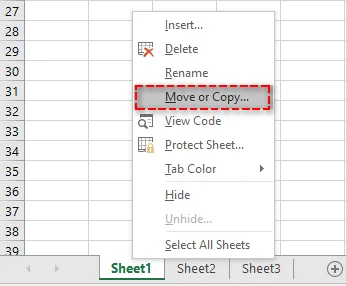
Fai clic con il pulsante destro del mouse sulla scheda del foglio di lavoro che desideri duplicare.
-
Dal menu di scelta rapida, seleziona Sposta o copia. Si aprirà la finestra di dialogo Sposta o copia.
-
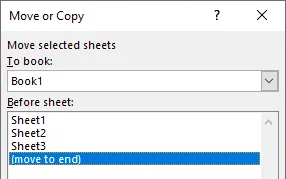
Nell'elenco Prima del foglio, seleziona dove vuoi che appaia il foglio copiato (ad esempio prima del Foglio2 o spostalo alla fine).
-
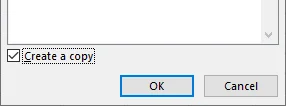
Seleziona la casella Crea una copia per assicurarti di copiare il foglio e non di spostarlo.
-
Fai clic su OK per completare il processo.
Il tuo foglio di lavoro verrà ora copiato nella posizione selezionata e apparirà con lo stesso nome seguito da "(2)" (ad esempio, Foglio1 (2)). Se necessario, puoi rinominare il foglio di lavoro copiato facendo clic con il pulsante destro del mouse sulla scheda e selezionando Rinomina.
Potrebbe interessarti anche: Come dividere i fogli di Excel in più file (3 modi).
Duplicare un foglio di lavoro trascinandolo
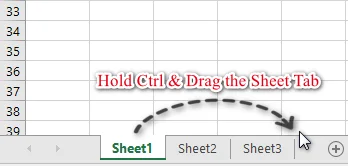
Un altro modo semplice e veloce per duplicare un foglio di lavoro è trascinarlo e rilasciarlo. Questo metodo è perfetto quando si desidera che il nuovo foglio venga posizionato vicino a quello originale. Segui questi passaggi:
-
Tieni premuto il tasto Ctrl sulla tastiera.
-
Fai clic e trascina la scheda del foglio di lavoro nella posizione desiderata all'interno dell'area delle schede.
-
Rilascia il pulsante del mouse e quindi il tasto Ctrl.
Copiare una scheda del foglio utilizzando la barra multifunzione
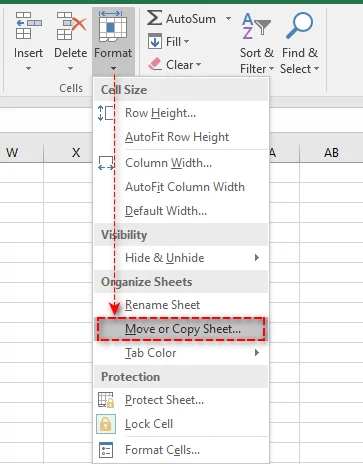
Se preferisci utilizzare l'interfaccia della barra multifunzione, copiare un foglio di lavoro tramite i controlli della barra multifunzione è semplice. Ecco come:
- Seleziona la scheda del foglio di lavoro che desideri copiare.
- Vai alla scheda Home sulla barra multifunzione.
- Fai clic su Formato nel gruppo Celle.
- Dal menu a discesa, seleziona Sposta o copia foglio.
- Nella finestra di dialogo Sposta o copia, seleziona la casella Crea una copia e scegli dove vuoi posizionare il foglio di lavoro copiato.
- Fai clic su OK per completare il processo.
Copiare un foglio di Excel in un'altra cartella di lavoro
La copia di un foglio di lavoro in una cartella di lavoro diversa è un'operazione comune quando è necessario consolidare i dati da più file. Ecco come farlo senza problemi:
- Apri sia la cartella di lavoro di origine che quella di destinazione.
- Fai clic con il pulsante destro del mouse sulla scheda del foglio di lavoro che desideri copiare.
- Seleziona Sposta o copia dal menu di scelta rapida.
- Nel menu a discesa Alla cartella, seleziona la cartella di lavoro di destinazione.
- Nell'elenco Prima del foglio, scegli dove posizionare il foglio copiato.
- Seleziona la casella Crea una copia e fai clic su OK per completare il processo.
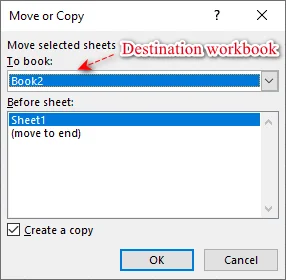
Il tuo foglio di lavoro è ora duplicato nella cartella di lavoro di destinazione, conservando tutti i dati e la formattazione originali.
Suggerimento: puoi ottenere lo stesso risultato tenendo premuto il tasto Ctrl e trascinando la scheda del foglio dalla cartella di lavoro di origine alla cartella di lavoro di destinazione.
Come copiare più fogli di lavoro in Excel contemporaneamente
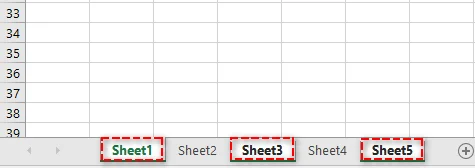
Quando lavori con più fogli di lavoro, puoi copiarli tutti in una volta per risparmiare tempo. Ecco come:
-
Tieni premuto il tasto Ctrl per i fogli non adiacenti o il tasto Shift per i fogli adiacenti.
-
Seleziona le schede dei fogli che desideri copiare.
-
Fai clic con il pulsante destro del mouse su una delle schede del foglio selezionate e scegli Sposta o copia.
-
Nella finestra di dialogo Sposta o copia, scegli la cartella di lavoro di destinazione e la posizione di destinazione in cui posizionare la copia.
-
Seleziona la casella Crea una copia e fai clic su OK. Excel creerà copie di tutti i fogli di lavoro selezionati contemporaneamente.
Come copiare automaticamente i fogli di lavoro in Excel
Per gli utenti avanzati o per coloro che copiano frequentemente fogli di lavoro, l'automazione del processo con VBA (Visual Basic for Applications) o Python può far risparmiare molto tempo e garantire la coerenza.
Copiare un foglio di lavoro con VBA
VBA è perfetto per automatizzare attività ripetitive all'interno di Excel, in particolare le attività che richiedono l'interazione dell'utente tramite pulsanti o menu.
Ecco come utilizzare una semplice macro VBA per copiare un foglio:
-
Premi Alt + F11 per aprire l'editor VBA.
-
Nell'editor, vai su Inserisci > Modulo.
-
Incolla il seguente codice VBA nella finestra del modulo. Questo codice copia il Foglio1 e posiziona la copia dopo il Foglio3.
Sub CopyWorksheet() ' Modifica "Foglio1" con il nome del tuo foglio Worksheets("Foglio1").Copy After:=Worksheets("Foglio3") End Sub -
Premi F5 per eseguire la macro. La copia verrà creata istantaneamente.
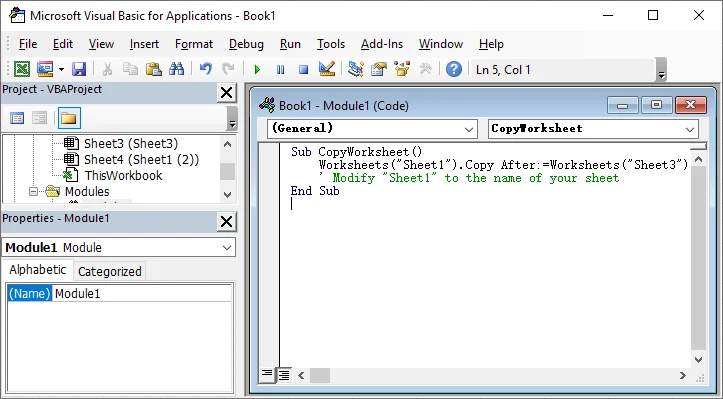
Per maggiori dettagli sul metodo Worksheet.Copy utilizzato in questo script VBA, consulta la documentazione ufficiale di Microsoft: Metodo Worksheet.Copy (Excel).
Copiare un foglio di lavoro con Python
In alternativa, puoi utilizzare Python con librerie come Spire.XLS for Python per creare una copia di un foglio. Questo metodo è ideale per automatizzare attività Excel su larga scala, elaborazione lato server o integrazione di operazioni Excel con sistemi esterni.
Ecco come utilizzare Python per copiare un foglio di lavoro:
-
Installa Spire.XLS for Python da PyPI utilizzando il seguente comando:
pip install spire-xls -
Utilizza lo script Python seguente per copiare un foglio all'interno di una cartella di lavoro.
from spire.xls import *

# Inizializza un'istanza della classe Workbook
workbook = Workbook()

# Carica una cartella di lavoro di Excel
workbook.LoadFromFile("Input.xlsx")

# Ottieni il primo foglio di lavoro
sourceSheet = workbook.Worksheets[0]

# Crea un nuovo foglio con un nome specifico
sheetName = sourceSheet.Name + "_Copy"
destSheet = workbook.Worksheets.Add(sheetName)

# Copia il primo foglio di lavoro nel foglio appena aggiunto
destSheet.CopyFrom(sourceSheet)

# Salva la cartella di lavoro risultante con il foglio copiato
workbook.SaveToFile("CopySheet.xlsx", ExcelVersion.Version2013)

# Elimina la cartella di lavoro per rilasciare le risorse
workbook.Dispose()
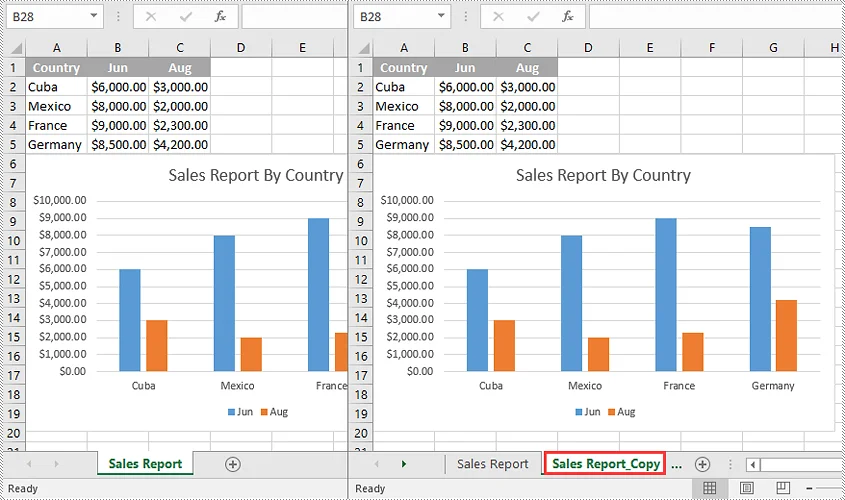
Per tecniche aggiuntive come la copia del foglio tra cartelle di lavoro, consulta la guida ufficiale di Spire.XLS: Python: Copia fogli di lavoro in Excel.
Suggerimenti professionali per la copia di un foglio di lavoro in Excel
Per mantenere l'integrità dei dati ed evitare errori durante la copia di un foglio di lavoro, segui questi suggerimenti professionali:
- Gestione delle tabelle di Excel: quando si copia un foglio di lavoro contenente una tabella di Excel, Excel rinominerà automaticamente la tabella (ad esempio, Tabella1 diventa Tabella2). Se si dispone di formule che fanno riferimento a Tabella1, aggiornarle manualmente o utilizzare riferimenti strutturati per una maggiore flessibilità.
- Gestione delle origini dati dei grafici: i grafici nel foglio copiato faranno generalmente riferimento ai dati del foglio copiato. Se i grafici si basano su dati esterni, controllare e aggiornare l'origine dati dopo la copia.
- Gestione dei dati nascosti: verranno copiate anche le righe, le colonne o i dati filtrati nascosti. Se si desidera copiare solo i dati visibili, utilizzare la funzione Vai a speciale (in Trova e seleziona nella scheda Home) per selezionare le celle visibili prima di copiare.
- Correzione dei collegamenti interrotti: dopo aver copiato un foglio di lavoro in una nuova cartella di lavoro, verificare la presenza di collegamenti interrotti utilizzando la funzione "Modifica collegamenti" (nella scheda Dati). Aggiornare eventuali riferimenti esterni secondo necessità.
Conclusione: scegli il metodo giusto per la massima efficienza
La copia di fogli di lavoro in Excel può essere rapida e semplice quando si utilizza il metodo giusto. Selezionando l'approccio più efficiente, puoi risparmiare tempo e aumentare la tua produttività. Ecco una guida rapida per aiutarti a scegliere l'opzione migliore per le tue esigenze:
- Copie rapide una tantum: per copie occasionali, il metodo del clic con il pulsante destro del mouse o Ctrl + trascina offre una soluzione rapida e semplice.
- Automazione di attività ripetitive: se si copiano spesso fogli di lavoro, VBA può automatizzare il processo, garantendo coerenza e risparmiando tempo.
- Automazione avanzata: per progetti su larga scala o integrazioni di dati complesse, Python offre solide funzionalità di automazione che vanno oltre le funzionalità integrate di Excel.
Scegli il metodo che meglio si adatta al tuo flusso di lavoro e inizia a ottimizzare le tue attività di Excel oggi stesso!
Domande frequenti
D1: Posso copiare un foglio di lavoro di Excel in un'altra cartella di lavoro?
R1: Sì. Utilizza la finestra di dialogo Sposta o copia: fai clic con il pulsante destro del mouse sulla scheda del foglio, seleziona la cartella di lavoro di destinazione dal menu a discesa Alla cartella, seleziona Crea una copia e fai clic su OK.
D2: Come si copiano più fogli di lavoro in Excel?
R2: Seleziona più fogli tenendo premuto Ctrl (per fogli non adiacenti) o Shift (per fogli adiacenti). Quindi, fai clic con il pulsante destro del mouse su una scheda selezionata e scegli Sposta o copia. Assicurati che la casella Crea una copia sia selezionata.
D3: Come si copia solo la formattazione di un foglio di lavoro senza copiarne i dati?
R3: Seleziona tutte le celle nel foglio originale (Ctrl+A) e copia (Ctrl+C). In un nuovo foglio di lavoro, fai clic con il pulsante destro del mouse su una cella qualsiasi, scegli Incolla speciale -> Formati per applicare solo la formattazione.
D4: Esiste un modo per automatizzare la copia di più fogli in Excel?
R4: Sì. Per l'automazione, utilizza VBA per le attività all'interno di Excel o Python con librerie come Spire.XLS per l'elaborazione esterna su larga scala.