Spire.XLS for Java 15.7.7 supports Array data binding in MarkerDesigner
We’re glad to announce the release of Spire.XLS for Java 15.7.7. The latest version supports Array data binding in MarkerDesigner. Moreover, some known bugs are fixed successfully in the new version, such as the issue that font rendering was incorrect when converting Excel to PDF in Linux environments. More details are listed below.
Here is a list of changes made in this release:
| Category | ID | Description |
| New feature | SPIREXLS-5874 | Supports Array data binding in MarkerDesigner.
Workbook workbook = new Workbook();
// Get the first worksheet from the workbook
Worksheet sheet = workbook.getWorksheets().get(0);
// Set the value of cell range A1 to "&=Array"
sheet.getCellRange("A1").setValue("&=Array");
// Add a parameter named "Array" with an array of strings as its value
workbook.getMarkerDesigner().addArray("Array", new String[] { "Spire.Xls", "Spire.Doc", "Spire.PDF", "Spire.Presentation", "Spire.Email" });
// Apply the marker design to the workbook
workbook.getMarkerDesigner().apply();
// Calculate all the values in the workbook
workbook.calculateAllValue();
// Auto-fit the rows and columns in the allocated range of the worksheet
sheet.getAllocatedRange().autoFitRows();
sheet.getAllocatedRange().autoFitColumns();
// Save the workbook to the specified file path using Excel 2013 format
workbook.saveToFile(outputFile, ExcelVersion.Version2013);
// Clean up and release resources used by the workbook
workbook.dispose();
|
| Bug | SPIREXLS-5861 SPIREXLS-5873 |
Fixes the issue that font rendering was incorrect when converting Excel to PDF in Linux environments. |
| Bug | SPIREXLS-5869 | Fixes the issue that the behavior of isWriteUnMergedColSpan(false) was incorrect when converting Excel to HTML. |
| Bug | SPIREXLS-5870 | Fixes the issue that "Invalid formula: =#REF!" error happened when loading Excel documents. |
| Bug | SPIREXLS-5875 | Fixes the issue that the layout rendering was incorrect when converting Excel to PDF. |
| Bug | SPIREXLS-5876 | Fixes the issue that the program threw a java.lang.NullPointerException error when loading Excel files. |
| Bug | SPIREXLS-5877 | Removed dependencies on sun.misc.BASE64Decoder. |
Convert PDF to Markdown in Python – Single & Batch Conversion
PDFs are ubiquitous in digital document management, but their rigid formatting often makes them less than ideal for content that needs to be easily edited, updated, or integrated into modern workflows. Markdown (.md), on the other hand, offers a lightweight, human-readable syntax perfect for web publishing, documentation, and version control. In this guide, we'll explore how to leverage the Spire.PDF for Python library to perform single or batch conversions from PDF to Markdown in Python efficiently.
- Why Convert PDFs to Markdown?
- Python PDF Converter Library – Installation
- Convert PDF to Markdown in Python
- Batch Convert Multiple PDFs to Markdown in Python
- Frequently Asked Questions
- Conclusion
Why Convert PDFs to Markdown?
Markdown offers several advantages over PDF for content creation and management:
- Version control friendly: Easily track changes in Git
- Lightweight and readable: Plain text format with simple syntax
- Editability: Simple to modify without specialized software
- Web integration: Natively supported by platforms like GitHub, GitLab, and static site generators (e.g., Jekyll, Hugo).
Spire.PDF for Python provides a robust solution for extracting text and structure from PDFs while preserving essential formatting elements like tables, lists, and basic styling.
Python PDF Converter Library - Installation
To use Spire.PDF for Python in your projects, you need to install the library via PyPI (Python Package Index) using pip. Open your terminal/command prompt and run:
pip install Spire.PDF
To upgrade an existing installation to the latest version:
pip install --upgrade spire.pdf
Convert PDF to Markdown in Python
Here’s a basic example demonstrates how to use Python to convert a PDF file to a Markdown (.md) file.
from spire.pdf.common import *
from spire.pdf import *

# Create an instance of PdfDocument class
pdf = PdfDocument()

# Load a PDF document
pdf.LoadFromFile("TestFile.pdf")

# Convert the PDF to a Markdown file
pdf.SaveToFile("PDFToMarkdown.md", FileFormat.Markdown)
pdf.Close()
This Python script loads a PDF file and then uses the SaveToFile() method to convert it to Markdown format. The FileFormat.Markdown parameter specifies the output format.
How Conversion Works
The library extracts text, images, tables, and basic formatting from the PDF and converts them into Markdown syntax.
- Text: Preserved with paragraphs/line breaks.
- Images: Images in the PDF are converted to base64-encoded PNG format and embedded directly in the Markdown.
- Tables: Tabular data is converted to Markdown table syntax (rows/columns with pipes |).
- Styling: Basic formatting (bold, italic) is retained using Markdown syntax.
Output: 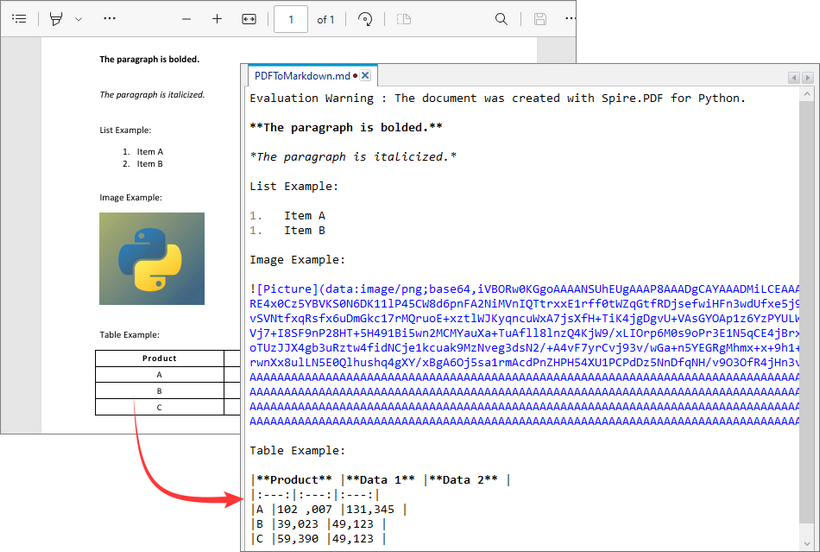
Batch Convert Multiple PDFs to Markdown in Python
This Python script uses a loop to convert all PDF files in a specified directory to Markdown format.
import os
from spire.pdf import *

# Configure paths
input_folder = "pdf_folder/"
output_folder = "markdown_output/"

# Create output directory
os.makedirs(output_folder, exist_ok=True)

# Process all PDFs in folder
for file_name in os.listdir(input_folder):
    if file_name.endswith(".pdf"):
        # Initialize document
        pdf = PdfDocument()
        pdf.LoadFromFile(os.path.join(input_folder, file_name))

        # Generate output path
        md_name = os.path.splitext(file_name)[0] + ".md"
        output_path = os.path.join(output_folder, md_name)

        # Convert to Markdown
        pdf.SaveToFile(output_path, FileFormat.Markdown)
        pdf.Close()
Key Characteristics
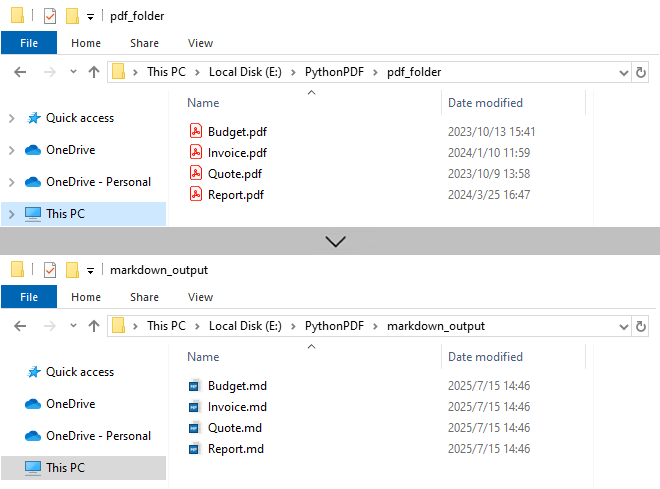
- Batch Processing: Automatically processes all PDFs in input folder, improving efficiency for bulk operations.
- 1:1 Conversion: Each PDF generates corresponding Markdown file.
- Sequential Execution: Files processed in alphabetical order.
- Resource Management: Each PDF is closed immediately after conversion.
Output:
Need to convert Markdown to PDF? Refer to: Convert Markdown to PDF in Python
Frequently Asked Questions (FAQs)
Q1: Is Spire.PDF for Python free?
A: Spire.PDF offers a free version with limitations (e.g., maximum 3 pages per conversion). For unlimited use, request a 30-day free trial for evaluation.
Q2: Can I convert password-protected PDFs to Markdown?
A: Yes. Use the LoadFromFile method with the password as a second parameter:
pdf.LoadFromFile("ProtectedFile.pdf", "your_password")
Q3: Can Spire.PDF convert scanned/image-based PDFs to Markdown?
A: No. The library extracts text-based content only. For scanned PDFs, use OCR tools (like Spire.OCR for Python) to create searchable PDFs first.
Conclusion
Spire.PDF for Python simplifies PDF to Markdown conversion for both single file and batch processing.
Its advantages include:
- Simple API with minimal code
- Preservation of document structure
- Batch processing capabilities
- Cross-platform compatibility
Whether you're migrating documentation, processing research papers, or building content pipelines, by following the examples in this guide, you can efficiently transform static PDF documents into flexible, editable Markdown content, streamlining workflows and improving collaboration.
5 maneiras inteligentes de extrair texto do PowerPoint (sem copiar e colar)
Índice
Instalar com Pypi
pip install Spire.Presentation
Links Relacionados

Visão Geral
As apresentações do PowerPoint são amplamente utilizadas para reuniões de negócios, fins educacionais e conferências. No entanto, extrair texto dessas apresentações pode, por vezes, ser uma tarefa tediosa, especialmente ao lidar com vários slides.
Felizmente, existem vários métodos disponíveis para extrair texto do PowerPoint sem recorrer ao método tradicional de copiar e colar. Nesta postagem do blog, exploraremos cinco maneiras inteligentes de extrair texto, incluindo métodos que usam Microsoft PowerPoint, DeepSeek, conversores online, VBA e Python.
Extraindo Texto Usando o MS PowerPoint
Uma das maneiras mais diretas de extrair texto de uma apresentação do PowerPoint é usando o próprio software. O Microsoft PowerPoint possui recursos integrados que permitem aos usuários salvar apresentações em diferentes formatos, incluindo RTF (Rich Text Format). Este método é particularmente útil para aqueles que preferem não usar ferramentas ou serviços adicionais. Seguindo alguns passos simples, você pode converter rapidamente sua apresentação para um formato amigável ao texto.
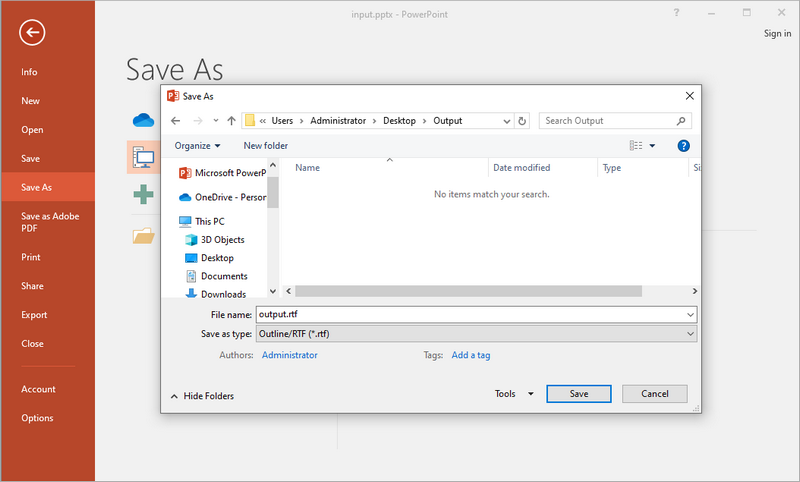
Passos para Salvar Arquivo PPT(X) como RTF:
- Abra seu arquivo PPT(X) com o MS PowerPoint.
- Vá para Arquivo > Salvar Como.
- Escolha Estrutura de Tópicos/RTF no menu suspenso de tipo de arquivo.
- Altere o nome e a localização do arquivo (opcional) e, em seguida, clique em Salvar.
Prós:
- Recurso integrado — nenhum software adicional necessário.
- Preserva a estrutura básica do texto (títulos, marcadores).
Contras:
- Perde elementos não textuais, como imagens e tabelas.
Quando Usar este Método:
Este método é ideal para usuários que já têm o MS Office instalado em suas máquinas e desejam trabalhar com documentos confidenciais sem usar ferramentas de terceiros.
Extraindo Texto Usando o DeepSeek
Hoje em dia, as ferramentas de bate-papo com IA tornaram-se um software de escritório indispensável, e um número crescente de pessoas prefere usar ferramentas de IA para tarefas relacionadas a texto. Entre elas, o DeepSeek é uma ferramenta orientada por IA que ajuda a extrair texto de apresentações do PowerPoint de forma eficiente. Esta ferramenta não apenas fornece uma saída limpa, mas também oferece recursos adicionais como resumo, análise, tradução e polimento.

Passos para Extrair Texto do PowerPoint Usando o DeepSeek:
- Visite o DeepSeek Chat.
- Clique no botão de anexo para carregar seu arquivo PPT/PPTX.
- Digite um prompt como: “extrair texto dele”.
- A IA processará e retornará o texto estruturado.
Prós:
- Fornece uma saída de texto limpa e estruturada com marcadores intactos.
- Oferece a opção de traduzir, resumir ou analisar o texto extraído.
Contras:
- Apenas o texto é extraído; imagens e tabelas não são incluídas**.**
- Requer conexão com a rede.
Quando Usar este Método:
O DeepSeek é melhor utilizado quando você precisa de extração de texto aprimorada por IA com tradução, resumo ou análise. É uma ótima opção para fins de pesquisa ou documentação.
Extraindo Texto Usando um Conversor Online
Conversores online, como o Cloudxdocs.com, oferecem uma maneira rápida e conveniente de extrair texto de arquivos do PowerPoint sem a necessidade de instalação. Essas ferramentas são particularmente úteis para usuários que podem не ter acesso ao PowerPoint ou que preferem uma solução simples baseada na web. Ao carregar sua apresentação para um conversor online, você pode extrair rapidamente o texto e baixá-lo em um formato de texto simples, facilitando o trabalho.
Embora este site ofereça vários conversores de formato de arquivo, você pode visitar diretamente seu conversor de PowerPoint para TXT:
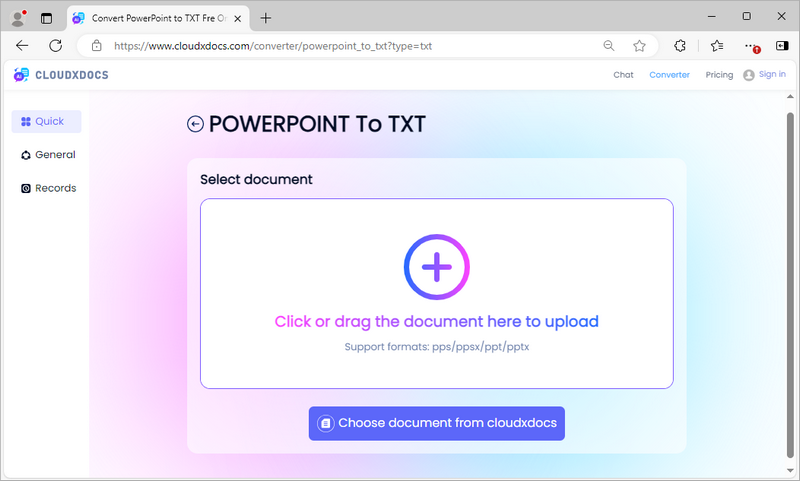
Passos para Converter PowerPoint para TXT Usando o Conversor Online CloudXDocs:
- Vá para o conversor de PowerPoint para TXT.
- Carregue seu arquivo PPT/PPTX.
- A ferramenta extrairá o texto automaticamente.
- Baixe o arquivo TXT contendo o conteúdo extraído.
Prós:
- Nenhuma instalação de software — funciona diretamente no navegador.
- Preserva o conteúdo da tabela, mas perde a estrutura.
- Funciona em várias plataformas, como Mac, Windows e Linux.
Contras:
- Pode causar preocupações com a privacidade para arquivos sensíveis.
- Requer conexão com a rede.
Quando Usar este Método:
Este método é perfeito para usuários que precisam de uma solução rápida e não querem instalar ferramentas adicionais.
Extraindo Texto Usando VBA
Para usuários confortáveis com codificação, o Visual Basic for Applications (VBA) oferece uma maneira poderosa de automatizar o processo de extração. Escrevendo uma macro simples, você pode extrair rapidamente texto de vários slides, economizando tempo e esforço. Este método é particularmente útil para aqueles que trabalham frequentemente com apresentações do PowerPoint e precisam de uma solução mais personalizada que possa lidar com necessidades específicas de extração.
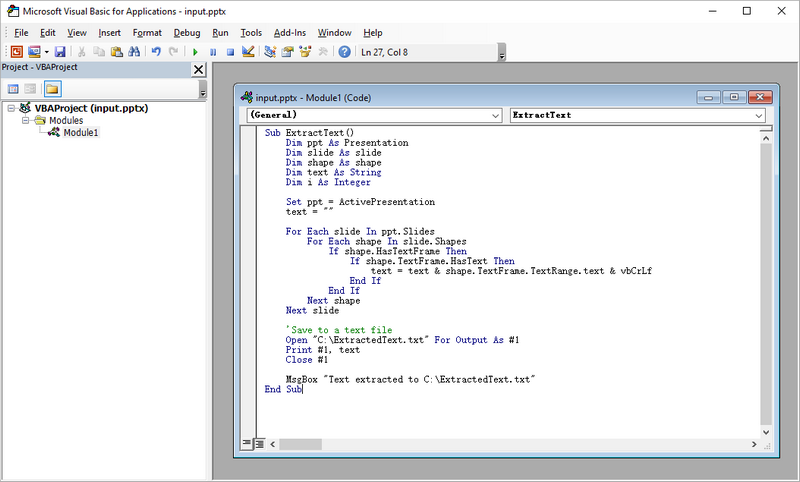
Passos para Extrair Texto do PowerPoint Usando uma Macro VBA:
- Inicie o MS PowerPoint no seu computador.
- Pressione Alt + F11 para abrir o editor VBA.
- Clique com o botão direito em qualquer um dos itens na janela Projeto. Selecione Inserir e, em seguida, Módulo.
- Escreva o código VBA no módulo para realizar a extração de texto.
- Feche o editor VBA.
- Pressione Alt + F8, selecione o nome da Macro que você acabou de criar e clique em Executar.
Exemplo de Código VBA para Extrair Texto do PowerPoint:
Sub ExtractText()
    Dim ppt As Presentation
    Dim slide As slide
    Dim shape As shape
    Dim text As String
    Dim i As Integer

    Set ppt = ActivePresentation
    text = ""

    For Each slide In ppt.Slides
        For Each shape In slide.Shapes
            If shape.HasTextFrame Then
                If shape.TextFrame.HasText Then
                    text = text & shape.TextFrame.TextRange.text & vbCrLf
                End If
            End If
        Next shape
    Next slide

    'Salvar em um arquivo de texto
    Open "C:\ExtractedText.txt" For Output As #1
    Print #1, text
    Close #1

    MsgBox "Texto extraído para C:\ExtractedText.txt"
End Sub
Prós:
- Altamente personalizável – modifique o código para necessidades específicas.
Contras:
- Requer a habilitação de macros, o que pode representar riscos de segurança.
- Pode exigir algum conhecimento de programação.
Quando Usar este Método:
O VBA é mais adequado para usuários que estão familiarizados com programação e desejam automatizar o processo de extração para várias apresentações. Este método permite maior flexibilidade e personalização.
Extraindo Texto Usando Python
Python é uma linguagem de programação versátil que pode ser usada para várias tarefas de automação, incluindo a extração de texto de apresentações do PowerPoint. Com bibliotecas como Spire.Presentation, o Python permite que os usuários escrevam scripts que podem lidar com apresentações complexas e automatizar o processo de extração. Este método é ideal para indivíduos com conhecimento técnico que necessitam de uma solução robusta para manipulação de dados ou processamento adicional.
Passos para Extrair Texto do PowerPoint Usando Python:
- Instale e configure o Python em seu computador.
- Crie um projeto Python em sua IDE, como o Visual Studio Code.
- Instale o Spire.Presentation executando o comando pip: pip install spire.presentation
- Escreva o código (fornecido abaixo) para realizar a extração de texto nos slides.
- Execute o script Python.
Exemplo de Trecho de Código Python:
from spire.presentation import *
from spire.presentation.common import *

# Crie um objeto da classe Presentation
presentation = Presentation()

# Carregue uma apresentação do PowerPoint
presentation.LoadFromFile("C:\\Users\\Administrator\\Desktop\\Input.pptx")

# Crie uma lista
text = []

# Percorra os slides no documento
for slide in presentation.Slides:

    # Percorra as formas no slide
    for shape in slide.Shapes:

        # Verifique se a forma é um objeto IAutoShape
        if isinstance(shape, IAutoShape):

            # Percorra os parágrafos na forma
            for paragraph in (shape if isinstance(shape, IAutoShape) else None).TextFrame.Paragraphs:

                # Obtenha o texto do parágrafo e adicione-o à lista
                text.append(paragraph.Text)

# Escreva o texto em um arquivo txt
f = open("output/ExtractText.txt","w", encoding = 'utf-8')
for s in text:
    f.write(s + "\n")
f.close()

# Libere os recursos
presentation.Dispose()
Este código extrai apenas texto do PowerPoint. O Spire.Presentation permite a extração de tabelas preservando sua estrutura. Para mais detalhes, consulte o guia: Como Extrair Tabelas do PowerPoint em Python.
Prós:
- Processamento em lote — ideal para vários arquivos.
- Pode ser integrado a fluxos de trabalho maiores.
- Altamente personalizável com extensas bibliotecas disponíveis para processamento adicional.
Contras:
- Sem formatação - a saída é texto simples.
- Requer conhecimento de programação e configuração de ambiente.
Quando Usar este Método:
O Python é ideal para desenvolvedores que precisam integrar a extração de texto em fluxos de trabalho ou projetos maiores. Este método é particularmente útil ao lidar com apresentações complexas ou quando é necessário um processamento de dados adicional.
Palavras Finais
Quando se trata de extrair texto de apresentações do PowerPoint, o melhor método depende de suas necessidades específicas e habilidades técnicas. Para tarefas rápidas e diretas, usar o Microsoft PowerPoint ou um conversor online costuma ser a melhor escolha. Se você precisa de mais controle ou tem tarefas de extração repetitivas, considere usar VBA ou Python. Para extração aprimorada por IA com funcionalidades adicionais, o DeepSeek é a escolha ideal.
Em conclusão, existem várias maneiras inteligentes de extrair texto de apresentações do PowerPoint sem usar o método de copiar e colar. Cada método tem seus prós e contras, e a escolha certa dependerá de seus requisitos individuais e nível de conforto com a tecnologia. Quer você escolha um recurso integrado simples или uma abordagem de programação mais avançada, poderá extrair eficientemente o texto de que precisa de seus arquivos do PowerPoint.
LEIA TAMBÉM:
5 modi intelligenti per estrarre testo da PowerPoint (senza copia e incolla)
Indice
Installa con Pypi
pip install Spire.Presentation
Link correlati
Panoramica
Le presentazioni di PowerPoint sono ampiamente utilizzate per riunioni di lavoro, scopi educativi e conferenze. Tuttavia, estrarre testo da queste presentazioni può talvolta essere un compito noioso, specialmente quando si ha a che fare con più diapositive.
Fortunatamente, esistono diversi metodi per estrarre testo da PowerPoint senza ricorrere al tradizionale metodo del copia-incolla. In questo post del blog, esploreremo cinque modi intelligenti per estrarre testo, inclusi metodi che utilizzano Microsoft PowerPoint, DeepSeek, convertitori online, VBA e Python.
Estrazione del testo con MS PowerPoint
Uno dei modi più semplici per estrarre testo da una presentazione di PowerPoint è utilizzare il software stesso. Microsoft PowerPoint ha funzionalità integrate che consentono agli utenti di salvare presentazioni in diversi formati, incluso RTF (Rich Text Format). Questo metodo è particolarmente utile per coloro che preferiscono non utilizzare strumenti o servizi aggiuntivi. Seguendo alcuni semplici passaggi, puoi convertire rapidamente la tua presentazione in un formato compatibile con il testo.
Passaggi per salvare un file PPT(X) come RTF:
- Apri il tuo file PPT(X) con MS PowerPoint.
- Vai su File > Salva con nome.
- Scegli Struttura/RTF dal menu a discesa del tipo di file.
- Cambia il nome e la posizione del file (opzionale), quindi fai clic su Salva.
Vantaggi:
- Funzionalità integrata — non è richiesto alcun software aggiuntivo.
- Conserva la struttura di base del testo (titoli, elenchi puntati).
Svantaggi:
- Perde elementi non testuali come immagini e tabelle.
Quando usare questo metodo:
Questo metodo è ideale per gli utenti che hanno già installato MS Office sulle loro macchine e desiderano lavorare con documenti riservati senza utilizzare strumenti di terze parti.
Estrazione del testo con DeepSeek
Oggigiorno, gli strumenti di chat con intelligenza artificiale sono diventati software per ufficio indispensabili, e un numero crescente di persone preferisce utilizzare strumenti di intelligenza artificiale per attività legate al testo. Tra questi, DeepSeek è uno strumento basato sull'IA che ti aiuta a estrarre testo dalle presentazioni di PowerPoint in modo efficiente. Questo strumento non solo fornisce un output pulito, ma offre anche funzionalità aggiuntive come riassunto, analisi, traduzione e perfezionamento.
Passaggi per estrarre testo da PowerPoint usando DeepSeek:
- Visita DeepSeek Chat.
- Fai clic sul pulsante dell'allegato per caricare il tuo file PPT/PPTX.
- Inserisci un prompt come: “estrai il testo da esso”.
- L'IA elaborerà e restituirà il testo strutturato.
Vantaggi:
- Fornisce un output di testo pulito e strutturato con elenchi puntati intatti.
- Offre l'opzione di tradurre, riassumere o analizzare il testo estratto.
Svantaggi:
- Viene estratto solo il testo; immagini e tabelle non sono incluse**.**
- Richiede una connessione di rete.
Quando usare questo metodo:
DeepSeek è utilizzato al meglio quando si necessita di un'estrazione di testo potenziata dall'IA con traduzione, riassunto o analisi. È un'ottima opzione per scopi di ricerca o documentazione.
Estrazione del testo con un convertitore online
I convertitori online, come Cloudxdocs.com, offrono un modo rapido e conveniente per estrarre testo dai file di PowerPoint senza la necessità di installazione. Questi strumenti sono particolarmente utili per gli utenti che potrebbero non avere accesso a PowerPoint o che preferiscono una semplice soluzione basata sul web. Caricando la tua presentazione su un convertitore online, puoi estrarre rapidamente il testo e scaricarlo in un formato di testo semplice, facilitandone l'utilizzo.
Sebbene questo sito web offra tonnellate di convertitori di formati di file, puoi visitare direttamente il suo convertitore da PowerPoint a TXT:
Passaggi per convertire PowerPoint in TXT usando il convertitore online CloudXDocs:
- Vai al convertitore da PowerPoint a TXT.
- Carica il tuo file PPT/PPTX.
- Lo strumento estrarrà il testo automaticamente.
- Scarica il file TXT contenente il contenuto estratto.
Vantaggi:
- Nessuna installazione di software — funziona direttamente nel browser.
- Conserva il contenuto delle tabelle ma perde la struttura.
- Funziona su varie piattaforme come Mac, Windows e Linux.
Svantaggi:
- Può causare problemi di privacy per i file sensibili.
- Richiede una connessione di rete.
Quando usare questo metodo:
Questo metodo è perfetto per gli utenti che necessitano di una soluzione rapida e non vogliono installare strumenti aggiuntivi.
Estrazione del testo con VBA
Per gli utenti a proprio agio con la programmazione, Visual Basic for Applications (VBA) offre un modo potente per automatizzare il processo di estrazione. Scrivendo una semplice macro, puoi estrarre rapidamente testo da più diapositive, risparmiando tempo e fatica. Questo metodo è particolarmente utile per coloro che lavorano frequentemente con presentazioni di PowerPoint e necessitano di una soluzione più personalizzata in grado di gestire specifiche esigenze di estrazione.
Passaggi per estrarre testo da PowerPoint usando una macro VBA:
- Avvia MS PowerPoint sul tuo computer.
- Premi Alt + F11 per aprire l'editor VBA.
- Fai clic con il pulsante destro del mouse su uno qualsiasi degli elementi nella finestra Progetto. Seleziona Inserisci, e poi Modulo.
- Scrivi il codice VBA nel modulo per eseguire l'estrazione del testo.
- Chiudi l'editor VBA.
- Premi Alt + F8, seleziona il nome della macro appena creata e fai clic su Esegui.
Esempio di codice VBA per estrarre testo da PowerPoint:
Sub ExtractText()
    Dim ppt As Presentation
    Dim slide As slide
    Dim shape As shape
    Dim text As String
    Dim i As Integer

    Set ppt = ActivePresentation
    text = ""

    For Each slide In ppt.Slides
        For Each shape In slide.Shapes
            If shape.HasTextFrame Then
                If shape.TextFrame.HasText Then
                    text = text & shape.TextFrame.TextRange.text & vbCrLf
                End If
            End If
        Next shape
    Next slide

    'Salva in un file di testo
    Open "C:\ExtractedText.txt" For Output As #1
    Print #1, text
    Close #1

    MsgBox "Testo estratto in C:\ExtractedText.txt"
End Sub
Vantaggi:
- Altamente personalizzabile – modifica il codice per esigenze specifiche.
Svantaggi:
- Richiede l'abilitazione delle macro, che può comportare rischi per la sicurezza.
- Può richiedere alcune conoscenze di programmazione.
Quando usare questo metodo:
VBA è più adatto per gli utenti che hanno familiarità con la programmazione e desiderano automatizzare il processo di estrazione per più presentazioni. Questo metodo consente una maggiore flessibilità e personalizzazione.
Estrazione del testo con Python
Python è un linguaggio di programmazione versatile che può essere utilizzato per varie attività di automazione, inclusa l'estrazione di testo da presentazioni di PowerPoint. Con librerie come Spire.Presentation, Python consente agli utenti di scrivere script in grado di gestire presentazioni complesse e automatizzare il processo di estrazione. Questo metodo è ideale per persone esperte di tecnologia che richiedono una soluzione robusta per la manipolazione dei dati o un'ulteriore elaborazione.
Passaggi per estrarre testo da PowerPoint usando Python:
- Installa e configura Python sul tuo computer.
- Crea un progetto Python nel tuo IDE, come Visual Studio Code.
- Installa Spire.Presentation eseguendo il comando pip: pip install spire.presentation
- Scrivi il codice (fornito di seguito) per eseguire l'estrazione del testo sulle diapositive.
- Esegui lo script Python.
Frammento di codice Python di esempio:
from spire.presentation import *
from spire.presentation.common import *

# Crea un oggetto della classe Presentation
presentation = Presentation()

# Carica una presentazione di PowerPoint
presentation.LoadFromFile("C:\\Users\\Administrator\\Desktop\\Input.pptx")

# Crea una lista
text = []

# Scansiona le diapositive nel documento
for slide in presentation.Slides:

    # Scansiona le forme nella diapositiva
    for shape in slide.Shapes:

        # Controlla se la forma è un oggetto IAutoShape
        if isinstance(shape, IAutoShape):

            # Scansiona i paragrafi nella forma
            for paragraph in (shape if isinstance(shape, IAutoShape) else None).TextFrame.Paragraphs:

                # Ottieni il testo del paragrafo e aggiungilo alla lista
                text.append(paragraph.Text)

# Scrivi il testo in un file txt
f = open("output/ExtractText.txt","w", encoding = 'utf-8')
for s in text:
    f.write(s + "\n")
f.close()

# Rilascia le risorse
presentation.Dispose()
Questo codice estrae solo testo da PowerPoint. Spire.Presentation consente l'estrazione di tabelle preservandone la struttura. Per maggiori dettagli, fare riferimento alla guida: Come estrarre tabelle da PowerPoint in Python.
Vantaggi:
- Elaborazione in batch — ideale per più file.
- Può essere integrato in flussi di lavoro più ampi.
- Altamente personalizzabile con ampie librerie disponibili per ulteriori elaborazioni.
Svantaggi:
- Nessuna formattazione - l'output è testo semplice.
- Richiede conoscenze di programmazione e configurazione dell'ambiente.
Quando usare questo metodo:
Python è ideale per gli sviluppatori che devono integrare l'estrazione di testo in flussi di lavoro o progetti più grandi. Questo metodo è particolarmente utile quando si ha a che fare con presentazioni complesse o quando è richiesta un'ulteriore elaborazione dei dati.
Parole finali
Quando si tratta di estrarre testo da presentazioni di PowerPoint, il metodo migliore dipende dalle tue esigenze specifiche e dalle tue competenze tecniche. Per compiti rapidi e semplici, l'uso di Microsoft PowerPoint o di un convertitore online è spesso la scelta migliore. Se hai bisogno di un maggiore controllo o hai compiti di estrazione ripetitivi, considera l'uso di VBA o Python. Per un'estrazione potenziata dall'IA con funzionalità aggiuntive, DeepSeek è la scelta ottimale.
In conclusione, esistono diversi modi intelligenti per estrarre testo da presentazioni di PowerPoint senza usare il metodo del copia-incolla. Ogni metodo ha i suoi pro e contro, e la scelta giusta dipenderà dalle tue esigenze individuali e dal tuo livello di comfort con la tecnologia. Che tu scelga una semplice funzione integrata o un approccio di programmazione più avanzato, puoi estrarre in modo efficiente il testo di cui hai bisogno dai tuoi file di PowerPoint.
LEGGI ANCHE:
복사 붙여넣기 없이 PowerPoint에서 텍스트를 추출하는 5가지 스마트한 방법
목차
Pypi로 설치
pip install Spire.Presentation
관련 링크
개요
PowerPoint 프레젠테이션은 비즈니스 미팅, 교육 목적 및 컨퍼런스에 널리 사용됩니다. 그러나 이러한 프레젠테이션에서 텍스트를 추출하는 것은 때때로 지루한 작업일 수 있으며, 특히 여러 슬라이드를 다룰 때 그렇습니다.
다행히도, 전통적인 복사-붙여넣기 방법을 사용하지 않고 PowerPoint에서 텍스트를 추출하는 여러 가지 방법이 있습니다. 이 블로그 게시물에서는 Microsoft PowerPoint, DeepSeek, 온라인 변환기, VBA 및 Python을 사용하는 방법을 포함하여 텍스트를 추출하는 다섯 가지 스마트한 방법을 살펴보겠습니다.
MS PowerPoint를 사용하여 텍스트 추출
PowerPoint 프레젠테이션에서 텍스트를 추출하는 가장 간단한 방법 중 하나는 소프트웨어 자체를 사용하는 것입니다. Microsoft PowerPoint에는 사용자가 RTF(Rich Text Format)를 포함한 다양한 형식으로 프레젠테이션을 저장할 수 있는 기본 제공 기능이 있습니다. 이 방법은 추가 도구나 서비스를 사용하지 않으려는 사용자에게 특히 유용합니다. 몇 가지 간단한 단계를 따르면 프레젠테이션을 텍스트 친화적인 형식으로 빠르게 변환할 수 있습니다.
PPT(X) 파일을 RTF로 저장하는 단계:
- MS PowerPoint로 PPT(X) 파일을 엽니다.
- 파일 > 다른 이름으로 저장으로 이동합니다.
- 파일 형식 드롭다운 메뉴에서 개요/RTF를 선택합니다.
- 파일 이름과 위치를 변경(선택 사항)한 다음 저장을 클릭합니다.
장점:
- 기본 제공 기능—추가 소프트웨어 필요 없음.
- 기본 텍스트 구조(제목, 글머리 기호) 유지.
단점:
- 이미지 및 표와 같은 비텍스트 요소 손실.
이 방법을 사용해야 할 때:
이 방법은 이미 컴퓨터에 MS Office가 설치되어 있고 타사 도구를 사용하지 않고 기밀 문서로 작업하려는 사용자에게 이상적입니다.
DeepSeek를 사용하여 텍스트 추출
오늘날 AI 채팅 도구는 필수적인 사무용 소프트웨어가 되었으며, 점점 더 많은 사람들이 텍스트 관련 작업을 위해 AI 도구를 사용하는 것을 선호합니다. 그중 DeepSeek은 PowerPoint 프레젠테이션에서 효율적으로 텍스트를 추출하는 데 도움이 되는 AI 기반 도구입니다. 이 도구는 깨끗한 출력을 제공할 뿐만 아니라 요약, 분석, 번역 및 다듬기와 같은 추가 기능도 제공합니다.
DeepSeek를 사용하여 PowerPoint에서 텍스트를 추출하는 단계:
- DeepSeek Chat을 방문합니다.
- 첨부 파일 버튼을 클릭하여 PPT/PPTX 파일을 업로드합니다.
- "extract text from it"과 같은 프롬프트를 입력합니다.
- AI가 처리하여 구조화된 텍스트를 반환합니다.
장점:
- 글머리 기호가 그대로 유지된 깨끗하고 구조화된 텍스트 출력 제공.
- 추출된 텍스트를 번역, 요약 또는 분석하는 옵션 제공.
단점:
- 텍스트만 추출되며 이미지와 표는 포함되지 않음**.**
- 네트워크 연결 필요.
이 방법을 사용해야 할 때:
DeepSeek는 번역, 요약 또는 분석과 같은 AI 강화 텍스트 추출이 필요할 때 가장 잘 활용됩니다. 연구 또는 문서화 목적에 훌륭한 옵션입니다.
온라인 변환기를 사용하여 텍스트 추출
Cloudxdocs.com과 같은 온라인 변환기는 설치 없이 PowerPoint 파일에서 텍스트를 추출하는 빠르고 편리한 방법을 제공합니다. 이 도구는 PowerPoint에 액세스할 수 없거나 간단한 웹 기반 솔루션을 선호하는 사용자에게 특히 유용합니다. 프레젠테이션을 온라인 변환기에 업로드하면 텍스트를 신속하게 추출하고 일반 텍스트 형식으로 다운로드하여 쉽게 작업할 수 있습니다.
이 웹사이트는 수많은 파일 형식 변환기를 제공하지만, 직접 PowerPoint에서 TXT로 변환기를 방문할 수 있습니다.
CloudXDocs 온라인 변환기를 사용하여 PowerPoint를 TXT로 변환하는 단계:
- PowerPoint에서 TXT로 변환기로 이동합니다.
- PPT/PPTX 파일을 업로드합니다.
- 도구가 자동으로 텍스트를 추출합니다.
- 추출된 내용이 포함된 TXT 파일을 다운로드합니다.
장점:
- 소프트웨어 설치 없음—브라우저에서 직접 작동.
- 표 내용은 유지되지만 구조는 손실됨.
- Mac, Windows, Linux와 같은 다양한 플랫폼에서 작동.
단점:
- 민감한 파일에 대한 개인 정보 보호 문제가 발생할 수 있음.
- 네트워크 연결 필요.
이 방법을 사용해야 할 때:
이 방법은 빠른 해결책이 필요하고 추가 도구를 설치하고 싶지 않은 사용자에게 적합합니다.
VBA를 사용하여 텍스트 추출
코딩에 익숙한 사용자를 위해 Visual Basic for Applications (VBA)는 추출 프로세스를 자동화하는 강력한 방법을 제공합니다. 간단한 매크로를 작성하여 여러 슬라이드에서 텍스트를 빠르게 추출하여 시간과 노력을 절약할 수 있습니다. 이 방법은 PowerPoint 프레젠테이션을 자주 사용하고 특정 추출 요구 사항을 처리할 수 있는 맞춤형 솔루션이 필요한 사용자에게 특히 유용합니다.
VBA 매크로를 사용하여 PowerPoint에서 텍스트를 추출하는 단계:
- 컴퓨터에서 MS PowerPoint를 시작합니다.
- Alt + F11을 눌러 VBA 편집기를 엽니다.
- 프로젝트 창의 항목 중 하나를 마우스 오른쪽 버튼으로 클릭합니다. 삽입을 선택한 다음 모듈을 선택합니다.
- 모듈에 텍스트 추출을 수행하는 VBA 코드를 작성합니다.
- VBA 편집기를 닫습니다.
- Alt + F8을 누르고 방금 만든 매크로 이름을 선택한 다음 실행을 클릭합니다.
PowerPoint에서 텍스트를 추출하기 위한 샘플 VBA 코드:
Sub ExtractText()
    Dim ppt As Presentation
    Dim slide As slide
    Dim shape As shape
    Dim text As String
    Dim i As Integer

    Set ppt = ActivePresentation
    text = ""

    For Each slide In ppt.Slides
        For Each shape In slide.Shapes
            If shape.HasTextFrame Then
                If shape.TextFrame.HasText Then
                    text = text & shape.TextFrame.TextRange.text & vbCrLf
                End If
            End If
        Next shape
    Next slide

    '텍스트 파일에 저장
    Open "C:\ExtractedText.txt" For Output As #1
    Print #1, text
    Close #1

    MsgBox "텍스트가 C:\ExtractedText.txt에 추출되었습니다."
End Sub
장점:
- 높은 사용자 정의 가능성 – 특정 요구에 맞게 코드 수정.
단점:
- 보안 위험을 초래할 수 있는 매크로 활성화 필요.
- 프로그래밍 지식이 필요할 수 있음.
이 방법을 사용해야 할 때:
VBA는 프로그래밍에 익숙하고 여러 프레젠테이션에 대한 추출 프로세스를 자동화하려는 사용자에게 가장 적합합니다. 이 방법은 더 큰 유연성과 사용자 정의를 허용합니다.
Python을 사용하여 텍스트 추출
Python은 PowerPoint 프레젠테이션에서 텍스트를 추출하는 것을 포함하여 다양한 자동화 작업에 사용할 수 있는 다재다능한 프로그래밍 언어입니다. Spire.Presentation과 같은 라이브러리를 사용하면 Python 사용자는 복잡한 프레젠테이션을 처리하고 추출 프로세스를 자동화하는 스크립트를 작성할 수 있습니다. 이 방법은 데이터 조작이나 추가 처리를 위한 강력한 솔루션이 필요한 기술에 정통한 개인에게 이상적입니다.
Python을 사용하여 PowerPoint에서 텍스트를 추출하는 단계:
- 컴퓨터에 Python을 설치하고 구성합니다.
- Visual Studio Code와 같은 IDE에서 Python 프로젝트를 만듭니다.
- pip 명령을 실행하여 Spire.Presentation을 설치합니다: pip install spire.presentation
- 슬라이드에서 텍스트 추출을 수행하는 코드(아래 제공)를 작성합니다.
- Python 스크립트를 실행합니다.
샘플 Python 코드 스니펫:
from spire.presentation import *
from spire.presentation.common import *

# Presentation 클래스의 객체 생성
presentation = Presentation()

# PowerPoint 프레젠테이션 로드
presentation.LoadFromFile("C:\\Users\\Administrator\\Desktop\\Input.pptx")

# 목록 생성
text = []

# 문서의 슬라이드 반복
for slide in presentation.Slides:

    # 슬라이드의 도형 반복
    for shape in slide.Shapes:

        # 도형이 IAutoShape 객체인지 확인
        if isinstance(shape, IAutoShape):

            # 도형의 단락 반복
            for paragraph in (shape if isinstance(shape, IAutoShape) else None).TextFrame.Paragraphs:

                # 단락 텍스트를 가져와 목록에 추가
                text.append(paragraph.Text)

# 텍스트를 txt 파일에 쓰기
f = open("output/ExtractText.txt","w", encoding = 'utf-8')
for s in text:
    f.write(s + "\n")
f.close()

# 리소스 해제
presentation.Dispose()
이 코드는 PowerPoint에서 텍스트만 추출합니다. Spire.Presentation은 구조를 유지하면서 표를 추출할 수 있습니다. 자세한 내용은 다음 가이드를 참조하십시오. Python에서 PowerPoint의 표를 추출하는 방법.
장점:
- 일괄 처리—여러 파일에 이상적.
- 더 큰 워크플로에 통합 가능.
- 추가 처리를 위한 광범위한 라이브러리로 높은 사용자 정의 가능성.
단점:
- 서식 없음 - 출력은 일반 텍스트.
- 프로그래밍 지식 및 환경 설정 필요.
이 방법을 사용해야 할 때:
Python은 텍스트 추출을 더 큰 워크플로나 프로젝트에 통합해야 하는 개발자에게 이상적입니다. 이 방법은 복잡한 프레젠테이션을 다루거나 추가 데이터 처리가 필요한 경우에 특히 유용합니다.
마지막 말
PowerPoint 프레젠테이션에서 텍스트를 추출할 때 최상의 방법은 특정 요구 사항과 기술 수준에 따라 다릅니다. 빠르고 간단한 작업의 경우 Microsoft PowerPoint나 온라인 변환기를 사용하는 것이 종종 최선의 선택입니다. 더 많은 제어가 필요하거나 반복적인 추출 작업이 있는 경우 VBA나 Python 사용을 고려하십시오. 추가 기능이 있는 AI 강화 추출의 경우 DeepSeek가 최적의 선택입니다.
결론적으로, 복사-붙여넣기 방법을 사용하지 않고 PowerPoint 프레젠테이션에서 텍스트를 추출하는 여러 가지 스마트한 방법이 있습니다. 각 방법에는 장단점이 있으며, 올바른 선택은 개인의 요구 사항과 기술에 대한 편안함 수준에 따라 달라집니다. 간단한 내장 기능을 선택하든 더 고급 프로그래밍 접근 방식을 선택하든 PowerPoint 파일에서 필요한 텍스트를 효율적으로 추출할 수 있습니다.
또한 읽기:
5 méthodes intelligentes pour extraire du texte depuis PowerPoint (sans copier-coller)
Table des matières
Installer avec Pypi
pip install Spire.Presentation
Liens connexes
Aperçu
Les présentations PowerPoint sont largement utilisées pour les réunions d'affaires, à des fins éducatives et lors de conférences. Cependant, l'extraction de texte de ces présentations peut parfois être une tâche fastidieuse, surtout lorsqu'il s'agit de plusieurs diapositives.
Heureusement, plusieurs méthodes sont disponibles pour extraire du texte de PowerPoint sans recourir à la méthode traditionnelle du copier-coller. Dans cet article de blog, nous explorerons cinq manières intelligentes d'extraire du texte, y compris des méthodes utilisant Microsoft PowerPoint, DeepSeek, des convertisseurs en ligne, VBA et Python.
Extraction de texte avec MS PowerPoint
L'un des moyens les plus simples d'extraire du texte d'une présentation PowerPoint est d'utiliser le logiciel lui-même. Microsoft PowerPoint dispose de fonctionnalités intégrées qui permettent aux utilisateurs d'enregistrer des présentations dans différents formats, y compris RTF (Rich Text Format). Cette méthode est particulièrement utile pour ceux qui préfèrent ne pas utiliser d'outils ou de services supplémentaires. En suivant quelques étapes simples, vous pouvez rapidement convertir votre présentation dans un format convivial pour le texte.
Étapes pour enregistrer un fichier PPT(X) en RTF :
- Ouvrez votre fichier PPT(X) avec MS PowerPoint.
- Allez dans Fichier > Enregistrer sous.
- Choisissez Plan/RTF dans le menu déroulant du type de fichier.
- Changez le nom et l'emplacement du fichier (facultatif), puis cliquez sur Enregistrer.
Avantages :
- Fonctionnalité intégrée — aucun logiciel supplémentaire requis.
- Préserve la structure de base du texte (titres, puces).
Inconvénients :
- Perd les éléments non textuels tels que les images et les tableaux.
Quand utiliser cette méthode :
Cette méthode est idéale pour les utilisateurs qui ont déjà MS Office installé sur leur machine et qui souhaitent travailler avec des documents confidentiels sans utiliser d'outils tiers.
Extraction de texte avec DeepSeek
De nos jours, les outils de discussion IA sont devenus des logiciels de bureau indispensables, et un nombre croissant de personnes préfèrent utiliser des outils d'IA pour les tâches liées au texte. Parmi eux, DeepSeek est un outil piloté par l'IA qui vous aide à extraire efficacement le texte des présentations PowerPoint. Cet outil fournit non seulement une sortie propre, mais offre également des fonctionnalités supplémentaires telles que le résumé, l'analyse, la traduction et le polissage.
Étapes pour extraire du texte de PowerPoint à l'aide de DeepSeek :
- Visitez DeepSeek Chat.
- Cliquez sur le bouton de pièce jointe pour télécharger votre fichier PPT/PPTX.
- Entrez une invite comme : « extraire le texte de celui-ci ».
- L'IA traitera et renverra le texte structuré.
Avantages :
- Fournit une sortie de texte propre et structurée avec les puces intactes.
- Offre la possibilité de traduire, de résumer ou d'analyser le texte extrait.
Inconvénients :
- Seul le texte est extrait ; les images et les tableaux ne sont pas inclus**.**
- Nécessite une connexion réseau.
Quand utiliser cette méthode :
DeepSeek est mieux utilisé lorsque vous avez besoin d'une extraction de texte améliorée par l'IA avec traduction, résumé ou analyse. C'est une excellente option à des fins de recherche ou de documentation.
Extraction de texte avec un convertisseur en ligne
Les convertisseurs en ligne, tels que Cloudxdocs.com, offrent un moyen rapide и pratique d'extraire du texte de fichiers PowerPoint sans nécessiter d'installation. Ces outils sont particulièrement utiles pour les utilisateurs qui n'ont peut-être pas accès à PowerPoint ou qui préfèrent une solution simple basée sur le Web. En téléchargeant votre présentation sur un convertisseur en ligne, vous pouvez rapidement extraire le texte et le télécharger dans un format de texte brut, ce qui facilite son utilisation.
Bien que ce site Web propose des tonnes de convertisseurs de formats de fichiers, vous pouvez visiter directement son convertisseur PowerPoint vers TXT :
Étapes pour convertir PowerPoint en TXT à l'aide du convertisseur en ligne CloudXDocs :
- Allez sur le convertisseur PowerPoint vers TXT.
- Téléchargez votre fichier PPT/PPTX.
- L'outil extraira le texte automatiquement.
- Téléchargez le fichier TXT contenant le contenu extrait.
Avantages :
- Aucune installation de logiciel — fonctionne directement dans le navigateur.
- Préserve le contenu des tableaux mais perd la structure.
- Fonctionne sur diverses plateformes telles que Mac, Windows et Linux.
Inconvénients :
- Peut soulever des problèmes de confidentialité pour les fichiers sensibles.
- Nécessite une connexion réseau.
Quand utiliser cette méthode :
Cette méthode est parfaite pour les utilisateurs qui ont besoin d'une solution rapide et qui ne veulent pas installer d'outils supplémentaires.
Extraction de texte avec VBA
Pour les utilisateurs à l'aise avec le codage, Visual Basic for Applications (VBA) offre un moyen puissant d'automatiser le processus d'extraction. En écrivant une simple macro, vous pouvez rapidement extraire du texte de plusieurs diapositives, ce qui vous fait gagner du temps et des efforts. Cette méthode est particulièrement utile pour ceux qui travaillent fréquemment avec des présentations PowerPoint et qui ont besoin d'une solution plus personnalisée capable de gérer des besoins d'extraction spécifiques.
Étapes pour extraire du texte de PowerPoint à l'aide d'une macro VBA :
- Lancez MS PowerPoint sur votre ordinateur.
- Appuyez sur Alt + F11 pour ouvrir l'éditeur VBA.
- Faites un clic droit sur l'un des éléments de la fenêtre Projet. Sélectionnez Insérer, puis Module.
- Écrivez le code VBA dans le module pour effectuer l'extraction de texte.
- Fermez l'éditeur VBA.
- Appuyez sur Alt + F8, sélectionnez le nom de la macro que vous venez de créer, puis cliquez sur Exécuter.
Exemple de code VBA pour extraire du texte de PowerPoint :
Sub ExtractText()
    Dim ppt As Presentation
    Dim slide As slide
    Dim shape As shape
    Dim text As String
    Dim i As Integer

    Set ppt = ActivePresentation
    text = ""

    For Each slide In ppt.Slides
        For Each shape In slide.Shapes
            If shape.HasTextFrame Then
                If shape.TextFrame.HasText Then
                    text = text & shape.TextFrame.TextRange.text & vbCrLf
                End If
            End If
        Next shape
    Next slide

    'Enregistrer dans un fichier texte
    Open "C:\ExtractedText.txt" For Output As #1
    Print #1, text
    Close #1

    MsgBox "Texte extrait dans C:\ExtractedText.txt"
End Sub
Avantages :
- Hautement personnalisable – modifiez le code pour des besoins spécifiques.
Inconvénients :
- Nécessite l'activation des macros, ce qui peut poser des risques de sécurité.
- Peut nécessiter des connaissances en programmation.
Quand utiliser cette méthode :
VBA est le mieux adapté aux utilisateurs qui connaissent la programmation et souhaitent automatiser le processus d'extraction pour plusieurs présentations. Cette méthode permet une plus grande flexibilité et personnalisation.
Extraction de texte avec Python
Python est un langage de programmation polyvalent qui peut être utilisé pour diverses tâches d'automatisation, y compris l'extraction de texte de présentations PowerPoint. Avec des bibliothèques comme Spire.Presentation, Python permet aux utilisateurs d'écrire des scripts capables de gérer des présentations complexes et d'automatiser le processus d'extraction. Cette méthode est idéale pour les personnes férues de technologie qui ont besoin d'une solution robuste pour la manipulation de données ou un traitement ultérieur.
Étapes pour extraire du texte de PowerPoint à l'aide de Python :
- Installez et configurez Python sur votre ordinateur.
- Créez un projet Python dans votre IDE, tel que Visual Studio Code.
- Installez Spire.Presentation en exécutant la commande pip : pip install spire.presentation
- Écrivez du code (fourni ci-dessous) pour effectuer l'extraction de texte sur les diapositives.
- Exécutez le script Python.
Exemple de fragment de code Python :
from spire.presentation import *
from spire.presentation.common import *

# Créer un objet de la classe Presentation
presentation = Presentation()

# Charger une présentation PowerPoint
presentation.LoadFromFile("C:\\Users\\Administrator\\Desktop\\Input.pptx")

# Créer une liste
text = []

# Parcourir les diapositives du document
for slide in presentation.Slides:

    # Parcourir les formes de la diapositive
    for shape in slide.Shapes:

        # Vérifier si la forme est un objet IAutoShape
        if isinstance(shape, IAutoShape):

            # Parcourir les paragraphes de la forme
            for paragraph in (shape if isinstance(shape, IAutoShape) else None).TextFrame.Paragraphs:

                # Obtenir le texte du paragraphe et l'ajouter à la liste
                text.append(paragraph.Text)

# Écrire le texte dans un fichier txt
f = open("output/ExtractText.txt","w", encoding = 'utf-8')
for s in text:
    f.write(s + "\n")
f.close()

# Libérer les ressources
presentation.Dispose()
Ce code extrait uniquement le texte de PowerPoint. Spire.Presentation permet l'extraction de tableaux tout en préservant leur structure. Pour plus de détails, consultez le guide : Comment extraire des tableaux de PowerPoint en Python.
Avantages :
- Traitement par lots — idéal pour plusieurs fichiers.
- Peut être intégré dans des flux de travail plus importants.
- Hautement personnalisable avec de nombreuses bibliothèques disponibles pour un traitement ultérieur.
Inconvénients :
- Pas de mise en forme - la sortie est du texte brut.
- Nécessite des connaissances en programmation et la configuration de l'environnement.
Quand utiliser cette méthode :
Python est idéal pour les développeurs qui ont besoin d'intégrer l'extraction de texte dans des flux de travail ou des projets plus importants. Cette méthode est particulièrement utile lorsqu'il s'agit de présentations complexes ou lorsqu'un traitement de données supplémentaire est requis.
Mots de la fin
Lorsqu'il s'agit d'extraire du texte de présentations PowerPoint, la meilleure méthode dépend de vos besoins spécifiques et de vos compétences techniques. Pour les tâches rapides et simples, l'utilisation de Microsoft PowerPoint ou d'un convertisseur en ligne est souvent le meilleur choix. Si vous avez besoin de plus de contrôle ou si vous avez des tâches d'extraction répétitives, envisagez d'utiliser VBA ou Python. Pour une extraction améliorée par l'IA avec des fonctionnalités supplémentaires, DeepSeek est le choix optimal.
En conclusion, il existe plusieurs manières intelligentes d'extraire du texte de présentations PowerPoint sans utiliser la méthode du copier-coller. Chaque méthode a ses avantages et ses inconvénients, et le bon choix dépendra de vos besoins individuels et de votre niveau de confort avec la technologie. Que vous choisissiez une simple fonctionnalité intégrée ou une approche de programmation plus avancée, vous pouvez extraire efficacement le texte dont vous avez besoin de vos fichiers PowerPoint.
LIRE AUSSI :
5 formas inteligentes de extraer texto de PowerPoint (sin copiar y pegar)
Tabla de contenidos
Instalar con Pypi
pip install Spire.Presentation
Enlaces relacionados
Descripción general
Las presentaciones de PowerPoint se utilizan ampliamente para reuniones de negocios, fines educativos y conferencias. Sin embargo, extraer texto de estas presentaciones a veces puede ser una tarea tediosa, especialmente cuando se trata de múltiples diapositivas.
Afortunadamente, existen varios métodos disponibles para extraer texto de PowerPoint sin recurrir al método tradicional de copiar y pegar. En esta publicación de blog, exploraremos cinco formas inteligentes de extraer texto, incluidos métodos que utilizan Microsoft PowerPoint, DeepSeek, convertidores en línea, VBA y Python.
Extraer texto usando MS PowerPoint
Una de las formas más directas de extraer texto de una presentación de PowerPoint es utilizando el propio software. Microsoft PowerPoint tiene funciones integradas que permiten a los usuarios guardar presentaciones en diferentes formatos, incluido RTF (Formato de texto enriquecido). Este método es particularmente útil para aquellos que prefieren не usar herramientas o servicios adicionales. Siguiendo unos sencillos pasos, puede convertir rápidamente su presentación a un formato compatible con texto.
Pasos para guardar un archivo PPT(X) como RTF:
- Abra su archivo PPT(X) con MS PowerPoint.
- Vaya a Archivo > Guardar como.
- Elija Esquema/RTF en el menú desplegable de tipo de archivo.
- Cambie el nombre y la ubicación del archivo (opcional) y luego haga clic en Guardar.
Ventajas:
- Función integrada: no se requiere software adicional.
- Conserva la estructura básica del texto (títulos, viñetas).
Desventajas:
- Pierde elementos no textuales como imágenes y tablas.
Cuándo usar este método:
Este método es ideal para usuarios que ya tienen MS Office instalado en sus máquinas y desean trabajar con documentos confidenciales sin utilizar herramientas de terceros.
Extraer texto usando DeepSeek
Hoy en día, las herramientas de chat con IA se han convertido en un software de oficina indispensable, y cada vez más personas prefieren usar herramientas de IA para tareas relacionadas con el texto. Entre ellas, DeepSeek es una herramienta impulsada por IA que le ayuda a extraer texto de presentaciones de PowerPoint de manera eficiente. Esta herramienta no solo proporciona una salida limpia, sino que también ofrece características adicionales como resumen, análisis, traducción y pulido.
Pasos para extraer texto de PowerPoint usando DeepSeek:
- Visite DeepSeek Chat.
- Haga clic en el botón de adjunto para cargar su archivo PPT/PPTX.
- Ingrese una indicación como: “extraer texto de él”.
- La IA procesará y devolverá texto estructurado.
Ventajas:
- Proporciona una salida de texto limpia y estructurada con viñetas intactas.
- Ofrece la opción de traducir, resumir o analizar el texto extraído.
Desventajas:
- Solo se extrae texto; las imágenes y tablas no se incluyen**.**
- Requiere conexión a la red.
Cuándo usar este método:
DeepSeek se utiliza mejor cuando necesita una extracción de texto mejorada por IA con traducción, resumen o análisis. Es una excelente opción para fines de investigación o documentación.
Extraer texto usando un convertidor en línea
Los convertidores en línea, como Cloudxdocs.com, ofrecen una forma rápida y conveniente de extraer texto de archivos de PowerPoint sin necesidad de instalación. Estas herramientas son particularmente útiles para los usuarios que pueden no tener acceso a PowerPoint o que prefieren una solución simple basada en la web. Al cargar su presentación en un convertidor en línea, puede extraer rápidamente el texto y descargarlo en un formato de texto sin formato, lo que facilita el trabajo.
Si bien este sitio web ofrece toneladas de convertidores de formato de archivo, puede visitar directamente su convertidor de PowerPoint a TXT:
Pasos para convertir PowerPoint a TXT usando el convertidor en línea de CloudXDocs:
- Vaya al convertidor de PowerPoint a TXT.
- Cargue su archivo PPT/PPTX.
- La herramienta extraerá el texto automáticamente.
- Descargue el archivo TXT que contiene el contenido extraído.
Ventajas:
- Sin instalación de software: funciona directamente en el navegador.
- Conserva el contenido de la tabla pero pierde la estructura.
- Funciona en varias plataformas como Mac, Windows y Linux.
Desventajas:
- Puede causar problemas de privacidad para archivos sensibles.
- Requiere conexión a la red.
Cuándo usar este método:
Este método es perfecto para usuarios que necesitan una solución rápida y не quieren instalar herramientas adicionales.
Extraer texto usando VBA
Para los usuarios que se sienten cómodos con la codificación, Visual Basic for Applications (VBA) ofrece una forma poderosa de automatizar el proceso de extracción. Al escribir una macro simple, puede extraer rápidamente texto de múltiples diapositivas, ahorrando tiempo y esfuerzo. Este método es particularmente útil para aquellos que trabajan frecuentemente con presentaciones de PowerPoint y necesitan una solución más personalizada que pueda manejar necesidades de extracción específicas.
Pasos para extraer texto de PowerPoint usando una macro de VBA:
- Inicie MS PowerPoint en su computadora.
- Presione Alt + F11 para abrir el editor de VBA.
- Haga clic con el botón derecho en cualquiera de los elementos en la ventana Proyecto. Seleccione Insertar y luego Módulo.
- Escriba el código VBA en el módulo para realizar la extracción de texto.
- Cierre el editor de VBA.
- Presione Alt + F8, seleccione el nombre de la macro que acaba de crear y haga clic en Ejecutar.
Ejemplo de código VBA para extraer texto de PowerPoint:
Sub ExtractText()
    Dim ppt As Presentation
    Dim slide As slide
    Dim shape As shape
    Dim text As String
    Dim i As Integer

    Set ppt = ActivePresentation
    text = ""

    For Each slide In ppt.Slides
        For Each shape In slide.Shapes
            If shape.HasTextFrame Then
                If shape.TextFrame.HasText Then
                    text = text & shape.TextFrame.TextRange.text & vbCrLf
                End If
            End If
        Next shape
    Next slide

    'Guardar en un archivo de texto
    Open "C:\ExtractedText.txt" For Output As #1
    Print #1, text
    Close #1

    MsgBox "Texto extraído a C:\ExtractedText.txt"
End Sub
Ventajas:
- Altamente personalizable: modifique el código para necesidades específicas.
Desventajas:
- Requiere habilitar macros, lo que puede presentar riesgos de seguridad.
- Puede requerir algunos conocimientos de programación.
Cuándo usar este método:
VBA es más adecuado para usuarios que están familiarizados con la programación y desean automatizar el proceso de extracción para múltiples presentaciones. Este método permite una mayor flexibilidad y personalización.
Extraer texto usando Python
Python es un lenguaje de programación versátil que se puede utilizar para diversas tareas de automatización, incluida la extracción de texto de presentaciones de PowerPoint. Con bibliotecas como Spire.Presentation, Python permite a los usuarios escribir scripts que pueden manejar presentaciones complejas y automatizar el proceso de extracción. Este método es ideal para personas con conocimientos técnicos que requieren una solución robusta para la manipulación de datos o un procesamiento posterior.
Pasos para extraer texto de PowerPoint usando Python:
- Instale y configure Python en su computadora.
- Cree un proyecto de Python en su IDE, como Visual Studio Code.
- Instale Spire.Presentation ejecutando el comando pip: pip install spire.presentation
- Escriba el código (proporcionado a continuación) para realizar la extracción de texto en las diapositivas.
- Ejecute el script de Python.
Fragmento de código de ejemplo en Python:
from spire.presentation import *
from spire.presentation.common import *

# Crear un objeto de la clase Presentation
presentation = Presentation()

# Cargar una presentación de PowerPoint
presentation.LoadFromFile("C:\\Users\\Administrator\\Desktop\\Input.pptx")

# Crear una lista
text = []

# Recorrer las diapositivas del documento
for slide in presentation.Slides:

    # Recorrer las formas de la diapositiva
    for shape in slide.Shapes:

        # Comprobar si la forma es un objeto IAutoShape
        if isinstance(shape, IAutoShape):

            # Recorrer los párrafos de la forma
            for paragraph in (shape if isinstance(shape, IAutoShape) else None).TextFrame.Paragraphs:

                # Obtener el texto del párrafo y añadirlo a la lista
                text.append(paragraph.Text)

# Escribir el texto en un archivo txt
f = open("output/ExtractText.txt","w", encoding = 'utf-8')
for s in text:
    f.write(s + "\n")
f.close()

# Liberar recursos
presentation.Dispose()
Este código extrae solo texto de PowerPoint. Spire.Presentation permite la extracción de tablas conservando su estructura. Para más detalles, consulte la guía: Cómo extraer tablas de PowerPoint en Python.
Ventajas:
- Procesamiento por lotes: ideal para múltiples archivos.
- Se puede integrar en flujos de trabajo más grandes.
- Altamente personalizable con amplias bibliotecas disponibles para un procesamiento posterior.
Desventajas:
- Sin formato: la salida es texto sin formato.
- Requiere conocimientos de programación y configuración del entorno.
Cuándo usar este método:
Python es ideal para desarrolladores que necesitan integrar la extracción de texto en flujos de trabajo o proyectos más grandes. Este método es particularmente útil cuando se trata de presentaciones complejas o cuando se requiere un procesamiento de datos adicional.
Palabras finales
Cuando se trata de extraer texto de presentaciones de PowerPoint, el mejor método depende de sus necesidades específicas y habilidades técnicas. Para tareas rápidas y sencillas, usar Microsoft PowerPoint o un convertidor en línea suele ser la mejor opción. Si requiere más control o tiene tareas de extracción repetitivas, considere usar VBA o Python. Para una extracción mejorada por IA con funcionalidad adicional, DeepSeek es la opción óptima.
En conclusión, existen varias formas inteligentes de extraer texto de presentaciones de PowerPoint sin usar el método de copiar y pegar. Cada método tiene sus pros y sus contras, y la elección correcta dependerá de sus requisitos individuales y su nivel de comodidad con la tecnología. Ya sea que elija una función integrada simple o un enfoque de programación más avanzado, puede extraer eficientemente el texto que necesita de sus archivos de PowerPoint.
TAMBIÉN LEA:
5 clevere Methoden, um Text aus PowerPoint zu extrahieren (kein Kopieren und Einfügen nötig)
Inhaltsverzeichnis
Installation mit Pypi
pip install Spire.Presentation
Verwandte Links
Überblick
PowerPoint-Präsentationen werden häufig für Geschäftstreffen, Bildungszwecke und Konferenzen verwendet. Das Extrahieren von Text aus diesen Präsentationen kann jedoch manchmal eine mühsame Aufgabe sein, insbesondere wenn es sich um mehrere Folien handelt.
Glücklicherweise gibt es mehrere Methoden, um Text aus PowerPoint zu extrahieren, ohne auf die traditionelle Kopier-Einfüge-Methode zurückzugreifen. In diesem Blogbeitrag werden wir fünf intelligente Wege zur Textextraktion untersuchen, einschließlich Methoden mit Microsoft PowerPoint, DeepSeek, Online-Konvertern, VBA und Python.
Text mit MS PowerPoint extrahieren
Eine der einfachsten Möglichkeiten, Text aus einer PowerPoint-Präsentation zu extrahieren, ist die Verwendung der Software selbst. Microsoft PowerPoint verfügt über integrierte Funktionen, mit denen Benutzer Präsentationen in verschiedenen Formaten speichern können, einschließlich RTF (Rich Text Format). Diese Methode ist besonders nützlich für diejenigen, die keine zusätzlichen Tools oder Dienste verwenden möchten. Mit wenigen einfachen Schritten können Sie Ihre Präsentation schnell in ein textfreundliches Format konvertieren.
Schritte zum Speichern einer PPT(X)-Datei als RTF:
- Öffnen Sie Ihre PPT(X)-Datei mit MS PowerPoint.
- Gehen Sie zu Datei > Speichern unter.
- Wählen Sie Gliederung/RTF aus dem Dropdown-Menü für den Dateityp.
- Ändern Sie den Dateinamen und den Speicherort (optional) und klicken Sie dann auf Speichern.
Vorteile:
- Integrierte Funktion – keine zusätzliche Software erforderlich.
- Behält die grundlegende Textstruktur bei (Überschriften, Aufzählungszeichen).
Nachteile:
- Nicht-textliche Elemente wie Bilder und Tabellen gehen verloren.
Wann diese Methode verwenden:
Diese Methode ist ideal für Benutzer, die bereits MS Office auf ihren Rechnern installiert haben und mit vertraulichen Dokumenten arbeiten möchten, ohne Tools von Drittanbietern zu verwenden.
Text mit DeepSeek extrahieren
Heutzutage sind KI-Chat-Tools zu unverzichtbarer Bürosoftware geworden, und eine wachsende Zahl von Menschen bevorzugt die Verwendung von KI-Tools für textbezogene Aufgaben. Unter ihnen ist DeepSeek ein KI-gesteuertes Tool, das Ihnen hilft, Text effizient aus PowerPoint-Präsentationen zu extrahieren. Dieses Tool liefert nicht nur eine saubere Ausgabe, sondern bietet auch zusätzliche Funktionen wie Zusammenfassung, Analyse, Übersetzung und Überarbeitung.
Schritte zum Extrahieren von Text aus PowerPoint mit DeepSeek:
- Besuchen Sie DeepSeek Chat.
- Klicken Sie auf die Anhang-Schaltfläche, um Ihre PPT/PPTX-Datei hochzuladen.
- Geben Sie eine Aufforderung ein wie: „extrahiere den Text daraus“.
- Die KI verarbeitet und gibt strukturierten Text zurück.
Vorteile:
- Liefert eine saubere, strukturierte Textausgabe mit intakten Aufzählungszeichen.
- Bietet die Möglichkeit, den extrahierten Text zu übersetzen, zusammenzufassen oder zu analysieren.
Nachteile:
- Es wird nur Text extrahiert; Bilder und Tabellen sind nicht enthalten**.**
- Erfordert eine Netzwerkverbindung.
Wann diese Methode verwenden:
DeepSeek eignet sich am besten, wenn Sie eine KI-gestützte Textextraktion mit Übersetzung, Zusammenfassung oder Analyse benötigen. Es ist eine großartige Option für Forschungs- oder Dokumentationszwecke.
Text mit einem Online-Konverter extrahieren
Online-Konverter wie Cloudxdocs.com bieten eine schnelle und bequeme Möglichkeit, Text aus PowerPoint-Dateien ohne Installation zu extrahieren. Diese Tools sind besonders nützlich für Benutzer, die möglicherweise keinen Zugriff auf PowerPoint haben oder eine einfache webbasierte Lösung bevorzugen. Indem Sie Ihre Präsentation auf einen Online-Konverter hochladen, können Sie den Text schnell extrahieren und im reinen Textformat herunterladen, was die Arbeit damit erleichtert.
Obwohl diese Website Unmengen von Dateiformatkonvertern anbietet, können Sie direkt ihren PowerPoint zu TXT Konverter besuchen:
Schritte zum Konvertieren von PowerPoint zu TXT mit dem CloudXDocs Online-Konverter:
- Gehen Sie zum PowerPoint zu TXT Konverter.
- Laden Sie Ihre PPT/PPTX-Datei hoch.
- Das Tool extrahiert den Text automatisch.
- Laden Sie die TXT-Datei mit dem extrahierten Inhalt herunter.
Vorteile:
- Keine Softwareinstallation – funktioniert direkt im Browser.
- Behält den Inhalt von Tabellen bei, verliert aber die Struktur.
- Funktioniert auf verschiedenen Plattformen wie Mac, Windows und Linux.
Nachteile:
- Kann bei sensiblen Dateien Datenschutzbedenken aufwerfen.
- Erfordert eine Netzwerkverbindung.
Wann diese Methode verwenden:
Diese Methode ist perfekt für Benutzer, die eine schnelle Lösung benötigen und keine zusätzlichen Tools installieren möchten.
Text mit VBA extrahieren
Für Benutzer, die mit Programmierung vertraut sind, bietet Visual Basic for Applications (VBA) eine leistungsstarke Möglichkeit, den Extraktionsprozess zu automatisieren. Durch das Schreiben eines einfachen Makros können Sie schnell Text aus mehreren Folien extrahieren und so Zeit und Mühe sparen. Diese Methode ist besonders nützlich für diejenigen, die häufig mit PowerPoint-Präsentationen arbeiten und eine maßgeschneiderte Lösung benötigen, die spezifische Extraktionsanforderungen bewältigen kann.
Schritte zum Extrahieren von Text aus PowerPoint mit einem VBA-Makro:
- Starten Sie MS PowerPoint auf Ihrem Computer.
- Drücken Sie Alt + F11, um den VBA-Editor zu öffnen.
- Klicken Sie mit der rechten Maustaste auf eines der Elemente im Projekt-Fenster. Wählen Sie Einfügen und dann Modul.
- Schreiben Sie VBA-Code in das Modul, um die Textextraktion durchzuführen.
- Schließen Sie den VBA-Editor.
- Drücken Sie Alt + F8, wählen Sie den soeben erstellten Makronamen aus und klicken Sie auf Ausführen.
Beispiel-VBA-Code zum Extrahieren von Text aus PowerPoint:
Sub ExtractText()
    Dim ppt As Presentation
    Dim slide As slide
    Dim shape As shape
    Dim text As String
    Dim i As Integer

    Set ppt = ActivePresentation
    text = ""

    For Each slide In ppt.Slides
        For Each shape In slide.Shapes
            If shape.HasTextFrame Then
                If shape.TextFrame.HasText Then
                    text = text & shape.TextFrame.TextRange.text & vbCrLf
                End If
            End If
        Next shape
    Next slide

    'In eine Textdatei speichern
    Open "C:\ExtractedText.txt" For Output As #1
    Print #1, text
    Close #1

    MsgBox "Text wurde nach C:\ExtractedText.txt extrahiert"
End Sub
Vorteile:
- Hochgradig anpassbar – Code für spezifische Bedürfnisse ändern.
Nachteile:
- Erfordert die Aktivierung von Makros, was Sicherheitsrisiken bergen kann.
- Kann einige Programmierkenntnisse erfordern.
Wann diese Methode verwenden:
VBA eignet sich am besten für Benutzer, die mit der Programmierung vertraut sind und den Extraktionsprozess für mehrere Präsentationen automatisieren möchten. Diese Methode ermöglicht eine größere Flexibilität und Anpassung.
Text mit Python extrahieren
Python ist eine vielseitige Programmiersprache, die für verschiedene Automatisierungsaufgaben verwendet werden kann, einschließlich des Extrahierens von Text aus PowerPoint-Präsentationen. Mit Bibliotheken wie Spire.Presentation ermöglicht Python Benutzern das Schreiben von Skripten, die komplexe Präsentationen verarbeiten und den Extraktionsprozess automatisieren können. Diese Methode ist ideal für technisch versierte Personen, die eine robuste Lösung für die Datenmanipulation oder Weiterverarbeitung benötigen.
Schritte zum Extrahieren von Text aus PowerPoint mit Python:
- Installieren und konfigurieren Sie Python auf Ihrem Computer.
- Erstellen Sie ein Python-Projekt in Ihrer IDE, wie z.B. Visual Studio Code.
- Installieren Sie Spire.Presentation, indem Sie den pip-Befehl ausführen: pip install spire.presentation
- Schreiben Sie Code (unten bereitgestellt), um die Textextraktion auf den Folien durchzuführen.
- Führen Sie das Python-Skript aus.
Beispiel-Python-Code-Snippet:
from spire.presentation import *
from spire.presentation.common import *

# Erstellen eines Objekts der Klasse Presentation
presentation = Presentation()

# Laden einer PowerPoint-Präsentation
presentation.LoadFromFile("C:\\Users\\Administrator\\Desktop\\Input.pptx")

# Erstellen einer Liste
text = []

# Durchlaufen der Folien im Dokument
for slide in presentation.Slides:

    # Durchlaufen der Formen auf der Folie
    for shape in slide.Shapes:

        # Prüfen, ob die Form ein IAutoShape-Objekt ist
        if isinstance(shape, IAutoShape):

            # Durchlaufen der Absätze in der Form
            for paragraph in (shape if isinstance(shape, IAutoShape) else None).TextFrame.Paragraphs:

                # Den Text des Absatzes abrufen und zur Liste hinzufügen
                text.append(paragraph.Text)

# Schreiben des Textes in eine txt-Datei
f = open("output/ExtractText.txt","w", encoding = 'utf-8')
for s in text:
    f.write(s + "\n")
f.close()

# Ressourcen freigeben
presentation.Dispose()
Dieser Code extrahiert nur Text aus PowerPoint. Spire.Presentation ermöglicht die Extraktion von Tabellen unter Beibehaltung ihrer Struktur. Weitere Einzelheiten finden Sie in der Anleitung: Wie man Tabellen aus PowerPoint in Python extrahiert.
Vorteile:
- Stapelverarbeitung – ideal für mehrere Dateien.
- Kann in größere Arbeitsabläufe integriert werden.
- Hochgradig anpassbar mit umfangreichen Bibliotheken zur Weiterverarbeitung.
Nachteile:
- Keine Formatierung – Ausgabe ist reiner Text.
- Erfordert Programmierkenntnisse und Umgebungseinrichtung.
Wann diese Methode verwenden:
Python ist ideal für Entwickler, die die Textextraktion in größere Arbeitsabläufe oder Projekte integrieren müssen. Diese Methode ist besonders nützlich bei der Arbeit mit komplexen Präsentationen oder wenn eine weitere Datenverarbeitung erforderlich ist.
Schlussworte
Wenn es darum geht, Text aus PowerPoint-Präsentationen zu extrahieren, hängt die beste Methode von Ihren spezifischen Bedürfnissen und technischen Fähigkeiten ab. Für schnelle und unkomplizierte Aufgaben ist die Verwendung von Microsoft PowerPoint oder einem Online-Konverter oft die beste Wahl. Wenn Sie mehr Kontrolle benötigen oder wiederkehrende Extraktionsaufgaben haben, ziehen Sie die Verwendung von VBA oder Python in Betracht. Für eine KI-gestützte Extraktion mit zusätzlicher Funktionalität ist DeepSeek die optimale Wahl.
Zusammenfassend lässt sich sagen, dass es mehrere intelligente Wege gibt, Text aus PowerPoint-Präsentationen zu extrahieren, ohne die Kopier-Einfüge-Methode zu verwenden. Jede Methode hat ihre Vor- und Nachteile, und die richtige Wahl hängt von Ihren individuellen Anforderungen und Ihrem Komfortniveau mit der Technologie ab. Ob Sie eine einfache integrierte Funktion oder einen fortschrittlicheren Programmieransatz wählen, Sie können den benötigten Text effizient aus Ihren PowerPoint-Dateien extrahieren.
AUCH LESEN:
5 умных способов извлечь текст из PowerPoint (без копирования и вставки)
Оглавление
Установка через Pypi
pip install Spire.Presentation
Похожие ссылки
Обзор
Презентации PowerPoint широко используются для деловых встреч, образовательных целей и конференций. Однако извлечение текста из этих презентаций иногда может быть утомительной задачей, особенно при работе с несколькими слайдами.
К счастью, существует несколько методов для извлечения текста из PowerPoint без использования традиционного метода копирования-вставки. В этом сообщении блога мы рассмотрим пять умных способов извлечения текста, включая методы с использованием Microsoft PowerPoint, DeepSeek, онлайн-конвертеров, VBA и Python.
Извлечение текста с помощью MS PowerPoint
Один из самых простых способов извлечь текст из презентации PowerPoint — использовать само программное обеспечение. В Microsoft PowerPoint есть встроенные функции, которые позволяют пользователям сохранять презентации в разных форматах, включая RTF (формат обогащенного текста). Этот метод особенно полезен для тех, кто предпочитает не использовать дополнительные инструменты или сервисы. Следуя нескольким простым шагам, вы можете быстро преобразовать свою презентацию в текстовый формат.
Шаги для сохранения файла PPT(X) в формате RTF:
- Откройте свой файл PPT(X) с помощью MS PowerPoint.
- Перейдите в Файл > Сохранить как.
- Выберите Структура/RTF из выпадающего меню типов файлов.
- Измените имя файла и местоположение (необязательно), а затем нажмите Сохранить.
Плюсы:
- Встроенная функция — не требуется дополнительное программное обеспечение.
- Сохраняет базовую структуру текста (заголовки, маркированные списки).
Минусы:
- Теряет нетекстовые элементы, такие как изображения и таблицы.
Когда использовать этот метод:
Этот метод идеально подходит для пользователей, у которых уже установлен MS Office на их компьютерах и которые хотят работать с конфиденциальными документами без использования сторонних инструментов.
Извлечение текста с помощью DeepSeek
В настоящее время инструменты для чата с ИИ стали незаменимым офисным программным обеспечением, и все больше людей предпочитают использовать инструменты ИИ для задач, связанных с текстом. Среди них DeepSeek — это инструмент на базе ИИ, который помогает эффективно извлекать текст из презентаций PowerPoint. Этот инструмент не только обеспечивает чистый вывод, но и предлагает дополнительные функции, такие как подведение итогов, анализ, перевод и улучшение текста.
Шаги для извлечения текста из PowerPoint с помощью DeepSeek:
- Посетите DeepSeek Chat.
- Нажмите кнопку прикрепления, чтобы загрузить ваш файл PPT/PPTX.
- Введите запрос, например: «извлечь текст из него».
- ИИ обработает и вернет структурированный текст.
Плюсы:
- Обеспечивает чистый, структурированный текстовый вывод с сохранением маркированных списков.
- Предлагает возможность перевести, подвести итоги или проанализировать извлеченный текст.
Минусы:
- Извлекается только текст; изображения и таблицы не включаются**.**
- Требуется подключение к сети.
Когда использовать этот метод:
DeepSeek лучше всего использовать, когда вам нужно извлечение текста с улучшением ИИ, с переводом, подведением итогов или анализом. Это отличный вариант для исследовательских или документационных целей.
Извлечение текста с помощью онлайн-конвертера
Онлайн-конвертеры, такие как Cloudxdocs.com, предлагают быстрый и удобный способ извлечения текста из файлов PowerPoint без необходимости установки. Эти инструменты особенно полезны для пользователей, у которых может не быть доступа к PowerPoint или которые предпочитают простое веб-решение. Загрузив свою презентацию в онлайн-конвертер, вы можете быстро извлечь текст и загрузить его в простом текстовом формате, что упрощает работу с ним.
Хотя этот веб-сайт предлагает множество конвертеров форматов файлов, вы можете напрямую посетить его конвертер PowerPoint в TXT:
Шаги для преобразования PowerPoint в TXT с помощью онлайн-конвертера CloudXDocs:
- Перейдите к конвертеру PowerPoint в TXT.
- Загрузите ваш файл PPT/PPTX.
- Инструмент автоматически извлечет текст.
- Загрузите файл TXT, содержащий извлеченный контент.
Плюсы:
- Не требуется установка программного обеспечения — работает прямо в браузере.
- Сохраняет содержимое таблиц, но теряет структуру.
- Работает на различных платформах, таких как Mac, Windows и Linux.
Минусы:
- Может вызывать опасения по поводу конфиденциальности для чувствительных файлов.
- Требуется подключение к сети.
Когда использовать этот метод:
Этот метод идеально подходит для пользователей, которым нужно быстрое решение и которые не хотят устанавливать дополнительные инструменты.
Извлечение текста с помощью VBA
Для пользователей, знакомых с программированием, Visual Basic for Applications (VBA) предлагает мощный способ автоматизации процесса извлечения. Написав простой макрос, вы можете быстро извлечь текст из нескольких слайдов, экономя время и усилия. Этот метод особенно полезен для тех, кто часто работает с презентациями PowerPoint и нуждается в более индивидуальном решении, которое может справиться с конкретными потребностями извлечения.
Шаги для извлечения текста из PowerPoint с помощью макроса VBA:
- Запустите MS PowerPoint на своем компьютере.
- Нажмите Alt + F11, чтобы открыть редактор VBA.
- Щелкните правой кнопкой мыши по любому из элементов в окне Проект. Выберите Вставить, а затем Модуль.
- Напишите код VBA в модуле для выполнения извлечения текста.
- Закройте редактор VBA.
- Нажмите Alt + F8, выберите только что созданное имя макроса и нажмите Выполнить.
Пример кода VBA для извлечения текста из PowerPoint:
Sub ExtractText()
    Dim ppt As Presentation
    Dim slide As slide
    Dim shape As shape
    Dim text As String
    Dim i As Integer

    Set ppt = ActivePresentation
    text = ""

    For Each slide In ppt.Slides
        For Each shape In slide.Shapes
            If shape.HasTextFrame Then
                If shape.TextFrame.HasText Then
                    text = text & shape.TextFrame.TextRange.text & vbCrLf
                End If
            End If
        Next shape
    Next slide

    'Сохранить в текстовый файл
    Open "C:\ExtractedText.txt" For Output As #1
    Print #1, text
    Close #1

    MsgBox "Текст извлечен в C:\ExtractedText.txt"
End Sub
Плюсы:
- Высокая настраиваемость — можно изменять код для конкретных нужд.
Минусы:
- Требуется включение макросов, что может представлять угрозу безопасности.
- Может потребовать некоторых знаний в программировании.
Когда использовать этот метод:
VBA лучше всего подходит для пользователей, знакомых с программированием и желающих автоматизировать процесс извлечения для нескольких презентаций. Этот метод обеспечивает большую гибкость и настройку.
Извлечение текста с помощью Python
Python — это универсальный язык программирования, который можно использовать для различных задач автоматизации, включая извлечение текста из презентаций PowerPoint. С помощью таких библиотек, как Spire.Presentation, Python позволяет пользователям писать скрипты, которые могут обрабатывать сложные презентации и автоматизировать процесс извлечения. Этот метод идеально подходит для технически подкованных людей, которым требуется надежное решение для манипулирования данными или дальнейшей обработки.
Шаги для извлечения текста из PowerPoint с помощью Python:
- Установите и настройте Python на своем компьютере.
- Создайте проект Python в вашей IDE, например, в Visual Studio Code.
- Установите Spire.Presentation, выполнив команду pip: pip install spire.presentation
- Напишите код (предоставлен ниже) для выполнения извлечения текста со слайдов.
- Запустите скрипт Python.
Пример фрагмента кода на Python:
from spire.presentation import *
from spire.presentation.common import *

# Создание объекта класса Presentation
presentation = Presentation()

# Загрузка презентации PowerPoint
presentation.LoadFromFile("C:\\Users\\Administrator\\Desktop\\Input.pptx")

# Создание списка
text = []

# Цикл по слайдам в документе
for slide in presentation.Slides:

    # Цикл по фигурам на слайде
    for shape in slide.Shapes:

        # Проверка, является ли фигура объектом IAutoShape
        if isinstance(shape, IAutoShape):

            # Цикл по абзацам в фигуре
            for paragraph in (shape if isinstance(shape, IAutoShape) else None).TextFrame.Paragraphs:

                # Получение текста абзаца и добавление его в список
                text.append(paragraph.Text)

# Запись текста в txt файл
f = open("output/ExtractText.txt","w", encoding = 'utf-8')
for s in text:
    f.write(s + "\n")
f.close()

# Освобождение ресурсов
presentation.Dispose()
Этот код извлекает текст только из PowerPoint. Spire.Presentation позволяет извлекать таблицы, сохраняя их структуру. Для получения более подробной информации обратитесь к руководству: Как извлечь таблицы из PowerPoint на Python.
Плюсы:
- Пакетная обработка — идеально для нескольких файлов.
- Может быть интегрирован в более крупные рабочие процессы.
- Высокая настраиваемость с обширными библиотеками, доступными для дальнейшей обработки.
Минусы:
- Нет форматирования — вывод в виде простого текста.
- Требует знаний в программировании и настройки среды.
Когда использовать этот метод:
Python идеально подходит для разработчиков, которым необходимо интегрировать извлечение текста в более крупные рабочие процессы или проекты. Этот метод особенно полезен при работе со сложными презентациями или когда требуется дальнейшая обработка данных.
Заключительные слова
Когда дело доходит до извлечения текста из презентаций PowerPoint, лучший метод зависит от ваших конкретных потребностей и технических навыков. Для быстрых и простых задач часто лучшим выбором является использование Microsoft PowerPoint или онлайн-конвертера. Если вам требуется больше контроля или у вас есть повторяющиеся задачи по извлечению, рассмотрите возможность использования VBA или Python. Для извлечения текста с улучшением ИИ и дополнительной функциональностью оптимальным выбором является DeepSeek.
В заключение, существует несколько умных способов извлечения текста из презентаций PowerPoint без использования метода копирования-вставки. Каждый метод имеет свои плюсы и минусы, и правильный выбор будет зависеть от ваших индивидуальных требований и уровня комфорта с технологиями. Независимо от того, выберете ли вы простую встроенную функцию или более продвинутый программный подход, вы сможете эффективно извлечь необходимый текст из ваших файлов PowerPoint.
ТАКЖЕ ЧИТАЙТЕ:
Spire.XLS 15.7.8 adds support for loading Markdown documents
We're pleased to announce the release of Spire.XLS 15.7.8. This version adds the LoadFromMarkdown() method to support for loading Markdown-format documents. It also includes several important bug fixes, such as issues with Excel-to-PDF conversion, AGGREGATE formula calculation, text layout, and formula evaluation. More details are listed below.
Here is a list of changes made in this release
| Category | ID | Description |
| New feature | — | Adds the LoadFromMarkdown() method to support for loading Markdown-format documents.
Workbook wb = new Workbook();
wb.LoadFromMarkdown("test.md");
wb.SaveToFile("out.pdf", FileFormat.PDF);
wb.SaveToFile("out.xlsx", ExcelVersion.Version2010);
|
| Bug | SPIREXLS-5820 | Fixes the issue where checkboxes were displayed incorrectly after converting Excel to PDF. |
| Bug | SPIREXLS-5833 | Fixes the issue where the AGGREGATE formula was calculated incorrectly. |
| Bug | SPIREXLS-5858 | Fixes the issue where content overlapped after converting Excel to PDF. |
| Bug | SPIREXLS-5860 | Fixes the issue where text wrapping was incorrect after converting Excel to PDF. |
| Bug | SPIREXLS-5862 | Fixes the issue where the Ungroup effect was incorrect. |
| Bug | SPIREXLS-5863 | Fixes the issue where page breaks were inconsistent after converting Excel to PDF. |
| Bug | SPIREXLS-5868 | Fixes the issue where formula calculation returned "#VALUE!". |