Como converter imagens em texto: As melhores ferramentas OCR para iniciantes
Índice
- Por que converter uma imagem para TXT? Principais casos de uso
- Como funciona o conversor de imagem para texto: os fundamentos do OCR
- Principais ferramentas gratuitas para converter imagens em texto online
- Conversor gratuito de imagem para texto para desktop: Microsoft OneNote
- Biblioteca Python OCR: extraia texto de imagem usando Spire.OCR
- Perguntas Frequentes (FAQs)
Você já precisou editar o texto de uma captura de tela, um PDF digitalizado ou a foto de um documento? Redigitar tudo manualmente é um processo tedioso e sujeito a erros. Felizmente, você pode converter imagens em texto usando uma tecnologia poderosa conhecida como Reconhecimento Óptico de Caracteres (OCR).
Neste guia abrangente, exploraremos as melhores ferramentas e métodos gratuitos para extrair texto de imagens instantaneamente, atendendo tanto a usuários casuais quanto a desenvolvedores.
- Por que converter uma imagem para TXT? Principais casos de uso
- Como funciona o conversor de imagem para texto: os fundamentos do OCR
- Principais ferramentas gratuitas para converter imagens em texto online
- Conversor gratuito de imagem para texto para desktop: Microsoft OneNote
- Biblioteca Python OCR: extraia texto de imagem usando Spire.OCR
- Perguntas Frequentes (FAQs)
Por que converter uma imagem para TXT? Principais casos de uso
A capacidade de converter imagens como PNG ou JPG em arquivos TXT é mais útil do que você imagina. Aqui estão alguns cenários comuns:
- Editar Documentos Digitalizados: Transforme documentos antigos em papel, contratos ou cartas em arquivos editáveis do Word ou Google Docs.
- Capturar Texto de Capturas de Tela: Obtenha rapidamente o texto de um tutorial de software, uma postagem de mídia social ou uma mensagem de erro sem redigitar.
- Traduzir Texto em Imagens: Use uma ferramenta de OCR para extrair o texto e, em seguida, cole-o em um tradutor como o Google Tradutor.
- Melhorar a Acessibilidade: Torne o texto dentro das imagens legível por leitores de tela para usuários com deficiência visual.
Como funciona o conversor de imagem para texto: os fundamentos do OCR
A maioria das ferramentas gratuitas usa OCR baseado em nuvem (não é necessário baixar software) ou aplicativos de desktop leves. O processo é simples:

As ferramentas modernas de OCR suportam vários idiomas (inglês, espanhol, chinês, etc.), texto manuscrito (com precisão variável) e podem até lidar com imagens de baixa qualidade - embora imagens mais nítidas produzam melhores resultados.
Dica Profissional: Para obter os melhores resultados de OCR, use imagens de alta resolução com boa iluminação, brilho mínimo e texto reto (evite fotos inclinadas).
Principais ferramentas gratuitas para converter imagens em texto online
Você não precisa de software caro. Aqui estão as melhores ferramentas de OCR online gratuitas que funcionam diretamente no seu navegador.
1. Google Drive (Google Docs)
Esta é uma das soluções de OCR gratuitas mais poderosas e muitas vezes esquecidas.
Como usar:
- Acesse drive.google.com.
- Faça o upload da sua imagem (JPG, PNG) ou PDF digitalizado para o seu Drive.
- Clique com o botão direito no arquivo e selecione “Abrir com > Google Docs”.
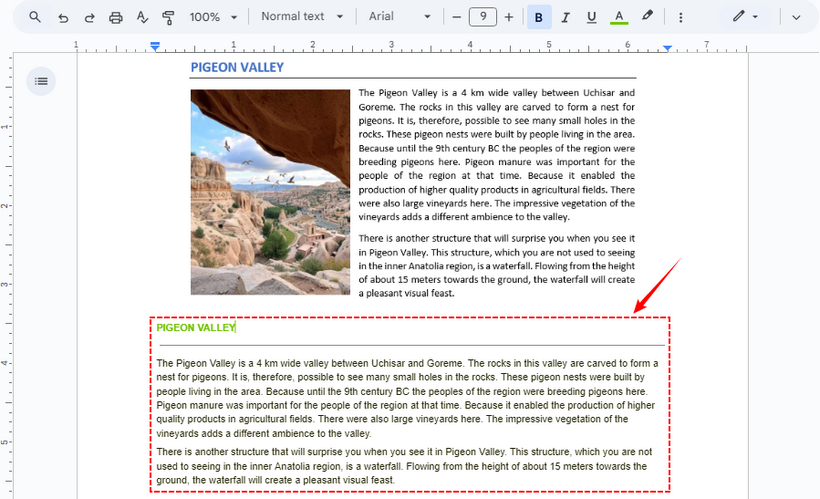
- O Google Docs criará instantaneamente um novo documento. O texto extraído estará na parte inferior da imagem incorporada.
✔ Prós: Altamente preciso, integra-se perfeitamente ao seu ecossistema Google e lida com várias páginas.
✘ Contras: A formatação às vezes pode ser imperfeita.
2. Ferramenta de OCR Online
O Online OCR é uma ferramenta da web dedicada para conversão gratuita de imagem em texto. Ele suporta JPG, PNG, TIFF e PDF (até 15 MB por arquivo gratuitamente).
Como usar:
- Acesse Online OCR (não é necessário se inscrever).
- Faça o upload da sua imagem ou arraste e solte-a na ferramenta.
- Selecione o idioma de origem (por exemplo, inglês, francês) e o formato de saída (Word, TXT, Excel).
- Clique em “Converter” e baixe o arquivo editável com o texto extraído.

✔ Prós: Não é necessário registro para uso básico; suporta uma ampla variedade de idiomas e formatos de saída.
✘ Contras: A versão gratuita tem limites de tamanho de arquivo; anúncios no site.
Precisa exportar texto como PDF? Consulte: Converta texto para PDF facilmente: 4 métodos rápidos e profissionais
Conversor gratuito de imagem para texto para desktop: Microsoft OneNote
Se você usa o Windows ou o Microsoft Office, a ferramenta de OCR integrada do OneNote é perfeita e gratuita. Funciona com imagens, PDFs digitalizados e até capturas de tela que você cola nas notas.
Como usar:
- Abra o Microsoft OneNote e crie uma nova página.
- Cole uma imagem na página ou insira uma via “Inserir > Imagens”.
- Clique com o botão direito na imagem e selecione “Copiar Texto da Imagem”.
- Cole o texto extraído em qualquer lugar (Word, Excel, etc.).
Nota: Se precisar reconhecer outros idiomas, lembre-se de clicar com o botão direito na imagem, selecionar “Tornar o texto na imagem pesquisável” e escolher o idioma exato do seu texto.

✔ Prós: Integra-se perfeitamente com o Office; suporta texto manuscrito; funciona offline.
✘ Contras: Requer que o aplicativo de desktop seja instalado; menos intuitivo para usuários de Mac.
Biblioteca Python OCR: extraia texto de imagem usando Spire.OCR
Para usuários com habilidades básicas em Python, a biblioteca Spire.OCR para Python permite a conversão automatizada de imagem em texto. Ele suporta processamento em lote, vários idiomas e formatos de imagem (JPG, PNG, BMP, etc.) - perfeito para otimizar tarefas repetitivas de OCR (por exemplo, extrair texto de 100 imagens de produtos de uma vez).
1. Instale a biblioteca Spire.OCR: Abra seu prompt de comando ou terminal e execute o seguinte comando pip:
pip install spire.ocr
2. Baixe o modelo de OCR: Baixe o modelo pré-treinado para o seu sistema operacional nos links abaixo e extraia os arquivos para um diretório conhecido (por exemplo, F:\OCR\win-x64).
3. Escreva o script Python
Crie um novo arquivo Python (por exemplo, image_to_text.py) e cole o código a seguir. Este script carrega uma imagem, executa o OCR e salva o texto extraído em um arquivo.
from spire.ocr import *

# Create OCR scanner instance
scanner = OcrScanner()

# Configure OCR model path and language
configureOptions = ConfigureOptions()
configureOptions.ModelPath = "F:\\OCR Model\\win-x64"
configureOptions.Language = "English"
scanner.ConfigureDependencies(configureOptions)

# Perform OCR on the image
scanner.Scan("Sample.png")

# Save extracted text to file
text = scanner.Text.ToString()
with open("ImageText.txt", "a", encoding="utf-8") as file:
    file.write(text)
Etapas principais:
- Criar um scanner de OCR: Inicializa um objeto OcrScanner principal, que é responsável por todas as operações relacionadas ao OCR (configuração, digitalização de imagem, extração de texto).
- Configurar caminho do modelo & Idioma:
- ConfigureOptions: Uma classe para definir os parâmetros de OCR.
- ModelPath: Caminho para os arquivos do modelo de OCR extraídos (crítico para o reconhecimento preciso do texto).
- Idioma: Especifica o idioma de reconhecimento de texto (suporta inglês, chinês, francês, etc).
- Executar OCR na imagem: Usa o método Scan() para processar a imagem de destino, acionando o mecanismo de OCR para extrair o texto da imagem.
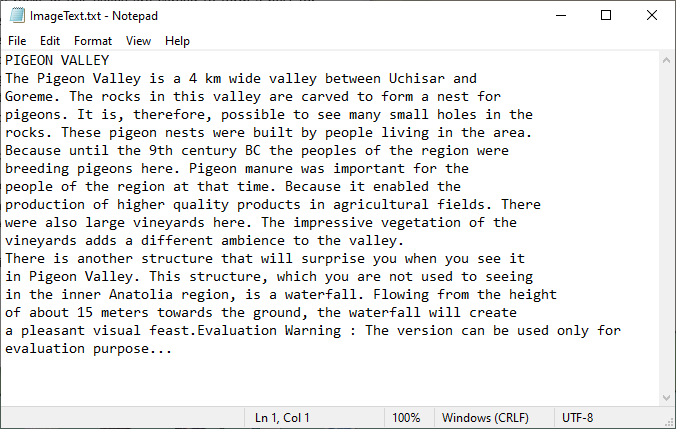
O texto extraído:
✔ Prós: Perfeito para automação e processamento em lote; altamente personalizável através de código.
✘ Contras: Requer conhecimento básico de Python e configuração inicial.
Para PDF digitalizado, verifique isto: Execute OCR em PDF com Python (Extraia texto de PDF digitalizado)
Considerações Finais
Converter uma imagem em texto gratuitamente não é mais uma tarefa complexa reservada a profissionais. Com ferramentas poderosas e acessíveis como Google Drive, OnlineOCR, e Microsoft OneNote, você pode extrair texto de qualquer imagem em segundos. Para desenvolvedores e usuários avançados que procuram automatizar tarefas repetitivas, as bibliotecas Python OCR fornecem uma solução robusta e escalável.
Perguntas Frequentes (FAQs)
P: Essas ferramentas podem extrair texto de anotações manuscritas?
R: Sim, mas com precisão variável. O texto impresso é reconhecido com alta precisão, enquanto o sucesso da caligrafia depende de sua clareza e das capacidades da ferramenta.
P: As ferramentas de OCR online gratuitas são seguras de usar?
R: Ferramentas respeitáveis como o Google Drive e o OnlineOCR são geralmente seguras para documentos não confidenciais. No entanto, para arquivos confidenciais, usar uma ferramenta de desktop como o OneNote ou um script Python local é mais seguro, pois não carrega seus dados para um servidor.
P: Posso converter imagens em texto offline?
R: Sim. Você pode usar o Microsoft OneNote ou a biblioteca Spire.OCR para Python sem uma conexão com a internet.
P: O Spire.OCR pode extrair as coordenadas do texto na imagem?
R: Sim. O Spire.OCR captura as coordenadas do texto retornando as informações da caixa delimitadora de cada região de texto reconhecida.
# Extract block-level text with position
block_text = ""
for block in text.Blocks:
    rectangle = block.Box
    block_info = f'{block.Text} -> x: {rectangle.X}, y: {rectangle.Y}, w: {rectangle.Width}, h: {rectangle.Height}'
    block_text += block_info + '\n'
Veja também
이미지를 텍스트로 변환하는 방법: 초보자를 위한 최고의 OCR 도구
스크린샷, 스캔한 PDF 또는 문서 사진의 텍스트를 편집해야 한 적이 있습니까? 모든 것을 수동으로 다시 입력하는 것은 지루하고 오류가 발생하기 쉬운 프로세스입니다. 다행히도 광학 문자 인식(OCR)이라는 강력한 기술을 사용하여 이미지를 텍스트로 변환할 수 있습니다.
이 종합 가이드에서는 일반 사용자와 개발자 모두를 위해 이미지에서 텍스트를 추출하는 최고의 무료 도구와 방법을 즉시 살펴보겠습니다.
- 이미지를 TXT로 변환하는 이유? 주요 사용 사례
- 이미지-텍스트 변환기 작동 방식: OCR의 기본
- 온라인에서 이미지를 텍스트로 변환하는 최고의 무료 도구
- 사진-텍스트 무료 데스크톱 변환기: Microsoft OneNote
- Python OCR 라이브러리: Spire.OCR을 사용하여 이미지에서 텍스트 추출
- 자주 묻는 질문 (FAQ)
이미지를 TXT로 변환하는 이유? 주요 사용 사례
PNG 또는 JPG와 같은 이미지를 TXT 파일로 변환하는 기능은 생각보다 유용합니다. 다음은 몇 가지 일반적인 시나리오입니다.
- 스캔한 문서 편집: 오래된 종이 문서, 계약서 또는 편지를 편집 가능한 Word 또는 Google Docs 파일로 변환합니다.
- 스크린샷에서 텍스트 캡처: 다시 입력하지 않고도 소프트웨어 튜토리얼, 소셜 미디어 게시물 또는 오류 메시지에서 텍스트를 빠르게 가져옵니다.
- 이미지 속 텍스트 번역: OCR 도구를 사용하여 텍스트를 추출한 다음 Google 번역과 같은 번역기에 붙여넣습니다.
- 접근성 향상: 시각 장애가 있는 사용자를 위해 스크린 리더가 이미지 내의 텍스트를 읽을 수 있도록 합니다.
이미지-텍스트 변환기 작동 방식: OCR의 기본
대부분의 무료 도구는 클라우드 기반 OCR(소프트웨어 다운로드 필요 없음) 또는 경량 데스크톱 앱을 사용합니다. 과정은 간단합니다.
최신 OCR 도구는 여러 언어(영어, 스페인어, 중국어 등), 필기 텍스트(정확도 다양)를 지원하며 저화질 이미지도 처리할 수 있습니다. 물론 선명한 이미지일수록 더 나은 결과를 얻을 수 있습니다.
전문가 팁: 최상의 OCR 결과를 얻으려면 조명이 좋고 눈부심이 적으며 텍스트가 똑바른(기울어진 사진 피하기) 고해상도 이미지를 사용하십시오.
온라인에서 이미지를 텍스트로 변환하는 최고의 무료 도구
비싼 소프트웨어가 필요하지 않습니다. 브라우저에서 직접 작동하는 최고의 무료 온라인 OCR 도구는 다음과 같습니다.
1. Google Drive (Google Docs)
이것은 가장 강력하면서도 종종 간과되는 무료 OCR 솔루션 중 하나입니다.
사용 방법:
- drive.google.com으로 이동합니다.
- 이미지(JPG, PNG) 또는 스캔한 PDF를 Drive에 업로드합니다.
- 파일을 마우스 오른쪽 버튼으로 클릭하고 “연결 프로그램 > Google Docs”를 선택합니다.
- Google Docs가 즉시 새 문서를 만듭니다. 추출된 텍스트는 삽입된 이미지 하단에 표시됩니다.
✔ 장점: 매우 정확하고 Google 생태계와 원활하게 통합되며 여러 페이지를 처리합니다.
✘ 단점: 서식이 때때로 불완전할 수 있습니다.
2. 온라인 OCR 도구
Online OCR은 무료 이미지-텍스트 변환을 위한 전용 웹 도구입니다. JPG, PNG, TIFF 및 PDF(무료 파일당 최대 15MB)를 지원합니다.
사용 방법:
- Online OCR로 이동합니다(가입 필요 없음).
- 이미지를 업로드하거나 도구로 드래그 앤 드롭합니다.
- 소스 언어(예: 영어, 프랑스어)와 출력 형식(Word, TXT, Excel)을 선택합니다.
- “변환”을 클릭하고 추출된 텍스트가 포함된 편집 가능한 파일을 다운로드합니다.
✔ 장점: 기본 사용에 등록이 필요하지 않음; 다양한 언어와 출력 형식을 지원합니다.
✘ 단점: 무료 버전에는 파일 크기 제한이 있습니다. 사이트에 광고가 있습니다.
텍스트를 PDF로 내보내야 합니까? 참조: 텍스트를 PDF로 쉽게 변환: 4가지 빠르고 전문적인 방법
사진-텍스트 무료 데스크톱 변환기: Microsoft OneNote
Windows 또는 Microsoft Office를 사용하는 경우 OneNote의 내장 OCR 도구는 원활하고 무료입니다. 이미지, 스캔한 PDF, 노트에 붙여넣는 스크린샷에서도 작동합니다.
사용 방법:
- Microsoft OneNote를 열고 새 페이지를 만듭니다.
- 페이지에 이미지를 붙여넣거나 “삽입 > 그림”을 통해 삽입합니다.
- 이미지를 마우스 오른쪽 버튼으로 클릭하고 “그림에서 텍스트 복사”를 선택합니다.
- 추출된 텍스트를 아무 곳에나(Word, Excel 등) 붙여넣습니다.
참고: 다른 언어를 인식해야 하는 경우 이미지를 마우스 오른쪽 버튼으로 클릭하고 “이미지에서 텍스트를 검색 가능하게 만들기”를 선택한 다음 텍스트의 정확한 언어를 선택해야 합니다.
✔ 장점: Office와 완벽하게 통합됩니다. 필기 텍스트를 지원합니다. 오프라인으로 작동합니다.
✘ 단점: 데스크톱 앱을 설치해야 합니다. Mac 사용자에게는 덜 직관적입니다.
Python OCR 라이브러리: Spire.OCR을 사용하여 이미지에서 텍스트 추출
기본적인 Python 기술을 가진 사용자를 위해 Spire.OCR for Python 라이브러리는 자동화된 이미지-텍스트 변환을 가능하게 합니다. 일괄 처리, 여러 언어 및 이미지 형식(JPG, PNG, BMP 등)을 지원하므로 반복적인 OCR 작업(예: 한 번에 100개 제품 이미지에서 텍스트 추출)을 간소화하는 데 적합합니다.
1. Spire.OCR 라이브러리 설치: 명령 프롬프트 또는 터미널을 열고 다음 pip 명령을 실행합니다.
pip install spire.ocr
2. OCR 모델 다운로드: 아래 링크에서 운영 체제에 맞는 사전 훈련된 모델을 다운로드하고 알려진 디렉터리(예: F:\OCR\win-x64)에 파일의 압축을 풉니다.
3. Python 스크립트 작성
새 Python 파일(예: image_to_text.py)을 만들고 다음 코드를 붙여넣습니다. 이 스크립트는 이미지를 로드하고 OCR을 수행한 다음 추출된 텍스트를 파일에 저장합니다.
from spire.ocr import *

# OCR 스캐너 인스턴스 생성
scanner = OcrScanner()

# OCR 모델 경로 및 언어 구성
configureOptions = ConfigureOptions()
configureOptions.ModelPath = "F:\\OCR Model\\win-x64"
configureOptions.Language = "English"
scanner.ConfigureDependencies(configureOptions)

# 이미지에서 OCR 수행
scanner.Scan("Sample.png")

# 추출된 텍스트를 파일에 저장
text = scanner.Text.ToString()
with open("ImageText.txt", "a", encoding="utf-8") as file:
    file.write(text)
주요 단계:
- OCR 스캐너 생성: 모든 OCR 관련 작업(구성, 이미지 스캔, 텍스트 추출)을 담당하는 핵심 OcrScanner 개체를 초기화합니다.
- 모델 경로 및 언어 구성:
- ConfigureOptions: OCR 매개변수를 설정하는 클래스입니다.
- ModelPath: 추출된 OCR 모델 파일의 경로(정확한 텍스트 인식을 위해 중요).
- Language: 텍스트 인식 언어를 지정합니다(영어, 중국어, 프랑스어 등 지원).
- 이미지에서 OCR 수행: Scan() 메서드를 사용하여 대상 이미지를 처리하고 OCR 엔진을 트리거하여 이미지에서 텍스트를 추출합니다.
추출된 텍스트:
✔ 장점: 자동화 및 일괄 처리에 적합합니다. 코드를 통해 고도로 사용자 정의할 수 있습니다.
✘ 단점: 기본적인 Python 지식과 초기 설정이 필요합니다.
스캔한 PDF의 경우 다음을 확인하십시오: Python으로 PDF OCR 수행 (스캔한 PDF에서 텍스트 추출)
마지막 생각들
이미지를 텍스트로 무료로 변환하는 것은 더 이상 전문가에게만 국한된 복잡한 작업이 아닙니다. Google Drive, OnlineOCR, 및 Microsoft OneNote와 같은 강력하고 접근 가능한 도구를 사용하면 모든 이미지에서 몇 초 만에 텍스트를 추출할 수 있습니다. 반복적인 작업을 자동화하려는 개발자와 고급 사용자를 위해 Python OCR 라이브러리는 강력하고 확장 가능한 솔루션을 제공합니다.
자주 묻는 질문 (FAQ)
Q: 이 도구들이 필기 노트에서 텍스트를 추출할 수 있습니까?
A: 예, 하지만 정확도는 다양합니다. 인쇄된 텍스트는 높은 정밀도로 인식되는 반면, 필기 성공 여부는 선명도와 도구의 기능에 따라 달라집니다.
Q: 무료 온라인 OCR 도구는 사용하기에 안전한가요?
A: Google Drive 및 OnlineOCR과 같은 평판이 좋은 도구는 일반적으로 민감하지 않은 문서에 대해 안전합니다. 그러나 기밀 파일의 경우 OneNote와 같은 데스크톱 도구나 로컬 Python 스크립트를 사용하는 것이 데이터를 서버에 업로드하지 않으므로 더 안전합니다.
Q: 오프라인에서 이미지를 텍스트로 변환할 수 있나요?
A: 예. 인터넷 연결 없이 Microsoft OneNote 또는 Spire.OCR for Python 라이브러리를 사용할 수 있습니다.
Q: Spire.OCR이 이미지에서 텍스트 좌표를 추출할 수 있나요?
A: 예. Spire.OCR은 인식된 각 텍스트 영역의 경계 상자 정보를 반환하여 텍스트 좌표를 캡처합니다.
# 위치와 함께 블록 수준 텍스트 추출
block_text = ""
for block in text.Blocks:
    rectangle = block.Box
    block_info = f'{block.Text} -> x: {rectangle.X}, y: {rectangle.Y}, w: {rectangle.Width}, h: {rectangle.Height}'
    block_text += block_info + '\n'
더 보기
Come convertire immagini in testo: I migliori strumenti OCR per principianti
Indice
- Perché convertire un'immagine in TXT? Principali casi d'uso
- Come funziona il convertitore da immagine a testo: le basi dell'OCR
- I migliori strumenti gratuiti per convertire immagini in testo online
- Convertitore gratuito da immagine a testo per desktop: Microsoft OneNote
- Libreria OCR Python: estrarre testo da un'immagine usando Spire.OCR
- Domande frequenti (FAQ)
Hai mai avuto bisogno di modificare il testo di uno screenshot, di un PDF scansionato o della foto di un documento? Riscrivere tutto manualmente è un processo noioso e soggetto a errori. Fortunatamente, puoi convertire le immagini in testo utilizzando una potente tecnologia nota come Riconoscimento Ottico dei Caratteri (OCR).
In questa guida completa, esploreremo i migliori strumenti e metodi gratuiti per estrarre testo dalle immagini istantaneamente, adatti sia agli utenti occasionali che agli sviluppatori.
- Perché convertire un'immagine in TXT? Principali casi d'uso
- Come funziona il convertitore da immagine a testo: le basi dell'OCR
- I migliori strumenti gratuiti per convertire immagini in testo online
- Convertitore gratuito da immagine a testo per desktop: Microsoft OneNote
- Libreria OCR Python: estrarre testo da un'immagine usando Spire.OCR
- Domande frequenti (FAQ)
Perché convertire un'immagine in TXT? Principali casi d'uso
La capacità di convertire immagini come PNG o JPG in file TXT è più utile di quanto si possa pensare. Ecco alcuni scenari comuni:
- Modifica documenti scansionati: Trasforma vecchi documenti cartacei, contratti o lettere in file Word o Google Docs modificabili.
- Cattura testo da screenshot: Prendi rapidamente testo da un tutorial software, un post sui social media o un messaggio di errore senza doverlo riscrivere.
- Traduci testo nelle immagini: Usa uno strumento OCR per estrarre il testo, quindi incollalo in un traduttore come Google Translate.
- Migliora l'accessibilità: Rendi il testo all'interno delle immagini leggibile dagli screen reader per gli utenti con disabilità visive.
Come funziona il convertitore da immagine a testo: le basi dell'OCR
La maggior parte degli strumenti gratuiti utilizza l'OCR basato su cloud (nessun download di software richiesto) o app desktop leggere. Il processo è semplice:
I moderni strumenti OCR supportano più lingue (inglese, spagnolo, cinese, ecc.), testo scritto a mano (con accuratezza variabile) e possono persino gestire immagini di bassa qualità, anche se immagini più nitide producono risultati migliori.
Suggerimento pro: per ottenere i migliori risultati OCR, utilizza immagini ad alta risoluzione con una buona illuminazione, abbagliamento minimo e testo dritto (evita foto inclinate).
I migliori strumenti gratuiti per convertire immagini in testo online
Non hai bisogno di software costosi. Ecco i migliori strumenti OCR online gratuiti che funzionano direttamente nel tuo browser.
1. Google Drive (Google Docs)
Questa è una delle soluzioni OCR gratuite più potenti e spesso trascurate.
Come usarlo:
- Vai su drive.google.com.
- Carica la tua immagine (JPG, PNG) o PDF scansionato sul tuo Drive.
- Fai clic con il pulsante destro del mouse sul file e seleziona “Apri con > Documenti Google”.
- Google Docs creerà istantaneamente un nuovo documento. Il testo estratto si troverà in fondo all'immagine incorporata.
✔ Pro: Molto preciso, si integra perfettamente con il tuo ecosistema Google e gestisce più pagine.
✘ Contro: La formattazione a volte può essere imperfetta.
2. Strumento OCR online
Online OCR è uno strumento web dedicato per la conversione gratuita da immagine a testo. Supporta JPG, PNG, TIFF e PDF (fino a 15 MB per file gratuitamente).
Come usarlo:
- Vai su Online OCR (nessuna registrazione richiesta).
- Carica la tua immagine o trascinala nello strumento.
- Seleziona la lingua di origine (es. inglese, francese) e il formato di output (Word, TXT, Excel).
- Fai clic su “Converti” e scarica il file modificabile con il testo estratto.
✔ Pro: Nessuna registrazione richiesta per l'uso di base; supporta una vasta gamma di lingue e formati di output.
✘ Contro: La versione gratuita ha limiti di dimensione dei file; annunci sul sito.
Hai bisogno di esportare il testo come PDF? Fai riferimento a: Converti facilmente il testo in PDF: 4 metodi rapidi e professionali
Convertitore gratuito da immagine a testo per desktop: Microsoft OneNote
Se usi Windows o Microsoft Office, lo strumento OCR integrato di OneNote è perfetto e gratuito. Funziona con immagini, PDF scansionati e persino screenshot che incolli nelle note.
Come usarlo:
- Apri Microsoft OneNote e crea una nuova pagina.
- Incolla un'immagine nella pagina o inseriscine una tramite “Inserisci > Immagini”.
- Fai clic con il pulsante destro del mouse sull'immagine e seleziona “Copia testo dall'immagine”.
- Incolla il testo estratto ovunque (Word, Excel, ecc.).
Nota: se devi riconoscere altre lingue, ricorda di fare clic con il pulsante destro del mouse sull'immagine, selezionare “Rendi il testo nell'immagine ricercabile” e scegliere la lingua esatta del tuo testo.
✔ Pro: Si integra perfettamente con Office; supporta il testo scritto a mano; funziona offline.
✘ Contro: Richiede l'installazione dell'app desktop; meno intuitivo per gli utenti Mac.
Libreria OCR Python: estrarre testo da un'immagine usando Spire.OCR
Per gli utenti con competenze di base di Python, la libreria Spire.OCR per Python consente la conversione automatizzata da immagine a testo. Supporta l'elaborazione batch, più lingue e formati di immagine (JPG, PNG, BMP, ecc.), perfetto per semplificare le attività OCR ripetitive (ad esempio, estrarre testo da 100 immagini di prodotti contemporaneamente).
1. Installa la libreria Spire.OCR: Apri il prompt dei comandi o il terminale ed esegui il seguente comando pip:
pip install spire.ocr
2. Scarica il modello OCR: scarica il modello pre-addestrato per il tuo sistema operativo dai link sottostanti ed estrai i file in una directory nota (ad es. F:\OCR\win-x64).
3. Scrivi lo script Python
Crea un nuovo file Python (ad es. image_to_text.py) e incolla il seguente codice. Questo script carica un'immagine, esegue l'OCR e salva il testo estratto in un file.
from spire.ocr import *

# Create OCR scanner instance
scanner = OcrScanner()

# Configure OCR model path and language
configureOptions = ConfigureOptions()
configureOptions.ModelPath = "F:\\OCR Model\\win-x64"
configureOptions.Language = "English"
scanner.ConfigureDependencies(configureOptions)

# Perform OCR on the image
scanner.Scan("Sample.png")

# Save extracted text to file
text = scanner.Text.ToString()
with open("ImageText.txt", "a", encoding="utf-8") as file:
    file.write(text)
Passaggi chiave:
- Crea uno scanner OCR: inizializza un oggetto OcrScanner principale, responsabile di tutte le operazioni relative all'OCR (configurazione, scansione di immagini, estrazione di testo).
- Configura percorso modello & lingua:
- ConfigureOptions: una classe per impostare i parametri OCR.
- ModelPath: percorso dei file del modello OCR estratti (fondamentale per un riconoscimento accurato del testo).
- Lingua: specifica la lingua di riconoscimento del testo (supporta inglese, cinese, francese, ecc.).
- Esegui OCR sull'immagine: utilizza il metodo Scan() per elaborare l'immagine di destinazione, attivando il motore OCR per estrarre il testo dall'immagine.
Il testo estratto:
✔ Pro: perfetto per l'automazione e l'elaborazione batch; altamente personalizzabile tramite codice.
✘ Contro: richiede una conoscenza di base di Python e una configurazione iniziale.
Per i PDF scansionati, controlla questo: Esegui l'OCR di PDF con Python (estrai testo da PDF scansionato)
Considerazioni finali
Convertire un'immagine in testo gratuitamente non è più un compito complesso riservato ai professionisti. Con strumenti potenti e accessibili come Google Drive, OnlineOCR, e Microsoft OneNote, puoi estrarre testo da qualsiasi immagine in pochi secondi. Per sviluppatori e utenti esperti che desiderano automatizzare attività ripetitive, le librerie OCR di Python forniscono una soluzione solida e scalabile.
Domande frequenti (FAQ)
D: Questi strumenti possono estrarre testo da note scritte a mano?
R: Sì, ma con accuratezza variabile. Il testo stampato viene riconosciuto con alta precisione, while handwriting success depends on its clarity and the tool's capabilities.
D: Gli strumenti OCR online gratuiti sono sicuri da usare?
R: Strumenti affidabili come Google Drive e OnlineOCR sono generalmente sicuri per i documenti non sensibili. Tuttavia, per i file riservati, l'utilizzo di uno strumento desktop come OneNote o di uno script Python locale è più sicuro in quanto non carica i dati su un server.
D: Posso convertire le immagini in testo offline?
R: Sì. Puoi utilizzare Microsoft OneNote o la libreria Spire.OCR per Python senza una connessione Internet.
D: Spire.OCR può estrarre le coordinate del testo nell'immagine?
R: Sì. Spire.OCR acquisisce le coordinate del testo restituendo le informazioni del riquadro di delimitazione di ciascuna regione di testo riconosciuta.
# Extract block-level text with position
block_text = ""
for block in text.Blocks:
    rectangle = block.Box
    block_info = f'{block.Text} -> x: {rectangle.X}, y: {rectangle.Y}, w: {rectangle.Width}, h: {rectangle.Height}'
    block_text += block_info + '\n'
Vedi anche
Comment convertir des images en texte : Les meilleurs outils OCR pour les débutants
Table des matières
- Pourquoi convertir une image en TXT ? Principaux cas d'utilisation
- Comment fonctionne le convertisseur d'image en texte : les bases de l'OCR
- Meilleurs outils gratuits pour convertir des images en texte en ligne
- Convertisseur de bureau gratuit d'image en texte : Microsoft OneNote
- Bibliothèque OCR Python : extraire du texte d'une image à l'aide de Spire.OCR
- Foire aux questions (FAQ)
Avez-vous déjà eu besoin de modifier le texte d'une capture d'écran, d'un PDF numérisé ou d'une photo d'un document ? Retaper manuellement tout est un processus fastidieux et sujet aux erreurs. Heureusement, vous pouvez convertir des images en texte en utilisant une technologie puissante connue sous le nom de reconnaissance optique de caractères (OCR).
Dans ce guide complet, nous explorerons les meilleurs outils et méthodes gratuits pour extraire du texte à partir d'images instantanément, s'adressant à la fois aux utilisateurs occasionnels et aux développeurs.
- Pourquoi convertir une image en TXT ? Principaux cas d'utilisation
- Comment fonctionne le convertisseur d'image en texte : les bases de l'OCR
- Meilleurs outils gratuits pour convertir des images en texte en ligne
- Convertisseur de bureau gratuit d'image en texte : Microsoft OneNote
- Bibliothèque OCR Python : extraire du texte d'une image à l'aide de Spire.OCR
- Foire aux questions (FAQ)
Pourquoi convertir une image en TXT ? Principaux cas d'utilisation
La capacité de convertir des images telles que PNG ou JPG en fichiers TXT est plus utile que vous ne le pensez. Voici quelques scénarios courants :
- Modifier des documents numérisés : Transformez de vieux documents papier, contrats ou lettres en fichiers Word ou Google Docs modifiables.
- Capturer du texte à partir de captures d'écran : Saisissez rapidement du texte à partir d'un didacticiel logiciel, d'une publication sur les réseaux sociaux ou d'un message d'erreur sans avoir à le retaper.
- Traduire du texte dans des images : Utilisez un outil d'OCR pour extraire le texte, puis collez-le dans un traducteur comme Google Translate.
- Améliorer l'accessibilité : Rendez le texte des images lisible par les lecteurs d'écran pour les utilisateurs malvoyants.
Comment fonctionne le convertisseur d'image en texte : les bases de l'OCR
La plupart des outils gratuits utilisent l'OCR basée sur le cloud (aucun téléchargement de logiciel requis) ou des applications de bureau légères. Le processus est simple :
Les outils d'OCR modernes prennent en charge plusieurs langues (anglais, espagnol, chinois, etc.), le texte manuscrit (avec une précision variable) et peuvent même traiter des images de faible qualité, bien que des images plus claires donnent de meilleurs résultats.
Conseil de pro : pour de meilleurs résultats d'OCR, utilisez des images haute résolution avec un bon éclairage, un minimum de reflets et un texte droit (évitez les photos inclinées).
Meilleurs outils gratuits pour convertir des images en texte en ligne
Vous n'avez pas besoin de logiciels coûteux. Voici les meilleurs outils d'OCR en ligne gratuits qui fonctionnent directement dans votre navigateur.
1. Google Drive (Google Docs)
C'est l'une des solutions d'OCR gratuites les plus puissantes et souvent négligées.
Comment l'utiliser :
- Allez sur drive.google.com.
- Téléchargez votre image (JPG, PNG) ou votre PDF numérisé sur votre Drive.
- Faites un clic droit sur le fichier et sélectionnez « Ouvrir avec > Google Docs ».
- Google Docs créera instantanément un nouveau document. Le texte extrait se trouvera au bas de l'image intégrée.
✔ Avantages : Très précis, s'intègre parfaitement à votre écosystème Google et gère plusieurs pages.
✘ Inconvénients : La mise en forme peut parfois être imparfaite.
2. Outil OCR en ligne
Online OCR est un outil Web dédié à la conversion gratuite d'images en texte. Il prend en charge les formats JPG, PNG, TIFF et PDF (jusqu'à 15 Mo par fichier gratuitement).
Comment l'utiliser :
- Allez sur Online OCR (aucune inscription requise).
- Téléchargez votre image ou faites-la glisser et déposez-la dans l'outil.
- Sélectionnez la langue source (par exemple, anglais, français) et le format de sortie (Word, TXT, Excel).
- Cliquez sur « Convertir » et téléchargez le fichier modifiable avec le texte extrait.
✔ Avantages : Aucune inscription requise pour une utilisation de base ; prend en charge un large éventail de langues et de formats de sortie.
✘ Inconvénients : La version gratuite a des limites de taille de fichier ; publicités sur le site.
Besoin d'exporter du texte au format PDF ? Référez-vous à : Convertir facilement du texte en PDF : 4 méthodes rapides et professionnelles
Convertisseur de bureau gratuit d'image en texte : Microsoft OneNote
Si vous utilisez Windows ou Microsoft Office, l'outil d'OCR intégré de OneNote est transparent et gratuit. Il fonctionne avec des images, des PDF numérisés et même des captures d'écran que vous collez dans des notes.
Comment l'utiliser :
- Ouvrez Microsoft OneNote et créez une nouvelle page.
- Collez une image dans la page ou insérez-en une via « Insertion > Images ».
- Faites un clic droit sur l'image et sélectionnez « Copier le texte de l'image ».
- Collez le texte extrait n'importe où (Word, Excel, etc.).
Remarque : si vous devez reconnaître d'autres langues, n'oubliez pas de faire un clic droit sur l'image, de sélectionner « Rendre le texte de l'image consultable » et de choisir la langue exacte de votre texte.
✔ Avantages : S'intègre parfaitement à Office ; prend en charge le texte manuscrit ; fonctionne hors ligne.
✘ Inconvénients : Nécessite l'installation de l'application de bureau ; moins intuitif pour les utilisateurs de Mac.
Bibliothèque OCR Python : extraire du texte d'une image à l'aide de Spire.OCR
Pour les utilisateurs ayant des compétences de base en Python, la bibliothèque Spire.OCR for Python permet la conversion automatisée d'images en texte. Elle prend en charge le traitement par lots, plusieurs langues et formats d'image (JPG, PNG, BMP, etc.), ce qui est parfait pour rationaliser les tâches d'OCR répétitives (par exemple, extraire le texte de 100 images de produits à la fois).
1. Installer la bibliothèque Spire.OCR : Ouvrez votre invite de commande ou votre terminal et exécutez la commande pip suivante :
pip install spire.ocr
2. Télécharger le modèle d'OCR : Téléchargez le modèle pré-entraîné pour votre système d'exploitation à partir des liens ci-dessous et extrayez les fichiers dans un répertoire connu (par exemple, F:\OCR\win-x64).
3. Écrire le script Python
Créez un nouveau fichier Python (par exemple, image_to_text.py) et collez le code suivant. Ce script charge une image, effectue une OCR et enregistre le texte extrait dans un fichier.
from spire.ocr import *

# Créer une instance de scanner OCR
scanner = OcrScanner()

# Configurer le chemin du modèle OCR et la langue
configureOptions = ConfigureOptions()
configureOptions.ModelPath = "F:\\OCR Model\\win-x64"
configureOptions.Language = "English"
scanner.ConfigureDependencies(configureOptions)

# Effectuer une OCR sur l'image
scanner.Scan("Sample.png")

# Enregistrer le texte extrait dans un fichier
text = scanner.Text.ToString()
with open("ImageText.txt", "a", encoding="utf-8") as file:
    file.write(text)
Étapes clés :
- Créer un scanner OCR : initialise un objet OcrScanner de base, qui est responsable de toutes les opérations liées à l'OCR (configuration, numérisation d'images, extraction de texte).
- Configurer le chemin du modèle et la langue :
- ConfigureOptions : une classe pour définir les paramètres de l'OCR.
- ModelPath : chemin d'accès aux fichiers du modèle d'OCR extraits (essentiel pour une reconnaissance de texte précise).
- Langue : spécifie la langue de reconnaissance de texte (prend en charge l'anglais, le chinois, le français, etc.).
- Effectuer une OCR sur l'image : utilise la méthode Scan() pour traiter l'image cible, déclenchant le moteur d'OCR pour extraire le texte de l'image.
Le texte extrait :
✔ Avantages : Parfait pour l'automatisation et le traitement par lots ; hautement personnalisable via le code.
✘ Inconvénients : Nécessite des connaissances de base en Python et une configuration initiale.
Pour les PDF numérisés, consultez ceci : Effectuer une OCR sur un PDF avec Python (extraire du texte d'un PDF numérisé)
Réflexions finales
Convertir gratuitement une image en texte n'est plus une tâche complexe réservée aux professionnels. Avec des outils puissants et accessibles comme Google Drive, OnlineOCR et Microsoft OneNote, vous pouvez extraire du texte de n'importe quelle image en quelques secondes. Pour les développeurs et les utilisateurs expérimentés qui cherchent à automatiser des tâches répétitives, les bibliothèques d'OCR Python offrent une solution robuste et évolutive.
Foire aux questions (FAQ)
Q : Ces outils peuvent-ils extraire du texte de notes manuscrites ?
R : Oui, mais avec une précision variable. Le texte imprimé est reconnu avec une grande précision, tandis que le succès de l'écriture manuscrite dépend de sa clarté et des capacités de l'outil.
Q : Les outils d'OCR en ligne gratuits sont-ils sûrs à utiliser ?
R : Les outils réputés comme Google Drive et OnlineOCR sont généralement sûrs pour les documents non sensibles. Cependant, pour les fichiers confidentiels, l'utilisation d'un outil de bureau comme OneNote ou d'un script Python local est plus sécurisée car elle ne télécharge pas vos données sur un serveur.
Q : Puis-je convertir des images en texte hors ligne ?
R : Oui. Vous pouvez utiliser Microsoft OneNote ou la bibliothèque Spire.OCR for Python sans connexion Internet.
Q : Spire.OCR peut-il extraire les coordonnées du texte dans l'image ?
R : Oui. Spire.OCR capture les coordonnées du texte en renvoyant les informations de la boîte englobante de chaque région de texte reconnue.
# Extraire le texte au niveau du bloc avec la position
block_text = ""
for block in text.Blocks:
    rectangle = block.Box
    block_info = f'{block.Text} -> x: {rectangle.X}, y: {rectangle.Y}, w: {rectangle.Width}, h: {rectangle.Height}'
    block_text += block_info + '\n'
Voir aussi
Cómo convertir imágenes a texto: Las mejores herramientas OCR para principiantes
Tabla de Contenidos
- ¿Por Qué Convertir una Imagen a TXT? Principales Casos de Uso
- Cómo Funciona un Convertidor de Imagen a Texto: Los Fundamentos de OCR
- Principales Herramientas Gratuitas para Convertir Imágenes a Texto en Línea
- Convertidor Gratuito de Imagen a Texto para Escritorio: Microsoft OneNote
- Biblioteca de OCR para Python: Extraer Texto de una Imagen usando Spire.OCR
- Preguntas Frecuentes (FAQs)
¿Alguna vez has necesitado editar el texto de una captura de pantalla, un PDF escaneado o la foto de un documento? Volver a escribir todo manualmente es un proceso tedioso y propenso a errores. Afortunadamente, puedes convertir imágenes a texto utilizando una potente tecnología conocida como Reconocimiento Óptico de Caracteres (OCR).
En esta guía completa, exploraremos las mejores herramientas y métodos gratuitos para extraer texto de imágenes al instante, tanto para usuarios ocasionales como para desarrolladores.
- ¿Por Qué Convertir una Imagen a TXT? Principales Casos de Uso
- Cómo Funciona un Convertidor de Imagen a Texto: Los Fundamentos de OCR
- Principales Herramientas Gratuitas para Convertir Imágenes a Texto en Línea
- Convertidor Gratuito de Imagen a Texto para Escritorio: Microsoft OneNote
- Biblioteca de OCR para Python: Extraer Texto de una Imagen usando Spire.OCR
- Preguntas Frecuentes (FAQs)
¿Por Qué Convertir una Imagen a TXT? Principales Casos de Uso
La capacidad de convertir imágenes como PNG o JPG a archivos TXT es más útil de lo que podrías pensar. Aquí hay algunos escenarios comunes:
- Editar Documentos Escaneados: Convierte documentos antiguos en papel, contratos o cartas en archivos editables de Word o Google Docs.
- Capturar Texto de Capturas de Pantalla: Extrae rápidamente texto de un tutorial de software, una publicación en redes sociales o un mensaje de error sin tener que volver a escribirlo.
- Traducir Texto en Imágenes: Usa una herramienta de OCR para extraer el texto y luego pégalo en un traductor como Google Translate.
- Mejorar la Accesibilidad: Haz que el texto dentro de las imágenes sea legible por lectores de pantalla para usuarios con discapacidad visual.
Cómo Funciona un Convertidor de Imagen a Texto: Los Fundamentos de OCR
La mayoría de las herramientas gratuitas utilizan OCR basado en la nube (no se necesita descargar software) o aplicaciones de escritorio ligeras. El proceso es simple:
Las herramientas de OCR modernas admiten múltiples idiomas (inglés, español, chino, etc.), texto manuscrito (con precisión variable) e incluso pueden manejar imágenes de baja calidad, aunque las imágenes más claras producen mejores resultados.
Consejo Profesional: Para obtener los mejores resultados de OCR, utiliza imágenes de alta resolución con buena iluminación, mínimo deslumbramiento y texto recto (evita las fotos inclinadas).
Principales Herramientas Gratuitas para Convertir Imágenes a Texto en Línea
No necesitas software caro. Aquí están las mejores herramientas de OCR en línea gratuitas que funcionan directamente en tu navegador.
1. Google Drive (Google Docs)
Esta es una de las soluciones de OCR gratuitas más potentes y a menudo pasadas por alto.
Cómo usarlo:
- Ve a drive.google.com.
- Sube tu imagen (JPG, PNG) o PDF escaneado a tu Drive.
- Haz clic derecho en el archivo y selecciona “Abrir con > Google Docs”.
- Google Docs creará instantáneamente un nuevo documento. El texto extraído estará en la parte inferior de la imagen incrustada.
✔ Pros: Muy preciso, se integra perfectamente con tu ecosistema de Google y maneja múltiples páginas.
✘ Contras: El formato a veces puede ser imperfecto.
2. Herramienta de OCR en Línea
Online OCR es una herramienta web dedicada a la conversión gratuita de imagen a texto. Admite JPG, PNG, TIFF y PDF (hasta 15 MB por archivo de forma gratuita).
Cómo usarlo:
- Ve a Online OCR (no es necesario registrarse).
- Sube tu imagen o arrástrala y suéltala en la herramienta.
- Selecciona el idioma de origen (p. ej., inglés, francés) y el formato de salida (Word, TXT, Excel).
- Haz clic en “Convertir” y descarga el archivo editable con el texto extraído.
✔ Pros: No se requiere registro para uso básico; admite una amplia gama de idiomas y formatos de salida.
✘ Contras: La versión gratuita tiene límites de tamaño de archivo; anuncios en el sitio.
¿Necesitas exportar texto como PDF? Consulta: Convertir Texto a PDF Fácilmente: 4 Métodos Rápidos y Profesionales
Convertidor Gratuito de Imagen a Texto para Escritorio: Microsoft OneNote
Si usas Windows o Microsoft Office, la herramienta de OCR integrada de OneNote es perfecta y gratuita. Funciona con imágenes, PDF escaneados e incluso capturas de pantalla que pegas en las notas.
Cómo usarlo:
- Abre Microsoft OneNote y crea una nueva página.
- Pega una imagen en la página o inserta una a través de “Insertar > Imágenes”.
- Haz clic derecho en la imagen y selecciona “Copiar texto de la imagen”.
- Pega el texto extraído en cualquier lugar (Word, Excel, etc.).
Nota: Si necesitas reconocer otros idiomas, recuerda hacer clic derecho en la imagen, seleccionar “Hacer que el texto de la imagen se pueda buscar” y elegir el idioma exacto de tu texto.
✔ Pros: Se integra perfectamente con Office; admite texto manuscrito; funciona sin conexión.
✘ Contras: Requiere que la aplicación de escritorio esté instalada; menos intuitivo para los usuarios de Mac.
Biblioteca de OCR para Python: Extraer Texto de una Imagen usando Spire.OCR
Para usuarios con habilidades básicas de Python, la biblioteca Spire.OCR for Python permite la conversión automatizada de imagen a texto. Admite procesamiento por lotes, múltiples idiomas y formatos de imagen (JPG, PNG, BMP, etc.), perfecto para optimizar tareas repetitivas de OCR (p. ej., extraer texto de 100 imágenes de productos a la vez).
1. Instalar la Biblioteca Spire.OCR: Abre tu símbolo del sistema o terminal y ejecuta el siguiente comando pip:
pip install spire.ocr
2. Descargar el Modelo de OCR: Descarga el modelo preentrenado para tu sistema operativo desde los enlaces a continuación y extrae los archivos a un directorio conocido (p. ej., F:\OCR\win-x64).
3. Escribir el Script de Python
Crea un nuevo archivo de Python (p. ej., image_to_text.py) y pega el siguiente código. Este script carga una imagen, realiza OCR y guarda el texto extraído en un archivo.
from spire.ocr import *

# Create OCR scanner instance
scanner = OcrScanner()

# Configure OCR model path and language
configureOptions = ConfigureOptions()
configureOptions.ModelPath = "F:\\OCR Model\\win-x64"
configureOptions.Language = "English"
scanner.ConfigureDependencies(configureOptions)

# Perform OCR on the image
scanner.Scan("Sample.png")

# Save extracted text to file
text = scanner.Text.ToString()
with open("ImageText.txt", "a", encoding="utf-8") as file:
    file.write(text)
Pasos Clave:
- Crear un Escáner OCR: Inicializa un objeto OcrScanner principal, que es responsable de todas las operaciones relacionadas con OCR (configuración, escaneo de imágenes, extracción de texto).
- Configurar Ruta del Modelo e Idioma:
- ConfigureOptions: Una clase para establecer los parámetros de OCR.
- ModelPath: Ruta a los archivos del modelo de OCR extraídos (crítico para un reconocimiento de texto preciso).
- Language: Especifica el idioma de reconocimiento de texto (admite inglés, chino, francés, etc).
- Realizar OCR en la Imagen: Utiliza el método Scan() para procesar la imagen de destino, activando el motor de OCR para extraer texto de la imagen.
El Texto Extraído:
✔ Pros: Perfecto para la automatización y el procesamiento por lotes; altamente personalizable a través de código.
✘ Contras: Requiere conocimientos básicos de Python y configuración inicial.
Para PDF escaneados, consulta esto: Realizar OCR en PDF con Python (Extraer Texto de PDF Escaneado)
Conclusiones Finales
Convertir una imagen a texto de forma gratuita ya no es una tarea compleja reservada para profesionales. Con herramientas potentes y accesibles como Google Drive, OnlineOCR, y Microsoft OneNote, puedes extraer texto de cualquier imagen en segundos. Para desarrolladores y usuarios avanzados que buscan automatizar tareas repetitivas, las bibliotecas de OCR de Python proporcionan una solución robusta y escalable.
Preguntas Frecuentes (FAQs)
P: ¿Pueden estas herramientas extraer texto de notas manuscritas?
R: Sí, pero con una precisión variable. El texto impreso se reconoce con alta precisión, mientras que el éxito con la escritura a mano depende de su claridad y de las capacidades de la herramienta.
P: ¿Son seguras de usar las herramientas de OCR en línea gratuitas?
R: Las herramientas de buena reputación como Google Drive y OnlineOCR son generalmente seguras para documentos no sensibles. Sin embargo, para archivos confidenciales, usar una herramienta de escritorio como OneNote o un script local de Python es más seguro, ya que no sube tus datos a un servidor.
P: ¿Puedo convertir imágenes a texto sin conexión?
R: Sí. Puedes usar Microsoft OneNote o la biblioteca Spire.OCR for Python sin conexión a internet.
P: ¿Puede Spire.OCR extraer las coordenadas del texto en la imagen?
R: Sí. Spire.OCR captura las coordenadas del texto devolviendo la información del cuadro delimitador de cada región de texto reconocida.
# Extract block-level text with position
block_text = ""
for block in text.Blocks:
    rectangle = block.Box
    block_info = f'{block.Text} -> x: {rectangle.X}, y: {rectangle.Y}, w: {rectangle.Width}, h: {rectangle.Height}'
    block_text += block_info + '\n'
Ver También
Wie man Bilder in Text umwandelt: Die besten OCR-Tools für Anfänger
Inhaltsverzeichnis
- Warum ein Bild in TXT konvertieren? Top-Anwendungsfälle
- Wie ein Bild-zu-Text-Konverter funktioniert: Die Grundlagen von OCR
- Top kostenlose Tools zum Online-Konvertieren von Bildern in Text
- Kostenloser Desktop-Konverter von Bild zu Text: Microsoft OneNote
- Python OCR-Bibliothek: Text aus Bild extrahieren mit Spire.OCR
- Häufig gestellte Fragen (FAQs)
Mussten Sie schon einmal den Text aus einem Screenshot, einem gescannten PDF oder einem Foto eines Dokuments bearbeiten? Alles manuell abzutippen ist ein mühsamer und fehleranfälliger Prozess. Glücklicherweise können Sie Bilder in Text umwandeln, indem Sie eine leistungsstarke Technologie namens Optische Zeichenerkennung (OCR) verwenden.
In diesem umfassenden Leitfaden werden wir die besten kostenlosen Tools und Methoden untersuchen, um sofort Text aus Bildern zu extrahieren, die sich sowohl an Gelegenheitsnutzer als auch an Entwickler richten.
- Warum ein Bild in TXT konvertieren? Top-Anwendungsfälle
- Wie ein Bild-zu-Text-Konverter funktioniert: Die Grundlagen von OCR
- Top kostenlose Tools zum Online-Konvertieren von Bildern in Text
- Kostenloser Desktop-Konverter von Bild zu Text: Microsoft OneNote
- Python OCR-Bibliothek: Text aus Bild extrahieren mit Spire.OCR
- Häufig gestellte Fragen (FAQs)
Warum ein Bild in TXT konvertieren? Top-Anwendungsfälle
Die Fähigkeit, Bilder wie PNG oder JPG in TXT-Dateien umzuwandeln, ist nützlicher, als Sie vielleicht denken. Hier sind einige häufige Szenarien:
- Gescannte Dokumente bearbeiten: Verwandeln Sie alte Papierdokumente, Verträge oder Briefe in bearbeitbare Word- oder Google Docs-Dateien.
- Text aus Screenshots erfassen: Erfassen Sie schnell Text aus einem Software-Tutorial, einem Social-Media-Beitrag oder einer Fehlermeldung, ohne ihn abzutippen.
- Text in Bildern übersetzen: Verwenden Sie ein OCR-Tool, um Text zu extrahieren, und fügen Sie ihn dann in einen Übersetzer wie Google Translate ein.
- Barrierefreiheit verbessern: Machen Sie Text in Bildern für sehbehinderte Benutzer durch Bildschirmleser lesbar.
Wie ein Bild-zu-Text-Konverter funktioniert: Die Grundlagen von OCR
Die meisten kostenlosen Tools verwenden cloudbasiertes OCR (kein Software-Download erforderlich) oder leichtgewichtige Desktop-Anwendungen. Der Prozess ist einfach:
Moderne OCR-Tools unterstützen mehrere Sprachen (Englisch, Spanisch, Chinesisch usw.), handschriftlichen Text (mit unterschiedlicher Genauigkeit) und können sogar Bilder von geringer Qualität verarbeiten – obwohl klarere Bilder bessere Ergebnisse liefern.
Profi-Tipp: Für beste OCR-Ergebnisse verwenden Sie hochauflösende Bilder mit guter Beleuchtung, minimaler Blendung und geradem Text (vermeiden Sie geneigte Fotos).
Top kostenlose Tools zum Online-Konvertieren von Bildern in Text
Sie benötigen keine teure Software. Hier sind die besten kostenlosen Online-OCR-Tools, die direkt in Ihrem Browser funktionieren.
1. Google Drive (Google Docs)
Dies ist eine der leistungsstärksten und oft übersehenen kostenlosen OCR-Lösungen.
So wird es gemacht:
- Gehen Sie zu drive.google.com.
- Laden Sie Ihr Bild (JPG, PNG) oder gescanntes PDF in Ihr Drive hoch.
- Klicken Sie mit der rechten Maustaste auf die Datei und wählen Sie „Öffnen mit > Google Docs“.
- Google Docs erstellt sofort ein neues Dokument. Der extrahierte Text befindet sich am unteren Rand des eingebetteten Bildes.
✔ Vorteile: Sehr genau, integriert sich nahtlos in Ihr Google-Ökosystem und verarbeitet mehrere Seiten.
✘ Nachteile: Die Formatierung kann manchmal unvollkommen sein.
2. Online-OCR-Tool
Online OCR ist ein dediziertes Web-Tool zur kostenlosen Umwandlung von Bildern in Text. Es unterstützt JPG, PNG, TIFF und PDF (bis zu 15 MB pro Datei kostenlos).
So wird es gemacht:
- Gehen Sie zu Online OCR (keine Anmeldung erforderlich).
- Laden Sie Ihr Bild hoch oder ziehen Sie es per Drag-and-Drop in das Tool.
- Wählen Sie die Ausgangssprache (z. B. Englisch, Französisch) und das Ausgabeformat (Word, TXT, Excel).
- Klicken Sie auf „Konvertieren“ und laden Sie die bearbeitbare Datei mit dem extrahierten Text herunter.
✔ Vorteile: Keine Registrierung für die grundlegende Nutzung erforderlich; unterstützt eine Vielzahl von Sprachen und Ausgabeformaten.
✘ Nachteile: Die kostenlose Version hat Dateigrößenbeschränkungen; Werbung auf der Website.
Müssen Sie Text als PDF exportieren? Siehe: Text einfach in PDF konvertieren: 4 schnelle und professionelle Methoden
Kostenloser Desktop-Konverter von Bild zu Text: Microsoft OneNote
Wenn Sie Windows oder Microsoft Office verwenden, ist das integrierte OCR-Tool von OneNote nahtlos und kostenlos. Es funktioniert mit Bildern, gescannten PDFs und sogar Screenshots, die Sie in Notizen einfügen.
So wird es gemacht:
- Öffnen Sie Microsoft OneNote und erstellen Sie eine neue Seite.
- Fügen Sie ein Bild auf der Seite ein oder fügen Sie eines über „Einfügen > Bilder“ hinzu.
- Klicken Sie mit der rechten Maustaste auf das Bild und wählen Sie „Text aus Bild kopieren“.
- Fügen Sie den extrahierten Text an einer beliebigen Stelle ein (Word, Excel usw.).
Hinweis: Wenn Sie andere Sprachen erkennen müssen, denken Sie daran, mit der rechten Maustaste auf das Bild zu klicken, „Text im Bild durchsuchbar machen“ auszuwählen und die genaue Sprache Ihres Textes zu wählen.
✔ Vorteile: Integriert sich perfekt in Office; unterstützt handschriftlichen Text; funktioniert offline.
✘ Nachteile: Erfordert die Installation der Desktop-App; weniger intuitiv für Mac-Benutzer.
Python OCR-Bibliothek: Text aus Bild extrahieren mit Spire.OCR
Für Benutzer mit grundlegenden Python-Kenntnissen ermöglicht die Bibliothek Spire.OCR for Python die automatisierte Umwandlung von Bildern in Text. Sie unterstützt die Stapelverarbeitung, mehrere Sprachen und Bildformate (JPG, PNG, BMP usw.) – perfekt zur Optimierung wiederholter OCR-Aufgaben (z. B. das Extrahieren von Text aus 100 Produktbildern auf einmal).
1. Spire.OCR-Bibliothek installieren: Öffnen Sie Ihre Eingabeaufforderung oder Ihr Terminal und führen Sie den folgenden Pip-Befehl aus:
pip install spire.ocr
2. OCR-Modell herunterladen: Laden Sie das vortrainierte Modell für Ihr Betriebssystem über die folgenden Links herunter und extrahieren Sie die Dateien in ein bekanntes Verzeichnis (z. B. F:\OCR\win-x64).
3. Das Python-Skript schreiben
Erstellen Sie eine neue Python-Datei (z. B. image_to_text.py) und fügen Sie den folgenden Code ein. Dieses Skript lädt ein Bild, führt OCR durch und speichert den extrahierten Text in einer Datei.
from spire.ocr import *

# OCR-Scanner-Instanz erstellen
scanner = OcrScanner()

# OCR-Modellpfad und Sprache konfigurieren
configureOptions = ConfigureOptions()
configureOptions.ModelPath = "F:\\OCR Model\\win-x64"
configureOptions.Language = "English"
scanner.ConfigureDependencies(configureOptions)

# OCR auf dem Bild durchführen
scanner.Scan("Sample.png")

# Extrahierter Text in Datei speichern
text = scanner.Text.ToString()
with open("ImageText.txt", "a", encoding="utf-8") as file:
    file.write(text)
Wichtige Schritte:
- Einen OCR-Scanner erstellen: Initialisiert ein zentrales OcrScanner-Objekt, das für alle OCR-bezogenen Operationen (Konfiguration, Bild-Scannen, Textextraktion) verantwortlich ist.
- Modellpfad & Sprache konfigurieren:
- ConfigureOptions: Eine Klasse zum Festlegen von OCR-Parametern.
- ModelPath: Pfad zu den extrahierten OCR-Modelldateien (entscheidend für eine genaue Texterkennung).
- Language: Gibt die Spracherkennungssprache an (unterstützt Englisch, Chinesisch, Französisch usw.).
- OCR auf Bild durchführen: Verwendet die Scan() Methode, um das Zielbild zu verarbeiten, wodurch die OCR-Engine ausgelöst wird, um Text aus dem Bild zu extrahieren.
Der extrahierte Text:
✔ Vorteile: Perfekt für Automatisierung und Stapelverarbeitung; hochgradig anpassbar durch Code.
✘ Nachteile: Erfordert grundlegende Python-Kenntnisse und eine Ersteinrichtung.
Für gescannte PDFs, siehe hier: PDF-OCR mit Python durchführen (Text aus gescanntem PDF extrahieren)
Abschließende Gedanken
Das kostenlose Umwandeln eines Bildes in Text ist keine komplexe Aufgabe mehr, die nur Profis vorbehalten ist. Mit leistungsstarken und zugänglichen Tools wie Google Drive, OnlineOCR, und Microsoft OneNote, können Sie in Sekundenschnelle Text aus jedem Bild extrahieren. Für Entwickler und Power-User, die wiederkehrende Aufgaben automatisieren möchten, Python-OCR-Bibliotheken bieten eine robuste und skalierbare Lösung.
Häufig gestellte Fragen (FAQs)
F: Können diese Tools Text aus handschriftlichen Notizen extrahieren?
A: Ja, aber mit unterschiedlicher Genauigkeit. Gedruckter Text wird mit hoher Präzision erkannt, während der Erfolg bei Handschrift von ihrer Klarheit und den Fähigkeiten des Tools abhängt.
F: Sind kostenlose Online-OCR-Tools sicher in der Anwendung?
A: Seriöse Tools wie Google Drive und OnlineOCR sind im Allgemeinen sicher für nicht vertrauliche Dokumente. Für vertrauliche Dateien ist die Verwendung eines Desktop-Tools wie OneNote oder eines lokalen Python-Skripts jedoch sicherer, da Ihre Daten nicht auf einen Server hochgeladen werden.
F: Kann ich Bilder offline in Text umwandeln?
A: Ja. Sie können Microsoft OneNote oder die Spire.OCR for Python-Bibliothek ohne Internetverbindung verwenden.
F: Kann Spire.OCR Textkoordinaten im Bild extrahieren?
A: Ja. Spire.OCR erfasst Textkoordinaten, indem es die Begrenzungsrahmeninformationen jeder erkannten Textregion zurückgibt.
# Block-Level-Text mit Position extrahieren
block_text = ""
for block in text.Blocks:
    rectangle = block.Box
    block_info = f'{block.Text} -> x: {rectangle.X}, y: {rectangle.Y}, w: {rectangle.Width}, h: {rectangle.Height}'
    block_text += block_info + '\n'
Siehe auch
Как конвертировать изображения в текст: Лучшие инструменты OCR для начинающих
Содержание
- Зачем конвертировать изображение в TXT? Основные сценарии использования
- Как работает конвертер изображений в текст: основы OCR
- Лучшие бесплатные онлайн-инструменты для конвертации изображений в текст
- Бесплатный настольный конвертер изображений в текст: Microsoft OneNote
- Библиотека Python OCR: извлечение текста из изображения с помощью Spire.OCR
- Часто задаваемые вопросы (FAQ)
Вам когда-нибудь требовалось отредактировать текст со скриншота, отсканированного PDF-файла или фотографии документа? Перепечатывать все вручную — утомительный и чреватый ошибками процесс. К счастью, вы можете конвертировать изображения в текст, используя мощную технологию, известную как оптическое распознавание символов (OCR).
В этом подробном руководстве мы рассмотрим лучшие бесплатные инструменты и методы для мгновенного извлечения текста из изображений, предназначенные как для обычных пользователей, так и для разработчиков.
- Зачем конвертировать изображение в TXT? Основные сценарии использования
- Как работает конвертер изображений в текст: основы OCR
- Лучшие бесплатные онлайн-инструменты для конвертации изображений в текст
- Бесплатный настольный конвертер изображений в текст: Microsoft OneNote
- Библиотека Python OCR: извлечение текста из изображения с помощью Spire.OCR
- Часто задаваемые вопросы (FAQ)
Зачем конвертировать изображение в TXT? Основные сценарии использования
Возможность конвертировать изображения, такие как PNG или JPG, в TXT-файлы, полезнее, чем вы могли бы подумать. Вот несколько распространенных сценариев:
- Редактирование отсканированных документов: Превратите старые бумажные документы, контракты или письма в редактируемые файлы Word или Google Docs.
- Захват текста со скриншотов: Быстро извлекайте текст из руководства по программному обеспечению, публикации в социальных сетях или сообщения об ошибке без перепечатывания.
- Перевод текста на изображениях: Используйте инструмент OCR для извлечения текста, а затем вставьте его в переводчик, например, Google Translate.
- Улучшение доступности: Сделайте текст на изображениях читаемым для программ чтения с экрана для слабовидящих пользователей.
Как работает конвертер изображений в текст: основы OCR
Большинство бесплатных инструментов используют облачное OCR (не требуется загрузка программного обеспечения) или легковесные настольные приложения. Процесс прост:
Современные инструменты OCR поддерживают несколько языков (английский, испанский, китайский и т. д.), рукописный текст (с разной точностью) и могут даже обрабатывать изображения низкого качества, хотя более четкие изображения дают лучшие результаты.
Совет профессионала: для достижения наилучших результатов OCR используйте изображения с высоким разрешением, хорошим освещением, минимальными бликами и прямым текстом (избегайте наклонных фотографий).
Лучшие бесплатные онлайн-инструменты для конвертации изображений в текст
Вам не нужно дорогое программное обеспечение. Вот лучшие бесплатные онлайн-инструменты OCR, которые работают прямо в вашем браузере.
1. Google Диск (Google Документы)
Это одно из самых мощных и часто упускаемых из виду бесплатных решений OCR.
Как это использовать:
- Перейдите на drive.google.com.
- Загрузите свое изображение (JPG, PNG) или отсканированный PDF-файл на свой Диск.
- Щелкните файл правой кнопкой мыши и выберите “Открыть с помощью > Google Документы”.
- Google Документы мгновенно создадут новый документ. Извлеченный текст будет находиться под встроенным изображением.
✔ Плюсы: Высокая точность, бесшовная интеграция с вашей экосистемой Google и обработка нескольких страниц.
✘ Минусы: Форматирование иногда может быть несовершенным.
2. Онлайн-инструмент OCR
Online OCR — это специализированный веб-инструмент для бесплатного преобразования изображений в текст. Он поддерживает JPG, PNG, TIFF и PDF (до 15 МБ на файл бесплатно).
Как это использовать:
- Перейдите на Online OCR (регистрация не требуется).
- Загрузите свое изображение или перетащите его в инструмент.
- Выберите исходный язык (например, английский, французский) и формат вывода (Word, TXT, Excel).
- Нажмите “Конвертировать” и загрузите редактируемый файл с извлеченным текстом.
✔ Плюсы: Не требуется регистрация для базового использования; поддерживает широкий спектр языков и форматов вывода.
✘ Минусы: В бесплатной версии есть ограничения на размер файла; реклама на сайте.
Нужно экспортировать текст в PDF? Обратитесь к: Конвертируйте текст в PDF легко: 4 быстрых и профессиональных метода
Бесплатный настольный конвертер изображений в текст: Microsoft OneNote
Если вы используете Windows или Microsoft Office, встроенный инструмент OCR в OneNote является бесшовным и бесплатным. Он работает с изображениями, отсканированными PDF-файлами и даже скриншотами, которые вы вставляете в заметки.
Как это использовать:
- Откройте Microsoft OneNote и создайте новую страницу.
- Вставьте изображение на страницу или вставьте его через “Вставка > Изображения”.
- Щелкните изображение правой кнопкой мыши и выберите “Копировать текст из изображения”.
- Вставьте извлеченный текст в любое место (Word, Excel и т. д.).
Примечание: Если вам нужно распознать другие языки, не забудьте щелкнуть изображение правой кнопкой мыши, выбрать “Сделать текст на изображении доступным для поиска” и выбрать точный язык вашего текста.
✔ Плюсы: Идеально интегрируется с Office; поддерживает рукописный текст; работает в автономном режиме.
✘ Минусы: Требуется установка настольного приложения; менее интуитивно понятно для пользователей Mac.
Библиотека Python OCR: извлечение текста из изображения с помощью Spire.OCR
Для пользователей с базовыми навыками Python библиотека Spire.OCR для Python позволяет автоматизировать преобразование изображений в текст. Она поддерживает пакетную обработку, несколько языков и форматы изображений (JPG, PNG, BMP и т. д.), что идеально подходит для оптимизации повторяющихся задач OCR (например, извлечение текста из 100 изображений продуктов за один раз).
1. Установите библиотеку Spire.OCR: Откройте командную строку или терминал и выполните следующую команду pip:
pip install spire.ocr
2. Загрузите модель OCR: Загрузите предварительно обученную модель для вашей операционной системы по ссылкам ниже и извлеките файлы в известный каталог (например, F:\OCR\win-x64).
3. Напишите скрипт на Python
Создайте новый файл Python (например, image_to_text.py) и вставьте следующий код. Этот скрипт загружает изображение, выполняет OCR и сохраняет извлеченный текст в файл.
from spire.ocr import *

# Create OCR scanner instance
scanner = OcrScanner()

# Configure OCR model path and language
configureOptions = ConfigureOptions()
configureOptions.ModelPath = "F:\\OCR Model\\win-x64"
configureOptions.Language = "English"
scanner.ConfigureDependencies(configureOptions)

# Perform OCR on the image
scanner.Scan("Sample.png")

# Save extracted text to file
text = scanner.Text.ToString()
with open("ImageText.txt", "a", encoding="utf-8") as file:
    file.write(text)
Ключевые шаги:
- Создание сканера OCR: инициализирует основной объект OcrScanner, который отвечает за все операции, связанные с OCR (конфигурация, сканирование изображений, извлечение текста).
- Настройка пути к модели и языка:
- ConfigureOptions: класс для установки параметров OCR.
- ModelPath: путь к извлеченным файлам модели OCR (критически важно для точного распознавания текста).
- Language: указывает язык распознавания текста (поддерживает английский, китайский, французский и т. д.).
- Выполнение OCR на изображении: использует метод Scan() для обработки целевого изображения, запуская механизм OCR для извлечения текста из изображения.
Извлеченный текст:
✔ Плюсы: Идеально подходит для автоматизации и пакетной обработки; широкие возможности настройки с помощью кода.
✘ Минусы: Требуются базовые знания Python и начальная настройка.
Для отсканированных PDF-файлов см. это: Выполнение OCR PDF с помощью Python (извлечение текста из отсканированного PDF)
Заключительные мысли
Бесплатное преобразование изображения в текст больше не является сложной задачей, предназначенной для профессионалов. С помощью мощных и доступных инструментов, таких как Google Диск, OnlineOCR, и Microsoft OneNote, вы можете извлекать текст из любого изображения за считанные секунды. Для разработчиков и опытных пользователей, желающих автоматизировать повторяющиеся задачи, библиотеки Python OCR предоставляют надежное и масштабируемое решение.
Часто задаваемые вопросы (FAQ)
В: Могут ли эти инструменты извлекать текст из рукописных заметок?
О: Да, но с разной точностью. Печатный текст распознается с высокой точностью, в то время как успех распознавания рукописного текста зависит от его четкости и возможностей инструмента.
В: Безопасно ли использовать бесплатные онлайн-инструменты OCR?
О: Авторитетные инструменты, такие как Google Диск и OnlineOCR, как правило, безопасны для неконфиденциальных документов. Однако для конфиденциальных файлов использование настольного инструмента, такого как OneNote, или локального скрипта Python более безопасно, поскольку ваши данные не загружаются на сервер.
В: Могу ли я конвертировать изображения в текст в автономном режиме?
О: Да. Вы можете использовать Microsoft OneNote или библиотеку Spire.OCR для Python без подключения к Интернету.
В: Может ли Spire.OCR извлекать координаты текста на изображении?
О: Да. Spire.OCR захватывает координаты текста, возвращая информацию об ограничивающем прямоугольнике каждой распознанной текстовой области.
# Извлечение текста на уровне блока с позицией
block_text = ""
for block in text.Blocks:
    rectangle = block.Box
    block_info = f'{block.Text} -> x: {rectangle.X}, y: {rectangle.Y}, w: {rectangle.Width}, h: {rectangle.Height}'
    block_text += block_info + '\n'
Смотрите также
Convertire HTML in testo: Soluzioni semplici per principianti e sviluppatori
Nel mondo digitale di oggi, l'HTML (HyperText Markup Language) è la spina dorsale dei contenuti web. Tuttavia, ci sono innumerevoli scenari in cui è necessario invece un testo semplice, pulito e non formattato. Che si tratti di estrarre dati per l'analisi, semplificare i contenuti per un'e-mail o preparare il testo per l'analisi SEO, sapere come convertire HTML in testo è una competenza essenziale.
Questa guida completa ti illustrerà i metodi più efficaci per convertire HTML in testo semplice, dagli semplici strumenti online per principianti alle potenti librerie di codice per sviluppatori.
- Vantaggi principali della conversione da HTML a testo
- Due metodi semplici per convertire HTML in testo semplice
- Avanzato: Convertire HTML in testo con codice (per sviluppatori)
- Domande frequenti (FAQ)
Vantaggi principali della conversione da HTML a testo
Rimuovere il markup HTML per ottenere un testo pulito e leggibile serve a diversi scopi cruciali:
- Elaborazione e analisi dei dati: Per scienziati e analisti dei dati, il testo semplice è il punto di partenza per l'Elaborazione del Linguaggio Naturale (NLP), l'analisi del sentiment e l'estrazione di parole chiave. I tag HTML sono solo rumore per questi algoritmi.
- Ottimizzazione per i motori di ricerca (SEO): Quando i motori di ricerca eseguono la scansione del tuo sito, indicizzano principalmente il contenuto di testo semplice. Assicurarsi che il tuo messaggio principale sia facilmente estraibile dall'HTML aiuta con la SEO on-page e il posizionamento.
- Riutilizzo dei contenuti: Il testo semplice è leggero e versatile, perfetto per newsletter via e-mail, notifiche di app, anteprime sui social media o frammenti di documenti.
- Efficienza del web scraping: I web scraper sono progettati per estrarre dati specifici. La conversione della risposta HTML grezza in testo è spesso il primo passo per filtrare le informazioni essenziali dal livello di presentazione.
Due metodi semplici per convertire HTML in testo semplice
Per gli utenti non tecnici, questi strumenti di facile utilizzo offrono risultati rapidi senza la rimozione manuale dei tag.
1. Convertitori online da HTML a testo
Per conversioni rapide e una tantum, gli strumenti online automatizzano la rimozione del markup con il minimo sforzo.
Strumenti principali:
CLOUDXDOCS, Convertio, CodeBeautify (tutti gratuiti, senza registrazione).
Passaggi generali:
- Carica il tuo file HTML.
- Seleziona “Converti” o “Estrai testo.”
- Scarica l'output in testo semplice (di solito come file .txt ).
Esempio di utilizzo di CLOUDXDOCS:
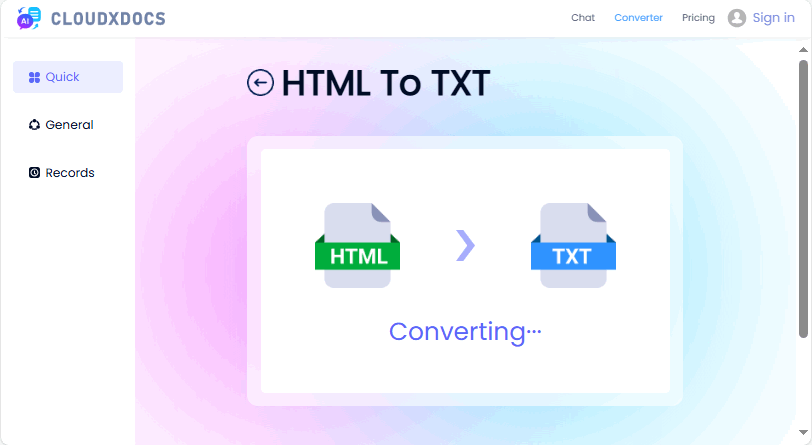
Vantaggi: Veloci, non richiedono competenze tecniche e spesso conservano la formattazione di base come le interruzioni di riga.
Svantaggi: Non adatti per l'elaborazione in batch; problemi di privacy con dati sensibili.
Potrebbe piacerti anche: I 5 migliori convertitori gratuiti da HTML a Word (testati e consigliati)
2. Elaboratori di testi (Microsoft Word, Google Docs)
Sfrutta gli strumenti familiari di office per cambiare efficacemente l'HTML in testo, senza bisogno di software aggiuntivo.
Microsoft Word:
- Apri Word e vai su “File > Apri”
- Seleziona il tuo file HTML (scegli “Tutti i file” dal menu a discesa per vederlo).
- Word convertirà l'HTML in un documento modificabile.
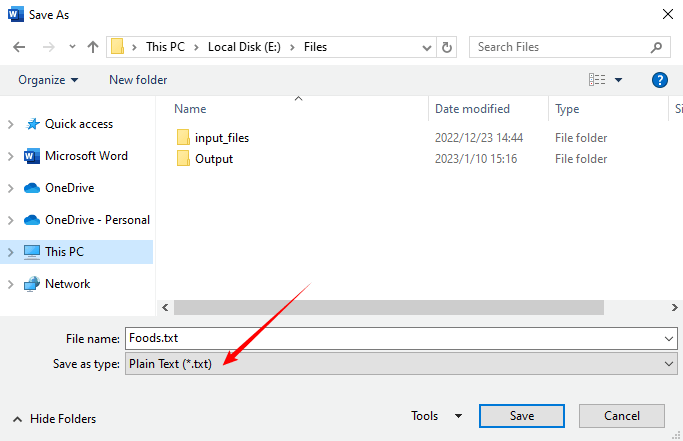
- Vai su “File > Salva con nome” e seleziona “Testo normale (*.txt)” come formato.
Google Docs:
- Carica il file HTML su Google Drive.
- Fai clic con il pulsante destro del mouse sul file e seleziona “Apri con > Documenti Google”
- Documenti Google renderizzerà l'HTML come testo.
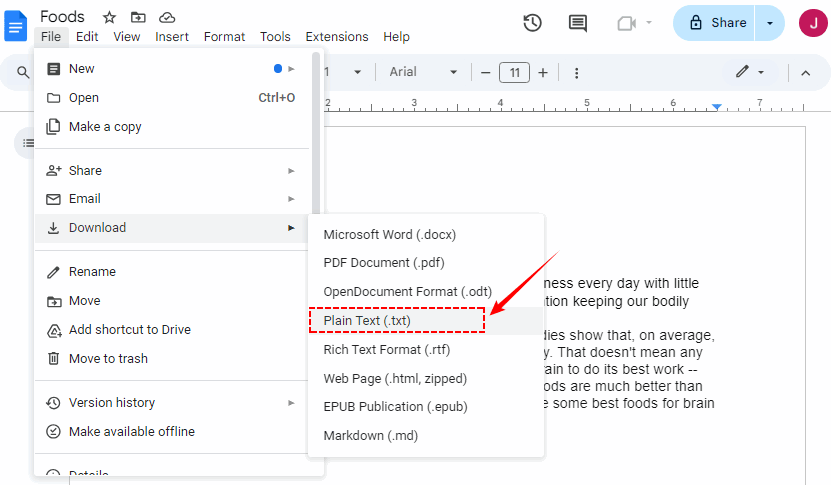
- Scarica come “Testo normale (.txt)” tramite “File > Scarica”
Ideale per: Utenti che hanno già familiarità con queste applicazioni e devono eseguire questa attività di rado.
Avanzato: Convertire HTML in testo con codice (per sviluppatori)
Se hai bisogno di automatizzare le conversioni (ad es. elaborazione in blocco, web scraping), l'utilizzo di linguaggi di programmazione come Python o C# è l'approccio più potente.
1. Convertire HTML in testo in Python
La libreria Spire.Doc for Python fornisce il metodo SaveToFile per salvare direttamente i file HTML come file TXT.
- Installa tramite Pypi:
pip install Spire.Doc
- Scrivi lo script Python:
from spire.doc import *
from spire.doc.common import *

# Load an HTML file
document = Document()
document.LoadFromFile("sample.html", FileFormat.Html, XHTMLValidationType.none)
# Save as a plain text file
document.SaveToFile("HtmlToText.txt", FileFormat.Txt)
document.Close()
Se hai bisogno di elaborare stringhe HTML, controlla questo: Come convertire una stringa HTML in testo in Python
2. Convertire HTML in testo semplice in C#
Per le applicazioni .NET, Spire.Doc for .NET è una soluzione solida per estrarre testo da HTML.
- Installa tramite Nuget:
Install-Package Spire.Doc
- Codice C# di esempio:
using Spire.Doc;
using Spire.Doc.Documents;

namespace HtmlToText
{
    class Program
    {
        static void Main()
        {
            // Create a Document object
            Document doc = new Document();

            // Load an HTML file
            doc.LoadFromFile("sample.html", FileFormat.Html, XHTMLValidationType.None);

            // Convert HTML to plain text
            doc.SaveToFile("HTMLtoText.txt", FileFormat.Txt);
            doc.Dispose();
        }
    }
}
Il file TXT convertito:

Ideale per: Sviluppatori, scienziati dei dati e chiunque necessiti di un'estrazione di testo automatizzata, scalabile o personalizzata.
Conclusione
Saper convertire HTML in testo è una competenza fondamentale che colma il divario tra i contenuti web e i dati utilizzabili. I principianti possono utilizzare strumenti online o elaboratori di testi per attività rapide, mentre gli sviluppatori possono automatizzare con codice per flussi di lavoro in blocco o personalizzati. Indipendentemente dal tuo livello di abilità, l'obiettivo è ottenere un testo pulito e utilizzabile che si adatti al tuo caso d'uso.
Seguendo questi metodi, risparmierai tempo, eviterai problemi di formattazione e sbloccherai il pieno potenziale del testo semplice nel tuo flusso di lavoro digitale.
Domande frequenti (FAQ)
D: Perché non posso semplicemente copiare e incollare il testo da un sito web?
R: Copiare e incollare direttamente da una pagina web spesso trascina formattazione nascosta, spazi extra o tag HTML parziali. Ciò porta a un testo disordinato che richiede una pulizia manuale. Gli strumenti/metodi da HTML a testo rimuovono solo il markup preservando il contenuto principale, facendoti risparmiare tempo.
D: Posso convertire HTML in rich text (RTF) invece che in testo semplice?
R: Sì, la maggior parte degli strumenti online (ad es. Convertio) e degli elaboratori di testi supporta l'output RTF. Per la codifica, usa Spire.Doc per salvare l'HTML come RTF preservando la formattazione come grassetto, corsivo e intestazioni.
D: Qual è il metodo migliore per convertire più file HTML contemporaneamente?
R: Per la conversione in blocco, l'utilizzo di uno script è il metodo più efficiente. Puoi scrivere un semplice script Python o C# per scorrere tutti i file in una directory e convertirli uno per uno.
D: I convertitori online da HTML a testo sono sicuri da usare?
R: Dovresti evitare di incollare codice HTML sensibile, confidenziale o proprietario in strumenti online. Sebbene la maggior parte dei siti affidabili sia sicura, c'è il rischio che i tuoi dati possano essere intercettati o archiviati. Per informazioni sensibili, utilizza sempre un metodo locale come uno script sul tuo computer.
Vedi anche
Converter HTML para Texto: Soluções fáceis para iniciantes e desenvolvedores
No mundo digital de hoje, o HTML (HyperText Markup Language) é a espinha dorsal do conteúdo da web. No entanto, existem inúmeros cenários em que você precisa de texto simples, limpo e não formatado. Seja para extrair dados para análise, simplificar conteúdo para um e-mail ou preparar texto para análise de SEO, saber como converter HTML para texto é uma habilidade essencial.
Este guia abrangente irá orientá-lo através dos métodos mais eficazes para converter HTML em texto simples, desde ferramentas online simples para iniciantes até poderosas bibliotecas de código para desenvolvedores.
- Principais Benefícios da Conversão de HTML para Texto
- Dois Métodos Fáceis para Converter HTML em Texto Simples
- Avançado: Converter HTML para Texto com Código (Para Desenvolvedores)
- Perguntas Frequentes (FAQs)
Principais Benefícios da Conversão de HTML para Texto
Remover a marcação HTML para obter um texto limpo e legível serve a vários propósitos cruciais:
- Processamento e Análise de Dados: Para cientistas e analistas de dados, o texto simples é o ponto de partida para o Processamento de Linguagem Natural (PLN), análise de sentimento e extração de palavras-chave. As tags HTML são apenas ruído para esses algoritmos.
- Otimização para Mecanismos de Busca (SEO): Quando os mecanismos de busca rastreiam seu site, eles indexam principalmente o conteúdo de texto simples. Garantir que sua mensagem principal seja facilmente extraível do HTML ajuda no SEO na página e na classificação.
- Reutilização de Conteúdo: O texto simples é leve e versátil, perfeito para boletins informativos por e-mail, notificações de aplicativos, pré-visualizações de mídias sociais ou trechos de documentos.
- Eficiência de Web Scraping: Os web scrapers são projetados para extrair dados específicos. Converter a resposta HTML bruta em texto é frequentemente o primeiro passo para filtrar as informações essenciais da camada de apresentação.
Dois Métodos Fáceis para Converter HTML em Texto Simples
Para usuários não técnicos, essas ferramentas fáceis de usar oferecem resultados rápidos sem a remoção manual de tags.
1. Conversores Online de HTML para Texto
Para conversões rápidas e únicas, as ferramentas online automatizam a remoção de marcação com o mínimo de esforço.
Principais Ferramentas:
CLOUDXDOCS, Convertio, CodeBeautify (todos gratuitos, sem necessidade de inscrição).
Passos Gerais:
- Carregue seu arquivo HTML.
- Selecione “Converter” ou “Extrair Texto.”
- Baixe a saída de texto simples (geralmente como um arquivo .txt).
Exemplo de uso do CLOUDXDOCS:
Prós: Rápido, não requer habilidades técnicas e geralmente preserva a formatação básica, como quebras de linha.
Contras: Não é adequado para processamento em lote; preocupações com a privacidade de dados sensíveis.
Você também pode gostar: Os 5 Melhores Conversores Gratuitos de HTML para Word (Testados e Recomendados)
2. Processadores de Texto (Microsoft Word, Google Docs)
Aproveite as ferramentas de escritório familiares para transformar HTML em texto de forma eficaz — sem necessidade de software extra.
Microsoft Word:
- Abra o Word e vá para “Arquivo > Abrir”
- Selecione seu arquivo HTML (escolha “Todos os Arquivos” no menu suspenso para vê-lo).
- O Word converterá o HTML em um documento editável.
- Vá para “Arquivo > Salvar Como” e selecione “Texto Simples (*.txt)” como o formato.
Google Docs:
- Faça o upload do arquivo HTML para o Google Drive.
- Clique com o botão direito no arquivo e selecione “Abrir com > Google Docs”
- O Google Docs renderizará o HTML como texto.
- Baixe como “Texto simples (.txt)” via “Arquivo > Baixar”
Ideal para: Usuários que já estão familiarizados com esses aplicativos e precisam realizar essa tarefa com pouca frequência.
Avançado: Converter HTML para Texto com Código (Para Desenvolvedores)
Se você precisa automatizar conversões (por exemplo, processamento em lote, web scraping), usar linguagens de programação como Python ou C# é a abordagem mais poderosa.
1. Converter HTML para Texto em Python
A biblioteca Spire.Doc for Python fornece o método SaveToFile para salvar arquivos HTML como arquivos TXT diretamente.
- Instalar via Pypi:
pip install Spire.Doc
- Escreva o script Python:
from spire.doc import *
from spire.doc.common import *

# Carregue um arquivo HTML
document = Document()
document.LoadFromFile("sample.html", FileFormat.Html, XHTMLValidationType.none)
# Salve como um arquivo de texto simples
document.SaveToFile("HtmlToText.txt", FileFormat.Txt)
document.Close()
Se você precisar processar strings HTML, verifique isto: Como Converter uma String HTML em Texto em Python
2. Converter HTML para Texto Simples em C#
Para aplicações .NET, Spire.Doc for .NET é uma solução robusta para extrair texto de HTML.
- Instalar via Nuget:
Install-Package Spire.Doc
- Exemplo de código C#:
using Spire.Doc;
using Spire.Doc.Documents;

namespace HtmlToText
{
    class Program
    {
        static void Main()
        {
            // Crie um objeto Document
            Document doc = new Document();

            // Carregue um arquivo HTML
            doc.LoadFromFile("sample.html", FileFormat.Html, XHTMLValidationType.None);

            // Converta HTML para texto simples
            doc.SaveToFile("HTMLtoText.txt", FileFormat.Txt);
            doc.Dispose();
        }
    }
}
O arquivo TXT convertido:
Ideal para: Desenvolvedores, cientistas de dados e qualquer pessoa que precise de extração de texto automatizada, escalável ou personalizada.
Conclusão
Saber como converter HTML para texto é uma habilidade fundamental que preenche a lacuna entre o conteúdo da web e os dados utilizáveis. Iniciantes podem usar ferramentas online ou processadores de texto para tarefas rápidas, enquanto desenvolvedores podem automatizar com código para fluxos de trabalho em massa ou personalizados. Não importa o seu nível de habilidade, o objetivo é obter um texto limpo e utilizável que se ajuste ao seu caso de uso.
Seguindo esses métodos, você economizará tempo, evitará dores de cabeça com formatação e desbloqueará todo o potencial do texto simples em seu fluxo de trabalho digital.
Perguntas Frequentes (FAQs)
P: Por que não posso simplesmente copiar e colar texto de um site?
R: Copiar e colar diretamente de uma página da web geralmente traz formatação oculta, espaços extras ou tags HTML parciais. Isso leva a um texto bagunçado que requer limpeza manual. As ferramentas/métodos de conversão de HTML para texto removem apenas a marcação, preservando o conteúdo principal, economizando seu tempo.
P: Posso converter HTML para texto rico (RTF) em vez de texto simples?
R: Sim, a maioria das ferramentas online (por exemplo, Convertio) e processadores de texto suportam a saída em RTF. Para codificação, use o Spire.Doc para salvar HTML como RTF, preservando a formatação como negrito, itálico e títulos.
P: Qual é o melhor método para converter vários arquivos HTML de uma só vez?
R: Para conversão em massa, usar um script é o método mais eficiente. Você pode escrever um script simples em Python ou C# para percorrer todos os arquivos em um diretório e convertê-los um por um.
P: Os conversores online de HTML para texto são seguros de usar?
R: Você deve evitar colar código HTML sensível, confidencial ou proprietário em ferramentas online. Embora a maioria dos sites respeitáveis seja segura, existe o risco de que seus dados possam ser interceptados ou armazenados. Para informações sensíveis, sempre use um método local, como um script em seu próprio computador.
Veja Também
HTML을 텍스트로 변환: 초보자와 개발자를 위한 쉬운 솔루션
오늘날의 디지털 세계에서 HTML(HyperText Markup Language)은 웹 콘텐츠의 중추입니다. 그러나 서식이 지정되지 않은 깨끗한 일반 텍스트가 필요한 시나리오는 셀 수 없이 많습니다. 분석을 위해 데이터를 추출하든, 이메일용 콘텐츠를 단순화하든, SEO 분석을 위해 텍스트를 준비하든, HTML을 텍스트로 변환하는 방법을 아는 것은 필수적인 기술입니다.
이 포괄적인 가이드는 초보자를 위한 간단한 온라인 도구부터 개발자를 위한 강력한 코드 라이브러리까지 HTML을 일반 텍스트로 변환하는 가장 효과적인 방법을 안내합니다.
HTML을 텍스트로 변환할 때의 주요 이점
HTML 마크업을 제거하여 깨끗하고 읽기 쉬운 텍스트를 얻는 것은 몇 가지 중요한 목적을 수행합니다.
- 데이터 처리 및 분석: 데이터 과학자 및 분석가에게 일반 텍스트는 자연어 처리(NLP), 감성 분석 및 키워드 추출의 시작점입니다. HTML 태그는 이러한 알고리즘에 대한 노이즈일 뿐입니다.
- 검색 엔진 최적화(SEO): 검색 엔진이 사이트를 크롤링할 때 주로 일반 텍스트 콘텐츠를 인덱싱합니다. 핵심 메시지를 HTML에서 쉽게 추출할 수 있도록 하면 페이지 내 SEO 및 순위 지정에 도움이 됩니다.
- 콘텐츠 용도 변경: 일반 텍스트는 가볍고 다용도로 사용할 수 있어 이메일 뉴스레터, 앱 알림, 소셜 미디어 미리보기 또는 문서 스니펫에 적합합니다.
- 웹 스크래핑 효율성: 웹 스크레이퍼는 특정 데이터를 추출하도록 설계되었습니다. 원시 HTML 응답을 텍스트로 변환하는 것은 종종 프레젠테이션 계층에서 필수 정보를 필터링하는 첫 번째 단계입니다.
HTML을 일반 텍스트로 변환하는 두 가지 쉬운 방법
기술적이지 않은 사용자를 위해 이러한 사용자 친화적인 도구는 수동 태그 제거 없이 빠른 결과를 제공합니다.
1. 온라인 HTML-텍스트 변환기
빠른 일회성 변환을 위해 온라인 도구는 최소한의 노력으로 마크업 제거를 자동화합니다.
최고의 도구:
CLOUDXDOCS, Convertio, CodeBeautify (모두 무료, 가입 필요 없음).
일반적인 단계:
- HTML 파일을 업로드하세요.
- "변환" 또는 "텍스트 추출"을 선택하세요.
- 일반 텍스트 출력(일반적으로 .txt 파일)을 다운로드하세요.
CLOUDXDOCS 사용 예:
장점: 빠르고 기술적인 기술이 필요 없으며 줄 바꿈과 같은 기본 서식을 유지하는 경우가 많습니다.
단점: 일괄 처리에 적합하지 않음; 민감한 데이터에 대한 개인 정보 보호 문제.
관심 있을 만한 다른 글: 최고의 무료 HTML-Word 변환기 5가지 (테스트 및 추천)
2. 워드 프로세서 (Microsoft Word, Google Docs)
익숙한 오피스 도구를 활용하여 추가 소프트웨어 없이 HTML을 텍스트로 효과적으로 변경하세요.
Microsoft Word:
- Word를 열고 "파일 > 열기"로 이동합니다.
- HTML 파일을 선택합니다(드롭다운에서 "모든 파일"을 선택하여 확인).
- Word가 HTML을 편집 가능한 문서로 변환합니다.
- "파일 > 다른 이름으로 저장"으로 이동하여 형식으로 "일반 텍스트(*.txt)"를 선택합니다.
Google Docs:
- Google Drive에 HTML 파일을 업로드합니다.
- 파일을 마우스 오른쪽 버튼으로 클릭하고 "연결 프로그램 > Google Docs"를 선택합니다.
- Google Docs가 HTML을 텍스트로 렌더링합니다.
- "파일 > 다운로드"를 통해 "일반 텍스트(.txt)"로 다운로드합니다.
최적 대상: 이러한 응용 프로그램에 이미 익숙하고 이 작업을 드물게 수행해야 하는 사용자.
고급: 코드로 HTML을 텍스트로 변환하기 (개발자용)
변환을 자동화해야 하는 경우(예: 대량 처리, 웹 스크래핑) Python 또는 C#과 같은 프로그래밍 언어를 사용하는 것이 가장 강력한 접근 방식입니다.
1. Python에서 HTML을 텍스트로 변환
Spire.Doc for Python 라이브러리는 HTML 파일을 TXT 파일로 직접 저장하기 위한 SaveToFile 메서드를 제공합니다.
- Pypi를 통해 설치:
pip install Spire.Doc
- Python 스크립트 작성:
from spire.doc import *
from spire.doc.common import *

# Load an HTML file
document = Document()
document.LoadFromFile("sample.html", FileFormat.Html, XHTMLValidationType.none)
# Save as a plain text file
document.SaveToFile("HtmlToText.txt", FileFormat.Txt)
document.Close()
HTML 문자열을 처리해야 하는 경우 다음을 확인하십시오. Python에서 HTML 문자열을 텍스트로 변환하는 방법
2. C#에서 HTML을 일반 텍스트로 변환
.NET 응용 프로그램의 경우 Spire.Doc for .NET은 HTML에서 텍스트를 추출하는 강력한 솔루션입니다.
- Nuget을 통해 설치:
Install-Package Spire.Doc
- 샘플 C# 코드:
using Spire.Doc;
using Spire.Doc.Documents;

namespace HtmlToText
{
    class Program
    {
        static void Main()
        {
            // Create a Document object
            Document doc = new Document();

            // Load an HTML file
            doc.LoadFromFile("sample.html", FileFormat.Html, XHTMLValidationType.None);

            // Convert HTML to plain text
            doc.SaveToFile("HTMLtoText.txt", FileFormat.Txt);
            doc.Dispose();
        }
    }
}
변환된 TXT 파일:
최적 대상: 자동화되고 확장 가능하며 사용자 정의된 텍스트 추출이 필요한 개발자, 데이터 과학자 및 모든 사람.
결론
HTML을 텍스트로 변환하는 방법을 아는 것은 웹 콘텐츠와 사용 가능한 데이터 간의 격차를 해소하는 기본 기술입니다. 초보자는 빠른 작업을 위해 온라인 도구나 워드 프로세서를 사용할 수 있으며, 개발자는 대량 또는 사용자 지정 워크플로를 위해 코드로 자동화할 수 있습니다. 기술 수준에 관계없이 목표는 사용 사례에 맞는 깨끗하고 사용 가능한 텍스트를 얻는 것입니다.
이러한 방법을 따르면 시간을 절약하고 서식 문제를 피하며 디지털 워크플로에서 일반 텍스트의 잠재력을 최대한 활용할 수 있습니다.
자주 묻는 질문 (FAQ)
Q: 웹사이트에서 텍스트를 그냥 복사하여 붙여넣을 수 없는 이유는 무엇입니까?
A: 웹 페이지에서 직접 복사하여 붙여넣으면 숨겨진 서식, 추가 공백 또는 부분적인 HTML 태그가 함께 복사되는 경우가 많습니다. 이로 인해 수동으로 정리해야 하는 지저분한 텍스트가 생성됩니다. HTML-텍스트 도구/방법은 핵심 콘텐츠를 보존하면서 마크업만 제거하여 시간을 절약합니다.
Q: HTML을 일반 텍스트 대신 서식 있는 텍스트(RTF)로 변환할 수 있습니까?
A: 예, 대부분의 온라인 도구(예: Convertio) 및 워드 프로세서는 RTF 출력을 지원합니다. 코딩의 경우 Spire.Doc을 사용하여 굵게, 기울임꼴 및 제목과 같은 서식을 유지하면서 HTML을 RTF로 저장하세요.
Q: 여러 HTML 파일을 한 번에 변환하는 가장 좋은 방법은 무엇입니까?
A: 대량 변환의 경우 스크립트를 사용하는 것이 가장 효율적인 방법입니다. 간단한 Python 또는 C# 스크립트를 작성하여 디렉토리의 모든 파일을 반복하고 하나씩 변환할 수 있습니다.
Q: 온라인 HTML-텍스트 변환기는 사용하기에 안전한가요?
A: 민감하거나 기밀이거나 독점적인 HTML 코드를 온라인 도구에 붙여넣는 것은 피해야 합니다. 대부분의 평판 좋은 사이트는 안전하지만 데이터가 가로채거나 저장될 위험이 있습니다. 민감한 정보의 경우 항상 자신의 컴퓨터에서 스크립트와 같은 로컬 방법을 사용하십시오.