Base64 para PDF e PDF para Base64 em Java (somente JDK + Pro)
Índice
Instalar com Maven
<dependency>
    <groupId>e-iceblue</groupId>
    <artifactId>spire.pdf</artifactId>
    <version>11.8.3</version>
</dependency>
Links Relacionados
Ao trabalhar com arquivos PDF em Java, muitas vezes é necessário converter entre dados binários e formatos baseados em texto. A codificação Base64 permite que o conteúdo do PDF seja representado como texto simples, o que é útil ao transmitir documentos em JSON, enviá-los por meio de formulários ou armazená-los em sistemas baseados em texto. A biblioteca padrão do Java fornece java.util.Base64, tornando simples a implementação de conversões de Base64 para PDF e PDF para Base64 sem dependências adicionais.
Neste tutorial, exploraremos como lidar com essas conversões usando apenas o JDK, bem como como trabalhar com imagens Base64 e incorporá-las em PDFs. Para operações mais avançadas, como editar um PDF recebido como Base64 e exportá-lo de volta, demonstraremos o uso do Free Spire.PDF for Java.
Índice
- Converter Base64 para PDF em Java (apenas JDK)
- Converter PDF para Base64 em Java (apenas JDK)
- Dicas de Validação e Segurança
- Salvar Imagens Base64 como PDF em Java
- Carregar PDF Base64, Modificar e Salvar de Volta como Base64
- Considerações de Desempenho e Memória
- FAQ
Converter Base64 para PDF em Java (apenas JDK)
A abordagem mais simples é ler uma string Base64 na memória, remover quaisquer prefixos opcionais (como data:application/pdf;base64,) e, em seguida, decodificá-la em um PDF. Isso funciona bem para arquivos de pequeno a médio porte.
import java.nio.file.*;
import java.nio.charset.StandardCharsets;
import java.util.Base64;

public class Base64ToPdf {
    public static void main(String[] args) throws Exception {
        // Ler texto Base64 de um arquivo (ou qualquer outra fonte)
        String base64 = Files.readString(Paths.get("sample.pdf.b64"), StandardCharsets.UTF_8);

        // Remover prefixos de URI de dados comuns, se presentes
        base64 = stripDataPrefix(base64);

        // Decodificar Base64 em bytes de PDF brutos
        // O decodificador MIME tolera quebras de linha e texto quebrado
        byte[] pdfBytes = Base64.getMimeDecoder().decode(base64);

        // Escrever os bytes decodificados em um arquivo PDF
        Files.write(Paths.get("output.pdf"), pdfBytes);
    }

    /** Utilitário para remover o prefixo "data:application/pdf;base64,", se incluído */
    private static String stripDataPrefix(String src) {
        String s = src.trim();
        int comma = s.indexOf(',');
        if (comma > 0 && s.substring(0, comma).toLowerCase().contains("base64")) {
            return s.substring(comma + 1).trim();
        }
        return s;
    }
}
Explicação Este exemplo é direto e confiável para conteúdo Base64 que cabe confortavelmente na memória. O Base64.getMimeDecoder() é escolhido porque lida elegantemente com quebras de linha, que são comuns em texto Base64 exportado de sistemas de e-mail ou APIs. Se você sabe que sua string Base64 não contém novas linhas, também pode usar Base64.getDecoder().
Certifique-se de remover qualquer prefixo de URI de dados (data:application/pdf;base64,) antes de decodificar, pois não faz parte da carga útil do Base64. O método auxiliar stripDataPrefix() faz isso automaticamente.
Variante de streaming (sem a string completa na memória)
Para PDFs grandes, é melhor processar o Base64 de forma contínua. Isso evita carregar toda a string Base64 na memória de uma vez.
import java.io.*;
import java.nio.file.*;
import java.util.Base64;

public class Base64ToPdfStreamed {
    public static void main(String[] args) throws Exception {
        // Entrada: arquivo de texto contendo PDF codificado em Base64
        Path in = Paths.get("sample.pdf.b64");

        // Saída: arquivo PDF decodificado
        Path out = Paths.get("output.pdf");

        // Envolver o decodificador Base64 em torno do fluxo de entrada
        try (InputStream b64In = Base64.getMimeDecoder().wrap(Files.newInputStream(in));
             OutputStream pdfOut = Files.newOutputStream(out)) {

            // Transmitir os bytes decodificados diretamente para a saída do PDF
            b64In.transferTo(pdfOut);
        }
    }
}
Explicação Essa abordagem baseada em streaming é mais eficiente em termos de memória, pois decodifica os dados em tempo real, em vez de armazenar a string inteira em buffer. É o método recomendado para arquivos grandes ou fluxos contínuos (por exemplo, soquetes de rede).
- Base64.getMimeDecoder() é usado para tolerar quebras de linha na entrada.
- O método transferTo() copia eficientemente os bytes decodificados da entrada para a saída sem o manuseio manual do buffer.
- No uso real, considere adicionar tratamento de exceções para gerenciar erros de acesso a arquivos ou gravações parciais.
Converter PDF para Base64 em Java (apenas JDK)
Codificar um PDF em Base64 é igualmente simples. Para arquivos menores, ler o PDF inteiro na memória é suficiente:
import java.nio.file.*;
import java.util.Base64;

public class PdfToBase64 {
    public static void main(String[] args) throws Exception {
        // Ler o arquivo PDF em um array de bytes
        byte[] pdfBytes = Files.readAllBytes(Paths.get("input.pdf"));

        // Codificar os bytes do PDF como uma string Base64
        String base64 = Base64.getEncoder().encodeToString(pdfBytes);

        // Escrever a string Base64 em um arquivo de texto
        Files.writeString(Paths.get("output.pdf.b64"), base64);
    }
}
Explicação Essa abordagem é simples e funciona bem para arquivos de pequeno a médio porte. O arquivo PDF inteiro é lido em um array de bytes e codificado como uma única string Base64. Essa string pode ser armazenada, transmitida em JSON ou incorporada em uma URI de dados.
Codificador de streaming (lida com arquivos grandes de forma eficiente)
Para PDFs grandes, você pode evitar a sobrecarga de memória codificando diretamente como um fluxo:
import java.io.*;
import java.nio.file.*;
import java.util.Base64;

public class PdfToBase64Streamed {
    public static void main(String[] args) throws Exception {
        // Entrada: arquivo PDF binário
        try (InputStream pdfIn = Files.newInputStream(Paths.get("input.pdf"));
             // Fluxo de saída bruto para arquivo de texto Base64
             OutputStream rawOut = Files.newOutputStream(Paths.get("output.pdf.b64"));
             // Envolver o fluxo de saída com o codificador Base64
             OutputStream b64Out = Base64.getEncoder().wrap(rawOut)) {

            // Transmitir bytes de PDF diretamente para a saída codificada em Base64
            pdfIn.transferTo(b64Out);
        }
    }
}
Explicação O codificador de streaming lida eficientemente com arquivos grandes, codificando os dados de forma incremental em vez de carregar tudo na memória. O método Base64.getEncoder().wrap() transforma um fluxo de saída regular em um que grava texto Base64 automaticamente.
Este design escala melhor para PDFs grandes, fluxos de rede ou serviços que devem lidar com muitos documentos simultaneamente sem sofrer pressão de memória.
Dicas de Validação e Segurança
- Detectar URIs de Dados: os usuários podem enviar prefixos data:application/pdf;base64,. Remova-os antes de decodificar.
- Quebras de linha: ao decodificar texto que pode conter linhas quebradas (e-mails, logs), use Base64.getMimeDecoder().
- Verificação rápida de sanidade: após a decodificação, os primeiros bytes de um PDF válido geralmente começam com %PDF-. Você pode verificar isso para detecção precoce de falhas.
- Codificação de caracteres: trate o texto Base64 como UTF-8 (ou US-ASCII) ao ler/escrever arquivos .b64.
- Tratamento de erros: envolva a decodificação/codificação em blocos try/catch e exiba mensagens acionáveis (por exemplo, tamanho, incompatibilidade de cabeçalho).
Salvar Imagens Base64 como PDF em Java
Às vezes, você recebe imagens (por exemplo, PNG ou JPEG) como strings Base64 e precisa envolvê-las em um PDF. Embora a biblioteca padrão do Java não tenha APIs de PDF, o Free Spire.PDF for Java torna isso simples.
Você pode baixar o Free Spire.PDF for Java e adicioná-lo ao seu projeto ou instalar o Free Spire.PDF for Java a partir do repositório Maven.
Conceitos-chave do Spire.PDF
- PdfDocument — o contêiner para uma ou mais páginas de PDF.
- PdfPageBase — representa uma página na qual você pode desenhar.
- PdfImage.fromImage() — carrega uma BufferedImage ou um fluxo em uma imagem PDF desenhável.
- drawImage() — posiciona a imagem nas coordenadas e no tamanho especificados.
- Sistema de Coordenadas — o Spire.PDF usa um sistema de coordenadas onde (0,0) é o canto superior esquerdo.
Exemplo: Converter imagem Base64 para PDF usando Java
import com.spire.pdf.PdfDocument;
import com.spire.pdf.PdfPageBase;
import com.spire.pdf.graphics.PdfImage;

import java.io.*;
import java.nio.charset.StandardCharsets;
import java.nio.file.*;
import java.util.Base64;

public class Base64ImageToPdf {
    public static void main(String[] args) throws Exception {
        // 1) Ler arquivo Base64 e decodificar (remover prefixo de URI de dados, se existir)
        String base64Image = Files.readString(Paths.get("G:/Document/image.b64"), StandardCharsets.UTF_8).trim();
        int comma = base64Image.indexOf(',');
        if (comma > 0 && base64Image.substring(0, comma).toLowerCase().contains("base64")) {
            base64Image = base64Image.substring(comma + 1).trim();
        }
        byte[] imageBytes = Base64.getMimeDecoder().decode(base64Image);

        // 2) Criar PDF e inserir a imagem
        PdfDocument pdf = new PdfDocument();
        try (ByteArrayInputStream in = new ByteArrayInputStream(imageBytes)) {
            PdfImage img = PdfImage.fromStream(in);
            pdf.getPageSettings().setWidth(img.getWidth());
            pdf.getPageSettings().setHeight(img.getHeight());
            pdf.getPageSettings().setMargins(0, 0, 0, 0);
            PdfPageBase page = pdf.getPages().add();
            page.getCanvas().drawImage(img, 0, 0);
        }

        // 3) Salvar arquivo PDF
        pdf.saveToFile("output/image.pdf");
    }
}
O exemplo a seguir decodifica uma imagem Base64 e a incorpora em uma página de PDF. A saída se parece com isto:
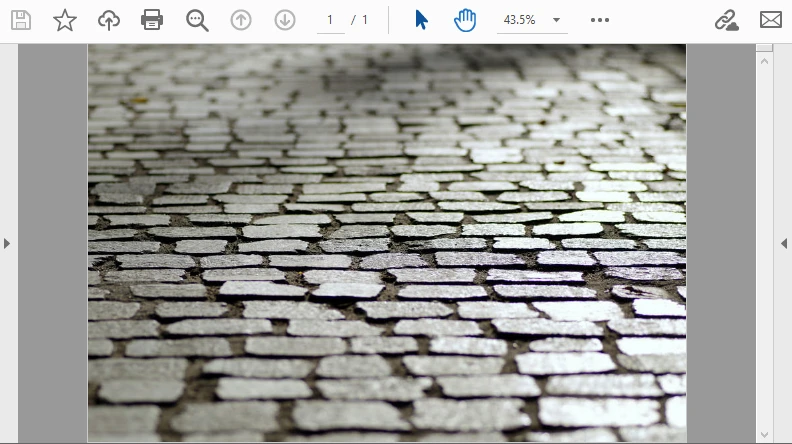
Este fluxo de trabalho é ideal para incorporar documentos digitalizados ou assinaturas que chegam como Base64.
Para gráficos vetoriais, você também pode consultar nosso guia sobre Converter SVG para PDF em Java.
Carregar PDF Base64, Modificar e Salvar de Volta como Base64
Em muitas APIs, um PDF chega como Base64. Com o Spire.PDF, você pode carregá-lo, desenhar nas páginas (texto/marcas d'água) e retornar Base64 novamente — ideal para funções sem servidor ou microsserviços.
Conceitos-chave do Spire.PDF usados aqui
- PdfDocument.loadFromBytes(byte[]) — constrói um documento diretamente a partir de bytes decodificados.
- PdfPageBase#getCanvas() — obtém uma superfície de desenho para colocar texto, formas ou imagens.
- Fontes e pincéis — por exemplo, PdfTrueTypeFont ou fontes integradas via PdfFont, com PdfSolidBrush para colorir.
- Salvar na memória — pdf.saveToStream(ByteArrayOutputStream) produz bytes brutos, que você pode recodificar com Base64.
Exemplo: Carregar, modificar e salvar PDF Base64 em Java
import com.spire.pdf.*;
import com.spire.pdf.graphics.*;

import java.awt.*;
import java.io.*;
import java.util.Base64;

public class EditBase64Pdf {
    public static void main(String[] args) throws Exception {
        String base64Pdf = "..."; // string de PDF Base64 recebida

        // Decodificar para bytes
        byte[] pdfBytes = Base64.getDecoder().decode(base64Pdf);

        // Carregar PDF
        PdfDocument pdf = new PdfDocument();
        pdf.loadFromBytes(pdfBytes);

        // Adicionar carimbo em cada página
        for (PdfPageBase page : (Iterable) pdf.getPages()) {
            PdfTrueTypeFont font = new PdfTrueTypeFont(new Font("Arial", Font.BOLD, 36));
            PdfSolidBrush brush = new PdfSolidBrush(new PdfRGBColor(Color.BLUE));
            page.getCanvas().drawString("Processed", font, brush, 100, 100);
        }

        // Salvar na memória e codificar de volta para Base64
        ByteArrayOutputStream output = new ByteArrayOutputStream();
        pdf.saveToStream(output);
        pdf.close();

        String resultBase64 = Base64.getEncoder().encodeToString(output.toByteArray());
        System.out.println(resultBase64);
    }
}
Neste exemplo, uma marca d'água azul "Processado" é adicionada a cada página do PDF antes de recodificá-lo de volta para Base64. O resultado se parece com isto:
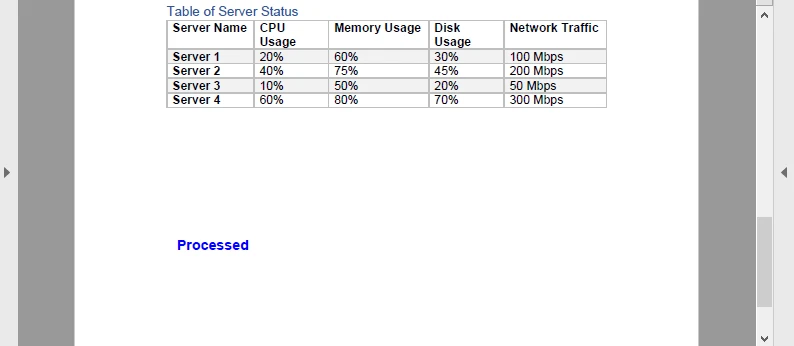
Esta viagem de ida e volta (Base64 → PDF → Base64) é útil para pipelines de documentos, como carimbar faturas ou adicionar assinaturas dinâmicas em um serviço de nuvem.
Tutoriais relacionados:
Extrair Texto de PDF em Java | Criar Documentos PDF em Java
Considerações de Desempenho e Memória
- Streaming vs. E/S de arquivos — ao lidar com Base64, prefira ByteArrayInputStream e ByteArrayOutputStream para evitar arquivos temporários desnecessários.
- PDFs com muitas imagens — a decodificação de imagens Base64 pode aumentar o uso da memória; considere redimensionar ou comprimir antes de incorporar.
- PDFs grandes — o Spire.PDF lida com PDFs de vários MB, mas para documentos muito grandes, considere o processamento página por página.
- Funções sem servidor — os fluxos de trabalho Base64 se encaixam bem porque você evita a dependência do sistema de arquivos e retorna os resultados diretamente por meio de respostas de API.
FAQ
P: Posso converter Base64 para PDF usando apenas o JDK?
Sim. O Java SE fornece utilitários de Base64 e E/S de arquivos, para que você possa lidar com a conversão sem bibliotecas extras.
P: Posso editar um PDF com a biblioteca padrão do Java?
Não. O Java SE não suporta a análise da estrutura ou a renderização de PDF. Para edição, use uma biblioteca dedicada como Spire.PDF for Java.
P: O Free Spire.PDF for Java é suficiente?
Sim. O Free Spire.PDF for Java é limitado no tamanho do documento, mas suficiente para testes ou projetos de pequena escala.
P: Preciso salvar os PDFs no disco?
Nem sempre. A conversão também pode ser executada na memória usando fluxos, o que é frequentemente preferido para APIs e aplicativos em nuvem.
Veja Também
Java에서 Base64를 PDF로, PDF를 Base64로 변환 (JDK 전용 + Pro)
목차
Maven으로 설치
<dependency>
    <groupId>e-iceblue</groupId>
    <artifactId>spire.pdf</artifactId>
    <version>11.8.3</version>
</dependency>
관련 링크
Java에서 PDF 파일로 작업할 때 바이너리 데이터와 텍스트 기반 형식 간에 변환해야 하는 경우가 많습니다. Base64 인코딩을 사용하면 PDF 콘텐츠를 일반 텍스트로 나타낼 수 있으며, 이는 문서를 JSON으로 전송하거나, 양식 제출을 통해 보내거나, 텍스트 기반 시스템에 저장할 때 유용합니다. Java의 표준 라이브러리는 java.util.Base64를 제공하여 추가 종속성 없이 Base64를 PDF로 및 PDF를 Base64로 변환하는 작업을 간단하게 구현할 수 있습니다.
이 튜토리얼에서는 JDK만 사용하여 이러한 변환을 처리하는 방법과 Base64 이미지로 작업하고 이를 PDF에 포함하는 방법을 살펴봅니다. Base64로 받은 PDF를 편집하고 다시 내보내는 것과 같은 고급 작업의 경우 Free Spire.PDF for Java를 사용하는 방법을 시연합니다.
목차
- Java에서 Base64를 PDF로 변환 (JDK만 사용)
- Java에서 PDF를 Base64로 변환 (JDK만 사용)
- 유효성 검사 및 안전 팁
- Java에서 Base64 이미지를 PDF로 저장
- Base64 PDF 로드, 수정 및 Base64로 다시 저장
- 성능 및 메모리 고려 사항
- FAQ
Java에서 Base64를 PDF로 변환 (JDK만 사용)
가장 간단한 방법은 Base64 문자열을 메모리로 읽어들인 다음, 선택적 접두사(예: data:application/pdf;base64,)를 제거하고 PDF로 디코딩하는 것입니다. 이 방법은 중소 규모 파일에 적합합니다.
import java.nio.file.*;
import java.nio.charset.StandardCharsets;
import java.util.Base64;

public class Base64ToPdf {
    public static void main(String[] args) throws Exception {
        // 파일(또는 다른 소스)에서 Base64 텍스트 읽기
        String base64 = Files.readString(Paths.get("sample.pdf.b64"), StandardCharsets.UTF_8);

        // 존재하는 경우 일반적인 데이터 URI 접두사 제거
        base64 = stripDataPrefix(base64);

        // Base64를 원시 PDF 바이트로 디코딩
        // MIME 디코더는 줄 바꿈 및 줄 바꿈된 텍스트를 허용합니다
        byte[] pdfBytes = Base64.getMimeDecoder().decode(base64);

        // 디코딩된 바이트를 PDF 파일에 쓰기
        Files.write(Paths.get("output.pdf"), pdfBytes);
    }

    /** "data:application/pdf;base64," 접두사를 제거하는 유틸리티 */
    private static String stripDataPrefix(String src) {
        String s = src.trim();
        int comma = s.indexOf(',');
        if (comma > 0 && s.substring(0, comma).toLowerCase().contains("base64")) {
            return s.substring(comma + 1).trim();
        }
        return s;
    }
}
설명 이 예제는 메모리에 편안하게 맞는 Base64 콘텐츠에 대해 간단하고 신뢰할 수 있습니다. Base64.getMimeDecoder()는 이메일 시스템이나 API에서 내보낸 Base64 텍스트에서 흔히 볼 수 있는 줄 바꿈을 정상적으로 처리하기 때문에 선택되었습니다. Base64 문자열에 줄 바꿈이 없다는 것을 알고 있다면 Base64.getDecoder()를 사용할 수도 있습니다.
디코딩하기 전에 데이터 URI 접두사(data:application/pdf;base64,)를 제거해야 합니다. 이는 Base64 페이로드의 일부가 아니기 때문입니다. 도우미 메서드 stripDataPrefix()가 이를 자동으로 수행합니다.
스트리밍 변형 (메모리에 전체 문자열 없음)
대용량 PDF의 경우 Base64를 스트리밍 방식으로 처리하는 것이 좋습니다. 이렇게 하면 전체 Base64 문자열을 한 번에 메모리에 로드하는 것을 피할 수 있습니다.
import java.io.*;
import java.nio.file.*;
import java.util.Base64;

public class Base64ToPdfStreamed {
    public static void main(String[] args) throws Exception {
        // 입력: Base64로 인코딩된 PDF가 포함된 텍스트 파일
        Path in = Paths.get("sample.pdf.b64");

        // 출력: 디코딩된 PDF 파일
        Path out = Paths.get("output.pdf");

        // 입력 스트림 주위에 Base64 디코더 래핑
        try (InputStream b64In = Base64.getMimeDecoder().wrap(Files.newInputStream(in));
             OutputStream pdfOut = Files.newOutputStream(out)) {

            // 디코딩된 바이트를 PDF 출력으로 직접 스트리밍
            b64In.transferTo(pdfOut);
        }
    }
}
설명 이 스트리밍 기반 접근 방식은 전체 문자열을 버퍼링하는 대신 데이터를 즉시 디코딩하므로 메모리 효율성이 더 높습니다. 대용량 파일이나 연속적인 스트림(예: 네트워크 소켓)에 권장되는 방법입니다.
- Base64.getMimeDecoder()는 입력의 줄 바꿈을 허용하는 데 사용됩니다.
- transferTo() 메서드는 수동 버퍼 처리 없이 디코딩된 바이트를 입력에서 출력으로 효율적으로 복사합니다.
- 실제 사용 시에는 파일 접근 오류나 부분 쓰기를 관리하기 위해 예외 처리를 추가하는 것을 고려하십시오.
Java에서 PDF를 Base64로 변환 (JDK만 사용)
PDF를 Base64로 인코딩하는 것도 마찬가지로 간단합니다. 작은 파일의 경우 전체 PDF를 메모리로 읽는 것이 좋습니다.
import java.nio.file.*;
import java.util.Base64;

public class PdfToBase64 {
    public static void main(String[] args) throws Exception {
        // PDF 파일을 바이트 배열로 읽기
        byte[] pdfBytes = Files.readAllBytes(Paths.get("input.pdf"));

        // PDF 바이트를 Base64 문자열로 인코딩
        String base64 = Base64.getEncoder().encodeToString(pdfBytes);

        // Base64 문자열을 텍스트 파일에 쓰기
        Files.writeString(Paths.get("output.pdf.b64"), base64);
    }
}
설명 이 접근 방식은 간단하며 중소 규모 파일에 적합합니다. 전체 PDF 파일이 바이트 배열로 읽혀 단일 Base64 문자열로 인코딩됩니다. 이 문자열은 저장하거나 JSON으로 전송하거나 데이터 URI에 포함할 수 있습니다.
스트리밍 인코더 (대용량 파일을 효율적으로 처리)
대용량 PDF의 경우 스트림으로 직접 인코딩하여 메모리 오버헤드를 피할 수 있습니다.
import java.io.*;
import java.nio.file.*;
import java.util.Base64;

public class PdfToBase64Streamed {
    public static void main(String[] args) throws Exception {
        // 입력: 바이너리 PDF 파일
        try (InputStream pdfIn = Files.newInputStream(Paths.get("input.pdf"));
             // Base64 텍스트 파일을 위한 원시 출력 스트림
             OutputStream rawOut = Files.newOutputStream(Paths.get("output.pdf.b64"));
             // 출력 스트림을 Base64 인코더로 래핑
             OutputStream b64Out = Base64.getEncoder().wrap(rawOut)) {

            // PDF 바이트를 Base64로 인코딩된 출력으로 직접 스트리밍
            pdfIn.transferTo(b64Out);
        }
    }
}
설명 스트리밍 인코더는 모든 것을 메모리에 로드하는 대신 데이터를 점진적으로 인코딩하여 대용량 파일을 효율적으로 처리합니다. Base64.getEncoder().wrap() 메서드는 일반 출력 스트림을 자동으로 Base64 텍스트를 쓰는 스트림으로 변환합니다.
이 디자인은 대용량 PDF, 네트워크 스트림 또는 메모리 부담 없이 동시에 많은 문서를 처리해야 하는 서비스에 더 잘 확장됩니다.
유효성 검사 및 안전 팁
- 데이터 URI 감지: 사용자가 data:application/pdf;base64, 접두사를 보낼 수 있습니다. 디코딩하기 전에 제거하십시오.
- 줄 바꿈: 줄 바꿈된 줄이 포함될 수 있는 텍스트(이메일, 로그)를 디코딩할 때는 Base64.getMimeDecoder()를 사용하십시오.
- 빠른 온전성 검사: 디코딩 후 유효한 PDF의 첫 번째 바이트는 일반적으로 %PDF-로 시작합니다. 조기 실패 감지를 위해 이를 확인할 수 있습니다.
- 문자 인코딩: .b64 파일을 읽고 쓸 때 Base64 텍스트를 UTF-8(또는 US-ASCII)로 처리하십시오.
- 오류 처리: 디코드/인코드 작업을 try/catch로 감싸고 실행 가능한 메시지(예: 크기, 헤더 불일치)를 표시하십시오.
Java에서 Base64 이미지를 PDF로 저장
때때로 이미지(예: PNG 또는 JPEG)를 Base64 문자열로 받고 이를 PDF로 래핑해야 하는 경우가 있습니다. Java의 표준 라이브러리에는 PDF API가 없지만 Free Spire.PDF for Java를 사용하면 간단하게 할 수 있습니다.
Free Spire.PDF for Java를 다운로드하여 프로젝트에 추가하거나 Maven 저장소에서 Free Spire.PDF for Java를 설치할 수 있습니다.
주요 Spire.PDF 개념
- PdfDocument — 하나 이상의 PDF 페이지를 담는 컨테이너입니다.
- PdfPageBase — 그릴 수 있는 페이지를 나타냅니다.
- PdfImage.fromImage() — BufferedImage 또는 스트림을 그릴 수 있는 PDF 이미지로 로드합니다.
- drawImage() — 지정된 좌표와 크기로 이미지를 배치합니다.
- 좌표계 — Spire.PDF는 (0,0)이 왼쪽 상단 모서리인 좌표계를 사용합니다.
예제: Java를 사용하여 Base64 이미지를 PDF로 변환
import com.spire.pdf.PdfDocument;
import com.spire.pdf.PdfPageBase;
import com.spire.pdf.graphics.PdfImage;

import java.io.*;
import java.nio.charset.StandardCharsets;
import java.nio.file.*;
import java.util.Base64;

public class Base64ImageToPdf {
    public static void main(String[] args) throws Exception {
        // 1) Base64 파일 읽기 및 디코딩 (데이터 URI 접두사가 있는 경우 제거)
        String base64Image = Files.readString(Paths.get("G:/Document/image.b64"), StandardCharsets.UTF_8).trim();
        int comma = base64Image.indexOf(',');
        if (comma > 0 && base64Image.substring(0, comma).toLowerCase().contains("base64")) {
            base64Image = base64Image.substring(comma + 1).trim();
        }
        byte[] imageBytes = Base64.getMimeDecoder().decode(base64Image);

        // 2) PDF 생성 및 이미지 삽입
        PdfDocument pdf = new PdfDocument();
        try (ByteArrayInputStream in = new ByteArrayInputStream(imageBytes)) {
            PdfImage img = PdfImage.fromStream(in);
            pdf.getPageSettings().setWidth(img.getWidth());
            pdf.getPageSettings().setHeight(img.getHeight());
            pdf.getPageSettings().setMargins(0, 0, 0, 0);
            PdfPageBase page = pdf.getPages().add();
            page.getCanvas().drawImage(img, 0, 0);
        }

        // 3) PDF 파일 저장
        pdf.saveToFile("output/image.pdf");
    }
}
다음 예제는 Base64 이미지를 디코딩하여 PDF 페이지에 포함시킵니다. 출력은 다음과 같습니다.
이 워크플로는 Base64로 도착하는 스캔된 문서나 서명을 포함하는 데 이상적입니다.
벡터 그래픽의 경우 Java에서 SVG를 PDF로 변환하는 가이드를 참조할 수도 있습니다.
Base64 PDF 로드, 수정 및 Base64로 다시 저장
많은 API에서 PDF는 Base64로 도착합니다. Spire.PDF를 사용하면 이를 로드하고, 페이지에 그림(텍스트/워터마크)을 그리고, 다시 Base64를 반환할 수 있어 서버리스 함수나 마이크로서비스에 이상적입니다.
여기서 사용되는 주요 Spire.PDF 개념
- PdfDocument.loadFromBytes(byte[]) — 디코딩된 바이트에서 직접 문서를 구성합니다.
- PdfPageBase#getCanvas() — 텍스트, 도형 또는 이미지를 배치할 그리기 표면을 가져옵니다.
- 글꼴 및 브러시 — 예: PdfTrueTypeFont 또는 PdfFont를 통한 내장 글꼴, 색칠을 위한 PdfSolidBrush.
- 메모리에 저장 — pdf.saveToStream(ByteArrayOutputStream)은 원시 바이트를 생성하며, 이를 Base64로 다시 인코딩할 수 있습니다.
예제: Java에서 Base64 PDF 로드, 수정 및 저장
import com.spire.pdf.*;
import com.spire.pdf.graphics.*;

import java.awt.*;
import java.io.*;
import java.util.Base64;

public class EditBase64Pdf {
    public static void main(String[] args) throws Exception {
        String base64Pdf = "..."; // 들어오는 Base64 PDF 문자열

        // 바이트로 디코딩
        byte[] pdfBytes = Base64.getDecoder().decode(base64Pdf);

        // PDF 로드
        PdfDocument pdf = new PdfDocument();
        pdf.loadFromBytes(pdfBytes);

        // 각 페이지에 스탬프 추가
        for (PdfPageBase page : (Iterable) pdf.getPages()) {
            PdfTrueTypeFont font = new PdfTrueTypeFont(new Font("Arial", Font.BOLD, 36));
            PdfSolidBrush brush = new PdfSolidBrush(new PdfRGBColor(Color.BLUE));
            page.getCanvas().drawString("Processed", font, brush, 100, 100);
        }

        // 메모리에 저장하고 다시 Base64로 인코딩
        ByteArrayOutputStream output = new ByteArrayOutputStream();
        pdf.saveToStream(output);
        pdf.close();

        String resultBase64 = Base64.getEncoder().encodeToString(output.toByteArray());
        System.out.println(resultBase64);
    }
}
이 예제에서는 PDF의 각 페이지에 파란색 'Processed' 워터마크를 추가한 다음 다시 Base64로 인코딩합니다. 결과는 다음과 같습니다.
이 왕복(Base64 → PDF → Base64)은 송장 스탬핑이나 클라우드 서비스에서 동적 서명 추가와 같은 문서 파이프라인에 유용합니다.
관련 튜토리얼:
Java에서 PDF 텍스트 추출 | Java에서 PDF 문서 생성
성능 및 메모리 고려 사항
- 스트리밍 대 파일 I/O — Base64를 다룰 때 불필요한 임시 파일을 피하기 위해 ByteArrayInputStream 및 ByteArrayOutputStream을 선호합니다.
- 이미지가 많은 PDF — Base64 이미지 디코딩은 메모리 사용량을 급증시킬 수 있습니다. 포함하기 전에 크기를 조정하거나 압축하는 것을 고려하십시오.
- 대용량 PDF — Spire.PDF는 수 MB의 PDF를 처리하지만 매우 큰 문서의 경우 페이지별 처리를 고려하십시오.
- 서버리스 함수 — Base64 워크플로는 파일 시스템 종속성을 피하고 API 응답을 통해 직접 결과를 반환하기 때문에 잘 맞습니다.
FAQ
Q: JDK만 사용하여 Base64를 PDF로 변환할 수 있나요?
예. Java SE는 Base64 및 파일 I/O 유틸리티를 제공하므로 추가 라이브러리 없이 변환을 처리할 수 있습니다.
Q: 표준 Java 라이브러리로 PDF를 편집할 수 있나요?
아니요. Java SE는 PDF 구조 구문 분석이나 렌더링을 지원하지 않습니다. 편집을 위해서는 Spire.PDF for Java와 같은 전용 라이브러리를 사용하십시오.
Q: Free Spire.PDF for Java로 충분한가요?
예. Free Spire.PDF for Java는 문서 크기가 제한되지만 테스트나 소규모 프로젝트에는 충분합니다.
Q: PDF를 디스크에 저장해야 하나요?
항상 그런 것은 아닙니다. 변환은 종종 API 및 클라우드 앱에 선호되는 스트림을 사용하여 메모리 내에서 실행될 수도 있습니다.
참고 항목
Base64 vers PDF et PDF vers Base64 en Java (JDK uniquement + Pro)
Table des matières
Installer avec Maven
<dependency>
    <groupId>e-iceblue</groupId>
    <artifactId>spire.pdf</artifactId>
    <version>11.8.3</version>
</dependency>
Liens connexes
Lorsque l'on travaille avec des fichiers PDF en Java, il est souvent nécessaire de convertir entre des données binaires et des formats textuels. L'encodage Base64 permet de représenter le contenu d'un PDF sous forme de texte brut, ce qui est utile lors de la transmission de documents en JSON, de leur envoi via des soumissions de formulaires ou de leur stockage dans des systèmes basés sur du texte. La bibliothèque standard de Java fournit java.util.Base64, ce qui facilite la mise en œuvre des conversions Base64 vers PDF et PDF vers Base64 sans dépendances supplémentaires.
Dans ce tutoriel, nous explorerons comment gérer ces conversions en utilisant uniquement le JDK, ainsi que comment travailler avec des images Base64 et les intégrer dans des PDF. Pour des opérations plus avancées, telles que la modification d'un PDF reçu en Base64 et son réexportation, nous démontrerons l'utilisation de Free Spire.PDF for Java.
Table des matières
- Convertir Base64 en PDF en Java (JDK uniquement)
- Convertir PDF en Base64 en Java (JDK uniquement)
- Conseils de validation et de sécurité
- Enregistrer des images Base64 en PDF en Java
- Charger un PDF Base64, le modifier et le réenregistrer en Base64
- Considérations sur les performances et la mémoire
- FAQ
Convertir Base64 en PDF en Java (JDK uniquement)
L'approche la plus simple consiste à lire une chaîne Base64 en mémoire, à supprimer les préfixes facultatifs (tels que data:application/pdf;base64,), puis à la décoder en PDF. Cela fonctionne bien pour les fichiers de petite à moyenne taille.
import java.nio.file.*;
import java.nio.charset.StandardCharsets;
import java.util.Base64;

public class Base64ToPdf {
    public static void main(String[] args) throws Exception {
        // Lire le texte Base64 d'un fichier (ou de toute autre source)
        String base64 = Files.readString(Paths.get("sample.pdf.b64"), StandardCharsets.UTF_8);

        // Supprimer les préfixes d'URI de données courants s'ils sont présents
        base64 = stripDataPrefix(base64);

        // Décoder le Base64 en octets PDF bruts
        // Le décodeur MIME tolère les sauts de ligne et le texte enveloppé
        byte[] pdfBytes = Base64.getMimeDecoder().decode(base64);

        // Écrire les octets décodés dans un fichier PDF
        Files.write(Paths.get("output.pdf"), pdfBytes);
    }

    /** Utilitaire pour supprimer le préfixe "data:application/pdf;base64,", s'il est inclus */
    private static String stripDataPrefix(String src) {
        String s = src.trim();
        int comma = s.indexOf(',');
        if (comma > 0 && s.substring(0, comma).toLowerCase().contains("base64")) {
            return s.substring(comma + 1).trim();
        }
        return s;
    }
}
Explication Cet exemple est simple et fiable pour le contenu Base64 qui tient confortablement en mémoire. Le Base64.getMimeDecoder() est choisi car il gère avec élégance les sauts de ligne, qui sont courants dans le texte Base64 exporté depuis des systèmes de messagerie ou des API. Si vous savez que votre chaîne Base64 ne contient aucun saut de ligne, vous pouvez également utiliser Base64.getDecoder().
Assurez-vous de supprimer tout préfixe d'URI de données (data:application/pdf;base64,) avant de décoder, car il ne fait pas partie de la charge utile Base64. La méthode d'aide stripDataPrefix() le fait automatiquement.
Variante en streaming (pas de chaîne complète en mémoire)
Pour les gros PDF, il est préférable de traiter le Base64 en mode streaming. Cela évite de charger toute la chaîne Base64 en mémoire en une seule fois.
import java.io.*;
import java.nio.file.*;
import java.util.Base64;

public class Base64ToPdfStreamed {
    public static void main(String[] args) throws Exception {
        // Entrée : fichier texte contenant un PDF encodé en Base64
        Path in = Paths.get("sample.pdf.b64");

        // Sortie : fichier PDF décodé
        Path out = Paths.get("output.pdf");

        // Envelopper le décodeur Base64 autour du flux d'entrée
        try (InputStream b64In = Base64.getMimeDecoder().wrap(Files.newInputStream(in));
             OutputStream pdfOut = Files.newOutputStream(out)) {

            // Transférer les octets décodés directement vers la sortie PDF
            b64In.transferTo(pdfOut);
        }
    }
}
Explication Cette approche basée sur le streaming est plus efficace en termes de mémoire, car elle décode les données à la volée plutôt que de mettre en mémoire tampon la chaîne entière. C'est la méthode recommandée pour les fichiers volumineux ou les flux continus (par exemple, les sockets réseau).
- Base64.getMimeDecoder() est utilisé pour tolérer les sauts de ligne dans l'entrée.
- La méthode transferTo() copie efficacement les octets décodés de l'entrée vers la sortie sans gestion manuelle de la mémoire tampon.
- Dans un cas d'utilisation réel, envisagez d'ajouter une gestion des exceptions pour gérer les erreurs d'accès aux fichiers ou les écritures partielles.
Convertir PDF en Base64 en Java (JDK uniquement)
Encoder un PDF en Base64 est tout aussi simple. Pour les fichiers plus petits, lire l'intégralité du PDF en mémoire convient parfaitement :
import java.nio.file.*;
import java.util.Base64;

public class PdfToBase64 {
    public static void main(String[] args) throws Exception {
        // Lire le fichier PDF dans un tableau d'octets
        byte[] pdfBytes = Files.readAllBytes(Paths.get("input.pdf"));

        // Encoder les octets du PDF en une chaîne Base64
        String base64 = Base64.getEncoder().encodeToString(pdfBytes);

        // Écrire la chaîne Base64 dans un fichier texte
        Files.writeString(Paths.get("output.pdf.b64"), base64);
    }
}
Explication Cette approche est simple et fonctionne bien pour les fichiers de petite ou moyenne taille. L'intégralité du fichier PDF est lue dans un tableau d'octets et encodée en une seule chaîne Base64. Cette chaîne peut être stockée, transmise en JSON ou intégrée dans une URI de données.
Encodeur en streaming (gère efficacement les gros fichiers)
Pour les gros PDF, vous pouvez éviter la surcharge de mémoire en encodant directement en tant que flux :
import java.io.*;
import java.nio.file.*;
import java.util.Base64;

public class PdfToBase64Streamed {
    public static void main(String[] args) throws Exception {
        // Entrée : fichier PDF binaire
        try (InputStream pdfIn = Files.newInputStream(Paths.get("input.pdf"));
             // Flux de sortie brut pour le fichier texte Base64
             OutputStream rawOut = Files.newOutputStream(Paths.get("output.pdf.b64"));
             // Envelopper le flux de sortie avec l'encodeur Base64
             OutputStream b64Out = Base64.getEncoder().wrap(rawOut)) {

            // Transférer les octets du PDF directement dans la sortie encodée en Base64
            pdfIn.transferTo(b64Out);
        }
    }
}
Explication L'encodeur en streaming gère efficacement les fichiers volumineux en encodant les données de manière incrémentielle au lieu de tout charger en mémoire. La méthode Base64.getEncoder().wrap() transforme un flux de sortie ordinaire en un flux qui écrit automatiquement du texte Base64.
Cette conception s'adapte mieux aux PDF volumineux, aux flux réseau ou aux services qui doivent gérer de nombreux documents simultanément sans subir de pression sur la mémoire.
Conseils de validation et de sécurité
- Détecter les URI de données : les utilisateurs peuvent envoyer des préfixes data:application/pdf;base64,. Supprimez-les avant de décoder.
- Sauts de ligne : lors du décodage de texte pouvant contenir des lignes enveloppées (e-mails, journaux), utilisez Base64.getMimeDecoder().
- Vérification rapide : après le décodage, les premiers octets d'un PDF valide commencent généralement par %PDF-. Vous pouvez l'affirmer pour une détection précoce des défaillances.
- Encodage des caractères : traitez le texte Base64 en UTF-8 (ou US-ASCII) lors de la lecture/écriture de fichiers .b64.
- Gestion des erreurs : enveloppez le décodage/encodage dans des blocs try/catch et affichez des messages exploitables (par exemple, taille, discordance d'en-tête).
Enregistrer des images Base64 en PDF en Java
Parfois, vous recevez des images (par exemple, PNG ou JPEG) sous forme de chaînes Base64 et vous devez les encapsuler dans un PDF. Bien que la bibliothèque standard de Java ne dispose pas d'API PDF, Free Spire.PDF for Java rend cela simple.
Vous pouvez télécharger Free Spire.PDF for Java et l'ajouter à votre projet ou installer Free Spire.PDF for Java depuis le référentiel Maven.
Concepts clés de Spire.PDF
- PdfDocument — le conteneur pour une ou plusieurs pages PDF.
- PdfPageBase — représente une page sur laquelle vous pouvez dessiner.
- PdfImage.fromImage() — charge une BufferedImage ou un flux dans une image PDF dessinable.
- drawImage() — place l'image aux coordonnées et à la taille spécifiées.
- Système de coordonnées — Spire.PDF utilise un système de coordonnées où (0,0) est le coin supérieur gauche.
Exemple : Convertir une image Base64 en PDF en utilisant Java
import com.spire.pdf.PdfDocument;
import com.spire.pdf.PdfPageBase;
import com.spire.pdf.graphics.PdfImage;

import java.io.*;
import java.nio.charset.StandardCharsets;
import java.nio.file.*;
import java.util.Base64;

public class Base64ImageToPdf {
    public static void main(String[] args) throws Exception {
        // 1) Lire le fichier Base64 et décoder (supprimer le préfixe de l'URI de données s'il existe)
        String base64Image = Files.readString(Paths.get("G:/Document/image.b64"), StandardCharsets.UTF_8).trim();
        int comma = base64Image.indexOf(',');
        if (comma > 0 && base64Image.substring(0, comma).toLowerCase().contains("base64")) {
            base64Image = base64Image.substring(comma + 1).trim();
        }
        byte[] imageBytes = Base64.getMimeDecoder().decode(base64Image);

        // 2) Créer un PDF et y insérer l'image
        PdfDocument pdf = new PdfDocument();
        try (ByteArrayInputStream in = new ByteArrayInputStream(imageBytes)) {
            PdfImage img = PdfImage.fromStream(in);
            pdf.getPageSettings().setWidth(img.getWidth());
            pdf.getPageSettings().setHeight(img.getHeight());
            pdf.getPageSettings().setMargins(0, 0, 0, 0);
            PdfPageBase page = pdf.getPages().add();
            page.getCanvas().drawImage(img, 0, 0);
        }

        // 3) Enregistrer le fichier PDF
        pdf.saveToFile("output/image.pdf");
    }
}
L'exemple suivant décode une image Base64 et l'intègre dans une page PDF. La sortie ressemble à ceci :
Ce flux de travail est idéal pour intégrer des documents numérisés ou des signatures qui arrivent en Base64.
Pour les graphiques vectoriels, vous pouvez également consulter notre guide sur la conversion de SVG en PDF en Java.
Charger un PDF Base64, le modifier et le réenregistrer en Base64
Dans de nombreuses API, un PDF arrive en Base64. Avec Spire.PDF, vous pouvez le charger, dessiner sur les pages (texte/filigranes) et renvoyer à nouveau du Base64 — idéal pour les fonctions sans serveur ou les microservices.
Concepts clés de Spire.PDF utilisés ici
- PdfDocument.loadFromBytes(byte[]) — construit un document directement à partir d'octets décodés.
- PdfPageBase#getCanvas() — obtient une surface de dessin pour placer du texte, des formes ou des images.
- Polices et pinceaux — par ex., PdfTrueTypeFont ou polices intégrées via PdfFont, avec PdfSolidBrush pour la coloration.
- Enregistrement en mémoire — pdf.saveToStream(ByteArrayOutputStream) produit des octets bruts, que vous pouvez réencoder avec Base64.
Exemple : Charger, modifier et enregistrer un PDF Base64 en Java
import com.spire.pdf.*;
import com.spire.pdf.graphics.*;

import java.awt.*;
import java.io.*;
import java.util.Base64;

public class EditBase64Pdf {
    public static void main(String[] args) throws Exception {
        String base64Pdf = "..."; // chaîne PDF en Base64 entrante

        // Décoder en octets
        byte[] pdfBytes = Base64.getDecoder().decode(base64Pdf);

        // Charger le PDF
        PdfDocument pdf = new PdfDocument();
        pdf.loadFromBytes(pdfBytes);

        // Ajouter un tampon sur chaque page
        for (PdfPageBase page : (Iterable) pdf.getPages()) {
            PdfTrueTypeFont font = new PdfTrueTypeFont(new Font("Arial", Font.BOLD, 36));
            PdfSolidBrush brush = new PdfSolidBrush(new PdfRGBColor(Color.BLUE));
            page.getCanvas().drawString("Processed", font, brush, 100, 100);
        }

        // Enregistrer en mémoire et réencoder en Base64
        ByteArrayOutputStream output = new ByteArrayOutputStream();
        pdf.saveToStream(output);
        pdf.close();

        String resultBase64 = Base64.getEncoder().encodeToString(output.toByteArray());
        System.out.println(resultBase64);
    }
}
Dans cet exemple, un filigrane bleu « Processed » est ajouté à chaque page du PDF avant de le réencoder en Base64. Le résultat ressemble à ceci :
Ce cycle (Base64 → PDF → Base64) est utile pour les pipelines de documents, tels que l'estampillage de factures ou l'ajout de signatures dynamiques dans un service cloud.
Tutoriels associés :
Extraire du texte d'un PDF en Java | Créer des documents PDF en Java
Considérations sur les performances et la mémoire
- Streaming vs. E/S de fichiers — lors du traitement de Base64, préférez ByteArrayInputStream et ByteArrayOutputStream pour éviter les fichiers temporaires inutiles.
- PDF riches en images — le décodage d'images Base64 peut augmenter considérablement l'utilisation de la mémoire ; envisagez de les redimensionner ou de les compresser avant de les intégrer.
- Gros PDF — Spire.PDF gère les PDF de plusieurs Mo, mais pour les documents très volumineux, envisagez un traitement page par page.
- Fonctions sans serveur — les flux de travail Base64 s'intègrent bien car vous évitez la dépendance au système de fichiers et renvoyez les résultats directement via les réponses de l'API.
FAQ
Q : Puis-je convertir Base64 en PDF en utilisant uniquement le JDK ?
Oui. Java SE fournit des utilitaires Base64 et d'E/S de fichiers, vous pouvez donc gérer la conversion sans bibliothèques supplémentaires.
Q : Puis-je modifier un PDF avec la bibliothèque standard de Java ?
Non. Java SE ne prend pas en charge l'analyse de la structure ou le rendu des PDF. Pour l'édition, utilisez une bibliothèque dédiée telle que Spire.PDF for Java.
Q : Free Spire.PDF for Java est-il suffisant ?
Oui. La version gratuite de Spire.PDF for Java est limitée en taille de document, mais suffisante pour les tests ou les projets à petite échelle.
Q : Dois-je enregistrer les PDF sur le disque ?
Pas toujours. La conversion peut également s'exécuter en mémoire à l'aide de flux, ce qui est souvent préférable pour les API et les applications cloud.
Voir aussi
Base64 a PDF y PDF a Base64 en Java (solo JDK + Pro)
Tabla de contenidos
Instalar con Maven
<dependency>
    <groupId>e-iceblue</groupId>
    <artifactId>spire.pdf</artifactId>
    <version>11.8.3</version>
</dependency>
Enlaces relacionados
Al trabajar con archivos PDF en Java, a menudo es necesario convertir entre datos binarios y formatos basados en texto. La codificación Base64 permite representar el contenido de un PDF como texto sin formato, lo cual es útil al transmitir documentos en JSON, enviarlos a través de envíos de formularios o almacenarlos en sistemas basados en texto. La biblioteca estándar de Java proporciona java.util.Base64, lo que facilita la implementación de conversiones de Base64 a PDF y de PDF a Base64 sin dependencias adicionales.
En este tutorial, exploraremos cómo manejar estas conversiones utilizando únicamente el JDK, así como cómo trabajar con imágenes en Base64 e incrustarlas en archivos PDF. Para operaciones más avanzadas, como editar un PDF recibido como Base64 y exportarlo de nuevo, demostraremos el uso de Free Spire.PDF for Java.
Tabla de contenidos
- Convertir Base64 a PDF en Java (solo JDK)
- Convertir PDF a Base64 en Java (solo JDK)
- Consejos de validación y seguridad
- Guardar imágenes Base64 como PDF en Java
- Cargar PDF en Base64, modificar y guardar de nuevo como Base64
- Consideraciones de rendimiento y memoria
- FAQ
Convertir Base64 a PDF en Java (solo JDK)
El enfoque más sencillo es leer una cadena Base64 en la memoria, eliminar cualquier prefijo opcional (como data:application/pdf;base64,) y luego decodificarla en un PDF. Esto funciona bien para archivos de tamaño pequeño a mediano.
import java.nio.file.*;
import java.nio.charset.StandardCharsets;
import java.util.Base64;

public class Base64ToPdf {
    public static void main(String[] args) throws Exception {
        // Leer texto Base64 de un archivo (o cualquier otra fuente)
        String base64 = Files.readString(Paths.get("sample.pdf.b64"), StandardCharsets.UTF_8);

        // Eliminar prefijos comunes de URI de datos si están presentes
        base64 = stripDataPrefix(base64);

        // Decodificar Base64 en bytes de PDF sin procesar
        // El decodificador MIME tolera saltos de línea y texto ajustado
        byte[] pdfBytes = Base64.getMimeDecoder().decode(base64);

        // Escribir los bytes decodificados en un archivo PDF
        Files.write(Paths.get("output.pdf"), pdfBytes);
    }

    /** Utilidad para eliminar el prefijo "data:application/pdf;base64,", si está incluido */
    private static String stripDataPrefix(String src) {
        String s = src.trim();
        int comma = s.indexOf(',');
        if (comma > 0 && s.substring(0, comma).toLowerCase().contains("base64")) {
            return s.substring(comma + 1).trim();
        }
        return s;
    }
}
Explicación Este ejemplo es sencillo y fiable para contenido Base64 que cabe cómodamente en la memoria. Se elige Base64.getMimeDecoder() porque maneja con elegancia los saltos de línea, que son comunes en el texto Base64 exportado desde sistemas de correo electrónico o API. Si sabe que su cadena Base64 no contiene saltos de línea, también podría usar Base64.getDecoder().
Asegúrese de eliminar cualquier prefijo de URI de datos (data:application/pdf;base64,) antes de decodificar, ya que no forma parte de la carga útil de Base64. El método de ayuda stripDataPrefix() lo hace automáticamente.
Variante de transmisión (sin la cadena completa en memoria)
Para archivos PDF grandes, es mejor procesar Base64 en modo de transmisión. Esto evita cargar toda la cadena Base64 en la memoria de una vez.
import java.io.*;
import java.nio.file.*;
import java.util.Base64;

public class Base64ToPdfStreamed {
    public static void main(String[] args) throws Exception {
        // Entrada: archivo de texto que contiene PDF codificado en Base64
        Path in = Paths.get("sample.pdf.b64");

        // Salida: archivo PDF decodificado
        Path out = Paths.get("output.pdf");

        // Envolver el decodificador Base64 alrededor del flujo de entrada
        try (InputStream b64In = Base64.getMimeDecoder().wrap(Files.newInputStream(in));
             OutputStream pdfOut = Files.newOutputStream(out)) {

            // Transmitir los bytes decodificados directamente a la salida PDF
            b64In.transferTo(pdfOut);
        }
    }
}
Explicación Este enfoque basado en la transmisión es más eficiente en cuanto a memoria, ya que decodifica los datos sobre la marcha en lugar de almacenar en búfer toda la cadena. Es el método recomendado para archivos grandes o flujos continuos (por ejemplo, sockets de red).
- Se utiliza Base64.getMimeDecoder() para tolerar los saltos de línea en la entrada.
- El método transferTo() copia eficientemente los bytes decodificados de la entrada a la salida sin manejo manual de búfer.
- En el uso en el mundo real, considere agregar manejo de excepciones para gestionar errores de acceso a archivos o escrituras parciales.
Convertir PDF a Base64 en Java (solo JDK)
Codificar un PDF en Base64 es igual de simple. Para archivos más pequeños, leer todo el PDF en la memoria está bien:
import java.nio.file.*;
import java.util.Base64;

public class PdfToBase64 {
    public static void main(String[] args) throws Exception {
        // Leer el archivo PDF en un arreglo de bytes
        byte[] pdfBytes = Files.readAllBytes(Paths.get("input.pdf"));

        // Codificar los bytes del PDF como una cadena Base64
        String base64 = Base64.getEncoder().encodeToString(pdfBytes);

        // Escribir la cadena Base64 en un archivo de texto
        Files.writeString(Paths.get("output.pdf.b64"), base64);
    }
}
Explicación Este enfoque es simple y funciona bien para archivos de tamaño pequeño o mediano. Todo el archivo PDF se lee en un arreglo de bytes y se codifica como una única cadena Base64. Esta cadena se puede almacenar, transmitir en JSON o incrustar en una URI de datos.
Codificador de transmisión (maneja archivos grandes de manera eficiente)
Para archivos PDF grandes, puede evitar la sobrecarga de memoria codificando directamente como un flujo:
import java.io.*;
import java.nio.file.*;
import java.util.Base64;

public class PdfToBase64Streamed {
    public static void main(String[] args) throws Exception {
        // Entrada: archivo PDF binario
        try (InputStream pdfIn = Files.newInputStream(Paths.get("input.pdf"));
             // Flujo de salida sin procesar para el archivo de texto Base64
             OutputStream rawOut = Files.newOutputStream(Paths.get("output.pdf.b64"));
             // Envolver el flujo de salida con el codificador Base64
             OutputStream b64Out = Base64.getEncoder().wrap(rawOut)) {

            // Transmitir los bytes del PDF directamente a la salida codificada en Base64
            pdfIn.transferTo(b64Out);
        }
    }
}
Explicación El codificador de transmisión maneja eficientemente archivos grandes codificando datos de forma incremental en lugar de cargar todo en la memoria. El método Base64.getEncoder().wrap() convierte un flujo de salida regular en uno que escribe texto Base64 automáticamente.
Este diseño se escala mejor para archivos PDF grandes, flujos de red o servicios que deben manejar muchos documentos simultáneamente sin sufrir problemas de memoria.
Consejos de validación y seguridad
- Detectar URIs de datos: los usuarios pueden enviar prefijos data:application/pdf;base64,. Elimínelos antes de decodificar.
- Saltos de línea: al decodificar texto que puede contener líneas ajustadas (correos electrónicos, registros), use Base64.getMimeDecoder().
- Verificación rápida de cordura: después de la decodificación, los primeros bytes de un PDF válido generalmente comienzan con %PDF-. Puede afirmar esto para la detección temprana de fallas.
- Codificación de caracteres: trate el texto Base64 como UTF-8 (o US-ASCII) al leer/escribir archivos .b64.
- Manejo de errores: envuelva la decodificación/codificación en bloques try/catch y muestre mensajes procesables (por ejemplo, tamaño, discrepancia de encabezado).
Guardar imágenes Base64 como PDF en Java
A veces recibe imágenes (por ejemplo, PNG o JPEG) como cadenas Base64 y necesita envolverlas en un PDF. Si bien la biblioteca estándar de Java no tiene API de PDF, Free Spire.PDF for Java lo hace sencillo.
Puede descargar Free Spire.PDF for Java y agregarlo a su proyecto o instalar Free Spire.PDF for Java desde el repositorio de Maven.
Conceptos clave de Spire.PDF
- PdfDocument — el contenedor para una o más páginas PDF.
- PdfPageBase — representa una página en la que puede dibujar.
- PdfImage.fromImage() — carga una BufferedImage o un flujo en una imagen PDF dibujable.
- drawImage() — coloca la imagen en las coordenadas y el tamaño especificados.
- Sistema de coordenadas — Spire.PDF utiliza un sistema de coordenadas donde (0,0) es la esquina superior izquierda.
Ejemplo: Convertir una imagen Base64 a PDF usando Java
import com.spire.pdf.PdfDocument;
import com.spire.pdf.PdfPageBase;
import com.spire.pdf.graphics.PdfImage;

import java.io.*;
import java.nio.charset.StandardCharsets;
import java.nio.file.*;
import java.util.Base64;

public class Base64ImageToPdf {
    public static void main(String[] args) throws Exception {
        // 1) Leer el archivo Base64 y decodificar (eliminar el prefijo de URI de datos si existe)
        String base64Image = Files.readString(Paths.get("G:/Document/image.b64"), StandardCharsets.UTF_8).trim();
        int comma = base64Image.indexOf(',');
        if (comma > 0 && base64Image.substring(0, comma).toLowerCase().contains("base64")) {
            base64Image = base64Image.substring(comma + 1).trim();
        }
        byte[] imageBytes = Base64.getMimeDecoder().decode(base64Image);

        // 2) Crear PDF e insertar la imagen
        PdfDocument pdf = new PdfDocument();
        try (ByteArrayInputStream in = new ByteArrayInputStream(imageBytes)) {
            PdfImage img = PdfImage.fromStream(in);
            pdf.getPageSettings().setWidth(img.getWidth());
            pdf.getPageSettings().setHeight(img.getHeight());
            pdf.getPageSettings().setMargins(0, 0, 0, 0);
            PdfPageBase page = pdf.getPages().add();
            page.getCanvas().drawImage(img, 0, 0);
        }

        // 3) Guardar el archivo PDF
        pdf.saveToFile("output/image.pdf");
    }
}
El siguiente ejemplo decodifica una imagen Base64 y la incrusta en una página PDF. La salida se ve así:
Este flujo de trabajo es ideal para incrustar documentos escaneados o firmas que llegan como Base64.
Para gráficos vectoriales, también puede consultar nuestra guía sobre Convertir SVG a PDF en Java.
Cargar PDF en Base64, modificar y guardar de nuevo como Base64
En muchas API, un PDF llega como Base64. Con Spire.PDF puede cargarlo, dibujar en las páginas (texto/marcas de agua) y devolver Base64 nuevamente, ideal para funciones sin servidor o microservicios.
Conceptos clave de Spire.PDF utilizados aquí
- PdfDocument.loadFromBytes(byte[]) — construye un documento directamente a partir de bytes decodificados.
- PdfPageBase#getCanvas() — obtiene una superficie de dibujo para colocar texto, formas o imágenes.
- Fuentes y pinceles — por ejemplo, PdfTrueTypeFont o fuentes integradas a través de PdfFont, con PdfSolidBrush para colorear.
- Guardar en memoria — pdf.saveToStream(ByteArrayOutputStream) produce bytes sin procesar, que puede volver a codificar con Base64.
Ejemplo: Cargar, modificar y guardar PDF en Base64 en Java
import com.spire.pdf.*;
import com.spire.pdf.graphics.*;

import java.awt.*;
import java.io.*;
import java.util.Base64;

public class EditBase64Pdf {
    public static void main(String[] args) throws Exception {
        String base64Pdf = "..."; // cadena de PDF en Base64 entrante

        // Decodificar a bytes
        byte[] pdfBytes = Base64.getDecoder().decode(base64Pdf);

        // Cargar PDF
        PdfDocument pdf = new PdfDocument();
        pdf.loadFromBytes(pdfBytes);

        // Agregar sello en cada página
        for (PdfPageBase page : (Iterable) pdf.getPages()) {
            PdfTrueTypeFont font = new PdfTrueTypeFont(new Font("Arial", Font.BOLD, 36));
            PdfSolidBrush brush = new PdfSolidBrush(new PdfRGBColor(Color.BLUE));
            page.getCanvas().drawString("Processed", font, brush, 100, 100);
        }

        // Guardar en memoria y volver a codificar en Base64
        ByteArrayOutputStream output = new ByteArrayOutputStream();
        pdf.saveToStream(output);
        pdf.close();

        String resultBase64 = Base64.getEncoder().encodeToString(output.toByteArray());
        System.out.println(resultBase64);
    }
}
En este ejemplo, se agrega una marca de agua azul "Procesado" a cada página del PDF antes de volver a codificarlo en Base64. El resultado se ve así:
Este viaje de ida y vuelta (Base64 → PDF → Base64) es útil para pipelines de documentos, como estampar facturas o agregar firmas dinámicas en un servicio en la nube.
Tutoriales relacionados:
Extraer texto de PDF en Java | Crear documentos PDF en Java
Consideraciones de rendimiento y memoria
- Transmisión vs. E/S de archivos — cuando se trata de Base64, prefiera ByteArrayInputStream y ByteArrayOutputStream para evitar archivos temporales innecesarios.
- PDF con muchas imágenes — la decodificación de imágenes Base64 puede aumentar el uso de la memoria; considere escalar o comprimir antes de incrustar.
- PDF grandes — Spire.PDF maneja PDF de varios MB, pero para documentos muy grandes considere el procesamiento página por página.
- Funciones sin servidor — los flujos de trabajo de Base64 encajan bien porque se evita la dependencia del sistema de archivos y se devuelven los resultados directamente a través de las respuestas de la API.
FAQ
P: ¿Puedo convertir Base64 a PDF usando solo el JDK?
Sí. Java SE proporciona utilidades de Base64 y E/S de archivos, por lo que puede manejar la conversión sin bibliotecas adicionales.
P: ¿Puedo editar PDF con la biblioteca estándar de Java?
No. Java SE no admite el análisis de la estructura ni la representación de PDF. Para editar, use una biblioteca dedicada como Spire.PDF for Java.
P: ¿Es suficiente Free Spire.PDF for Java?
Sí. La edición gratuita de Spire.PDF for Java tiene un tamaño de documento limitado, pero es suficiente para pruebas o proyectos a pequeña escala.
P: ¿Necesito guardar los PDF en el disco?
No siempre. La conversión también se puede ejecutar en memoria usando flujos, lo que a menudo se prefiere para API y aplicaciones en la nube.
Véase también
Base64 zu PDF und PDF zu Base64 in Java (nur JDK + Pro)
Inhaltsverzeichnis
Installation mit Maven
<dependency>
    <groupId>e-iceblue</groupId>
    <artifactId>spire.pdf</artifactId>
    <version>11.8.3</version>
</dependency>
Verwandte Links
Bei der Arbeit mit PDF-Dateien in Java ist es oft notwendig, zwischen Binärdaten und textbasierten Formaten zu konvertieren. Die Base64-Kodierung ermöglicht es, PDF-Inhalte als reinen Text darzustellen, was nützlich ist, wenn Dokumente in JSON übertragen, über Formulare gesendet oder in textbasierten Systemen gespeichert werden. Die Standardbibliothek von Java bietet java.util.Base64, was die Implementierung von Konvertierungen von Base64 in PDF und von PDF in Base64 ohne zusätzliche Abhängigkeiten unkompliziert macht.
In diesem Tutorial werden wir untersuchen, wie diese Konvertierungen nur mit dem JDK gehandhabt werden, sowie wie man mit Base64-Bildern arbeitet und sie in PDFs einbettet. Für fortgeschrittenere Operationen, wie das Bearbeiten eines als Base64 empfangenen PDFs und das erneute Exportieren, werden wir die Verwendung von Free Spire.PDF for Java demonstrieren.
Inhaltsverzeichnis
- Base64 in PDF in Java konvertieren (nur JDK)
- PDF in Base64 in Java konvertieren (nur JDK)
- Validierungs- und Sicherheitstipps
- Base64-Bilder als PDF in Java speichern
- Base64-PDF laden, ändern und wieder als Base64 speichern
- Leistungs- und Speicherüberlegungen
- FAQ
Base64 in PDF in Java konvertieren (nur JDK)
Der einfachste Ansatz besteht darin, eine Base64-Zeichenfolge in den Speicher zu lesen, optionale Präfixe (wie data:application/pdf;base64,) zu entfernen und sie dann in ein PDF zu dekodieren. Dies funktioniert gut für kleine bis mittelgroße Dateien.
import java.nio.file.*;
import java.nio.charset.StandardCharsets;
import java.util.Base64;

public class Base64ToPdf {
    public static void main(String[] args) throws Exception {
        // Base64-Text aus einer Datei (oder einer anderen Quelle) lesen
        String base64 = Files.readString(Paths.get("sample.pdf.b64"), StandardCharsets.UTF_8);

        // Gängige Daten-URI-Präfixe entfernen, falls vorhanden
        base64 = stripDataPrefix(base64);

        // Base64 in rohe PDF-Bytes dekodieren
        // Der MIME-Dekodierer toleriert Zeilenumbrüche und umgebrochenen Text
        byte[] pdfBytes = Base64.getMimeDecoder().decode(base64);

        // Dekodierte Bytes in eine PDF-Datei schreiben
        Files.write(Paths.get("output.pdf"), pdfBytes);
    }

    /** Hilfsprogramm zum Entfernen von "data:application/pdf;base64,", falls enthalten */
    private static String stripDataPrefix(String src) {
        String s = src.trim();
        int comma = s.indexOf(',');
        if (comma > 0 && s.substring(0, comma).toLowerCase().contains("base64")) {
            return s.substring(comma + 1).trim();
        }
        return s;
    }
}
Erklärung Dieses Beispiel ist unkompliziert und zuverlässig für Base64-Inhalte, die bequem in den Speicher passen. Der Base64.getMimeDecoder() wird gewählt, weil er Zeilenumbrüche problemlos handhabt, die in aus E-Mail-Systemen oder APIs exportiertem Base64-Text üblich sind. Wenn Sie wissen, dass Ihre Base64-Zeichenfolge keine Zeilenumbrüche enthält, können Sie auch Base64.getDecoder() verwenden.
Stellen Sie sicher, dass Sie vor dem Dekodieren alle Daten-URI-Präfixe (data:application/pdf;base64,) entfernen, da sie nicht Teil der Base64-Nutzlast sind. Die Hilfsmethode stripDataPrefix() erledigt dies automatisch.
Streaming-Variante (keine vollständige Zeichenfolge im Speicher)
Für große PDFs ist es besser, Base64 im Streaming-Verfahren zu verarbeiten. Dies vermeidet das Laden der gesamten Base64-Zeichenfolge auf einmal in den Speicher.
import java.io.*;
import java.nio.file.*;
import java.util.Base64;

public class Base64ToPdfStreamed {
    public static void main(String[] args) throws Exception {
        // Eingabe: Textdatei mit Base64-kodiertem PDF
        Path in = Paths.get("sample.pdf.b64");

        // Ausgabe: dekodierte PDF-Datei
        Path out = Paths.get("output.pdf");

        // Den Base64-Dekodierer um den Eingabestream wickeln
        try (InputStream b64In = Base64.getMimeDecoder().wrap(Files.newInputStream(in));
             OutputStream pdfOut = Files.newOutputStream(out)) {

            // Dekodierte Bytes direkt in die PDF-Ausgabe streamen
            b64In.transferTo(pdfOut);
        }
    }
}
Erklärung Dieser streamingbasierte Ansatz ist speichereffizienter, da er Daten on-the-fly dekodiert, anstatt die gesamte Zeichenfolge zu puffern. Es ist die empfohlene Methode für große Dateien oder kontinuierliche Streams (z. B. Netzwerk-Sockets).
- Base64.getMimeDecoder() wird verwendet, um Zeilenumbrüche in der Eingabe zu tolerieren.
- Die Methode transferTo() kopiert dekodierte Bytes effizient vom Eingang zum Ausgang ohne manuelle Pufferbehandlung.
- Im realen Einsatz sollten Sie eine Ausnahmebehandlung hinzufügen, um Dateizugriffsfehler или Teil-Schreibvorgänge zu verwalten.
PDF in Base64 in Java konvertieren (nur JDK)
Das Kodieren eines PDFs in Base64 ist genauso einfach. Für kleinere Dateien ist es in Ordnung, das gesamte PDF in den Speicher zu lesen:
import java.nio.file.*;
import java.util.Base64;

public class PdfToBase64 {
    public static void main(String[] args) throws Exception {
        // Die PDF-Datei in ein Byte-Array lesen
        byte[] pdfBytes = Files.readAllBytes(Paths.get("input.pdf"));

        // Die PDF-Bytes als Base64-Zeichenfolge kodieren
        String base64 = Base64.getEncoder().encodeToString(pdfBytes);

        // Die Base64-Zeichenfolge in eine Textdatei schreiben
        Files.writeString(Paths.get("output.pdf.b64"), base64);
    }
}
Erklärung Dieser Ansatz ist einfach und funktioniert gut für kleine oder mittelgroße Dateien. Das gesamte PDF wird in ein Byte-Array eingelesen und als einzelne Base64-Zeichenfolge kodiert. Diese Zeichenfolge kann gespeichert, in JSON übertragen oder in eine Daten-URI eingebettet werden.
Streaming-Encoder (behandelt große Dateien effizient)
Für große PDFs können Sie den Speicher-Overhead vermeiden, indem Sie direkt als Stream kodieren:
import java.io.*;
import java.nio.file.*;
import java.util.Base64;

public class PdfToBase64Streamed {
    public static void main(String[] args) throws Exception {
        // Eingabe: binäre PDF-Datei
        try (InputStream pdfIn = Files.newInputStream(Paths.get("input.pdf"));
             // Roher Ausgabestream für die Base64-Textdatei
             OutputStream rawOut = Files.newOutputStream(Paths.get("output.pdf.b64"));
             // Ausgabestream mit Base64-Encoder umwickeln
             OutputStream b64Out = Base64.getEncoder().wrap(rawOut)) {

            // PDF-Bytes direkt in die Base64-kodierte Ausgabe streamen
            pdfIn.transferTo(b64Out);
        }
    }
}
Erklärung Der Streaming-Encoder behandelt große Dateien effizient, indem er Daten inkrementell kodiert, anstatt alles in den Speicher zu laden. Die Methode Base64.getEncoder().wrap() verwandelt einen regulären Ausgabestream in einen, der automatisch Base64-Text schreibt.
Dieses Design skaliert besser für große PDFs, Netzwerk-Streams oder Dienste, die viele Dokumente gleichzeitig ohne Speicherprobleme verarbeiten müssen.
Validierungs- und Sicherheitstipps
- Daten-URIs erkennen: Benutzer könnten Präfixe wie data:application/pdf;base64, senden. Entfernen Sie diese vor dem Dekodieren.
- Zeilenumbrüche: Beim Dekodieren von Text, der umgebrochene Zeilen enthalten könnte (E-Mails, Protokolle), verwenden Sie Base64.getMimeDecoder().
- Schnelle Plausibilitätsprüfung: Nach dem Dekodieren beginnen die ersten Bytes eines gültigen PDFs normalerweise mit %PDF-. Sie können dies zur frühzeitigen Fehlererkennung überprüfen.
- Zeichenkodierung: Behandeln Sie Base64-Text als UTF-8 (oder US-ASCII), wenn Sie .b64-Dateien lesen/schreiben.
- Fehlerbehandlung: Umschließen Sie Dekodierung/Kodierung mit try/catch und geben Sie aussagekräftige Meldungen aus (z. B. Größe, Header-Fehlanpassung).
Base64-Bilder als PDF in Java speichern
Manchmal erhalten Sie Bilder (z. B. PNG oder JPEG) als Base64-Zeichenfolgen und müssen sie in ein PDF einbetten. Während die Standardbibliothek von Java keine PDF-APIs hat, macht Free Spire.PDF for Java dies unkompliziert.
Sie können Free Spire.PDF for Java herunterladen und zu Ihrem Projekt hinzufügen oder Free Spire.PDF for Java aus dem Maven-Repository installieren.
Wichtige Spire.PDF-Konzepte
- PdfDocument — der Container für eine oder mehrere PDF-Seiten.
- PdfPageBase — repräsentiert eine Seite, auf der Sie zeichnen können.
- PdfImage.fromImage() — lädt ein BufferedImage oder einen Stream in ein zeichenbares PDF-Bild.
- drawImage() — platziert das Bild an den angegebenen Koordinaten und in der angegebenen Größe.
- Koordinatensystem — Spire.PDF verwendet ein Koordinatensystem, bei dem (0,0) die obere linke Ecke ist.
Beispiel: Base64-Bild in PDF konvertieren mit Java
import com.spire.pdf.PdfDocument;
import com.spire.pdf.PdfPageBase;
import com.spire.pdf.graphics.PdfImage;

import java.io.*;
import java.nio.charset.StandardCharsets;
import java.nio.file.*;
import java.util.Base64;

public class Base64ImageToPdf {
    public static void main(String[] args) throws Exception {
        // 1) Base64-Datei lesen und dekodieren (Daten-URI-Präfix entfernen, falls vorhanden)
        String base64Image = Files.readString(Paths.get("G:/Document/image.b64"), StandardCharsets.UTF_8).trim();
        int comma = base64Image.indexOf(',');
        if (comma > 0 && base64Image.substring(0, comma).toLowerCase().contains("base64")) {
            base64Image = base64Image.substring(comma + 1).trim();
        }
        byte[] imageBytes = Base64.getMimeDecoder().decode(base64Image);

        // 2) PDF erstellen und das Bild einfügen
        PdfDocument pdf = new PdfDocument();
        try (ByteArrayInputStream in = new ByteArrayInputStream(imageBytes)) {
            PdfImage img = PdfImage.fromStream(in);
            pdf.getPageSettings().setWidth(img.getWidth());
            pdf.getPageSettings().setHeight(img.getHeight());
            pdf.getPageSettings().setMargins(0, 0, 0, 0);
            PdfPageBase page = pdf.getPages().add();
            page.getCanvas().drawImage(img, 0, 0);
        }

        // 3) PDF-Datei speichern
        pdf.saveToFile("output/image.pdf");
    }
}
Das folgende Beispiel dekodiert ein Base64-Bild und bettet es in eine PDF-Seite ein. Die Ausgabe sieht so aus:
Dieser Workflow ist ideal zum Einbetten von gescannten Dokumenten oder Signaturen, die als Base64 ankommen.
Für Vektorgrafiken können Sie auch unsere Anleitung zum Konvertieren von SVG in PDF in Java einsehen.
Base64-PDF laden, ändern und wieder als Base64 speichern
In vielen APIs kommt ein PDF als Base64 an. Mit Spire.PDF können Sie es laden, auf Seiten zeichnen (Text/Wasserzeichen) und wieder Base64 zurückgeben – ideal für serverlose Funktionen oder Microservices.
Hier verwendete wichtige Spire.PDF-Konzepte
- PdfDocument.loadFromBytes(byte[]) — erstellt ein Dokument direkt aus dekodierten Bytes.
- PdfPageBase#getCanvas() — erhält eine Zeichenfläche zum Platzieren von Text, Formen oder Bildern.
- Schriftarten und Pinsel — z.B. PdfTrueTypeFont oder integrierte Schriftarten über PdfFont, mit PdfSolidBrush zum Färben.
- Speichern im Speicher — pdf.saveToStream(ByteArrayOutputStream) liefert rohe Bytes, die Sie mit Base64 erneut kodieren können.
Beispiel: Base64-PDF in Java laden, ändern und speichern
import com.spire.pdf.*;
import com.spire.pdf.graphics.*;

import java.awt.*;
import java.io.*;
import java.util.Base64;

public class EditBase64Pdf {
    public static void main(String[] args) throws Exception {
        String base64Pdf = "..."; // eingehende Base64-PDF-Zeichenfolge

        // In Bytes dekodieren
        byte[] pdfBytes = Base64.getDecoder().decode(base64Pdf);

        // PDF laden
        PdfDocument pdf = new PdfDocument();
        pdf.loadFromBytes(pdfBytes);

        // Stempel auf jede Seite hinzufügen
        for (PdfPageBase page : (Iterable<PdfPageBase>) pdf.getPages()) {
            PdfTrueTypeFont font = new PdfTrueTypeFont(new Font("Arial", Font.BOLD, 36));
            PdfSolidBrush brush = new PdfSolidBrush(new PdfRGBColor(Color.BLUE));
            page.getCanvas().drawString("Processed", font, brush, 100, 100);
        }

        // In den Speicher speichern und zurück in Base64 kodieren
        ByteArrayOutputStream output = new ByteArrayOutputStream();
        pdf.saveToStream(output);
        pdf.close();

        String resultBase64 = Base64.getEncoder().encodeToString(output.toByteArray());
        System.out.println(resultBase64);
    }
}
In diesem Beispiel wird jeder Seite des PDFs ein blauer „Processed“-Wasserzeichen hinzugefügt, bevor es wieder in Base64 kodiert wird. Das Ergebnis sieht so aus:
Dieser Round-Trip (Base64 → PDF → Base64) ist nützlich für Dokumenten-Pipelines, wie z.B. das Stempeln von Rechnungen oder das Hinzufügen dynamischer Signaturen in einem Cloud-Dienst.
Verwandte Tutorials:
Text aus PDF in Java extrahieren | PDF-Dokumente in Java erstellen
Leistungs- und Speicherüberlegungen
- Streaming vs. Datei-I/O — bei der Arbeit mit Base64 bevorzugen Sie ByteArrayInputStream und ByteArrayOutputStream, um unnötige temporäre Dateien zu vermeiden.
- Bildlastige PDFs — das Dekodieren von Base64-Bildern kann den Speicherverbrauch stark erhöhen; erwägen Sie eine Skalierung oder Komprimierung vor dem Einbetten.
- Große PDFs — Spire.PDF verarbeitet PDFs mit mehreren MB, aber für sehr große Dokumente sollten Sie eine seitenweise Verarbeitung in Betracht ziehen.
- Serverlose Funktionen — Base64-Workflows passen gut, da Sie die Abhängigkeit vom Dateisystem vermeiden und Ergebnisse direkt über API-Antworten zurückgeben.
FAQ
F: Kann ich Base64 nur mit dem JDK in PDF konvertieren?
Ja. Java SE bietet Dienstprogramme für Base64 und Datei-I/O, sodass Sie die Konvertierung ohne zusätzliche Bibliotheken durchführen können.
F: Kann ich PDF mit der Standard-Java-Bibliothek bearbeiten?
Nein. Java SE unterstützt weder das Parsen von PDF-Strukturen noch das Rendern. Verwenden Sie zum Bearbeiten eine dedizierte Bibliothek wie Spire.PDF for Java.
F: Ist Free Spire.PDF for Java ausreichend?
Ja. Die Free Spire.PDF for Java ist in der Dokumentengröße begrenzt, aber für Tests oder kleine Projekte ausreichend.
F: Muss ich PDFs auf der Festplatte speichern?
Nicht immer. Die Konvertierung kann auch im Speicher mit Streams ausgeführt werden, was oft für APIs und Cloud-Apps bevorzugt wird.
Siehe auch
Base64 в PDF и PDF в Base64 на Java (только JDK + Pro)
Оглавление
- Преобразование Base64 в PDF на Java (только JDK)
- Преобразование PDF в Base64 на Java (только JDK)
- Советы по проверке и безопасности
- Сохранение изображений Base64 в формате PDF на Java
- Загрузка PDF в Base64, изменение и сохранение обратно в Base64
- Вопросы производительности и памяти
- Часто задаваемые вопросы
Установка с помощью Maven
<dependency>
    <groupId>e-iceblue</groupId>
    <artifactId>spire.pdf</artifactId>
    <version>11.8.3</version>
</dependency>
Похожие ссылки
При работе с PDF-файлами на Java часто необходимо преобразовывать двоичные данные в текстовые форматы. Кодирование Base64 позволяет представлять содержимое PDF в виде простого текста, что полезно при передаче документов в JSON, отправке через формы или хранении в текстовых системах. Стандартная библиотека Java предоставляет java.util.Base64, что упрощает реализацию преобразований как из Base64 в PDF, так и из PDF в Base64 без дополнительных зависимостей.
В этом руководстве мы рассмотрим, как выполнять эти преобразования, используя только JDK, а также как работать с изображениями в формате Base64 и встраивать их в PDF. Для более сложных операций, таких как редактирование PDF, полученного в виде Base64, и экспорт его обратно, мы продемонстрируем использование Free Spire.PDF for Java.
Оглавление
- Преобразование Base64 в PDF на Java (только JDK)
- Преобразование PDF в Base64 на Java (только JDK)
- Советы по проверке и безопасности
- Сохранение изображений Base64 в формате PDF на Java
- Загрузка PDF в Base64, изменение и сохранение обратно в Base64
- Вопросы производительности и памяти
- Часто задаваемые вопросы
Преобразование Base64 в PDF на Java (только JDK)
Самый простой подход — прочитать строку Base64 в память, удалить необязательные префиксы (например, data:application/pdf;base64,), а затем декодировать ее в PDF. Это хорошо работает для файлов малого и среднего размера.
import java.nio.file.*;
import java.nio.charset.StandardCharsets;
import java.util.Base64;

public class Base64ToPdf {
    public static void main(String[] args) throws Exception {
        // Чтение текста Base64 из файла (или любого другого источника)
        String base64 = Files.readString(Paths.get("sample.pdf.b64"), StandardCharsets.UTF_8);

        // Удаление общих префиксов Data URI, если они есть
        base64 = stripDataPrefix(base64);

        // Декодирование Base64 в необработанные байты PDF
        // MIME-декодер допускает разрывы строк и перенос текста
        byte[] pdfBytes = Base64.getMimeDecoder().decode(base64);

        // Запись декодированных байтов в файл PDF
        Files.write(Paths.get("output.pdf"), pdfBytes);
    }

    /** Утилита для удаления "data:application/pdf;base64,", если он включен */
    private static String stripDataPrefix(String src) {
        String s = src.trim();
        int comma = s.indexOf(',');
        if (comma > 0 && s.substring(0, comma).toLowerCase().contains("base64")) {
            return s.substring(comma + 1).trim();
        }
        return s;
    }
}
Объяснение Этот пример прост и надежен для содержимого Base64, которое удобно помещается в памяти. Base64.getMimeDecoder() выбран потому, что он корректно обрабатывает разрывы строк, которые часто встречаются в тексте Base64, экспортированном из почтовых систем или API. Если вы знаете, что ваша строка Base64 не содержит новых строк, вы также можете использовать Base64.getDecoder().
Перед декодированием обязательно удалите любой префикс Data URI (data:application/pdf;base64,), так как он не является частью полезной нагрузки Base64. Вспомогательный метод stripDataPrefix() делает это автоматически.
Потоковый вариант (без полной строки в памяти)
Для больших PDF-файлов лучше обрабатывать Base64 в потоковом режиме. Это позволяет избежать загрузки всей строки Base64 в память за один раз.
import java.io.*;
import java.nio.file.*;
import java.util.Base64;

public class Base64ToPdfStreamed {
    public static void main(String[] args) throws Exception {
        // Вход: текстовый файл, содержащий PDF в кодировке Base64
        Path in = Paths.get("sample.pdf.b64");

        // Выход: декодированный PDF-файл
        Path out = Paths.get("output.pdf");

        // Обернуть декодер Base64 вокруг входного потока
        try (InputStream b64In = Base64.getMimeDecoder().wrap(Files.newInputStream(in));
             OutputStream pdfOut = Files.newOutputStream(out)) {

            // Потоковая передача декодированных байтов непосредственно в выходной файл PDF
            b64In.transferTo(pdfOut);
        }
    }
}
Объяснение Этот потоковый подход более эффективен с точки зрения использования памяти, так как он декодирует данные на лету, а не буферизует всю строку. Это рекомендуемый метод для больших файлов или непрерывных потоков (например, сетевых сокетов).
- Base64.getMimeDecoder() используется для обработки разрывов строк во входных данных.
- Метод transferTo() эффективно копирует декодированные байты из входа в выход без ручной обработки буфера.
- В реальных условиях рекомендуется добавить обработку исключений для управления ошибками доступа к файлам или частичной записи.
Преобразование PDF в Base64 на Java (только JDK)
Кодирование PDF в Base64 так же просто. Для небольших файлов достаточно прочитать весь PDF в память:
import java.nio.file.*;
import java.util.Base64;

public class PdfToBase64 {
    public static void main(String[] args) throws Exception {
        // Чтение PDF-файла в массив байтов
        byte[] pdfBytes = Files.readAllBytes(Paths.get("input.pdf"));

        // Кодирование байтов PDF в строку Base64
        String base64 = Base64.getEncoder().encodeToString(pdfBytes);

        // Запись строки Base64 в текстовый файл
        Files.writeString(Paths.get("output.pdf.b64"), base64);
    }
}
Объяснение Этот подход прост и хорошо работает для файлов малого и среднего размера. Весь PDF считывается в массив байтов и кодируется в одну строку Base64. Эту строку можно хранить, передавать в JSON или встраивать в Data URI.
Потоковый кодировщик (эффективно обрабатывает большие файлы)
Для больших PDF-файлов можно избежать излишней нагрузки на память, кодируя непосредственно в виде потока:
import java.io.*;
import java.nio.file.*;
import java.util.Base64;

public class PdfToBase64Streamed {
    public static void main(String[] args) throws Exception {
        // Вход: двоичный PDF-файл
        try (InputStream pdfIn = Files.newInputStream(Paths.get("input.pdf"));
             // Необработанный выходной поток для текстового файла Base64
             OutputStream rawOut = Files.newOutputStream(Paths.get("output.pdf.b64"));
             // Обернуть выходной поток кодировщиком Base64
             OutputStream b64Out = Base64.getEncoder().wrap(rawOut)) {

            // Потоковая передача байтов PDF непосредственно в закодированный вывод Base64
            pdfIn.transferTo(b64Out);
        }
    }
}
Объяснение Потоковый кодировщик эффективно обрабатывает большие файлы, кодируя данные по частям, а не загружая все в память. Метод Base64.getEncoder().wrap() превращает обычный выходной поток в поток, который автоматически записывает текст в формате Base64.
Такая конструкция лучше масштабируется для больших PDF-файлов, сетевых потоков или сервисов, которые должны обрабатывать много документов одновременно, не испытывая проблем с памятью.
Советы по проверке и безопасности
- Обнаружение Data URI: пользователи могут отправлять префиксы data:application/pdf;base64,. Удаляйте их перед декодированием.
- Разрывы строк: при декодировании текста, который может содержать перенесенные строки (электронные письма, журналы), используйте Base64.getMimeDecoder().
- Быстрая проверка на вшивость: после декодирования первые байты действительного PDF обычно начинаются с %PDF-. Вы можете проверить это для раннего обнаружения сбоев.
- Кодировка символов: рассматривайте текст Base64 как UTF-8 (или US-ASCII) при чтении/записи файлов .b64.
- Обработка ошибок: оберните декодирование/кодирование в блоки try/catch и выводите информативные сообщения (например, о размере, несоответствии заголовка).
Сохранение изображений Base64 в формате PDF на Java
Иногда вы получаете изображения (например, PNG или JPEG) в виде строк Base64 и вам нужно встроить их в PDF. Хотя стандартная библиотека Java не имеет API для работы с PDF, Free Spire.PDF for Java делает это простым.
Вы можете скачать Free Spire.PDF for Java и добавить его в свой проект или установить Free Spire.PDF for Java из репозитория Maven.
Ключевые концепции Spire.PDF
- PdfDocument — контейнер для одной или нескольких страниц PDF.
- PdfPageBase — представляет страницу, на которой можно рисовать.
- PdfImage.fromImage() — загрузка BufferedImage или потока в рисуемое изображение PDF.
- drawImage() — размещение изображения в указанных координатах и с указанным размером.
- Система координат — Spire.PDF использует систему координат, где (0,0) — это верхний левый угол.
Пример: Преобразование изображения Base64 в PDF с помощью Java
import com.spire.pdf.PdfDocument;
import com.spire.pdf.PdfPageBase;
import com.spire.pdf.graphics.PdfImage;

import java.io.*;
import java.nio.charset.StandardCharsets;
import java.nio.file.*;
import java.util.Base64;

public class Base64ImageToPdf {
    public static void main(String[] args) throws Exception {
        // 1) Прочитать файл Base64 и декодировать (удалить префикс data URI, если есть)
        String base64Image = Files.readString(Paths.get("G:/Document/image.b64"), StandardCharsets.UTF_8).trim();
        int comma = base64Image.indexOf(',');
        if (comma > 0 && base64Image.substring(0, comma).toLowerCase().contains("base64")) {
            base64Image = base64Image.substring(comma + 1).trim();
        }
        byte[] imageBytes = Base64.getMimeDecoder().decode(base64Image);

        // 2) Создать PDF и вставить изображение
        PdfDocument pdf = new PdfDocument();
        try (ByteArrayInputStream in = new ByteArrayInputStream(imageBytes)) {
            PdfImage img = PdfImage.fromStream(in);
            pdf.getPageSettings().setWidth(img.getWidth());
            pdf.getPageSettings().setHeight(img.getHeight());
            pdf.getPageSettings().setMargins(0, 0, 0, 0);
            PdfPageBase page = pdf.getPages().add();
            page.getCanvas().drawImage(img, 0, 0);
        }

        // 3) Сохранить PDF-файл
        pdf.saveToFile("output/image.pdf");
    }
}
Следующий пример декодирует изображение Base64 и встраивает его на страницу PDF. Вывод выглядит так:
Этот рабочий процесс идеально подходит для встраивания отсканированных документов или подписей, которые поступают в формате Base64.
Для векторной графики вы также можете ознакомиться с нашим руководством по преобразованию SVG в PDF на Java.
Загрузка PDF в Base64, изменение и сохранение обратно в Base64
Во многих API PDF-файл поступает в формате Base64. С помощью Spire.PDF вы можете загрузить его, рисовать на страницах (текст/водяные знаки) и снова вернуть Base64 — идеально для бессерверных функций или микросервисов.
Ключевые концепции Spire.PDF, используемые здесь
- PdfDocument.loadFromBytes(byte[]) — создание документа непосредственно из декодированных байтов.
- PdfPageBase#getCanvas() — получение поверхности для рисования для размещения текста, фигур или изображений.
- Шрифты и кисти — например, PdfTrueTypeFont или встроенные шрифты через PdfFont, с PdfSolidBrush для раскрашивания.
- Сохранение в память — pdf.saveToStream(ByteArrayOutputStream) дает необработанные байты, которые можно повторно закодировать с помощью Base64.
Пример: Загрузка, изменение и сохранение PDF в Base64 на Java
import com.spire.pdf.*;
import com.spire.pdf.graphics.*;

import java.awt.*;
import java.io.*;
import java.util.Base64;

public class EditBase64Pdf {
    public static void main(String[] args) throws Exception {
        String base64Pdf = "..."; // входящая строка PDF в Base64

        // Декодирование в байты
        byte[] pdfBytes = Base64.getDecoder().decode(base64Pdf);

        // Загрузка PDF
        PdfDocument pdf = new PdfDocument();
        pdf.loadFromBytes(pdfBytes);

        // Добавление штампа на каждую страницу
        for (PdfPageBase page : (Iterable<PdfPageBase>) pdf.getPages()) {
            PdfTrueTypeFont font = new PdfTrueTypeFont(new Font("Arial", Font.BOLD, 36));
            PdfSolidBrush brush = new PdfSolidBrush(new PdfRGBColor(Color.BLUE));
            page.getCanvas().drawString("Processed", font, brush, 100, 100);
        }

        // Сохранение в память и кодирование обратно в Base64
        ByteArrayOutputStream output = new ByteArrayOutputStream();
        pdf.saveToStream(output);
        pdf.close();

        String resultBase64 = Base64.getEncoder().encodeToString(output.toByteArray());
        System.out.println(resultBase64);
    }
}
В этом примере на каждую страницу PDF добавляется синий водяной знак «Processed» перед повторным кодированием в Base64. Результат выглядит так:
Этот круговой процесс (Base64 → PDF → Base64) полезен для конвейеров обработки документов, таких как проставление штампов на счетах-фактурах или добавление динамических подписей в облачном сервисе.
Связанные руководства:
Извлечение текста из PDF на Java | Создание PDF-документов на Java
Вопросы производительности и памяти
- Потоковая обработка против файлового ввода-вывода — при работе с Base64 предпочитайте ByteArrayInputStream и ByteArrayOutputStream, чтобы избежать ненужных временных файлов.
- PDF-файлы с большим количеством изображений — декодирование изображений Base64 может резко увеличить использование памяти; рассмотрите возможность масштабирования или сжатия перед встраиванием.
- Большие PDF-файлы — Spire.PDF обрабатывает PDF-файлы размером в несколько мегабайт, но для очень больших документов рассмотрите возможность постраничной обработки.
- Бессерверные функции — рабочие процессы с Base64 хорошо подходят, потому что вы избегаете зависимости от файловой системы и возвращаете результаты напрямую через ответы API.
Часто задаваемые вопросы
В: Могу ли я преобразовать Base64 в PDF, используя только JDK?
Да. Java SE предоставляет утилиты для работы с Base64 и файловым вводом-выводом, так что вы можете выполнять преобразование без дополнительных библиотек.
В: Могу ли я редактировать PDF с помощью стандартной библиотеки Java?
Нет. Java SE не поддерживает разбор структуры или рендеринг PDF. для редактирования используйте специальную библиотеку, такую как Spire.PDF for Java.
В: Достаточно ли Free Spire.PDF for Java?
Да. Free Spire.PDF for Java имеет ограничения по размеру документа, но достаточен для тестирования или небольших проектов.
В: Нужно ли мне сохранять PDF-файлы на диск?
Не всегда. Преобразование также может выполняться в памяти с использованием потоков, что часто предпочтительнее для API и облачных приложений.
Смотрите также
Base64 to PDF and PDF to Base64 in Java (JDK-Only + Pro)
Table of Contents
Install with Maven
<dependency>
    <groupId>e-iceblue</groupId>
    <artifactId>spire.pdf</artifactId>
    <version>11.8.3</version>
</dependency>
Related Links
When working with PDF files in Java, it is often necessary to convert between binary data and text-based formats. Base64 encoding allows PDF content to be represented as plain text, which is useful when transmitting documents in JSON, sending them through form submissions, or storing them in text-based systems. Java’s standard library provides java.util.Base64, making it straightforward to implement both Base64 to PDF and PDF to Base64 conversions without additional dependencies.
In this tutorial, we will explore how to handle these conversions using only the JDK, as well as how to work with Base64 images and embed them into PDFs. For more advanced operations, such as editing a PDF received as Base64 and exporting it back, we will demonstrate the use of Free Spire.PDF for Java.
Table of Contents
- Convert Base64 to PDF in Java (JDK only)
- Convert PDF to Base64 in Java (JDK only)
- Validation & Safety Tips
- Save Base64 Images as PDF in Java
- Load Base64 PDF, Modify, and Save Back as Base64
- Performance & Memory Considerations
- FAQ
Convert Base64 to PDF in Java (JDK only)
The simplest approach is to read a Base64 string into memory, remove any optional prefixes (such as data:application/pdf;base64,), and then decode it into a PDF. This works well for small to medium files.
import java.nio.file.*;
import java.nio.charset.StandardCharsets;
import java.util.Base64;

public class Base64ToPdf {
    public static void main(String[] args) throws Exception {
        // Read Base64 text from a file (or any other source)
        String base64 = Files.readString(Paths.get("sample.pdf.b64"), StandardCharsets.UTF_8);

        // Remove common Data URI prefixes if present
        base64 = stripDataPrefix(base64);

        // Decode Base64 into raw PDF bytes
        // MIME decoder tolerates line breaks and wrapped text
        byte[] pdfBytes = Base64.getMimeDecoder().decode(base64);

        // Write decoded bytes to a PDF file
        Files.write(Paths.get("output.pdf"), pdfBytes);
    }

    /** Utility to strip "data:application/pdf;base64," if included */
    private static String stripDataPrefix(String src) {
        String s = src.trim();
        int comma = s.indexOf(',');
        if (comma > 0 && s.substring(0, comma).toLowerCase().contains("base64")) {
            return s.substring(comma + 1).trim();
        }
        return s;
    }
}
Explanation This example is straightforward and reliable for Base64 content that fits comfortably in memory. The Base64.getMimeDecoder() is chosen because it gracefully handles line breaks, which are common in Base64 text exported from email systems or APIs. If you know your Base64 string contains no newlines, you could also use Base64.getDecoder().
Make sure to strip out any Data URI prefix (data:application/pdf;base64,) before decoding, as it is not part of the Base64 payload. The helper method stripDataPrefix() does this automatically.
Streaming variant (no full string in memory)
For large PDFs, it’s better to process Base64 in a streaming fashion. This avoids loading the entire Base64 string into memory at once.
import java.io.*;
import java.nio.file.*;
import java.util.Base64;

public class Base64ToPdfStreamed {
    public static void main(String[] args) throws Exception {
        // Input: text file containing Base64-encoded PDF
        Path in = Paths.get("sample.pdf.b64");

        // Output: decoded PDF file
        Path out = Paths.get("output.pdf");

        // Wrap the Base64 decoder around the input stream
        try (InputStream b64In = Base64.getMimeDecoder().wrap(Files.newInputStream(in));
             OutputStream pdfOut = Files.newOutputStream(out)) {

            // Stream decoded bytes directly to the PDF output
            b64In.transferTo(pdfOut);
        }
    }
}
Explanation This streaming-based approach is more memory-efficient, as it decodes data on-the-fly rather than buffering the entire string. It is the recommended method for large files or continuous streams (e.g., network sockets).
- Base64.getMimeDecoder() is used to tolerate line breaks in the input.
- The transferTo() method efficiently copies decoded bytes from input to output without manual buffer handling.
- In real-world use, consider adding exception handling to manage file access errors or partial writes.
Convert PDF to Base64 in Java (JDK only)
Encoding a PDF into Base64 is just as simple. For smaller files, reading the entire PDF into memory is fine:
import java.nio.file.*;
import java.util.Base64;

public class PdfToBase64 {
    public static void main(String[] args) throws Exception {
        // Read the PDF file into a byte array
        byte[] pdfBytes = Files.readAllBytes(Paths.get("input.pdf"));

        // Encode the PDF bytes as a Base64 string
        String base64 = Base64.getEncoder().encodeToString(pdfBytes);

        // Write the Base64 string to a text file
        Files.writeString(Paths.get("output.pdf.b64"), base64);
    }
}
Explanation This approach is simple and works well for small or medium-sized files. The entire PDF is read into a byte array and encoded as a single Base64 string. This string can be stored, transmitted in JSON, or embedded in a Data URI.
Streaming encoder (handles large files efficiently)
For large PDFs, you can avoid memory overhead by encoding directly as a stream:
import java.io.*;
import java.nio.file.*;
import java.util.Base64;

public class PdfToBase64Streamed {
    public static void main(String[] args) throws Exception {
        // Input: binary PDF file
        try (InputStream pdfIn = Files.newInputStream(Paths.get("input.pdf"));
             // Raw output stream for Base64 text file
             OutputStream rawOut = Files.newOutputStream(Paths.get("output.pdf.b64"));
             // Wrap output stream with Base64 encoder
             OutputStream b64Out = Base64.getEncoder().wrap(rawOut)) {

            // Stream PDF bytes directly into Base64-encoded output
            pdfIn.transferTo(b64Out);
        }
    }
}
Explanation The streaming encoder efficiently handles large files by encoding data incrementally instead of loading everything into memory. The Base64.getEncoder().wrap() method turns a regular output stream into one that writes Base64 text automatically.
This design scales better for large PDFs, network streams, or services that must handle many documents concurrently without running into memory pressure.
Validation & Safety Tips
- Detect Data URIs: Users may send data:application/pdf;base64, prefixes. Strip them before decoding.
- Line breaks: When decoding text that may contain wrapped lines (emails, logs), use Base64.getMimeDecoder().
- Quick sanity check: After decoding, the first bytes of a valid PDF usually start with %PDF-. You can assert this for early failure detection.
- Character encoding: Treat Base64 text as UTF-8 (or US-ASCII) when reading/writing .b64 files.
- Error handling: Wrap decode/encode in try/catch and surface actionable messages (e.g., size, header mismatch).
Save Base64 Images as PDF in Java
Sometimes you receive images (e.g., PNG or JPEG) as Base64 strings and need to wrap them into a PDF. While Java’s standard library doesn’t have PDF APIs, Free Spire.PDF for Java makes this straightforward.
You can download Free Spire.PDF for Java and add it to your project or install Free Spire.PDF for Java from Maven repository.
Key Spire.PDF concepts
- PdfDocument — the container for one or more PDF pages.
- PdfPageBase — represents a page you can draw on.
- PdfImage.fromImage() — load a BufferedImage or stream into a drawable PDF image.
- drawImage() — place the image at specified coordinates and size.
- Coordinate System — Spire.PDF uses a coordinate system where (0,0) is the top left corner.
Example: Convert Base64 image to PDF Using Java
import com.spire.pdf.PdfDocument;
import com.spire.pdf.PdfPageBase;
import com.spire.pdf.graphics.PdfImage;

import java.io.*;
import java.nio.charset.StandardCharsets;
import java.nio.file.*;
import java.util.Base64;

public class Base64ImageToPdf {
    public static void main(String[] args) throws Exception {
        // 1) Read Base64 file and decode (strip data URI prefix if exists)
        String base64Image = Files.readString(Paths.get("G:/Document/image.b64"), StandardCharsets.UTF_8).trim();
        int comma = base64Image.indexOf(',');
        if (comma > 0 && base64Image.substring(0, comma).toLowerCase().contains("base64")) {
            base64Image = base64Image.substring(comma + 1).trim();
        }
        byte[] imageBytes = Base64.getMimeDecoder().decode(base64Image);

        // 2) Create PDF and insert the image
        PdfDocument pdf = new PdfDocument();
        try (ByteArrayInputStream in = new ByteArrayInputStream(imageBytes)) {
            PdfImage img = PdfImage.fromStream(in);
            pdf.getPageSettings().setWidth(img.getWidth());
            pdf.getPageSettings().setHeight(img.getHeight());
            pdf.getPageSettings().setMargins(0, 0, 0, 0);
            PdfPageBase page = pdf.getPages().add();
            page.getCanvas().drawImage(img, 0, 0);
        }

        // 3) Save PDF file
        pdf.saveToFile("output/image.pdf");
    }
}
The following example decodes a Base64 image and embeds it into a PDF page. The output looks like this:
This workflow is ideal for embedding scanned documents or signatures that arrive as Base64.
For vector graphics, you may also check out our guide on Converting SVG to PDF in Java.
Load Base64 PDF, Modify, and Save Back as Base64
In many APIs, a PDF arrives as Base64. With Spire.PDF you can load it, draw on pages (text/watermarks), and return Base64 again—ideal for serverless functions or microservices.
Key Spire.PDF concepts used here
- PdfDocument.loadFromBytes(byte[]) — construct a document directly from decoded bytes.
- PdfPageBase#getCanvas() — obtain a drawing surface to place text, shapes, or images.
- Fonts & brushes — e.g., PdfTrueTypeFont or built-in fonts via PdfFont, with PdfSolidBrush for coloring.
- Saving to memory — pdf.saveToStream(ByteArrayOutputStream) yields raw bytes, which you can re-encode with Base64.
Example: Load, Modify, and Save Base64 PDF in Java
import com.spire.pdf.*;
import com.spire.pdf.graphics.*;

import java.awt.*;
import java.io.*;
import java.util.Base64;

public class EditBase64Pdf {
    public static void main(String[] args) throws Exception {
        String base64Pdf = "..."; // incoming Base64 PDF string

        // Decode to bytes
        byte[] pdfBytes = Base64.getDecoder().decode(base64Pdf);

        // Load PDF
        PdfDocument pdf = new PdfDocument();
        pdf.loadFromBytes(pdfBytes);

        // Add stamp on each page
        for (PdfPageBase page : (Iterable<PdfPageBase>) pdf.getPages()) {
            PdfTrueTypeFont font = new PdfTrueTypeFont(new Font("Arial", Font.BOLD, 36));
            PdfSolidBrush brush = new PdfSolidBrush(new PdfRGBColor(Color.BLUE));
            page.getCanvas().drawString("Processed", font, brush, 100, 100);
        }

        // Save to memory and encode back to Base64
        ByteArrayOutputStream output = new ByteArrayOutputStream();
        pdf.saveToStream(output);
        pdf.close();

        String resultBase64 = Base64.getEncoder().encodeToString(output.toByteArray());
        System.out.println(resultBase64);
    }
}
In this example, a blue ‘Processed’ watermark is added to each page of the PDF before re-encoding it back to Base64. The result looks like this:
This round-trip (Base64 → PDF → Base64) is useful for document pipelines, such as stamping invoices or adding dynamic signatures in a cloud service.
Related tutorials:
Extract Text from PDF in Java | Create PDF Documents in Java
Performance & Memory Considerations
- Streaming vs. file I/O — when dealing with Base64, prefer ByteArrayInputStream and ByteArrayOutputStream to avoid unnecessary temp files.
- Image-heavy PDFs — decoding Base64 images can spike memory usage; consider scaling or compressing before embedding.
- Large PDFs — Spire.PDF handles multi-MB PDFs, but for very large documents consider page-by-page processing.
- Serverless functions — Base64 workflows fit well because you avoid filesystem dependency and return results directly via API responses.
FAQ
Q: Can I convert Base64 to PDF using only JDK?
Yes. Java SE provides Base64 and file I/O utilities, so you can handle conversion without extra libraries.
Q: Can I edit PDF with standard Java library?
No. Java SE doesn’t support PDF structure parsing or rendering. For editing, use a dedicated library such as Spire.PDF for Java.
Q: Is Free Spire.PDF for Java enough?
Yes. The Free Spire.PDF for Java is limited in document size, but sufficient for testing or small-scale projects.
Q: Do I need to save PDFs to disk?
Not always. Conversion can also run in-memory using streams, which is often preferred for APIs and cloud apps.
See Also
Java Convert Byte Array to PDF: Load & Create with Spire.PDF
In modern Java applications, PDF data is not always stored as files on disk. Instead, it may be transmitted over a network, returned by a REST API, or stored as a byte array in a database. In such cases, you’ll often need to convert a byte array back into a PDF file or even generate a new PDF from plain text bytes.
This tutorial will walk you through both scenarios using Spire.PDF for Java, a powerful library for working with PDF documents.
Table of Contents:
- Getting Started with Spire.PDF for Java
- Understanding PDF Bytes vs. Text Bytes
- Loading PDF from Byte Array
- Creating PDF from Text Bytes
- Common Pitfalls to Avoid
- Frequently Asked Questions
- Conclusion
Getting Started with Spire.PDF for Java
Spire.PDF is a powerful and feature-rich API that allows Java developers to create, read, edit, convert, and print PDF documents without any dependencies on Adobe Acrobat.
Key Features:
- Create PDFs with text, images, tables, and shapes.
- Edit existing PDFs and extract text and images.
- Convert PDFs to formats like HTML, Word, Excel, and images.
- Encrypt PDFs with password protection.
- Add watermarks, annotations, and digital signatures.
To get started, download Spire.PDF for Java from our website and add the JAR files to your project's build path. If you’re using Maven, include the following dependency in your pom.xml.
<repositories>
    <repository>
        <id>com.e-iceblue</id>
        <name>e-iceblue</name>
        <url>https://repo.e-iceblue.com/nexus/content/groups/public/</url>
    </repository>
</repositories>
<dependencies>
    <dependency>
        <groupId>e-iceblue</groupId>
        <artifactId>spire.pdf</artifactId>
        <version>12.5.1</version>
    </dependency>
</dependencies>
Once set up, you can now proceed to convert byte arrays to PDFs and perform other PDF-related operations.
Understanding PDF Bytes vs. Text Bytes
Before coding, it’s important to distinguish between two very different kinds of byte arrays :
- PDF File Bytes : These represent the actual binary structure of a valid PDF document. They always start with %PDF-1.x and contain objects, cross-reference tables, and streams. Such byte arrays can be loaded directly into a PdfDocument.
- Text Bytes : These are simply ASCII or UTF-8 encodings of characters. For example,
byte[] bytes = {84, 104, 105, 115};
System.out.println(new String(bytes)); // Output: "This"
Such arrays are not valid PDFs, but you can create a new PDF and write the text into it.
Loading PDF from Byte Array in Java
Suppose you want to download a PDF from a URL and work with it in memory as a byte array. With Spire.PDF for Java, you can easily load and save it back as a PDF document.
import com.spire.pdf.PdfDocument;

import java.io.ByteArrayInputStream;
import java.io.ByteArrayOutputStream;
import java.io.InputStream;
import java.net.HttpURLConnection;
import java.net.URL;

public class LoadPdfFromByteArray throws Exception{

    public static void main(String[] args) {

        // The PDF URL
        String fileUrl = "https://www.e-iceblue.com/resource/sample.pdf";

        // Download PDF into a byte array
        byte[] pdfBytes = downloadPdfAsBytes(fileUrl);

        // Create a PdfDocument object
        PdfDocument doc = new PdfDocument();

        // Load PDF from byte array
        doc.loadFromStream(new ByteArrayInputStream(pdfBytes));

        // Save the document locally
        doc.saveToFile("downloaded.pdf");
        doc.close();
    }

    // Helper method: download file as byte[]
    private static byte[] downloadPdfAsBytes(String fileUrl) throws Exception {
        URL url = new URL(fileUrl);
        HttpURLConnection conn = (HttpURLConnection) url.openConnection();
        conn.setRequestMethod("GET");

        InputStream inputStream = conn.getInputStream();
        ByteArrayOutputStream buffer = new ByteArrayOutputStream();

        byte[] data = new byte[4096];
        int nRead;
        while ((nRead = inputStream.read(data, 0, data.length)) != -1) {
            buffer.write(data, 0, nRead);
        }

        buffer.flush();
        inputStream.close();
        conn.disconnect();

        return buffer.toByteArray();
    }
}
How this works
- Make an HTTP request to fetch the PDF file.
- Convert the InputStream into a byte array using ByteArrayOutputStream .
- Pass the byte array into Spire.PDF via loadFromStream .
- Save or manipulate the document as needed.
Output:
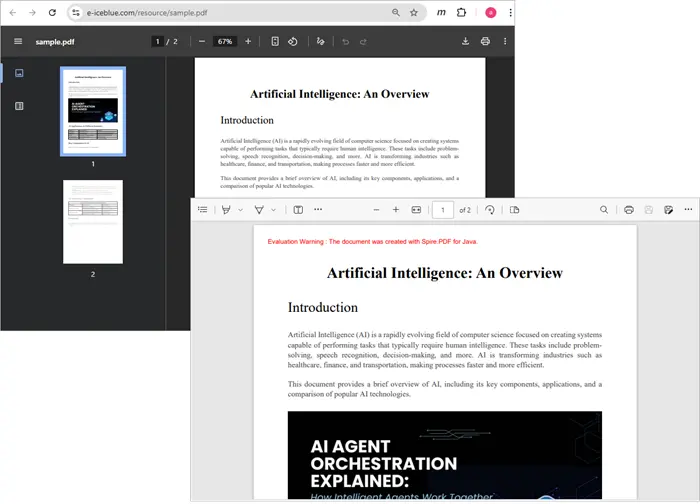
Creating PDF from Text Bytes in Java
If you only have plain text bytes (e.g., This document is created from text bytes.), you can decode them into a string and then draw the text onto a new PDF document.
import com.spire.pdf.*;
import com.spire.pdf.graphics.*;
import java.awt.*;

public class TextFromBytesToPdf {
    public static void main(String[] args) {

        // Your text bytes
        byte[] byteArray = {
                84, 104, 105, 115, 32,
                100, 111, 99, 117, 109, 101, 110, 116, 32,
                105, 115, 32,
                99, 114, 101, 97, 116, 101, 100, 32,
                102, 114, 111, 109, 32,
                116, 101, 120, 116, 32,
                98, 121, 116, 101, 115, 46
        };
        String text = new String(byteArray);

        // Create a PDF document
        PdfDocument doc = new PdfDocument();

        // Configure the page settings
        doc.getPageSettings().setSize(PdfPageSize.A4);
        doc.getPageSettings().setMargins(40f);

        // Add a page
        PdfPageBase page = doc.getPages().add();

        // Draw the string onto PDF
        PdfFont font = new PdfFont(PdfFontFamily.Helvetica, 20f);
        PdfSolidBrush brush = new PdfSolidBrush(new PdfRGBColor(Color.black));
        page.getCanvas().drawString(text, font, brush, 20, 40);

        // Save the document to a PDF file
        doc.saveToFile("TextBytes.pdf");
        doc.close();
    }
}
This will produce a new PDF named TextBytes.pdf (shown below) containing the sentence represented by your byte array.

You might be interested in: How to Generate PDF Documents in Java
Common Pitfalls to Avoid
When converting byte arrays to PDFs, watch out for these issues:
- Confusing plain text with PDF bytes
Not every byte array is a valid PDF. Unless the array starts with %PDF-1.x and contains the proper structure, you can’t load it directly with PdfDocument.loadFromStream .
- Incorrect encoding
If your text bytes are in UTF-16, ISO-8859-1, or another encoding, you need to specify the charset when creating a string:
String text = new String(byteArray, StandardCharsets.UTF_8);
- Large byte arrays
When dealing with large PDFs, consider streaming instead of holding everything in memory to avoid OutOfMemoryError .
- Forgetting to close documents
Always call doc.close() to release resources after saving or processing a PDF.
Frequently Asked Questions
Q1. Can I store a PDF as a byte array in a database?
Yes. You can store a PDF as a BLOB in a relational database. Later, you can retrieve it, load it into a PdfDocument , and save or manipulate it.
Q2. How do I check if a byte array is a valid PDF?
Check if the array begins with the %PDF- header. You can do:
String header = new String(Arrays.copyOfRange(bytes, 0, 5));
if (header.startsWith("%PDF-")) {
    // valid PDF
}
Q3. Can Spire.PDF load a PDF directly from an InputStream?
Yes. Instead of converting to a byte array, you can pass the InputStream directly to loadFromStream() .
Q4. Can I convert a PdfDocument back into a byte array?
You can save the document into a ByteArrayOutputStream instead of a file:
ByteArrayOutputStream baos = new ByteArrayOutputStream();
doc.saveToStream(baos);
byte[] pdfBytes = baos.toByteArray();
Q5. What if my byte array contains images instead of text or PDF?
In that case, you’ll need to create a new PDF and insert the image using Spire.PDF’s drawing APIs.
Conclusion
In this article, we explored how to efficiently convert byte arrays to PDF documents using Spire.PDF for Java. Whether you're loading existing PDF files from byte arrays retrieved via APIs or creating new PDFs from plain text bytes, Spire.PDF provides a robust solution to meet your needs.
We covered essential concepts, including the distinction between PDF file bytes and text bytes, and highlighted common pitfalls to avoid during the conversion process. With the right understanding and tools, you can seamlessly integrate PDF functionalities into your Java applications, enhancing your ability to manage and manipulate document data.
For further exploration, consider experimenting with additional features of Spire.PDF, such as editing, encrypting, and converting PDFs to other formats. The possibilities are extensive, and mastering these techniques will undoubtedly improve your development skills and project outcomes.
4 metodi efficaci per estrarre tabelle HTML in Excel (manuale e automatizzato)
Indice
Installa con Pypi
pip install Spire.XLS
Link correlati
Panoramica
L'estrazione di tabelle HTML in Excel è un requisito comune per analisti di dati, ricercatori, sviluppatori e professionisti aziendali che lavorano frequentemente con dati web strutturati. Le tabelle HTML contengono spesso informazioni preziose come rapporti finanziari, cataloghi di prodotti, risultati di ricerche o statistiche sulle prestazioni. Tuttavia, trasferire tali dati in Excel in un formato pulito e utilizzabile può essere complicato, specialmente quando si ha a che fare con tabelle complesse che includono celle unite (rowspan, colspan), intestazioni nidificate o grandi set di dati.
Fortunatamente, esistono diversi approcci per convertire le tabelle HTML in file Excel. Questi metodi vanno da rapide azioni manuali di copia-incolla, adatte a piccoli compiti, a script completamente automatizzati che utilizzano VBA o Python per lavori su larga scala o ricorrenti.
In questo articolo, esploreremo quattro metodi efficaci per estrarre tabelle HTML in Excel:
- Copia-Incolla manuale (metodo più semplice)
- Funzionalità integrata di Excel "Da Web"
- Macro VBA (Automazione di Excel)
- Python (BeautifulSoup + Spire.XLS)
Infine, confronteremo questi approcci in una tabella riassuntiva per aiutarti a scegliere il metodo migliore in base al tuo caso d'uso.
Copia-Incolla manuale (Metodo più semplice)
Per piccole estrazioni una tantum, l'opzione più semplice è utilizzare il copia e incolla direttamente dal browser in Excel.

Passaggi:
- Apri la pagina HTML in un browser (es. Chrome, Edge o Firefox).
- Evidenzia la tabella che desideri estrarre.
- Copiala con Ctrl+C (o clic destro → Copia).
- Apri Excel e incolla con Ctrl+V.
Vantaggi:
- Estremamente semplice — non è richiesta alcuna configurazione o codifica.
- Funziona istantaneamente per tabelle piccole e pulite.
Svantaggi:
- Processo manuale — noioso e inefficiente per set di dati frequenti o di grandi dimensioni.
- Non sempre conserva le celle unite o la formattazione.
- Non è in grado di gestire in modo affidabile tabelle dinamiche (renderizzate con JavaScript).
Quando usarlo: Ideale per piccole tabelle, raccolta di dati ad-hoc o test rapidi.
Funzionalità integrata di Excel "Da Web"
Excel include un potente strumento "Recupera e trasforma dati" (precedentemente Power Query) che consente agli utenti di estrarre tabelle direttamente da una pagina web.
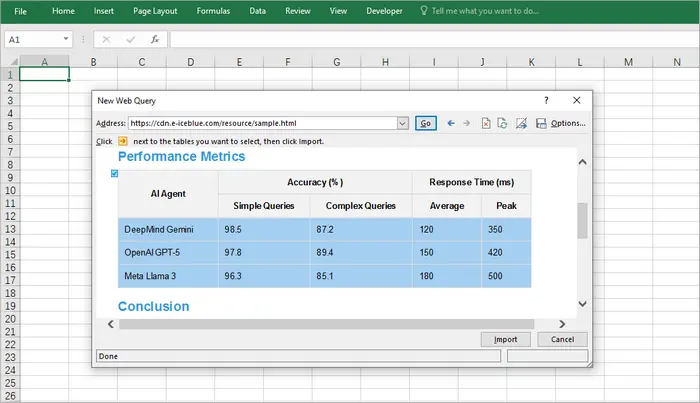
Passaggi:
- Apri Excel.
- Vai su Dati → Da Web.
- Inserisci l'URL della pagina web contenente la tabella.
- Excel visualizzerà le tabelle rilevate; seleziona quella che desideri.
- Carica i dati nel tuo foglio di lavoro.
Vantaggi:
- Integrazione diretta in Excel — non sono necessari strumenti esterni.
- Funziona bene per tabelle HTML strutturate.
- Supporta l'aggiornamento — può recuperare nuovamente i dati aggiornati dalla stessa fonte.
Svantaggi:
- Supporto limitato per contenuti dinamici o renderizzati con JavaScript.
- A volte non riesce a rilevare tabelle complesse.
- Richiede l'accesso a Internet e un URL valido (non per file HTML locali a meno che non vengano importati manualmente).
Quando usarlo: Ideale per gli analisti che estraggono dati strutturati in tempo reale da siti web che vengono aggiornati regolarmente.
Macro VBA (Automazione di Excel)
Per gli utenti che estraggono frequentemente tabelle HTML e desiderano un maggiore controllo, VBA (Visual Basic for Applications) offre un'eccellente soluzione. VBA consente di recuperare tabelle da un URL e di elaborare correttamente le celle unite, cosa che il semplice copia-incolla non può fare.
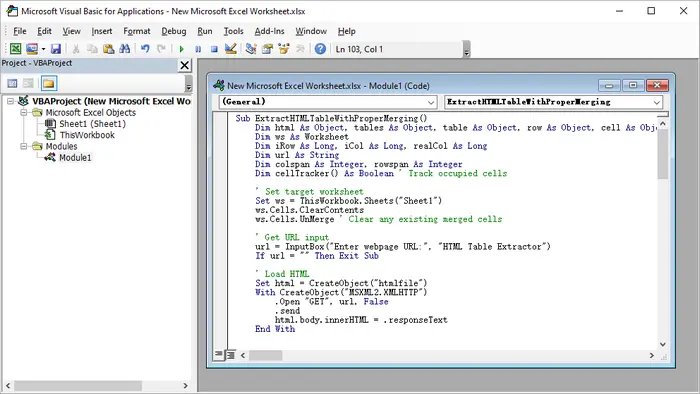
Passaggi:
- Avvia Microsoft Excel.
- Premi Alt + F11 per aprire l'editor VBA.
- Fai clic con il pulsante destro del mouse sull'esploratore del progetto → Inserisci → Modulo.
- Incolla il codice VBA fornito.
- Chiudi l'editor VBA.
- Premi Alt + F8, seleziona il nome della macro e fai clic su Esegui.
Codice VBA di esempio:
Sub ExtractHTMLTableWithProperMerging()
    Dim html As Object, tables As Object, table As Object, row As Object, cell As Object
    Dim ws As Worksheet
    Dim iRow As Long, iCol As Long, realCol As Long
    Dim url As String
    Dim colspan As Integer, rowspan As Integer
    Dim cellTracker() As Boolean ' Tieni traccia delle celle occupate

    ' Imposta il foglio di lavoro di destinazione
    Set ws = ThisWorkbook.Sheets("Sheet1")
    ws.Cells.ClearContents
    ws.Cells.UnMerge ' Rimuovi eventuali celle unite esistenti

    ' Ottieni l'URL di input
    url = InputBox("Inserisci l'URL della pagina web:", "Estrattore di tabelle HTML")
    If url = "" Then Exit Sub

    ' Carica l'HTML
    Set html = CreateObject("htmlfile")
    With CreateObject("MSXML2.XMLHTTP")
        .Open "GET", url, False
        .send
        html.body.innerHTML = .responseText
    End With

    ' Ottieni la prima tabella (modifica l'indice se necessario)
    Set tables = html.getElementsByTagName("table")
    If tables.Length = 0 Then
        MsgBox "Nessuna tabella trovata!", vbExclamation
        Exit Sub
    End If
    Set table = tables(0)

    ' Inizializza la matrice di tracciamento delle celle
    Dim maxRows As Long, maxCols As Long
    maxRows = table.Rows.Length
    maxCols = 0
    For Each row In table.Rows
        If row.Cells.Length > maxCols Then maxCols = row.Cells.Length
    Next
    ReDim cellTracker(1 To maxRows, 1 To maxCols)

    ' Elabora la tabella
    iRow = 1
    For Each row In table.Rows
        realCol = 1 ' Tieni traccia della posizione effettiva della colonna tenendo conto dei rowspan

        ' Trova la prima colonna disponibile in questa riga
        While realCol <= maxCols And cellTracker(iRow, realCol)
            realCol = realCol + 1
        Wend

        iCol = 1 ' Tieni traccia della posizione logica della colonna
        For Each cell In row.Cells
            ' Ottieni gli attributi di unione
            colspan = 1
            rowspan = 1
            On Error Resume Next ' Nel caso in cui gli attributi non esistano
            colspan = cell.colspan
            rowspan = cell.rowspan
            On Error GoTo 0

            ' Salta le celle già occupate (da rowspan sopra)
            While realCol <= maxCols And cellTracker(iRow, realCol)
                realCol = realCol + 1
            Wend

            If realCol > maxCols Then Exit For

            ' Scrivi il valore
            ws.Cells(iRow, realCol).Value = cell.innerText

            ' Contrassegna tutte le celle che saranno occupate da questa cella
            Dim r As Long, c As Long
            For r = iRow To iRow + rowspan - 1
                For c = realCol To realCol + colspan - 1
                    If r <= maxRows And c <= maxCols Then
                        cellTracker(r, c) = True
                    End If
                Next c
            Next r

            ' Unisci le celle se necessario
            If colspan > 1 Or rowspan > 1 Then
                With ws.Range(ws.Cells(iRow, realCol), ws.Cells(iRow + rowspan - 1, realCol + colspan - 1))
                    .Merge
                    .HorizontalAlignment = xlCenter
                    .VerticalAlignment = xlCenter
                End With
            End If

            realCol = realCol + colspan
            iCol = iCol + 1
        Next cell
        iRow = iRow + 1
    Next row

    ' Formattazione
    ws.UsedRange.Columns.AutoFit
    ws.UsedRange.Borders.Weight = xlThin
    MsgBox "Tabella estratta con unione corretta!", vbInformation
End Sub
Vantaggi:
- Funziona interamente all'interno di Excel — non sono necessari strumenti esterni.
- Gestisce tabelle complesse con celle unite.
- Può essere personalizzato per più tabelle o per l'esecuzione pianificata.
Svantaggi:
- La configurazione richiede conoscenze di VBA.
- Non può gestire dati renderizzati con JavaScript senza passaggi aggiuntivi.
- Funziona solo in Excel desktop (non in Excel Online).
Quando usarlo: Perfetto per gli utenti che estraggono regolarmente tabelle simili e desiderano una soluzione con un solo clic.
Python (BeautifulSoup & Spire.XLS)
Per sviluppatori o utenti esperti, Python offre la soluzione più flessibile, scalabile e automatizzata. Con librerie come BeautifulSoup per l'analisi di HTML e Spire.XLS for Python per la manipolazione di Excel, è possibile recuperare, pulire ed esportare tabelle a livello di codice con un controllo totale.
Passaggi:
- Installa Python (consigliato 3.8+).
- Crea un nuovo progetto nel tuo IDE (es. VS Code, PyCharm).
- Installa le dipendenze:
pip install requests beautifulsoup4 spire.xls
- Copia ed esegui il seguente script.
Codice Python:
import requests

from bs4 import BeautifulSoup
from spire.xls import Workbook, ExcelVersion

# Ottieni la stringa HTML dall'URL
response = requests.get("https://cdn.e-iceblue.com/resource/sample.html")
html = response.text

# Analizza l'HTML
soup = BeautifulSoup(html, "html.parser")
table = soup.find("table")  # Ottieni la prima tabella

# Inizializza Excel
workbook = Workbook()
sheet = workbook.Worksheets[0]

# Tieni traccia delle celle unite per saltarle in seguito
skip_cells = set()

# Itera attraverso le righe e le celle HTML
for row_idx, row in enumerate(table.find_all("tr")):
    col_idx = 1  # Le colonne di Excel iniziano da 1
    for cell in row.find_all(["th", "td"]):
        # Salta le celle già unite
        while (row_idx + 1, col_idx) in skip_cells:
            col_idx += 1

        # Ottieni i valori di colspan/rowspan (predefinito 1 se non presenti)
        colspan = int(cell.get("colspan", 1))
        rowspan = int(cell.get("rowspan", 1))

        # Scrivi il valore della cella in Excel
        sheet.Range[row_idx + 1, col_idx].Text = cell.get_text(strip=True)

        # Unisci le celle se colspan/rowspan > 1
        if colspan > 1 or rowspan > 1:
            end_row = row_idx + rowspan
            end_col = col_idx + colspan - 1
            sheet.Range[row_idx + 1, col_idx, end_row, end_col].Merge()

            # Contrassegna le celle unite da saltare
            for r in range(row_idx + 1, end_row + 1):
                for c in range(col_idx, end_col + 1):
                    if r != row_idx + 1 or c != col_idx:  # Salta la cella principale
                        skip_cells.add((r, c))

        col_idx += colspan

# Adatta automaticamente la larghezza delle colonne nell'intervallo utilizzato
sheet.AllocatedRange.AutoFitColumns()

# Salva in Excel
workbook.SaveToFile("TableToExcel.xlsx", ExcelVersion.Version2016)
workbook.Dispose()
Vantaggi:
- Controllo completo — può analizzare, pulire e trasformare i dati.
- Gestisce correttamente le celle unite.
- Facilmente scalabile per più tabelle o siti web.
- Automatizzabile per attività pianificate o lavori in batch.
Svantaggi:
- Richiede l'installazione di Python e conoscenze di base di programmazione.
- Maggiore configurazione rispetto alle soluzioni integrate di Excel.
- Dipendenze esterne (BeautifulSoup, Spire.XLS).
Quando usarlo: Ideale per sviluppatori o utenti avanzati che estraggono regolarmente tabelle grandi o complesse.
Output:
Per migliorare l'aspetto visivo del foglio di lavoro di Excel generato in Python, è possibile applicare stili a celle o fogli di lavoro in Excel.
Tabella riassuntiva: Metodo migliore per caso d'uso
| Metodo | Ideale per | Vantaggi | Svantaggi | Automazione? |
|---|---|---|---|---|
| Copia-Incolla manuale | Uso rapido e una tantum | Veloce, nessuna configurazione | Nessuna automazione, problemi di formattazione | ❌No |
| Excel Da Web | Dati strutturati in tempo reale | Integrato, supporta l'aggiornamento | Limitato per tabelle dinamiche | ❌No |
| Macro VBA | Attività ripetute in Excel | Automatizza l'estrazione, gestisce le unioni | Richiede conoscenze di VBA | ✅Sì |
| Python (BeautifulSoup + Spire.XLS) | Sviluppatori, tabelle grandi/complesse | Controllo totale, scalabile, automatizzabile | Richiede programmazione e dipendenze | ✅Sì |
Considerazioni finali
Il metodo che scegli dipende in gran parte dal tuo caso d'uso:
- Se hai solo bisogno di prendere una piccola tabella occasionalmente, il copia-incolla manuale è il più veloce.
- Se vuoi estrarre dati strutturati da una pagina web che si aggiorna frequentemente, la funzione Da Web di Excel è comoda.
- Per gli utenti aziendali che lavorano quotidianamente in Excel e desiderano l'automazione, una macro VBA è l'ideale.
- Per gli sviluppatori che gestiscono più set di dati o strutture HTML complesse, Python con BeautifulSoup e Spire.XLS offre la massima flessibilità e scalabilità.
Combinando questi metodi con il tuo flusso di lavoro, puoi risparmiare ore di lavoro manuale e garantire un'estrazione di dati più pulita e affidabile in Excel.
Vedi anche
4 métodos eficazes para extrair tabelas HTML para Excel (manual e automatizado)
Índice
Instalar com Pypi
pip install Spire.XLS
Links Relacionados
Visão Geral
Extrair tabelas HTML para o Excel é um requisito comum para analistas de dados, pesquisadores, desenvolvedores e profissionais de negócios que trabalham frequentemente com dados estruturados da web. As tabelas HTML geralmente contêm informações valiosas, como relatórios financeiros, catálogos de produtos, resultados de pesquisas ou estatísticas de desempenho. No entanto, transferir esses dados para o Excel em um formato limpo e utilizável pode ser complicado, especialmente ao lidar com tabelas complexas que incluem células mescladas (rowspan, colspan), cabeçalhos aninhados ou grandes conjuntos de dados.
Felizmente, existem várias abordagens para converter tabelas HTML em arquivos do Excel. Esses métodos variam de ações rápidas e manuais de copiar e colar, adequadas para pequenas tarefas, a scripts totalmente automatizados usando VBA ou Python para trabalhos em grande escala ou recorrentes.
Neste artigo, exploraremos quatro métodos eficazes para extrair tabelas HTML para o Excel:
- Copiar e Colar Manual (método mais simples)
- Recurso Embutido do Excel "Da Web"
- Macro VBA (Automação do Excel)
- Python (BeautifulSoup + Spire.XLS)
Finalmente, compararemos essas abordagens em uma tabela resumo para ajudá-lo a escolher o melhor método com base no seu caso de uso.
Copiar e Colar Manual (Método mais simples)
Para extrações pequenas e pontuais, a opção mais simples é usar o copiar e colar diretamente do seu navegador para o Excel.
Passos:
- Abra a página HTML em um navegador (por exemplo, Chrome, Edge ou Firefox).
- Destaque a tabela que deseja extrair.
- Copie-a com Ctrl+C (ou clique com o botão direito → Copiar).
- Abra o Excel e cole com Ctrl+V.
Prós:
- Extremamente simples — não é necessária configuração ou codificação.
- Funciona instantaneamente para tabelas pequenas e limpas.
Contras:
- Processo manual — tedioso e ineficiente para conjuntos de dados frequentes ou grandes.
- Nem sempre preserva células mescladas ou formatação.
- Não consegue lidar de forma confiável com tabelas dinâmicas (renderizadas por JavaScript).
Quando usar: Melhor para tabelas pequenas, coleta de dados ad-hoc ou testes rápidos.
Recurso Embutido do Excel "Da Web"
O Excel inclui uma poderosa ferramenta “Obter e Transformar Dados” (anteriormente Power Query) que permite aos usuários extrair tabelas diretamente de uma página da web.
Passos:
- Abra o Excel.
- Vá para Dados → Da Web.
- Insira a URL da página da web que contém a tabela.
- O Excel exibirá as tabelas detectadas; selecione a que você deseja.
- Carregue os dados em sua planilha.
Prós:
- Integração direta no Excel — não são necessárias ferramentas externas.
- Funciona bem para tabelas HTML estruturadas.
- Suporta atualização — pode extrair novamente dados atualizados da mesma fonte.
Contras:
- Suporte limitado para conteúdo dinâmico ou renderizado por JavaScript.
- Às vezes, falha em detectar tabelas complexas.
- Requer acesso à Internet e URL válida (não para arquivos HTML locais, a menos que importados manualmente).
Quando usar: Melhor para analistas que extraem dados estruturados ao vivo de sites que são atualizados regularmente.
Macro VBA (Automação do Excel)
Para usuários que extraem tabelas HTML com frequência e desejam mais controle, o VBA (Visual Basic for Applications) oferece uma excelente solução. O VBA permite buscar tabelas de uma URL e processar corretamente as células mescladas, algo que o simples copiar e colar não consegue fazer.
Passos:
- Inicie o Microsoft Excel.
- Pressione Alt + F11 para abrir o editor do VBA.
- Clique com o botão direito no explorador de projetos → Inserir → Módulo.
- Cole o código VBA fornecido.
- Feche o editor do VBA.
- Pressione Alt + F8, selecione o nome da macro e clique em Executar.
Exemplo de Código VBA:
Sub ExtractHTMLTableWithProperMerging()
    Dim html As Object, tables As Object, table As Object, row As Object, cell As Object
    Dim ws As Worksheet
    Dim iRow As Long, iCol As Long, realCol As Long
    Dim url As String
    Dim colspan As Integer, rowspan As Integer
    Dim cellTracker() As Boolean ' Rastrear células ocupadas

    ' Definir planilha de destino
    Set ws = ThisWorkbook.Sheets("Sheet1")
    ws.Cells.ClearContents
    ws.Cells.UnMerge ' Limpar quaisquer células mescladas existentes

    ' Obter URL de entrada
    url = InputBox("Digite a URL da página da web:", "Extrator de Tabela HTML")
    If url = "" Then Exit Sub

    ' Carregar HTML
    Set html = CreateObject("htmlfile")
    With CreateObject("MSXML2.XMLHTTP")
        .Open "GET", url, False
        .send
        html.body.innerHTML = .responseText
    End With

    ' Obter a primeira tabela (alterar o índice, se necessário)
    Set tables = html.getElementsByTagName("table")
    If tables.Length = 0 Then
        MsgBox "Nenhuma tabela encontrada!", vbExclamation
        Exit Sub
    End If
    Set table = tables(0)

    ' Inicializar a matriz de rastreamento de células
    Dim maxRows As Long, maxCols As Long
    maxRows = table.Rows.Length
    maxCols = 0
    For Each row In table.Rows
        If row.Cells.Length > maxCols Then maxCols = row.Cells.Length
    Next
    ReDim cellTracker(1 To maxRows, 1 To maxCols)

    ' Processar a tabela
    iRow = 1
    For Each row In table.Rows
        realCol = 1 ' Rastrear a posição real da coluna considerando os rowspans

        ' Encontrar a primeira coluna disponível nesta linha
        While realCol <= maxCols And cellTracker(iRow, realCol)
            realCol = realCol + 1
        Wend

        iCol = 1 ' Rastrear a posição lógica da coluna
        For Each cell In row.Cells
            ' Obter atributos de mesclagem
            colspan = 1
            rowspan = 1
            On Error Resume Next ' Caso os atributos não existam
            colspan = cell.colspan
            rowspan = cell.rowspan
            On Error GoTo 0

            ' Pular células já ocupadas (de rowspan acima)
            While realCol <= maxCols And cellTracker(iRow, realCol)
                realCol = realCol + 1
            Wend

            If realCol > maxCols Then Exit For

            ' Escrever o valor
            ws.Cells(iRow, realCol).Value = cell.innerText

            ' Marcar todas as células que serão ocupadas por esta célula
            Dim r As Long, c As Long
            For r = iRow To iRow + rowspan - 1
                For c = realCol To realCol + colspan - 1
                    If r <= maxRows And c <= maxCols Then
                        cellTracker(r, c) = True
                    End If
                Next c
            Next r

            ' Mesclar células, se necessário
            If colspan > 1 Or rowspan > 1 Then
                With ws.Range(ws.Cells(iRow, realCol), ws.Cells(iRow + rowspan - 1, realCol + colspan - 1))
                    .Merge
                    .HorizontalAlignment = xlCenter
                    .VerticalAlignment = xlCenter
                End With
            End If

            realCol = realCol + colspan
            iCol = iCol + 1
        Next cell
        iRow = iRow + 1
    Next row

    ' Formatação
    ws.UsedRange.Columns.AutoFit
    ws.UsedRange.Borders.Weight = xlThin
    MsgBox "Tabela extraída com a mesclagem correta!", vbInformation
End Sub
Prós:
- Executa inteiramente dentro do Excel — não são necessárias ferramentas externas.
- Lida com tabelas complexas com células mescladas.
- Pode ser personalizado para várias tabelas ou execução agendada.
Contras:
- A configuração requer conhecimento de VBA.
- Não consegue lidar com dados renderizados por JavaScript sem etapas extras.
- Funciona apenas no Excel para desktop (não no Excel Online).
Quando usar: Perfeito para usuários que extraem regularmente tabelas semelhantes e desejam uma solução de um clique.
Python (BeautifulSoup & Spire.XLS)
Para desenvolvedores ou usuários avançados, o Python oferece a solução mais flexível, escalável e automatizada. Com bibliotecas como BeautifulSoup para análise de HTML e Spire.XLS for Python para manipulação do Excel, você pode buscar, limpar e exportar tabelas programaticamente com controle total.
Passos:
- Instale o Python (3.8+ recomendado).
- Crie um novo projeto em seu IDE (por exemplo, VS Code, PyCharm).
- Instale as dependências:
pip install requests beautifulsoup4 spire.xls
- Copie e execute o seguinte script.
Código Python:
import requests

from bs4 import BeautifulSoup
from spire.xls import Workbook, ExcelVersion

# Obter a string HTML da url
response = requests.get("https://cdn.e-iceblue.com/resource/sample.html")
html = response.text

# Analisar o HTML
soup = BeautifulSoup(html, "html.parser")
table = soup.find("table")  # Obter a primeira tabela

# Inicializar o Excel
workbook = Workbook()
sheet = workbook.Worksheets[0]

# Rastrear células mescladas para pulá-las mais tarde
skip_cells = set()

# Iterar sobre as linhas e células HTML
for row_idx, row in enumerate(table.find_all("tr")):
    col_idx = 1  # As colunas do Excel começam em 1
    for cell in row.find_all(["th", "td"]):
        # Pular células já mescladas
        while (row_idx + 1, col_idx) in skip_cells:
            col_idx += 1

        # Obter valores de colspan/rowspan (padrão para 1 se não estiverem presentes)
        colspan = int(cell.get("colspan", 1))
        rowspan = int(cell.get("rowspan", 1))

        # Escrever o valor da célula no Excel
        sheet.Range[row_idx + 1, col_idx].Text = cell.get_text(strip=True)

        # Mesclar células se colspan/rowspan > 1
        if colspan > 1 or rowspan > 1:
            end_row = row_idx + rowspan
            end_col = col_idx + colspan - 1
            sheet.Range[row_idx + 1, col_idx, end_row, end_col].Merge()

            # Marcar células mescladas para pular
            for r in range(row_idx + 1, end_row + 1):
                for c in range(col_idx, end_col + 1):
                    if r != row_idx + 1 or c != col_idx:  # Pular a célula principal
                        skip_cells.add((r, c))

        col_idx += colspan

# Ajustar automaticamente a largura da coluna em todo o intervalo usado
sheet.AllocatedRange.AutoFitColumns()

# Salvar no Excel
workbook.SaveToFile("TableToExcel.xlsx", ExcelVersion.Version2016)
workbook.Dispose()
Prós:
- Controle total — pode analisar, limpar e transformar dados.
- Lida corretamente com células mescladas.
- Facilmente escalável para várias tabelas ou sites.
- Automatizável para tarefas agendadas ou trabalhos em lote.
Contras:
- Requer instalação do Python e conhecimentos básicos de programação.
- Mais configuração do que as soluções integradas do Excel.
- Dependências externas (BeautifulSoup, Spire.XLS).
Quando usar: Melhor para desenvolvedores ou usuários avançados que extraem regularmente tabelas grandes ou complexas.
Saída:
Para melhorar o apelo visual da planilha do Excel gerada em Python, você pode aplicar estilos a células ou planilhas no Excel.
Tabela Resumo: Melhor Método por Caso de Uso
| Método | Melhor Para | Prós | Contras | Automação? |
|---|---|---|---|---|
| Copiar e Colar Manual | Uso rápido e único | Rápido, sem configuração | Sem automação, problemas de formatação | ❌Não |
| Excel Da Web | Dados estruturados ao vivo | Integrado, suporta atualização | Limitado para tabelas dinâmicas | ❌Não |
| Macro VBA | Tarefas repetidas no Excel | Automatiza a extração, lida com mesclagens | Requer conhecimento de VBA | ✅Sim |
| Python (BeautifulSoup + Spire.XLS) | Desenvolvedores, tabelas grandes/complexas | Controle total, escalável, automatizável | Requer codificação e dependências | ✅Sim |
Considerações Finais
O método que você escolhe depende muito do seu caso de uso:
- Se você só precisa pegar uma pequena tabela ocasionalmente, o copiar e colar manual é o mais rápido.
- Se você deseja extrair dados estruturados de uma página da web que é atualizada com frequência, o recurso Da Web do Excel é conveniente.
- Para usuários de negócios que trabalham no Excel diariamente e desejam automação, uma macro VBA é ideal.
- Para desenvolvedores que lidam com vários conjuntos de dados ou estruturas HTML complexas, o Python com BeautifulSoup e Spire.XLS oferece a maior flexibilidade e escalabilidade.
Ao combinar esses métodos com seu fluxo de trabalho, você pode economizar horas de esforço manual e garantir uma extração de dados mais limpa e confiável para o Excel.