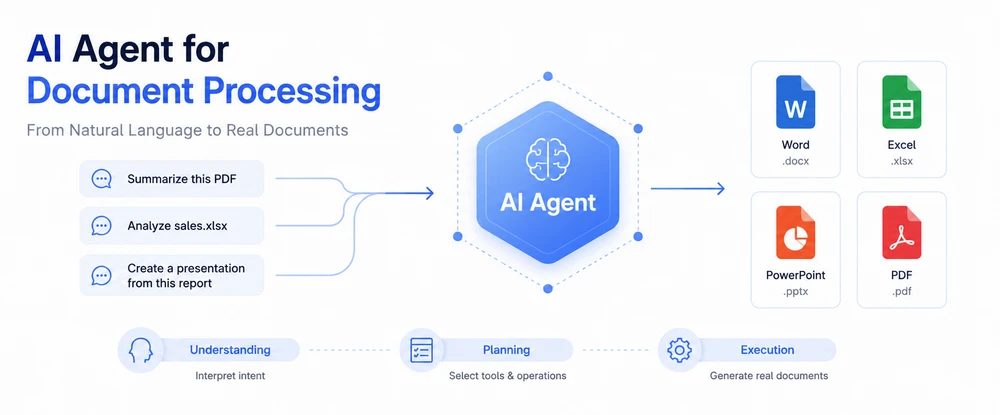
An AI agent for document processing is a software system that uses artificial intelligence models and tools to understand natural language instructions and perform tasks such as creating, editing, converting, analyzing, or extracting content from documents—without writing line-by-line code. An AI agent can work with Word, Excel, PowerPoint, and PDF files by interpreting user intent, selecting appropriate document-processing operations, and producing output that preserves the required file structure and formatting.
AI agents are one approach to automating document-related work. Other approaches include traditional programmatic APIs, raw language model endpoints used with custom code, and workflow engines that automate predefined steps. This article explains what AI-driven document processing is, how it differs from earlier methods, and when it makes sense to use it alongside other technologies.
1. What Is AI Document Processing?
Document processing—the activity of reading, creating, editing, converting, extracting information from, or analyzing digital documents—has always been one of the most common software tasks across industries. Email invoices arrive as PDFs. Sales reports sit inside Excel workbooks with inconsistent layouts. Employee handbooks live in Word templates that change every year. Legal agreements show up as scanned PDFs from external parties. For decades, organizations have written code to manage this variety.
Traditional document-processing approaches share a common pattern: someone defines what should happen to which documents using explicit rules. A template-fill script reads a CSV and populates a Word .docx by replacing predefined placeholders. A Python script iterates over Excel columns and calls layout functions to produce a styled report. A C# routine opens a PDF, searches for specific fields by position or regex pattern, and writes the results back into a database. These methods work well for stable, well-specified workflows—but they require programmatic instructions for every variation. When the template changes, when the input format shifts, or when new document types enter the pipeline, the code needs to be rewritten, tested, and redeployed.
AI-driven document processing extends those same operations by introducing a layer of language understanding. Instead of telling the software exactly which placeholder to replace or which cell range to read, you describe what result you want in natural language: "Summarize this contract and extract the payment terms," or "Compare last month's sales spreadsheet to this month's and save the analysis as a formatted report." The system uses an AI model to interpret that instruction, determines which document operations are needed, executes them against real file formats, and returns a properly structured output.
In practice, AI document processing does not replace traditional approaches—it augments them. Simple, predictable tasks may still be better handled by rule-based scripts because they are faster and fully deterministic. But when documents vary in structure, when inputs arrive in unpredictable formats, or when the question being asked of a document changes frequently, an AI-assisted approach saves engineering effort and adapts more naturally to shifting requirements.
2. What Is an AI Agent for Document Processing?
An AI agent for document processing is a system that combines language-model reasoning with document-oriented tools so a person can describe a task in conversational terms and have a real, well-formed document returned as output.
The defining characteristic of an agent—in this context—is that it bridges two capabilities that most individual components do not possess on their own:
- Understanding. The system interprets open-ended, high-level instructions about what to do with a document. "Review this agreement for risky clauses" or "Turn these quarterly figures into a presentation slide deck" are not structured queries; they require semantic comprehension.
-
Action. After understanding the intent, the system selects and executes concrete document operations—reading a file, extracting text or tables, inserting content, changing layout, generating a new file—in formats like
.docx,.xlsx,.pptx, or.pdf.
Different vendors and research groups use slightly different terminology around these concepts. Some call these systems "AI assistants," others use "agentic workflows," "autonomous document pipelines," or "document intelligence platforms." The distinctions are subtle and often marketing-driven. What matters for evaluation is not the label but the capability: can the system both interpret unstructured instructions and manipulate document files through real APIs?
In practice, the term "document agent" covers several kinds of systems — including extraction-focused agents that ingest, classify, and route documents, and agents that directly interpret natural-language instructions and manipulate or generate documents. In this article the term refers specifically to agents that combine language-model reasoning with document-processing APIs. Below is a functional comparison that distinguishes an AI document agent from related technologies. These categories overlap significantly—many products combine several of them—but understanding where each approach excels helps clarify what an agent actually adds.
| Approach | Primary strength | How it handles instructions | Typical limitation |
|---|---|---|---|
| LLM endpoint only | Deep language understanding | Interprets natural language very effectively | Does not by itself provide deterministic, format-aware control over Office and PDF file structures; produces raw text or HTML unless combined with document-processing tools |
| Natural-language agent | Bridges understanding with tool execution | Takes high-level requests and chains appropriate tools together | Depends on quality of available tools and orchestration logic |
| Traditional SDK / API | Deterministic, precise file manipulation | Requires explicit programmatic commands; no language understanding | Rigid—every change in template or input format requires code updates |
| RPA (Robotic Process Automation) | Automates UI-level interactions across applications | Follows scripted workflows; some modern RPA includes vision and OCR | Struggles with ambiguous instructions that require semantic interpretation — RPA (Robotic Process Automation) is based on software robots that handle data across applications following predefined rules, whereas agents interpret open-ended natural-language requests |
| OCR (Optical Character Recognition) | Converts images / scans into machine-readable text | Operates on visual content; extracts characters and basic layout | Does not perform document generation, analysis, or multi-step workflows |
These capabilities often appear together in production systems. An enterprise document pipeline might use OCR to digitize scanned invoices, pass the extracted text through an LLM for semantic classification, route the result into an RPA workflow for data entry, and finally generate a branded report using a document API. An AI document agent sits at the center of such a pipeline as the component that understands the human request and coordinates whichever tools are needed to fulfill it.
When people search for "what is AI document processing" or "how AI document agents work," they are usually trying to understand whether buying or building such a system is different from combining off-the-shelf tools manually. The short answer: yes—when document variety, instruction variability, and formatting fidelity matter enough to justify a dedicated orchestration layer between language understanding and file manipulation.
3. How Does an AI Document Agent Work?
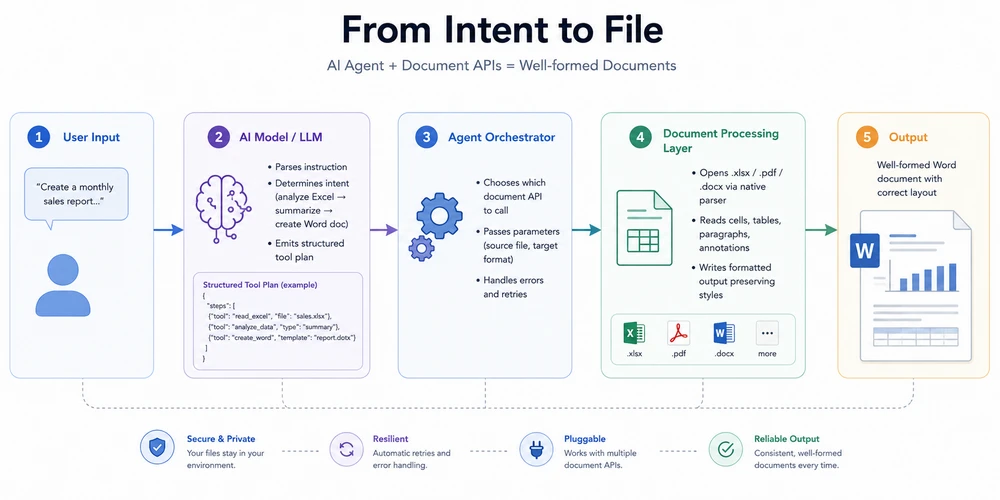
At a high level, an AI document agent follows five conceptual stages:
User provides natural language instruction
     ↓
AI model interprets intent and identifies needed operations
     ↓
Agent selects appropriate document-processing tools or APIs
     ↓
Document APIs execute file-level operations (read, modify, generate)
     ↓
Output document is generated using deterministic document-processing operations
Each stage introduces decisions that determine how accurate, reliable, and well-formatted the final output will be. Understanding these decisions clarifies why a pure LLM alone cannot reliably produce real Word or Excel files—and why a traditional SDK alone cannot understand a vague or open-ended request.
Architecture: From Intent to File
A typical implementation chains five layers, passing the document through each stage from intent to output:
Example: From a Natural-Language Request to a Finished Document
Consider a scenario that many finance teams encounter every month: a manager sends a folder of regional sales workbooks and asks for a consolidated summary report in Word format.
A user's natural-language request might read something like:
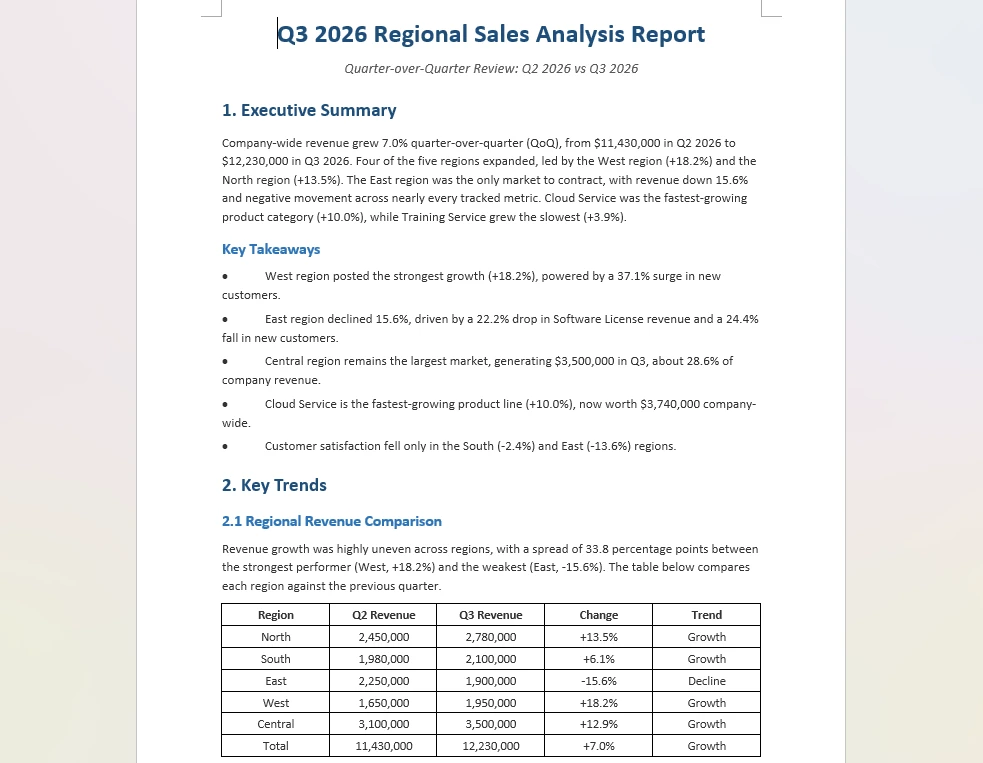
"Read all the Q3 sales files in this folder, compare each region to the previous quarter, summarize the key trends and outliers, and save the results as a formatted Word document."
Behind the scenes, the agent decomposes that single sentence into a sequence of operations:
- Discover and open every
.xlsxfile in the specified directory. - Read summary rows or key sheets from each workbook.
- Compute period-over-period changes.
- Identify the highest-performing and underperforming regions.
- Compose a narrative summary describing the trends.
- Create a new Word document, insert the summary, add tables showing regional comparisons, and apply formatting consistent with corporate templates.
The finished deliverable—the consolidated Word report with the narrative summary and regional comparison tables:
Without an agent, a developer would typically need to build and orchestrate each of those six steps—writing code for file discovery, reading data, computing changes, calling an LLM for prose generation, parsing its response, and mapping it into a structured document layout. With an agent, steps 4–6 can be expressed in a single instruction, while step 1–3 still leverage the same file-parsing capabilities your application already owns.
This kind of cross-format workflow—where reading data from one type of file and producing output in another requires both semantic reasoning and precise file manipulation—is exactly where AI agents provide the most value. Tools like Spire.Agent.Office package the orchestration layer together with deterministic document APIs so developers get a natural-language interface without losing control over formatting, layout, or output fidelity.
4. What Can AI Agents Do With Documents?
Depending on the capabilities of the underlying document-processing tools, AI agents can potentially cover a broad range of document operations that developers traditionally implement with explicit code—only expressed through intent rather than syntax. The table below shows representative operation categories that many implementations support when their underlying document-processing tools provide those capabilities.
| Capability | Word (.docx/.doc) | Excel (.xlsx/.xls) | PowerPoint (.pptx/.ppt) | PDF (.pdf) |
|---|---|---|---|---|
| Create from scratch or data | Yes — paragraphs, tables, headings, styles | Yes — sheets, cells, formulas, charts | Yes — slides, layouts, themes | Yes — sections, text blocks, annotations |
| Edit existing documents | Yes — insert, replace, reflow content | Yes — update cells, rearrange rows/columns | Yes — modify slide content, reorder | Yes — add/remove pages, annotate, redact |
| Convert between formats | Yes ↔ PDF, HTML, XPS, Markdown | Yes ↔ CSV, PDF, HTML | Yes ↔ PDF | Yes ↔ DOCX, HTML, image formats |
| Analyze / Summarize content | Yes — extract clauses, identify structure | Yes — compare datasets, compute statistics | Yes — review slide narratives | Yes — classify pages, extract key information |
| Extract data (structured) | Yes — pull text from paragraphs and tables | Yes — read cell values, ranges, named ranges | Limited — slide text and notes | Yes — parse forms, tables, embedded text |
Actual capabilities depend on the underlying document-processing libraries and the specific agent implementation.
Common use cases that fall under these capabilities include:
- Contract and agreement review: Read incoming PDFs or Word files, flag unusual clauses or missing provisions, and produce a Markdown or Word summary brief.
- Report consolidation: Aggregate disparate spreadsheets from multiple regions, detect anomalies, and generate a management-ready Word or PDF report.
- Presentation generation: Feed a briefing document or dataset into a presentation template and produce a finished slide deck with charts and talking points.
- Invoice and form processing: Open scanned or digital invoices, extract line items and totals, verify against purchase orders, and populate downstream systems.
- Policy and handbook maintenance: Update employee documents by replacing names, dates, and department-specific language across dozens of templates.
For teams that already build document workflows today, these capabilities do not replace their existing logic—they extend it. An agent handles the parts of a workflow that depend on human communication (understanding what to do), while the underlying document APIs handle the parts that depend on precision (producing the right file with the right layout). See the official tutorials on batch contract generation and generating presentations from documents for examples of how these operations fit into real applications.
5. Approaches to Document Automation
Not every organization reaches for an AI agent when automating document workflows. The technology choice depends on what kinds of documents you handle, how frequently they change, and how much engineering effort you have available. Below is a comparison of the primary approaches you will encounter in practice.
| Approach | Strengths | Limitations | Best suited for |
|---|---|---|---|
| Natural-language agent | Human-friendly interaction; minimal boilerplate; adapts to varied input formats | Requires integration with a document-processing layer; depends on model accuracy for complex instructions | Teams that receive documents with inconsistent structures and want rapid iteration without recompiling |
| LLM API + custom code | Highly customizable; pick best-of-breed models for each task; full control over orchestration | Significant engineering effort for file I/O, error handling, formatting, and validation | Organizations already running an LLM stack who want maximum flexibility and have engineering bandwidth |
| Traditional document SDK / API | Fully deterministic; precise control over layout, styling, and output consistency; no model dependency at runtime | Requires explicit programmatic instructions for every scenario; rigid when templates or input structures change frequently | Fixed-format documents with predictable structure that rarely change, such as standardized forms or compliance reports |
| RPA / workflow engine | Good for automating repeatable, rule-based processes across systems; leverages existing infrastructure | Less flexible for ambiguous or open-ended tasks; struggles when document formats vary widely | Back-office processes with high volume and low variance, such as invoice entry into ERP systems |
None of these approaches is universally superior. A mature document-automation strategy often combines more than one. For example, an organization might use traditional SDK code for generating fixed compliance reports and reserve an AI agent for ad-hoc analysis tasks that vary from week to week.
Where a solution like Spire.Agent.Office differentiates itself is in offering a single SDK that provides both the natural-language interface and the deterministic document-processing capabilities required to turn instructions into real files. Rather than wiring together separate LLM services, custom formatting libraries, and orchestration logic, developers add an AI processor to their existing document objects — a single AI(options) call on any Document, Workbook, Presentation, or PdfDocument instance — and then issue plain-language instructions that return formatted output while preserving layout, fonts, tables, and styles.
If you already use a traditional document library for deterministic operations, adding an agent layer typically means wrapping the same Document or Spreadsheet object with an AI processor and replacing field-by-field replacement logic with declarative instructions. The learning curve centers on writing effective prompts rather than learning a new file format.
6. AI Document Processing vs Intelligent Document Processing (IDP)
If you have researched document automation professionally, you will encounter several overlapping terms: AI document processing, intelligent document processing (or IDP), document intelligence, AI document automation, and AI document agent. Understanding their relationship helps narrow down what you are actually looking for—and avoids confusion caused by vendor terminology that varies across markets.
In common usage:
- AI document processing is often used as a broad umbrella term—it refers to any approach that applies artificial intelligence techniques to understand, create, edit, convert, or analyze documents. However, how broadly or narrowly this term is defined varies depending on who you ask.
- Intelligent Document Processing (IDP) originated in enterprise document management with an emphasis on the capture-and-extract phase: scanning or ingesting documents, classifying them by type (invoice, receipt, contract), applying OCR, extracting fields, validating against business rules, and routing to downstream systems. Over time, the boundaries of what counts as IDP have shifted as vendors incorporate generative AI into their products.
- Document intelligence is sometimes used interchangeably with IDP but often carries a stronger emphasis on extraction and understanding over generation. Vendors in the legal-tech and financial-services spaces favor this terminology.
- AI document automation highlights the execution side—using AI to trigger workflows that produce, send, or modify documents based on triggers or user requests.
- AI document agent focuses on the orchestrator aspect: a system that receives natural-language intent, plans the necessary operations, and delegates to whichever tools are required to complete the job.
These definitions are conventional rather than formal. You will find different vendors placing boundaries at different points, and many products span multiple categories simultaneously. The key takeaway is not which label your chosen tool carries but whether the tool can do what you actually need: understand a request, pick the right operations, execute them against real files, and return structured output.
For example, a system labeled "document intelligence platform" might excel at classification and extraction but lack strong generation capabilities. An "AI document agent" may support generation in addition to extraction, classification, and routing, depending on its tools and intended workflow. In practice, the best solutions combine extraction, reasoning, and generation under one roof—which is why frameworks like Spire.Agent.Office position themselves as end-to-end agents rather than point solutions for a single stage of the pipeline.
7. Why AI Agents Are Useful for Document Processing
The core reason AI agents matter for document work is simple: most meaningful document tasks involve three requirements simultaneously.
First, the system needs to understand what the user wants. "Prepare a quarterly summary from these reports" is not a structured query—it leaves unspecified which files to read, which metrics to extract, how to structure the output, and which tone to use. A language model excels at resolving that ambiguity.
Second, the system needs to execute actions against actual files. Generating coherent text in a chat window is different from producing a .docx with correct paragraph styles, page margins, table borders, and embedded charts. A language model by itself does not provide deterministic, format-aware control over Office file structures.
Third, the system needs to ensure the output preserves structure and formatting. Business documents carry constraints that go beyond readable text: clause numbering, section hierarchies, footer headers, merge fields, conditional formatting rules. These are structural properties that belong to the file format itself, not to plain text.
A traditional SDK is designed to address #2 and #3 deterministically, but it does not provide the language-level intent understanding described in #1. A raw LLM API can address #1 effectively, but does not by itself provide deterministic control over #2 and #3. Combining the two—putting a language model behind a deterministic document-processing layer—is what makes an agent useful for real-world document work.
Organizations that process high volumes of documents often face the same fundamental tension: documents require both semantic understanding (to figure out what to do) and deterministic file manipulation (to produce correctly formatted output). AI agents address this tension by combining both capabilities under one interface.
Industry analysts expect this combination to become the norm rather than the exception. Gartner predicts that by 2028, 33% of enterprise software applications will include agentic AI, up from less than 1% in 2024, and that 15% of day-to-day work decisions will be made autonomously—a shift with direct implications for document-heavy business workflows.
8. Frequently Asked Questions
What is the difference between an AI document agent and a regular LLM?
An LLM (Large Language Model) is a neural network trained to generate and understand text. It operates on sequences of tokens. By itself, it does not provide deterministic, format-aware control over Office or PDF file structures — though LLM-powered systems can access these formats through separate tools and APIs. An AI document agent sits on top of an LLM (or similar model) and connects it to document-processing tools that can open .docx, .xlsx, .pptx, and .pdf files, execute operations on them, and produce well-formed output. The LLM provides understanding; the agent provides the bridge to real files.
Do I need to send documents to the cloud to use an AI document agent?
Not necessarily. Many AI document agents can run entirely within your own infrastructure—the SDK or service runs on-premise or in a private cloud, and documents stay inside your environment. To analyze content, the relevant text layers are transmitted to the underlying model, which may reside on a hosted API or locally depending on configuration. If data privacy is a concern, look for solutions that support local model deployment or allow you to configure where model calls originate.
Which document formats do AI agents support?
AI document agents can support a wide range of formats, but the exact set varies considerably by implementation. Some agents focus primarily on PDF and image-based OCR workflows, while others handle full Microsoft Office file formats including Word (.docx, .doc), Excel (.xlsx, .xls), and PowerPoint (.pptx, .ppt). Many also support intermediate formats such as HTML, Markdown, XPS, CSV, and common image types for conversion purposes. Check the documentation for any product-specific limitations around encrypted files, legacy binary formats, or specialized templates.
Can I use my own AI model with a document agent SDK?
Some document-agent SDKs support flexible model integration, allowing developers to configure the provider or endpoint used by the agent. You can often choose between hosted services like OpenAI or Azure OpenAI, open-source models running in your environment, or proprietary endpoints provided by the SDK vendor. Supported providers vary by implementation, so consult the integration guide for the specific product you evaluate.
How does an AI document agent differ from RPA or OCR tools?
RPA (Robotic Process Automation) primarily automates predefined workflows and interactions, while AI agents can interpret higher-level instructions and dynamically select tools or actions based on context. Modern RPA systems sometimes incorporate OCR, NLP, or even LLMs themselves, but their core paradigm remains rule-based process automation.
OCR (Optical Character Recognition) primarily converts visual document content into machine-readable text, while an AI document agent can use OCR as one component in a broader workflow that includes interpretation and document operations. In practice, agents frequently invoke OCR internally when dealing with scanned documents but go far beyond text extraction to generate, format, and structure new files from what they find.
Is AI document processing suitable for enterprise workflows?
AI document processing is increasingly suitable for enterprise use, but readiness depends on several practical factors. On the positive side, modern document agents provide deterministic file manipulation that ensures output matches corporate templates and brand guidelines. They run inside existing application stacks without requiring users to learn new interfaces.
Key considerations before deployment include data privacy (how and where document text is transmitted), model reliability (handling edge cases where instructions are ambiguous), human-in-the-loop review processes for sensitive documents, and the ability to configure fallback behavior when a model call fails. Enterprises that pilot an agent for low-risk tasks first—internal memos, draft summaries, non-compliant templates—usually reach production deployments faster than those attempting enterprise-wide rollout on day one.
What is the difference between AI document processing and Intelligent Document Processing (IDP)?
Intelligent Document Processing (IDP) typically refers to enterprise-focused systems that specialize in the capture-and-extract phase of document workflows: ingesting documents, classifying them by type, applying OCR, extracting structured fields, validating against business rules, and routing to downstream systems. AI document processing is a broader umbrella term that encompasses IDP but also includes generation, transformation, cross-format workflows, and interactive agent-based automation.
A useful way to think about the distinction is that IDP traditionally emphasizes document ingestion, classification, extraction, validation, and downstream workflow orchestration, while AI document processing is often used more broadly to include analysis, generation, transformation, and agent-based reasoning. The two categories increasingly overlap as vendors incorporate generative capabilities into IDP platforms and agents adopt structured extraction pipelines.
Ready to Try AI Document Processing?
AI-driven document processing spans a wide range of use cases, from simple report generation to complex cross-format workflows that combine data analysis, summarization, and structured output. If you are evaluating options for integrating AI agents into a .NET application, start with the official Getting Started tutorial, then explore topic-specific guides on contract generation and presentation automation.
Further Reading
- Spire.Agent.Office product overview — AI agent SDK for Word, Excel, PowerPoint, and PDF document processing
- Batch Contract Generation tutorial — generating contracts from templates and data sources
- Generate PPT from Documents — turning Word, PDF, and other formats into presentations
- Automate Student Score Analysis in Excel — data analysis and ranking with AI agents
- Generate Various Word Templates — building templates the agent can fill