
Java (485)
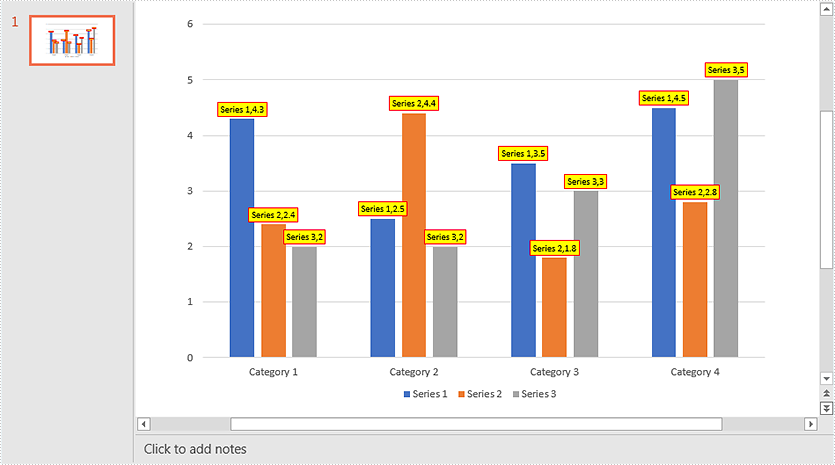
This article demonstrates how to add data labels to a chart and set the appearance (border style and fill style) for the data labels in PowerPoint using Spire.Presentation for Java. Note some chart types like Surface3D, Surface3DNoColor, Contour and ContourNoColor do not support data labels.
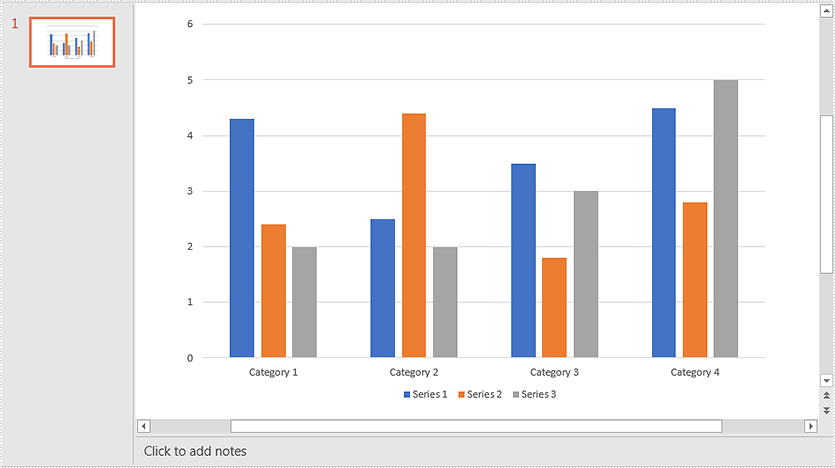
Below screenshot shows the original chart before adding data labels:
import com.spire.presentation.FileFormat;
import com.spire.presentation.ISlide;
import com.spire.presentation.Presentation;
import com.spire.presentation.charts.IChart;
import com.spire.presentation.charts.entity.ChartDataLabel;
import com.spire.presentation.charts.entity.ChartSeriesDataFormat;
import com.spire.presentation.drawing.FillFormatType;

import java.awt.*;

public class AddDataLabelsToChart {
    public static void main(String[] args) throws Exception {
        //Load the PowerPoint document
        Presentation ppt = new Presentation();
        ppt.loadFromFile("Chart.pptx");

        //Get the first slide
        ISlide slide = ppt.getSlides().get(0);
        //Get the chart in the slide
        IChart chart = (IChart)slide.getShapes().get(0);

        //Loop through the series in the chart
        for (ChartSeriesDataFormat series:(Iterable<ChartSeriesDataFormat>)chart.getSeries()) {
             ) {
            //Add data labels for the data points in each series
            for(int i = 0; i < 4; i++){
                ChartDataLabel dataLabel = series.getDataLabels().add();
                //Show label value
                dataLabel.setLabelValueVisible(true);
                //Show series name
                dataLabel.setSeriesNameVisible(true);
                //Set border line style
                dataLabel.getLine().setFillType(FillFormatType.SOLID);
                dataLabel.getLine().getSolidFillColor().setColor(Color.RED);
                //Set fill style
                dataLabel.getFill().setFillType(FillFormatType.SOLID);
                dataLabel.getFill().getSolidColor().setColor(Color.YELLOW);
            }
        }

        //Save the resultant document
        ppt.saveToFile("DataLabels.pptx", FileFormat.PPTX_2013);
    }
}
Output:
Tables in Word are a useful feature for organizing and presenting data. While the default table has an equal number of cells in each column or row, there are times when you may need to combine multiple cells to create a header, or split a cell to accommodate additional data. This article will introduce how to programmatically merge or split cells in a Word table using Spire.Doc for Java.
Install Spire.Doc for Java
First of all, you're required to add the Spire.Doc.jar file as a dependency in your Java program. The JAR file can be downloaded from this link. If you use Maven, you can easily import the JAR file in your application by adding the following code to your project's pom.xml file.
<repositories>
    <repository>
        <id>com.e-iceblue</id>
        <name>e-iceblue</name>
        <url>https://repo.e-iceblue.com/nexus/content/groups/public/</url>
    </repository>
</repositories>
<dependencies>
    <dependency>
        <groupId>e-iceblue</groupId>
        <artifactId>spire.doc</artifactId>
        <version>14.8.4</version>
    </dependency>
</dependencies>
Merge Table Cells in Word in Java
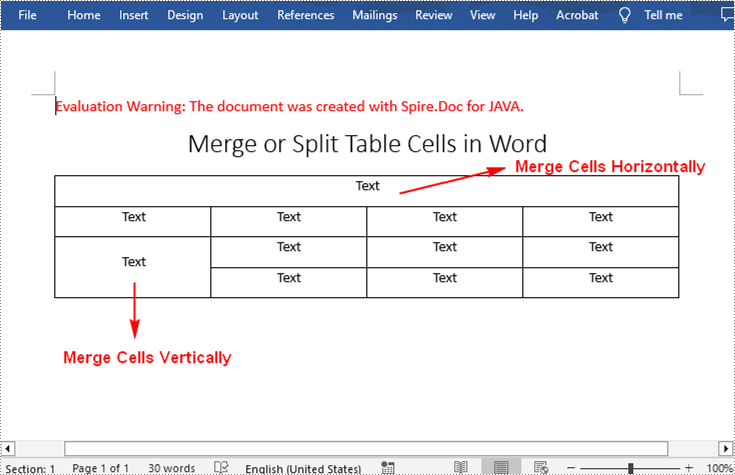
With Spire.Doc for .NET, you can merge two or more adjacent cells horizontally or vertically using the Table.applyHorizontalMerge() or Table.applyVerticalMerge() method. The following are the detailed steps.
- Create a Document instance.
- Load a Word document using Document.loadFromFile() method.
- Get a specified section in the document using Document.getSections().get() method.
- Add a table to the section using Section.addTable() method.
- Specify the number of rows and columns of the table using Table.resetCells(int rowsNum, int columnsNum) method.
- Horizontally merge specified cells in the table using Table.applyHorizontalMerge(int rowIndex, int startCellIndex, int endCellIndex) method.
- Vertically merge specified cells in the table using Table.applyVerticalMerge(int columnIndex, int startRowIndex, int endRowIndex) method.
- Add some data to the table.
- Save the result document using Document.saveToFile() method.
- Java
import com.spire.doc.*;
import com.spire.doc.documents.HorizontalAlignment;
import com.spire.doc.documents.Paragraph;
import com.spire.doc.documents.VerticalAlignment;

public class MergeTableCell {
    public static void main(String[] args) throws Exception {

        //Create a Document instance
        Document document = new Document();

        //Load a sample Word document
        document.loadFromFile("input.docx");

        //Get the first section
        Section section = document.getSections().get(0);

        //Add a 4 x 4 table to the section
        Table table = section.addTable(true);
        table.resetCells(4, 4);

        //Horizontally merge cells 1, 2, 3, and 4 in the first row
        table.applyHorizontalMerge(0, 0, 3);

        //Vertically merge cells 3 and 4 in the first column
        table.applyVerticalMerge(0, 2, 3);

        //Add some data to the table
        for (int row = 0; row < table.getRows().getCount(); row++) {
            for (int col = 0; col < table.getRows().get(row).getCells().getCount(); col++) {
                TableCell cell = table.get(row, col);
                cell.getCellFormat().setVerticalAlignment(VerticalAlignment.Middle);
                Paragraph paragraph = cell.addParagraph();
                paragraph.getFormat().setHorizontalAlignment(HorizontalAlignment.Center);
                paragraph.setText("Text");
            }
        }

        //Save the result document
        document.saveToFile("MergeTableCells.docx", FileFormat.Docx);
    }
}
Split Table Cells in Word in Java
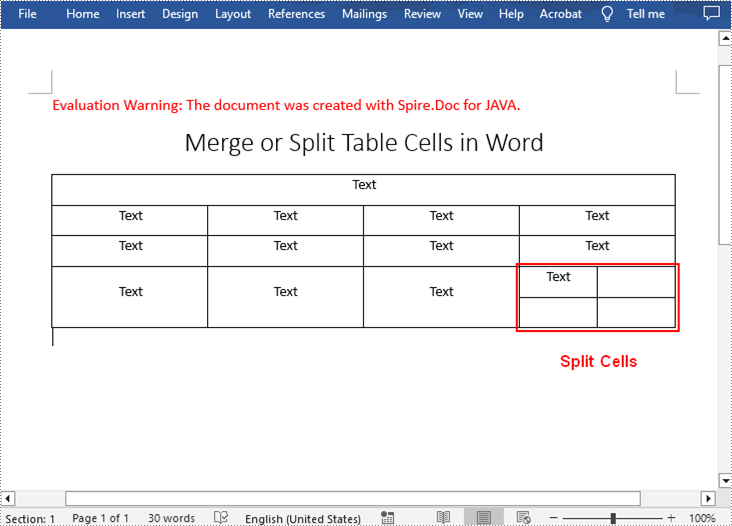
To divide a cell in a Word table into multiple cells, Spire.Doc for .NET offers the TableCell.splitCell(int columnNum, int rowNum) method. The following are the detailed steps.
- Create a Document instance.
- Load a Word document using Document.loadFromFile() method.
- Get a specified section in the document using Document.getSections().get() method.
- Get a specified table in the section using Section.getTables().get() method.
- Get the table cell that need to be split using Table.getRows().get().getCells().get() method.
- Split the cell into specific number of columns and rows using TableCell.splitCell(int columnNum, int rowNum) method.
- Save the result document using Document.saveToFile() method.
- Java
import com.spire.doc.*;

public class SplitTableCell {
    public static void main(String[] args) throws Exception {

        //Create a Document instance
        Document document = new Document();

        //Load a sample Word document
        document.loadFromFile("MergeTableCells.docx");

        //Get the first section
        Section section = document.getSections().get(0);

        //Get the first table in the section
        Table table = section.getTables().get(0);

        //Get the 4th cell in the 4th row
        TableCell cell1 = table.getRows().get(3).getCells().get(3);

        //Split the cell into 2 columns and 2 rows
        cell1.splitCell(2, 2);

        //save the result document
        document.saveToFile("SplitTableCells.docx", FileFormat.Docx);
    }
}
Apply for a Temporary License
If you'd like to remove the evaluation message from the generated documents, or to get rid of the function limitations, please request a 30-day trial license for yourself.
Getting the PDF page size, orientation and rotation angle are tasks that are often required when working with PDF documents. These parameters are important to ensure that the printout meets expectations and that the document content is displayed correctly on different devices. In this article, you will learn how to get the page size, orientation and rotation angle of PDFs in Java using Spire.PDF for Java.
- Get PDF Page Size in Java
- Detect PDF Page Orientation in Java
- Detect PDF Page Rotation Angle in Java
Install Spire.PDF for Java
First of all, you're required to add the Spire.Pdf.jar file as a dependency in your Java program. The JAR file can be downloaded from this link. If you use Maven, you can easily import the JAR file in your application by adding the following code to your project's pom.xml file.
<repositories>
    <repository>
        <id>com.e-iceblue</id>
        <name>e-iceblue</name>
        <url>https://repo.e-iceblue.com/nexus/content/groups/public/</url>
    </repository>
</repositories>
<dependencies>
    <dependency>
        <groupId>e-iceblue</groupId>
        <artifactId>spire.pdf</artifactId>
        <version>12.9.0</version>
    </dependency>
</dependencies>
Get PDF Page Size in Java
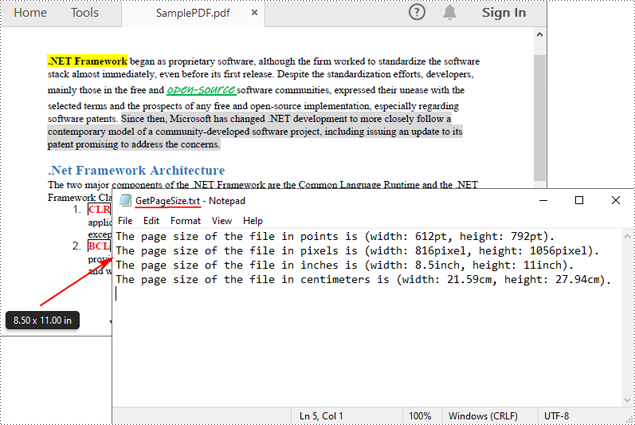
Spire.PDF for Java offers the PdfPageBase.getSize().getWidth() and PdfPageBase.getSize().getHeight() methods to get the width and height of a PDF page in points. If you want to convert the default unit of measure to other units, you can use the PdfUnitConvertor class. The following are the detailed steps.
- Create a PdfDocument instance.
- Load a PDF file using PdfDocument.loadFromFile() method.
- Get a specified page using PdfDocument.getPages().get() method.
- Get the width and height of the PDF page using PdfPageBase.getSize().getWidth() and PdfPageBase.getSize().getHeight() methods.
- Create a PdfUnitConvertor instance, and then convert the size units from points to other units of measure using PdfUnitConvertor.convertUnits() method.
- Add the page size information to a StringBuilder instance, and then save the result to a TXT file.
- Java
import com.spire.pdf.*;
import com.spire.pdf.graphics.*;
import java.io.*;

public class GetPDFPageSize {
    public static void main(String[] args) throws IOException {

        //Create a PdfDocument object
        PdfDocument pdf = new PdfDocument();

        //Load a PDF file from disk
        pdf.loadFromFile("SamplePDF.pdf");

        //Get the first page
        PdfPageBase page = pdf.getPages().get(0);

        //Get the width and height of the page in "point"
        double pointWidth = page.getSize().getWidth();
        double pointHeight = page.getSize().getHeight();

        //Create PdfUnitConvertor to convert the unit
        PdfUnitConvertor unitCvtr = new PdfUnitConvertor();

        //Convert size units from points to pixels
        float pixelWidth = unitCvtr.convertUnits((float) pointWidth, PdfGraphicsUnit.Point, PdfGraphicsUnit.Pixel);
        float pixelHeight = unitCvtr.convertUnits((float) pointHeight, PdfGraphicsUnit.Point, PdfGraphicsUnit.Pixel);

        //Convert size units from points to inches
        float inchWidth = unitCvtr.convertUnits((float) pointWidth, PdfGraphicsUnit.Point, PdfGraphicsUnit.Inch);
        float inchHeight = unitCvtr.convertUnits((float) pointHeight, PdfGraphicsUnit.Point, PdfGraphicsUnit.Inch);

        //Convert size units from points to centimeters
        float centimeterWidth = unitCvtr.convertUnits((float) pointWidth, PdfGraphicsUnit.Point, PdfGraphicsUnit.Centimeter);
        float centimeterHeight = unitCvtr.convertUnits((float) pointHeight, PdfGraphicsUnit.Point, PdfGraphicsUnit.Centimeter);

        //Create StringBuilder to save
        StringBuilder content = new StringBuilder();

        //Add the page size information to the StringBuilder instance
        content.append("The page size of the file in points is (width: " + pointWidth + "pt, height: " + pointHeight + "pt)." + "\r\n");
        content.append("The page size of the file in pixels is (width: " + pixelWidth + "pixel, height: " + pixelHeight + "pixel)." + "\r\n");
        content.append("The page size of the file in inches is (width: " + inchWidth + "inch, height: " + inchHeight + "inch)." + "\r\n");
        content.append("The page size of the file in centimeters is (width: " + centimeterWidth + "cm, height: " + centimeterHeight + "cm)." + "\r\n");

        //Write information to a txt file
        FileWriter writer = new FileWriter("GetPageSize.txt");
        writer.write(content.toString());
        writer.flush();
        writer.close();

        pdf.close();
        pdf.dispose();
    }
}
Detect PDF Page Orientation in Java
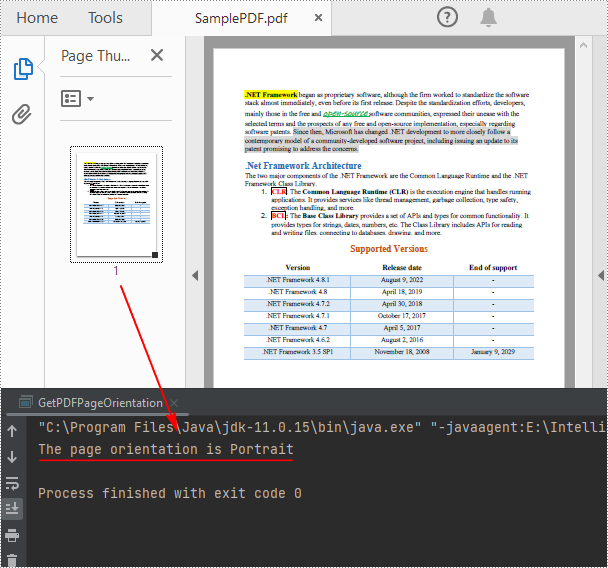
To detect the orientation of a PDF page, you can compare the width and height of the page. If the page width is greater than the height, then the page orientation is landscape, otherwise it is portrait. The following are the detailed steps.
- Create a PdfDocument instance.
- Load a PDF file using PdfDocument.loadFromFile() method.
- Get a specified page using PdfDocument.getPages().get() method.
- Get the width and height of the PDF page using PdfPageBase.getSize().getWidth() and PdfPageBase.getSize().getHeight() methods.
- Compare the values of page width and height to detect the page orientation.
- Print out the result.
- Java
import com.spire.pdf.*;
import java.io.*;

public class GetPDFPageOrientation {
    public static void main(String[] args) throws IOException {

        //Create a PdfDocument object
        PdfDocument pdf = new PdfDocument();

        //Load a PDF file from disk
        pdf.loadFromFile("SamplePDF.pdf");

        //Get the first page
        PdfPageBase page = pdf.getPages().get(0);

        //Get the width and height of the page
        double width = page.getSize().getWidth();
        double height = page.getSize().getHeight();

        //Compare the value of page width and height
        if (width> height){
            System.out.println("The page orientation is Landscape");
        }
        else{
            System.out.println("The page orientation is Portrait");
        }
    }
}
Detect PDF Page Rotation Angle in Java
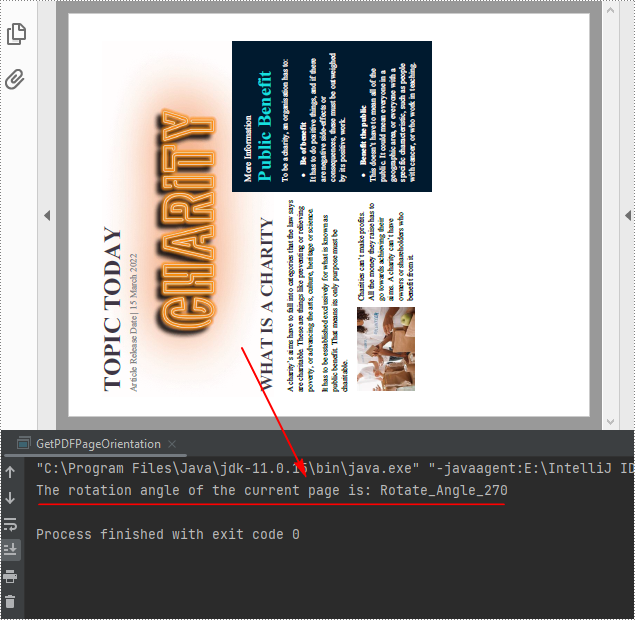
The rotation angle of a PDF page can be obtained through the PdfPageBase.getRotation() method. The following are the detailed steps.
- Create a PdfDocument instance.
- Load a PDF file using PdfDocument.loadFromFile() method.
- Get a specified page using PdfDocument.getPages().get() method.
- Get the rotation angle of the page using PdfPageBase.getRotation() method, and then convert it to text string.
- Create a PdfUnitConvertor instance, and then convert the size units from points to other units of measure using PdfUnitConvertor.convertUnits() method.
- Print out the result.
- Java
import com.spire.pdf.*;
import java.io.*;

public class GetPDFPageOrientation {
    public static void main(String[] args) throws IOException {

        //Create a PdfDocument object
        PdfDocument pdf = new PdfDocument();

        //Load a PDF file from disk
        pdf.loadFromFile("Sample.pdf");

        //Get the first page
        PdfPageBase page = pdf.getPages().get(0);

        //Get the rotation angle of the current page
        PdfPageRotateAngle rotationAngle = page.getRotation();
        String rotation = rotationAngle.toString();

        //Print out the page rotation angle information
        System.out.println("The rotation angle of the current page is: " + rotation);
    }
}
Apply for a Temporary License
If you'd like to remove the evaluation message from the generated documents, or to get rid of the function limitations, please request a 30-day trial license for yourself.
