Java (485)
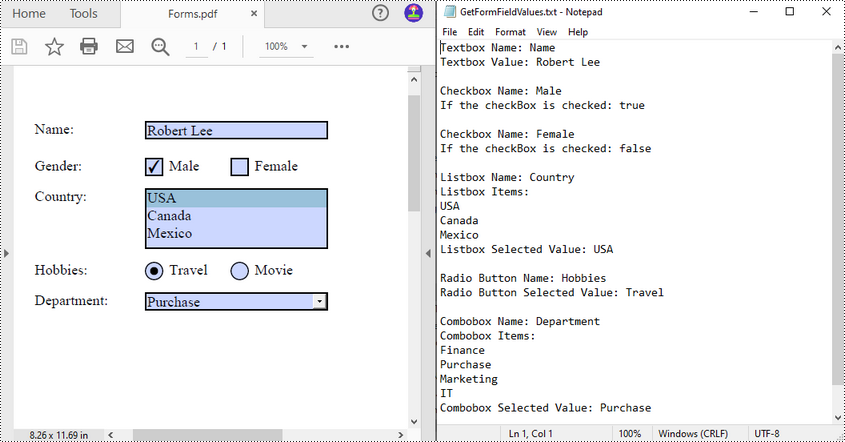
Extracting values from PDF forms can be a crucial task for organizations looking to analyze and utilize the information collected from these forms. For example, a company may use PDF forms to collect customer contact details or feedback on products or services. By extracting the PDF form data, the company can easily input the information into their database for further analysis and follow-up. In this article, you will learn how to extract values from PDF forms in Java using Spire.PDF for Java.
Install Spire.PDF for Java
First of all, you're required to add the Spire.Pdf.jar file as a dependency in your Java program. The JAR file can be downloaded from this link. If you use Maven, you can easily import the JAR file in your application by adding the following code to your project's pom.xml file.
<repositories>
    <repository>
        <id>com.e-iceblue</id>
        <name>e-iceblue</name>
        <url>https://repo.e-iceblue.com/nexus/content/groups/public/</url>
    </repository>
</repositories>
<dependencies>
    <dependency>
        <groupId>e-iceblue</groupId>
        <artifactId>spire.pdf</artifactId>
        <version>12.9.0</version>
    </dependency>
</dependencies>
Extract Data from PDF Forms in Java
Spire.PDF for Java supports various types of PDF form fields, including:
- Text box field (represented by the PdfTextBoxFieldWidget class)
- Check box field (represented by the PdfCheckBoxWidgetFieldWidget class)
- Radio button field (represented by the PdfRadioButtonListFieldWidget class)
- List box field (represented by the PdfListBoxWidgetFieldWidget class)
- Combo box field (represented by the PdfComboBoxWidgetFieldWidget class)
Before extracting data from the PDF forms, it is necessary to determine the specific type of each form field first, and then you can use the properties of the corresponding form field class to extract their values accurately. The following are the detailed steps.
- Initialize an instance of the PdfDocument class.
- Load a PDF document using PdfDocument.loadFromFile() method.
- Get the forms in the PDF document using PdfDocument.getForm() method.
- Create a StringBuilder instance to store the extracted form field values.
- Iterate through all fields in the PDF forms.
- Determine the types of the form fields, then get the names and values of the form fields using the corresponding properties.
- Write the results to a txt file.
- Java
import com.spire.pdf.PdfDocument;
import com.spire.pdf.fields.PdfField;
import com.spire.pdf.widget.*;

import java.io.FileWriter;
import java.io.IOException;

public class ReadPdfFormValues {
    public static void main(String[] args) throws Exception{
        //Create a PdfDocument instance
        PdfDocument pdf = new PdfDocument();

        //Load a PDF document
        pdf.loadFromFile("forms.pdf");

        //Create a StringBuilder instance
        StringBuilder sb = new StringBuilder();

        //Get PDF forms
        PdfFormWidget formWidget = (PdfFormWidget)pdf.getForm();

        //Iterate through all fields in the form
        for (int i = 0; i < formWidget.getFieldsWidget().getList().size(); i++)
        {
            PdfField field = (PdfField)formWidget.getFieldsWidget().getList().get(i);

            //Get the name and value of the textbox field
            if (field instanceof PdfTextBoxFieldWidget)
            {
                PdfTextBoxFieldWidget textBoxField = (PdfTextBoxFieldWidget)field ;
                String text = textBoxField.getName();
                String value = textBoxField.getText();
                sb.append("Textbox Name: " + text + "\r\n");
                sb.append("Textbox Value: " + value + "\n\r");
            }

            //Get the name of the listbox field
            if (field instanceof PdfListBoxWidgetFieldWidget)
            {
                PdfListBoxWidgetFieldWidget listBoxField = (PdfListBoxWidgetFieldWidget)field;
                String name = listBoxField.getName();
                sb.append("Listbox Name: " + name + "\r\n");

                //Get the items of the listbox field
                sb.append("Listbox Items: \r\n");
                PdfListWidgetItemCollection items = listBoxField.getValues();
                for (int j = 0; j < items.getCount(); j ++)
                {
                    sb.append( items.get(j).getValue() + "\r\n");
                }

                //Get the selected item of the listbox field
                String selectedValue = listBoxField.getSelectedValue();
                sb.append("Listbox Selected Value: " + selectedValue + "\n\r");

            }

            //Get the name of the combo box field
            if (field instanceof PdfComboBoxWidgetFieldWidget)
            {
                PdfComboBoxWidgetFieldWidget comBoxField = (PdfComboBoxWidgetFieldWidget)field;
                String name = comBoxField.getName();
                sb.append("Combobox Name: " + name + "\r\n");

                //Get the items of the combo box field
                sb.append("Combobox Items: \r\n");
                PdfListWidgetItemCollection items = comBoxField.getValues();
                for (int j = 0; j < items.getCount(); j ++)
                {
                    sb.append( items.get(j).getValue() + "\r\n");
                }

                //Get the selected item of the combo box field
                String selectedValue = comBoxField.getSelectedValue();
                sb.append("Combobox Selected Value: " + selectedValue + "\n\r");

            }

            //Get the name and selected item of the radio button field
            if (field instanceof PdfRadioButtonListFieldWidget)
            {
                PdfRadioButtonListFieldWidget radioBtnField = (PdfRadioButtonListFieldWidget)field;
                String name = radioBtnField.getName();
                String value = radioBtnField.getValue();
                sb.append("Radio Button Name: " + name + "\r\n");
                sb.append("Radio Button Selected Value: " + value + "\n\r");
            }

            //Get the name and status of the checkbox field
            if (field instanceof PdfCheckBoxWidgetFieldWidget)
            {
                PdfCheckBoxWidgetFieldWidget checkBoxField = (PdfCheckBoxWidgetFieldWidget)field;
                String name = checkBoxField.getName();
                sb.append("Checkbox Name: " + name + "\r\n");

                boolean state = checkBoxField.getChecked();
                sb.append("If the checkBox is checked: " + state + "\n\r");
            }
        }

        //Write the results to a txt file
        writeStringToTxt(sb.toString(), "GetFormFieldValues.txt");
    }

    public static void writeStringToTxt(String content, String txtFileName) throws IOException {
        FileWriter fWriter = new FileWriter(txtFileName, true);
        try {
            fWriter.write(content);
        } catch (IOException ex) {
            ex.printStackTrace();
        } finally {
            try {
                fWriter.flush();
                fWriter.close();
            } catch (IOException ex) {
                ex.printStackTrace();
            }
        }
    }
}
Apply for a Temporary License
If you'd like to remove the evaluation message from the generated documents, or to get rid of the function limitations, please request a 30-day trial license for yourself.
Page numbers provide clarity and structure to the content, making it easier for readers to navigate through the document. By including page numbers, readers can quickly locate specific information or refer to a specific page. Adding page numbers to a PDF document is a common requirement when creating professional and organized files. Whether you're working on a report, a thesis, or any other type of PDF document, incorporating page numbers enhances the overall readability and professionalism of your work.
In this article, you will learn how to add page numbers to a PDF document at the footer section using Spire.PDF for Java.
- Add Page Numbers to the Left Corner of PDF Footer
- Add Page Numbers to the Center of PDF Footer
- Add Page Numbers to the Right Corner of PDF Footer
Install Spire.PDF for Java
You're required to add the Spire.Pdf.jar file as a dependency in your Java program. The JAR file can be downloaded from this link. If you use Maven, you can easily import the JAR file in your application by adding the following code to your project's pom.xml file.
<repositories>
    <repository>
        <id>com.e-iceblue</id>
        <name>e-iceblue</name>
        <url>https://repo.e-iceblue.com/nexus/content/groups/public/</url>
    </repository>
</repositories>
<dependencies>
    <dependency>
        <groupId>e-iceblue</groupId>
        <artifactId>spire.pdf</artifactId>
        <version>12.9.0</version>
    </dependency>
</dependencies>
PDF Coordinate System
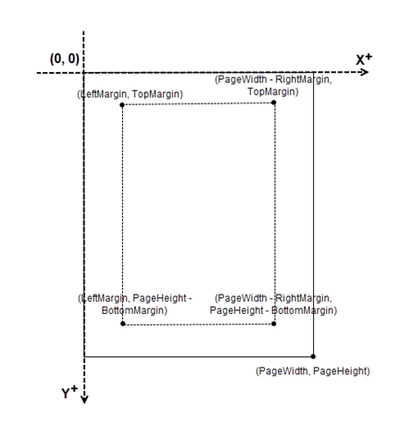
When using Spire.PDF for Java to manipulate an existing PDF document, the coordinate system's origin is positioned at the top left corner of the page. The x-axis extends to the right, while the y-axis extends downward.
In general, page numbers are commonly positioned in the header or footer section of a document. As a result, it is important to consider the page size and margins when deciding where to place the page numbers.
Add Page Numbers to the Left Corner of PDF Footer in Java
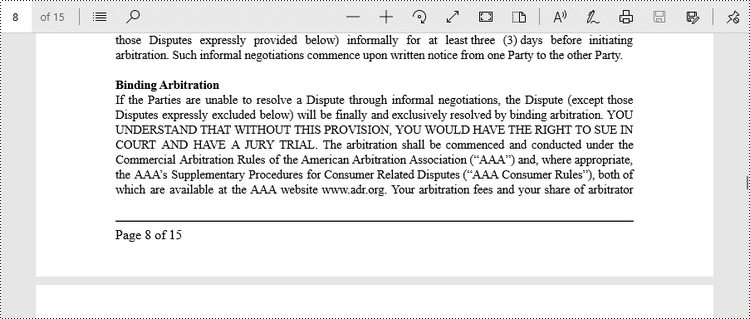
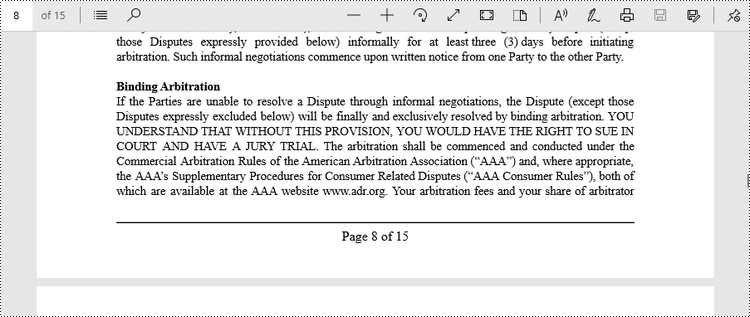
Spire.PDF for Java offers the PdfPageNumberField class and the PdfPageCountField class, which reflect the current page number and the total page count when added to a page of a PDF document. To insert a piece of text like "Page X" or "Page X of Y", you can use a PdfCompositeField object to combine the text with one or more fields into a single field.
To add "Page X of Y" to the left corner of PDF footer, follow the steps below.
- Create a Document object.
- Load a PDF file from a specified page.
- Create a PdfPageNumberField object and a PdfPageCountField object.
- Create a PdfCompositeField object to create a "Page X of Y" format.
- Specify the location of the PdfCompositeField object using PdfCompositeField.setLocation() method.
- Iterate though the pages in the document, and add "Page X of Y" to the left corner of the footer section using PdfCompositeField.draw() method.
- Save the document to a different PDF file.
- Java
import com.spire.pdf.PdfDocument;
import com.spire.pdf.PdfPageBase;
import com.spire.pdf.automaticfields.PdfCompositeField;
import com.spire.pdf.automaticfields.PdfPageCountField;
import com.spire.pdf.automaticfields.PdfPageNumberField;
import com.spire.pdf.graphics.*;
import com.spire.pdf.license.LicenseProvider;

import java.awt.*;
import java.awt.geom.Dimension2D;
import java.awt.geom.Point2D;

public class AddPageNumberToLeftCorner {

    public static void main(String[] args) {

        // Apply your license key
        LicenseProvider.setLicenseKey("License Key");

        // Create a PdfDocument object
        PdfDocument doc = new PdfDocument();

        // Load a PDF file
        doc.loadFromFile("C:\\Users\\Administrator\\Desktop\\Terms of service.pdf");

        // Create font, brush and pen, which determine the appearance of the page numbers to be added
        PdfTrueTypeFont font = new PdfTrueTypeFont(new Font("Times New Roman", Font.PLAIN, 12),true);
        PdfBrush brush = PdfBrushes.getBlack();
        PdfPen pen = new PdfPen(brush, 1.0);

        // Create a PdfPageNumberField object and a PdfPageCountField object
        PdfPageNumberField pageNumberField = new PdfPageNumberField();
        PdfPageCountField pageCountField = new PdfPageCountField();

        // Create a PdfCompositeField object to combine page count field and page number field in a single field
        PdfCompositeField compositeField = new PdfCompositeField(font, brush, "Page {0} of {1}", pageNumberField, pageCountField);

        // Get the page size
        Dimension2D pageSize = doc.getPages().get(0).getSize();

        // Set the location of the composite field
        compositeField.setLocation(new Point2D.Float(72, (float) pageSize.getHeight() - 45));

        // Iterate through the pages in the document
        for (int i = 0; i < doc.getPages().getCount(); i++) {

            // Get a specific page
            PdfPageBase page = doc.getPages().get(i);

            // Draw a line at the specified position
            page.getCanvas().drawLine(pen, 72, pageSize.getHeight() - 50, pageSize.getWidth() - 72, pageSize.getHeight() - 50);

            // Draw the composite field on the page
            compositeField.draw(page.getCanvas(), 0.0, 0.0);
        }

        // Save to a different PDF file
        doc.saveToFile("Output/AddPageNumbersToLeftCorner.pdf");

        // Dispose resources
        doc.dispose();
    }
}
Add Page Numbers to the Center of PDF Footer in Java
To center-align the page number in the footer section, it is necessary to dynamically calculate the width of the text "Page X of Y." This calculation is important because the X coordinate of the page number (PdfCompositeField) will be determined by subtracting the width of the page number from the page width and then dividing the result by 2, i.e., (PageWidth - PageNumberWidth)/2.
The steps to add page numbers to the center of PDF footer are as follows.
- Create a Document object.
- Load a PDF file from a specified page.
- Create a PdfPageNumberField object and a PdfPageCountField object.
- Create a PdfCompositeField object to create a "Page X of Y" format.
- Specify the location of the PdfCompositeField object using PdfCompositeField.setLocation() method.
- Iterate though the pages in the document, and add "Page X of Y" to the center of the footer section using PdfCompositeField.draw() method.
- Save the document to a different PDF file.
- Java
import com.spire.pdf.PdfDocument;
import com.spire.pdf.PdfPageBase;
import com.spire.pdf.automaticfields.PdfCompositeField;
import com.spire.pdf.automaticfields.PdfPageCountField;
import com.spire.pdf.automaticfields.PdfPageNumberField;
import com.spire.pdf.graphics.PdfBrush;
import com.spire.pdf.graphics.PdfBrushes;
import com.spire.pdf.graphics.PdfPen;
import com.spire.pdf.graphics.PdfTrueTypeFont;
import com.spire.pdf.license.LicenseProvider;

import java.awt.*;
import java.awt.geom.Dimension2D;
import java.awt.geom.Point2D;

public class AddPageNumberToCenter {

    public static void main(String[] args) {

        // Apply your license key
        LicenseProvider.setLicenseKey("License Key");

        // Create a PdfDocument object
        PdfDocument doc = new PdfDocument();

        // Load a PDF file
        doc.loadFromFile("C:\\Users\\Administrator\\Desktop\\Terms of service.pdf");

        // Create font, brush and pen, which determine the appearance of the page numbers to be added
        PdfTrueTypeFont font = new PdfTrueTypeFont(new Font("Times New Roman", Font.PLAIN, 12),true);
        PdfBrush brush = PdfBrushes.getBlack();
        PdfPen pen = new PdfPen(brush, 1.0);

        // Create a PdfPageNumberField object and a PdfPageCountField object
        PdfPageNumberField pageNumberField = new PdfPageNumberField();
        PdfPageCountField pageCountField = new PdfPageCountField();

        // Create a PdfCompositeField object to combine page count field and page number field in a single field
        PdfCompositeField compositeField = new PdfCompositeField(font, brush, "Page {0} of {1}", pageNumberField, pageCountField);

        // Iterate through the pages in the document
        for (int i = 0; i < doc.getPages().getCount(); i++) {

            // Get a specific page
            PdfPageBase page = doc.getPages().get(i);

            // Get the page size
            Dimension2D pageSize = doc.getPages().get(i).getSize();

            // Draw a line at the specified position
            page.getCanvas().drawLine(pen, 72, pageSize.getHeight() - 50, pageSize.getWidth() - 72, pageSize.getHeight() - 50);

            // Measure the size the "Page X of Y"
            Dimension2D pageNumberSize = font.measureString(String.format("Page %d of %d", i + 1, doc.getPages().getCount()));

            // Set the location of the composite field
            compositeField.setLocation(new Point2D.Float((float)(pageSize.getWidth() - pageNumberSize.getWidth())/2, (float)pageSize.getHeight() - 45));

            // Draw the composite field on the page
            compositeField.draw(page.getCanvas());
        }

        // Save to a different PDF file
        doc.saveToFile("Output/AddPageNumbersToCenter.pdf");

        // Dispose resources
        doc.dispose();
    }
}
Add Page Numbers to the Right Corner of PDF Footer in Java
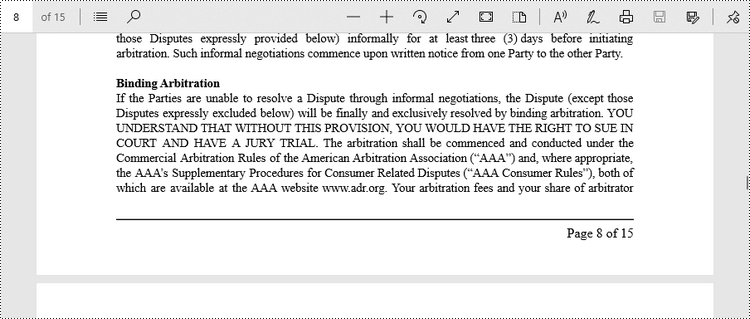
To position the page number at the right corner of the footer section, it is necessary to dynamically calculate the width of the text "Page X of Y" as well. Because the X coordinate of the page number (PdfCompositeField) will be determined by subtracting the width of the page number and the right page margin from the page width, i.e., PageWidth - PageNumberWidth - RightPageMargin.
The steps to add page numbers to the right corner of PDF footer are as follows.
- Create a Document object.
- Load a PDF file from a specified page.
- Create a PdfPageNumberField object and a PdfPageCountField object.
- Create a PdfCompositeField object to create a "Page X of Y" format.
- Specify the location of the PdfCompositeField object using PdfCompositeField.setLocation() method.
- Iterate though the pages in the document, and add "Page X of Y" to the right corner of the footer section using PdfCompositeField.draw() method.
- Save the document to a different PDF file.
- Java
import com.spire.pdf.PdfDocument;
import com.spire.pdf.PdfPageBase;
import com.spire.pdf.automaticfields.PdfCompositeField;
import com.spire.pdf.automaticfields.PdfPageCountField;
import com.spire.pdf.automaticfields.PdfPageNumberField;
import com.spire.pdf.graphics.PdfBrush;
import com.spire.pdf.graphics.PdfBrushes;
import com.spire.pdf.graphics.PdfPen;
import com.spire.pdf.graphics.PdfTrueTypeFont;
import com.spire.pdf.license.LicenseProvider;

import java.awt.*;
import java.awt.geom.Dimension2D;
import java.awt.geom.Point2D;

public class AddPageNumberToRightCorner {

    public static void main(String[] args) {

        // Apply your license key
        LicenseProvider.setLicenseKey("License Key");

        // Create a PdfDocument object
        PdfDocument doc = new PdfDocument();

        // Load a PDF file
        doc.loadFromFile("C:\\Users\\Administrator\\Desktop\\Terms of service.pdf");

        // Create font, brush and pen, which determine the appearance of the page numbers to be added
        PdfTrueTypeFont font = new PdfTrueTypeFont(new Font("Times New Roman", Font.PLAIN, 12),true);
        PdfBrush brush = PdfBrushes.getBlack();
        PdfPen pen = new PdfPen(brush, 1.0);

        // Create a PdfPageNumberField object and a PdfPageCountField object
        PdfPageNumberField pageNumberField = new PdfPageNumberField();
        PdfPageCountField pageCountField = new PdfPageCountField();

        // Create a PdfCompositeField object to combine page count field and page number field in a single field
        PdfCompositeField compositeField = new PdfCompositeField(font, brush, "Page {0} of {1}", pageNumberField, pageCountField);

        // Iterate through the pages in the document
        for (int i = 0; i < doc.getPages().getCount(); i++) {

            // Get a specific page
            PdfPageBase page = doc.getPages().get(i);

            // Get the page size
            Dimension2D pageSize = doc.getPages().get(i).getSize();

            // Draw a line at the specified position
            page.getCanvas().drawLine(pen, 72, pageSize.getHeight() - 50, pageSize.getWidth() - 72, pageSize.getHeight() - 50);

            // Measure the size the "Page X of Y"
            Dimension2D pageNumberSize = font.measureString(String.format("Page %d of %d", i + 1, doc.getPages().getCount()));

            // Set the location of the composite field
            compositeField.setLocation(new Point2D.Float((float)(pageSize.getWidth() - pageNumberSize.getWidth() -  72), (float)(pageSize.getHeight() - 45)));

            // Draw the composite field on the page
            compositeField.draw(page.getCanvas());
        }

        // Save to a different PDF file
        doc.saveToFile("Output/AddPageNumbersToRightCorner.pdf");

        // Dispose resources
        doc.dispose();
    }
}
Apply for a Temporary License
If you'd like to remove the evaluation message from the generated documents, or to get rid of the function limitations, please request a 30-day trial license for yourself.
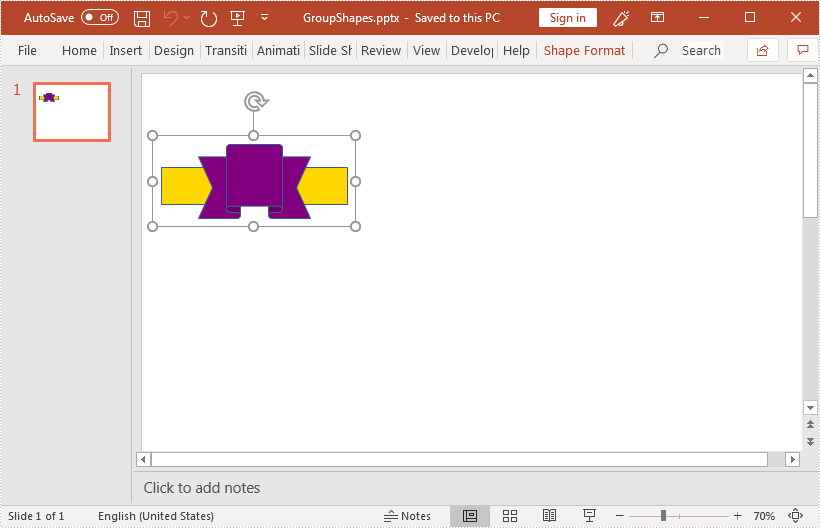
This article demonstrates how to group shapes in a PowerPoint document using Spire.Presentation for Java.
import com.spire.presentation.*;
import com.spire.presentation.drawing.FillFormatType;

import java.awt.geom.Rectangle2D;
import java.util.ArrayList;

public class GroupShapes {
    public static void main(String[] args) throws Exception {
        //create a PowerPoint document
        Presentation ppt = new Presentation();
        //get the first slide
        ISlide slide = ppt.getSlides().get(0);

        //add a rectangle shape to the slide
        IShape rectangle = slide.getShapes().appendShape(ShapeType.RECTANGLE, new Rectangle2D.Double(20,100,200,40));
        rectangle.getFill().setFillType(FillFormatType.SOLID);
        rectangle.getFill().getSolidColor().setKnownColor(KnownColors.GOLD);
        rectangle.getLine().setWidth(0.1f);

        //add a ribbon shape to the slide
        IShape ribbon = slide.getShapes().appendShape(ShapeType.RIBBON_2, new Rectangle2D.Double(60, 75, 120, 80));
        ribbon.getFill().setFillType(FillFormatType.SOLID);
        ribbon.getFill().getSolidColor().setKnownColor(KnownColors.PURPLE);
        ribbon.getLine().setWidth(0.1f);

        //add the shapes to a list
        ArrayList list = new ArrayList();
        list.add((Shape)rectangle);
        list.add((Shape)ribbon);

        //group the shapes
        ppt.getSlides().get(0).groupShapes(list);

        //save the resultant document
        ppt.saveToFile("GroupShapes.pptx", FileFormat.PPTX_2013);
    }
}