5 maneiras de tornar um arquivo do Word somente leitura
Índice
- Marcar um documento do Word como final (todas as versões do Word)
- Sempre abrir arquivos do Word no modo somente leitura (Word 2019 ou posterior)
- Restringir edição para tornar documentos do Word somente leitura
- Salvar arquivos do Word como PDF para proteção completa somente leitura
- Automatizar a proteção de arquivos do Word com Python (senha ou PDF)
- Qual método você deve escolher?
- Palavras Finais
- Perguntas frequentes sobre como tornar arquivos do Word somente leitura

Ao compartilhar um documento do Word, talvez você não queira que outras pessoas alterem acidentalmente seu conteúdo. Seja um contrato, relatório, certificado ou proposta finalizada, tornar um arquivo do Word somente leitura ajuda a preservar a formatação, manter a integridade do documento e garantir que os destinatários visualizem — mas não alterem — seu trabalho.
O Microsoft Word oferece várias maneiras de tornar seus arquivos somente leitura, dependendo da versão que você está usando e do nível de proteção de que precisa. Neste guia, exploraremos cinco métodos eficazes — desde configurações manuais simples como “Marcar como Final” até soluções automatizadas usando Python. Ao final, você saberá exatamente como proteger seus documentos do Word, esteja usando o Word 2016, Word 2019 ou edições mais recentes do Microsoft 365.
- Marcar um documento do Word como final (todas as versões do Word)
- Sempre abrir arquivos do Word no modo somente leitura (Word 2019 ou posterior)
- Restringir edição para tornar documentos do Word somente leitura
- Salvar arquivos do Word como PDF para proteção completa somente leitura
- Automatizar a proteção de arquivos do Word com Python (senha ou PDF)
Marcar um documento do Word como final (todas as versões do Word)
Se você está usando o Microsoft Word, uma das maneiras mais simples de tornar um arquivo somente leitura é marcá-lo como final. Este recurso está disponível em todas as versões modernas do Word e indica que o documento está completo, desencorajando outras pessoas de fazerem mais edições.
Passos:
-
Abra seu documento do Word.
-
Vá para Arquivo → Informações → Proteger Documento → Marcar como Final.
-
Clique em OK quando solicitado.
-
Salve e feche o documento.
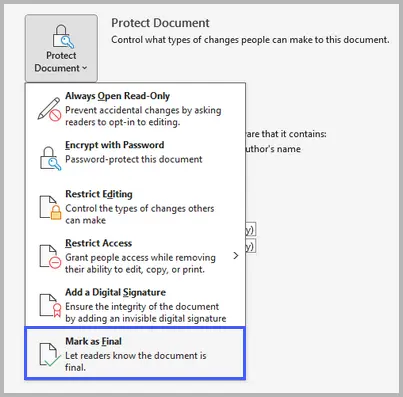
Esta abordagem define o documento para um status de somente leitura e desencoraja a edição, mas não impede que alguém remova a marca “Marcar como Final” para editar o arquivo. É melhor usado como um sinal de que o documento está completo, não como uma medida de segurança estrita.
Prós e Contras
✔ Rápido e simples; nenhuma senha necessária.
✘ Os usuários podem contorná-lo facilmente clicando em Editar Mesmo Assim.
Sempre abrir arquivos do Word no modo somente leitura (Word 2019 ou posterior)
A partir do Word 2019 e do Microsoft 365, a Microsoft introduziu uma maneira mais moderna de fazer com que os documentos abram no modo somente visualização — o recurso “Sempre Abrir Somente Leitura”.
Passos:
-
Abra seu arquivo no Word.
-
Clique em Arquivo → Informações → Proteger Documento → Sempre Abrir Somente Leitura.
- Salve o documento.
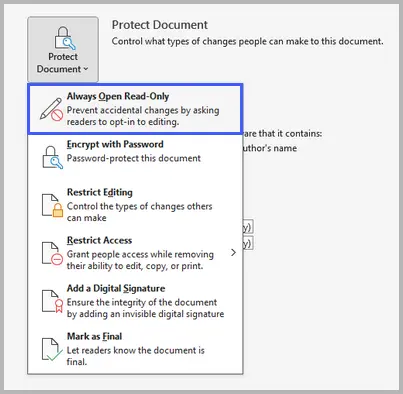
Este recurso diz ao Word para sempre abrir o arquivo no modo somente leitura por padrão. Ele não bloqueia a edição completamente, mas os usuários devem habilitar a edição manualmente antes de fazer alterações — reduzindo o risco de modificações acidentais.
Prós e Contras
✔ Conveniente e ciente da versão; funciona perfeitamente com o OneDrive e o SharePoint.
✘ Disponível apenas no Word 2019 e versões posteriores.
Restringir edição para tornar documentos do Word somente leitura
Para um controle mais forte, use o recurso Restringir Edição do Word. Ele permite que você impeça alterações e, opcionalmente, adicione uma senha, garantindo que apenas usuários autorizados possam modificar o arquivo. Este método está disponível em quase todas as versões do Word.
Passos:
-
Abra seu documento.
-
Vá para Arquivo → Informações → Proteger Documento → Restringir Edição.
- Em Restrições de edição, marque Permitir apenas este tipo de edição no documento.
- No menu suspenso, selecione Sem alterações (Somente leitura).
- Clique em Sim, Iniciar Aplicação da Proteção, e defina uma senha (opcional).
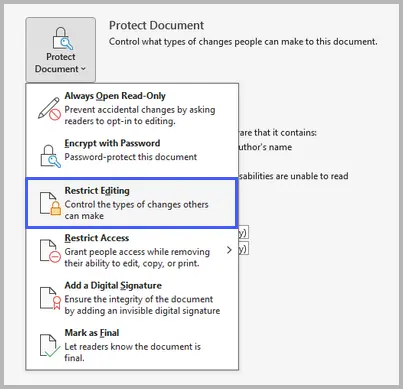
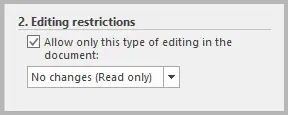
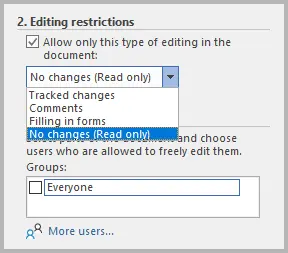
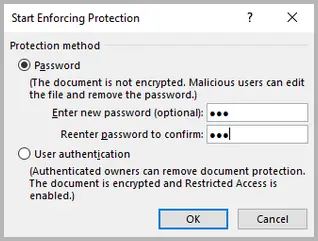
Esta opção oferece proteção robusta. Requer uma senha para desproteger o documento, impedindo que qualquer pessoa sem ela faça alterações. É ideal para arquivos confidenciais, contratos e documentos oficiais.
Prós e Contras
✔ Forte e protegido por senha; impede edições intencionais e acidentais.
✘ Requer tempo de configuração e gerenciamento de senhas.
Salvar arquivos do Word como PDF para proteção completa somente leitura
Se você precisa bloquear completamente o conteúdo e a formatação, converter o documento do Word para um PDF é a melhor escolha. Os PDFs são naturalmente mais seguros e mais difíceis de editar.
Passos:
- Abra seu documento do Word.
- Vá para Arquivo → Salvar Como.
- Escolha PDF como o formato do arquivo.
-
(Opcional) Clique em Opções e habilite Compatível com ISO 19005-1 (PDF/A) para qualidade de arquivamento.
-
Salve seu arquivo.
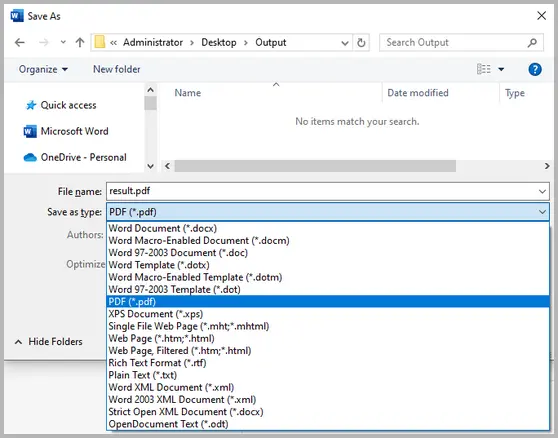
Esta abordagem transforma seu arquivo do Word em um formato somente leitura que preserva o layout e o design. Você pode adicionar mais restrições ou senhas em um editor de PDF para controlar a impressão, cópia ou edição.
Prós e Contras
✔ Garante formatação consistente; excelente para distribuir versões finais.
✘ Não pode ser facilmente convertido de volta para o formato editável do Word.
Automatizar a proteção de arquivos do Word com Python (senha ou PDF)
Se você lida com muitos documentos do Word regularmente, automatizar o processo de proteção pode economizar muito tempo. Usando Spire.Doc for Python, você pode adicionar senhas programaticamente ou converter arquivos para PDF em massa.
Antes de começar, você precisará instalar a biblioteca do PyPI usando o seguinte comando:
pip install spire.doc
Exemplo 1: Proteger um arquivo do Word com uma senha
from spire.doc import *
from spire.doc.common import *

# Create a Document object
doc = Document()

# Load a Word file
doc.LoadFromFile("C:\\Users\\Administrator\\Desktop\\input.docx")

# Encrypt the document with an open password
doc.Encrypt("open-psd")

# Set the editing restriction type to allow read only
doc.Protect(ProtectionType.AllowOnlyReading, "permission-psd")

# Save the document
doc.SaveToFile("output/EditingRestrictions.docx")
doc.Close()
Aqui está o guia completo sobre como: Definir ou Remover Restrições de Edição de Documentos do Word em Python
Exemplo 2: Converter Word para PDF automaticamente
from spire.doc import *
from spire.doc.common import *

# Create a Document object
doc = Document()

# Load a Word file
doc.LoadFromFile("C:\\Users\\Administrator\\Desktop\\input.docx")

# Save the document to PDF
doc.SaveToFile("output/ToPDF.pdf", FileFormat.PDF)
doc.Close()
Leia mais: Converter Word para PDF com Python
A automação da proteção é perfeita para organizações ou desenvolvedores que precisam proteger vários arquivos de uma vez. Garante consistência, eficiência e minimiza o erro humano.
Prós e Contras
✔ Ótimo para proteção em lote e fluxos de trabalho de documentos.
✘ Requer conhecimento básico de programação.
Qual método você deve escolher?
Aqui está uma comparação rápida para ajudá-lo a decidir:
| Método | Nível de Proteção | Funciona Em | Melhor Para |
|---|---|---|---|
| Marcar como Final | Básico | Todas as versões | Sinalizar que um documento está completo |
| Sempre Abrir Somente Leitura | Moderado | Word 2019+ | Prevenir edições casuais |
| Restringir Edição | Forte | Todas as versões | Proteção baseada em senha |
| Salvar como PDF | Forte | Todas as versões | Compartilhar documentos finalizados |
| Automação com Python | Avançado | Multiplataforma | Automatizar a segurança de documentos |
Se você só precisa desencorajar edições, “Marcar como Final” ou “Sempre Abrir Somente Leitura” é suficiente. Para uso profissional ou legal, “Restringir Edição” ou “Salvar como PDF” oferece um controle mais forte. Desenvolvedores que gerenciam um grande número de arquivos devem considerar a automação da proteção com Python.
Palavras Finais
Tornar um documento do Word somente leitura é simples — mas o método certo depende do seu propósito. Para proteção básica, marcar como final ou habilitar o modo somente leitura funciona bem. Para um controle mais forte, use restrições de edição ou salve como PDF. E para cenários em grande escala ou automatizados, os scripts Python fornecem uma solução confiável.
Ao aplicar a abordagem correta, você pode compartilhar documentos com confiança, sem se preocupar com edições indesejadas, garantindo que seu trabalho permaneça seguro e inalterado.
Perguntas frequentes sobre como tornar arquivos do Word somente leitura
Q1. Posso tornar um arquivo do Word somente leitura sem uma senha?
Sim. Você pode usar Marcar como Final ou Sempre Abrir Somente Leitura para desencorajar edições sem exigir uma senha.
Q2. Alguém ainda pode editar um documento do Word “somente leitura”?
Depende do método. “Marcar como Final” e “Sempre Abrir Somente Leitura” podem ser contornados, mas “Restringir Edição” com uma senha impede edições não autorizadas.
Q3. Como removo as restrições de somente leitura de um arquivo do Word?
Abra o documento, vá para Arquivo → Informações → Proteger Documento, e desmarque ou desative o método de proteção aplicado. Você pode precisar de uma senha se uma foi definida.
Q4. Qual é a maneira mais segura de tornar um documento somente leitura?
Salvá-lo como PDF ou aplicar Restringir Edição com uma senha oferece o mais alto nível de proteção.
Q5. Posso automatizar as configurações de somente leitura em massa?
Sim. Você pode usar Python e bibliotecas como Spire.Doc for Python para aplicar senhas ou converter vários arquivos do Word para PDF automaticamente.
Veja Também
Word 파일을 읽기 전용으로 만드는 5가지 방법
Word 문서를 공유할 때 다른 사람이 실수로 내용을 변경하는 것을 원하지 않을 수 있습니다. 계약서, 보고서, 인증서 또는 최종 제안서이든 Word 파일을 읽기 전용으로 만들면 서식을 보존하고 문서 무결성을 유지하며 수신자가 작업을 변경하지 않고 볼 수 있도록 보장합니다.
Microsoft Word는 사용 중인 버전과 필요한 보호 수준에 따라 파일을 읽기 전용으로 만드는 여러 가지 방법을 제공합니다. 이 가이드에서는 "최종본으로 표시"와 같은 간단한 수동 설정부터 Python을 사용한 자동화된 솔루션에 이르기까지 다섯 가지 효과적인 방법을 살펴봅니다. 이 가이드를 마치면 Word 2016, Word 2019 또는 최신 Microsoft 365 버전을 사용하든 Word 문서를 보호하는 방법을 정확히 알게 될 것입니다.
- Word 문서를 최종본으로 표시 (모든 Word 버전)
- 항상 읽기 전용 모드로 Word 파일 열기 (Word 2019 이상)
- 편집을 제한하여 Word 문서를 읽기 전용으로 만들기
- 완벽한 읽기 전용 보호를 위해 Word 파일을 PDF로 저장
- Python으로 Word 파일 보호 자동화 (비밀번호 또는 PDF)
Word 문서를 최종본으로 표시 (모든 Word 버전)
Microsoft Word를 사용하는 경우 파일을 읽기 전용으로 만드는 가장 간단한 방법 중 하나는 최종본으로 표시하는 것입니다. 이 기능은 모든 최신 버전의 Word에서 사용할 수 있으며 문서가 완료되었음을 나타내어 다른 사람이 추가 편집을 하지 못하도록 합니다.
단계:
-
Word 문서를 엽니다.
-
파일 → 정보 → 문서 보호 → 최종본으로 표시로 이동합니다.
-
메시지가 표시되면 확인을 클릭합니다.
-
문서를 저장하고 닫습니다.
이 접근 방식은 문서를 읽기 전용 상태로 설정하고 편집을 권장하지 않지만, 다른 사람이 "최종본으로 표시" 플래그를 제거하여 파일을 편집하는 것을 막지는 못합니다. 엄격한 보안 조치가 아닌 문서가 완료되었다는 신호로 사용하는 것이 가장 좋습니다.
장단점
✔ 빠르고 간단하며 암호가 필요 없습니다.
✘ 사용자는 계속 편집을 클릭하여 쉽게 우회할 수 있습니다.
항상 읽기 전용 모드로 Word 파일 열기 (Word 2019 이상)
Word 2019 및 Microsoft 365부터 Microsoft는 문서를 보기 전용 모드로 열 수 있는 보다 현대적인 방법인 "항상 읽기 전용으로 열기" 기능을 도입했습니다.
단계:
-
Word에서 파일을 엽니다.
-
파일 → 정보 → 문서 보호 → 항상 읽기 전용으로 열기를 클릭합니다.
- 문서를 저장합니다.
이 기능은 Word에 항상 기본적으로 읽기 전용 모드로 파일을 열도록 지시합니다. 편집을 완전히 잠그지는 않지만 사용자는 변경하기 전에 수동으로 편집을 활성화해야 하므로 우발적인 수정 위험을 줄일 수 있습니다.
장단점
✔ 편리하고 버전을 인식하며 OneDrive 및 SharePoint와 원활하게 작동합니다.
✘ Word 2019 이상 버전에서만 사용할 수 있습니다.
편집을 제한하여 Word 문서를 읽기 전용으로 만들기
더 강력한 제어를 위해 Word의 편집 제한 기능을 사용하십시오. 변경을 방지하고 선택적으로 암호를 추가하여 권한 있는 사용자만 파일을 수정할 수 있도록 합니다. 이 방법은 거의 모든 Word 버전에서 사용할 수 있습니다.
단계:
-
문서를 엽니다.
-
파일 → 정보 → 문서 보호 → 편집 제한으로 이동합니다.
- 편집 제한에서 문서에서 이 유형의 편집만 허용을 선택합니다.
- 드롭다운에서 변경 없음(읽기 전용)을 선택합니다.
- 예, 보호 적용 시작을 클릭하고 암호를 설정합니다(선택 사항).
이 옵션은 강력한 보호 기능을 제공합니다. 문서를 보호 해제하려면 암호가 필요하며, 암호가 없는 사람은 변경할 수 없습니다. 기밀 파일, 계약서 및 공식 문서에 이상적입니다.
장단점
✔ 강력하고 암호로 보호되며 의도적이거나 우발적인 편집을 모두 방지합니다.
✘ 설정 시간과 암호 관리가 필요합니다.
완벽한 읽기 전용 보호를 위해 Word 파일을 PDF로 저장
내용과 서식을 완전히 잠가야 하는 경우 Word 문서를 PDF로 변환하는 것이 가장 좋습니다. PDF는 기본적으로 더 안전하고 편집하기가 더 어렵습니다.
단계:
- Word 문서를 엽니다.
- 파일 → 다른 이름으로 저장으로 이동합니다.
- 파일 형식으로 PDF를 선택합니다.
-
(선택 사항) 옵션을 클릭하고 보관 품질을 위해 ISO 19005-1 호환(PDF/A)을 활성화합니다.
-
파일을 저장합니다.
이 접근 방식은 Word 파일을 레이아웃과 디자인을 보존하는 읽기 전용 형식으로 변환합니다. PDF 편집기에서 추가 제한이나 암호를 추가하여 인쇄, 복사 또는 편집을 제어할 수 있습니다.
장단점
✔ 일관된 서식을 보장하며 최종 버전을 배포하는 데 탁월합니다.
✘ 편집 가능한 Word 형식으로 쉽게 다시 변환할 수 없습니다.
Python으로 Word 파일 보호 자동화 (비밀번호 또는 PDF)
정기적으로 많은 Word 문서를 처리하는 경우 보호 프로세스를 자동화하면 많은 시간을 절약할 수 있습니다. Spire.Doc for Python을 사용하면 프로그래밍 방식으로 암호를 추가하거나 파일을 PDF로 대량 변환할 수 있습니다.
시작하기 전에 다음 명령을 사용하여 PyPI에서 라이브러리를 설치해야 합니다.
pip install spire.doc
예제 1: 암호로 Word 파일 보호
from spire.doc import *
from spire.doc.common import *

# Document 객체 생성
doc = Document()

# Word 파일 로드
doc.LoadFromFile("C:\\Users\\Administrator\\Desktop\\input.docx")

# 열기 암호로 문서 암호화
doc.Encrypt("open-psd")

# 편집 제한 유형을 읽기 전용으로 설정
doc.Protect(ProtectionType.AllowOnlyReading, "permission-psd")

# 문서 저장
doc.SaveToFile("output/EditingRestrictions.docx")
doc.Close()
방법에 대한 전체 가이드는 다음과 같습니다. Python에서 Word 문서 편집 제한 설정 또는 제거
예제 2: Word를 PDF로 자동 변환
from spire.doc import *
from spire.doc.common import *

# Document 객체 생성
doc = Document()

# Word 파일 로드
doc.LoadFromFile("C:\\Users\\Administrator\\Desktop\\input.docx")

# 문서를 PDF로 저장
doc.SaveToFile("output/ToPDF.pdf", FileFormat.PDF)
doc.Close()
더 읽어보기: Python으로 Word를 PDF로 변환
보호 자동화는 한 번에 여러 파일을 보호해야 하는 조직이나 개발자에게 적합합니다. 일관성, 효율성을 보장하고 인적 오류를 최소화합니다.
장단점
✔ 일괄 보호 및 문서 워크플로에 적합합니다.
✘ 기본적인 프로그래밍 지식이 필요합니다.
어떤 방법을 선택해야 할까요?
결정에 도움이 되는 빠른 비교는 다음과 같습니다.
| 방법 | 보호 수준 | 작동 환경 | 최적 대상 |
|---|---|---|---|
| 최종본으로 표시 | 기본 | 모든 버전 | 문서가 완료되었음을 알림 |
| 항상 읽기 전용으로 열기 | 중간 | Word 2019+ | 일상적인 편집 방지 |
| 편집 제한 | 강력 | 모든 버전 | 암호 기반 보호 |
| PDF로 저장 | 강력 | 모든 버전 | 최종 문서 공유 |
| Python 자동화 | 고급 | 크로스 플랫폼 | 문서 보안 자동화 |
편집을 막기만 하면 되는 경우 "최종본으로 표시" 또는 "항상 읽기 전용으로 열기"로 충분합니다. 전문적이거나 법적인 용도로는 "편집 제한" 또는 "PDF로 저장"이 더 강력한 제어를 제공합니다. 많은 수의 파일을 관리하는 개발자는 Python으로 보호를 자동화하는 것을 고려해야 합니다.
마지막 말
Word 문서를 읽기 전용으로 만드는 것은 간단하지만 올바른 방법은 목적에 따라 다릅니다. 기본 보호를 위해서는 최종본으로 표시하거나 읽기 전용 모드를 활성화하는 것이 좋습니다. 더 강력한 제어를 위해서는 편집 제한을 사용하거나 PDF로 저장하십시오. 그리고 대규모 또는 자동화된 시나리오의 경우 Python 스크립트가 신뢰할 수 있는 솔루션을 제공합니다.
올바른 접근 방식을 적용하면 원치 않는 편집에 대한 걱정 없이 문서를 자신 있게 공유하여 작업이 안전하고 변경되지 않도록 할 수 있습니다.
Word 파일을 읽기 전용으로 만드는 것에 대한 자주 묻는 질문
Q1. 암호 없이 Word 파일을 읽기 전용으로 만들 수 있나요?
예. 최종본으로 표시 또는 항상 읽기 전용으로 열기를 사용하여 암호 없이 편집을 막을 수 있습니다.
Q2. "읽기 전용" Word 문서를 다른 사람이 여전히 편집할 수 있나요?
방법에 따라 다릅니다. "최종본으로 표시" 및 "항상 읽기 전용으로 열기"는 우회할 수 있지만 암호가 있는 "편집 제한"은 무단 편집을 방지합니다.
Q3. Word 파일에서 읽기 전용 제한을 어떻게 제거하나요?
문서를 열고 파일 → 정보 → 문서 보호로 이동하여 적용된 보호 방법을 선택 취소하거나 비활성화합니다. 암호가 설정된 경우 암호가 필요할 수 있습니다.
Q4. 문서를 읽기 전용으로 만드는 가장 안전한 방법은 무엇인가요?
PDF로 저장하거나 암호로 편집 제한을 적용하는 것이 가장 높은 수준의 보호를 제공합니다.
Q5. 읽기 전용 설정을 대량으로 자동화할 수 있나요?
예. Python 및 Spire.Doc for Python과 같은 라이브러리를 사용하여 암호를 적용하거나 여러 Word 파일을 PDF로 자동 변환할 수 있습니다.
참고 항목
5 façons de rendre un fichier Word en lecture seule
Table des matières
- Marquer un document Word comme final (toutes les versions de Word)
- Toujours ouvrir les fichiers Word en mode lecture seule (Word 2019 ou version ultérieure)
- Restreindre la modification pour rendre les documents Word en lecture seule
- Enregistrer les fichiers Word au format PDF pour une protection complète en lecture seule
- Automatiser la protection des fichiers Word avec Python (mot de passe ou PDF)
- Quelle méthode devriez-vous choisir ?
- Mots de la fin
- FAQ sur la mise en lecture seule des fichiers Word
Lorsque vous partagez un document Word, vous ne souhaitez peut-être pas que d'autres personnes modifient accidentellement votre contenu. Qu'il s'agisse d'un contrat, d'un rapport, d'un certificat ou d'une proposition finalisée, rendre un fichier Word en lecture seule permet de préserver la mise en forme, de maintenir l'intégrité du document et de garantir que les destinataires consultent — mais ne modifient pas — votre travail.
Microsoft Word propose plusieurs façons de rendre vos fichiers en lecture seule, en fonction de la version que vous utilisez et du niveau de protection dont vous avez besoin. Dans ce guide, nous explorerons cinq méthodes efficaces — des paramètres manuels simples comme « Marquer comme final » aux solutions automatisées utilisant Python. À la fin, vous saurez exactement comment protéger vos documents Word, que vous utilisiez Word 2016, Word 2019 ou les éditions plus récentes de Microsoft 365.
- Marquer un document Word comme final (toutes les versions de Word)
- Toujours ouvrir les fichiers Word en mode lecture seule (Word 2019 ou version ultérieure)
- Restreindre la modification pour rendre les documents Word en lecture seule
- Enregistrer les fichiers Word au format PDF pour une protection complète en lecture seule
- Automatiser la protection des fichiers Word avec Python (mot de passe ou PDF)
Marquer un document Word comme final (toutes les versions de Word)
Si vous utilisez Microsoft Word, l'une des façons les plus simples de rendre un fichier en lecture seule est de le marquer comme final. Cette fonctionnalité est disponible dans toutes les versions modernes de Word et indique que le document est terminé, décourageant les autres d'apporter d'autres modifications.
Étapes :
-
Ouvrez votre document Word.
-
Allez dans Fichier → Informations → Protéger le document → Marquer comme final.
-
Cliquez sur OK lorsque vous y êtes invité.
-
Enregistrez et fermez le document.
Cette approche définit le document en lecture seule et décourage la modification, mais elle n'empêche pas quelqu'un de supprimer l'indicateur « Marquer comme final » pour modifier le fichier. Il est préférable de l'utiliser comme un signal que le document est terminé, et non comme une mesure de sécurité stricte.
Avantages et inconvénients
✔ Rapide et simple ; aucun mot de passe requis.
✘ Les utilisateurs peuvent facilement le contourner en cliquant sur Modifier quand même.
Toujours ouvrir les fichiers Word en mode lecture seule (Word 2019 ou version ultérieure)
À partir de Word 2019 et de Microsoft 365, Microsoft a introduit une manière plus moderne d'ouvrir les documents en mode affichage seul — la fonctionnalité « Toujours ouvrir en lecture seule ».
Étapes :
-
Ouvrez votre fichier dans Word.
-
Cliquez sur Fichier → Informations → Protéger le document → Toujours ouvrir en lecture seule.
- Enregistrez le document.
Cette fonctionnalité indique à Word d'ouvrir toujours le fichier en mode lecture seule par défaut. Elle ne verrouille pas entièrement la modification, mais les utilisateurs doivent activer manuellement la modification avant d'apporter des changements — réduisant ainsi le risque de modifications accidentelles.
Avantages et inconvénients
✔ Pratique et conscient de la version ; fonctionne de manière transparente avec OneDrive et SharePoint.
✘ Uniquement disponible dans Word 2019 et les versions ultérieures.
Restreindre la modification pour rendre les documents Word en lecture seule
Pour un contrôle plus strict, utilisez la fonctionnalité Restreindre la modification de Word. Elle vous permet d'empêcher les modifications et d'ajouter éventuellement un mot de passe, garantissant que seuls les utilisateurs autorisés peuvent modifier le fichier. Cette méthode est disponible dans presque toutes les versions de Word.
Étapes :
-
Ouvrez votre document.
-
Allez dans Fichier → Informations → Protéger le document → Restreindre la modification.
- Sous Restrictions de modification, cochez Autoriser uniquement ce type de modification dans le document.
- Dans le menu déroulant, sélectionnez Aucune modification (Lecture seule).
- Cliquez sur Oui, activer la protection, et définissez un mot de passe (facultatif).
Cette option offre une protection robuste. Elle nécessite un mot de passe pour déprotéger le document, empêchant quiconque sans celui-ci d'apporter des modifications. C'est idéal pour les fichiers confidentiels, les contrats et les documents officiels.
Avantages et inconvénients
✔ Robuste et protégé par mot de passe ; empêche les modifications intentionnelles et accidentelles.
✘ Nécessite un temps de configuration et une gestion des mots de passe.
Enregistrer les fichiers Word au format PDF pour une protection complète en lecture seule
Si vous avez besoin de verrouiller complètement le contenu et la mise en forme, la conversion du document Word en PDF est le meilleur choix. Les PDF sont naturellement plus sécurisés et plus difficiles à modifier.
Étapes :
- Ouvrez votre document Word.
- Allez dans Fichier → Enregistrer sous.
- Choisissez PDF comme format de fichier.
-
(Facultatif) Cliquez sur Options et activez Conforme à la norme ISO 19005-1 (PDF/A) pour une qualité d'archivage.
-
Enregistrez votre fichier.
Cette approche transforme votre fichier Word en un format en lecture seule qui préserve la mise en page et le design. Vous pouvez ajouter d'autres restrictions ou mots de passe dans un éditeur PDF pour contrôler l'impression, la copie ou la modification.
Avantages et inconvénients
✔ Assure une mise en forme cohérente ; excellent pour la distribution des versions finales.
✘ Ne peut pas être facilement reconverti au format Word modifiable.
Automatiser la protection des fichiers Word avec Python (mot de passe ou PDF)
Si vous manipulez régulièrement de nombreux documents Word, l'automatisation du processus de protection peut vous faire gagner beaucoup de temps. En utilisant Spire.Doc for Python, vous pouvez ajouter des mots de passe par programme ou convertir des fichiers en PDF en masse.
Avant de commencer, vous devrez installer la bibliothèque depuis PyPI à l'aide de la commande suivante :
pip install spire.doc
Exemple 1 : Protéger un fichier Word avec un mot de passe
from spire.doc import *
from spire.doc.common import *

# Créer un objet Document
doc = Document()

# Charger un fichier Word
doc.LoadFromFile("C:\\Users\\Administrator\\Desktop\\input.docx")

# Chiffrer le document avec un mot de passe d'ouverture
doc.Encrypt("open-psd")

# Définir le type de restriction de modification pour autoriser la lecture seule
doc.Protect(ProtectionType.AllowOnlyReading, "permission-psd")

# Enregistrer le document
doc.SaveToFile("output/EditingRestrictions.docx")
doc.Close()
Voici le guide complet sur comment : Définir ou supprimer les restrictions de modification de document Word en Python
Exemple 2 : Convertir Word en PDF automatiquement
from spire.doc import *
from spire.doc.common import *

# Créer un objet Document
doc = Document()

# Charger un fichier Word
doc.LoadFromFile("C:\\Users\\Administrator\\Desktop\\input.docx")

# Enregistrer le document au format PDF
doc.SaveToFile("output/ToPDF.pdf", FileFormat.PDF)
doc.Close()
Lire la suite : Convertir Word en PDF avec Python
L'automatisation de la protection est parfaite pour les organisations ou les développeurs qui ont besoin de protéger plusieurs fichiers à la fois. Elle garantit la cohérence, l'efficacité et minimise les erreurs humaines.
Avantages et inconvénients
✔ Idéal pour la protection par lots et les flux de travail documentaires.
✘ Nécessite des connaissances de base en programmation.
Quelle méthode devriez-vous choisir ?
Voici une comparaison rapide pour vous aider à décider :
| Méthode | Niveau de protection | Fonctionne dans | Idéal pour |
|---|---|---|---|
| Marquer comme final | Basique | Toutes les versions | Signaler qu'un document est terminé |
| Toujours ouvrir en lecture seule | Modéré | Word 2019+ | Empêcher les modifications occasionnelles |
| Restreindre la modification | Fort | Toutes les versions | Protection par mot de passe |
| Enregistrer en PDF | Fort | Toutes les versions | Partager des documents finalisés |
| Automatisation Python | Avancé | Multiplateforme | Automatiser la sécurité des documents |
Si vous avez seulement besoin de décourager les modifications, « Marquer comme final » ou « Toujours ouvrir en lecture seule » est suffisant. Pour un usage professionnel ou légal, « Restreindre la modification » ou « Enregistrer en PDF » offre un contrôle plus strict. Les développeurs gérant un grand nombre de fichiers devraient envisager d'automatiser la protection avec Python.
Mots de la fin
Rendre un document Word en lecture seule est simple — mais la bonne méthode dépend de votre objectif. Pour une protection de base, marquer comme final ou activer le mode lecture seule fonctionne bien. Pour un contrôle plus strict, utilisez les restrictions de modification ou enregistrez en PDF. Et pour les scénarios à grande échelle ou automatisés, les scripts Python fournissent une solution fiable.
En appliquant la bonne approche, vous pouvez partager des documents en toute confiance sans vous soucier des modifications indésirables, garantissant que votre travail reste sécurisé et inchangé.
FAQ sur la mise en lecture seule des fichiers Word
Q1. Puis-je rendre un fichier Word en lecture seule sans mot de passe ?
Oui. Vous pouvez utiliser Marquer comme final ou Toujours ouvrir en lecture seule pour décourager les modifications sans nécessiter de mot de passe.
Q2. Quelqu'un peut-il encore modifier un document Word en « lecture seule » ?
Cela dépend de la méthode. « Marquer comme final » et « Toujours ouvrir en lecture seule » peuvent être contournés, mais « Restreindre la modification » avec un mot de passe empêche les modifications non autorisées.
Q3. Comment supprimer les restrictions de lecture seule d'un fichier Word ?
Ouvrez le document, allez dans Fichier → Informations → Protéger le document, et décochez ou désactivez la méthode de protection appliquée. Vous pourriez avoir besoin d'un mot de passe s'il en a été défini un.
Q4. Quelle est la manière la plus sécurisée de rendre un document en lecture seule ?
L'enregistrer en tant que PDF ou appliquer la Restriction de modification avec un mot de passe offre le plus haut niveau de protection.
Q5. Puis-je automatiser les paramètres de lecture seule en masse ?
Oui. Vous pouvez utiliser Python et des bibliothèques comme Spire.Doc for Python pour appliquer des mots de passe ou convertir plusieurs fichiers Word en PDF automatiquement.
Voir aussi
5 maneras de hacer un archivo de Word de solo lectura
Tabla de Contenidos
- Marcar un Documento de Word como Final (Todas las Versiones de Word)
- Abrir Siempre los Archivos de Word en Modo de Solo Vista (Word 2019 o Posterior)
- Restringir la Edición para Hacer los Documentos de Word de Solo Lectura
- Guardar Archivos de Word como PDF para una Protección Completa de Solo Lectura
- Automatizar la Protección de Archivos de Word con Python (Contraseña o PDF)
- ¿Qué Método Deberías Elegir?
- Palabras Finales
- Preguntas Frecuentes Sobre Cómo Hacer Archivos de Word de Solo Lectura
Al compartir un documento de Word, es posible que no desees que otros cambien accidentalmente tu contenido. Ya sea un contrato, un informe, un certificado o una propuesta finalizada, hacer que un archivo de Word sea de solo lectura ayuda a preservar el formato, mantener la integridad del documento y garantizar que los destinatarios vean, pero no alteren, tu trabajo.
Microsoft Word ofrece múltiples formas de hacer que tus archivos sean de solo lectura, dependiendo de la versión que estés utilizando y el nivel de protección que necesites. En esta guía, exploraremos cinco métodos efectivos, desde configuraciones manuales simples como “Marcar como Final” hasta soluciones automatizadas usando Python. Al final, sabrás exactly cómo proteger tus documentos de Word, ya sea que estés usando Word 2016, Word 2019 o las ediciones más nuevas de Microsoft 365.
- Marcar un Documento de Word como Final (Todas las Versiones de Word)
- Abrir Siempre los Archivos de Word en Modo de Solo Vista (Word 2019 o Posterior)
- Restringir la Edición para Hacer los Documentos de Word de Solo Lectura
- Guardar Archivos de Word como PDF para una Protección Completa de Solo Lectura
- Automatizar la Protección de Archivos de Word con Python (Contraseña o PDF)
Marcar un Documento de Word como Final (Todas las Versiones de Word)
Si estás usando Microsoft Word, una de las formas más sencillas de hacer que un archivo sea de solo lectura es marcándolo como final. Esta característica está disponible en todas las versiones modernas de Word e indica que el documento está completo, disuadiendo a otros de realizar más ediciones.
Pasos:
-
Abre tu documento de Word.
-
Ve a Archivo → Información → Proteger Documento → Marcar como Final.
-
Haz clic en Aceptar cuando se te solicite.
-
Guarda y cierra el documento.
Este enfoque establece el documento en un estado de solo lectura y desalienta la edición, pero no impide que alguien elimine la marca de “Marcar como Final” para editar el archivo. Es mejor usarlo como una señal de que el documento está completo, no como una medida de seguridad estricta.
Pros y Contras
✔ Rápido y sencillo; no se necesita contraseña.
✘ Los usuarios pueden omitirlo fácilmente haciendo clic en Editar de todos modos.
Abrir Siempre los Archivos de Word en Modo de Solo Lectura (Word 2019 o Posterior)
A partir de Word 2019 y Microsoft 365, Microsoft introdujo una forma más moderna de hacer que los documentos se abran en modo de solo vista: la función “Abrir siempre en solo lectura”.
Pasos:
-
Abre tu archivo en Word.
-
Haz clic en Archivo → Información → Proteger documento → Abrir siempre en solo lectura.
- Guarda el documento.
Esta función le dice a Word que siempre abra el archivo en modo de solo lectura de forma predeterminada. No bloquea la edición por completo, pero los usuarios deben habilitar manualmente la edición antes de realizar cambios, lo que reduce el riesgo de modificaciones accidentales.
Pros y Contras
✔ Conveniente y consciente de la versión; funciona sin problemas con OneDrive y SharePoint.
✘ Solo disponible en Word 2019 y versiones posteriores.
Restringir la Edición para Hacer los Documentos de Word de Solo Lectura
Para un control más fuerte, utiliza la función Restringir edición de Word. Te permite evitar cambios y, opcionalmente, agregar una contraseña, asegurando que solo los usuarios autorizados puedan modificar el archivo. Este método está disponible en casi allas las versiones de Word.
Pasos:
-
Abre tu documento.
-
Ve a Archivo → Información → Proteger documento → Restringir edición.
- En Restricciones de edición, marca Permitir solo este tipo de edición en el documento.
- En el menú desplegable, selecciona Sin cambios (Solo lectura).
- Haz clic en Sí, comenzar a aplicar la protección y establece una contraseña (opcional).
Esta opción proporciona una protección sólida. Requiere una contraseña para desproteger el documento, lo que impide que cualquiera sin ella realice cambios. Es ideal para archivos confidenciales, contratos y documentos oficiales.
Pros y Contras
✔ Fuerte y protegido con contraseña; evita tanto las ediciones intencionadas como las accidentales.
✘ Requiere tiempo de configuración y gestión de contraseñas.
Guardar Archivos de Word como PDF para una Protección Completa de Solo Lectura
Si necesitas bloquear completamente el contenido y el formato, convertir el documento de Word a un PDF es la mejor opción. Los PDF son naturalmente más seguros y más difíciles de editar.
Pasos:
- Abre tu documento de Word.
- Ve a Archivo → Guardar como.
- Elige PDF como formato de archivo.
-
(Opcional) Haz clic en Opciones y habilita Compatible con ISO 19005-1 (PDF/A) para calidad de archivo.
-
Guarda tu archivo.
Este enfoque transforma tu archivo de Word en un formato de solo lectura que conserva el diseño. Puedes agregar más restricciones o contraseñas en un editor de PDF para controlar la impresión, la copia o la edición.
Pros y Contras
✔ Garantiza un formato coherente; excelente para distribuir versiones finales.
✘ No se puede convertir fácilmente de nuevo a un formato de Word editable.
Automatizar la Protección de Archivos de Word con Python (Contraseña o PDF)
Si manejas muchos documentos de Word con regularidad, automatizar el proceso de protección puede ahorrar mucho tiempo. Usando Spire.Doc for Python, puedes agregar contraseñas mediante programación o convertir archivos a PDF en masa.
Antes de comenzar, deberás instalar la biblioteca desde PyPI usando el siguiente comando:
pip install spire.doc
Ejemplo 1: Proteger un archivo de Word con una contraseña
from spire.doc import *
from spire.doc.common import *

# Create a Document object
doc = Document()

# Load a Word file
doc.LoadFromFile("C:\\Users\\Administrator\\Desktop\\input.docx")

# Encrypt the document with an open password
doc.Encrypt("open-psd")

# Set the editing restriction type to allow read only
doc.Protect(ProtectionType.AllowOnlyReading, "permission-psd")

# Save the document
doc.SaveToFile("output/EditingRestrictions.docx")
doc.Close()
Aquí está la guía completa sobre cómo: Establecer o Eliminar las Restricciones de Edición de Documentos de Word en Python
Ejemplo 2: Convertir Word a PDF automáticamente
from spire.doc import *
from spire.doc.common import *

# Create a Document object
doc = Document()

# Load a Word file
doc.LoadFromFile("C:\\Users\\Administrator\\Desktop\\input.docx")

# Save the document to PDF
doc.SaveToFile("output/ToPDF.pdf", FileFormat.PDF)
doc.Close()
Leer más: Convertir Word a PDF con Python
La protección automatizada es perfecta para organizaciones o desarrolladores que necesitan proteger varios archivos a la vez. Garantiza la coherencia, la eficiencia y minimiza el error humano.
Pros y Contras
✔ Ideal para la protección por lotes y los flujos de trabajo de documentos.
✘ Requiere conocimientos básicos de programación.
¿Qué Método Deberías Elegir?
Aquí tienes una comparación rápida para ayudarte a decidir:
| Método | Nivel de protección | Funciona en | Mejor para |
|---|---|---|---|
| Marcar como Final | Básico | Todas las versiones | Señalar que un documento está completo |
| Abrir siempre en solo lectura | Moderado | Word 2019+ | Prevenir ediciones casuales |
| Restringir edición | Fuerte | Todas las versiones | Protección basada en contraseña |
| Guardar como PDF | Fuerte | Todas las versiones | Compartir documentos finalizados |
| Automatización con Python | Avanzado | Multiplataforma | Automatizar la seguridad de los documentos |
Si solo necesitas disuadir las ediciones, “Marcar como Final” o “Abrir siempre en solo lectura” es suficiente. Para uso profesional o legal, “Restringir edición” o “Guardar como PDF” ofrece un control más fuerte. Los desarrolladores que gestionan grandes cantidades de archivos deberían considerar la posibilidad de automatizar la protección con Python.
Palabras Finales
Hacer que un documento de Word sea de solo lectura es simple, pero el método correcto depende de tu propósito. Para una protección básica, marcar como final o habilitar el modo de solo lectura funciona bien. Para un control más fuerte, utiliza las restricciones de edición o guarda como PDF. Y para escenarios a gran escala o automatizados, los scripts de Python proporcionan una solución fiable.
Al aplicar el enfoque correcto, puedes compartir documentos con confianza sin preocuparte por ediciones no deseadas, asegurando que tu trabajo permanezca seguro y sin cambios.
Preguntas Frecuentes Sobre Cómo Hacer Archivos de Word de Solo Lectura
P1. ¿Puedo hacer que un archivo de Word sea de solo lectura sin contraseña?
Sí. Puedes usar Marcar como Final o Abrir siempre en solo lectura para disuadir las ediciones sin necesidad de una contraseña.
P2. ¿Alguien puede editar un documento de Word de “solo lectura”?
Depende del método. “Marcar como Final” y “Abrir siempre en solo lectura” se pueden omitir, pero “Restringir edición” con una contraseña evita las ediciones no autorizadas.
P3. ¿Cómo elimino las restricciones de solo lectura de un archivo de Word?
Abre el documento, ve a Archivo → Información → Proteger documento y desmarca o deshabilita el método de protección aplicado. Es posible que necesites una contraseña si se estableció una.
P4. ¿Cuál es la forma más segura de hacer que un documento sea de solo lectura?
Guardarlo como PDF o aplicar Restringir edición con una contraseña ofrece el nivel más alto de protección.
P5. ¿Puedo automatizar la configuración de solo lectura en masa?
Sí. Puedes usar Python y bibliotecas como Spire.Doc for Python para aplicar contraseñas o convertir varios archivos de Word a PDF automáticamente.
Ver También
5 Wege, eine Word-Datei schreibgeschützt zu machen
Inhaltsverzeichnis
- Ein Word-Dokument als final kennzeichnen (Alle Word-Versionen)
- Word-Dateien immer im schreibgeschützten Modus öffnen (Word 2019 oder neuer)
- Bearbeitung einschränken, um Word-Dokumente schreibgeschützt zu machen
- Word-Dateien als PDF speichern für vollständigen Schreibschutz
- Word-Dateischutz mit Python automatisieren (Passwort oder PDF)
- Welche Methode sollten Sie wählen?
- Schlussworte
- Häufig gestellte Fragen zum Schreibschutz von Word-Dateien
Wenn Sie ein Word-Dokument freigeben, möchten Sie möglicherweise nicht, dass andere Ihren Inhalt versehentlich ändern. Ob es sich um einen Vertrag, einen Bericht, ein Zertifikat oder einen endgültigen Vorschlag handelt, das Schreibschützen einer Word-Datei hilft, die Formatierung zu erhalten, die Dokumentintegrität zu wahren und sicherzustellen, dass die Empfänger Ihre Arbeit ansehen, aber nicht verändern.
Microsoft Word bietet mehrere Möglichkeiten, Ihre Dateien schreibgeschützt zu machen, abhängig von der von Ihnen verwendeten Version und dem benötigten Schutzniveau. In diesem Leitfaden werden wir fünf effektive Methoden untersuchen – von einfachen manuellen Einstellungen wie „Als final kennzeichnen“ bis hin zu automatisierten Lösungen mit Python. Am Ende werden Sie genau wissen, wie Sie Ihre Word-Dokumente schützen können, egal ob Sie Word 2016, Word 2019 oder neuere Microsoft 365-Editionen verwenden.
- Ein Word-Dokument als final kennzeichnen (Alle Word-Versionen)
- Word-Dateien immer im schreibgeschützten Modus öffnen (Word 2019 oder neuer)
- Bearbeitung einschränken, um Word-Dokumente schreibgeschützt zu machen
- Word-Dateien als PDF speichern für vollständigen Schreibschutz
- Word-Dateischutz mit Python automatisieren (Passwort oder PDF)
Ein Word-Dokument als final kennzeichnen (Alle Word-Versionen)
Wenn Sie Microsoft Word verwenden, ist eine der einfachsten Möglichkeiten, eine Datei schreibgeschützt zu machen, sie als final zu kennzeichnen. Diese Funktion ist in allen modernen Word-Versionen verfügbar und zeigt an, dass das Dokument fertiggestellt ist, was andere davon abhält, weitere Bearbeitungen vorzunehmen.
Schritte:
-
Öffnen Sie Ihr Word-Dokument.
-
Gehen Sie zu Datei → Informationen → Dokument schützen → Als final kennzeichnen.
-
Klicken Sie auf OK, wenn Sie dazu aufgefordert werden.
-
Speichern und schließen Sie das Dokument.
Dieser Ansatz versetzt das Dokument in einen schreibgeschützten Status und hält von der Bearbeitung ab, verhindert aber nicht, dass jemand das Kennzeichen „Als final kennzeichnen“ entfernt, um die Datei zu bearbeiten. Er wird am besten als Signal verwendet, dass das Dokument vollständig ist, nicht als strenge Sicherheitsmaßnahme.
Vor- und Nachteile
✔ Schnell und einfach; kein Passwort erforderlich.
✘ Benutzer können dies leicht umgehen, indem sie auf Trotzdem bearbeiten klicken.
Word-Dateien immer im schreibgeschützten Modus öffnen (Word 2019 oder neuer)
Ab Word 2019 und Microsoft 365 hat Microsoft eine modernere Möglichkeit eingeführt, Dokumente im schreibgeschützten Modus zu öffnen – die Funktion „Immer schreibgeschützt öffnen“.
Schritte:
-
Öffnen Sie Ihre Datei in Word.
-
Klicken Sie auf Datei → Informationen → Dokument schützen → Immer schreibgeschützt öffnen.
- Speichern Sie das Dokument.
Diese Funktion weist Word an, die Datei standardmäßig immer im schreibgeschützten Modus zu öffnen. Sie sperrt die Bearbeitung nicht vollständig, aber Benutzer müssen die Bearbeitung manuell aktivieren, bevor sie Änderungen vornehmen können – was das Risiko versehentlicher Änderungen verringert.
Vor- und Nachteile
✔ Bequem und versionsbewusst; funktioniert nahtlos mit OneDrive und SharePoint.
✘ Nur in Word 2019 und neueren Versionen verfügbar.
Bearbeitung einschränken, um Word-Dokumente schreibgeschützt zu machen
Für eine stärkere Kontrolle verwenden Sie die Funktion Bearbeitung einschränken von Word. Sie ermöglicht es Ihnen, Änderungen zu verhindern und optional ein Passwort hinzuzufügen, um sicherzustellen, dass nur autorisierte Benutzer die Datei ändern können. Diese Methode ist in fast allen Word-Versionen verfügbar.
Schritte:
-
Öffnen Sie Ihr Dokument.
-
Gehen Sie zu Datei → Informationen → Dokument schützen → Bearbeitung einschränken.
- Aktivieren Sie unter Bearbeitungseinschränkungen die Option Nur diese Art der Bearbeitung im Dokument zulassen.
- Wählen Sie aus dem Dropdown-Menü Keine Änderungen (Schreibgeschützt).
- Klicken Sie auf Ja, Schutz anwenden und legen Sie ein Passwort fest (optional).
Diese Option bietet robusten Schutz. Sie erfordert ein Passwort, um den Schutz des Dokuments aufzuheben, und verhindert so, dass jemand ohne dieses Passwort Änderungen vornehmen kann. Sie ist ideal für vertrauliche Dateien, Verträge und offizielle Dokumente.
Vor- und Nachteile
✔ Stark und passwortgeschützt; verhindert sowohl absichtliche als auch versehentliche Bearbeitungen.
✘ Erfordert Einrichtungszeit und Passwortverwaltung.
Word-Dateien als PDF speichern für vollständigen Schreibschutz
Wenn Sie den Inhalt und die Formatierung vollständig sperren müssen, ist die Konvertierung des Word-Dokuments in ein PDF die beste Wahl. PDFs sind von Natur aus sicherer und schwieriger zu bearbeiten.
Schritte:
- Öffnen Sie Ihr Word-Dokument.
- Gehen Sie zu Datei → Speichern unter.
- Wählen Sie PDF als Dateiformat.
-
(Optional) Klicken Sie auf Optionen und aktivieren Sie ISO 19005-1-konform (PDF/A) für Archivierungsqualität.
-
Speichern Sie Ihre Datei.
Dieser Ansatz wandelt Ihre Word-Datei in ein schreibgeschütztes Format um, das Layout und Design beibehält. Sie können in einem PDF-Editor weitere Einschränkungen oder Passwörter hinzufügen, um das Drucken, Kopieren oder Bearbeiten zu steuern.
Vor- und Nachteile
✔ Gewährleistet eine konsistente Formatierung; hervorragend für die Verteilung von Endversionen.
✘ Kann nicht einfach wieder in ein bearbeitbares Word-Format konvertiert werden.
Word-Dateischutz mit Python automatisieren (Passwort oder PDF)
Wenn Sie regelmäßig viele Word-Dokumente bearbeiten, kann die Automatisierung des Schutzprozesses viel Zeit sparen. Mit Spire.Doc for Python können Sie programmgesteuert Passwörter hinzufügen oder Dateien stapelweise in PDF konvertieren.
Bevor Sie beginnen, müssen Sie die Bibliothek von PyPI mit dem folgenden Befehl installieren:
pip install spire.doc
Beispiel 1: Eine Word-Datei mit einem Passwort schützen
from spire.doc import *
from spire.doc.common import *

# Create a Document object
doc = Document()

# Load a Word file
doc.LoadFromFile("C:\\Users\\Administrator\\Desktop\\input.docx")

# Encrypt the document with an open password
doc.Encrypt("open-psd")

# Set the editing restriction type to allow read only
doc.Protect(ProtectionType.AllowOnlyReading, "permission-psd")

# Save the document
doc.SaveToFile("output/EditingRestrictions.docx")
doc.Close()
Hier ist die vollständige Anleitung zum Thema: Bearbeitungseinschränkungen für Word-Dokumente in Python festlegen oder entfernen
Beispiel 2: Word automatisch in PDF konvertieren
from spire.doc import *
from spire.doc.common import *

# Create a Document object
doc = Document()

# Load a Word file
doc.LoadFromFile("C:\\Users\\Administrator\\Desktop\\input.docx")

# Save the document to PDF
doc.SaveToFile("output/ToPDF.pdf", FileFormat.PDF)
doc.Close()
Lesen Sie weiter: Word mit Python in PDF konvertieren
Die Automatisierung des Schutzes ist perfekt für Organisationen oder Entwickler, die mehrere Dateien auf einmal schützen müssen. Sie gewährleistet Konsistenz, Effizienz und minimiert menschliche Fehler.
Vor- und Nachteile
✔ Hervorragend für den Stapelschutz und Dokumenten-Workflows.
✘ Erfordert grundlegende Programmierkenntnisse.
Welche Methode sollten Sie wählen?
Hier ist ein kurzer Vergleich, der Ihnen bei der Entscheidung hilft:
| Methode | Schutzstufe | Funktioniert in | Am besten für |
|---|---|---|---|
| Als final kennzeichnen | Grundlegend | Alle Versionen | Signalisieren, dass ein Dokument fertig ist |
| Immer schreibgeschützt öffnen | Mittel | Word 2019+ | Verhindern von gelegentlichen Bearbeitungen |
| Bearbeitung einschränken | Stark | Alle Versionen | Passwortbasierter Schutz |
| Als PDF speichern | Stark | Alle Versionen | Teilen von finalisierten Dokumenten |
| Python-Automatisierung | Fortgeschritten | Plattformübergreifend | Automatisierung der Dokumentsicherheit |
Wenn Sie nur von Bearbeitungen abhalten müssen, ist „Als final kennzeichnen“ oder „Immer schreibgeschützt öffnen“ ausreichend. Für den professionellen oder rechtlichen Gebrauch bieten „Bearbeitung einschränken“ oder „Als PDF speichern“ eine stärkere Kontrolle. Entwickler, die eine große Anzahl von Dateien verwalten, sollten die Automatisierung des Schutzes mit Python in Betracht ziehen.
Schlussworte
Ein Word-Dokument schreibgeschützt zu machen ist einfach – aber die richtige Methode hängt von Ihrem Zweck ab. Für einen grundlegenden Schutz funktioniert das Kennzeichnen als final oder das Aktivieren des schreibgeschützten Modus gut. Für eine stärkere Kontrolle verwenden Sie Bearbeitungseinschränkungen oder speichern Sie als PDF. Und für groß angelegte oder automatisierte Szenarien bieten Python-Skripte eine zuverlässige Lösung.
Indem Sie den richtigen Ansatz anwenden, können Sie Dokumente vertrauensvoll teilen, ohne sich über unerwünschte Bearbeitungen Gedanken machen zu müssen, und sicherstellen, dass Ihre Arbeit sicher und unverändert bleibt.
Häufig gestellte Fragen zum Schreibschutz von Word-Dateien
F1. Kann ich eine Word-Datei ohne Passwort schreibgeschützt machen?
Ja. Sie können Als final kennzeichnen oder Immer schreibgeschützt öffnen verwenden, um von Bearbeitungen abzuhalten, ohne ein Passwort zu benötigen.
F2. Kann jemand ein „schreibgeschütztes“ Word-Dokument trotzdem bearbeiten?
Das hängt von der Methode ab. „Als final kennzeichnen“ und „Immer schreibgeschützt öffnen“ können umgangen werden, aber „Bearbeitung einschränken“ mit einem Passwort verhindert unbefugte Bearbeitungen.
F3. Wie entferne ich den Schreibschutz von einer Word-Datei?
Öffnen Sie das Dokument, gehen Sie zu Datei → Informationen → Dokument schützen und deaktivieren oder entfernen Sie die angewendete Schutzmethode. Möglicherweise benötigen Sie ein Passwort, falls eines festgelegt wurde.
F4. Was ist der sicherste Weg, ein Dokument schreibgeschützt zu machen?
Das Speichern als PDF oder das Anwenden von Bearbeitung einschränken mit einem Passwort bietet das höchste Schutzniveau.
F5. Kann ich die Schreibschutzeinstellungen stapelweise automatisieren?
Ja. Sie können Python und Bibliotheken wie Spire.Doc for Python verwenden, um Passwörter anzuwenden oder mehrere Word-Dateien automatisch in PDF zu konvertieren.
Siehe auch
5 простых способов сделать файл Word только для чтения
Содержание
- Пометить документ Word как окончательный (все версии Word)
- Всегда открывать файлы Word в режиме только для просмотра (Word 2019 или новее)
- Ограничить редактирование, чтобы сделать документы Word доступными только для чтения
- Сохранять файлы Word как PDF для полной защиты от редактирования
- Автоматизировать защиту файлов Word с помощью Python (пароль или PDF)
- Какой метод выбрать?
- Заключение
- Часто задаваемые вопросы о том, как сделать файлы Word доступными только для чтения
При совместном использовании документа Word вы можете не захотеть, чтобы другие случайно изменили ваше содержимое. Будь то контракт, отчет, сертификат или окончательное предложение, установка для файла Word режима "только для чтения" помогает сохранить форматирование, обеспечить целостность документа и гарантировать, что получатели будут просматривать — но не изменять — вашу работу.
Microsoft Word предлагает несколько способов сделать ваши файлы доступными только для чтения, в зависимости от используемой вами версии и необходимого уровня защиты. В этом руководстве мы рассмотрим пять эффективных методов — от простых ручных настроек, таких как «Пометить как окончательный», до автоматизированных решений с использованием Python. К концу вы будете точно знать, как защитить свои документы Word, независимо от того, используете ли вы Word 2016, Word 2019 или более новые версии Microsoft 365.
- Пометить документ Word как окончательный (все версии Word)
- Всегда открывать файлы Word в режиме только для просмотра (Word 2019 или новее)
- Ограничить редактирование, чтобы сделать документы Word доступными только для чтения
- Сохранять файлы Word как PDF для полной защиты от редактирования
- Автоматизировать защиту файлов Word с помощью Python (пароль или PDF)
Пометить документ Word как окончательный (все версии Word)
Если вы используете Microsoft Word, один из самых простых способов сделать файл доступным только для чтения — это пометить его как окончательный . Эта функция доступна во всех современных версиях Word и указывает на то, что документ завершен, отговаривая других от дальнейшего редактирования.
Шаги:
-
Откройте ваш документ Word.
-
Перейдите в Файл → Сведения → Защитить документ → Пометить как окончательный .
-
Нажмите OK при появлении запроса.
-
Сохраните и закройте документ.
Этот подход устанавливает для документа статус "только для чтения" и препятствует редактированию, но не мешает кому-либо снять флажок "Пометить как окончательный", чтобы отредактировать файл. Его лучше всего использовать как сигнал о том, что документ завершен, а не как строгую меру безопасности.
Плюсы и минусы
Быстро и просто; пароль не требуется. Пользователи могут легко обойти это, нажав Редактировать все равно .
Всегда открывать файлы Word в режиме только для чтения (Word 2019 или новее)
Начиная с Word 2019 и Microsoft 365, Microsoft представила более современный способ открывать документы в режиме только для просмотра — функцию «Всегда открывать только для чтения».
Шаги:
-
Откройте ваш файл в Word.
-
Нажмите Файл → Сведения → Защитить документ → Всегда открывать только для чтения .
- Сохраните документ.
Эта функция указывает Word всегда открывать файл в режиме только для чтения по умолчанию. Она не блокирует редактирование полностью, но пользователи должны вручную включить редактирование перед внесением изменений, что снижает риск случайных модификаций.
Плюсы и минусы
Удобно и с учетом версии; без проблем работает с OneDrive и SharePoint. Доступно только в Word 2019 и более поздних версиях.
Ограничить редактирование, чтобы сделать документы Word доступными только для чтения
Для более строгого контроля используйте функцию Word Ограничить редактирование. Она позволяет предотвратить изменения и при желании добавить пароль , гарантируя, что только авторизованные пользователи смогут изменять файл. Этот метод доступен почти во всех версиях Word.
Шаги:
-
Откройте ваш документ.
-
Перейдите в Файл → Сведения → Защитить документ → Ограничить редактирование .
- В разделе Ограничения на редактирование , установите флажок Разрешить только указанный способ редактирования в документе .
- В выпадающем списке выберите Нет изменений (только чтение) .
- Нажмите Да, включить защиту и установите пароль (необязательно).
Этот вариант обеспечивает надежную защиту. Для снятия защиты с документа требуется пароль, что не позволяет вносить изменения никому, у кого его нет. Он идеально подходит для конфиденциальных файлов, контрактов и официальных документов.
Плюсы и минусы
Надежная защита паролем; предотвращает как преднамеренные, так и случайные правки. Требует времени на настройку и управление паролями.
Сохранять файлы Word как PDF для полной защиты от редактирования
Если вам нужно полностью заблокировать содержимое и форматирование, лучшим выбором будет преобразование документа Word в PDF. PDF-файлы по своей природе более безопасны и их сложнее редактировать.
Шаги:
- Откройте ваш документ Word.
- Перейдите в Файл → Сохранить как .
- Выберите PDF в качестве формата файла.
-
(Необязательно) Нажмите Параметры и включите Совместимый с ISO 19005-1 (PDF/A) для архивного качества.
-
Сохраните ваш файл.
Этот подход преобразует ваш файл Word в формат только для чтения, который сохраняет макет и дизайн. Вы можете добавить дополнительные ограничения или пароли в редакторе PDF для контроля печати, копирования или редактирования.
Плюсы и минусы
Обеспечивает единообразное форматирование; отлично подходит для распространения окончательных версий. Не может быть легко преобразован обратно в редактируемый формат Word.
Автоматизировать защиту файлов Word с помощью Python (пароль или PDF)
Если вы регулярно работаете с большим количеством документов Word, автоматизация процесса защиты может сэкономить много времени. Используя Spire.Doc for Python, вы можете программно добавлять пароли или массово конвертировать файлы в PDF.
Перед началом вам необходимо установить библиотеку из PyPI с помощью следующей команды:
pip install spire.doc
Пример 1: Защита файла Word паролем
from spire.doc import *
from spire.doc.common import *

# Create a Document object
doc = Document()

# Load a Word file
doc.LoadFromFile("C:\\Users\\Administrator\\Desktop\\input.docx")

# Encrypt the document with an open password
doc.Encrypt("open-psd")

# Set the editing restriction type to allow read only
doc.Protect(ProtectionType.AllowOnlyReading, "permission-psd")

# Save the document
doc.SaveToFile("output/EditingRestrictions.docx")
doc.Close()
Вот полное руководство о том, как: Установить или снять ограничения на редактирование документа Word в Python
Пример 2: Автоматическое преобразование Word в PDF
from spire.doc import *
from spire.doc.common import *

# Create a Document object
doc = Document()

# Load a Word file
doc.LoadFromFile("C:\\Users\\Administrator\\Desktop\\input.docx")

# Save the document to PDF
doc.SaveToFile("output/ToPDF.pdf", FileFormat.PDF)
doc.Close()
Читать далее: Преобразование Word в PDF с помощью Python
Автоматизация защиты идеально подходит для организаций или разработчиков, которым необходимо защитить несколько файлов одновременно. Это обеспечивает согласованность, эффективность и минимизирует человеческие ошибки.
Плюсы и минусы
Отлично подходит для пакетной защиты и документооборота. Требуются базовые знания в программировании.
Какой метод выбрать?
Вот краткое сравнение, которое поможет вам определиться:
| Метод | Уровень защиты | Работает в | Лучше всего для |
|---|---|---|---|
| Пометить как окончательный | Базовый | Все версии | Сигнализирования о завершении документа |
| Всегда открывать только для чтения | Умеренный | Word 2019+ | Предотвращения случайных правок |
| Ограничить редактирование | Сильный | Все версии | Защиты на основе пароля |
| Сохранить как PDF | Сильный | Все версии | Обмена окончательными документами |
| Автоматизация на Python | Продвинутый | Кроссплатформенный | Автоматизации безопасности документов |
Если вам нужно только воспрепятствовать редактированию, «Пометить как окончательный» или «Всегда открывать только для чтения» является достаточным. Для профессионального или юридического использования «Ограничить редактирование» или «Сохранить как PDF» предлагают более строгий контроль. Разработчикам, управляющим большим количеством файлов, следует рассмотреть возможность автоматизации защиты с помощью Python.
Заключение
Сделать документ Word доступным только для чтения просто — но правильный метод зависит от вашей цели. Для базовой защиты хорошо работает пометка как окончательного или включение режима только для чтения. Для более строгого контроля используйте ограничения на редактирование или сохраните как PDF. А для крупномасштабных или автоматизированных сценариев надежное решение предоставляют скрипты на Python.
Применяя правильный подход, вы можете уверенно делиться документами, не беспокоясь о нежелательных правках, гарантируя, что ваша работа останется в безопасности и без изменений.
Часто задаваемые вопросы о том, как сделать файлы Word доступными только для чтения
В1. Могу ли я сделать файл Word доступным только для чтения без пароля?
Да. Вы можете использовать Пометить как окончательный или Всегда открывать только для чтения, чтобы воспрепятствовать редактированию без необходимости ввода пароля.
В2. Может ли кто-нибудь все еще редактировать документ Word в режиме «только для чтения»?
Это зависит от метода. «Пометить как окончательный» и «Всегда открывать только для чтения» можно обойти, но «Ограничить редактирование» с паролем предотвращает несанкционированные правки.
В3. Как снять ограничения только для чтения с файла Word?
Откройте документ, перейдите в Файл → Сведения → Защитить документ и снимите флажок или отключите примененный метод защиты. Вам может понадобиться пароль, если он был установлен.
В4. Какой самый безопасный способ сделать документ доступным только для чтения?
Сохранение в формате PDF или применение функции Ограничить редактирование с паролем обеспечивает самый высокий уровень защиты.
В5. Могу ли я автоматизировать настройки только для чтения в массовом порядке?
Да. Вы можете использовать Python и библиотеки, такие как Spire.Doc for Python, для автоматического применения паролей или преобразования нескольких файлов Word в PDF.
Смотрите также
5 Easy Ways to Make a Word File Read-Only
Table of Contents
- Mark a Word Document as Final (All Word Versions)
- Always Open Word Files in View-Only Mode (Word 2019 or Later)
- Restrict Editing to Make Word Documents Read-Only
- Save Word Files as PDF for Complete Read-Only Protection
- Automate Word File Protection with Python (Password or PDF)
- Which Method Should You Choose?
- Final Words
- FAQs About Making Word Files Read-Only
When sharing a Word document, you may not want others to accidentally change your content. Whether it’s a contract, report, certificate, or finalized proposal, making a Word file read-only helps preserve formatting, maintain document integrity, and ensure recipients view — but don’t alter — your work.
Microsoft Word offers multiple ways to make your files read-only, depending on the version you’re using and the level of protection you need. In this guide, we’ll explore five effective methods — from simple manual settings like “Mark as Final” to automated solutions using Python. By the end, you’ll know exactly how to protect your Word documents, whether you’re using Word 2016, Word 2019, or newer Microsoft 365 editions.
- Mark a Word Document as Final (All Word Versions)
- Always Open Word Files in View-Only Mode (Word 2019 or Later)
- Restrict Editing to Make Word Documents Read-Only
- Save Word Files as PDF for Complete Read-Only Protection
- Automate Word File Protection with Python (Password or PDF)
Mark a Word Document as Final (All Word Versions)
If you’re using Microsoft Word, one of the simplest ways to make a file read-only is by marking it as final . This feature is available in all modern versions of Word and indicates that the document is complete, discouraging others from making further edits.
Steps:
-
Open your Word document.
-
Go to File → Info → Protect Document → Mark as Final .
-
Click OK when prompted.
-
Save and close the document.
This approach sets the document to a read-only status and discourages editing, but it doesn’t prevent someone from removing the “Mark as Final” flag to edit the file. It’s best used as a signal that the document is complete, not as a strict security measure.
Pros and Cons
✔ Quick and simple; no password needed.
✘ Users can easily bypass it by clicking Edit Anyway .
Always Open Word Files in Read-Only Mode (Word 2019 or Later)
Starting with Word 2019 and Microsoft 365, Microsoft introduced a more modern way to make documents open in view-only mode — the “Always Open Read-Only” feature.
Steps:
-
Open your file in Word.
-
Click File → Info → Protect Document → Always Open Read-Only .
- Save the document.
This feature tells Word to always open the file in read-only mode by default. It doesn’t lock editing entirely, but users must manually enable editing before making changes — reducing the risk of accidental modifications.
Pros and Cons
✔ Convenient and version-aware; works seamlessly with OneDrive and SharePoint.
✘ Only available in Word 2019 and later versions.
Restrict Editing to Make Word Documents Read-Only
For stronger control, use Word’s Restrict Editing feature. It lets you prevent changes and optionally add a password , ensuring only authorized users can modify the file. This method is available in nearly all Word versions.
Steps:
-
Open your document.
-
Go to File → Info → Protect Document → Restrict Editing .
- Under Editing restrictions , check Allow only this type of editing in the document .
- From the dropdown, select No changes (Read only) .
- Click Yes, Start Enforcing Protection , and set a password (optional).
This option provides robust protection. It requires a password to unprotect the document, preventing anyone without it from making changes. It’s ideal for confidential files, contracts, and official documents.
Pros and Cons
✔ Strong and password-protected; prevents both intentional and accidental edits.
✘ Requires setup time and password management.
Save Word Files as PDF for Complete Read-Only Protection
If you need to completely lock the content and formatting, converting the Word document to a PDF is the best choice. PDFs are naturally more secure and harder to edit.
Steps:
- Open your Word document.
- Go to File → Save As .
- Choose PDF as the file format.
-
(Optional) Click Options and enable ISO 19005-1 compliant (PDF/A) for archival quality.
-
Save your file.
This approach transforms your Word file into a read-only format that preserves layout and design. You can add further restrictions or passwords in a PDF editor to control printing, copying, or editing.
Pros and Cons
✔ Ensures consistent formatting; excellent for distributing final versions.
✘ Cannot be easily converted back to editable Word format.
Automate Word File Protection with Python (Password or PDF)
If you handle many Word documents regularly, automating the protection process can save a lot of time. Using Spire.Doc for Python, you can programmatically add passwords or convert files to PDF in bulk.
Before starting, you’ll need to install the library from PyPI using the following command:
pip install spire.doc
Example 1: Protect a Word file with a password
from spire.doc import *
from spire.doc.common import *

# Create a Document object
doc = Document()

# Load a Word file
doc.LoadFromFile("C:\\Users\\Administrator\\Desktop\\input.docx")

# Encrypt the document with an open password
doc.Encrypt("open-psd")

# Set the editing restriction type to allow read only
doc.Protect(ProtectionType.AllowOnlyReading, "permission-psd")

# Save the document
doc.SaveToFile("output/EditingRestrictions.docx")
doc.Close()
Here is the full guide on how to: Set or Remove Word Document Editing Resections in Python
Example 2: Convert Word to PDF automatically
from spire.doc import *
from spire.doc.common import *

# Create a Document object
doc = Document()

# Load a Word file
doc.LoadFromFile("C:\\Users\\Administrator\\Desktop\\input.docx")

# Save the document to PDF
doc.SaveToFile("output/ToPDF.pdf", FileFormat.PDF)
doc.Close()
Read further: Convert Word to PDF with Python
Automating protection is perfect for organizations or developers who need to safeguard multiple files at once. It ensures consistency, efficiency, and minimizes human error.
Pros and Cons
✔ Great for batch protection and document workflows.
✘ Requires basic programming knowledge.
Which Method Should You Choose?
Here’s a quick comparison to help you decide:
| Method | Protection Level | Works In | Best For |
|---|---|---|---|
| Mark as Final | Basic | All versions | Signaling a document is complete |
| Always Open Read-Only | Moderate | Word 2019+ | Preventing casual edits |
| Restrict Editing | Strong | All versions | Password-based protection |
| Save as PDF | Strong | All versions | Sharing finalized documents |
| Python Automation | Advanced | Cross platform | Automating document security |
If you only need to discourage edits, “Mark as Final” or “Always Open Read-Only” is sufficient. For professional or legal use, “Restrict Editing” or “Save as PDF” offers stronger control. Developers managing large numbers of files should consider automating protection with Python.
Final Words
Making a Word document read-only is simple — but the right method depends on your purpose. For basic protection, marking as final or enabling read-only mode works well. For stronger control, use editing restrictions or save as PDF. And for large-scale or automated scenarios, Python scripts provide a reliable solution.
By applying the right approach, you can confidently share documents without worrying about unwanted edits, ensuring your work remains secure and unchanged.
FAQs About Making Word Files Read-Only
Q1. Can I make a Word file read-only without a password?
Yes. You can use Mark as Final or Always Open Read-Only to discourage edits without requiring a password.
Q2. Can someone still edit a “read-only” Word document?
It depends on the method. “Mark as Final” and “Always Open Read-Only” can be bypassed, but “Restrict Editing” with a password prevents unauthorized edits.
Q3. How do I remove read-only restrictions from a Word file?
Open the document, go to File → Info → Protect Document , and uncheck or disable the applied protection method. You may need a password if one was set.
Q4. What’s the most secure way to make a document read-only?
Saving it as a PDF or applying Restrict Editing with a password offers the highest level of protection.
Q5. Can I automate read-only settings in bulk?
Yes. You can use Python and libraries like Spire.Doc for Python to apply passwords or convert multiple Word files to PDF automatically.
See Also
I 6 migliori strumenti per ritagliare PDF nel 2026: soluzioni online gratuite, IA e offline
Indice dei contenuti
- Come abbiamo effettuato i test
- Confronto: 6 strumenti per ritagliare PDF a colpo d'occhio
- 1. CloudXDocs Agent — Il miglior strumento di ritaglio PDF basato sull'IA
- 2. PDF24 — Il miglior strumento gratuito offline
- 3. Smallpdf — Il migliore per i principianti
- 4. iLovePDF — Il migliore per flussi di lavoro online rapidi
- 5. Sejda — Il migliore per impostazioni di ritaglio flessibili
- 6. Adobe Acrobat Online — Il migliore per flussi di lavoro PDF affidabili
- Come ritagliare un PDF su qualsiasi dispositivo
- FAQ
- Correlato: ritagliare PDF tramite codice (sviluppatori)
- Vedi anche
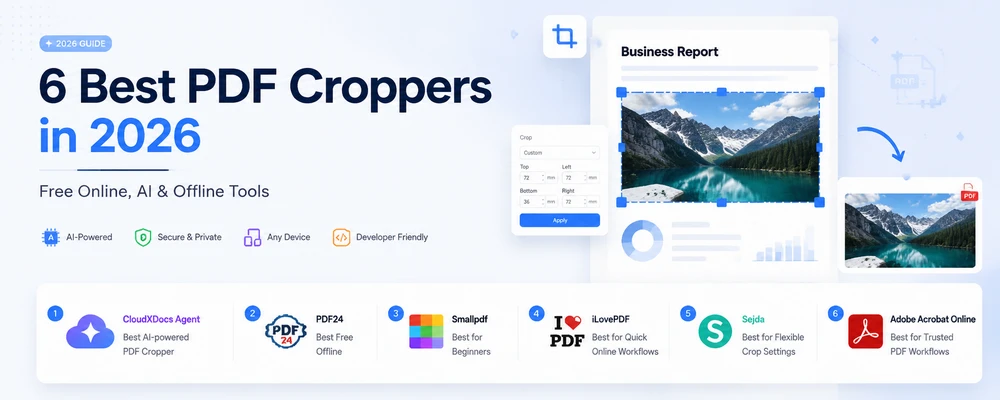
Margini bianchi su un contratto scansionato. Una fastidiosa intestazione che appare su 40 pagine. Uno screenshot salvato come PDF che vorresti semplicemente ritagliare per mostrare solo il contenuto. Ritagliare un PDF è una di quelle attività che sembrano semplici ma che finiscono per portarti via tutto il pomeriggio.
Abbiamo confrontato le opzioni gratuite che appaiono effettivamente quando cerchi "ritagliare pdf" — strumenti online, app desktop e un agente IA che ti permette di descrivere il ritaglio in linguaggio naturale. Di seguito trovi i 6 migliori strumenti per ritagliare PDF nel 2026, ognuno indicato come il migliore per uno scopo specifico, oltre ai metodi passo dopo passo per Windows, Mac e smartphone.
Risposta rapida: Per un ritaglio online veloce, strumenti come Smallpdf o iLovePDF ritagliano nel browser in pochi clic. Preferisci descrivere il ritaglio a parole invece di trascinare un riquadro? CloudXDocs Agent fa proprio questo: tu scrivi il ritaglio, lui esegue il lavoro. Vuoi zero installazioni e nessun account? Usa PDF24 (il miglior gratuito offline) o Anteprima su Mac. La suddivisione completa per categoria è riportata di seguito.
Come abbiamo effettuato i test
Per rendere questo articolo un confronto reale piuttosto che un semplice elenco, abbiamo valutato ogni strumento su:
- Precisione del ritaglio — può raggiungere un margine o una misura esatta?
- Elaborazione batch — gestisce molte pagine contemporaneamente?
- Limiti della versione gratuita — cosa puoi fare realmente senza pagare?
- Requisiti di registrazione — funziona senza account?
- Privacy — i file vengono elaborati nel tuo browser/dispositivo o caricati su server?
- Piattaforme supportate — web, desktop, mobile.
Confronto: 6 strumenti per ritagliare PDF a colpo d'occhio
| # | Strumento | Ideale per | Come funziona | Gratuito? | Account richiesto? | Controllo di precisione |
|---|---|---|---|---|---|---|
| 1 | CloudXDocs Agent | Ritaglio assistito da IA | Comandi in linguaggio naturale | Gratis (crediti) | Sì (account gratuito) | Istruzioni basate su misure |
| 2 | PDF24 | Miglior gratuito offline | Riquadro di ritaglio + margini | Desktop gratis, senza account | No | Margini numerici |
| 3 | Smallpdf | Ideale per principianti | Editor di ritaglio visivo | Gratis (limite giornaliero) | Per funzioni extra | Regolazione riquadro di ritaglio |
| 4 | iLovePDF | Ideale per flussi online rapidi | Strumento di ritaglio visivo | Gratis | No | Regolazione area di ritaglio |
| 5 | Sejda | Ideale per impostazioni flessibili | Riquadro di ritaglio + preset | Gratis (limite orario) | No | Modalità pagine multiple |
| 6 | Adobe Acrobat Online | Ideale per flussi di lavoro affidabili | Strumento di ritaglio online | Gratis base | Account Adobe | Controlli di ritaglio standard |
Nota: La maggior parte degli strumenti qui elencati ritaglia tramite un riquadro trascinabile e/o l'inserimento numerico di margini/misure. Quando un ritaglio è più facile da descrivere a parole — o deve essere applicato su molte pagine tramite descrizione — CloudXDocs Agent ti consente di farlo digitando l'istruzione invece di lavorare all'interno di un editor.
1. CloudXDocs Agent — Il miglior strumento di ritaglio PDF basato sull'IA
CloudXDocs Agent adotta un approccio diverso dai tradizionali strumenti di ritaglio PDF: invece di regolare manualmente un riquadro in un editor, descrivi il risultato che desideri in linguaggio naturale e lui applica un ritaglio preciso e basato su misure in modo coerente in tutto il documento. Gestisce un'ampia gamma di tipi di PDF, inclusi file basati su testo, scansionati e ricchi di immagini.
Dove il ritaglio tramite IA fa la differenza:
- Ripetere lo stesso ritaglio su molte pagine (es. "ritaglia le pagine 2–50 sull'area del contenuto + 5 mm di margine").
- Raggiungere una misura esatta che sarebbe difficile ottenere a occhio ("rimuovi 2,54 cm / 1 pollice dal margine sinistro").
- Ritagliare come un unico passaggio all'interno di un'attività documentale più ampia.
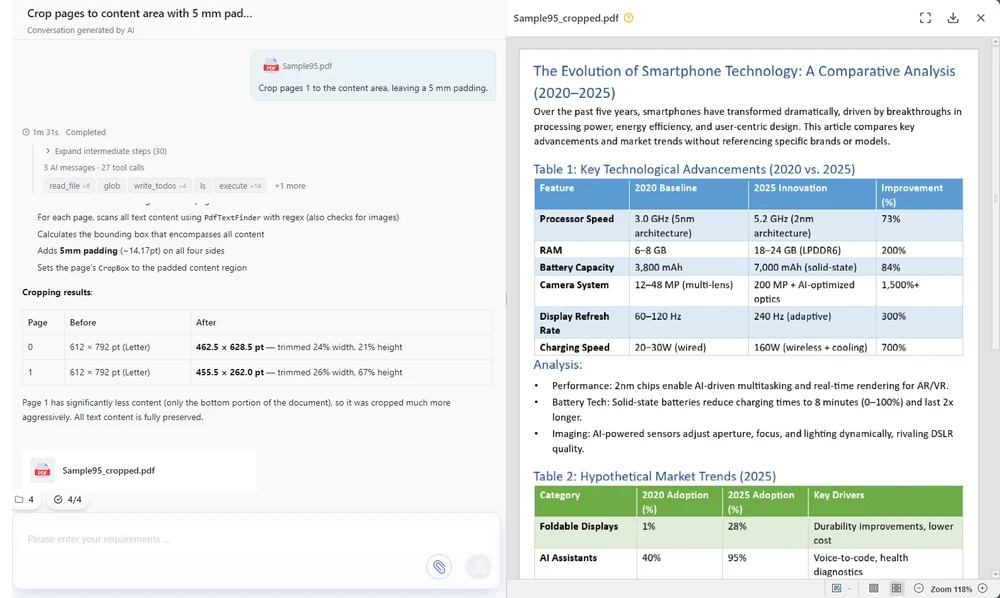
Come ritagliare un PDF con CloudXDocs Agent:
- Apri CloudXDocs Agent e accedi con un account gratuito.
- Carica il tuo PDF (o incolla un link).
- Digita un comando, ad esempio:
- "Ritaglia 1,5 cm dal margine inferiore di ogni pagina."
- "Rimuovi l'intestazione superiore di 1 pollice (72 pt) da tutte le pagine."
- "Ritaglia le pagine 2–10 sull'area del contenuto, lasciando un margine di 5 mm."
- Controlla l'anteprima e scarica il file ritagliato.
Ecco l'interfaccia di CloudXDocs Agent con un comando di ritaglio digitato e l'anteprima pronta per il download.
Utilizzo gratuito: Un account gratuito include crediti che puoi spendere per le attività di ritaglio quotidiane. (Vedi le FAQ per i dettagli sulla disponibilità.)
Pro: Ritaglio in linguaggio naturale — nessun riquadro da trascinare; ritagli batch coerenti su molte pagine; funziona su qualsiasi dispositivo tramite browser.
Contro: Basato su cloud (i file vengono elaborati lato server — per una privacy totalmente offline usa PDF24 desktop o Anteprima su Mac); richiede un login gratuito.
2. PDF24 — Il miglior strumento gratuito offline
PDF24 è uno strumento di ritaglio PDF veramente gratuito che non richiede alcun account — l'app desktop è completamente gratuita per l'uso tipico. Funziona sia online che come app desktop; la versione desktop mantiene i file sul tuo computer, il che è la scelta migliore se la privacy è importante. Puoi ritagliare trascinando un rettangolo o inserendo i margini numericamente.
Come ritagliare (app desktop):
- Apri PDF24 Creator / PDF24 Tools desktop.
- Carica il tuo PDF e scegli Ritaglia.
- Trascina il rettangolo di ritaglio o inserisci i margini.
- Salva.
La schermata di ritaglio desktop di PDF24, con i campi dei margini e le maniglie di trascinamento visibili.

Pro: Nessuna registrazione, nessuna filigrana, opzione realmente offline; supporta sia il trascinamento del riquadro che i margini digitati.
Contro: L'interfaccia è più semplice rispetto agli strumenti online più curati.
3. Smallpdf — Il migliore per i principianti
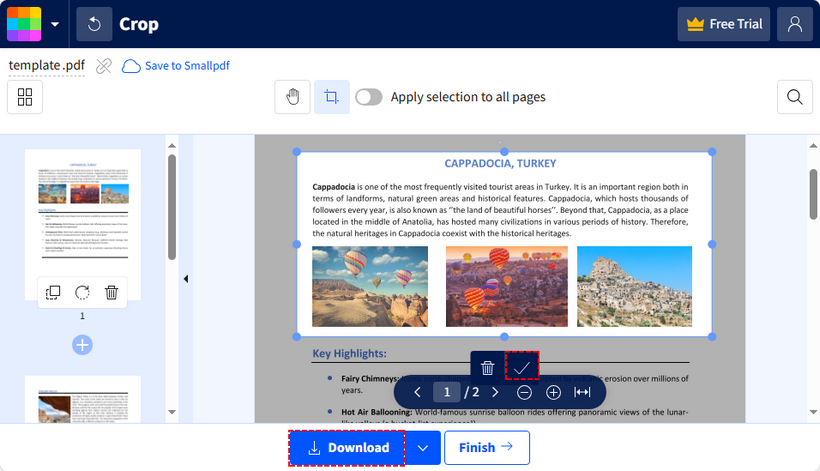
Smallpdf sembra più un editor PDF leggero che un semplice strumento di ritaglio. La sua interfaccia pulita e accattivante rende il ritaglio di base veloce e accessibile per gli utenti comuni. Il piano gratuito ha un limite giornaliero di attività.
Come ritagliare: Carica → Ritaglia → regola il riquadro → applica → scarica.
L'editor di ritaglio di Smallpdf con il riquadro di regolazione posizionato attorno alla pagina.
Pro: Interfaccia curata, flusso di lavoro semplice, sensazione di editing familiare.
Contro: Il piano gratuito limita le attività giornaliere; alcune azioni richiedono un account.
4. iLovePDF — Il migliore per flussi di lavoro online rapidi
iLovePDF è uno spazio di lavoro online completo per PDF; il ritaglio è solo uno dei tanti strumenti disponibili e gestisce diversi file in un unico passaggio. Ottimo per lavori online rapidi e ripetibili senza installare nulla.
Come ritagliare: Carica → Ritaglia PDF → trascina il riquadro per pagina (o applica a tutte) → scarica.
Pro: Ampia gamma di strumenti, flusso di lavoro batch fluido.
Contro: Il piano gratuito ha limiti di utilizzo; i file vengono caricati per l'elaborazione invece di essere elaborati interamente sul tuo dispositivo.
5. Sejda — Il migliore per impostazioni di ritaglio flessibili
Sejda offre una configurazione di ritaglio maggiore rispetto a molti strumenti online di base: selezione delle pagine, anteprima di sovrapposizione, impostazioni diverse per pagine pari/dispari, oltre all'inserimento di margini o trascinamento del riquadro. Una scelta solida quando hai bisogno di controllo senza pagare. Il piano gratuito è limitato su base oraria e per dimensione, ma non aggiunge filigrane.
Come ritagliare: Carica → Ritaglia → imposta i margini o trascina, scegli le modalità pagina → scarica.
Pro: Ricche opzioni di ritaglio, nessuna filigrana sui ritagli gratuiti.
Contro: L'uso gratuito è limitato su base oraria (circa 3 attività/ora) e limitato a ~200 pagine / 50 MB.
6. Adobe Acrobat Online — Il migliore per flussi di lavoro PDF affidabili
Adobe Acrobat Online fornisce un ritaglio di base gratuito tra i suoi strumenti web, supportato dal nome Adobe. È la scelta migliore quando la fiducia e la familiarità con il marchio contano più delle opzioni avanzate. Avrai bisogno di un account Adobe.
Come ritagliare: Accedi → Ritaglia PDF → trascina → scarica.
Lo strumento di ritaglio di Adobe Acrobat Online con la pagina selezionata per il ritaglio.
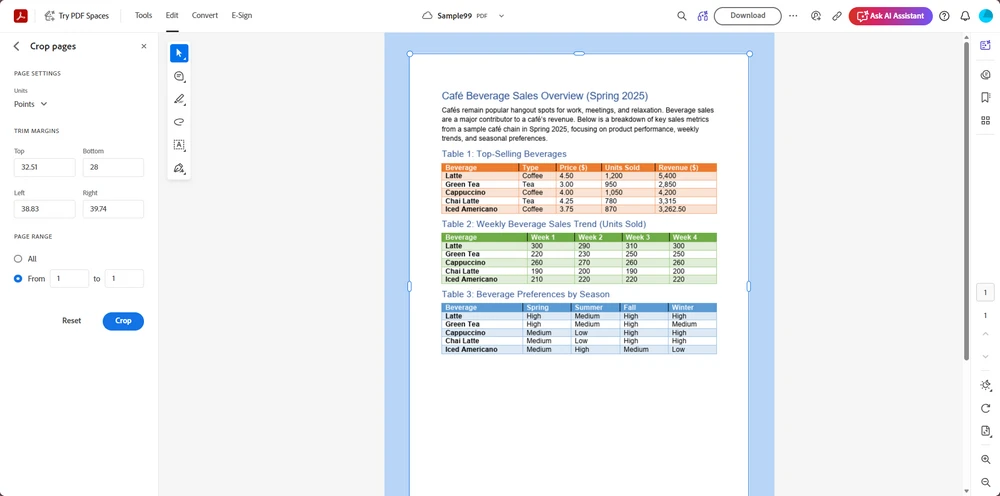
Pro: Marchio affidabile, percezione di sicurezza, basi gratuite decenti.
Contro: Gli utilizzi gratuiti sono limitati; le funzionalità complete richiedono un piano a pagamento.
Come ritagliare un PDF su qualsiasi dispositivo
Su Windows
- Online (qualsiasi browser): Usa uno strumento di ritaglio web come Smallpdf, iLovePDF, Sejda, Adobe Acrobat Online o CloudXDocs Agent — carica (o descrivi il ritaglio in linguaggio naturale), ritaglia, scarica.
- Offline / privato: Installa PDF24 desktop e ritaglia localmente senza account.
Su Mac
- Integrato (gratuito, offline): Apri il PDF in Anteprima → Strumenti → Ritaglia (o trascina una selezione e premi
Command + K). Perfetto per la privacy. - Online: Smallpdf, iLovePDF, Sejda, Adobe Acrobat Online e CloudXDocs Agent ritagliano tutti nel browser.
Su iPhone / Android
- Il più semplice: Carica il PDF su CloudXDocs Agent nel tuo browser mobile e descrivi il ritaglio — nessuna installazione di app, e la gestione tramite IA batte la scomodità dell'editing su schermo.
- Alternativa: Usa l'app File + un editor PDF mobile, o uno strumento online come iLovePDF dal browser.
FAQ
Posso ritagliare un PDF gratuitamente senza installare software?
Sì. Gli strumenti online (CloudXDocs Agent, iLovePDF, Smallpdf, Sejda, Adobe Acrobat Online) ritagliano nel browser. Per non installare nulla e non creare account, usa l'app desktop di PDF24 o Anteprima su Mac.
Quale strumento gratuito consente un ritaglio PDF preciso?
CloudXDocs Agent ti permette di descrivere il ritaglio in linguaggio naturale — "ritaglia 1,5 cm dal basso" — e applica il risultato senza trascinare manualmente un riquadro, il che è particolarmente utile su molte pagine. La maggior parte degli altri strumenti accetta anche l'inserimento numerico dei margini, ma lavori all'interno del loro editor invece di digitare semplicemente una richiesta.
Posso ritagliare tutte le pagine contemporaneamente?
Sì — CloudXDocs Agent e iLovePDF supportano entrambi ritagli batch/su tutte le pagine. Anche PDF24 e Sejda ti consentono di applicare un riquadro di ritaglio a tutte le pagine.
Quanto costa CloudXDocs Agent?
È gratuito per iniziare: un nuovo account include 600 crediti e ricevi 50 crediti extra ogni giorno che effettui l'accesso. Un'attività documentale complessa utilizza solitamente 20–40 crediti, quindi la disponibilità gratuita è sufficiente per provare molteplici attività PDF.
Ritagliare un PDF elimina il contenuto ritagliato?
No. Il ritaglio standard nasconde solo l'area con un clip del visualizzatore; i dati originali potrebbero rimanere nel file. Per rimuovere veramente il contenuto per motivi di privacy/redazione, usa uno strumento di redazione, non di ritaglio.
Il ritaglio riduce le dimensioni del file PDF?
Di solito solo leggermente. Il ritaglio rifila l'area visibile ma spesso mantiene gli oggetti sottostanti. Per una reale riduzione delle dimensioni, comprimi/ottimizza anche il PDF dopo il ritaglio.
Correlato: ritagliare PDF tramite codice (sviluppatori)
Se stai costruendo un flusso di lavoro documentale, l'elaborazione PDF lato server è solitamente più affidabile degli strumenti online per lavori ripetitivi o ad alto volume. Casi comuni in cui una libreria supera uno strumento web:
- Elaborazione PDF batch — ritaglia migliaia di file secondo una pianificazione.
- Report automatizzati — rifila estratti conto generati su un'area di contenuto pulita.
- Pipeline documentali — ritaglia come passaggio in un flusso più ampio di conversione/unione/redazione.
- Applicazioni aziendali — incorpora il ritaglio nel tuo prodotto o servizio.
Il ritaglio programmatico offre agli sviluppatori il controllo diretto sulle coordinate della pagina PDF (il CropBox), mentre gli agenti IA forniscono un'interfaccia in linguaggio naturale più semplice per le operazioni comuni. Spire.PDF ti consente di impostare i riquadri di ritaglio per pagina in C#, Java, Python e altro ancora. Vedi la guida al ritaglio di Spire.PDF per esempi di codice.
Vedi anche
Os 6 melhores cortadores de PDF em 2026: ferramentas gratuitas online, com IA e offline
Índice
- Como testamos
- Comparação: 6 ferramentas de corte de PDF em resumo
- 1. CloudXDocs Agent — O melhor cortador de PDF com IA
- 2. PDF24 — O melhor gratuito offline
- 3. Smallpdf — O melhor para iniciantes
- 4. iLovePDF — O melhor para fluxos de trabalho online rápidos
- 5. Sejda — O melhor para configurações de corte flexíveis
- 6. Adobe Acrobat Online — O melhor para fluxos de trabalho PDF confiáveis
- Como cortar um PDF em qualquer dispositivo
- Perguntas frequentes (FAQ)
- Relacionado: cortar PDFs via código (desenvolvedores)
- Veja também
Margens brancas em um contrato digitalizado. Uma faixa de cabeçalho persistente em 40 páginas. Uma captura de tela salva como PDF que você só quer ajustar ao conteúdo. Cortar um PDF é uma daquelas tarefas que parecem simples, mas que acabam consumindo toda a sua tarde.
Comparamos as opções gratuitas que realmente aparecem quando você pesquisa "cortar pdf" — ferramentas online, aplicativos de desktop e um agente de IA que permite descrever o corte em linguagem simples. Abaixo estão os 6 melhores cortadores de PDF em 2026, cada um nomeado como o melhor para uma tarefa específica, além de métodos passo a passo para Windows, Mac e celular.
Resposta rápida: Para um corte online rápido, ferramentas como Smallpdf ou iLovePDF cortam no navegador com poucos cliques. Prefere descrever o corte em linguagem simples em vez de arrastar uma caixa? O CloudXDocs Agent resolve isso — você digita o corte, ele faz o trabalho. Quer zero instalação e zero conta? Use o PDF24 (Melhor gratuito offline) ou a Pré-visualização no Mac. A análise completa das categorias está abaixo.
Como testamos
Para manter esta comparação real e não apenas uma lista, avaliamos cada ferramenta com base em:
- Precisão do corte — consegue atingir uma margem ou medida exata?
- Processamento em lote — lida com várias páginas de uma vez?
- Limites gratuitos — o que você realmente pode fazer sem pagar?
- Requisito de cadastro — funciona sem conta?
- Privacidade — os arquivos são processados no seu navegador/dispositivo ou enviados para um servidor?
- Plataformas suportadas — web, desktop, celular.
Comparação: 6 ferramentas de corte de PDF em resumo
| # | Ferramenta | Melhor para | Como funciona | Gratuito? | Precisa de conta? | Controle de precisão |
|---|---|---|---|---|---|---|
| 1 | CloudXDocs Agent | Corte assistido por IA | Comandos em linguagem natural | Gratuito (créditos) | Sim (conta gratuita) | Instruções baseadas em medidas |
| 2 | PDF24 | Melhor gratuito offline | Caixa de corte + configurações de margem | Desktop gratuito, sem conta | Não | Margens numéricas |
| 3 | Smallpdf | Melhor para iniciantes | Editor de corte visual | Gratuito (limite diário) | Para recursos extras | Ajuste da caixa de corte |
| 4 | iLovePDF | Melhor para fluxos de trabalho online rápidos | Ferramenta de corte visual | Gratuito | Não | Ajuste da área de corte |
| 5 | Sejda | Melhor para configurações de corte flexíveis | Caixa de corte + predefinições | Gratuito (limite por hora) | Não | Múltiplos modos de página |
| 6 | Adobe Acrobat Online | Melhor para fluxos de trabalho PDF confiáveis | Ferramenta de corte online | Gratuito básico | Conta Adobe | Controles de corte padrão |
Nota: A maioria das ferramentas aqui corta através de uma caixa de corte arrastável e/ou entrada numérica de margem/medida. Quando um corte é mais fácil de descrever em palavras — ou precisa ser aplicado em várias páginas por descrição — o CloudXDocs Agent permite que você faça isso digitando a instrução em vez de trabalhar dentro de um editor.
1. CloudXDocs Agent — O melhor cortador de PDF com IA
CloudXDocs Agent adota uma abordagem diferente dos cortadores de PDF tradicionais: em vez de ajustar manualmente uma caixa de corte em um editor, você descreve o resultado desejado em linguagem natural, e ele aplica um corte preciso, baseado em medidas, de forma consistente em todo o seu documento. Ele lida com uma ampla gama de tipos de PDF, incluindo arquivos baseados em texto, digitalizados e com muitas imagens.
Onde o corte por IA se destaca:
- Repetir um corte em várias páginas (por exemplo, "cortar páginas 2 a 50 para a área de conteúdo + 5 mm de preenchimento").
- Atingir uma medida exata que seria difícil de estimar visualmente ("remover 2,54 cm / 1 polegada da margem esquerda").
- Cortar como uma etapa em uma tarefa documental maior.
Como cortar um PDF com o CloudXDocs Agent:
- Abra o CloudXDocs Agent e entre com uma conta gratuita.
- Envie seu PDF (ou cole um link).
- Digite um comando, por exemplo:
- "Corte 1,5 cm da margem inferior de cada página."
- "Remova a faixa de cabeçalho superior de 1 polegada (72 pt) de todas as páginas."
- "Corte as páginas 2 a 10 para a área de conteúdo, deixando um preenchimento de 5 mm."
- Revise a pré-visualização e baixe o arquivo cortado.
Aqui está a interface do CloudXDocs Agent com um comando de corte digitado e a pré-visualização pronta para download.
Gratuito para usar: Uma conta gratuita inclui créditos que você pode gastar em tarefas diárias de corte. (Veja o FAQ para a franquia exata.)
Prós: Corte em linguagem natural — sem caixa de corte para arrastar; cortes em lote consistentes em várias páginas; funciona em qualquer dispositivo via navegador.
Contras: Baseado na nuvem (os arquivos são processados no servidor — para privacidade totalmente offline, use o PDF24 desktop ou a Pré-visualização do Mac); requer login gratuito.
2. PDF24 — O melhor gratuito offline
PDF24 é um cortador de PDF genuinamente gratuito, sem necessidade de conta — o aplicativo de desktop é totalmente gratuito para uso típico. Ele funciona tanto online quanto como um aplicativo de desktop; a versão desktop mantém os arquivos na sua máquina, o que é a melhor escolha se a privacidade for importante. Você pode cortar arrastando um retângulo ou inserindo margens numericamente.
Como cortar (aplicativo de desktop):
- Abra o PDF24 Creator / PDF24 Tools desktop.
- Carregue seu PDF e escolha Cortar.
- Arraste o retângulo de corte ou insira as margens.
- Salve.
A tela de corte do desktop PDF24, com os campos de margem e alças de arrasto visíveis.
Prós: Sem cadastro, sem marca d'água, opção offline real; suporta tanto caixa de arrasto quanto margens digitadas.
Contras: A interface é mais simples do que as ferramentas online polidas.
3. Smallpdf — O melhor para iniciantes
Smallpdf parece mais um editor de PDF leve do que uma ferramenta de corte de propósito único. Sua interface limpa e atraente torna o corte básico rápido e acessível para usuários comuns. O plano gratuito tem um limite diário de tarefas.
Como cortar: Enviar → Cortar → ajustar a caixa → aplicar → baixar.
O editor de corte do Smallpdf com a caixa de ajuste colocada ao redor da página.
Prós: Interface polida, fluxo de trabalho simples, sensação de edição familiar.
Contras: O plano gratuito limita as tarefas diárias; algumas ações exigem uma conta.
4. iLovePDF — O melhor para fluxos de trabalho online rápidos
iLovePDF é um espaço de trabalho online para PDF maduro e completo; o corte é uma das muitas ferramentas, e ele lida com vários arquivos de uma só vez. Bom para trabalhos online rápidos e repetíveis sem instalar nada.
Como cortar: Enviar → Cortar PDF → arrastar a caixa por página (ou aplicar a todas) → baixar.
Prós: Conjunto de ferramentas amplo, fluxo de trabalho em lote suave.
Contras: O nível gratuito tem limites de uso; os arquivos são enviados para processamento em vez de serem processados inteiramente no seu dispositivo.
5. Sejda — O melhor para configurações de corte flexíveis
Sejda oferece mais configuração de corte do que muitos cortadores online básicos: seleção de página, uma pré-visualização de sobreposição e configurações diferentes para páginas ímpares/pares, além de entrada de margem ou caixa de arrasto. Uma ótima escolha quando você precisa de controle sem pagar. O nível gratuito é limitado por hora e por tamanho, mas não adiciona marca d'água.
Como cortar: Enviar → Cortar → definir margens ou arrastar, escolher modos de página → baixar.
Prós: Opções de corte ricas, sem marca d'água em cortes gratuitos.
Contras: O uso gratuito é limitado por hora (aprox. 3 tarefas/hora) e limitado a ~200 páginas / 50 MB.
6. Adobe Acrobat Online — O melhor para fluxos de trabalho PDF confiáveis
Adobe Acrobat Online oferece um corte básico gratuito entre suas ferramentas web, apoiado pelo nome Adobe. Melhor quando a confiança e a familiaridade com a marca são mais importantes do que opções avançadas. Você precisará de uma conta Adobe.
Como cortar: Entrar → Cortar PDF → arrastar → baixar.
A ferramenta de corte do Adobe Acrobat Online com a página selecionada para corte.
Prós: Marca confiável, percepção de segurança, bons recursos básicos gratuitos.
Contras: Os usos gratuitos são limitados; recursos completos exigem um plano pago.
Como cortar um PDF em qualquer dispositivo
No Windows
- Online (qualquer navegador): Use um cortador web como Smallpdf, iLovePDF, Sejda, Adobe Acrobat Online ou CloudXDocs Agent — envie (ou descreva o corte em linguagem simples), corte, baixe.
- Offline / privado: Instale o PDF24 desktop e corte localmente sem conta.
No Mac
- Integrado (gratuito, offline): Abra o PDF na Pré-visualização → Ferramentas → Cortar (ou arraste uma seleção e pressione
Command + K). Perfeito para privacidade. - Online: Smallpdf, iLovePDF, Sejda, Adobe Acrobat Online e CloudXDocs Agent cortam no navegador.
No iPhone / Android
- Mais fácil: Envie o PDF para o CloudXDocs Agent no seu navegador móvel e descreva o corte — sem instalação de aplicativo, e o manuseio por IA supera a edição complicada na tela.
- Alternativa: Use o aplicativo Arquivos + um editor de PDF móvel, ou uma ferramenta online como o iLovePDF pelo navegador.
Perguntas frequentes (FAQ)
Posso cortar um PDF gratuitamente sem instalar software?
Sim. Ferramentas online (CloudXDocs Agent, iLovePDF, Smallpdf, Sejda, Adobe Acrobat Online) cortam no navegador. Para não instalar e não precisar de conta, use o aplicativo desktop do PDF24 ou a Pré-visualização do Mac.
Qual ferramenta gratuita permite um corte de PDF preciso?
O CloudXDocs Agent permite que você descreva o corte em linguagem simples — "corte 1,5 cm da parte inferior" — e aplica o resultado sem arrastar manualmente uma caixa de corte, o que é especialmente útil em várias páginas. A maioria das outras ferramentas também aceita entrada numérica de margem, mas você trabalha dentro do editor delas em vez de apenas digitar uma solicitação.
Posso cortar todas as páginas de uma vez?
Sim — o CloudXDocs Agent e o iLovePDF suportam cortes em lote/todas as páginas. O PDF24 e o Sejda também permitem aplicar um retângulo de corte a todas as páginas.
Quanto custa o CloudXDocs Agent?
É gratuito para começar: uma nova conta inclui 600 créditos, e você recebe mais 50 créditos a cada dia que fizer login. Uma tarefa documental complexa normalmente usa 20–40 créditos, então a franquia gratuita é suficiente para experimentar várias tarefas em PDF.
Cortar um PDF exclui o conteúdo cortado?
Não. O corte padrão apenas oculta a área com um clipe de visualização; os dados originais podem permanecer no arquivo. Para remover conteúdo de fato por privacidade/redação, use uma ferramenta de redação, não de corte.
Cortar reduz o tamanho do arquivo PDF?
Geralmente apenas um pouco. O corte apara a área visível, mas muitas vezes mantém os objetos subjacentes. Para uma redução real de tamanho, também comprima/otimize o PDF após o corte.
Relacionado: cortar PDFs via código (desenvolvedores)
Se você está criando um fluxo de trabalho documental, o processamento de PDF no lado do servidor geralmente é mais confiável do que ferramentas online para trabalhos repetitivos ou de alto volume. Casos comuns onde uma biblioteca supera uma ferramenta web:
- Processamento de PDF em lote — cortar milhares de arquivos em uma programação.
- Relatórios automatizados — aparar extratos gerados para uma área de conteúdo limpa.
- Pipelines de documentos — cortar como uma etapa em um fluxo maior de conversão/mesclagem/redação.
- Aplicações corporativas — incorporar o corte em seu próprio produto ou serviço.
O corte programático dá aos desenvolvedores controle direto sobre as coordenadas da página PDF (o CropBox), enquanto os agentes de IA fornecem uma interface de linguagem natural mais simples para operações comuns. O Spire.PDF permite definir caixas de corte por página em C#, Java, Python e muito mais. Veja o guia de corte do Spire.PDF para exemplos de código.
Veja também
2026년 최고의 PDF 자르기 도구 6선: 무료 온라인, AI 및 오프라인 도구
목차
스캔한 계약서의 하얀 여백, 40페이지에 걸쳐 나타나는 지우기 힘든 머리글, 콘텐츠만 남기고 싶은 PDF로 저장된 스크린샷. PDF 자르기는 간단해 보이지만 막상 시작하면 시간을 많이 잡아먹는 작업 중 하나입니다.
"PDF 자르기"를 검색했을 때 실제로 나타나는 무료 옵션들(온라인 도구, 데스크톱 앱, 그리고 자연어로 자르기 명령을 내릴 수 있는 AI 에이전트)을 비교했습니다. 아래는 2026년 기준 최고의 PDF 자르기 도구 6가지이며, 각 도구의 특화된 용도와 Windows, Mac, 스마트폰에서의 단계별 방법을 정리했습니다.
빠른 답변: 빠른 온라인 자르기가 필요하다면 Smallpdf나 iLovePDF처럼 클릭 몇 번으로 브라우저에서 작업할 수 있는 도구를 추천합니다. 상자를 드래그하는 대신 자연어로 자르기 방식을 설명하고 싶다면 CloudXDocs Agent를 사용해 보세요. 입력한 내용대로 도구가 작업을 수행합니다. 설치나 계정 생성 없이 바로 사용하려면 PDF24(최고의 무료 오프라인 도구)나 Mac의 미리보기(Preview)를 이용하세요. 전체 범주별 분석은 아래와 같습니다.
테스트 방법
단순한 목록이 아닌 실제 비교를 위해 각 도구를 다음 항목으로 평가했습니다:
- 자르기 정확도 — 정확한 여백이나 치수를 맞출 수 있는가?
- 일괄 처리 — 한 번에 여러 페이지를 처리할 수 있는가?
- 무료 제한 — 결제 없이 실제로 어디까지 가능한가?
- 가입 필요 여부 — 계정 없이도 작동하는가?
- 개인정보 보호 — 파일이 브라우저/기기에서 처리되는가, 아니면 업로드되는가?
- 지원 플랫폼 — 웹, 데스크톱, 모바일.
비교: 6가지 PDF 자르기 도구 한눈에 보기
| # | 도구 | 최적 용도 | 작동 방식 | 무료 여부 | 계정 필요? | 정밀 제어 |
|---|---|---|---|---|---|---|
| 1 | CloudXDocs Agent | AI 지원 자르기 | 자연어 명령 | 무료 (크레딧) | 예 (무료 계정) | 치수 기반 지침 |
| 2 | PDF24 | 최고의 무료 오프라인 | 자르기 상자 + 여백 설정 | 무료 데스크톱, 계정 불필요 | 아니요 | 숫자 여백 |
| 3 | Smallpdf | 초보자에게 최적 | 시각적 자르기 편집기 | 무료 (일일 제한) | 추가 기능 시 필요 | 자르기 상자 조정 |
| 4 | iLovePDF | 빠른 온라인 작업에 최적 | 시각적 자르기 도구 | 무료 | 아니요 | 자르기 영역 조정 |
| 5 | Sejda | 유연한 자르기 설정에 최적 | 자르기 상자 + 사전 설정 | 무료 (시간당 제한) | 아니요 | 다중 페이지 모드 |
| 6 | Adobe Acrobat Online | 신뢰할 수 있는 PDF 작업에 최적 | 온라인 자르기 도구 | 무료 기본 기능 | Adobe 계정 | 표준 자르기 제어 |
참고: 대부분의 도구는 드래그 가능한 자르기 상자나 숫자 여백/치수 입력을 통해 자르기를 수행합니다. 말로 설명하는 것이 더 쉽거나, 설명만으로 여러 페이지에 일괄 적용해야 할 경우, CloudXDocs Agent를 사용하면 편집기 안에서 작업하는 대신 명령을 입력하여 처리할 수 있습니다.
1. CloudXDocs Agent — 최고의 AI 기반 PDF 자르기 도구
CloudXDocs Agent는 기존 PDF 자르기 도구와 다른 접근 방식을 취합니다. 편집기에서 자르기 상자를 수동으로 조정하는 대신, 원하는 결과를 자연어로 설명하면 문서 전체에 정밀한 치수 기반 자르기를 일관되게 적용합니다. 텍스트 기반, 스캔본, 이미지 위주의 파일 등 다양한 PDF 유형을 처리합니다.
AI 자르기가 유용한 경우:
- 여러 페이지에 동일한 자르기 적용 (예: "2~50페이지를 콘텐츠 영역 + 5mm 여백으로 자르기").
- 눈대중으로 맞추기 어려운 정확한 치수 적용 ("왼쪽 여백에서 2.54cm / 1인치 잘라내기").
- 더 큰 문서 작업의 한 단계로서 자르기 수행.
CloudXDocs Agent로 PDF 자르는 방법:
- CloudXDocs Agent를 열고 무료 계정으로 로그인합니다.
- PDF를 업로드하거나 링크를 붙여넣습니다.
- 명령을 입력합니다. 예:
- "모든 페이지 하단 여백에서 1.5cm 잘라내기."
- "모든 페이지에서 상단 1인치(72pt) 머리글 밴드 제거."
- "2~10페이지를 콘텐츠 영역으로 자르고 5mm 여백 남기기."
- 미리보기를 확인하고 잘린 파일을 다운로드합니다.
다음은 자르기 명령을 입력하고 다운로드할 준비가 된 CloudXDocs Agent 인터페이스입니다.
무료 사용: 무료 계정에는 일상적인 자르기 작업에 사용할 수 있는 크레딧이 포함되어 있습니다. (정확한 허용량은 FAQ 참조)
장점: 자연어 자르기(드래그할 상자 없음), 여러 페이지에 걸친 일관된 일괄 자르기, 브라우저를 통해 모든 기기에서 사용 가능.
단점: 클라우드 기반(파일이 서버 측에서 처리됨 — 완전한 오프라인 개인정보 보호를 원하면 PDF24 데스크톱이나 Mac 미리보기 사용), 무료 로그인 필요.
2. PDF24 — 최고의 무료 오프라인 도구
PDF24는 계정 생성 없이 사용할 수 있는 진정한 무료 PDF 자르기 도구입니다. 데스크톱 앱은 일반적인 용도로 완전히 무료입니다. 온라인 및 데스크톱 앱으로 모두 실행되며, 데스크톱 버전은 파일을 컴퓨터에 유지하므로 개인정보 보호가 중요하다면 더 나은 선택입니다. 사각형을 드래그하거나 여백을 숫자로 입력하여 자를 수 있습니다.
자르는 방법 (데스크톱 앱):
- PDF24 Creator / PDF24 Tools 데스크톱을 엽니다.
- PDF를 불러오고 자르기(Crop)를 선택합니다.
- 자르기 사각형을 드래그하거나 여백을 입력합니다.
- 저장합니다.
여백 필드와 드래그 핸들이 표시된 PDF24 데스크톱 자르기 화면입니다.
장점: 가입 불필요, 워터마크 없음, 실제 오프라인 옵션 제공, 드래그 상자와 입력식 여백 모두 지원.
단점: 세련된 온라인 도구에 비해 인터페이스가 단순함.
3. Smallpdf — 초보자에게 최적
Smallpdf는 단일 목적의 자르기 도구라기보다 가벼운 PDF 편집기처럼 느껴집니다. 깔끔하고 매력적인 인터페이스 덕분에 일반 사용자가 기본적인 자르기를 빠르고 쉽게 할 수 있습니다. 무료 플랜에는 일일 작업 제한이 있습니다.
자르는 방법: 업로드 → 자르기 → 상자 조정 → 적용 → 다운로드.
페이지 주위에 조정 상자가 배치된 Smallpdf 자르기 편집기입니다.
장점: 세련된 UI, 간단한 워크플로우, 익숙한 편집 느낌.
단점: 무료 플랜은 일일 작업 제한 있음, 일부 작업은 계정 필요.
4. iLovePDF — 빠른 온라인 작업에 최적
iLovePDF는 성숙한 올인원 온라인 PDF 워크스페이스입니다. 자르기는 여러 도구 중 하나이며, 한 번에 여러 파일을 처리할 수 있습니다. 별도의 설치 없이 빠르고 반복적인 온라인 작업에 적합합니다.
자르는 방법: 업로드 → PDF 자르기 → 페이지별로 상자 드래그(또는 모두 적용) → 다운로드.
장점: 광범위한 도구 세트, 원활한 일괄 작업.
단점: 무료 등급은 사용 제한 있음, 파일이 기기에서 완전히 처리되는 것이 아니라 처리를 위해 업로드됨.
5. Sejda — 유연한 자르기 설정에 최적
Sejda는 많은 기본 온라인 자르기 도구보다 더 많은 자르기 구성을 제공합니다. 페이지 선택, 겹침 미리보기, 홀수/짝수 페이지에 대한 다른 설정, 여백 또는 드래그 상자 입력 등이 가능합니다. 비용 지불 없이 제어 기능이 필요할 때 좋은 선택입니다. 무료 등급은 시간당 제한과 크기 제한이 있지만 워터마크는 추가되지 않습니다.
자르는 방법: 업로드 → 자르기 → 여백 설정 또는 드래그, 페이지 모드 선택 → 다운로드.
장점: 풍부한 자르기 옵션, 무료 자르기에 워터마크 없음.
단점: 무료 사용은 시간당 제한(시간당 약 3개 작업) 및 약 200페이지 / 50MB로 제한됨.
6. Adobe Acrobat Online — 신뢰할 수 있는 PDF 작업에 최적
Adobe Acrobat Online은 Adobe라는 이름에 걸맞게 웹 도구 중 무료 기본 자르기 기능을 제공합니다. 고급 옵션보다 신뢰성과 브랜드 친숙도가 더 중요할 때 가장 좋습니다. Adobe 계정이 필요합니다.
자르는 방법: 로그인 → PDF 자르기 → 드래그 → 다운로드.
자르기를 위해 페이지가 선택된 Adobe Acrobat Online 자르기 도구입니다.
장점: 신뢰할 수 있는 브랜드, 보안 인식, 적절한 무료 기본 기능.
단점: 무료 사용 제한적, 전체 기능을 사용하려면 유료 플랜 필요.
모든 기기에서 PDF 자르는 방법
Windows에서
- 온라인 (모든 브라우저): Smallpdf, iLovePDF, Sejda, Adobe Acrobat Online 또는 CloudXDocs Agent와 같은 웹 자르기 도구를 사용하세요. 업로드(또는 자연어로 자르기 설명), 자르기, 다운로드하면 됩니다.
- 오프라인 / 비공개: PDF24 데스크톱을 설치하고 계정 없이 로컬에서 자르세요.
Mac에서
- 내장 기능 (무료, 오프라인): 미리보기(Preview)에서 PDF를 열고 도구(Tools) → 자르기(Crop)를 선택하세요(또는 영역을 드래그하고
Command + K를 누르세요). 개인정보 보호에 완벽합니다. - 온라인: Smallpdf, iLovePDF, Sejda, Adobe Acrobat Online 및 CloudXDocs Agent 모두 브라우저에서 자를 수 있습니다.
iPhone / Android에서
- 가장 쉬운 방법: 모바일 브라우저에서 CloudXDocs Agent에 PDF를 업로드하고 자르기 방식을 설명하세요. 앱 설치가 필요 없으며, AI가 처리하므로 화면에서 번거롭게 편집할 필요가 없습니다.
- 대안: 파일(Files) 앱 + 모바일 PDF 편집기를 사용하거나, 브라우저에서 iLovePDF 같은 온라인 도구를 사용하세요.
자주 묻는 질문(FAQ)
소프트웨어 설치 없이 무료로 PDF를 자를 수 있나요?
네. 온라인 도구(CloudXDocs Agent, iLovePDF, Smallpdf, Sejda, Adobe Acrobat Online)는 브라우저에서 자르기를 수행합니다. 설치도 없고 계정도 필요 없는 방법을 원하시면 PDF24 데스크톱 앱이나 Mac 미리보기를 사용하세요.
정밀한 PDF 자르기가 가능한 무료 도구는 무엇인가요?
CloudXDocs Agent는 자연어로 자르기 방식을 설명하면(예: "하단에서 1.5cm 자르기") 자르기 상자를 수동으로 드래그하지 않고도 결과를 적용할 수 있어 여러 페이지에 걸쳐 작업할 때 특히 편리합니다. 대부분의 다른 도구도 숫자 여백 입력을 허용하지만, 요청을 입력하는 대신 편집기 내부에서 작업해야 합니다.
모든 페이지를 한 번에 자를 수 있나요?
네. CloudXDocs Agent와 iLovePDF 모두 일괄/전체 페이지 자르기를 지원합니다. PDF24와 Sejda도 하나의 자르기 사각형을 모든 페이지에 적용할 수 있습니다.
CloudXDocs Agent의 비용은 얼마인가요?
무료로 시작할 수 있습니다. 새 계정에는 600 크레딧이 포함되어 있으며, 로그인할 때마다 매일 50 크레딧을 추가로 받습니다. 복잡한 문서 작업은 보통 20~40 크레딧을 사용하므로, 무료 허용량으로 여러 PDF 작업을 시도하기에 충분합니다.
PDF를 자르면 잘린 콘텐츠가 삭제되나요?
아니요. 표준 자르기는 뷰어 클립으로 영역을 숨기기만 할 뿐이며, 원본 데이터는 파일에 남아 있을 수 있습니다. 개인정보 보호/편집을 위해 콘텐츠를 완전히 제거하려면 자르기가 아닌 편집(Redact) 도구를 사용하세요.
PDF를 자르면 파일 크기가 줄어드나요?
보통 약간만 줄어듭니다. 자르기는 보이는 영역을 다듬지만 기본 개체는 유지하는 경우가 많습니다. 실제 크기를 줄이려면 자르기 후 PDF를 압축/최적화하세요.
관련 항목: 코드로 PDF 자르기 (개발자용)
문서 워크플로우를 구축 중이라면 반복적이거나 대량의 작업에는 온라인 도구보다 서버 측 PDF 처리가 일반적으로 더 안정적입니다. 라이브러리가 웹 도구보다 나은 일반적인 사례:
- 일괄 PDF 처리 — 일정에 따라 수천 개의 파일 자르기.
- 자동화된 보고서 — 생성된 명세서를 깔끔한 콘텐츠 영역으로 다듬기.
- 문서 파이프라인 — 변환/병합/편집 흐름의 한 단계로 자르기 수행.
- 엔터프라이즈 애플리케이션 — 자체 제품이나 서비스에 자르기 기능 내장.
프로그래밍 방식의 자르기는 개발자가 PDF 페이지 좌표(CropBox)를 직접 제어할 수 있게 하며, AI 에이전트는 일반적인 작업에 대해 더 간단한 자연어 인터페이스를 제공합니다. Spire.PDF를 사용하면 C#, Java, Python 등에서 페이지별로 자르기 상자를 설정할 수 있습니다. 코드 샘플은 Spire.PDF 자르기 가이드를 참조하세요.