For decades, building document processing features followed a predictable pattern: more complex document logic demanded more code. Common workloads such as extracting data from PDFs, reformatting Word reports, or cleaning Excel exports typically required hundreds of lines of hand-coded logic, regular expressions, and endless exception handling.
That rule is now being fundamentally transformed. .NET AI agent SDKs are changing how enterprises handle documents—not by making C# scripting easier, but by making large parts of it unnecessary.
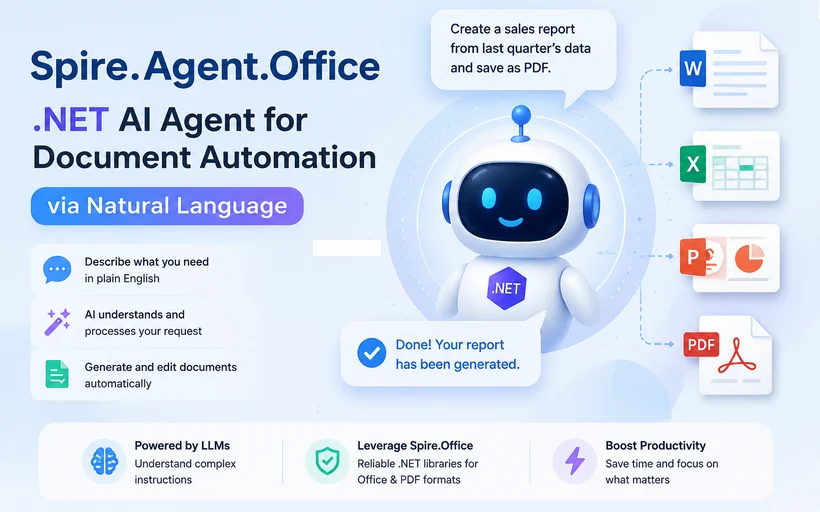
Meet Spire.Agent.Office SDK — a .NET AI agent built specifically for the Office ecosystem. With it, .NET developers can replace verbose traversal and parsing code with a single natural language instruction. Simply describe your target outcome in plain English, and the agent executes it for you.
What you’ll learn in this article:
- The Evolution: From Macros to AI Agents
- The Real Cost of Document‑Driven Code in .NET
- Spire.Agent.Office SDK Architecture and Core APIs
- A Practical Example: Extracting Invoice Data from PDF
- Beyond PDF: Four Specialized AI Agent Modules
- Why This Matters for .NET Developers
- Frequently Asked Questions (FAQs)
The Evolution: From Macros to AI Agents
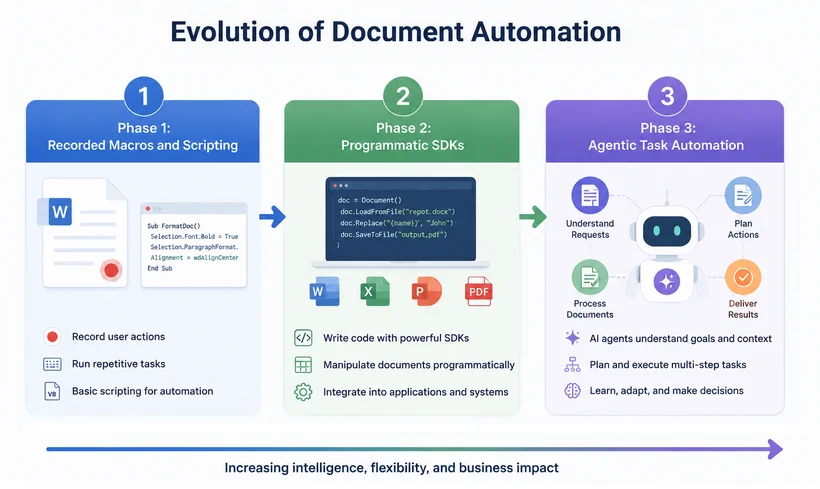
Document automation has evolved through distinct phases, each bringing developers closer to a true natural-language programming interface.
Phase 1: Recorded Macros and Scripting
Early automation relied on recorded keystrokes and VBA scripts. These solutions were rigid, broke easily when layouts changed, and required specialist knowledge to modify.
Phase 2: Programmatic SDKs
Libraries like Spire.Office for .NET gave developers granular control over DOCX, XLSX, PPTX, and PDF formats. While powerful, this approach was code-intensive. A simple task like "extract the total from an invoice" demanded multiple lines of code to handle page traversal, coordinate mapping, and data serialization.
Phase 3: Agentic Task Automation
We are now entering the era of document AI agents. These tools don't just help you find a specific API method; they understand the business intent behind your request. Instead of telling the computer how to find a table in a Word document, you tell it what you want.
The Real Cost of Document‑Driven Code in .NET
Traditional document automation in C# places a heavy burden on developers:
- Learning intricate APIs from specialized document libraries
- Manually invoking methods to load files, iterate pages, and parse content
- Bearing complete responsibility for custom error handling logic
The developer drives every step; the library is merely a toolbox of discrete functions.
And How an AI Agent SDK Changes It?
A purpose-built document AI agent SDK changes this dynamic. Instead of coding traversal logic, users define the desired business outcome. With Spire.Agent.Office, you write C# code like this:
// New approach: one natural language instruction
string instruction = "Review this contract for risky clauses and generate a summary.";
AIResult result = processor.ExecuteInstruction(doc, instruction, "summary.docx");
Behind the scenes, the agent autonomously parses layouts, extracts content, executes transformations, validates output, and adapts to unexpected structures—all without explicit coding.
✅ The core insight: Spire.Agent.Office has "action ability" within the document domain. It does not merely suggest code snippets—it directly manipulates files, reads content, applies formatting rules, and verifies results, all controlled through natural language commands.
This transforms the library from a coding toolkit into an autonomous operator that completes end-to-end document engineering tasks on your behalf—while still exposing a familiar C# API surface for .NET developers.
Spire.Agent.Office SDK Architecture and Core APIs
The architecture is a hybrid:
┌─────────────────────────────────────────────────────────────────┐
│  [1]  AI Understanding Layer (configurable LLM)               │
│       • Interprets natural language instructions              │
│       • Identifies business intent                            │
│       • Plans the necessary actions                           │
└─────────────────────────────┬───────────────────────────────────┘
                              │
                              ▼
┌─────────────────────────────────────────────────────────────────┐
│  [2]  Deterministic Document Engine (Spire.Office APIs)        │
│       • Executes planned actions with precision               │
│       • Guarantees accurate file manipulation                 │
│       • Ensures pixel-perfect layouts and correct formats     │
└─────────────────────────────────────────────────────────────────┘
Key SDK components for .NET developers:
-
AIOptions– Configuration class for setting your AI provider (OpenAI, Azure, local models, etc.) and API keys. -
AIDocumentProcessor– The main entry point, obtained by calling .AI(options) on a document object (e.g., PdfDocument, WordDocument, etc.). -
ExecuteInstruction()– The core method that accepts a natural language instruction and an optional output path, returning an AIResult containing status, messages, and generated file paths.
All processing runs locally within your infrastructure—no document content is sent to external servers, preserving data security and compliance—and you can swap the underlying LLM via the AIOptions.
A Practical Example: Extracting Invoice Data from PDF
The Challenge: Extracting structured data from PDF invoices is one of the most time-consuming tasks for developers.
Traditional Approach
The traditional programmatic approach requires writing code to:
- Load the PDF and iterate through every page
- Identify text regions and table boundaries
- Apply regular expressions or positional coordinates
- Handle variations across dozens of vendor layouts
- Export the final structured data to an Excel sheet
This workflow typically demands dozens of lines of C# code, filled with brittle positional logic and edge-case exception handling.
The Spire.Agent.Office Approach
With Spire.Agent.Office, an AI agent SDK built on the mature Spire.Office document engine, the same task is reduced to a single natural language instruction wrapped in minimal boilerplate:
using Spire.Agent.Office.AI;
using Spire.Agent.Office.Extensions;
using Spire.Pdf;

AIOptions options = new AIOptions();
options.SpireToken = "your-token";

using (PdfDocument pdf = new PdfDocument())
{
    pdf.LoadFromFile("Invoice Details.pdf");
    AIDocumentProcessor processor = pdf.AI(options);

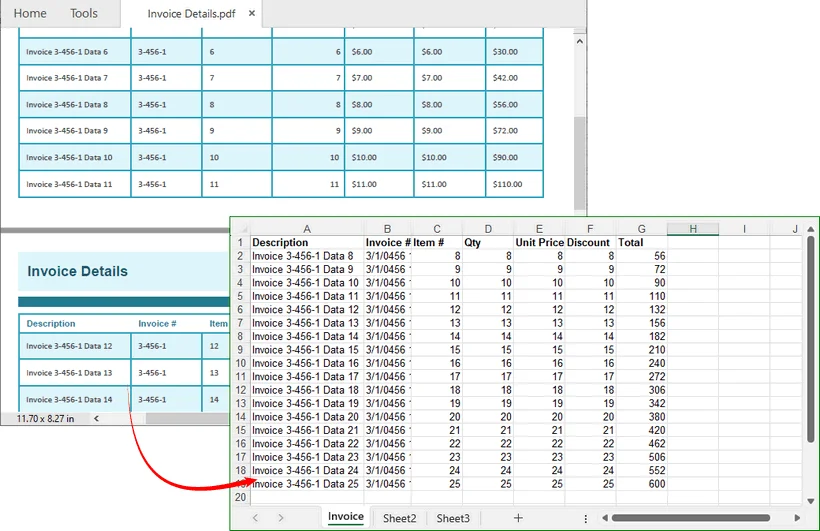
    string instruction = "From this invoice table, extract only the rows where the Total is greater than $50. " +
                         "Include all 7 columns (Item #, Description, Qty, Unit Price, Discount, Price) and export to an Excel workbook.";

    AIResult result = processor.ExecuteInstruction(
        pdf,
        instruction,
        "extracted_invoice_data.xlsx"
    );
}
About 10 lines of supporting code + 1 natural language instruction. You can filter and export target invoice rows into an Excel file.
Result Preview:
The Workflow Behind It

You no longer need to understand document object models, page coordinates, or API signatures. You simply describe what you want in the instruction string.
And when business rules evolve, you update the instruction—not the codebase. This dramatically reduces maintenance overhead and accelerates response times to business needs.
Beyond PDF: Four Specialized AI Agent Modules
The agent’s capabilities extend far beyond PDF processing. Spire.Agent.Office comprises four specialized modules, each tailored to a core office document format, all controllable via natural language instructions:
| Module | Document Type | Natural Language Capabilities |
|---|---|---|
| Spire.Agent.Doc | Word | Report generation, contract review, content refinement, format standardization |
| Spire.Agent.XLS | Excel | Automated reporting, data cleaning, data importing, multi-format export |
| Spire.Agent.Presentation | PowerPoint | Automated slide generation, content updates, media embedding, data visualization |
| Spire.Agent.PDF | Merge/split operations, watermarking, data extraction, conversion to Word/Excel |
All modules share the same pattern: configure AIOptions, then make a single ExecuteInstruction call.
Why This Matters for .NET Developers
This evolution does not spell the end for automation engineers or .NET developers. Rather, it redefines their daily work.
- Less time on low‑level file I/O, coordinate mapping, and exception‑handling boilerplate.
- More time on workflow design, validation rules, and integrating the agent into larger business processes.
- Easier maintenance: when rules change, you update the instruction, not the codebase. This reduces regression risk and speeds up response to business needs.
Developers shift from being hands-on scripters to workflow orchestrators. They define high-level objectives, supervise the agent’s output, and make strategic decisions about what to accept, refine, or reject.
Conclusion
In short, Spire.Agent.Office brings AI capabilities directly into your document workflows. Instead of writing hundreds of lines of complex code to process Word, Excel, PowerPoint, and PDF files, you simply tell the agent what you need in natural language.
It handles the heavy‑duty work including data extraction, batch report generation and slide formatting, while you retain full control of security and accuracy. The result is faster development, easier maintenance, and more time to focus on business outcomes, not coding details.
Frequently Asked Questions (FAQs)
Q: Is Spire.Agent.Office replacing traditional document automation?
A: No. It enhances it by eliminating manual coding for routine tasks while allowing developers to focus on complex, high-value workflows.
Q: What about security and compliance?
A: Spire.Agent.Office operates within your existing infrastructure, with all processing happening locally. No document content is sent externally.
Q: Can I customize the agent's behavior?
A: Yes. You can provide specific instructions, set validation rules, and define approval workflows for agent outputs.
Q: Can I bring my own custom LLM or switch the underlying AI model?
A: Yes. Spire.Agent.Office allows you to set up your preferred AI models. Whether it’s OpenAI, Azure OpenAI, a local Llama model, or any other compatible AI endpoints, you can plug it into the AI understanding layer.